|
|
|
|
|
|
| |
| |
|
|
|
|
| |
| |
|
|
> ..., and perhaps some adjusting for the contrast
> is needed...

How? Colors with assumed_gamma = 1 look washed-out.
If there is a way to increase contrast using that value let us
know.

I usualy use default values (I guess it's 2.2). If normal value
for assumed_gamma is 1 why it's not a default value?

Gena.
Post a reply to this message
|
|
| |
| |
|
|
|
|
| |
| |
|
|
"Gena Obukhov" <obu### [at] mail com> wrote in message
news:3E9A2071.A34BDF4A@mail.com...
> > ..., and perhaps some adjusting for the contrast
> > is needed...
>
> How? Colors with assumed_gamma = 1 look washed-out.
> If there is a way to increase contrast using that value let us
> know.
>
> I usualy use default values (I guess it's 2.2). If normal value
> for assumed_gamma is 1 why it's not a default value?
Just stepping in briefly-- has everyone adjusted their monitors according to
POV's specs?
What I know from recent reading is that PCs generally need a gamma of around
2.2 while Macs generally need one of 1.6, and somehow the assumed_gamma is
supposed to even things up. I *think* that means that assumed_gamma 1 will
be right for anybody who has adjusted their monitor as suggested in the POV
docs-- http://www.povray.org/documentation/view/128/ -- section 5.2.2.2.2.2
I spent an hour or so a week ago noodling through all the POV stuff I could
find on gamma, and doing the monitor adjustment as shown above. Although I'm
running a Dell Windoze box, my best gamma setting was at 1.4 -- *way*
different from what my reading led me to expect. But then my monitor is an
add-on flat screen.
Changing my monitor settings according to the above link has made my world
brighter and more colorful. I think before a group settles on an
assumed_gamma setting, it would be good if everyone calibrated their
monitors.
--
Will Woodhull
Thornhenge, SW Oregon, USA
willl.at.thornhenge.net com> wrote in message
news:3E9A2071.A34BDF4A@mail.com...
> > ..., and perhaps some adjusting for the contrast
> > is needed...
>
> How? Colors with assumed_gamma = 1 look washed-out.
> If there is a way to increase contrast using that value let us
> know.
>
> I usualy use default values (I guess it's 2.2). If normal value
> for assumed_gamma is 1 why it's not a default value?
Just stepping in briefly-- has everyone adjusted their monitors according to
POV's specs?
What I know from recent reading is that PCs generally need a gamma of around
2.2 while Macs generally need one of 1.6, and somehow the assumed_gamma is
supposed to even things up. I *think* that means that assumed_gamma 1 will
be right for anybody who has adjusted their monitor as suggested in the POV
docs-- http://www.povray.org/documentation/view/128/ -- section 5.2.2.2.2.2
I spent an hour or so a week ago noodling through all the POV stuff I could
find on gamma, and doing the monitor adjustment as shown above. Although I'm
running a Dell Windoze box, my best gamma setting was at 1.4 -- *way*
different from what my reading led me to expect. But then my monitor is an
add-on flat screen.
Changing my monitor settings according to the above link has made my world
brighter and more colorful. I think before a group settles on an
assumed_gamma setting, it would be good if everyone calibrated their
monitors.
--
Will Woodhull
Thornhenge, SW Oregon, USA
willl.at.thornhenge.net
Post a reply to this message
|
|
| |
| |
|
|
|
|
| |
| |
|
|
in news:3e9a4670@news.povray.org Will W wrote:

> POV docs-- http://www.povray.org/documentation/view/128/ -- section
> 5.2.2.2.2.2
>
> Although I'm running a Dell Windoze box, my best gamma setting was at
> 1.4 -- *way* different from what my reading led me to expect. But
> then my monitor is an add-on flat screen.

I think I should add a note to the above mentioned paragraph that explains
that flatscreens don't have the same gamma-curve as CRT's and that thus
the method won't work (although the result may look resonable).

If you want to use flatscreens for graphics work you need one that is
designed for it.

Ingo
Post a reply to this message
|
|
| |
| |
|
|
|
|
| |
| |
|
|
Will W wrote:

> supposed to even things up. I *think* that means that assumed_gamma 1 will
> be right for anybody who has adjusted their monitor as suggested in the POV
> docs-- http://www.povray.org/documentation/view/128/ -- section 5.2.2.2.2.2

You are talking about  Display_gamma which works together with
assumed_gamma. That gamma stuff was always a 'terra incognita'
for me :)

I think the main confusing definition in assuming_gamma is that
it 'resolves the problem with brightness of images on different
platforms'. But it's actually not true unless you use format containning
gamma info (e.g. PNG). If you use JPG it will be normal on PC but still
bright on Macintosh. So IMHO for viewing final image in non-gamma format
it doesn't help.
It helps when you render image on different platforms. In this case you
can set assumed_gamma=1 and set different Display_Gamma on different
platforms, for example 2.2 on PC and 1.8 on Macintosh. In this case POV-Ray
will create image based on your Display_Gamma settings. So actual value
which you have to play with is Display_Gamma not assumed_gamma which
should be usually equal 1.

Please correct me if I'm wrong :)

Gena.
Post a reply to this message
|
|
| |
| |
|
|
|
|
| |
| |
|
|
Great models! Especially for completely hand-made models.
We have a family already :)
There are some visible artefacts but I think you are
aware of it.
Keep on good job Jim :)

Gena.
Post a reply to this message
|
|
| |
| |
|
|
|
|
| |
| |
|
|
Gena Obukhov wrote:
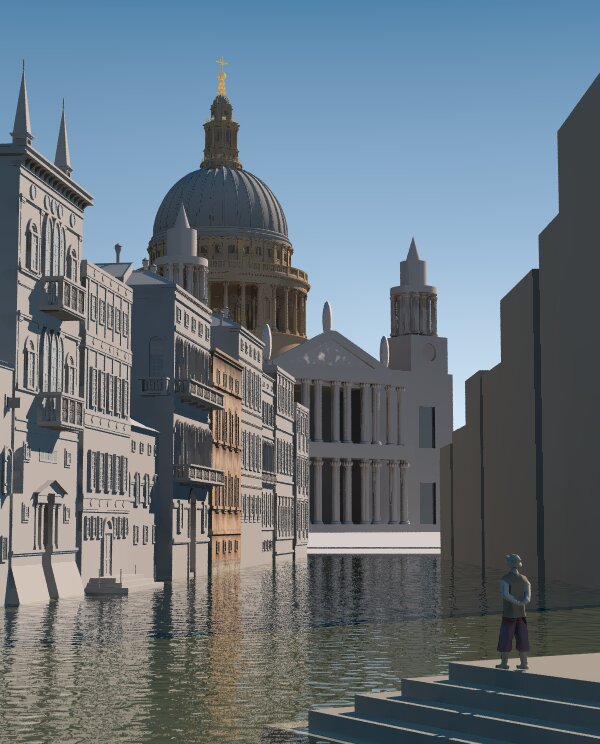
>
> I removed 'ambient' from all textures (except cathedral facade),
> reduced radiosity brightness to 0.6, reduced 'diffuse' to 0.6 and
> reduced sky brightness.
> You can see the result below. Let's decide which value for
> assumed_gamma we should use.
> IMHO we should use something from the middle 1.4-1.6 even
> though such value is not right from theoretical point of view :)

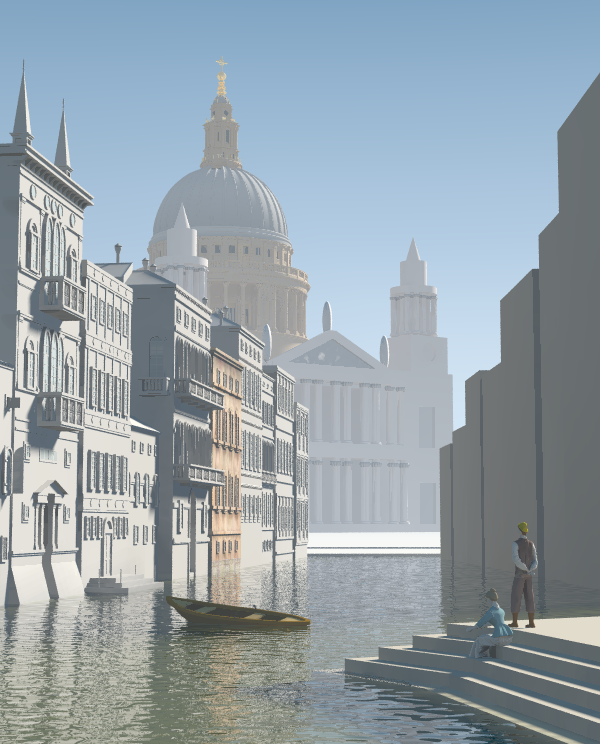
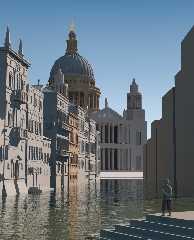
Attached is my adaptation of the scene for assumed_gamma 1 - i did not try
to modify the textures apart from removing the ambient since they are
provisonal anyway.  I changed the light position to be fairly conforming
with the painting (although this is tricky since the painting does not
really have consistent lighting...)

The modified scene is in p.b.s-f. (only the main scene, the other
modifications are only the removing of ambient in finishes)

Concerning assumed_gamma: not specifying it results in a linear output,
just as if assumed_gamma and display_gamma have the same value.  As Tim
explained most people are used to design their textures for assumed_gamma
1.

Christoph

--
POV-Ray tutorials, include files, Sim-POV,
HCR-Edit and more: http://www.tu-bs.de/~y0013390/
Last updated 28 Feb. 2003 _____./\/^>_*_<^\/\.______
Post a reply to this message
Attachments:
Download 'capriccio9a.jpg' (86 KB)
Preview of image 'capriccio9a.jpg'
|
|
| |
| |
|
|
|
|
| |
| |
|
|
Christoph Hormann wrote:

> As Tim explained most people are used to design their textures for

> assumed_gamma 1.

Do you have any hard data to support that assumption? I would think that
most people would use the default 2.2. I know, I have never used
anything else.

/Ib
Post a reply to this message
|
|
| |
| |
|
|
|
|
| |
| |
|
|
Gena Obukhov wrote:

> You can see the result below. Let's decide which value for
> assumed_gamma we should use.

I'm for the default 2.2.

/Ib
Post a reply to this message
|
|
| |
| |
|
|
|
|
| |
| |
|
|
On Mon, 14 Apr 2003 11:27:00 +0200, Ib Rasmussen <ib### [at] ibrasdk> wrote:
> > You can see the result below. Let's decide which value for
> > assumed_gamma we should use.
>
> I'm for the default 2.2.

Quoting manual from http://www.povray.org/documentation/view/216/
"Recommended value for assumed_gamma is 1.". Since it is likely representative
work of POV possibilites I would suggest follow this recommendation.

ABX
Post a reply to this message
|
|
| |
| |
|
|
|
|
| |
| |
|
|
Ib Rasmussen wrote:
>
> > As Tim explained most people are used to design their textures for
>
> > assumed_gamma 1.
>
> Do you have any hard data to support that assumption? I would think that
> most people would use the default 2.2. I know, I have never used
> anything else.

I have not investigated this matter into depth, could be interesting to
see what is commonly used in the IRTC scenes where source is given.  At
the risk of repeating myself, 'assumed_gamma' is not meant as a value to
adjust to personal preferences, in fact it is not really necessary because
for technically correct results you would either use a value of 1 (meaning
correct gamma correction being applied) or give no value (meaning the
render result is linear and needs to be gamma corrected afterwards).

As explained before the huge advantage of using correct gamma adjustment
is that you can achieve realistic results by using 'correct' settings.
You can surely also achieve realistic pictures with linear gamma but this
will require adjusting the values to fit well with each other until things
look good.  This will be immensely tricky when several people are working
on a scene - one will change the sky/light/radiosity settings to gain some
effects and all others will cry because their part no more looks good.

Christoph

--
POV-Ray tutorials, include files, Sim-POV,
HCR-Edit and more: http://www.tu-bs.de/~y0013390/
Last updated 28 Feb. 2003 _____./\/^>_*_<^\/\.______
Post a reply to this message
|
|
| |
| |
|
|
|
|
| |
| |
|
|
Ib Rasmussen wrote:
>
> Christoph Hormann wrote:
>
> > As Tim explained most people are used to design their textures for
>
> > assumed_gamma 1.
>
> Do you have any hard data to support that assumption? I would think that
> most people would use the default 2.2. I know, I have never used
> anything else.

I think the majority of people simply go with the default of 2.2. I know,
I do.

--
Ken Tyler
Post a reply to this message
|
|
| |
| |
|
|
|
|
| |
| |
|
|
Ib Rasmussen wrote:
>
>
> Christoph Hormann wrote:
>
>> As Tim explained most people are used to design their textures for
>
>
>> assumed_gamma 1.
>
>
> Do you have any hard data to support that assumption? I would think that
> most people would use the default 2.2. I know, I have never used
> anything else.

It would depend on how many people have read the part of the manual that
says "For new scenes, you should use an assumed gamma value of 1.0 as
this models how light appears in the real world more realistically.". I
have, so I use assumed_gamma 1.
Post a reply to this message
|
|
| |
| |
|
|
|
|
| |
| |
|
|
Gena Obukhov wrote:
> I removed 'ambient' from all textures (except cathedral facade),
> reduced radiosity brightness to 0.6, reduced 'diffuse' to 0.6 and
> reduced sky brightness.
> You can see the result below. Let's decide which value for
> assumed_gamma we should use.
> IMHO we should use something from the middle 1.4-1.6 even
> though such value is not right from theoretical point of view :)

What was the monitor_gamma used for creating these images? Unless
everyone viewing them has monitors of that gamma value they are useless
for comparison. Surely an assumed_gamma value should be chosen such that
when someone renders the scene on their computer with the monitor_gamma
set for their monitor, a ray calculated to have a color of <0.5, 0.5,
0.5> is displayed as a grey perceived to have 50% of the monitor's full
intensity. That value is 1.
Post a reply to this message
|
|
| |
| |
|
|
|
|
| |
| |
|
|
"Ib Rasmussen" <ib### [at] ibrasdk> a écrit dans le message de news:
3E9### [at] ibrasdk...
> I'm for the default 2.2.

For what it's worth, I had until last year used the default 2.2, but after
having to switch monitors (CRT and flat) and running into gamma trouble, I'm
now all for assumed_gamma 1 and I don't regret it. Of course, textures and
lighting must be changed accordingly if they had been designed with
assumed_gamma 2.2 in mind.

G.


--

**********************
http://www.oyonale.com
**********************
- Graphic experiments
- POV-Ray and Poser computer images
- Posters
Post a reply to this message
|
|
| |
| |
|
|
|
|
| |
| |
|
|
"ingo" <ing### [at] tagpovrayorg> wrote in message
news:Xns### [at] povrayorg...
> in news:3e9a4670@news.povray.org Will W wrote:

> I think I should add a note to the above mentioned paragraph that explains
> that flatscreens don't have the same gamma-curve as CRT's

Exactly so.

> and that thus
> the method won't work (although the result may look resonable).

No.

First you are contradicting yourself. If the results of the display_gamma
adjustment look more reasonable than they did before, then the system is in
better adjustment for your situation than it had been. Which is all that one
can hope to achieve no matter what type of display you've got.

It is true that the procedure given in the POV docs was designed to take
advantage of side effects of CRT technology-- on  a flat screen you don't
get the necessary blurring of raster lines that analog CRT phosphors
provide. That isn't a problem for me-- I just take off my glasses. Or you
can unfocus your vision to get the requisite blurring.

It is also true that the rate of change in brightness as one approaches the
extremes is different for flatscreens and CRTs, but that doesn't invalidate
the procedure. The procedure adjusts the central value of medium gray--
whether your whites are whiter and your blacks are blacker than someone
else's is a different thing entirely. And it doesn't even touch color
balance. (Paint Shop Pro has a color gamma calibration procedure that can
help with that).

> If you want to use flatscreens for graphics work you need one that is
> designed for it.

If I had everything I wanted, I'd be riding a powerful horse rather than
trudging along this muddy rut :-)

Thanks for your input.


--
Will Woodhull
Thornhenge, SW Oregon, USA
willl.at.thornhenge.net
Post a reply to this message
|
|
| |
| |
|
|
|
|
| |
| |
|
|
in news:3e9ac173@news.povray.org Will W wrote:

>> and that thus
>> the method won't work (although the result may look resonable).
>
> No.

You're right, what I wrote is rather inaccurate, yet from your awnser I
understand that you understood exactly what I meant. Guess I'll have to
grow them pointy ears first, before I write that bit for the docs :)


Ingo
Post a reply to this message
|
|
| |
| |
|
|
|
|
| |
| |
|
|
Thanks very much, Gena! By jumping back and forth between what you've
written and the POV-Ray docs, I've learned a bit.

I've got my display_gamma set to 1.8, which is appropriate for my system,
which means that I've got POV's equivalent of an artist's studio with large
north-facing windows: a neutral environment for selecting colors and
brightness levels. When I use assumed_gamma 1, POV will use my display_gamma
without any further adjustment to correct the pixels it writes to the image
file. The result will be the best I can hope for in terms of viewabiltiy on
other systems. If I want to tune my jpgs to look their best on PC systems,
then I should set the assumed_gamma to 2.2 (and accept that fact that Mac
users will see a poorer image).

If I have chosen the .png format, POV will also write the appropriate gamma
correction factor into the image file. Then anybody who is using viewing
software that is smart about .png gamma corrections and correctly set up on
their system will see my image precisely the way I intended. But other than
in this situation, my work is going to be distorted on some other systems.

It seems to me that in a cooperative creation process, the people doing the
textures need to have their display_gamma settings correctly tuned for their
systems, and use assumed_gamma 1 in their output.

It also seems to me that in a cooperative situation, decisions on the
assumed_gamma level cannot be based on how jpgs look, since Macs and PCs and
other systems will always distort jpgs in different ways. The decisions need
to be made either on the basis of .png files displayed through a smart
viewer that is correctly configured for the individual system, or by sending
out .pov files that each contributor would render on their own (assuming
they have their display_gamma set correctly). Sending out sample .pov files
shouldn't be too difficult.

Does this sound right to you?


--
Will Woodhull
Thornhenge, SW Oregon, USA
willl.at.thornhenge.net

"Gena Obukhov" <obu### [at] mailcom> wrote in message
news:3E9A5D93.B10D1E84@mail.com...
> Will W wrote:
>
> > supposed to even things up. I *think* that means that assumed_gamma 1
will
> > be right for anybody who has adjusted their monitor as suggested in the
POV
> > docs-- http://www.povray.org/documentation/view/128/ -- section
5.2.2.2.2.2
>
> You are talking about  Display_gamma which works together with
> assumed_gamma. That gamma stuff was always a 'terra incognita'
> for me :)
>
> I think the main confusing definition in assuming_gamma is that
> it 'resolves the problem with brightness of images on different
> platforms'. But it's actually not true unless you use format containning
> gamma info (e.g. PNG). If you use JPG it will be normal on PC but still
> bright on Macintosh. So IMHO for viewing final image in non-gamma format
> it doesn't help.
> It helps when you render image on different platforms. In this case you
> can set assumed_gamma=1 and set different Display_Gamma on different
> platforms, for example 2.2 on PC and 1.8 on Macintosh. In this case
POV-Ray
> will create image based on your Display_Gamma settings. So actual value
> which you have to play with is Display_Gamma not assumed_gamma which
> should be usually equal 1.
>
> Please correct me if I'm wrong :)
>
> Gena.
Post a reply to this message
|
|
| |
| |
|
|
|
|
| |
| |
|
|
"ingo" <ing### [at] tagpovrayorg> wrote in message
news:Xns### [at] povrayorg...
>
> You're right, what I wrote is rather inaccurate, yet from your awnser I
> understand that you understood exactly what I meant.

Uh, well... *now* I know that you know what I was talking about is so, yet
when I wrote that last message I wasn't sure that was the case.

But there are several people who have voiced an opinion about where to set
the assumed_gamma for a joint project. Including some who may be thinking
that the default value in one system-specific POV-Ray implementation is the
POV-Ray default used in all implementations on every platform.

So do you think they know what we know?
I would hope so.
But I feel I have cause to wonder about it.


--
Will Woodhull
Thornhenge, SW Oregon, USA
willl.at.thornhenge.net
Post a reply to this message
|
|
| |
| |
|
|
|
|
| |
| |
|
|
> What was the monitor_gamma used for creating these images? Unless

It was default value. I guess on my PC it's 2.2

So let's recap the discussion :)
From all those posts and POV-Ray doc we could make conclusion
that recommended assumed_gamma is 1. So let's use it.

If you feel that image looks too bright or too dark on your monitor
with assumed_gamma=1 try to adjust Display_Gamma parameter
which is monitor specific (I specified 1.8 for my monitor). Because
that parameter is placed in command line we don't have to have
gamma-specific sources for each platform.

Please, correct me if I'm wrong :)

Gena.
Post a reply to this message
|
|
| |
| |
|
|
|
|
| |
| |
|
|
Will W wrote:

> ...Does this sound right to you?

Totally agree :)
Let's use assumed_gamma=1 and adjust Display_Gamma
according to our monitors. Let's don't make any brightness
decisions on JPEG images let's render it on your platform
instead with your Display_Gamma settings.

Gena.
Post a reply to this message
|
|
| |
| |
|
|
|
|
| |
| |
|
|
in news:3e9ae5d1@news.povray.org Will W wrote:

> So do you think they know what we know?
> I would hope so.

It may take some time, but in the end they will.


Though, sometimes I wonder why assumed_gamma is a Float and not a Bool.
Gamma_correction yes/no.


Ingo
Post a reply to this message
|
|
| |
| |
|
|
|
|
| |
| |
|
|
On 14 Apr 2003 14:11:34 -0400
ingo <ing### [at] tagpovrayorg> wrote:

> Though, sometimes I wonder why assumed_gamma is a Float and not a
> Bool. Gamma_correction yes/no.

  Because it is a correction value? IMHO, it is suposed to let you adapt
the image to the intended viewing conditions. I think I finally learned
how assumed_gamma is related to the typical "viewing gamma" on most
gamma tutorials like this one:

  http://www.w3.org/TR/PNG-GammaAppendix.html)

  If I'm not wrong, it works this way:

    viewing_gamma = pov_output_gamma * display_gamma

  where

    pov_output_gamma = 1/(Display_Gamma_ini_setting/scene_assumed_gamma)

  and display_gamma is the gamma corrections of your display.

  So, with assumed_gamma 1.0 you end up with a viewing_gamma of 1.0,
suposing you have set properly your ini setting to the real gamma of
your monitor. The usual recommendation says you must use a "viewing
gamma" of 1.0 for bright environments, 1.25 for poorly light rooms, and
1.5 for really dark rooms.

  Please, can someone confirm I'm not worng?

--
Jaime Vives Piqueres

La Persistencia de la Ignorancia
http://www.ignorancia.org
Post a reply to this message
|
|
| |
| |
|
|
|
|
| |
| |
|
|
in news:200### [at] ignoranciaorg Jaime Vives
Piqueres wrote:

>   Please, can someone confirm I'm not worng?
>

You're not wrong.

There are two reasons why I sometimes wonder why there is no
"Gamma_correction yes/no" instead of assumed_gamma;

- assumed_gamma seems to generate a lot of confusion although the way it
works is technically correct.

- Working with POV-Ray is like working in a photo studio (even for outdoor
scenes) where you have full control over the lighting scheme and thus over
contrast range / distribution ('gamma').

Ingo
Post a reply to this message
|
|
| |
| |
|
|
|
|
| |
| |
|
|
"Gena" <obu### [at] mailcom> wrote in message
news:3E9AF410.968C320C@mail.com...
> Let's use assumed_gamma=1 and adjust Display_Gamma
> according to our monitors. Let's don't make any brightness
> decisions on JPEG images let's render it on your platform
> instead with your Display_Gamma settings.

I tend to leave assumed_gamma out. I should have learned enough about all
this by now but it's still a stumbling block for me. I'm not sure why it is
suggested, dare I say required, in every scene file made now. I'm all for
the value of 1.0 for new renders and the reasons behind it, but what stops
me all the time is that it has seemingly become a requirement and yet I
thought it was still just a suggestion. A person might expect their
Display_Gamma, set in the main povray.ini file, to be all that is needed.
Until, of course, a scene file is rendered from another computer and then
adjustments made to the gamma for that reason.

Anyway, this is always the subject of debate and yet it still goes on even
after the documentation tries to settle it once and for all. I don't see any
solution unless assumed_gamma becomes mandatory (error without it) and
people follow the advice given for its usage.

All that said, Christoph has shown it can be done, obviously. Looked fairly
good to me.

Sure hope someone is willing to mess with that jumble I put together for the
"facade" of the cathedral. It's starting to look quite repulsive now.  :-)
I don't seem to get much effort into this project these days... or any other
for that matter.
Post a reply to this message
|
|
| |
| |
|
|
|
|
| |
| |
|
|
Will W wrote:
> Thanks very much, Gena! By jumping back and forth between what you've
> written and the POV-Ray docs, I've learned a bit.
>
> I've got my display_gamma set to 1.8, which is appropriate for my system,
> which means that I've got POV's equivalent of an artist's studio with large
> north-facing windows: a neutral environment for selecting colors and
> brightness levels. When I use assumed_gamma 1, POV will use my display_gamma
> without any further adjustment to correct the pixels it writes to the image
> file. The result will be the best I can hope for in terms of viewabiltiy on
> other systems. If I want to tune my jpgs to look their best on PC systems,
> then I should set the assumed_gamma to 2.2 (and accept that fact that Mac
> users will see a poorer image).

Did you mean "set the display_gamma to 2.2" in that last sentance?
Post a reply to this message
|
|
| |
| |
|
|
|
|
| |
| |
|
|
"Edward Coffey" <eco### [at] alphalinkcomau> wrote in message
news:3E9### [at] alphalinkcomau...
> Will W wrote:
> > Thanks very much, Gena! By jumping back and forth between what you've
> > written and the POV-Ray docs, I've learned a bit.
> >
> > I've got my display_gamma set to 1.8, which is appropriate for my
system,
> > which means that I've got POV's equivalent of an artist's studio with
large
> > north-facing windows: a neutral environment for selecting colors and
> > brightness levels. When I use assumed_gamma 1, POV will use my
display_gamma
> > without any further adjustment to correct the pixels it writes to the
image
> > file. The result will be the best I can hope for in terms of viewabiltiy
on
> > other systems. If I want to tune my jpgs to look their best on PC
systems,
> > then I should set the assumed_gamma to 2.2 (and accept that fact that
Mac
> > users will see a poorer image).
>
> Did you mean "set the display_gamma to 2.2" in that last sentance?
>

No, I meant what I said.

display_gamma only affects what POV sends to the screen. It's important to
have it right so you get the right feedback when you're developing textures.
Otherwise it would be like painting with watercolors under one of those
bright bluish streetlights. Your end product would only look good under the
same streetlight-- it would look garish and ugly in daylight or in a home.

Of course you won't notice anything is wrong unless you can see your work on
somebody else's monitor (that has a different gamma).

Once display_gamma is set, if assumed_gamma is 1 then POV knows how to
adjust the the colors in the jpgs and other images it produces for a
"neutral" appearance. But if you *assume* that your audience is using only
PCs (like, maybe you're sending your portfolio to Microsoft) then you can
adjust assumed_gamma to the best value for that audience.

I think that's right. I'm pretty sure, and others seem to be agreeing with
this.


--
Will Woodhull
Thornhenge, SW Oregon, USA
willl.at.thornhenge.net
Post a reply to this message
|
|
| |
| |
|
|
|
|
| |
| |
|
|
Will W wrote:
> "Edward Coffey" <eco### [at] alphalinkcomau> wrote in message
> news:3E9### [at] alphalinkcomau...
>
>>Will W wrote:
>>
>>>Thanks very much, Gena! By jumping back and forth between what you've
>>>written and the POV-Ray docs, I've learned a bit.
>>>
>>>I've got my display_gamma set to 1.8, which is appropriate for my
>>
> system,
>
>>>which means that I've got POV's equivalent of an artist's studio with
>>
> large
>
>>>north-facing windows: a neutral environment for selecting colors and
>>>brightness levels. When I use assumed_gamma 1, POV will use my
>>
> display_gamma
>
>>>without any further adjustment to correct the pixels it writes to the
>>
> image
>
>>>file. The result will be the best I can hope for in terms of viewabiltiy
>>
> on
>
>>>other systems. If I want to tune my jpgs to look their best on PC
>>
> systems,
>
>>>then I should set the assumed_gamma to 2.2 (and accept that fact that
>>
> Mac
>
>>>users will see a poorer image).
>>
>>Did you mean "set the display_gamma to 2.2" in that last sentance?
>>
>
>
> No, I meant what I said.
>
> display_gamma only affects what POV sends to the screen. It's important to
> have it right so you get the right feedback when you're developing textures.
> Otherwise it would be like painting with watercolors under one of those
> bright bluish streetlights. Your end product would only look good under the
> same streetlight-- it would look garish and ugly in daylight or in a home.
>
> Of course you won't notice anything is wrong unless you can see your work on
> somebody else's monitor (that has a different gamma).
>
> Once display_gamma is set, if assumed_gamma is 1 then POV knows how to
> adjust the the colors in the jpgs and other images it produces for a
> "neutral" appearance. But if you *assume* that your audience is using only
> PCs (like, maybe you're sending your portfolio to Microsoft) then you can
> adjust assumed_gamma to the best value for that audience.
>
> I think that's right. I'm pretty sure, and others seem to be agreeing with
> this.

display_gamma does not only affect what POV sends to the screen, it also
affects what it sends to the saved image file. I believe the connection
between 'assuming' your audience uses a certain gamma and the
'assumed'_gamma setting is completely unintended and misleading. When
rendering (not while doing the lighting and texturing on your system,
only during the final render) for an audience you believe to have a
certain display gamma, you set display_gamma to match it.

The way I understand it is you set assumed_gamma to 1 and leave it
alone, as others have said, it may be less confusing if it were a
boolean option to select whether gamma correction is applied to the
output. You develop your scene using display_gamma set to 1.8, and do
any renders designed to be viewed on similar systems the same way. When
you do a render designed to be viewed on systems with display systems
having a gamma value nearer 2.2, you change the display_gamma value to
2.2 for the final render. It looks bright on your monitor, but you send
it off to a PC user and it looks spot on when they view it on their
gamma 2.2 system.
Post a reply to this message
|
|
| |
| |
|
|
|
|
| |
| |
|
|
"Edward Coffey" <eco### [at] alphalinkcomau> wrote in message
news:3E9### [at] alphalinkcomau...

> display_gamma does not only affect what POV sends to the screen, it also
> affects what it sends to the saved image file.

Well yes, sort of. *If* assumed_gamma is used, then the display_gamma is one
of the factors used in determining the actual rgb values. I thought I had
said that, but it is hard to be clear. If assumed_gamma is turned off, then
display_gamma doesn't matter-- the file will be built with no gamma
correction at all. [see footnote]

>                                                                 I believe
the connection
> between 'assuming' your audience uses a certain gamma and the
> 'assumed'_gamma setting is completely unintended and misleading.


Well, you are reading much more into something I intended as a useful
mnemonic than I thought would happen.


>
When
> rendering (not while doing the lighting and texturing on your system,
> only during the final render) for an audience you believe to have a
> certain display gamma, you set display_gamma to match it.

Yes, that seems to be what the dang thing is there for.


> The way I understand it is you set assumed_gamma to 1 and leave it
> alone, as others have said, it may be less confusing if it were a
> boolean option to select whether gamma correction is applied to the
> output. You develop your scene using display_gamma set to 1.8, and do
> any renders designed to be viewed on similar systems the same way. When
> you do a render designed to be viewed on systems with display systems
> having a gamma value nearer 2.2, you change the display_gamma value to
> 2.2 for the final render. It looks bright on your monitor, but you send
> it off to a PC user and it looks spot on when they view it on their
> gamma 2.2 system.

That sounds like an alternate approach that could work. However it isn't the
 one that's implemented in POV-Ray.

There is another piece of this that isn't getting enough emphasis. The
design used in POV-Ray fits very well with image file formats like .png that
enable the client software to do the final adjustments. This isn't very
widely supported as yet, but browsers and image editors that use the png
gamma information are coming. POV-Ray is just ahead of the curve on this
one-- its method of handling gamma will make more sense as newer software is
adopted.

Yet another thing is that assuming that all PCs are 2.2 and all Macs are 1.8
is increasingly in error as time goes by. I'm not the only PC user with a
newfangled flatscreen whose gamma is now around 1.6 - 1.8.


[note] It occurred to me as I was rereading this that if I'm using POV to
prepare an image for a heightfield, I probably need to set assumed_gamma at
zero or the heightfield will be distorted. That might explain why some of my
experiments have been less than successful... hmmm.

--
Will Woodhull
Thornhenge, SW Oregon, USA
willl.at.thornhenge.net
Post a reply to this message
|
|
| |
| |
|
|
|
|
| |
| |
|
|
On Tue, 15 Apr 2003 00:38:37 -0700
"Will W" <wil### [at] NOSPAMwizzardsnet> wrote:

> [note] It occurred to me as I was rereading this that if I'm using POV
> to prepare an image for a heightfield, I probably need to set
> assumed_gamma at zero or the heightfield will be distorted.

  This will give you a blank image! :)

--
Jaime Vives Piqueres

La Persistencia de la Ignorancia
http://www.ignorancia.org
Post a reply to this message
|
|
| |
| |
|
|
|
|
| |
| |
|
|
On 14 Apr 2003 16:53:33 -0400
ingo <ing### [at] tagpovrayorg> wrote:

> There are two reasons why I sometimes wonder why there is no
> "Gamma_correction yes/no" instead of assumed_gamma;
>
> - assumed_gamma seems to generate a lot of confusion although the way
> it works is technically correct.

  Yes, but gamma in general generates a lot of confusion, isn't? ;)

> - Working with POV-Ray is like working in a photo studio (even for
> outdoor scenes) where you have full control over the lighting scheme
> and thus over  contrast range / distribution ('gamma').

  That's true, but I think you must have a way to adjust the image for
the viewing conditions (once the scene is finished), without having to
change all the lighting and texturing setup. Also, we need a standard
way to "syncronize" our viewing gammas when sharing code. The float
assumed_gamma give us this all, IMHO.

--
Jaime Vives Piqueres

La Persistencia de la Ignorancia
http://www.ignorancia.org
Post a reply to this message
|
|
| |
| |
|
|
|
|
| |
| |
|
|
Will W wrote:
...
>>The way I understand it is you set assumed_gamma to 1 and leave it
>>alone, as others have said, it may be less confusing if it were a
>>boolean option to select whether gamma correction is applied to the
>>output. You develop your scene using display_gamma set to 1.8, and do
>>any renders designed to be viewed on similar systems the same way. When
>>you do a render designed to be viewed on systems with display systems
>>having a gamma value nearer 2.2, you change the display_gamma value to
>>2.2 for the final render. It looks bright on your monitor, but you send
>>it off to a PC user and it looks spot on when they view it on their
>>gamma 2.2 system.
>
>
> That sounds like an alternate approach that could work. However it isn't the
>  one that's implemented in POV-Ray.

I maintain that it is.

Take this concrete example: You have a setup that delivers a display
gamma of 1.8, so you set display_gamma = 1.8 in POV. You create a new
scene with assumed_gamma = 1 and you render yourself some nice
wallpaper. You send this wallpaper to a friend with a system that
delivers a display gamma of 2.2, and she complains that it is too dark.
You remedy this situation by re-rendering it with assumed_gamma changed
from 1 to 2.2. Only trouble is, going from an assumed_gamma of 1 to an
assumed_gamma of 2.2 makes the image *darker*. Try it and see.

Now my method: Same up to where the friend complains, then you remedy
the situation leaving assumed_gamma alone and changing display_gamma
from 1.8 to 2.2. This creates a brighter image and your friend can see
the wallpaper just fine.
Post a reply to this message
|
|
| |
| |
|
|
|
|
| |
| |
|
|
On Tue, 15 Apr 2003 20:07:14 +1000
Edward Coffey <eco### [at] alphalinkcomau> wrote:

> Now my method: Same up to where the friend complains, then you remedy
> the situation leaving assumed_gamma alone and changing display_gamma
> from 1.8 to 2.2. This creates a brighter image and your friend can see
> the wallpaper just fine.

  Yes, but you can also set assumed_gamma to 1.8/2.2 to achieve the same
effect without having to alter your povray.ini, if I read well the
manual.

--
Jaime Vives Piqueres

La Persistencia de la Ignorancia
http://www.ignorancia.org
Post a reply to this message
|
|
| |
| |
|
|
|
|
| |
| |
|
|
Jaime Vives Piqueres wrote:
> On Tue, 15 Apr 2003 20:07:14 +1000
> Edward Coffey <eco### [at] alphalinkcomau> wrote:
>
>
>>Now my method: Same up to where the friend complains, then you remedy
>>the situation leaving assumed_gamma alone and changing display_gamma
>>from 1.8 to 2.2. This creates a brighter image and your friend can see
>>the wallpaper just fine.
>
>
>   Yes, but you can also set assumed_gamma to 1.8/2.2 to achieve the same
> effect without having to alter your povray.ini, if I read well the
> manual.

Starting from an assumed_gamma value of 1 and a display_gamma of 1.8 on
a system with gamma of 1.8 you could change assumed_gamma to 1.8/2.2
(approximately 0.82) to have the image display correctly on a gamma 2.2
machine if you were dead set against altering your display_gamma, but
why bother? The POV-Ray gamma features allow you to do it all easily -
set assumed_gamma to 1, set display_gamma to whatever your system's
gamma is. When rendering for display on a different system, set
display_gamma to whatever that system's gamma is, then set it back again
when the render is finished. What could be simpler?
Post a reply to this message
|
|
| |
| |
|
|
|
|
| |
| |
|
|
"Jaime Vives Piqueres" <jai### [at] ignoranciaorg> wrote in message
news:200### [at] ignoranciaorg...
> On Tue, 15 Apr 2003 00:38:37 -0700
> "Will W" <wil### [at] NOSPAMwizzardsnet> wrote:
>
> > [note] It occurred to me as I was rereading this that if I'm using POV
> > to prepare an image for a heightfield, I probably need to set
> > assumed_gamma at zero or the heightfield will be distorted.
>
>   This will give you a blank image! :)

Yes, pure white!  I just tried it. It's one of those "raise to the zeroeth
power" things.

The proper way to do what I intended would be to comment out the
assumed_gamma. I was getting confused in my late night thinking. OTOH,
setting  "HF_Gray_16 on" probably does something like this... I'll have to
check that out when I next go back to messing around in heightfields.


--
Will Woodhull
Thornhenge, SW Oregon, USA
willl.at.thornhenge.net
Post a reply to this message
|
|
| |
| |
|
|
|
|
| |
| |
|
|
"Edward Coffey" <eco### [at] alphalinkcomau> wrote in message
news:3E9### [at] alphalinkcomau...
> Will W wrote:
>
> > That sounds like an alternate approach that could work. However it isn't
the
> >  one that's implemented in POV-Ray.
>
> I maintain that it is.
>
<snip good example>

Yes, you can force POV to do it this way. But it is not the way the gamma
tools were desigend to work.

Here's a counter example: Roll the clock forward about two years. In 2005
you do up some wallpaper on your trusty old Mac with its gamma of 1.8 and
send it tou your friend who is still using her trusty old PC with its gamma
of 2.2. She emails you an immediate response saying that she's delighted,
the colors are so vibrant! Neither of you think about gamma.

Why is this? Where has the gamma problem gone to?

It went into history. Although neither you nor your friend have updated your
hardware in quite a while, you are both staying current with software and
recent trends. So naturally you sent her the image in a lossless compression
.png file, which is so much better than the lossy old jpg files everybody
used to use. The png file also carries the gamma information so it can tell
whatever machine it ends up on how to best display itself. No problems.

*That* is what POV's gamma system is designed for. Eternal universality--
what a concept.

If you want the image files you develop in POV to still look good a couple
of years from now, a good thing to do would be to use POV's gamma controls
as documented, and use the .png format for your images. Currently that is
the only one that carries its own gamma correction information. It is the
most likely format to still look good when we are all using newfangled
roll-up organochromatic monitors with their wierd sub-one gammas (or
whatever they will have).


--
Will Woodhull
Thornhenge, SW Oregon, USA
willl.at.thornhenge.net
Post a reply to this message
|
|
| |
| |
|
|
|
|
| |
| |
|
|
Will W wrote:
>
> [...]
>
> It went into history. Although neither you nor your friend have updated your
> hardware in quite a while, you are both staying current with software and
> recent trends. So naturally you sent her the image in a lossless compression
> .png file, which is so much better than the lossy old jpg files everybody
> used to use. The png file also carries the gamma information so it can tell
> whatever machine it ends up on how to best display itself. No problems.

Except the 'small' problem of very low quality results.  Applying gamma
correction to a 8 bit image will lead to immense quality losses (and the
known effects like color stripes in the skies etc.).

This whole discussion is not any different than a lot of other ones that
have been made before in these groups.  There are always the same two
points:

a) what gamma settings one should one use in ini and scene file?
b) how one does achieve the image looking right on all computers?

Both questions have a technically satisfying answer:

a) adjust display_gamma according to the characteristic of your output
device, use 'assumed_gamma 1' if you want POV-Ray to adjust gamma for you,
don't use any assumed_gamma if you don't.
b) render the image with linear colors (no assumed_gamma) to 16bit output
and apply gamma correction individually on the system where the image is
displayed.

This solution of course has its practical problems:

- people who are used to graphics programs which don't apply a gamma
correction afterwards (like most paint programs) are not used to defining
colors in this way - they will intuitively use wrong colors.
- most image displaying programs are neither able to deal with more than 8
bit color depth nor to automatically apply the appropriate gamma
correction before showing the images.
- 16 bit images tend to be somewhat larger.

And i guess this situation will be the same in 2005 except one can hope
that the abilities of image display programs are somewhat better by
then...

Christoph

--
POV-Ray tutorials, include files, Sim-POV,
HCR-Edit and more: http://www.tu-bs.de/~y0013390/
Last updated 28 Feb. 2003 _____./\/^>_*_<^\/\.______
Post a reply to this message
|
|
| |
| |
|
|
|
|
| |
| |
|
|
Your premise that .png color depth is limited is wrong. The format supports
variable depths up to 48 bit/pixel, which is more than adequate. Browsers
and image editors that handle these greater color depths are beginning to
show up now.


--
Will Woodhull
Thornhenge, SW Oregon, USA
willl.at.thornhenge.net
Post a reply to this message
|
|
| |
| |
|
|
|
|
| |
| |
|
|
Will W wrote:
>
> [...] Browsers
> and image editors that handle these greater color depths are beginning to
> show up now.

Show me any browser that does apply gamma correction automatically and
reads more than 8 bit color depth images.

Christoph

--
POV-Ray tutorials, include files, Sim-POV,
HCR-Edit and more: http://www.tu-bs.de/~y0013390/
Last updated 28 Feb. 2003 _____./\/^>_*_<^\/\.______
Post a reply to this message
|
|
| |
| |
|
|
|
|
| |
| |
|
|
Jaime Vives Piqueres wrote:

>   Yes, but you can also set assumed_gamma to 1.8/2.2 to achieve the same
> effect without having to alter your povray.ini, if I read well the
> manual.

That works fine when only you work on the scene. But it doesn't work in
collaborative project. Every time you download new files you override
your settings. The advantage of tuning only Display_Gamma is that it's not
placed in the source file. You can change it either in INI or type it in
that
text field for parameters.

Gena.
Post a reply to this message
|
|
| |
| |
|
|
|
|
| |
| |
|
|
Wait for them. They will show up.

Here's some info on what's going on:
http://www.libpng.org/pub/png/pngstatus.html#browsers

Part of the problem is that the MS web server, IIS, was written to serve
.png files as the wrong MIME type-- there is a post-installation fix but
there has not been much effort made by MS to get IIS users to install it. Of
course with Apache making steady inroads into the MS/IIS market, this issue
is going away (people with minimal tech skills are now using Apache for
their web server in preference to IIS-- partly because in doing so they
don't have to learn the arts of managing IIS patches).

As you can see, Amaya has had some limited support for png from day one, and
continues to improve it (since Amaya is used as a validator of W3C standards
by much of the web industry, this is more important than their small
installed base would make it seem). Mozilla has been steadily improving png
support and I see that it now has gamma correction support (Yippee! Note to
self: check browser configuration since last upgrade). Since the
Mozilla/Gecko engine is at the core of most non-MS browsers, this is
significant. Opera has some png support, I'm not sure how much. Since less
than half of one percent of my web site visitors use Opera, I've not been
tracking it. Rumors are that MSIE will provide good png support in the next
major release, probably next year.

I think this disucssion has wandered about as far off topic as is
reasonable. The original concern was what to do about gamma settings in a
joint project where several different people would be writing textures on
different machines with different system gammas. I think that discussion has
been satisfactorily concluded. There was an interesting sidebar about using
gamma settings to target a specific audience, and that developed into a
brief discussion about using gamma settings and file format choices to
assure that a future audience will see an image as the artist intended. I
really don't think there is much more useful ground to cover in this
direction.


--
Will Woodhull
Thornhenge, SW Oregon, USA
willl.at.thornhenge.net


"Christoph Hormann" <chr### [at] gmxde> wrote in message
news:3E9C37BE.3E1A9C17@gmx.de...
>
>
> Will W wrote:
> >
> > [...] Browsers
> > and image editors that handle these greater color depths are beginning
to
> > show up now.
>
> Show me any browser that does apply gamma correction automatically and
> reads more than 8 bit color depth images.
>
> Christoph
Post a reply to this message
|
|
| |
| |
|
|
|
|
| |
| |
|
|
Will W wrote:
> "Edward Coffey" <eco### [at] alphalinkcomau> wrote in message
> news:3E9### [at] alphalinkcomau...
>
>>Will W wrote:
>>
>>
>>>That sounds like an alternate approach that could work. However it isn't
>>
> the
>
>>> one that's implemented in POV-Ray.
>>
>>I maintain that it is.
>>
>
> <snip good example>
>
> Yes, you can force POV to do it this way. But it is not the way the gamma
> tools were desigend to work.
>
> Here's a counter example: Roll the clock forward about two years. In 2005
> you do up some wallpaper on your trusty old Mac with its gamma of 1.8 and
> send it tou your friend who is still using her trusty old PC with its gamma
> of 2.2. She emails you an immediate response saying that she's delighted,
> the colors are so vibrant! Neither of you think about gamma.
>
> Why is this? Where has the gamma problem gone to?
>
> It went into history. Although neither you nor your friend have updated your
> hardware in quite a while, you are both staying current with software and
> recent trends. So naturally you sent her the image in a lossless compression
> ..png file, which is so much better than the lossy old jpg files everybody
> used to use. The png file also carries the gamma information so it can tell
> whatever machine it ends up on how to best display itself. No problems.
>
> *That* is what POV's gamma system is designed for. Eternal universality--
> what a concept.

You are quite correct that with file fomats that record the gamma of the
stored image this problem disappears altogether, you can render at a
gamma of 1.8, your friend's software sees that the image has a recorded
gamma of 1.8 and does the necessary conversions to display it properly
on their gamma 2.2 system. Of course, using such gamma aware software
will result in correct display of all the PNG images I make using the
procedures I have described here. These procedures are not 'forcing' POV
to work in any weird and unnatural way, they are simply using the
features to do the job they were designed for - to get around the
limitations of non gamma-aware formats while not causing any detriment
when using gamma-aware formats. I am curious to see a concrete example
of how you believe the gamma controls should be used *today*, since the
only suggestion I've seen is changing assumed_gamma from 1 to 2.2 when
changing the target from a gamma 1.8 system to a gamma 2.2 system, which
results in effects opposite to those which are desired.
Post a reply to this message
|
|
| |
| |
|
|
|
|
| |
| |
|
|
"Edward Coffey" <eco### [at] alphalinkcomau> wrote in message
news:3E9### [at] alphalinkcomau...

<snip to chase>

> I am curious to see a concrete example
> of how you believe the gamma controls should be used *today*, since the
> only suggestion I've seen is changing assumed_gamma from 1 to 2.2 when
> changing the target from a gamma 1.8 system to a gamma 2.2 system, which
> results in effects opposite to those which are desired.

First, that was not the suggestion. Check out the POV docs-- they are good
reading. Combined with earlier messages in this thread, they do an excellent
job of describing the hows and whys of POV's approach to gamma.

Second, your curiosity will have to wait quite a long while. See my response
to Christoph Hormann. Basically I feel everything that needs to be said
about the subject has been said  quite adequately-- people have what's
needed to make informed decisions.

Thank you for the conversation.


--
Will Woodhull
Thornhenge, SW Oregon, USA
willl.at.thornhenge.net
Post a reply to this message
|
|
| |
| |
|
|
|
|
| |
| |
|
|
Will W wrote:
...
> Basically I feel everything that needs to be said
> about the subject has been said  quite adequately-- people have what's
> needed to make informed decisions.
...

I couldn't agree more.
Post a reply to this message
|
|
| |
| |
|
|
|
|
| |
| |
|
|
Gena wrote:
>
> So let's recap the discussion :)
> From all those posts and POV-Ray doc we could make conclusion
> that recommended assumed_gamma is 1. So let's use it.
>
> If you feel that image looks too bright or too dark on your monitor
> with assumed_gamma=1 try to adjust Display_Gamma parameter
> which is monitor specific (I specified 1.8 for my monitor). Because
> that parameter is placed in command line we don't have to have
> gamma-specific sources for each platform.

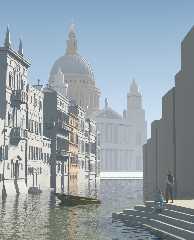
Attached is a rendering I did with assumed_gamma 1 and Christoph's
latest version.  I used the chart in the POV docs and decided that my
monitor's gamma is 2.6.  So I set this as the display gamma in my master
ini.  I rendered to a png file and that is what is attached.  Now this
rendering looks overexposed on my monitor.  Presumably it looks good on
yours?

To get a rendering that looks nice and saturated and contrasty I need to
set my display gamma at more like 1.6.  So I am still not clear on
whether the textures are wrong or if my display gamma value does not
match the gamma value for my monitor.
Post a reply to this message
Attachments:
Download 'v016.png' (390 KB)
Preview of image 'v016.png'
|
|
| |
| |
|
|
|
|
| |
| |
|
|
Jim Charter wrote:
> Attached is a rendering I did with assumed_gamma 1 and Christoph's
> latest version.  I used the chart in the POV docs and decided that my
> monitor's gamma is 2.6.  So I set this as the display gamma in my master
> ini.  I rendered to a png file and that is what is attached.  Now this
> rendering looks overexposed on my monitor.  Presumably it looks good on
> yours?

Note that because this is a PNG file, and PNG stores gamma information,
if the recipient's newsreader/image-viewer handles gamma correctly and
everything is properly configured, they should see the image exactly as
you see it on your monitor.
Post a reply to this message
|
|
| |
| |
|
|
|
|
| |
| |
|
|
Jim Charter wrote:

> Attached is a rendering I did with assumed_gamma 1 and Christoph's
> latest version.  I used the chart in the POV docs and decided that my
> monitor's gamma is 2.6.  So I set this as the display gamma in my master
> ini.  I rendered to a png file and that is what is attached.  Now this
> rendering looks overexposed on my monitor.  Presumably it looks good on
> yours?

It doesn't. I think I see the same as you - overexposed image.
I don't have that clever PNG viewer yet :( It makes sense to use
PNG only if people have gamma-aware viewers. I doubt if anybody
has it.

First of all we have to tune fog. It's too thick right now. The fog
is one of the components in that problem. If you'll render image
without fog it won't be so overexposed.

> To get a rendering that looks nice and saturated and contrasty I need to
> set my display gamma at more like 1.6.  So I am still not clear on
> whether the textures are wrong or if my display gamma value does not
> match the gamma value for my monitor.

That was also confusing to me. Eventually I decided don't use that table
from POV docs but rely completely on my feeelings :) As a result I defined
Display_Gamma as 1.8 instead of 2.2 from that table.

So just use Display_Gamma which suits fine to your feelings :) That's all I
can recommend for now.

Gena.
Post a reply to this message
|
|
| |
| |
|
|
|
|
| |
| |
|
|
"Jim Charter" <jrc### [at] aolcom> schrieb im Newsbeitrag
news:3e9cceec@news.povray.org...
> Gena wrote:
> >
> > So let's recap the discussion :)
> > From all those posts and POV-Ray doc we could make conclusion
> > that recommended assumed_gamma is 1. So let's use it.
> >
> > If you feel that image looks too bright or too dark on your monitor
> > with assumed_gamma=1 try to adjust Display_Gamma parameter
> > which is monitor specific (I specified 1.8 for my monitor). Because
> > that parameter is placed in command line we don't have to have
> > gamma-specific sources for each platform.
>
> Attached is a rendering I did with assumed_gamma 1 and Christoph's
> latest version.  I used the chart in the POV docs and decided that my
> monitor's gamma is 2.6.  So I set this as the display gamma in my master
> ini.  I rendered to a png file and that is what is attached.  Now this
> rendering looks overexposed on my monitor.  Presumably it looks good on
> yours?
>
> To get a rendering that looks nice and saturated and contrasty I need to
> set my display gamma at more like 1.6.  So I am still not clear on
> whether the textures are wrong or if my display gamma value does not
> match the gamma value for my monitor.
>
>

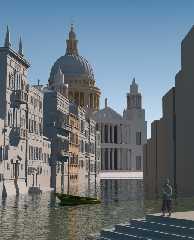
sorry, I do not want to disturb 'cause I really don't have the time to join your
project (but I really liked the idea) and I think all important things about gamma
are already mentioned and I do also completely agree with Christoph about
the importance of assumed_gamma 1.0, BUT it seems there is still confusion.
So I have simply done a search'n'replace on ALL files to remove EVERY
ambient statement, did rise the radiosity brightness to 0.85 and did render
it with display gamma of 2.2 (and Jim, do not trust that poor test so much,
2.2 is the typical value for a crt monitor and for a tft and a mac it is usually
lower). Oh, one more thing, note that the texture include files have (for
historical reasons, I guess) also - sometimes quite high - ambient values, so
it is not a good idea to use them directly, so I have also changed the
T_Gold3C used for the cross.
I think with a little tuning of some diffuse values this is the way to go.

The changed files are Stpaul.inc, entrance.inc and ManOnSlip.inc. I guess you
can apply those small changes very quickly but if I should post them I can do.

Just a final note on the png file format: the ability of png to store a gamma chunk
does not mean that every png file contains gamma information. PoV adds the
gamma chunk but e.g. the program Jim did use to create the texture of his pretty
little figure does not.

so long
-Ive
Post a reply to this message
Attachments:
Download 'capriccio.png' (242 KB)
Preview of image 'capriccio.png'
|
|
| |
| |
|
|
|
|
| |
| |
|
|
Jim Charter wrote:
>
> [...]
>
> Attached is a rendering I did with assumed_gamma 1 and Christoph's
> latest version.

No.  My version does not contain fog and removes all ambient finishes from
the textures.  Apart from that you also seem to use a different light
source than i set up (the area light is too large).

Christoph

--
POV-Ray tutorials, include files, Sim-POV,
HCR-Edit and more: http://www.tu-bs.de/~y0013390/
Last updated 28 Feb. 2003 _____./\/^>_*_<^\/\.______
Post a reply to this message
|
|
| |
| |
|
|
|
|
| |
| |
|
|
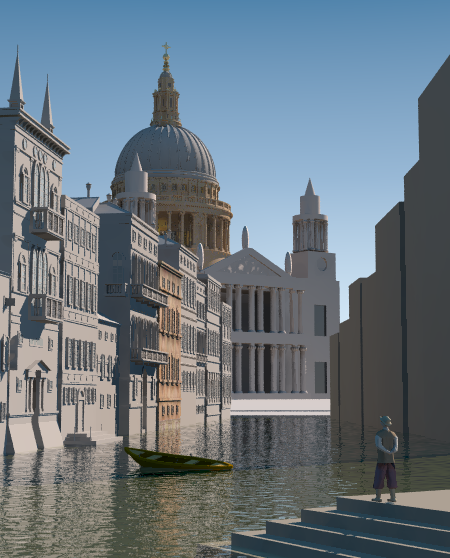
Hi
Well that's taking shape.
I just found what was disturbing me about that image: the boat is tilted.
I checked on original painting and I don't feel that.
I'm living in a harbour and I see a lot of boats.
That tilting make me think of a leaking and slowly sinking boat.

Marc
Post a reply to this message
|
|
| |
| |
|
|
|
|
| |
| |
|
|
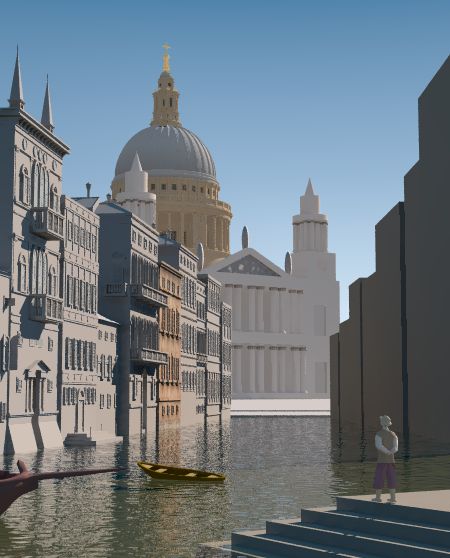
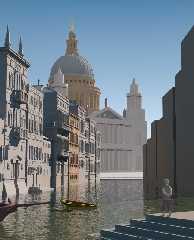
Hi all.
Here is a new boat.
I've also made some adjustments to boat 1
(translations and scaling).
Boat_2.inc and the modified capriccio.pov
posted in p.s.b-f.
Bye.

Txemi Jendrix
http://www.txemijendrix.com
Post a reply to this message
Attachments:
Download 'capriccio09.jpg' (43 KB)
Preview of image 'capriccio09.jpg'
|
|
| |
| |
|
|
|
|
| |