|
|
|
|
|
|
| |
| |
|
|
|
|
| |
| |
|
|
[in response to BE's "post something...]
For several weeks, I've been playing around with making anaglyph images, as well
as animations. I was inspired by Maete's recent post about his star-field
animations...
https://news.povray.org/povray.binaries.animations/thread/%3Cweb.697f16a4993dccb938e9762c7597fb06%40news.povray.org%3E/
I had made anaglyphs before from POV-ray scenes in the distant past, but always
used an external image app to color and combine them as the final step. I wanted
to see if I could accomplish the same result completely within POV-ray. (It's a
two step process: running the grayscale left/right views in the 'main' scene,
then using another scene to simply copy them 1:1 while coloring and combining
them-- plus shifting each view horizontally to get the 3-D effect I want, either
into the 'screen plane' or out of it.)
So far, mine are only grayscale versions, not 'full-color' anaglyphs. I first
had to work out the proper camera set-up for getting the left/right views, to
avoid what I call '3D distortion'-- where some of the scene elements in each
view do not line up perfectly horizontally when viewed as red/cyan stereo. (This
causes an uncomfortable viewing experience, where you have to tilt your head to
see the non-aligned parts.)
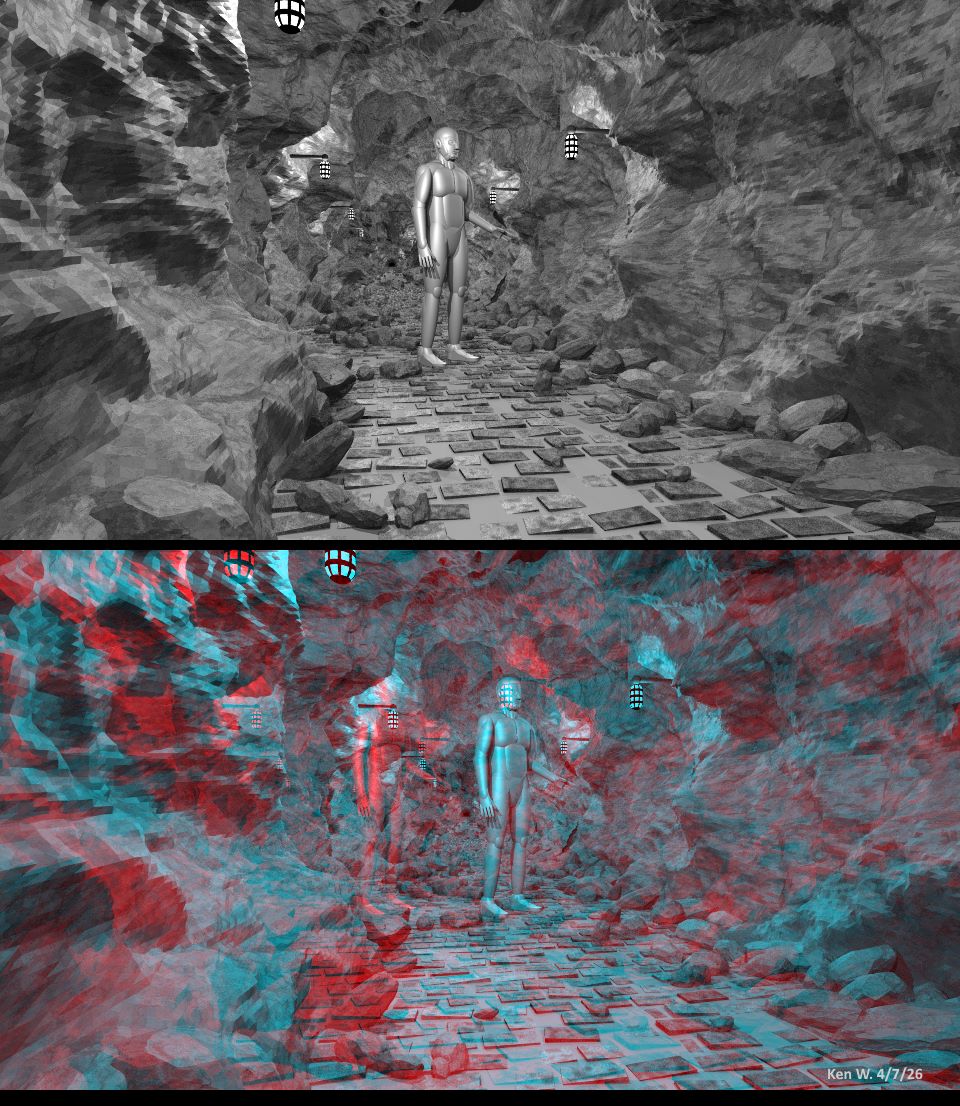
For the attached image, I used an old scene-- a cave, made using the HF_Cylinder
macro in shapes.inc (along with some functions to give it the craggy 'rock'
look.)
I also made an animation of the scene, that I will post separately.
I'm having WAY too much fun with this!
Post a reply to this message
Attachments:
Download 'anaglyph_of_cave_4_7_26_ken_w.jpg' (241 KB)
Preview of image 'anaglyph_of_cave_4_7_26_ken_w.jpg'
|
|
| |
| |
|
|
|
|
| |
| |
|
|
Your stereo image should look better, the effect doesn't come into its own as it
could.
For my 3D shots, I create the left + right shots by ROTATING the camera by 0.5
to a maximum of 1.5 degrees. It seems to me that you did it differently.
I don't want to complain, I just want to help.
I'm also interested in the humanoid. I've tried several times on a fully
controllable person, It didn't fail because of the programming, but because of
the appearance, the things always looked extremely ugly.
m
Post a reply to this message
|
|
| |
| |
|
|
|
|
| |
| |
|
|
"Maetes" <nomail@nomail> wrote:
> I'm also interested in the humanoid. I've tried several times on a fully
> controllable person, It didn't fail because of the programming, but because of
> the appearance, the things always looked extremely ugly.
PovPerson
BlobMan
IIRC, Rune did a thing with faces that I can't find now
also IIRC, Thomas deGroot worked with someone on an animated scene project with
automated dialog-controlled faces (?)
There may be other inverse kinematics and other skeleton-muscle projects.
They is to exhaustively search for prior art, and look at other sites to see
what they do, and then adapt that to raytracing.
- BE
Post a reply to this message
|
|
| |
| |
|
|
|
|
| |
| |
|
|
"Maetes" <nomail@nomail> wrote:
> Your stereo image should look better, the effect doesn't come into its
> own as it could.
>
> For my 3D shots, I create the left + right shots by ROTATING the camera by 0.5
> to a maximum of 1.5 degrees. It seems to me that you did it differently.
>
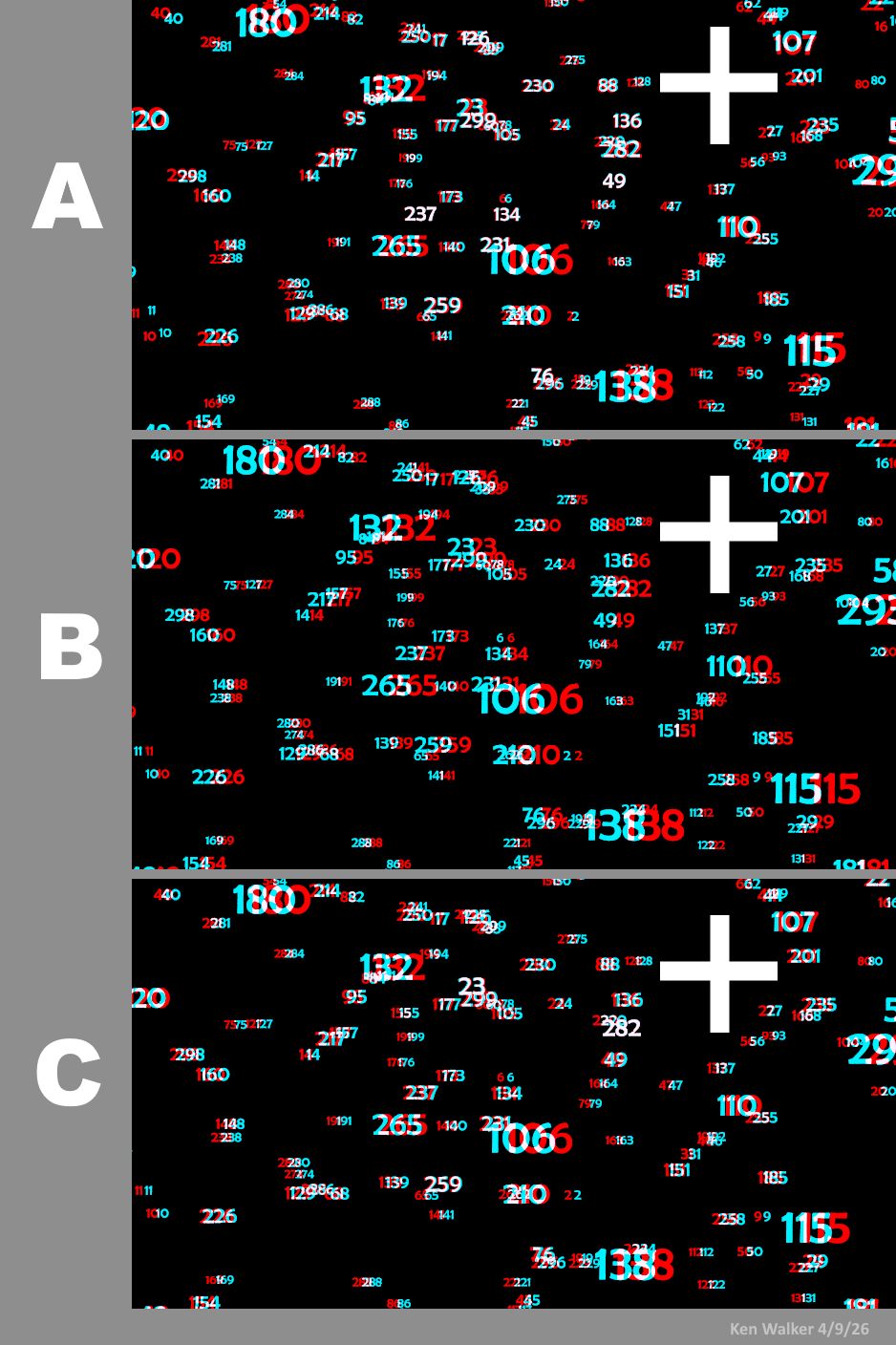
I tested a bunch of different camera setups to get my left/right views,
including the rotation scheme you mentioned. If I understand what you use, it's
something like the following(?): (see A in the attached images; assume that the
field of numbers is centered on <0,0,0>)
camera {
perspective
location <0, 0, -25>
look_at <0, 0, 0> // ditto
right x*image_width/image_height
angle 67
rotate 1.0*y // 1.0 for left view, -1.0 for right view
}
That does produce a beautiful 3-D effect, both into and out of the screen plane,
and with no post-processed image-shifting required. But it also creates the
'distortion' I mentioned earlier-- where the red and cyan views of some of the
objects do not line up horizontally. This makes the anaglyph difficult to look
at. In this particular image, the worst offenders are at the top and bottom
corners on both sides; the only truly horizontal color pairs are in a band
across the middle of the image.
To correct for that (see image B), I use a different set-up: no rotation (unless
I want to add it just for effect, and equally to both images), but rather by
shifting the camera's x-location and x-look_at, *equally*:
camera {
perspective
location <-.5, 0, -25> // -/+ .5 for left and right
look_at <-.5, 0, 0> // ditto
right x*image_width/image_height
angle 67
// rotate <0,0,0> // optional; same for each view
}
These x-values are the only things I change-- and this by itself eliminates the
'distortion'; all of the resulting red/cyan pairs are nicely horizontal.
Unfortunately, the resulting 3-D effect-- while correct as to 3-D depth--
appears totally OUT of the screen plane, toward the viewer. In other words, the
'infinite distance' of the scene is *at* the screen plane, instead of appearing
deep into the screen. (To be honest, I am still a bit clueless as to why this
occurs.)
So I correct for that in another step (a special 2nd-scene copying set-up), by
slightly shifting both images in x, in opposite directions, until I get the 3-D
effect I want. See image C.
>
> I'm also interested in the humanoid. I've tried several times on a fully
> controllable person...
My human is a CSG model I made *long* ago (from just basic POV-ray shapes) as a
stand-in for testing various scenes. It's just a rigid shape; I never included
any animation code. Every now and then, I'll go back and tweak various parts. It
has probably gone through a dozen iterations by now! And its code is very messy
:-(
Post a reply to this message
Attachments:
Download 'anaglyph_camera_tests_kw.jpg' (193 KB)
Preview of image 'anaglyph_camera_tests_kw.jpg'
|
|
| |
| |
|
|
|
|
| |
| |
|
|
So, I know that you have been playing with this for a while, and have (probably)
read Paul Bourke's write-ups on this, and are (probably) using a mesh camera.
Have you tried not rotating the entire mesh, but rotating the "look-at" vector
of each mesh triangle instead? Or rotating all of the triangles themselves?
(like a louvre)
- BW
Post a reply to this message
|
|
| |
| |
|
|
|
|
| |
| |
|
|
"Bald Eagle" <cre### [at] netscape net> wrote:
> So, I know that you have been playing with this for a while, and have (probably)
> read Paul Bourke's write-ups on this, and are (probably) using a mesh camera.
>
No, this time I didn't use any of POV-ray's included mesh_cam scenes as a
starting point (in the scenes/camera/mesh_camera folder, specifically the
meshcam_persp_demo). Instead, I took an 'old world' approach of simply using two
left/right camera views in a scene.
Back in May of 2023, I did experiment with the mesh camera to try and make
anaglyphs. See my comments and image tests in Josh English's thread, starting
about midway through the various replies...
https://news.povray.org/povray.binaries.images/thread/%3C64588ca4%40news.povray.org%3E/?mtop=441115
I had to re-read that entire thread, to re-familiarize myself with what I had
done! (Us 'old folks' have a way of forgetting things, ha.) But my final
anaglyph result there also exhibited the '3D distortion' that I mentioned--
which was probably a natural result of the way I used the mesh camera (perhaps
the same way as in my experiments here, when using camera rotation rather than
x-displacement.) Maybe that distortion could have been eliminated somehow if I
had kept at it, but I could not fully understand the meshcam code or math.
Although, I might revisit that code... net> wrote:
> So, I know that you have been playing with this for a while, and have (probably)
> read Paul Bourke's write-ups on this, and are (probably) using a mesh camera.
>
No, this time I didn't use any of POV-ray's included mesh_cam scenes as a
starting point (in the scenes/camera/mesh_camera folder, specifically the
meshcam_persp_demo). Instead, I took an 'old world' approach of simply using two
left/right camera views in a scene.
Back in May of 2023, I did experiment with the mesh camera to try and make
anaglyphs. See my comments and image tests in Josh English's thread, starting
about midway through the various replies...
https://news.povray.org/povray.binaries.images/thread/%3C64588ca4%40news.povray.org%3E/?mtop=441115
I had to re-read that entire thread, to re-familiarize myself with what I had
done! (Us 'old folks' have a way of forgetting things, ha.) But my final
anaglyph result there also exhibited the '3D distortion' that I mentioned--
which was probably a natural result of the way I used the mesh camera (perhaps
the same way as in my experiments here, when using camera rotation rather than
x-displacement.) Maybe that distortion could have been eliminated somehow if I
had kept at it, but I could not fully understand the meshcam code or math.
Although, I might revisit that code...
Post a reply to this message
|
|
| |
| |
|
|
|
|
| |
|
|