|
 |
"Maetes" <nomail@nomail> wrote:
> Your stereo image should look better, the effect doesn't come into its
> own as it could.
>
> For my 3D shots, I create the left + right shots by ROTATING the camera by 0.5
> to a maximum of 1.5 degrees. It seems to me that you did it differently.
>
I tested a bunch of different camera setups to get my left/right views,
including the rotation scheme you mentioned. If I understand what you use, it's
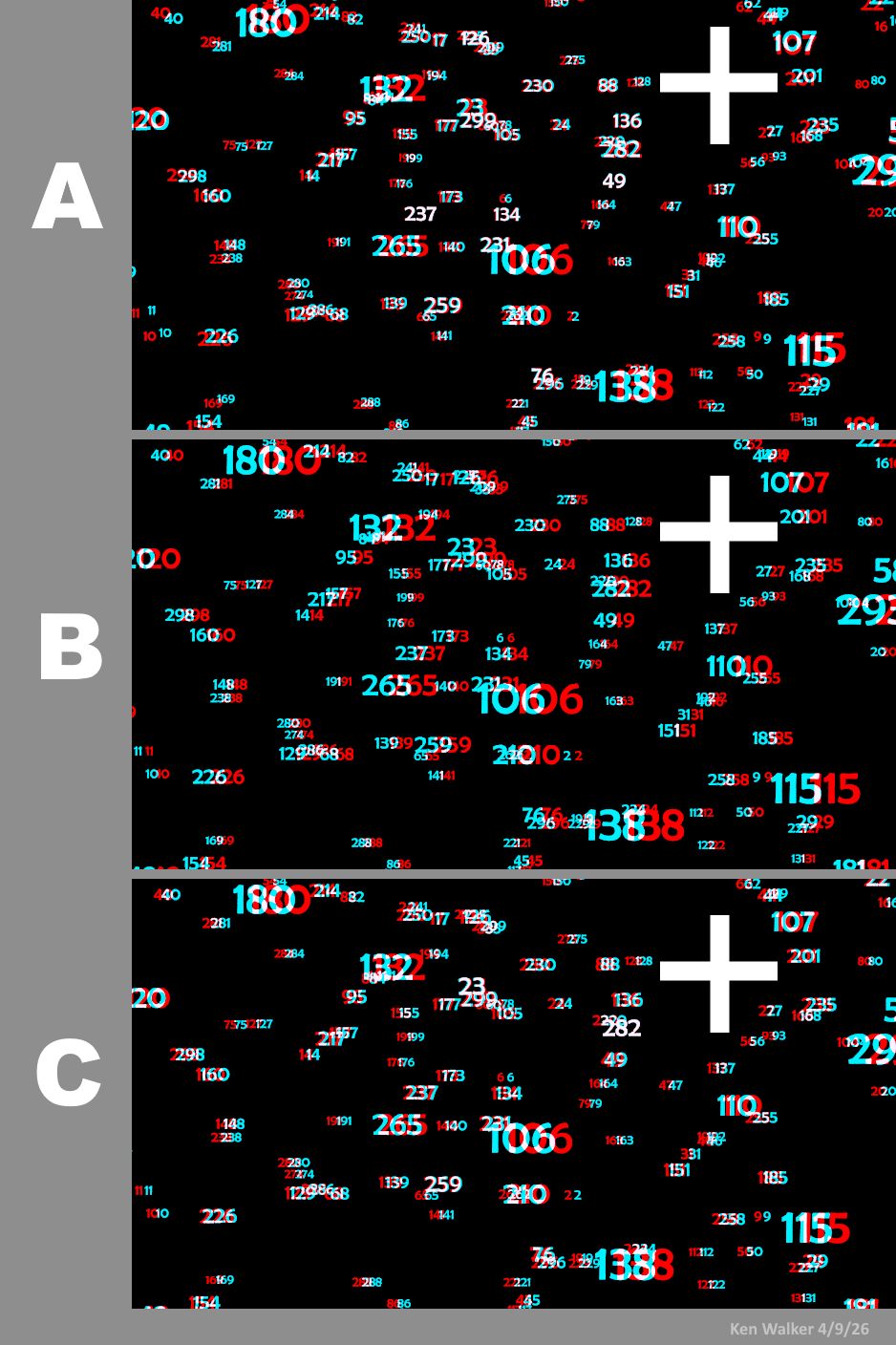
something like the following(?): (see A in the attached images; assume that the
field of numbers is centered on <0,0,0>)
camera {
perspective
location <0, 0, -25>
look_at <0, 0, 0> // ditto
right x*image_width/image_height
angle 67
rotate 1.0*y // 1.0 for left view, -1.0 for right view
}
That does produce a beautiful 3-D effect, both into and out of the screen plane,
and with no post-processed image-shifting required. But it also creates the
'distortion' I mentioned earlier-- where the red and cyan views of some of the
objects do not line up horizontally. This makes the anaglyph difficult to look
at. In this particular image, the worst offenders are at the top and bottom
corners on both sides; the only truly horizontal color pairs are in a band
across the middle of the image.
To correct for that (see image B), I use a different set-up: no rotation (unless
I want to add it just for effect, and equally to both images), but rather by
shifting the camera's x-location and x-look_at, *equally*:
camera {
perspective
location <-.5, 0, -25> // -/+ .5 for left and right
look_at <-.5, 0, 0> // ditto
right x*image_width/image_height
angle 67
// rotate <0,0,0> // optional; same for each view
}
These x-values are the only things I change-- and this by itself eliminates the
'distortion'; all of the resulting red/cyan pairs are nicely horizontal.
Unfortunately, the resulting 3-D effect-- while correct as to 3-D depth--
appears totally OUT of the screen plane, toward the viewer. In other words, the
'infinite distance' of the scene is *at* the screen plane, instead of appearing
deep into the screen. (To be honest, I am still a bit clueless as to why this
occurs.)
So I correct for that in another step (a special 2nd-scene copying set-up), by
slightly shifting both images in x, in opposite directions, until I get the 3-D
effect I want. See image C.
>
> I'm also interested in the humanoid. I've tried several times on a fully
> controllable person...
My human is a CSG model I made *long* ago (from just basic POV-ray shapes) as a
stand-in for testing various scenes. It's just a rigid shape; I never included
any animation code. Every now and then, I'll go back and tweak various parts. It
has probably gone through a dozen iterations by now! And its code is very messy
:-(
Post a reply to this message
Attachments:
Download 'anaglyph_camera_tests_kw.jpg' (193 KB)
Preview of image 'anaglyph_camera_tests_kw.jpg'
|
|