|
|
|
|
|
|
| |
| |
|
|
|
|
| |
| |
|
|
scott escreveu:
>> Most games just precompute GI. (Usually at too low resolution...)
>
> This is fine if nothing moves or changes colour in your game.

http://www.youtube.com/watch?v=FqeXuO2AlEE

http://www.crytek.com/fileadmin/user_upload/inside/presentations/2009/Light_Propagation_Volumes.pdf

A GPU implementation of instant radiosity presented at this year's
SIGRAPH.  Yeah, objects move around and affect GI.  be very afraid...

Of course, that's only in the triangle mesh-world, not in the world of
perfect sphere surfaces...

--
a game sig: http://tinyurl.com/d3rxz9
Post a reply to this message
|
|
| |
| |
|
|
|
|
| |
| |
|
|
nemesis wrote:
> this is an insanely amazing Crysis mod shot too:

What's insane about it?
Post a reply to this message
|
|
| |
| |
|
|
|
|
| |
| |
|
|
Invisible wrote:
> nemesis wrote:
>> this is an insanely amazing Crysis mod shot too:
>
> What's insane about it?

DOF, sun pouring in from behind high-definition tree foliage, dust from
the ground, and some glass thing just in front of you showing some
(fake) refraction and dispersion.
Post a reply to this message
|
|
| |
| |
|
|
|
|
| |
| |
|
|
>>> this is an insanely amazing Crysis mod shot too:
>>
>> What's insane about it?
>
> DOF, sun pouring in from behind high-definition tree foliage, dust from
> the ground, and some glass thing just in front of you showing some
> (fake) refraction and dispersion.

...all of which I'm pretty much sure were in the original Crysis game.
Not saying it isn't impressive, but I'm not sure what this mod adds.
Post a reply to this message
|
|
| |
| |
|
|
|
|
| |
| |
|
|
Invisible wrote:
>>>> this is an insanely amazing Crysis mod shot too:
>>>
>>> What's insane about it?
>>
>> DOF, sun pouring in from behind high-definition tree foliage, dust
>> from the ground, and some glass thing just in front of you showing
>> some (fake) refraction and dispersion.
>
> ...all of which I'm pretty much sure were in the original Crysis game.
> Not saying it isn't impressive, but I'm not sure what this mod adds.

oh

still impressive though... :D

BTW, saw the link to instant radiosity in Cryengine 3?

http://www.youtube.com/watch?v=FqeXuO2AlEE
http://www.crytek.com/fileadmin/user_upload/inside/presentations/2009/Light_Propagation_Volumes.pdf
Post a reply to this message
|
|
| |
| |
|
|
|
|
| |
| |
|
|
Orchid XP v8 wrote:
> I liked Crysis more than HL2, so I guess it's up to what you want out of
> a game.

Same here; I'm about halfway through Ep1, and I just haven't picked it
up in more than a week.

...Chambers
Post a reply to this message
|
|
| |
| |
|
|
|
|
| |
| |
|
|
> A GPU implementation of instant radiosity presented at this year's
> SIGRAPH.  Yeah, objects move around and affect GI.  be very afraid...

Yes I think dynamic GI is getting more and more realistic on the GPU, it
makes a huge visual difference that is often hard to pin down (ie it just
"looks better" but it's not massively obvious like adding reflections).

> Of course, that's only in the triangle mesh-world, not in the world of
> perfect sphere surfaces...

I don't understand the fascination with perfect mathematically described
surfaces, they are inflexible and slow to render.  If you use sub-divided
triangle meshes you can make the output perfectly smooth all the time and of
course do whatever transformations you like very easily by just transforming
every vertex.  AFAIK all film-quality 3D animation is done with triangle
mesh based renderers, and we can probably assume they have worked out the
best way to get photo-realistic quality.  And the huge benefit for games
(rather than offline rendering) is that it's very simple to reduce the
triangle count to keep real-time animation.
Post a reply to this message
|
|
| |
| |
|
|
|
|
| |
| |
|
|
> this is an insanely amazing Crysis mod shot too:
>
>
http://www1.picturepush.com/photo/a/1578869/1024/Crysis/crysis64-2009-04-11-19-45-23-44.png

Imagine how long that would take to render in POV, media, DOF, refraction!
And I don't think the result would be *that* different (maybe the refraction
would look slightly different, but a normal person probably couldn't tell
which one was correct, especially during animation).
Post a reply to this message
|
|
| |
| |
|
|
|
|
| |
| |
|
|
>> I liked Crysis more than HL2, so I guess it's up to what you want out
>> of a game.
>
> Same here; I'm about halfway through Ep1, and I just haven't picked it
> up in more than a week.

HL2 was technically astonishing. (Remember, at the time the only other
game I'd played was HL1. Oh, and Quake II.) But it wasn't all that much
fun to actually play.

HL2:EP1 added even better graphics, but wasn't greatly more fun to play.
(God I hate zombies!)

HL2:EP2 was graphically better still, but - far more importantly - it
was *fun*! I actually played it more than once. (Didn't do that with HL2
or HL2:EP1.) The final battle is absurdly difficult, but other than
that, it's really rather entertaining.
Post a reply to this message
|
|
| |
| |
|
|
|
|
| |
| |
|
|
scott wrote:

> I don't understand the fascination with perfect mathematically described
> surfaces, they are inflexible and slow to render.

Really? I was under the impression that splines can describe any
possible surface. Triangles, on the other hand, can only give a crude
approximation to curves.
Post a reply to this message
|
|
| |
| |
|
|
|
|
| |
| |
|
|
scott wrote:
>> this is an insanely amazing Crysis mod shot too:
>>
>>
http://www1.picturepush.com/photo/a/1578869/1024/Crysis/crysis64-2009-04-11-19-45-23-44.png

>>
>
> Imagine how long that would take to render in POV, media, DOF,
> refraction! And I don't think the result would be *that* different
> (maybe the refraction would look slightly different, but a normal person
> probably couldn't tell which one was correct, especially during animation).

It wouldn't have all those glitches that games have though. (Like grass
that rotates as you run past it, or "mist" that has sharp edges where it
intersects things.)
Post a reply to this message
|
|
| |
| |
|
|
|
|
| |
| |
|
|
On Thu, 24 Sep 2009 09:25:52 +0100, Invisible wrote:

> I was under the impression that splines can describe any possible
> surface.

"When the only tool you have is a hammer, everything looks like a nail."

In my current sleep-deprived state, that seems a relevant quote.  It may
not after I go to bed, sleep, wake up, shower, and come back up here in
the morning.  But right now it seems relevant.

Jim ZZZZzzzzzzzzzzzzzzzzzzzzzzzz.................
Post a reply to this message
|
|
| |
| |
|
|
|
|
| |
| |
|
|
>> I don't understand the fascination with perfect mathematically described
>> surfaces, they are inflexible and slow to render.
>
> Really? I was under the impression that splines can describe any possible
> surface.

How do you render a splined surface directly?  Even POV converts them to
triangles first!

> Triangles, on the other hand, can only give a crude approximation to
> curves.

In practice display devices are made of pixels, so using triangles you can
always get exactly the same output as using the true curve.  Have you ever
seen any "crude approximations" to curves in film CG?
Post a reply to this message
|
|
| |
| |
|
|
|
|
| |
| |
|
|
>> Really? I was under the impression that splines can describe any
>> possible surface.
>
> How do you render a splined surface directly?  Even POV converts them to
> triangles first!

It's news to me that POV supports splines in the first place.

>> Triangles, on the other hand, can only give a crude approximation to
>> curves.
>
> In practice display devices are made of pixels, so using triangles you
> can always get exactly the same output as using the true curve.

Only if you have the original curve to hand.

> Have you ever seen any "crude approximations" to curves in film CG?

Have you ever seen any curved surfaces in computer games?

If you *insist* on using triangles, you're going to need a hell of a lot
of them to fake the appearence of a good curve. That means you either
need a triangle mesh of absurd dimensions, or you need to generate the
triangles on the fly.

What all known computer games do is use a static, very low resolution
triangle mesh and then smother it with lashes of low-level trickery to
give a vague semblance of curvature.
Post a reply to this message
|
|
| |
| |
|
|
|
|
| |
| |
|
|
>> Imagine how long that would take to render in POV, media, DOF,
>> refraction! And I don't think the result would be *that* different (maybe
>> the refraction would look slightly different, but a normal person
>> probably couldn't tell which one was correct, especially during
>> animation).
>
> It wouldn't have all those glitches that games have though. (Like grass
> that rotates as you run past it, or "mist" that has sharp edges where it
> intersects things.)

I don't think modern games have those glitches anymore, the grass is true 3D
geometry not just billboards, and the mist billboards usually compare depths
of existing pixels to avoid the hard edges with geometry.  Some games even
have true 3D volume textures and rendering for smoke and mist, I don't know
if Crysis uses this or just cheats with multiple billboards.  Maybe the
glitches you mention are on a game from 5 years ago or on a very badly
written modern one.
Post a reply to this message
|
|
| |
| |
|
|
|
|
| |
| |
|
|
> It's news to me that POV supports splines in the first place.

It does bezier patches which are the closest you are going to get to
describing "any curved surface" mathematically.

> Only if you have the original curve to hand.

What if you designed the curve by seeing how it turned out after
sub-divison?  Blender works like this, you can edit the vertices of a very
rough triangle mesh and see how the perfectly smooth surface reacts in real
time.  You are then defining the "original curve" by the crude mesh.

> If you *insist* on using triangles, you're going to need a hell of a lot
> of them to fake the appearence of a good curve. That means you either need
> a triangle mesh of absurd dimensions, or you need to generate the
> triangles on the fly.

Exactly.  This is what all film-quality renderers do.

> What all known computer games do is use a static, very low resolution
> triangle mesh and then smother it with lashes of low-level trickery to
> give a vague semblance of curvature.

Of course, because that method gets the highest quality output in realtime.
And it's very easy to have two (or more) versions of a mesh at different
resolutions, eg for stills rendering, close-up real-time rendering, far away
rendering etc.  When you have a mathematical surface rendered directly it's
very difficult to speed it up!
Post a reply to this message
|
|
| |
| |
|
|
|
|
| |
| |
|
|
scott wrote:
>>> Imagine how long that would take to render in POV, media, DOF,
>>> refraction! And I don't think the result would be *that* different
>>> (maybe the refraction would look slightly different, but a normal
>>> person probably couldn't tell which one was correct, especially
>>> during animation).
>>
>> It wouldn't have all those glitches that games have though. (Like
>> grass that rotates as you run past it, or "mist" that has sharp edges
>> where it intersects things.)
>
> I don't think modern games have those glitches anymore, the grass is
> true 3D geometry not just billboards, and the mist billboards usually
> compare depths of existing pixels to avoid the hard edges with
> geometry.  Some games even have true 3D volume textures and rendering
> for smoke and mist, I don't know if Crysis uses this or just cheats with
> multiple billboards.  Maybe the glitches you mention are on a game from
> 5 years ago or on a very badly written modern one.

HalfLife 2: Episode 2 has mist in one section. Looks really
impressive... until it intersects something.

Mind you, POV-Ray has the exact same problem, until you turn the
settings up so high that it takes 82+ hours to render a single frame...
Post a reply to this message
|
|
| |
| |
|
|
|
|
| |
| |
|
|
Ever heard of subdivision surfaces, Andrew?  You can get a perfectly
round sphere out of a plain cube cage by specifying up to 5 iterations.
  This is the norm in the industry, and there's also NURBS.

Pixar got its own gig with REYES in Renderman, basically an automatic
triangulator breaking down every geometry on screen into triangles until
they are less than one pixel wide in the final resolution.  It probably
breaks them down by subdivision as well, since one of the well-known
algorithms has the name of one of Pixar founding fathers...

No one designs multibillion triangle meshes by carefully moving them one
by one.

BTW:
http://www.3d-coat.com/v3_voxel_sculpting.html
Post a reply to this message
|
|
| |
| |
|
|
|
|
| |
| |
|
|
nemesis wrote:
> Ever heard of subdivision surfaces, Andrew?  You can get a perfectly
> round sphere out of a plain cube cage by specifying up to 5 iterations.

Yes. But the resulting surface can only be controlled by the 8 original
cube corners. That's not much control.

> No one designs multibillion triangle meshes by carefully moving them one
> by one.

And yet, in all known editors, moving triangle corners around one at a
time is the only available editing operation...
Post a reply to this message
|
|
| |
| |
|
|
|
|
| |
| |
|
|
Invisible wrote:
> nemesis wrote:
>> Ever heard of subdivision surfaces, Andrew?  You can get a perfectly
>> round sphere out of a plain cube cage by specifying up to 5 iterations.
>
> Yes. But the resulting surface can only be controlled by the 8 original
> cube corners. That's not much control.

If you need refinement, you do loop cuts over the control cage and extrude.

>> No one designs multibillion triangle meshes by carefully moving them
>> one by one.
>
> And yet, in all known editors, moving triangle corners around one at a
> time is the only available editing operation...

You have your head in the 80's.  Do you ever click on the links I provide?
Post a reply to this message
|
|
| |
| |
|
|
|
|
| |
| |
|
|
>>> No one designs multibillion triangle meshes by carefully moving them
>>> one by one.
>>
>> And yet, in all known editors, moving triangle corners around one at a
>> time is the only available editing operation...
>
> You have your head in the 80's.  Do you ever click on the links I provide?

Really?

Everybody says that Wings3D is the best editor going, but all it does is
manipulate triangle meshes, one point at a time. Last time I checked, it
didn't exist in the 80s.
Post a reply to this message
|
|
| |
| |
|
|
|
|
| |
| |
|
|
Invisible wrote:
>>>> No one designs multibillion triangle meshes by carefully moving them
>>>> one by one.
>>>
>>> And yet, in all known editors, moving triangle corners around one at
>>> a time is the only available editing operation...
>>
>> You have your head in the 80's.  Do you ever click on the links I
>> provide?
>
> Really?
>
> Everybody says that Wings3D is the best editor going, but all it does is
> manipulate triangle meshes, one point at a time. Last time I checked, it
> didn't exist in the 80s.

I'm used to Blender, not Wings, but I'm pretty sure they share the same
operations and that means extruding and controlling and selecting
friggin' amounts of vertices at the same time by mean of vertex loops
and rings.  Let alone by sculpting like in the link I provided.

Not knowing how to use such operations doesn't mean they don't exist.
Almost never I've had to move a single vertex alone.
Post a reply to this message
|
|
| |
| |
|
|
|
|
| |
| |
|
|
Invisible wrote:
> scott wrote:
>
>> I don't understand the fascination with perfect mathematically
>> described surfaces, they are inflexible and slow to render.
>
> Really? I was under the impression that splines can describe any
> possible surface. Triangles, on the other hand, can only give a crude
> approximation to curves.

This is not true.  Just like triangles splines can only approximate most
curves, they just give a different approximation.


Back to the initial topic -- the main reason why I like the ability to
support arbitrary surfaces is that isosufraces are such a useful
modeling tool.  Sure you could always tessilate them to triangles, but I
don't think that doing so correctly, quickly, and automatically is that
easy of a problem -- particularly if you want to treat the normals
correctly.

Of course if you have a really nice modeler the added value of
isosurfaces is less, so it makes sense to go with a pure-triangle
approach.  For a text-based editor like Povray, however, I think having
a larger vocabulary of surfaces is extremely handy.
Post a reply to this message
|
|
| |
| |
|
|
|
|
| |
| |
|
|
scott wrote:
> I don't understand the fascination with perfect mathematically described
> surfaces, they are inflexible and slow to render.  If you use
> sub-divided triangle meshes you can make the output perfectly smooth all
> the time and of course do whatever transformations you like very easily
> by just transforming every vertex.

True, as long as you dynamically adjust the subdivision level so that
triangles aren't too large.  Unfortunately, nobody actually does that.
In reality, everyone pre-subdivides the meshes.

Mathematically described surfaces don't have to be subdivided, because
they're rendered at the pixel level.

...Chambers
Post a reply to this message
|
|
| |
| |
|
|
|
|
| |
| |
|
|
>> Ever heard of subdivision surfaces, Andrew?  You can get a perfectly
>> round sphere out of a plain cube cage by specifying up to 5 iterations.
>
> Yes. But the resulting surface can only be controlled by the 8 original
> cube corners. That's not much control.

It's very simple to add in more control points, every time you want more
control you simple add in another point, this leaves you free to have
certain areas with very few control points, and other areas with lots of
control points, yet the result will be perfectly smooth.  For example when
modelling a car the large flat roof might only need a handful of control
points, but something around the wheel-arch might need many more to get the
curvature correct.

Another benefit is that you can instantly switch between the level of
subdivision, so you can have a 10 million triangle mesh for perfectly smooth
rendering, or a 100k mesh for use in a game, both coming from exactly the
same control points.

Watch this for a demo of it working (in BLender);

http://www.youtube.com/watch?v=ckOTl2GcS-E

around 0:47 you can see him editing the control points and the perfectly
smooth surface is following.  This is how you design smooth triangle meshes,
not point by point of the individual triangles!

> And yet, in all known editors, moving triangle corners around one at a
> time is the only available editing operation...

Haha, do you *really* think that people haven't thought of a better way to
edit triangle meshes? LOL
Post a reply to this message
|
|
| |
| |
|
|
|
|
| |
| |
|
|
scott wrote:
>>> Ever heard of subdivision surfaces, Andrew?  You can get a perfectly
>>> round sphere out of a plain cube cage by specifying up to 5 iterations.
>>
>> Yes. But the resulting surface can only be controlled by the 8
>> original cube corners. That's not much control.
>
> It's very simple to add in more control points, every time you want more
> control you simple add in another point, this leaves you free to have
> certain areas with very few control points, and other areas with lots of
> control points, yet the result will be perfectly smooth.  For example
> when modelling a car the large flat roof might only need a handful of
> control points, but something around the wheel-arch might need many more
> to get the curvature correct.
>
> Another benefit is that you can instantly switch between the level of
> subdivision, so you can have a 10 million triangle mesh for perfectly
> smooth rendering, or a 100k mesh for use in a game, both coming from
> exactly the same control points.

No, these are benefits of splines. If you have a surface described by
splines, you can tesselate it to whatever resolution you feel like (or
just render it normally). But if you have a triangle mesh, then you only
have a triangle mesh. If you subdivide it, you now have only the new,
higher-resolution mesh; you have lost the original. Now if you decide
you want to edit it further, you can only do so in its new form. Sure,
you could probably "un-subdivide" it, but no guarantees this won't
completely wreck it.

> Watch this for a demo of it working (in BLender);
>
> http://www.youtube.com/watch?v=ckOTl2GcS-E

I'm guessing I'm going to need audio before any of this makes sense.
Maybe when I get home.

>> And yet, in all known editors, moving triangle corners around one at a
>> time is the only available editing operation...
>
> Haha, do you *really* think that people haven't thought of a better way
> to edit triangle meshes? LOL

The problem is that, fundamentally, it's very hard to manipulate
straight lines in a way that approximates curves. 10 years ago I used a
couple of editors that would let you do things like move several points
at once, or have a "magnet" feature where nearby points were sort of
"pulled" towards where you're clicking, but the basic problem is that
it's almost impossible to make anything good out of straight lines.
(Unless, of course, you're actually *trying* to make something with
straight lines - in which case it's fairly easy.)

For all the wizzy features of those editors of old, even creating an
object as trivial as a banana was impossibly difficult. And, for some
reason, modern editors seem to have drastically fewer tools to help.
(Like I said, basically you can move points one at a time, and maybe
scale / rotate the entire mesh, and sometimes you can increase or
decrease the number of points automatically. That's not a lot to work with.)
Post a reply to this message
|
|
| |
| |
|
|
|
|
| |
| |
|
|
Invisible <voi### [at] dev null> wrote:
> But if you have a triangle mesh, then you only have a triangle mesh.
I think that the point is that nobody designs models using raw triangle
meshes. Instead, all models are designed using NURBS or other similar
spline-based surfaces which are easy to edit. The triangle mesh you see
in the end result has been automatically generated from those surface
models.
--
- Warp null> wrote:
> But if you have a triangle mesh, then you only have a triangle mesh.
I think that the point is that nobody designs models using raw triangle
meshes. Instead, all models are designed using NURBS or other similar
spline-based surfaces which are easy to edit. The triangle mesh you see
in the end result has been automatically generated from those surface
models.
--
- Warp
Post a reply to this message
|
|
| |
| |
|
|
|
|
| |
| |
|
|
> But if you have a triangle mesh, then you only have a triangle mesh. If
> you subdivide it, you now have only the new, higher-resolution mesh; you
> have lost the original.

No you don't.  After you've seen the Blender video you will see what I mean.
The original data is always kept, and you can still edit it while the
subdivided triangle mesh is updated in real time.

> 10 years ago I used a couple of editors that would let you do things like
> move several points at once, or have a "magnet" feature where nearby
> points were sort of "pulled" towards where you're clicking, but the basic
> problem is that it's almost impossible to make anything good out of
> straight lines.

You use those "basic" tools to edit the original low resolution triangle
mesh.  BTW in most packages you can at least select by vertex, edge or face,
and of course multi-select, then the obvious scale/rotate/move, also you can
extrude from faces and edges plus numerous more functions I haven't used.
The tools are designed *for* people to edit triangle meshes as their job,
once you've learned how it works you can do things quickly.

> For all the wizzy features of those editors of old, even creating an
> object as trivial as a banana was impossibly difficult.

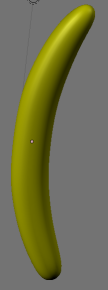
It just took me about 1 minute to make a simple banana shape in Blender.
Blender even gives you a box to start with, so I just rotated the top face a
bit, scaled it down and extruded, then repeated 5 or 6 times.  See attached
result - it's not hard, that model has ~2500 triangles and I can easily edit
the original triangle mesh (40 vertices) if I want to change the shape.  If
I was going to do a big render I could knock up the number of triangles with
a click of the mouse, yet the original triangle mesh is still there to be
modified.
Post a reply to this message
Attachments:
Download 'image1.png' (10 KB)
Preview of image 'image1.png'

|
|
| |
| |
|
|
|
|
| |
| |
|
|
Warp wrote:

>   I think that the point is that nobody designs models using raw triangle
> meshes. Instead, all models are designed using NURBS or other similar
> spline-based surfaces which are easy to edit. The triangle mesh you see
> in the end result has been automatically generated from those surface
> models.

That would make a lot more sense, yes...
Post a reply to this message
|
|
| |
| |
|
|
|
|
| |
| |
|
|
scott wrote:

> also you can extrude from faces and edges plus numerous more functions I
> haven't used.

Care to define what "extrude" means?

> The tools are designed *for* people to edit triangle
> meshes as their job, once you've learned how it works you can do things
> quickly.

I've seen people who can take three sheets of paper, freehand scribble a
few lines on each page, drop one page on top of another and create an
instantly recognisable moving picture of Micky Mouse in life-like fluid
motion. That doesn't mean it's "easy".

>> For all the wizzy features of those editors of old, even creating an
>> object as trivial as a banana was impossibly difficult.
>
> It just took me about 1 minute to make a simple banana shape in Blender.
> Blender even gives you a box to start with, so I just rotated the top
> face a bit, scaled it down and extruded, then repeated 5 or 6 times.

I won't pretend I understand what you just said.

(FWIW, I *always* get Wing3D and Blender confused. But isn't Blender the
one that's supposedly impossible to learn due to the weird UI?)

Many, many years ago, AmigaFormat released a full version of Imagine 2.0
on a coverdisk. They ran a series of tutorials on using it. It had a
tool - I forget what it was called - where you start with a sphere, and
by moving the points in each of the 3 axis views, you could change the
profile and cross-section of the mesh. AF did a morphing tutorial where
you were supposed to use this tool to build an organe (so, an oragne
sphere then), a pear, an apple and a banana, and then morph from one to
the other.

(Unfortunately, the morph operation requires both start and finish
object to move the same number of polygons, and just linearly
interpolates them. BAD THING happen if the polygons are in a different
order in each model! But anyway...)

I wasted literally *days* trying to make these objects. They're all
absurdly simple, but I couldn't get them to look anywhere near right. It
was just far too hard.

As far as I could tell, Wings [I think that's the one I tried] doesn't
even offer this much help...
Post a reply to this message
|
|
| |
| |
|
|
|
|
| |
| |
|
|
> Care to define what "extrude" means?

Shifting a face in the direction of its normal, and filling in the gaps
between the shifted face and the other faces that it used to be connected to
(by automatically adding more faces perpendicular to the selected face).

Example in amazing 2D ASCII:

Start with 3 faces:

---.---.---


Extrude the middle face upwards:

   .---.
   |   |
---.   .---


Move the left vertex up a bit:
   .
   |\
   | \
   |  \
   .   .
   |   |
---.   .---

Extrude the top left face:

.--.
|   \
|    \
|     \
.--.   .
   |   |
---.   .---

It's a very useful tool in 3D mesh design.
Post a reply to this message
|
|
| |
| |
|
|
|
|
| |
| |
|
|
scott wrote:
>> Care to define what "extrude" means?
>
> Shifting a face in the direction of its normal, and filling in the gaps
> between the shifted face and the other faces that it used to be
> connected to (by automatically adding more faces perpendicular to the
> selected face).

Ah, I see.

> Example in amazing 2D ASCII:

TMFT alert! ;-)

> It's a very useful tool in 3D mesh design.

I suppose...
Post a reply to this message
|
|
| |
| |
|
|
|
|
| |
| |
|
|
> HalfLife 2: Episode 2 has mist in one section. Looks really impressive...
> until it intersects something.

The quick way to get around that is to compare the depth value of the mist
you are about to render with the depth value behind, the closer they are
together the more transparent you make the mist.  That way there is no
visible hard edge with the existing geometry.  It's a hack of course, but it
looks a million times better than the hard edges, and doesn't draw your
attention immediately to "artifact".  There is an example in the DirectX SDK
on this exact thing where you can toggle between different rendering
methods.

> Mind you, POV-Ray has the exact same problem, until you turn the settings
> up so high that it takes 82+ hours to render a single frame...

But at least you'll be sure it is 100% physically correct, ermmm no hang on
you'll need MCPOV for that, so make it 820+ hours for a single frame :-)
And don't even mention the time needed to tweak all the mist, dof and
lighting parameters to get it looking right...
Post a reply to this message
|
|
| |
| |
|
|
|
|
| |
| |
|
|
Invisible wrote:
> Care to define what "extrude" means?

Go to blender.org and watch the tutorial. Wings3D does the same thing.

It does exactly what you would think it does, given the name.

> (FWIW, I *always* get Wing3D and Blender confused. But isn't Blender the
> one that's supposedly impossible to learn due to the weird UI?)

Yes. Honestly, tho, it's not that hard. I picked it up with a day or two of
practice, got good enough to actually make a little anthropomorphic monster
type walk along, look around, and wave.  It took a few days to get that far,
but it was the first package where I ever managed such a thing.  I'm not
very good at it an I still managed in a couple of days to make something
work, limited more by my artistic skills than the tool.

> As far as I could tell, Wings [I think that's the one I tried] doesn't
> even offer this much help...

I found Wings much harder than blender, but I never went back and tried it
again. I think it has all the same operations as Blender at the basic level,
so I don't know why I found it so hard.

--
   Darren New, San Diego CA, USA (PST)
   I ordered stamps from Zazzle that read "Place Stamp Here".
Post a reply to this message
|
|
| |
| |
|
|
|
|
| |
| |
|
|
>> Care to define what "extrude" means?
>
> It does exactly what you would think it does, given the name.

No, I mean... I don't know what the word "extrude" means.

>> (FWIW, I *always* get Wing3D and Blender confused. But isn't Blender
>> the one that's supposedly impossible to learn due to the weird UI?)
>
> Yes. Honestly, tho, it's not that hard.

I gather they've been working on documenting it / making it was obscure
more recently...

--
http://blog.orphi.me.uk/
http://www.zazzle.com/MathematicalOrchid*
Post a reply to this message
|
|
| |
| |
|
|
|
|
| |
| |
|
|
Orchid XP v8 wrote:
>>> Care to define what "extrude" means?
>>
>> It does exactly what you would think it does, given the name.
>
> No, I mean... I don't know what the word "extrude" means.

http://lmgtfy.com/?q=define%3Aextrude

> I gather they've been working on documenting it / making it was obscure
> more recently...

If by "recently" you mean two years ago, yes, probably. Watch the tutorials.
They're good.

--
   Darren New, San Diego CA, USA (PST)
   I ordered stamps from Zazzle that read "Place Stamp Here".
Post a reply to this message
|
|
| |
| |
|
|
|
|
| |
| |
|
|
Invisible escreveu:
> The problem is that, fundamentally, it's very hard to manipulate
> straight lines in a way that approximates curves. 10 years ago I used a
> couple of editors that would let you do things like move several points
> at once, or have a "magnet" feature where nearby points were sort of
> "pulled" towards where you're clicking, but the basic problem is that
> it's almost impossible to make anything good out of straight lines.
> (Unless, of course, you're actually *trying* to make something with
> straight lines - in which case it's fairly easy.)
>
> For all the wizzy features of those editors of old, even creating an
> object as trivial as a banana was impossibly difficult. And, for some
> reason, modern editors seem to have drastically fewer tools to help.

oh, please...

http://blenderartists.org/forum/attachment.php?attachmentid=85399&d=1253912116

all I did was start with the standard Blender box, select the top face
and extrude it from various different view points (CTRL+left mouse
button) and scale each new segment accordingly.

I then rendered after adding a subdivision surface modifier up to level
3 in the top image and  without it in the bottom image to show the very
geometric and simple cage that is what I effectively deal with...

--
a game sig: http://tinyurl.com/d3rxz9
Post a reply to this message
|
|
| |
| |
|
|
|
|
| |
| |
|
|
Invisible escreveu:
> Warp wrote:
>
>>   I think that the point is that nobody designs models using raw triangle
>> meshes. Instead, all models are designed using NURBS or other similar
>> spline-based surfaces which are easy to edit. The triangle mesh you see
>> in the end result has been automatically generated from those surface
>> models.
>
> That would make a lot more sense, yes...

Subdivision surfaces are just like that, except generated smoothness is
controlled by number of iterations.

--
a game sig: http://tinyurl.com/d3rxz9
Post a reply to this message
|
|
| |
| |
|
|
|
|
| |
| |
|
|
Invisible escreveu:
> scott wrote:
>> It just took me about 1 minute to make a simple banana shape in
>> Blender. Blender even gives you a box to start with, so I just rotated
>> the top face a bit, scaled it down and extruded, then repeated 5 or 6
>> times.

bwahaha, I took 2 minutes of my time to do one of my own before seeing
this... :P

> (FWIW, I *always* get Wing3D and Blender confused. But isn't Blender the
> one that's supposedly impossible to learn due to the weird UI?)

Yes, it's so friggin' impossible that I bow in respect for the tortured
souls that use it to produce some of these images:

http://blenderartists.org/forum/attachment.php?attachmentid=84834&d=1253361663
http://www.myline.be/myline/3D/268_1.jpg
http://www.artofinterpretation.com/images/philosophiaandherproblems-byrjt2007.jpg
http://www.blender.org/typo3temp/pics/782b767f1e.jpg
http://www.artofinterpretation.com/images/wc255-autumnsbane-byrjt2007.jpg
http://www.blender.org/typo3temp/pics/d3dd9a6f20.jpg

I don't find it inherently more difficult to learn than emacs, vim or
any modern IDE.

> As far as I could tell, Wings [I think that's the one I tried] doesn't
> even offer this much help...

Start by learning the "box modelling" technique.

--
a game sig: http://tinyurl.com/d3rxz9
Post a reply to this message
|
|
| |
| |
|
|
|
|
| |
| |
|
|
nemesis wrote:
> Yes, it's so friggin' impossible that I bow in respect for the tortured
> souls that use it to produce some of these images:

To be fair, each of those I'm guessing took weeks to model. :-) I just wish
I could get that good. If I could reproduce a reasonable facsimile of what I
saw in photographs, I'd be happy. :-)

> Start by learning the "box modelling" technique.

I'm waiting for a Minority-Report style 3D modeling interface.

--
   Darren New, San Diego CA, USA (PST)
   I ordered stamps from Zazzle that read "Place Stamp Here".
Post a reply to this message
|
|
| |
| |
|
|
|
|
| |
| |
|
|
Darren New wrote:
> nemesis wrote:
>> Yes, it's so friggin' impossible that I bow in respect for the
>> tortured souls that use it to produce some of these images:
>
> To be fair, each of those I'm guessing took weeks to model. :-) I just
> wish I could get that good. If I could reproduce a reasonable facsimile
> of what I saw in photographs, I'd be happy. :-)

I too lack artistic skills and go for "copy".  My /modus operandi/ is:
whenever I see a great picture, I try to reproduce it.  I fail more
often than anything, sure... :)

>> Start by learning the "box modelling" technique.
>
> I'm waiting for a Minority-Report style 3D modeling interface.

I remember that video... :)

while that doesn't happen, at least Blender 2.5 is getting quite a
face-lift.  The splash screen alone looks as good as any found in modern
IDEs:

http://blenderartists.org/forum/showthread.php?t=167428

The Hotkeys dropdown is sure to make some converts... :D
Post a reply to this message
|
|
| |
| |
|
|
|
|
| |
| |
|
|
nemesis wrote:
> while that doesn't happen, at least Blender 2.5 is getting quite a
> face-lift.

I would far rather they fix the bugs and finish the documentation than work
on the splash screen.  However, I understand it *is* free software (thanks,
Warp!) and that splash screens are probably much more fun to code. :-)

--
   Darren New, San Diego CA, USA (PST)
   I ordered stamps from Zazzle that read "Place Stamp Here".
Post a reply to this message
|
|
| |
| |
|
|
|
|
| |
| |
|
|
Darren New wrote:
> nemesis wrote:
>> while that doesn't happen, at least Blender 2.5 is getting quite a
>> face-lift.
>
> I would far rather they fix the bugs and finish the documentation than
> work on the splash screen.  However, I understand it *is* free software
> (thanks, Warp!) and that splash screens are probably much more fun to
> code. :-)

You know that splash screen is just part of the overall new graphical
user interface engine for 2.5, don't you?  Couple that with volumetrics
and an optimized raytracing core, and Blender 2.5 will fly like never
before...

nobody works on documentation when they're busy coding...  Managers
should do that in their spare time! :D
Post a reply to this message
|
|
| |
| |
|
|
|
|
| |
| |
|
|
nemesis wrote:
> You know that splash screen is just part of the overall new graphical
> user interface engine for 2.5, don't you?

I haven't really been following it. It was more just being snarky. :-)

I'd probably use blender a whole bunch more but for the bugs I run into.

--
   Darren New, San Diego CA, USA (PST)
   I ordered stamps from Zazzle that read "Place Stamp Here".
Post a reply to this message
|
|
| |
| |
|
|
|
|
| |
| |
|
|
Orchid XP v8 wrote:
>>> Care to define what "extrude" means?
>>
>> It does exactly what you would think it does, given the name.
>
> No, I mean... I don't know what the word "extrude" means.

To pull out.

...Chambers
Post a reply to this message
|
|
| |
| |
|
|
|
|
| |
| |
|
|
nemesis wrote:

> I too lack artistic skills and go for "copy".  My /modus operandi/ is:
> whenever I see a great picture, I try to reproduce it.  I fail more
> often than anything, sure... :)

I do the same thing with music.

You show me a piece of music, and I can tell you exactly why it works
and why it sounds cool. But you show me a blank piece of paper and I'm
like "hmm, what would sound cool?"

I think I'm basically too much of an automaton to be creative. :-(

--
http://blog.orphi.me.uk/
http://www.zazzle.com/MathematicalOrchid*
Post a reply to this message
|
|
| |
| |
|
|
|
|
| |
| |
|
|
Orchid XP v8 wrote:
> You show me a piece of music, and I can tell you exactly why it works
> and why it sounds cool. But you show me a blank piece of paper and I'm
> like "hmm, what would sound cool?"

There's a book called "This is your brain on music" that's actually very
interesting. I got half way thru it and then left it in the hotel, and I
never bought it again. But it's all about what you might call the technology
of music itself (not creating music, but why scales work and stuff). It kind
of goes about answering the question "why does everyone use the same scales"
and such.  "Why does this form of music sound sad, and what distinguishes it
from happy music."  Etc.

--
   Darren New, San Diego CA, USA (PST)
   I ordered stamps from Zazzle that read "Place Stamp Here".
Post a reply to this message
|
|
| |
| |
|
|
|
|
| |
| |
|
|
>> You show me a piece of music, and I can tell you exactly why it works
>> and why it sounds cool. But you show me a blank piece of paper and I'm
>> like "hmm, what would sound cool?"
>
> There's a book called "This is your brain on music" that's actually very
> interesting. I got half way thru it and then left it in the hotel, and I
> never bought it again. But it's all about what you might call the
> technology of music itself (not creating music, but why scales work and
> stuff). It kind of goes about answering the question "why does everyone
> use the same scales" and such.  "Why does this form of music sound sad,
> and what distinguishes it from happy music."  Etc.

Chromatic scales, diatonic scales, pentatonic scales, Pythagorean
tuning, equal-tempered tuning, harmonic series, the circle of fifths,
major and minor scales... it's amazing what you can pick up if your
bored but curious.

And FWIW, not everybody uses the same scales. (Particularly people you
wouldn't class as "Westerners".)

--
http://blog.orphi.me.uk/
http://www.zazzle.com/MathematicalOrchid*
Post a reply to this message
|
|
| |
| |
|
|
|
|
| |
| |
|
|
Orchid XP v8 wrote:
> And FWIW, not everybody uses the same scales. (Particularly people you
> wouldn't class as "Westerners".)

Everyone uses the same octaves, and everyone partitions the octave in the
same ratios, even if they have different points where they say "that's a note."

Anyway, I only got halfway thru the book, so I might be misrepresenting
something a bit. But it was an interesting book.

--
   Darren New, San Diego CA, USA (PST)
   I ordered stamps from Zazzle that read "Place Stamp Here".
Post a reply to this message
|
|
| |
| |
|
|
|
|
| |
| |
|
|
Orchid XP v8 wrote:
>>> You show me a piece of music, and I can tell you exactly why it works
>>> and why it sounds cool. But you show me a blank piece of paper and
>>> I'm like "hmm, what would sound cool?"

We're performers, not writers. ;)

>> "why does everyone use the same scales" and such.  "Why does this form
>> of music sound sad, and what distinguishes it from happy music."  Etc.

It's the balance between harmonic tensions and relaxations present in
adjacent intervals.  In minor scale modes, points of tensions are
positioned a little bit earlier in the scale than in major (happy) scales.

Of course, rhythm might have a say on this too... :)

> Chromatic scales, diatonic scales, pentatonic scales, Pythagorean
> tuning, equal-tempered tuning, harmonic series, the circle of fifths,
> major and minor scales... it's amazing what you can pick up if your
> bored but curious.

I don't think that has to do with boredom.  Whichever field you choose
for hobby or career, you're likely to want to know more about it, its
history, techniques etc.

> And FWIW, not everybody uses the same scales. (Particularly people you
> wouldn't class as "Westerners".)

They use theirs (particularly the pentatonic). ;)
Post a reply to this message
|
|
| |
| |
|
|
|
|
| |