|
|
|
|
|
|
| |
| |
|
|
|
|
| |
| |
|
|
Thomas de Groot <tho### [at] degroot org> wrote:
>
> Not exactly: should be srgbf or srgbt as there are *four* parameters in
> the vector ;-)
>
> Thomas
Therefore I asked. Means, s - isn't adjustable parameter
Post a reply to this message
|
|
| |
| |
|
|
|
|
| |
| |
|
|
On 9-1-2014 9:48, LanuHum wrote:
> Therefore I asked. Means, s - isn't adjustable parameter

no indeed. It is /not/ adjustable.

Thomas
Post a reply to this message
|
|
| |
| |
|
|
|
|
| |
| |
|
|
clipka <ano### [at] anonymousorg> wrote:
> Am 08.01.2014 15:25, schrieb clipka:
>
> > Here's my first result after getting the worst stuff sorted out (using
> > UberPOV of course).
>
> Further down the line, UberPOV gives me this.
>
> Which reminds me that I still have to make blurred reflections work
> properly with photons.

clipka, may I place your work on i.imgur.com?
I want that the picture was visible on the page our site.
While I placed the link
Post a reply to this message
|
|
| |
| |
|
|
|
|
| |
| |
|
|
Am 09.01.2014 09:41, schrieb LanuHum:

> clipka, I noticed that in your work light on a floor in the room differs from
> light on a floor in a mirror. It is correct?

I'm perfectly sure there is no such difference. It does differ from your
results, but that's because I adjusted the light source position to
better match the images produced with other renderers.
Post a reply to this message
|
|
| |
| |
|
|
|
|
| |
| |
|
|
Am 09.01.2014 09:02, schrieb LanuHum:
> clipka <ano### [at] anonymousorg> wrote:
>> Am 08.01.2014 15:25, schrieb clipka:
>>
>>> Here's my first result after getting the worst stuff sorted out (using
>>> UberPOV of course).
>>
>> Further down the line, UberPOV gives me this.
>>
>> Which reminds me that I still have to make blurred reflections work
>> properly with photons.
>
> What is the time left on a render?

This particular render took about 2.5 hours.
Post a reply to this message
|
|
| |
| |
|
|
|
|
| |
| |
|
|
Am 09.01.2014 10:07, schrieb LanuHum:
> clipka <ano### [at] anonymousorg> wrote:
>> Am 08.01.2014 15:25, schrieb clipka:
>>
>>> Here's my first result after getting the worst stuff sorted out (using
>>> UberPOV of course).
>>
>> Further down the line, UberPOV gives me this.
>>
>> Which reminds me that I still have to make blurred reflections work
>> properly with photons.
>
> clipka, may I place your work on i.imgur.com?

You're welcome to do so.

> I want that the picture was visible on the page our site.
> While I placed the link

I don't understand what you're trying to say here.
Post a reply to this message
|
|
| |
| |
|
|
|
|
| |
| |
|
|
clipka <ano### [at] anonymousorg> wrote:
>
> > I want that the picture was visible on the page our site.
> > While I placed the link
>
> I don't understand what you're trying to say here.
Post a reply to this message
Attachments:
Download 'toclipka.jpeg.jpg' (61 KB)
Preview of image 'toclipka.jpeg.jpg'

|
|
| |
| |
|
|
|
|
| |
| |
|
|
clipka, I asked for permission download you picture and paste it in imgur.com

Other question.
On the picture of uber, lux and my vase. It is possible to adjust it in the
official version Povray?
Post a reply to this message
Attachments:
Download '3vases.png' (49 KB)
Preview of image '3vases.png'

|
|
| |
| |
|
|
|
|
| |
| |
|
|
Am 09.01.2014 11:39, schrieb LanuHum:
> clipka <ano### [at] anonymousorg> wrote:
>>
>>> I want that the picture was visible on the page our site.
>>> While I placed the link
>>
>> I don't understand what you're trying to say here.
>

If I understand you correctly, you're saying that the image must be
uploaded to i.umgur.com to be visible directly on that page.

I actually don't care whether that's necessary or not - if you intend to
show it or otherwise reference it on that page, I'd like you to
reference a copy located on some server related to that page anyway.
Referencing the copy stored on the povray news server comes with the
risk that some day the link might end up dead.

So yes, you do have my kind permission to upload the image to
i.imgur.com for this purpose.
Post a reply to this message
|
|
| |
| |
|
|
|
|
| |
| |
|
|
Am 09.01.2014 11:49, schrieb LanuHum:
> clipka, I asked for permission download you picture and paste it in imgur.com
>
> Other question.
> On the picture of uber, lux and my vase. It is possible to adjust it in the
> official version Povray?

Certainly.

I'm using the following statements for the vases:


#declare brown_shapes_finish = finish {
     specular 0.653
     roughness 0.01
     diffuse  0.815
     conserve_energy
     reflection {
         <1,1,1> * 0.6
         fresnel on
     }
}
...
#declare brown_shapes_tex =
texture {pigment {color srgbf <0.3959,0.1713,0.1713,1.0>}
finish{brown_shapes_finish}}
...
#include "vase1_object.inc"
object {vase1_ob interior { ior 1.5 }}
...
#include "vase2_object.inc"
object {vase2_ob interior { ior 1.5 }}


BTW, I'm using the following light source, which seems to be much closer
to the original light setup:

light_source {
     <-7.1,10,-5.16>*10000
     color srgb<1, 1, 1> * 2
     area_light x*1000,y*1000,17,17 adaptive 1 circular orient jitter
     photons { refraction on reflection on }
}
Post a reply to this message
|
|
| |
| |
|
|
|
|
| |
| |
|
|
clipka <ano### [at] anonymousorg> wrote:

>
> So yes, you do have my kind permission to upload the image to
> i.imgur.com for this purpose.

Thanks!
Post a reply to this message
|
|
| |
| |
|
|
|
|
| |
| |
|
|
Far from me the desire to reach the perfection of Master Lipka, so as a
good disciple I humbly show here my unworthy filth to be judged, kindly
but justly I hope. :-)

I am far from done, so no caustics or other more serious material
details, neither is the water or the glass sculpture visited here.

I changed the light source to a CIE.inc blackbody of 6200 kelvin and
doubled the luminosity; I added micro-normals to plaster and tiles. Not
yet UberPOV but that should come soon too.

Thomas
Post a reply to this message
Attachments:
Download 'test.png' (453 KB)
Preview of image 'test.png'

|
|
| |
| |
|
|
|
|
| |
| |
|
|
Thomas de Groot <tho### [at] degrootorg> wrote:
> Far from me the desire to reach the perfection of Master Lipka, so as a
> good disciple I humbly show here my unworthy filth to be judged, kindly
> but justly I hope. :-)
>
> I am far from done, so no caustics or other more serious material
> details, neither is the water or the glass sculpture visited here.
>
> I changed the light source to a CIE.inc blackbody of 6200 kelvin and
> doubled the luminosity; I added micro-normals to plaster and tiles. Not
> yet UberPOV but that should come soon too.
>
> Thomas

Thomas, You will provide me the picture for display on our site?
You will work over test? There will be caustics?
Post a reply to this message
|
|
| |
| |
|
|
|
|
| |
| |
|
|
On 9-1-2014 15:36, LanuHum wrote:
> Thomas, You will provide me the picture for display on our site?
> You will work over test? There will be caustics?
>
Yes indeed. I cannot work as fast as Christoph, especially caustics are
unfamiliar to me, but I shall try my best. You are free to use the
images of course.

Thomas
Post a reply to this message
|
|
| |
| |
|
|
|
|
| |
| |
|
|
Am 09.01.2014 14:18, schrieb Thomas de Groot:
> Far from me the desire to reach the perfection of Master Lipka, so as a
> good disciple I humbly show here my unworthy filth to be judged, kindly
> but justly I hope. :-)

"Master Lipka"? Oh my gosh, what have you imbibed? ;-)
Post a reply to this message
|
|
| |
| |
|
|
|
|
| |
| |
|
|
On 9-1-2014 16:28, clipka wrote:
> Am 09.01.2014 14:18, schrieb Thomas de Groot:
>> Far from me the desire to reach the perfection of Master Lipka, so as a
>> good disciple I humbly show here my unworthy filth to be judged, kindly
>> but justly I hope. :-)
>
> "Master Lipka"? Oh my gosh, what have you imbibed? ;-)
>
I am sorry Master! I of course meant High Master!

[abases himself in the mud]

Thomas
Post a reply to this message
|
|
| |
| |
|
|
|
|
| |
| |
|
|
clipka <ano### [at] anonymousorg> wrote:
>
> Certainly.
>
> #declare brown_shapes_tex =
> texture {pigment {color srgbf <0.3959,0.1713,0.1713,1.0>}
> finish{brown_shapes_finish}}

But, this glass. It not glossy!
Post a reply to this message
|
|
| |
| |
|
|
|
|
| |
| |
|
|
Thomas de Groot <tho### [at] degrootorg> wrote:

> Yes indeed. I cannot work as fast as Christoph, especially caustics are
> unfamiliar to me, but I shall try my best. You are free to use the
> images of course.
>
> Thomas

Thanks!
Post a reply to this message
|
|
| |
| |
|
|
|
|
| |
| |
|
|
Am 09.01.2014 18:56, schrieb LanuHum:
> clipka <ano### [at] anonymousorg> wrote:
>>
>> Certainly.
>>
>> #declare brown_shapes_tex =
>> texture {pigment {color srgbf <0.3959,0.1713,0.1713,1.0>}
>> finish{brown_shapes_finish}}
>
> But, this glass. It not glossy!

The glossyness depends on the finish, in this case brown_shapes_finish.

I'm not sure what you're trying to say. Are you saying that the glass is
too glossy, or that the glass isn't glossy enough?


Note that I didn't attempt to reproduce the Lux render; the render
results are so different between all the various renderers anyway that I
didn't bother.
Post a reply to this message
|
|
| |
| |
|
|
|
|
| |
| |
|
|
clipka <ano### [at] anonymousorg> wrote:
>
> The glossyness depends on the finish, in this case brown_shapes_finish.
>
> I'm not sure what you're trying to say. Are you saying that the glass is
> too glossy, or that the glass isn't glossy enough?
>
>
> Note that I didn't attempt to reproduce the Lux render; the render
> results are so different between all the various renderers anyway that I
> didn't bother.

I don't speak about Luxrender
I say that I saw your vase glossy, but opaque as dark porcelain
I adjusted the vase with the rgb parameter, not rgbf
Other result turned out absolutely, and, I didn't find the reason
Post a reply to this message
|
|
| |
| |
|
|
|
|
| |
| |
|
|
Hi(gh)!

On 09.01.2014 14:18, Thomas de Groot wrote:
> Far from me the desire to reach the perfection of Master Lipka, so as a
> good disciple I humbly show here my unworthy filth to be judged, kindly
> but justly I hope. :-)
>
> I am far from done, so no caustics or other more serious material
> details, neither is the water or the glass sculpture visited here.
>
> I changed the light source to a CIE.inc blackbody of 6200 kelvin and
> doubled the luminosity; I added micro-normals to plaster and tiles. Not
> yet UberPOV but that should come soon too.
>
> Thomas

Still, to me the overall light levels of the shadowed parts seems
somewhat too low (but this might be a question of my system's gamma -
currently 2.0)... and there are still some bright artifact dots along
the upper edges of the walls. What radiosity settings did you use?

See you in Khyberspace!

Yadgar

Now playing: Gustav Mahler: Symphony No. 2, 5th movement, live at
Masada, conductor: Zubin Mehta

No
Post a reply to this message
|
|
| |
| |
|
|
|
|
| |
| |
|
|
On 10-1-2014 1:13, Jörg 'Yadgar' Bleimann wrote:
> Still, to me the overall light levels of the shadowed parts seems
> somewhat too low (but this might be a question of my system's gamma -
> currently 2.0)... and there are still some bright artifact dots along
> the upper edges of the walls. What radiosity settings did you use?
>

I agree about the light levels but I don't know how to compensate that
other than by an additional light (I don't like) or by a stronger light
maybe (I shall try). However, I personally like this and my impression
is that this is a /natural/ situation. Comments welcome.

The bright dots are still a problem indeed. They are also present in
Christoph's image. I wonder if this is not light leaking along mesh
edges.... Comments welcome.

presently, radiosity settings are:

   radiosity {
       pretrace_start   0.08
       pretrace_end     0.004
       count            500, 1000
       nearest_count    10, 5
       error_bound      1
       recursion_limit  4
       low_error_factor 0.3
       gray_threshold   0.0
       minimum_reuse    0.015
       maximum_reuse    0.1
       brightness       1
       adc_bailout      1/100000
       normal           on
       media            off
       always_sample    off
       //max_sample     1.0
   }

Thomas
Post a reply to this message
|
|
| |
| |
|
|
|
|
| |
| |
|
|
Am 10.01.2014 09:21, schrieb Thomas de Groot:
> I agree about the light levels but I don't know how to compensate that
> other than by an additional light (I don't like) or by a stronger light
> maybe (I shall try). However, I personally like this and my impression
> is that this is a /natural/ situation. Comments welcome.
>
I think the shadowed parts do look perfectly right.

> The bright dots are still a problem indeed. They are also present in
> Christoph's image. I wonder if this is not light leaking along mesh
> edges....
>
It is light leaking and it gets even worse when using higher quality
(i.e. lower error_bound) settings. I guess the only solution is to
remodel the room and give the walls and the ceiling some real thickness,
thats what I did. As with CSG where it is a good idea to let walls and
ceiling overlap.


> presently, radiosity settings are:
>
>    radiosity {
>        pretrace_start   0.08
>        pretrace_end     0.004
>        count            500, 1000
>        nearest_count    10, 5
>        error_bound      1
>        recursion_limit  4
>        low_error_factor 0.3
>        gray_threshold   0.0
>        minimum_reuse    0.015
>        maximum_reuse    0.1
>        brightness       1
>        adc_bailout      1/100000
>        normal           on
>        media            off
>        always_sample    off
>        //max_sample     1.0
>    }
>

When you add no_radiosity to all window/door glasses you'll get away
with 2 recursions and faster render speed - without any visual impact.
And I'm not sure about this low adc_bailout within the radiosity block,
if such low value is needed shouldn't it go into the global settings
block itself - to keep the photons visible?
Maybe Christoph can shed some light on this.

-Ive
Post a reply to this message
|
|
| |
| |
|
|
|
|
| |
| |
|
|
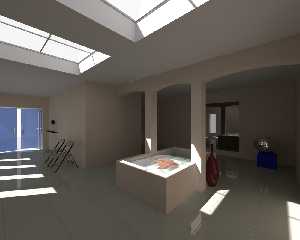
Just for a quick test I switched off the normals here. I doubled again
the luminosity and now the shadowy parts come out better.

I wonder if the leaking along the edges cannot be remedied by better
meshes. The present ones are of very low resolution (a pillar face is
just two triangles for instance). That might give problems. I am going
to have the walls through Silo and process them a bit.

Thomas
Post a reply to this message
Attachments:
Download 'test.png' (299 KB)
Preview of image 'test.png'
|
|
| |
| |
|
|
|
|
| |
| |
|
|
On 10-1-2014 9:59, Ive wrote:
> Am 10.01.2014 09:21, schrieb Thomas de Groot:
>> The bright dots are still a problem indeed. They are also present in
>> Christoph's image. I wonder if this is not light leaking along mesh
>> edges....
>>
> It is light leaking and it gets even worse when using higher quality
> (i.e. lower error_bound) settings. I guess the only solution is to
> remodel the room and give the walls and the ceiling some real thickness,
> thats what I did. As with CSG where it is a good idea to let walls and
> ceiling overlap.

You confirm my own guess. I am going to process the walls and pillars
objects in Silo.

>
>
>> presently, radiosity settings are:
>>
>>    radiosity {
>>        pretrace_start   0.08
>>        pretrace_end     0.004
>>        count            500, 1000
>>        nearest_count    10, 5
>>        error_bound      1
>>        recursion_limit  4
>>        low_error_factor 0.3
>>        gray_threshold   0.0
>>        minimum_reuse    0.015
>>        maximum_reuse    0.1
>>        brightness       1
>>        adc_bailout      1/100000
>>        normal           on
>>        media            off
>>        always_sample    off
>>        //max_sample     1.0
>>    }
>>
>
> When you add no_radiosity to all window/door glasses you'll get away
> with 2 recursions and faster render speed - without any visual impact.

Good idea. I didn't think of that possibility.

> And I'm not sure about this low adc_bailout within the radiosity block,
> if such low value is needed shouldn't it go into the global settings
> block itself - to keep the photons visible?
> Maybe Christoph can shed some light on this.

I put in that low adc_bailout in preparation to the photons/caustics
generation, as Christoph suggested earlier in this thread. I am a newbie
as far as this is concerned.

Thomas
Post a reply to this message
|
|
| |
| |
|
|
|
|
| |
| |
|
|
Am 10.01.2014 10:11, schrieb Thomas de Groot:
>> And I'm not sure about this low adc_bailout within the radiosity block,
>> if such low value is needed shouldn't it go into the global settings
>> block itself - to keep the photons visible?
>
> I put in that low adc_bailout in preparation to the photons/caustics
> generation, as Christoph suggested earlier in this thread.
>
Yes, thats what I'm saying too, but it seems you missed the "global
settings block itself" - and not the radiosity block within the global
settings.

-Ive
Post a reply to this message
|
|
| |
| |
|
|
|
|
| |
| |
|
|
Am 10.01.2014 09:21, schrieb Thomas de Groot:
> On 10-1-2014 1:13, Jörg 'Yadgar' Bleimann wrote:
>> Still, to me the overall light levels of the shadowed parts seems
>> somewhat too low (but this might be a question of my system's gamma -
>> currently 2.0)... and there are still some bright artifact dots along
>> the upper edges of the walls. What radiosity settings did you use?
>
> I agree about the light levels but I don't know how to compensate that
> other than by an additional light (I don't like) or by a stronger light
> maybe (I shall try). However, I personally like this and my impression
> is that this is a /natural/ situation. Comments welcome.

The proper approach to compensate would be to increase the walls'
brightness. /If/ you want to compensate at all. Looks natural enough to
me, too.

> The bright dots are still a problem indeed. They are also present in
> Christoph's image. I wonder if this is not light leaking along mesh
> edges.... Comments welcome.

It's not specifically leaking along mesh edges, but through /any/ edges.
Surprisingly, similar artifacts can be observed with CSG as well. Up to
this day I haven't really figured out what's causing this, but the
number of radiosity bounces (i.e. recursion_limit) does seem to play a
role (I think I've never seen these artifacts with recursion_limit 2 or
lower).
Post a reply to this message
|
|
| |
| |
|
|
|
|
| |
| |
|
|
Am 10.01.2014 10:18, schrieb Ive:
> Am 10.01.2014 10:11, schrieb Thomas de Groot:
>>> And I'm not sure about this low adc_bailout within the radiosity block,
>>> if such low value is needed shouldn't it go into the global settings
>>> block itself - to keep the photons visible?
>>
>> I put in that low adc_bailout in preparation to the photons/caustics
>> generation, as Christoph suggested earlier in this thread.
>>
> Yes, thats what I'm saying too, but it seems you missed the "global
> settings block itself" - and not the radiosity block within the global
> settings.

Actually I proposed to use such a low value in the global settings
/photons/ block.

The general global settings adc_bailout, as well as radiosity
adc_bailout, should both be ok with more conservative values.
Post a reply to this message
|
|
| |
| |
|
|
|
|
| |
| |
|
|
On 10-1-2014 12:47, clipka wrote:
> Am 10.01.2014 10:18, schrieb Ive:
>> Am 10.01.2014 10:11, schrieb Thomas de Groot:
>>>> And I'm not sure about this low adc_bailout within the radiosity block,
>>>> if such low value is needed shouldn't it go into the global settings
>>>> block itself - to keep the photons visible?
>>>
>>> I put in that low adc_bailout in preparation to the photons/caustics
>>> generation, as Christoph suggested earlier in this thread.
>>>
>> Yes, thats what I'm saying too, but it seems you missed the "global
>> settings block itself" - and not the radiosity block within the global
>> settings.
>
> Actually I proposed to use such a low value in the global settings
> /photons/ block.
>
> The general global settings adc_bailout, as well as radiosity
> adc_bailout, should both be ok with more conservative values.
>

Right. I missed that, as I am now entering unknown territory ;-)

I have some read-up on the matter to do, and some testing.

Thomas
Post a reply to this message
|
|
| |
| |
|
|
|
|
| |
| |
|
|
On 10-1-2014 12:44, clipka wrote:
> The proper approach to compensate would be to increase the walls'
> brightness. /If/ you want to compensate at all. Looks natural enough to
> me, too.

I agree and, as far as I am concerned, I do not want to compensate.
Increasing luminosity helps too while keeping the balance between light
and dark within acceptable limits.

>
>> The bright dots are still a problem indeed. They are also present in
>> Christoph's image. I wonder if this is not light leaking along mesh
>> edges.... Comments welcome.
>
> It's not specifically leaking along mesh edges, but through /any/ edges.
> Surprisingly, similar artifacts can be observed with CSG as well. Up to
> this day I haven't really figured out what's causing this, but the
> number of radiosity bounces (i.e. recursion_limit) does seem to play a
> role (I think I've never seen these artifacts with recursion_limit 2 or
> lower).
>
Well, from my latest render (not included here) I must say that leaking
also appears with recursion_limit 2.

Iirc, Christoph Hormann treated this problem in Megapov with a radiosity
patch.

Thomas
Post a reply to this message
|
|
| |
| |
|
|
From: Thomas de Groot
Subject: Re: LanuHum Global Test image - wip 3
Date: 11 Jan 2014 07:11:37
Message: <52d134f9@news.povray.org>
|
|
|
| |
| |
|
|
Does not seem much but I got rid of the light leaking. Following was done:

- meshes (walls, archs, windows) inc files through Poseray export as obj
files (weld vertices and recalculate normals);

- in Silo: giving thickness to the walls with the Shell utility (this
probably exists also in Blender?);

- in Silo: closing of the arch object and extending it a little bit
above the ceiling;

- in Silo: lowering the sky-windows which were /floating/ just above the
building letting light leak in-between;

- saving the different objects as obj files and through Poseray export
to POV as mesh2 files (recalculate normals);

- in the POV scene: replace the mesh{} objects by the mesh2{} ones;

Everything seems now to be in place to tackle the photons and caustics.

Thomas
Post a reply to this message
Attachments:
Download 'test.png' (558 KB)
Preview of image 'test.png'

|
|
| |
| |
|
|
|
|
| |
| |
|
|
Thomas de Groot <tho### [at] degrootorg> wrote:

>
> - in the POV scene: replace the mesh{} objects by the mesh2{} ones;
>

Povray slows down the miscalculation if matrix is used
I didn't find the solution to calculate normal*matrix for mesh2
Maurice Raybaud it is possible will make
Post a reply to this message
|
|
| |
| |
|
|
|
|
| |
| |
|
|
Am 11.01.2014 13:11, schrieb Thomas de Groot:

> Does not seem much but I got rid of the light leaking. Following was done:
>
Seems much to me.

BTW before you start a final render: your aspect ratio for the image is
wrong!

-Ive
Post a reply to this message
|
|
| |
| |
|
|
|
|
| |
| |
|
|
On 11-1-2014 15:41, Ive wrote:
> Am 11.01.2014 13:11, schrieb Thomas de Groot:
>
>> Does not seem much but I got rid of the light leaking. Following was
>> done:
>>
> Seems much to me.

I know ;-) it is a fair lot of work for only little specks of light, but
the result is essential of course.

>
> BTW before you start a final render: your aspect ratio for the image is
> wrong!

hmm... 1000x800 and using all camera parameters as given by the original
scene file. I shall change the right to -x*image_width/image_height and
see if that makes any difference.

Presently, I have difficulties with photons/caustics. THey do not show
on the ceiling...

Ultimately, I shall add a media to the scene to show some dust in the
atmosphere, but not too much.

Thomas
Post a reply to this message
|
|
| |
| |
|
|
From: Thomas de Groot
Subject: Re: LanuHum Global Test image - wip 3
Date: 11 Jan 2014 10:31:15
Message: <52d163c3@news.povray.org>
|
|
|
| |
| |
|
|
On 11-1-2014 14:20, LanuHum wrote:
> Thomas de Groot <tho### [at] degrootorg> wrote:
>
>>
>> - in the POV scene: replace the mesh{} objects by the mesh2{} ones;
>>
>
> Povray slows down the miscalculation if matrix is used
> I didn't find the solution to calculate normal*matrix for mesh2
> Maurice Raybaud it is possible will make
>
not essential presently, I used mesh2{} because Poseray does not export
to mesh{} (well, an older version does, but I prefer mesh2 anyway). The
result should be the same. One of the advantages of mesh2{} is that
/materials/ are given to the objects, so there are more possibilities
especially for translucent objects).

Thomas
Post a reply to this message
|
|
| |
| |
|
|
From: Thomas de Groot
Subject: Re: LanuHum Global Test image - wip 3
Date: 11 Jan 2014 10:34:59
Message: <52d164a3@news.povray.org>
|
|
|
| |
| |
|
|
On 11-1-2014 16:14, Thomas de Groot wrote:
> On 11-1-2014 15:41, Ive wrote:
>> BTW before you start a final render: your aspect ratio for the image is
>> wrong!
>
> hmm... 1000x800 and using all camera parameters as given by the original
> scene file. I shall change the right to -x*image_width/image_height and
> see if that makes any difference.
>

Hmmm, yes, that makes indeed a difference.

Thomas
Post a reply to this message
Attachments:
Download 'test.png' (133 KB)
Preview of image 'test.png'

|
|
| |
| |
|
|
|
|
| |
| |
|
|
Am 11.01.2014 16:14, schrieb Thomas de Groot:
> hmm... 1000x800 and using all camera parameters as given by the original
> scene file. I shall change the right to -x*image_width/image_height and
> see if that makes any difference.
>
well, 1000 / 800 makes 1.25 and I bet 100 PovCoins this is not what you
have. The squeezed chairs do give it away.


> Presently, I have difficulties with photons/caustics. THey do not show
> on the ceiling...
>
I cannot add anything that's not already in the docs: you need a photon
block within global_settings, make the main light source emit them, make
the water (and Suzanne) a target and shoot a few millions of them... and
do not forget to turn collect off for objects where it is not important
to speed up the render.

> Ultimately, I shall add a media to the scene to show some dust in the
> atmosphere, but not too much.
>
Thomas, you are a patient one ;)

But what *I* really would like to see is Suzanne made of tinted glass.


-Ive
Post a reply to this message
|
|
| |
| |
|
|
From: Thomas de Groot
Subject: Re: LanuHum Global Test image - wip 3 photons?
Date: 11 Jan 2014 10:55:47
Message: <52d16983$1@news.povray.org>
|
|
|
| |
| |
|
|
I have difficulties with photons/caustics. If you compare with
Christoph's image of the scene, you will see there how the water plays
on the ceiling. I cannot reproduce this.

I am using the following settings:

global_settings:
   photons {
     spacing 0.01
     gather 20, 100
     autostop 0
     jitter 0.5
     max_trace_level 15
     adc_bailout 1/10e5
   }

objects:
object {suzanne_ob
   interior {
     ior 1.5
     dispersion 1.05
     dispersion_samples 10
     caustics 1.0
     //fade_distance 5
     //fade_power 2
   }
   photons {
     target
     refraction on
     reflection on
     collect off
   }
}

object {water_ob
   interior {
     ior 1.3
     dispersion 1.05
     dispersion_samples 10
     caustics 1.0
     //fade_distance 5
     //fade_power 2
   }
   photons {
     target
     refraction on
     reflection on
     collect off
   }
}

light_source:
     photons { refraction on reflection on }

glass surfaces:
photons {pass_through}

How can I tweak these parameters?

Thomas
Post a reply to this message
|
|
| |
| |
|
|
|
|
| |
| |
|
|
On 11-1-2014 16:53, Ive wrote:
> Am 11.01.2014 16:14, schrieb Thomas de Groot:
>> hmm... 1000x800 and using all camera parameters as given by the original
>> scene file. I shall change the right to -x*image_width/image_height and
>> see if that makes any difference.
>>
> well, 1000 / 800 makes 1.25 and I bet 100 PovCoins this is not what you
> have. The squeezed chairs do give it away.

Yes, the difference comes from:
original right: <-1.0799999982118607, 0, 0> results in squeezed chairs
my (new) right: -x*image_width/image_height gives the chairs correctly

I suppose passing from Blender to POV introduces differences.

>
>
>> Presently, I have difficulties with photons/caustics. THey do not show
>> on the ceiling...
>>
> I cannot add anything that's not already in the docs: you need a photon
> block within global_settings, make the main light source emit them, make
> the water (and Suzanne) a target and shoot a few millions of them... and
> do not forget to turn collect off for objects where it is not important
> to speed up the render.

See my post below.

>
>> Ultimately, I shall add a media to the scene to show some dust in the
>> atmosphere, but not too much.
>>
> Thomas, you are a patient one ;)

I am, if the render time remains manageable. Somehow, presently I am at
about 1 hour.

>
> But what *I* really would like to see is Suzanne made of tinted glass.

yes, that is still something I need to tweak.

Thomas
Post a reply to this message
|
|
| |
| |
|
|
|
|
| |
| |
|
|
Am 11.01.2014 16:55, schrieb Thomas de Groot:
> I have difficulties with photons/caustics. If you compare with
> Christoph's image of the scene, you will see there how the water plays
> on the ceiling. I cannot reproduce this.

Don't forget to make the ceiling windows pass_through.
Post a reply to this message
|
|
| |
| |
|
|
|
|
| |
| |
|
|
Le 14-01-10 04:06, Thomas de Groot a écrit :
> Just for a quick test I switched off the normals here. I doubled again
> the luminosity and now the shadowy parts come out better.
>
> I wonder if the leaking along the edges cannot be remedied by better
> meshes. The present ones are of very low resolution (a pillar face is
> just two triangles for instance). That might give problems. I am going
> to have the walls through Silo and process them a bit.
>
> Thomas

A pilar face using only 2 triangles don't mean low quality as those two
are realy all that is needed.

Some slight beveling of the edges /may/ help some.

Another solution is to add something behind the mesh, or give it some
actual thickness, especialy near the corners where some radiosity
samples can sample areas of the bright sky or that receive direct
illumination.


Alain
Post a reply to this message
|
|
| |
| |
|
|
|
|
| |
| |
|
|
On 11-1-2014 22:27, Alain wrote:
> A pilar face using only 2 triangles don't mean low quality as those two
> are realy all that is needed.

Yes, I thought so too after I posted :-)

>
> Some slight beveling of the edges /may/ help some.

Editing the object, it appears that there /is/ some bevelling present on
the arches and pillars.

>
> Another solution is to add something behind the mesh, or give it some
> actual thickness, especialy near the corners where some radiosity
> samples can sample areas of the bright sky or that receive direct
> illumination.

Has been done since.

Thomas
Post a reply to this message
|
|
| |
| |
|
|
From: Thomas de Groot
Subject: Re: LanuHum Global Test image - wip 3 photons?
Date: 12 Jan 2014 03:12:04
Message: <52d24e54@news.povray.org>
|
|
|
| |
| |
|
|
On 11-1-2014 20:00, clipka wrote:
> Am 11.01.2014 16:55, schrieb Thomas de Groot:
>> I have difficulties with photons/caustics. If you compare with
>> Christoph's image of the scene, you will see there how the water plays
>> on the ceiling. I cannot reproduce this.
>
> Don't forget to make the ceiling windows pass_through.
>

They are.

Thomas
Post a reply to this message
|
|
| |
| |
|
|
From: Thomas de Groot
Subject: Re: LanuHum Global Test image - wip 4
Date: 12 Jan 2014 07:14:01
Message: <52d28709@news.povray.org>
|
|
|
| |
| |
|
|
After improving suzanne's and the water's finish, and adding a light
scattering media to the air, this is what I get.

I think I need to move the light_source a bit again. Moving the
skylights increased the shadows on the water surface.

Over all, I am well satisfied but before going for the final render I
would like your opinions.

Thomas
Post a reply to this message
Attachments:
Download 'test.png' (427 KB)
Preview of image 'test.png'

|
|
| |
| |
|
|
|
|
| |
| |
|
|
Thomas de Groot <tho### [at] degrootorg> wrote:

>
> Over all, I am well satisfied but before going for the final render I
> would like your opinions.
>
> Thomas

I don't understand, what is reflected in a mirror in a floor? From what there
the washed-away light spot?
Post a reply to this message
|
|
| |
| |
|
|
|
|
| |
| |
|
|
Thomas de Groot <tho### [at] degrootorg> wrote:
> Does not seem much but I got rid of the light leaking. Following was done:
>
> - meshes (walls, archs, windows) inc files through Poseray export as obj
> files (weld vertices and recalculate normals);
>
> - in Silo: giving thickness to the walls with the Shell utility (this
> probably exists also in Blender?);
>
> - in Silo: closing of the arch object and extending it a little bit
> above the ceiling;
>
> - in Silo: lowering the sky-windows which were /floating/ just above the
> building letting light leak in-between;
>
> - saving the different objects as obj files and through Poseray export
> to POV as mesh2 files (recalculate normals);
>
> - in the POV scene: replace the mesh{} objects by the mesh2{} ones;
>
> Everything seems now to be in place to tackle the photons and caustics.
>
> Thomas

Looking really nice Thomas, I like the subtle media beams! Don't forget to add
pass_through to the photon blocks for the skylights and the water (to allow
reflected caustics on arch and ceiling).

I'm having a go at this myself and found that the walls had nearly 10,000 stray
verts in the mesh that needed merging; and letting PoseRay re-process those
Blender meshes makes the textures so much easier to manage! WIP currently
rendering...

Cheers,
Rob
-------------------------------------------------
Post a reply to this message
|
|
| |
| |
|
|
|
|
| |
| |
|
|
Am 12.01.2014 17:11, schrieb LanuHum:
> Thomas de Groot <tho### [at] degrootorg> wrote:
>
>>
>> Over all, I am well satisfied but before going for the final render I
>> would like your opinions.
>>
>> Thomas
>
> I don't understand, what is reflected in a mirror in a floor? From what there
> the washed-away light spot?

 From what I understand, that's blurred reflections on the floor tiles,
using an approach dubbed "micronormals": You use standard specular
reflection on a texture, but also add some normal perturbation (using a
pattern with some randomness), scaled so small that the structure is
smaller than the image resolution; last not least you also make sure
there is sufficient oversampling (often via a bit of focal blur, or
plenty of anti-aliasing; sometimes it is also done by using an average
texture comprised of countless duplicates of the base texture with
random differences in the normal perturbation).
Post a reply to this message
|
|
| |
| |
|
|
|
|
| |
| |
|
|
On 12.01.2014 13:13, Thomas de Groot wrote:

> I think I need to move the light_source a bit again. Moving the
> skylights increased the shadows on the water surface.

The image is good but shouldn't light source / skylights be in
the same place as the comparison renders for this test scene? It is
hard to compare the images otherwise, especially the water looks very
different with half the basin in shadow.
Post a reply to this message
|
|
| |
| |
|
|
|
|
| |
| |
|
|
Am 12.01.2014 13:13, schrieb Thomas de Groot:
> Over all, I am well satisfied but before going for the final render I
> would like your opinions.
>
Well, those light beams look always nice but I ask myself: do they
really add anything to *this* particular scene.
And where are the caustics on the ceiling, IMO for this scene a more
interesting effect - and your photon settings look fine to me, no idea
whats wrong there, I did get them immediately.

-Ive
Post a reply to this message
|
|
| |
| |
|
|
From: clipka
Subject: Re: LanuHum Global Test image - wip 3 photons?
Date: 12 Jan 2014 16:17:20
Message: <52d30660@news.povray.org>
|
|
|
| |
| |
|
|
Am 12.01.2014 09:12, schrieb Thomas de Groot:
> On 11-1-2014 20:00, clipka wrote:
>> Am 11.01.2014 16:55, schrieb Thomas de Groot:
>>> I have difficulties with photons/caustics. If you compare with
>>> Christoph's image of the scene, you will see there how the water plays
>>> on the ceiling. I cannot reproduce this.
>>
>> Don't forget to make the ceiling windows pass_through.
>>
>
> They are.

What's your adc_bailout setting in the global photons block?
Post a reply to this message
|
|
| |
| |
|
|
|
|
| |