|
|
|
|
|
|
| |
| |
|
|
|
|
| |
| |
|
|
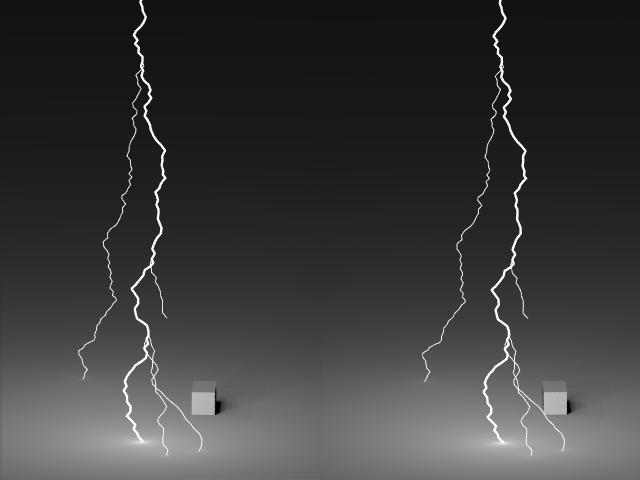
> I disagree . . . the left and right images are exactly as they should be . .
Indeed, I have to say it was a bit difficult to get the whole thing working with
my eyes, but just took me a full 15 secs of concentration!
--
+--------------------------------+---------------------------+
| Simon Lemieux | http://666Mhz.myip.org/ |
| Email : lem### [at] yahoo com | Povray and OpenGL Gallery |
+--------------------------------+---------------------------+ com | Povray and OpenGL Gallery |
+--------------------------------+---------------------------+
Post a reply to this message
|
|
| |
| |
|
|
|
|
| |
| |
|
|
"yooper" <Out### [at] huntelnet> wrote :
>
> I think the problem . . . the inability to *see* it is . . . just a matter
> of how you look at it and what you expect to see. The perception of
> depth is a function of the brain . . . no such depth exists in the pic . .
.
> only in our minds.
Most of us on this server are -very- familiar with the basics of 3d
viewing. I was able to find the proper focus cross-eyed in about 2 seconds
but could tell that the scene was wrong (the block tried to move in front of
lightening) so I shifted to wall-eyed and it snapped into proper depth.
You may find that, if you attempt to see it wall eyed, the sense of
depth is more obvious and you will easily be able to tell that it is not set
up for cross-eyed viewing.
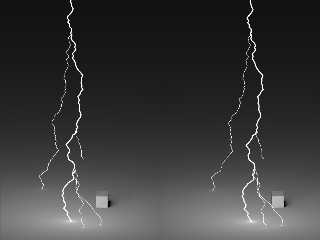
Or, if you are not adept at wall-eyed viewing, you could shift the
images like Ron did and find that they work a lot better. Here, I'll do it
for you.
Post a reply to this message
Attachments:
Download 'lightening.png' (34 KB)
Preview of image 'lightening.png'
|
|
| |
| |
|
|
|
|
| |
| |
|
|
You may find that, if you attempt to see it wall eyed, the sense of
depth is more obvious and you will easily be able to tell that it is not set
up for cross-eyed viewing.
Or, if you are not adept at wall-eyed viewing, you could shift the
images like Ron did and find that they work a lot better. Here, I'll do it
for you.
---------
Now, see ... this doesn't work for me ... now I see the box in front of
the lightning. As for wall-eyed or cross-eyed, I only know of one
way to view them ... the way Phil had 'em works for me ... and I don't
know what it's called ... or care ;). I just wanna do whatever it takes
to simulate the left & right views and fool the brain into seeing it.
Anyway ... as for the pic ... it's nice and would look pretty cool as an
animation. Maybe a hint of blue here and there would *hotten* it.
What's the lighting, Phil? Nice how the ground is lit near the strike.
Y
Post a reply to this message
|
|
| |
| |
|
|
|
|
| |
| |
|
|
"yooper" <Out### [at] huntelnet> wrote in message
news:3af4e54f@news.povray.org...
>
> Now, see ... this doesn't work for me ... now I see the box in front of
> the lightning
In that case you are viewing them wall-eyed, by relaxing your eyes until
they become parallel (or, in my case, a few degrees wider than parallel),
instead of cross-eyed, stressing them to point more towards each other.
To see them cross-eyed, try holding your finger about 6 in from your
eyes and look at the tip. Then, while keeping your finger in focus, look at
the revised image I posted.
Cross-eyed works better for images whose centers are further apart then
the centers of the average person's eyes. Wall-eyed works best for small
images or those computer generated composite images.
Post a reply to this message
|
|
| |
| |
|
|
|
|
| |
| |
|
|
Are you going to post the code?
--
#version unofficial MegaPov.7;#local Q=seed(7);#local B=<-2,2,5>;#local
E=<2,-
2,5>;#while(vlength(B-E)>.1)#local S=B;#local B=B+<rand(Q),rand(Q),rand(Q)
>/20;#local
B=B-2*(B-S)*(vlength(B-E)>vlength(S-E));glow{radius.07location<B.y
,-B.x,B.z>size.1}glow{radius.07size.1location B}#end// Nekar Xenos
Post a reply to this message
|
|
| |
| |
|
|
|
|
| |
| |
|
|
> Are you going to post the code?
As you asked so very nicely!
Here is a POV file including the lightening macro...
Phil
Post a reply to this message
Attachments:
Download 'lightening.pov.txt' (5 KB)
|
|
| |
| |
|
|
|
|
| |
| |
|
|
Phil,
Thank you very much.
Nekar
--
#local N=<-4,8,20>;#local K=<4,-8,20>;#local R=seed(0);union{#while((K-N).x>0)
#local X=N;#local N=N+<rand(R),rand(R),1>/30;#local N=(vlength(N-K)<vlength(X-K
)?N:2*X-N);sphere{<N.y,-N.x,N.z>,.2}sphere{N,.2}sphere{<-N.x-8,N.y,N.z>,.1//-NX
pigment{rgb N}}sphere{<N.x+8,-N.y,N.z>,.1 pigment{rgb N}}#end pigment{rgb 9}}
Post a reply to this message
|
|
| |
| |
|
|
|
|
| |
| |
|
|
I see I need "macros.inc" for this. Could you be so kind as to send me this file
as well?
Thank you
Nekar
--
#local N=<-4,8,20>;#local K=<4,-8,20>;#local R=seed(0);union{#while((K-N).x>0)
#local X=N;#local N=N+<rand(R),rand(R),1>/30;#local N=(vlength(N-K)<vlength(X-K
)?N:2*X-N);sphere{<N.y,-N.x,N.z>,.2}sphere{N,.2}sphere{<-N.x-8,N.y,N.z>,.1//-NX
pigment{rgb N}}sphere{<N.x+8,-N.y,N.z>,.1 pigment{rgb N}}#end pigment{rgb 9}}
Post a reply to this message
|
|
| |
| |
|
|
|
|
| |
| |
|
|
> I see I need "macros.inc" for this. Could you be so kind as to send me
this file
> as well?
You don't need it... just delete the #include line...
Phil
Post a reply to this message
|
|
| |
| |
|
|
|
|
| |
| |
|
|
Thanks!
Nekar X
--
#local N=<-4,8,20>;#local K=<4,-8,20>;#local R=seed(0);union{#while((K-N).x>0)
#local X=N;#local N=N+<rand(R),rand(R),1>/30;#local N=(vlength(N-K)<vlength(X-K
)?N:2*X-N);sphere{<N.y,-N.x,N.z>,.2}sphere{N,.2}sphere{<-N.x-8,N.y,N.z>,.1//-NX
pigment{rgb N}}sphere{<N.x+8,-N.y,N.z>,.1 pigment{rgb N}}#end pigment{rgb 9}}
Post a reply to this message
|
|
| |
| |
|
|
|
|
| |
|
|