|
|
|
|
|
|
| |
| |
|
|
|
|
| |
| |
|
|
Hello, I have a question: how to make a blurred reflection in Povray version
3.7?
Post a reply to this message
Attachments:
Download 'rdt_20251015_1132498961558942031733869.jpg.png' (2912 KB)
Preview of image 'rdt_20251015_1132498961558942031733869.jpg.png'

|
|
| |
| |
|
|
|
|
| |
| |
|
|
"Cossack " <nomail@nomail> wrote:
> Hello, I have a question: how to make a blurred reflection in Povray version
> 3.7?

The method I know of is here, under the heading: "Is blurred reflection possible
in POV-ray?"

https://wiki.povray.org/content/Knowledgebase:Language_Questions_and_Tips#Topic_13

It works by averaging multiple almost-identical textures, each with a
different 'normal', to create the blur.
Post a reply to this message
|
|
| |
| |
|
|
|
|
| |
| |
|
|
"Cossack " <nomail@nomail> wrote:
> Hello, I have a question: how to make a blurred reflection in Povray version
> 3.7?

Use a very scaled down normal and keep the "hight" of it relative big. Use a
patter like granite or noise like

ingo
Post a reply to this message
|
|
| |
| |
|
|
|
|
| |
| |
|
|
Le 2026-05-26 à 13:28, Cossack a écrit :
> Hello, I have a question: how to make a blurred reflection in Povray version
> 3.7?

Work with versions 3.3+.
Two ways :
1) Micro-normals. Use some normal, like granite, scaled very small. Need
to use antialiasing to work.
2) Averaged normals. Apply many normals randomly displaced. Really slow
down the render. You must avoid inter reflections between surfaces with
blurred refection. Use no_image and no_reflection this way : One object
with the averaged normals and the no_reflection attribute. Don't show in
reflections.
A second identical object with micro-normals or just normal reflection
instead of the averaged normals, and the no_image attribute. Not visible
directly, but shows in reflections.

Micro-normals work best with some averaging. Normally, 5 to 10 instances
are OK.
Averaged normals usually demand 200+ instances.

=====================================================

With version 3.8 and radiosity, you can get blurred metallic reflection
using brilliance.
Need to add «brilliance on» in the radiosity block.
Need the surface to have a pretty high brilliance. Typically 100 to 1000.
This blurring seems to be similar to phong highlights : Higher value =
more and sharper reflection.
Post a reply to this message
|
|
| |
| |
|
|
From: kurtz le pirate
Subject: Re: how to make a blurry reflection?
Date: 29 May 2026 12:18:37
Message: <6a19bc5d@news.povray.org>
|
|
|
| |
| |
|
|
On 26/05/2026 23:28, Kenneth wrote:
> "Cossack " <nomail@nomail> wrote:
>> Hello, I have a question: how to make a blurred reflection in Povray version
>> 3.7?
>
> The method I know of is here, under the heading: "Is blurred reflection possible
> in POV-ray?"
>
> https://wiki.povray.org/content/Knowledgebase:Language_Questions_and_Tips#Topic_13
>
> It works by averaging multiple almost-identical textures, each with a
> different 'normal', to create the blur.
>

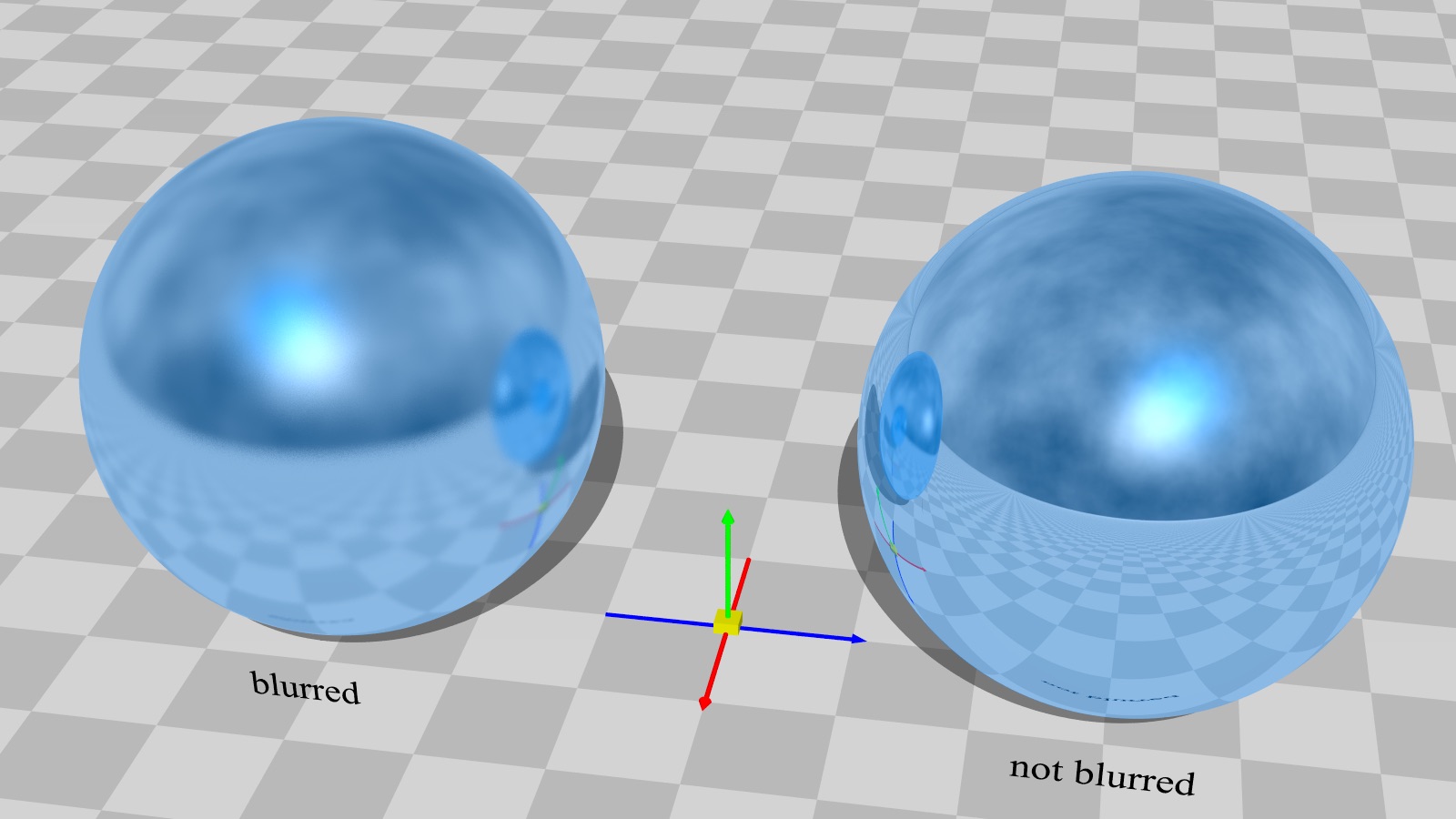
Thanks, Kenneth, for reminding us of this tip. I’d never tried it
before, but you can get good results quickly with this method.

#declare BlurAmount = 0.15;
#declare BlurSamples = 40;

normal {
   wrinkles BlurAmount
   translate <rand(S),rand(S),rand(S)>/2
   scale 0.001
   }


--
kurtz le pirate
compagnie de la banquise
Post a reply to this message
Attachments:
Download 'blurred.jpeg.jpg' (144 KB)
Preview of image 'blurred.jpeg.jpg'
|
|
| |
| |
|
|
|
|
| |
| |
|
|
kurtz le pirate <kur### [at] free fr> wrote:
> On 26/05/2026 23:28, Kenneth wrote:
> > "Cossack " <nomail@nomail> wrote:
> >> Hello, I have a question: how to make a blurred reflection in Povray version
> >> 3.7?
> >
> > The method I know of is here, under the heading: "Is blurred reflection possible
> > in POV-ray?"
> >
> > https://wiki.povray.org/content/Knowledgebase:Language_Questions_and_Tips#Topic_13
> >
> > It works by averaging multiple almost-identical textures, each with a
> > different 'normal', to create the blur.
> >
>
> Thanks, Kenneth, for reminding us of this tip. I’d never tried it
> before, but you can get good results quickly with this method.
>
> #declare BlurAmount = 0.15;
> #declare BlurSamples = 40;
>
> normal {
> wrinkles BlurAmount
> translate <rand(S),rand(S),rand(S)>/2
> scale 0.001
> }
>
>
>
>
> --
> kurtz le pirate
> compagnie de la banquise
It's a shame that I have a crappy phone, and my PC has passed on to a better
world.;] fr> wrote:
> On 26/05/2026 23:28, Kenneth wrote:
> > "Cossack " <nomail@nomail> wrote:
> >> Hello, I have a question: how to make a blurred reflection in Povray version
> >> 3.7?
> >
> > The method I know of is here, under the heading: "Is blurred reflection possible
> > in POV-ray?"
> >
> > https://wiki.povray.org/content/Knowledgebase:Language_Questions_and_Tips#Topic_13
> >
> > It works by averaging multiple almost-identical textures, each with a
> > different 'normal', to create the blur.
> >
>
> Thanks, Kenneth, for reminding us of this tip. I’d never tried it
> before, but you can get good results quickly with this method.
>
> #declare BlurAmount = 0.15;
> #declare BlurSamples = 40;
>
> normal {
> wrinkles BlurAmount
> translate <rand(S),rand(S),rand(S)>/2
> scale 0.001
> }
>
>
>
>
> --
> kurtz le pirate
> compagnie de la banquise
It's a shame that I have a crappy phone, and my PC has passed on to a better
world.;]
Post a reply to this message
|
|
| |
| |
|
|
|
|
| |
| |
|
|
"Cossack " <nomail@nomail> wrote:
> Hello, I have a question: how to make a blurred reflection in Povray version
> 3.7?

This file contains macros that implement the solution that Kenneth referred to:
  https://github.com/CousinRicky/POV-RC3Metal/blob/main/rc3metal.inc

RC3Metal_Blur_t() is a naive implementation.  It's perfectly fine for a simple
object with no other reflective object in the scene, but it can bring your CPU
to its knees if there are mutual blurred reflections.

RC3Metal_Blur() uses the optimization that Alain described.

The argument t_Base is the reflective texture that you want to blur.

Note that if t_Base has a normal, the above macros will not work as expected.
Use macros RC3Metal_Normal_blur_t() or RC3Metal_Normal_blur() if you want a
blurred normal.

The entire library, including documentation and examples, can be downloaded at:
  https://github.com/CousinRicky/POV-RC3Metal
Post a reply to this message
|
|
| |
| |
|
|
|
|
| |
| |
|
|
kurtz le pirate <kur### [at] freefr> wrote:
> On 26/05/2026 23:28, Kenneth wrote:
> > "Cossack " <nomail@nomail> wrote:
> >> Hello, I have a question: how to make a blurred reflection in Povray version
> >> 3.7?
> >
> > The method I know of is here, under the heading: "Is blurred reflection possible
> > in POV-ray?"
> >
> > https://wiki.povray.org/content/Knowledgebase:Language_Questions_and_Tips#Topic_13
> >
> > It works by averaging multiple almost-identical textures, each with a
> > different 'normal', to create the blur.
> >
>
> Thanks, Kenneth, for reminding us of this tip. I’d never tried it
> before, but you can get good results quickly with this method.
>
> #declare BlurAmount = 0.15;
> #declare BlurSamples = 40;
>
> normal {
>    wrinkles BlurAmount
>    translate <rand(S),rand(S),rand(S)>/2
>    scale 0.001
>    }
>
>
>
>
> --
> kurtz le pirate
> compagnie de la banquise

I managed to learn this result with 3 samples
Post a reply to this message
Attachments:
Download 'ls9.png' (588 KB)
Preview of image 'ls9.png'

|
|
| |
| |
|
|
|
|
| |
| |
|
|
Le 2026-05-30 à 23:47, Cousin Ricky a écrit :
> "Cossack " <nomail@nomail> wrote:
>> Hello, I have a question: how to make a blurred reflection in Povray version
>> 3.7?
>
> This file contains macros that implement the solution that Kenneth referred to:
>    https://github.com/CousinRicky/POV-RC3Metal/blob/main/rc3metal.inc
>
> RC3Metal_Blur_t() is a naive implementation.  It's perfectly fine for a simple
> object with no other reflective object in the scene, but it can bring your CPU
> to its knees if there are mutual blurred reflections.

How to avoid this problem :
1) Give the objects with the blurred reflection the no_reflection attribute.
2) Create a second version of the objects with just normal reflection,
or the micro-normals based blurred reflection, and the no_image attribute.

>
> RC3Metal_Blur() uses the optimization that Alain described.
>
> The argument t_Base is the reflective texture that you want to blur.
>
> Note that if t_Base has a normal, the above macros will not work as expected.
> Use macros RC3Metal_Normal_blur_t() or RC3Metal_Normal_blur() if you want a
> blurred normal.
>
> The entire library, including documentation and examples, can be downloaded at:
>    https://github.com/CousinRicky/POV-RC3Metal
>
Post a reply to this message
|
|
| |
| |
|
|
|
|
| |
| |
|
|
I ran some comparison tests of two of the blur methods-- averaging full TEXTURES
vs. simpler averaged NORMALS in a single texture. I had never achieved decent
results with the latter method, until I realized that strong antialiasing was
*required* to eliminate its 'noisy' appearance. For both methods, I used a very
small-scaled 'bumps' pattern; 'granite' looks a bit better but is slower to
render.

(For the averaged-textures method, I also used max_trace_level 4 in
global_settings; the default is 5, but higher values really slow down the render
when there are other reflective objects in a scene.)

I was surprised to see that the averaged-normals method looks OK when using only
one normal (or two or three averaged copies at most.) A normal can be thought of
as a grayscale pattern (either 0.0 to 1.0 or -0.5 to +0.5 ?)-- and averaging a
lot of offset copies really just 'smooths them out' to a flat median value.
.....which looks almost like no normal effect at all. The averaged-TEXTURES
method-- even though it uses multiple averaged normals as well-- is a different
situation, because it creates averaged *reflections* too.

Both methods produce a nice blur; the only real difference is render time-- and
the averaged-textures method does not necessarily need antialiasing, depending
on the number of textures used. But if you are going to use AA anyway, the
averaged-normals method is faster. (For its AA, I used the default Method 1,
with Antialias_Threshold 0.1 and Antialias_Depth 8. The current 3.8 betas have a
new AA Method 3, which looks better and is faster.)  As an added bonus, the
averaged-normals method does not 'blur' phong/specular highlights.

For the averaged-textures method, Alain's suggestion of using TWO overlapping
objects for the blurred sphere (the primary one with with no_reflection, the 2nd
one with no blur  and no_image) is an excellent one-- it vastly speeds up the
render (when there are other reflective objects in the scene), even though the
blurred object shows up on the other objects as non-blurred. That is not very
noticeable IMO, unless you are specifically looking for it.  The averaged
NORMALS method does not really need this trick (or the restricted
max_trace_level value) since it uses only *one* reflective texture, regardless
of its multiple normals.

--------------------------
I used the following values for both test methods:
#declare Norm_Scale = .0001;
#declare Blur_Softness = .35; // how 'smeared out' the blurring is
#declare Multiplier = 60; // 60 for A), 3 or even 1 for B)
#declare S = seed(13);

#declare TEX_1 =
texture{
     pigment {rgb .8}
     finish {ambient 0 emission 0 diffuse .2  reflection .7
             phong 1 phong_size 14}
       }


A)  Averaged TEXTURES example:
#declare C = 1;
sphere{0,1
   texture{
      average
      texture_map{
      #while(C <= Multiplier)
          [1
          TEX_1
          normal{
              bumps
              scale Norm_Scale
              bump_size Blur_Softness
              translate <rand(S),rand(S),rand(S)>*10
                }
          ]
     #declare C = C+1;
     #end
                }
          }
       }


B) Averaged NORMALS example:
#declare C = 1;
sphere{0,1
texture{TEX_1}
    normal{
       average
       normal_map{
       #while(C <= Multiplier)
          [1
          bumps
          bump_size Blur_Softness
          scale Norm_Scale
          translate <rand(S),rand(S),rand(S)>*10
          ]
       #declare C = C+1;
       #end
                 }
          }
   }
Post a reply to this message
Attachments:
Download 'blurred_reflections_tests_kw.jpg' (412 KB)
Preview of image 'blurred_reflections_tests_kw.jpg'

|
|
| |
| |
|
|
|
|
| |
| |
|
|
"Kenneth" <kdw### [at] gmailcom> wrote:
>
> As an added bonus, the averaged-normals method does not 'blur' phong/specular
> highlights.
>

Sorry, I was mistaken; some further tests show that those highlights *do* appear
to be blurred. It's somewhat difficult to see, depending on the amount of
blurring used and the size of the highlight.
Post a reply to this message
|
|
| |
| |
|
|
|
|
| |
| |
|
|
hi,

"Kenneth" <kdw### [at] gmailcom> wrote:
> I ran some comparison tests of two of the blur methods ...
> I was surprised to see ...
> Both methods produce a nice blur; the only real difference is render time ...

thank you for the "investigation", summarising, and the scene code.  neat.  I'd
like to see this knowledge, the information, go into the corresponding HowTo[*]
article, to extend and improve that.  would you be willing (have the time ?) to
provide "content" ?

[*] <wiki.povray.org/content/HowTo:Manual_focal_blur>


regards, jr.
Post a reply to this message
|
|
| |
| |
|
|
|
|
| |
| |
|
|
Alain Martel <kua### [at] videotronca> wrote:

> =====================================================
>
> With version 3.8 and radiosity, you can get blurred metallic reflection
> using brilliance.
> Need to add «brilliance on» in the radiosity block.
> Need the surface to have a pretty high brilliance. Typically 100 to 1000.
> This blurring seems to be similar to phong highlights : Higher value =
> more and sharper reflection.

Do you have example images of the results? I had never heard of this method
which seems awesome as it allows all other normal mapping to still be taken
advantage of, doesn't it? besides it somewhat feels physically correct... is it?
Post a reply to this message
|
|
| |
| |
|
|
|
|
| |