|
|
|
|
|
|
| |
| |
|
|
|
|
| |
| |
|
|
I need the help of a Matrix Master.

I am a regular user of Doctor John's FieldCam macro which enables
slanting architecture to look straight. It simulates the professional
cameras where this adjustment can be done through the lenses.

The macro works perfectly... as long as your scene camera is situated
about the origin of the Y-axis. Recently, I have been working on scenes
where the camera is situated at about y=170.00, and strange things
happen: the camera is moved upwards and forwards, the more so as
elevation gets greater.

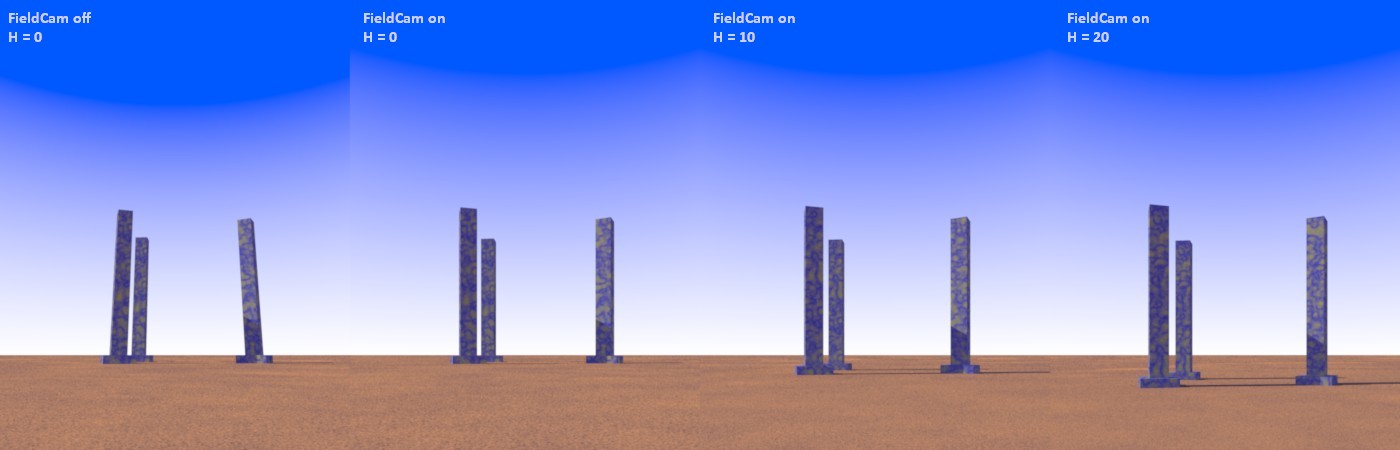
To illustrate this, I have attached a little test scene and an image
showing the problem. H is the value for the elevation of the scene
elements along the Y-axis.

I can correct this by adding a translate after the "NoFall" transform in
the camera code, but I assume that this could better be done within the
"NoFall" matrix. I have not the slightest idea how to do this.

Thanks for any help.

--
Thomas
Post a reply to this message
Attachments:
Download 'dj_fieldcam_test.pov.txt' (7 KB)
Download 'dj_fieldcam_testx.jpg' (66 KB)
Preview of image 'dj_fieldcam_testx.jpg'
|
|
| |
| |
|
|
|
|
| |
| |
|
|
Hi Thomas,
I have never used Doctor John's macro but a quick look at it make me think it is
not supposed to work if the Y coordinates of you camera location and look_at do
not have the same value.
Changing your script as follow:
#case (2)
#declare CamHeight = 1;
#declare CamLoc = <2000.0, H+CamHeight, -2400.0>;
#declare CamLookAt = <2000-100, H+CamHeight, -2400+100>;
#end
and testing with the same H values as you example and FC on gives me correct
images (as far as I understand), cf attachment.
I also don't know if you really need to have a look_at at a different height...
I hope this will help you.
Thomas de Groot <tho### [at] degroot org> wrote:
> I need the help of a Matrix Master.
>
> I am a regular user of Doctor John's FieldCam macro which enables
> slanting architecture to look straight. It simulates the professional
> cameras where this adjustment can be done through the lenses.
>
> The macro works perfectly... as long as your scene camera is situated
> about the origin of the Y-axis. Recently, I have been working on scenes
> where the camera is situated at about y=170.00, and strange things
> happen: the camera is moved upwards and forwards, the more so as
> elevation gets greater.
>
> To illustrate this, I have attached a little test scene and an image
> showing the problem. H is the value for the elevation of the scene
> elements along the Y-axis.
>
> I can correct this by adding a translate after the "NoFall" transform in
> the camera code, but I assume that this could better be done within the
> "NoFall" matrix. I have not the slightest idea how to do this.
>
> Thanks for any help.
>
> --
> Thomas org> wrote:
> I need the help of a Matrix Master.
>
> I am a regular user of Doctor John's FieldCam macro which enables
> slanting architecture to look straight. It simulates the professional
> cameras where this adjustment can be done through the lenses.
>
> The macro works perfectly... as long as your scene camera is situated
> about the origin of the Y-axis. Recently, I have been working on scenes
> where the camera is situated at about y=170.00, and strange things
> happen: the camera is moved upwards and forwards, the more so as
> elevation gets greater.
>
> To illustrate this, I have attached a little test scene and an image
> showing the problem. H is the value for the elevation of the scene
> elements along the Y-axis.
>
> I can correct this by adding a translate after the "NoFall" transform in
> the camera code, but I assume that this could better be done within the
> "NoFall" matrix. I have not the slightest idea how to do this.
>
> Thanks for any help.
>
> --
> Thomas
Post a reply to this message
Attachments:
Download 'test.png' (1255 KB)
Preview of image 'test.png'

|
|
| |
| |
|
|
|
|
| |
| |
|
|
Sorry, after sending my previous message and looking at yours again I think I
have misunderstood what this macro does.
Sorry for the useless post...


Thomas de Groot <tho### [at] degrootorg> wrote:
> I need the help of a Matrix Master.
>
> I am a regular user of Doctor John's FieldCam macro which enables
> slanting architecture to look straight. It simulates the professional
> cameras where this adjustment can be done through the lenses.
>
> The macro works perfectly... as long as your scene camera is situated
> about the origin of the Y-axis. Recently, I have been working on scenes
> where the camera is situated at about y=170.00, and strange things
> happen: the camera is moved upwards and forwards, the more so as
> elevation gets greater.
>
> To illustrate this, I have attached a little test scene and an image
> showing the problem. H is the value for the elevation of the scene
> elements along the Y-axis.
>
> I can correct this by adding a translate after the "NoFall" transform in
> the camera code, but I assume that this could better be done within the
> "NoFall" matrix. I have not the slightest idea how to do this.
>
> Thanks for any help.
>
> --
> Thomas
Post a reply to this message
|
|
| |
| |
|
|
|
|
| |
| |
|
|
hi,

Thomas de Groot <tho### [at] degrootorg> wrote:
> I need the help of a Matrix Master.

that disqualifies me immediately.  :-)  however, I did write a simple calculator
UI to help me see how a change to the matrix affects a point.  maybe it and or
the thread will be of use.

<http://news.povray.org/povray.binaries.misc/thread/%3Cweb.5c226659252b677e48892b50%40news.povray.org%3E/>

one pitfall: the range of (matrix) values is limited to range -10.0 to 10.0.  if
you need larger values, edit the script in line 11.


regards, jr.
Post a reply to this message
|
|
| |
| |
|
|
|
|
| |
| |
|
|
Thomas de Groot <tho### [at] degrootorg> wrote:

> I am a regular user of Doctor John's FieldCam macro which enables
> slanting architecture to look straight. It simulates the professional
> cameras where this adjustment can be done through the lenses.

I think it's actually accomplished using the adjustable film plane of the view
camera.
The 3-book series on negative, print, and camera by Ansel Adams ought to
describe it fully and clearly.
<hint> One might think there are PDF's of those available...   ;) </hint>

> The macro works perfectly... as long as your scene camera is situated
> about the origin of the Y-axis. Recently, I have been working on scenes
> where the camera is situated at about y=170.00, and strange things
> happen: the camera is moved upwards and forwards, the more so as
> elevation gets greater.

Is this a custom version that you edited yourself, or a later version of the
original?
All I found was this:
http://news.povray.org/povray.text.scene-files/thread/%3Cweb.3e0c736a1f1273cdb29393de0%40news.povray.org%3E/

I'm puzzled by this:
#local VCorr = pow(vlength(CD), 2)/pow(HypoXZ, 2);
and its use in the matrix.  Seems to be some long-winded way to compute y^2 or a
multiple of it....

Maybe try
#local VCorr = CP.y;       ?    Totally guessing.

> To illustrate this, I have attached a little test scene and an image
> showing the problem. H is the value for the elevation of the scene
> elements along the Y-axis.

I don't really understand what I'm looking at in the scene, nor how the macro
corrects the one column and not the others...

> I can correct this by adding a translate after the "NoFall" transform in
> the camera code, but I assume that this could better be done within the
> "NoFall" matrix. I have not the slightest idea how to do this.

shear matrix:
http://www.f-lohmueller.de/pov_tut/trans/trans_450e.htm

The matrix just ... "corrects" the basis vectors of the world space that the
camera uses.

If you look at the thread that jr references:
http://news.povray.org/povray.binaries.misc/thread/%3Cweb.5c226659252b677e48892b50%40news.povray.org%3E/

we explain that the POV-Ray matrix keyword uses a proper 3x3 mathematical matrix
with an additional 1x3 translation matrix "bolted on"to the bottom.

So for
ABC
DEF
GHI

you have row-wise definitions of the basis vectors i, j, k (x, y, z) of the
world space.

So
ABC = <1, 0, 0> = x
DEF = <0, 1, 0> = y
GHI = <0, 0, 1> = z

and then you tack on a translate <x, y, z> to the bottom of that.

So, quick and dirty answer, to address moving your correctional translation to
the matrix would be (I think)

matrix <1, 0, 0, 0, 1, 0, 0, 0, 1, 0, -CP.y, 0>

Doctor John has some mathematical hocus pocus going in with his squared terms,
and what assumptions he makes and why is currently beyond my ken, but perhaps at
some point when I return to having the time and energy to muck around with
POV-Ray stuff, I will puzzle it out.

I'm not sure what the Vcorr does, but I guess it is doing it... wrong?

That's all I've got - for now.

-Bill
Post a reply to this message
|
|
| |
| |
|
|
From: Thomas de Groot
Subject: Re: Doctor John - FieldCam conundrum
Date: 17 Nov 2020 02:32:52
Message: <5fb37ca4@news.povray.org>
|
|
|
| |
| |
|
|
Op 16/11/2020 om 14:48 schreef BayashiPascal:
> Sorry, after sending my previous message and looking at yours again I think I
> have misunderstood what this macro does.
> Sorry for the useless post...
>

LOL! No Problem; your attention to this is nonetheless appreciated.

--
Thomas
Post a reply to this message
|
|
| |
| |
|
|
From: Thomas de Groot
Subject: Re: Doctor John - FieldCam conundrum
Date: 17 Nov 2020 02:34:38
Message: <5fb37d0e@news.povray.org>
|
|
|
| |
| |
|
|
Op 16/11/2020 om 16:03 schreef jr:
> hi,
>
> Thomas de Groot <tho### [at] degrootorg> wrote:
>> I need the help of a Matrix Master.
>
> that disqualifies me immediately.  :-)  however, I did write a simple calculator
> UI to help me see how a change to the matrix affects a point.  maybe it and or
> the thread will be of use.
>
>
<http://news.povray.org/povray.binaries.misc/thread/%3Cweb.5c226659252b677e48892b50%40news.povray.org%3E/>
>
> one pitfall: the range of (matrix) values is limited to range -10.0 to 10.0.  if
> you need larger values, edit the script in line 11.
>

Frankly, I do not know what to do with this ;-}  A file with a .tk
extension... what program runs this?

--
Thomas
Post a reply to this message
|
|
| |
| |
|
|
From: Thomas de Groot
Subject: Re: Doctor John - FieldCam conundrum
Date: 17 Nov 2020 03:03:18
Message: <5fb383c6@news.povray.org>
|
|
|
| |
| |
|
|
Op 16/11/2020 om 23:12 schreef Bald Eagle:
> Thomas de Groot <tho### [at] degrootorg> wrote:
>
>> I am a regular user of Doctor John's FieldCam macro which enables
>> slanting architecture to look straight. It simulates the professional
>> cameras where this adjustment can be done through the lenses.
>
> I think it's actually accomplished using the adjustable film plane of the view
> camera.
> The 3-book series on negative, print, and camera by Ansel Adams ought to
> describe it fully and clearly.
> <hint> One might think there are PDF's of those available...   ;) </hint>

In a dim, prehistoric past, I actually played a bit with a technical
camera which could do this: it was a matter of sliding up and/or down
the lens and/or the film plane indeed. Additionally, one could rotate
those horizontally. Great toys for photographing (tall) architecture!
But, back to topic.

>
>> The macro works perfectly... as long as your scene camera is situated
>> about the origin of the Y-axis. Recently, I have been working on scenes
>> where the camera is situated at about y=170.00, and strange things
>> happen: the camera is moved upwards and forwards, the more so as
>> elevation gets greater.
>
> Is this a custom version that you edited yourself, or a later version of the
> original?
> All I found was this:
>
http://news.povray.org/povray.text.scene-files/thread/%3Cweb.3e0c736a1f1273cdb29393de0%40news.povray.org%3E/

This is a custom version 2.0 (2005). I only added the #debug lines to
understand what kind of info was generated.

>
> I'm puzzled by this:
> #local VCorr = pow(vlength(CD), 2)/pow(HypoXZ, 2);
> and its use in the matrix.  Seems to be some long-winded way to compute y^2 or a
> multiple of it....
>
> Maybe try
> #local VCorr = CP.y;       ?    Totally guessing.

I also was puzzled by VCorr, not understanding what it really does.
I shall try your guess later today.

>
>> To illustrate this, I have attached a little test scene and an image
>> showing the problem. H is the value for the elevation of the scene
>> elements along the Y-axis.
>
> I don't really understand what I'm looking at in the scene, nor how the macro
> corrects the one column and not the others...

 From left to right:
1 - a scene not using FC, camera pointing upwards, base level at y=0.0
2 - same scene using FC. The pillars are now straight as far as the
observer is concerned. Base level still at y=0.0
3 - same scene, again using FC, but now with a base level of y=10.0
4 - idem, base level is y=20.0

Look again: all three pillars are corrected!

>
>> I can correct this by adding a translate after the "NoFall" transform in
>> the camera code, but I assume that this could better be done within the
>> "NoFall" matrix. I have not the slightest idea how to do this.
>
> shear matrix:
> http://www.f-lohmueller.de/pov_tut/trans/trans_450e.htm
>
> The matrix just ... "corrects" the basis vectors of the world space that the
> camera uses.
>
> If you look at the thread that jr references:
>
http://news.povray.org/povray.binaries.misc/thread/%3Cweb.5c226659252b677e48892b50%40news.povray.org%3E/
>
> we explain that the POV-Ray matrix keyword uses a proper 3x3 mathematical matrix
> with an additional 1x3 translation matrix "bolted on"to the bottom.
>
> So for
> ABC
> DEF
> GHI
>
> you have row-wise definitions of the basis vectors i, j, k (x, y, z) of the
> world space.
>
> So
> ABC = <1, 0, 0> = x
> DEF = <0, 1, 0> = y
> GHI = <0, 0, 1> = z
>
> and then you tack on a translate <x, y, z> to the bottom of that.
>
> So, quick and dirty answer, to address moving your correctional translation to
> the matrix would be (I think)
>
> matrix <1, 0, 0, 0, 1, 0, 0, 0, 1, 0, -CP.y, 0>
>
> Doctor John has some mathematical hocus pocus going in with his squared terms,
> and what assumptions he makes and why is currently beyond my ken, but perhaps at
> some point when I return to having the time and energy to muck around with
> POV-Ray stuff, I will puzzle it out.
>
> I'm not sure what the Vcorr does, but I guess it is doing it... wrong?
>
> That's all I've got - for now.
>

Well, that is already a lot and thanks for that.  You gave me an idea
for further testing, without understanding at all what I shall do, but
at least it will give me some visual clues. Frankly, this is beyond my
already feeble knowledge.

I shall be back later.

--
Thomas
Post a reply to this message
|
|
| |
| |
|
|
|
|
| |
| |
|
|
hi,

Thomas de Groot <tho### [at] degrootorg> wrote:
> ...
> Frankly, I do not know what to do with this ;-}  A file with a .tk
> extension... what program runs this?

the language is Tcl/Tk.  back when I used to use ActiveState's stuff on Windows,
from: <https://www.activestate.com/products/tcl/>

(then only one other thing needed - rename the script to a .tcl extension
because that's what MS Windows looks for)  hth.


regards, jr.
Post a reply to this message
|
|
| |
| |
|
|
|
|
| |
| |
|
|
just to correct some poor writing.


"jr" <cre### [at] gmailcom> wrote:
> Thomas de Groot <tho### [at] degrootorg> wrote:
> > ...
> > Frankly, I do not know what to do with this ;-}  A file with a .tk
> > extension... what program runs this?
>
> the language is Tcl/Tk.

the language is 'Tcl', short for tool command language.  'Tk' is short for
toolkit, essentially a bag of Tcl commands which provide the graphical (UI)
elements like buttons.

non-graphical stuff gets run/executed by 'tclsh' -- the Tcl shell, while UI
stuff gets executed by the 'wish' program -- the windowing shell.

> back when I used to use ActiveState's stuff on Windows,
> from: <https://www.activestate.com/products/tcl/>
>
> (then only one other thing needed - rename the script to a .tcl extension
> because that's what MS Windows looks for)  hth.

most people use '.tcl' as extension for both UI and terminal-only scripts (I
don't).  after a default installation, any 'something.tcl' can be double-clicked
to run (and you will probably never notice any difference to a compiled s/ware).


regards, jr.
Post a reply to this message
|
|
| |
| |
|
|
|
|
| |
| |
|
|
Thomas de Groot <tho### [at] degrootorg> wrote:
> The macro works perfectly... as long as your scene camera is situated
> about the origin of the Y-axis.

For the moment, just disregard my other suggestions/guesses.

Just get rid of the VCorr term in the matrix.
I have no idea what that's for, but it seems to be the source of the problem.

Do a few fast, simple [but extreme] renders and see what you think.
Post a reply to this message
|
|
| |
| |
|
|
|
|
| |
| |
|
|
On 2020-11-16 6:12 PM (-4), Bald Eagle wrote:
>
> Is this a custom version that you edited yourself, or a later version of the
> original?
> All I found was this:
>
http://news.povray.org/povray.text.scene-files/thread/%3Cweb.3e0c736a1f1273cdb29393de0%40news.povray.org%3E/

Doctor John posted this version in 2009:

   https://news.povray.org/4aa8db4e$1@news.povray.org

As these camera shift macros and discussions have been sitting on my
computer completely uncomprehended for years, I cannot say whether the
"Corrected silly mathematical error in vertical scaling" addresses
Thomas's concerns.
Post a reply to this message
|
|
| |
| |
|
|
|
|
| |
| |
|
|
Cousin Ricky <ric### [at] yahoocom> wrote:

> Doctor John posted this version in 2009:
>
>    https://news.povray.org/4aa8db4e$1@news.povray.org

Ah, excellent.   I needed different search terms.

> As these camera shift macros and discussions have been sitting on my
> computer completely uncomprehended for years, I cannot say whether the
> "Corrected silly mathematical error in vertical scaling" addresses
> Thomas's concerns.

Well me neither, but I figured it was a good place to start.  I've made some
sort of sense of all of the stuff Doctor John did, and so understand the WHY and
resulting output of what he does, and a little over half of the HOW.

The thing I do NOT understand is the purpose of the VCorr term or the meaning of
it's defining equation.

This is what I've got so far:

#local VCorr = pow(vlength(CamDirVec), 2) / pow(HypoXZ, 2);
  // HypoXZ / CamDirVec = adjacent / hypotenuse = cos (theta)
  // CamDirVec / HypoXZ = the inverse of the above, which is 1/cos (theta) = sec
(theta)
  // Squaring numerator and denominator is the same as squaring the fraction
  // so it looks like he's [erroneously?] calculating the secant squared of
theta

But maybe there's some trigonometric identity or other way of approaching the
meaning of the terms that sheds some light on what's going on....
Post a reply to this message
|
|
| |
| |
|
|
From: Thomas de Groot
Subject: Re: Doctor John - FieldCam conundrum
Date: 18 Nov 2020 02:56:33
Message: <5fb4d3b1@news.povray.org>
|
|
|
| |
| |
|
|
Op 17/11/2020 om 22:12 schreef Bald Eagle:
> Thomas de Groot <tho### [at] degrootorg> wrote:
>> The macro works perfectly... as long as your scene camera is situated
>> about the origin of the Y-axis.
>
> For the moment, just disregard my other suggestions/guesses.
>
> Just get rid of the VCorr term in the matrix.
> I have no idea what that's for, but it seems to be the source of the problem.
>
> Do a few fast, simple [but extreme] renders and see what you think.
>
>

#declare NoFall =
transform {
   matrix < 1,     0,      0,
           ShearX, 1, ShearZ,
            0,     0,      1,
            0,     0,      0>
}

Better (the camera stays at the correct altitude) but is still shifted
increasingly in the view direction. At least, it shows that, as
suspected, VCorr did not serve any purpose. Interestingly, in its first
version, John did not have a VCorr at all!

Using a cube as a proxy camera, shifted an arbitrary value in front of
the camera to make it visible, I can show what happens. The red,
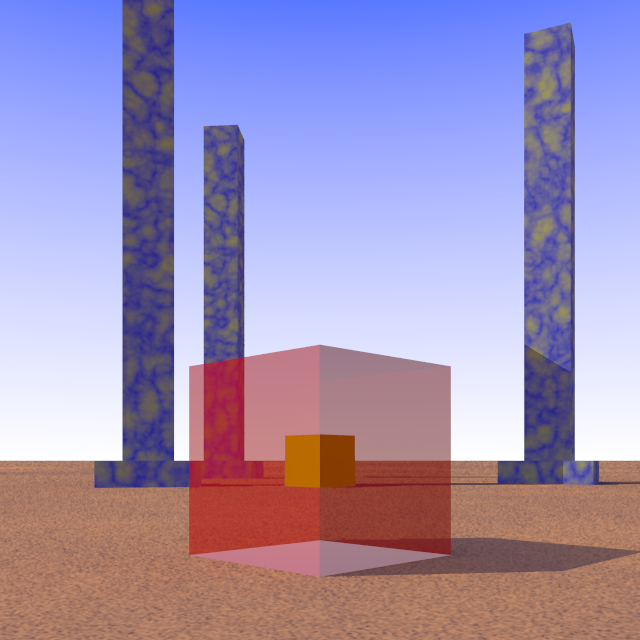
transparant, box is the proxy of the "real" camera; the yellow box is
the proxy of the "real" camera, shifted along the line of view after the
application of the NoFall transform. The distance between the cubes
increases with the height of the camera for y>0.

 From this, it is easy to write a quick-and-dirty correction to be added
/after/ the NoFall transform in the camera definition:

//start code
   FieldCam (CamLoc, CamLookAt)
   #local ProxyCam =
   box {
     <-1, -1, -1>, <1, 1, 1>
     translate CamLoc
     transform {NoFall}
   }
   #local MinBox = min_extent(ProxyCam);
   #local MaxBox = max_extent(ProxyCam);
   #local MidPoint = ((MaxBox-MinBox)/2) + MinBox;
   #local CamLoc_corr = CamLoc - MidPoint;

#declare Camera =
#if (FC)
camera {
   perspective
   location  CamLoc
   sky       CamSky
   up        CamSky
   direction z*CamZoom
   right     x*AspectRatio
   angle     CamAng
   transform {NoFall}
   translate CamLoc_corr
   look_at   CamLookAt
}
#else
camera {
   perspective
   location  CamLoc
   sky       CamSky
   up        CamSky
   direction z*CamZoom
   right     x*AspectRatio
   angle     CamAng
   look_at   CamLookAt
}
#end

camera {Camera}
//end code

But this is not as elegant as finding a way to do this already in the
macro ;-)

--
Thomas
Post a reply to this message
Attachments:
Download 'dj_fieldcam_test.png' (255 KB)
Preview of image 'dj_fieldcam_test.png'
|
|
| |
| |
|
|
|
|
| |
| |
|
|
Op 17/11/2020 om 11:29 schreef jr:
> just to correct some poor writing.
>
>
> "jr" <cre### [at] gmailcom> wrote:
>> Thomas de Groot <tho### [at] degrootorg> wrote:
>>> ...
>>> Frankly, I do not know what to do with this ;-}  A file with a .tk
>>> extension... what program runs this?
>>
>> the language is Tcl/Tk.
>
> the language is 'Tcl', short for tool command language.  'Tk' is short for
> toolkit, essentially a bag of Tcl commands which provide the graphical (UI)
> elements like buttons.
>

OK, thanks for this. I shall pospone a bit any further incursion into
this domain as I do not want to clutter up my system with things I am
pretty sure I shall only use once. ;-)

No problem. I try to avoid matrix stuff editing as much as possible, but
now I have at least to get an understanding of it...

--
Thomas
Post a reply to this message
|
|
| |
| |
|
|
|
|
| |
| |
|
|
Op 17/11/2020 om 22:40 schreef Cousin Ricky:
> On 2020-11-16 6:12 PM (-4), Bald Eagle wrote:
>>
>> Is this a custom version that you edited yourself, or a later version
>> of the
>> original?
>> All I found was this:
>>
http://news.povray.org/povray.text.scene-files/thread/%3Cweb.3e0c736a1f1273cdb29393de0%40news.povray.org%3E/

>>
>
> Doctor John posted this version in 2009:
>
>    https://news.povray.org/4aa8db4e$1@news.povray.org
>
> As these camera shift macros and discussions have been sitting on my
> computer completely uncomprehended for years, I cannot say whether the
> "Corrected silly mathematical error in vertical scaling" addresses
> Thomas's concerns.

Hey! That is a version I did not know, apparently adapted also for use
with Moray. Otherwise, the code is identical to version 2. Thanks for this!

--
Thomas
Post a reply to this message
|
|
| |
| |
|
|
|
|
| |
| |
|
|
hi,

Thomas de Groot <tho### [at] degrootorg> wrote:
> > > the language is 'Tcl', ...
>
> OK, thanks for this. I shall pospone a bit any further incursion into
> this domain as I do not want to clutter up my system with things I am
> pretty sure I shall only use once. ;-)

no sweat.  am pretty sure that you could set up a spreadsheet (Bald Eagle
probably got one already :-)), with little fuss.


regards, jr.
Post a reply to this message
|
|
| |
| |
|
|
|
|
| |
| |
|
|
Hi(gh)!

On 16.11.20 08:48, Thomas de Groot wrote:

 > I need the help of a Matrix Master.
 >
 > I am a regular user of Doctor John's FieldCam macro which enables
slanting architecture to look straight. It simulates the professional
cameras where this adjustment can be done through the lenses.

Hmmm, falling lines would be also an issue when in February another
another architectural photography season for my OpenCologne POV-Ray
project starts... in my part of the world, February to (early) April is
the best time in year for taking pictures of urban architecture, as
trees are still bare (and thus do not obscure the facades much), but on
the other hand, daylight lasts already long enough for extensive photo
sessions (as long as storms would not prevent them)! And, hopefully,
Covid-19 is not so much a threat anymore...

My digital cameras (even the relatively sophisticated Panasonic Lumix
DMC-LZ100) are no able to correct for falling lines... but perhaps this
macro can do that with the photos?

See you in Khyberspace!

Yadgar

Now playing: Der goldene Ball (Zara-Thustra) - German neo-Wagnerian
symphonic pop!
Post a reply to this message
|
|
| |
| |
|
|
|
|
| |
| |
|
|
I'll try to look at this at some point to quantify the shift - it dependent upon
the cam loc, the look_at point, or both?

My thought is that the transform is a _scaling_ and so as we know, that can
shift things that are not AT the origin...

What happens if you shift the camera to the origin, apply the transform, and
then shift it back?
Post a reply to this message
|
|
| |
| |
|
|
|
|
| |
| |
|
|
"Bald Eagle" <cre### [at] netscapenet> wrote:

> What happens if you shift the camera to the origin, apply the transform, and
> then shift it back?

Well, it definitely has an effect.

First I tried location <0, 0, 0> applying the transform, and then translate
CamLoc, but I just got a blue render (sky)

Then I did

#if (FC)
 camera {
  //FieldCam (CamLoc, CamLookAt)
  FieldCam2 (CamLoc, CamLookAt)
  perspective
  location  CamLoc
  sky       CamSky
  up        CamSky
  direction z*CamZoom
  right     x*AspectRatio
  angle     CamAng
  translate -CamLoc
  transform {NoFall}
  translate CamLoc
  look_at   CamLookAt
 }

That lets me see the columns and seems to change the camera position as well.

replacing VCorr with 1 changes the camera position such that the columns are no
longer visible...


Juggling some things, so that's all I was able to play with for now.
Post a reply to this message
|
|
| |
| |
|
|
|
|
| |
| |
|
|
So I turned off the field cam, but added the macro invocation to the other
camera definition.

Then I made an axes object, made an object {axes transform {NoFall}}
and overlayed them.

There's no difference if they are at the origin, but when the axes are
translated up (by 50) before applying the transform, I indeed get the up and
forward behaviour.

I can fix the forward movement, but the vertical movement is really puzzling.

  #declare NoFall =
  transform {
   matrix <     1,     0,      0,
           ShearX,  VCorr, ShearZ,
                0,     0,      1,
                0,     0,      -50*ShearZ>
  }
Post a reply to this message
|
|
| |
| |
|
|
|
|
| |
| |
|
|
So for now, just try

  #declare NoFall =
  transform {
  matrix < 1,     0,      0,
           ShearX, 1, ShearZ,
    0,     0,      1,
   -CamLoc.y*ShearX,     0,      -CamLoc.y*ShearZ>
  }
Post a reply to this message
|
|
| |
| |
|
|
|
|
| |
| |
|
|
Op 19/11/2020 om 01:28 schreef Bald Eagle:
> So for now, just try
>
>    #declare NoFall =
>    transform {
>    matrix < 1,     0,      0,
>             ShearX, 1, ShearZ,
>      0,     0,      1,
>     -CamLoc.y*ShearX,     0,      -CamLoc.y*ShearZ>
>    }
>

[aside: OK. New Thunderbird version... seems I clicked on wrong answer
button... Sorry]

YOU MADE MY DAY!! :-)

This is the correct answer indeed. I tried a couple of exotic scene
settings and the scene remains rock-solid.

Sir, I bow before your fathomless wisdom and sharp insight. I only got
as far as to understand that the last row of the matrix was crucial.

Thank you infinitely indeed.

--
Thomas
Post a reply to this message
|
|
| |
| |
|
|
From: Thomas de Groot
Subject: Re: Doctor John - FieldCam conundrum
Date: 19 Nov 2020 03:06:04
Message: <5fb6276c@news.povray.org>
|
|
|
| |
| |
|
|
Op 18/11/2020 om 13:16 schreef Jörg "Yadgar" Bleimann:
> My digital cameras (even the relatively sophisticated Panasonic Lumix
> DMC-LZ100) are no able to correct for falling lines... but perhaps this
> macro can do that with the photos?
>

I do not see how. If you import your photograph into a povray scene,
applying the macro will not correct the '/content/ of the photograph,
only the scene it is part of.

--
Thomas
Post a reply to this message
|
|
| |
| |
|
|
|
|
| |
| |
|
|
Thomas de Groot <tho### [at] degrootorg> wrote:

Thanks, Thomas.
I'm glad that it seems that I've mostly solved the issue - at least for all of
the use cases you've tested.
I still have a feeling that there's a bit more to be done, and somehow VCorr
_may_ be needed in there.
It's not very noticeable from far away, you need steep viewing angles to see
what I mean.

> Op 18/11/2020 om 13:16 schreef Jörg "Yadgar" Bleimann:
> > My digital cameras (even the relatively sophisticated Panasonic Lumix
> > DMC-LZ100) are no able to correct for falling lines... but perhaps this
> > macro can do that with the photos?
> >
>
> I do not see how. If you import your photograph into a povray scene,
> applying the macro will not correct the '/content/ of the photograph,
> only the scene it is part of.


Possibly.
But you'd need the camera and look_at data from your original photo to get the
right angle of tilt needed.
You may just try making an animation with your photo and rotating it around -x
to see what happens, since AFAIA, that's the bulk of the effect.

Mr Le Coat seems to have a much firmer grasp of all of this:
http://news.povray.org/povray.advanced-users/thread/%3C5bb67852%40news.povray.org%3E/?mtop=425362
Post a reply to this message
|
|
| |
| |
|
|
From: Thomas de Groot
Subject: Re: Doctor John - FieldCam conundrum
Date: 20 Nov 2020 02:27:32
Message: <5fb76fe4@news.povray.org>
|
|
|
| |
| |
|
|
Op 19/11/2020 om 12:30 schreef Bald Eagle:
> Thomas de Groot <tho### [at] degrootorg> wrote:
>
> Thanks, Thomas.
> I'm glad that it seems that I've mostly solved the issue - at least for all of
> the use cases you've tested.
> I still have a feeling that there's a bit more to be done, and somehow VCorr
> _may_ be needed in there.
> It's not very noticeable from far away, you need steep viewing angles to see
> what I mean.
>

I agree with you. One of the things which still puzzles me is that there
seems also to be a slight zoom effect, mostly noticiably in cloud
patterns for instance in the background. Maybe that is what you observe.
However, for the time being, the macro is more useful than it was.

I shall put version 4.0 of the macro in povray.binaries,utilities.

--
Thomas
Post a reply to this message
|
|
| |
| |
|
|
|
|
| |
| |
|
|
Op 19/11/2020 om 12:30 schreef Bald Eagle:
>> Op 18/11/2020 om 13:16 schreef Jörg "Yadgar" Bleimann:
>>> My digital cameras (even the relatively sophisticated Panasonic Lumix
>>> DMC-LZ100) are no able to correct for falling lines... but perhaps this
>>> macro can do that with the photos?
>>>
>
> Possibly.
> But you'd need the camera and look_at data from your original photo to get the
> right angle of tilt needed.
> You may just try making an animation with your photo and rotating it around -x
> to see what happens, since AFAIA, that's the bulk of the effect.
>
> Mr Le Coat seems to have a much firmer grasp of all of this:
>
http://news.povray.org/povray.advanced-users/thread/%3C5bb67852%40news.povray.org%3E/?mtop=425362
>
>

I woke up this night with a possible solution. You need to simulate a
technical camera using the combinationof your digital camera and povray:

1. Take a photograph of a (tall) building with your camera, tilting it
/backwards/ by 20 degrees (for instance);

2. In povray, put this photograph on a vertical flat plane in front of
the camera, and tilt the plane /forwards/ by 20 degrees. Be sure that
the camera is level (both location and look_at with identical y-value);

3. In povray, you may need an orthographic camera for better results.

I /think/ this would do the trick; you will need to experiment.


--
Thomas
Post a reply to this message
|
|
| |
| |
|
|
|
|
| |
| |
|
|
Thomas de Groot <tho### [at] degrootorg> wrote:
> I agree with you. One of the things which still puzzles me is that there
> seems also to be a slight zoom effect, mostly noticiably in cloud
> patterns for instance in the background. Maybe that is what you observe.
> However, for the time being, the macro is more useful than it was.

OK, I wanted to make sure that it wasn't just me.

The zoom, I think, is part uncorrected stuff, and part unexpected "optical
illusion".  It's real, but it's the effect of tilting the camera's "film plane",
so that some parts are closer to the scene objects than they were.

Try 2 things.

use:

  #local _j = vlength (<ShearX, VCorr, ShearZ>);

  #debug "\nIgnore the following Parse Warning: \n"
  #debug "----------------------------------- \n"
  #declare NoFall =
  transform {
   matrix <     1,     0,      0,
           ShearX,  VCorr, ShearZ,
                0,     0,      1,
     -CamLoc.y*ShearX,     -CamLoc.y/_j*VCorr,      -CamLoc.y*ShearZ*_j>

_j is the length of the new modified y-axis, and I think that there needs to be
a shift back to compensate for that, and average out the "zoom" effect, as shown
in the new matrix term.

and _then_ follow up with:


#if (FC)
 camera {
  //FieldCam (CamLoc, CamLookAt)
  FieldCam2 (CamLoc, CamLookAt)
  perspective
  location  CamLoc
  sky       CamSky
  up        CamSky
  direction z*CamZoom
  right     x*AspectRatio
  angle     CamAng
  translate -CamLoc
  transform {NoFall}
  translate CamLoc
  look_at   CamLookAt
 }

To apply the camera matrix with the camera at the origin.

I think any further work will really need to quantify the effect.
Post a reply to this message
|
|
| |
| |
|
|
|
|
| |
| |
|
|
Op 20/11/2020 om 12:28 schreef Bald Eagle:
> Thomas de Groot <tho### [at] degrootorg> wrote:
>> I agree with you. One of the things which still puzzles me is that there
>> seems also to be a slight zoom effect, mostly noticiably in cloud
>> patterns for instance in the background. Maybe that is what you observe.
>> However, for the time being, the macro is more useful than it was.
>
> OK, I wanted to make sure that it wasn't just me.
>
> The zoom, I think, is part uncorrected stuff, and part unexpected "optical
> illusion".  It's real, but it's the effect of tilting the camera's "film plane",
> so that some parts are closer to the scene objects than they were.

Yes, I guessed something like that.

>
> Try 2 things.
>
> use:
>
>    #local _j = vlength (<ShearX, VCorr, ShearZ>);
>
>    #debug "\nIgnore the following Parse Warning: \n"
>    #debug "----------------------------------- \n"
>    #declare NoFall =
>    transform {
>     matrix <     1,     0,      0,
>             ShearX,  VCorr, ShearZ,
>                  0,     0,      1,
>       -CamLoc.y*ShearX,     -CamLoc.y/_j*VCorr,      -CamLoc.y*ShearZ*_j>
>
> _j is the length of the new modified y-axis, and I think that there needs to be
> a shift back to compensate for that, and average out the "zoom" effect, as shown
> in the new matrix term.
>
> and _then_ follow up with:
>
>
> #if (FC)
>   camera {
>    //FieldCam (CamLoc, CamLookAt)
>    FieldCam2 (CamLoc, CamLookAt)
>    perspective
>    location  CamLoc
>    sky       CamSky
>    up        CamSky
>    direction z*CamZoom
>    right     x*AspectRatio
>    angle     CamAng
>    translate -CamLoc
>    transform {NoFall}
>    translate CamLoc
>    look_at   CamLookAt
>   }
>
> To apply the camera matrix with the camera at the origin.

This does not work correctly: the camera is pushed below the surface
(above the surface when y becomes negative, obviously). the VCorr
remains a puzzle to me and the _j does not help in the matter. I also
have a hunch that putting the camera at the origin is not helpful. It
doe not make any difference as far as I can tell.

>
> I think any further work will really need to quantify the effect.
>

Yes, I think that is the correct conclusion. So far, you have done a
great job already and made the macro much more useful than it was
originally.


--
Thomas
Post a reply to this message
|
|
| |
| |
|
|
|
|
| |
|
|