 |
|
|
|
|
|
| |
| |
|
|
|
|
| |
| |
|
|
That's really beautiful.

I'm not familiar with the artist; I need to look him up. Metal sculptures like
this really impress me.
Post a reply to this message
|
|
| |
| |
|
|
|
|
| |
| |
|
|
On 17-11-2017 14:16, Bald Eagle wrote:
> Thomas de Groot <tho### [at] degroot org> wrote:
>
>>>> I intend to simulate different Gormley approaches. I find them truly
>>>> fascinating.
>
>
> If you set up different scenes where the object to be placed was an argument for
> a macro, then you could assemble a list of objects and let an animation cycle
> through the list.
>
> It would be fun to see everything from nails to oranges to leaves, circuit
> boards, springs, stars, image-mapped boxes, etc....
I am not really an animation guy. Somehow, I never was able to go for it :-)
I have a couple of ideas though, and maybe you will find a Gormley
hidden somewhere in some of my future scenes ;-)
>
>
>
> It looks like he even did Tesla ;) :D
>
>
https://i.pinimg.com/736x/bd/65/c5/bd65c58ee533c4d38e77ffe0c55856d5--antony-gormley-land-art.jpg
>
>
LOL
--
Thomas org> wrote:
>
>>>> I intend to simulate different Gormley approaches. I find them truly
>>>> fascinating.
>
>
> If you set up different scenes where the object to be placed was an argument for
> a macro, then you could assemble a list of objects and let an animation cycle
> through the list.
>
> It would be fun to see everything from nails to oranges to leaves, circuit
> boards, springs, stars, image-mapped boxes, etc....
I am not really an animation guy. Somehow, I never was able to go for it :-)
I have a couple of ideas though, and maybe you will find a Gormley
hidden somewhere in some of my future scenes ;-)
>
>
>
> It looks like he even did Tesla ;) :D
>
>
https://i.pinimg.com/736x/bd/65/c5/bd65c58ee533c4d38e77ffe0c55856d5--antony-gormley-land-art.jpg
>
>
LOL
--
Thomas
Post a reply to this message
|
|
| |
| |
|
|
|
|
| |
| |
|
|
On 17-11-2017 13:57, Stephen wrote:
> On 17/11/2017 12:05, Thomas de Groot wrote:
>> On 17-11-2017 11:42, Stephen wrote:
>>> On 17/11/2017 08:28, Thomas de Groot wrote:
>>>> I am a fan.
>>>>
>>> So am I. :-)
>>>
>>> How did you construct it?
>>>
>> Very easy: a Poser figure (Apollo Maximus in this case) and a random
>> inside() test to place randomly scaled cubes. Finished off with
>> Nicolas Rougier's rust texture.
>>
>
> Simple and effective. :-)
> I wonder if you could use a similar technique for Giacometti?

Hmm, that would be different but not impossible I guess. I have to think
about this.

>
>> I am testing different rust possibilities, including of course
>> proximity patterns.
>>
>> I intend to simulate different Gormley approaches. I find them truly
>> fascinating.
>>
>
> I look forward to seeing the results.
> Have you seen any of Andy Scott's work?
>

Andy Scott yes, I have seen some indeed. An approach that is not that
much different from Gormley and yet with a totally different aura.
Fascinating.


--
Thomas
Post a reply to this message
|
|
| |
| |
|
|
|
|
| |
| |
|
|
On 17-11-2017 13:53, B. Gimeno wrote:
> Thomas de Groot <tho### [at] degrootorg> wrote:
>> I am a fan.
>>
>> --
>> Thomas
>
> Two windmills are standing in a field and one asks the other,
>
> "What kind of music do you like?"
>
> The other says, "I'm a big metal fan"
>

LOL. Very good.


--
Thomas
Post a reply to this message
|
|
| |
| |
|
|
|
|
| |
| |
|
|
On 18-11-2017 2:33, Kenneth wrote:
> That's really beautiful.
>
> I'm not familiar with the artist; I need to look him up. Metal sculptures like
> this really impress me.
>
>
>

Recently, there was a documentary about him here on TV. He is a very
likeable personality with a deep feeling for human nature and the social
context. He makes fascinating art, sometimes subtly disturbing but
always with compassion.

This site http://www.antonygormley.com/ gives an excellent overview of
his work.

--
Thomas
Post a reply to this message
|
|
| |
| |
|
|
|
|
| |
| |
|
|
Another built.


--
Thomas
Post a reply to this message
Attachments:
Download 'antony gormley sim.png' (330 KB)
Preview of image 'antony gormley sim.png'

|
|
| |
| |
|
|
|
|
| |
| |
|
|
Or maybe this.

--
Thomas
Post a reply to this message
Attachments:
Download 'antony gormley sim_1_2.png' (343 KB)
Preview of image 'antony gormley sim_1_2.png'

|
|
| |
| |
|
|
|
|
| |
| |
|
|
And better yet, using VRand_In_Obj()


--
Thomas
Post a reply to this message
Attachments:
Download 'antony gormley sim.png' (395 KB)
Preview of image 'antony gormley sim.png'

|
|
| |
| |
|
|
|
|
| |
| |
|
|
Thomas de Groot <tho### [at] degrootorg> wrote:
> And better yet, using VRand_In_Obj()
>
>
> --
> Thomas

Good job! The man seems to disappear.
Maybe you should add a background, to compose an image in the surrealist style.
Post a reply to this message
|
|
| |
| |
|
|
|
|
| |
| |
|
|
Thomas de Groot <tho### [at] degrootorg> wrote:
>
> This site http://www.antonygormley.com/ gives an excellent overview of
> his work.
>

Some of his 'rectilinear'/block sculptures there instantly recalled a POV-Ray
scene I made years ago and posted...

http://news.povray.org/povray.binaries.images/thread/%3Cweb.4bd33d559bbfa54fae92d9930@news.povray.org%3E/

....specifically the two slab-like objects on the left and right. I must have
been 'channeling' Gormley!
Post a reply to this message
|
|
| |
| |
|
|
|
|
| |
| |
|
|
On 20-11-2017 7:24, Kenneth wrote:
> Thomas de Groot <tho### [at] degrootorg> wrote:
>>
>> This site http://www.antonygormley.com/ gives an excellent overview of
>> his work.
>>
>
> Some of his 'rectilinear'/block sculptures there instantly recalled a POV-Ray
> scene I made years ago and posted...
>
>
http://news.povray.org/povray.binaries.images/thread/%3Cweb.4bd33d559bbfa54fae92d9930@news.povray.org%3E/
>
> ....specifically the two slab-like objects on the left and right. I must have
> been 'channeling' Gormley!
>
>

Indeed. :-)

--
Thomas
Post a reply to this message
|
|
| |
| |
|
|
|
|
| |
| |
|
|
On 19-11-2017 14:30, Fractracer wrote:
> Thomas de Groot <tho### [at] degrootorg> wrote:
>> And better yet, using VRand_In_Obj()
>>
>>
>> --
>> Thomas
>
> Good job! The man seems to disappear.
> Maybe you should add a background, to compose an image in the surrealist style.
>

For the time being this remains just an empty test landscape  ;-)

--
Thomas
Post a reply to this message
|
|
| |
| |
|
|
|
|
| |
| |
|
|
Thomas de Groot <tho### [at] degrootorg> wrote:
> And better yet, using VRand_In_Obj()
>
>
> --
> Thomas

These are fun - and so comparatively easy to make compared to other types of
scenes!

I was wondering what your "yield" was in terms of successful placement of random
points inside.  I did a few real quick experiments, and it seemed like I was
getting _very_ sparse coverage.  I did a (Success/TotalTests)*100 calculation,
and got 1.4%.

I like the [rusted] wire boxes   :)
Post a reply to this message
|
|
| |
| |
|
|
|
|
| |
| |
|
|
On 20-11-2017 14:03, Bald Eagle wrote:
> Thomas de Groot <tho### [at] degrootorg> wrote:
>> And better yet, using VRand_In_Obj()
>>
>>
>> --
>> Thomas
>
> These are fun - and so comparatively easy to make compared to other types of
> scenes!

Yes, one has no merit at all :-)

>
> I was wondering what your "yield" was in terms of successful placement of random
> points inside.  I did a few real quick experiments, and it seemed like I was
> getting _very_ sparse coverage.  I did a (Success/TotalTests)*100 calculation,
> and got 1.4%.

I don't know about yield. Using VRand_In_Obj() that should be 100%,
shouldn't it? Anyway, I just increase or decrease the number of objects
and judge the result.

My main focus now is to get a "better" (?) coverage of the arms and legs
compared to the body. They seem to be more sparsely populated. So, my
idea was to use an additional test: function {pow(f_boxed(x,y,z),2)}
provided by Christian Froeschlin some years ago, and thus concentrate
the objects more towards the periphery than towards the centre. However,
I am not sure what I am doing and I have difficulty scaling this to the
correct proportions of the body. Any suggestions there would help me.

>
> I like the [rusted] wire boxes   :)
>

Me too.

--
Thomas
Post a reply to this message
|
|
| |
| |
|
|
|
|
| |
| |
|
|
On 21/11/2017 07:54, Thomas de Groot wrote:

>
> My main focus now is to get a "better" (?) coverage of the arms and legs
> compared to the body. They seem to be more sparsely populated. So, my
> idea was to use an additional test: function {pow(f_boxed(x,y,z),2)}
> provided by Christian Froeschlin some years ago, and thus concentrate
> the objects more towards the periphery than towards the centre. However,
> I am not sure what I am doing and I have difficulty scaling this to the
> correct proportions of the body. Any suggestions there would help me.
>

Could you split your analysis into body part groups? That might give yo
more control over the sizes of the "filler" boxes.

>>
>> I like the [rusted] wire boxes   :)
>>
>
> Me too.
>

Reflective spheres would be interesting, I think. :-)

--

Regards
     Stephen
Post a reply to this message
|
|
| |
| |
|
|
|
|
| |
| |
|
|
On 21-11-2017 10:31, Stephen wrote:
> On 21/11/2017 07:54, Thomas de Groot wrote:
>
>>
>> My main focus now is to get a "better" (?) coverage of the arms and
>> legs compared to the body. They seem to be more sparsely populated.
>> So, my idea was to use an additional test: function
>> {pow(f_boxed(x,y,z),2)} provided by Christian Froeschlin some years
>> ago, and thus concentrate the objects more towards the periphery than
>> towards the centre. However, I am not sure what I am doing and I have
>> difficulty scaling this to the correct proportions of the body. Any
>> suggestions there would help me.
>>
>
> Could you split your analysis into body part groups? That might give yo
> more control over the sizes of the "filler" boxes.

That would be one option indeed. I keep that for when all else fails. ;-)

>
>>>
>>> I like the [rusted] wire boxes   :)
>>>
>>
>> Me too.
>>
>
> Reflective spheres would be interesting, I think. :-)
>

Oh yes, and blobs (reflective or not) too.

--
Thomas
Post a reply to this message
|
|
| |
| |
|
|
|
|
| |
| |
|
|
On 21/11/2017 11:43, Thomas de Groot wrote:
> On 21-11-2017 10:31, Stephen wrote:
>> On 21/11/2017 07:54, Thomas de Groot wrote:
>>
>>>
>>> My main focus now is to get a "better" (?) coverage of the arms and
>>> legs compared to the body. They seem to be more sparsely populated.
>>> So, my idea was to use an additional test: function
>>> {pow(f_boxed(x,y,z),2)} provided by Christian Froeschlin some years
>>> ago, and thus concentrate the objects more towards the periphery than
>>> towards the centre. However, I am not sure what I am doing and I have
>>> difficulty scaling this to the correct proportions of the body. Any
>>> suggestions there would help me.
>>>
>>
>> Could you split your analysis into body part groups? That might give
>> yo more control over the sizes of the "filler" boxes.
>
> That would be one option indeed. I keep that for when all else fails. ;-)
>

It sounds like a lot of work. ;-)

>>
>>>>
>>>> I like the [rusted] wire boxes   :)
>>>>
>>>
>>> Me too.
>>>
>>
>> Reflective spheres would be interesting, I think. :-)
>>
>
> Oh yes, and blobs (reflective or not) too.
>

Blobs! yes. :-D

--

Regards
     Stephen
Post a reply to this message
|
|
| |
| |
|
|
|
|
| |
| |
|
|
On 21/11/2017 11:53, Stephen wrote:
> It sounds like a lot of work. ;-)

Depending on the model and how many groups it is exported as.


--

Regards
     Stephen
Post a reply to this message
|
|
| |
| |
|
|
|
|
| |
| |
|
|
On 21-11-2017 12:54, Stephen wrote:
> On 21/11/2017 11:53, Stephen wrote:
>> It sounds like a lot of work. ;-)
>
> Depending on the model and how many groups it is exported as.
>
>

Poseray is your friend

--
Thomas
Post a reply to this message
|
|
| |
| |
|
|
|
|
| |
| |
|
|
On 21/11/2017 12:17, Thomas de Groot wrote:
> On 21-11-2017 12:54, Stephen wrote:
>> On 21/11/2017 11:53, Stephen wrote:
>>> It sounds like a lot of work. ;-)
>>
>> Depending on the model and how many groups it is exported as.
>>
>>
>
> Poseray is your friend
>

Poser is your friend's friend. ;-)

--

Regards
     Stephen
Post a reply to this message
|
|
| |
| |
|
|
|
|
| |
| |
|
|
Thomas de Groot <tho### [at] degrootorg> wrote:

> > I was wondering what your "yield" was in terms of successful placement of random
> > points inside.  I did a few real quick experiments, and it seemed like I was
> > getting _very_ sparse coverage.  I did a (Success/TotalTests)*100 calculation,
> > and got 1.4%.
>
> I don't know about yield. Using VRand_In_Obj() that should be 100%,
> shouldn't it? Anyway, I just increase or decrease the number of objects
> and judge the result.

Yes, I was just testing a vector in the bounding box.
IIRC VRand_In_Object() is part of an iclude file, so it just does pretty much
the same thing - the success/fail process is just hidden.

> My main focus now is to get a "better" (?) coverage of the arms and legs
> compared to the body. They seem to be more sparsely populated. So, my
> idea was to use an additional test: function {pow(f_boxed(x,y,z),2)}
> provided by Christian Froeschlin some years ago, and thus concentrate
> the objects more towards the periphery than towards the centre. However,
> I am not sure what I am doing and I have difficulty scaling this to the
> correct proportions of the body. Any suggestions there would help me.

Right - I noticed the same problem.
I thought about that and naturally what Stephen suggested is the most obvious
solution.
Your function-based approach is something that could work, though I was thinking
of something more cylindrical / spherical / egg-shaped and centered on the body
trunk.

Alternatively, you could use an x-y-z nested loop of smaller testing boxes and
cycle through a random placement in all of those smaller boxes.

It would, of course, be VERY nice if someone in-the-know could hammer out some
sort of octree macro/include file that made some sense to those of us who
haven't had the time to puzzle all of that out yet.

Along those lines, you could build an array to store coordinates, "scan" the
bounding box of the figure with an x-y-z nested loop and inside(object, vector)
tests, and then use the pseudorandom selection process to pick known inside()
points.
The advantage there is that you could save the array to disk, and not have to
test the same figure every single time you wanted to place objects.  You
wouldn't even need to load the mesh for the figure either.

So far, my whole weekend has been major SNAFU, so I haven't had mush time to
fiddle with many of the things I've wanted to.  :(

Hopefully the rest of the week/weekend won't be FUBAR.
Post a reply to this message
|
|
| |
| |
|
|
|
|
| |
| |
|
|
On 21-11-2017 13:52, Bald Eagle wrote:
> Thomas de Groot <tho### [at] degrootorg> wrote:
>
>>> I was wondering what your "yield" was in terms of successful placement of random
>>> points inside.  I did a few real quick experiments, and it seemed like I was
>>> getting _very_ sparse coverage.  I did a (Success/TotalTests)*100 calculation,
>>> and got 1.4%.
>>
>> I don't know about yield. Using VRand_In_Obj() that should be 100%,
>> shouldn't it? Anyway, I just increase or decrease the number of objects
>> and judge the result.
>
> Yes, I was just testing a vector in the bounding box.
> IIRC VRand_In_Object() is part of an iclude file, so it just does pretty much
> the same thing - the success/fail process is just hidden.

I seem to remember now that that is the way it works indeed.

>
>> My main focus now is to get a "better" (?) coverage of the arms and legs
>> compared to the body. They seem to be more sparsely populated. So, my
>> idea was to use an additional test: function {pow(f_boxed(x,y,z),2)}
>> provided by Christian Froeschlin some years ago, and thus concentrate
>> the objects more towards the periphery than towards the centre. However,
>> I am not sure what I am doing and I have difficulty scaling this to the
>> correct proportions of the body. Any suggestions there would help me.
>
> Right - I noticed the same problem.
> I thought about that and naturally what Stephen suggested is the most obvious
> solution.

In the end, that is probably what I am going to do. My other experiments
give interesting results but not entirely to my liking, and I prefer to
concentrate on more interesting things ;-)

> Your function-based approach is something that could work, though I was thinking
> of something more cylindrical / spherical / egg-shaped and centered on the body
> trunk.
>
> Alternatively, you could use an x-y-z nested loop of smaller testing boxes and
> cycle through a random placement in all of those smaller boxes.
>
> It would, of course, be VERY nice if someone in-the-know could hammer out some
> sort of octree macro/include file that made some sense to those of us who
> haven't had the time to puzzle all of that out yet.
>
> Along those lines, you could build an array to store coordinates, "scan" the
> bounding box of the figure with an x-y-z nested loop and inside(object, vector)
> tests, and then use the pseudorandom selection process to pick known inside()
> points.
> The advantage there is that you could save the array to disk, and not have to
> test the same figure every single time you wanted to place objects.  You
> wouldn't even need to load the mesh for the figure either.

I am not going to dive too deep into this as it rapidly becomes unknown
territory to me, but nonetheless I am grateful for the suggestions.

>
> So far, my whole weekend has been major SNAFU, so I haven't had mush time to
> fiddle with many of the things I've wanted to.  :(
>
> Hopefully the rest of the week/weekend won't be FUBAR.
>
Best wishes for that indeed. I have a couple of minor SNAFUs myself at
present which need sorted out (well, ideally, they /should/ sort
themselves out eventually). RL... :-/


--
Thomas
Post a reply to this message
|
|
| |
| |
|
|
|
|
| |
| |
|
|
On 22/11/2017 07:51, Thomas de Groot wrote:
> On 21-11-2017 13:52, Bald Eagle wrote:
>>
>>> My main focus now is to get a "better" (?) coverage of the arms and legs
>>> compared to the body. They seem to be more sparsely populated. So, my
>>> idea was to use an additional test: function {pow(f_boxed(x,y,z),2)}
>>> provided by Christian Froeschlin some years ago, and thus concentrate
>>> the objects more towards the periphery than towards the centre. However,
>>> I am not sure what I am doing and I have difficulty scaling this to the
>>> correct proportions of the body. Any suggestions there would help me.
>>
>> Right - I noticed the same problem.
>> I thought about that and naturally what Stephen suggested is the most
>> obvious
>> solution.
>

Never underestimate the power of the obvious. ;)

> In the end, that is probably what I am going to do. My other experiments
> give interesting results but not entirely to my liking, and I prefer to
> concentrate on more interesting things ;-)
>

:-)
I'm in the same position trying to get some clothes to fit the way I
want. When I really want to get on with it.


>
>


--

Regards
     Stephen
Post a reply to this message
|
|
| |
| |
|
|
|
|
| |
| |
|
|
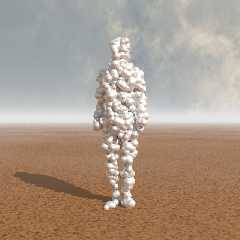
So, I abandoned my attempts at being smart and reverted to the basic
filling of the container.

This time it is blobs that steal the show, with some brushed metal
texture. To make it more interesting (reflection wise) I included a hdri
map.

--
Thomas
Post a reply to this message
Attachments:
Download 'antony gormley sim.png' (450 KB)
Preview of image 'antony gormley sim.png'
|
|
| |
| |
|
|
|
|
| |
| |
|
|
On 27/11/2017 08:51, Thomas de Groot wrote:
> So, I abandoned my attempts at being smart and reverted to the basic
> filling of the container.
>
> This time it is blobs that steal the show, with some brushed metal
> texture. To make it more interesting (reflection wise) I included a hdri
> map.
>

It reminds me a little bit of the Michelin Man or Bibendum. :-)

--

Regards
     Stephen
Post a reply to this message
|
|
| |
| |
|
|
|
|
| |
| |
|
|
Stephen <mca### [at] aolcom> wrote:
> On 27/11/2017 08:51, Thomas de Groot wrote:
> > So, I abandoned my attempts at being smart and reverted to the basic
> > filling of the container.
> >
> > This time it is blobs that steal the show, with some brushed metal
> > texture. To make it more interesting (reflection wise) I included a hdri
> > map.
> >
>
> It reminds me a little bit of the Michelin Man or Bibendum. :-)
>
> --
>
> Regards
>      Stephen

I was about to say - "It's the Stay-Puft..." expanded polystyrene man!  :D


(https://en.wikipedia.org/wiki/Stay_Puft_Marshmallow_Man)


I think the blobs could be fun, Thomas - have you tried a highly polished,
reflective surface?
I would also be interested in what differing blob strengths looked like - it
would be a wonderful effect if you got the parameters right to get that
stretched, interconnected blob filament look.


This is a nice new addition to --- The Thomas Gormley Collection!  ;)
Keep up the good work.
Post a reply to this message
|
|
| |
| |
|
|
|
|
| |
| |
|
|
On 27-11-2017 12:29, Bald Eagle wrote:
> Stephen <mca### [at] aolcom> wrote:
>>
>> It reminds me a little bit of the Michelin Man or Bibendum. :-)
>>
>> --
>>
>> Regards
>>       Stephen
>
> I was about to say - "It's the Stay-Puft..." expanded polystyrene man!  :D

Absolutely! Both of you!

It also has a vaguely disgusting alien look to it. I might need to use a
greenish, slimy, texture... [on todo list]

>
>
> (https://en.wikipedia.org/wiki/Stay_Puft_Marshmallow_Man)
>
>
> I think the blobs could be fun, Thomas - have you tried a highly polished,
> reflective surface?
> I would also be interested in what differing blob strengths looked like - it
> would be a wonderful effect if you got the parameters right to get that
> stretched, interconnected blob filament look.

Strength and scale of the blobs are already randomly changed. I intend
to find the correct settings for those filaments indeed. I have not yet
been entirely successful.

I also intend to do a glass/photon sculpture of course!

>
>
> This is a nice new addition to --- The Thomas Gormley Collection!  ;)
> Keep up the good work.
>

LOL I readily step aside for the original inspirer of this all.

--
Thomas
Post a reply to this message
|
|
| |
| |
|
|
|
|
| |
| |
|
|
Thomas de Groot <tho### [at] degrootorg> wrote:


> It also has a vaguely disgusting alien look to it. I might need to use a
> greenish, slimy, texture... [on todo list]

Hmmm.  That would be interesting indeed.

> Strength and scale of the blobs are already randomly changed. I intend
> to find the correct settings for those filaments indeed. I have not yet
> been entirely successful.

Yeah - you may have to insert a few lines of code to limit the proximity of the
centers so that the density is kept low enough.
#if (vlength() < something) sorta thing...

> I also intend to do a glass/photon sculpture of course!

Of course - It's the first thing that came to mind, and I figured you'd do that,
so I didn't feel the need to suggest it.
I DO think that And's recently posted cloud/ice/snow texture would look
wonderful here!
Post a reply to this message
|
|
| |
| |
|
|
|
|
| |
| |
|
|
On 27/11/2017 11:29, Bald Eagle wrote:
> I was about to say - "It's the Stay-Puft..." expanded polystyrene man!  :D
>
>
> (https://en.wikipedia.org/wiki/Stay_Puft_Marshmallow_Man)

I live and learn. :)

--

Regards
     Stephen
Post a reply to this message
|
|
| |
| |
|
|
|
|
| |
| |
|
|
On 11/27/2017 09:51 AM, Thomas de Groot wrote:
> So, I abandoned my attempts at being smart and reverted to the basic
> filling of the container.
>
> This time it is blobs that steal the show, with some brushed metal
> texture. To make it more interesting (reflection wise) I included a hdri
> map.
>

    I like blobs !

http://la.buvette.org/POV/brownian-move/mouvement-monoblob.mp4
Post a reply to this message
|
|
| |
| |
|
|
|
|
| |
| |
|
|
On 27/11/2017 16:26, tth wrote:
> On 11/27/2017 09:51 AM, Thomas de Groot wrote:
>> So, I abandoned my attempts at being smart and reverted to the basic
>> filling of the container.
>>
>> This time it is blobs that steal the show, with some brushed metal
>> texture. To make it more interesting (reflection wise) I included a hdri
>> map.
>>
>
>     I like blobs !
>
Oh! dear. I must get new glasses. I misread that. ;-)


> http://la.buvette.org/POV/brownian-move/mouvement-monoblob.mp4

I like that too but it is quite large almost 300 Meg.

--

Regards
     Stephen
Post a reply to this message
|
|
| |
| |
|
|
|
|
| |
| |
|
|
On 27/11/2017 16:41, Stephen wrote:
> I like that too but it is quite large almost 300 Meg.

Interesting banner on the front page. Maybe I don't need new glasses
after all. ;-)

--

Regards
     Stephen
Post a reply to this message
|
|
| |
| |
|
|
|
|
| |
| |
|
|
On 27-11-2017 17:44, Stephen wrote:
> On 27/11/2017 16:41, Stephen wrote:
>> I like that too but it is quite large almost 300 Meg.
>
> Interesting banner on the front page. Maybe I don't need new glasses
> after all. ;-)
>

You seem to have a problem Stephen. First b-l-obs, then that banner...
hmm?  :-)

--
Thomas
Post a reply to this message
|
|
| |
| |
|
|
|
|
| |
| |
|
|
On 28/11/2017 07:52, Thomas de Groot wrote:
> On 27-11-2017 17:44, Stephen wrote:
>> On 27/11/2017 16:41, Stephen wrote:
>>> I like that too but it is quite large almost 300 Meg.
>>
>> Interesting banner on the front page. Maybe I don't need new glasses
>> after all. ;-)
>>
>
> You seem to have a problem Stephen.

You've just noticed? ;-)

> First b-l-obs, then that banner...
> hmm?  :-)
>


That's dyslexia for you.

--

Regards
     Stephen
Post a reply to this message
|
|
| |
| |
|
|
|
|
| |
| |
|
|
On 28-11-2017 9:50, Stephen wrote:
> On 28/11/2017 07:52, Thomas de Groot wrote:
>> On 27-11-2017 17:44, Stephen wrote:
>>> On 27/11/2017 16:41, Stephen wrote:
>>>> I like that too but it is quite large almost 300 Meg.
>>>
>>> Interesting banner on the front page. Maybe I don't need new glasses
>>> after all. ;-)
>>>
>>
>> You seem to have a problem Stephen.
>
> You've just noticed? ;-)
>
>> First b-l-obs, then that banner... hmm?  :-)
>>
>
>
> That's dyslexia for you.
>

Nobody is perfect.

[trips over own feet]

--
Thomas
Post a reply to this message
|
|
| |
| |
|
|
|
|
| |
| |
|
|
A little better, but I need now to divide the container in separate groups.

--
Thomas
Post a reply to this message
Attachments:
Download 'antony gormley sim_2_3.png' (442 KB)
Preview of image 'antony gormley sim_2_3.png'

|
|
| |
| |
|
|
|
|
| |
| |
|
|
Thomas de Groot <tho### [at] degrootorg> wrote:
> A little better, but I need now to divide the container in separate groups.

Not sure where you're going with this, I liked the metal sculpture at beginning
and these blobs seem to be causing you some trouble as I read through here. Just
hope your not obsessing too much. :)

Random thought occurred to me. A projected image of actual person onto this
would be interesting, like those special effect particle people I've seen.

Bob
Post a reply to this message
|
|
| |
| |
|
|
|
|
| |
| |
|
|
On 28/11/2017 18:22, omniverse wrote:
> Thomas de Groot <tho### [at] degrootorg> wrote:
>> A little better, but I need now to divide the container in separate groups.
>
> Not sure where you're going with this, I liked the metal sculpture at beginning
> and these blobs seem to be causing you some trouble as I read through here. Just
> hope your not obsessing too much. :)
>
> Random thought occurred to me. A projected image of actual person onto this
> would be interesting, like those special effect particle people I've seen.
>

UV mapping a blob. Now there's a thought. :)

--

Regards
     Stephen
Post a reply to this message
|
|
| |
| |
|
|
|
|
| |
| |
|
|
On 28-11-2017 19:51, Stephen wrote:
> On 28/11/2017 18:22, omniverse wrote:
>> Thomas de Groot <tho### [at] degrootorg> wrote:
>>> A little better, but I need now to divide the container in separate
>>> groups.
>>
>> Not sure where you're going with this, I liked the metal sculpture at
>> beginning
>> and these blobs seem to be causing you some trouble as I read through
>> here. Just
>> hope your not obsessing too much. :)

Obsession? Never! :-)

I probably keep on experimenting until I get bored... or find Nirvana.
;-) Not to be worried though, there are always some elements sticking on
and used elsewhere/when.

>>
>> Random thought occurred to me. A projected image of actual person onto
>> this
>> would be interesting, like those special effect particle people I've
>> seen.
>>
>
> UV mapping a blob. Now there's a thought. :)
>

Hmmm... is that possible? easily? Blobs are not on the list of readily
uv_mapped objects.

--
Thomas
Post a reply to this message
|
|
| |
| |
|
|
|
|
| |
| |
|
|
On 29/11/2017 07:52, Thomas de Groot wrote:
>>>
>>
>> UV mapping a blob. Now there's a thought. :)
>>
>
> Hmmm... is that possible?

After a quick test, yes.

easily?

No. It would need more testing and much more coffee.
I got some results but not something recognisable as the image map.

Blobs are not on the list of readily
> uv_mapped objects.


--

Regards
     Stephen
Post a reply to this message
|
|
| |
| |
|
|
|
|
| |
| |
|
|
On 29-11-2017 9:44, Stephen wrote:
> On 29/11/2017 07:52, Thomas de Groot wrote:
>>>>
>>>
>>> UV mapping a blob. Now there's a thought. :)
>>>
>>
>> Hmmm... is that possible?
>
> After a quick test, yes.
>
> easily?
>
> No. It would need more testing and much more coffee.
> I got some results but not something recognisable as the image map.
>
> Blobs are not on the list of readily
>> uv_mapped objects.
>
>

Hmm... I shall leave that alone for the time being.

--
Thomas
Post a reply to this message
|
|
| |
| |
|
|
|
|
| |
| |
|
|
On 29/11/2017 12:08, Thomas de Groot wrote:
> On 29-11-2017 9:44, Stephen wrote:
>> On 29/11/2017 07:52, Thomas de Groot wrote:
>>>>>
>>>>
>>>> UV mapping a blob. Now there's a thought. :)
>>>>
>>>
>>> Hmmm... is that possible?
>>
>> After a quick test, yes.
>>
>> easily?
>>
>> No. It would need more testing and much more coffee.
>> I got some results but not something recognisable as the image map.
>>
>> Blobs are not on the list of readily
>>> uv_mapped objects.
>>
>>
>
> Hmm... I shall leave that alone for the time being.
>

Probably best

--

Regards
     Stephen
Post a reply to this message
|
|
| |
| |
|
|
|
|
| |
| |
|
|
Am 29.11.2017 um 09:44 schrieb Stephen:
> On 29/11/2017 07:52, Thomas de Groot wrote:
>>>>
>>>
>>> UV mapping a blob. Now there's a thought. :)
>>>
>>
>> Hmmm... is that possible?
>
> After a quick test, yes.

Not with POV-Ray.

You might not get an error message, but that doesn't mean you actually
get UV mapping.
Post a reply to this message
|
|
| |
| |
|
|
|
|
| |
| |
|
|
On 29/11/2017 14:47, clipka wrote:
> Am 29.11.2017 um 09:44 schrieb Stephen:
>> On 29/11/2017 07:52, Thomas de Groot wrote:
>>>>>
>>>>
>>>> UV mapping a blob. Now there's a thought. :)
>>>>
>>>
>>> Hmmm... is that possible?
>>
>> After a quick test, yes.
>
> Not with POV-Ray.
>
> You might not get an error message,

No error message in Ver 3.6


> but that doesn't mean you actually
> get UV mapping.
>

It did not look the slightest like UV mapping when I tried it.

It might be possible to get the effect in Blender if the PovRay exporter
exports their metaballs as meshes.

--

Regards
     Stephen
Post a reply to this message
|
|
| |
| |
|
|
|
|
| |
| |
|
|
"Bald Eagle" <cre### [at] netscapenet> wrote:


> Along those lines, you could build an array to store coordinates, "scan" the
> bounding box of the figure with an x-y-z nested loop and inside(object, vector)
> tests, and then use the pseudorandom selection process to pick known inside()
> points.
> The advantage there is that you could save the array to disk, and not have to
> test the same figure every single time you wanted to place objects.  You
> wouldn't even need to load the mesh for the figure either.

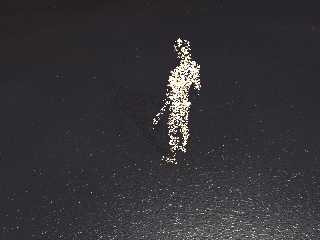
So, I managed to get this to work, and it seems like it gives fairly decent
coverage.
I think if I find the time, (and I'm reminded of this to-do item) I might try to
figure out a way to use a spline to give greater probability of selecting the
smaller volumes and less probability of selecting the larger volumes, resulting
in a more even distribution.

Meet ... Jack.  :D
Post a reply to this message
Attachments:
Download '_jack.png' (592 KB)
Preview of image '_jack.png'
|
|
| |
| |
|
|
|
|
| |
| |
|
|
On 30-11-2017 2:37, Bald Eagle wrote:
> "Bald Eagle" <cre### [at] netscapenet> wrote:
>
>
>> Along those lines, you could build an array to store coordinates, "scan" the
>> bounding box of the figure with an x-y-z nested loop and inside(object, vector)
>> tests, and then use the pseudorandom selection process to pick known inside()
>> points.
>> The advantage there is that you could save the array to disk, and not have to
>> test the same figure every single time you wanted to place objects.  You
>> wouldn't even need to load the mesh for the figure either.
>
> So, I managed to get this to work, and it seems like it gives fairly decent
> coverage.
> I think if I find the time, (and I'm reminded of this to-do item) I might try to
> figure out a way to use a spline to give greater probability of selecting the
> smaller volumes and less probability of selecting the larger volumes, resulting
> in a more even distribution.
>
> Meet ... Jack.  :D
>

That is looking good indeed. I need to ponder this a bit more; I think I
know how to do this but I want to examine all the angles, so to speak. I
can see the advantage of this procedure and it would avoid the
subdividing of the container in discrete elements.

Saving the point locations is certainly an excellent idea. I shall
certainly come to that eventually.

Well done indeed.

--
Thomas
Post a reply to this message
|
|
| |
| |
|
|
|
|
| |
| |
|
|
On 29-11-2017 16:14, Stephen wrote:
> On 29/11/2017 14:47, clipka wrote:
>> Am 29.11.2017 um 09:44 schrieb Stephen:
>>> On 29/11/2017 07:52, Thomas de Groot wrote:
>>>>>>
>>>>>
>>>>> UV mapping a blob. Now there's a thought. :)
>>>>>
>>>>
>>>> Hmmm... is that possible?
>>>
>>> After a quick test, yes.
>>
>> Not with POV-Ray.
>>
>> You might not get an error message,
>
> No error message in Ver 3.6
>
>
>> but that doesn't mean you actually
>> get UV mapping.
>>
>
> It did not look the slightest like UV mapping when I tried it.
>
> It might be possible to get the effect in Blender if the PovRay exporter
> exports their metaballs as meshes.
>

A big problem as I see it, would then be how to define the uv_map seams
and where to place them. That would have to be done in Blender too.

--
Thomas
Post a reply to this message
|
|
| |
| |
|
|
|
|
| |
| |
|
|
Am 2017-11-29 20:37, also sprach Bald Eagle:

>
> Meet ... Jack.  :D
>

You're such a snowflake, Jack. Go to your safespace!

--
dik
Post a reply to this message
|
|
| |
| |
|
|
|
|
| |
| |
|
|
On 30/11/2017 08:10, Thomas de Groot wrote:
> On 29-11-2017 16:14, Stephen wrote:
>> On 29/11/2017 14:47, clipka wrote:
>>> Am 29.11.2017 um 09:44 schrieb Stephen:
>>>> On 29/11/2017 07:52, Thomas de Groot wrote:
>>>>>>>
>>>>>>
>>>>>> UV mapping a blob. Now there's a thought. :)
>>>>>>
>>>>>
>>>>> Hmmm... is that possible?
>>>>
>>>> After a quick test, yes.
>>>
>>> Not with POV-Ray.
>>>
>>> You might not get an error message,
>>
>> No error message in Ver 3.6
>>
>>
>>> but that doesn't mean you actually
>>> get UV mapping.
>>>
>>
>> It did not look the slightest like UV mapping when I tried it.
>>
>> It might be possible to get the effect in Blender if the PovRay
>> exporter exports their metaballs as meshes.
>>
>
> A big problem as I see it, would then be how to define the uv_map seams
> and where to place them. That would have to be done in Blender too.
>

Just thinking out loud.

I think you could do it with a technique similar to using uv mapper.
Select a portion of the model and associate it with a part of the image
map. Quite laborious compared to using the "ready rolled" Poser ones.
Also Blender's metaballs have some differences from Pov's blobs. Or so
it seemed in the 15 minutes I took to look at it.
I don't really want to get distracted form what I am doing in Poser. I
am having problems getting clothes to fit a model in a crouching
position. The working title is: "How Christianity came to the Western
Isles."

BTW Do you (or anyone) know how to add a colour tint to a poser model?
Say, give a green or blue tint to a skin tone.


--

Regards
     Stephen
Post a reply to this message
|
|
| |
| |
|
|
|
|
| |
| |
|
|
On 30/11/2017 09:51, Stephen wrote:
> BTW Do you (or anyone) know how to add a colour tint to a poser model?
> Say, give a green or blue tint to a skin tone.

Never mind. It is easy to do in Poser. (Change the diffuse colour in the
material room.)

--

Regards
     Stephen
Post a reply to this message
|
|
| |
| |
|
|
|
|
| |








