|
|
|
|
|
|
| |
| |
|
|
From: Nathan Kopp
Subject: Re: First image in a long time, just testing "new" stuff
Date: 28 Oct 2001 23:37:36
Message: <3bdcdd10$1@news.povray.org>
|
|
|
| |
| |
|
|
"Lance Birch" <-> wrote...
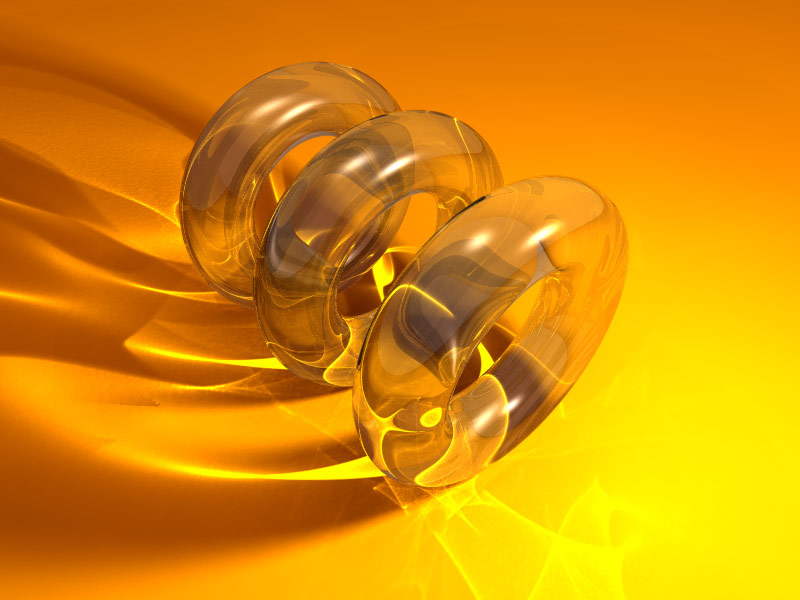
> Hiya, well, this is my first use of POV-Ray in a few years now (probably 3
> years, wow, it's been a while), so I've been catching up on a lot of
> features that were never in the POV-Ray I knew.  This is just a test of
> using Photons and Radiosity together... it took about 20 minutes to render
> which doesn't seem too bad, but I'm guessing the "stripe" effect in the
> photons is just because I haven't set the count high enough?

Increasing the photon jitter (up to 1.0) should get rid of that, but it
might introduce some noise into the caustics... overall, high jitter should
work well with this scene, though.

-Nathan
Post a reply to this message
|
|
| |
| |
|
|
From: Lance Birch
Subject: Re: First image in a long time, just testing "new" stuff
Date: 29 Oct 2001 07:05:54
Message: <3bdd4622@news.povray.org>
|
|
|
| |
| |
|
|
Nathan Kopp wrote:
> Increasing the photon jitter (up to 1.0) should get rid of that, but it
> might introduce some noise into the caustics... overall, high jitter
should
> work well with this scene, though.

Thanks, I did and it made a big difference :)

Lance.

thezone.firewave.com.au
www.firewave.com.au
Post a reply to this message
|
|
| |
| |
|
|
From: Lance Birch
Subject: Photon Revision, Was: First image in a long time, just testing "new" stuff
Date: 29 Oct 2001 07:11:20
Message: <3bdd4768@news.povray.org>
|
|
|
| |
| |
|
|
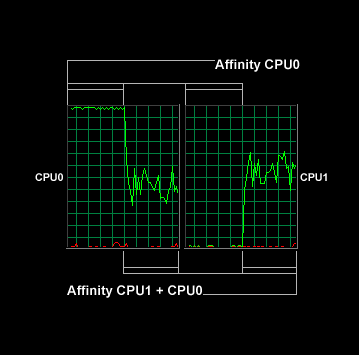
After a little experimenting I found that it was simply that Windows 2000
was sharing the pvengine process across both processors, so that it could
load balance other processes better.  The affinity by default is set on CPU0
+ CPU1, even if the process only contains a single thread.  As more
processes are set to a specific processor, it throttles the other processes
more towards the opposite processor to ensure they're being balanced in
terms of cycles.  I tried forcing pvengine to affinity CPU0, and it does
take up 100-99% of that processor, so the thread is getting the equivilant
of 100% of a processor's time.  As soon as it's switched back to CPU0 + CPU1
it balances again.

The process shows as taking up 50% of the total CPU usage, which is correct.
(graph of the cycles from switch affinty from CPU0 to CPU0 + CPU1 included
just for fun ;)  Even with distributed.net running it still gets 50-49% of
the total usage, while distributed.net is throttled to the other processor,
and gets the remaining 49-50%.  Works well :)

Anyway, that's getting really off-topic (kinda), so back to the image.

I tried raising the jitter from 0.3 to 1 as was suggested by Nathan and it
made the image look a lot better, but it was getting dark and light patches,
so I figured it still needed more photons.  I bumped the count up to 3
million from 2 million, but it was still patchy, so I went to 4 million,
then 5 and then 6 million (heh) and it seems to have smoothed it out a fair
bit.  I probably should read the documentation a little more carefully...
maybe there's an option I've missed to help a little bit, but then again
maybe there isn't (I guess that's what jitter is for really), so I'm happy
with pushing the count up.  It's still a little patchy in some of the more
sparse areas of the shadows, but no where near as bad as it was :)

I've also replaced the standard light with an area light and it looks a lot
better (I'm a big fan of soft shadows, heh) but there is an atefact I've
having difficulties getting rid of (the harsh edge to the shadows that
appears on the shadows of the first and second torii on the left side of the
image, just where it goes really soft).  Any ideas how to get rid of it?  I
tried using 32x32 lights in the area light too (instead of the 18x18 in that
image) but it was still there :/

Anyway, I can see I'm going to have a LOT of fun with photons and radiosity!

Lance.

thezone.firewave.com.au
www.firewave.com.au
Post a reply to this message
Attachments:
Download 'photon_tracing_2.jpg' (71 KB)
Download 'affinity_graph.gif' (5 KB)
Preview of image 'photon_tracing_2.jpg'
Preview of image 'affinity_graph.gif'
|
|
| |
| |
|
|
From: Warp
Subject: Re: First image in a long time, just testing "new" stuff
Date: 29 Oct 2001 07:22:13
Message: <3bdd49e9@news.povray.org>
|
|
|
| |
| |
|
|
The image looks very good.
  However, there's something strange there. I think that you clearly wanted
to make glass torii. However, for some reason they look like made of plastic
instead.
  What is their ior? Also perhaps the highlights should be sharper.

--
#macro N(D,I)#if(I<6)cylinder{M()#local D[I]=div(D[I],104);M().5,2pigment{
rgb M()}}N(D,(D[I]>99?I:I+1))#end#end#macro M()<mod(D[I],13)-6,mod(div(D[I
],13),8)-3,10>#end blob{N(array[6]{11117333955,
7382340,3358,3900569407,970,4254934330},0)}//                     - Warp -
Post a reply to this message
|
|
| |
| |
|
|
From: Lance Birch
Subject: Re: First image in a long time, just testing "new" stuff
Date: 29 Oct 2001 07:36:22
Message: <3bdd4d46@news.povray.org>
|
|
|
| |
| |
|
|
Warp wrote:
>   The image looks very good.
>   However, there's something strange there. I think that you clearly
wanted
> to make glass torii. However, for some reason they look like made of
plastic
> instead.
>   What is their ior? Also perhaps the highlights should be sharper.

Yes I haven't played with the highlights yet, so I left them fairly dull
(more like some kind of plastic).  The IOR is 1.15, so the highlights should
be much tighter.

Lance.

thezone.firewave.com.au
www.firewave.com.au
Post a reply to this message
|
|
| |
| |
|
|
From: Chris Cason
Subject: Re: First image in a long time, just testing "new" stuff
Date: 29 Oct 2001 09:28:33
Message: <3bdd6791@news.povray.org>
|
|
|
| |
| |
|
|
"Lance Birch" <-> wrote in message news:3bdcc5f5@news.povray.org...
> I'm not sure, with RC5 running I can get both processors doing 100% (if not
> with a little bit or kernel action here and there).  I'll have to
> investigate it further.  AFAIK POV-Ray is single-threaded as well, but even
> still, setting it to the highest thread priority should get it using 100% of
> one processor.  I'll have to try manually setting it in the task manager on
> pvengine.

Incidentally, if you download beta.7 (available in the next 24 hours), you will
find that on NT it prints a summary of actual kernel+user time after each render.

I added this to allow for more accurate benchmarking, regardless of what other
processes are running on the machine (in the process of which I discovered that,
for some reason, NT doesn't seem to include time spent updating graphics or the
UI in either time count, which to an extent suits me, though I wasn't expecting
it).

-- Chris
Post a reply to this message
|
|
| |
| |
|
|
From: Lance Birch
Subject: Re: First image in a long time, just testing "new" stuff
Date: 29 Oct 2001 10:01:47
Message: <3bdd6f5b@news.povray.org>
|
|
|
| |
| |
|
|
Chris Cason wrote:
>
> "Lance Birch" <-> wrote in message news:3bdcc5f5@news.povray.org...
> > I'm not sure, with RC5 running I can get both processors doing 100% (if
not
> > with a little bit or kernel action here and there).  I'll have to
> > investigate it further.  AFAIK POV-Ray is single-threaded as well, but
even
> > still, setting it to the highest thread priority should get it using
100% of
> > one processor.  I'll have to try manually setting it in the task manager
on
> > pvengine.
>
> Incidentally, if you download beta.7 (available in the next 24 hours), you
will
> find that on NT it prints a summary of actual kernel+user time after each
render.
>
> I added this to allow for more accurate benchmarking, regardless of what
other
> processes are running on the machine (in the process of which I discovered
that,
> for some reason, NT doesn't seem to include time spent updating graphics
or the
> UI in either time count, which to an extent suits me, though I wasn't
expecting
> it).

Thanks Chris, this'll be an interesting thing to watch.  I've been
monitoring the way it's prioritised across both processors and it seems to
get the equivalent of 100% of one processor (regardless of the assigned
affinity), which is good :)

Lance.

thezone.firewave.com.au
www.firewave.com.au
Post a reply to this message
|
|
| |
| |
|
|
From: Ruy
Subject: Re: First image in a long time, just testing "new" stuff
Date: 29 Oct 2001 10:26:40
Message: <3bdd7530@news.povray.org>
|
|
|
| |
| |
|
|
Nice image. Can you share the photons and radiosity parameters with us?

Ruy
Post a reply to this message
|
|
| |
| |
|
|
From: Warp
Subject: Re: First image in a long time, just testing "new" stuff
Date: 29 Oct 2001 12:23:10
Message: <3bdd907e@news.povray.org>
|
|
|
| |
| |
|
|
Lance Birch <-> wrote:
: The IOR is 1.15

  That explains a lot. They just didn't have that glass-refraction look.

  The IOR for glass is 1.5, and for water it's 1.33. So what you have modelled
are torii made of some gas which is a bit denser than air. In fact, those
torii couldn't exist in the real world (a material of that density would just
vaporize as any gas). No wonder why they looked odd... :P

--
#macro N(D,I)#if(I<6)cylinder{M()#local D[I]=div(D[I],104);M().5,2pigment{
rgb M()}}N(D,(D[I]>99?I:I+1))#end#end#macro M()<mod(D[I],13)-6,mod(div(D[I
],13),8)-3,10>#end blob{N(array[6]{11117333955,
7382340,3358,3900569407,970,4254934330},0)}//                     - Warp -
Post a reply to this message
|
|
| |
| |
|
|
From: Lance Birch
Subject: Re: First image in a long time, just testing "new" stuff
Date: 29 Oct 2001 17:09:17
Message: <3bddd38d@news.povray.org>
|
|
|
| |
| |
|
|
Warp wrote:
> Lance Birch <-> wrote:
> : The IOR is 1.15
>
>   That explains a lot. They just didn't have that glass-refraction look.
>
>   The IOR for glass is 1.5, and for water it's 1.33. So what you have
modelled
> are torii made of some gas which is a bit denser than air. In fact, those
> torii couldn't exist in the real world (a material of that density would
just
> vaporize as any gas). No wonder why they looked odd... :P

Yes I know all the values for different materials... I was more just going
for artistic mertic ;)

Lance.

thezone.firewave.com.au
www.firewave.com.au
Post a reply to this message
|
|
| |
| |
|
|
From: Lance Birch
Subject: Re: First image in a long time, just testing "new" stuff
Date: 29 Oct 2001 17:12:26
Message: <3bddd44a@news.povray.org>
|
|
|
| |
| |
|
|
Ruy wrote:
> Nice image. Can you share the photons and radiosity parameters with us?

I started with the standard radiosity settings from the Insert menu and work
my way along.  The photons are fairly self explanatory.  I don't think the
radiosity has too much effect in the image, except with the grey sky sphere
I put in for the sky.  The ambient light does a lot of the work too.

global_settings {
  radiosity {
    pretrace_start 0.08
    pretrace_end 0.04
    error_bound 1.8
    recursion_limit 3
    low_error_factor .5
    gray_threshold 0.0
    minimum_reuse 0.015
    brightness 1
    adc_bailout 0.01/2
    normal on
    count 1600
    nearest_count 7
  }
  photons {
     count 6000000
     autostop 0
     jitter 1
  }
  ambient_light rgb <2,0.25,0>
}

Lance.

thezone.firewave.com.au
www.firewave.com.au
Post a reply to this message
|
|
| |
| |
|
|
From: JRG
Subject: Re: First image in a long time, just testing "new" stuff
Date: 29 Oct 2001 17:29:06
Message: <3bddd832$1@news.povray.org>
|
|
|
| |
| |
|
|
AFAIK POV 3.5 radiosity looks much better with ambient set to 0 (except the
sky of course).
The motto is: "let radiosity do it!"

--
Jonathan.

"Lance Birch" <-> ha scritto nel messaggio news:3bddd44a@news.povray.org...
> Ruy wrote:
> > Nice image. Can you share the photons and radiosity parameters with us?
>
> I started with the standard radiosity settings from the Insert menu and
work
> my way along.  The photons are fairly self explanatory.  I don't think the
> radiosity has too much effect in the image, except with the grey sky
sphere
> I put in for the sky.  The ambient light does a lot of the work too.
>
> global_settings {
>   radiosity {
>     pretrace_start 0.08
>     pretrace_end 0.04
>     error_bound 1.8
>     recursion_limit 3
>     low_error_factor .5
>     gray_threshold 0.0
>     minimum_reuse 0.015
>     brightness 1
>     adc_bailout 0.01/2
>     normal on
>     count 1600
>     nearest_count 7
>   }
>   photons {
>      count 6000000
>      autostop 0
>      jitter 1
>   }
>   ambient_light rgb <2,0.25,0>
> }
>
> Lance.
>
> thezone.firewave.com.au
> www.firewave.com.au
>
>
Post a reply to this message
|
|
| |
| |
|
|
From: Francois Labreque
Subject: Re: First image in a long time, just testing "new" stuff
Date: 29 Oct 2001 18:50:25
Message: <3BDDEAEC.8040905@videotron.ca>
|
|
|
| |
| |
|
|
Chris Cason wrote:

>
> Incidentally, if you download beta.7 (available in the next 24 hours),


Wow!  What would be the odds of getting both Netscape 6.2 and POV 3.5.b7
on the same day!!!

--
/*Francois Labreque*/#local a=x+y;#local b=x+a;#local c=a+b;#macro P(F//
/*    flabreque    */L)polygon{5,F,F+z,L+z,L,F pigment{rgb 9}}#end union
/*        @        */{P(0,a)P(a,b)P(b,c)P(2*a,2*b)P(2*b,b+c)P(b+c,<2,3>)
/*   videotron.ca  */}camera{location<6,1.25,-6>look_at a orthographic}
Post a reply to this message
|
|
| |
| |
|
|
From: Lance Birch
Subject: Re: First image in a long time, just testing "new" stuff
Date: 29 Oct 2001 22:18:31
Message: <3bde1c07@news.povray.org>
|
|
|
| |
| |
|
|
"JRG" <jrg### [at] hotmail com> wrote in message
news:3bddd832$1@news.povray.org...
> AFAIK POV 3.5 radiosity looks much better with ambient set to 0 (except
the
> sky of course).
> The motto is: "let radiosity do it!"
Yes but I always love maxing out colours to get better contrast :)
Lance.
thezone.firewave.com.au
www.firewave.com.au
Post a reply to this message
|
|
| |
| |
|
|
|
|
| |
| |
|
|
On Mon, 29 Oct 2001 11:36:19 +1000, Lance Birch wrote:
>Hiya, well, this is my first use of POV-Ray in a few years now (probably 3
>years, wow, it's been a while), so I've been catching up on a lot of
>features that were never in the POV-Ray I knew.  This is just a test of
>using Photons and Radiosity together... it took about 20 minutes to render
>which doesn't seem too bad, but I'm guessing the "stripe" effect in the
>photons is just because I haven't set the count high enough?

Welcome home.

Looking forward to seeing your future work, I know the old stuff that
you used to post was good, and you don't seem to have gotten rustie at
all.

--
Cheers
Steve              email mailto:ste### [at] zeroppsuklinuxnet

%HAV-A-NICEDAY Error not enough coffee  0 pps.

web http://www.zeropps.uklinux.net/

or  http://start.at/zero-pps

  7:29pm  up 22 days, 11:11,  1 user,  load average: 1.00, 1.00, 1.00
Post a reply to this message
|
|
| |
| |
|
|
From: Shay
Subject: Re: First image in a long time, just testing "new" stuff
Date: 31 Oct 2001 09:18:31
Message: <3be00837$1@news.povray.org>
|
|
|
| |
| |
|
|
Any chance you could post the entire code for this image? I would like to
try some different torus macros I have written with photons, and it would be
nice to render them within your scene so that the group and I have a similar
image against which to compare mine.


Thank you,
 -Shay
Post a reply to this message
|
|
| |
| |
|
|
From: Lance Birch
Subject: Re: First image in a long time, just testing "new" stuff
Date: 31 Oct 2001 11:45:33
Message: <3be02aad@news.povray.org>
|
|
|
| |
| |
|
|
"Shay" <sah### [at] simcopartscom> wrote in message
news:3be00837$1@news.povray.org...
> Any chance you could post the entire code for this image? I would like to
> try some different torus macros I have written with photons, and it would
be
> nice to render them within your scene so that the group and I have a
similar
> image against which to compare mine.

No problem, here it is.  You might want to reduce some of the values
though... like the radiosity count, the photon count, and the number of
lights in the area light.

// ah, here we go again...

#declare TestFinish = finish {ambient 0 ior 1.15 diffuse 0.15 specular 0.6
roughness 0.005 brilliance 4 reflection {0.2, 1.0 fresnel on}
conserve_energy}

global_settings {
  radiosity {
    pretrace_start 0.08
    pretrace_end 0.04
    error_bound 1.8
    recursion_limit 3
    low_error_factor .5
    gray_threshold 0.0
    minimum_reuse 0.015
    brightness 1
    adc_bailout 0.01/2
    normal on
    count 1600
    nearest_count 7
  }
  photons {
     count 6000000
     autostop 0
     jitter 1
  }
  ambient_light rgb <2,0.25,0>
}

camera {location <-4,7,-5> look_at <1,0,1>}

light_source {
  0*x
  color rgb 1.5
  area_light
  <1, 0, 0> <0, 0, 1>
  18, 18
  adaptive 0
  jitter
  translate <2, 5, -5>
  photons {reflection on refraction on}
}

sphere {<0,0,0> 50 texture{pigment {color rgb <0.5,0.5,0.5>}}}
plane {y,0 texture{pigment{color rgb <1,0.75,0>}}}

torus {1.5, 0.5 rotate <90,0,0> translate <0,2,0>
        texture{pigment {rgbf <1,1,1,.9>} finish{TestFinish}}
        photons {
                target
                refraction on
                reflection on
                collect off
        }
}
torus {1.5, 0.5 rotate <90,0,0> translate <0,2,0>
        texture{pigment {rgbf <1,1,1,.9>} finish{TestFinish}}
        photons {
                target
                refraction on
                reflection on
                collect off
        }
        translate <0,0,-2>
}

torus {1.5, 0.5 rotate <90,0,0> translate <0,2,0>
        texture{pigment {rgbf <1,1,1,.9>} finish{TestFinish}}
        photons {
                target
                refraction on
                reflection on
                collect off
        }
        translate <0,0,2>
}

// end
Post a reply to this message
|
|
| |
| |
|
|
From: Shay
Subject: Re: First image in a long time, just testing "new" stuff
Date: 1 Nov 2001 09:29:38
Message: <3be15c52@news.povray.org>
|
|
|
| |
| |
|
|
I appreciate it. I've got one going right now that should be finished by
Monday. If it looks interesting, I'll post it.

 -Shay
Lance Birch <-> wrote in message news:3be02aad@news.povray.org...
> "Shay" <sah### [at] simcopartscom> wrote in message
> news:3be00837$1@news.povray.org...
> > Any chance you could post the entire code for this image? I would like
to
> > try some different torus macros I have written with photons, and it
would
> be
> > nice to render them within your scene so that the group and I have a
> similar
> > image against which to compare mine.
>
> No problem, here it is.  You might want to reduce some of the values
> though... like the radiosity count, the photon count, and the number of
> lights in the area light.
>
> // ah, here we go again...
>
> #declare TestFinish = finish {ambient 0 ior 1.15 diffuse 0.15 specular 0.6
> roughness 0.005 brilliance 4 reflection {0.2, 1.0 fresnel on}
> conserve_energy}
>
> global_settings {
>   radiosity {
>     pretrace_start 0.08
>     pretrace_end 0.04
>     error_bound 1.8
>     recursion_limit 3
>     low_error_factor .5
>     gray_threshold 0.0
>     minimum_reuse 0.015
>     brightness 1
>     adc_bailout 0.01/2
>     normal on
>     count 1600
>     nearest_count 7
>   }
>   photons {
>      count 6000000
>      autostop 0
>      jitter 1
>   }
>   ambient_light rgb <2,0.25,0>
> }
>
> camera {location <-4,7,-5> look_at <1,0,1>}
>
> light_source {
>   0*x
>   color rgb 1.5
>   area_light
>   <1, 0, 0> <0, 0, 1>
>   18, 18
>   adaptive 0
>   jitter
>   translate <2, 5, -5>
>   photons {reflection on refraction on}
> }
>
> sphere {<0,0,0> 50 texture{pigment {color rgb <0.5,0.5,0.5>}}}
> plane {y,0 texture{pigment{color rgb <1,0.75,0>}}}
>
> torus {1.5, 0.5 rotate <90,0,0> translate <0,2,0>
>         texture{pigment {rgbf <1,1,1,.9>} finish{TestFinish}}
>         photons {
>                 target
>                 refraction on
>                 reflection on
>                 collect off
>         }
> }
> torus {1.5, 0.5 rotate <90,0,0> translate <0,2,0>
>         texture{pigment {rgbf <1,1,1,.9>} finish{TestFinish}}
>         photons {
>                 target
>                 refraction on
>                 reflection on
>                 collect off
>         }
>         translate <0,0,-2>
> }
>
> torus {1.5, 0.5 rotate <90,0,0> translate <0,2,0>
>         texture{pigment {rgbf <1,1,1,.9>} finish{TestFinish}}
>         photons {
>                 target
>                 refraction on
>                 reflection on
>                 collect off
>         }
>         translate <0,0,2>
> }
>
> // end
>
>
Post a reply to this message
|
|
| |
| |
|
|
From:
Subject: Re: First image in a long time, just testing "new" stuff
Date: 2 Nov 2001 02:17:34
Message: <3be2488e@news.povray.org>
|
|
|
| |
| |
|
|
"Lance Birch" <-> wrote in message news:3be02aad@news.povray.org...
> "Shay" <sah### [at] simcopartscom> wrote in message
> news:3be00837$1@news.povray.org...

> No problem, here it is.

And it produced a very good looking desktop. Great colors. It looks very
warm and the refractions are a real firework.

>   photons {
>      count 6000000
>      autostop 0
>      jitter 1
>   }
How about spacing instead of count. I tried 0.003 and some of the caustics
got a bit smoother. (What can you expect when you shoot a few more millions
of photons.:-) ) But I guess it's the same as using a bigger count. You
could also try a focal blur with a small aperture size (0.1?). It might blur
the caustics just enough without bluring the image too much.  I didn't dare
to try it yet because a 1024x768 with proper aa is a four hour job already.

Ari-Matti
Post a reply to this message
|
|
| |
| |
|
|
From: Lance Birch
Subject: Re: First image in a long time, just testing "new" stuff
Date: 4 Nov 2001 03:00:33
Message: <3be4f5a1@news.povray.org>
|
|
|
| |
| |
|
|
Ari-Matti Leppänen wrote:
> And it produced a very good looking desktop. Great colors. It looks very
> warm and the refractions are a real firework.

:D

> How about spacing instead of count. I tried 0.003 and some of the caustics
> got a bit smoother. (What can you expect when you shoot a few more
millions
> of photons.:-) ) But I guess it's the same as using a bigger count. You
> could also try a focal blur with a small aperture size (0.1?). It might
blur
> the caustics just enough without bluring the image too much.  I didn't
dare
> to try it yet because a 1024x768 with proper aa is a four hour job
already.

Yeah it tends to slow things down a little.  I'll play around with the
spacing.  There are probably settings I haven't looked in to yet that will
improve the quality without having to have such a large count (not that it's
really a problem, it stills renders in under 40 minutes on this computer at
that res).

Lance.

thezone.firewave.com.au
www.firewave.com.au
Post a reply to this message
|
|
| |
| |
|
|
|
|
| |
|
|