|
|
|
|
|
|
| |
| |
|
|
|
|
| |
| |
|
|
Hello,

This exemple come from MathMod, "Vase_3 by Abderrahman Taha 31/10/2019"

Several isosurfaces and functions including these two :

isoTransform_2 =
if(CarvinCondition(x,y,z,t)=(0),ThickIsoExterior(x,y,z,t),1)"

isoTransform_6=if(CarvinCondition(x,y,z,t)&ThickIsoExterior(x,y,z,t)<(0),-ThickIso2((6*x),(6*y),(6*z),t)*Iso6((x*6),(y*6),(z*6),-1)

*(Iso6((x*6),(y*6),(z*6),1)),1)"

CarvinCondition, ThickIsoExterior, ThickIso2, Iso6 are others functions.


The (my) transcription for POV gives :

#declare isoTransform_2 = function(x,y,z,T) {
  	select (
		// A (condition)
  		CarvinCondition(x,y,z,T),
		// B : A < 0
   		ThickIsoExterior(x,y,z,T),
  		// C : A = 0
  		1,
  		// D : A > 0
   		ThickIsoExterior(x,y,z,T)
   		)
   	}

#declare isoTransform_6 = function(x,y,z,T) {
	select (
		// A (condition)
		(CarvinCondition(x,y,z,T) & ThickIsoExterior(x,y,z,T)),
		// B : A <0
		-ThickIso2((6*x),(6*y),(6*z),T) * Iso6((x*6),(y*6),(z*6),-1) *
(Iso6((x*6),(y*6),(z*6),1)),
		// C : A >= 0
  		1
  		)
  	}


Do you agree with the use of select() to replace if() ?
I'm struggling a bit and I would like to check this option already.


On the left is MathMod, on the right where I am.
I'm trying to figure out why the “laces” are missing.


Thanks


--
kurtz le pirate
compagnie de la banquise
Post a reply to this message
Attachments:
Download 'vase.png' (102 KB)
Preview of image 'vase.png'

|
|
| |
| |
|
|
|
|
| |
| |
|
|
kurtz le pirate <kur### [at] free fr> wrote:
> This exemple come from MathMod, "Vase_3 by Abderrahman Taha 31/10/2019"
Nice. There have been a lot of MathMod shapes that I'd like to replicate in
POV-Ray.
> Do you agree with the use of select() to replace if() ?
Yes - there are few other options to do that, if any.
> On the left is MathMod, on the right where I am.
> I'm trying to figure out why the “laces” are missing.
No time for me to investigate this in detail right now but:
Isosurfaces of complex things can be tricky - especially if you're trying to use
certain "forms" of equations.
First thing is to check messages and see what the gradient is.
Then I'd try to take the abs () of the equation and subtract a tiny amount to
see if anything shows up.
Then I might see if subtracting the equation from the r (x,y,z) function gets
you anywhere.
- BW fr> wrote:
> This exemple come from MathMod, "Vase_3 by Abderrahman Taha 31/10/2019"
Nice. There have been a lot of MathMod shapes that I'd like to replicate in
POV-Ray.
> Do you agree with the use of select() to replace if() ?
Yes - there are few other options to do that, if any.
> On the left is MathMod, on the right where I am.
> I'm trying to figure out why the “laces” are missing.
No time for me to investigate this in detail right now but:
Isosurfaces of complex things can be tricky - especially if you're trying to use
certain "forms" of equations.
First thing is to check messages and see what the gradient is.
Then I'd try to take the abs () of the equation and subtract a tiny amount to
see if anything shows up.
Then I might see if subtracting the equation from the r (x,y,z) function gets
you anywhere.
- BW
Post a reply to this message
|
|
| |
| |
|
|
|
|
| |
| |
|
|
Le 2024-12-06 à 06:15, kurtz le pirate a écrit :
>
>
> Do you agree with the use of select() to replace if() ?
> I'm struggling a bit and I would like to check this option already.

As if() can't be used in the function of an isosurface, select() is
pretty much the only option.

>
>
>
> On the left is MathMod, on the right where I am.
> I'm trying to figure out why the “laces” are missing.
>
>
>
>
>
> Thanks
>
>
>
Post a reply to this message
|
|
| |
| |
|
|
|
|
| |
| |
|
|
Alain Martel <kua### [at] videotronca> wrote:

> As if() can't be used in the function of an isosurface, select() is
> pretty much the only option.

Well, I don't think that's entirely true.

If you take advantage of the fact that expressions inside of parentheses get
evaluated, and make use of functions like sgn, min, max, etc, then you can
multiply terms in an equation by values that select them (multiply by 1 or -1)
or cancel them out (multiply by 0).

So if you wanted to alternate signs, you could use a sine wave and take the sign
of that:  sgn(sin(N))

- BW
Post a reply to this message
|
|
| |
| |
|
|
|
|
| |
| |
|
|
Le 2024-12-06 à 13:44, Bald Eagle a écrit :
> Alain Martel <kua### [at] videotronca> wrote:
>
>> As if() can't be used in the function of an isosurface, select() is
>> pretty much the only option.
>
> Well, I don't think that's entirely true.
>
> If you take advantage of the fact that expressions inside of parentheses get
> evaluated, and make use of functions like sgn, min, max, etc, then you can
> multiply terms in an equation by values that select them (multiply by 1 or -1)
> or cancel them out (multiply by 0).
>
> So if you wanted to alternate signs, you could use a sine wave and take the sign
> of that:  sgn(sin(N))
>
> - BW
>

According to what I remember from a discussion here a while back :
The if() is normally evaluated at parse time. That makes it unsuitable
to be used in an isosurface that need to evaluate it at render time.
Post a reply to this message
|
|
| |
| |
|
|
|
|
| |
| |
|
|
Alain Martel <kua### [at] videotronca> wrote:

> select() is
> >> pretty much the only option.

> > Well, I don't think that's entirely true.

What I meant is that select() is not the ONLY option.

It will be a while before I can check and confirm, but I think that one can
embed conditional statements into a function such as (Theta < pi/2) which will
be evaluated to true (1) or false (0).

Plus all of the other methods I referred to.

- BW
Post a reply to this message
|
|
| |
| |
|
|
|
|
| |
| |
|
|
kurtz le pirate <kur### [at] freefr> wrote:
> Hello,
>
> This exemple come from MathMod, "Vase_3 by Abderrahman Taha 31/10/2019"
>
> Several isosurfaces and functions including these two :
>
> isoTransform_2 =
> if(CarvinCondition(x,y,z,t)=(0),ThickIsoExterior(x,y,z,t),1)"
>
>
isoTransform_6=if(CarvinCondition(x,y,z,t)&ThickIsoExterior(x,y,z,t)<(0),-ThickIso2((6*x),(6*y),(6*z),t)*Iso6((x*6),(
y*6),(z*6),-1)
> *(Iso6((x*6),(y*6),(z*6),1)),1)"
>
> CarvinCondition, ThickIsoExterior, ThickIso2, Iso6 are others functions.
>
>
>
> The (my) transcription for POV gives :
>
> #declare isoTransform_2 = function(x,y,z,T) {
>    select (
>   // A (condition)
>     CarvinCondition(x,y,z,T),
>   // B : A < 0
>      ThickIsoExterior(x,y,z,T),
>     // C : A = 0
>     1,
>     // D : A > 0
>      ThickIsoExterior(x,y,z,T)
>      )
>     }
>
> #declare isoTransform_6 = function(x,y,z,T) {
>  select (
>   // A (condition)
>   (CarvinCondition(x,y,z,T) & ThickIsoExterior(x,y,z,T)),
>   // B : A <0
>   -ThickIso2((6*x),(6*y),(6*z),T) * Iso6((x*6),(y*6),(z*6),-1) *
> (Iso6((x*6),(y*6),(z*6),1)),
>   // C : A >= 0
>     1
>     )
>    }
>
>
> Do you agree with the use of select() to replace if() ?
> I'm struggling a bit and I would like to check this option already.
>
>
>
> On the left is MathMod, on the right where I am.
>...

Hi Kurtz

That's an interesting project.

I found some MathMod documentation here:
https://fossies.org/linux/mathmod/documentation/index.html#SupportedOperatorsFunctions

Some of its mathematical operators in order of precedence:

! A
unary logical not (result is 1 if A is 0, else 0)

A = B    A < B    A <= B    A != B    A > B    A >= B
comparison between A and B (result is either 0 or 1)

A & B
result is 1 if A and B differ from 0, else 0

A | B
result is 1 if A or B differ from 0, else 0


One of its mathematical functions:

if(A, B, C)
if A differs from 0, the return value of this function is B, else C


In POV-Ray 0 = 0.0, so I have removed the all the int() calls in the
expressions above.

From this documentation I understand that any value equal to 0 is treated
as a logical False and any other numerical value is treated as logical True.
(I think this convention makes expressions harder to understand, so I will
not use it further in my simplified expressions, even if POV-Ray also uses it.
Writing readable expressions is more important than writing compact
expressions.)

To make it easier to get an overview, I rename the MathMod functions in your
post, remove their parameter lists and arguments, insert some white space
and finally simplify them a bit.

isoTransform_2(): IT2()
isoTransform_6(): IT6()
CarvinCondition(): CC()
ThickIsoExterior(): TIE()
ThickIso2(): TI2()
Iso6(): I6()


IT2() =
    if(
        CC() = 0,
        TIE(),
        1
    )

IT2() =
    if(
        CC(),
        1,
        TIE()
    )

IT6() =
    if(
        CC() & (TIE() < 0),
        -TI2()*I6()*I6(),
        1
    )

IT6() =
    if(
        TIE() < 0,
        if(
            CC(),
            -TI2()*I6()*I6(),
            1
        ),
        1
    )

The nested ifs above has the same effect as the & operator.

Now a rewrite to POV-Ray expressions is not so difficult:

IT2():
    select(
        CC(),
        1,
        TIE(),
        1
    )

IT6():
    select(
        TIE(),
        select(
            CC(),
            -TI2()*I6()*I6(),
            1,
            -TI2()*I6()*I6()
        ),
        1
    )

The nested selects above has the same effect as the & operator.

Now you can fill in the parameter lists, the arguments, give back functions
their original names and give them a proper POV-Ray function syntax.

--
Tor Olav
http://subcube.com
https://github.com/t-o-k
Post a reply to this message
|
|
| |
| |
|
|
|
|
| |
| |
|
|
On 07/12/2024 19:54, Tor Olav Kristensen wrote:

> Hi Kurtz
>
> That's an interesting project.
>
> I found some MathMod documentation here:
>
https://fossies.org/linux/mathmod/documentation/index.html#SupportedOperatorsFunctions

Hi Tor,

I also found the doc in the MathMod package.


>
> ...
> ...
> ...
>
> One of its mathematical functions:
>
> if(A, B, C)
> if A differs from 0, the return value of this function is B, else C
>
>
> In POV-Ray 0 = 0.0, so I have removed the all the int() calls in the
> expressions above.
>
>  From this documentation I understand that any value equal to 0 is treated
> as a logical False and any other numerical value is treated as logical True.
> (I think this convention makes expressions harder to understand, so I will
> not use it further in my simplified expressions, even if POV-Ray also uses it.
> Writing readable expressions is more important than writing compact
> expressions.)
>
Yes, indeed, difficult to understand.
MathMod's language is, on certain points, obscure ... at least for me.

I also have problems with PrettyBall_1. 3 isosurfaces. Two are ok. The
third really doesn't match. Yet the code is/looks ok.


> To make it easier to get an overview, I rename the MathMod functions in your
> post, remove their parameter lists and arguments, insert some white space
> and finally simplify them a bit.
>
> isoTransform_2(): IT2()
> isoTransform_6(): IT6()
> CarvinCondition(): CC()
> ThickIsoExterior(): TIE()
> ThickIso2(): TI2()
> Iso6(): I6()
>
>
> IT2() =
>      if(
>          CC() = 0,
>          TIE(),
>          1
>      )
>
> IT2() =
>      if(
>          CC(),
>          1,
>          TIE()
>      )
>
> IT6() =
>      if(
>          CC() & (TIE() < 0),
>          -TI2()*I6()*I6(),
>          1
>      )
>
> IT6() =
>      if(
>          TIE() < 0,
>          if(
>              CC(),
>              -TI2()*I6()*I6(),
>              1
>          ),
>          1
>      )
>
> The nested ifs above has the same effect as the & operator.
>
> Now a rewrite to POV-Ray expressions is not so difficult:
>
> IT2():
>      select(
>          CC(),
>          1,
>          TIE(),
>          1
>      )
>
> IT6():
>      select(
>          TIE(),
>          select(
>              CC(),
>              -TI2()*I6()*I6(),
>              1,
>              -TI2()*I6()*I6()
>          ),
>          1
>      )
>
> The nested selects above has the same effect as the & operator.
>
> Now you can fill in the parameter lists, the arguments, give back functions
> their original names and give them a proper POV-Ray function syntax.
>

Ingenious approach. I'm going to look into it very closely.


Thanks+


--
kurtz le pirate
compagnie de la banquise
Post a reply to this message
|
|
| |
| |
|
|
|
|
| |
| |
|
|
Following Tor's advice, I corrected my 'select()'.

I've also put the 't' parameter back into the functions. I mistakenly
thought that this parameter was only used for animation and morphing.
This is not the case at all.


I put an image of the result in p.b.i.


I can ost functions if someone is interested.


--
kurtz le pirate
compagnie de la banquise
Post a reply to this message
|
|
| |
| |
|
|
|
|
| |
| |
|
|
hi,

kurtz le pirate <kur### [at] freefr> wrote:
> ...
> I put an image of the result in p.b.i.
> I can ost functions if someone is interested.

the vase looks pretty cool.  the functions as such would not be much use to me,
I guess, but how about creating a macro ?  perhaps with options to supply one's
own material and for scaling (making the vase taller/shorter, slimmer/more
bulge), and such ?


regards, jr.
Post a reply to this message
|
|
| |
| |
|
|
|
|
| |
| |
|
|
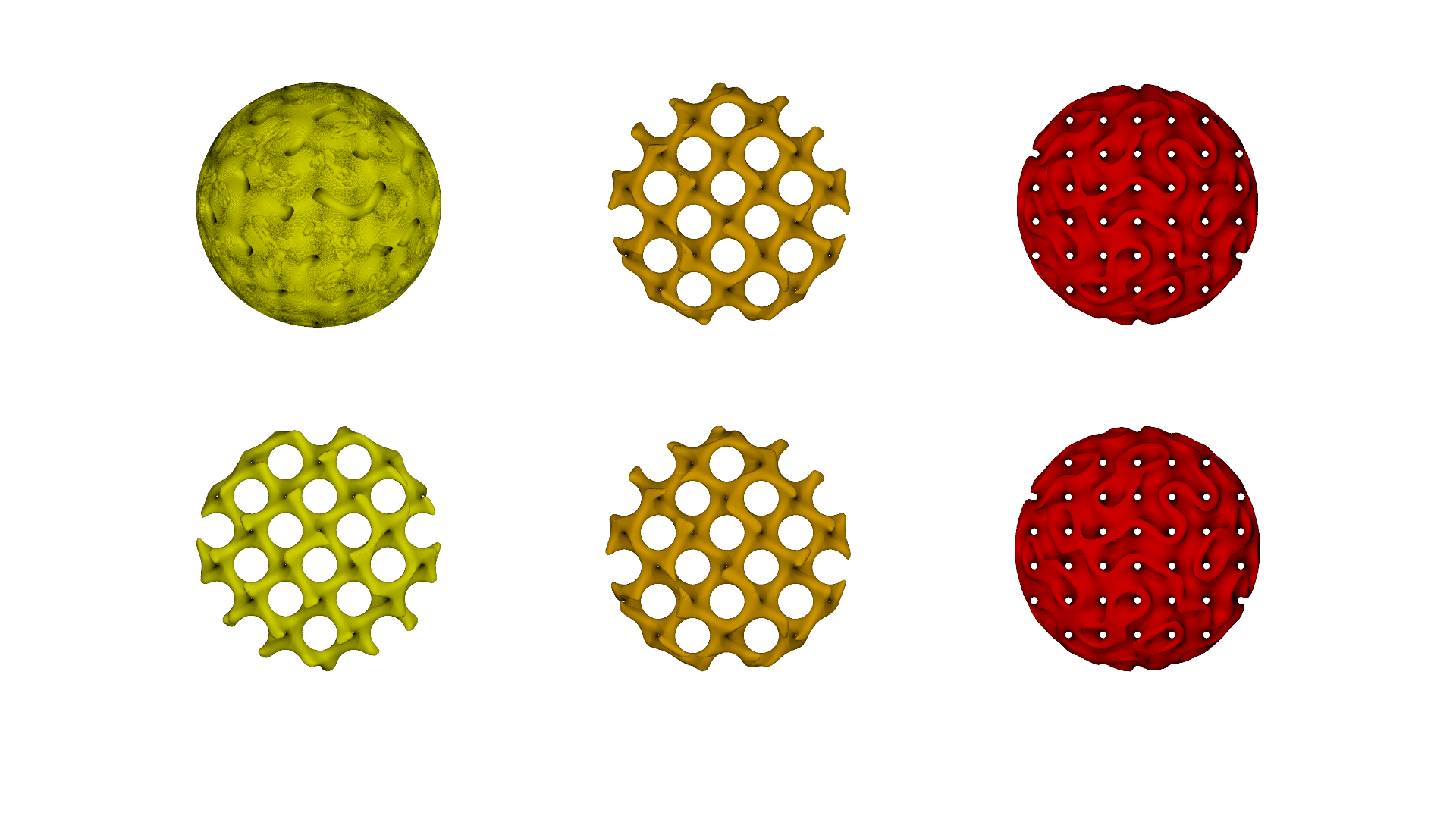
Am 08.12.2024 um 17:25 schrieb kurtz le pirate:

>
> I also have problems with PrettyBall_1. 3 isosurfaces. Two are ok. The
> third really doesn't match. Yet the code is/looks ok.
>
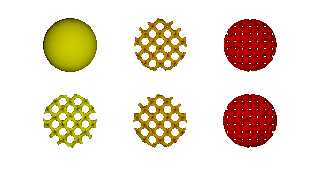
>
Indeed, this is actually a very strange difference between POV and
MathMod. In the top row are the three objects as isosurfaces in POV,
below are the objects exported from MathMod with the same formulae. The
second and third objects match quite well, while the first one is
completely different. I cannot judge whether the error is in POV or in
MathMod.

If you compare the two objects on the right and in the centre in the
bottom row (MathMod), you may get the impression that the one on the
right could be created from the middle one as a point reflection at the
origin (scale <-1,-1,-1>) and in fact both are largely congruent after
this operation. You will get the correct result with POV if you create
the first object from the centre one with the mentioned scaling or
change the definition of GyroidLatice_1 as follows:

#declare GyroidLatice_1 = function {
    select(isoCondition(x,y,z),Iso3(-x,-y,-z),1) +
exp(isoCondition(x,y,z)/5)
//   select(isoCondition(x,y,z),Iso2(x,y,z),1)// -
exp(isoCondition(x,y,z)/5)
}


Best regards
Michael
Post a reply to this message
Attachments:
Download 'zeige_ball01.png' (497 KB)
Preview of image 'zeige_ball01.png'
|
|
| |
| |
|
|
|
|
| |
| |
|
|
MichaelJF <fri### [at] t-onlinede> wrote:

Hmmm.   It looks like maybe it's a sign issue?
Inside and outside are switched?

Try just negating the function and see what happens.

I'm not sure if that might have to do with the left-handed coordinate system, or
what.

- BW
Post a reply to this message
|
|
| |
| |
|
|
|
|
| |
| |
|
|
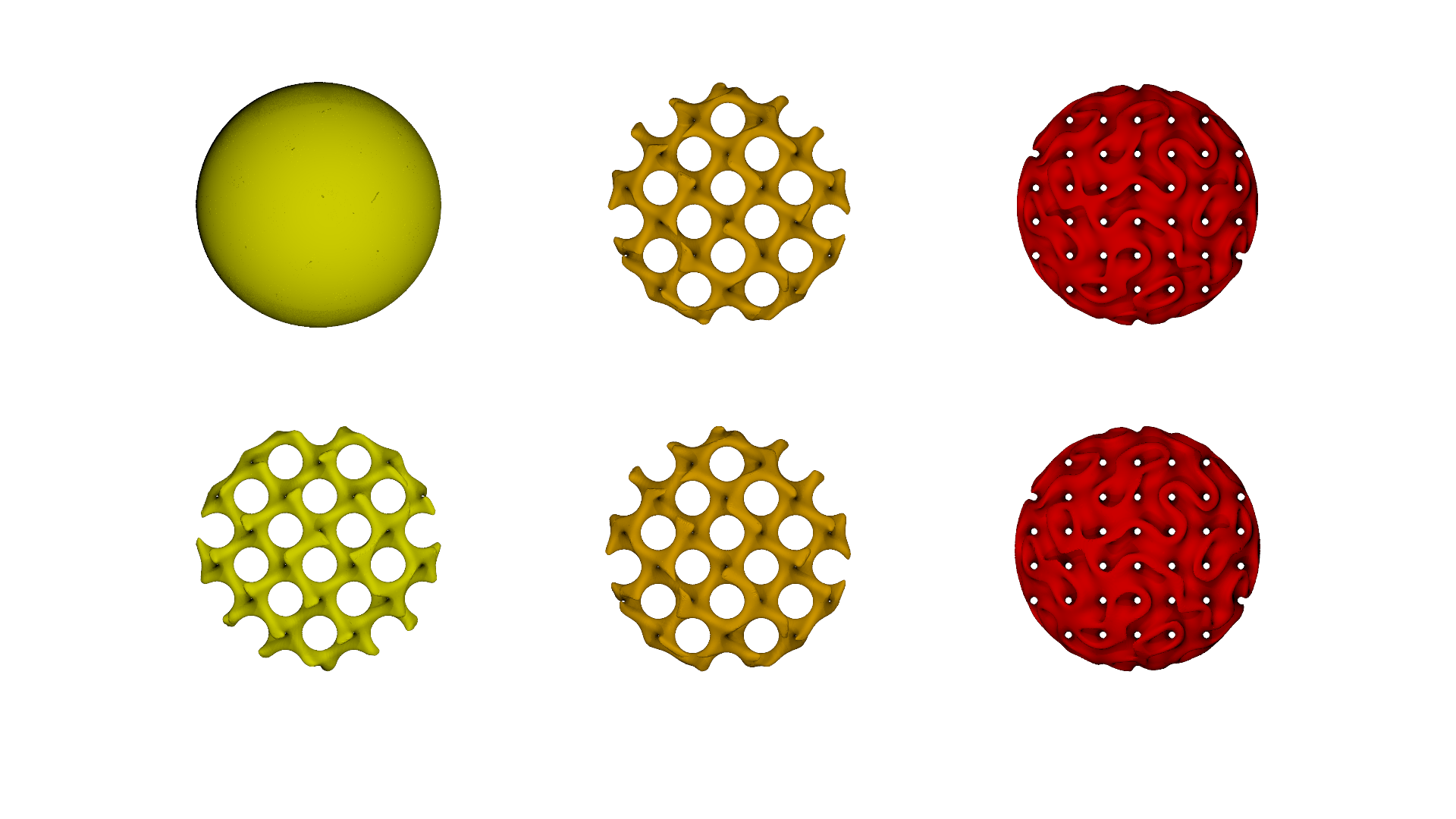
Am 16.12.2024 um 23:36 schrieb Bald Eagle:
> MichaelJF <fri### [at] t-onlinede> wrote:
>
> Hmmm.   It looks like maybe it's a sign issue?
> Inside and outside are switched?
>
> Try just negating the function and see what happens.
>
> I'm not sure if that might have to do with the left-handed coordinate system, or
> what.
>
> - BW
>
>
Sorry, I mixed up the image yesterday. Here is the corrected version.
It's even worse. Yesterday is was one of my tests to solve the riddle,
in which I had commented out the exponential term as a test:

#declare GyroidLatice_1 = function (x,y,z) {
    select(isoCondition(x,y,z),Iso2(x,y,z),1) - //exp(isoCondition(x,y,z)/5)
}

The actual version depicts the full expression without the comment.

The difference between the functions Iso2 and Iso3 is just a change of
signs and in GyroidLatice_1 the exponential term is subtracted whereas
in GyroidLatice_2 it is added.

Below you can find the POV-part of the code with the MathMod-Code within
the comments. Maybe someone else can spot the difference. The parameter
t from MathMod is not used in this examnple.

Best regards
Michael

#declare L=23/2;
#declare c=1/10000;
#declare Th1=5/10;
#declare Th2=-8/10;


/* isoCondition=(x^N+y^N+z^N-(L-1/10)^N)  (N=2)*/
#declare isoCondition = function(x,y,z) { x*x+y*y+z*z-(L-1/10)*(L-1/10) }

/* Iso =
    cos(x)*sin(y)+cos(y)*sin(z)+cos(z)*sin(x) */
#declare Iso = function(x,y,z) {
    cos(x)*sin(y)+cos(y)*sin(z)+cos(z)*sin(x)
}


/* DFx=((Iso(x+c,y,z,t)-Iso(x,y,z,t))/c)
    DFy=((Iso(x,y+c,z,t)-Iso(x,y,z,t))/c)
    DFz=((Iso(x,y,z+c,t)-Iso(x,y,z,t))/c) */
#declare DFx = function(x,y,z) { (Iso(x+c,y,z)-Iso(x,y,z))/c }
#declare DFy = function(x,y,z) { (Iso(x,y+c,z)-Iso(x,y,z))/c }
#declare DFz = function(x,y,z) { (Iso(x,y,z+c)-Iso(x,y,z))/c }

/* Rapp=(x/sqrt(x*x+y*y+z*z)) */
#declare Rapp = function(x,y,z) {x/sqrt(x*x+y*y+z*z) }

/* "Iso2 =
    Iso(x+Th2*Rapp(DFx(x,y,z,t),DFy(x,y,z,t),DFz(x,y,z,t),t),
        y+Th2*Rapp(DFy(x,y,z,t),DFz(x,y,z,t),DFx(x,y,z,t),t),
        z+Th2*Rapp(DFz(x,y,z,t),DFx(x,y,z,t),DFy(x,y,z,t),t),t)
    ) */
#declare Iso2 = function(x,y,z) {
    Iso(x+Th2*Rapp(DFx(x,y,z),DFy(x,y,z),DFz(x,y,z)),
        y+Th2*Rapp(DFy(x,y,z),DFz(x,y,z),DFx(x,y,z)),
        z+Th2*Rapp(DFz(x,y,z),DFx(x,y,z),DFy(x,y,z))
    )
}

/* Iso3 =
    Iso(x-Th2*Rapp(DFx(x,y,z,t),DFy(x,y,z,t),DFz(x,y,z,t),t),
        y-Th2*Rapp(DFy(x,y,z,t),DFz(x,y,z,t),DFx(x,y,z,t),t),
        z-Th2*Rapp(DFz(x,y,z,t),DFx(x,y,z,t),DFy(x,y,z,t),t),t)
    )*/
#declare Iso3 = function(x,y,z) {
    Iso(x-Th2*Rapp(DFx(x,y,z),DFy(x,y,z),DFz(x,y,z)),
        y-Th2*Rapp(DFy(x,y,z),DFz(x,y,z),DFx(x,y,z)),
        z-Th2*Rapp(DFz(x,y,z),DFx(x,y,z),DFy(x,y,z))
    )
}

/* Iso4 =
    Iso(x+Th1*Rapp(DFx(x,y,z,t),DFy(x,y,z,t),DFz(x,y,z,t),t),
        y+Th1*Rapp(DFy(x,y,z,t),DFz(x,y,z,t),DFx(x,y,z,t),t),
        z+Th1*Rapp(DFz(x,y,z,t),DFx(x,y,z,t),DFy(x,y,z,t),t),t)
    ) */
#declare Iso4 = function(x,y,z) {
    Iso(x+Th1*Rapp(DFx(x,y,z),DFy(x,y,z),DFz(x,y,z)),
        y+Th1*Rapp(DFy(x,y,z),DFz(x,y,z),DFx(x,y,z)),
        z+Th1*Rapp(DFz(x,y,z),DFx(x,y,z),DFy(x,y,z))
    )
}

/* Iso5 =
    Iso(x-Th1*Rapp(DFx(x,y,z,t),DFy(x,y,z,t),DFz(x,y,z,t),t),
        y-Th1*Rapp(DFy(x,y,z,t),DFz(x,y,z,t),DFx(x,y,z,t),t),
        z-Th1*Rapp(DFz(x,y,z,t),DFx(x,y,z,t),DFy(x,y,z,t),t),t)
    )*/
#declare Iso5 = function(x,y,z) {
    Iso(x-Th1*Rapp(DFx(x,y,z),DFy(x,y,z),DFz(x,y,z)),
        y-Th1*Rapp(DFy(x,y,z),DFz(x,y,z),DFx(x,y,z)),
        z-Th1*Rapp(DFz(x,y,z),DFx(x,y,z),DFy(x,y,z))
    )
}

/* ThickIso2=(Iso4(x,y,z,t)*Iso5(x,y,z,t)) */
#declare ThickIso2 = function(x,y,z) { Iso4(x,y,z) * Iso5(x,y,z) }


/*
GyroidLatice_1=if(isoCondition(x,y,z,t)<(0),Iso2(x,y,z,t),1)-exp(isoCondition(x,y,z,t)/5)

*/

#declare GyroidLatice_1 = function (x,y,z) {
    select(isoCondition(x,y,z),Iso2(x,y,z),1) - exp(isoCondition(x,y,z)/5)
}

/*
GyroidLatice_2=if(isoCondition(x,y,z,t)<(0),Iso3(x,y,z,t),1)+exp(isoCondition(x,y,z,t)/5)

*/
#declare GyroidLatice_2 = function (x,y,z) {
    select(isoCondition(x,y,z),Iso3(x,y,z),1) + exp(isoCondition(x,y,z)/5)
}

/*
GyroidLatice_3=if(isoCondition(x,y,z,t)<(0),ThickIso2(x,y,z,t),1)+exp(isoCondition(x,y,z,t)/5)

*/
#declare GyroidLatice_3 = function (x,y,z) {
    select(isoCondition(x,y,z),ThickIso2(x,y,z),1) +
exp(isoCondition(x,y,z)/5)
}

#declare G1 = isosurface {
    function {
       GyroidLatice_1(x,y,z)
    }
    contained_by { sphere { 0,L-0.1} }
    threshold 0
    max_gradient 1000

    pigment { colour Yellow }
}

#declare G2 = isosurface {
    function {
       GyroidLatice_2(x,y,z)
    }
    contained_by { sphere { 0,L-0.1 } }
    threshold 0
    max_gradient 1000

    pigment { colour Orange }
}

#declare G3 = isosurface {
    function {
       GyroidLatice_3(x,y,z)
    }
    contained_by { sphere { 0,L-0.1 } }
    threshold 0
    max_gradient 1000

    pigment { colour Red }
}
Post a reply to this message
Attachments:
Download 'zeige_ball01.png' (413 KB)
Preview of image 'zeige_ball01.png'
|
|
| |
| |
|
|
|
|
| |
| |
|
|
MichaelJF <fri### [at] t-onlinede> wrote:

>     contained_by { sphere { 0,L-0.1 } }

Have you simply tried adding "open" to your isosurface block, so you don't see
the containing sphere?
Post a reply to this message
|
|
| |
| |
|
|
|
|
| |
| |
|
|
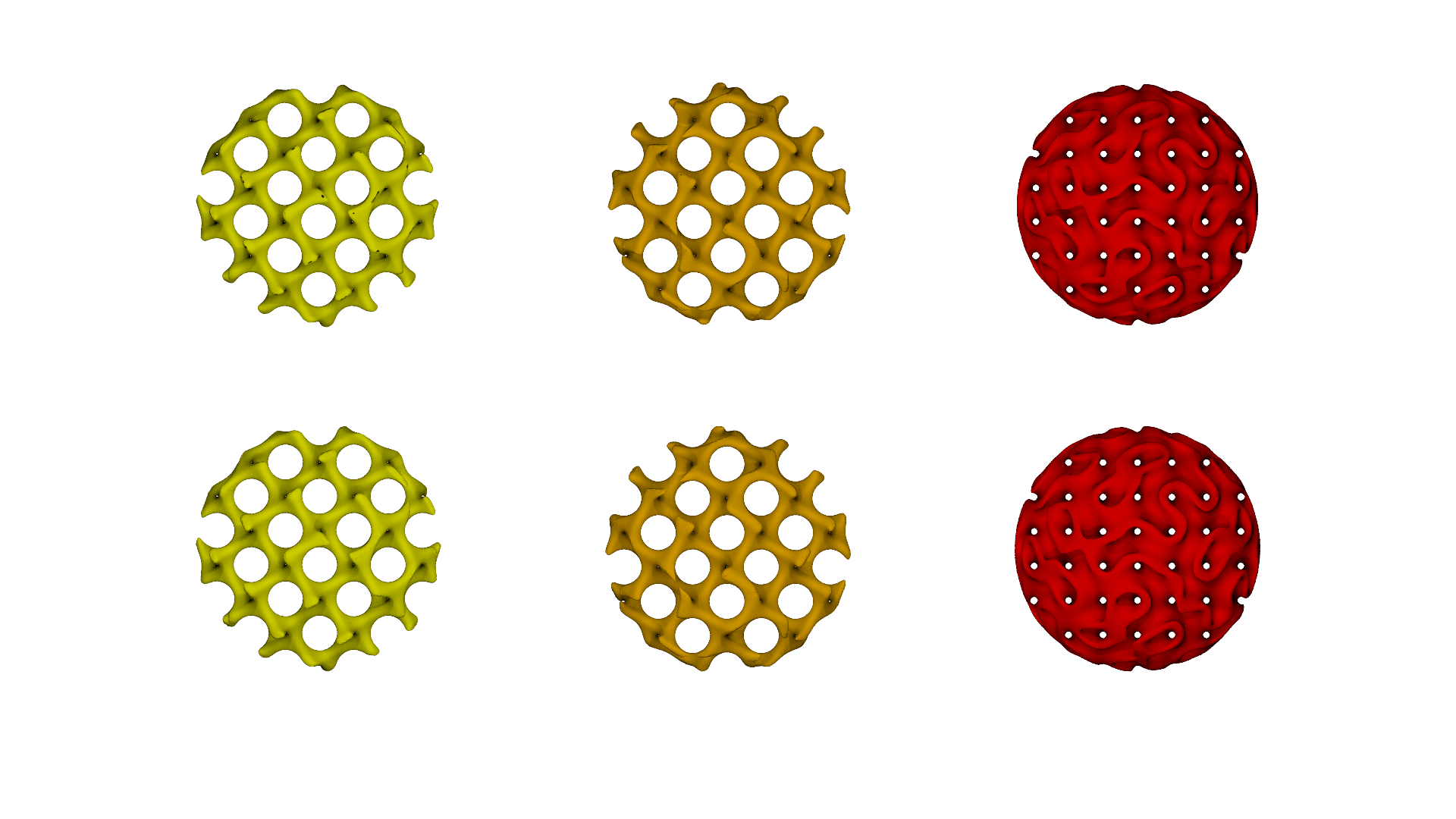
Am 17.12.2024 um 12:16 schrieb Bald Eagle:
> MichaelJF <fri### [at] t-onlinede> wrote:
>
>>      contained_by { sphere { 0,L-0.1 } }
>
> Have you simply tried adding "open" to your isosurface block, so you don't see
> the containing sphere?
>
>
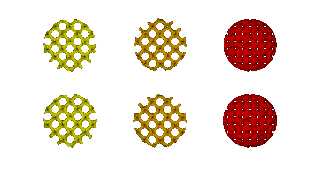
Thanks, that solves the riddle. In a way, you have to look at the
surface from the "inside" of the object. I can't remember ever having
consciously used this option.
Post a reply to this message
Attachments:
Download 'zeige_ball05.png' (424 KB)
Preview of image 'zeige_ball05.png'
|
|
| |
| |
|
|
|
|
| |
| |
|
|
MichaelJF <fri### [at] t-onlinede> wrote:

> In a way, you have to look at the
> surface from the "inside" of the object.

Sorta.
I think it has more to do with the extent of the visible surface:

https://wiki.povray.org/content/Reference:Isosurface

"When the isosurface is not fully contained within the contained_by object,
there will be a cross section. When this happens, you will see the surface of
the container. Using the open keyword, these cross section surfaces are removed,
and the inside of the isosurface becomes visible."
Post a reply to this message
|
|
| |
| |
|
|
|
|
| |
| |
|
|
On 17/12/2024 12:16, Bald Eagle wrote:
>
> Have you simply tried adding "open" to your isosurface block, so you don't see
> the containing sphere?
>
>

I also tried it. It fixes the problem.

I've never seen/used this option, which is still not very clear to me :(


--
kurtz le pirate
compagnie de la banquise
Post a reply to this message
|
|
| |
| |
|
|
|
|
| |
| |
|
|
Am 19.12.2024 um 17:00 schrieb kurtz le pirate:
> On 17/12/2024 12:16, Bald Eagle wrote:
>>
>> Have you simply tried adding "open" to your isosurface block, so you
>> don't see
>> the containing sphere?
>>
>>
>
> I also tried it. It fixes the problem.
>
> I've never seen/used this option, which is still not very clear to me :(
>
>
>
>
>
>
As I understand it, all points below the threshold value of the
isosurface are considered as inside the surface and all above as
outside. All points on the surface of the containing box or sphere of an
isosurface considered as part of the interior of the isosurface are
closed. The open keyword removes this coating.

This explains the behavior here. But I my be wrong again.

Best regards
Michael
Post a reply to this message
|
|
| |
| |
|
|
|
|
| |
|
|