|
|
|
|
|
|
| |
| |
|
|
|
|
| |
| |
|
|
With regard to TdG's interest in erosion, I was thinking about doing a quick
test with an image map converted to a height_field.

The only problem here is that I don't recall if there was a way to edit the
pixel data in the image_map, or in the height_field, or to somehow use a
function {} or a 2D array to create an image or heightfield...

Or maybe a way to add/subtract / overlay onto the base image.
I can't use arrays in functions, otherwise I could do image_map {function
{array}}

It would be useful to not have to load an image, convert that to an array, use
that array to create a mesh, then use the algorithm I'm experimenting with to
edit the mesh.....

Does anyone have any ideas?

- BW
Post a reply to this message
|
|
| |
| |
|
|
|
|
| |
| |
|
|
"Bald Eagle" <cre### [at] netscape net> wrote:
> Does anyone have any ideas?
>
> - BW
Not elegant, but you can abuse splines as arrays in functions.
In a distant past we've had several discussions on erosion. I had a look but
can't find it (my archive is lost). I then made an animation or images using
DF3's. Not in POV-Ray it self but in Python.
I randomly dropped rain drops on the DF3. Every rain drop had a strength. The
density of the DF3 was the density/hardness of the stone. When eroding the
raindrop lost some strength and the stone lost some density. The harder the rock
the more costly it was for the drop.
Then, if there was still some 'life' in it, the raindrop would move to the
nearest neighbor with the lowest density and repeat the process until the drops
strength was zero.
I also did it with a combination of Hf and DF3, the HF was the landscape and the
DF3 the rock/soil. Then I eroded the HF away.
Christoph Hormann, ABX were also working on this, i.i.r.c.
ingo net> wrote:
> Does anyone have any ideas?
>
> - BW
Not elegant, but you can abuse splines as arrays in functions.
In a distant past we've had several discussions on erosion. I had a look but
can't find it (my archive is lost). I then made an animation or images using
DF3's. Not in POV-Ray it self but in Python.
I randomly dropped rain drops on the DF3. Every rain drop had a strength. The
density of the DF3 was the density/hardness of the stone. When eroding the
raindrop lost some strength and the stone lost some density. The harder the rock
the more costly it was for the drop.
Then, if there was still some 'life' in it, the raindrop would move to the
nearest neighbor with the lowest density and repeat the process until the drops
strength was zero.
I also did it with a combination of Hf and DF3, the HF was the landscape and the
DF3 the rock/soil. Then I eroded the HF away.
Christoph Hormann, ABX were also working on this, i.i.r.c.
ingo
Post a reply to this message
|
|
| |
| |
|
|
|
|
| |
| |
|
|
"Bald Eagle" <cre### [at] netscapenet> wrote:

> Does anyone have any ideas?
>
> - BW

Does the starting point have to be an image? You can use a function in a HF.
https://wiki.povray.org/content/Reference:Function_Pattern#Function_Image

ingo
Post a reply to this message
|
|
| |
| |
|
|
|
|
| |
| |
|
|
"ingo" <nomail@nomail> wrote:

> Does the starting point have to be an image? You can use a function in a HF.
> https://wiki.povray.org/content/Reference:Function_Pattern#Function_Image

Good to know, sorry that you lost your archive.

I've (ab)used splines in functions, but I don't know if I could do that in 2D to
get a heightfield.

I could use a function to make the HF, but I'm still presently at a loss for how
I'd modify the values at each <x, y> position, since I still can't make discrete
modifications, due to the nature of functions, etc.  Going around in circles.

It seems like we _should_ have a way to "write" to the <x,y> pixel data stored
in memory after POV-Ray loads an image file, but we don't.
It also seems like we _should_ have a way to make images and HF's from a 2D
array, but we don't.

I guess I'll just bite the bullet and remember how to make a mesh, calculate the
normals, make smooth triangles..... {sigh}.

I was just hoping for an easier, lazier way.

- BW
Post a reply to this message
|
|
| |
| |
|
|
|
|
| |
| |
|
|
"Bald Eagle" <cre### [at] netscapenet> wrote:

> I guess I'll just bite the bullet and remember how to make a mesh, calculate the
> normals, make smooth triangles..... {sigh}.

I abandoned an A* driven method in favor of using existing algorithms instead of
starting from scratch with no real idea what I'm doing.  (A* might be useful for
filling in the terrain with water cascading downhill via the erosion paths.)

So, I made the meshes, calculated the normals, made the smooth_triangles, edited
a small erosion algorithm, ran it a few times (which took longer that it should
have), and then added some elapsed time code.
Had to hack the algorithm to get rid of the deep pitting.

My meshes look terrible, my color_map is all off, etc.

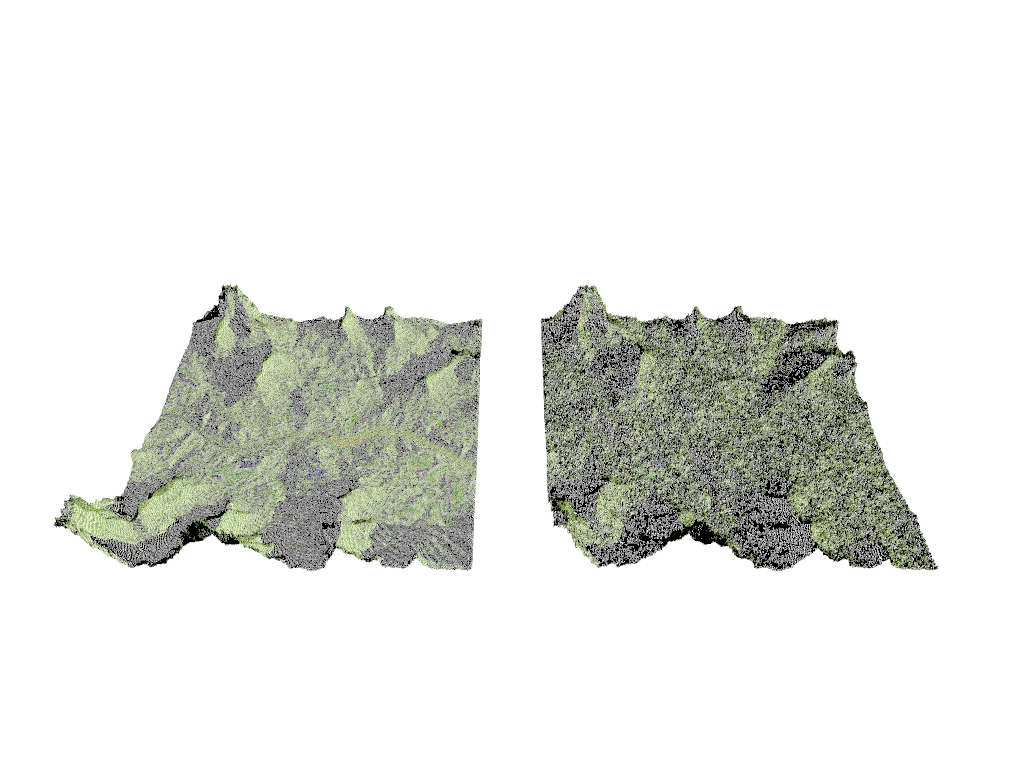
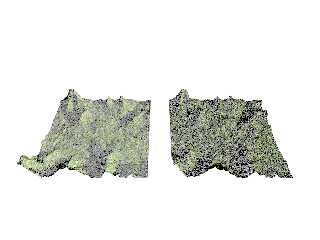
I'm using a tiny 358 x 358 image for my terrain.  That's 128164 pixels or 256328
triangles (maybe a few less).

I then drop 20,000 raindrops that undergo a max of 50 erosion/deposition cycles.

No idea what the parameter values ought to be.


Building HeightField array ...
Took 2.47 sec to build the HeightField array.
Making starting mesh ...
Took 59.70 sec to build the starting mesh.
Took 1.43 min to erode starting mesh.
Making eroded mesh ...
Took 1.08 min to make the Eroded mesh.


Parser Time
  Parse Time:       0 hours  3 minutes 32 seconds (212.499 seconds)
Elapsed time 215.84 seconds.


That's an awful damned long time to build a stinking mesh, especially since the
array gets populated in 2.47 sec.

Anyway, it's a start, and I'm sure there are improvements to be made, for those
interested in having a go at it.

- BW
Post a reply to this message
Attachments:
Download 'a-star heightmap.png' (453 KB)
Preview of image 'a-star heightmap.png'
|
|
| |
| |
|
|
From: kurtz le pirate
Subject: Re: Editing or creating an image or heightfield in POV-Ray
Date: 11 Sep 2023 05:35:24
Message: <64fedf5c@news.povray.org>
|
|
|
| |
| |
|
|
On 10/09/2023 18:01, Bald Eagle wrote:
>
> With regard to TdG's interest in erosion, I was thinking about doing a quick
> test with an image map converted to a height_field.
>
> The only problem here is that I don't recall if there was a way to edit the
> pixel data in the image_map, or in the height_field, or to somehow use a
> function {} or a 2D array to create an image or heightfield...
>
> Or maybe a way to add/subtract / overlay onto the base image.
> I can't use arrays in functions, otherwise I could do image_map {function
> {array}}
>
> It would be useful to not have to load an image, convert that to an array, use
> that array to create a mesh, then use the algorithm I'm experimenting with to
> edit the mesh.....
>
> Does anyone have any ideas?
>
> - BW
>


Long time ago, I made a code that, given a png image, would plot for
each pixel a box of the original color and store this value in a 2d array.

Code attached


Maybe it can give you some ideas for your problem ?


--
Kurtz le pirate
Compagnie de la Banquise
Post a reply to this message
Attachments:
Download 'eval_pigment1.pov.txt' (3 KB)
|
|
| |
| |
|
|
|
|
| |
| |
|
|
"Bald Eagle" <cre### [at] netscapenet> wrote:

> Does anyone have any ideas?

Tor Olav has, or at least some inspiration:

https://github.com/t-o-k/POV-Ray-gaussian-blur/blob/master/Examples/Blur_Image_Region.png

https://github.com/t-o-k/POV-Ray-gaussian-blur/blob/master/Examples/Blur_Image_Region.pov

ingo
Post a reply to this message
|
|
| |
| |
|
|
|
|
| |
| |
|
|
"ingo" <nomail@nomail> wrote:

> Tor Olav has, or at least some inspiration:

Hmmmm.... Very interesting.  I'm gonna need a bit of time to dissect that and
see how all the different parts work.
Knowing TOK, I'll probably walk away with some new lessons well worth learning,
which might give rise to some new inspirations and experiments.

Thanks for the links - I would have never made the connection and thought to
look there. (although I did, of course, suspect that he would have some ideas...
;) )

[Now of course, what we need to do is get him some _free time_ to POV!  :D ]

- BW
Post a reply to this message
|
|
| |
| |
|
|
From: Thomas de Groot
Subject: Re: Editing or creating an image or heightfield in POV-Ray
Date: 13 Sep 2023 02:35:33
Message: <65015835@news.povray.org>
|
|
|
| |
| |
|
|
Op 10/09/2023 om 18:01 schreef Bald Eagle:
>
> With regard to TdG's interest in erosion, I was thinking about doing a quick
> test with an image map converted to a height_field.
>
> The only problem here is that I don't recall if there was a way to edit the
> pixel data in the image_map, or in the height_field, or to somehow use a
> function {} or a 2D array to create an image or heightfield...
>
> Or maybe a way to add/subtract / overlay onto the base image.
> I can't use arrays in functions, otherwise I could do image_map {function
> {array}}
>
> It would be useful to not have to load an image, convert that to an array, use
> that array to create a mesh, then use the algorithm I'm experimenting with to
> edit the mesh.....
>
> Does anyone have any ideas?
>
> - BW
>

Real Time is binding me hands and feet, so a belated comment so far.

What I am personally looking for / interested in is not so much the
generation of natural-looking heightfields in terms of erosional
patterns like mountains and valleys which is provided by e.g. World
Machine. In itself it is an interesting topic and I remember (but cannot
find again) a series of tests some years ago where the drainage patterns
on in the heightfields were used to generate down-flowing rivers using a
trace function. I must have a whole collection of examples somewhere
under the dust but to date I have not been able to find those.

What I am /really/ interested in is the rockface erosion in cliffs and
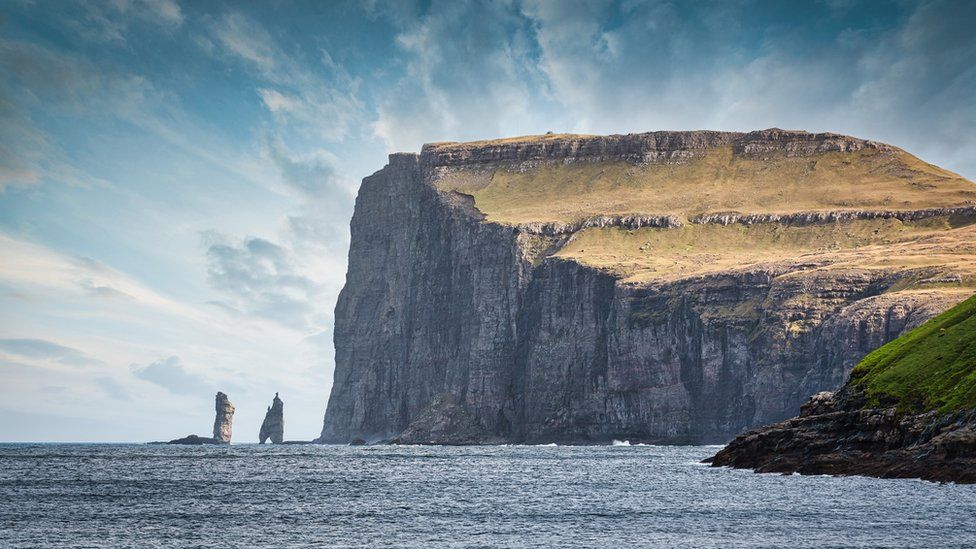
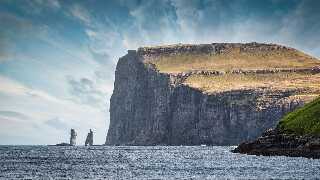
such which enhance the natural aspect of any mountain or landscape. As
an example I attach a photograph of the Faroe Islands showing a cliff
face, but what you can see are those (sub-)horizontal layers of more or
less "competent" (= hard/soft) rocks, in the cliff and in the overlying
landscape. They account for regions where the rock faces are more or
less overhanging. This is impossible in classical heightfields but easy
to achieve with isosurfaces of course.

Could we somehow achieve something similar using functions in POV-Ray,
without the help of isosurfaces? That would be my question.

--
Thomas
Post a reply to this message
Attachments:
Download 'faroe islands.jpg' (112 KB)
Preview of image 'faroe islands.jpg'
|
|
| |
| |
|
|
|
|
| |
| |
|
|
Thomas de Groot <tho### [at] degrootorg> wrote:
> Could we somehow achieve something similar using functions in POV-Ray,
> without the help of isosurfaces? That would be my question.
>

Create hight-fields using functions. Then rotate the one with the 'lines' and
intersect it with the one with the horizontal landscape.

ingo
Post a reply to this message
|
|
| |
| |
|
|
|
|
| |
| |
|
|
"ingo" <nomail@nomail> wrote:
> Thomas de Groot <tho### [at] degrootorg> wrote:
> > Could we somehow achieve something similar using functions in POV-Ray,
> > without the help of isosurfaces? That would be my question.
> >
>
> Create hight-fields using functions. Then rotate the one with the 'lines' and
> intersect it with the one with the horizontal landscape.
>
> ingo

simple quick example of HF intersection (the Mount2.png is in the 3.7
distribution):

---%<------%<------%<---
// PoVRay 3.7 Scene File " hf_intersection.pov"
// author:  ingo
// date:    2023-09-13
//--------------------------------------------------------------------------
#version 3.7;
global_settings{ assumed_gamma 1.0 }
#default{ finish{ ambient 0.1 diffuse 0.9 }}

camera {
  perspective angle 75               // front view
  location  <0.0 , 4.0 ,-10.0>
  right     x*image_width/image_height
  look_at   <0.0 , 1.0 , 0.0>
}

light_source{< 3000,3000,-3000> rgb 1}

sky_sphere {
  pigment {
    gradient <0,1,0>
    color_map {
      [0.00 rgb <0.6,0.7,1.0>]
      [0.35 rgb <0.1,0.0,0.8>]
      [0.65 rgb <0.1,0.0,0.8>]
      [1.00 rgb <0.6,0.7,1.0>]
    }
    scale 2
  }
}


#declare Rock = height_field{
  png "Mount2.png" smooth double_illuminate
  translate<-0.5,-0.0,-0.5>
  scale<9, 2.5, 9>*2
  texture{
    pigment { color rgb <0.82,0.6,0.4>}
  }
  rotate<0,-110,0>
  translate<1,0,11>
}

intersection{

  object{Rock}

  object {
    Rock
    scale 1.5
    rotate <-33,0,-90>
    translate <-4,-1,0>
  }

  object {
    Rock
    rotate <0,0,90>
  }


---%<------%<------%<---

ingo
Post a reply to this message
|
|
| |
| |
|
|
From: Thomas de Groot
Subject: Re: Editing or creating an image or heightfield in POV-Ray
Date: 13 Sep 2023 11:03:31
Message: <6501cf43$1@news.povray.org>
|
|
|
| |
| |
|
|
Op 13-9-2023 om 13:45 schreef ingo:
>
> simple quick example of HF intersection (the Mount2.png is in the 3.7
> distribution):
>
> ---%<------%<------%<---
> // PoVRay 3.7 Scene File " hf_intersection.pov"
> // author:  ingo
> // date:    2023-09-13
> //--------------------------------------------------------------------------
> #version 3.7;
> global_settings{ assumed_gamma 1.0 }
> #default{ finish{ ambient 0.1 diffuse 0.9 }}
>
> camera {
>    perspective angle 75               // front view
>    location  <0.0 , 4.0 ,-10.0>
>    right     x*image_width/image_height
>    look_at   <0.0 , 1.0 , 0.0>
> }
>
> light_source{< 3000,3000,-3000> rgb 1}
>
> sky_sphere {
>    pigment {
>      gradient <0,1,0>
>      color_map {
>        [0.00 rgb <0.6,0.7,1.0>]
>        [0.35 rgb <0.1,0.0,0.8>]
>        [0.65 rgb <0.1,0.0,0.8>]
>        [1.00 rgb <0.6,0.7,1.0>]
>      }
>      scale 2
>    }
> }
>
>
> #declare Rock = height_field{
>    png "Mount2.png" smooth double_illuminate
>    translate<-0.5,-0.0,-0.5>
>    scale<9, 2.5, 9>*2
>    texture{
>      pigment { color rgb <0.82,0.6,0.4>}
>    }
>    rotate<0,-110,0>
>    translate<1,0,11>
> }
>
> intersection{
>
>    object{Rock}
>
>    object {
>      Rock
>      scale 1.5
>      rotate <-33,0,-90>
>      translate <-4,-1,0>
>    }
>
>    object {
>      Rock
>      rotate <0,0,90>
>    }
>
>
> ---%<------%<------%<---
>
> ingo
>
>

Right! I had been briefly wondering about something like this, but
thought it would not really do. However, your example makes me think
again more seriously. I need to think some more and - above all - play.
Potential solutions are certainly there indeed.

Thanks for the pointer, Ingo!

--
Thomas
Post a reply to this message
|
|
| |
| |
|
|
|
|
| |
| |
|
|
Thomas de Groot <tho### [at] degrootorg> wrote:

> Thanks for the pointer, Ingo!
>

Here's an other version, using a patter function for the structure. First a
union{hf box} then the intersection.

An other option, if you want to shape an island, in the insert menu/special
shapes/meshmaker.inc/p_cylinder_crackle2 shows how to do displacement of mesh
vertices. This in principle works for all things one can make with the mesh
macros. You could extrude the island shape and then deform the mesh or build the
island shape with multiple splines.

---%<------%<------%<---

// PoVRay 3.7 Scene File " hf_intersection_2.pov"
// author:  ingo
// date:    2023-09-13
//--------------------------------------------------------------------------

#version 3.7;
global_settings{ assumed_gamma 1.0 }
#default{ finish{ ambient 0.1 diffuse 0.7 }}

camera {
  perspective angle 5               // front view
  location  <20.0 , 0.0 ,-40.0>
  right     x*image_width/image_height
  look_at   <0.0 , 0.0 , 0.0>
}

light_source{< 3000, 3000,-6000> rgb 1}

sky_sphere {
  pigment {
    gradient <0,1,0>
    color_map {
      [0.00 rgb <0.6,0.7,1.0>]
      [0.35 rgb <0.1,0.0,0.8>]
      [0.65 rgb <0.1,0.0,0.8>]
      [1.00 rgb <0.6,0.7,1.0>]
    }
    scale 2
  }
}


#declare Rock = union {
  intersection{
    height_field {
      function 1000,1000 {
        pattern {
          gradient -y
          scale .1
          turbulence 0.7
          octaves 12
          lambda 1.5
          omega 0.3
        }
      }
    }
    box{0,1.001}
    scale <1,0.05,1>
  }
  box{<0,0,0>,<1,-1,1>}
  translate <-0.5,0.5,-0.5>
}

intersection{
  object{
    Rock
    translate <0,-0.1,0>
    pigment{rgb 1}
  }

  object{
    Rock
    rotate <-90,0,0>
    translate <0,0,0.1>
    pigment{rgb 1}
  }

  object{
    Rock
    rotate <90,90,0>
    translate <-0.1,0,0>
    pigment{rgb 1}
  }

  rotate <-45,0,0>
}

---%<------%<------%<---

You can modify the patterns in the HF_function with the functions in
https://ingoogni.nl/download/Gradients.zip


ingo
Post a reply to this message
|
|
| |
| |
|
|
|
|
| |
| |
|
|
I think that if you did something like make a brick wall out of mesh blocks, in
the manner of building a wood floor, then you could "erode" the faces ad
abutting edges of all the blocks according to hardness assigned by a noise
function, and you could vary the height of the lateral strata, and govern the
shape of the protruding layer by using something like an x=pow(y, N) type
function that gets more square with higher powers (superellipsoid).

For that matter, you could even try just stacking superellipsoids to see how
that works.

Building the cliff with individual blocks would allow you to govern the size and
width of each piece, and allow indexing of any individual block.  You could also
remove or fracture out the majority of an individual block.

Also, going with the heightfield thing, you could just use a base heightfield
image for the basic clock, and then perturb it with a noise function, but rotate
it on its side, and scale it be a "block".

- BW
Post a reply to this message
|
|
| |
| |
|
|
|
|
| |
| |
|
|
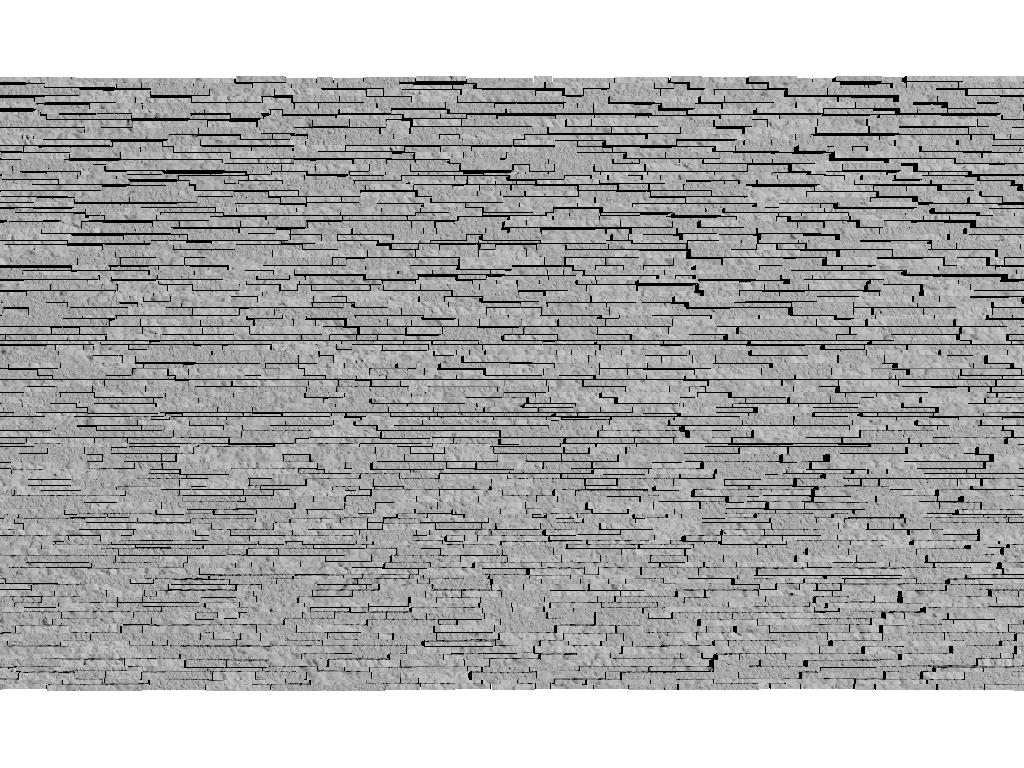
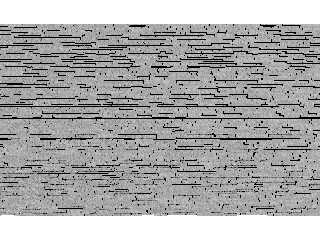
So, this is just boxes with a granite texture, nothing fancy yet.
Post a reply to this message
Attachments:
Download 'rockcliff.png' (746 KB)
Preview of image 'rockcliff.png'
|
|
| |
| |
|
|
From: Thomas de Groot
Subject: Re: Editing or creating an image or heightfield in POV-Ray
Date: 14 Sep 2023 02:35:18
Message: <6502a9a6$1@news.povray.org>
|
|
|
| |
| |
|
|
Op 13/09/2023 om 19:33 schreef ingo:
> Thomas de Groot <tho### [at] degrootorg> wrote:
>
>> Thanks for the pointer, Ingo!
>>
>
> Here's an other version, using a patter function for the structure. First a
> union{hf box} then the intersection.
>
> An other option, if you want to shape an island, in the insert menu/special
> shapes/meshmaker.inc/p_cylinder_crackle2 shows how to do displacement of mesh
> vertices. This in principle works for all things one can make with the mesh
> macros. You could extrude the island shape and then deform the mesh or build the
> island shape with multiple splines.
>
> ---%<------%<------%<---
>
> // PoVRay 3.7 Scene File " hf_intersection_2.pov"
> // author:  ingo
> // date:    2023-09-13
> //--------------------------------------------------------------------------
>
> #version 3.7;
> global_settings{ assumed_gamma 1.0 }
> #default{ finish{ ambient 0.1 diffuse 0.7 }}
>
> camera {
>    perspective angle 5               // front view
>    location  <20.0 , 0.0 ,-40.0>
>    right     x*image_width/image_height
>    look_at   <0.0 , 0.0 , 0.0>
> }
>
> light_source{< 3000, 3000,-6000> rgb 1}
>
> sky_sphere {
>    pigment {
>      gradient <0,1,0>
>      color_map {
>        [0.00 rgb <0.6,0.7,1.0>]
>        [0.35 rgb <0.1,0.0,0.8>]
>        [0.65 rgb <0.1,0.0,0.8>]
>        [1.00 rgb <0.6,0.7,1.0>]
>      }
>      scale 2
>    }
> }
>
>
> #declare Rock = union {
>    intersection{
>      height_field {
>        function 1000,1000 {
>          pattern {
>            gradient -y
>            scale .1
>            turbulence 0.7
>            octaves 12
>            lambda 1.5
>            omega 0.3
>          }
>        }
>      }
>      box{0,1.001}
>      scale <1,0.05,1>
>    }
>    box{<0,0,0>,<1,-1,1>}
>    translate <-0.5,0.5,-0.5>
> }
>
> intersection{
>    object{
>      Rock
>      translate <0,-0.1,0>
>      pigment{rgb 1}
>    }
>
>    object{
>      Rock
>      rotate <-90,0,0>
>      translate <0,0,0.1>
>      pigment{rgb 1}
>    }
>
>    object{
>      Rock
>      rotate <90,90,0>
>      translate <-0.1,0,0>
>      pigment{rgb 1}
>    }
>
>    rotate <-45,0,0>
> }
>
> ---%<------%<------%<---
>
> You can modify the patterns in the HF_function with the functions in
> https://ingoogni.nl/download/Gradients.zip
>
>
> ingo
>
Thanks for all this ingo, very much appreciated indeed. I need to review
all this at leisure.

I used displacement mapping a couple of years ago for stoneworks, using
Poseray:

https://news.povray.org/povray.binaries.images/thread/%3C60e02637%40news.povray.org%3E/

And (I think) I tackled Meshmaker too somewhere/-time in a similar
manner. I really /need/ to delve deeper in my archives (and my hazy
memory).... :-/

--
Thomas
Post a reply to this message
|
|
| |
| |
|
|
From: Thomas de Groot
Subject: Re: Editing or creating an image or heightfield in POV-Ray
Date: 14 Sep 2023 02:42:02
Message: <6502ab3a@news.povray.org>
|
|
|
| |
| |
|
|
Op 13/09/2023 om 22:00 schreef Bald Eagle:
> So, this is just boxes with a granite texture, nothing fancy yet.

Yes indeed. Thanks Bill. My main problem at the moment is that I have so
little time to do some significant experiments, and I fail to come
across those things I did already in the past on this very same chapter.
Patience! I shall tackle all this asap and see where it brings me; there
are a couple of ideas you and ingo have reawakened that I want to pursue.

--
Thomas
Post a reply to this message
|
|
| |
| |
|
|
|
|
| |
| |
|
|
Thomas de Groot <tho### [at] degrootorg> wrote:

> Yes indeed. Thanks Bill. My main problem at the moment is that I have so
> little time to do some significant experiments, and I fail to come
> across those things I did already in the past on this very same chapter.

That is indeed the ebb and flow of what we do here.
A long, prolonged and eerie silence, followed by a sudden flurry of frenetic
activity.


> Patience! I shall tackle all this asap and see where it brings me; there
> are a couple of ideas you and ingo have reawakened that I want to pursue.


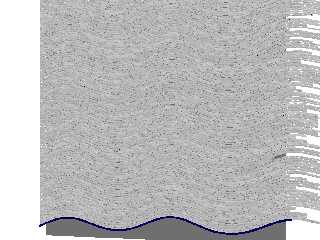
Excellent.
Here's another one where I just rendered the faces of the boxes as meshes and
added in a function to give some tectonic sqooshing of the lateral layers of the
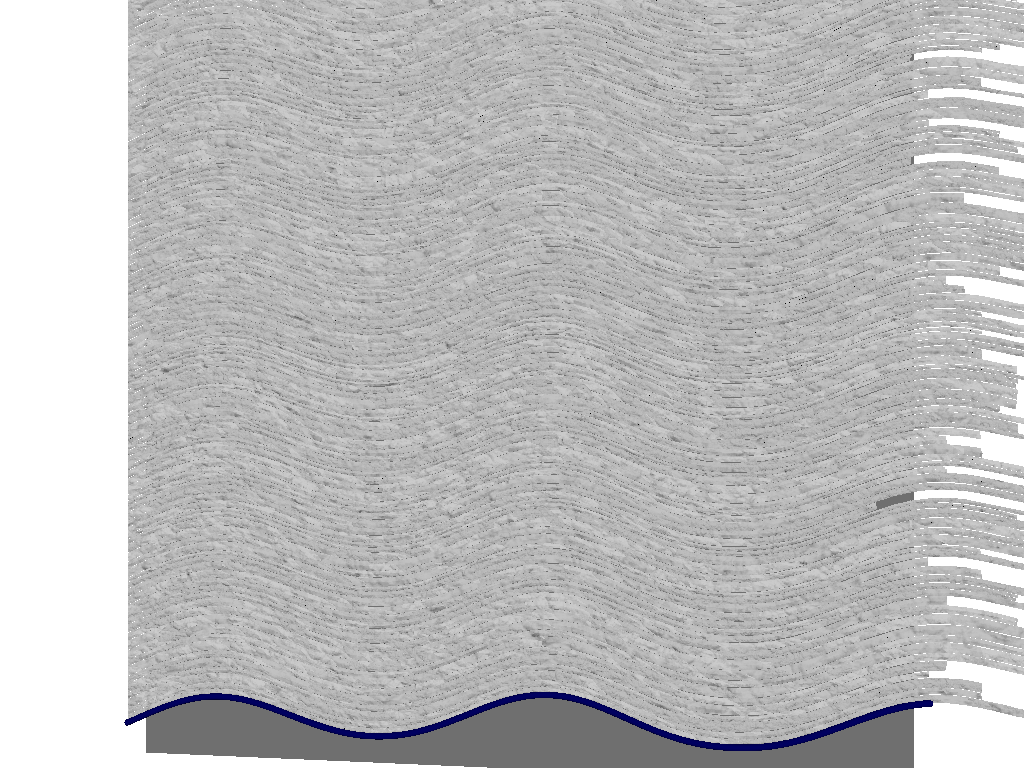
strata.

Very quick, buggy early morning WIP.
Post a reply to this message
Attachments:
Download 'rockcliff.png' (744 KB)
Preview of image 'rockcliff.png'
|
|
| |
| |
|
|
From: Thomas de Groot
Subject: Re: Editing or creating an image or heightfield in POV-Ray
Date: 14 Sep 2023 08:57:08
Message: <65030324$1@news.povray.org>
|
|
|
| |
| |
|
|
Op 14-9-2023 om 12:49 schreef Bald Eagle:
> Excellent.
> Here's another one where I just rendered the faces of the boxes as meshes and
> added in a function to give some tectonic sqooshing of the lateral layers of the
> strata.
>
> Very quick, buggy early morning WIP.

For a quick buggy, it is a ride I would not have missed! ;-)

Very good indeed; it is development full of promises.

--
Thomas
Post a reply to this message
|
|
| |
| |
|
|
From: Thomas de Groot
Subject: Re: Editing or creating an image or heightfield in POV-Ray
Date: 14 Sep 2023 09:04:02
Message: <650304c2@news.povray.org>
|
|
|
| |
| |
|
|
Op 13-9-2023 om 19:33 schreef ingo:
> An other option, if you want to shape an island, in the insert menu/special
> shapes/meshmaker.inc/p_cylinder_crackle2 shows how to do displacement of mesh
> vertices. This in principle works for all things one can make with the mesh
> macros. You could extrude the island shape and then deform the mesh or build the
> island shape with multiple splines.
>

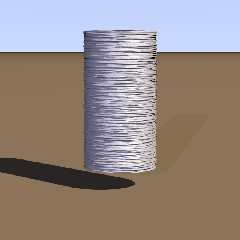
I correctly remembered I had played some with meshmaker. I used in the
example included, a granite pattern, heavily scaled up in the horizontal
directions. Not a sedimentary pattern but I see where to go from here.

--
Thomas
Post a reply to this message
Attachments:
Download 'ij_displacementmapping_meshmaker_test.png' (134 KB)
Preview of image 'ij_displacementmapping_meshmaker_test.png'
|
|
| |
| |
|
|
|
|
| |
|
|