|
|
|
|
|
|
| |
| |
|
|
|
|
| |
| |
|
|
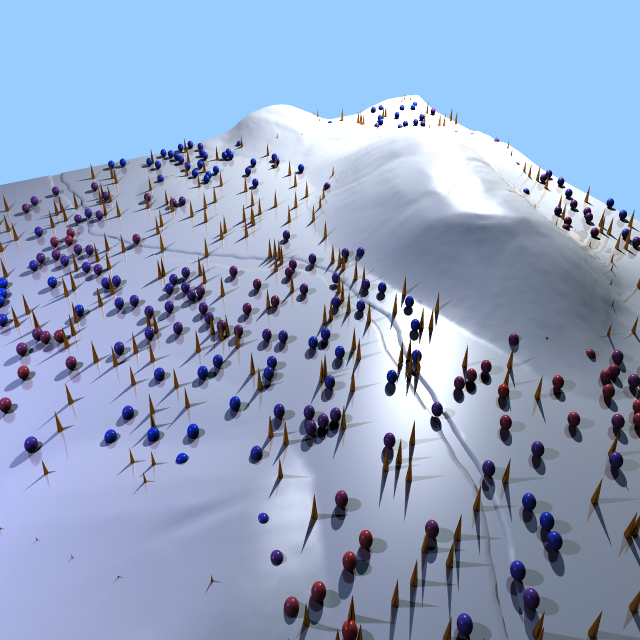
I am having trouble getting the `trace` function to detect intersections
with a mesh object. Does `trace` not recognize meshes? Thanks!


Mike
Post a reply to this message
Attachments:
Download 'clutter_003.zip' (2940 KB)
|
|
| |
| |
|
|
|
|
| |
| |
|
|
Op 17/05/2021 om 07:12 schreef Mike Horvath:
> I am having trouble getting the `trace` function to detect intersections
> with a mesh object. Does `trace` not recognize meshes? Thanks!
>
It might... if the meshes are not well-behaving, for instance if the
normals of each mesh face are not /all/ consistently pointing outwards,
or if the mesh is not 'closed'. Mesh objects (especially when generated
by external programs and not POV-Ray) are notorious.

I would suggest to convert your meshes with Poseray to mesh2 objects
which are much better behaving than mesh objects. I tried to upload your
file as a whole into Poseray but it appears to be too big for the
program, so upload chunks of meshes separately. I am not sure if you can
put them together again afterwards as it is bad practice to edit mesh2
files manually, but you can put them in a union at least.

--
Thomas
Post a reply to this message
|
|
| |
| |
|
|
|
|
| |
| |
|
|
I had not loaded the code before in POV-Ray, but it appears that each
mesh is only 1 (one!) triangle... This is terrible, and no wonder trace
does not work well. You need to have at least one mesh containing /all/
the triangles to start with if you want it to work at all.

--
Thomas
Post a reply to this message
|
|
| |
| |
|
|
|
|
| |
| |
|
|
On 5/17/2021 2:40 AM, Thomas de Groot wrote:
> I had not loaded the code before in POV-Ray, but it appears that each
> mesh is only 1 (one!) triangle... This is terrible, and no wonder trace
> does not work well. You need to have at least one mesh containing /all/
> the triangles to start with if you want it to work at all.
>


I attached new terrain with a single mesh2 object, but the issue
persists! :(


Mike
Post a reply to this message
Attachments:
Download 'clutter_004.zip' (4244 KB)
|
|
| |
| |
|
|
|
|
| |
| |
|
|
On 5/17/2021 2:40 AM, Thomas de Groot wrote:
> I had not loaded the code before in POV-Ray, but it appears that each
> mesh is only 1 (one!) triangle... This is terrible, and no wonder trace
> does not work well. You need to have at least one mesh containing /all/
> the triangles to start with if you want it to work at all.
>

Alternatively, do you know how I might create a bitmap heightfield image
from this data?

For instance, if I were to copy the coordinates into an array and loop
through the array?

Thanks.


Mike
Post a reply to this message
|
|
| |
| |
|
|
|
|
| |
| |
|
|
Op 17/05/2021 om 09:57 schreef Mike Horvath:
> I attached new terrain with a single mesh2 object, but the issue
> persists! :(
>

As /last/ line inside the mesh2 {} add the following line:

inside_vector <0,0,1>

For good measure, add the line also to the sf_terrain_water_dot_ldr
mesh2 object.

Then it works, at least in my system.

--
Thomas
Post a reply to this message
|
|
| |
| |
|
|
|
|
| |
| |
|
|
Op 17/05/2021 om 10:39 schreef Mike Horvath:
> On 5/17/2021 2:40 AM, Thomas de Groot wrote:
>> I had not loaded the code before in POV-Ray, but it appears that each
>> mesh is only 1 (one!) triangle... This is terrible, and no wonder
>> trace does not work well. You need to have at least one mesh
>> containing /all/ the triangles to start with if you want it to work at
>> all.
>>
>
> Alternatively, do you know how I might create a bitmap heightfield image
> from this data?
>
> For instance, if I were to copy the coordinates into an array and loop
> through the array?
>
Thinking aloud here... assuming that you can render the landscape itself
without trouble (I assume you can) then using a gradient texture going
e.g. from black (bottom) to white (top) on the landscape, and rendering
that with an orthographic camera from above, within a white sphere
containing a finish {emission 1 diffuse 0}... that would do the job imo.
Make a large render, at least 2048x2048px.

--
Thomas
Post a reply to this message
|
|
| |
| |
|
|
|
|
| |
| |
|
|
On 5/17/2021 4:47 AM, Thomas de Groot wrote:
> Op 17/05/2021 om 09:57 schreef Mike Horvath:
>> I attached new terrain with a single mesh2 object, but the issue
>> persists! :(
>>
>
> As /last/ line inside the mesh2 {} add the following line:
>
> inside_vector <0,0,1>
>
> For good measure, add the line also to the sf_terrain_water_dot_ldr
> mesh2 object.
>
> Then it works, at least in my system.
>

It is still not working for me. There are no errors or warnings, but the
spheres and cones are still at y = 0 instead of conforming to the hills.

Can you upload your working files?


Mike
Post a reply to this message
|
|
| |
| |
|
|
|
|
| |
| |
|
|
On 5/17/2021 4:56 AM, Thomas de Groot wrote:
> Thinking aloud here... assuming that you can render the landscape itself
> without trouble (I assume you can) then using a gradient texture going
> e.g. from black (bottom) to white (top) on the landscape, and rendering
> that with an orthographic camera from above, within a white sphere
> containing a finish {emission 1 diffuse 0}... that would do the job imo.
> Make a large render, at least 2048x2048px.
>

The problem is that the pixels in a heightmap represent _vertices_ (and
are therefore n+1 pixels per side) whereas a rendered image as you
describe shows _faces_. So there will be a discrepancy (that I would
like to avoid).


Mike
Post a reply to this message
|
|
| |
| |
|
|
|
|
| |
| |
|
|
Op 17-5-2021 om 10:59 schreef Mike Horvath:
> It is still not working for me. There are no errors or warnings, but the
> spheres and cones are still at y = 0 instead of conforming to the hills.
>
> Can you upload your working files?
>

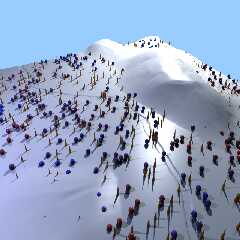
I only changed terrain.pov in the package. Attached also a render of the
scene.


--
Thomas
Post a reply to this message
Attachments:
Download 'makescene.png' (358 KB)
Download 'clutter_004b.zip' (4489 KB)
Preview of image 'makescene.png'
|
|
| |
| |
|
|
|
|
| |
| |
|
|
On 5/17/2021 9:39 AM, Thomas de Groot wrote:
> Op 17-5-2021 om 10:59 schreef Mike Horvath:
>> It is still not working for me. There are no errors or warnings, but
>> the spheres and cones are still at y = 0 instead of conforming to the
>> hills.
>>
>> Can you upload your working files?
>>
>
> I only changed terrain.pov in the package. Attached also a render of the
> scene.
>
>

You can see in the render that the balls are not on _top_ of the hill.
(They should be!)


Mike
Post a reply to this message
|
|
| |
| |
|
|
|
|
| |
| |
|
|
On 5/17/2021 4:39 AM, Mike Horvath wrote:
> On 5/17/2021 2:40 AM, Thomas de Groot wrote:
>> I had not loaded the code before in POV-Ray, but it appears that each
>> mesh is only 1 (one!) triangle... This is terrible, and no wonder
>> trace does not work well. You need to have at least one mesh
>> containing /all/ the triangles to start with if you want it to work at
>> all.
>>
>
> Alternatively, do you know how I might create a bitmap heightfield image
> from this data?
>
> For instance, if I were to copy the coordinates into an array and loop
> through the array?
>
> Thanks.
>
>
> Mike


I am teaching myself how to create a BMP file in a hex editor.


Mike
Post a reply to this message
|
|
| |
| |
|
|
|
|
| |
| |
|
|
Mike Horvath <mik### [at] gmail com> wrote:
> On 5/17/2021 4:56 AM, Thomas de Groot wrote:
> > Thinking aloud here... assuming that you can render the landscape itself
> > without trouble (I assume you can) then using a gradient texture going
> > e.g. from black (bottom) to white (top) on the landscape, and rendering
> > that with an orthographic camera from above, within a white sphere
> > containing a finish {emission 1 diffuse 0}... that would do the job imo.
> > Make a large render, at least 2048x2048px.
> >
>
> The problem is that the pixels in a heightmap represent _vertices_ (and
> are therefore n+1 pixels per side) whereas a rendered image as you
> describe shows _faces_. So there will be a discrepancy (that I would
> like to avoid).
Why don't you just set up an orthographic scene, and plot 1-unit-square box with
a grayscale rgb value corresponding to the height. Then you have an image with
each pixel representing a vertex. com> wrote:
> On 5/17/2021 4:56 AM, Thomas de Groot wrote:
> > Thinking aloud here... assuming that you can render the landscape itself
> > without trouble (I assume you can) then using a gradient texture going
> > e.g. from black (bottom) to white (top) on the landscape, and rendering
> > that with an orthographic camera from above, within a white sphere
> > containing a finish {emission 1 diffuse 0}... that would do the job imo.
> > Make a large render, at least 2048x2048px.
> >
>
> The problem is that the pixels in a heightmap represent _vertices_ (and
> are therefore n+1 pixels per side) whereas a rendered image as you
> describe shows _faces_. So there will be a discrepancy (that I would
> like to avoid).
Why don't you just set up an orthographic scene, and plot 1-unit-square box with
a grayscale rgb value corresponding to the height. Then you have an image with
each pixel representing a vertex.
Post a reply to this message
|
|
| |
| |
|
|
|
|
| |
| |
|
|
On 5/17/2021 7:52 PM, Bald Eagle wrote:
> Why don't you just set up an orthographic scene, and plot 1-unit-square box with
> a grayscale rgb value corresponding to the height.  Then you have an image with
> each pixel representing a vertex.
>
>
>

I have done this. But vertices have zero area/volume. They would not
appear in a render.


Mike
Post a reply to this message
|
|
| |
| |
|
|
|
|
| |
| |
|
|
Op 17/05/2021 om 20:05 schreef Mike Horvath:
>
> You can see in the render that the balls are not on _top_ of the hill.
> (They should be!)
>

Well, that was not the /initial/ question, was it? ;-)

"I am having trouble getting the `trace` function to detect
intersections with a mesh object. Does `trace` not recognize meshes?"

So, what /is/ exactly the problem, and /what/ do you want to achieve?

--
Thomas
Post a reply to this message
|
|
| |
| |
|
|
|
|
| |
| |
|
|
On 5/18/2021 2:07 AM, Thomas de Groot wrote:
> Op 17/05/2021 om 20:05 schreef Mike Horvath:
>>
>> You can see in the render that the balls are not on _top_ of the hill.
>> (They should be!)
>>
>
> Well, that was not the /initial/ question, was it? ;-)
>
> "I am having trouble getting the `trace` function to detect
> intersections with a mesh object. Does `trace` not recognize meshes?"
>
> So, what /is/ exactly the problem, and /what/ do you want to achieve?
>

Sorry.

The clutter macro is supposed to place the spheres and cones on top of
the mesh terrain. Instead, it is placing them all at y = 0. I assumed it
was an issue with `trace`, but this appears not to be the case according
to my tests.

The problem does _not_ occur with the test isosurface or the test
heightfield. I assumed it was a mesh or mesh2 issue, but it is likely
something else. But what?


Mike
Post a reply to this message
|
|
| |
| |
|
|
|
|
| |
| |
|
|
Op 18/05/2021 om 19:23 schreef Mike Horvath:
> On 5/18/2021 2:07 AM, Thomas de Groot wrote:
>> Op 17/05/2021 om 20:05 schreef Mike Horvath:
>>>
>>> You can see in the render that the balls are not on _top_ of the
>>> hill. (They should be!)
>>>
>>
>> Well, that was not the /initial/ question, was it? ;-)
>>
>> "I am having trouble getting the `trace` function to detect
>> intersections with a mesh object. Does `trace` not recognize meshes?"
>>
>> So, what /is/ exactly the problem, and /what/ do you want to achieve?
>>
>
> Sorry.
>
> The clutter macro is supposed to place the spheres and cones on top of
> the mesh terrain. Instead, it is placing them all at y = 0. I assumed it
> was an issue with `trace`, but this appears not to be the case according
> to my tests.
>
> The problem does _not_ occur with the test isosurface or the test
> heightfield. I assumed it was a mesh or mesh2 issue, but it is likely
> something else. But what?
>

  OK, I see what you mean. I had not been aware of the problem when
looking casually at the rendered scene and thought that was on purpose.

I loaded terrain.pov into Poseray but apart from the fact that the
object is showing +y pointing downwards, it seems ok. Normals are
oriented correctly too. For good measure, I scaled the terrain by y*-1
and saved a copy which I rendered in your scene file (taking care to
comment-out your rotation x*180) but that did not help either. [your
terrain looks better btw when transformed as I did].

So, something fishy happening here. Not the mesh2 which should work (I
know by experience). Interestingly, switching 'on' normal orientation in
the clutter macro, resulted in an 'error in normal calculation'
somewhere during parsing.

I have no time to dig deeper presently, but that is as far as I got now.
Maybe the terrain needs a finer subdivision?

--
Thomas
Post a reply to this message
|
|
| |
| |
|
|
|
|
| |
| |
|
|
Op 19-5-2021 om 08:57 schreef Thomas de Groot:
>   OK, I see what you mean. I had not been aware of the problem when
> looking casually at the rendered scene and thought that was on purpose.
>
> I loaded terrain.pov into Poseray but apart from the fact that the
> object is showing +y pointing downwards, it seems ok. Normals are
> oriented correctly too. For good measure, I scaled the terrain by y*-1
> and saved a copy which I rendered in your scene file (taking care to
> comment-out your rotation x*180) but that did not help either. [your
> terrain looks better btw when transformed as I did].
>
> So, something fishy happening here. Not the mesh2 which should work (I
> know by experience). Interestingly, switching 'on' normal orientation in
> the clutter macro, resulted in an 'error in normal calculation'
> somewhere during parsing.
>
> I have no time to dig deeper presently, but that is as far as I got now.
> Maybe the terrain needs a finer subdivision?
>

I give up. I have absolutely no idea what/how clutter works exactly, and
why trace returns 0. Personally, I guess it is the macro misbehaving as
the mesh2 is sound. I don't know either why vdot or vlength are used
within the trace command. An expert is needed here.

--
Thomas
Post a reply to this message
|
|
| |
| |
|
|
|
|
| |
| |
|
|
I may have found the problem.

I converted the mesh2 terrain.pov to an obj file in Poseray, and
imported that into Silo. It appears that the faces of the terrain do
/not/ have normals. I know that your mesh2 objects /have/ normals in
their normals block, but somehow those are not read by the trace
function. So, what are they? Do they refer to the triangle faces or are
they related to the triangle vertices? If the later, trace will not work
I believe.

--
Thomas
Post a reply to this message
|
|
| |
| |
|
|
|
|
| |
| |
|
|
I did some more testing. I think you should look at the /original/
landscape file and see how that was converted to mesh and/or mesh2. I
guess something is wrong (as far as POV-Ray is concerned) with its
normal handling: the .ldr file? the .stl file? Either LDraw or MeshLab
do not do the job correctly; I guess LDraw more than MeshLab...

--
Thomas
Post a reply to this message
|
|
| |
| |
|
|
|
|
| |
| |
|
|
On 5/20/2021 4:49 AM, Thomas de Groot wrote:
> I did some more testing. I think you should look at the /original/
> landscape file and see how that was converted to mesh and/or mesh2. I
> guess something is wrong (as far as POV-Ray is concerned) with its
> normal handling: the .ldr file? the .stl file? Either LDraw or MeshLab
> do not do the job correctly; I guess LDraw more than MeshLab...
>


Thank you so much for taking a deeper look!

LDraw does not store normal data at all. None whatsoever. It only stores
the vertices. A program called LDCad is used to convert from LDraw
format to POV-Ray mesh2 format.

So, do you think that the LDraw to mesh2 converter is having some
issues? I can inform the programmer.


Thanks!

Mike
Post a reply to this message
|
|
| |
| |
|
|
|
|
| |
| |
|
|
Thomas de Groot <tho### [at] degrootorg> wrote:

> I give up. I have absolutely no idea what/how clutter works exactly, and
> why trace returns 0. Personally, I guess it is the macro misbehaving as
> the mesh2 is sound. I don't know either why vdot or vlength are used
> within the trace command. An expert is needed here.

My day got completely eaten up yesterday, and today my brain is just - off.

What I did notice is that the code is OLD - 20 years - and it's likely
unfinished.

I say that because the vdot function looks to be testing the angle between the
normal and y, but the result is just never used.  Trace gets invoked, vdot gets
calculated, and then the result is stored in a throwaway variable that gets
overwritten.   Very curious - almost like the author was going to use it, but
simultaneously decided he wasn't...

vlength looks to be getting used as a way to test for the <0, 0, 0> vector.

I like the test scenes so far, and this would be a lovely macro to have
rewritten for clarity, performance, etc.  I can imagine this might find heavy
usage for folks wanting to populate landscape and other scenes.

(Were there example renders?)

So, add that to the To-Do pile for any takers.

I have only made meshes (yes, and messes) not mesh2 objects.  With regard to
that, at first glance, it seems odd to me that given 3 vertices, a normal needs
to be supplied and isn't simply calculated.  But I guess there's involved stuff
with directionality that needs to be unambiguously provided (at this point).
Post a reply to this message
|
|
| |
| |
|
|
|
|
| |
| |
|
|
On 5/20/2021 7:45 PM, Bald Eagle wrote:
> I have only made meshes (yes, and messes) not mesh2 objects.  With regard to
> that, at first glance, it seems odd to me that given 3 vertices, a normal needs
> to be supplied and isn't simply calculated.  But I guess there's involved stuff
> with directionality that needs to be unambiguously provided (at this point).

I suppose an author might want the normal to point somewhere different
than one might expect given the supplied vertices.

For instance, what if a smooth mesh meets another mesh that is at right
angles to it? You likely want the edge where they meet to be super
sharp, but an auto-calculated normal could be rounded or bumpy or whatever.

IIRC, I used a tool a long time ago that asked you to supply an
(arbitrary) cutoff value, at which point the auto-smoothing is turned off.


Mike
Post a reply to this message
|
|
| |
| |
|
|
|
|
| |
| |
|
|
On 5/20/2021 8:07 PM, Mike Horvath wrote:
> IIRC, I used a tool a long time ago that asked you to supply an
> (arbitrary) cutoff value, at which point the auto-smoothing is turned off.

And even this cutoff value is based on /assumptions/ made about what the
artist wants. A /third/ individual might want to hand-select each and
every normal for each and every vertex for some (valid!) reason.


Mike
Post a reply to this message
|
|
| |
| |
|
|
|
|
| |
| |
|
|
On 5/17/2021 6:52 PM, Mike Horvath wrote:
> I am teaching myself how to create a BMP file in a hex editor.
>
>
> Mike


I found out that I require 16 bit precision, which is an uncommon mode
for BMP. Are there other 16 bit grayscale uncompressed bitmap formats?

Thanks.


Mike
Post a reply to this message
|
|
| |
| |
|
|
|
|
| |
| |
|
|
hi,

Mike Horvath <mik### [at] gmailcom> wrote:
> ...
> I found out that I require 16 bit precision, which is an uncommon mode
> for BMP. Are there other 16 bit grayscale uncompressed bitmap formats?

PNG can be stored uncompressed.


regards, jr.
Post a reply to this message
|
|
| |
| |
|
|
|
|
| |
| |
|
|
Op 20/05/2021 om 17:46 schreef Mike Horvath:
> On 5/20/2021 4:49 AM, Thomas de Groot wrote:
>> I did some more testing. I think you should look at the /original/
>> landscape file and see how that was converted to mesh and/or mesh2. I
>> guess something is wrong (as far as POV-Ray is concerned) with its
>> normal handling: the .ldr file? the .stl file? Either LDraw or MeshLab
>> do not do the job correctly; I guess LDraw more than MeshLab...
>>
>
>
> Thank you so much for taking a deeper look!
>
> LDraw does not store normal data at all. None whatsoever. It only stores
> the vertices. A program called LDCad is used to convert from LDraw
> format to POV-Ray mesh2 format.
>
> So, do you think that the LDraw to mesh2 converter is having some
> issues? I can inform the programmer.
>
Well, if no normals are stored you got a problem indeed. What trace
does, on whatever surface it is pointed to, is to control the normal of
the first face it hits, and change its own (preset) normal <0,0,0> to
the normal of the face. With the location of the hit point /and/ the
normal's value, you get a point and orientation for the object to be
posed on the surface. So, it is all about *faces* and their *normals*.
If no normals are present, the object is "transparant" to trace.

I am pretty sure now that the LDraw to mesh2 converter has an issue, but
before that, LDraw has a problem if it only stores vertices. Somewhere
on the road, faces (triangles or quadrangles) need to be generated with
their corresponding normals. That is how all 3D programs I know work,
being it Silo or Wings3D or Poser, to mention a few. Poseray besides, is
one of the best utilities I know to convert a large body of formats
(obj, 3ds, lwo, dxf, raw, inc, pov, wrl, gz) to mesh2 objects.
Unfortunately it does not convert directly from LDraw. If LDraw could
export to one of these formats (inc and pov /only/ for mesh and mesh2),
Poseray would do the job accurately, provided that face normals are present.

--
Thomas
Post a reply to this message
|
|
| |
| |
|
|
|
|
| |
| |
|
|
Le 2021-05-21 à 00:45, Mike Horvath a écrit :
> On 5/17/2021 6:52 PM, Mike Horvath wrote:
>> I am teaching myself how to create a BMP file in a hex editor.
>>
>>
>> Mike
>
>
> I found out that I require 16 bit precision, which is an uncommon mode
> for BMP. Are there other 16 bit grayscale uncompressed bitmap formats?
>
> Thanks.
>
>
> Mike

You may try TGA or PPM. Both support arbitrary bit per pixel, from 1 up
to 24 per channel.

TGA is even simpler than BMP, and the data are from top to bottom, not
bottom to top as in BMP.
Post a reply to this message
|
|
| |
| |
|
|
|
|
| |