|
|
|
|
|
|
| |
| |
|
|
From: Mike Horvath
Subject: Need a script to randomly scatter objects vertically
Date: 20 Apr 2021 00:02:49
Message: <607e5269$1@news.povray.org>
|
|
|
| |
| |
|
|
I have some mesh based terrain model. I would like to drop trees
vertically on to it based on some rules:

1. the trees should not overlap with each other
2. the tree density should depend on the (configurable) slope of the ground
3. trees are circular so the only important data is the radius of the tree
4. the script needs to output the generated coordinates to a text file

Can someone help me write such a script? Thanks!


Michael
Post a reply to this message
|
|
| |
| |
|
|
From: Mike Horvath
Subject: Re: Need a script to randomly scatter objects vertically
Date: 20 Apr 2021 00:05:10
Message: <607e52f6$1@news.povray.org>
|
|
|
| |
| |
|
|
On 4/20/2021 12:02 AM, Mike Horvath wrote:
> I have some mesh based terrain model. I would like to drop trees
> vertically on to it based on some rules:
>
> 1. the trees should not overlap with each other
> 2. the tree density should depend on the (configurable) slope of the ground
> 3. trees are circular so the only important data is the radius of the tree
> 4. the script needs to output the generated coordinates to a text file
>
> Can someone help me write such a script? Thanks!
>
>
> Michael


Oops, also this:

5. there are multiple types of trees with varying probability of occuring
Post a reply to this message
|
|
| |
| |
|
|
From: Thomas de Groot
Subject: Re: Need a script to randomly scatter objects vertically
Date: 20 Apr 2021 02:10:04
Message: <607e703c@news.povray.org>
|
|
|
| |
| |
|
|
Op 20/04/2021 om 06:05 schreef Mike Horvath:
> On 4/20/2021 12:02 AM, Mike Horvath wrote:
>> I have some mesh based terrain model. I would like to drop trees
>> vertically on to it based on some rules:
>>
>> 1. the trees should not overlap with each other
>> 2. the tree density should depend on the (configurable) slope of the
>> ground
>> 3. trees are circular so the only important data is the radius of the
>> tree
>> 4. the script needs to output the generated coordinates to a text file
>>
>> Can someone help me write such a script? Thanks!
>>
>>
>> Michael
>
>
> Oops, also this:
>
> 5. there are multiple types of trees with varying probability of occuring


I have such a script!

I shall send you the details later today.

--
Thomas
Post a reply to this message
|
|
| |
| |
|
|
From: Thomas de Groot
Subject: Re: Need a script to randomly scatter objects vertically
Date: 20 Apr 2021 02:47:00
Message: <607e78e4$1@news.povray.org>
|
|
|
| |
| |
|
|
Op 20/04/2021 om 08:10 schreef Thomas de Groot:
> Op 20/04/2021 om 06:05 schreef Mike Horvath:
>> On 4/20/2021 12:02 AM, Mike Horvath wrote:
>>> I have some mesh based terrain model. I would like to drop trees
>>> vertically on to it based on some rules:
>>>
>>> 1. the trees should not overlap with each other
>>> 2. the tree density should depend on the (configurable) slope of the
>>> ground
>>> 3. trees are circular so the only important data is the radius of the
>>> tree
>>> 4. the script needs to output the generated coordinates to a text file
>>>
>>> Can someone help me write such a script? Thanks!
>>>
>>>
>>> Michael
>>
>>
>> Oops, also this:
>>
>> 5. there are multiple types of trees with varying probability of occuring
>
>
> I have such a script!
>
> I shall send you the details later today.
>

That "later today" was sooner than expected.

In the attached zip file are three POV-Ray codes:

1) the original code by Kirk Andrews which you can use as reference
(KA_LandscapeTutorial.pov)

2) my own code based on (1) where I have added and/or changed a couple
of things. This code I use currently for any landscape, whether they are
trees or rocks or whatever (My objects poser.pov)

3) My own code for trees, with probability added for different types of
trees (My tree poser.pov)

They do not answer /all/ your conditions maybe, but come very close
indeed. I think you can improve where necessary :-)

If in doubt, please yell.

--
Thomas
Post a reply to this message
|
|
| |
| |
|
|
From: Thomas de Groot
Subject: Re: Need a script to randomly scatter objects vertically
Date: 20 Apr 2021 02:48:02
Message: <607e7922$1@news.povray.org>
|
|
|
| |
| |
|
|
Oops! no attachment!

--
Thomas
Post a reply to this message
Attachments:
Download 'temp.zip' (11 KB)
|
|
| |
| |
|
|
From: Mike Horvath
Subject: Re: Need a script to randomly scatter objects vertically
Date: 20 Apr 2021 03:24:57
Message: <607e81c9$1@news.povray.org>
|
|
|
| |
| |
|
|
Awesome, thanks!

A couple of questions:

1. I cannot render either of the scripts you created. Seems the floor
and landscape objects are missing. What format do they take?

2. What does the proximity function do? I don't know what a proximity
function is.

Mike


On 4/20/2021 2:46 AM, Thomas de Groot wrote:
> That "later today" was sooner than expected.
>
> In the attached zip file are three POV-Ray codes:
>
> 1) the original code by Kirk Andrews which you can use as reference
> (KA_LandscapeTutorial.pov)
>
> 2) my own code based on (1) where I have added and/or changed a couple
> of things. This code I use currently for any landscape, whether they are
> trees or rocks or whatever (My objects poser.pov)
>
> 3) My own code for trees, with probability added for different types of
> trees (My tree poser.pov)
>
> They do not answer /all/ your conditions maybe, but come very close
> indeed. I think you can improve where necessary :-)
>
> If in doubt, please yell.
>
Post a reply to this message
|
|
| |
| |
|
|
From: Thomas de Groot
Subject: Re: Need a script to randomly scatter objects vertically
Date: 20 Apr 2021 04:29:38
Message: <607e90f2$1@news.povray.org>
|
|
|
| |
| |
|
|
Op 20-4-2021 om 09:24 schreef Mike Horvath:
> Awesome, thanks!
>
> A couple of questions:
>
> 1. I cannot render either of the scripts you created. Seems the floor
> and landscape objects are missing. What format do they take?
>
> 2. What does the proximity function do? I don't know what a proximity
> function is.
>
> Mike
>

Good questions.
"floor" is a placeholder name. When you define your target, i.e. the
mesh or the height_field on which you want to place your trees and which
you have already declared before, you fill in their name instead of "floor":

#declare my_HF = height_field {etc etc}

#declare Target  = object {my_HF}


The Proximity Function as defined by Kirk Andrews, and as I understand
it, is an averaged  pigment which uses the target object repeatedly as
an object pattern. It can then be used for instance to exclude trees on
sharp edges of the landscape or scale trees vertically following certain
rules (there are example uses in some of the commented out lines of the
code; I switch them on or off according to purpose or need).

I confess that I do not always exactly understand how things work in the
code, but as long as it does what I want...

If you want, I can design a little demo scene to make things more
visual. Maybe I even have one somewhere... I need to delve in my dungeons.

--
Thomas
Post a reply to this message
|
|
| |
| |
|
|
From: Mike Horvath
Subject: Re: Need a script to randomly scatter objects vertically
Date: 20 Apr 2021 13:14:22
Message: <607f0bee$1@news.povray.org>
|
|
|
| |
| |
|
|
The code is missing the `IsObjectVisible` macro too. Do you have that in
your records somewhere? Thanks.


Mike
Post a reply to this message
|
|
| |
| |
|
|
From: Thomas de Groot
Subject: Re: Need a script to randomly scatter objects vertically
Date: 21 Apr 2021 02:22:58
Message: <607fc4c2@news.povray.org>
|
|
|
| |
| |
|
|
Op 20/04/2021 om 19:14 schreef Mike Horvath:
> The code is missing the `IsObjectVisible` macro too. Do you have that in
> your records somewhere? Thanks.
>

Aaah... Sorry, over time those things become more complex and added to.
What is missing is Gilles Tran's Visibility Test indeed (attached).

Very useful when you do not want to drop objects /outside/ of the camera
view.

I also attached a little test scene to show how it works and how you
calibrate it for your scene.

--
Thomas
Post a reply to this message
Attachments:
Download 'gt_visibilitytest.mcr.txt' (2 KB)
Download 'visibilitytest.pov.txt' (5 KB)
|
|
| |
| |
|
|
|
|
| |
| |
|
|
Mike Horvath <mik### [at] gmail com> wrote:
> I have some mesh based terrain model. I would like to drop trees
> vertically on to it based on some rules:
>
> 1. the trees should not overlap with each other
> 2. the tree density should depend on the (configurable) slope of the ground
> 3. trees are circular so the only important data is the radius of the tree
> 4. the script needs to output the generated coordinates to a text file
>
> Can someone help me write such a script? Thanks!
>
>
> Michael
I know that Thomas made some very nice macros public in this thread, but I want
to point to an old macro made by JRG (Jonathan Rafael Ghiglia) back in 2001 -
his "clutter macro". Since I wasn't able to find the link on this server I
include the macro here.
With some modifications every point of your list is doable - perhaps I'm able to
do it in the next days. Especially interesting is your first point - but I
haven't looked into Thomas macro regarding it - perhaps this problem is already
solved...
Furthermore, if you want to use a very large number of trees, you should use
only visible coordinates. Back in 2005 I published a method
(http://news.povray.org/povray.binaries.scene-files/message/%3C432414bf%40news.povray.org%3E/#%3C432414bf%40news.povray
.org%3E
for macro -
http://news.povray.org/povray.binaries.images/thread/%3Cdg0ifb%242oi%241%40chho.imagico.de%3E/
for the thread).
Stay healthy
Norbert com> wrote:
> I have some mesh based terrain model. I would like to drop trees
> vertically on to it based on some rules:
>
> 1. the trees should not overlap with each other
> 2. the tree density should depend on the (configurable) slope of the ground
> 3. trees are circular so the only important data is the radius of the tree
> 4. the script needs to output the generated coordinates to a text file
>
> Can someone help me write such a script? Thanks!
>
>
> Michael
I know that Thomas made some very nice macros public in this thread, but I want
to point to an old macro made by JRG (Jonathan Rafael Ghiglia) back in 2001 -
his "clutter macro". Since I wasn't able to find the link on this server I
include the macro here.
With some modifications every point of your list is doable - perhaps I'm able to
do it in the next days. Especially interesting is your first point - but I
haven't looked into Thomas macro regarding it - perhaps this problem is already
solved...
Furthermore, if you want to use a very large number of trees, you should use
only visible coordinates. Back in 2005 I published a method
(http://news.povray.org/povray.binaries.scene-files/message/%3C432414bf%40news.povray.org%3E/#%3C432414bf%40news.povray
.org%3E
for macro -
http://news.povray.org/povray.binaries.images/thread/%3Cdg0ifb%242oi%241%40chho.imagico.de%3E/
for the thread).
Stay healthy
Norbert
Post a reply to this message
Attachments:
Download 'clutter.zip' (73 KB)
|
|
| |
| |
|
|
|
|
| |
| |
|
|
"Norbert Kern" <nor### [at] t-onlinede> wrote:
>... I want
> to point to an old macro made by JRG (Jonathan Rafael Ghiglia) back in 2001 -
> his "clutter macro". Since I wasn't able to find the link on this server I
> include the macro here.
>...

Hi Norbert

I suspect that there is an error in JRG's Interpolate macro in the enclosed zip
file.

I would guess that it should return this expression:

    (P1 + (T - T1)/(T2 - T1)*(P2 - P1))

- instead of this one:

    (P1 + (T1 + T/(T2 - T1))*(P2 - P1))

--
Tor Olav
http://subcube.com
https://github.com/t-o-k
Post a reply to this message
|
|
| |
| |
|
|
From: Thomas de Groot
Subject: Re: Need a script to randomly scatter objects vertically
Date: 22 Apr 2021 02:46:42
Message: <60811bd2$1@news.povray.org>
|
|
|
| |
| |
|
|
Op 21/04/2021 om 20:07 schreef Norbert Kern:
> Mike Horvath <mik### [at] gmailcom> wrote:
>> I have some mesh based terrain model. I would like to drop trees
>> vertically on to it based on some rules:
>>
>> 1. the trees should not overlap with each other
>> 2. the tree density should depend on the (configurable) slope of the ground
>> 3. trees are circular so the only important data is the radius of the tree
>> 4. the script needs to output the generated coordinates to a text file
>>
>> Can someone help me write such a script? Thanks!
>>
>>
>> Michael
>
>
>
> I know that Thomas made some very nice macros public in this thread, but I want
> to point to an old macro made by JRG (Jonathan Rafael Ghiglia) back in 2001 -
> his "clutter macro". Since I wasn't able to find the link on this server I
> include the macro here.
>
I had all but forgotten about this macro! Thanks for the reminder
indeed. Hight time to try it again.

> With some modifications every point of your list is doable - perhaps I'm able to
> do it in the next days. Especially interesting is your first point - but I
> haven't looked into Thomas macro regarding it - perhaps this problem is already
> solved...
>
Not really.

> Furthermore, if you want to use a very large number of trees, you should use
> only visible coordinates. Back in 2005 I published a method
>
(http://news.povray.org/povray.binaries.scene-files/message/%3C432414bf%40news.povray.org%3E/#%3C432414bf%40news.povray
> .org%3E
> for macro -
>
http://news.povray.org/povray.binaries.images/thread/%3Cdg0ifb%242oi%241%40chho.imagico.de%3E/
> for the thread).
>
vegmanythings! Of course! Another of those macros I have and then,
somehow, forget about because I follow my own routine. :-/

>
> Stay healthy
>
Thanks. Up to now, successfully...

--
Thomas
Post a reply to this message
|
|
| |
| |
|
|
|
|
| |
| |
|
|
"Tor Olav Kristensen" <tor### [at] TOBEREMOVEDgmailcom> wrote:

> Hi Norbert
>
> I suspect that there is an error in JRG's Interpolate macro in the enclosed zip
> file.
>
> I would guess that it should return this expression:
>
>     (P1 + (T - T1)/(T2 - T1)*(P2 - P1))
>
> - instead of this one:
>
>     (P1 + (T1 + T/(T2 - T1))*(P2 - P1))
>
> --
> Tor Olav
> http://subcube.com
> https://github.com/t-o-k


Thanks Tor!

I would never recognize such errors.

Norbert
Post a reply to this message
|
|
| |
| |
|
|
From: Mike Horvath
Subject: Re: Need a script to randomly scatter objects vertically
Date: 11 May 2021 17:16:34
Message: <609af432$1@news.povray.org>
|
|
|
| |
| |
|
|
I finally got around to this. Thanks!

I don't quite understand the code yet. A few questions:

1. How do I make it so that the probability is lower depending on the
    slope of the terrain? This should vary depending on the type of
    object. For instance, the sphere might not like a high slope. The
    spike might not care very much.
2. The spikes seem to point in the direction of the normal. Can I
    disable this? I want them to always be vertical.
3. Is there a way to round the y coordinate to the nearest 8 units and
    the x and z coordinates to the nearest 10 units? I am working with
    virtual LEGO and the precision is very coarse.

Thanks again!


Michael


On 4/21/2021 2:07 PM, Norbert Kern wrote:
> I know that Thomas made some very nice macros public in this thread, but I want
> to point to an old macro made by JRG (Jonathan Rafael Ghiglia) back in 2001 -
> his "clutter macro". Since I wasn't able to find the link on this server I
> include the macro here.
>
> With some modifications every point of your list is doable - perhaps I'm able to
> do it in the next days. Especially interesting is your first point - but I
> haven't looked into Thomas macro regarding it - perhaps this problem is already
> solved...
>
> Furthermore, if you want to use a very large number of trees, you should use
> only visible coordinates. Back in 2005 I published a method
>
(http://news.povray.org/povray.binaries.scene-files/message/%3C432414bf%40news.povray.org%3E/#%3C432414bf%40news.povray
> .org%3E
> for macro -
>
http://news.povray.org/povray.binaries.images/thread/%3Cdg0ifb%242oi%241%40chho.imagico.de%3E/
> for the thread).
>
>
> Stay healthy
> Norbert
>
Post a reply to this message
|
|
| |
| |
|
|
From: Alain Martel
Subject: Re: Need a script to randomly scatter objects vertically
Date: 12 May 2021 10:19:27
Message: <609be3ef$1@news.povray.org>
|
|
|
| |
| |
|
|
Le 2021-05-11 à 17:16, Mike Horvath a écrit :
> I finally got around to this. Thanks!
>
> I don't quite understand the code yet. A few questions:
>
> 1. How do I make it so that the probability is lower depending on the
>     slope of the terrain? This should vary depending on the type of
>     object. For instance, the sphere might not like a high slope. The
>     spike might not care very much.
> 2. The spikes seem to point in the direction of the normal. Can I
>     disable this? I want them to always be vertical.
> 3. Is there a way to round the y coordinate to the nearest 8 units and
>     the x and z coordinates to the nearest 10 units? I am working with
>     virtual LEGO and the precision is very coarse.
>
> Thanks again!
>
>
> Michael
>
>
For the spikes. You just need to ignore the normal returned by the trace
function when placing them.
So, remove any vrotate or vorient.

For the rounding... I would try using the modulo function.
Something like this :
#declare LEGO_Position = <Position.x-mod(Position.x, 10),
Position.y-mod(Position.y, 8), Position.z-mod(Position.z, 10)>
Post a reply to this message
|
|
| |
| |
|
|
From: Mike Horvath
Subject: Re: Need a script to randomly scatter objects vertically
Date: 12 May 2021 18:19:49
Message: <609c5485$1@news.povray.org>
|
|
|
| |
| |
|
|
Do the size and orientation of the landscape and probability functions
matter? The example seems to be contained in a 10 unit square with one
corner at the origin, but can it be a 100 unit square? Can the square be
located elsewhere than the origin?

The documentation is lacking/confusing.


Mike
Post a reply to this message
|
|
| |
| |
|
|
From: Mike Horvath
Subject: Re: Need a script to randomly scatter objects vertically
Date: 12 May 2021 18:20:58
Message: <609c54ca$1@news.povray.org>
|
|
|
| |
| |
|
|
On 5/12/2021 10:19 AM, Alain Martel wrote:
> For the spikes. You just need to ignore the normal returned by the trace
> function when placing them.
> So, remove any vrotate or vorient.

There is actually a macro setting for this, I found out. But it is for
*all* the objects, not for each object individually.


>
> For the rounding... I would try using the modulo function.
> Something like this :
> #declare LEGO_Position = <Position.x-mod(Position.x, 10),
> Position.y-mod(Position.y, 8), Position.z-mod(Position.z, 10)>

Thanks!


Mike
Post a reply to this message
|
|
| |
| |
|
|
|
|
| |
| |
|
|
Mike Horvath <mik### [at] gmailcom> wrote:

> 1. How do I make it so that the probability is lower depending on the
>     slope of the terrain? This should vary depending on the type of
>     object. For instance, the sphere might not like a high slope. The
>     spike might not care very much.

I just took a brief look at this.

Since your objects get placed using a loop, you can add conditionals and
multipliers.

So maybe have a rand value selecting for each type of object.  Using #switch,
you can do object-specific things like define values, orientation, etc.

In each block of object code you can simply do a calculation on the slope to see
if it's a good value.  If it is, you can just use another rand value and if it's
below a certain threshold, then place your object.  #if (RandVal < 80)  object
{Object} #end  Would place it 80% if the time.

There's a terrain scale that gets used to adjust other calculations in the
scene.  That ought to make the fairly code size independent.

Looks like everything is at the origin, so you'll have to do it and then
translate, or translate to the origin, do it, and then translate back.

That's all I picked up / thought up on a quick read-through.
Post a reply to this message
|
|
| |
| |
|
|
From: Mike Horvath
Subject: Re: Need a script to randomly scatter objects vertically
Date: 13 May 2021 14:24:30
Message: <609d6ede$1@news.povray.org>
|
|
|
| |
| |
|
|
On 5/13/2021 7:03 AM, Bald Eagle wrote:
> In each block of object code you can simply do a calculation on the slope to see
> if it's a good value.  If it is, you can just use another rand value and if it's
> below a certain threshold, then place your object.  #if (RandVal < 80)  object
> {Object} #end  Would place it 80% if the time.
>
> There's a terrain scale that gets used to adjust other calculations in the
> scene.  That ought to make the fairly code size independent.
>
> Looks like everything is at the origin, so you'll have to do it and then
> translate, or translate to the origin, do it, and then translate back.
>
> That's all I picked up / thought up on a quick read-through.
>


Could I create a slope map or object pigment? That would be a lot
smoother gradient I think than doing a few checks here and there using
conditionals.

I would need to feed the 3D mesh into some function or macro and get a
2D pigment as output. Dunno how to do that.


Mike
Post a reply to this message
|
|
| |
| |
|
|
|
|
| |
| |
|
|
Mike Horvath <mik### [at] gmailcom> wrote:

> Could I create a slope map or object pigment? That would be a lot
> smoother gradient I think than doing a few checks here and there using
> conditionals.

Not having implemented any of this in a working scene, I don't presently have
any practical knowledge of everything that's going on.  As it appeared to me,
there were a few pigments/functions that governed stuff, and a trace to get a
normal at a point.  I'm not sure why more maps or pigments would be required or
how they would be used.

If you're placing objects based on the sampling results of the ground plane /
heightfield, then the decision about what object to place and how would be done
in the loop.
Maybe there's a way to have several loops, but I think that would be less
efficient.

As for an object pigment, there is NO gradient at all - or rather - an abrupt,
infinite gradient - a sudden discontinuity from inside to outside.  Bill
Pokorny, myself, and possibly others have experimented with sampling methods
geared toward creating an actual smooth gradient for the object pattern to
(IIRC) use it in isosurfaces.

> I would need to feed the 3D mesh into some function or macro and get a
> 2D pigment as output. Dunno how to do that.

You're gonna have to give me a sample image or a drawing that shows what the 3D
mesh is and what needs to go where and why - and then maybe I tell you how to
accomplish your goal.

You _can_ trivially turn your 3D mesh into a "2D" pigment by just using the mesh
as an object in an object pigment, or if you want that silhouette effect, using
an object pigment in a function, setting y to 0, and putting that back into a
pigment pattern....

But I'm presently just guessing / speculating about what your actual needs and
final goals are.
Post a reply to this message
|
|
| |
| |
|
|
From: Mike Horvath
Subject: Re: Need a script to randomly scatter objects vertically
Date: 13 May 2021 15:41:20
Message: <609d80e0$1@news.povray.org>
|
|
|
| |
| |
|
|
On 5/13/2021 2:55 PM, Bald Eagle wrote:
> Mike Horvath <mik### [at] gmailcom> wrote:
>
>> Could I create a slope map or object pigment? That would be a lot
>> smoother gradient I think than doing a few checks here and there using
>> conditionals.
>
> Not having implemented any of this in a working scene, I don't presently have
> any practical knowledge of everything that's going on.  As it appeared to me,
> there were a few pigments/functions that governed stuff, and a trace to get a
> normal at a point.  I'm not sure why more maps or pigments would be required or
> how they would be used.
>

The clutter script already determines the probability of placing an
object using a grayscale pigment. I am thinking I could leverage that by
supplying a grayscale pigment representing the slope of the terrain
object. Not sure how though.

Any heightmap will do right now such as this one:

https://en.wikipedia.org/wiki/File:Heightmap.png

I have attached the code I am working on right now.


Mike
Post a reply to this message
Attachments:
Download 'clutter_001.zip' (105 KB)
|
|
| |
| |
|
|
From: Mike Horvath
Subject: Re: Need a script to randomly scatter objects vertically
Date: 13 May 2021 15:58:21
Message: <609d84dd$1@news.povray.org>
|
|
|
| |
| |
|
|
Alternatively I can render an overhead shot of the terrain with a
grayscale pigment determined by slope, and feed the resulting image back
into the macro as an image map.


Mike
Post a reply to this message
|
|
| |
| |
|
|
From: Mike Horvath
Subject: Re: Need a script to randomly scatter objects vertically
Date: 13 May 2021 21:48:59
Message: <609dd70b@news.povray.org>
|
|
|
| |
| |
|
|
This version should work better.

It adjusts the probability of the spheres based on:

1. slope of terrain
2. altitude of terrain

Low flat areas have more spheres.

Cones are evenly distributed.


Mike
Post a reply to this message
Attachments:
Download 'clutter_002.zip' (306 KB)
|
|
| |
| |
|
|
From: Mike Horvath
Subject: Re: Need a script to randomly scatter objects vertically
Date: 21 May 2021 04:02:41
Message: <60a76921@news.povray.org>
|
|
|
| |
| |
|
|
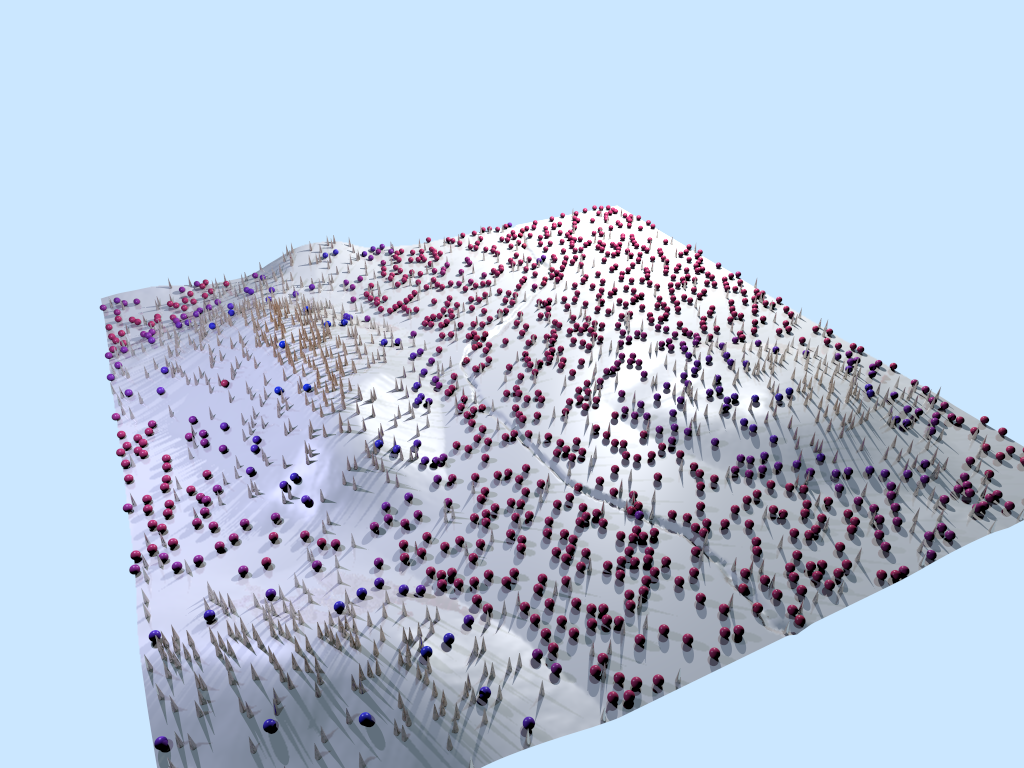
This version generates a heightmap from the original vertex data, that
is then fed into the main script. I think I made some small tweaks to
the probability functions too. I am pretty happy with the results.


Mike
Post a reply to this message
Attachments:
Download 'clutter_005.zip' (1673 KB)
Download 'makescene.png' (650 KB)
Preview of image 'makescene.png'
|
|
| |
| |
|
|
From: Thomas de Groot
Subject: Re: Need a script to randomly scatter objects vertically
Date: 21 May 2021 08:06:59
Message: <60a7a263@news.povray.org>
|
|
|
| |
| |
|
|
Op 21-5-2021 om 10:02 schreef Mike Horvath:
> This version generates a heightmap from the original vertex data, that
> is then fed into the main script. I think I made some small tweaks to
> the probability functions too. I am pretty happy with the results.
>
This looks very good!

--
Thomas
Post a reply to this message
|
|
| |
| |
|
|
From: Mike Horvath
Subject: Re: Need a script to randomly scatter objects vertically
Date: 25 May 2021 13:44:55
Message: <60ad3797$1@news.povray.org>
|
|
|
| |
| |
|
|
On 5/21/2021 8:06 AM, Thomas de Groot wrote:
> Op 21-5-2021 om 10:02 schreef Mike Horvath:
>> This version generates a heightmap from the original vertex data, that
>> is then fed into the main script. I think I made some small tweaks to
>> the probability functions too. I am pretty happy with the results.
>>
> This looks very good!
>


Thanks! Jonathan Rafael Ghiglia created an awesome script!


Mike
Post a reply to this message
|
|
| |
| |
|
|
From: Mike Horvath
Subject: Re: Need a script to randomly scatter objects horizontally
Date: 27 May 2021 07:37:08
Message: <60af8464$1@news.povray.org>
|
|
|
| |
| |
|
|
Just realized the title of this thread should be, "Need a script to
randomly scatter objects horizontally". Oops!


Mike
Post a reply to this message
|
|
| |
| |
|
|
From: Thomas de Groot
Subject: Re: Need a script to randomly scatter objects horizontally
Date: 27 May 2021 10:52:49
Message: <60afb241$1@news.povray.org>
|
|
|
| |
| |
|
|
Op 27-5-2021 om 13:37 schreef Mike Horvath:
> Just realized the title of this thread should be, "Need a script to
> randomly scatter objects horizontally". Oops!
>
LOL yes, but the vertical differentiation you were also after, validated
the title anyway.

--
Thomas
Post a reply to this message
|
|
| |
| |
|
|
From: Mike Horvath
Subject: Re: Need a script to randomly scatter objects vertically
Date: 27 May 2021 16:58:14
Message: <60b007e6@news.povray.org>
|
|
|
| |
| |
|
|
This version has some changes to the arrays, as well as the option to
round values to within a certain threshold. For instance, I am working
with LDraw models, so I round to the nearest 20 horizontal units, 8
vertical units, and 90 degree rotation increments.

Also, the script outputs data to a TSV file you can then import into a
spreadsheet.


Mike
Post a reply to this message
Attachments:
Download 'clutter_dv_006.zip' (1085 KB)
|
|
| |
| |
|
|
From: Mike Horvath
Subject: Re: Need a script to randomly scatter objects vertically
Date: 27 May 2021 18:09:41
Message: <60b018a5@news.povray.org>
|
|
|
| |
| |
|
|
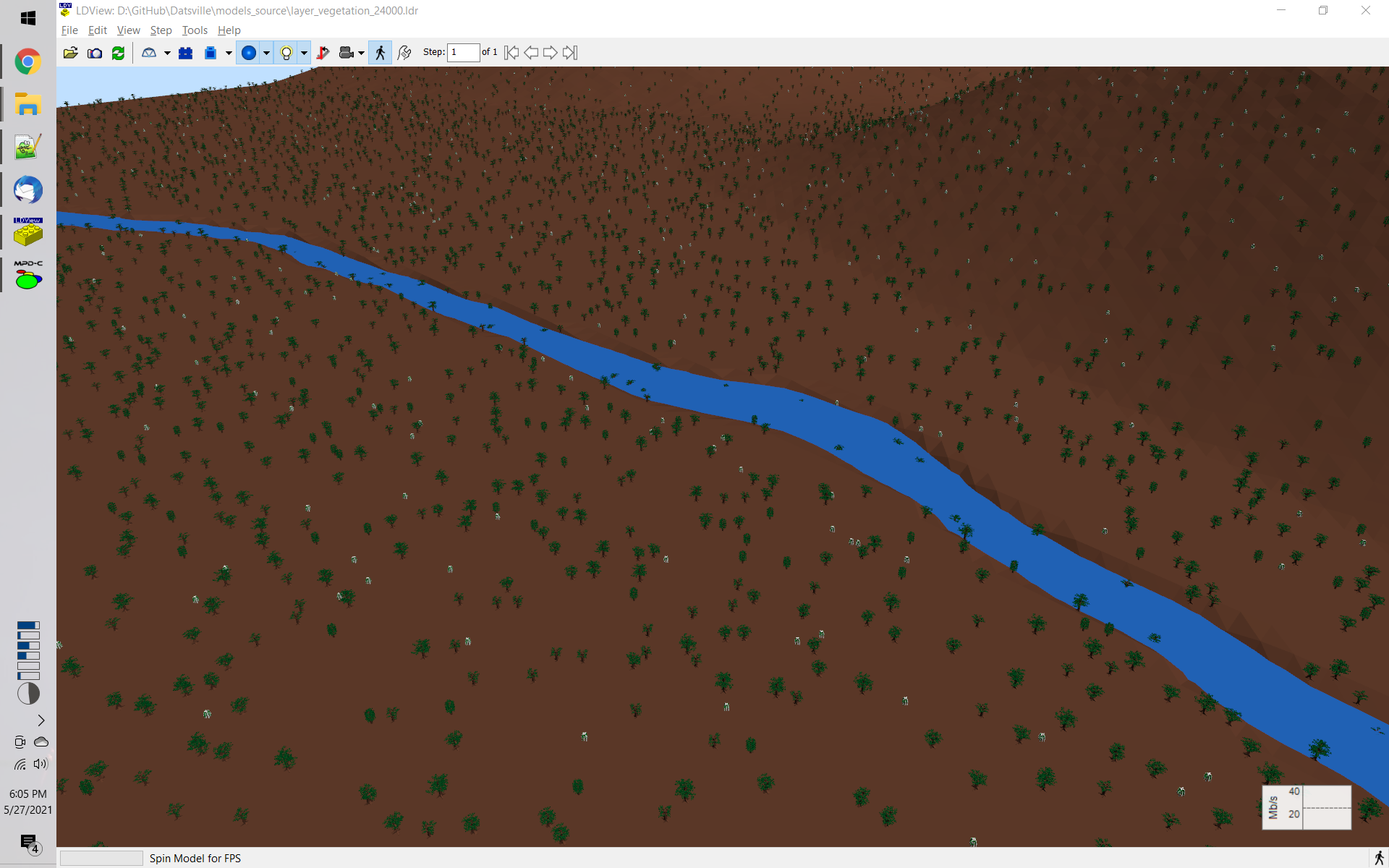
Screenshot after importing the generated coordinates into LDraw.


Mike
Post a reply to this message
Attachments:
Download 'ldview_screenshot_024.fs.png' (792 KB)
Preview of image 'ldview_screenshot_024.fs.png'
|
|
| |
| |
|
|
|
|
| |