 |
|
|
|
|
|
| |
| |
|
|
|
|
| |
| |
|
|
I would like to create a three-dimensional representation of the
L*C*h(uv) color space in the form of a cylinder.

How would I do that?

I may limit myself to colors that also exist in the sRGB color space.

Mike
Post a reply to this message
|
|
| |
| |
|
|
|
|
| |
| |
|
|
On 18.11.2016 8:22, Mike Horvath wrote:

> I would like to create a three-dimensional representation of the
> L*C*h(uv) color space in the form of a cylinder.

I assume you already have a formula to convert the color space to sRGB.

What you need is a function-based pigment that yields appropriate
RGB values based on x,y,z coordinates inside the cylinder. There is
no direct way to define a user-defined color function (unless you
already have a pigment) but you can do it like this:

1. Define three separate float functions yielding R, G, B separately

f_R(x,y,z)
f_B(x,y,z)
f_G(x,y,z)

2. Create red / green / blue pigments from that using function
pattern and red / green / blue color_maps

3. Join the 3 pigments into RGB pigment via "average" pattern.

Regarding implementation of f_R(x,y,z) I was going to suggest
you derive radial distance and angle around y from x-z pair via
(pythagoras / atan2) but as far as I understand LCh(uv) is already
a cylindrical version of Luv so these transformations are
technically part of the color space conversion itself.

Still it would probably be useful to implement the coordinate
transformation (including appropriate scaling of intervals) in
a separate set of functions f_L, f_u, f_v since you need them
multiple times in the definition of f_R, f_G, f_B.
Post a reply to this message
|
|
| |
| |
|
|
|
|
| |
| |
|
|
On 11/18/2016 8:37 AM, Christian Froeschlin wrote:
> I assume you already have a formula to convert the color space to sRGB.
>

Actually, I have a formula to convert a *single* color vector from LCH
to sRGB.

https://github.com/THEjoezack/ColorMine/blob/master/ColorMine/ColorSpaces/Conversions/LchConverter.cs

But I don't know how to convert this to one of POV-Ray's functions.


Mike
Post a reply to this message
|
|
| |
| |
|
|
|
|
| |
| |
|
|
Le 18/11/2016 à 08:22, Mike Horvath a écrit :
> I would like to create a three-dimensional representation of the
> L*C*h(uv) color space in the form of a cylinder.
>
> How would I do that?
>
> I may limit myself to colors that also exist in the sRGB color space.
>
> Mike

I would go via the fresh uv-mapping of cylinder, using a gradient map to
other gradient map of orthogonal direction.
Post a reply to this message
|
|
| |
| |
|
|
|
|
| |
| |
|
|
Le 18/11/2016 à 19:25, Le_Forgeron a écrit :
> Le 18/11/2016 à 08:22, Mike Horvath a écrit :
>> I would like to create a three-dimensional representation of the
>> L*C*h(uv) color space in the form of a cylinder.
>>
>> How would I do that?
>>
>> I may limit myself to colors that also exist in the sRGB color space.
>>
>> Mike
>
> I would go via the fresh uv-mapping of cylinder, using a gradient map to
> other gradient map of orthogonal direction.
>

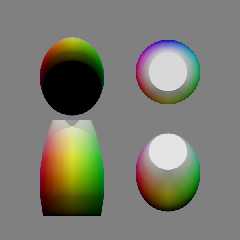
Here illustrated with a lemon, and HSL2RGB.

The adaptation to a cylinder and L*C*h(uv) is left as an exercise for
the reader.
Post a reply to this message
Attachments:
Download 'lemon.pov.txt' (1 KB)
Download 'lemon.png' (74 KB)
Preview of image 'lemon.png'
|
|
| |
| |
|
|
|
|
| |
| |
|
|
On 11/19/2016 2:53 AM, Le_Forgeron wrote:
> Le 18/11/2016 à 19:25, Le_Forgeron a écrit :
>> I would go via the fresh uv-mapping of cylinder, using a gradient map to
>> other gradient map of orthogonal direction.
>>
>
> Here illustrated with a lemon, and HSL2RGB.
>
> The adaptation to a cylinder and L*C*h(uv) is left as an exercise for
> the reader.
>

I want to model the 3D shape of the color solid, too. This is a very
irregular shape, and I believe I will need to create an isosurface.

Mike
Post a reply to this message
|
|
| |
| |
|
|
|
|
| |
| |
|
|
Let's start with a relatively simpler example of converting CIE XYZ to
sRGB. The following function is copied from here:

https://github.com/THEjoezack/ColorMine/blob/master/ColorMine/ColorSpaces/Conversions/XyzConverter.cs


         internal static IRgb ToColor(IXyz item)
         {
             // (Observer = 2°, Illuminant = D65)
             var x = item.X / 100.0;
             var y = item.Y / 100.0;
             var z = item.Z / 100.0;

             var r = x * 3.2406 + y * -1.5372 + z * -0.4986;
             var g = x * -0.9689 + y * 1.8758 + z * 0.0415;
             var b = x * 0.0557 + y * -0.2040 + z * 1.0570;

             r = r > 0.0031308 ? 1.055 * Math.Pow(r, 1 / 2.4) - 0.055 :
12.92 * r;
             g = g > 0.0031308 ? 1.055 * Math.Pow(g, 1 / 2.4) - 0.055 :
12.92 * g;
             b = b > 0.0031308 ? 1.055 * Math.Pow(b, 1 / 2.4) - 0.055 :
12.92 * b;

             return new Rgb
             {
                 R = ToRgb(r),
                 G = ToRgb(g),
                 B = ToRgb(b)
             };
         }


I think it would be pretty easy to produce a macro that does all of the
above. But how do I turn that into a POV-Ray function? The function
needs to work as a color as well as an isosurface I think.

Mike
Post a reply to this message
|
|
| |
| |
|
|
|
|
| |
| |
|
|
Le 19/11/2016 à 18:43, Mike Horvath a écrit :
> On 11/19/2016 2:53 AM, Le_Forgeron wrote:
>> Le 18/11/2016 à 19:25, Le_Forgeron a écrit :
>>> I would go via the fresh uv-mapping of cylinder, using a gradient map to
>>> other gradient map of orthogonal direction.
>>>
>>
>> Here illustrated with a lemon, and HSL2RGB.
>>
>> The adaptation to a cylinder and L*C*h(uv) is left as an exercise for
>> the reader.
>>
>
> I want to model the 3D shape of the color solid, too. This is a very
> irregular shape, and I believe I will need to create an isosurface.

for once, I would go for mesh
Post a reply to this message
|
|
| |
| |
|
|
|
|
| |
| |
|
|
Le 19/11/2016 à 18:47, Mike Horvath a écrit :
>
> I think it would be pretty easy to produce a macro that does all of the
> above. But how do I turn that into a POV-Ray function? The function
> needs to work as a color as well as an isosurface I think.


Basic of povray: the shape is not bound to the texture (excepted for
uv_mapping).

Make the work for the shape, and separately the work to map 3D
coordinates to colour.
Post a reply to this message
|
|
| |
| |
|
|
|
|
| |
| |
|
|
On 11/19/2016 12:59 PM, Le_Forgeron wrote:
> Le 19/11/2016 à 18:47, Mike Horvath a écrit :
>>
>> I think it would be pretty easy to produce a macro that does all of the
>> above. But how do I turn that into a POV-Ray function? The function
>> needs to work as a color as well as an isosurface I think.
>
>
> Basic of povray: the shape is not bound to the texture (excepted for
> uv_mapping).
>
> Make the work for the shape, and separately the work to map 3D
> coordinates to colour.
>

Okay. But how?


Mike
Post a reply to this message
|
|
| |
| |
|
|
|
|
| |
| |
|
|
Le 19/11/2016 à 19:19, Mike Horvath a écrit :
> On 11/19/2016 12:59 PM, Le_Forgeron wrote:
>> Le 19/11/2016 à 18:47, Mike Horvath a écrit :
>>>
>>> I think it would be pretty easy to produce a macro that does all of the
>>> above. But how do I turn that into a POV-Ray function? The function
>>> needs to work as a color as well as an isosurface I think.
>>
>>
>> Basic of povray: the shape is not bound to the texture (excepted for
>> uv_mapping).
>>
>> Make the work for the shape, and separately the work to map 3D
>> coordinates to colour.
>>
>
> Okay. But how?

Within the attached include file, you could replace uv_vertex with your
computed position.

The top macro is UVMeshable, first parameter is an object, just
ignore/remove it
The two others are the resolutions... you can simplify too for your
usage (getting ride of uv_min & uv_max).

mesh{
UVMeshable...

then you insert the uv_mapped texture (and I already provided some code
for that part in this thread)

et voila.
Post a reply to this message
Attachments:
Download 'nurbsmesh.inc.txt' (2 KB)
|
|
| |
| |
|
|
|
|
| |
| |
|
|
On 11/19/2016 3:25 PM, Le_Forgeron wrote:
> Le 19/11/2016 à 19:19, Mike Horvath a écrit :
>> On 11/19/2016 12:59 PM, Le_Forgeron wrote:
>>> Le 19/11/2016 à 18:47, Mike Horvath a écrit :
>>>>
>>>> I think it would be pretty easy to produce a macro that does all of the
>>>> above. But how do I turn that into a POV-Ray function? The function
>>>> needs to work as a color as well as an isosurface I think.
>>>
>>>
>>> Basic of povray: the shape is not bound to the texture (excepted for
>>> uv_mapping).
>>>
>>> Make the work for the shape, and separately the work to map 3D
>>> coordinates to colour.
>>>
>>
>> Okay. But how?
>
> Within the attached include file, you could replace uv_vertex with your
> computed position.
>
> The top macro is UVMeshable, first parameter is an object, just
> ignore/remove it
> The two others are the resolutions... you can simplify too for your
> usage (getting ride of uv_min & uv_max).
>
> mesh{
> UVMeshable...
>
> then you insert the uv_mapped texture (and I already provided some code
> for that part in this thread)
>
> et voila.
>

I will try to get your method to work. However, it seems like it is more
effort than simply using an isosurface. I am not worried much about
performance.

Mike
Post a reply to this message
|
|
| |
| |
|
|
|
|
| |
| |
|
|
On 11/19/2016 2:53 AM, Le_Forgeron wrote:
> Here illustrated with a lemon, and HSL2RGB.
>
> The adaptation to a cylinder and L*C*h(uv) is left as an exercise for
> the reader.
>

I have never used u and v in a gradient, so I am not sure what is going
on in your code. In the past I have used three separate functions for H,
S and L. I will try both methods.


Mike
Post a reply to this message
|
|
| |
| |
|
|
|
|
| |
| |
|
|
On 11/19/2016 3:25 PM, Le_Forgeron wrote:
> Le 19/11/2016 à 19:19, Mike Horvath a écrit :
>> On 11/19/2016 12:59 PM, Le_Forgeron wrote:
>>> Le 19/11/2016 à 18:47, Mike Horvath a écrit :
>>>>
>>>> I think it would be pretty easy to produce a macro that does all of the
>>>> above. But how do I turn that into a POV-Ray function? The function
>>>> needs to work as a color as well as an isosurface I think.
>>>
>>>
>>> Basic of povray: the shape is not bound to the texture (excepted for
>>> uv_mapping).
>>>
>>> Make the work for the shape, and separately the work to map 3D
>>> coordinates to colour.
>>>
>>
>> Okay. But how?
>
> Within the attached include file, you could replace uv_vertex with your
> computed position.
>
> The top macro is UVMeshable, first parameter is an object, just
> ignore/remove it
> The two others are the resolutions... you can simplify too for your
> usage (getting ride of uv_min & uv_max).
>
> mesh{
> UVMeshable...
>
> then you insert the uv_mapped texture (and I already provided some code
> for that part in this thread)
>
> et voila.
>

Also, uv mapping for cylinders is not supported by POV-Ray 3.7.0. Do I
need to compile 3.7.1 on my own?

Mike
Post a reply to this message
|
|
| |
| |
|
|
|
|
| |
| |
|
|
On 11/19/2016 3:25 PM, Le_Forgeron wrote:
> Le 19/11/2016 à 19:19, Mike Horvath a écrit :
>> On 11/19/2016 12:59 PM, Le_Forgeron wrote:
>>> Le 19/11/2016 à 18:47, Mike Horvath a écrit :
>>>>
>>>> I think it would be pretty easy to produce a macro that does all of the
>>>> above. But how do I turn that into a POV-Ray function? The function
>>>> needs to work as a color as well as an isosurface I think.
>>>
>>>
>>> Basic of povray: the shape is not bound to the texture (excepted for
>>> uv_mapping).
>>>
>>> Make the work for the shape, and separately the work to map 3D
>>> coordinates to colour.
>>>
>>
>> Okay. But how?
>
> Within the attached include file, you could replace uv_vertex with your
> computed position.
>
> The top macro is UVMeshable, first parameter is an object, just
> ignore/remove it
> The two others are the resolutions... you can simplify too for your
> usage (getting ride of uv_min & uv_max).
>
> mesh{
> UVMeshable...
>
> then you insert the uv_mapped texture (and I already provided some code
> for that part in this thread)
>
> et voila.
>

Also, if I wasn't clear before, I only want to render those portions of
the HCL cylinder that lie within the sRGB gamut. Thus, the resulting 3D
shape will be quite irregular. Can I still generate a mesh this way?

Mike
Post a reply to this message
|
|
| |
| |
|
|
|
|
| |
| |
|
|
Le 19/11/2016 à 22:22, Mike Horvath a écrit :
> Also, if I wasn't clear before, I only want to render those portions of
> the HCL cylinder that lie within the sRGB gamut. Thus, the resulting 3D
> shape will be quite irregular. Can I still generate a mesh this way?

Yes. I do not know your HCL, but as long as you have 2 parameters to
cover the surface you want, it should be fine.

If you look at the scene with the lemon, I made the exploration (there
for uv mapping) in 3 "bands", one for each portion of the surface.
you can use the same approach.
Post a reply to this message
|
|
| |
| |
|
|
|
|
| |
| |
|
|
Am 19.11.2016 um 22:16 schrieb Mike Horvath:

> Also, uv mapping for cylinders is not supported by POV-Ray 3.7.0. Do I
> need to compile 3.7.1 on my own?

Presuming you're using Windows, then no, not at all -- development
binaries can be found at our GitHub repository:

    https://github.com/POV-Ray/povray/releases
Post a reply to this message
|
|
| |
| |
|
|
|
|
| |
| |
|
|
I tried changing Ku to a cylinder. I expected some differences, but in
the output the texture does not seem to be changing direction along with
the rest of the cylinder.

Mike


#declare Ku = cylinder
{
	-y, +y, 0.4
	uv_mapping texture { TM }
	rotate 150*y
}
Post a reply to this message
|
|
| |
| |
|
|
|
|
| |
| |
|
|
Le 19/11/2016 à 23:34, Mike Horvath a écrit :
> I tried changing Ku to a cylinder. I expected some differences, but in
> the output the texture does not seem to be changing direction along with
> the rest of the cylinder.
>
> Mike
>
>
> #declare Ku = cylinder
> {
>     -y, +y, 0.4
>     uv_mapping texture { TM }
>     rotate 150*y
> }

uv mapping of cylinder is not available in 3.70
Post a reply to this message
|
|
| |
| |
|
|
|
|
| |
| |
|
|
On 11/19/2016 5:40 PM, Le_Forgeron wrote:
> Le 19/11/2016 à 23:34, Mike Horvath a écrit :
>> I tried changing Ku to a cylinder. I expected some differences, but in
>> the output the texture does not seem to be changing direction along with
>> the rest of the cylinder.
>>
>> Mike
>>
>>
>> #declare Ku = cylinder
>> {
>>     -y, +y, 0.4
>>     uv_mapping texture { TM }
>>     rotate 150*y
>> }
>
> uv mapping of cylinder is not available in 3.70
>

I am using 3.7.1-alpha.8826150+av273.msvc14 now.

Mike
Post a reply to this message
|
|
| |
| |
|
|
|
|
| |
| |
|
|
On 11/19/2016 6:09 PM, Mike Horvath wrote:
> On 11/19/2016 5:40 PM, Le_Forgeron wrote:
>> Le 19/11/2016 à 23:34, Mike Horvath a écrit :
>>> I tried changing Ku to a cylinder. I expected some differences, but in
>>> the output the texture does not seem to be changing direction along with
>>> the rest of the cylinder.
>>>
>>> Mike
>>>
>>>
>>> #declare Ku = cylinder
>>> {
>>>     -y, +y, 0.4
>>>     uv_mapping texture { TM }
>>>     rotate 150*y
>>> }
>>
>> uv mapping of cylinder is not available in 3.70
>>
>
> I am using 3.7.1-alpha.8826150+av273.msvc14 now.
>
> Mike


Oops. I must have downloaded the wrong version.

Mike
Post a reply to this message
|
|
| |
| |
|
|
|
|
| |
| |
|
|
On 11/19/2016 4:36 PM, Le_Forgeron wrote:
> Le 19/11/2016 à 22:22, Mike Horvath a écrit :
>> Also, if I wasn't clear before, I only want to render those portions of
>> the HCL cylinder that lie within the sRGB gamut. Thus, the resulting 3D
>> shape will be quite irregular. Can I still generate a mesh this way?
>
> Yes. I do not know your HCL, but as long as you have 2 parameters to
> cover the surface you want, it should be fine.
>
> If you look at the scene with the lemon, I made the exploration (there
> for uv mapping) in 3 "bands", one for each portion of the surface.
> you can use the same approach.
>

I just did a CSG difference of the object, and the interior does not
look at all like the exterior. Does you method work with CSG?

Mike
Post a reply to this message
|
|
| |
| |
|
|
|
|
| |
| |
|
|
Le 20/11/2016 à 00:30, Mike Horvath a écrit :
> On 11/19/2016 4:36 PM, Le_Forgeron wrote:
>> Le 19/11/2016 à 22:22, Mike Horvath a écrit :
>>> Also, if I wasn't clear before, I only want to render those portions of
>>> the HCL cylinder that lie within the sRGB gamut. Thus, the resulting 3D
>>> shape will be quite irregular. Can I still generate a mesh this way?
>>
>> Yes. I do not know your HCL, but as long as you have 2 parameters to
>> cover the surface you want, it should be fine.
>>
>> If you look at the scene with the lemon, I made the exploration (there
>> for uv mapping) in 3 "bands", one for each portion of the surface.
>> you can use the same approach.
>>
>
> I just did a CSG difference of the object, and the interior does not
> look at all like the exterior. Does you method work with CSG?
>

I'm afraid not. A mesh is hollow.

You would need to compute the CSG to get the points of mesh instead.

So far I was assuming your object was to just be alone, and visible
without transparency.

You only talked of making a cylinder so far.
Post a reply to this message
|
|
| |
| |
|
|
|
|
| |
| |
|
|
On 11/19/2016 6:56 PM, Le_Forgeron wrote:
> Le 20/11/2016 à 00:30, Mike Horvath a écrit :
>> On 11/19/2016 4:36 PM, Le_Forgeron wrote:
>>> Le 19/11/2016 à 22:22, Mike Horvath a écrit :
>>>> Also, if I wasn't clear before, I only want to render those portions of
>>>> the HCL cylinder that lie within the sRGB gamut. Thus, the resulting 3D
>>>> shape will be quite irregular. Can I still generate a mesh this way?
>>>
>>> Yes. I do not know your HCL, but as long as you have 2 parameters to
>>> cover the surface you want, it should be fine.
>>>
>>> If you look at the scene with the lemon, I made the exploration (there
>>> for uv mapping) in 3 "bands", one for each portion of the surface.
>>> you can use the same approach.
>>>
>>
>> I just did a CSG difference of the object, and the interior does not
>> look at all like the exterior. Does you method work with CSG?
>>
>
> I'm afraid not. A mesh is hollow.
>
> You would need to compute the CSG to get the points of mesh instead.
>
> So far I was assuming your object was to just be alone, and visible
> without transparency.
>
> You only talked of making a cylinder so far.
>

I need to be able to see the inside of the cylinder.

Mike
Post a reply to this message
|
|
| |
| |
|
|
|
|
| |
| |
|
|
On 11/18/2016 2:22 AM, Mike Horvath wrote:
> I would like to create a three-dimensional representation of the
> L*C*h(uv) color space in the form of a cylinder.
>
> How would I do that?
>
> I may limit myself to colors that also exist in the sRGB color space.
>
> Mike

I guess my only option is to use individually painted voxels, as I don't
see how you can enter conditional statements into a function declaration.

:(

Mike
Post a reply to this message
|
|
| |
| |
|
|
|
|
| |
| |
|
|
Am 20.11.2016 um 02:33 schrieb Mike Horvath:
> On 11/18/2016 2:22 AM, Mike Horvath wrote:
>> I would like to create a three-dimensional representation of the
>> L*C*h(uv) color space in the form of a cylinder.
>>
>> How would I do that?
>>
>> I may limit myself to colors that also exist in the sRGB color space.
>>
>> Mike
>
> I guess my only option is to use individually painted voxels, as I don't
> see how you can enter conditional statements into a function declaration.

Did you try the `select` function?
Post a reply to this message
|
|
| |
| |
|
|
|
|
| |
| |
|
|
On 11/19/2016 8:48 PM, clipka wrote:
> Am 20.11.2016 um 02:33 schrieb Mike Horvath:
>> On 11/18/2016 2:22 AM, Mike Horvath wrote:
>>> I would like to create a three-dimensional representation of the
>>> L*C*h(uv) color space in the form of a cylinder.
>>>
>>> How would I do that?
>>>
>>> I may limit myself to colors that also exist in the sRGB color space.
>>>
>>> Mike
>>
>> I guess my only option is to use individually painted voxels, as I don't
>> see how you can enter conditional statements into a function declaration.
>
> Did you try the `select` function?
>

No I didn't!

Can I create and store local variables too?

Mike
Post a reply to this message
|
|
| |
| |
|
|
|
|
| |
| |
|
|
Am 20.11.2016 um 03:04 schrieb Mike Horvath:
> On 11/19/2016 8:48 PM, clipka wrote:
>> Am 20.11.2016 um 02:33 schrieb Mike Horvath:
>>> On 11/18/2016 2:22 AM, Mike Horvath wrote:
>>>> I would like to create a three-dimensional representation of the
>>>> L*C*h(uv) color space in the form of a cylinder.
>>>>
>>>> How would I do that?
>>>>
>>>> I may limit myself to colors that also exist in the sRGB color space.
>>>>
>>>> Mike
>>>
>>> I guess my only option is to use individually painted voxels, as I don't
>>> see how you can enter conditional statements into a function
>>> declaration.
>>
>> Did you try the `select` function?
>>
>
> No I didn't!
>
> Can I create and store local variables too?

Nope; the virtual machine currently used by POV-Ray to execute
user-defined functions was designed solely for genuine functions; it
doesn't do anything remotely resembling programming.
Post a reply to this message
|
|
| |
| |
|
|
|
|
| |
| |
|
|
I'm having a problem converting between units. Here is the code I'm
trying to adapt to POV-Ray:

	https://github.com/THEjoezack/ColorMine/blob/master/ColorMine/ColorSpaces/Conversions/LchConverter.cs

         internal static IRgb ToColor(ILch item)
         {
             var hRadians = item.H * Math.PI / 180.0;
             var lab = new Lab
                 {
                     L = item.L,
                     A = Math.Cos(hRadians) * item.C,
                     B = Math.Sin(hRadians) * item.C
                 };
             return lab.To<Rgb>();
         }

Here is the POV-Ray version I created:

	// input L = between 0 and 100
	// input C = between 0 and 100
	// input H = between 0 and 360
	// output L = between 0 and 100
	// output A = between -128 and +128
	// output B = between -128 and +128
	#macro CLCH2LAB(Color)
		#local LCHFT = color Color;
		#local L = LCHFT.red;
		#local C = LCHFT.green;
		#local H = LCHFT.blue;
		#local hRadians = radians(H);
		#local A = cos(hRadians) * C;
		#local B = sin(hRadians) * C;
		<L,A,B>
	#end

When I plug the vector <50,50,180> into this function I get
<50.00000,-50.00000,0.00000> as a result. However, the Web converter
(http://colormine.org/convert/lch-to-lab) says it should be
<51.622535970468874,-37.18943330724933,2.558221480506817>

It's a simple function. I don't see anything obvious that is wrong with
it. Do you?

Mike
Post a reply to this message
|
|
| |
| |
|
|
|
|
| |
| |
|
|
Am 20.11.2016 um 04:47 schrieb Mike Horvath:
> I'm having a problem converting between units. Here is the code I'm
> trying to adapt to POV-Ray:
>
>
https://github.com/THEjoezack/ColorMine/blob/master/ColorMine/ColorSpaces/Conversions/LchConverter.cs
>
>
>         internal static IRgb ToColor(ILch item)
>         {
>             var hRadians = item.H * Math.PI / 180.0;
>             var lab = new Lab
>                 {
>                     L = item.L,
>                     A = Math.Cos(hRadians) * item.C,
>                     B = Math.Sin(hRadians) * item.C
>                 };
>             return lab.To<Rgb>();
>         }
...

>
> Here is the POV-Ray version I created:
>
>     // input L = between 0 and 100
>     // input C = between 0 and 100
>     // input H = between 0 and 360
>     // output L = between 0 and 100
>     // output A = between -128 and +128
>     // output B = between -128 and +128
>     #macro CLCH2LAB(Color)
>         #local LCHFT = color Color;
>         #local L = LCHFT.red;
>         #local C = LCHFT.green;
>         #local H = LCHFT.blue;
>         #local hRadians = radians(H);
>         #local A = cos(hRadians) * C;
>         #local B = sin(hRadians) * C;
>         <L,A,B>
>     #end
>
> When I plug the vector <50,50,180> into this function I get
> <50.00000,-50.00000,0.00000> as a result. However, the Web converter
> (http://colormine.org/convert/lch-to-lab) says it should be
> <51.622535970468874,-37.18943330724933,2.558221480506817>
>
> It's a simple function. I don't see anything obvious that is wrong with
> it. Do you?

I see something obviously wrong with the web converter: the "CIE-L*ab"
(whatever colour space that even is supposed to be; L*a*b, maybe?)
result it computes cannot possibly be the same as the "lab" interim
result computed by the `ToColor` function you've posted, as that leaves
the "L" component entirely untouched, so it should evaluate to 50.

Judging from the results the web converter computes for Lch to XYZ,
which gives out-of-range values for an obviously within-range Lch value
of <50,50,180>, that web converter can't be trusted.

The first other web converter I've tested does convert "Lch" <50,50,180>
to "Lab" <50,-50,0>, matching your implementation.
Post a reply to this message
|
|
| |
| |
|
|
|
|
| |
| |
|
|
On 11/20/2016 12:09 AM, clipka wrote:
> Am 20.11.2016 um 04:47 schrieb Mike Horvath:
>> I'm having a problem converting between units. Here is the code I'm
>> trying to adapt to POV-Ray:
>>
>>
https://github.com/THEjoezack/ColorMine/blob/master/ColorMine/ColorSpaces/Conversions/LchConverter.cs
>>
>>
>>         internal static IRgb ToColor(ILch item)
>>         {
>>             var hRadians = item.H * Math.PI / 180.0;
>>             var lab = new Lab
>>                 {
>>                     L = item.L,
>>                     A = Math.Cos(hRadians) * item.C,
>>                     B = Math.Sin(hRadians) * item.C
>>                 };
>>             return lab.To<Rgb>();
>>         }
> ...
>
>>
>> Here is the POV-Ray version I created:
>>
>>     // input L = between 0 and 100
>>     // input C = between 0 and 100
>>     // input H = between 0 and 360
>>     // output L = between 0 and 100
>>     // output A = between -128 and +128
>>     // output B = between -128 and +128
>>     #macro CLCH2LAB(Color)
>>         #local LCHFT = color Color;
>>         #local L = LCHFT.red;
>>         #local C = LCHFT.green;
>>         #local H = LCHFT.blue;
>>         #local hRadians = radians(H);
>>         #local A = cos(hRadians) * C;
>>         #local B = sin(hRadians) * C;
>>         <L,A,B>
>>     #end
>>
>> When I plug the vector <50,50,180> into this function I get
>> <50.00000,-50.00000,0.00000> as a result. However, the Web converter
>> (http://colormine.org/convert/lch-to-lab) says it should be
>> <51.622535970468874,-37.18943330724933,2.558221480506817>
>>
>> It's a simple function. I don't see anything obvious that is wrong with
>> it. Do you?
>
> I see something obviously wrong with the web converter: the "CIE-L*ab"
> (whatever colour space that even is supposed to be; L*a*b, maybe?)
> result it computes cannot possibly be the same as the "lab" interim
> result computed by the `ToColor` function you've posted, as that leaves
> the "L" component entirely untouched, so it should evaluate to 50.
>
> Judging from the results the web converter computes for Lch to XYZ,
> which gives out-of-range values for an obviously within-range Lch value
> of <50,50,180>, that web converter can't be trusted.
>
> The first other web converter I've tested does convert "Lch" <50,50,180>
> to "Lab" <50,-50,0>, matching your implementation.
>


THANK YOU!!

Which other converter did you use, BTW? I need to do the same for
LAB>XYZ and XYZ>RGB as well.

Mike
Post a reply to this message
|
|
| |
| |
|
|
|
|
| |
| |
|
|
I posted my work in p.t.s-f. I used cylindrical cells, and the result is
rather chunky. Next up is to see if I can achieve the same using
functions only.

Mike
Post a reply to this message
|
|
| |
| |
|
|
|
|
| |
| |
|
|
On 11/19/2016 9:26 PM, clipka wrote:
> Am 20.11.2016 um 03:04 schrieb Mike Horvath:
>> On 11/19/2016 8:48 PM, clipka wrote:
>>> Am 20.11.2016 um 02:33 schrieb Mike Horvath:
>>>> On 11/18/2016 2:22 AM, Mike Horvath wrote:
>>>>> I would like to create a three-dimensional representation of the
>>>>> L*C*h(uv) color space in the form of a cylinder.
>>>>>
>>>>> How would I do that?
>>>>>
>>>>> I may limit myself to colors that also exist in the sRGB color space.
>>>>>
>>>>> Mike
>>>>
>>>> I guess my only option is to use individually painted voxels, as I don't
>>>> see how you can enter conditional statements into a function
>>>> declaration.
>>>
>>> Did you try the `select` function?
>>>
>>
>> No I didn't!
>>
>> Can I create and store local variables too?
>
> Nope; the virtual machine currently used by POV-Ray to execute
> user-defined functions was designed solely for genuine functions; it
> doesn't do anything remotely resembling programming.
>

Do you think I could make the shape using lots of little functions?

Mike
Post a reply to this message
|
|
| |
| |
|
|
|
|
| |
| |
|
|
Am 20.11.2016 um 06:51 schrieb Mike Horvath:

> Which other converter did you use, BTW? I need to do the same for
> LAB>XYZ and XYZ>RGB as well.

Actually it was a colour picker that auto-converted upon changing the
colour model:

http://davidjohnstone.net/pages/lch-lab-colour-gradient-picker


For the most common conversion needs I found this one earlier:

http://davengrace.com/dave/cspace/
Post a reply to this message
|
|
| |
| |
|
|
|
|
| |
| |
|
|
So, I created a bunch of functions. Now how do I turn them into pigments?

(See p.t.s-f)

Mike
Post a reply to this message
|
|
| |
| |
|
|
|
|
| |
| |
|
|
On 11/21/2016 12:31 PM, Mike Horvath wrote:
> So, I created a bunch of functions. Now how do I turn them into pigments?
>
> (See p.t.s-f)
>
> Mike

Disregard. I already know how to create an approixmation of the pigment.
Sorry.


Mike
Post a reply to this message
|
|
| |
| |
|
|
|
|
| |
| |
|
|
On 11/19/2016 3:25 PM, Le_Forgeron wrote:
> Le 19/11/2016 à 19:19, Mike Horvath a écrit :
>> On 11/19/2016 12:59 PM, Le_Forgeron wrote:
>>> Le 19/11/2016 à 18:47, Mike Horvath a écrit :
>>>>
>>>> I think it would be pretty easy to produce a macro that does all of the
>>>> above. But how do I turn that into a POV-Ray function? The function
>>>> needs to work as a color as well as an isosurface I think.
>>>
>>>
>>> Basic of povray: the shape is not bound to the texture (excepted for
>>> uv_mapping).
>>>
>>> Make the work for the shape, and separately the work to map 3D
>>> coordinates to colour.
>>>
>>
>> Okay. But how?
>
> Within the attached include file, you could replace uv_vertex with your
> computed position.
>
> The top macro is UVMeshable, first parameter is an object, just
> ignore/remove it
> The two others are the resolutions... you can simplify too for your
> usage (getting ride of uv_min & uv_max).
>
> mesh{
> UVMeshable...
>
> then you insert the uv_mapped texture (and I already provided some code
> for that part in this thread)
>
> et voila.
>

I don't understand how to use these macros. Do you have examples I can
look at?

Mike
Post a reply to this message
|
|
| |
| |
|
|
|
|
| |
| |
|
|
On 11/18/2016 8:37 AM, Christian Froeschlin wrote:
> 1. Define three separate float functions yielding R, G, B separately
>
> f_R(x,y,z)
> f_B(x,y,z)
> f_G(x,y,z)
>
> 2. Create red / green / blue pigments from that using function
> pattern and red / green / blue color_maps
>
> 3. Join the 3 pigments into RGB pigment via "average" pattern.

With these three functions, do I fade them from a pure color to black,
or a pure color to transparent?

Mike
Post a reply to this message
|
|
| |
| |
|
|
|
|
| |
| |
|
|
On 11/18/2016 8:37 AM, Christian Froeschlin wrote:
> Still it would probably be useful to implement the coordinate
> transformation (including appropriate scaling of intervals) in
> a separate set of functions f_L, f_u, f_v since you need them
> multiple times in the definition of f_R, f_G, f_B.
>

Are you suggesting I use a parametric instead of an isosurface?

Mike
Post a reply to this message
|
|
| |
| |
|
|
|
|
| |
| |
|
|
On 11/23/2016 4:05 AM, Mike Horvath wrote:
> On 11/18/2016 8:37 AM, Christian Froeschlin wrote:
>> Still it would probably be useful to implement the coordinate
>> transformation (including appropriate scaling of intervals) in
>> a separate set of functions f_L, f_u, f_v since you need them
>> multiple times in the definition of f_R, f_G, f_B.
>>
>
> Are you suggesting I use a parametric instead of an isosurface?
>
> Mike

I think I would need a third parameter in addition to u and v to make it
work.


Mike
Post a reply to this message
|
|
| |
| |
|
|
|
|
| |
| |
|
|
On 11/23/2016 8:51 PM, clipka wrote:
 > Am 24.11.2016 um 01:27 schrieb Mike Horvath:
 >> On 11/23/2016 7:22 PM, Christian Froeschlin wrote:
 >>> No threshold will give the desired result using the color
 >>> conversion function directly, as clipka explained you need
 >>> a define a "distance" function for this purpose.
 >>>
 >>> Alternatively you could try to render the clipped function
 >>> (set to 0 outside the gamut) as strongly scattering media but
 >>> it may be fiddly and you don't get the look of a "surface"
 >>> regarding finish and lighting etc.
 >>>
 >>
 >> What is a "distance" function?
 >>
 >> The "convertLCH2RGBb2(y*100,sqrt(x*x+z*z)*100,atan2d(x,z))" bit is what
 >> clipka showed me.
 >
 > You may need to deconstruct the problem into easy-to-handle building
 > blocks, and tackle each of them separately.
 >
 > One building block you need is a function that maps a single RGB colour
 > component to a distance-ish scalar telling you how "far away" the colour
 > component is from the valid range (this time, just for giggles, I'm
 > contructing the function in such a way that <0 is inside, >0 is outside):
 >
 >     #declare fD = function(C) { abs(C-0.5)-0.5 }
 >
 > Another building block you need is a function that combines three such
 > distance-ish scalars, such that you get a positive value if one or more
 > parameters is positive, or a negative value if all are negative, in a
 > manner that avoid steps:
 >
 >     #declare fDist = function(Dr,Dg,Db) { max(Dr,Dg,Db) }
 >
 >
 > That's kind of all you need to know about the "distance" functions;
 > however, those functions alone don't get you anywhere.
 >
 >
 > Another necessary building block is a set of functions that map Lch
to RGB:
 >
 >     #declare fR = function(L,c,h) { ... }
 >     #declare fG = function(L,c,h) { ... }
 >     #declare fB = function(L,c,h) { ... }
 >
 > And the final building block is a set of functions that map 3D cartesian
 > space to Lch:
 >
 >     #declare fL = function(x,y,z) { y*100 }
 >     #declare fc = function(x,y,z) { sqrt(x*x+z*z)*100 }
 >     #declare fh = function(x,y,z) { atan2d(x,z) }
 >
 >
 > Once you have all these building blocks, all that's left is to plug them
 > all together.
 >
 > The final result to be compared to the threshold by the isosurface is
 > the result of the `fDist` function, so that's where you start:
 >
 >     isosurface {
 >       threshold 0
 >       function { fDist (Dr,Dg,Db) }
 >     }
 >
 > The isosurface doesn't know what `Dr`, `Dg` and `Db` are, but we know
 > they are supposed to be results of the `fD` function, using the three
 > colour channels as input:
 >
 >     isosurface {
 >       threshold 0
 >       function { fDist (
 >         fD (R),
 >         fD (G),
 >         fD (B)
 >       ) }
 >     }
 >
 > Again the isosurface doesn't know `R`, `G` and `B`:
 >
 >     isosurface {
 >       threshold 0
 >       function { fDist (
 >         fD ( fR (L,c,h) ),
 >         fD ( fG (L,c,h) ),
 >         fD ( fB (L,c,h) )
 >       ) }
 >     }
 >
 > Still not done yet, as the isosurface doesn't know `L`, `c` and `h`
either:
 >
 >     isosurface {
 >       threshold 0
 >       function { fDist (
 >         fD ( fR (fL(x,y,z),fc(x,y,z),fh(x,y,z)) ),
 >         fD ( fG (fL(x,y,z),fc(x,y,z),fh(x,y,z)) ),
 >         fD ( fB (fL(x,y,z),fc(x,y,z),fh(x,y,z)) )
 >       ) }
 >     }
 >
 > Now we have only `x`, `y` and `z` left as parameters, which is what the
 > isosurface can handle.
 >
 >
 > For bonus points, you could eliminate the multiple invocation of
 > `fL(x,y,z)`, `fc(x,y,z)` and `fh(x,y,z)`. To this end, you need to
 > provide a function that does not compute these values itself, but rather
 > takes them as parameters:
 >
 >     #declare fFinal = function(L,c,h) { fDist (
 >       fD ( fR (L,c,h) ),
 >       fD ( fG (L,c,h) ),
 >       fD ( fB (L,c,h) )
 >     ) }
 >
 >     isosurface {
 >       threshold 0
 >       function { fFinal (fL(x,y,z),fc(x,y,z),fh(x,y,z)) }
 >     }
 >
 >
 > And of course you'll want to use different names; I chose the above for
 > brevity.
 >

Next issue: What is the best way to create an accurate pigment to paint
the isosurface?

I was thinking of repurposing the following:

//------------------------------
// HSL Cylinder

#declare CSolid_HSLCylinder_Hue = pigment
{
	function {-f_th(x,y,z)/pi/2}
	color_map
	{
		// need to replace these with calls to CHSL2RGB() or CH2RGB(), then
increase the number of steps
		[0/6 srgb <1,0,0,>]
		[1/6 srgb <1,1,0,>]
		[2/6 srgb <0,1,0,>]
		[3/6 srgb <0,1,1,>]
		[4/6 srgb <0,0,1,>]
		[5/6 srgb <1,0,1,>]
		[6/6 srgb <1,0,0,>]
	}
}
#declare CSolid_HSLCylinder_Saturation = pigment
{
	cylindrical
	pigment_map
	{
		[0 CSolid_HSLCylinder_Hue]
		[1 color srgb 1/2]
	}
	scale	(1 + CSolid_Offset)
}
#declare CSolid_HSLCylinder_Lightness = pigment
{
	gradient y
	pigment_map
	{
		[0/2 color srgb 0]
		[1/2 CSolid_HSLCylinder_Saturation]
		[2/2 color srgb 1]
	}
	scale		(1 + CSolid_Offset)
	translate	-y * CSolid_Offset/2
}
#declare CSolid_HSLCylinder_Pigment = pigment {CSolid_HSLCylinder_Lightness}

Except, in this case using LCH conversion formula to create the gradients:

	[0/6 srgb <convertLCH2RGBb1(50, 50, 0),convertLCH2RGBb2(50, 50,
0),convertLCH2RGBb3(50, 50, 0)>]
	[1/6 srgb <convertLCH2RGBb1(50, 50, 60),convertLCH2RGBb2(50, 50,
60),convertLCH2RGBb3(50, 50, 60)>]
	[2/6 srgb <convertLCH2RGBb1(50, 50, 120),convertLCH2RGBb2(50, 50,
120),convertLCH2RGBb3(50, 50, 120)>]
	[3/6 srgb <convertLCH2RGBb1(50, 50, 180),convertLCH2RGBb2(50, 50,
180),convertLCH2RGBb3(50, 50, 180)>]
	[4/6 srgb <convertLCH2RGBb1(50, 50, 240),convertLCH2RGBb2(50, 50,
240),convertLCH2RGBb3(50, 50, 240)>]
	[5/6 srgb <convertLCH2RGBb1(50, 50, 300),convertLCH2RGBb2(50, 50,
300),convertLCH2RGBb3(50, 50, 300)>]
	[6/6 srgb <convertLCH2RGBb1(50, 50, 360),convertLCH2RGBb2(50, 50,
360),convertLCH2RGBb3(50, 50, 360)>]


Is this maybe a bad idea?

Mike
Post a reply to this message
|
|
| |
| |
|
|
|
|
| |
| |
|
|
Am 24.11.2016 um 20:10 schrieb Mike Horvath:

> Next issue: What is the best way to create an accurate pigment to paint
> the isosurface?

The main problem to solve is that POV-Ray's mechanisms to generate
gradient-ish pigments only supports 1-dimensional gradients.

A common solution is to construct three 1-dimensional gradient-ish
pigments -- one for each colour component -- and then mix them together
using the `average` pseudo-pattern:

    #declare FinalPigment = pigment {
      average
      pigment_map {
        [ 1.0 RedPigment   ]
        [ 1.0 GreenPigment ]
        [ 1.0 BluePigment  ]
      }
    }

Each of the `RedPigment`, `GreenPigment` and `BluePigment` component
patterns is designed in such a way that it only has the corresponding
component set to non-zero.

An important thing to note here is that the `average` pseudo-pattern
does not add colours, but averages them; so in order to achieve the full
range of colours, the component patterns must have colour ranges from 0
to 3 for the corresponding channel:

    #declare RedPigment = pigment {
      function { fR(fL(x,y,z),fc(x,y,z),fh(x,y,z), }
      colour_map {
        [ 0.0 colour rgb <0,0,0> ]
        [ 1.0 colour rgb <3,0,0> ]
      }
    }

Note that there is no need for clipping the function result: This is
automatically achieved by the colour_map.
Post a reply to this message
|
|
| |
| |
|
|
|
|
| |
| |
|
|
Here's what I have:

#declare pigmentR = pigment
{
	function {fR (fL(x,y,z),fC(x,y,z),fH(x,y,z))}
	color_map
	{
		[0 color srgb <0,0,0>]
		[1 color srgb <3,0,0>]
	}
}
#declare pigmentG = pigment
{
	function {fG (fL(x,y,z),fC(x,y,z),fH(x,y,z))}
	color_map
	{
		[0 color srgb <0,0,0>]
		[1 color srgb <0,3,0>]
	}
}
#declare pigmentB = pigment
{
	function {fB (fL(x,y,z),fC(x,y,z),fH(x,y,z))}
	color_map
	{
		[0 color srgb <0,0,0>]
		[1 color srgb <0,0,3>]
	}
}


isosurface
{
	function { fFinal (fL(x,y,z),fC(x,y,z),fH(x,y,z)) }
	threshold	0
	accuracy	0.01
	contained_by
	{
		box {<-1,0,-1>,<+1,+1,+1>}
	}
	max_gradient	20000
//	[evaluate P0, P1, P2]
//	open
//	[max_trace INTEGER] | [all_intersections]
	pigment
	{
		average
		pigment_map
		{
			[1 pigmentR]
			[1 pigmentG]
			[1 pigmentB]
		}
	}
}

However, the result is much to white on top, and there are no blues or
greens whatsoever. I've attached the result of the render. Here's
roughly what the colors are supposed to look like:

https://commons.wikimedia.org/wiki/File:Cielch_color_solid_cylinder.png

Mike
Post a reply to this message
Attachments:
Download 'cielch_color_solid_cylinder_isosurface_2.png' (17 KB)
Preview of image 'cielch_color_solid_cylinder_isosurface_2.png'

|
|
| |
| |
|
|
|
|
| |
| |
|
|
It occurred to me that the color solid should not extend beyond a
cylinder with radius 1 and height 1. I have attached an overhead view.

I'm guessing the simplest thing to do was intersect the isosurface with
the cylinder. Is that correct?

Mike
Post a reply to this message
Attachments:
Download 'cielch_color_solid_cylinder_isosurface_2.png' (16 KB)
Preview of image 'cielch_color_solid_cylinder_isosurface_2.png'

|
|
| |
| |
|
|
|
|
| |
| |
|
|
On 11/24/2016 3:50 PM, Mike Horvath wrote:
> Here's what I have:
>
> #declare pigmentR = pigment
> {
>     function {fR (fL(x,y,z),fC(x,y,z),fH(x,y,z))}
>     color_map
>     {
>         [0 color srgb <0,0,0>]
>         [1 color srgb <3,0,0>]
>     }
> }
> #declare pigmentG = pigment
> {
>     function {fG (fL(x,y,z),fC(x,y,z),fH(x,y,z))}
>     color_map
>     {
>         [0 color srgb <0,0,0>]
>         [1 color srgb <0,3,0>]
>     }
> }
> #declare pigmentB = pigment
> {
>     function {fB (fL(x,y,z),fC(x,y,z),fH(x,y,z))}
>     color_map
>     {
>         [0 color srgb <0,0,0>]
>         [1 color srgb <0,0,3>]
>     }
> }
>
>
> isosurface
> {
>     function { fFinal (fL(x,y,z),fC(x,y,z),fH(x,y,z)) }
>     threshold    0
>     accuracy    0.01
>     contained_by
>     {
>         box {<-1,0,-1>,<+1,+1,+1>}
>     }
>     max_gradient    20000
> //    [evaluate P0, P1, P2]
> //    open
> //    [max_trace INTEGER] | [all_intersections]
>     pigment
>     {
>         average
>         pigment_map
>         {
>             [1 pigmentR]
>             [1 pigmentG]
>             [1 pigmentB]
>         }
>     }
> }
>
> However, the result is much to white on top, and there are no blues or
> greens whatsoever. I've attached the result of the render. Here's
> roughly what the colors are supposed to look like:
>
> https://commons.wikimedia.org/wiki/File:Cielch_color_solid_cylinder.png
>
> Mike
>


Okay, the problem is that I want to use sRGB instead of RGB in the
pigments. However, it seems to not be possible to multiply the sRGB
colors and then average them like you can with regular RGB. Or is there
a way to get this to work?

Mike
Post a reply to this message
|
|
| |
| |
|
|
|
|
| |
| |
|
|
Am 24.11.2016 um 23:56 schrieb Mike Horvath:

> Okay, the problem is that I want to use sRGB instead of RGB in the
> pigments. However, it seems to not be possible to multiply the sRGB
> colors and then average them like you can with regular RGB. Or is there
> a way to get this to work?

Don't use sRGB when mucking around with colour spaces, unless you know
/exactly/ what you are doing. Colour space experts are smart enough to
specify colours in terms of linear light intensity, or otherwise
explicitly inform the readers.
Post a reply to this message
|
|
| |
| |
|
|
|
|
| |
| |
|
|
Am 24.11.2016 um 22:50 schrieb Mike Horvath:
> It occurred to me that the color solid should not extend beyond a
> cylinder with radius 1 and height 1. I have attached an overhead view.

May I ask the stupid question, "why not"?

I would expect the Lch colour space to encompass all the RGB colour
space, so the boundaries of the latter should be sufficient to bound the
shape.

My guess is that the issues you see with the shape are due to bogosities
in your colour conversion functions.
Post a reply to this message
|
|
| |
| |
|
|
|
|
| |
| |
|
|
Thank you clipka! Everything is working perfectly now! Part of the
problem was a bug in my conversion functions. Once I fixed it, I started
getting the correct results.

Do you mind if I put a LGPL license on the code an upload it to Wikipedia?


Mike
Post a reply to this message
|
|
| |
| |
|
|
|
|
| |
| |
|
|
On 11/24/2016 6:43 PM, clipka wrote:
> Am 24.11.2016 um 23:56 schrieb Mike Horvath:
>
>> Okay, the problem is that I want to use sRGB instead of RGB in the
>> pigments. However, it seems to not be possible to multiply the sRGB
>> colors and then average them like you can with regular RGB. Or is there
>> a way to get this to work?
>
> Don't use sRGB when mucking around with colour spaces, unless you know
> /exactly/ what you are doing. Colour space experts are smart enough to
> specify colours in terms of linear light intensity, or otherwise
> explicitly inform the readers.
>

The functions output sRGB colors with Illuminant = D65 and Observer = 2°
(1931) according to one of the conversion websites that uses these formulas.

I'd like the POV code to use sRGB as well.


Mike
Post a reply to this message
|
|
| |
| |
|
|
|
|
| |
| |
|
|
On 11/24/2016 6:46 PM, clipka wrote:
> Am 24.11.2016 um 22:50 schrieb Mike Horvath:
>> It occurred to me that the color solid should not extend beyond a
>> cylinder with radius 1 and height 1. I have attached an overhead view.
>
> May I ask the stupid question, "why not"?
>
> I would expect the Lch colour space to encompass all the RGB colour
> space, so the boundaries of the latter should be sufficient to bound the
> shape.
>
> My guess is that the issues you see with the shape are due to bogosities
> in your colour conversion functions.
>

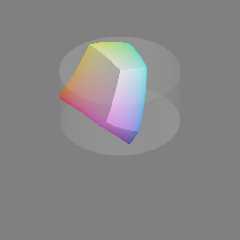
L, C and H are supposed to form a cylinder. There are some very small
sRGB bits poking outside of the cylinder. I guess I could show the bits
as well, as long as I explain what they are.

Also, I *did* make a mistake in the color conversion code. I was
clamping L, C and H to 0..100, 0..100 and 0..360 incorrectly. Once I
stopped clamping, the shape turned into what I have been expecting based
on earlier tests.

I've attached the final shape, with the outside sRGB bits trimmed off.

Mike
Post a reply to this message
Attachments:
Download 'cielch_color_solid_cylinder_isosurface.png' (24 KB)
Preview of image 'cielch_color_solid_cylinder_isosurface.png'
|
|
| |
| |
|
|
|
|
| |
|
|








