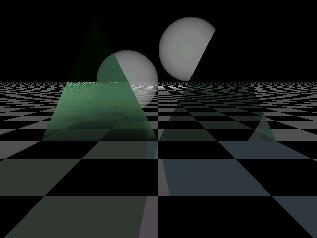
|
|
|
|
|
|
| |
| |
|
|
|
|
| |
| |
|
|
Hi there,

maybe I'm not an advanced user but I need help from one. So I hope this post
isn't OT.
It's about the milky glass problem. It is not an easy task for ANY raytracer
but since I'm working on POV, POV tips are preferred :-)

I need some texture which simulates shining-through-but-not-transparent
objects. The first thing which comes into my mind is a hollow object filled
with scattering media or similar things. Unfortunately I want to apply this
texture onto a mesh which is therefore infinitively thin (at least the
triangles). Does any one know a fancy trick to emulate milky glass by using
a texture?
The object should also be bright in case the light source is BEHIND the
object (like milky glass does). Any way to do this? Please note that it is
about difficult lighting situations with varying arrangement of the objects.
So any hand-trimmed ambient stuff will fail.
It really needs to be a result of a rendering process.

Any hints?
I really got stuck with this.

Thanks in advance,
regards,
SY
Post a reply to this message
|
|
| |
| |
|
|
|
|
| |
| |
|
|
In article <3c72a8b7$1@news.povray.org>,
"Jürgen Scharfy" <sch### [at] surfeu at> wrote:
> I need some texture which simulates shining-through-but-not-transparent
> objects. The first thing which comes into my mind is a hollow object filled
> with scattering media or similar things. Unfortunately I want to apply this
> texture onto a mesh which is therefore infinitively thin (at least the
> triangles). Does any one know a fancy trick to emulate milky glass by using
> a texture?
> The object should also be bright in case the light source is BEHIND the
> object (like milky glass does). Any way to do this? Please note that it is
> about difficult lighting situations with varying arrangement of the objects.
> So any hand-trimmed ambient stuff will fail.
Scattering media is the right thing to use here, it should work fine as
long as your mesh is "well behaved", meaning it doesn't have any
internal surfaces or openings.
--
Christopher James Huff <chr### [at] maccom>
POV-Ray TAG e-mail: chr### [at] tagpovrayorg
TAG web site: http://tag.povray.org/ at> wrote:
> I need some texture which simulates shining-through-but-not-transparent
> objects. The first thing which comes into my mind is a hollow object filled
> with scattering media or similar things. Unfortunately I want to apply this
> texture onto a mesh which is therefore infinitively thin (at least the
> triangles). Does any one know a fancy trick to emulate milky glass by using
> a texture?
> The object should also be bright in case the light source is BEHIND the
> object (like milky glass does). Any way to do this? Please note that it is
> about difficult lighting situations with varying arrangement of the objects.
> So any hand-trimmed ambient stuff will fail.
Scattering media is the right thing to use here, it should work fine as
long as your mesh is "well behaved", meaning it doesn't have any
internal surfaces or openings.
--
Christopher James Huff <chr### [at] maccom>
POV-Ray TAG e-mail: chr### [at] tagpovrayorg
TAG web site: http://tag.povray.org/
Post a reply to this message
|
|
| |
| |
|
|
|
|
| |
| |
|
|
"Jürgen Scharfy" wrote:
>
> Hi there,
>
> maybe I'm not an advanced user but I need help from one. So I hope this post
> isn't OT.
> It's about the milky glass problem. It is not an easy task for ANY raytracer
> but since I'm working on POV, POV tips are preferred :-)
>
> I need some texture which simulates shining-through-but-not-transparent
> objects. The first thing which comes into my mind is a hollow object filled
> with scattering media or similar things. Unfortunately I want to apply this
> texture onto a mesh which is therefore infinitively thin (at least the
> triangles). Does any one know a fancy trick to emulate milky glass by using
> a texture?

Scattering media should be fine for that, no problem with meshes as long
as they are closed of course.  If you need it on a singular mesh surface
you will have to 'double' it to get a closed volume.

See:

http://news.povray.org/3B97ABD4.5E70568D@engineer.com

(no milky glass but a glass of milk, that should not be a problem though)

Christoph

--
POV-Ray tutorials, IsoWood include,
TransSkin and more: http://www.tu-bs.de/~y0013390/
Last updated 06 Feb. 2002 _____./\/^>_*_<^\/\.______
Post a reply to this message
|
|
| |
| |
|
|
|
|
| |
| |
|
|
> Scattering media should be fine for that, no problem with meshes as long
> as they are closed of course.  If you need it on a singular mesh surface
> you will have to 'double' it to get a closed volume.

That is what I want to avoid. I already have several hunderts of thouthands
triangles. I don't want to double them (or almost triple to close it
properly)

regards
SY
Post a reply to this message
|
|
| |
| |
|
|
|
|
| |
| |
|
|
> Scattering media is the right thing to use here, it should work fine as
> long as your mesh is "well behaved", meaning it doesn't have any
> internal surfaces or openings.

That is the point: it is flat. And since the nr. of triangles is huge I
don't want (can't?) double them to make it closed.
No other way?

regards
SY
Post a reply to this message
|
|
| |
| |
|
|
|
|
| |
| |
|
|
In article <3c72cb59$1@news.povray.org>,
 "Jürgen Scharfy" <sch### [at] surfeuat> wrote:

> That is the point: it is flat. And since the nr. of triangles is huge I
> don't want (can't?) double them to make it closed.

Well, you are trying to simulate an effect over the interior of the
object, on an object without an interior...maybe you should explain more
clearly what you want to do. The double_illuminate flag will let the
surface be lit from the other side, which might be enough for your
purposes.

--
Christopher James Huff <chr### [at] maccom>
POV-Ray TAG e-mail: chr### [at] tagpovrayorg
TAG web site: http://tag.povray.org/
Post a reply to this message
|
|
| |
| |
|
|
|
|
| |
| |
|
|
"Jürgen Scharfy" wrote:
>
> > Scattering media should be fine for that, no problem with meshes as long
> > as they are closed of course.  If you need it on a singular mesh surface
> > you will have to 'double' it to get a closed volume.
>
> That is what I want to avoid.

That would be difficult.  Or have you ever seen a milky glass of zero
thickness?

> I already have several hunderts of thouthands
> triangles. I don't want to double them (or almost triple to close it
> properly)

It would not be much slower, meshes are very efficient concerning higher
triangle counts.

Christoph

--
POV-Ray tutorials, IsoWood include,
TransSkin and more: http://www.tu-bs.de/~y0013390/
Last updated 06 Feb. 2002 _____./\/^>_*_<^\/\.______
Post a reply to this message
|
|
| |
| |
|
|
|
|
| |
| |
|
|
"Jürgen Scharfy" wrote:

> I need some texture which simulates shining-through-but-not-transparent
> objects. The first thing which comes into my mind is a hollow object filled
> with scattering media or similar things. Unfortunately I want to apply this
> texture onto a mesh which is therefore infinitively thin (at least the
> triangles).

Truth is you CAN apply media to the interior of a triangle. The problem
comes when you try to apply it to an entire mesh object. The remedy,
though not a very attractive one, is to apply the media to each and
every individual triangle in your object. Good luck with the processing
time...

--
Ken Tyler
Post a reply to this message
|
|
| |
| |
|
|
|
|
| |
| |
|
|
> Truth is you CAN apply media to the interior of a triangle. The problem

How? I thought a triangle / smooth_triangle doesn't have interiors?

> though not a very attractive one, is to apply the media to each and
> every individual triangle in your object. Good luck with the processing
> time...

Since I already have idividual textures for each triangle, this wouldn't be
a conceptual problem :-)
Processing time.... well..... I don't think it gets larger than the parsing
time right now ;-)

Thanks and regards,
SY
Post a reply to this message
|
|
| |
| |
|
|
|
|
| |
| |
|
|
> It would not be much slower, meshes are very efficient concerning higher
> triangle counts.

Hmmm... But then it would come into millions. I don't think that my PC could
handle that, besinde the huge resulting include file (which is already at 20
to 100 MB depending on LOD)

Thanks and regards
SY
Post a reply to this message
|
|
| |
| |
|
|
|
|
| |
| |
|
|
> Well, you are trying to simulate an effect over the interior of the
> object, on an object without an interior...maybe you should explain more

Exactly. Similar as normal patterns simulate bumps on a surface which is
modelled absolutley, mathematically smooth.

> clearly what you want to do. The double_illuminate flag will let the
> surface be lit from the other side, which might be enough for your
> purposes.

I'll have a look on this flag. I never heard about it.
The approach I have now is a small amount of filtering. Therefore you might
"see through a bit" which brings up lit objects of the background, giving
the illusion the light comes from the mesh. Doesn't work too bad but in some
cases you can see the contours of objects which I dont really like.

Thanks and regards
SY
Post a reply to this message
|
|
| |
| |
|
|
|
|
| |
| |
|
|
"Jürgen Scharfy" wrote:
>
> > Truth is you CAN apply media to the interior of a triangle. The problem
>
> How? I thought a triangle / smooth_triangle doesn't have interiors?

Au contraire!  Try it and see. Consider the following example and
note the difference in defraction between the triangle on the left
and the defraction of the triangle on the right.

camera{location<0,1,-3>look_at 0}
light_source{<0,5,-20> rgb 1}

triangle{<-1,0,0>,<-.5,1,0>,< 0,0,0>pigment{rgbf .5}interior{ior 1.0}}
triangle{< 0,0,0>,< .5,1,0>,< 1,0,0>pigment{rgbf .5}interior{ior 2.0}}

plane{y,0 pigment{checker color rgb 1 color rgb 0 scale .5}finish{ambient .5}}

--
Ken Tyler
Post a reply to this message
|
|
| |
| |
|
|
|
|
| |
| |
|
|
> Au contraire!  Try it and see. Consider the following example and
> note the difference in defraction between the triangle on the left
> and the defraction of the triangle on the right.

Coooolll!
I never tried it since I was so convinced that it doesn't work ( I always
thought only textures are possible on triangles).
Let's see what I can achive with the interior. But I guess it's much better
than the rgbf thing it has now. Very nice chance to adapt it by the level of
detail: triangles in the background are sufficiently described with rgbf,
closer to the camera the interior comes into action.
I really like this.

Thank you very much!
regards
SY
Post a reply to this message
|
|
| |
| |
|
|
|
|
| |
| |
|
|
On Wed, 20 Feb 2002 06:50:50 -0800, Ken wrote:
>
>
> "Jürgen Scharfy" wrote:
>>
>> > Truth is you CAN apply media to the interior of a triangle. The problem
>>
>> How? I thought a triangle / smooth_triangle doesn't have interiors?
>
> Au contraire!  Try it and see. Consider the following example and
> note the difference in defraction between the triangle on the left
> and the defraction of the triangle on the right.

Media is different, though, because the ray has to exit the triangle to get
media calculated.  This only happens when the ray hits another object after
having passed through the triangle, so you get media that obscures other
objects but that doesn't exist in areas where the background shows through.
A containing sphere can fix this effect to some extent, though.

--
plane{-z,-3normal{crackle scale.2#local a=5;#while(a)warp{repeat x flip x}rotate
z*60#local a=a-1;#end translate-9*x}pigment{rgb 1}}light_source{-9red 1rotate 60
*z}light_source{-9rgb y rotate-z*60}light_source{9-z*18rgb z}text{ttf"arial.ttf"
"RP".01,0translate-<.6,.4,.02>pigment{bozo}}light_source{-z*3rgb-.2}//Ron Parker
Post a reply to this message
|
|
| |
| |
|
|
|
|
| |
| |
|
|
In article <3c736330$1@news.povray.org>,
 "Jürgen Scharfy" <sch### [at] surfeuat> wrote:

> The approach I have now is a small amount of filtering. Therefore you might
> "see through a bit" which brings up lit objects of the background, giving
> the illusion the light comes from the mesh. Doesn't work too bad but in some
> cases you can see the contours of objects which I dont really like.

The same problem will occur with media, it won't blur the background at
all. Maybe if you used a normal and ior...look up the postings about
blurring textures in POV 3.5.

--
Christopher James Huff <chr### [at] maccom>
POV-Ray TAG e-mail: chr### [at] tagpovrayorg
TAG web site: http://tag.povray.org/
Post a reply to this message
|
|
| |
| |
|
|
|
|
| |
| |
|
|
I did some tests on the interior stuff of triangles which were first quite
sucessful but the turned out to be useles. :-(

In summary:

.) Interior on triangles only works on single triangles and not on mesh
members. This was the reason why I couldn't work with it previously since I
always built meshes rather than with unions of triangles.

.) However, an union of triangles behaves a bit differently than a mesh
built up from the same triangles.
-Several dropped pixels occur and stay even when using AA which is not the
case in a mesh.
-Additionally POV reports degenerate triangles when using an union although
they are definitvely NOT degenerate as debug output shows clearly. When
using a meshe there is no message although the triangles are identical.
-The borders of the triangles which build up a closed shape do not match
exactly anymore and you can see black lines across the object (along the
triangle borders). Using a mesh solves this.

.) The first tests using scattering media seemed to work fine even for
back-light, until I moved the camera. Scattering media isn't really a
scattering media, it is still some kind of filter. If you look through the
media you only see the effect if there is something behind it, but not if
there is black background. Scattering media would be visible whenever it is
lit by some light-source regardless of the objects behind it. So this is
unforunately useless since I can do filtering already on the texture and
don't need slow media for this.

For now I will have to use standard texture features only. :(
Thanks for your hints anyway!

best regards
SY
Post a reply to this message
|
|
| |
| |
|
|
|
|
| |
| |
|
|
On Sun, 24 Feb 2002 13:55:21 +0100, Jürgen Scharfy wrote:
> .) Interior on triangles only works on single triangles and not on mesh
> members. This was the reason why I couldn't work with it previously since I
> always built meshes rather than with unions of triangles.

It will, however, work on the mesh as a whole, won't it?

> -Additionally POV reports degenerate triangles when using an union although
> they are definitvely NOT degenerate as debug output shows clearly. When
> using a meshe there is no message although the triangles are identical.

Meshes silently drop degenerate triangles.  Keep in mind that there's more
ways for a triangle - especially a smooth triangle - to be degenerate than
just the obvious "collinear vertices" one.

> .) The first tests using scattering media seemed to work fine even for
> back-light, until I moved the camera. Scattering media isn't really a
> scattering media, it is still some kind of filter. If you look through the
> media you only see the effect if there is something behind it, but not if
> there is black background. Scattering media would be visible whenever it is
> lit by some light-source regardless of the objects behind it. So this is
> unforunately useless since I can do filtering already on the texture and
> don't need slow media for this.

I seem to recall having mentioned this in one of my posts on the subject.
If you enclose your entire scene in a big black sphere, it will work as you
might expect.  However, it still won't be "right" because the mesh has an
infinite interior.  The right way to do this, like it or not, is to make
your object actually look like something you could make in real life.

--
#macro R(L P)sphere{L F}cylinder{L P F}#end#macro P(V)merge{R(z+a z)R(-z a-z)R(a
-z-z-z a+z)torus{1F clipped_by{plane{a 0}}}translate V}#end#macro Z(a F T)merge{
P(z+a)P(z-a)R(-z-z-x a)pigment{rgbf 1}hollow interior{media{emission 3-T}}}#end
Z(-x-x.2x)camera{location z*-10rotate x*90normal{bumps.02scale.05}}
Post a reply to this message
|
|
| |
| |
|
|
|
|
| |
| |
|
|
Hi,

> It will, however, work on the mesh as a whole, won't it?

Possibly. But this is not of interest since almost each triangle in the mesh
has a different texture and (would have) therefore different interiors.

> Meshes silently drop degenerate triangles.  Keep in mind that there's more
> ways for a triangle - especially a smooth triangle - to be degenerate than
> just the obvious "collinear vertices" one.

Like?

> I seem to recall having mentioned this in one of my posts on the subject.
> If you enclose your entire scene in a big black sphere, it will work as
you
> might expect.  However, it still won't be "right" because the mesh has an

I don't understand why the same effect (called interior and it's media)
behaves completely different on different primitives. In a hollow sphere it
works as expected. If POV allows the same statement in a triangle, I expect
this behavior too. But nope. It's completely different.
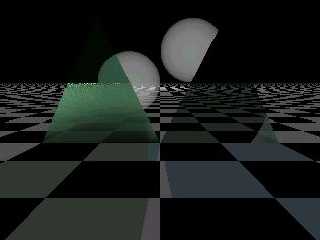
See the attached pic for that: It is base on the scene posted by Ken. In the
foreground you see two smooth_triangles. Left one with media interior, right
one has just rgbf texture. The two spheres in the background also have
interior with media. The scene is lit from the background.
As you can see clearly: in case of the triangle the media is only visible if
there is something BEHIND it. This is not the case for the spheres.
Where's the clue?

> infinite interior.  The right way to do this, like it or not, is to make
> your object actually look like something you could make in real life.

Unfortunately this would overload my PC. And possibly even yours. Nature is
more complex than any computer avaliable today could handle.... So I need
some simplification. And in fact we all use simplifications like normals,
textures and all the nice POV features. Normals are used to replace
tiny-detail-modelling (every object should have the SHAPE and not a
mathematical shape with normals stick on it). Similar situation for
textures.

However.... obviously for me it is just not possible to manage. Maybe I can
tune the texture so that it is sufficient.
Thanks,
regards
SY
Post a reply to this message
Attachments:
Download 'media.jpg' (9 KB)
Preview of image 'media.jpg'
|
|
| |
| |
|
|
|
|
| |
| |
|
|
In article <3c7aaf24@news.povray.org>,
 "Jürgen Scharfy" <sch### [at] surfeuat> wrote:

> Possibly. But this is not of interest since almost each triangle in the mesh
> has a different texture and (would have) therefore different interiors.

Think about what this object would be like...there is nothing in the
real world remotely like this. The closest thing would be an ior
variable over space, which POV is incapable of doing (and which would
take a huge amount of time if it was capable). Are you sure you need for
each triangle to have its own interior?


> I don't understand why the same effect (called interior and it's media)
> behaves completely different on different primitives. In a hollow sphere it
> works as expected. If POV allows the same statement in a triangle, I expect
> this behavior too. But nope. It's completely different.

Actually, the problem is that it's the same. Media operates over the
interior of the object. A sphere has a finite interior, defined by the
area between the point where the ray enters the sphere and where it
exits. Triangles don't...after the ray enters the triangle, it is
inside. Meshes are in the middle, after hitting the mesh, the ray is
inside until it hits another part of the mesh.


> As you can see clearly: in case of the triangle the media is only visible if
> there is something BEHIND it. This is not the case for the spheres.
> Where's the clue?

There is an object behind it. That gives POV a finite interval to sample
the media in. In the areas where only the background is visible, the ray
goes off into infinity, and POV can't sample it. Put a big, hollow
sphere around your scene, and things will be more predictable, though
still not realistic...lone triangles aren't very useful for media
containers.


> Unfortunately this would overload my PC. And possibly even yours. Nature is
> more complex than any computer avaliable today could handle.... So I need
> some simplification. And in fact we all use simplifications like normals,
> textures and all the nice POV features. Normals are used to replace
> tiny-detail-modelling (every object should have the SHAPE and not a
> mathematical shape with normals stick on it). Similar situation for
> textures.

You don't have to duplicate nature entirely, just use closed meshes.
Closing the mesh shouldn't add that much in complexity.

--
Christopher James Huff <chr### [at] maccom>
POV-Ray TAG e-mail: chr### [at] tagpovrayorg
TAG web site: http://tag.povray.org/
Post a reply to this message
|
|
| |
| |
|
|
|
|
| |
| |
|
|
Hi,

> real world remotely like this. The closest thing would be an ior
> variable over space, which POV is incapable of doing (and which would

I don't care about IOR. I just want a thing like thick fog. However, same
problem of course.

> take a huge amount of time if it was capable). Are you sure you need for
> each triangle to have its own interior?

Almost. Each group of approx. 100 to 1000 triangles may have the same
interior. But in relation to a total count of several millions of triangles
this is similar to "each triangle".
However, the whole object is one, single, huge mesh (for speed reasons).

> There is an object behind it. That gives POV a finite interval to sample
> the media in. In the areas where only the background is visible, the ray
> goes off into infinity, and POV can't sample it. Put a big, hollow
> sphere around your scene, and things will be more predictable, though
> still not realistic...lone triangles aren't very useful for media
> containers.

I see. So the interior statement is misleading incase of triangles since it
is no interior. It is like a switch to turn on interior calculation if it
hits the triangle until it hit an other object, rather than an interior of
the triangle (which one would think if entering the POV statement).

> You don't have to duplicate nature entirely, just use closed meshes.
> Closing the mesh shouldn't add that much in complexity.

Uhm. It would at least double the amount of triangles an I already have
millions of them.....
We'll see. Would it be enough just to create each triangle twice with a
small offset between them? According to my latest tests I think so.
Fortunately this would have a further advantage (beside the working media
and the doubled amount of data): The objects could have a front and a flip
side with different textures. I once thought about it.


Just one further question:
If I store millions of triangles in a mesh it is not a big problem since
meshes store triangles efficiently and build a hierarchical octree of the
structure. This speeds up tracing.
Will I lose this if I switch to a union of triangles? (since interior
doesn't work on triangles in meshes). Will tracing speed decrease and memory
usage increase??

thanks a lot,
regards
SY
Post a reply to this message
|
|
| |
| |
|
|
|
|
| |
| |
|
|
On Tue, 26 Feb 2002 09:35:48 +0100, Jürgen Scharfy wrote:
> I see. So the interior statement is misleading incase of triangles since it
> is no interior. It is like a switch to turn on interior calculation if it
> hits the triangle until it hit an other object, rather than an interior of
> the triangle (which one would think if entering the POV statement).

The triangle has no thickness.  It has no interior.  To have done it "right"
we would have disabled interior for triangles, but the way it is gives more
flexibility in cases like yours.

> Just one further question:
> If I store millions of triangles in a mesh it is not a big problem since
> meshes store triangles efficiently and build a hierarchical octree of the
> structure. This speeds up tracing.
> Will I lose this if I switch to a union of triangles? (since interior
> doesn't work on triangles in meshes). Will tracing speed decrease and memory
> usage increase??

Yes, you will lose this.  You can compensate, a little, by breaking the big
union up into smaller unions and bounding them separately.

In addition, if you specify different interiors for different triangles, you
will have other problems.  One of the other problems you will have is that
this:

  union {
   triangle {x,y,x+y interior {...whatever...}}
   triangle {x+z,y+z,1 interior {...whatever...}}
  }

won't get rendered the way you expect it to, because the two interiors
there are utterly independent of each other.  This:

  union {
   triangle {x,y,x+y}
   triangle {x+z,y+z,1}
   interior {...whatever...}
  }

will be closer to what you want.

In addition, it's still possible for a ray to sneak between the two triangles
and give you funny borders around your triangle.  That might be the cause of
the black lines you mentioned before.

--
#local R=<7084844682857967,0787982,826975826580>;#macro L(P)concat(#while(P)chr(
mod(P,100)),#local P=P/100;#end"")#end background{rgb 1}text{ttf L(R.x)L(R.y)0,0
translate<-.8,0,-1>}text{ttf L(R.x)L(R.z)0,0translate<-1.6,-.75,-1>}sphere{z/9e3
4/26/2001finish{reflection 1}}//ron.parker@povray.org My opinions, nobody else's
Post a reply to this message
|
|
| |
| |
|
|
|
|
| |
| |
|
|
On Mon, 25 Feb 2002 22:40:12 +0100, Jürgen Scharfy wrote:
>> Meshes silently drop degenerate triangles.  Keep in mind that there's more
>> ways for a triangle - especially a smooth triangle - to be degenerate than
>> just the obvious "collinear vertices" one.
>
> Like?

If the normal vectors aren't all within 90 degrees of each other.

> begin 666 media.jpg

Please put binaries in the proper place.


--
#macro R(L P)sphere{L __}cylinder{L P __}#end#macro P(_1)union{R(z+_ z)R(-z _-z)
R(_-z*3_+z)torus{1__ clipped_by{plane{_ 0}}}translate z+_1}#end#macro S(_)9-(_1-
_)*(_1-_)#end#macro Z(_1 _ __)union{P(_)P(-_)R(y-z-1_)translate.1*_1-y*8pigment{
rgb<S(7)S(5)S(3)>}}#if(_1)Z(_1-__,_,__)#end#end Z(10x*-2,.2)camera{rotate x*90}
Post a reply to this message
|
|
| |
| |
|
|
|
|
| |
| |
|
|
> > doesn't work on triangles in meshes). Will tracing speed decrease and
memory
> > usage increase??
>
> Yes, you will lose this.  You can compensate, a little, by breaking the
big
> union up into smaller unions and bounding them separately.

*lol* this is the point where I started from. Then I made it a single mesh
to speed it up (I had 30000 objects which made bounding test very slow). Now
I will have to flip back again ....

> In addition, if you specify different interiors for different triangles,
you
> will have other problems.  One of the other problems you will have is that
> this:
>
>   union {
>    triangle {x,y,x+y interior {...whatever...}}
>    triangle {x+z,y+z,1 interior {...whatever...}}
>   }
>
> won't get rendered the way you expect it to, because the two interiors
> there are utterly independent of each other.  This:

Yes I am aware of this. But since the interior has no structure (just a
foggy -something-) this wouldn't be a problem.

>   union {
>    triangle {x,y,x+y}
>    triangle {x+z,y+z,1}
>    interior {...whatever...}
>   }
>
> will be closer to what you want.

Yep. And this would be also necessary for bounding reasons.

> In addition, it's still possible for a ray to sneak between the two
triangles
> and give you funny borders around your triangle.  That might be the cause
of
> the black lines you mentioned before.

The current thing doesn't use interior at all. The borders seem to be a
"numeric resolution" problem. It is alwys a single pixel regardless of the
rendering resolution.

regards
SY
Post a reply to this message
|
|
| |
| |
|
|
|
|
| |
| |
|
|
> If the normal vectors aren't all within 90 degrees of each other.

Hm. I once created such a smooth_triangle manually. It rendered weird, of
course, but ther was no message about a degenerate triangle. (?)

> > begin 666 media.jpg
>
> Please put binaries in the proper place.

I wanted to have the pic in the text context.

regards
SY
Post a reply to this message
|
|
| |
| |
|
|
|
|
| |
| |
|
|
"Jürgen Scharfy" wrote:

> > Please put binaries in the proper place.
>
> I wanted to have the pic in the text context.

Our rules on this news server are pretty simple - binaries in binaries groups
and text in text groups. Please respect our wishes in this regard.

--
Ken Tyler - News Admin.
Post a reply to this message
|
|
| |
| |
|
|
|
|
| |
| |
|
|
In article <3c7b48c6$1@news.povray.org>,
 "Jürgen Scharfy" <sch### [at] surfeuat> wrote:

> > real world remotely like this. The closest thing would be an ior
> > variable over space, which POV is incapable of doing (and which would
>
> I don't care about IOR. I just want a thing like thick fog. However, same
> problem of course.

Then why are you trying to apply different interiors to individual
triangles? Just use a density pattern. POV is capable of rendering a
varying density media...it doesn't change the ray direction, so it
requires much less computing power.
Maybe you should give a better description of what you are trying to do.

--
Christopher James Huff <chr### [at] maccom>
POV-Ray TAG e-mail: chr### [at] tagpovrayorg
TAG web site: http://tag.povray.org/
Post a reply to this message
|
|
| |
| |
|
|
|
|
| |
| |
|
|
On Tue, 26 Feb 2002 15:34:24 +0100, Jürgen Scharfy wrote:
>> If the normal vectors aren't all within 90 degrees of each other.
>
> Hm. I once created such a smooth_triangle manually. It rendered weird, of
> course, but ther was no message about a degenerate triangle. (?)

This might be new in 3.5.

--
#local R=<7084844682857967,0787982,826975826580>;#macro L(P)concat(#while(P)chr(
mod(P,100)),#local P=P/100;#end"")#end background{rgb 1}text{ttf L(R.x)L(R.y)0,0
translate<-.8,0,-1>}text{ttf L(R.x)L(R.z)0,0translate<-1.6,-.75,-1>}sphere{z/9e3
4/26/2001finish{reflection 1}}//ron.parker@povray.org My opinions, nobody else's
Post a reply to this message
|
|
| |
| |
|
|
|
|
| |
| |
|
|
> > I wanted to have the pic in the text context.
>
> Our rules on this news server are pretty simple - binaries in binaries
groups
> and text in text groups. Please respect our wishes in this regard.

Sure I'll respect.
But it is pretty unhandy. Why don't it make user friendly?
Post a reply to this message
|
|
| |
| |
|
|
|
|
| |
| |
|
|
> Then why are you trying to apply different interiors to individual
> triangles? Just use a density pattern. POV is capable of rendering a

Uhm. Up to now I thought the density thing is related to media which is
related to interiors. That's what I understood by reading the help doc. I
will go over it again to follow your hint.
Thanks.

> Maybe you should give a better description of what you are trying to do.

Just follow up the thread. I gave a clear description.
The problem is i am looking for a good method to simulate this "foggy milk
glass effect" without adding too much complexity. Maybe it is not possible
but as long there are specialists I can ask them, right?
I don't have a specific problem like artefacts or error messages or
whatever. I'm just looking for solutions.

Thanks and regards,
SY
Post a reply to this message
|
|
| |
| |
|
|
|
|
| |
| |
|
|
In article <3c7bc319$1@news.povray.org> , "Jürgen Scharfy"
<sch### [at] surfeuat> wrote:

> Sure I'll respect.
> But it is pretty unhandy. Why don't it make user friendly?

Because not everybody has a high-speed internet connection:  When going
through groups and having to download megabytes of useless images, it is very
annoying and takes very long to read because one obviously has to wait for the
download.  So keeping some order is actually friendly and involves less
waiting for everybody.

For practical purposed you should always say in which binary group you put the
image and in the image description you simply say which thread in which group
you are referring to.  This is sufficient for someone interested to find both,
and for those not interested in the image to not have to download it.

BTW, for a summary of all rules lots of other useful information, you may want
to read povray.announce.frequently-asked-questions in case you haven't yet.

    Thorsten

____________________________________________________
Thorsten Froehlich
e-mail: mac### [at] povrayorg

I am a member of the POV-Ray Team.
Visit POV-Ray on the web: http://mac.povray.org
Post a reply to this message
|
|
| |
| |
|
|
|
|
| |
| |
|
|
> > Sure I'll respect.
> > But it is pretty unhandy. Why don't it make user friendly?
>
> Because not everybody has a high-speed internet connection:  When going

I use a 33kB dialup connection.

> download.  So keeping some order is actually friendly and involves less
> waiting for everybody.

You see the message headers and the size. I only read messages I can afford
to download.

> For practical purposed you should always say in which binary group you put
the

That is what I meant with unhandy *gg*

best regards
SY
Post a reply to this message
|
|
| |
| |
|
|
|
|
| |
| |
|
|
On Tue, 26 Feb 2002 21:58:47 +0100, Jürgen Scharfy wrote:
> You see the message headers and the size. I only read messages I can afford
> to download.

Not everyone reads messages online; some of us download the entire group and
read it offline.  We don't necessarily get a choice of which messages to
download.


--
#macro R(L P)sphere{L __}cylinder{L P __}#end#macro P(_1)union{R(z+_ z)R(-z _-z)
R(_-z*3_+z)torus{1__ clipped_by{plane{_ 0}}}translate z+_1}#end#macro S(_)9-(_1-
_)*(_1-_)#end#macro Z(_1 _ __)union{P(_)P(-_)R(y-z-1_)translate.1*_1-y*8pigment{
rgb<S(7)S(5)S(3)>}}#if(_1)Z(_1-__,_,__)#end#end Z(10x*-2,.2)camera{rotate x*90}
Post a reply to this message
|
|
| |
| |
|
|
|
|
| |
| |
|
|
On Tue, 26 Feb 2002 19:22:06 +0100, "Jürgen Scharfy" <sch### [at] surfeuat> wrote:
> Just follow up the thread. I gave a clear description.
> The problem is i am looking for a good method to simulate this "foggy milk
> glass effect" without adding too much complexity. Maybe it is not possible
> but as long there are specialists I can ask them, right?
> I don't have a specific problem like artefacts or error messages or
> whatever. I'm just looking for solutions.
>
> Thanks and regards,
> SY

You know.. Isn't it funny when a week after having the idea of subsurface scattering
simulation shot down as not needed because you can use media someone comes
along with a problem that can't be solved without 'serious' problems using only media.
This is exactly the kind of situation that I was talking about on that thread, though
I
can't seem to remember which one... lol It has been brought up on quite a few
occations. Earliest I could find was Aug 31 2001, but my mail reader won't pull, it up
and the http site doesn't give message headers... :p) No one has tried to do it yet as
far as I know and unfortunately I have trouble wrapping my mind around the other
math used in raytracing, so a patch for it is beyond me. :p

It would however probably do exactly what you need.

The paper on it is at http://www-graphics.stanford.edu/~henrik/papers/bssrdf/

This being probably the 30th time someone has posted it. ;) lol
Post a reply to this message
|
|
| |
| |
|
|
|
|
| |
| |
|
|
Umm... Dummy me.. Didn't think to look at the link name. lol

One thread is in pov.general #17855

Another thread starts in povray.advanced-users #16814

I still haven't found the one I posted too. :p
Post a reply to this message
|
|
| |
| |
|
|
|
|
| |
| |
|
|
Patrick Elliott wrote:
>
> [...]
>
> You know.. Isn't it funny when a week after having the idea of subsurface scattering
> simulation shot down as not needed because you can use media someone comes
> along with a problem that can't be solved without 'serious' problems using only
media.

To make it short, this kind of problem can't be solved with subsurface
scattering techniques either, the methods used for this are subject to the
same restrictions as scattering media.

Christoph

--
POV-Ray tutorials, IsoWood include,
TransSkin and more: http://www.tu-bs.de/~y0013390/
Last updated 21 Feb. 2002 _____./\/^>_*_<^\/\.______
Post a reply to this message
|
|
| |
| |
|
|
|
|
| |
| |
|
|
> Not everyone reads messages online; some of us download the entire group
and
> read it offline.  We don't necessarily get a choice of which messages to
> download.

I know and therefore things like size filters exist. But I'll stop this now
since it is not my point of interest and this discussion will not lead to
anywhere.

However, thank you very much for your valuable hints and explanations. I
didn't know the special role of the 2-dimensional primitives like triangles
and their relatives in terms of interiors.
I'm sorry about the direct e-mail instead of the newsgroup post. This
happens to me at least once a week since I use too many different but
similar OS, PC's and installed software. Currently I have to use 3 of them
the hole day.... *g*

best regards
SY
Post a reply to this message
|
|
| |
| |
|
|
|
|
| |
| |
|
|
> You know.. Isn't it funny when a week after having the idea of subsurface
scattering

Thank you for your interesting link.
Unfortunately I am not talking about subsurface scattering. I need a think
which is like thick fog but blurres the background heavily so that no
contours come through unless they are very very close to the surface.
Additionally it should emit light when lit from the background.
All this (beside blurring) matches good on scattering media. The only
problem I have is, that the object is very thin. It is so thin that I
currently modelled it by using a mesh/triangles. To make it realistic it
must stay very thin (in reality approx. 1/10 to 1/8 mm). Having a scattering
media in such a small object forces me to make it very, very thick to be
visible at all. However, this blows up my PC's processing capacity so I
decided not to use it.
Maybe it will come up again when I model thicker objects. But up to now I'll
use filtering on the texture as it was up to now.
Due to the explanations of Ron I could make it run and it was quite
realistic. Unfortunately the interior doesn't work on triangles of meshes,
just on unions of triangles which would increase memory usage and slow down
rendering.

 > This being probably the 30th time someone has posted it. ;) lol

Sorry, still 29 times since the subject was just unluckily chosen. Sorry.
regards
SY
Post a reply to this message
|
|
| |
| |
|
|
|
|
| |
| |
|
|
On Wed, 27 Feb 2002 09:32:38 +0100, Jürgen Scharfy wrote:
> Due to the explanations of Ron I could make it run and it was quite
> realistic. Unfortunately the interior doesn't work on triangles of meshes,
> just on unions of triangles which would increase memory usage and slow down
> rendering.

It does work on the interiors of meshes; it just doesn't make any sense for
individual triangles in meshes to have separate interiors.

--
#local R=<7084844682857967,0787982,826975826580>;#macro L(P)concat(#while(P)chr(
mod(P,100)),#local P=P/100;#end"")#end background{rgb 1}text{ttf L(R.x)L(R.y)0,0
translate<-.8,0,-1>}text{ttf L(R.x)L(R.z)0,0translate<-1.6,-.75,-1>}sphere{z/9e3
4/26/2001finish{reflection 1}}//ron.parker@povray.org My opinions, nobody else's
Post a reply to this message
|
|
| |
| |
|
|
|
|
| |
| |
|
|
> It does work on the interiors of meshes; it just doesn't make any sense
for
> individual triangles in meshes to have separate interiors.

but for some of the triangles. Just ALL or NONE is less usable than a way to
define a GROUP within a mesh. Why should have a mesh a homogenous interior
regardless of it's structure?
Post a reply to this message
|
|
| |
| |
|
|
|
|
| |
| |
|
|
In article <1103_1014761637@selliot>,
 Patrick Elliott <sel### [at] rrazcom> wrote:

> You know.. Isn't it funny when a week after having the idea of
> subsurface scattering simulation shot down as not needed because you
> can use media someone comes along with a problem that can't be solved
> without 'serious' problems using only media.

But it can be solved with media, without serious problems. Exactly how
to do this has been explained many times in this thread.

--
Christopher James Huff <chr### [at] maccom>
POV-Ray TAG e-mail: chr### [at] tagpovrayorg
TAG web site: http://tag.povray.org/
Post a reply to this message
|
|
| |
| |
|
|
|
|
| |
| |
|
|
In article <3c7cf5cf@news.povray.org>,
 "Jürgen Scharfy" <sch### [at] surfeuat> wrote:

> but for some of the triangles. Just ALL or NONE is less usable than a way to
> define a GROUP within a mesh. Why should have a mesh a homogenous interior
> regardless of it's structure?

Because it is a single object, and thus only has one interior.
But you are only restricted to a single interior, it does not have to be
homogenous. Media can have its density vary according to a pattern. The
thing that doesn't make any sense would be for individual triangles of a
mesh to have their own interiors. This has been explained many times,
and is for fairly obvious reasons, I don't know why you don't understand
it.
If different parts of your object are composed of different materials,
you should probably be using a union of several meshes.

--
Christopher James Huff <chr### [at] maccom>
POV-Ray TAG e-mail: chr### [at] tagpovrayorg
TAG web site: http://tag.povray.org/
Post a reply to this message
|
|
| |
| |
|
|
|
|
| |
| |
|
|
> and is for fairly obvious reasons, I don't know why you don't understand
> it.
> If different parts of your object are composed of different materials,
> you should probably be using a union of several meshes.

Just because you can't imagine an object whose inner structure is
defined/influenced by it's outer shape it doesn't mean that I don't
understand the limitations implemented in the code.
Post a reply to this message
|
|
| |
| |
|
|
|
|
| |