|
|
|
|
|
|
| |
| |
|
|
|
|
| |
| |
|
|
Hi,

   Attempting tonight to make a simple lamp shade I failed miserably.
I'm trying to create a lamp shade of the type seen commonly in household
settings. It is cone shaped but has a sine wave pleating as it's suface
feature. I have been able to achieve a sine wave surface through various
means but alas these where all in a flat pattern. Revloving around a
conical circle is not as simple as it sounds and I would appreciate any
tips you may have.

--
Ken Tyler

mailto://tylereng@pacbell.net
Post a reply to this message
|
|
| |
| |
|
|
|
|
| |
| |
|
|
have you concidered using the dome plugin, so far all i have managed to
create is lamp shades!
Rick
Ken <tyl### [at] pacbell net> wrote in message
news:372596DD.494C2FAA@pacbell.net...
> Hi,
>
> Attempting tonight to make a simple lamp shade I failed miserably.
> I'm trying to create a lamp shade of the type seen commonly in household
> settings. It is cone shaped but has a sine wave pleating as it's suface
> feature. I have been able to achieve a sine wave surface through various
> means but alas these where all in a flat pattern. Revloving around a
> conical circle is not as simple as it sounds and I would appreciate any
> tips you may have.
>
> --
> Ken Tyler
>
> mailto://tylereng@pacbell.net net> wrote in message
news:372596DD.494C2FAA@pacbell.net...
> Hi,
>
> Attempting tonight to make a simple lamp shade I failed miserably.
> I'm trying to create a lamp shade of the type seen commonly in household
> settings. It is cone shaped but has a sine wave pleating as it's suface
> feature. I have been able to achieve a sine wave surface through various
> means but alas these where all in a flat pattern. Revloving around a
> conical circle is not as simple as it sounds and I would appreciate any
> tips you may have.
>
> --
> Ken Tyler
>
> mailto://tylereng@pacbell.net
Post a reply to this message
|
|
| |
| |
|
|
|
|
| |
| |
|
|
On Tue, 27 Apr 1999 03:52:13 -0700, Ken <tyl### [at] pacbellnet> wrote:
>   Attempting tonight to make a simple lamp shade I failed miserably.
>I'm trying to create a lamp shade of the type seen commonly in household
>settings. It is cone shaped but has a sine wave pleating as it's suface
>feature. I have been able to achieve a sine wave surface through various
>means but alas these where all in a flat pattern. Revloving around a
>conical circle is not as simple as it sounds and I would appreciate any
>tips you may have.

Go get my Jan/Feb IRTC Stills entry (borrow.zip) and make suitable
modifications to the bottle cap object.  It's a bunch of patch objects,
so you get the added advantage of double illumination for your lampshade.
Post a reply to this message
|
|
| |
| |
|
|
|
|
| |
| |
|
|
On 27 Apr 1999 09:37:38 -0500, Ron Parker <par### [at] my-dejanewscom> wrote:
>Go get my Jan/Feb IRTC Stills entry (borrow.zip) and make suitable
>modifications to the bottle cap object.  It's a bunch of patch objects,
>so you get the added advantage of double illumination for your lampshade.

I just went and grabbed a copy of that file and realized that I never did
get around to documenting it.  So, here's some (slight) documentation:

rad     this is the average radius at the narrow end of the cone
sl      this is the "slope" and should be the difference in average radius
        from one end of the cone to the other, divided by 3.
fac     The furrows in the bottlecap go from zero amplitude at the narrow
        end to fac*3 amplitude at the wide end.
ys      ys is the height of the cone, divided by 3.  Think "Y-step"
steps   steps is twice the number of furrows around the cone.  Must be even.


So, here's your cone:

          radius at this end is rad, and there are no pleats.
         ____
        /    \
       /      \     height is 3*ys
      /________\

          radius at this end is rad+3*sl +/- fac*3

As for the actual pleated cone, you want to keep the union called "cap_part"
and delete the last two bicubic_patch objects, keeping just the first one.
If you want to make the furrows be of constant depth, you'll have to modify
the part of the code that makes the furrows from

           #if ((X=1 | X=2)&(Y>0))
              #if ( mod(i,2) )
                #local lrad=lrad+fac*(Y-1);
              #else
                #local lrad=lrad-fac*(Y-1);
              #end
            #end

to
           #if ((X=1 | X=2))
              #if ( mod(i,2) )
                #local lrad=lrad+fac;
              #else
                #local lrad=lrad-fac;
              #end
            #end

and then set fac to the desired amplitude.

Throw away the rest of the include file; you probably don't need the peas or
the test-render version of the cap.
Post a reply to this message
|
|
| |
| |
|
|
|
|
| |
| |
|
|
Ron Parker wrote:
>
> On Tue, 27 Apr 1999 03:52:13 -0700, Ken <tyl### [at] pacbellnet> wrote:
> >   Attempting tonight to make a simple lamp shade I failed miserably.
> >I'm trying to create a lamp shade of the type seen commonly in household
> >settings. It is cone shaped but has a sine wave pleating as it's suface
> >feature. I have been able to achieve a sine wave surface through various
> >means but alas these where all in a flat pattern. Revloving around a
> >conical circle is not as simple as it sounds and I would appreciate any
> >tips you may have.
>
> Go get my Jan/Feb IRTC Stills entry (borrow.zip) and make suitable
> modifications to the bottle cap object.  It's a bunch of patch objects,
> so you get the added advantage of double illumination for your lampshade.

Thanks Ron I will indeed take a look upon your masterful work.

--
Ken Tyler

mailto://tylereng@pacbell.net
Post a reply to this message
|
|
| |
| |
|
|
|
|
| |
| |
|
|
>Revloving around a
>conical circle is not as simple as it sounds and I would
appreciate any
>tips you may have.


Isn't it possible to define a somewhat rotated 'slab of
shade' and then translating/rotating it around the y-axis?
Something like this:

#declare Slab=box { <0,0,-0.1> , <0.01,1,0.1> rotate
<0,0,20> translate <2,0,0>  texture {...} }

#declare Precision=1;
#declare T=0;
#declare SinCount=0;
#while (T<360)
object { Slab translate <sin(SinCount),0,0> rotate y*T}
#declare SinCount=Sincount+pi/(8*Precision);
#declare T=T+1/Precision;
#end

Haven't tested the code, but the idea should work...

Julius
Post a reply to this message
|
|
| |
| |
|
|
|
|
| |
| |
|
|
Hiya Ken,

One workaround is to create your circular sine wave in Illustrator and
bring it into POV as a font ( after converting).

Another workaround would be to create a flat sine wave in the ususal manner
and then use BEND.INC to curve it.

Another workaround might be to create 1 sine wave and then employ rotated
copies of it.

steve


Ken wrote:

> Hi,
>
>    Attempting tonight to make a simple lamp shade I failed miserably.
> I'm trying to create a lamp shade of the type seen commonly in household
> settings. It is cone shaped but has a sine wave pleating as it's suface
> feature. I have been able to achieve a sine wave surface through various
> means but alas these where all in a flat pattern. Revloving around a
> conical circle is not as simple as it sounds and I would appreciate any
> tips you may have.
>
> --
> Ken Tyler
>
> mailto://tylereng@pacbell.net
Post a reply to this message
|
|
| |
| |
|
|
|
|
| |
| |
|
|
Another workaround would be to use the dome generator with a
base=hypocycloid or epicycloid
and many sides.
Philippe
Steve a écrit dans le message <372D8F66.5021B38C@puzzlecraft.com>...
>Hiya Ken,
>
>One workaround is to create your circular sine wave in Illustrator and
>bring it into POV as a font ( after converting).
>
>Another workaround would be to create a flat sine wave in the ususal manner
>and then use BEND.INC to curve it.
>
>Another workaround might be to create 1 sine wave and then employ rotated
>copies of it.
>
>steve
>
>
>Ken wrote:
>
>> Hi,
>>
>>    Attempting tonight to make a simple lamp shade I failed miserably.
>> I'm trying to create a lamp shade of the type seen commonly in household
>> settings. It is cone shaped but has a sine wave pleating as it's suface
>> feature. I have been able to achieve a sine wave surface through various
>> means but alas these where all in a flat pattern. Revloving around a
>> conical circle is not as simple as it sounds and I would appreciate any
>> tips you may have.
>>
>> --
>> Ken Tyler
>>
>> mailto://tylereng@pacbell.net
>
Post a reply to this message
|
|
| |
| |
|
|
|
|
| |
| |
|
|
Ph Gibone wrote:
>
> Another workaround would be to use the dome generator with a
> base=hypocycloid or epicycloid
> and many sides.
> Philippe

  I followed your advice and tried the Dome generater program. After about
15 different tests/renders/rejections I have yet to find a shape that comes
close to what I am hoping for. Perhaps the master could supply me with a
couple of examples of what to enter in the different fields so that I may
learn from his wisdome ?

  On a side note:
  One undesirable characteristic of the Dome program is that it is producing
a lot of degenerate triangles. You might think about adding a degenerate
triangle testing/removal feature in the program to eliminate these. I had
one file with over 350 degenerate triangles and that is a lot to have to edit
out of the file by hand. Especialy in files that are over 1+ megs in size.
I am not sure how to implement such a routine but there are many here
that I am sure could help you with that. It is a common problem for triangle
generating utilities and the fix I believe is an easy one to add.


 On a side-side note:
 For some reason I am now mentally calling the Dome program the Domenator.
Resistance is futile. You will be Domenated !

--
Ken Tyler

mailto://tylereng@pacbell.net
Post a reply to this message
|
|
| |
| |
|
|
|
|
| |
| |
|
|
>
>  I followed your advice and tried the Dome generater program. After about
>15 different tests/renders/rejections I have yet to find a shape that comes
>close to what I am hoping for. Perhaps the master could supply me with a
>couple of examples of what to enter in the different fields so that I may
>learn from his wisdome ?


I will as soon as tomorrow
>
>  On a side note:
>  One undesirable characteristic of the Dome program is that it is
producing
>a lot of degenerate triangles. You might think about adding a degenerate
>triangle testing/removal feature in the program to eliminate these. I had
>one file with over 350 degenerate triangles and that is a lot to have to
edit
>out of the file by hand. Especialy in files that are over 1+ megs in size.
>I am not sure how to implement such a routine but there are many here
>that I am sure could help you with that. It is a common problem for
triangle
>generating utilities and the fix I believe is an easy one to add.
>

I'm currently working on a few "inside features" degenerated traiangles
removal is one of them. BTW you get a warning and don't have to remove them
by hand (I never did).

>
> On a side-side note:
> For some reason I am now mentally calling the Dome program the Domenator.
>Resistance is futile. You will be Domenated !
>

I like it, even if I can feel your irony :-)))

Philippe
Post a reply to this message
|
|
| |
| |
|
|
|
|
| |
| |
|
|
>
>  I followed your advice and tried the Dome generater program. After about
>15 different tests/renders/rejections I have yet to find a shape that comes
>close to what I am hoping for. Perhaps the master could supply me with a
>couple of examples of what to enter in the different fields so that I may
>learn from his wisdome ?


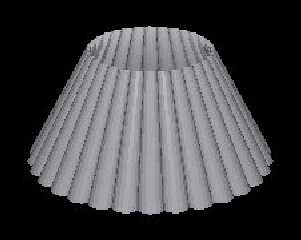
The enclosed image (very quick and dirty, no AA, no good texture... just to
show you) is defined by
Base = EpiCycloide
Slope = Droite-Droite
Windows = Sans

To be honnest, this image has been done with *MY* version of the domenator
:-} (didn't I send it to you ?) where you can choose more parameters and so
the sort of cone given by the previous definition has it's head, (sorry, too
much bloody, I meant top) cut off (as you know, meshes are not good in CSG).
Here I used a v in the range 0.5 to 1 and then scaled by 2 in the up
direction.

>
>  On a side note:
>  One undesirable characteristic of the Dome program is that it is
producing
>a lot of degenerate triangles. You might think about adding a degenerate
>triangle testing/removal feature in the program to eliminate these. I had
>one file with over 350 degenerate triangles and that is a lot to have to
edit
>out of the file by hand. Especialy in files that are over 1+ megs in size.
>I am not sure how to implement such a routine but there are many here
>that I am sure could help you with that. It is a common problem for
triangle
>generating utilities and the fix I believe is an easy one to add.
>
Very easy : cross product is the answer (will be done as soon as I can)

Philippe
Post a reply to this message
Attachments:
Download 'LampShade.jpg' (8 KB)
Preview of image 'LampShade.jpg'
|
|
| |
| |
|
|
|
|
| |
| |
|
|
Ph Gibone wrote:

>
> The enclosed image (very quick and dirty, no AA, no good texture... just to
> show you) is defined by
> Base = EpiCycloide
> Slope = Droite-Droite
> Windows = Sans
>
> To be honnest, this image has been done with *MY* version of the domenator
> :-} (didn't I send it to you ?) where you can choose more parameters and so
> the sort of cone given by the previous definition has it's head, (sorry, too
> much bloody, I meant top) cut off (as you know, meshes are not good in CSG).
> Here I used a v in the range 0.5 to 1 and then scaled by 2 in the up
> direction.

  Even this is not exactly what I am looking for. The pattern in the image
you attached is only using a half wave from what I can see and I want
a full sine wave pattern.

Yours looks like this:
    __        __
   /  \      /  \
  /    \    /    \
 /      \  /      \
/        \/        \
---------------------


and I am trying to get this:
       __            __
      /  \          /  \
     /    \        /    \
 ---/----- \------/------\----
   /        \    /        \
__/          \__/          \__


Picture to yourself both of the above samples with nice smooth curves that
striaght lines simply do not do justice to.

  I have hacked out a method that uses an open cone object and then clip
it in half. I use two of these one the inverse of the other. Then it's a
simple (ha ha) translate and rotate routine with a while loop to completes
the shape. There are a few hidden challenges doing it this way but the
results are looking acceptable once the parameters are setup right.

>> It is a common problem for triangle generating utilities and the
>> fix I believe is an easy one to add.

> Very easy : cross product is the answer (will be done as soon as I can)

 Glad to here that it is something you can fix with reletive ease.

Thanks for your help and your continued support.

--
Ken Tyler

mailto://tylereng@pacbell.net
Post a reply to this message
|
|
| |
| |
|
|
|
|
| |
| |
|
|
>  Even this is not exactly what I am looking for. The pattern in the image
>you attached is only using a half wave from what I can see and I want
>a full sine wave pattern.
>
>Yours looks like this:
>    __        __
>   /  \      /  \
>  /    \    /    \
> /      \  /      \
>/        \/        \
>---------------------
>
>
>and I am trying to get this:
>       __            __
>      /  \          /  \
>     /    \        /    \
> ---/----- \------/------\----
>   /        \    /        \
>__/          \__/          \__
>
>
>Picture to yourself both of the above samples with nice smooth curves that
>striaght lines simply do not do justice to.


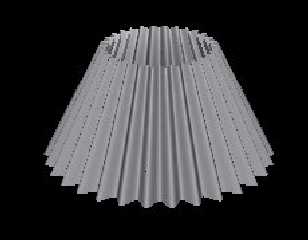
Change the "epicycloid" base to "napperon" and you'll get it ! If I can find
a few minutes today I'll post a small image


>  I have hacked out a method that uses an open cone object and then clip
>it in half. I use two of these one the inverse of the other. Then it's a
>simple (ha ha) translate and rotate routine with a while loop to completes
>the shape. There are a few hidden challenges doing it this way but the
>results are looking acceptable once the parameters are setup right.
>

You can't miss !


> Glad to here that it is something you can fix with reletive ease.


It is done : i'm testing it before releasing

>Thanks for your help and your continued support.


Uncle Ken thankful to me ? My 3d life's fullfilled :-} (in fact not 100%
joke, I really have great respect and admiration for your knowledge and for
the way you share it, thanks Mr Ken)

Philippe
Post a reply to this message
|
|
| |
| |
|
|
|
|
| |
| |
|
|
I took the time (in fact a few minutes), here the base is "Napperon"

Philippe
Post a reply to this message
Attachments:
Download 'LampShade2.jpg' (7 KB)
Preview of image 'LampShade2.jpg'
|
|
| |
| |
|
|
|
|
| |
| |
|
|
Ph Gibone wrote:
>
> I took the time (in fact a few minutes), here the base is "Napperon"
>
> Philippe


  Now your cookin". That is indeed much closer to that which I have been
endeavoring to produce.

Thank you sir.

--
Ken Tyler

mailto://tylereng@pacbell.net
Post a reply to this message
|
|
| |
| |
|
|
|
|
| |
| |
|
|
Ph Gibone wrote:

> Change the "epicycloid" base to "napperon" and you'll get it !

I will accept this challenge.


> > Glad to here that it is something you can fix with reletive ease.
> It is done : i'm testing it before releasing

Superb !

> >Thanks for your help and your continued support.
>
> Uncle Ken thankful to me ? My 3d life's fullfilled :-} (in fact not 100%
> joke, I really have great respect and admiration for your knowledge and for
> the way you share it, thanks Mr Ken)
>
> Philippe

 Ah gee. (blush).

--
Ken Tyler

mailto://tylereng@pacbell.net
Post a reply to this message
|
|
| |
| |
|
|
|
|
| |
| |
|
|
On Wed, 05 May 1999 17:32:16 -0700, Ken <tyl### [at] pacbellnet> wrote:
>  Even this is not exactly what I am looking for. The pattern in the image
>you attached is only using a half wave from what I can see and I want
>a full sine wave pattern.
>
>Yours looks like this:

[pictures clipped]

>Picture to yourself both of the above samples with nice smooth curves that
>striaght lines simply do not do justice to.

Ken, was there something in my include file that didn't work for you?  It
should have generated something very like what you're looking for, with
the added benefit of double illumination.  If you can't figure it out, just
tell me the dimensions you're looking for and I'll make the necessary
modifications for you.
Post a reply to this message
|
|
| |
| |
|
|
|
|
| |
| |
|
|
Ron Parker wrote:

> Ken, was there something in my include file that didn't work for you?  It
> should have generated something very like what you're looking for, with
> the added benefit of double illumination.  If you can't figure it out, just
> tell me the dimensions you're looking for and I'll make the necessary
> modifications for you.

Ron,

  Sorry it took so long for me to get to your suggestion but I aviod
patch object unless I can control them in a modelling environment.
 So any way I downloaded your source last night and after a bit of work
isolated the ridged part of the cap. After a few modifications and a
total lack of comprehension of what exacly your source is doing I don't
believe that it will work as structured and my lack of ability to control
it's overall shape is limiting. The angle or taper of the shape is not
steep enough and I am not particularly happy with the straight skirt or
it's length at the top (or bottom depending on orientation) of the shape.
  It is a very nicely modelled bottle cap however and I have had enough
suggestions and a few successful attempts of my own that I just don't
need another lamp shade at the point in time. I have around 10 different
designs for one lamp and I think that is enough for one lamp.

 Thank you for the offer regardless.

--
Ken Tyler

mailto://tylereng@pacbell.net
Post a reply to this message
|
|
| |
| |
|
|
|
|
| |