|
|
|
|
|
|
| |
| |
|
|
|
|
| |
| |
|
|
How does one create perfect mirror to reflect beam of light in scattering media?
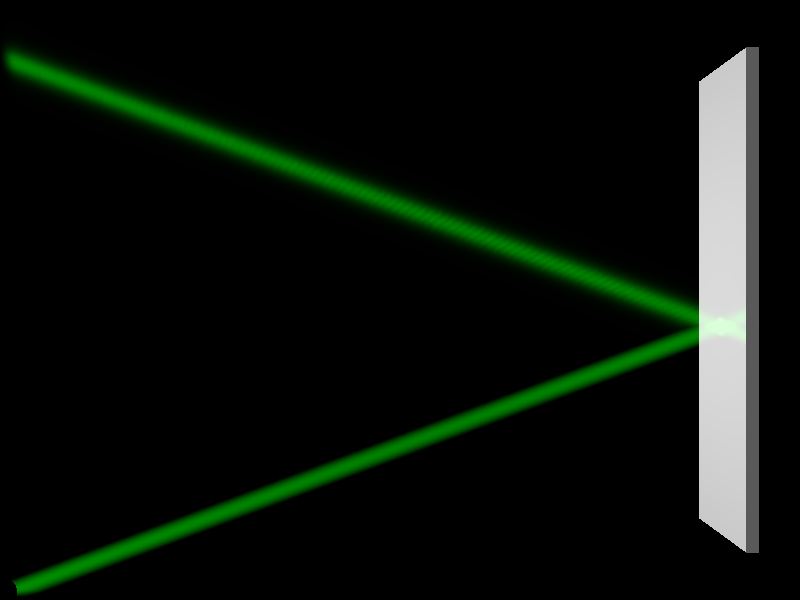
In attached scene, the reflected beam is clearly different from the incident
one. It is (a) wider, (b) weaker [maybe due to (a)] and (c) contains some
fringes. So if I want reflected beam to look identical to incident one (just
like if the second source is placed at the position of the mirror), what should
I do?
Also, it is possible that the mirror reflect only the light directly from the
source and not the scattered one (so we do not see the scattered beam on the
mirror)?
#declare BOX_X = 10*(4/3);
#declare BOX_Y = 10;
#declare BOX_Z = 0.5;
#declare MIR_S = 1;
#declare MIR_W = 0.2;
global_settings {
assumed_gamma 1
photons { count 100000 media 100, 2 }
}
camera {
location <BOX_X/2, BOX_Y/2, -10>
look_at <BOX_X/2, BOX_Y/2, +10>
}
light_source { // ambient light
<BOX_X/2, BOX_Y/2, BOX_Z/2>
color rgb 1
photons { reflection off }
media_interaction off
}
box { // scattering media
<0, 0, 0>, <BOX_X, BOX_Y, BOX_Z>
pigment { rgbt 1 }
hollow
interior {
media {
scattering { 1, 1 extinction 0 }
samples 100
}
}
photons { pass_through }
}
light_source { // laser beam
<0, 0, BOX_Z/2>
color rgb <0, 1, 0>
cylinder
radius 0.01
falloff 0.2
point_at <BOX_X, BOX_Y/2, BOX_Z/2>
photons { reflection on }
}
box { // mirror
<BOX_X-MIR_W-MIR_S, MIR_S, MIR_S>, <BOX_X-MIR_S, BOX_Y-MIR_S, BOX_Z-MIR_S>
pigment { rgb 1 }
finish { reflection 1 }
photons { target reflection on }
}
Post a reply to this message
Attachments:
Download 'reflection_on_mirror__v01.png' (37 KB)
Preview of image 'reflection_on_mirror__v01.png'
|
|
| |
| |
|
|
|
|
| |
| |
|
|
hi,
"radmac" <nomail@nomail> wrote:
> How does one create perfect mirror to reflect beam of light in scattering media?
<wiki.povray.org/content/Reference:Finish#Diffuse_Reflection_Items>, see the
section "Specular Reflection" for perfect mirror.
regards, jr.
Post a reply to this message
|
|
| |
| |
|
|
|
|
| |
| |
|
|
In your global_settings block, try these photon values instead:
photons {count 200000 media 600, 2}
That seems to eliminate the 'banding' and fuzziness in the reflected laser
light.
Also, just as a safety measure, I added 'collect off' to the photon blocks in
your media box and the mirror box. According to the docs, it is 'on' by default.
But those object don't actually need photon effects to show up *on* them-- if I
correctly understand what 'collect' means. Although, I didn't notice any
render-time difference by turning it off.
In your two light sources, I added 'refraction off' to the photon blocks there.
Since your mirror is only 'reflecting' light, refraction is not needed. As far
as I can tell, the docs do not mention what the default behavior is-- on or off.
The most important change I made was in your media box:
media {
scattering { 1, 1 extinction 0 }
samples 6 // originally 100
}
With this lower samples value, I don't see much (if any) difference in the
appearance of the media/light interaction...and the scene renders at least 10X
faster!
> Also, it is possible that the mirror reflect only the light directly from the
> source and not the scattered one (so we do not see the scattered beam on the
> mirror)?
If I understand your question, the only way to get a reflected light beam to
show up in POV-ray is to use photons (as well as media, to interact with the
'photons'.) Or do you mean the reflected appearance of the two light beams *in*
the mirror? That's just typical behavior of the mirror itself.
Post a reply to this message
|
|
| |
| |
|
|
|
|
| |
| |
|
|
Le 2025-12-06 à 00:57, Kenneth a écrit :
> In your global_settings block, try these photon values instead:
>
> photons {count 200000 media 600, 2}
>
> That seems to eliminate the 'banding' and fuzziness in the reflected laser
> light.
>
> Also, just as a safety measure, I added 'collect off' to the photon blocks in
> your media box and the mirror box. According to the docs, it is 'on' by default.
> But those object don't actually need photon effects to show up *on* them-- if I
> correctly understand what 'collect' means. Although, I didn't notice any
> render-time difference by turning it off.
>
> In your two light sources, I added 'refraction off' to the photon blocks there.
> Since your mirror is only 'reflecting' light, refraction is not needed. As far
> as I can tell, the docs do not mention what the default behavior is-- on or off.
Since version 3.6. By default, all light_source, except shadowless
lights, have the following photons block :
{
reflection on
refraction on
}
Up to version 3.5, the states where the opposite.
Post a reply to this message
|
|
| |
| |
|
|
|
|
| |
| |
|
|
Alain Martel <kua### [at] videotron ca> wrote:
>
> > In your two light sources, I added 'refraction off' to the photon blocks.
> > Since your mirror is only 'reflecting' light, refraction is not needed. As far
> > as I can tell, the docs do not mention what the default behavior is--
> > on or off.
>
>
> Since version 3.6. By default, all light_source, except shadowless
> lights, have the following photons block :
> {
> reflection on
> refraction on
> }
>
In the v3.8 documentation, I did finally find the default behavior at "3.4.3.4.3
Photon Global Settings"-- but it actually states the opposite(!) :
All photons default values:
Light_source:
area_light : off
refraction : off
reflection : off
So there is some confusion here. I haven't yet looked at the online wiki docs to
double-check... ca> wrote:
>
> > In your two light sources, I added 'refraction off' to the photon blocks.
> > Since your mirror is only 'reflecting' light, refraction is not needed. As far
> > as I can tell, the docs do not mention what the default behavior is--
> > on or off.
>
>
> Since version 3.6. By default, all light_source, except shadowless
> lights, have the following photons block :
> {
> reflection on
> refraction on
> }
>
In the v3.8 documentation, I did finally find the default behavior at "3.4.3.4.3
Photon Global Settings"-- but it actually states the opposite(!) :
All photons default values:
Light_source:
area_light : off
refraction : off
reflection : off
So there is some confusion here. I haven't yet looked at the online wiki docs to
double-check...
Post a reply to this message
|
|
| |
| |
|
|
|
|
| |
| |
|
|
On 12/5/25 09:51, radmac wrote:
> How does one create perfect mirror to reflect beam of light in scattering media?
> In attached scene, the reflected beam is clearly different from the incident
> one.
In your posted scene, mostly, what is causing the difference in
intensity is that the beam for the light source to the mirror path is
being calculated by the scattering media mechanism, while the reflected
beam is being calculated by the photon mechanism.
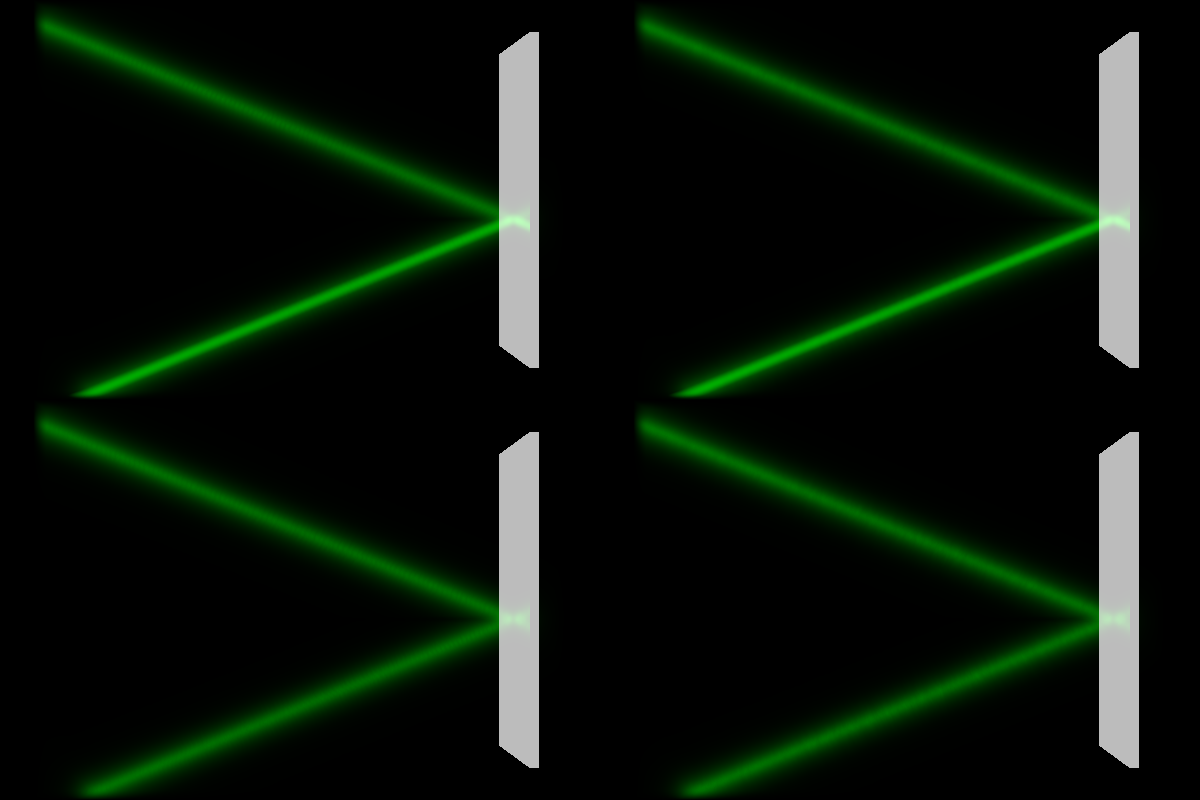
Attached a modified version of your posted scene and four images (No
AA). The scene has been updated to calculate both paths light intensity
with the photon mechanism. For all changes look for '***'.
In the attached image the left column is POV-Ray version 3.8 beta 2; The
right column is my yuqk fork - which has a fix for the photon banding.
The top row has 'media_interaction on' for the beam light - with the
photons now used for both paths, the difference in intensity between
paths due the scattering component is even more apparent. The bottom row
turns 'media_interaction off' for the beam light - both beam path
segments are now calculated solely by the photon mechanism.
Bill P.
Aside: The general rule with light sources and media is that the light
source should be outside any media container by some small value.
Post a reply to this message
Attachments:
Download 'radmacphotonbeam_story.png' (110 KB)
Download 'radmacphotonbeam.pov.txt' (2 KB)
Preview of image 'radmacphotonbeam_story.png'
|
|
| |
| |
|
|
|
|
| |
| |
|
|
hi,
"Kenneth" <kdw### [at] gmailcom> wrote:
> Alain Martel <kua### [at] videotronca> wrote:
> > ...
> > Since version 3.6. By default, all light_source, except shadowless
> > lights, have the following photons block :
> > {
> > reflection on
> > refraction on
> > }
> >
> In the v3.8 documentation, I did finally find the default behavior at "3.4.3.4.3
> Photon Global Settings"-- but it actually states the opposite(!) :
>
> All photons default values:
>
> Light_source:
> area_light : off
> refraction : off
> reflection : off
>
> So there is some confusion here. I haven't yet looked at the online wiki docs to
> double-check...
thank you. (before changing/updating the docs) can someone looking at the
sources confirm the defaults, please ?
regards, jr.
Post a reply to this message
|
|
| |
| |
|
|
|
|
| |
| |
|
|
"jr" <cre### [at] gmailcom> wrote:
>
> "Kenneth" <kdw### [at] gmailcom> wrote:
> >
> > So there is some confusion here. I haven't yet looked at the online wiki
> > docs to double-check...
>
> thank you. (before changing/updating the docs) can someone looking at the
> sources confirm the defaults, please ?
>
In v3.8 beta 1, I've been running a series of tests (on just the photon
'refraction' defaults, not 'reflection' so far), using a modified version of the
OP's code here-- and there seems to be a mixed-up interaction of on/off/default
in the photons blocks of the light_source and the refracting object. In other
words, the *default* behavior changes(!) when other changes are made in one or
the other of the blocks. Sorry that I cannot be more specific yet, as I am still
testing and trying to make sense of the results. But as it's off-topic here,
I'll try to post a follow-up in a new thread.
I don't yet know if these odd results are specific to the 3.8 betas...and/or to
the OP's specific cylinder light_source...
Post a reply to this message
|
|
| |
| |
|
|
|
|
| |
| |
|
|
Le 2025-12-06 à 15:41, Kenneth a écrit :
> Alain Martel <kua### [at] videotronca> wrote:
>>
>>> In your two light sources, I added 'refraction off' to the photon blocks.
>>> Since your mirror is only 'reflecting' light, refraction is not needed. As far
>>> as I can tell, the docs do not mention what the default behavior is--
>>> on or off.
>>
>>
>> Since version 3.6. By default, all light_source, except shadowless
>> lights, have the following photons block :
>> {
>> reflection on
>> refraction on
>> }
>>
>
> In the v3.8 documentation, I did finally find the default behavior at "3.4.3.4.3
> Photon Global Settings"-- but it actually states the opposite(!) :
>
> All photons default values:
>
> Light_source:
> area_light : off
> refraction : off
> reflection : off
>
> So there is some confusion here. I haven't yet looked at the online wiki docs to
> double-check...
>
>
And, in my experience, photons work just right WITHOUT any photons block
in any light_source.
I only add one when I want a light to NOT shoot photons or to activate
the area_light support.
Post a reply to this message
|
|
| |
| |
|
|
|
|
| |
|
|