|
|
|
|
|
|
| |
| |
|
|
|
|
| |
| |
|
|
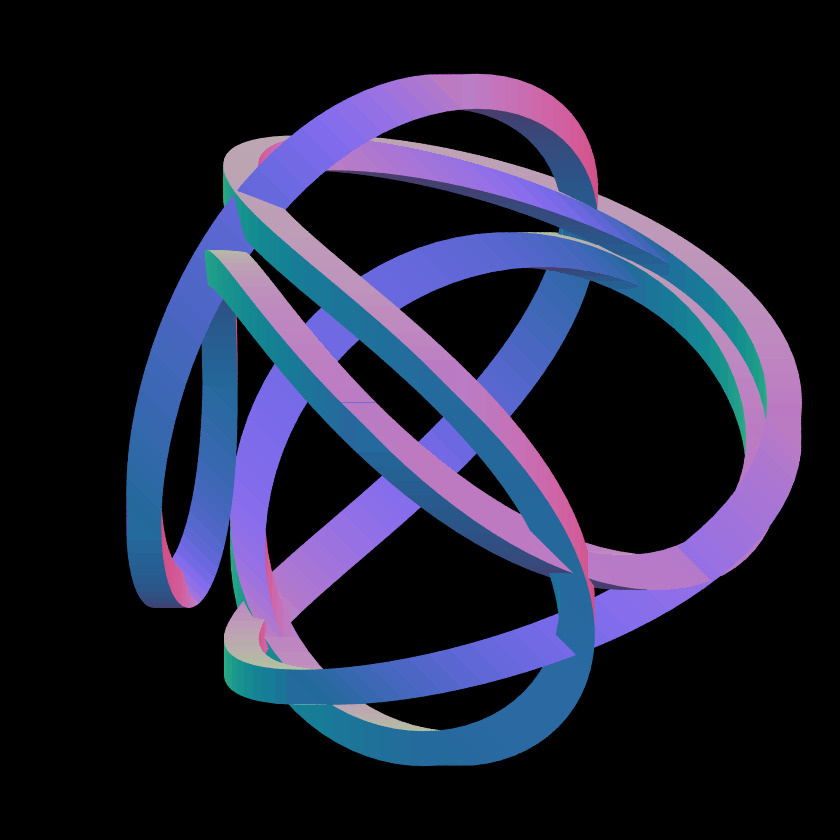
The mesh for the attached image was generated by a program. I would
like to make a simple animation with the camera following the path.
Can I define an array of points and have the camera shoot from each of them?
--
*\\* Anton Sherwood *\\* https://bendwavy.org/
Post a reply to this message
Attachments:
Download '18996-e3.png' (79 KB)
Preview of image '18996-e3.png'
|
|
| |
| |
|
|
|
|
| |
| |
|
|
On 2026-01-25 12:04, Anton Sherwood wrote:
> The mesh for the attached image was generated by a program. I would
> like to make a simple animation with the camera following the path.
>
> Can I define an array of points and have the camera shoot from each of them?
.. oh i think i found it in the docs.
Post a reply to this message
|
|
| |
| |
|
|
|
|
| |
| |
|
|
Anton Sherwood <bro### [at] pobox com> wrote:
> On 2026-01-25 12:04, Anton Sherwood wrote:
> > The mesh for the attached image was generated by a program. I would
> > like to make a simple animation with the camera following the path.
> >
> > Can I define an array of points and have the camera shoot from each of them?
>
It all depends on the program that wrote the mesh and what values you have
access to. It also depends on how good you want the simple animation to be.
If it was wrote with a spline and you have access to it. It wouldn't be much
trouble to make your own spline to move the camera while looking at the old
spline.
If the mesh was made with a function again if you have access you could make an
array of points that can be use.
If all you have is the mesh then finding those points you want maybe a little
difficult. But not impossible. It all depends on how the mesh was made. If the
mesh is a POV mesh2 then all the point are in one place and you could go through
them and throw away all but the ones you need. A lot of work but could be done.
I noticed that the mesh intersects itself a lot and the camera could run into it
if care is not taken.
Have Fun!
I wrote this up and hit preview and it kicked me out. So I came back and this:
> .. oh i think i found it in the docs.
I'm posting this any way! Sorry, I hate to waste typing! com> wrote:
> On 2026-01-25 12:04, Anton Sherwood wrote:
> > The mesh for the attached image was generated by a program. I would
> > like to make a simple animation with the camera following the path.
> >
> > Can I define an array of points and have the camera shoot from each of them?
>
It all depends on the program that wrote the mesh and what values you have
access to. It also depends on how good you want the simple animation to be.
If it was wrote with a spline and you have access to it. It wouldn't be much
trouble to make your own spline to move the camera while looking at the old
spline.
If the mesh was made with a function again if you have access you could make an
array of points that can be use.
If all you have is the mesh then finding those points you want maybe a little
difficult. But not impossible. It all depends on how the mesh was made. If the
mesh is a POV mesh2 then all the point are in one place and you could go through
them and throw away all but the ones you need. A lot of work but could be done.
I noticed that the mesh intersects itself a lot and the camera could run into it
if care is not taken.
Have Fun!
I wrote this up and hit preview and it kicked me out. So I came back and this:
> .. oh i think i found it in the docs.
I'm posting this any way! Sorry, I hate to waste typing!
Post a reply to this message
|
|
| |
| |
|
|
|
|
| |
| |
|
|
>> On 2026-01-25 12:04, Anton Sherwood wrote:
>>> The mesh for the attached image was generated by a program. I would
>>> like to make a simple animation with the camera following the path.
>>>
>>> Can I define an array of points and have the camera
>>> shoot from each of them?
(I don't remember ever using an array before in povray)
On 2026-01-25 13:35, Leroy wrote:
> It all depends on the program that wrote the mesh and what values
> you have access to. [...]
Ah, well, I wrote the program, so I have whatever access I want.
(It's a special-purpose program, not a general modeller.)
> I noticed that the mesh intersects itself a lot and the camera
> could run into it if care is not taken.
I'll take points in the middle of the 'beams' (which are generated
first) and double them to get the camera positions.
> I wrote this up and hit preview and it kicked me out.
> So I came back and this:
> Anton Sherwood <bro### [at] poboxcom> wrote:
>> .. oh i think i found it in the docs.
> I'm posting this any way! Sorry, I hate to waste typing!
May it be of use to someone!
--
*\\* Anton Sherwood *\\* bendwavy.org
Post a reply to this message
|
|
| |
| |
|
|
|
|
| |
| |
|
|
Anton Sherwood <bro### [at] poboxcom> wrote:
> >
> > Can I define an array of points and have the camera shoot from each of them?
>
> .. oh i think i found it in the docs.
Did you find the Spline_Trans(...) macro, in 'transforms.inc'?
That is what I would use. It takes a spline--made from your designated points--
then the macro is used in a camera, which will follow the spline.
There is a nice animated demonstration scene included with POV-ray, called
'splinefollow.pov', in scenes\animations. Take a look.
Post a reply to this message
|
|
| |
| |
|
|
|
|
| |