|
|
|
|
|
|
| |
| |
|
|
|
|
| |
| |
|
|
"Cousin Ricky" <rickysttATyahooDOTcom> wrote:
> "LanuHum" <Lan### [at] yandex ru> wrote:
> >
> > Thank you. I understand macros very poorly, but I can create a spiral from a
> > sphere_sweep. Then subtract the spiral from the cylinder. But, I want to achieve
> > a realistic profile.
>
> Either of the isosurface solutions Robert Munyer and I posted would satisfy this
> profile.
>
> https://news.povray.org/5eec257c%241%40news.povray.org
> https://news.povray.org/875zph8073.fsf%40munyer.com
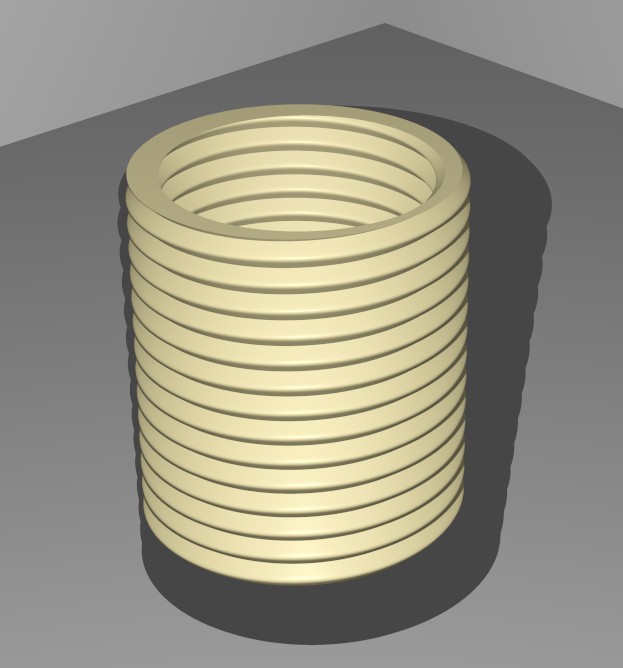
Thanks. The best option for me is this:
isosurface { //-------------------------------------------------------------
function{
f_helix1(
x,y,z,
1, // number of helixes, (1 = single helix, 2 = double helix etc.)
44, // period, turns on the length of 2*pi
0.07, // minor radius,
0.8, // major radius,
1, // shape parameter,
0.3, // cross section type, (0.0 to 1.0 = square ... rounded to circle
// over 2.0 to 3.0 = rounded to diamond and
concave diamond
45 // cross section rotation angle
)
}
contained_by {box {<-1,-1,-1>,<1,1,1>}}
max_gradient 8
texture{ pigment{ color rgb <1,0.9,0.5>}
finish {specular 0.1 roughness 0.1 phong 0.2}
}
} // end of isosurface -------------------------------------------------------
Proper geometry with a radius on the edge and little text.
Mr, this needs to be added to the Pov@ble Blender addon : Menu Add/ Povray
shapes / Add Thread/ ))) ru> wrote:
> >
> > Thank you. I understand macros very poorly, but I can create a spiral from a
> > sphere_sweep. Then subtract the spiral from the cylinder. But, I want to achieve
> > a realistic profile.
>
> Either of the isosurface solutions Robert Munyer and I posted would satisfy this
> profile.
>
> https://news.povray.org/5eec257c%241%40news.povray.org
> https://news.povray.org/875zph8073.fsf%40munyer.com
Thanks. The best option for me is this:
isosurface { //-------------------------------------------------------------
function{
f_helix1(
x,y,z,
1, // number of helixes, (1 = single helix, 2 = double helix etc.)
44, // period, turns on the length of 2*pi
0.07, // minor radius,
0.8, // major radius,
1, // shape parameter,
0.3, // cross section type, (0.0 to 1.0 = square ... rounded to circle
// over 2.0 to 3.0 = rounded to diamond and
concave diamond
45 // cross section rotation angle
)
}
contained_by {box {<-1,-1,-1>,<1,1,1>}}
max_gradient 8
texture{ pigment{ color rgb <1,0.9,0.5>}
finish {specular 0.1 roughness 0.1 phong 0.2}
}
} // end of isosurface -------------------------------------------------------
Proper geometry with a radius on the edge and little text.
Mr, this needs to be added to the Pov@ble Blender addon : Menu Add/ Povray
shapes / Add Thread/ )))
Post a reply to this message
Attachments:
Download 'scene.jpg' (51 KB)
Preview of image 'scene.jpg'
|
|
| |
| |
|
|
|
|
| |
| |
|
|
"Bald Eagle" <cre### [at] netscapenet> wrote:
> "To create threads in Blender, enable the built-in "Bolt Factory" add-on in Edit
> > Preferences > Add-ons. Once active, press Shift+A, select Mesh, and choose
> Bolt to generate customizable threaded bolts or nuts. Adjust settings like
> Major/Minor Pitch for size and Crest/Root for shape."
>
> - BE
Create that bolt in the blender for the entire scene, select the render Cycles,
set the output image size to 38400x21600 and count the seconds until the
computer dies.
Post a reply to this message
|
|
| |
| |
|
|
|
|
| |
| |
|
|
"LanuHum" <Lan### [at] yandexru> wrote:
> Create that bolt in the blender for the entire scene, select the render Cycles,
> set the output image size to 38400x21600 and count the seconds until the
> computer dies.
> Thanks. The best option for me is this:
>
> isosurface {
So, I'm trying to understand: you're trying to model this in POV-Ray or Blender?
A helix is a fairly simple thing to model, and you could make one with the exact
profile that you want by creating a mesh with smooth triangles.
The basic helix is:
X = radius * cos (T);
Y = B * T;
Z = radius * sin (T);
And you just sort of model the profile, spin it a bit, and make quads that you
split into triangles. If you go around once, you can probably just make that one
small mesh and union {} together a string of them.
- BE
Post a reply to this message
|
|
| |
| |
|
|
|
|
| |
| |
|
|
"Bald Eagle" <cre### [at] netscapenet> wrote:
> "LanuHum" <Lan### [at] yandexru> wrote:
>
> > Create that bolt in the blender for the entire scene, select the render Cycles,
> > set the output image size to 38400x21600 and count the seconds until the
> > computer dies.
>
>
> > Thanks. The best option for me is this:
> >
> > isosurface {
>
> So, I'm trying to understand: you're trying to model this in POV-Ray or Blender?
>
>
> - BE
I am a member of the Pov@Ble project. Create a scene in Blender and export it to
a .pov file. Right now I'm trying to create a very heavy scene that the GPU
won't be able to calculate. That's why I'm talking about the size of the output
image of 50-100!!! 4k monitors.
Post a reply to this message
|
|
| |
| |
|
|
|
|
| |
| |
|
|
"Bald Eagle" <cre### [at] netscapenet> wrote:
> So, I'm trying to understand: you're trying to model this in POV-Ray or Blender?
> - BE
Blender draws its own objects, but when exporting, I can replace the mesh with a
isosurface.
Post a reply to this message
|
|
| |
| |
|
|
|
|
| |
| |
|
|
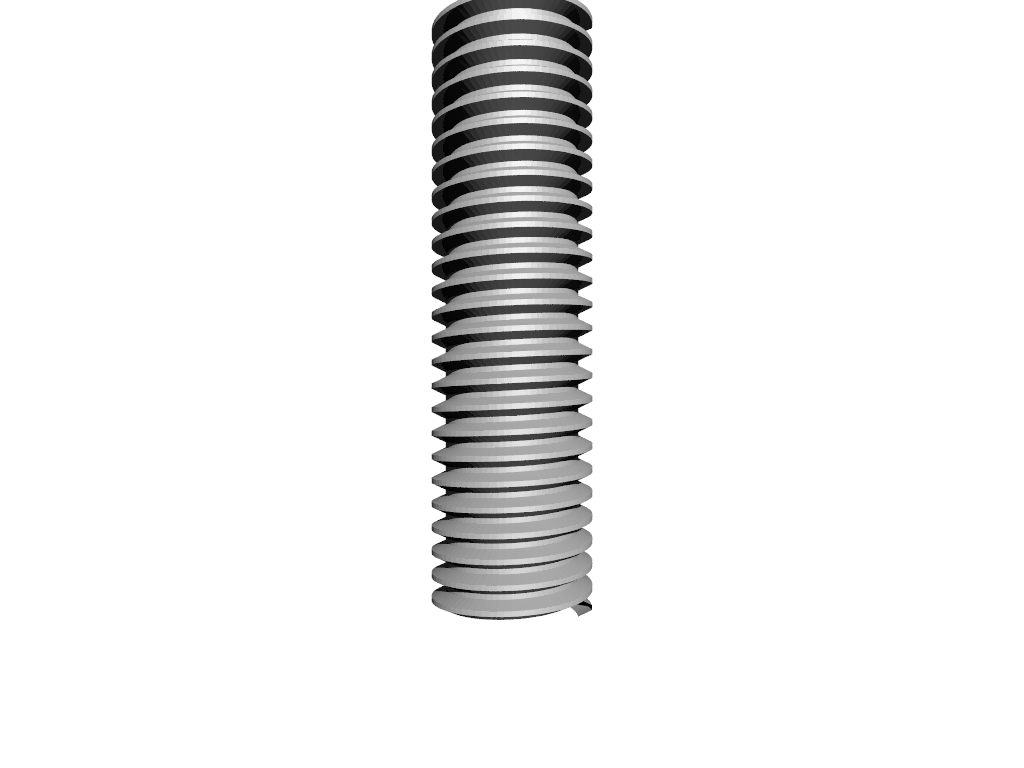
#version 3.8;
global_settings {assumed_gamma 1.0 }
camera {
location <0, 1, -3>
right x*image_width/image_height
up y
look_at <0, 1, 0>
}
light_source {<10, 20, -50> rgb 1}
sky_sphere {pigment {rgb 1}}
#declare TPI = 11; // (Threads per inch / TPI)
#declare DM = 0.625/2;
#declare Dm = 0.5167/2;
#declare Angle = 60;
#declare Pitch = 1/TPI;
#declare CompAngle = 90-Angle;
#declare Asin = atan(radians(CompAngle));
#declare dx = DM - Dm;
#declare dy = dx * Asin;
#declare AL = 2*dy; // total Angled length
#declare FL = (Pitch - AL)/2; // Flat length
// Profile
#declare P = array {
<Dm, 0, 0>,
<DM, dy, 0>,
<DM, dy+FL, 0>,
<Dm, dy+FL+dy, 0>,
<Dm, dy+FL+dy+FL, 0>
}
#declare OldPoint = array[5][3];
#declare NewPoint = array[5][3];
#macro MakeBoltProfile (Pitch,Steps, Tex, Copies)
#local Increment = tau/Steps;
#local Unit =
union {
#for (Theta, 0, tau, Increment)
#for (Pt, 0, 4)
#declare NewPoint[Pt][0] = P[Pt].x * cos (Theta);
#declare NewPoint[Pt][1] = P[Pt].y + Pitch * Theta/tau;
#declare NewPoint[Pt][2] = P[Pt].x * sin (Theta);
#end
#if (Theta > 0)
#for (T, 0, 3)
triangle {<OldPoint[T][0], OldPoint[T][1], OldPoint[T][2]>,
<NewPoint[T][0], NewPoint[T][1], NewPoint[T][2]>,
<OldPoint[T+1][0], OldPoint[T+1][1], OldPoint[T+1][2]>
}
triangle {<OldPoint[T+1][0], OldPoint[T+1][1],
OldPoint[T+1][2]>,
<NewPoint[T][0], NewPoint[T][1], NewPoint[T][2]>,
<NewPoint[T+1][0], NewPoint[T+1][1], NewPoint[T+1][2]>
}
#end
#end
#declare OldPoint = NewPoint;
#end
texture {Tex}
}
#for (C, 1, Copies)
object {Unit translate y*Pitch*C*1}
#end
#end
#declare MyTex = texture {pigment {rgb 0.9} finish {specular 0.4 reflection
0.01}}
MakeBoltProfile (Pitch, 72, MyTex, 25)
Post a reply to this message
Attachments:
Download 'lanuhumboltmesh.png' (83 KB)
Preview of image 'lanuhumboltmesh.png'
|
|
| |
| |
|
|
|
|
| |
|
|