|
|
|
|
|
|
| |
| |
|
|
|
|
| |
| |
|
|
This is prompted from the discussion in beta-test under colors.inc.

POV4 should allow you to enter colours and use image files that are already
gamma corrected (ie they look correct on your monitor prior to using in
POV).  This, I think, is what most users expect when entering colour values
or using texture files.  They expect the colours to look the same as if they
were choosing that colour in PowerPoint, or painting with that pixel colour
in a photo editor.

Currently however, POV assumes all RGB values in the SDL and any RGB values
from textures are in linear colour space, and uses them directly in the
rendering core.  This often leads to output not being as expected (see
numerous posts about "washed out" effect when using image files).

I propose that POV4 has the option to apply the inverse of the display gamma
to any RGB values or image files used.  This will mean users can directly
use RGB values and expect the correct output.

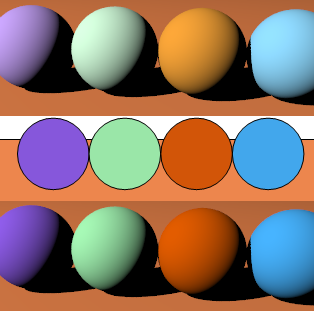
Attached is an example, the middle row of spheres is from eg a 2D drawing or
web page etc.  The top row is the result if you just try to use those
colours in POV directly, the bottom row is if POV applied inverse gamma to
those colours prior to rendering.  Note that these are both rendered with
display gamma of 2.2, if you try a higher display gamma the difference is
even bigger.

The bottom row is what most users would expect, I think.
Post a reply to this message
Attachments:
Download 'comparison.png' (65 KB)
Preview of image 'comparison.png'
|
|
| |
| |
|
|
From: Warp
Subject: Re: Gamma correction of input colours/image files
Date: 10 Oct 2008 04:05:31
Message: <48ef0cca@news.povray.org>
|
|
|
| |
| |
|
|
scott <sco### [at] scott com> wrote:
> Currently however, POV assumes all RGB values in the SDL and any RGB values
> from textures are in linear colour space, and uses them directly in the
> rendering core. This often leads to output not being as expected (see
> numerous posts about "washed out" effect when using image files).
I still can't understand why assumed_gamma doesn't fix this. Did you
even try it in your example?
--
- Warp com> wrote:
> Currently however, POV assumes all RGB values in the SDL and any RGB values
> from textures are in linear colour space, and uses them directly in the
> rendering core. This often leads to output not being as expected (see
> numerous posts about "washed out" effect when using image files).
I still can't understand why assumed_gamma doesn't fix this. Did you
even try it in your example?
--
- Warp
Post a reply to this message
|
|
| |
| |
|
|
From: scott
Subject: Re: Gamma correction of input colours/image files
Date: 10 Oct 2008 04:26:23
Message: <48ef11af@news.povray.org>
|
|
|
| |
| |
|
|
>  I still can't understand why assumed_gamma doesn't fix this. Did you
> even try it in your example?

Yes, assumed_gamma *only* affected the output gamma correction
(display_gamma/assumed_gamma is what is actually used).  Anyway,
assumed_gamma has all but been dropped from v3.7.

What I am asking for, is for the inverse of the output gamma to be applied
to RGB literals and image file *before* the rendering engine gets hold of
them. Currently POV does not do this.
Post a reply to this message
|
|
| |
| |
|
|
From: Jim Holsenback
Subject: Re: Gamma correction of input colours/image files
Date: 10 Oct 2008 08:27:00
Message: <48ef4a14@news.povray.org>
|
|
|
| |
| |
|
|
"scott" <sco### [at] scottcom> wrote in message news:48ef0656@news.povray.org...
> Attached is an example, the middle row of spheres is from eg a 2D drawing
> or
> web page etc.  The top row is the result if you just try to use those
> colours in POV directly, the bottom row is if POV applied inverse gamma to
> those colours prior to rendering.  Note that these are both rendered with
> display gamma of 2.2, if you try a higher display gamma the difference is
> even bigger.

I'm going to jump in here and hopefully I won't look too foolish ....
however I think the top row looks more like what I'd expect. I wrestled with
this when I was doing the v3.7 scene file updates. I settled on
display_gamma = 2.5. You know the documentation example about dosen't really
talk about color. The example shows grey, black, & white probably best for
determining brightness and contrast. Componets of gamma correction right?

> The bottom row is what most users would expect, I think.
>

brightness looks to low to me. contrast compares with top row.

Jim
Post a reply to this message
|
|
| |
| |
|
|
From: Severi Salminen
Subject: Re: Gamma correction of input colours/image files
Date: 10 Oct 2008 08:41:21
Message: <48ef4d71$1@news.povray.org>
|
|
|
| |
| |
|
|
Jim Holsenback wrote:
> however I think the top row looks more like what I'd expect.

Why on earth would you expect the colors to be off?

I'd guess most users want to see the colors they actually chose (of
course, there are many ways to describe spectral power
distributions...). The difference in the two rows was that top spheres
had way too light colors compared to bottom row spheres. So I don't
understand the point in expecting "false" colors.

Of course, I make here some assumptions about light source
color/intensity and tone mapping...
Post a reply to this message
|
|
| |
| |
|
|
From: Jim Holsenback
Subject: Re: Gamma correction of input colours/image files
Date: 10 Oct 2008 09:46:48
Message: <48ef5cc8@news.povray.org>
|
|
|
| |
| |
|
|
"Severi Salminen" <sev### [at] NOTTHISsaunalahtifiinvalid> wrote in
message news:48ef4d71$1@news.povray.org...
> Jim Holsenback wrote:
>> however I think the top row looks more like what I'd expect.
>
> Why on earth would you expect the colors to be off?

I reread my post and I don't believe I said that .....

> I'd guess most users want to see the colors they actually chose (of
> course, there are many ways to describe spectral power
> distributions...). The difference in the two rows was that top spheres
> had way too light colors compared to bottom row spheres. So I don't
> understand the point in expecting "false" colors.

I think I eluded to brightness & contrast  differences .... not color.

Jim
Post a reply to this message
|
|
| |
| |
|
|
|
|
| |
| |
|
|
> I'm going to jump in here and hopefully I won't look too foolish ....
> however I think the top row looks more like what I'd expect.

Because you are used to how POV handles colours :-)  But seriously, in the
top row, the *colours* (not brightness) are actually different from what you
specified in the SDL.  It is easiest to see this with the orange ball,
anybody trying to make some promotional material where the colours need to
be accurate for a certain brand (eg the Sony Ericsson "orange") would likely
get the top row thrown back at them for being the wrong colour.  The bottom
row preserves the correct colour.

The reason is that for "colours" (where RGB are not equal), gamma will
modify the brightness of each channel a different amount, so you are
actually changing the colour that you see, not just the brightness.  Your
eye is very sensitive to changes in colour, even when the brightness is
different.

> brightness looks to low to me. contrast compares with top row.

The brightness is easily controlled by the diffuse value in the finish
statement, or by cranking up the light colour.  Maybe I should have rendered
with more brightness to avoid the confusion between change in brightness and
change of colour?
Post a reply to this message
|
|
| |
| |
|
|
From: scott
Subject: Re: Gamma correction of input colours/image files
Date: 10 Oct 2008 10:56:41
Message: <48ef6d29@news.povray.org>
|
|
|
| |
| |
|
|
> I think I eluded to brightness & contrast  differences .... not color.

Try all you want to modify the brightness and contrast of the top row,
you'll never be able to get a match with the middle row because the actual
*colours* are different.  The only way to get the match will be do undo the
gamma correction, but then by doing that you're screwing with the physical
correctness of the lighting on the spheres (ie the brightness won't be
proportional to normal of the surface in the correct way anymore).
Post a reply to this message
|
|
| |
| |
|
|
|
|
| |
| |
|
|
On Fri, 10 Oct 2008 16:17:02 +0200, "scott" <sco### [at] scottcom> wrote:

>Because you are used to how POV handles colours :-)  But seriously, in the
>top row, the *colours* (not brightness) are actually different from what you
>specified in the SDL.  It is easiest to see this with the orange ball,
>anybody trying to make some promotional material where the colours need to
>be accurate for a certain brand (eg the Sony Ericsson "orange") would likely
>get the top row thrown back at them for being the wrong colour.  The bottom
>row preserves the correct colour.
>
>The reason is that for "colours" (where RGB are not equal), gamma will
>modify the brightness of each channel a different amount, so you are
>actually changing the colour that you see, not just the brightness.  Your
>eye is very sensitive to changes in colour, even when the brightness is
>different.
>

This can be demonstrated in your favorite image editor, GIMP in my case.  Open up two
copies of the image, then adjust the gamma of one copy by 0.45, which is 1/2.2 gamma.
The colors of the top row
of the gamma adjusted image will closely match the center row of the original image.

>The brightness is easily controlled by the diffuse value in the finish
>statement, or by cranking up the light colour.  Maybe I should have rendered
>with more brightness to avoid the confusion between change in brightness and
>change of colour?

You can do the same experiment above, but instead try and adjust the brightness and
contrast.  The colors will never match.

The issue is definitely related to how POV-Ray handles gamma in pigments.  For solid
pigments, the gamma-adjusted levels can be easily calculated manually.  For image
pigments, a macro can be used...

// Macro to adjust APGPig pigment by APGGam gamma value
// Adapted from the CIE_Imagemap macro by Jaime Vives Piqueres
#macro AdjustPigmentGamma(APGPig, APGGam)
  #local APGfn = function { pigment { APGPig } }
  pigment {
    average
    pigment_map {
      [function { pow(APGfn(x,y,z).red, APGGam) }   color_map { [0 rgb 0][1 rgb
<3,0,0>] } ]
      [function { pow(APGfn(x,y,z).green, APGGam) } color_map { [0 rgb 0][1 rgb
<0,3,0>] } ]
      [function { pow(APGfn(x,y,z).blue, APGGam) }  color_map { [0 rgb 0][1 rgb
<0,0,3>] } ]
    }
  }
#end
Post a reply to this message
|
|
| |
| |
|
|
From: Severi Salminen
Subject: Re: Gamma correction of input colours/image files
Date: 10 Oct 2008 11:43:05
Message: <48ef7809@news.povray.org>
|
|
|
| |
| |
|
|
Jim Holsenback wrote:

>>> however I think the top row looks more like what I'd expect.
>> Why on earth would you expect the colors to be off?
>
> I reread my post and I don't believe I said that .....

I stand corrected, but that is how I interpreted it as you preferred the
top row. Anyway, inverse gamma correction is the thing to do in order to
get what you ask for.

(This is the same issue I was pondering with my own ray tracer a while ago.)

In addition, it would be nice if POV4 supported some other tone mapping
methods besides this linear one. I guess Megapov has "exposure" keyword
for this.
Post a reply to this message
|
|
| |
| |
|
|
From: Ive
Subject: Re: Gamma correction of input colours/image files
Date: 10 Oct 2008 11:55:54
Message: <48ef7b0a@news.povray.org>
|
|
|
| |
| |
|
|
scott wrote:

> Currently however, POV assumes all RGB values in the SDL and any RGB
> values from textures are in linear colour space, and uses them
> directly in the rendering core.  This often leads to output not being
>  as expected (see numerous posts about "washed out" effect when using
>  image files).
>

I fully agree with you, but things are even more complicated:
POV "assumes" for all image files to be in linear color space except for
PNG if they contain a gamma chunk. (But POV recognizes *only* PNG gamma
chunks, other colorimetric chunks like the sRGB chunk are ignored.)
This is why I have converted most of my texture image files to PNG by
using a program that does add this gamma chunk, (e.g. some older
versions of Photoshop did not).

I have also used this macro to use JPEG images as textures:

//=========================================================

#declare sRGB_Inv = function(C) {
   select(C-0.04045, C/12.92, pow((C+0.055)/1.055,2.4))
}

#macro sRGB_JpgMap(ImageName)

#local fn = function {
   pigment {image_map {jpeg ImageName interpolate 2}}
}

pigment {
   average
   pigment_map {
    [function {sRGB_Inv(fn(x,y,z).red)}
      color_map {[0 rgb<0,0,0>][1 rgb<3,0,0>]}]
    [function {sRGB_Inv(fn(x,y,z).green)}
      color_map {[0 rgb<0,0,0>][1 rgb<0,3,0>]}]
    [function {sRGB_Inv(fn(x,y,z).blue)}
      color_map {[0 rgb<0,0,0>][1 rgb<0,0,3>]}]
   }
}
#end

// used like:
pigment {
   sRGB_JpgMap("MyTexture.jpg")
}

//=========================================================

works well but the sad thing is: it slows things down because the colors
are transformed at render time.


About the use of assumed_gamma (and @Warp who seems to advocate this):

The major problem when using assumed_gamma with any value not equal to
1.0 is that antialiasing is no longer done in linear color space and so
results in quite poor quality. I will post an illustration to p.b.i.

It is removed from POV 3.7 - and IMO this is a VERY good idea.

And finally quite frankly: this gamma and assumed_gamma issues have been
discussed so many times and still the same old misconceptions reappear -
this makes me think it is meanwhile a kind of urban legend where some
people just insist to *believe* in something.


-Ive
Post a reply to this message
|
|
| |
| |
|
|
From: Warp
Subject: Re: Gamma correction of input colours/image files
Date: 10 Oct 2008 12:38:37
Message: <48ef850c@news.povray.org>
|
|
|
| |
| |
|
|
Ive <"ive### [at] lilysoftorg"> wrote:
> And finally quite frankly: this gamma and assumed_gamma issues have been
> discussed so many times and still the same old misconceptions reappear -
> this makes me think it is meanwhile a kind of urban legend where some
> people just insist to *believe* in something.

  The only thing I know for sure about gamma correction is that whenever
it makes an appearance, it only causes problems and nothing else.

  Take, for example, the GIF and JPEG image formats: No gamma correction
values anywhere, never any problems with gamma correction. They are two
of the most popular image formats ever, yet I don't remember reading
anybody complaining about gamma correction issues with them. Why? Because
they don't have any gamma correction info.

  Now take PNG: As a more modern image file format they decided to add
gamma correction information to it, as well as some recommendations and
specifications about how sofware should interpret it (as well as interpret
what happens if the info is missing). The result? The PNG format is
burdened with endless problems related to gamma correction issues. No two
programs seem to agree on how a PNG should be shown, regardless of whether
it has gamma correction info embedded or not.

  This is a huge problem for example with web browsers, which is one of
the reasons why PNG has been so unpopular in web design. And why wouldn't
it be: The exact same PNG can look completely different in different
browsers (for example with regards to the background color of the webpage),
while GIF and JPEG images look the same regardless of the browser.

  One big problem precisely related to web design is that you might
specify, for example, a background color for your web page, let's say
for example #808080, and you use *the exact same color* in a PNG expecting
it to match precisely the background color of the web page so that its
color scheme will nicely blend with the background. However, in one browser
the colors may match, while in another they might not. And this completely
regardless of whether you embed any gamma correction info into the PNG or
not. (This is because some web browsers *assume* some gamma value if none
is present in the PNG file, as per the specs recommendation, while others
just take the pixels unmodified, like they do with other image formats.)

  So what can a web developer do when he encounters this problem? The only
solution is to switch to either GIF (if 256 colors are enough) or JPEG.
Those do not present the problem because they do not have any gamma info.
A pixel value of #808080 will be #808080, like the page background, and
nothing else. No browser will make a *different* gamma correction to the
image and the background color, like they often do with PNG images.

  If PNG had never included the gamma correction information in its format,
this problem would not happen, and it would be exactly as usable as GIF and
JPEG. But no. Gamma correction = problems.

  It's no wonder why POV-Ray is also riddled with all kinds of problems
related to gamma correction. Whenever you are dealing with gamma correction
you are going to encounter big problems.

  I suppose that gamma correction is a bit like text character encodings:
Nice ideas in theory, but the world is completely riddled with endless
problems related to them, and every software has its own ideas about how
it should implement them.

--
                                                          - Warp
Post a reply to this message
|
|
| |
| |
|
|
From: Ive
Subject: Re: Gamma correction of input colours/image files
Date: 10 Oct 2008 15:10:45
Message: <48efa8b5@news.povray.org>
|
|
|
| |
| |
|
|
Warp wrote:

>   Take, for example, the GIF and JPEG image formats: No gamma correction
> values anywhere, never any problems with gamma correction. They are two
> of the most popular image formats ever, yet I don't remember reading
> anybody complaining about gamma correction issues with them. Why? Because
> they don't have any gamma correction info.
>
the W3C, HP and Microsoft have agreed (since 1996 IIRC) that the www is
in sRGB color space. So GIF and JPEG have - so to say - a build in gamma
tag that reads 2.2 - close to the sRGB gamma curve.
But in the early 90ies, when I worked with a SGI graphics workstation
things where horrible because JPEG & GIF images always looked completely
different when viewed on a Mac, PC or a SGI IRIS.
Photoshop used to include ICC profiles into JPEG images and store the
image data in an internal working color space. As most viewers and all
web browsers do ignore color profiles in jpeg images the result was
sometimes quite strange. Photoshop CS3 doesn't do this anymore. (well
Adobe never cared much about being compatible to the rest of the world,
seems to be part of their business model, and sadly enough this is even
working)
POV assumes JPEG and GIF files to be in linear color space (and they
usually are not). This results in the well known washed out colors and
was the whole point of this thread.
Poser assumes that JPEG images used for bump, transparency or specular
maps are in linear color space but textures are gamma 2.2. So when
converting Poser figures to POV either the textures or the bump etc.
maps are wrong. With assumed_gamma 2.2 the textures are correct but the
other maps are not, with assumed_gamma 1.0 the textures are washed out
but the other maps are right - so to render poser stuff in POV,
assumed_gamma 1.0 and texture files converted to PNG are needed.
DAZ Studio uses some different assumptions about texture, bump and so on
maps. So professional vendors do meanwhile provide two different sets of
maps for Poser and DAZ Studio. (And I bet when it comes to Lightwave,
Maja, Cinema4D and what not we have similar problems!)

I can continue this list but this should be enough. Now tell me again
that there was never any problem with gamma correction  and JPEG/GIF images.


>   Now take PNG: As a more modern image file format they decided to add
> gamma correction information to it, as well as some recommendations and
> specifications about how sofware should interpret it (as well as interpret
> what happens if the info is missing). The result? The PNG format is
> burdened with endless problems related to gamma correction issues. No two
> programs seem to agree on how a PNG should be shown, regardless of whether
> it has gamma correction info embedded or not.
>

This is the point I really do not understand. The use of the png gamma
chunk is well documented in the png specs, the reference library libpng
(used by almost everybody) already includes all the code needed and the
usage is even as example code available. A programmer can just copy and
paste it. Still, the programmers of a lot of browser and other image
applications managed it to do it wrong (wrong as in programming a
calculator that says 1 + 1 = 3). And as a result the PNG format is
blamed for that.
The POV programmer (whoever this was) did it right, at least.


>   If PNG had never included the gamma correction information in its format,
> this problem would not happen, and it would be exactly as usable as GIF and
> JPEG. But no. Gamma correction = problems.
>
>   It's no wonder why POV-Ray is also riddled with all kinds of problems
> related to gamma correction. Whenever you are dealing with gamma correction
> you are going to encounter big problems.
>
>   I suppose that gamma correction is a bit like text character encodings:
> Nice ideas in theory, but the world is completely riddled with endless
> problems related to them, and every software has its own ideas about how
> it should implement them.
>

Well, ok, do not get me wrong, I really do see your point but my
conclusion is different. I would never say gamma correction = problem.
Gamma correction is a necessary (and in fact quite simple) concept that
has to been known in digital image processing. People who do not know or
understand it should not work there as a programmer. But they did and
this is the source for most irritation about the gamma subject.

-Ive
Post a reply to this message
|
|
| |
| |
|
|
From: Warp
Subject: Re: Gamma correction of input colours/image files
Date: 11 Oct 2008 04:04:36
Message: <48f05e13@news.povray.org>
|
|
|
| |
| |
|
|
Ive <"ive### [at] lilysoftorg"> wrote:
> This is the point I really do not understand. The use of the png gamma
> chunk is well documented in the png specs, the reference library libpng
> (used by almost everybody) already includes all the code needed and the
> usage is even as example code available. A programmer can just copy and
> paste it. Still, the programmers of a lot of browser and other image
> applications managed it to do it wrong (wrong as in programming a
> calculator that says 1 + 1 = 3). And as a result the PNG format is
> blamed for that.

  The problem is that some software out there apply the gamma correction
info properly, other software ignore it, and there is even some software
which apply the gamma correction incorrectly.

  The biggest and most usual problems happen when the PNG does *not*
have any gamma correction info. Some software out there will *assume*
some gamma (eg. 2.2), others will assume linear color space (or whatever
they are using for GIF and JPEG). You can easily have four or more
different programs, none of which show all PNG images in the same way,
because of gamma correction issues. Yet all the programs will usually
show GIF and JPEG images identically to each other.

> The POV programmer (whoever this was) did it right, at least.

  Yet you can still suffer from gamma correction issues. For example,
specify a surface color like <.5, .5, .5> to an object and apply a PNG
as an image map to another object, expecting a color value of 128, 128, 128
in the PNG to look exactly the same as the <.5, .5, .5>, and that might
just not be the case.

  Sometimes gamma correction is applied when you don't want it to be
applied, sometimes it's not applied when you want it to be applied, and
sometimes it is applied when you want, but incorrectly.

  Gamma correction = problems.

> Well, ok, do not get me wrong, I really do see your point but my
> conclusion is different. I would never say gamma correction = problem.
> Gamma correction is a necessary (and in fact quite simple) concept that
> has to been known in digital image processing. People who do not know or
> understand it should not work there as a programmer. But they did and
> this is the source for most irritation about the gamma subject.

  I think that the underlying problem is that gamma correction is applied
improperly, and different programs and systems use different approaches
at applying it, many of them erroneous. Or perhaps not erroneous per se.
Perhaps there is *no* way of taking gamma into account in a way which
would work in all possible situations. The whole thing is a mess.

  I believe that the problem could be solved (or at least greatly
alleviated) if there was a unified universal standard which stated that
*all* image formats must use a strictly linear color space for *everything*,
and that the *only* place where gamma correction is applied is when showing
the image *on screen* (or printed on paper, or whatever visual media).

  This way you don't need to add any gamma correction information to any
image because every single software out there would assume that it's
already in a strictly linear color space, and every system knows how
it should convert that linear color space when it sends it to the monitor
(in other words, the only place where you fine-tune gamma correction is
in the the OS).

  Saving gamma correction information on the image file is not needed
because when eg. the image manipulation program uses the strict linear
color space but the OS *shows* the window of the image manipulation
program gamma-corrected for that specific system, it automatically means
that the created image will look the same in other systems as well (as long
as the gamma correction has been set up correctly in those systems).

  In other words, every single program out there would use the exact same
color space, and it's only up to the OS/display driver to show the colors
properly gamma-corrected *on screen* (and no "correction" is performed
anywhere else).

  However, things have got completely messed up because different programs
use *different* color spaces and do not agree on a single common one. Some
programs (I'm looking at you, Photoshop) want to gamma-correct the pixel
values being edited, rather than leaving the gamma correction to the the
OS/display drivers. Then they want to store the gamma value they used in
the file, and expect every other program to read this info and perform the
conversion to the pixel values.

  This is a bad idea, and only causes problems. It may work fine when you
simply want to *show* the image: First you apply the gamma correction
specified in the file to the pixels, after which the OS/display hardware
applies whatever gamma correction is necessary for the current hardware.
If this is done properly, the image will look the same as in the original
hardware.

  Problems start happening when you want to mix these images together and
with other color settings, eg. in a web page or a rendering software.
Should the gamma correction specified in the image be applied to the
image while reading it or not? If the web page or whatever uses its own
gamma correction, should it *also* be applied to the image or not? If
you want a color value of <.5, .5, .5> to exactly match the equivalent
color in the image, how can you do it? Should the color be gamma-corrected
to match the image? Or should the image be gamma-corrected to match the
color space where the <.5, .5, .5> was specified? How can you even know
which pixel value in the image corresponds visually to <.5, .5, .5>?

  It's a huge mess. Maybe there is no solution to all these problems
because it all has become an unfixable mess.

--
                                                          - Warp
Post a reply to this message
|
|
| |
| |
|
|
|
|
| |
| |
|
|
Warp wrote:

>   The biggest and most usual problems happen when the PNG does *not*
> have any gamma correction info. Some software out there will *assume*
> some gamma (eg. 2.2), others will assume linear color space (or whatever
> they are using for GIF and JPEG).

IIRC there was indeed a fault in the first draft of the PNG
specification saying if no gamma chunk is present the application should
not assume any gamma correction (meaning the image is in linear color
space). But this was soon revised and happened more than 10 years ago.


>> The POV programmer (whoever this was) did it right, at least.
>
>   Yet you can still suffer from gamma correction issues. For example,
> specify a surface color like <.5, .5, .5> to an object and apply a PNG
> as an image map to another object, expecting a color value of 128, 128, 128
> in the PNG to look exactly the same as the <.5, .5, .5>, and that might
> just not be the case.
>

well, I never had any problem doing exactly this with PNG files - with
the PNG files I do use and do know they include a correct gamma chunk.
But this does NOT work with GIF/JPEG/TGA files and assumed_gamma = 1.0
(what I always do - and if you have forgotten why reread my post about
bump/specular/transparency maps and look at the antialiasing pictures in
p.b.i). Changing the default behavior of POV (by assuming these files
to be in sRGB color space instead of linear) would break the usage of
them as bump etc. maps - something that does currently work as expected.


>   I think that the underlying problem is that gamma correction is applied
> improperly, and different programs and systems use different approaches
> at applying it, many of them erroneous.

Agreed.


> Or perhaps not erroneous per se.
> Perhaps there is *no* way of taking gamma into account in a way which
> would work in all possible situations. The whole thing is a mess.
>

When you search this newsgroups for "gamma" and read all the posts (what
I just did) the whole thing obviously IS a mess. But I guess I mean it
for a different reason you did ;)


>   I believe that the problem could be solved (or at least greatly
> alleviated) if there was a unified universal standard which stated that
> *all* image formats must use a strictly linear color space for *everything*,
> and that the *only* place where gamma correction is applied is when showing
> the image *on screen* (or printed on paper, or whatever visual media).
>   This way you don't need to add any gamma correction information to any
> image because every single software out there would assume that it's
> already in a strictly linear color space, and every system knows how
> it should convert that linear color space when it sends it to the monitor
> (in other words, the only place where you fine-tune gamma correction is
> in the the OS).
>

This is no solution at all and another common misconception. There is a
good reason that 8bit/sample image formats are not linear because the
human visual system is more sensitive in the dark areas and to avoid
"color bands" it makes sense to use more bits in the dark area -> no
linear color space -> gamma correction. In times of low computer power
it was merely a lucky coincidence that a common CRT also had a similar
non linear response curve and we could send the image data directly to
the display controller - without processing the data through lookup tables.
To avoid this you'll have to switch to 16bit/sample. But this means a
much worse compression ratio (because the "noise" introduced into the
low bits) and (just an educated guess) about 5x the filesize for a DCT
or DWT compressed file format only to achieve the same visual quality
for an average photographic image.
What is the point in doing this?


>   Saving gamma correction information on the image file is not needed
> because when eg. the image manipulation program uses the strict linear
> color space but the OS *shows* the window of the image manipulation
> program gamma-corrected for that specific system, it automatically means
> that the created image will look the same in other systems as well (as long
> as the gamma correction has been set up correctly in those systems).
>

B.T.W. with contemporary computer power nowadays EVERY image
manipulation program should internal use a linear color space. This is
one of the reasons I use Photoshop (and Windows for that matter - even
if I dislike the business attitude of both companies behind them). Do
not get me wrong, I'm not trolling about Gimp, if you like it, fine, but
it simply does not do what I expect. (And I do not know about the
current development status of CinePaint, last time I tried it on a linux
box it just crashed unpredictable.)


>   In other words, every single program out there would use the exact same
> color space, and it's only up to the OS/display driver to show the colors
> properly gamma-corrected *on screen* (and no "correction" is performed
> anywhere else).
>
>   However, things have got completely messed up because different programs
> use *different* color spaces and do not agree on a single common one. Some
> programs (I'm looking at you, Photoshop) want to gamma-correct the pixel
> values being edited, rather than leaving the gamma correction to the the
> OS/display drivers. Then they want to store the gamma value they used in
> the file, and expect every other program to read this info and perform the
> conversion to the pixel values.
>

Just because I feel a little picky. A color space does also define what
colors red, green and blue *are*. And there are good reasons to use
different color spaces and embed colorimetric information into an image
file (like e.g. using ICC profiles). But I do not want to open another
can of worms ;)


>   It's a huge mess. Maybe there is no solution to all these problems
> because it all has become an unfixable mess.
>
Ok. So finally we have the point again I meanwhile tend to agree ;)


-Ive
Post a reply to this message
|
|
| |
| |
|
|
|
|
| |
| |
|
|
>  The only thing I know for sure about gamma correction is that whenever
> it makes an appearance, it only causes problems and nothing else.

So let's simplify things for POV4:

Facts:
* A raytracer needs to work internally in linear colour space
* A monitor is a non-linear device (usually requiring a gamma correction of
1.8-2.2)

Assumptions:
* Most outputs from a raytracer will be in monitor colour space, not linear
space
  --> raw output from the raytracer needs to be converted from linear space
* Most inputs to a raytracer will be in monitor colour space
  --> User input needs to be converted to linear space

Default solution:
* One single system-defined Gamma value (default 2.2 for Windows, editable
by user)
* Gamma applied to all output from raytracer engine
* Inverse-gamma applied to all input to raytracer engine
* For #version <4.0 the old behaviour is set (ie no conversion for input
colours)

Options:
* User can change Gamma value for their system (in .ini file?)
* User can use SDL keywords to set if input values in that file are
specifically in linear space

eg: color rgb <1.0,0.5,0.25> will be the same colour as RGB 255,128,64 when
viewed on your monitor, no matter what gamma setting you have.

linear_color rgb <1.0,0,0> will be twice as bright as linear_rgb <0.5,0,0>.
Can be used when you want a linear mapping for physical reasons (eg one box
twice as bright as the other).

There could also be a linear_image_map keyword to work with texture files in
the same way.
Post a reply to this message
|
|
| |
| |
|
|
|
|
| |
| |
|
|
I partially agree that it can be annoying.  But I like being able to specify
color rgb 0.25 and it mean 25% gray, if the input was taken as a gamma
corrected value I may have to do something like color rgb 0.53 to get the same
result on one monitor (gamma 2.2) and 0.56 for a different monitor (gamma
0.56).

If anything I think the existing keywords should keep their meanings, color 0.5
should mean 50% gray, and the new keywords should un-gammacorrect the input:
display_color 0.5 should represent 21% gray if the display gamma is 2.2.

I agree when loading image maps I may want it to avoid correction in some cases
and apply it in others.  Sometimes a value 128 means 128 (~0.5, for height
fields generated by a custom program/script), and other times when loading it
should correct (or uncorrect) the image into POV-Ray colorspace.
Post a reply to this message
|
|
| |
| |
|
|
From: Warp
Subject: Re: Gamma correction of input colours/image files
Date: 16 Nov 2008 06:31:03
Message: <49200477@news.povray.org>
|
|
|
| |
| |
|
|
Allen <bri### [at] yahoocom> wrote:
> I partially agree that it can be annoying.  But I like being able to specify
> color rgb 0.25 and it mean 25% gray

  What do you mean by "25% gray"? It could mean one of two different things:

- The pixel (if completely non-shaded) ends up having a value of (64, 64, 64)
  in a 24 bits-per-pixel image.

- The brightness of the pixel will be exactly 1/4 of the maximum brightness.

  Those two things are totally different. A pixel value of (64, 64, 64) might
not be even close to 1/4 of the maximum brightness of a pixel on your
display.

  Which one do you mean?

> if the input was taken as a gamma
> corrected value I may have to do something like color rgb 0.53 to get the same
> result on one monitor (gamma 2.2) and 0.56 for a different monitor (gamma
> 0.56).

  Well, the whole idea with gamma correction is that it's enough for you
to specify just the value "rgb 0.25" and then with gamma correction make
it look exactly 1/4 of the maximum brightness in your display. You just
adjust the gamma correction rather than the color values.

  OTOH IMO gamma correction should not be force-fed, and it should be
possible to turn it completely off. Sometimes you *want* "rgb 0.25" to
mean exactly the pixel value (64, 64, 64) and nothing else, regardless
of how it may *look* on the screen. Images are sometimes used for purposes
other than just displaying them, and gamma correction might just be a
hindrance than anything else.

--
                                                          - Warp
Post a reply to this message
|
|
| |
| |
|
|
|
|
| |
| |
|
|
>> if the input was taken as a gamma
>> corrected value I may have to do something like color rgb 0.53 to get the
>> same
>> result on one monitor (gamma 2.2) and 0.56 for a different monitor (gamma
>> 0.56).

That's why I suggest we have two options for entering colours/images in the
SDL, one will apply inverse of whatever your gamma setting is, the other
will just use it linearly.

Your suggestion might be better ie:
color rgb 0.25  // this is 25% the brightness of rgb 1.0 inside the engine,
ie 25% the photons, 25% the power, whatever. if you are using gamma
correction, the output pixel value will not be 64,64,64

display_color rgb 0.25 // this is what rgb 64,64,64 would look like on your
monitor, will come out as rgb 64,64,64 no matter what gamma setting you
have.  use this if you have chosen a colour from html, some image editor etc
and you want the output gamma corrected colour to be the same.

>  Well, the whole idea with gamma correction is that it's enough for you
> to specify just the value "rgb 0.25" and then with gamma correction make
> it look exactly 1/4 of the maximum brightness in your display.

Yes, that's true if you know what 25% brightness is, which POV does when it
works out light/shadow calculations, it says "i want this pixel to be 25%
brightness" and then the gamma correction fixes it so it looks realistic on
your monitor.  But sometimes you know what you want the output colour to
look like, eg RGB 255,128,64, currently there is no way to tell POV to use
that colour without doing some complex inverse gamma calculation by hand.

>  OTOH IMO gamma correction should not be force-fed, and it should be
> possible to turn it completely off.

You should be able to set display_gamma as 1.0 in an ini file and it should
actually do that.

> Sometimes you *want* "rgb 0.25" to
> mean exactly the pixel value (64, 64, 64) and nothing else, regardless
> of how it may *look* on the screen.

Agreed, which is why I suggest having two methods for entering
colours/images.  Note that for colours it is more important than greys,
because gamma correction actually changes the colour hue, not just the
brightness.
Post a reply to this message
|
|
| |
| |
|
|
|
|
| |
| |
|
|
"Warp" wrote
>   Which one do you mean?

I'm sorry I didn't specify.  I meant 25% visual maximum brightness.

>  Well, the whole idea with gamma correction is that it's enough for you
> to specify just the value "rgb 0.25" and then with gamma correction make
> it look exactly 1/4 of the maximum brightness in your display. You just
> adjust the gamma correction rather than the color values.

I agree.  I think it's nice that POV-Ray has it's own internal linear color
space that works this way so that the same image can be rendered anywhere and
appear the same.  It also, at least for me, makes more sense when trying to mix
certain colors that the values should represent relative brightnesses.

"scott" <sco### [at] scottcom> wrote:
> display_color rgb 0.25 // this is what rgb 64,64,64 would look like on your
> monitor, will come out as rgb 64,64,64 no matter what gamma setting you
> have.  use this if you have chosen a colour from html, some image editor etc
> and you want the output gamma corrected colour to be the same.

Well I don't think it will be exactly 64, 64, 64 on the output.  It would be
translated to the equivalent for input, but because of lighting, shadows, etc
etc, it may not be exactly 64, 64, 64 on output.  One way to make it may be to
set diffuse 0 and ambient 1, and have no other translucent objects that may
alter the color.


> >  OTOH IMO gamma correction should not be force-fed, and it should be
> > possible to turn it completely off.
>
> You should be able to set display_gamma as 1.0 in an ini file and it should
> actually do that.

That's true you could put it in the scene-specific ini file and turn it off for
that scene.  But for display_color to work, it would need to know how to 'undo'
the gamma correction of the color to convert it to POV-Ray internal color space,
so a valid display_gamma would be needed.  With a display_gamma of 1, color and
display_color would behave exactly the same, so you couldn't use color rgb 0.5
to get 50% output brightness.  Perhaps instead a global_settings {
output_gamma_correction off }, so that display_gamma could still work with
display_color to convert it internally to a color.


> Agreed, which is why I suggest having two methods for entering
> colours/images.  Note that for colours it is more important than greys,
> because gamma correction actually changes the colour hue, not just the
> brightness.

For input specifications, a 'display_color' could work and 'undo' the gamma
correction to get the correct rgb values.

For input images and maps, two things may be needed.  During the loading stage,
a way to specify the input gamma correction or not for decoding the image.  For
example, in a .bmp, should an input of 128,128,128 be kept 0.5,0.5,0.5 or
'adjusted' to something like 0.27,0.27,0.27.  I noticed when reading the source
code, for height fields and some other things, the input image is taken as is
with not decoding gamma correction, but for other things it does do gamma
correction for decoding, so maybe only one flag would be needed saying whether
or not to do gamma correction for rendering of the image.  If it should be
corrected the the image can be left as-is in memory, but if it should not be
corrected, then the image may need to have an inverse gamma correction applied
so when rendered it will be correct.


I've noticed that on the same display, colors that are and are not gamma
corrected do have a different hue.  But on two different displays with
different gammas, the gamma corrected hue bar always looks the same as long as
the program gamma correction is set to match the monitor.  It also seems that
the gamma corrected hue bar is more natural.  In the attachment, the left is
not gamma corrected and the right is.  The left, the secondary colors get a
very small section on the hue bar compared to the primaries (magenta, cyan, and
yellow have a smaller space than red, green, blue parts), but when gamma
correction is enabled on the right, it seems they have more of an equal section
on the hue bar.  Also the bars on the right looks the same on two different
monitors I have with different gammas.
Post a reply to this message
Attachments:
Download 'gamma.png' (9 KB)
Preview of image 'gamma.png'

|
|
| |
| |
|
|
|
|
| |
| |
|
|
I think that the following are the most likely situations:

Colors:

1. I want 0.5 to mean 50% brightness

Use color rgb 0.5 and povray stores internally as 0.5

2. I want 0.5 to mean an output of RGB 128,128,128

Use display_color rgb 0.5 and povray would do an inverse correction based on
display_gamma to store it internally something like 0.217


Images as maps for heightfields, color/texture maps

1. I want 128 in the image to represent 50% height, or 0.5 in the
color_map/texture_map

When loading the image, ignore any file gamma and let RGB 128,128,128 be
internally treated as 0.5

3. I want the true brightness of the image to represent the height or position
in color_map,texture_map

When loading the image, apply gamma correction based on the file gamma, so that
if the file gamma of a PNG is 0.4545454 and a pixel is 128,128,128, it would
represent ~ 0.217, about 21.7% height or 0.217 in color_map and height_map


Images as images/textures:

1.  I want 128 to represent 50% brightness

When loading the image, do not do any gamma correction based on the file gamma
so 128 loads as 0.5, when rendering, output gamma correction will make it 50%
brightness, depending on other scene factors

2. I want 128 input to represent 128 output

When loading the image, do not do any gamma correction based on file gamma so
128 loads internally as 0.5.  Then with the 0.5 do a correction like with
display_color, so that 0.5 becomes corrected to 0.217 if display_gamma is 2.2

3. I want the original brightness of the image to be the output brightness as
well.

When loading the image, perform gamma correction based on file gamma to get the
original brightness values, then output gamma correction will keep the
brightness.

4.  Probably a lesser situation.  I want the original brightness value to be the
pixel output value. (an input of 196 may represent 50% brightness, so should
have an output 'pixel' of 128)

When loading the image, perform gamma correction based on file gamma to get the
original brightness values.  Then perform yet another gamma correction like
display_color on those brightness values.


For colors, color and display_color could be used.

For input images, perhaps a flag gamma_method could be used to indicate which
method to use when decoding the input image, 0-4, 0 = default based on the
type, 1-4 represents on of the above.  For height fields, etc 0 would mean 1
from above, for everything else, 0 would mean 3 from above.
Post a reply to this message
|
|
| |
| |
|
|
|
|
| |
| |
|
|
> Well I don't think it will be exactly 64, 64, 64 on the output.  It would
> be
> translated to the equivalent for input, but because of lighting, shadows,
> etc
> etc, it may not be exactly 64, 64, 64 on output.  One way to make it may
> be to
> set diffuse 0 and ambient 1, and have no other translucent objects that
> may
> alter the color.

Yes that's what I meant, of course lighting shadows etc will affect the
brightness (but not the colour).

> That's true you could put it in the scene-specific ini file and turn it
> off for
> that scene.  But for display_color to work, it would need to know how to
> 'undo'
> the gamma correction of the color to convert it to POV-Ray internal color
> space,
> so a valid display_gamma would be needed.

It should just work with whatever value of display_gamma you specify,
whether than be 2.2, 1.8, 1.0 or 0.5.

> With a display_gamma of 1, color and
> display_color would behave exactly the same,

That's right.

> so you couldn't use color rgb 0.5
> to get 50% output brightness.

Why not? If you've set display_gamma to 1.0 then both color 0.5 and
display_color 0.5 will give 50% brightness.

> For input specifications, a 'display_color' could work and 'undo' the
> gamma
> correction to get the correct rgb values.

That is exactly the functionality I would like to see.  I'm not that
bothered about how it is implemented, but it's a pain having to "undo gamma"
for RGB values and images that I want to use in POV scenes.


> I noticed when reading the source
> code, for height fields and some other things, the input image is taken as
> is
> with not decoding gamma correction, but for other things it does do gamma
> correction for decoding,

Oh really? I've never experienced any undo-gamma for reading in images,
maybe I'll have to try and look at the source to find out under which
circumstances this is done.

> so maybe only one flag would be needed saying whether
> or not to do gamma correction for rendering of the image.  If it should be
> corrected the the image can be left as-is in memory, but if it should not
> be
> corrected, then the image may need to have an inverse gamma correction
> applied
> so when rendered it will be correct.

This would be useful if you are using photos or other images from the web
that are already gamma corrected, you don't want to gamma correct them again
because the colours will be all wrong then (not to mention the
contrast/brightness).

> I've noticed that on the same display, colors that are and are not gamma
> corrected do have a different hue.

That is the main reason I am asking for this capability.
Brightness/contrast you can usually mostly fix with diffuse/ambient terms,
but you can't fix incorrect colours within POV.

> But on two different displays with
> different gammas, the gamma corrected hue bar always looks the same as
> long as
> the program gamma correction is set to match the monitor.  It also seems
> that
> the gamma corrected hue bar is more natural.  In the attachment, the left
> is
> not gamma corrected and the right is.

Of course you should gamma correct the output from POV to match the display
device, that's the whole point of gamma correction, and obviously if you
don't gamma correct the result is going to look false and "unnatural".
Post a reply to this message
|
|
| |
| |
|
|
From: scott
Subject: Re: Gamma correction of input colours/image files
Date: 19 Nov 2008 08:21:11
Message: <492412c7@news.povray.org>
|
|
|
| |
| |
|
|
> Use display_color rgb 0.5 and povray would do an inverse correction based
> on
> display_gamma to store it internally something like 0.217

Exactly what I was asking for.  That way if you see a colour like 255,128,64
used on a web page, or maybe it's your company's corporate colour, or maybe
you grabbed it from a photo, whatever, you should be able to use that colour
directly in SDL and get the same colour out no matter what output gamma
settings you are using.

> Images as maps for heightfields, color/texture maps
>
> 1. I want 128 in the image to represent 50% height, or 0.5 in the
> color_map/texture_map
>
> When loading the image, ignore any file gamma and let RGB 128,128,128 be
> internally treated as 0.5

Yup, makes total sense for height fields.

> Images as images/textures:
> 2. I want 128 input to represent 128 output
>
> When loading the image, do not do any gamma correction based on file gamma
> so
> 128 loads internally as 0.5.  Then with the 0.5 do a correction like with
> display_color, so that 0.5 becomes corrected to 0.217 if display_gamma is
> 2.2

I think this would be the most used situation, if someone uses an image they
have made in a photo editor, or taken with their camera, or rendered
previously with gamma correction in POV, they want the colours to be the
same in the POV rendered scene as the original colours appear on their
monitor.  For this reason, POV should use the inverse of display_gamma for
the input.
Post a reply to this message
|
|
| |
| |
|
|
|
|
| |
| |
|
|
> Why not? If you've set display_gamma to 1.0 then both color 0.5 and
> display_color 0.5 will give 50% brightness.

If display_gamma is 1.0, then no output gamma correction would occur and it
would give an output pixel of 128,128,128, which is for 2.2 gamma only about
~21% brightness.  If display_gamma is 2.2, then it would give an output of
186,186,186 for 'color' and still about 128,128,128 for display_color

> > Images as images/textures:
> > 2. I want 128 input to represent 128 output
> >
> > When loading the image, do not do any gamma correction based on file gamma
> > so
> > 128 loads internally as 0.5.  Then with the 0.5 do a correction like with
> > display_color, so that 0.5 becomes corrected to 0.217 if display_gamma is
> > 2.2
>
> I think this would be the most used situation, if someone uses an image they
> have made in a photo editor, or taken with their camera, or rendered
> previously with gamma correction in POV, they want the colours to be the
> same in the POV rendered scene as the original colours appear on their
> monitor.  For this reason, POV should use the inverse of display_gamma for
> the input.

I think this or 3.  If your are using images from the web, their gamma may not
be the same as your monitor gamma.  In this case you would probably want the
true original brightness on the output in which case 3 makes sense.  If the
file gamma matches the monitor gamma, then option 3 is like option 2 because
loading the image would 'undo' the file gamma instead of undoing the display
gamma, which both would have the same values.
Post a reply to this message
|
|
| |
| |
|
|
|
|
| |
| |
|
|
>> Why not? If you've set display_gamma to 1.0 then both color 0.5 and
>> display_color 0.5 will give 50% brightness.
>
> If display_gamma is 1.0, then no output gamma correction would occur and
> it
> would give an output pixel of 128,128,128, which is for 2.2 gamma only
> about
> ~21% brightness.

Oh OK, I was assuming that you would set display_gamma correctly for
whatever device you wanted to "view" the output on.  Of course if you set
that incorrectly then everything is going to be screwed up, including
shadows, diffuse lighting etc let alone the colours.

> I think this or 3.  If your are using images from the web, their gamma may
> not
> be the same as your monitor gamma.

Oh I didn't realise that colours on the web had gamma, I thought that
255,128,64 would display the same no matter if it was in HTML color
statement or png file or jpeg file etc.  IIRC everything on the web is
designed for use in sRGB color space, so gamma of 2.2?

All I'm thinking is that I know lots of places have certain RGB colour
values that are assigned for brand colours etc or just used in web sites for
the "core colours".  These are presumably designed with gamma 2.2 in mind,
it would just be nice to use those RGB values (and any images already made
that contain them) directly in POV without any tricks.
Post a reply to this message
|
|
| |
| |
|
|
|
|
| |
| |
|
|
"scott" <sco### [at] scottcom> wrote:
>
> Oh I didn't realise that colours on the web had gamma, I thought that
> 255,128,64 would display the same no matter if it was in HTML color
> statement or png file or jpeg file etc.  IIRC everything on the web is
> designed for use in sRGB color space, so gamma of 2.2?
>
> All I'm thinking is that I know lots of places have certain RGB colour
> values that are assigned for brand colours etc or just used in web sites for
> the "core colours".  These are presumably designed with gamma 2.2 in mind,
> it would just be nice to use those RGB values (and any images already made
> that contain them) directly in POV without any tricks.

Yes I'm pretty sure most the web is sRGB or 2.2, the only format that I know
that allows embedding different gamma/profile is PNG, so it is possible that a
PNG may contain something different.  Of course a person creating something for
sharing should save it with sRGB.
Post a reply to this message
|
|
| |
| |
|
|
|
|
| |
|
|