|
|
|
|
|
|
| |
| |
|
|
|
|
| |
| |
|
|
I recently got Win7 and am now using it as my primary OS. It's certainly
flashy, but the sluggishness of the UI is really getting me down.

When opening new windows (especially File Manager) there's a much too
noticeable delay as different portions of the window get filled. First
I'll see the outer edge of the window, then the different panels fill
in, then the panels get populated with objects. The navigation pane is
especially painful, as it needs to display the new folder libraries,
homegroup, favorites, etc. It happens pretty frequently that I'll try
and click on an item, and in the interim in which I try to point the
mouse at it the position of the item changes because new stuff got
filled in. The "Open File" and "Save File" dialogs and the new grouped
taskbar items suffer from the same problem.


Maybe my PC is too weak (2.4GHz single core Celeron with 3GB RAM), but
I'm starting to really regret switching from XP.

--
http://isometricland.com
Post a reply to this message
|
|
| |
| |
|
|
|
|
| |
| |
|
|
SharkD wrote:
> I recently got Win7 and am now using it as my primary OS. It's certainly
> flashy, but the sluggishness of the UI is really getting me down.
>
> Maybe my PC is too weak (2.4GHz single core Celeron with 3GB RAM), but
> I'm starting to really regret switching from XP.

At work, I run Win7 *in a VM* and don't notice much speed difference.
(The install took *years*, however.) I'm running on a 2.0 GHz Core2 Duo
with 2GB RAM. (Only 1GB is actually assigned to the VM, and only a
single core.) So I'm guessing your PC is too weak. (Or, more accurately,
Win7 is too inefficient.)

--
http://blog.orphi.me.uk/
http://www.zazzle.com/MathematicalOrchid*
Post a reply to this message
|
|
| |
| |
|
|
|
|
| |
| |
|
|
SharkD wrote:
> Maybe my PC is too weak (2.4GHz single core Celeron with 3GB RAM), but
> I'm starting to really regret switching from XP.

I find that usually windows seems sluggish when there is either heavy disk
activity or something running at a normal priority and taking up a bunch of
CPU time that you don't notice. (Moreso the former.)

If you just installed Win7 within a day or two, you might be feeling the
pain of it trying to index the entire hard drive for searching, or some such.

When you open the resource manager, do you see something running that takes
up a lot of time?

I had some driver problems with Vista (the hard drive virtual raid bit
interfering with the sound card or something weird) that had a system task
repeatedly crashing and then starting up at full bore over and over. If you
have a pre-install, it might be conflicting drivers or something.

In any case, open up the resource manager (which you can get to from the
task manager in Vista) and see what's making it slow - disk or CPU or memory
swapping or what.

--
Darren New, San Diego CA, USA (PST)
    Eiffel - The language that lets you specify exactly
    that the code does what you think it does, even if
    it doesn't do what you wanted.
Post a reply to this message
|
|
| |
| |
|
|
|
|
| |
| |
|
|
On 6/23/2010 5:35 PM, Darren New wrote:
> I find that usually windows seems sluggish when there is either heavy
> disk activity or something running at a normal priority and taking up a
> bunch of CPU time that you don't notice. (Moreso the former.)
>
> If you just installed Win7 within a day or two, you might be feeling the
> pain of it trying to index the entire hard drive for searching, or some
> such.

It's been a bit over two months. I've got all my favorite apps
installed. Most everything is set up like it was on XP.


> When you open the resource manager, do you see something running that
> takes up a lot of time?

I use a combination of Process Explorer and Process Lasso to control
process priorities. Running at idle the CPU usually stays under 5%
utilization. It will start sputtering when my antivirus wants to update.
Also, I messed up Thunderbird somehow so that now it always wants 15-20%
for no reason, so I don't leave it running anymore like it was. Will
have to try and reinstall that...


> I had some driver problems with Vista (the hard drive virtual raid bit
> interfering with the sound card or something weird) that had a system
> task repeatedly crashing and then starting up at full bore over and
> over. If you have a pre-install, it might be conflicting drivers or
> something.


> In any case, open up the resource manager (which you can get to from the
> task manager in Vista) and see what's making it slow - disk or CPU or
> memory swapping or what.
>

I will try and take a screenshot after a fresh reboot. I don't
understand the values enough to interpret them myself.


--
http://isometricland.com
Post a reply to this message
|
|
| |
| |
|
|
|
|
| |
| |
|
|
On 6/23/2010 5:28 PM, Orchid XP v8 wrote:
> At work, I run Win7 *in a VM* and don't notice much speed difference.
> (The install took *years*, however.) I'm running on a 2.0 GHz Core2 Duo
> with 2GB RAM. (Only 1GB is actually assigned to the VM, and only a
> single core.) So I'm guessing your PC is too weak. (Or, more accurately,
> Win7 is too inefficient.)
>

Will a better video card help? I bought the cheapest video card I could
find, an nVidia GeForce 210. Better than the onboard video.


--
http://isometricland.com
Post a reply to this message
|
|
| |
| |
|
|
|
|
| |
| |
|
|
SharkD wrote:
> I will try and take a screenshot after a fresh reboot. I don't
> understand the values enough to interpret them myself.

Well, it should be pretty straightforward. There's either something eating
up a lot of CPU, or something eating up a lot of disk. If neither the CPU
nor disk is busy and your machine is still slow enough to watch it repaint,
then there's something you probably need more expertise to analyze. Probably
looking in the event logs would be one step. (Altho I heard something about
Win7 doing away with those or something absurd like that.)

If the disk is busy, sort it by read bytes per minute then write bytes per
minute and see if you can tell what file is busy or what process is doing
the disk thrashing.

If it's the CPU, sort the list by CPU utilization and see if you recognise
the name of the process.

If you don't recognise what's going on, post the names of the files and/or
processes and I'll see if I can guess for you.

--
Darren New, San Diego CA, USA (PST)
    Eiffel - The language that lets you specify exactly
    that the code does what you think it does, even if
    it doesn't do what you wanted.
Post a reply to this message
|
|
| |
| |
|
|
|
|
| |
| |
|
|
SharkD wrote:
> I will try and take a screenshot after a fresh reboot. I don't
> understand the values enough to interpret them myself.

Oh, and also look at how much memory is used up. I don't know about Win7,
but on Vista, the "resource monitor" is pretty good for naive analysis of
performance problems.

Does Win7 have the whole "welcome center" bit with the "system performance"
measurement? That might point out where the problems are too. Maybe if your
graphics card doesn't support 3D graphics and you're still telling the
system to do that anyway, it could be a problem. Try switching the theme to
an older theme (Areo Basic or Classic or something) and see if it's still
slow. If not, you've found the problem.

And again, this is all based on Vista info. I don't know if the same things
are in the same places on Win7.

--
Darren New, San Diego CA, USA (PST)
    Eiffel - The language that lets you specify exactly
    that the code does what you think it does, even if
    it doesn't do what you wanted.
Post a reply to this message
|
|
| |
| |
|
|
|
|
| |
| |
|
|
> Will a better video card help? I bought the cheapest video card I could
 > find, an nVidia GeForce 210. Better than the onboard video.

I bet it will. The problems you're describing sound almost like you
don't have hardware acceleration.

Try this and see if it makes anything better: Right click on desktop,
personalize, scroll down to "basic and high contrast themes" and choose
"windows 7 basic." This turns off a lot of flashy features like
transparency on the window borders.

If that partly helps but not all the way, I would definitely try a
better video card.

  - Slime
Post a reply to this message
|
|
| |
| |
|
|
|
|
| |
| |
|
|
Darren New wrote:

> If you just installed Win7 within a day or two, you might be feeling the
> pain of it trying to index the entire hard drive for searching, or some
> such.

Isn't this fun?

By the way, for reasons beyond my comprehension, OpenSUSE comes with a
cron job set up to periodically reindex all the manpages. (WTF? WHY??)
And of course the automatic updates which I've repeatedly turned off and
yet they still run... Trying to run this thing in a VM is so frustrating!
Post a reply to this message
|
|
| |
| |
|
|
|
|
| |
| |
|
|
Slime <pov### [at] slimeland com> wrote:
> > Will a better video card help? I bought the cheapest video card I could
> > find, an nVidia GeForce 210. Better than the onboard video.
>
> I bet it will. The problems you're describing sound almost like you
> don't have hardware acceleration.
>
> Try this and see if it makes anything better: Right click on desktop,
> personalize, scroll down to "basic and high contrast themes" and choose
> "windows 7 basic." This turns off a lot of flashy features like
> transparency on the window borders.
>
> If that partly helps but not all the way, I would definitely try a
> better video card.
>
> - Slime
Hi,
I'm running Win7 64bit on a Athlon64 X2 4000+ with a Geforce 6600 (256MB) with
Aero active and it's not really sluggish, so the Geforce 210 should be more than
sufficient to handle Aero.
You might have a resource hungry virus scanner for example.
Disconnect your PC from the Network and disable the Antivir. If this speeds
things up you should look for a smarter Antivir.
Regards
Aydan com> wrote:
> > Will a better video card help? I bought the cheapest video card I could
> > find, an nVidia GeForce 210. Better than the onboard video.
>
> I bet it will. The problems you're describing sound almost like you
> don't have hardware acceleration.
>
> Try this and see if it makes anything better: Right click on desktop,
> personalize, scroll down to "basic and high contrast themes" and choose
> "windows 7 basic." This turns off a lot of flashy features like
> transparency on the window borders.
>
> If that partly helps but not all the way, I would definitely try a
> better video card.
>
> - Slime
Hi,
I'm running Win7 64bit on a Athlon64 X2 4000+ with a Geforce 6600 (256MB) with
Aero active and it's not really sluggish, so the Geforce 210 should be more than
sufficient to handle Aero.
You might have a resource hungry virus scanner for example.
Disconnect your PC from the Network and disable the Antivir. If this speeds
things up you should look for a smarter Antivir.
Regards
Aydan
Post a reply to this message
|
|
| |
| |
|
|
|
|
| |
| |
|
|
> I'm running Win7 64bit on a Athlon64 X2 4000+ with a Geforce 6600 (256MB)
> with
> Aero active and it's not really sluggish, so the Geforce 210 should be
> more than
> sufficient to handle Aero.
> You might have a resource hungry virus scanner for example.
> Disconnect your PC from the Network and disable the Antivir. If this
> speeds
> things up you should look for a smarter Antivir.

Yes check the network setup, IME explorer reacts very badly (ie the GUI
becomes very unresponsive) to slow or unavailable network resources.
Post a reply to this message
|
|
| |
| |
|
|
|
|
| |
| |
|
|
On 6/24/2010 2:45 AM, Slime wrote:
> Try this and see if it makes anything better: Right click on desktop,
> personalize, scroll down to "basic and high contrast themes" and choose
> "windows 7 basic." This turns off a lot of flashy features like
> transparency on the window borders.

Already have it set to Basic! ;)

--
http://isometricland.com
Post a reply to this message
|
|
| |
| |
|
|
|
|
| |
| |
|
|
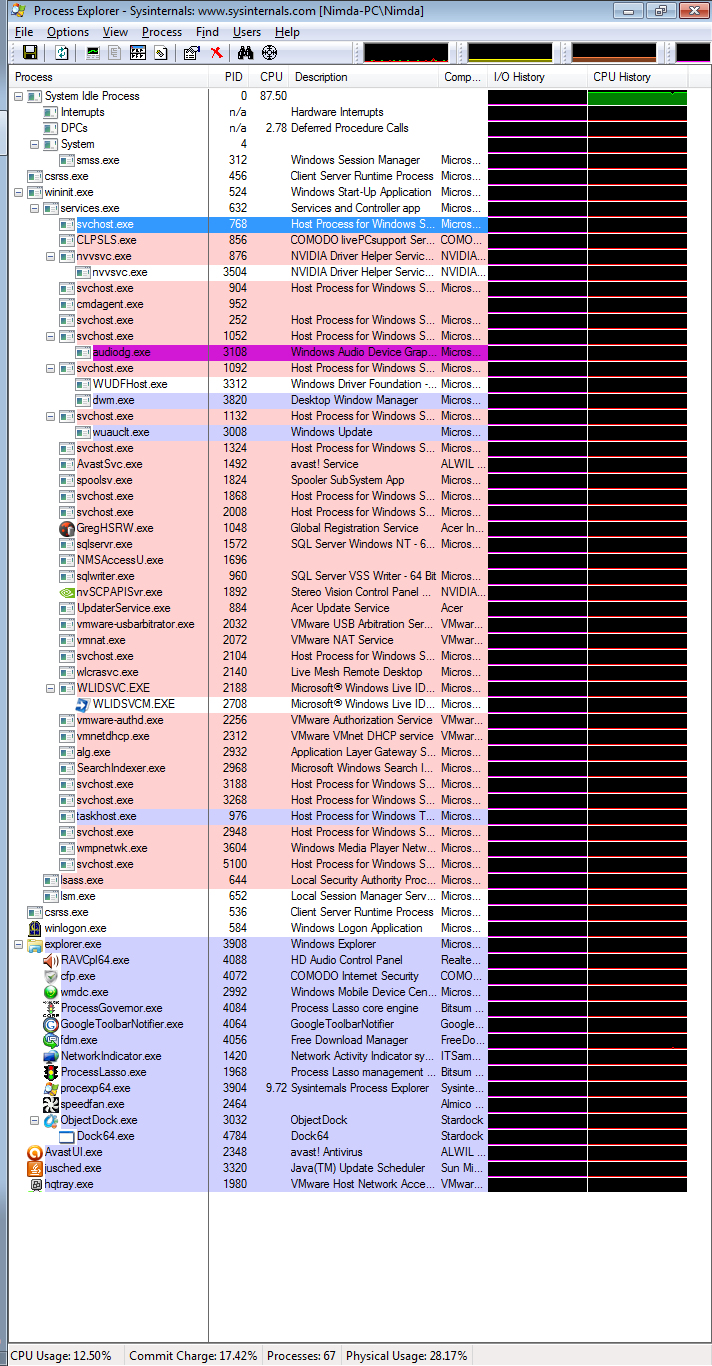
OK, here's an image of what's going on in my system when it's idling:


http://i421.photobucket.com/albums/pp292/SharkD2161/Support/windows7_idling.png


I have no idea how to interpret these values, other than, "Empty, black
space is good."


--
http://isometricland.com
Post a reply to this message
|
|
| |
| |
|
|
|
|
| |
| |
|
|
SharkD wrote:
> OK, here's an image of what's going on in my system when it's idling:
>
>
> http://i421.photobucket.com/albums/pp292/SharkD2161/Support/windows7_idling.png
>
>
>
> I have no idea how to interpret these values, other than, "Empty, black
> space is good."

That's a hack of a lot of I/O for an "idling" system. (If it really was
idling, of course, it would be zero bytes I/O...) Quite clearly it's
doing *something* fairly intensive in the background.

(The good news is, it doesn't appear to be swapping, or even coming
anywhere remotely near to swapping. You've still got acres of physical
RAM you can use before you need to start hitting virtual memory.)

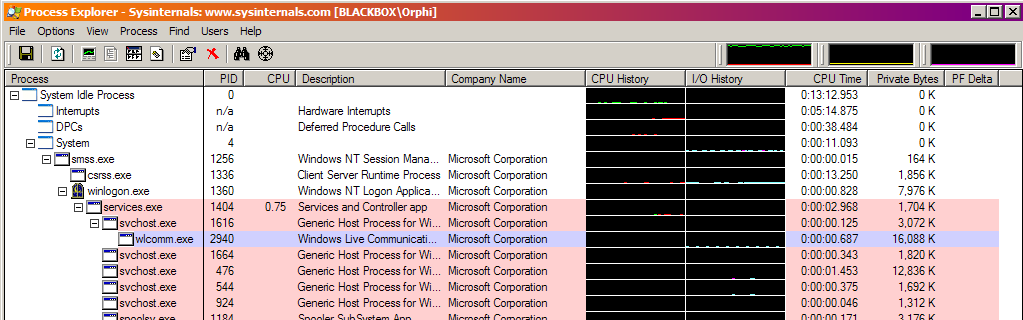
Try punching up Process Explorer and adding the CPU History and I/O
Bytes History columns, vis:

--
http://blog.orphi.me.uk/
http://www.zazzle.com/MathematicalOrchid*
Post a reply to this message
Attachments:
Download 'process explorer.png' (44 KB)
Preview of image 'process explorer.png'
|
|
| |
| |
|
|
|
|
| |
| |
|
|
On 6/25/2010 4:26 PM, Orchid XP v8 wrote:
> Try punching up Process Explorer and adding the CPU History and I/O
> Bytes History columns, vis:
>

Woah! You can attach files in this group!

I'm not seeing much of anything...

--
http://isometricland.com
Post a reply to this message
Attachments:
Download 'windows7_process_utilization_while_idle.png' (156 KB)
Preview of image 'windows7_process_utilization_while_idle.png'
|
|
| |
| |
|
|
|
|
| |
| |
|
|
SharkD wrote:
> OK, here's an image of what's going on in my system when it's idling:

If it's really idle, I'm susprised you have a page fault delta of almost
5000. Even with stuff running in the background (music, sidebar, etc) I'm
getting only a small PFDelta (<200) on Vista.

Find the resource monitor that looks like this:

http://www.techsupportalert.com/files/images/rm_overview_1.jpg

On Vista, there's a "resource monitor" button on the task manager
performance page. Or type it into the control panel or start bar or
something, to search?

It'll tell you what actual files etc are being accessed.

But, really, it doesn't look like it should be slow. As folks have said, it
doesn't look very busy.

--
Darren New, San Diego CA, USA (PST)
    C# - a language whose greatest drawback
    is that it's best implementation comes
    from a company that doesn't hate Microsoft.
Post a reply to this message
|
|
| |
| |
|
|
|
|
| |
| |
|
|
Le 25/06/2010 22:19, SharkD a écrit :
> OK, here's an image of what's going on in my system when it's idling:
>
>
> http://i421.photobucket.com/albums/pp292/SharkD2161/Support/windows7_idling.png
>
May be Microsoft is indexing your hard disk while idle, so that your
next search might be quicker. A great classical from the Redmont Firm.
(or it is just "defragmenting" in silence)

Or you might have some hidden process/virus, serving as a bot in botnet
(a shame you do not see the network traffic too).


--
A: Because it messes up the order in which people normally read text.<br/>
Q: Why is it such a bad thing?<br/>
A: Top-posting.<br/>
Q: What is the most annoying thing on usenet and in e-mail?
Post a reply to this message
|
|
| |
| |
|
|
|
|
| |