 |
|
|
|
|
|
| |
| |
|
|
|
|
| |
| |
|
|
> I'm running Win7 64bit on a Athlon64 X2 4000+ with a Geforce 6600 (256MB)
> with
> Aero active and it's not really sluggish, so the Geforce 210 should be
> more than
> sufficient to handle Aero.
> You might have a resource hungry virus scanner for example.
> Disconnect your PC from the Network and disable the Antivir. If this
> speeds
> things up you should look for a smarter Antivir.
Yes check the network setup, IME explorer reacts very badly (ie the GUI
becomes very unresponsive) to slow or unavailable network resources.
Post a reply to this message
|
|
| |
| |
|
|
|
|
| |
| |
|
|
On 6/24/2010 2:45 AM, Slime wrote:
> Try this and see if it makes anything better: Right click on desktop,
> personalize, scroll down to "basic and high contrast themes" and choose
> "windows 7 basic." This turns off a lot of flashy features like
> transparency on the window borders.
Already have it set to Basic! ;)
--
http://isometricland.com
Post a reply to this message
|
|
| |
| |
|
|
|
|
| |
| |
|
|
OK, here's an image of what's going on in my system when it's idling:
http://i421.photobucket.com/albums/pp292/SharkD2161/Support/windows7_idling.png
I have no idea how to interpret these values, other than, "Empty, black
space is good."
--
http://isometricland.com
Post a reply to this message
|
|
| |
| |
|
|
|
|
| |
| |
|
|
SharkD wrote:
> OK, here's an image of what's going on in my system when it's idling:
>
>
> http://i421.photobucket.com/albums/pp292/SharkD2161/Support/windows7_idling.png
>
>
>
> I have no idea how to interpret these values, other than, "Empty, black
> space is good."
That's a hack of a lot of I/O for an "idling" system. (If it really was
idling, of course, it would be zero bytes I/O...) Quite clearly it's
doing *something* fairly intensive in the background.
(The good news is, it doesn't appear to be swapping, or even coming
anywhere remotely near to swapping. You've still got acres of physical
RAM you can use before you need to start hitting virtual memory.)
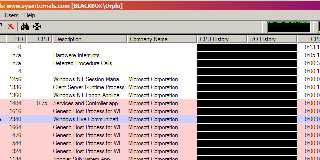
Try punching up Process Explorer and adding the CPU History and I/O
Bytes History columns, vis:
--
http://blog.orphi.me.uk/
http://www.zazzle.com/MathematicalOrchid*
Post a reply to this message
Attachments:
Download 'process explorer.png' (44 KB)
Preview of image 'process explorer.png'
|
|
| |
| |
|
|
|
|
| |
| |
|
|
On 6/25/2010 4:26 PM, Orchid XP v8 wrote:
> Try punching up Process Explorer and adding the CPU History and I/O
> Bytes History columns, vis:
>
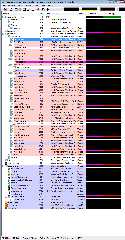
Woah! You can attach files in this group!
I'm not seeing much of anything...
--
http://isometricland.com
Post a reply to this message
Attachments:
Download 'windows7_process_utilization_while_idle.png' (156 KB)
Preview of image 'windows7_process_utilization_while_idle.png'
|
|
| |
| |
|
|
|
|
| |
| |
|
|
SharkD wrote:
> OK, here's an image of what's going on in my system when it's idling:
If it's really idle, I'm susprised you have a page fault delta of almost
5000. Even with stuff running in the background (music, sidebar, etc) I'm
getting only a small PFDelta (<200) on Vista.
Find the resource monitor that looks like this:
http://www.techsupportalert.com/files/images/rm_overview_1.jpg
On Vista, there's a "resource monitor" button on the task manager
performance page. Or type it into the control panel or start bar or
something, to search?
It'll tell you what actual files etc are being accessed.
But, really, it doesn't look like it should be slow. As folks have said, it
doesn't look very busy.
--
Darren New, San Diego CA, USA (PST)
C# - a language whose greatest drawback
is that it's best implementation comes
from a company that doesn't hate Microsoft.
Post a reply to this message
|
|
| |
| |
|
|
|
|
| |
| |
|
|
Le 25/06/2010 22:19, SharkD a écrit :
> OK, here's an image of what's going on in my system when it's idling:
>
>
> http://i421.photobucket.com/albums/pp292/SharkD2161/Support/windows7_idling.png
>
May be Microsoft is indexing your hard disk while idle, so that your
next search might be quicker. A great classical from the Redmont Firm.
(or it is just "defragmenting" in silence)
Or you might have some hidden process/virus, serving as a bot in botnet
(a shame you do not see the network traffic too).
--
A: Because it messes up the order in which people normally read text.<br/>
Q: Why is it such a bad thing?<br/>
A: Top-posting.<br/>
Q: What is the most annoying thing on usenet and in e-mail?
Post a reply to this message
|
|
| |
| |
|
|
|
|
| |







