 |
|
|
|
|
|
| |
| |
|
|
|
|
| |
| |
|
|
And lo On Tue, 04 May 2010 20:52:05 +0100, Fredrik Eriksson
<fe79}--at--{yahoo}--dot--{com> did spake thusly:
> On Tue, 04 May 2010 21:12:53 +0200, Orchid XP v8 <voi### [at] dev null> wrote:
>>
>> I realise the lense is important. My mum has an 8 MP camera, and it
>> takes crap pictures compared to my lowly 3 MP camera. I'm sure it's
>> because hime has a 45 mm lense and hers has a 4.5 mm lense.
>
> Mostly, it is because the sensor in your camera is much larger than the
> one in hers. Sensor size matters a lot; pixel density not so much. The
> focal length of the lens is not in any way a reliable indicator of
> quality; the lens in her camera is smaller because the tiny sensor does
> not require a larger lens.
Tooting my horn I did an entire 4 part guide to digital cameras last year.
http://flipc.blogspot.com/2009/03/digital-camera-guide-part-1.html
--
Phil Cook
--
I once tried to be apathetic, but I just couldn't be bothered
http://flipc.blogspot.com null> wrote:
>>
>> I realise the lense is important. My mum has an 8 MP camera, and it
>> takes crap pictures compared to my lowly 3 MP camera. I'm sure it's
>> because hime has a 45 mm lense and hers has a 4.5 mm lense.
>
> Mostly, it is because the sensor in your camera is much larger than the
> one in hers. Sensor size matters a lot; pixel density not so much. The
> focal length of the lens is not in any way a reliable indicator of
> quality; the lens in her camera is smaller because the tiny sensor does
> not require a larger lens.
Tooting my horn I did an entire 4 part guide to digital cameras last year.
http://flipc.blogspot.com/2009/03/digital-camera-guide-part-1.html
--
Phil Cook
--
I once tried to be apathetic, but I just couldn't be bothered
http://flipc.blogspot.com
Post a reply to this message
|
|
| |
| |
|
|
|
|
| |
| |
|
|
Phil Cook v2 wrote:

> Tooting my horn I did an entire 4 part guide to digital cameras last year.

Heh. And perhaps you remember me remarking at the time that you can
apparently buy a £200 Nikon D40 (?) and attach a £7,000 telephoto lense
to it - as if you'd want to. ;-)
Post a reply to this message
|
|
| |
| |
|
|
|
|
| |
| |
|
|
>> That is under 2 MP yet you would absolutely need a multi-thousand pound
>> lens to get that shot (purely because flood lights are not that bright
>> compared to daylight, and when you're zoomed in that much on action you
>> need a *really* fast shutter speed to avoid motion blur).
>
> Hell, *my* 3 MP camera would never, ever take a picture like that, no
> matter how perfect the lighting or how close up you were. The sensor just
> isn't of high enough quality.

If it was bright enough and you were a metre or two away from the action
then even a cheap consumer digital camera should give a pretty decent image:

http://www.flickr.com/photos/visithra/321853035/

That one was taken with a Canon A620.

The most obvious difference to the pro photo is that the background doesn't
get blurred (due to the small sensor size and low focal length).

And of course you can't always stand 2 metres from the action and ask for
daylight :-)
Post a reply to this message
|
|
| |
| |
|
|
|
|
| |
| |
|
|
> Heh. And perhaps you remember me remarking at the time that you can
> apparently buy a £200 Nikon D40 (?) and attach a £7,000 telephoto lense to
> it - as if you'd want to. ;-)

A friend of mine borrowed a 7K (or similar) telephoto lens to put on his old
Canon 300D body when he went to watch an air show.  The photos are
absolutely stunning, and I don't think if he had used a more expensive body
the photos would have been *much* better (but on the other hand, without the
big lens they would have been rubbish).

If you want to take action photos of things from far away under dodgy light,
then even the cheapest dSLR body will be fine, just get the biggest lens you
can afford.
Post a reply to this message
|
|
| |
| |
|
|
|
|
| |
| |
|
|
>> Hell, *my* 3 MP camera would never, ever take a picture like that, no
>> matter how perfect the lighting or how close up you were. The sensor
>> just isn't of high enough quality.
>
> If it was bright enough and you were a metre or two away from the action
> then even a cheap consumer digital camera should give a pretty decent
> image:
>
> http://www.flickr.com/photos/visithra/321853035/
>
> That one was taken with a Canon A620.

Well, try this:

http://www.orphi.me.uk/rev1/04-Photos/2007-04-14/DSCF0064.html

That's probably a metre or two away, it's a dazzlingly bright June
afternoon, and the image sucks. It's flat and utterly devoid of colour.

http://www.orphi.me.uk/rev1/04-Photos/2007-04-14/DSCF0011.html

Similar deal. No contrast anywhere, half the frame is bleached white,
and it doesn't even appear to be properly in focus in places.

These images are scaled down; usually the full-res image is horribly
grainy too. (Because, let's face it, usually it *isn't* a dazzlingly
bright June afternoon, and my camera is supremely insensitive to light.
If it's not blinding sunshine, it wants to use the flash...)

There's no way my camera would ever capture the lush colours and sharp
edges of the images you show.
Post a reply to this message
|
|
| |
| |
|
|
|
|
| |
| |
|
|
> There's no way my camera would ever capture the lush colours and sharp
> edges of the images you show.

Play with the settings!  Both on the camera and in your PC software.  No
professional would ever dream of using the "Auto" mode and using whatever
image the camera happened to produce.

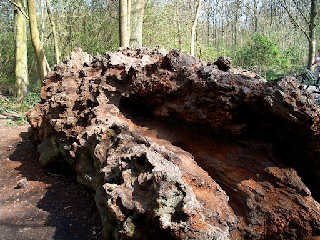
Attached is after 5 seconds in Paint Shop Pro.

If your camera is not so good at deciding the exposure and colour for itself
then you must step in and either force the camera (eg by reducing the
exposure or setting it manually) and/or post process it on your PC.
Post a reply to this message
Attachments:
Download 'dscf0064.jpg' (118 KB)
Preview of image 'dscf0064.jpg'
|
|
| |
| |
|
|
|
|
| |
| |
|
|
On Wed, 05 May 2010 10:17:21 +0200, Invisible <voi### [at] devnull> wrote:
>
> And here I was thinking that a larger lense lets more light in...

Which a larger sensor needs, because there is more sensor area to cover.


>  From what I've seen, if you buy an expensive camera, you get all kinds
> of crazy things like external flash, external exposure control (i.e.,
> you can have a 2-hour exposure if you want), software remote control,
> more colour balance settings than any sane person could possibly need,
> and so on.

I guess you consider most professional (and some hobbyist) photographers
insane then.


--
FE
Post a reply to this message
|
|
| |
| |
|
|
|
|
| |
| |
|
|
scott wrote:
>> There's no way my camera would ever capture the lush colours and sharp
>> edges of the images you show.
>
> Play with the settings!  Both on the camera and in your PC software.  No
> professional would ever dream of using the "Auto" mode and using
> whatever image the camera happened to produce.

The camera itself doesn't have much you can adjust. Off the top of my head:

- "Colour balance" has three options:
   - "Normal".
   - "Indoor", which makes the picture slightly more blue.
   - "Outdoor", which makes the picture slightly more yellow.

- "Exposure", which has options something like "-2, -1, 0, +1, +2".
Setting it to zero gives you normal images, turning it down makes the
picture blacker, turning it up makes the picture whiter.

> Attached is after 5 seconds in Paint Shop Pro.

It has slightly more colour now, but it's nothing like the lush greens
and deep browns you'd see in a glossy magazine.

> If your camera is not so good at deciding the exposure and colour for
> itself then you must step in and either force the camera (eg by reducing
> the exposure or setting it manually) and/or post process it on your PC.

Once the picture is taken, any detail which isn't captured in the image
is gone forever, and can never be brought back. You can turn the
brightness up or down, but you can't turn pure black (or pure white)
into detail. If you're lucky, you might be able to reveal the JPEG
compression artifacts, but that is all. You also can't focus a fuzzy
image, or remove graininess.

In short, post-processing is a hopeless task. You have to make the
camera take a half-decent image in the first place.

A new camera is just one of the things on my [huge] list of things to
buy one day. (Quite aside from picture issues, my camera eats batteries
for no apparent reason...)
Post a reply to this message
|
|
| |
| |
|
|
|
|
| |
| |
|
|
> - "Colour balance" has three options:
>   - "Normal".
>   - "Indoor", which makes the picture slightly more blue.
>   - "Outdoor", which makes the picture slightly more yellow.

So obviously you will need to tweak these later in an image program.  Take a
photo of something white in the same location to get a good reference for
later post-processing.

> It has slightly more colour now, but it's nothing like the lush greens and
> deep browns you'd see in a glossy magazine.

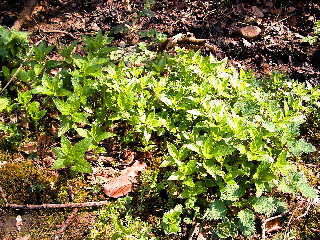
Just tweak it as much as you want in your software - I didn't want to make
it look too fake though.  Here's your other photo attached.  With digital
it's so easy to make it look so much better.

> Once the picture is taken, any detail which isn't captured in the image is
> gone forever, and can never be brought back. You can turn the brightness
> up or down, but you can't turn pure black (or pure white) into detail.

That is why it is very important that the exposure is not set too high when
you take the photo.  If you look at the histogram of the photo I edited, it
is obvious a lot of pixels are clipped at white.  If you'd turned down the
exposure a bit on the camera then the colours would probably have turned out
more saturated already. (eg RGB=100,200,100 exposed double gives
RGB=200,255,200 which looks washed out)

> If you're lucky, you might be able to reveal the JPEG compression
> artifacts, but that is all.

IME cameras save JPEG with extremely low compression, like the 1/100 setting
in an image editor.

> You also can't focus a fuzzy image

Your photos didn't look fuzzy to me.

> In short, post-processing is a hopeless task.

Professionals would disagree with you.
Post a reply to this message
Attachments:
Download 'dscf0064.jpg' (700 KB)
Preview of image 'dscf0064.jpg'
|
|
| |
| |
|
|
|
|
| |
| |
|
|
scott wrote:
>> - "Colour balance" has three options:
>>   - "Normal".
>>   - "Indoor", which makes the picture slightly more blue.
>>   - "Outdoor", which makes the picture slightly more yellow.
>
> So obviously you will need to tweak these later in an image program.
> Take a photo of something white in the same location to get a good
> reference for later post-processing.

I have had some limited success with this. Certainly if the problem is
the image having too much of one colour, that's usually fixable. What
isn't fixable is lighting problems. (E.g., part of the image is
correctly lit, but everything else is too dark.)

>> It has slightly more colour now, but it's nothing like the lush greens
>> and deep browns you'd see in a glossy magazine.
>
> Just tweak it as much as you want in your software - I didn't want to
> make it look too fake though.  Here's your other photo attached.  With
> digital it's so easy to make it look so much better.

Now that's more like it. (Although, again, obviously you can't do much
about the over-exposed leaves.)

>> Once the picture is taken, any detail which isn't captured in the
>> image is gone forever, and can never be brought back. You can turn the
>> brightness up or down, but you can't turn pure black (or pure white)
>> into detail.
>
> That is why it is very important that the exposure is not set too high
> when you take the photo.

Or too low, for that matter.

>> If you're lucky, you might be able to reveal the JPEG compression
>> artifacts, but that is all.
>
> IME cameras save JPEG with extremely low compression, like the 1/100
> setting in an image editor.

My camera has several image quality settings. Unfortunately, as I
explained, it eats batteries. If you're not using the camera even for
five minutes, you have to take the batteries out or they won't last the
day. Unfortunately that resets all the settings, which you then have to
go and put back in. Most particularly, the camera defaults back to
lower-resolution images.

Anyway, the available settings are "1 MP", "2 MP", "3 MP Natural" and "3
MP Fine". The difference between the last two is in the amount of JPEG
compression. (It's plausible there's also some image sharpening or
something, but that doesn't appear to be the case.)

>> You also can't focus a fuzzy image
>
> Your photos didn't look fuzzy to me.

These ones aren't, no. I was just making the point.

>> In short, post-processing is a hopeless task.
>
> Professionals would disagree with you.

Professionals would have taken decent photos in the first place. ;-)
Post a reply to this message
|
|
| |
| |
|
|
|
|
| |
| |
|
|
>> You also can't focus a fuzzy image
>
> Your photos didn't look fuzzy to me.

Try this one:

http://www.orphi.me.uk/rev1/04-Photos/2007-04-14/DSCF0016.html

(For whatever reason, my camera utterly refuses to focus on small
objects. I guess it's beyond the physical limits of the lense system or
something...)

Trying to sharpen the image just amplifies the JPEG compression, sadly.
Post a reply to this message
|
|
| |
| |
|
|
|
|
| |
| |
|
|
And lo On Wed, 05 May 2010 09:41:03 +0100, scott <sco### [at] scottcom> did
spake thusly:

>> Heh. And perhaps you remember me remarking at the time that you can
>> apparently buy a £200 Nikon D40 (?) and attach a £7,000 telephoto lense
>> to it - as if you'd want to. ;-)

That and the poor quality of your mum's camera.

> A friend of mine borrowed a 7K (or similar) telephoto lens to put on his
> old Canon 300D body when he went to watch an air show.  The photos are
> absolutely stunning, and I don't think if he had used a more expensive
> body the photos would have been *much* better (but on the other hand,
> without the big lens they would have been rubbish).
>
> If you want to take action photos of things from far away under dodgy
> light, then even the cheapest dSLR body will be fine, just get the
> biggest lens you can afford.

Toot "This is where DSLRs rule as they're both bigger and have
interchangable lenses. In this case the maxim is simple - the bigger the
better. A bigger lens means more light getting to the sensor, means a
faster shutter speed and less blur, and a lower ISO and more detail and
less noise." ;-)

--
Phil Cook

--
I once tried to be apathetic, but I just couldn't be bothered
http://flipc.blogspot.com
Post a reply to this message
|
|
| |
| |
|
|
|
|
| |
| |
|
|
> What isn't fixable is lighting problems. (E.g., part of the image is
> correctly lit, but everything else is too dark.)

A better camera won't fix this.  If you really want to fix this then just
take two different exposures and combine them later in software.  Pros have
to do this too when they can't control the lighting.

>>> In short, post-processing is a hopeless task.
>>
>> Professionals would disagree with you.
>
> Professionals would have taken decent photos in the first place. ;-)

They looked decent enough to me!  And typically pros will not let the camera
do *any* processing, and import the raw sensor data to their computer for
manual colour, sharpness and exposure control.
Post a reply to this message
|
|
| |
| |
|
|
|
|
| |
| |
|
|
And lo On Wed, 05 May 2010 09:53:59 +0100, Invisible <voi### [at] devnull> did
spake thusly:

>>> Hell, *my* 3 MP camera would never, ever take a picture like that, no
>>> matter how perfect the lighting or how close up you were. The sensor
>>> just isn't of high enough quality.
>>  If it was bright enough and you were a metre or two away from the
>> action then even a cheap consumer digital camera should give a pretty
>> decent image:
>>  http://www.flickr.com/photos/visithra/321853035/
>>  That one was taken with a Canon A620.
>
> Well, try this:
>
> http://www.orphi.me.uk/rev1/04-Photos/2007-04-14/DSCF0011.html

That looks familiar I wonder why?

http://flipc.blogspot.com/2009/04/orphis-photos-part-2.html

--
Phil Cook

--
I once tried to be apathetic, but I just couldn't be bothered
http://flipc.blogspot.com
Post a reply to this message
|
|
| |
| |
|
|
|
|
| |
| |
|
|
> Trying to sharpen the image just amplifies the JPEG compression, sadly.

Just delete out-of-focus images.
Post a reply to this message
|
|
| |
| |
|
|
|
|
| |
| |
|
|
On 3/05/2010 23:22, Orchid XP v8 wrote:
> Warp wrote:
>
>> Well, there are cheap student versions
>
> Oh yeah - I hadn't thought of that...

Well, actually, AFAIK even those versions are 300 to 600 Euro, I
wouldn't call that cheap.

Although, compared to 3000Euro, yes, it is :)

cu!
Post a reply to this message
|
|
| |
| |
|
|
|
|
| |
| |
|
|
On Wed, 05 May 2010 09:10:00 +0100, Invisible wrote:

>>>> How much did you think it was?
>>> ebuyer.com, Adobe Creative Suite 4, Complete Package, Windows:
>>> £1,502.62
>>
>> That's what happens if you don't shop around - you end up paying a
>> ridiculous price for a product. ;-)
>
> No, I'm pretty sure that's what it actually costs.

Arguably, that might be MSRP, but by shopping around you can get a
cheaper price on it.  That's why it's always a good idea to shop around.

> OK, let's try Insight. (Sure, they're not the cheapest people around...)
>
> Adobe Photoshop CS4: £587
> Adobe Creative Suite 4 Master Collection: £2,420 Adobe Creative Suite 4
> Production Premium: £1,815
>
> I'm not making these numbers up!

No, I believe you're finding those prices, but also have a look at the
source I quoted - you can't deny that it's available for much lower
pricing than you've found.

> (Photoshop Elements, however, is only £60 - which matches other prices
> I've seen around.)
>
>>> If that doesn't make you feel slightly dizzy, I don't know what
>>> will...
>>
>> I know I'd feel kinda dumb if I paid that much for it knowing that I
>> could get it for £361.58.
>
> I cannot believe it's the same product. Not for 1/3rd of the price. It
> can't be.

Yes, it can be, most of software pricing is profit.

> Then again, you said you got the price from a US website? Last time I
> checked [back when £1 = $2], Adobe Acrobat 8 Professional was £400 in
> the UK and $400 in the US. (IOW, the UK version was 2x the price.) I
> don't know if that's still the case...

It isn't.  I did the price conversions using that day's exchange rate as
provided by xe.com.  Those exchange rates are supposed to be realtime
AFAIK.  But if you're creative in purchasing items like this, you can
certainly get the US price if you want (I do this all the time with items
purchased in the UK; I have them shipped to a friend there if the
supplier won't send it to the US, and my friend either ships the item to
me or brings it the next time he's in the US).

Jim
Post a reply to this message
|
|
| |
| |
|
|
|
|
| |
| |
|
|
On Wed, 05 May 2010 09:53:59 +0100, Invisible wrote:

>>> Hell, *my* 3 MP camera would never, ever take a picture like that, no
>>> matter how perfect the lighting or how close up you were. The sensor
>>> just isn't of high enough quality.
>>
>> If it was bright enough and you were a metre or two away from the
>> action then even a cheap consumer digital camera should give a pretty
>> decent image:
>>
>> http://www.flickr.com/photos/visithra/321853035/
>>
>> That one was taken with a Canon A620.
>
> Well, try this:
>
> http://www.orphi.me.uk/rev1/04-Photos/2007-04-14/DSCF0064.html
>
> That's probably a metre or two away, it's a dazzlingly bright June
> afternoon, and the image sucks. It's flat and utterly devoid of colour.

It's not a function of the sensor, look what a couple seconds of
postprocessing in GIMP shows.

http://www.imagebam.com/image/7b757979306284

I increased the colour saturation and adjusted the brightness/contrast a
little.  Took < 10 seconds to do.

> http://www.orphi.me.uk/rev1/04-Photos/2007-04-14/DSCF0011.html

http://www.imagebam.com/image/24509579306856

Almost the same adjustments on this one.

> There's no way my camera would ever capture the lush colours and sharp
> edges of the images you show.

Well, I'd disagree.

Jim
Post a reply to this message
|
|
| |
| |
|
|
|
|
| |
| |
|
|
On Wed, 05 May 2010 12:35:02 +0200, scott wrote:

> And typically pros will not let the camera do *any* processing, and
> import the raw sensor data to their computer for manual colour,
> sharpness and exposure control.

Exactly - the adjustments I made were pretty basic with GIMP (similar to
the ones you made), but if RAW format images were available, there'd be a
lot more room to adjust things like exposure.

Jim
Post a reply to this message
|
|
| |
| |
|
|
|
|
| |
| |
|
|
Phil Cook v2 wrote:
> you can get the latest Paint Shop Pro

Yeah, would be great if it f'ing worked. :-)

--
Darren New, San Diego CA, USA (PST)
   Linux: Now bringing the quality and usability of
   open source desktop apps to your personal electronics.
Post a reply to this message
|
|
| |
| |
|
|
|
|
| |
| |
|
|
Invisible wrote:
>  From what I've seen, if you buy an expensive camera,

Depends what you mean "expensive". Before the dslr craze, this was pretty
normal on a $400 camera with a good lens.

--
Darren New, San Diego CA, USA (PST)
   Linux: Now bringing the quality and usability of
   open source desktop apps to your personal electronics.
Post a reply to this message
|
|
| |
| |
|
|
|
|
| |
| |
|
|
On Wed, 05 May 2010 11:29:02 +0100, Invisible wrote:

> Trying to sharpen the image just amplifies the JPEG compression, sadly.

Depends on the tools; I've seen a tool for GIMP called "refocus-it" that
actually does a very good job.  With practice, an unsharp mask or NL
filter can do pretty good with them as well, from what I've seen (I've
not practiced that as much).

Jim
Post a reply to this message
|
|
| |
| |
|
|
|
|
| |
| |
|
|
"Orchid XP v8" <voi### [at] devnull> wrote in message
news:4bdf12e4@news.povray.org...
> Mike Raiford wrote:
> > Has anybody seen the previews for some of the features of this new
> > edition of Photoshop?
> >
> > Been playing with it for a while. The Content-aware fill is truly
> > amazing.

> While it *is* truly amazing - to the point of being frightening - the
> thing I can't figure out is how a normal human manages to get near a
> copy of Photoshop in the first place. Last time I checked, it's
> jaw-droppingly expensive...

It's less than pocket change for individuals or businesses doing actual work
with it, as far as tools go.
Post a reply to this message
|
|
| |
| |
|
|
|
|
| |
| |
|
|
On 5/5/2010 3:02 AM, Phil Cook v2 wrote:

> I suppose the path is Windows own 'editor', then Photoshop Elements,
> then Photoshop depending on how serious you are. Still when you consider
> you can get the latest Paint Shop Pro for under £80 and Elements for
> under £55 jumping up to £644 for Photoshop is a chasm.

There is an upgrade from Elements to Photoshop, which gives a small
discount ;)

It's much like jumping from an advanced point and shoot camera to a DSLR.

--
~Mike
Post a reply to this message
|
|
| |
| |
|
|
|
|
| |
| |
|
|
On 5/4/2010 11:59 AM, Orchid XP v8 wrote:

> (It still amuses me that I can buy a £200 camera and attach a £7,000
> lense to it... as if it'll be worth it!)

Believe me, it is worth it. Especially a lens at that price (Just a
guess: 400mm f/2.8 aperture, which would be one heck of a lens!)

Of course, the one I purchased was about $700, a 70-200 f/4 (a great
budget lens, btw ...)

The difference between that, and the 70-300 Quantarray was astounding.
All on a low-end (Digital Rebel) body. The lens really matters the most.


>> And I'm mostly normal :)
>
> You're in povray.off-topic and you seriously expect us to believe you're
> *normal*?? :-P
>

.... Mostly ....

I've never been committed to any sort of institution for the insane, or
anything like that.

--
~Mike
Post a reply to this message
|
|
| |
| |
|
|
|
|
| |
| |
|
|
On 5/4/2010 1:50 PM, Darren New wrote:

> The lens, however, lets you take pictures you wouldn't otherwise be able
> to take. Even a small quality change in the lens adds or removes an hour
> each day that you can take natural light pictures, or pictures that
> aren't motion-blurred, or etc.

Right. The bigger the aperture, the more glass (And in high-end lenses
it's exotic glass with exotic coatings) ergo, the more cost.

Remember, the glass has to be a special type (and in most lenses, there
are a couple different types of glass being used) to eliminate
dispersion effects. Also, its expensive to grind some of the profiles on
the glass to counter geometrical distortions. Again, adding to the price
tag.

--
~Mike
Post a reply to this message
|
|
| |
| |
|
|
|
|
| |
| |
|
|
Darren New wrote:
> Sabrina Kilian wrote:
>> terms of the MPEG license attached to the camera.
>
> You'd be surprised.
>

Not really, there are some scary lawyer words buried in those owner's
manuals. How many of them mean anything are a different story, but you
do pay extra for the extra lawyer words.

>> have old Minolta lenses that still work just fine on a new Sony Alpha.
>
> Yeah, actually, I wound up with a camera that was slightly more
> expensive and a bit heavier than I needed because it supported lenses
> that were older than I am, which I obviously don't own.  Had I
> understood that, I would have gone the next body down.
>

If you own old lenses, it's worth the time, and maybe money, to look at
the different cameras. If you don't own old lenses, it doesn't matter.

I have lenses older than me. SLR bodies, folding cameras, and
8/super8/16mm film cameras too. Twenty five cents goes a long way at tag
sales.
Post a reply to this message
|
|
| |
| |
|
|
|
|
| |
| |
|
|
I just got PSP X2 working again.

What is with these companies?  PSP8 had a perfectly good mechanism for
browsing pictures. You opened the browser, you navigated to the directory
with the pictures, it generated and saved the thumbnails in that directory,
and you could work with a directory full of photos.

PSP X2, you open the paint program the first time, and it locks up for an
hour going around thumbnailing every photo on your entire system, into its
own little hidden directory, including all the pictures you will never want
to work on with this program, and it doesn't stop when you close the
program, and it's too unresponsive to even tell it to stop. And I really
don't even want ten thousand extra thumbnails on my disk. I now have three
progams that generate thumbnails for every photo I look at, and at least one
that generates thumbnails for every photo I don't look at as well. *And* the
photos already all have thumbnails in them!

Plus, really, I don't need a program running all the time just in case I
stick a memory chip in that has photos on it.  And anyway that's already
built into Windows, so why are you ruining that feature by giving your own
half-assed implementation?

</rant>

--
Darren New, San Diego CA, USA (PST)
   Linux: Now bringing the quality and usability of
   open source desktop apps to your personal electronics.
Post a reply to this message
|
|
| |
| |
|
|
|
|
| |
| |
|
|
On Wed, 05 May 2010 20:21:15 +0200, Darren New <dne### [at] sanrrcom> wrote:
> I just got PSP X2 working again.
>
> What is with these companies?  PSP8 had a perfectly good mechanism for
> browsing pictures.

Very different companies. Jasc good; Corel bad.


--
FE
Post a reply to this message
|
|
| |
| |
|
|
|
|
| |
| |
|
|
Invisible wrote:
> http://www.orphi.me.uk/rev1/04-Photos/2007-04-14/DSCF0016.html
>
> (For whatever reason, my camera utterly refuses to focus on small
> objects. I guess it's beyond the physical limits of the lense system or
> something...)

The fact that the corner is in focus, and is just a bit further away
than the center, suggests that the camera focused as near as it could. A
macro mode might get you a bit closer to your subject.
Post a reply to this message
|
|
| |
| |
|
|
|
|
| |
| |
|
|
Sabrina Kilian wrote:
> Not really, there are some scary lawyer words buried in those owner's
> manuals.

I just read a recent discussion where someone went thru a bunch of user
manuals for all the high-end cameras, including like the things that TV
studios and digital movie production houses use, and they *all* say you have
to go get your license for any commercial use. Indeed, individual viewers
also need a license to watch any video that was *ever* in MPEG (h.264?)
format that ever had any sort of money transfer associated with it.

So if you take a video with a camera that records it as mpeg, transcode that
to FLV, share it via youtube (where youtube makes money serving ads), and I
watch it, I technically need a license to watch that video.

> If you own old lenses, it's worth the time, and maybe money, to look at
> the different cameras. If you don't own old lenses, it doesn't matter.

I had old lenses, but not so old they didn't have autofocus. :-)

> I have lenses older than me. SLR bodies, folding cameras, and
> 8/super8/16mm film cameras too. Twenty five cents goes a long way at tag
> sales.

Yep.

--
Darren New, San Diego CA, USA (PST)
   Linux: Now bringing the quality and usability of
   open source desktop apps to your personal electronics.
Post a reply to this message
|
|
| |
| |
|
|
|
|
| |
| |
|
|
Fredrik Eriksson wrote:
> Very different companies. Jasc good; Corel bad.

Yeah, but this seems a common theme amongst many programs.

"Corel bad" is why I'm looking into whether the $70 photoshop is worthwhile.


--
Darren New, San Diego CA, USA (PST)
   Linux: Now bringing the quality and usability of
   open source desktop apps to your personal electronics.
Post a reply to this message
|
|
| |
| |
|
|
|
|
| |
| |
|
|
Invisible wrote:
> Well, try this:
>
> http://www.orphi.me.uk/rev1/04-Photos/2007-04-14/DSCF0064.html
>
> That's probably a metre or two away, it's a dazzlingly bright June
> afternoon, and the image sucks. It's flat and utterly devoid of colour.
>
> http://www.orphi.me.uk/rev1/04-Photos/2007-04-14/DSCF0011.html
>
> Similar deal. No contrast anywhere, half the frame is bleached white,
> and it doesn't even appear to be properly in focus in places.
>
> These images are scaled down; usually the full-res image is horribly
> grainy too. (Because, let's face it, usually it *isn't* a dazzlingly
> bright June afternoon, and my camera is supremely insensitive to light.
> If it's not blinding sunshine, it wants to use the flash...)
>
> There's no way my camera would ever capture the lush colours and sharp
> edges of the images you show.

As others are pointing out, your images are just fine with a bit of
tweaking. It is all about contrast. Earthy reds and greens do not differ
that much, so it all blurs. I turned your first link black&white to show
you how that contrast appears:
http://picasaweb.google.com/sabrina.kilian/TempAlbum?feat=directlink
Also put a comparison leafy picture in color and B&W.

You can fix it with the aperture and exposure, blurring out the
background. You can fix it in post, just pushing the hue and saturation
values around. You don't fix this in camera with menu options. Skip the
color correction in camera, if you can. Skip jpeg if the camera has the
option to shoot raw. You want some dark in there, so one fix in camera
might be to under expose the images if you can not set the shutter speed
directly.

Or, you fix it in your eyes before the picture. Shoot in black and white
for a while, just as practice, and you can quickly teach yourself how to
spot setting that is just doomed to be washed out. You can fix those
situations (spot flash, waiting for the sun to change, moving to a
different vantage point) but learn to see them first.
Post a reply to this message
|
|
| |
| |
|
|
|
|
| |
| |
|
|
Phil Cook v2 wrote:
> I suppose the path is Windows own 'editor', then Photoshop Elements,
> then Photoshop depending on how serious you are. Still when you consider
> you can get the latest Paint Shop Pro for under £80 and Elements for
> under £55 jumping up to £644 for Photoshop is a chasm.
>

I thought the path went windows 'editor', Elements, ArtRage?

I never 'got' Photoshop. I used it at work, and while it does everything
. . . it does everything. Felt like overkill, every time I started it
for something.
Post a reply to this message
|
|
| |
| |
|
|
|
|
| |
| |
|
|
Mike Raiford wrote:

> Right. The bigger the aperture, the more glass (And in high-end lenses
> it's exotic glass with exotic coatings) ergo, the more cost.
>
> Remember, the glass has to be a special type (and in most lenses, there
> are a couple different types of glass being used) to eliminate
> dispersion effects. Also, its expensive to grind some of the profiles on
> the glass to counter geometrical distortions. Again, adding to the price
> tag.

I bet a £7,000 lense is really, really heavy...

(I couldn't tell from the picture, but it looked like it was 30cm across
or something!)

--
http://blog.orphi.me.uk/
http://www.zazzle.com/MathematicalOrchid*
Post a reply to this message
|
|
| |
| |
|
|
|
|
| |
| |
|
|
Jim Henderson wrote:
> On Wed, 05 May 2010 12:35:02 +0200, scott wrote:
>
>> And typically pros will not let the camera do *any* processing, and
>> import the raw sensor data to their computer for manual colour,
>> sharpness and exposure control.
>
> Exactly - the adjustments I made were pretty basic with GIMP (similar to
> the ones you made), but if RAW format images were available, there'd be a
> lot more room to adjust things like exposure.

...but once the image has been taken, the exposure has already happened.
How can you change it after the fact?

--
http://blog.orphi.me.uk/
http://www.zazzle.com/MathematicalOrchid*
Post a reply to this message
|
|
| |
| |
|
|
|
|
| |
| |
|
|
Sabrina Kilian wrote:

> You can fix it with the aperture and exposure, blurring out the
> background. You can fix it in post, just pushing the hue and saturation
> values around. You don't fix this in camera with menu options. Skip the
> color correction in camera, if you can. Skip jpeg if the camera has the
> option to shoot raw. You want some dark in there, so one fix in camera
> might be to under expose the images if you can not set the shutter speed
> directly.

Just FYI, the camera doesn't have any option to save anything but JPEG
format. You can adjust the colour balance (but not very much), and
exposure and IIRC you can manually set the shutter speed in case you're
insane.

I still want a new camera. It's a PITA that I can't leave the batteries
in this one...

--
http://blog.orphi.me.uk/
http://www.zazzle.com/MathematicalOrchid*
Post a reply to this message
|
|
| |
| |
|
|
|
|
| |
| |
|
|
Orchid XP v8 wrote:
> Jim Henderson wrote:
>> On Wed, 05 May 2010 12:35:02 +0200, scott wrote:
>>
>>> And typically pros will not let the camera do *any* processing, and
>>> import the raw sensor data to their computer for manual colour,
>>> sharpness and exposure control.
>>
>> Exactly - the adjustments I made were pretty basic with GIMP (similar to
>> the ones you made), but if RAW format images were available, there'd be a
>> lot more room to adjust things like exposure.
>
> ...but once the image has been taken, the exposure has already happened.
> How can you change it after the fact?

In film cameras, exposure means how much time the film is exposed to light.
In digital cameras, the sensor is receiving light all the time. What does
"exposure" mean there?
Post a reply to this message
|
|
| |
| |
|
|
|
|
| |
| |
|
|
"Fredrik Eriksson" <fe79}--at--{yahoo}--dot--{com> wrote:
> On Wed, 05 May 2010 20:21:15 +0200, Darren New <dne### [at] sanrrcom> wrote:
>> I just got PSP X2 working again.
>>
>> What is with these companies?  PSP8 had a perfectly good mechanism for
>> browsing pictures.
>
> Very different companies. Jasc good; Corel bad.

I remember using Jasc Paint Shop Pro 5... Now that had no bloat :)
Post a reply to this message
|
|
| |
| |
|
|
|
|
| |
| |
|
|
On 05/05/2010 7:21 PM, Darren New wrote:
> I just got PSP X2 working again.
>

...

> What is with these companies? PSP8 had a perfectly good mechanism for
> browsing pictures.
> </rant>
>

Thanks for the heads up :-D

--

Best Regards,
	Stephen
Post a reply to this message
|
|
| |
| |
|
|
|
|
| |
| |
|
|
Nicolas Alvarez wrote:
> In digital cameras, the sensor is receiving light all the time. What does
> "exposure" mean there?

First, it's not.  At least in DSLRs. :-)

I suspect in things like the little cameras where you aim thru the LCD,
there's either a non-mechanical shutter, or there's a wire that clears the
sensor, you let it accumulate for some number of miliseconds, and then you
read the sensor.

Second, if you're talking about the ISO setting rather than the exposure,
that's about how much you pre-bias the electrons in the sensor. Basically,
you load up each pixel of the sensor with some electrons, and if light kicks
out an electron, you add one to the intensity of the light there. Adding
more electrons makes it easier to get kicked out.

--
Darren New, San Diego CA, USA (PST)
   Linux: Now bringing the quality and usability of
   open source desktop apps to your personal electronics.
Post a reply to this message
|
|
| |
| |
|
|
|
|
| |
| |
|
|
Nicolas Alvarez wrote:
> "Fredrik Eriksson" <fe79}--at--{yahoo}--dot--{com> wrote:
>> On Wed, 05 May 2010 20:21:15 +0200, Darren New <dne### [at] sanrrcom> wrote:
>>> I just got PSP X2 working again.
>>>
>>> What is with these companies?  PSP8 had a perfectly good mechanism for
>>> browsing pictures.
>> Very different companies. Jasc good; Corel bad.
>
> I remember using Jasc Paint Shop Pro 5... Now that had no bloat :)

I can still use 8. The only reason I even bought the new one is that when
working on vacation photos, I tend to open up a bunch from the same scene
(so to speak), do the adjustments, pick which ones I want to keep, then exit
out and tell the paint program to save everything. This fails on PSP8 under
Vista for some reason.  Otherwise I was perfectly happy with the program.

--
Darren New, San Diego CA, USA (PST)
   Linux: Now bringing the quality and usability of
   open source desktop apps to your personal electronics.
Post a reply to this message
|
|
| |
| |
|
|
|
|
| |
| |
|
|
On Wed, 05 May 2010 21:09:57 +0100, Orchid XP v8 wrote:

> Just FYI, the camera doesn't have any option to save anything but JPEG
> format. You can adjust the colour balance (but not very much), and
> exposure and IIRC you can manually set the shutter speed in case you're
> insane.
>
> I still want a new camera. It's a PITA that I can't leave the batteries
> in this one...

What kind of camera have you got?  (I suppose I could look at the EXIF
tags.....Fujifilm FinePix S304 it looks like.

Changing the shutter speed, though, that's not insane, that's sensible
when you can tell how it will affect the image.

Jim
Post a reply to this message
|
|
| |
| |
|
|
|
|
| |
| |
|
|
On Wed, 05 May 2010 21:04:31 +0100, Orchid XP v8 wrote:

> Jim Henderson wrote:
>> On Wed, 05 May 2010 12:35:02 +0200, scott wrote:
>>
>>> And typically pros will not let the camera do *any* processing, and
>>> import the raw sensor data to their computer for manual colour,
>>> sharpness and exposure control.
>>
>> Exactly - the adjustments I made were pretty basic with GIMP (similar
>> to the ones you made), but if RAW format images were available, there'd
>> be a lot more room to adjust things like exposure.
>
> ...but once the image has been taken, the exposure has already happened.
> How can you change it after the fact?

I've actually wondered this myself - raw editing software gives you the
option to adjust the exposure; obviously, you can't pull details out
doing this that are completely washed out or completely underexposed, but
it is possible to bring additional detail out by making changes to the
exposure setting (ev) after the photo has been taken.

I've done it, so clearly it's possible, I just don't understand the math
behind it.

Jim
Post a reply to this message
|
|
| |
| |
|
|
|
|
| |
| |
|
|
On 5/5/2010 8:28 AM, Darren New wrote:
> Phil Cook v2 wrote:
>> you can get the latest Paint Shop Pro
>
> Yeah, would be great if it f'ing worked. :-)
>
Snort.. Got X and X2. I use X, I won't touch X2, due to the mangling of
the damn photo browser in it (why the @#$@#$@ does a photo editor need
to scan videos, and not just the first frame, but the entire damn video,
before it can catalog it in the browser, for example?). Oh, yes. And
then there is the lovely fact that they never did have a "good"
integration between the animation editor (which only supported gif
anyway), and PSP, but at least they **had one**, for a while, then
removed that support too. Now you can't even extract, never mind create,
images in one. :p

--
void main () {
   If Schrödingers_cat is alive or version > 98 {
     if version = "Vista" {
       call slow_by_half();
       call DRM_everything();
     }
     call functional_code();
   }
   else
     call crash_windows();
}

<A HREF='http://www.daz3d.com/index.php?refid=16130551'>Get 3D Models,
3D Content, and 3D Software at DAZ3D!</A>
Post a reply to this message
|
|
| |
| |
|
|
|
|
| |
| |
|
|
On 6/05/2010 0:56, Jim Henderson wrote:
> I've done it, so clearly it's possible, I just don't understand the math
> behind it.

there's not really any math involved, the sensor just captures a lot
more than a JPEG-file can store, but a RAW-file stores the unaltered
sensor-data (although in some cases that's not entirely true, but a good
camera will)

cu!
Post a reply to this message
|
|
| |
| |
|
|
|
|
| |
| |
|
|
On Thu, 06 May 2010 07:56:18 +0200, Zeger Knaepen wrote:

> On 6/05/2010 0:56, Jim Henderson wrote:
>> I've done it, so clearly it's possible, I just don't understand the
>> math behind it.
>
> there's not really any math involved, the sensor just captures a lot
> more than a JPEG-file can store, but a RAW-file stores the unaltered
> sensor-data (although in some cases that's not entirely true, but a good
> camera will)
>
> cu!

That makes sense, one of these days I may research it a bit more. :-)

Jim
Post a reply to this message
|
|
| |
| |
|
|
|
|
| |
| |
|
|
> I bet a £7,000 lense is really, really heavy...

Usually you mount the tripod to the *lens* and the camera body hangs off the
back:

http://www.kiroastro.com/images/cannon/8640.jpg

You don't want to be holding that by yourself for very long...
Post a reply to this message
|
|
| |
| |
|
|
|
|
| |
| |
|
|
> ...but once the image has been taken, the exposure has already happened.
> How can you change it after the fact?

Think about how the camera works (in a very simple way).  It counts photons
for a certain length of time, applies a scale factor, then gamma correction
and writes the byte values to a JPEG file.

If you start with the JPEG file, you can undo the gamma, scale the data
using some exposure-adjustment factor, then reapply the gamma.  You then
have a new file that will look similar to if the camera had used a different
exposure.  Obviously the further your scale factor is from 1.0, the more
artifacts will be introduced to the image.

However pros use the raw sensor data from the camera and not a JPEG.  This
allows them some margin to adjust the exposure later without adding any
artifacts to the final JPEG image they create.  Because of this it is
extremely important not to saturate the sensor (ie 100% white) in any areas,
it is impossible to get back detail in areas that are at 100%.  If you
under-expose it you can scale up the brightness without introducing
artifacts (because usually the raw sensor data is higher bit depth than
JPEG).
Post a reply to this message
|
|
| |
| |
|
|
|
|
| |
| |
|
|
> I can still use 8. The only reason I even bought the new one is that when
> working on vacation photos, I tend to open up a bunch from the same scene
> (so to speak), do the adjustments, pick which ones I want to keep, then
> exit out and tell the paint program to save everything. This fails on PSP8
> under Vista for some reason.  Otherwise I was perfectly happy with the
> program.

Same story here, except 8 used to crash about 50% of the time when I tried
to crop an image.  Got X2 now and TBH I don't remember it trying to index
all the images on my HD (maybe I turned it off somehow, I don't remember).
Post a reply to this message
|
|
| |
| |
|
|
|
|
| |
|
|







