|
|
|
|
|
|
| |
| |
|
|
|
|
| |
| |
|
|
So my company now has a private internal blog. Which is pretty random,
really. But the thing that gets me is that it's so much more *pretty*
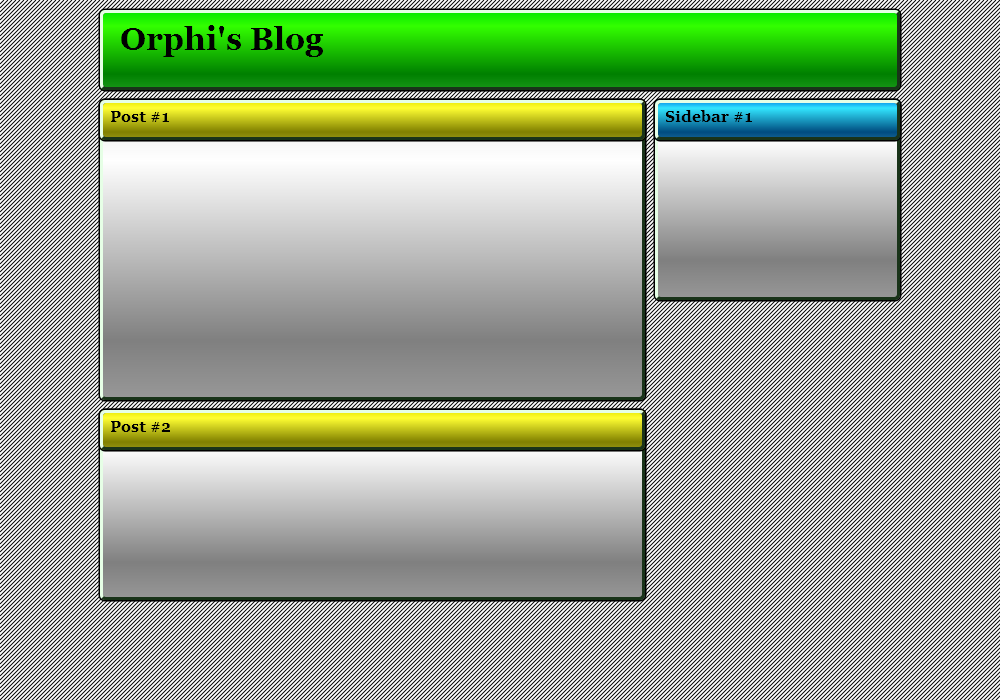
than my blog. I mean, it looks really slick. Take a look at the
attachment. I would imagine it's a default theme or something for
whatever off-the-shelf blogging engine they're using. But damn, how do
you draw something this nice in the first place? And once you've drawn
it, how the hell do you make it into a web page?
Post a reply to this message
Attachments:
Download 'website1.png' (81 KB)
Preview of image 'website1.png'

|
|
| |
| |
|
|
|
|
| |
| |
|
|
On Thu, 15 Apr 2010 16:36:48 +0100, Invisible wrote:

> But damn, how do you draw something this nice in the first place?

View the source and see?

Jim
Post a reply to this message
|
|
| |
| |
|
|
|
|
| |
| |
|
|
>> But damn, how do you draw something this nice in the first place?
>
> View the source and see?

That's not going to tell me how the graphics were drawn, is it? :-P

If I'm lucky, I might be able to determine how this elaborate collection
of images was stiched together to make a web page. But in all
likelihood, the CSS and stuff was machine-generated and will be utterly
unreadable.
Post a reply to this message
|
|
| |
| |
|
|
|
|
| |
| |
|
|
>> But damn, how do you draw something this nice in the first place?
> View the source and see?

Funny thing is, I've figured out how to do this with a graphics card, but I
still am not sure if it would work the same for a HTML page. :-)

--
Darren New, San Diego CA, USA (PST)
   Yes, we're traveling together,
   but to different destinations.
Post a reply to this message
|
|
| |
| |
|
|
|
|
| |
| |
|
|
Invisible wrote:
>>> But damn, how do you draw something this nice in the first place?
>>
>> View the source and see?
>
> That's not going to tell me how the graphics were drawn, is it? :-P

http://www.google.com/#hl=en&source=hp&q=how+to+darken+background+of+web+page

--
Darren New, San Diego CA, USA (PST)
   Yes, we're traveling together,
   but to different destinations.
Post a reply to this message
|
|
| |
| |
|
|
|
|
| |
| |
|
|
Invisible <voi### [at] dev null> wrote:
> But damn, how do
> you draw something this nice in the first place?
Well, there's this little-known program called Photoshop and...
--
- Warp null> wrote:
> But damn, how do
> you draw something this nice in the first place?
Well, there's this little-known program called Photoshop and...
--
- Warp
Post a reply to this message
|
|
| |
| |
|
|
|
|
| |
| |
|
|
On Thu, 15 Apr 2010 16:56:34 +0100, Invisible wrote:

>>> But damn, how do you draw something this nice in the first place?
>>
>> View the source and see?
>
> That's not going to tell me how the graphics were drawn, is it? :-P

I didn't particularly note any graphics, unless you were referring to the
page layout.

In which case, you might look at Inkscape, since ISTR it has the ability
to export vector drawings to be used as a web layout.

> If I'm lucky, I might be able to determine how this elaborate collection
> of images was stiched together to make a web page. But in all
> likelihood, the CSS and stuff was machine-generated and will be utterly
> unreadable.

That's quite possible.

Jim
Post a reply to this message
|
|
| |
| |
|
|
|
|
| |
| |
|
|
On Thu, 15 Apr 2010 09:16:37 -0700, Darren New wrote:

>>> But damn, how do you draw something this nice in the first place?
>> View the source and see?
>
> Funny thing is, I've figured out how to do this with a graphics card,
> but I still am not sure if it would work the same for a HTML page. :-)

Me neither, which is why I let a web design professional do the heavy
lifting. :-)

Jim
Post a reply to this message
|
|
| |
| |
|
|
|
|
| |
| |
|
|
Oh, sweet! Now when you do "view source" in Firefox, anything that's a
link is actually hyperlinked. That's nice.

OK, so looking at the CSS for this page, apparently it's a WordPress
theme called "black piano":

http://wordpress.org/extend/themes/piano-black

Now, if I can just figure out how it works...

--
http://blog.orphi.me.uk/
http://www.zazzle.com/MathematicalOrchid*
Post a reply to this message
|
|
| |
| |
|
|
|
|
| |
| |
|
|
Warp wrote:
> Invisible <voi### [at] devnull> wrote:
>> But damn, how do
>> you draw something this nice in the first place?
>
>   Well, there's this little-known program called Photoshop and...

...and using Photoshop, I wouldn't even know how to create the stripy
background. Goodness only knows how you do the curved corners, the
delicious drop shadows, the glow effect at the top of the page, and so
on and so forth. (And then, as I said, there's the "minor detail" of
turning all of thise graphics into a web page somehow...)

--
http://blog.orphi.me.uk/
http://www.zazzle.com/MathematicalOrchid*
Post a reply to this message
|
|
| |
| |
|
|
|
|
| |
| |
|
|
Orchid XP v8 <voi### [at] devnull> wrote:
> Warp wrote:
> > Invisible <voi### [at] devnull> wrote:
> >> But damn, how do
> >> you draw something this nice in the first place?
> >
> >   Well, there's this little-known program called Photoshop and...

> ...and using Photoshop, I wouldn't even know how to create the stripy
> background. Goodness only knows how you do the curved corners, the
> delicious drop shadows, the glow effect at the top of the page, and so
> on and so forth. (And then, as I said, there's the "minor detail" of
> turning all of thise graphics into a web page somehow...)

  There's this thing called learning and...

--
                                                          - Warp
Post a reply to this message
|
|
| |
| |
|
|
|
|
| |
| |
|
|
Warp wrote:
>   There's this thing called learning and...

I fondly remember the first company I ever worked at where people weren't
pissy and selfish and grumpy. I had hand-drawn a diagram of a rather complex
architecture, with multiple messages flying between computers in different
administrative domains and stuff like that.  I went to the head of marketing
and said "Do we have anything I could use to turn this into something
presentation-quality?"  She took it from my hand, glanced at it, reached it
over the wall of the cubicle she was standing next to,and said "Yes. His
name is Tom."

--
Darren New, San Diego CA, USA (PST)
   Yes, we're traveling together,
   but to different destinations.
Post a reply to this message
|
|
| |
| |
|
|
|
|
| |
| |
|
|
Darren New wrote:

> I fondly remember the first company I ever worked at where people
> weren't pissy and selfish and grumpy. I had hand-drawn a diagram of a
> rather complex architecture, with multiple messages flying between
> computers in different administrative domains and stuff like that.  I
> went to the head of marketing and said "Do we have anything I could use
> to turn this into something presentation-quality?"  She took it from my
> hand, glanced at it, reached it over the wall of the cubicle she was
> standing next to,and said "Yes. His name is Tom."

You shoulda brought a gun rather than a beer, mate.

Nah, I don't need a gun, I've got a Donk.

You've got a what??

DONK!

--
http://blog.orphi.me.uk/
http://www.zazzle.com/MathematicalOrchid*
Post a reply to this message
|
|
| |
| |
|
|
|
|
| |
| |
|
|
Orchid XP v8 wrote:

> OK, so looking at the CSS for this page, apparently it's a WordPress
> theme called "black piano":
>
> http://wordpress.org/extend/themes/piano-black

Holistic Teahouse isn't bad either.

http://wordpress.org/extend/themes/holistic-teahouse

--
http://blog.orphi.me.uk/
http://www.zazzle.com/MathematicalOrchid*
Post a reply to this message
|
|
| |
| |
|
|
|
|
| |
| |
|
|
Orchid XP v8 wrote:

> Now, if I can just figure out how it works...

Actually, browsing through the themes gallery, several of the themes do
things which I thought to be impossible. Apparently the state of the art
has changed. Hmm, I wonder how...

--
http://blog.orphi.me.uk/
http://www.zazzle.com/MathematicalOrchid*
Post a reply to this message
|
|
| |
| |
|
|
|
|
| |
| |
|
|
> really. But the thing that gets me is that it's so much more *pretty*
> than my blog. I mean, it looks really slick. Take a look at the
> attachment. I would imagine it's a default theme or something for
> whatever off-the-shelf blogging engine they're using. But damn, how do
> you draw something this nice in the first place? And once you've drawn
> it, how the hell do you make it into a web page?

When I first read this post, I thought you were using irony... now I'm not
so sure.

What is so special about this page? The rounded bottom?
Post a reply to this message
|
|
| |
| |
|
|
|
|
| |
| |
|
|
TC wrote:
> When I first read this post, I thought you were using irony... now I'm not
> so sure.
>
> What is so special about this page? The rounded bottom?

OK, they's nothing jaw-droppingly "wow" about it. It just looks really
sharp and stylish. And I can't put my finger on why. (Which is probably
part of why I can't replicate it...)

--
http://blog.orphi.me.uk/
http://www.zazzle.com/MathematicalOrchid*
Post a reply to this message
|
|
| |
| |
|
|
|
|
| |
| |
|
|
TC wrote:
> When I first read this post, I thought you were using irony... now I'm not
> so sure.

You're new around here, aren't you?   ;-)

--
Darren New, San Diego CA, USA (PST)
   Yes, we're traveling together,
   but to different destinations.
Post a reply to this message
|
|
| |
| |
|
|
|
|
| |
| |
|
|
On 15/04/2010 8:56 PM, Darren New wrote:
> TC wrote:
>> When I first read this post, I thought you were using irony... now I'm
>> not so sure.
>
> You're new around here, aren't you? ;-)
>

LOL
Stop it that's twice tonight. :-)

--

Best Regards,
	Stephen
Post a reply to this message
|
|
| |
| |
|
|
|
|
| |
| |
|
|
>> Now, if I can just figure out how it works...
>
> Actually, browsing through the themes gallery, several of the themes do
> things which I thought to be impossible. Apparently the state of the art
> has changed. Hmm, I wonder how...

Uh, yeah, that's affirmative. I took Black Piano apart and discovered
that it doesn't work the way I thought it did at all! Somehow it manages
to layer semitransparent images ON TOP OF EACH OTHER. It's news to me
that this is possible. This changes everything...

Now, if I can just figure out how this works... (The code is a tangle of
CSS and JavaScript events, and there are property names in there that
I've never even heard of.)

--
http://blog.orphi.me.uk/
http://www.zazzle.com/MathematicalOrchid*
Post a reply to this message
|
|
| |
| |
|
|
|
|
| |
| |
|
|
I've been using Artisteer for a while now. It's a (commercial) theme
generator for a variety of popular CMS. It's really a useful program it you
need a nice-looking website and don't have the time to learn how theming is
done in the CMS you're using. I've been using it for Joomla and Drupal but
it does Wordpress too. It does not replace a true web designer, but it's
faster than endlessly tweaking the CSS of existing themes.

G.

"Orchid XP v8" <voi### [at] devnull> a écrit dans le message de groupe de
discussion : 4bc74839$1@news.povray.org...
> Oh, sweet! Now when you do "view source" in Firefox, anything that's a
> link is actually hyperlinked. That's nice.
>
> OK, so looking at the CSS for this page, apparently it's a WordPress theme
> called "black piano":
>
> http://wordpress.org/extend/themes/piano-black
>
> Now, if I can just figure out how it works...
>
> --
> http://blog.orphi.me.uk/
> http://www.zazzle.com/MathematicalOrchid*
Post a reply to this message
|
|
| |
| |
|
|
|
|
| |
| |
|
|
On 04/15/10 10:13, Orchid XP v8 wrote:
> ...and using Photoshop, I wouldn't even know how to create the stripy

	Fairly easy.

> background. Goodness only knows how you do the curved corners, the

	Javascript.

> delicious drop shadows, the glow effect at the top of the page, and so

	Shadows is either CSS or Javascript. No idea what you mean by glow.


--
Psychoceramics: The study of crackpots.
Post a reply to this message
|
|
| |
| |
|
|
|
|
| |
| |
|
|
Neeum Zawan wrote:
> On 04/15/10 10:13, Orchid XP v8 wrote:
>> background. Goodness only knows how you do the curved corners, the
>
> Javascript.
>
>> delicious drop shadows, the glow effect at the top of the page, and so
>
> Shadows is either CSS or Javascript. No idea what you mean by glow.

Why would you need scripting for that?
Post a reply to this message
|
|
| |
| |
|
|
|
|
| |
| |
|
|
Gilles Tran wrote:
> I've been using Artisteer for a while now. It's a (commercial) theme
> generator for a variety of popular CMS. It's really a useful program it
> you need a nice-looking website and don't have the time to learn how
> theming is done in the CMS you're using. I've been using it for Joomla
> and Drupal but it does Wordpress too. It does not replace a true web
> designer, but it's faster than endlessly tweaking the CSS of existing
> themes.

Mmm, interesting. Of course, since I won't be using a CMS, I'm not sure
it helps, but it's interesting to know that such things exist.

I think my basic problem is that I'm not a graphic designer. When I look
at a blank screen, I can't imagine what I might put onto it that would
look cool...
Post a reply to this message
|
|
| |
| |
|
|
|
|
| |
| |
|
|
>> ...and using Photoshop, I wouldn't even know how to create the stripy
>
> 	Fairly easy.

Sure. If you somehow know how to use Photoshop.

>> Goodness only knows how you do the curved corners, the
>
> 	Javascript.

...?

>> delicious drop shadows, the glow effect at the top of the page, and so
>
> 	Shadows is either CSS or Javascript.

Actually it's part of the various bitmaps.

> No idea what you mean by glow.

If you look at the theme demo (not my cut up image), you'll see that the
top of the page has a subtle blue glow to it.
Post a reply to this message
|
|
| |
| |
|
|
|
|
| |
| |
|
|
"Invisible" <voi### [at] devnull> a écrit dans le message de news:
4bc8199b$1@news.povray.org...
> Mmm, interesting. Of course, since I won't be using a CMS, I'm not sure it
> helps, but it's interesting to know that such things exist.

Your blog is running on Wordpress, which is a CMS.

G.
Post a reply to this message
|
|
| |
| |
|
|
|
|
| |
| |
|
|
Orchid XP v8 wrote:

> http://wordpress.org/extend/themes/piano-black
>
> Now, if I can just figure out how it works...

The way it works is rather surprising.

There's a 5x5 pixel image that consists of grey with a black stripe
across it. This is tiled to form the stripey background.

There is an image named "top". This is the black slab with the rounded
corners and the drop shadow. The bit that the page title appears on top of.

Yes, that's right. Somehow they put text ON TOP OF an image. Not only
that, but somehow they put one image ON TOP OF another image, WITH
TRANSPARENCY. I have no idea how that's possible.

There's also an image that's blue in the center, and fades to
transparent towards the edges. This is somehow displayed ON TOP OF the
background image to generate the blue glow at the top of the page.

Then there's an image that's 2 pixels tall, just consisting of various
shades of grey. This is what generates the two-tone grey for the body
text and the sidebar. But it's TRANSPARENT, showing the stripe texture
through from below. (And also the blue glow.) And it has a drop shadow
at each end, which also blends through.

Finally, there's a "bottom" image, which implements the semicircular
bottom of the page. (You can just about make out where the edge of the
sidebar doesn't line up perfectly.)

In a similar way, there are a pair of "top" and "bottom" images
containing a black bar with a curved end; this is what implements the
black markers at the bottom of each post, where it tells you the number
of comments, etc. (This also explains why the curve isn't quite right.
You can also see a glitch in the dotted line where the two halves of the
image meet.)


Last time I checked, there are two ways to put an image into a web page.
You can use the IMG tag, which inserts an image in amoungst the text.
(But you cannot put anything over the top of this image.) Alternatively,
you can set the page background image, which is obviously behind
*everything*. That means you can put things over the top of it.

That gives you two ways to build a page like this:

1. Draw the entire page, with all the borders and lines you want, and
then use CSS to position the text into the spaces in the graphic. (This
means the page must be a fixed size, since the background graphics have
been drawn at a fixed size.)

2. Draw the entire page, and chop it into pieces. Use IMG tags to insert
each piece of the frame around the outside of the text, keeping the text
inside the frames. If you want the text itself to have a background,
things get tricky. But by using a repeating pattern, you might be able
to make the page semi-resizable.

This theme uses neither approach. Somehow it manages to combine multiple
layers of semitransparent images *at the client end* to produce the
final page. I have still to discover how that's possible. (Not to
mention how the hell you line all the text up nicely...) The fact that
the CSS code is litered with properties I've never even heard of is
probably the first clue. Unfortunately, it's not very readable in there...

(I have to find out what tags and classes exist in the HTML and what
they contain, then see where they end up on the rendered page, and then
see what CSS is applied to them, and lookup what images are being
referenced, and then see the JavaScript that's manipulating them, and...)
Post a reply to this message
|
|
| |
| |
|
|
|
|
| |
| |
|
|
>> Mmm, interesting. Of course, since I won't be using a CMS, I'm not sure it
>> helps, but it's interesting to know that such things exist.
>
> Your blog is running on Wordpress, which is a CMS.

My blog does not allow you to use any themes except the ones provided by
the hosting company.
Post a reply to this message
|
|
| |
| |
|
|
|
|
| |
| |
|
|
Warp wrote:

>   There's this thing called learning and...

Out of curiosity, how does one "learn" Photoshop anyway?

Presumably it doesn't come with a manual - or if it does, it only covers
what each button and menu item does (which isn't the same as knowing how
to *use* these tools to achieve a particular goal).

Also, Photoshop costs something absurd like £700, which normal humans
don't have.
Post a reply to this message
|
|
| |
| |
|
|
|
|
| |
| |
|
|
> Last time I checked, there are two ways to put an image into a web page.
> You can use the IMG tag, which inserts an image in amoungst the text.

You have to use CSS. There is a css-property called z-index, allowing you to
stack elements that have this property. There are "left", "right", "top",
"bottom" properties, allowing you to position elements with pixel-precision:
add style="position: absolute; left: 10px ; top: 10px; z-index: 2;" and
style="position: absolute; left: 20px; top: 20px; z-index: 3;" to a
div-element containg pictures and see what happens.

Note the "position" properties. They are important - read up on them.

Then you have a several css-properties for background: you can layer
div-elements one upon the other, and overlap them using "left", "top",
etc. - and each div-element can have a seperate background. The background
for each and every element can be aligned ("background-align" property) and
you can decide whether you want to repeat it or not. So you can position an
image within a div-element and have a backgound for this element. If the
background is a transparent image, the images and text below will show
through. Or, with IE, there are things called filters - neat things can be
done with them - but they are something only supported by IE, so best keep
away from them).

There are pitfalls, though. Not every browser supports css properly and you
have to make sure the browser is in the right mode. Mode is set by
HTML-DOCTYPE, I'd advise

<!DOCTYPE html PUBLIC "-//W3C//DTD XHTML 1.0 Strict//EN"
"http://www.w3.org/TR/xhtml1/DTD/xhtml1-strict.dtd">

It can be very hard to debug a style. Firefox with the Firebug-Extension is
your friend.

If you really want to dig into this, you have to learn how css works. And
how to circumnavigate the various browser-bugs.

For a background that goes from one colour to another you can use your
paint-program, create a line with fill-properties starting at blue and
ending at white. Then put this 1-pixel line in the background property of
your [whatever div or document part you want it to be]. Set style=
"background-repeat: none; background-position: top; background-align: left;"
and you have got what you want. Of course there are pitfalls here, too.

To explain all this properly is like asking somebody how to do a macro with
sphere-sweep in povray - and why it sometimes gives rather unexpected
results and in which cases it does and what to use as remedy. Or lecture on
the finer points of photons in povray. Not easy, for obvious reasons.
Post a reply to this message
|
|
| |
| |
|
|
|
|
| |
| |
|
|
Invisible <voi### [at] devnull> wrote:
> Warp wrote:

> >   There's this thing called learning and...

> Out of curiosity, how does one "learn" Photoshop anyway?

  You use it. You read tutorials on the internet (do you really think there
aren't any?) You read books. You ask colleagues.

--
                                                          - Warp
Post a reply to this message
|
|
| |
| |
|
|
|
|
| |
| |
|
|
TC wrote:
>> Last time I checked, there are two ways to put an image into a web page.
>> You can use the IMG tag, which inserts an image in amoungst the text.
>
> You have to use CSS.

Yeah, one way is to use IMG tags in the HTML, the other way is the
background property in CSS.

Besides, ideally your HTML should contain *only* the text you're trying
to display, and CSS should do all the styling. A while back I found this:

http://www.csszengarden.com/

Just by changing the CSS, it completely rearranges the entire contents
of the page. And I thought CSS was just for changing colours...

> There is a css-property called z-index, allowing you to
> stack elements that have this property.

Yeah, I remember reading about that. I didn't think any known browser
supported it though?

Oh, mind you, I guess that was a while ago...

> There are "left", "right", "top",
> "bottom" properties, allowing you to position elements with pixel-precision.

Yeah, I've played with them, but I could never think of any useful
purpose for them.

> Note the "position" properties. They are important - read up on them.

Yeah, you can set the position relative to the rest of the flow, or
absolute relative to the page, or relative to the browser frame, or...

> Then you have a several css-properties for background: you can layer
> div-elements one upon the other, and overlap them using "left", "top",
> etc. - and each div-element can have a seperate background. The background
> for each and every element can be aligned ("background-align" property) and
> you can decide whether you want to repeat it or not. So you can position an
> image within a div-element and have a backgound for this element. If the
> background is a transparent image, the images and text below will show
> through.

Now, see, I was under the impression that setting a background
completely overrides any previous setting. And yet here we have a page
with a stipey background, and then a glow background on top of that. Or
DIV boxes with a transparent background so what's below shows through
(rather than being replaced).

> There are pitfalls, though. Not every browser supports css properly and you
> have to make sure the browser is in the right mode.

Sure, you need to avoid quirks mode and stuff, and as soon as you use
CSS it's 100% guaranteed that it will only ever work in the one version
of the one browser you tested with. I get that.

> It can be very hard to debug a style.

Hell yeah. Almost as hard as trying to debug JavaScript...

> If you really want to dig into this, you have to learn how css works.

I already know how CSS works. What I seem to be missing is that since I
last looked at it, they've added some new features.

> For a background that goes from one colour to another you can use your
> paint-program, create a line with fill-properties starting at blue and
> ending at white. Then put this 1-pixel line in the background property of
> your [whatever div or document part you want it to be].

Sure. I get that. (Although I don't possess a "paint program" to create
this image with in the first place... I'd have to write a custom program
to generate the pixels and write them to file, which is a little tedious.)
Post a reply to this message
|
|
| |
| |
|
|
|
|
| |
| |
|
|
>> Out of curiosity, how does one "learn" Photoshop anyway?
>
>   You use it. You read tutorials on the internet (do you really think there
> aren't any?) You read books. You ask colleagues.

In my experience, most Internet tutorials aren't very useful. (Although
there are always exceptions.) And since povray.off-topic is the only
"colleagues" I have, asking here is only going to give me "dude, GIYF!"
Books are similarly hit-and-miss, but I'm sure there's some good ones
out there. The tricky part is finding them. ;-)
Post a reply to this message
|
|
| |
| |
|
|
|
|
| |
| |
|
|
Invisible <voi### [at] devnull> wrote:
> >> Out of curiosity, how does one "learn" Photoshop anyway?
> >
> >   You use it. You read tutorials on the internet (do you really think there
> > aren't any?) You read books. You ask colleagues.

> In my experience, most Internet tutorials aren't very useful.

  That's because you don't try them. When you read a tutorial you have to
actually *do* what the tutorial is saying, step by step. Just reading it
is not enough. You learn by doing.

--
                                                          - Warp
Post a reply to this message
|
|
| |
| |
|
|
|
|
| |
| |
|
|
>> In my experience, most Internet tutorials aren't very useful.
>
>   That's because you don't try them. When you read a tutorial you have to
> actually *do* what the tutorial is saying, step by step. Just reading it
> is not enough. You learn by doing.

If the tutorial doesn't make sense, it's not a good tutorial.

If the tutorial doesn't explain the part I'm trying to learn, it's not a
good tutorial.

Most tutorials I've seen fall into one or other of these categories. (As
I say, there are always exceptions...)
Post a reply to this message
|
|
| |
| |
|
|
|
|
| |
| |
|
|
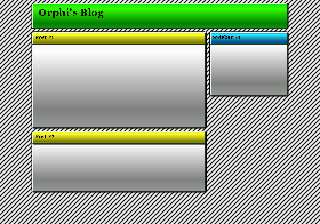
3 hours and 190 lines of source code later and I have... well, this.

Ugly, isn't it?

Let's face it, I'm no graphic designer, and I never will be. :-(
Post a reply to this message
Attachments:
Download 'website11.png' (22 KB)
Preview of image 'website11.png'
|
|
| |
| |
|
|
|
|
| |
| |
|
|
Invisible wrote:
> Yes, that's right. Somehow they put text ON TOP OF an image. Not only
> that, but somehow they put one image ON TOP OF another image, WITH
> TRANSPARENCY. I have no idea how that's possible.

That has been possible since forever. Except in IE which didn't support
alpha channel on PNGs.
http://www-archive.mozilla.org/start/1.0/demos/eagle-sun.html

> Last time I checked, there are two ways to put an image into a web page.
> You can use the IMG tag, which inserts an image in amoungst the text.
> (But you cannot put anything over the top of this image.) Alternatively,
> you can set the page background image, which is obviously behind
> *everything*. That means you can put things over the top of it.

You can put an image as a background on ANY element.

<div style="background-image: url(foo.png)">hello <img src="bar.png"></div>
Post a reply to this message
|
|
| |
| |
|
|
|
|
| |
| |
|
|
> Sure. I get that. (Although I don't possess a "paint program" to create
> this image with in the first place... I'd have to write a custom program
> to generate the pixels and write them to file, which is a little tedious.)

If you don't use any paint program yet, try the GIMP. It is free, can do
much, and is available for almost any OS I know.

www.gimp.org

It is not my first choice because I do not like the interface. Since you
don't use a paint program yet, this will be no problem. The GIMP should come
in handy when post-processing povray images, too. ;-)

With the right plugins GIMP can do many interesting things to a picture...
so sometimes I use it in spite of the interface. ;-)

If you want vector-images then inkscape looks promising. Not yet commercial
grade stuff, mainly because it has not many export formats, but it is free
and it imports PDF nicely. I think this is a program to watch.

BTW: if you want a >really< interesting background, then use an animated gif
(but keep down the loops to a few, else the text becomes unreadable)
Post a reply to this message
|
|
| |
| |
|
|
|
|
| |
| |
|
|
TC <do-not-reply@i-do get-enough-spam-already-2498.com> wrote:
> www.gimp.org

> It is not my first choice because I do not like the interface. Since you
> don't use a paint program yet, this will be no problem. The GIMP should come
> in handy when post-processing povray images, too. ;-)

  If he is unwilling to learn to use a program like Photoshop, I doubt he
will be willing to learn to use the Gimp.

> BTW: if you want a >really< interesting background, then use an animated gif

  Uh, what?

--
                                                          - Warp
Post a reply to this message
|
|
| |
| |
|
|
|
|
| |
| |
|
|
Invisible wrote:
> The tricky part is finding them. ;-)

You go to Amazon and read which books sell best, and look at the reviews.
When you get stuck, you ask someone you know who is already experienced with
photoshop.

 > Just reading it is not enough.

Seconded. The game programming tutorials I was reading often had bugs in
them - stuff that basically wouldn't compile, due to sloppily changing one
part but not the other, for example.  Figuring out what was broken was very
informative.

--
Darren New, San Diego CA, USA (PST)
   Linux: Now bringing the quality and usability of
   open source desktop apps to your personal electronics.
Post a reply to this message
|
|
| |
| |
|
|
|
|
| |
| |
|
|
Invisible wrote:
> Yes, that's right. Somehow they put text ON TOP OF an image. Not only
> that, but somehow they put one image ON TOP OF another image, WITH
> TRANSPARENCY. I have no idea how that's possible.

http://w3schools.com/css/

> Last time I checked, there are two ways to put an image into a web page.
> You can use the IMG tag, which inserts an image in amoungst the text.
> (But you cannot put anything over the top of this image.) Alternatively,
> you can set the page background image, which is obviously behind
> *everything*. That means you can put things over the top of it.

It's still an img tag. You just need to use CSS on it.

> (I have to find out what tags and classes exist in the HTML and what
> they contain, then see where they end up on the rendered page, and then
> see what CSS is applied to them, and lookup what images are being
> referenced, and then see the JavaScript that's manipulating them, and...)

Welcome to modern web programming.

--
Darren New, San Diego CA, USA (PST)
   Linux: Now bringing the quality and usability of
   open source desktop apps to your personal electronics.
Post a reply to this message
|
|
| |
| |
|
|
|
|
| |
| |
|
|
Invisible wrote:
> Ugly, isn't it?

Rather retro, actually.

--
Darren New, San Diego CA, USA (PST)
   Linux: Now bringing the quality and usability of
   open source desktop apps to your personal electronics.
Post a reply to this message
|
|
| |
| |
|
|
|
|
| |
| |
|
|
>> The tricky part is finding them. ;-)
>
> You go to Amazon and read which books sell best, and look at the
> reviews. When you get stuck, you ask someone you know who is already
> experienced with photoshop.

Heh. That drawing book had great reviews, and yet still it didn't really
help me to draw...

--
http://blog.orphi.me.uk/
http://www.zazzle.com/MathematicalOrchid*
Post a reply to this message
|
|
| |
| |
|
|
|
|
| |
| |
|
|
Warp wrote:

>   If he is unwilling to learn to use a program like Photoshop, I doubt he
> will be willing to learn to use the Gimp.

I'm unwilling to learn Photoshop because I don't *have* Photoshop! :-P
Learning how to use something I haven't got isn't going to help me very
much...

--
http://blog.orphi.me.uk/
http://www.zazzle.com/MathematicalOrchid*
Post a reply to this message
|
|
| |
| |
|
|
|
|
| |
| |
|
|
Darren New wrote:

> http://w3schools.com/css/

I've always found this site to be particularly unhelpful when I'm trying
to learn things. And yet lots of people seem to recommend it...

>> (I have to find out what tags and classes exist in the HTML and what
>> they contain, then see where they end up on the rendered page, and
>> then see what CSS is applied to them, and lookup what images are being
>> referenced, and then see the JavaScript that's manipulating them, and...)
>
> Welcome to modern web programming.

Well, understand that I learned about HTML, XML, CSS, etc. waaay back in
2001. Sure, I occasionally go read the latest W3C draft from time to
time, but I haven't done a huge amount of this stuff recently.

--
http://blog.orphi.me.uk/
http://www.zazzle.com/MathematicalOrchid*
Post a reply to this message
|
|
| |
| |
|
|
|
|
| |
| |
|
|
Darren New wrote:
> Invisible wrote:
>> Ugly, isn't it?
>
> Rather retro, actually.

I just got home, clicked it to remind myself what it looks like, and
GAH! >_< Did I really waste 2 hours making this? It's awful! :-S

Must try harder...

(Still, just making the vertical colour gradiant is painful when you
have to type in all the RGB values by hand, trying to guess what might
look nice.)

--
http://blog.orphi.me.uk/
http://www.zazzle.com/MathematicalOrchid*
Post a reply to this message
|
|
| |
| |
|
|
|
|
| |
| |
|
|
TC wrote:

> If you don't use any paint program yet, try the GIMP.

Now I'm sure I've heard people complain that "the GIMP is an image
processor, not a paint program".

> It is not my first choice because I do not like the interface.

Well, there is that too, yes. ;-) From what little research I've done,
the way the GIMP works makes sense to the people who designed it, but
fails to follow any normal kind of intuition, making it maddeningly hard
to learn.

> If you want vector-images then Inkscape looks promising.

I've seen it, I've used it, it's nice that it exists, but it's really
not very easy to do anything remotely useful with it.

--
http://blog.orphi.me.uk/
http://www.zazzle.com/MathematicalOrchid*
Post a reply to this message
|
|
| |
| |
|
|
|
|
| |
| |
|
|
Orchid XP v8 wrote:
> TC wrote:
>
>> If you don't use any paint program yet, try the GIMP.
>
> Now I'm sure I've heard people complain that "the GIMP is an image
> processor, not a paint program".

Then get tuxpaint :P
Post a reply to this message
|
|
| |
| |
|
|
|
|
| |
| |
|
|
>>> If you don't use any paint program yet, try the GIMP.
>> Now I'm sure I've heard people complain that "the GIMP is an image
>> processor, not a paint program".
>
> Then get tuxpaint :P

...oh dear god, it actually exists! o_O

--
http://blog.orphi.me.uk/
http://www.zazzle.com/MathematicalOrchid*
Post a reply to this message
|
|
| |
| |
|
|
|
|
| |
| |
|
|
On Fri, 16 Apr 2010 10:35:48 +0100, Invisible wrote:

> Out of curiosity, how does one "learn" Photoshop anyway?

Most people learn by using or by buying a book if the manual is useless
or nonexistent.

> Presumably it doesn't come with a manual - or if it does, it only covers
> what each button and menu item does (which isn't the same as knowing how
> to *use* these tools to achieve a particular goal).

That's what the plethora of third party books covers.

> Also, Photoshop costs something absurd like £700, which normal humans
> don't have.

There are other graphics programs besides Photoshop - like the Gimp.

Jim
Post a reply to this message
|
|
| |
| |
|
|
|
|
| |