 |
|
|
|
|
|
| |
| |
|
|
|
|
| |
| |
|
|
How many triangles can you find in the attached image?
Post a reply to this message
Attachments:
Download 'triangles.png' (3 KB)
Preview of image 'triangles.png'

|
|
| |
| |
|
|
|
|
| |
| |
|
|
Warp wrote:
>   How many triangles can you find in the attached image?

None, I just see many small squares of varying shades of gray :)
Post a reply to this message
|
|
| |
| |
|
|
|
|
| |
| |
|
|
On Mon, 14 Dec 2009 18:26:00 -0500, Warp wrote:

> How many triangles can you find in the attached image?

I count 21.

Jim
Post a reply to this message
|
|
| |
| |
|
|
|
|
| |
| |
|
|
Jim Henderson wrote:
> On Mon, 14 Dec 2009 18:26:00 -0500, Warp wrote:
>
>> How many triangles can you find in the attached image?
>
> I count 21.

I've gone 'til 26.
Post a reply to this message
|
|
| |
| |
|
|
|
|
| |
| |
|
|
Warp wrote:
>   How many triangles can you find in the attached image?

Here I thought I was going to come up with a whole clever answer that didn't
need counting at all, and the numbers came out as 120.  Whoops, that didn't
work.

--
Darren New, San Diego CA, USA (PST)
   Human nature dictates that toothpaste tubes spend
   much longer being almost empty than almost full.
Post a reply to this message
|
|
| |
| |
|
|
|
|
| |
| |
|
|
>> I count 21.
>
> I've gone 'til 26.

Heh, I got 24.

 - Slime
 [ http://www.slimeland.com/ ]
Post a reply to this message
|
|
| |
| |
|
|
|
|
| |
| |
|
|
Warp wrote:
>   How many triangles can you find in the attached image?
>
>
Is it that time of year again? ;)

--

Best Regards,
	Stephen
Post a reply to this message
|
|
| |
| |
|
|
|
|
| |
| |
|
|
On 15-12-2009 1:05, nemesis wrote:
> Jim Henderson wrote:
>> On Mon, 14 Dec 2009 18:26:00 -0500, Warp wrote:
>>
>>> How many triangles can you find in the attached image?
>>
>> I count 21.
>
> I've gone 'til 26.

Wow, which ones did I miss?
Counting all that include the top and the lower line:
4 of about a quarter surface
3 of half
2 of 3/4
1 whole
That is 10
Another 10 when we don't use the lower line but the diagonal from left
bottom to right middle
The triangle that uses that diagonal and the two bottom line
and finally (?) the left most small part of that triangle
Post a reply to this message
|
|
| |
| |
|
|
|
|
| |
| |
|
|
Warp wrote:
>   How many triangles can you find in the attached image?

It's the gift that keeps on giving... ;-)
Post a reply to this message
|
|
| |
| |
|
|
|
|
| |
| |
|
|
>  How many triangles can you find in the attached image?

I make it 24.

I thought about it like this.

There are 8 enclosed areas in the diagram, 4 at the top and 4 at the bottom.
For each triangle, each of those segments is either inside or outside the
triangle.

Consider just the top 4 segments, "0" means outside the triangle and "1"
means inside the triangle.  Some combinations obviously do not form a
triangle, eg "1001" (the far left and far right segment are "inside").

The combinations that are possible to make triangles:

0000
0001
0010
0100
1000
0011
0110
1100
0111
1110
1111

For all of those apart from the "0000", there are precisely two possible
states of the bottom row of 4 segments that make valid triangles.  For
"0000" there are 4 possible combinations on the bottom row that make valid
triangles.  10 x 2 + 4 = 24
Post a reply to this message
|
|
| |
| |
|
|
|
|
| |
| |
|
|
>> I've gone 'til 26.
>
> Wow, which ones did I miss?

I have 24...
Post a reply to this message
Attachments:
Download 'puzzle1.pdf' (3 KB)
|
|
| |
| |
|
|
|
|
| |
| |
|
|
> Wow, which ones did I miss?
> Counting all that include the top and the lower line:
> 4 of about a quarter surface
> 3 of half
> 2 of 3/4
> 1 whole
> That is 10
> Another 10 when we don't use the lower line but the diagonal from left
> bottom to right middle
> The triangle that uses that diagonal and the two bottom line
> and finally (?) the left most small part of that triangle

I got the first 20 the same way you did, but there are four along the
bottom.

 - Slime
 [ http://www.slimeland.com/ ]
Post a reply to this message
|
|
| |
| |
|
|
|
|
| |
| |
|
|
On 15-12-2009 12:52, Slime wrote:
>> Wow, which ones did I miss?
>> Counting all that include the top and the lower line:
>> 4 of about a quarter surface
>> 3 of half
>> 2 of 3/4
>> 1 whole
>> That is 10
>> Another 10 when we don't use the lower line but the diagonal from left
>> bottom to right middle
>> The triangle that uses that diagonal and the two bottom line
>> and finally (?) the left most small part of that triangle
>
> I got the first 20 the same way you did, but there are four along the
> bottom.

D*mn, why did I miss those?
Post a reply to this message
|
|
| |
| |
|
|
|
|
| |
| |
|
|
>> I got the first 20 the same way you did, but there are four along the
>> bottom.
>
> D*mn, why did I miss those?

If it makes you feel any better, I missed those too initially...
Post a reply to this message
|
|
| |
| |
|
|
|
|
| |
| |
|
|
Warp wrote:
>   How many triangles can you find in the attached image?
>
>

25 - somehow I feel odd compared to the rest of you
Post a reply to this message
|
|
| |
| |
|
|
|
|
| |
| |
|
|
On 15-12-2009 13:59, Invisible wrote:
>>> I got the first 20 the same way you did, but there are four along the
>>> bottom.
>>
>> D*mn, why did I miss those?
>
> If it makes you feel any better, I missed those too initially...

No I don't ;)

Yet, Tom got one more and nemesis even two.
Where would those be?
Post a reply to this message
|
|
| |
| |
|
|
|
|
| |
| |
|
|
>> If it makes you feel any better, I missed those too initially...
>
> No I don't ;)
>
> Yet, Tom got one more and nemesis even two.
> Where would those be?

Double-counted perhaps?

I posted a table with all the 24 combinations I've found. If anybody can
find a valid triangle that isn't in that table *then* I'll call it a
counter-example. ;-)
Post a reply to this message
|
|
| |
| |
|
|
|
|
| |
| |
|
|
Invisible escreveu:
>>> If it makes you feel any better, I missed those too initially...
>>
>> No I don't ;)
>>
>> Yet, Tom got one more and nemesis even two.
>> Where would those be?
>
> Double-counted perhaps?
>
> I posted a table with all the 24 combinations I've found. If anybody can
> find a valid triangle that isn't in that table *then* I'll call it a
> counter-example. ;-)

yes, I guess 24 is more likely.  Don't go counting while sleepy...

--
a game sig: http://tinyurl.com/d3rxz9
Post a reply to this message
|
|
| |
| |
|
|
|
|
| |
| |
|
|
nemesis wrote:
> Don't go counting while sleepy...

Well it can have other effects in this situation :-)

--
Vincent
Post a reply to this message
|
|
| |
| |
|
|
|
|
| |
| |
|
|
Vincent Le Chevalier escreveu:
> nemesis wrote:
>> Don't go counting while sleepy...
>
> Well it can have other effects in this situation :-)
>

Yes, the triangles began resembling sheep. :)

--
a game sig: http://tinyurl.com/d3rxz9
Post a reply to this message
|
|
| |
| |
|
|
|
|
| |
| |
|
|
Tom Austin <taustin> wrote:
> Warp wrote:
> >   How many triangles can you find in the attached image?

> 25 - somehow I feel odd compared to the rest of you

  I'm curious: Where do you see the 25th triangle?

--
                                                          - Warp
Post a reply to this message
|
|
| |
| |
|
|
|
|
| |
| |
|
|
Warp <war### [at] tag povrayorg> wrote:
> Tom Austin <taustin> wrote:
> > Warp wrote:
> > > How many triangles can you find in the attached image?
>
> > 25 - somehow I feel odd compared to the rest of you
>
> I'm curious: Where do you see the 25th triangle?
>
> --
Whole! povrayorg> wrote:
> Tom Austin <taustin> wrote:
> > Warp wrote:
> > > How many triangles can you find in the attached image?
>
> > 25 - somehow I feel odd compared to the rest of you
>
> I'm curious: Where do you see the 25th triangle?
>
> --
Whole!
Post a reply to this message
|
|
| |
| |
|
|
|
|
| |
| |
|
|
Warp wrote:
> Tom Austin <taustin> wrote:
>> Warp wrote:
>>>   How many triangles can you find in the attached image?
>
>> 25 - somehow I feel odd compared to the rest of you
>
>   I'm curious: Where do you see the 25th triangle?
>

due to my counting method I double counted one.
specifically the large bottom one
Post a reply to this message
|
|
| |
| |
|
|
|
|
| |
| |
|
|
come on, Warp!  Quit fooling around and say how many there are.  and where's the
prize? :D
Post a reply to this message
|
|
| |
| |
|
|
|
|
| |
| |
|
|
"gregjohn" <pte### [at] yahoocom> wrote:
>
> Whole!

<redacted>

I only get 25 if I mistakenly double count the whole.  Latest belief is that
there are only 24.
Post a reply to this message
|
|
| |
| |
|
|
|
|
| |
| |
|
|
"Warp" <war### [at] tagpovrayorg> wrote in message
news:4b26c988@news.povray.org...
>  How many triangles can you find in the attached image?

I found 24...

--
Jack
Post a reply to this message
Attachments:
Download 'Triangles.png' (66 KB)
Preview of image 'Triangles.png'

|
|
| |
| |
|
|
|
|
| |
| |
|
|
On Mon, 14 Dec 2009 18:37:20 -0500, Jim Henderson wrote:

> On Mon, 14 Dec 2009 18:26:00 -0500, Warp wrote:
>
>> How many triangles can you find in the attached image?
>
> I count 21.
>
> Jim

Amended to 24 now, I found the other three.

Jim
Post a reply to this message
|
|
| |
| |
|
|
|
|
| |
| |
|
|
On 12/14/2009 11:26 PM, Warp wrote:
>    How many triangles can you find in the attached image?
>
Excluding degenerate triangles,
it looks like there is indeed 24.
However, one more "triangle" could be found:
as a substring of the file name "triangles.png",
so total is 25 then.
Post a reply to this message
Attachments:
Download '24triangles.pdf' (141 KB)
|
|
| |
| |
|
|
|
|
| |
| |
|
|
On 15-12-2009 20:29, nemesis wrote:
> come on, Warp!  Quit fooling around and say how many there are.  and where's the
> prize? :D
>
>
More importantly, what did we learn from this and why did you, warp,
post this?
Post a reply to this message
|
|
| |
| |
|
|
|
|
| |
| |
|
|
andrel <a_l### [at] hotmailcom> wrote:
> More importantly, what did we learn from this and why did you, warp,
> post this?

  Does everything have to have a reason behind it? Can't things be done just
for the fun of it?

--
                                                          - Warp
Post a reply to this message
|
|
| |
| |
|
|
|
|
| |
| |
|
|
On 15-12-2009 22:41, Warp wrote:
> andrel <a_l### [at] hotmailcom> wrote:
>> More importantly, what did we learn from this and why did you, warp,
>> post this?
>
>   Does everything have to have a reason behind it?

Not always, but seemed to me a rather random post.

> Can't things be done just for the fun of it?

It would be much interesting for particularly this group if it had a
theory of how we perceive things and what we don't see behind it. I was
a bit hoping for something like that.
Post a reply to this message
|
|
| |
| |
|
|
|
|
| |
| |
|
|
>  How many triangles can you find in the attached image?

If this was a Project Euler problem it would state the answer, and then show
a horrendously complex shape and ask for how many triangles were in that
one, and it would probably be a 9 digit number or something :-)
Post a reply to this message
|
|
| |
| |
|
|
|
|
| |
| |
|
|
scott wrote:

> If this was a Project Euler problem it would state the answer, and then
> show a horrendously complex shape and ask for how many triangles were in
> that one, and it would probably be a 9 digit number or something :-)

What, like this?

http://tinyurl.com/y9h6cjz
Post a reply to this message
|
|
| |
| |
|
|
|
|
| |
| |
|
|
>> If this was a Project Euler problem it would state the answer, and then
>> show a horrendously complex shape and ask for how many triangles were in
>> that one, and it would probably be a 9 digit number or something :-)
>
> What, like this?
>
> http://tinyurl.com/y9h6cjz

Not quite what I had in mind, but LOLs nonetheless :-)
Post a reply to this message
|
|
| |
| |
|
|
|
|
| |
| |
|
|
>> What, like this?
>>
>> http://tinyurl.com/y9h6cjz
>
> Not quite what I had in mind, but LOLs nonetheless :-)

There's A LOT of triangles there, I assure you. ;-)
Post a reply to this message
|
|
| |
| |
|
|
|
|
| |
| |
|
|
>> Not quite what I had in mind, but LOLs nonetheless :-)
>
> There's A LOT of triangles there, I assure you. ;-)

To me it looks like a few thousand at most in that picture, not a
particularly detailed or smoothed model, and you're only seeing part of it.
(Man the triangles around her neck and clothes are *huge*)

Here are 7.3 million triangles:

http://tinyurl.com/yav476n
Post a reply to this message
|
|
| |
| |
|
|
|
|
| |
| |
|
|
>> There's A LOT of triangles there, I assure you. ;-)
>
> To me it looks like a few thousand at most

Which I would think qualifies as "a lot" in anyone's book.

> not a
> particularly detailed or smoothed model, and you're only seeing part of
> it.

It all looks so smooth and curvey...

...until you walk past a light source. Ah, the wonders of per-polygon
lighting calculations. :-P

> (Man the triangles around her neck and clothes are *huge*)

So is her bust. :-P

> Here are 7.3 million triangles:
>
> http://tinyurl.com/yav476n

I don't even want to *know* how much disk space that eats, do I? (Nor
how long it took some poor soul to manually place 7.3 million triangles
by hand...)
Post a reply to this message
|
|
| |
| |
|
|
|
|
| |
| |
|
|
> ...until you walk past a light source. Ah, the wonders of per-polygon
> lighting calculations. :-P

I thought all games used per-pixel lighting now?

> I don't even want to *know* how much disk space that eats, do I?

I fired up Blender and applied sub-surface to the Monkey mesh to 6 levels
(it seems that's the maximum allowed).  That gave me 2 million "faces" (4
million triangles I assume).  I made a copy of it, so there were 8 million
triangles being displayed.  Blender told me it was taking up 372 MB and I
could still navigate around the scene in real-time (maybe around 5 fps).

It seems the best nVidia cards (eg GTX 295) have a graphics bandwidth of
almost 20x what I have and 4x as much RAM, so I suspect you'd be able to
edit and work on well over 20 million triangles with no problem on a
high-spec machine.

> (Nor how long it took some poor soul to manually place 7.3 million
> triangles by hand...)

LOL, for the 5325th time, nobody manually places the triangles by hand, they
are calculated automatically by the computer using a subdivision algorithm.
Here is an example of the base mesh that was actually drawn by hand:

http://tinyurl.com/yavvpgx
Post a reply to this message
|
|
| |
| |
|
|
|
|
| |
| |
|
|
>> ...until you walk past a light source. Ah, the wonders of per-polygon
>> lighting calculations. :-P
>
> I thought all games used per-pixel lighting now?

Apparently HL2 doesn't. (They've upgraded the Source engine several
times since then, so maybe it does now. I doubt it.)

>> I don't even want to *know* how much disk space that eats, do I?
>
> Blender told me it was taking up 372 MB

Ouch. That's a hell of a lot of space for one single model. God only
knows what an entire scene from something like Cars takes...

> and I could still navigate around the scene in real-time
> (maybe around 5 fps).
>
> It seems the best nVidia cards (eg GTX 295) have a graphics bandwidth of
> almost 20x what I have and 4x as much RAM, so I suspect you'd be able to
> edit and work on well over 20 million triangles with no problem on a
> high-spec machine.

I have a GTX 280. It tells me it has several hundred cores. This makes
me very happy. (It does not, however, make Crysis run smoothly...)

>> (Nor how long it took some poor soul to manually place 7.3 million
>> triangles by hand...)
>
> LOL, for the 5325th time, nobody manually places the triangles by hand,
> they are calculated automatically by the computer using a subdivision
> algorithm. Here is an example of the base mesh that was actually drawn
> by hand:
>
> http://tinyurl.com/yavvpgx

That still looks impossibly complex to draw by hand.

Look at the belt. It's circular. Ever tried drawing a circle using
pencil and paper? (Hint: It's physically impossible.) Sure, you can move
the verticies around after you've drawn them. But it would still be
hopelessly hard to arrange 80 points into a near-perfect curve like
that. And that's just making the outline; next you have to somehow model
the height of the belt, not to mention its thickness. Impossibility upon
impossibility.

Also... no triangles. Only quadrilaterals, as far as I can tell.
Post a reply to this message
|
|
| |
| |
|
|
|
|
| |
| |
|
|
Invisible wrote:
> Look at the belt. It's circular. Ever tried drawing a circle using
> pencil and paper? (Hint: It's physically impossible.) Sure, you can move
> the verticies around after you've drawn them. But it would still be
> hopelessly hard to arrange 80 points into a near-perfect curve like
> that. And that's just making the outline; next you have to somehow model
> the height of the belt, not to mention its thickness. Impossibility upon
> impossibility.

I like how you try to demonstrate how something we see a picture of is
in fact impossible to do :-)

--
Vincent
Post a reply to this message
|
|
| |
| |
|
|
|
|
| |
| |
|
|
Vincent Le Chevalier wrote:

> I like how you try to demonstrate how something we see a picture of is
> in fact impossible to do :-)

Heh, well, it's impossibly by drawing polygon edges one at a time. Maybe
there's some other way of doing this which is, in fact, possible?
Post a reply to this message
|
|
| |
| |
|
|
|
|
| |
| |
|
|
On Wed, 16 Dec 2009 13:34:23 +0100, Invisible <voi### [at] devnull> wrote:
>>  I thought all games used per-pixel lighting now?
>
> Apparently HL2 doesn't.

Yes, it does.


> (They've upgraded the Source engine several times since then, so maybe
> it does now. I doubt it.)

It did from the start, just like pretty much every other game from the
last five years.


> Look at the belt. It's circular. Ever tried drawing a circle using
> pencil and paper? (Hint: It's physically impossible.) Sure, you can move
> the verticies around after you've drawn them. But it would still be
> hopelessly hard to arrange 80 points into a near-perfect curve like that.

Do you seriously believe that the modeling software does not help you
place things on a circle?


> And that's just making the outline; next you have to somehow model the
> height of the belt, not to mention its thickness.

Those are fairly trivial operations.


> Impossibility upon impossibility.

You use that word a lot, but I do not think you know what it means.


> Also... no triangles. Only quadrilaterals, as far as I can tell.

Most modelers these days can handle quads, and indeed prefer them over
triangles.


--
FE
Post a reply to this message
|
|
| |
| |
|
|
|
|
| |
| |
|
|
> Look at the belt. It's circular. Ever tried drawing a circle using pencil
> and paper? (Hint: It's physically impossible.) Sure, you can move the
> verticies around after you've drawn them. But it would still be hopelessly
> hard to arrange 80 points into a near-perfect curve like that.

"Add -> Circle" and work from there?

> And that's just making the outline; next you have to somehow model the
> height of the belt,

"Edit -> Extrude" until it looks about the right height?

> not to mention its thickness.

"Edit -> Extrude" until it looks about the right thickness?

> Impossibility upon impossibility.

If it's impossible how come a relatively novice Blender user can do what you
just described in under 30 seconds?
Post a reply to this message
|
|
| |
| |
|
|
|
|
| |
| |
|
|
>>>  I thought all games used per-pixel lighting now?
>>
>> Apparently HL2 doesn't.
>
> Yes, it does.
>
>> (They've upgraded the Source engine several times since then, so maybe
>> it does now. I doubt it.)
>
> It did from the start, just like pretty much every other game from the
> last five years.

OK, well... In level one, where you meet Barney and he walks past the
light fitting, why does the shading follow the polygons in the character
mesh?

>> Look at the belt. It's circular. Ever tried drawing a circle using
>> pencil and paper? (Hint: It's physically impossible.)
>
> Do you seriously believe that the modeling software does not help you
> place things on a circle?

Maybe it'll draw a perfect circle or even an ellipse for you. But this
is neither. It's more of a "stadium" shape, following the contours of
the human hips.

>> And that's just making the outline; next you have to somehow model the
>> height of the belt, not to mention its thickness.
>
> Those are fairly trivial operations.

Sure. Drawing hundreds of polygons with perfectly parallel surfaces is
drop-dead easy.

If they're aligned to the coordinate axies. :-P

>> Impossibility upon impossibility.
>
> You use that word a lot, but I do not think you know what it means.

I mean "impossible" in the same sense that it's "impossible" to throw a
dart at dart board and hit a particular atom with the point. Technically
if you throw the dart there is a finite, non-zero probability of hitting
that specific atom. But given the radius of such an atom, the
probability is so utterly minute as to be considered zero for any
imaginable real-world purpose.

Theoretically, I could type some random numbers into my PC and
accidentally enter an exact description of this polygon mesh. But what
are the chances of it happening? Pretty tiny. Much like the probability
of being able to draw this thing one dot at a time. :-P

>> Also... no triangles. Only quadrilaterals, as far as I can tell.
>
> Most modelers these days can handle quads, and indeed prefer them over
> triangles.

That, at least, makes sense. (And quads would seem easier for a human to
draw...)
Post a reply to this message
|
|
| |
| |
|
|
|
|
| |
| |
|
|
>> Look at the belt. It's circular. Ever tried drawing a circle using
>> pencil and paper? (Hint: It's physically impossible.)
>
> "Add -> Circle" and work from there?

Except that, as I mentioned, it's not perfectly circular.

>> And that's just making the outline; next you have to somehow model the
>> height of the belt,
>
> "Edit -> Extrude" until it looks about the right height?
>
>> not to mention its thickness.
>
> "Edit -> Extrude" until it looks about the right thickness?

And the tapered end? The beveled edges? The slight deformations along
the Y-axis? (Also, is it just me, or does the buckle self-intersect?)

The belt also presumably has to be curved in *the exact same way* as the
waistline it's supposed to fit around - which is also impossible.

And don't even get me started on the shoes...

>> Impossibility upon impossibility.
>
> If it's impossible how come a relatively novice Blender user can do what
> you just described in under 30 seconds?

You drew this in 30 seconds?
Post a reply to this message
|
|
| |
| |
|
|
|
|
| |
| |
|
|
>> "Add -> Circle" and work from there?
>
> Except that, as I mentioned, it's not perfectly circular.

Tweak a few of the vertices by hand then before you extrude.  There's only
16 or so of them that define the curve.

> And the tapered end?

After you've extruded, select 4 vertices around the belt and scale them.

> The beveled edges?

Select the edge and set the crease amount to non-zero.  Or select an edge
and do a "loop cut" if you want more control.

> The slight deformations along the Y-axis?

Drag around the base points of your circle in step 1 before the extrusions.

> (Also, is it just me, or does the buckle self-intersect?)

Probably he knows once it gets smoothed by the sub-surface algorithm it
won't intersect anymore.  You can drag around the very few points in the
base mesh by hand to tweak the final sub-divided mesh.

> The belt also presumably has to be curved in *the exact same way* as the
> waistline it's supposed to fit around - which is also impossible.

Ever heard of copy and paste?  Just copy some points from the waist model to
start with rather than using a circle.

> You drew this in 30 seconds?

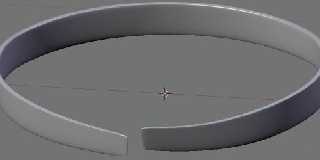
Similar, yes.  See attached version which includes the things I mentioned
above (I used a circle as the base though, I don't have a human model
handy), this took about 2 minutes.
Post a reply to this message
Attachments:
Download 'image1.jpg' (10 KB)
Preview of image 'image1.jpg'
|
|
| |
| |
|
|
|
|
| |
| |
|
|
>>> "Add -> Circle" and work from there?
>>
>> Except that, as I mentioned, it's not perfectly circular.
>
> Tweak a few of the vertices by hand then before you extrude.  There's
> only 16 or so of them that define the curve.

Are you nuts? I count at least 49 points in the curve, not 16. There's
no way you can place almost 50 points in 3D space with such perfection.
Placing just six points in a 2D circle is almost impossibly difficult,
so 50 is clearly well beyond possibility.

>> And the tapered end?
>
> After you've extruded, select 4 vertices around the belt and scale them.

Since when can you scale just one vertics?

>> The beveled edges?
>
> Select the edge and set the crease amount to non-zero.  Or select an
> edge and do a "loop cut" if you want more control.

I have no idea what you're talking about, but OK.

>> The slight deformations along the Y-axis?
>
> Drag around the base points of your circle in step 1 before the extrusions.

You can extrude a non-planar shape?

>> (Also, is it just me, or does the buckle self-intersect?)
>
> Probably he knows once it gets smoothed by the sub-surface algorithm it
> won't intersect anymore.

Fair enough.

>> The belt also presumably has to be curved in *the exact same way* as
>> the waistline it's supposed to fit around - which is also impossible.
>
> Ever heard of copy and paste?  Just copy some points from the waist
> model to start with rather than using a circle.

Well, I guess that would explain that. (Although the belt still needs to
be *larger* than the waist. Maybe just scaled a little?) Still doesn't
explain how it's possible to construct the trousers in the first place
of course...

>> You drew this in 30 seconds?
>
> Similar, yes.  See attached version which includes the things I
> mentioned above (I used a circle as the base though, I don't have a
> human model handy), this took about 2 minutes.

Then you have managed to create something in 2 minutes which is
dramatically more complex than any mesh object I have ever created in my
entire life with any 3D product, ever.
Post a reply to this message
|
|
| |
| |
|
|
|
|
| |
| |
|
|
Invisible wrote:

> Also... no triangles. Only quadrilaterals, as far as I can tell.

I take it back. I just found a single triangle on the heel of the left shoe.
Post a reply to this message
|
|
| |
| |
|
|
|
|
| |
| |
|
|
On Wed, 16 Dec 2009 14:32:07 +0100, Invisible <voi### [at] devnull> wrote:
>
> OK, well... In level one, where you meet Barney and he walks past the
> light fitting, why does the shading follow the polygons in the character
> mesh?

I dunno. Crappy graphics card/driver? Crappy settings? Optical illusion?
You imagining things because per-pixel lighting is "clearly impossible"?


>>  Do you seriously believe that the modeling software does not help you
>> place things on a circle?
>
> Maybe it'll draw a perfect circle or even an ellipse for you. But this
> is neither. It's more of a "stadium" shape, following the contours of
> the human hips.

So tweak it a little. Particularly easy if you use the human model as a
reference.


> Sure. Drawing hundreds of polygons with perfectly parallel surfaces is
> drop-dead easy.
>
> If they're aligned to the coordinate axies. :-P

Clearly you have not actually used any half-decent modeling software.


> I mean "impossible" in the same sense that it's "impossible" to throw a
> dart at dart board and hit a particular atom with the point.

Yet you keep using it when referring to things that are almost trivially
easy.


--
FE
Post a reply to this message
|
|
| |
| |
|
|
|
|
| |
| |
|
|
>> OK, well... In level one, where you meet Barney and he walks past the
>> light fitting, why does the shading follow the polygons in the
>> character mesh?
>
> I dunno. Crappy graphics card/driver? Crappy settings? Optical illusion?
> You imagining things because per-pixel lighting is "clearly impossible"?

When did I say *that* was impossible? It shouldn't be; I see no
particular problem with doing it. I just pointed out that when I played
HL2, it didn't. (Or didn't appear to.)

>> Maybe it'll draw a perfect circle or even an ellipse for you. But this
>> is neither. It's more of a "stadium" shape, following the contours of
>> the human hips.
>
> So tweak it a little.

IME, if you take a perfect circle and tweak it, the bits you've touched
now look horribly amaturish and wonky next to the perfect untouched
parts. I've wasted hours trying to force points into a smooth-looking
curve. As far as I can tell, it's impossible.

>> Sure. Drawing hundreds of polygons with perfectly parallel surfaces is
>> drop-dead easy.
>>
>> If they're aligned to the coordinate axies. :-P
>
> Clearly you have not actually used any half-decent modeling software.

I don't know - what counts as "half-decent"?

Back in the Amiga days, AmigaFormat gave away several coverdisks
featuring demo versions of what were supposedly "cutting-edge" 3D
applications - Expert 4D Jr, Imagine 3D, Real 3D, Cinema 4D, etc. Hell,
I even once borrowed an illegal copy of 3D Studio Max.

Real3D was nice in that it deals with *real* curved surfaces, rather
like POV-Ray, so spheres actually look spherical and so forth. The rest
are all just mesh editors, with all the limitations that implies. In
particular, all of them have options to generate a sphere, cone, torus
or whatever with X number of polygons. But once you've created the mesh,
you can't really *do* anything with it, except move the individual
verticies around, one at a time. (This is _not_ my idea of a fun time.)

Imagine 3D had a nice tool. I forget what it was called, but it gives
you three views, and you edit control points rather than the actual
polygons. The top view is the cross-section shape, and the other two
views are the path this is swept along. The tutorials show you how to
make a banana. (Helpfully, the real-world banan actually has a slightly
polygonal cross-section anyway.)

Could I get the damned thing to look like a banana? Not one bit of it. I
mean, I could make it look like a very blocky child's diagram of a
banana, but nothing anywhere approximating a real banana. It's just too
hard to line up dozens of points in a flowing curve. I spent weeks and
weeks trying.

As for 3D Studio Max... It has *a lot* of material properties you can
play with. I can see how that could be quite useful. But as far as mesh
editing goes, as far as I can tell it's even more limited than most such
editors. (Mind you, this was around 1992 or something. Maybe they've
fixed that by now...)

>> I mean "impossible" in the same sense that it's "impossible" to throw
>> a dart at dart board and hit a particular atom with the point.
>
> Yet you keep using it when referring to things that are almost trivially
> easy.

IME, with mesh moddelling *nothing* is trivial or easy. (Well, except
selecting "torus" and then "create mesh". That's trivial.) Every mesh
editor I've ever seen makes it utterly painful to achieve even the most
seemingly simple task.

But then again, mesh modelling by definition involves attempting to
create the illusion of complex surfaces by simply throwing hundreds of
trillions of data points at the problem rather than using some more
sophisticated approach. What do you expect?
Post a reply to this message
|
|
| |
| |
|
|
|
|
| |








