 |
|
|
|
|
|
| |
| |
|
|
|
|
| |
| |
|
|
On Wed, 16 Dec 2009 16:33:45 -0500, Warp wrote:
> Jim Henderson <nos### [at] nospam com> wrote:
>> An assertion that's easy to prove. Python runs on Macs. Macs
>> typically have a *1* button mouse.
>
> Isn't that info a bit old? Does Apple even sell 1-button mice anymore?
>
> (Apple's mice might *look* like they have only one button, but in
> reality
> they usually have at least four. They can be configured to work as if it
> had only one button, though.)
Perhaps, I'm not a Mac user. But I reckon that Python was around before
Apple switched to a multi-button mouse.
Jim com> wrote:
>> An assertion that's easy to prove. Python runs on Macs. Macs
>> typically have a *1* button mouse.
>
> Isn't that info a bit old? Does Apple even sell 1-button mice anymore?
>
> (Apple's mice might *look* like they have only one button, but in
> reality
> they usually have at least four. They can be configured to work as if it
> had only one button, though.)
Perhaps, I'm not a Mac user. But I reckon that Python was around before
Apple switched to a multi-button mouse.
Jim
Post a reply to this message
|
|
| |
| |
|
|
|
|
| |
| |
|
|
Warp wrote:
>   So the task is simple: Write a function f(m,n) which tells how many
> rectangles can be found in an m x n grid. (Explain how you came up
> with the function).

You mean just something like n*m*(n-1)*(m-1)/4?  The derivation is
pretty direct from the one-dimensional case.
Post a reply to this message
|
|
| |
| |
|
|
|
|
| |
| |
|
|
On Wed, 16 Dec 2009 22:56:50 +0100, Orchid XP v8 <voi### [at] devnull> wrote:
>
> Also... Blender seems to incorrectly assume that Z is "up" and Y is
> "back". (It should obviously be the other way around.)

It is not incorrect; it is right-handed.


> Interesting how the amount of scaling is apparently completely unrelated
> to the mouse movement... (Seems to scale the cube by about 20% of the
> distance the mouse is moved.)

It depends on how far the mouse pointer is from the selection.


> OK, this one took me a while to figure out. You'd think you extrude it
> by dragging the face that you want to extrude... but no. You just click
> and Blender places faces at random for you.

Select faces/edges/vertices, press E to extrude. The newly formed
faces/edges/vertices are automatically selected, and by default you are
put in Grab mode; move the mouse to move them or right-click to keep them
where they are. You can also switch from Grab mode to Scale or Rotate by
pressing S or R.


> F9 doesn't appear to do anything.

F9 opens the Editing panel in the Buttons window. If the Editing panel was
already active, nothing will happen.


--
FE
Post a reply to this message
|
|
| |
| |
|
|
|
|
| |
| |
|
|
Kevin Wampler <wam### [at] uwashingtonedu> wrote:
> Warp wrote:
> >   So the task is simple: Write a function f(m,n) which tells how many
> > rectangles can be found in an m x n grid. (Explain how you came up
> > with the function).

> You mean just something like n*m*(n-1)*(m-1)/4?  The derivation is
> pretty direct from the one-dimensional case.

  It would be interesting to see that derivation.

--
                                                          - Warp
Post a reply to this message
|
|
| |
| |
|
|
|
|
| |
| |
|
|
Warp wrote:
> Kevin Wampler <wam### [at] uwashingtonedu> wrote:
>> Warp wrote:
>>>   So the task is simple: Write a function f(m,n) which tells how many
>>> rectangles can be found in an m x n grid. (Explain how you came up
>>> with the function).
>
>> You mean just something like n*m*(n-1)*(m-1)/4?  The derivation is
>> pretty direct from the one-dimensional case.
>
>   It would be interesting to see that derivation.

Let's consider the one-dimensional case (so set m=1).  In this case we
have one rectangle of width n-1, two rectangles of width n-2, three of
width n-3, ..., and n-1 of width 1.  We can express the total number of
rectangles as the sum:

sum_{i=1:n-1} i

Which as the solution n*(n-1)/2.

If we relax the restriction that m=1, then we instead get the double sum:

sum_{j=1:m-1} j * sum_{i=1:n-1} i

Intuitively you can think of this as follows: for each of the
one-dimensional rectangles along the m-axis, we have sum_{i=1:n-1}
rectangles along the n-axis.  You can view this sum as expressing every
rectangle as being defined by two line segments along the n- and m-
axes.  In any case, the value of the sum is easy to compute:

sum_{j=1:m-1} j * sum_{i=1:n-1} i

= sum_{j=1:m-1} j * n*(n-1)/2

= (n*(n-1)/2) * sum_{j=1:m-1} j

= (n*(n-1)/2) * (m*(m-1)/2)

= n*m*(n-1)*(m-1)/4
Post a reply to this message
|
|
| |
| |
|
|
|
|
| |
| |
|
|
Random statistic: A standard Go board has 38 lines, 361 intersections and
29241 rectangles.

--
                                                          - Warp
Post a reply to this message
|
|
| |
| |
|
|
|
|
| |
| |
|
|
On 12/16/09 13:21, Warp wrote:
>> that's what the mascot does all of the time - yet he gets chastized from
>> time to time ;-)
>
>    He presents puzzles for people to think about?

	His presence is a puzzle in itself.

--
Would the capacity of a Palaeozoic Hard Dive be measured in Trilobites?
Post a reply to this message
|
|
| |
| |
|
|
|
|
| |
| |
|
|
Warp wrote:
>   Random statistic: A standard Go board has 38 lines, 361 intersections and
> 29241 rectangles.

And, rather surprisingly, 42 squares.
Post a reply to this message
|
|
| |
| |
|
|
|
|
| |
| |
|
|
Kevin Wampler <wam### [at] uwashingtonedu> wrote:
> Warp wrote:
> >   Random statistic: A standard Go board has 38 lines, 361 intersections and
> > 29241 rectangles.

> And, rather surprisingly, 42 squares.

  Since the lined grid of an official goban is 396 x 426.6 mm, does it form
any exact squares?

--
                                                          - Warp
Post a reply to this message
|
|
| |
| |
|
|
|
|
| |
| |
|
|
Warp wrote:
> Kevin Wampler <wam### [at] uwashingtonedu> wrote:
>> Warp wrote:
>>>   Random statistic: A standard Go board has 38 lines, 361 intersections and
>>> 29241 rectangles.
>
>> And, rather surprisingly, 42 squares.
>
>   Since the lined grid of an official goban is 396 x 426.6 mm, does it form
> any exact squares?
>

Hmm, no it doesn't.  I was just getting my info from this page:
http://senseis.xmp.net/?path=GoHumour&page=HowManySquaresOnAGoBoard  but
looking into it a bit more it seems that you're correct (at least for
Japanese boards).  I don't about standard sizes in other countries
though (I think a Chinese board is somewhat larger, but I don't know
about Korea or other countries).
Post a reply to this message
|
|
| |
| |
|
|
|
|
| |
| |
|
|
> Has somebody invented a way of placing points in 3D space even though you
> only have a 2D edit area yet?

Most 3D modellers I've seen allow you to split the edit area into 4, 3
viewing orthogonally along each axis, and 1 perspective.  This allows you to
place points accurately in 3D, and of course check the "real" look of the
outcome interactively (yes all views update together in real-time).

Like this:

http://www.nycresistor.com/wp-content/uploads/2009/07/blender-20080613-095701.jpg

Alternatively you just have 1 perspective view and slide the point along
each axis as you see fit (obviously rotating the model whilst you're doing
it to check the look).

Depends on personal preference I guess, and what exactly you're modelling.
Post a reply to this message
|
|
| |
| |
|
|
|
|
| |
| |
|
|
>> right mouse button click (RMB) - selects
>> left mouse button click (LMB) - changes location of 3D cursor
>
> And I think that there pretty much sums up why people think Blender's
> interface sucks. :-)

Not really, you can change that one around (as I always do).  There's many
other things too though that you can't change :-)
Post a reply to this message
|
|
| |
| |
|
|
|
|
| |
| |
|
|
>> Has somebody invented a way of placing points in 3D space even though
>> you only have a 2D edit area yet?
>
> Most 3D modellers I've seen allow you to split the edit area into 4, 3
> viewing orthogonally along each axis, and 1 perspective.  This allows
> you to place points accurately in 3D, and of course check the "real"
> look of the outcome interactively (yes all views update together in
> real-time).

Most of the modellers I've seen *only* work in this way. (Blender
apparently allows you to rejigger the display any way you see fit.)

It's still surprisingly easy to get "lost" in 3D space, or to draw stuff
and then discover you didn't draw what you thought you drew.
Post a reply to this message
|
|
| |
| |
|
|
|
|
| |
| |
|
|
>> Also... Blender seems to incorrectly assume that Z is "up" and Y is
>> "back". (It should obviously be the other way around.)
>
> It is not incorrect; it is right-handed.

OK, I rephrase: confusing.

>> Interesting how the amount of scaling is apparently completely
>> unrelated to the mouse movement... (Seems to scale the cube by about
>> 20% of the distance the mouse is moved.)
>
> It depends on how far the mouse pointer is from the selection.

Oh, I see. So, what, the mouse position at the instant you type "s"?

>> OK, this one took me a while to figure out. You'd think you extrude it
>> by dragging the face that you want to extrude... but no. You just
>> click and Blender places faces at random for you.
>
> Select faces/edges/vertices, press E to extrude. The newly formed
> faces/edges/vertices are automatically selected, and by default you are
> put in Grab mode; move the mouse to move them or right-click to keep
> them where they are. You can also switch from Grab mode to Scale or
> Rotate by pressing S or R.

This doesn't appear to match the behaviour I observed. Click somewhere
and new faces appear. Move the mouse and nothing happens. Click again
and more faces appear.

The faces aren't random though; it appears that if you click exactly
half way up the screen, the new geometry is parallel to the existing
cube. Click slightly below the midline and the geometry is connected at
an angle. Click lower still and it self-intersects in a way I don't
quite comprehend yet.

>> F9 doesn't appear to do anything.
>
> F9 opens the Editing panel in the Buttons window. If the Editing panel
> was already active, nothing will happen.

Ah, I see.
Post a reply to this message
|
|
| |
| |
|
|
|
|
| |
| |
|
|
> Most of the modellers I've seen *only* work in this way. (Blender
> apparently allows you to rejigger the display any way you see fit.)
>
> It's still surprisingly easy to get "lost" in 3D space, or to draw stuff
> and then discover you didn't draw what you thought you drew.

That's why you should keep an eye on the perspective view, and keep rotating
it around to ensure it looks ok.  As you said, it is very easy to make
something look cool from one viewpoint, but then when you rotate it around
it's nothing like you wanted.

If you're designing smooth surfaces it can really help if you turn on some
specular lighting or even an environment map reflection (if your modeller
allows it), this allows you to see how "smooth" the surface is better than
just with diffuse lighting.

Personally I prefer just one perspective view and to keep looking from
different angles while I'm designing, but maybe I'm just used to that
because it's how my 3D CAD software works (which I use 100x more frequently
than Blender).
Post a reply to this message
|
|
| |
| |
|
|
|
|
| |
| |
|
|
Given that Blender is only capable of rendering triangles, is there some
way to GPU-accelerate the rendering process? (As opposed to nailing my
CPU to the wall for 10 minutes at a time.)
Post a reply to this message
|
|
| |
| |
|
|
|
|
| |
| |
|
|
On Thu, 17 Dec 2009 11:31:13 +0100, Invisible <voi### [at] devnull> wrote:
> Given that Blender is only capable of rendering triangles, is there some
> way to GPU-accelerate the rendering process? (As opposed to nailing my
> CPU to the wall for 10 minutes at a time.)

For quick test renders, turn off OSA, and perhaps also ray-tracing.

For a quick preview of just a small part of the scene, use Render Preview
(Shift+P).


--
FE
Post a reply to this message
|
|
| |
| |
|
|
|
|
| |
| |
|
|
On Thu, 17 Dec 2009 10:20:33 +0100, Invisible <voi### [at] devnull> wrote:
>>> Also... Blender seems to incorrectly assume that Z is "up" and Y is
>>> "back". (It should obviously be the other way around.)
>>  It is not incorrect; it is right-handed.
>
> OK, I rephrase: confusing.

Confusing to *you* perhaps, because you are used to left-handed systems.


>>> Interesting how the amount of scaling is apparently completely
>>> unrelated to the mouse movement... (Seems to scale the cube by about
>>> 20% of the distance the mouse is moved.)
>>  It depends on how far the mouse pointer is from the selection.
>
> Oh, I see. So, what, the mouse position at the instant you type "s"?

Yes.


>>  Select faces/edges/vertices, press E to extrude. The newly formed
>> faces/edges/vertices are automatically selected, and by default you are
>> put in Grab mode; move the mouse to move them or right-click to keep
>> them where they are. You can also switch from Grab mode to Scale or
>> Rotate by pressing S or R.
>
> This doesn't appear to match the behaviour I observed. Click somewhere
> and new faces appear. Move the mouse and nothing happens. Click again
> and more faces appear.

http://blenderunderground.com/2007/08/17/blender-basics-part-3-is-live/


--
FE
Post a reply to this message
|
|
| |
| |
|
|
|
|
| |
| |
|
|
>> Given that Blender is only capable of rendering triangles, is there
>> some way to GPU-accelerate the rendering process? (As opposed to
>> nailing my CPU to the wall for 10 minutes at a time.)
>
> For quick test renders, turn off OSA, and perhaps also ray-tracing.
>
> For a quick preview of just a small part of the scene, use Render
> Preview (Shift+P).

Sure. I was just wondering, since Blender doesn't do anything a GPU
can't do, whether there's some way to use GPU acceleration, that's all.
Post a reply to this message
|
|
| |
| |
|
|
|
|
| |
| |
|
|
> Sure. I was just wondering, since Blender doesn't do anything a GPU can't
> do, whether there's some way to use GPU acceleration, that's all.

You mean the Blender internal renderer?  Umm, that's a fully-fledged
raytracer with multiple reflections/refractions, ray traced shadows, ambient
occlusion, all that stuff etc, as you will know from the POV/GPU discussion
these things are quite hard to do on a GPU, if possible at all.

Of course the editor view in Blender is using the GPU, but the materials
that are shown are a limited cut-down version of what will appear in the
render window.
Post a reply to this message
|
|
| |
| |
|
|
|
|
| |
| |
|
|
>> Sure. I was just wondering, since Blender doesn't do anything a GPU
>> can't do, whether there's some way to use GPU acceleration, that's all.
>
> You mean the Blender internal renderer?

Indeed.

> Umm, that's a fully-fledged
> raytracer with multiple reflections/refractions, ray traced shadows,
> ambient occlusion, all that stuff etc, as you will know from the POV/GPU
> discussion these things are quite hard to do on a GPU, if possible at all.

I thought ambient occlusion (as opposed to other GI algorithms) was
specifically suited to GPU implementation?

Anyway, I just thought if you weren't using ray tracing, it ought to be
possibly to run on the GPU. I guess not...

(What's the point of a ray tracer in a product that only renders triangles?)
Post a reply to this message
|
|
| |
| |
|
|
|
|
| |
| |
|
|
scott wrote:
>> Sure. I was just wondering, since Blender doesn't do anything a GPU
>> can't do, whether there's some way to use GPU acceleration, that's all.
>
> You mean the Blender internal renderer?  Umm, that's a fully-fledged
> raytracer with multiple reflections/refractions, ray traced shadows,
> ambient occlusion, all that stuff etc, as you will know from the POV/GPU
> discussion these things are quite hard to do on a GPU, if possible at all.

It's possible, sure.  This guy ported a small path tracing
implementation to OpenCL:

http://vimeo.com/8013005
Post a reply to this message
|
|
| |
| |
|
|
|
|
| |
| |
|
|
> I thought ambient occlusion (as opposed to other GI algorithms) was
> specifically suited to GPU implementation?

There's a variety of ways to implement AO, it just so happens someone
developed a clever way to approximate AO very quickly on the GPU.
Raytracers typically use a different method to compute AO that is not
possible (or would be very slow/tricky) on GPUs.

> Anyway, I just thought if you weren't using ray tracing, it ought to be
> possibly to run on the GPU. I guess not...

If you're not using any features of the ray tracer then isn't what you see
in the edit view good enough?

> (What's the point of a ray tracer in a product that only renders
> triangles?)

Ermm, physically correct multi-level reflections and refractions, more
accurate GI, better AA, more accurate shadows, basically all the benefits of
a raytracer rendering shapes other than triangles.
Post a reply to this message
|
|
| |
| |
|
|
|
|
| |
| |
|
|
>> I thought ambient occlusion (as opposed to other GI algorithms) was
>> specifically suited to GPU implementation?
>
> There's a variety of ways to implement AO, it just so happens someone
> developed a clever way to approximate AO very quickly on the GPU.
> Raytracers typically use a different method to compute AO that is not
> possible (or would be very slow/tricky) on GPUs.

I thought the entire definition of AO is that it's a rough approximation
to true GI that's useful because it renders really fast?

>> Anyway, I just thought if you weren't using ray tracing, it ought to
>> be possibly to run on the GPU. I guess not...
>
> If you're not using any features of the ray tracer then isn't what you
> see in the edit view good enough?

As far as I know, I'm not using any ray tracer features, and yet the
final render looks different than the edit window. (If only by being
more grainy...)

>> (What's the point of a ray tracer in a product that only renders
>> triangles?)
>
> Ermm, physically correct multi-level reflections and refractions, more
> accurate GI, better AA, more accurate shadows, basically all the
> benefits of a raytracer rendering shapes other than triangles.

Well, I suppose. (I idea why AA would be better...) I guess I usually
think of the main advantage of ray-tracing as being the ability to
render things that aren't triangles. But sure, reflection, refraction
and shadows are other big advantages...
Post a reply to this message
|
|
| |
| |
|
|
|
|
| |
| |
|
|
Invisible wrote:
>>> OK, this one took me a while to figure out. You'd think you extrude
>>> it by dragging the face that you want to extrude... but no. You just
>>> click and Blender places faces at random for you.
>>
>> Select faces/edges/vertices, press E to extrude. The newly formed
>> faces/edges/vertices are automatically selected, and by default you
>> are put in Grab mode; move the mouse to move them or right-click to
>> keep them where they are. You can also switch from Grab mode to Scale
>> or Rotate by pressing S or R.
>
> This doesn't appear to match the behaviour I observed. Click somewhere
> and new faces appear. Move the mouse and nothing happens. Click again
> and more faces appear.
>
> The faces aren't random though; it appears that if you click exactly
> half way up the screen, the new geometry is parallel to the existing
> cube. Click slightly below the midline and the geometry is connected at
> an angle. Click lower still and it self-intersects in a way I don't
> quite comprehend yet.

Extrusions are normally done by pressing E.  Select face/edge, press e
and push it around (or along an axis by typing the axis name).

But you can also do like I tell above when you're constrained to a plane
(like xy from top view) and it lets you quickly connect lots of extruded
faces like as if you were drawing.  Good for a belt, I guess, and also
good to draw SOR surfaces by begining with a plane (a face actually) and
deleting all but one vertice and then selecting this one, moving it
along the y axis with ctrl down until it's on y=0, and then changing to
front view with 1 and clicking along to finally draw your cup or bottle
or whatever, both outside and inside.  Next, F9 to get to the mesh edit
panels bellow and search for Spin button.  Change to top view, then hit
spin 4 times for a complete 360 turn.  You'll probably need the w menu
and select "Remove doubles" to remove extra vertices on the same
coordinates and then select all with a and hit ctrl+n to recalculate the
normals or else it should display some funky black lines along the
surface...

Have I mentioned block select operations yet?  b while in edit mode and
it'll let you make a select window by clicking the mouse, pushing it and
clicking again.  Or you click b again to select with a "brush" and paint
along the area you want selected.  Size of radius controlled with
pgup/pgdown.

If you don't want to select geometry in the background, I don't remember
any keycombo, but the penultimate button while in edit mode in the bar
just below the 3D view is called "Occlude background geometry".

Also, perhaps too early to tell, but you may also restrict your editing
to a certain area by selecting the area you're interested and hitting
shift+h to hide everything else or h to hide the selection.  Bring
everything back with alt+h.

oh, and at any time undo is ctrl+z indeed.  There's different undos for
edit mode and object mode, though.
Post a reply to this message
|
|
| |
| |
|
|
|
|
| |
| |
|
|
Invisible wrote:
> I thought ambient occlusion (as opposed to other GI algorithms) was
> specifically suited to GPU implementation?

It's certainly only dependent on geometry, not light sources.  But how
do you cast shadows on such geometry?  Blender comes with 2 options:
Approximate AO and Raytraced AO, which is the default.  AAO is only
useful if your geometry is dense, with lots of vertices, as all it does
is pretty much the same as the classic polygon-only radiosity algorithm
does (also available in Blender but a mess):  it "paints" vertex with
color information.  If your geometry is not dense, AAO looks ridiculous.

> (What's the point of a ray tracer in a product that only renders
> triangles?)

Yeah, what's the point of having povray raytrace any non-abstract math
scenes?...
Post a reply to this message
|
|
| |
| |
|
|
|
|
| |
| |
|
|
> I thought the entire definition of AO is that it's a rough approximation
> to true GI that's useful because it renders really fast?

Indeed.  Raytracers typically cast out a few rays (the more the smoother the
result) to see if they hit anything within a certain distance.  GPU methods
typically just compare the depths of the surrounding pixels (so it's
essentially done in 2D).  Obviously for a GPU this is much faster as it
doesn't need to access the scene data (it might not even exist in most
cases!).

> As far as I know, I'm not using any ray tracer features, and yet the final
> render looks different than the edit window. (If only by being more
> grainy...)

If it looks grainy then you've probably got AO turned on with a low number
of rays.

Note that in the edit window there are several different options for the
display mode (wireframe, shaded, textures etc).

> Well, I suppose. (I idea why AA would be better...)

AFAIK standard GPU rendering uses a very limited AA algorithm (usually fixed
to a certain number of sub-pixels and some maximum like 8x), a raytracer
usually can use dynamic AA depth and as many rays as are necessary.

> I guess I usually think of the main advantage of ray-tracing as being the
> ability to render things that aren't triangles.

I think there are some raytracers that can *only* render triangles.  I guess
it makes them simpler and they can be highly optimised for huge lists of
triangles.  Then you can make some layer that converts higher order shapes
to pixel sized triangles on the fly to feed the raytracer if needed.  IIRC
this is how Pixar's raytracer works.
Post a reply to this message
|
|
| |
| |
|
|
|
|
| |
| |
|
|
>> I thought the entire definition of AO is that it's a rough
>> approximation to true GI that's useful because it renders really fast?
>
> Indeed.  Raytracers typically cast out a few rays (the more the smoother
> the result) to see if they hit anything within a certain distance.  GPU
> methods typically just compare the depths of the surrounding pixels (so
> it's essentially done in 2D).  Obviously for a GPU this is much faster
> as it doesn't need to access the scene data (it might not even exist in
> most cases!).

Ah, wait... Apparently I'm confusing SSAO with normal AO. (The former
being commonly run on the GPU, the latter requiring an actual ray
tracer.) I wasn't aware that Blender is doing true AO. I assumed it was
just faking it, GPU-style.

>> (I idea why AA would be better...)
>
> AFAIK standard GPU rendering uses a very limited AA algorithm (usually
> fixed to a certain number of sub-pixels and some maximum like 8x), a
> raytracer usually can use dynamic AA depth and as many rays as are
> necessary.

This puzzles me. I'm not disputing you're wrong - usually there's some
option to set the number of subsamples taken - but since a GPU can
*only* draw straight lines, you'd think they could just use the
closed-form formulas for doing mathematically perfect AA on polygon
edges. It takes about 3 float-ops. No subsamples required.

Weird...

>> I guess I usually think of the main advantage of ray-tracing as being
>> the ability to render things that aren't triangles.
>
> I think there are some raytracers that can *only* render triangles.

Apparently I'm looking at one.

> I
> guess it makes them simpler and they can be highly optimised for huge
> lists of triangles.  Then you can make some layer that converts higher
> order shapes to pixel sized triangles on the fly to feed the raytracer
> if needed.  IIRC this is how Pixar's raytracer works.

That's what I heard. I also hear that only about 0.1% of the stuff Pixar
does actually involves any ray tracing, with is kind of unbelievable...

I still find it rather hard to believe that you can take a complex shape
such as the surface of a water splash and automatically tesselate it.
But apparently somebody has figured out how to do this.
Post a reply to this message
|
|
| |
| |
|
|
|
|
| |
| |
|
|
>> (What's the point of a ray tracer in a product that only renders
>> triangles?)
>
> Yeah, what's the point of having povray raytrace any non-abstract math
> scenes?...

What, you mean other than the ability to draw truly-curved surfaces,
resolution-independent textures, and construct complex shapes easily and
intuitively using CSG, blobs, isosurfaces, and so forth? ;-)
Post a reply to this message
|
|
| |
| |
|
|
|
|
| |
| |
|
|
Invisible <voi### [at] devnull> wrote:
> That's what I heard. I also hear that only about 0.1% of the stuff Pixar
> does actually involves any ray tracing, with is kind of unbelievable...
>
> I still find it rather hard to believe that you can take a complex shape
> such as the surface of a water splash and automatically tesselate it.
> But apparently somebody has figured out how to do this.

http://vimeo.com/7875145

no raytracing!  friggin' unbelievable...
Post a reply to this message
|
|
| |
| |
|
|
|
|
| |
| |
|
|
Invisible <voi### [at] devnull> wrote:
> >> (What's the point of a ray tracer in a product that only renders
> >> triangles?)
> >
> > Yeah, what's the point of having povray raytrace any non-abstract math
> > scenes?...
>
> What, you mean other than the ability to draw truly-curved surfaces,
> resolution-independent textures, and construct complex shapes easily and
> intuitively using CSG, blobs, isosurfaces, and so forth? ;-)

Very rare to have complex "real-life" scenes out of this math objects, except
landscapes due to their fractal nature (but even so, not even trees despite
their fractal base).  Characters and man-made buildings and objects need more
care detailing than one is willing to put forward out of pure math primitives
and functions.

It's very hard to go that route, both as an undertaking and waiting for some
insane render times.  Much easier to just approximate with polygons and
subdivision algorithms.  Have you tried subsurf modifier yet in Blender?
Post a reply to this message
|
|
| |
| |
|
|
|
|
| |
| |
|
|
> This puzzles me. I'm not disputing you're wrong - usually there's some
> option to set the number of subsamples taken - but since a GPU can *only*
> draw straight lines, you'd think they could just use the closed-form
> formulas for doing mathematically perfect AA on polygon edges. It takes
> about 3 float-ops. No subsamples required.

That method has problems when you are drawing triangles adjacent to each
other.  Also how does your method work with a pixel shader?  With
multi-sampling type AA it's easy because the scene is just rendered at a
higher resolution and then scaled down, this automatically fixes issues with
adjacent triangles and calculating pixel colours.

> That's what I heard. I also hear that only about 0.1% of the stuff Pixar
> does actually involves any ray tracing, with is kind of unbelievable...

Probably only very few surfaces actually *need* raytracing, the rest can be
scanline rendered.

> I still find it rather hard to believe that you can take a complex shape
> such as the surface of a water splash and automatically tesselate it.

If you're going for physical accuracy then your simulation data will be in
voxels or something anyway, so using marching cubes or similar will get you
your tesselated mesh directly.  If you just want an artistic look (and are a
skilled enough artist) then draw a rough mesh by hand and use some form of
sub-divison to smooth it.

Also:

http://graphics.pixar.com/library/Whitewater/paper.pdf
Post a reply to this message
|
|
| |
| |
|
|
|
|
| |
| |
|
|
>>> Yeah, what's the point of having povray raytrace any non-abstract math
>>> scenes?...
>> What, you mean other than the ability to draw truly-curved surfaces,
>> resolution-independent textures, and construct complex shapes easily and
>> intuitively using CSG, blobs, isosurfaces, and so forth? ;-)
>
> Very rare to have complex "real-life" scenes out of this math objects, except
> landscapes due to their fractal nature (but even so, not even trees despite
> their fractal base).  Characters and man-made buildings and objects need more
> care detailing than one is willing to put forward out of pure math primitives
> and functions.
>
> It's very hard to go that route, both as an undertaking and waiting for some
> insane render times.  Much easier to just approximate with polygons and
> subdivision algorithms.  Have you tried subsurf modifier yet in Blender?

Looking around the room I'm sitting in now, most if not all items in it
would be far, far easier to create with POV-Ray.

Man-made objects tend to be particularly easy to construct using CSG. My
telephone, for example. Throw a few cubes and prisms together with a
little CSG and it's done. Takes about a dozen operations. But all those
curves and bevelled edges would take years with triangles.

You want a vase or a wine glass? It's a trivial SoR of a spline in
POV-Ray. Almost impossible to do with flat triangles and straight edges.

Various spikey, wavey or otherwise deformed surfaces are both trivial
and flexible with isosurfaces (provided that the undeformed shape is
fairly simple). A brick with a rough surface is almost a 1-liner in
POV-Ray, but would be ludicrously hard to model with billions of
triangles. (You'd have to fake it with devious texture mapping.)

I could go on...

About the only thing that's really hard in POV-Ray is complex but
non-random shapes - things like the sleek body of a sports car. For that
you really need some kind of 2D spline system.
Post a reply to this message
|
|
| |
| |
|
|
|
|
| |
| |
|
|
Invisible <voi### [at] devnull> wrote:
> > Yeah, what's the point of having povray raytrace any non-abstract math
> > scenes?...
>
> resolution-independent textures,

I might add that while procedural textures do not pixellate, they definitely
don't look as good close up as they do at the resolution they were designed at.
This certainly makes them resolution-dependent from a practical standpoint.

Using a LOD framework, for textures and geometry, is important for any scene you
intend to use at different resolutions/camera positions. Unless you don't mind
waiting 10x longer than you need to for renders to finish ;)
Post a reply to this message
|
|
| |
| |
|
|
|
|
| |
| |
|
|
>>> Yeah, what's the point of having povray raytrace any non-abstract math
>>> scenes?...
>> resolution-independent textures,
>
> I might add that while procedural textures do not pixellate, they definitely

Sure. It's just nice that if you have a bit of floor (or something)
that's slightly nearer to the camera than the rest of the scene, it
doesn't look horrid. (Or a reflection from a curved surface, or...)
Post a reply to this message
|
|
| |
| |
|
|
|
|
| |
| |
|
|
> Looking around the room I'm sitting in now, most if not all items in it
> would be far, far easier to create with POV-Ray.

I beg to differ.

> Man-made objects tend to be particularly easy to construct using CSG. My
> telephone, for example. Throw a few cubes and prisms together with a
> little CSG and it's done.

But it's going to look like 80's CGI because you can't do rounded edges on
anything more complex than a straight edge without *a lot* of math and
patience.  Ditto for curved surfaces.  And you're stuck with perfectly
cylindrical rounds, IRL they are not usually used on edges because of the
discontinuity in curvature (it doesn't give smooth reflections).

Maybe your phone is different, but my phone looks impossibly hard to do in
POV SDL with all those complex curved surfaces and rounded edges.

> fairly simple). A brick with a rough surface is almost a 1-liner in
> POV-Ray, but would be ludicrously hard to model with billions of
> triangles. (You'd have to fake it with devious texture mapping.)

Or apply a noise texture to the displace modifier if your scene calls for a
brick with real geometry.

BTW what's your 1-line for a rough brick in POV?  How long did it take you
to write?
Post a reply to this message
|
|
| |
| |
|
|
|
|
| |
| |
|
|
> Maybe your phone is different, but my phone looks impossibly hard to do in
> POV SDL with all those complex curved surfaces and rounded edges.

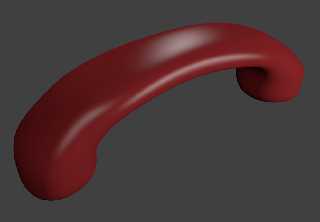
Mabye I just suck at POV?  I just made this in Blender (sorry for JPEG
compression, shouldn't have chosen red!), it has *9* vertices, followed by
two mirror modifiers and the subdivision modifier.  Total time about 10
mins, including adding some lights and materials.  No way I could achieve
the same in SDL, even in 1 hour.
Post a reply to this message
Attachments:
Download 'phone.jpg' (21 KB)
Preview of image 'phone.jpg'
|
|
| |
| |
|
|
|
|
| |
| |
|
|
>> Looking around the room I'm sitting in now, most if not all items in
>> it would be far, far easier to create with POV-Ray.
>
> I beg to differ.

Well, it was written by *me* I guess...

>> Man-made objects tend to be particularly easy to construct using CSG.
>> My telephone, for example. Throw a few cubes and prisms together with
>> a little CSG and it's done.
>
> But it's going to look like 80's CGI because you can't do rounded edges

Or, more correctly, you can't do rounded edges with triangles. You can
only take jaggid geometry and smother it with trickery until it gives
the vague suggestion of roundness.

If I want a round button on my phone, just select a cylinder and it's
done. You could also CSG a cone onto the end for a bevel, or use a torus
for a smooth bevel. Piece of cake.

> And you're stuck with
> perfectly cylindrical rounds, IRL they are not usually used on edges
> because of the discontinuity in curvature (it doesn't give smooth
> reflections).

...it doesn't?

> Maybe your phone is different, but my phone looks impossibly hard to do
> in POV SDL with all those complex curved surfaces and rounded edges.

My phone is pretty squarish, with square and round buttons. Looks quite
easy to do. The coilled cable might be difficult, what with POV not
having real splining tools. (You gotta type in the coordinates by hand.)
About the only remotely tricky part would be the handset.

>> A brick with a rough surface is almost a 1-liner in
>> POV-Ray, but would be ludicrously hard to model with billions of
>> triangles. (You'd have to fake it with devious texture mapping.)
>
> Or apply a noise texture to the displace modifier if your scene calls
> for a brick with real geometry.

...wuh?

> BTW what's your 1-line for a rough brick in POV?  How long did it take
> you to write?

You take the equation for a plane, add some noise to it. OK, for a brick
I guess you'd need a seperate isosurface for each side. Still much
easier than trying to model roughness by hand.
Post a reply to this message
|
|
| |
| |
|
|
|
|
| |
| |
|
|
scott wrote:
>> Maybe your phone is different, but my phone looks impossibly hard to
>> do in POV SDL with all those complex curved surfaces and rounded edges.
>
> Mabye I just suck at POV?  I just made this in Blender (sorry for JPEG
> compression, shouldn't have chosen red!), it has *9* vertices, followed
> by two mirror modifiers and the subdivision modifier.  Total time about
> 10 mins, including adding some lights and materials.  No way I could
> achieve the same in SDL, even in 1 hour.

That is actually quite impressive. Normally you'd have to model
something like this with blobs. I have no idea how it's possible to
construct this in a single human lifetime using only straight edges.

I just spent about an hour trying to make a torus in Blender. (Obviously
you can just click "insert torus", but I wanted to see if it's
physically possible to make one manually.) Suffice it to say most of
that time was just spent trying to force Blender to do what I actually
want it to do.

I guess the thing about Blender is that it forces you to think in terms
of surfaces, while POV-Ray allows you to think in terms of *volumes*,
which is far more natural.
Post a reply to this message
|
|
| |
| |
|
|
|
|
| |
| |
|
|
> Or, more correctly, you can't do rounded edges with triangles.

Maybe you can't, but other people can.

> If I want a round button on my phone, just select a cylinder and it's
> done. You could also CSG a cone onto the end for a bevel, or use a torus
> for a smooth bevel. Piece of cake.

Yup, but what if your button is not perfectly cylindrical, how do you do the
bezel/round then?

>> And you're stuck with perfectly cylindrical rounds, IRL they are not
>> usually used on edges because of the discontinuity in curvature (it
>> doesn't give smooth reflections).
>
> ...it doesn't?

No, you get a visible "seam" in the reflection where the cylinder/torus
(which has constant curvature) meets the planar surface (which has zero
curvature).  A better way is to use a curved surface where the curvature
gradually increases from zero up and then back to zero again, rather than
abruptly changing to a constant value.

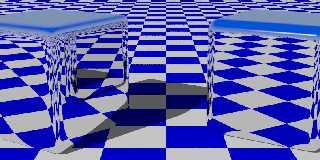
See attached POV image, right side is "Rounded_Box" made from boxes and
cylinders/spheres, left side is a super-ellipsoid, which kind of mimics the
varying curvature technique for the rounds.  Notice how on the right side
cube the reflection is sharply broken near all the rounds (especially the
specular highlight just abruptly stops), the left one is much smoother.
Post a reply to this message
Attachments:
Download 'image1.jpg' (92 KB)
Preview of image 'image1.jpg'
|
|
| |
| |
|
|
|
|
| |
| |
|
|
>> Or, more correctly, you can't do rounded edges with triangles.
>
> Maybe you can't, but other people can.

Nope. You can only fake it.

>> If I want a round button on my phone, just select a cylinder and it's
>> done. You could also CSG a cone onto the end for a bevel, or use a
>> torus for a smooth bevel. Piece of cake.
>
> Yup, but what if your button is not perfectly cylindrical, how do you do
> the bezel/round then?

Depends on exactly which way it isn't perfectly cylindrical in.

Really, you can go a seriously long way using only quadratics and CSG.
There are only a few constructions I've found that you can't do. You
can't model highly organic stuff like (say) cars very easily, but most
man-made stuff has lots of straight edges and simple curves that are
quite easy to do. Think about it - if you wanted to model the Natural
History Museum, would you built it out of a few quadrillion triangles?
Or just cut a few solids out of each other? I know what I'd choose...

>>> And you're stuck with perfectly cylindrical rounds, IRL they are not
>>> usually used on edges because of the discontinuity in curvature (it
>>> doesn't give smooth reflections).
>>
>> ...it doesn't?
>
> No, you get a visible "seam" in the reflection where the cylinder/torus
> (which has constant curvature) meets the planar surface (which has zero
> curvature).

Mmm, interesting. In all the years I've been using POV-Ray, I've never
actually noticed that before...
Post a reply to this message
|
|
| |
| |
|
|
|
|
| |
| |
|
|
> Depends on exactly which way it isn't perfectly cylindrical in.

How about simply a stretched cylinder, ie an extruded ellipse.  You can't
simply scale the torus or cone otherwise the radius/bevel will not be
constant around the perimeter.

As well as having elliptical buttons, the top surface of the buttons on my
phone are also curved (concave inwards).  I suppose you could model this in
POV by subtracting a big sphere from the extruded oval.  But how to do the
rounded edge then?  Matching up a round with the vertical sides (actually
they're slightly off-vertical) of the button with the curved top surface
doesn't sound very easy to me.

> Really, you can go a seriously long way using only quadratics and CSG.

Do you have any examples?

> Think about it - if you wanted to model the Natural History Museum, would
> you built it out of a few quadrillion triangles? Or just cut a few solids
> out of each other? I know what I'd choose...

And I know which one would look like a photo-realistic model and which one
would look like a few solids cut out of each other :-)

> Mmm, interesting. In all the years I've been using POV-Ray, I've never
> actually noticed that before...

I didn't realise it either until I got into designing stuff that people will
actually see (as opposed to internal components).  Most companies will
reject any curvature discontinuities.
Post a reply to this message
|
|
| |
| |
|
|
|
|
| |
| |
|
|
"Darren New" <dne### [at] sanrrcom> wrote in message
news:4b29374d$1@news.povray.org...
> nemesis wrote:

> > right mouse button click (RMB) - selects
> > left mouse button click (LMB) - changes location of 3D cursor

> And I think that there pretty much sums up why people think Blender's
> interface sucks. :-)

My thoughts exactly while I was reading that list. Well, not exactly, but
close enough.
Post a reply to this message
|
|
| |
| |
|
|
|
|
| |
| |
|
|
scott wrote:
>>> right mouse button click (RMB) - selects
>>> left mouse button click (LMB) - changes location of 3D cursor
>>
>> And I think that there pretty much sums up why people think Blender's
>> interface sucks. :-)
>
> Not really, you can change that one around (as I always do).

Which is irrelevant to the point that it defaults to doing everything
differently than every other piece of software and platform, and you have to
read lots of manuals just to learn how to close the program.

--
Darren New, San Diego CA, USA (PST)
   Human nature dictates that toothpaste tubes spend
   much longer being almost empty than almost full.
Post a reply to this message
|
|
| |
| |
|
|
|
|
| |
| |
|
|
Invisible escreveu:
> scott wrote:
>> Mabye I just suck at POV?  I just made this in Blender (sorry for JPEG
>> compression, shouldn't have chosen red!), it has *9* vertices,
>> followed by two mirror modifiers and the subdivision modifier.  Total
>> time about 10 mins, including adding some lights and materials.  No
>> way I could achieve the same in SDL, even in 1 hour.
>
> That is actually quite impressive. Normally you'd have to model
> something like this with blobs. I have no idea how it's possible to
> construct this in a single human lifetime using only straight edges.

Much easier than modelling the base.

Forget the straight edges:  for the millionth time, he's using a
subsurface division modifier on top of the base simple mesh.  There's no
hard edges to be seen anywhere because there's loads of very small
polygons tessalating the entire surface because of that.  Real curve or
not, it looks as good as real curved surface.  Yeah, even if there were
reflections.

> I just spent about an hour trying to make a torus in Blender. (Obviously
> you can just click "insert torus", but I wanted to see if it's
> physically possible to make one manually.) Suffice it to say most of
> that time was just spent trying to force Blender to do what I actually
> want it to do.

Like adding a circle object, going into edit mode, grabbing it some 1
unit to the left, changing view to front and using the spin button to
have it spin around the y axis?

> I guess the thing about Blender is that it forces you to think in terms
> of surfaces, while POV-Ray allows you to think in terms of *volumes*,
> which is far more natural.

Natural or not, I've been far more productive within a few weeks of
Blender than in my whole 10 or so years of pov SDL.  It's a marvel how
I've gone from RSOCP's or little more than that to realistic-looking
settings with real-world objects in such small time, kinda like a rupture.

I was a SDL-only guy once, but I don't find it any worth today except to
assemble and script scenes out of polygon-modelled objects.

--
a game sig: http://tinyurl.com/d3rxz9
Post a reply to this message
|
|
| |
| |
|
|
|
|
| |
| |
|
|
Invisible escreveu:
>> Maybe your phone is different, but my phone looks impossibly hard to
>> do in POV SDL with all those complex curved surfaces and rounded edges.
>
> My phone is pretty squarish, with square and round buttons. Looks quite
> easy to do. The coilled cable might be difficult, what with POV not
> having real splining tools. (You gotta type in the coordinates by hand.)
> About the only remotely tricky part would be the handset.

oh, so because your phone is squarish, we should refrain to model
non-squarish phones and only use pov SDL, since it's so great at
hard-edged geometry... fine excuse.  Good thing is that iPhone is so
popular and so easy to model with a superellipsoid... though you still
need an imagemap rather than procedural...

What I really want to see is you stop whinning and showing a perfectly
curved phone better than the fake-curved phone scott provided.  You have
ten minutes.

or just STFU.

> You take the equation for a plane, add some noise to it. OK, for a brick
> I guess you'd need a seperate isosurface for each side. Still much
> easier than trying to model roughness by hand.

psst:  there's a displace modifier too.  Or apply your material texture
to the disp channel.  But scott already told you that.

Why do you insist on being stubborn?

--
a game sig: http://tinyurl.com/d3rxz9
Post a reply to this message
|
|
| |
| |
|
|
|
|
| |
| |
|
|
nemesis wrote:
> I was a SDL-only guy once, but I don't find it any worth today except to
> assemble and script scenes out of polygon-modelled objects.

It's still the easiest ray tracer for writing a program that outputs your
scene file. The python stuff in Blender is (a) undocumented and (b) too
buggy to use.

I've done code to build 3D buildings from textual "blueprints," a program
that generates random mazes you can walk thru in first person, and somewhere
I have something that generates random caves with blobs for D&D-like games,
again 1st person of course.  None of which are feasible with any other tool
I've tried.

--
Darren New, San Diego CA, USA (PST)
   Human nature dictates that toothpaste tubes spend
   much longer being almost empty than almost full.
Post a reply to this message
|
|
| |
| |
|
|
|
|
| |
| |
|
|
>> Depends on exactly which way it isn't perfectly cylindrical in.
>
> How about simply a stretched cylinder, ie an extruded ellipse.  You
> can't simply scale the torus or cone otherwise the radius/bevel will not
> be constant around the perimeter.

Yeah. In that case you'd have to use a sphere-sweep [which is
inexplicably slow for no defined reason].

> As well as having elliptical buttons, the top surface of the buttons on
> my phone are also curved (concave inwards).  I suppose you could model
> this in POV by subtracting a big sphere from the extruded oval.

Indeed, that's exactly how you'd do it. Much like if you wanted a convex
top instead.

> But how
> to do the rounded edge then?  Matching up a round with the vertical
> sides (actually they're slightly off-vertical) of the button with the
> curved top surface doesn't sound very easy to me.

It does to me, but hey...

>> Really, you can go a seriously long way using only quadratics and CSG.
>
> Do you have any examples?

Not to hand, no.

>> Think about it - if you wanted to model the Natural History Museum,
>> would you built it out of a few quadrillion triangles? Or just cut a
>> few solids out of each other? I know what I'd choose...
>
> And I know which one would look like a photo-realistic model and which
> one would look like a few solids cut out of each other :-)

Yes, because crude approximations to cylindrical columns look so much
more photo-realistic than actually cylindrical columns. Oh, wait...

>> Mmm, interesting. In all the years I've been using POV-Ray, I've never
>> actually noticed that before...
>
> I didn't realise it either until I got into designing stuff that people
> will actually see (as opposed to internal components).  Most companies
> will reject any curvature discontinuities.

Ah, well, presumably if you're doing CAD rather than just pretty
pictures, you have *real* modelling tools. ;-)
Post a reply to this message
|
|
| |
| |
|
|
|
|
| |
| |
|
|
Darren New escreveu:
> nemesis wrote:
>> I was a SDL-only guy once, but I don't find it any worth today except
>> to assemble and script scenes out of polygon-modelled objects.
>
> It's still the easiest ray tracer for writing a program that outputs
> your scene file. The python stuff in Blender is (a) undocumented and (b)
> too buggy to use.
>
> I've done code to build 3D buildings from textual "blueprints," a
> program that generates random mazes you can walk thru in first person,
> and somewhere I have something that generates random caves with blobs
> for D&D-like games, again 1st person of course.  None of which are
> feasible with any other tool I've tried.

I see.  A limited scripting language with no real support for modules or
functions is better-suited for all those than a more general one.

Like they say:  sometimes less is more.

--
a game sig: http://tinyurl.com/d3rxz9
Post a reply to this message
|
|
| |
| |
|
|
|
|
| |
| |
|
|
nemesis wrote:

> What I really want to see is you stop whinning and showing a perfectly
> curved phone better than the fake-curved phone scott provided.  You have
> ten minutes.
>
> or just STFU.

Except that it *isn't* perfectly curved. It's fake. It's just flat
surfaces and jaggid lines filtered to make it seem smooth.

> psst:  there's a displace modifier too.

How can you displace a triangle?

> Why do you insist on being stubborn?

I think because fundamentally I dislike trickery. Modelling solid
objects as true solids with a real inside and outside, and real curves,
and real patterns, etc. seems so much superior to faking it with lots of
straight lines and pixels.
Post a reply to this message
|
|
| |
| |
|
|
|
|
| |







