|
|
|
|
|
|
| |
| |
|
|
|
|
| |
| |
|
|
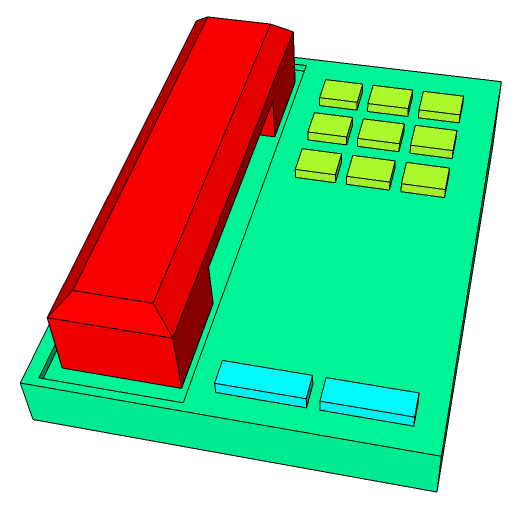
Isn't that just nausiating to look at?

(Yes, it's Saturday Night, and I'm playing with SketchUp while listening
to Jesus on Es.)

--
http://blog.orphi.me.uk/
http://www.zazzle.com/MathematicalOrchid*
Post a reply to this message
Attachments:
Download 'a02.png' (16 KB)
Preview of image 'a02.png'
|
|
| |
| |
|
|
|
|
| |
| |
|
|
No
--
Stephen
"Orchid XP v8" <voi### [at] dev null> wrote in message
news:4ad0da07@news.povray.org...
> Isn't that just nausiating to look at?
>
> (Yes, it's Saturday Night, and I'm playing with SketchUp while listening
> to Jesus on Es.)
>
> --
> http://blog.orphi.me.uk/
> http://www.zazzle.com/MathematicalOrchid*
> null> wrote in message
news:4ad0da07@news.povray.org...
> Isn't that just nausiating to look at?
>
> (Yes, it's Saturday Night, and I'm playing with SketchUp while listening
> to Jesus on Es.)
>
> --
> http://blog.orphi.me.uk/
> http://www.zazzle.com/MathematicalOrchid*
>
Post a reply to this message
|
|
| |
| |
|
|
|
|
| |
| |
|
|
No
--

Stephen
"Orchid XP v8" <voi### [at] devnull> wrote in message
news:4ad0da07@news.povray.org...
> Isn't that just nausiating to look at?
>
> (Yes, it's Saturday Night, and I'm playing with SketchUp while listening
> to Jesus on Es.)
>
> --
> http://blog.orphi.me.uk/
> http://www.zazzle.com/MathematicalOrchid*
>
Post a reply to this message
|
|
| |
| |
|
|
|
|
| |
| |
|
|
certainly not for not using the right tool, right?

The right tool for designing product electronics is NURBS, like in
Rhinoceros.  Polygons don't quite cut.
Post a reply to this message
|
|
| |
| |
|
|
|
|
| |
| |
|
|
"Orchid XP v8" <voi### [at] devnull> wrote in message
news:4ad0da07@news.povray.org...
> (Yes, it's Saturday Night, and I'm playing with SketchUp while listening
> to Jesus on Es.)

So it's sounds like you're bored .... right?

Know anything about LaTex markup? I'm struggling with one or two LaTex
markup issue's over on the Wiki. Curious enough to give it a go?

Jim
Post a reply to this message
|
|
| |
| |
|
|
|
|
| |
| |
|
|
Jim Holsenback wrote:

> So it's sounds like you're bored .... right?
>
> Know anything about LaTex markup? I'm struggling with one or two LaTex
> markup issue's over on the Wiki. Curious enough to give it a go?

What issues? And what Wiki, for that matter?

--
http://blog.orphi.me.uk/
http://www.zazzle.com/MathematicalOrchid*
Post a reply to this message
|
|
| |
| |
|
|
|
|
| |
| |
|
|
"Orchid XP v8" <voi### [at] devnull> wrote in message
news:4ad1eb2c$1@news.povray.org...
> Jim Holsenback wrote:
>
>> So it's sounds like you're bored .... right?
>>
>> Know anything about LaTex markup? I'm struggling with one or two LaTex
>> markup issue's over on the Wiki. Curious enough to give it a go?
>
> What issues? And what Wiki, for that matter?

Having trouble getting a formula or two to render like in the documention is
the issue .....

and http://wiki.povray.org/content/Main_Page is where the POV-Wiki is
located. Without too much digging you should be able to find the
Documentation project.

I won't go into the rest of the details unless you are interested!

Cheers
Post a reply to this message
|
|
| |
| |
|
|
|
|
| |
| |
|
|
Jim Holsenback wrote:

> Having trouble getting a formula or two to render like in the documention is
> the issue .....

OK. Which formulas?

--
http://blog.orphi.me.uk/
http://www.zazzle.com/MathematicalOrchid*
Post a reply to this message
|
|
| |
| |
|
|
|
|
| |
| |
|
|
"Orchid XP v8" <voi### [at] devnull> wrote in message
news:4ad20183@news.povray.org...
> OK. Which formulas?

First check out the thread in povray.documentation.inbuilt posted by SharkD
... titled "Problem with formula in blob ..." for background, then go to the
Wiki section here:

http://wiki.povray.org/content/Documentation:Reference_Section_4#Blob

I've isolated the formula in question on a talk page so you can fiddle with
it if you like.  There are two ways to get to the talk page. Either use the
"Discussion" link (lower left of each page header) or the "talk" link in the
box just below that .... have at 'er!

BTW: might need to get a wiki login if you haven't already done so!

Thanks
Jim
Post a reply to this message
|
|
| |
| |
|
|
|
|
| |
| |
|
|
>> OK. Which formulas?
>
> First check out the thread in povray.documentation.inbuilt posted by SharkD
> ... titled "Problem with formula in blob ..." for background

All it seems to say is that there should be a "min" in there. What do
you actually want to change in the formula?

> then go to the
> Wiki section here:
>
> http://wiki.povray.org/content/Documentation:Reference_Section_4#Blob
>
> I've isolated the formula in question on a talk page so you can fiddle with
> it if you like.

I notice the brackets around the fraction aren't tall enough to enclose
it properly. You can fix it like so:

   ( \frac{...}{...} )

becomes

   \left( \frac{...}{...} \right)

I should perhaps also point out that, technically, when TeX sees
<math>cat</math>, it interprets it as "c * a * t", which probably isn't
what you want. Use <math>\text{\it cat}</math> instead. (There's a
subtle difference in the letter spacing - and also the typeface is
slightly different.)

--
http://blog.orphi.me.uk/
http://www.zazzle.com/MathematicalOrchid*
Post a reply to this message
|
|
| |
| |
|
|
|
|
| |
| |
|
|
> Isn't that just nausiating to look at?
>
> (Yes, it's Saturday Night, and I'm playing with SketchUp while listening
> to Jesus on Es.)

Hehe, this is on level with someone using Paint to draw a reflective sphere
over a checkered plane, and ending up with a red circle over a green
rectangle :-)
Post a reply to this message
|
|
| |
| |
|
|
|
|
| |
| |
|
|
scott wrote:

> Hehe, this is on level with someone using Paint to draw a reflective
> sphere over a checkered plane, and ending up with a red circle over a
> green rectangle :-)

Why thank you. I feel much better now. :-P

Meh, the tutorial videos feature all kinds of intricate models, and
YouTube has a few people drawing highly complex stuff, but I don't see
how it's possible...
Post a reply to this message
|
|
| |
| |
|
|
|
|
| |
| |
|
|
> Why thank you. I feel much better now. :-P

Don't feel bad, you're using totally the wrong tool to try and do something
like you attempted.  There's a reason why Nokia don't use SketchUp to design
their phones :-)

> Meh, the tutorial videos feature all kinds of intricate models, and
> YouTube has a few people drawing highly complex stuff, but I don't see how
> it's possible...

Apart from showing off, I never understood people using a tool for something
it really isn't designed for.  If you really want to design stuff like that
phone with nice smooth surfaces then put the effort in to learning something
like Blender rather than SketchUp.
Post a reply to this message
|
|
| |
| |
|
|
|
|
| |
| |
|
|
>> Why thank you. I feel much better now. :-P
>
> Don't feel bad, you're using totally the wrong tool to try and do
> something like you attempted.  There's a reason why Nokia don't use
> SketchUp to design their phones :-)
>
>> Meh, the tutorial videos feature all kinds of intricate models, and
>> YouTube has a few people drawing highly complex stuff, but I don't see
>> how it's possible...
>
> Apart from showing off, I never understood people using a tool for
> something it really isn't designed for.  If you really want to design
> stuff like that phone with nice smooth surfaces then put the effort in
> to learning something like Blender rather than SketchUp.

I wonder - is there anything that SketchUp *is* the right tool for?
Every single time I mention it, everybody says I should use Blender
instead...
Post a reply to this message
|
|
| |
| |
|
|
|
|
| |
| |
|
|
> I wonder - is there anything that SketchUp *is* the right tool for? Every
> single time I mention it, everybody says I should use Blender instead...

AIUI (I only tried it once ages ago when it first came out) it is meant for
quickly designing simple, straight-lined 3D objects.  Like simplified
versions of buildings that mostly consist of cuboids or angled parts.
Wasn't it originally released to allow people to add 3D versions of
buildings to Google Earth?
Post a reply to this message
|
|
| |
| |
|
|
|
|
| |
| |
|
|
>> I wonder - is there anything that SketchUp *is* the right tool for?
>> Every single time I mention it, everybody says I should use Blender
>> instead...
>
> AIUI (I only tried it once ages ago when it first came out) it is meant
> for quickly designing simple, straight-lined 3D objects.  Like
> simplified versions of buildings that mostly consist of cuboids or
> angled parts. Wasn't it originally released to allow people to add 3D
> versions of buildings to Google Earth?

Indeed, there's a big 3-part tutorial showing somebody importing a plan
from a CAD program, tracing the walls, and cutting all the doors and
windows. The result is pretty impressive, actually...

My own attempts to do something similar are far less convincing.
Post a reply to this message
|
|
| |
| |
|
|
|
|
| |
| |
|
|
"Orchid XP v8" <voi### [at] devnull> wrote in message
news:4ad228ec$1@news.povray.org...
> All it seems to say is that there should be a "min" in there. What do you
> actually want to change in the formula?

Exactly ...

> I notice the brackets around the fraction aren't tall enough to enclose it
> properly. You can fix it like so:
>
>   ( \frac{...}{...} )
>
> becomes
>
>   \left( \frac{...}{...} \right)

OK ... this was helpful ... thanks

> I should perhaps also point out that, technically, when TeX sees
> <math>cat</math>, it interprets it as "c * a * t", which probably isn't
> what you want. Use <math>\text{\it cat}</math> instead. (There's a subtle
> difference in the letter spacing - and also the typeface is slightly
> different.)

The \it tag (italics?) was causing me grief. It gave a lexing error ...
failed to parse. With the \text tag alone I get normal typeface, without it
I get the italics typeface. it doesn't seem to be behaving as you suggest.

Here's what it looks like now:
http://wiki.povray.org/content/Documentation_Talk:Reference_Section_4

I think it looks like what Mike was getting at ... correct?

Jim
Post a reply to this message
|
|
| |
| |
|
|
|
|
| |
| |
|
|
>> I notice the brackets around the fraction aren't tall enough to enclose it
>> properly. You can fix it like so:
>>
>>   ( \frac{...}{...} )
>>
>> becomes
>>
>>   \left( \frac{...}{...} \right)
>
> OK ... this was helpful ... thanks.

Works with any delimiter, by the way:

   \left[ ... \right]

   \left| ... \right|

etc.

If you wanted to be flashy, you could replace min(...) with those funny
bent-angle brackets - but I don't suppose anybody except a mathematician
would understand what the hell that means, so leave it.

>> I should perhaps also point out that, technically, when TeX sees
>> <math>cat</math>, it interprets it as "c * a * t", which probably isn't
>> what you want. Use <math>\text{\it cat}</math> instead. (There's a subtle
>> difference in the letter spacing - and also the typeface is slightly
>> different.)
>
> The \it tag (italics?) was causing me grief. It gave a lexing error ...
> failed to parse. With the \text tag alone I get normal typeface, without it
> I get the italics typeface. it doesn't seem to be behaving as you suggest.

It's quite possible the Wiki doesn't support arbitrary TeX markup, but
only supports a specific subset of commands. You could try
\text{\emph{distance}} or something. That should typeset it in text
italics, which is subtly different from math italics (especially
spacing). The AMS-LaTeX \text{} command also adjusts the spacing subtly.
I will admit that all of this makes a fairly subtle difference to the
final output though.

> Here's what it looks like now:
> http://wiki.povray.org/content/Documentation_Talk:Reference_Section_4
>
> I think it looks like what Mike was getting at ... correct?

Change "min" to "\min" to have it typeset correctly. (I.e., in Roman
type, like all function names. It might even fix the spacing on the
brackets following...)

The spacing of the superscripts looks slightly odd, but I couldn't tell
you why...
Post a reply to this message
|
|
| |
| |
|
|
|
|
| |
| |
|
|
"Invisible" <voi### [at] devnull> wrote in message
news:4ad31c78$1@news.povray.org...
> Works with any delimiter, by the way:
>
>   \left[ ... \right]
>
>   \left| ... \right|

another nugget ... thanks

> It's quite possible the Wiki doesn't support arbitrary TeX markup, but
> only supports a specific subset of commands.

you are probably correct ...

> You could try \text{\emph{distance}} or something. That should typeset it
> in text italics, which is subtly different from math italics

no joy with this markup either ....

> Change "min" to "\min" to have it typeset correctly. (I.e., in Roman type,
> like all function names. It might even fix the spacing on the brackets
> following...)

worked ... thanks for the assist!

Cheers
Post a reply to this message
|
|
| |
| |
|
|
|
|
| |
| |
|
|
>> Works with any delimiter, by the way:
>>
>>   \left[ ... \right]
>>
>>   \left| ... \right|
>
> another nugget ... thanks

This method makes the brackets just big enough to contain the interior
text. You can also set the bracket size manually (e.g., if you want the
outer brackets big and the nested brackets smaller, to aid visibility),
but we won't worry about that. In this specific case, the brackets come
out reasonable sizes, so no need to fiddle.

You can also do stuff like this:

             | -1  if x < 0
   sign x = <   0   if x = 0
             |  1   if x > 0

Use "\left\{" to get the stretched symbol (you have to balance it with
"\right."), and then use an array environment to typeset the multiple rows.

>> It's quite possible the Wiki doesn't support arbitrary TeX markup, but
>> only supports a specific subset of commands.
>
> you are probably correct ...

I don't suppose for 13ms that there's any *documentation* for what the
wiki actually supports though...

>> You could try \text{\emph{distance}} or something. That should typeset it
>> in text italics, which is subtly different from math italics
>
> no joy with this markup either ....

Really? That's odd. Well, I guess the difference is quite small.

>> Change "min" to "\min" to have it typeset correctly. (I.e., in Roman type,
>> like all function names. It might even fix the spacing on the brackets
>> following...)
>
> worked ... thanks for the assist!

In general, any function name (sin, cos, tan, min, max, lim, etc.) wants
to be handled this way (\sin, \cos, etc.)

Now, in LaTeX there's a way to define new function names - but you have
to write the declaration in the document preamble. Not sure if you can
access this particular feature from the wiki...

Any further questions? :-D
Post a reply to this message
|
|
| |
| |
|
|
|
|
| |
| |
|
|
On 10/12/09 06:56, Jim Holsenback wrote:
>> I should perhaps also point out that, technically, when TeX sees
>> <math>cat</math>, it interprets it as "c * a * t", which probably isn't
>> what you want. Use<math>\text{\it cat}</math>  instead. (There's a subtle
>> difference in the letter spacing - and also the typeface is slightly
>> different.)
>
> The \it tag (italics?) was causing me grief. It gave a lexing error ...
> failed to parse. With the \text tag alone I get normal typeface, without it
> I get the italics typeface. it doesn't seem to be behaving as you suggest.

	In math mode, if you want text to appear in italics, and not be treated
like a formula, use \textit{...}.

	There's also \textrm if you want it to be nonitalicized. Bunch of
others - see the links below.

	Check out the page now - the 2nd formula is using \textit

	Ever been to the LaTeX Wikibook:

http://en.wikibooks.org/wiki/LaTeX

	I don't know how good it is for learning LaTeX, but it's fairly good
for either quick lookups or for "recipes" to achieve certain effects:

http://en.wikibooks.org/wiki/LaTeX/Mathematics#Adding_text_to_equations

http://en.wikibooks.org/wiki/LaTeX/Formatting#Font_Styles_and_size


--
A tautology is a thing which is tautological.
Post a reply to this message
|
|
| |
| |
|
|
|
|
| |
| |
|
|
Invisible wrote:
> I wonder - is there anything that SketchUp *is* the right tool for?

Getting people to talk about how cool Google is.

--
   Darren New, San Diego CA, USA (PST)
   I ordered stamps from Zazzle that read "Place Stamp Here".
Post a reply to this message
|
|
| |
| |
|
|
|
|
| |
| |
|
|
"Neeum Zawan" <m.n### [at] ieeeorg> wrote in message
news:4ad35232$1@news.povray.org...
> Check out the page now - the 2nd formula is using \textit

Jackpot! Exactly what I was going for, with them next to each other it's
easy to see the difference in font spacing.

> Ever been to the LaTeX Wikibook:
>
> http://en.wikibooks.org/wiki/LaTeX
>
> I don't know how good it is for learning LaTeX, but it's fairly good for
> either quick lookups or for "recipes" to achieve certain effects:
>
> http://en.wikibooks.org/wiki/LaTeX/Mathematics#Adding_text_to_equations
>
> http://en.wikibooks.org/wiki/LaTeX/Formatting#Font_Styles_and_size

Yes .... there is a lot of good stuff on Wiki's .... bookmarking links ....
Thanks

Jim
Post a reply to this message
|
|
| |
| |
|
|
|
|
| |
| |
|
|
>> The \it tag (italics?) was causing me grief. It gave a lexing error ...
>
>     In math mode, if you want text to appear in italics, and not be
> treated like a formula, use \textit{...}.
>
>     There's also \textrm if you want it to be nonitalicized. Bunch of
> others - see the links below.

Ah. I knew about \textrm, but \textit wasn't mentioned anywhere. (I know
it works in text mode, but I wasn't sure about math mode.)

Good work.

--
http://blog.orphi.me.uk/
http://www.zazzle.com/MathematicalOrchid*
Post a reply to this message
|
|
| |
| |
|
|
|
|
| |
| |
|
|
>> I wonder - is there anything that SketchUp *is* the right tool for?
>
> Getting people to talk about how cool Google is.

Does anybody else detect a subtle hint of cynicism here? ;-)

--
http://blog.orphi.me.uk/
http://www.zazzle.com/MathematicalOrchid*
Post a reply to this message
|
|
| |
| |
|
|
|
|
| |
| |
|
|
On 10/10/2009 2:01 PM, Orchid XP v8 wrote:
> Isn't that just nausiating to look at?

That looks exactly like the decade old Mitel phone in my office.
Excellent work!

--
~Mike
Post a reply to this message
|
|
| |
| |
|
|
|
|
| |
| |
|
|
>> Isn't that just nausiating to look at?
>
> That looks exactly like the decade old Mitel phone in my office.
> Excellent work!

Please tell me it doesn't use those colours. o_O

--
http://blog.orphi.me.uk/
http://www.zazzle.com/MathematicalOrchid*
Post a reply to this message
|
|
| |
| |
|
|
|
|
| |
| |
|
|
On 10/12/09 13:14, Orchid XP v8 wrote:
> Ah. I knew about \textrm, but \textit wasn't mentioned anywhere. (I know
> it works in text mode, but I wasn't sure about math mode.)

	For me it was the opposite.<G> I thought they were meant primarily for
math mode, and only found out they work in regular mode when I posted
the Wikibook links...

--
An unbreakable toy is useful for breaking other toys.
Post a reply to this message
|
|
| |
| |
|
|
|
|
| |
| |
|
|
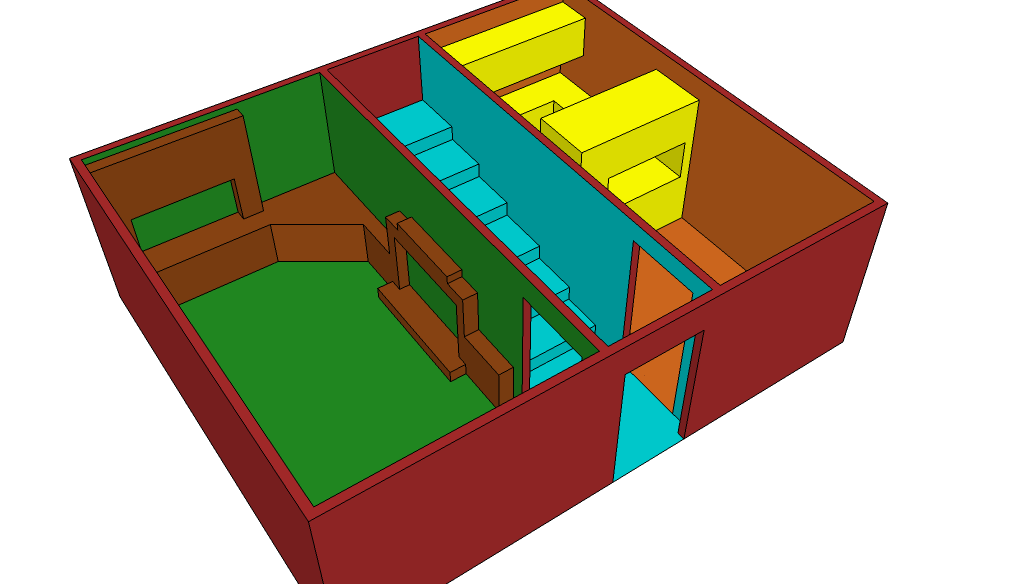
Welcome to my humble home.

This took 11 minutes to draw. And no, the house isn't *really* that
God-awful colour...

[And no, technically it's my mum's house.]

--
http://blog.orphi.me.uk/
http://www.zazzle.com/MathematicalOrchid*
Post a reply to this message
Attachments:
Download 'a01.png' (47 KB)
Preview of image 'a01.png'
|
|
| |
| |
|
|
|
|
| |
| |
|
|
Orchid XP v8 <voi### [at] devnull> wrote:
> Welcome to my humble home.

  Why does this remind me vividly of The Sims 2?

--
                                                          - Warp
Post a reply to this message
|
|
| |
| |
|
|
|
|
| |
| |
|
|
Warp wrote:

>   Why does this remind me vividly of The Sims 2?

I don't know. Does The Sims 2 feature horrific colour schemes and badly
drawn stairs?
Post a reply to this message
|
|
| |
| |
|
|
|
|
| |
| |
|
|
On 10/12/2009 2:17 PM, Orchid XP v8 wrote:

>
> Please tell me it doesn't use those colours. o_O
>

Well, no. It's not as fancy as yours. It comes in a nice shade of beige.

--
~Mike
Post a reply to this message
|
|
| |
| |
|
|
|
|
| |
| |
|
|
>> Please tell me it doesn't use those colours. o_O
>>
>
> Well, no. It's not as fancy as yours. It comes in a nice shade of beige.

Ah, OK.

I was actually purposefully going for a retro look, if only because back
in the old days straight lines were cool.

(The colours were so I can tell WTF I'm looking at while I model it.
SketchUp isn't very easy to navigate...)
Post a reply to this message
|
|
| |
| |
|
|
|
|
| |
| |
|
|
Invisible escreveu:
>> something it really isn't designed for.  If you really want to design
>> stuff like that phone with nice smooth surfaces then put the effort in
>> to learning something like Blender rather than SketchUp.
>
> I wonder - is there anything that SketchUp *is* the right tool for?
> Every single time I mention it, everybody says I should use Blender
> instead...

It's much better at architectural creations than Blender.  Blender and
other polygonal-based modellers are not the right tool for product
design either.  That truly demands fine and precise NURBS tools.

--
a game sig: http://tinyurl.com/d3rxz9
Post a reply to this message
|
|
| |
| |
|
|
|
|
| |
| |
|
|
nemesis wrote:
> It's much better at architectural creations than Blender.

http://www.wonderhowto.com/how-to/video/how-to-model-a-house-in-blender-3d-242095/

Which is not to say Blender makes it easy, but it's not *too* bad.

--
   Darren New, San Diego CA, USA (PST)
   I ordered stamps from Zazzle that read "Place Stamp Here".
Post a reply to this message
|
|
| |
| |
|
|
|
|
| |
| |
|
|
Darren New escreveu:
> nemesis wrote:
>> It's much better at architectural creations than Blender.
>
> http://www.wonderhowto.com/how-to/video/how-to-model-a-house-in-blender-3d-242095/
>
>
> Which is not to say Blender makes it easy, but it's not *too* bad.

I've learned to use that technique too.  Sketchup still has a large edge
over it.

--
a game sig: http://tinyurl.com/d3rxz9
Post a reply to this message
|
|
| |
| |
|
|
|
|
| |
| |
|
|
nemesis wrote:

> I've learned to use that technique too.  Sketchup still has a large edge
> over it.

I see what you did there. ;-)

--
http://blog.orphi.me.uk/
http://www.zazzle.com/MathematicalOrchid*
Post a reply to this message
|
|
| |
| |
|
|
|
|
| |