|
|
|
|
|
|
| |
| |
|
|
|
|
| |
| |
|
|
So today I finally got around to modifying my program to the point where
you can *change* the arrangement of magnets without having to recompile
the program. (The colouring scheme, however, is still hard-coded. In
particular, if you move the magnets around, the colouring does *not*
adjust to match.)

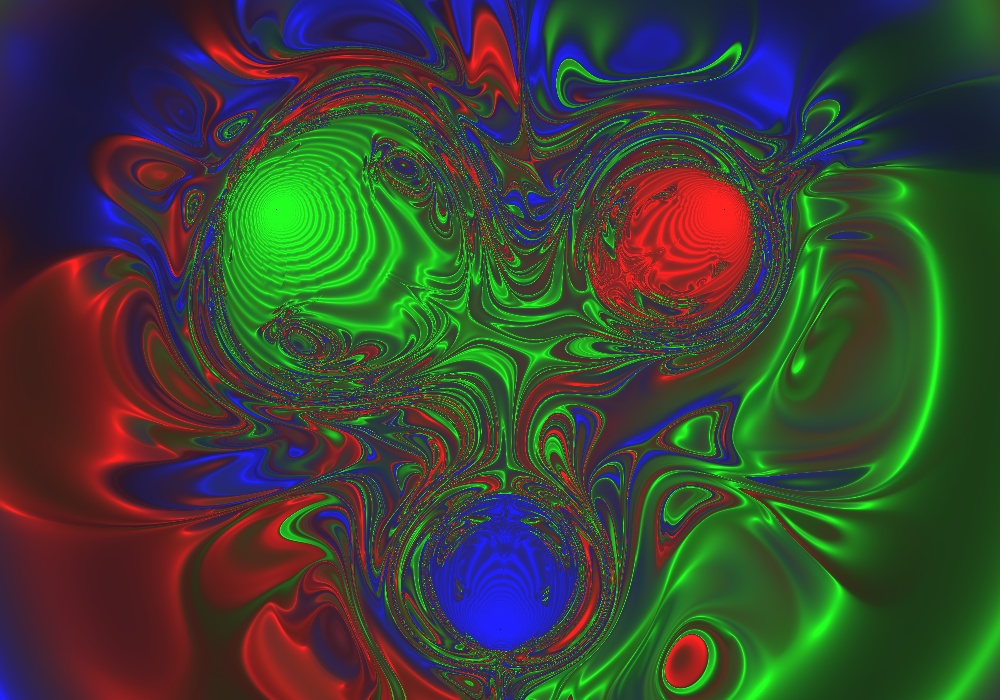
The attached image shows what happens if you change the green magnet
from 1/r to 1/r^2 attraction, while leaving everything else the same. As
you can see, pretty mental stuff ensues...
Post a reply to this message
Attachments:
Download '0342.jpg' (270 KB)
Preview of image '0342.jpg'
|
|
| |
| |
|
|
|
|
| |
| |
|
|
Hmm... I wonder. If I put this on Zazzle, do you think people would pay
money for it?
Post a reply to this message
|
|
| |
| |
|
|
|
|
| |
| |
|
|
If you don't get any response from Zazzle, you could probably sell items
like this at a head shop....


--
H²
Post a reply to this message
|
|
| |
| |
|
|
|
|
| |
| |
|
|
Halbert wrote:
> If you don't get any response from Zazzle, you could probably sell items
> like this at a head shop....

...there are shops that sell heads??

--
http://blog.orphi.me.uk/
http://www.zazzle.com/MathematicalOrchid*
Post a reply to this message
|
|
| |
| |
|
|
|
|
| |
| |
|
|
Hmmm. I suppose it's an american idiom. Its a shop that sells pipes, bongs
rolling papers and other marijuana related items and usually has a large
selection of brightly colored, "far-out" posters, t-shirts, etc. Though they
might sell heads if they were modified in such a way that you could smoke
pot from them. :-P


--
H²
Post a reply to this message
|
|
| |
| |
|
|
|
|
| |
| |
|
|
> Hmmm. I suppose it's an american idiom. Its a shop that sells pipes, bongs
> rolling papers and other marijuana related items and usually has a large
> selection of brightly colored, "far-out" posters, t-shirts, etc. Though
> they might sell heads if they were modified in such a way that you could
> smoke pot from them. :-P

http://www.geekologie.com/2008/07/kids_dig_up_corpse_to_make_sku.php
Post a reply to this message
|
|
| |
| |
|
|
|
|
| |
| |
|
|
Tim Attwood wrote:

> http://www.geekologie.com/2008/07/kids_dig_up_corpse_to_make_sku.php

"You might ask why they would volunteer this information. But we're
talking about a pair of kids who DUG UP A BODY TO MAKE A SKULL BONG! My
guess is that stuff isn't going on in their heads."

Only in America... o_O
Post a reply to this message
|
|
| |
| |
|
|
|
|
| |
| |
|
|
Invisible wrote:
> Only in America... o_O

No, go read "This term has always bothered me" thread.

Only in the *United States*!
Post a reply to this message
|
|
| |
| |
|
|
|
|
| |
| |
|
|
Invisible <voi### [at] dev null> wrote:
> The attached image shows what happens if you change the green magnet
> from 1/r to 1/r^2 attraction, while leaving everything else the same. As
> you can see, pretty mental stuff ensues...
I hope this image doesn't show up in my dreams--being chased by a three-eyed
multicolored 'thing'! Gee, thanks a lot... ;-)
KW null> wrote:
> The attached image shows what happens if you change the green magnet
> from 1/r to 1/r^2 attraction, while leaving everything else the same. As
> you can see, pretty mental stuff ensues...
I hope this image doesn't show up in my dreams--being chased by a three-eyed
multicolored 'thing'! Gee, thanks a lot... ;-)
KW
Post a reply to this message
|
|
| |
| |
|
|
|
|
| |
| |
|
|
"Halbert" <hal### [at] gmailcom> wrote:
> Hmmm. I suppose it's an american idiom. Its a shop that sells pipes, bongs
> rolling papers and other marijuana related items and usually has a large
> selection of brightly colored, "far-out" posters, t-shirts, etc. Though they
> might sell heads if they were modified in such a way that you could smoke
> pot from them. :-P
>

Here in Virginia--near the 'buckle of the Bible-belt' in the USA, and
ultra-conservative--head shops are a definite no-no.  Even selling something
that looks like it *might* be used as a bong is now against the law!!

KW
Post a reply to this message
|
|
| |
| |
|
|
|
|
| |
| |
|
|
Kenneth wrote:
> Here in Virginia--near the 'buckle of the Bible-belt' in the USA, and
> ultra-conservative--head shops are a definite no-no.  Even selling something
> that looks like it *might* be used as a bong is now against the law!!

As far as I remember from high school, that seems like it would include
just about everything.
Post a reply to this message
|
|
| |
| |
|
|
|
|
| |
| |
|
|
Nicolas Alvarez wrote:
> Invisible wrote:
>> Only in America... o_O
>
> No, go read "This term has always bothered me" thread.
>
> Only in the *United States*!

Would listening to "I am not an American" by the Arrogant Worms suffice?

--
http://blog.orphi.me.uk/
http://www.zazzle.com/MathematicalOrchid*
Post a reply to this message
|
|
| |
| |
|
|
|
|
| |
| |
|
|
Invisible wrote:
> So today I finally got around to modifying my program to the point where
> you can *change* the arrangement of magnets without having to recompile
> the program. (The colouring scheme, however, is still hard-coded. In
> particular, if you move the magnets around, the colouring does *not*
> adjust to match.)
>
> The attached image shows what happens if you change the green magnet
> from 1/r to 1/r^2 attraction, while leaving everything else the same. As
> you can see, pretty mental stuff ensues...
>
> ------------------------------------------------------------------------
>

How about colouring it differently ?

The primary colours are obvious - Hey I have three attractors, I'll make
them R, G, B !  The outcome is hardly pleasing though.

I think it might look much better with more subtle choices.  Yellow (or
Gold) and Blue through Purple mixes perhaps.  Make two of the attractors
similar and the third one a contrasting colour.

Hopefully you can keep the calculation already done and just render it
quickly to try different schemes.  Make a render front-end with colour
sliders.

This from someone who spent ages in FractInt playing with colour schemes
and colour cycling.
Post a reply to this message
|
|
| |
| |
|
|
|
|
| |
| |
|
|
Paul Fuller <pgf### [at] optusnetcomau> wrote:
> The primary colours are obvious - Hey I have three attractors, I'll make
> them R, G, B !  The outcome is hardly pleasing though.

  Yes, pure color components never look very pleasing to the eye. Even if
you want to use red, green and blue, always mix a bit of the other components
into them as well! Rather than pure red, use a red with a slightly orange
tint in it. Rather than pure green, use a green with a slightly yellowish
tint. And so on. When you mix a tiny bit of pastel tints into your primary
colors, they immediately become more pleasing to the eye.

--
                                                          - Warp
Post a reply to this message
|
|
| |
| |
|
|
|
|
| |
| |
|
|
Warp wrote:
> Paul Fuller <pgf### [at] optusnetcomau> wrote:
>> The primary colours are obvious - Hey I have three attractors, I'll make
>> them R, G, B !  The outcome is hardly pleasing though.
>
>   Yes, pure color components never look very pleasing to the eye. Even if
> you want to use red, green and blue, always mix a bit of the other components
> into them as well! Rather than pure red, use a red with a slightly orange
> tint in it. Rather than pure green, use a green with a slightly yellowish
> tint. And so on. When you mix a tiny bit of pastel tints into your primary
> colors, they immediately become more pleasing to the eye.

What can I say? I suck at choosing colours...

Show me a set of colours, and I'll tell you whether it looks good or
not. Show me a blank screen, and buggered if I can think of a set of
colours that might look good.

(I have the exact same problem with writing music, by the way. Show me a
piece of music, and I can tell you exactly why it's cool. But given a
blank score, I can't write something that sounds cool.)
Post a reply to this message
|
|
| |
| |
|
|
|
|
| |
| |
|
|
Invisible <voi### [at] devnull> wrote:
> Show me a set of colours, and I'll tell you whether it looks good or
> not. Show me a blank screen, and buggered if I can think of a set of
> colours that might look good.

  That's why you should use a color picker, such as the ones in image
manipulation programs (the Gimp, if you don't have anything else).
Choose a color which looks good, and then look its rgb values (the picker
will show them) and use those in your program.

  If you want to go really fancy, you could *test* the colors before using
them, such as by creating a gradient between two of the colors you chose,
to see how well they blend together.

--
                                                          - Warp
Post a reply to this message
|
|
| |
| |
|
|
|
|
| |
| |
|
|
Paul Fuller wrote:

> How about colouring it differently ?
>
> The primary colours are obvious - Hey I have three attractors, I'll make
> them R, G, B !  The outcome is hardly pleasing though.

I actually quite like the effect. But sure, there's no harm in trying
alternatives.

> Hopefully you can keep the calculation already done and just render it
> quickly to try different schemes.  Make a render front-end with colour
> sliders.

I've designed my program so that the integration engine dumps its state
to a file, and a seperate program reads that back and produces a PNG
file out of it. That way I can easily reprocess it to get different
colourings.

The only problem is... if you try to render at high resolutions, you
quickly reach a point where the computer spends more time nailing the
harddrive than actually running computations. Still, for the purposes of
trying different colourings, this doesn't matter too much.
Post a reply to this message
|
|
| |
| |
|
|
|
|
| |
| |
|
|
Paul Fuller <pgf### [at] optusnetcomau> wrote:
> Hopefully you can keep the calculation already done and just render it
> quickly to try different schemes.  Make a render front-end with colour
> sliders.

  Actually if he used a pure color component for each of the three
magnets, he *already* has the necessary data to re-color the resulting
image. This data is in the image itself: Each color component of each
pixel tells how much the corresponding magnet contributes to that pixel.
Doing a color remapping from this is trivial.

--
                                                          - Warp
Post a reply to this message
|
|
| |
| |
|
|
|
|
| |
| |
|
|
Warp wrote:
>   That's why you should use a color picker, such as the ones in image
> manipulation programs (the Gimp, if you don't have anything else).

Or learn some color theory. That's the sort of stuff they teach in first
year art classes.

http://www.tigercolor.com/color-lab/color-theory/color-harmonies.htm

--
   Darren New, San Diego CA, USA (PST)
   There's no CD like OCD, there's no CD I knoooow!
Post a reply to this message
|
|
| |
| |
|
|
|
|
| |
| |
|
|
"Invisible" <voi### [at] devnull> wrote in message
news:4a150a08$1@news.povray.org...
> Warp wrote:
> > Paul Fuller <pgf### [at] optusnetcomau> wrote:
> >> The primary colours are obvious - Hey I have three attractors, I'll
make
> >> them R, G, B !  The outcome is hardly pleasing though.
> >
> >   Yes, pure color components never look very pleasing to the eye. Even
if
> > you want to use red, green and blue, always mix a bit of the other
components
> > into them as well! Rather than pure red, use a red with a slightly
orange
> > tint in it. Rather than pure green, use a green with a slightly
yellowish
> > tint. And so on. When you mix a tiny bit of pastel tints into your
primary
> > colors, they immediately become more pleasing to the eye.

> What can I say? I suck at choosing colours...
>
> Show me a set of colours, and I'll tell you whether it looks good or
> not. Show me a blank screen, and buggered if I can think of a set of
> colours that might look good.

If that's the case, easy:

1. Pick a random colour.
2. Pick another random (*) colour, place it beside the first (using a couple
of different patterns).
3. Remove the last colour and goto 2 if the combination doesn't look good.
4. Goto 2 until you have enough number of distinct colours.

Do this a few times, and you will eventually be able to remove the random
selection by intuition/heuristics.

(*) Random is the key. Novices tend to be bad at being able to chose random
colours, and will almost always pick fully saturated colours. Best is to
code a test program.

> (I have the exact same problem with writing music, by the way. Show me a
> piece of music, and I can tell you exactly why it's cool. But given a
> blank score, I can't write something that sounds cool.)

Unfortunately, above algorithm doesn't work for music.
Post a reply to this message
|
|
| |
| |
|
|
|
|
| |