|
|
|
|
|
|
| |
| |
|
|
|
|
| |
| |
|
|
http://h20000.www2.hp.com/bc/docs/support/SupportManual/c00710263/c00710263.pdf

Mental, eh?

Mine is configured like this:

- Dual redundant PSUs.
- 2x quad-core Xeons at 2.0 GHz. (Yes, you read correctly. That's 8
cores in total.)
- 4x 1 GB RAM (i.e., 4 GB RAM on two channels.)
- 6x SAS 72 GB HDs spinning at 10,000 RPM. (Configured as two RAID-1
arrays with one hot spare and one cold spare.)

Points of interest:

- 1U rack-mount form factor. (It's bloody heavy BTW.)

- It comes with sliding rails and a bendy cable arm to automatically
fold or extend the cables as you slide the server into or out of the
rack. Completely tool-less installation. Everything snaps into place. (I
have *no idea* how the hell you take it apart again, should you want to.)

- When mine arrived, I had to open it up and install the optional extras
myself. In particular, it is highly non-obvious how to remove the air
baffle. (And I don't want to break a £4,000 server in five minutes!) I
had to install the second CPU and the second pair of RAM boards.

- The CPU chip comes inside a "processor installation tool". This
consists of a handle to hold it by, and when you press down it's
supposed to release the chip [but doesn't]; The chip itself doesn't
appear to have any pins, which is kinda weird.

- There's a button on the front that turns on a light at the back. So if
you have a rack with 10 of them, you can figure out which one to plug
your cables into.

- There's a little schematic on the front of the server showing you
where all the components are. And each one as a little LED next to it
that turns red if that component fails. That's the fans (it has 6), the
individual CPUs (both of them), the individual RAM boards (of which
there can be up to 8), the dual-redundant PSUs, even the freakin'
battery on the RAID controller!

- Front-mounted hot-swap drive bays. (I've got 6 drives - and you know
what? Each one is tiny, yet arrived in a really huge box!)

- Each drive has an activity light and a failure light. (One colour
indicates failure, the other indicates "pre-failure warning event".)

- When you select a drive or group of drives in the RAID configuration
program, those drives physically light up blue in the rack. Isn't that nice?

- It uses only ECC RAM. In addition to that, you can configure the RAM
controller to mirror your RAM at the hardware level, and even setup "hot
spare" RAM. As if ECC wasn't enough on its own!

- The server has 6 fans. Six freaking fans. Six of 'em! When I first
turned it on, it sounded like a washing machine on a fast spin cycle. I
thought I was going to go deaf! >_< Fortunately, after about 30 seconds
they all throttled down, and now the server is mostly inaudible.

- It comes with a remote management system that lets you turn the server
on and off remotely, check for hardware faults remotely, save a crash
dump even though the OS isn't running, reflash the various firmware
remotely and so on.

- You can set a hardware timer so that if the HP device driver doesn't
send a heartbeat message every X seconds (i.e., your OS has crashed),
the server automatically does a hard reset.

- The server has a firmware ROM, and a backup ROM. If one doesn't work,
it uses the other. On top of that, the server has an internal USB port
on the motherboard itself so you can install a firmware update from a
USB flash drive. Clearly somebody has had far too long to think about
all this!

- Hmm. Availability, much? On top of that, there's the warranty. If you
buy a fridge from Argos, it has a warranty. The warranty says that if it
breaks, they will [eventually] fix it for free, or replace it. It might
take you a month or two though. HP say they will have a technition
on-site by the next business day, and replacement parts will arrive
on-site within 5 business days. And we didn't even pay for their
extended service plan, this is just the default support level!

- The server consumes up to 1,000 W of electrical power and generates up
to 3,300 BTUs of heat per hour.

When you consider all of the above, suddenly £4,000 seems like a bit of
a bargin, really. I mean, *damn*! It's got 8 cores in total, it's got
fault-tolerance by the bucket, it's got hot-swap components all over the
place, it's got sophisticated diagnostic hardware, it's got a truckload
of remote management, it even comes with a CD that loads all the drivers
and installs Windows for you! And *if*, by some improbable _miracle_, it
breaks somehow, they promise to fix it for free. Within 5 business days.
WHAT THE HELL MORE DO YOU WANT?!?!! >_<

Seriously. This is the puppy.

...although, having just said all that, the cable arm isn't as nice as
the Dell one. It's a bit flimsy, and bends in planes it shouldn't. Also,
the automated installer doesn't support Windows 2000 Server, which is
what the company IT department wanted me to use. Wasted a few hours on
that one. But that's about all I can actually find to complain about.

PS. What *the hell* is a "PPM"? And why is it 80% heatsink??
Post a reply to this message
|
|
| |
| |
|
|
|
|
| |
| |
|
|
Invisible wrote:
> http://h20000.www2.hp.com/bc/docs/support/SupportManual/c00710263/c00710263.pdf
>
> Mental, eh?

This one is pretty crazy too:

http://h20000.www2.hp.com/bc/docs/support/SupportManual/c00710359/c00710359.pdf

Some pretty insane technical drawings happening in there! ;-)

(I wonder how they do that BTW. Must be quite a challenge to draw
something that complex...)
Post a reply to this message
|
|
| |
| |
|
|
|
|
| |
| |
|
|
Invisible wrote:
> http://h20000.www2.hp.com/bc/docs/support/SupportManual/c00710263/c00710263.pdf
>
>
> Mental, eh?
>
> Mine is configured like this:
>
> - Dual redundant PSUs.
> - 2x quad-core Xeons at 2.0 GHz. (Yes, you read correctly. That's 8
> cores in total.)
> - 4x 1 GB RAM (i.e., 4 GB RAM on two channels.)
> - 6x SAS 72 GB HDs spinning at 10,000 RPM. (Configured as two RAID-1
> arrays with one hot spare and one cold spare.)
>
> Points of interest:

Sounds like a nice piece of kit.


--
~Mike
Post a reply to this message
|
|
| |
| |
|
|
|
|
| |
| |
|
|
Mike Raiford wrote:

>> Mine is configured like this:
>>
>> - Dual redundant PSUs.
>> - 2x quad-core Xeons at 2.0 GHz. (Yes, you read correctly. That's 8
>> cores in total.)
>> - 4x 1 GB RAM (i.e., 4 GB RAM on two channels.)
>> - 6x SAS 72 GB HDs spinning at 10,000 RPM. (Configured as two RAID-1
>> arrays with one hot spare and one cold spare.)
>
> Sounds like a nice piece of kit.

Yep.

Since our existing server died, we needed a replacement. The daft thing
is, the application it's running is due to be replaced "any day soon".
(But that has been the case for a very long time now, so...)

The guy who ordered the replacement for me joked about "well, maybe
it'll make a nice Quake server for you when we're done with it". I'd
kinda like to delude myself that he was serious... but I rather doubt
the company is going to let me put a £4,000 server in my pocket in a few
months' time. Realistically... not gonna happen! :-(

 From memory, the old server looked like this:

- Dual redundant PSUs.
- 2x Pentium III 1.0 GHz. (Oi! Stop laughing.)
- 1 GB RAM.
- 4x 36 GB Ultra160 SCSI HDs (RAID-5), internal, not hot-swap.
- Floor-standing. (And *really* freakin' heavy!!)
Post a reply to this message
|
|
| |
| |
|
|
|
|
| |
| |
|
|
http://h20000.www2.hp.com/bc/docs/support/SupportManual/c00553302/c00553302.pdf

Damn, this puppy does even more than I thought! You can put a Windows
installation CD in your CD drive, remote in to the server, and install
Windows over the network even though there's nothing in the server's
CD-ROM drive. And it has an internal KVM over IP. And... mental! o_O
Post a reply to this message
|
|
| |
| |
|
|
|
|
| |
| |
|
|
Invisible wrote:
> Damn, this puppy does even more than I thought! You can put a Windows
> installation CD in your CD drive, remote in to the server, and install
> Windows over the network even though there's nothing in the server's
> CD-ROM drive.

<Invisible> ... which is obviously impossible ... </Invisible>


   ;-)

--
   Darren New, San Diego CA, USA (PST)
   My fortune cookie said, "You will soon be
   unable to read this, even at arm's length."
Post a reply to this message
|
|
| |
| |
|
|
|
|
| |
| |
|
|
BTW guys have you read/heard news about the 5TB/sqr. inch HP tape
back-up? I hope it could be in production so it arrives to my country in
about 6 months-1 year aprox., but again the price... probably is about
1000 $us... :(
Post a reply to this message
|
|
| |
| |
|
|
|
|
| |
| |
|
|
> Some pretty insane technical drawings happening in there! ;-)
>
> (I wonder how they do that BTW. Must be quite a challenge to draw
> something that complex...)

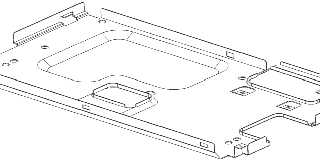
You don't draw it by hand, the CAD software will draw it based on the 3D CAD
data.  You simply set the view mode to wireframe with hidden edges,
orthographic projection etc and then save as a PNG at whatever resolution
you desire.  Takes about 30 seconds, see attached.

Actually making the 3D CAD data is not really a challenge, the software is
designed with drawing things like this in mind, so there are lots and lots
of features to make your life easy :-)
Post a reply to this message
Attachments:
Download 'image1.png' (19 KB)
Preview of image 'image1.png'
|
|
| |
| |
|
|
|
|
| |
| |
|
|
scott wrote:
>> Some pretty insane technical drawings happening in there! ;-)
>>
>> (I wonder how they do that BTW. Must be quite a challenge to draw
>> something that complex...)
>
> You don't draw it by hand

Well, not unless you're *insane* at least... ;-)

> the CAD software will draw it based on the 3D
> CAD data.  You simply set the view mode to wireframe with hidden edges,
> orthographic projection etc and then save as a PNG at whatever
> resolution you desire.  Takes about 30 seconds, see attached.

So... is something like this drawn from the real manufacturing data that
the plant uses? Or do they build specialised models simplified for
display purposes?

> Actually making the 3D CAD data is not really a challenge, the software
> is designed with drawing things like this in mind, so there are lots and
> lots of features to make your life easy :-)

I've often wondered how CAD manages to produce complex, detailed 3D
objects. I have yet to see a modeller that makes it feasible to produce
any moderately complex 3D shape. And yet, the world around me abounds
with intricately machined objects, so there must be somebody who knows
how to do it.

(Just sweeping my head from side to side right now, I see several CD
jewl cases, some external HD bays, an MP3 player which *could* be a
simple cube, but isn't, the casing of my computer... All of them have
pretty intricate shapes.)
Post a reply to this message
|
|
| |
| |
|
|
|
|
| |
| |
|
|
scott wrote:

> see attached.

That's pretty mental, by the way. But what the hell *is* it??

Also... how do you make something like that? It looks like you'd either
have to mould it, or take a sheet of metal, bend it around a bit, cut
windows and drill holes in it...
Post a reply to this message
|
|
| |
| |
|
|
|
|
| |
| |
|
|
> That's pretty mental, by the way. But what the hell *is* it??

A metal case that goes on the back of an LCD display.  Mainly to avoid
electrical interference between the LCD and other parts in the car, but also
for mechanical protection.  The pressed out lump in the centre is where
quite a few high components on the PCB are located, so it needs to provide
space for them, then there's two holes for connectors to go through, a
couple of features to make a good ground connection to the PCB, and various
clips and holes around the edge to securely fasten to the rest of the LCD.
Oh and of course some holes for screws to go through so the thing can be
fitted to the rest of the car!

> Also... how do you make something like that? It looks like you'd either
> have to mould it, or take a sheet of metal, bend it around a bit, cut
> windows and drill holes in it...

Yeh it's pressed metal, so you start with a blank sheet and then it goes
through a series of tools that bend and cut certain bits until the final
shape is produced (IIRC there's about 7 or 8 stages usually), no drilling -
the tools have sharp bits that cut the holes and other shapes, just like a
big hole-punch!
Post a reply to this message
|
|
| |
| |
|
|
|
|
| |
| |
|
|
>> That's pretty mental, by the way. But what the hell *is* it??
>
> A metal case that goes on the back of an LCD display.  Mainly to avoid
> electrical interference between the LCD and other parts in the car, but
> also for mechanical protection.  The pressed out lump in the centre is
> where quite a few high components on the PCB are located, so it needs to
> provide space for them, then there's two holes for connectors to go
> through, a couple of features to make a good ground connection to the
> PCB, and various clips and holes around the edge to securely fasten to
> the rest of the LCD. Oh and of course some holes for screws to go
> through so the thing can be fitted to the rest of the car!

...it's times like this that I realise other people have way more
interesting jobs than I do! ;-)

> Yeh it's pressed metal, so you start with a blank sheet and then it goes
> through a series of tools that bend and cut certain bits until the final
> shape is produced (IIRC there's about 7 or 8 stages usually)

Damn. That process must take some designing!

> no drilling - the tools have sharp bits that cut the holes and other
> shapes, just like a big hole-punch!

Heh. How thick is the metal??
Post a reply to this message
|
|
| |
| |
|
|
|
|
| |
| |
|
|
> I've often wondered how CAD manages to produce complex, detailed 3D
> objects. I have yet to see a modeller that makes it feasible to produce
> any moderately complex 3D shape.

Yes, but have you actually seen anyone using commercial CAD software like
Catia or Pro/Engineer? You know, the software that people who build planes
and cars use?

eg here is a screen shot of a model from Boeing:

http://www.nextcraft.com/media/aviation_technology/military_nasa/B737_catia_big.jpg

It's a bit more suited to doing this sort of stuff than a modeller like 3D
Studio or Blender.  It is more focussed on dimensions and model hierarchy,
and less on the graphical appearance (most of the time you are just using
plane gourard shading or even wireframe if you need to see certain details).

For example, the modelling process in a CAD package for that metal case I
posted would be something like this:
- Draw the outline cuboid shape
- Add on extrusions and cuts for any bumps and dips
- Add rounds to any edges
- Shell the model (this leaves a shell of specified thickness, 2 clicks in
CAD)
- Add in holes where necessary
- Add more rounds
- Add in any clip geometry

The CAD software remembers all that history used to generate the model, so
you can always go back and change the shell thickness and everything else
updates (or move the position of a bump etc).
Post a reply to this message
|
|
| |
| |
|
|
|
|
| |
| |
|
|
>> I've often wondered how CAD manages to produce complex, detailed 3D
>> objects. I have yet to see a modeller that makes it feasible to
>> produce any moderately complex 3D shape.
>
> Yes, but have you actually seen anyone using commercial CAD software
> like Catia or Pro/Engineer? You know, the software that people who build
> planes and cars use?

No. And that's what I've always wondered about - given the complexity of
the stuff these guys produce, their modelling tools must surely be more
sophisticated in some way.

> eg here is a screen shot of a model from Boeing:
>
> http://www.nextcraft.com/media/aviation_technology/military_nasa/B737_catia_big.jpg

OK, that's fairly crazy.

> For example, the modelling process in a CAD package for that metal case
> I posted would be something like this:
> - Draw the outline cuboid shape
> - Add on extrusions and cuts for any bumps and dips
> - Add rounds to any edges
> - Shell the model (this leaves a shell of specified thickness, 2 clicks
> in CAD)
> - Add in holes where necessary
> - Add more rounds
> - Add in any clip geometry
>
> The CAD software remembers all that history used to generate the model,
> so you can always go back and change the shell thickness and everything
> else updates (or move the position of a bump etc).

I'd almost consider trying to track down some software like this - if it
wasn't for the fact that I keep hearing that it costs a fortune and
crashes routinely...
Post a reply to this message
|
|
| |
| |
|
|
|
|
| |
| |
|
|
>> Yeh it's pressed metal, so you start with a blank sheet and then it goes
>> through a series of tools that bend and cut certain bits until the final
>> shape is produced (IIRC there's about 7 or 8 stages usually)
>
> Damn. That process must take some designing!

Yes, that's why the tools have ridiculous prices, usually with 6 or even
sometimes 7 figures!  And then you realise why the guy gets annoyed when you
ask for +/-0.1mm tolerance between two specific points :-)

>> no drilling - the tools have sharp bits that cut the holes and other
>> shapes, just like a big hole-punch!
>
> Heh. How thick is the metal??

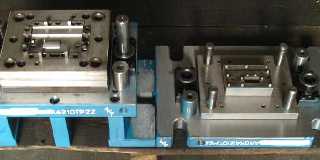
Usually 0.3 - 0.6 mm depending on how big it is.  The tools are quite beefy
though, see attached (that is just stage 4 out of 7), all the intricate
detail in the middle is what actually makes the cuts and folds, the inner
working of each stage can be quite complex with spring loaded plates and
levers etc to do the bending correctly as the two halfs come together.
Post a reply to this message
Attachments:
Download 'image1.jpg' (29 KB)
Preview of image 'image1.jpg'
|
|
| |
| |
|
|
|
|
| |
| |
|
|
> I'd almost consider trying to track down some software like this - if it
> wasn't for the fact that I keep hearing that it costs a fortune and
> crashes routinely...

There used to be a really good free version of Pro/Engineer called
Pro/Desktop, but unfortunately they stopped supporting it and I think you
needed to get some registration key before it would work on your machine.
Shame, because it was really nice and there really is no other decent free
CAD software out there, and as you pointed out the commerical software is
really expensive so not really suitable for home tinkering.
Post a reply to this message
|
|
| |
| |
|
|
|
|
| |
| |
|
|
>> Damn. That process must take some designing!
>
> Yes, that's why the tools have ridiculous prices, usually with 6 or even
> sometimes 7 figures!  And then you realise why the guy gets annoyed when
> you ask for +/-0.1mm tolerance between two specific points :-)

Heh. Suddenly paying £30 for a harddrive seems... quite reasonable,
actually. :-} I imagine the inside of one of those is somewhat more
complicated than a flat metal bracket.

>> Heh. How thick is the metal??
>
> Usually 0.3 - 0.6 mm depending on how big it is.

How strong is the metal? And how heavy? I mean, I guess it varies by
which particular alloy you use... Presumably somebody has already
tabulated this data? I imagine for a sufficiently small part, you can't
physically apply enough torque to it to actually bend it. (In normal
circumstances, at least.) I guess that's why small twigs sometimes seem
"stronger" than large branches...

> The tools are quite
> beefy though, see attached (that is just stage 4 out of 7), all the
> intricate detail in the middle is what actually makes the cuts and
> folds, the inner working of each stage can be quite complex with spring
> loaded plates and levers etc to do the bending correctly as the two
> halfs come together.

Hmm. And now I'm wondering... how do you manufacture the tool you use to
manufacture the thing you actually wanted to make in the first place? :-D
Post a reply to this message
|
|
| |
| |
|
|
|
|
| |
| |
|
|
>> I'd almost consider trying to track down some software like this - if
>> it wasn't for the fact that I keep hearing that it costs a fortune and
>> crashes routinely...
>
> There used to be a really good free version of Pro/Engineer called
> Pro/Desktop, but unfortunately they stopped supporting it and I think
> you needed to get some registration key before it would work on your
> machine. Shame, because it was really nice and there really is no other
> decent free CAD software out there,

Mmm. Pitty.

I suppose notionally if I knew how it works, I could write something
myself. OTOH, I have yet to write a working Tic-Tac-Toe program, so...
maybe not. :-/

> and as you pointed out the
> commerical software is really expensive so not really suitable for home
> tinkering.

I guess they figure that if you're going to spent 7 figures *per tool*
to make your multi-part item, a few extra digits for a CAD package is
nothing... ;-)
Post a reply to this message
|
|
| |
| |
|
|
|
|
| |
| |
|
|
> I suppose notionally if I knew how it works, I could write something
> myself.

I often thought about this too, this is usually what is used internally to
represent the shapes:

http://en.wikipedia.org/wiki/Boundary_representation

But it just gets too complicated too quickly when you have to calculate CSG
operations, adding rounds to edges etc, it's much harder than raytracing
CSG!
Post a reply to this message
|
|
| |
| |
|
|
|
|
| |
| |
|
|
> How strong is the metal? And how heavy? I mean, I guess it varies by which
> particular alloy you use... Presumably somebody has already tabulated this
> data?

Of course.

> I imagine for a sufficiently small part, you can't physically apply enough
> torque to it to actually bend it. (In normal circumstances, at least.)

Why not?  What is going to limit how much torque you can apply, you just get
a machine with a beefier tool and press attached.

> I guess that's why small twigs sometimes seem "stronger" than large
> branches...

That's probably just because you can't get a good grip of the twig to apply
enough torque, sandwich it between two huge steel plates, both with a step
in them, then apply 10 tons of force and I think you will see that the twig
can bend :-)

> Hmm. And now I'm wondering... how do you manufacture the tool you use to
> manufacture the thing you actually wanted to make in the first place? :-D

Some guy sitting at a computerised milling machine I would imagine.

And yes, how do you make that, etc etc I think at the beginning someone had
to make something with their bare hands :-)
Post a reply to this message
|
|
| |
| |
|
|
|
|
| |
| |
|
|
>> How strong is the metal? And how heavy? I mean, I guess it varies by
>> which particular alloy you use... Presumably somebody has already
>> tabulated this data?
>
> Of course.

Heh. Or do you look that up from the spec sheet of the guys selling you
the metal? ;-)

>> I imagine for a sufficiently small part, you can't physically apply
>> enough torque to it to actually bend it. (In normal circumstances, at
>> least.)
>
> Why not?  What is going to limit how much torque you can apply, you just
> get a machine with a beefier tool and press attached.

Sure. I'm thinking about when the part is in normal use. When you're
manufacturing it, you can use all kinds of machines to apply multiple
tonnes of force to it. But once you've bolted it to the car, somebody
isn't going to put 20 tonnes through it with their bare hands. You'd cut
your fingers for one.

But, if the part was larger, it might be easier to bend it with your
bare hands. And that's kind of what I'm getting at: does the thickness
of metal "necessary" to make a part "strong enough" for everyday use
depend on how large the part is?

>> Hmm. And now I'm wondering... how do you manufacture the tool you use
>> to manufacture the thing you actually wanted to make in the first
>> place? :-D
>
> Some guy sitting at a computerised milling machine I would imagine.
>
> And yes, how do you make that, etc etc I think at the beginning someone
> had to make something with their bare hands :-)

Sounds like bootstrapping a compiler.

Haskell's compiler is written in Haskell, so how do you compile it? ;-)


[I realise nobody gives a **** what the answer to that one is, but I'm
going to tell you anyway.]

To compile GHC, first you need a working Haskell compiler.
Realistically, a working copy of GHC itself, since the source code uses
so many GHC-specific features. But it is guaranteed to work with
anything newer than GHC 6.6, which is pretty old. (Apparently, the very
first GHC was written in ML.)

Anyway, you need *something* that can compile Haskell source code. This
is the "stage-0" compiler.

You then take the source code for GHC, compile it using the stage-0
compiler, and the result is called "stage-1".

This compiler, however, is linked against whatever Haskell libraries
your stage-0 compiler has. So the next thing you do is recompile all the
Haskell standard libraries using the stage-1 compiler. (This takes
drastically longer than compiling the compiler itself!)

You then compiler GHC all over again, using the stage-1 compiler and the
newly compiled libraries. This produces the "stage-2" compiler, which is
the final product.

[Optionally, as a stress test, you can recompile GHC using stage-2
yielding a stage-3 compiler. But the only purpose of this is to check
that stage-2 is working properly; you don't *use* stage-3 for anything.]

It should also be noted that stage-1 has a bunch of features disabled.
Stage-2 has everything enabled, because it's the "final" compiler.

Why not just compile the libraries with stage-0, compile GHC with
stage-0, and be done with it? Well, because libraries compiled with
different versions of the compiler are incompatible. So a library
compiled with stage-0 (which might be, say, GHC 6.6) won't be compatible
with stage-1 (which would be GHC 6.10.x). That's why you have to compile
stage-1, compile the libraries with stage-1, and then compile stage-2
with those libraries.
Post a reply to this message
|
|
| |
| |
|
|
|
|
| |
| |
|
|
> Heh. Or do you look that up from the spec sheet of the guys selling you
> the metal? ;-)

Well there are standard steel and aluminium alloys that have well documented
properties, when a supplier sells you one of these types you know what you
are getting, and if it's not within the official standard then you can get
your money back etc.

> Sure. I'm thinking about when the part is in normal use.

Ah I see, you mean if a part is designed to have some force applied during
normal use, like a door handle or a key or something.  Well yes, obviously
then you figure out what is the maximum force likely to be applied during
normal use and simulate/test that it will not break under that load.

> Anyway, you need *something* that can compile Haskell source code. This is
> the "stage-0" compiler.

But who wrote the stage 0 compiler?  Was it written in machine code?
Post a reply to this message
|
|
| |
| |
|
|
|
|
| |
| |
|
|
>> Heh. Or do you look that up from the spec sheet of the guys selling
>> you the metal? ;-)
>
> Well there are standard steel and aluminium alloys that have well
> documented properties, when a supplier sells you one of these types you
> know what you are getting, and if it's not within the official standard
> then you can get your money back etc.

Ah, I see.

>> Sure. I'm thinking about when the part is in normal use.
>
> Ah I see, you mean if a part is designed to have some force applied
> during normal use, like a door handle or a key or something.  Well yes,
> obviously then you figure out what is the maximum force likely to be
> applied during normal use and simulate/test that it will not break under
> that load.

If you're making something like an LCD mounting bracket, do you actually
do a detailed simulation for that component? Or do you just do "OK, well
we're using 0.3 mm steel for the rest of the frame, so let's use 0.3 mm
steel"? (And change it if it turns out to be too weak...)

>> Anyway, you need *something* that can compile Haskell source code.
>> This is the "stage-0" compiler.
>
> But who wrote the stage 0 compiler?  Was it written in machine code?

As I say, the "original" GHC was written in ML. (I have no idea what the
ML interpretter was written in...) These days, the stage-0 compiler will
just be an older version of GHC which is already compiled.

The fun thing is if you want to ran GHC on an unsupported platform. This
apparently involves asking GHC to compile itself into ANSI C, and then
using a suitable C compiler for the target platform to produce a working
binary. Apparently some nutter used this to get GHC to work on a mobile
phone powered by an ARM CPU or something random like that...

Aside from GHC, there are a few other Haskell compilers. AFAIK, Hugs is
written in plain C. NHC98, YHC, JHC, LHC and EHC/UHC are all written in
Haskell. Most of these are "experimental" compilers that can't be used
for production use. Only GHC is really "production-ready", and hence
when people say "Haskell compiler" they almost always mean GHC.
Post a reply to this message
|
|
| |
| |
|
|
|
|
| |
| |
|
|
> If you're making something like an LCD mounting bracket, do you actually
> do a detailed simulation for that component?

Only if it's in a place where someone could grab hold of it and tug it.
Best example is when it's mounted sticking up from the top of the dashboard
like this:

http://image.motortrend.com/f/9217160/112_0611_03z+2005_bmw_x3+interior_dash.jpg

It has to be able to withstand somebody grabbing hold of it and pulling to
help themselves out of the car, in that case the metal is much thicker and
we run finite element simulations to check.  It's further complicated
because during an accident if someone hits the display it must collapse
backwards and not be rigid, so you kind of need 1-way strength :-)

> Or do you just do "OK, well we're using 0.3 mm steel for the rest of the
> frame, so let's use 0.3 mm steel"? (And change it if it turns out to be
> too weak...)

For most other things, yes, or just based on our experience from the 100
other LCDs we've made over the last 10 years.  On a recent project we had to
change from 0.3 to 0.4 mm metal after some clips that were designed by the
customer were not strong enough.  Nobody tested for this or simulated it,
but to be honest there is no need as things like that always show up in the
early samples before we get anywhere near making the mass production tools.

> The fun thing is if you want to ran GHC on an unsupported platform. This
> apparently involves asking GHC to compile itself into ANSI C, and then
> using a suitable C compiler for the target platform to produce a working
> binary.

And I guess the C compiler can be cross-compiled on a pre-existing platform.
Post a reply to this message
|
|
| |
| |
|
|
|
|
| |
| |
|
|
>> If you're making something like an LCD mounting bracket, do you
>> actually do a detailed simulation for that component?
>
> Only if it's in a place where someone could grab hold of it and tug it.

Figures.

> It has to be able to withstand somebody grabbing hold of it and pulling
> to help themselves out of the car, in that case the metal is much
> thicker and we run finite element simulations to check.

How long does it take to do a computer simulation to check that
something won't break? How complicated is the process, and how much
computer time does it take?

> It's further
> complicated because during an accident if someone hits the display it
> must collapse backwards and not be rigid, so you kind of need 1-way
> strength :-)

So... corrugated? Or something.

>> Or do you just do "OK, well we're using 0.3 mm steel for the rest of
>> the frame, so let's use 0.3 mm steel"? (And change it if it turns out
>> to be too weak...)
>
> For most other things, yes, or just based on our experience from the 100
> other LCDs we've made over the last 10 years.

Heh, yeah. I guess if you've made something similar before it helps a
lot. ;-) I was just thinking, I imagine for "most" manufactured items,
the designers probably have a basic intuition about roughly what
thickness of metal is required. I don't suppose they do an exhaustive
mathematical derrivation of optimal thickness for every single component
ever designed.

> On a recent project we
> had to change from 0.3 to 0.4 mm metal after some clips that were
> designed by the customer were not strong enough.  Nobody tested for this
> or simulated it, but to be honest there is no need as things like that
> always show up in the early samples before we get anywhere near making
> the mass production tools.

Right. So you take an educated guess, and if the prototypes fall apart,
you figure out which bit broke?

>> The fun thing is if you want to ran GHC on an unsupported platform.
>> This apparently involves asking GHC to compile itself into ANSI C, and
>> then using a suitable C compiler for the target platform to produce a
>> working binary.
>
> And I guess the C compiler can be cross-compiled on a pre-existing
> platform.

Almost every platform known to man already has a C compiler - even if it
has nothing else. The C compiler is typically the very first thing that
gets built. ;-)

Itanium? Yep, that has a C compiler. UltraSPARC? Yeah, C compiler.
Post a reply to this message
|
|
| |
| |
|
|
|
|
| |
| |
|
|
> How long does it take to do a computer simulation to check that something
> won't break? How complicated is the process, and how much computer time
> does it take?

That sort of simulation is very quick and easy, only a few hours for a
moderately complicated part and then you get back data about the stress at
every point.

The harder simulations are the ones where you want to actually simulate some
dynamic force (like your product being dropped on the floor) and then of
course the simulator needs to deal with collisions and deformations.  These
sorts of simulations can take a long time to set up and run for days just to
simulate a fraction of a second.

> So... corrugated? Or something.

On the one I worked on we just bolted the base of the display to the car,
and then had two hooks at the back half way up that hooked into the car
mechanics (no screws).  That way when you pulled forward on the display the
hooks provided the strength and stiffness, and if you pushed back the hooks
did nothing so you were free to bend the bottom fixing points if you hit it
hard enough.

> Heh, yeah. I guess if you've made something similar before it helps a lot.
> ;-) I was just thinking, I imagine for "most" manufactured items, the
> designers probably have a basic intuition about roughly what thickness of
> metal is required. I don't suppose they do an exhaustive mathematical
> derrivation of optimal thickness for every single component ever designed.

It depends on the product and how critical it is, plus how many you are
making.  For something you are only making 1 of, like a bridge or a big
building, you will probably do a lot of calculations.  If you are planning
to make 10 million of something, you can probably just make a few hundred
test samples and have chance to optmise them if needed.

> Right. So you take an educated guess, and if the prototypes fall apart,
> you figure out which bit broke?

Yup, for car parts we usually have 3 rounds of prototypes before mass
production starts.

> Almost every platform known to man already has a C compiler - even if it
> has nothing else. The C compiler is typically the very first thing that
> gets built. ;-)

Someone still has to build it though in the first place.
Post a reply to this message
|
|
| |
| |
|
|
|
|
| |
| |
|
|
>> How long does it take to do a computer simulation to check that
>> something won't break? How complicated is the process, and how much
>> computer time does it take?
>
> That sort of simulation is very quick and easy, only a few hours for a
> moderately complicated part and then you get back data about the stress
> at every point.

Right. So not instantaneous, but not months of computer time either.

I take it there's more to it then just asking the computer "hey, will
this break if I put 25 N through it?"

> The harder simulations are the ones where you want to actually simulate
> some dynamic force (like your product being dropped on the floor) and
> then of course the simulator needs to deal with collisions and
> deformations.  These sorts of simulations can take a long time to set up
> and run for days just to simulate a fraction of a second.

At what point does it become cheaper to just make the thing rather than
simulate it?

>> So... corrugated? Or something.
>
> On the one I worked on we just bolted the base of the display to the
> car, and then had two hooks at the back half way up that hooked into the
> car mechanics (no screws).  That way when you pulled forward on the
> display the hooks provided the strength and stiffness, and if you pushed
> back the hooks did nothing so you were free to bend the bottom fixing
> points if you hit it hard enough.

Mmm, ingenious.

> It depends on the product and how critical it is, plus how many you are
> making.  For something you are only making 1 of, like a bridge or a big
> building, you will probably do a lot of calculations.  If you are
> planning to make 10 million of something, you can probably just make a
> few hundred test samples and have chance to optmise them if needed.

Well yeah, it's going to depend on how safety-critical it is. If you're
making a coathanger, probably not much need to test it. If you're making
a karabina... there are probably legal requirements for exhaustive testing.

>> Right. So you take an educated guess, and if the prototypes fall
>> apart, you figure out which bit broke?
>
> Yup, for car parts we usually have 3 rounds of prototypes before mass
> production starts.

One thing I always wondered... You see people doing all these crash
tests, right? So... where the hell do you get an endless supply of red
cars to crash into things?!

>> Almost every platform known to man already has a C compiler - even if
>> it has nothing else. The C compiler is typically the very first thing
>> that gets built. ;-)
>
> Someone still has to build it though in the first place.

Sure. But not the Haskell development team. ;-)

I would think it's by a cross-compiler though, yes. Indeed, some systems
are "too small" to run a C compiler natively, so you *must* cross-compile.
Post a reply to this message
|
|
| |
| |
|
|
|
|
| |
| |
|
|
Invisible wrote:

> myself. OTOH, I have yet to write a working Tic-Tac-Toe program, so...
> maybe not. :-/

I did that in grade school. :) It was unbeatable.

--
~Mike
Post a reply to this message
|
|
| |
| |
|
|
|
|
| |
| |
|
|
>> myself. OTOH, I have yet to write a working Tic-Tac-Toe program, so...
>> maybe not. :-/
>
> I did that in grade school. :) It was unbeatable.

The hard part is figuring out how to draw the graphics on screen and
register the mouse clicks. Usually you have to mutilate your program to
fit the window manager's event loop...
Post a reply to this message
|
|
| |
| |
|
|
|
|
| |
| |
|
|
> The hard part is figuring out how to draw the graphics on screen

Choose a language / IDE / API that gives you easy access to graphics?

>  and register the mouse clicks.

Ditto.

> Usually you have to mutilate your program to fit the window manager's
> event loop...

Don't see how, if you have written functions like:
MouseClicked(int xpixel , int ypixel)
RedrawScreen()
etc, you just need to call them in response to the correct window manager
messages.  Of course if you write the whole game as just a big long chunk of
code you are going to find it hard to fit it in with a window manager.

BTW why don't you just do a text based version?
Post a reply to this message
|
|
| |
| |
|
|
|
|
| |
| |
|
|
> I take it there's more to it then just asking the computer "hey, will this
> break if I put 25 N through it?"

Not much more, just specify which parts are fixed (eg mounting brackets) and
then tell it which surfaces to apply a force to.  It will then run some sort
of iteration algorithm until it has "solved" the structure so that all
internal forces are perfectly balanced.  Then you can just ask it for the
maximum stress in the structure and see how big it is compared with the
yield stress of the material...

> At what point does it become cheaper to just make the thing rather than
> simulate it?

Hmm, the first samples are always quite expensive to make because you are
making so few of them, but usually it's more a time thing than money.  It
can take 2 or 3 months from finalising the design until you have assembled
samples in your hands, and of course the customer usually has a deadline for
releasing the product so you can't just carry on making more and more
samples until you get it right.  If you know something is critical to get
right and you haven't done it much before, then you simulate it.

> Mmm, ingenious.

Similar to how your steering wheel is connected to the wheels by a
telescopic tube, so in the event of an accident the telescopic bits collapse
rather than the rod coming through the front of the steering wheel and into
your chest!  Although Jeremy Clarkson would say that would make people drive
safer...

> Well yeah, it's going to depend on how safety-critical it is. If you're
> making a coathanger, probably not much need to test it. If you're making a
> karabina... there are probably legal requirements for exhaustive testing.

Well yes, and then you get things inbetween, like the wrist strap for the
Wii remote control, where for some reason they didn't realise it would snap
if you pulled it hard.  I mean WTF how can you miss that one?  I would have
thought they would have got some really strong guy to throw it around while
measuring the force, and then made sure it could withstand double or
something.  Maybe Japanese "strong guys" are not that strong :-)

> One thing I always wondered... You see people doing all these crash tests,
> right? So... where the hell do you get an endless supply of red cars to
> crash into things?!

A car factory?  They make lots of prototypes too for many different
purposes, btw I don't think they have to crash very many to pass the
official tests, maybe even only 1 car, IDK.
Post a reply to this message
|
|
| |
| |
|
|
|
|
| |
| |
|
|
>> I take it there's more to it then just asking the computer "hey, will
>> this break if I put 25 N through it?"
>
> Not much more

Mmm, OK.

> just specify which parts are fixed (eg mounting brackets)
> and then tell it which surfaces to apply a force to.  It will then run
> some sort of iteration algorithm until it has "solved" the structure so
> that all internal forces are perfectly balanced.  Then you can just ask
> it for the maximum stress in the structure and see how big it is
> compared with the yield stress of the material...

I guess like you say, working out whether a component will snap under a
given load is much easier than determining (say) whether a car engine
will explode when you ignite petrol vapour inside it.

>> At what point does it become cheaper to just make the thing rather
>> than simulate it?
>
> Hmm, the first samples are always quite expensive to make because you
> are making so few of them, but usually it's more a time thing than
> money.

Ah, but time *is* money, because...

> of course the customer usually has a deadline for releasing the product

Even so, I'm kinda surprised at the lead-time for a prototype. Mind you,
I guess if you just want to build a model of something, that's quite
easy. If you want to build it out of the real materials for strength
test purposes, that's a tad slower...

> If you know
> something is critical to get right and you haven't done it much before,
> then you simulate it.

OK.

> Similar to how your steering wheel is connected to the wheels by a
> telescopic tube, so in the event of an accident the telescopic bits
> collapse rather than the rod coming through the front of the steering
> wheel and into your chest!  Although Jeremy Clarkson would say that
> would make people drive safer...

LOL! Well, Clarkson is a moron. ;-)

> Well yes, and then you get things inbetween, like the wrist strap for
> the Wii remote control, where for some reason they didn't realise it
> would snap if you pulled it hard.  I mean WTF how can you miss that
> one?  I would have thought they would have got some really strong guy to
> throw it around while measuring the force, and then made sure it could
> withstand double or something.  Maybe Japanese "strong guys" are not
> that strong :-)

Hehehe. Apparently the world record for the loudest human shout is held
my somebody from Japan or China. They're pretty crazy people, really.
Not sure how strong though...

>> One thing I always wondered... You see people doing all these crash
>> tests, right? So... where the hell do you get an endless supply of red
>> cars to crash into things?!
>
> A car factory?  They make lots of prototypes too for many different
> purposes, btw I don't think they have to crash very many to pass the
> official tests, maybe even only 1 car, IDK.

"And in this test, we're going to crash a new car into an 20-year old".
Uh, and where did you get that from, exactly?

Also, why do they already have to be painted random colours?
Post a reply to this message
|
|
| |
| |
|
|
|
|
| |
| |
|
|
Invisible <voi### [at] dev null> wrote:
> Even so, I'm kinda surprised at the lead-time for a prototype. Mind you,
> I guess if you just want to build a model of something, that's quite
> easy. If you want to build it out of the real materials for strength
> test purposes, that's a tad slower...
Even more so if you not only want to get the real material, but also the real
manufacturing process. It may make a hell of a difference, for instance,
whether you drill a hole or instead punch it. Planes have crashed due to such
details.
I guess machined parts are easy to prototype: Just feed the CAD data into a CAM
machine and wait a few moments, that's it (basically).
However, often you don't want your final product to be machined, because that's
prohibitively expensive for a lot of purposes. Pressed (is that the right
word?) or cast parts or the like are much different: They need special tools
that need to be made first (e.g., the molds in case of cast parts). Again,
they're prototypes. null> wrote:
> Even so, I'm kinda surprised at the lead-time for a prototype. Mind you,
> I guess if you just want to build a model of something, that's quite
> easy. If you want to build it out of the real materials for strength
> test purposes, that's a tad slower...
Even more so if you not only want to get the real material, but also the real
manufacturing process. It may make a hell of a difference, for instance,
whether you drill a hole or instead punch it. Planes have crashed due to such
details.
I guess machined parts are easy to prototype: Just feed the CAD data into a CAM
machine and wait a few moments, that's it (basically).
However, often you don't want your final product to be machined, because that's
prohibitively expensive for a lot of purposes. Pressed (is that the right
word?) or cast parts or the like are much different: They need special tools
that need to be made first (e.g., the molds in case of cast parts). Again,
they're prototypes.
Post a reply to this message
|
|
| |
| |
|
|
|
|
| |
| |
|
|
> I guess like you say, working out whether a component will snap under a
> given load is much easier than determining (say) whether a car engine will
> explode when you ignite petrol vapour inside it.

Yes, in fact some calculations you can even do by hand without simulation
just by using elementary beam bending mechanics.

> Even so, I'm kinda surprised at the lead-time for a prototype. Mind you, I
> guess if you just want to build a model of something, that's quite easy.
> If you want to build it out of the real materials for strength test
> purposes, that's a tad slower...

I did have a break down of the lead time somewhere, but there are mechanical
parts, optical parts, electrical parts, which all have to be designed in
complete detail and work together (your electrical engineer can't say he
needs a PCB that is bigger than the mechanical housing, and his circuit
needs to give the correct voltages to the LCD etc etc), then the tool-maker
must take those designs and design and build his tools, then the tools have
to be approved and tested to make sure they are making parts with the
correct accuracy, then finally the individual parts can be made (perhaps 500
pieces for a typical prototype run), and then they are assembled.  For the
later prototype stages they have to actually be made using the same
equipment that will be used for mass production, so the whole assembly line
needs to be set up and checked etc.

> "And in this test, we're going to crash a new car into an 20-year old".
> Uh, and where did you get that from, exactly?

I think the crash test standards give quite detailed information about what
you have to crash into.  All those crash test dummies you see are made to
exact specifications that simulate eg the 95th percentile of human
proportions and weights.

> Also, why do they already have to be painted random colours?

I don't think the colour matters too much, but they usually have all those
circular stickers on them divided into 4 for the software to easily measure
the movement and distortion of the car from the video sequence.
Post a reply to this message
|
|
| |
| |
|
|
|
|
| |
| |
|
|
scott wrote:
>> I guess like you say, working out whether a component will snap under
>> a given load is much easier than determining (say) whether a car
>> engine will explode when you ignite petrol vapour inside it.
>
> Yes, in fact some calculations you can even do by hand without
> simulation just by using elementary beam bending mechanics.

Heh. Rather you than me! ;-)

> I did have a break down of the lead time somewhere, but there are
> mechanical parts, optical parts, electrical parts, which all have to be
> designed in complete detail and work together (your electrical engineer
> can't say he needs a PCB that is bigger than the mechanical housing, and
> his circuit needs to give the correct voltages to the LCD etc etc), then
> the tool-maker must take those designs and design and build his tools,
> then the tools have to be approved and tested to make sure they are
> making parts with the correct accuracy, then finally the individual
> parts can be made (perhaps 500 pieces for a typical prototype run), and
> then they are assembled.  For the later prototype stages they have to
> actually be made using the same equipment that will be used for mass
> production, so the whole assembly line needs to be set up and checked etc.

Makes you start wondering how anything ever gets made at all...

>> "And in this test, we're going to crash a new car into an 20-year
>> old". Uh, and where did you get that from, exactly?
>
> I think the crash test standards give quite detailed information about
> what you have to crash into.  All those crash test dummies you see are
> made to exact specifications that simulate eg the 95th percentile of
> human proportions and weights.

...20-year old *car*. :-P

>> Also, why do they already have to be painted random colours?
>
> I don't think the colour matters too much, but they usually have all
> those circular stickers on them divided into 4 for the software to
> easily measure the movement and distortion of the car from the video
> sequence.

Oh, is *that* what those are for??
Post a reply to this message
|
|
| |
| |
|
|
|
|
| |
| |
|
|
Invisible wrote:
>>> myself. OTOH, I have yet to write a working Tic-Tac-Toe program,
>>> so... maybe not. :-/
>>
>> I did that in grade school. :) It was unbeatable.
>
> The hard part is figuring out how to draw the graphics on screen and
> register the mouse clicks. Usually you have to mutilate your program to
> fit the window manager's event loop...

Oh, mine was written in QuickBASIC under DOS. (No window manager, no
mouse, just good ol' fashioned keyboard. Fun that was..

Then I changed it so it played itself. I ran it for hours and printed
out the statistics. X wins: 0 O wins: 0 Draw: <insert number of games
played>

Heh. Good fun that was.

--
~Mike
Post a reply to this message
|
|
| |
| |
|
|
|
|
| |
| |
|
|
scott wrote:

>
>> Usually you have to mutilate your program to fit the window manager's
>> event loop...
>
> Don't see how, if you have written functions like:
> MouseClicked(int xpixel , int ypixel)
> RedrawScreen()

Dangit! Now I have a the urge to write a C# version. I did the Towers of
hanoi problem (with a solver) in C#, that entertained me for a while.


> etc, you just need to call them in response to the correct window
> manager messages.  Of course if you write the whole game as just a big
> long chunk of code you are going to find it hard to fit it in with a
> window manager.
>
> BTW why don't you just do a text based version?
>
>


--
~Mike
Post a reply to this message
|
|
| |
| |
|
|
|
|
| |
| |
|
|
scott wrote:
>
> Some guy sitting at a computerised milling machine I would imagine.
>
> And yes, how do you make that, etc etc I think at the beginning someone
> had to make something with their bare hands :-)

probably a CNC mill with the appropriate toolpath loaded. Push a button
and wait for the finished die to pop out. ;)


--
~Mike
Post a reply to this message
|
|
| |
| |
|
|
|
|
| |
| |
|
|
scott wrote:
>> The hard part is figuring out how to draw the graphics on screen
>
> Choose a language / IDE / API that gives you easy access to graphics?

Does one exist?

>> Usually you have to mutilate your program to fit the window manager's
>> event loop...
>
> Don't see how, if you have written functions like:
> MouseClicked(int xpixel , int ypixel)
> RedrawScreen()
> etc.

Typically you have to register callbacks with the GUI system, and then
call a "main loop" function which calls your callbacks when it feels
like it. Which is great if you just want something to happen when the
user presses a button, but becomes problematic if you want things to
happen while the user isn't pressing anything. (E.g., if you wanted to
do something compute-bound, now the GUI stops responding until the
compute task finishes.)

> BTW why don't you just do a text based version?

Because that wouldn't be very exciting?

What I'd really like to have a go at is Mahjong... but that would be
absurdly hard.
Post a reply to this message
|
|
| |
| |
|
|
|
|
| |
| |
|
|
Mike Raiford wrote:
> scott wrote:
>>
>> Some guy sitting at a computerised milling machine I would imagine.
>>
>> And yes, how do you make that, etc etc I think at the beginning
>> someone had to make something with their bare hands :-)
>
> probably a CNC mill with the appropriate toolpath loaded. Push a button
> and wait for the finished die to pop out. ;)

In that case, why are there more jobs of "CNC mill operators" than there
are for computer programmers? :-P
Post a reply to this message
|
|
| |
| |
|
|
|
|
| |
| |
|
|
"clipka" <nomail@nomail> wrote:
> However, often you don't want your final product to be machined, because that's
> prohibitively expensive for a lot of purposes. Pressed (is that the right
> word?) or cast parts or the like are much different: They need special tools
> that need to be made first (e.g., the molds in case of cast parts). Again,
> they're prototypes.

You design your final part in your CAD program, then design the corresponding
tool using the part as a starting point (many CAD applications will do this
semi automatically). You machine your tool, then use it to cheaply punch, cast
etc your main end product.

Bingo!
Post a reply to this message
|
|
| |
| |
|
|
|
|
| |
| |
|
|
> Does one exist?

Download and install Visual C# Express edition, click "create new project"
and then add in a few lines of code to draw stuff on the window (check out
Mike's recent posts about his flood fill and fire programs).  That's about
as simple as I can imagine in a window'd OS, I'm sure there are loads of
tutorials and example projects to get you started.

> Typically you have to register callbacks with the GUI system, and then
> call a "main loop" function which calls your callbacks when it feels like
> it.

Dunno about that, in Visual Studio Express I just go to the OnPaint property
and type in or select a function name from the drop-down menu.  That
function then gets called when the form/control needs repainting.

> happen while the user isn't pressing anything. (E.g., if you wanted to do
> something compute-bound, now the GUI stops responding until the compute
> task finishes.)

Anything that is going to take a while you should probably do in another
thread so your code can still respond to GUI events.  It's very easy, just
one call to _beginthreadex windows API function starts off the given
function in a new thread.

You can also drag and drop a timer onto your form and then tell it to call a
certain function every so often, which is useful if you want to do some
simple animation.

And if you want to look into anything more complicated than lines and simple
pixel animation, DirectX is easier than ever to use now, especially if you
already understand 3D coordinates and stuff.
Post a reply to this message
|
|
| |
| |
|
|
|
|
| |
| |
|
|
Invisible wrote:
> scott wrote:
>>> The hard part is figuring out how to draw the graphics on screen
>>
>> Choose a language / IDE / API that gives you easy access to graphics?
>
> Does one exist?
>

C# Maahahaahh ... hahaah.. hah.. <cough> heh.


>
> Typically you have to register callbacks with the GUI system, and then
> call a "main loop" function which calls your callbacks when it feels
> like it. Which is great if you just want something to happen when the
> user presses a button, but becomes problematic if you want things to
> happen while the user isn't pressing anything. (E.g., if you wanted to
> do something compute-bound, now the GUI stops responding until the
> compute task finishes.)
>

Huh? Do it on a background thread! For a game that has constant activity
  (a game loop, many games, but tic-tac-toe doesn't have this
requirement!) You'd generally have within your message loop a call to a
function called "DoGameLogicForThisFrame" or some such. It gets a time
delta from the last frame so you can adapt your logic to the frame work.
You work your computations in steps, so you don't block the frame for
too long, which usually works well for most things like character
movement, etc. Just make sure you calculate the frame quickly so you
don't kill frame rate. At some point you perform your message pumping if
any messages are in that thread's message queue.

Keyboard or mouse input can still be handled by event functions, you
just store the values somewhere convenient for the game loop to get to
them. I managed to have the keyboard basically act as a game controller
by handling KeyDown/KeyUp events and mapping to a list of keys.. I could
then check that list and see if that key were down and up.

>> BTW why don't you just do a text based version?
>
> Because that wouldn't be very exciting?
>
> What I'd really like to have a go at is Mahjong... but that would be
> absurdly hard.

Dude! Mahjong is easy EASY! That was one of the easiest games I ever
worked on! The ONLY hard part is if you want to give hints or have the
game solve itself. That's IT! Seriously easy stuff. :þ

--
~Mike
Post a reply to this message
|
|
| |
| |
|
|
|
|
| |
| |
|
|
Invisible wrote:

> In that case, why are there more jobs of "CNC mill operators" than there
> are for computer programmers? :-P

well, someone has to maintain the machine and kick it when it
misbehaves. ;) Oh, and they may be in the office with specialized CAD
programs making sure the tool paths won't cause the machine to bind,
jam, cut too much, etc..


--
~Mike
Post a reply to this message
|
|
| |
| |
|
|
|
|
| |
| |
|
|
>>>> The hard part is figuring out how to draw the graphics on screen
>>>
>>> Choose a language / IDE / API that gives you easy access to graphics?
>>
>> Does one exist?
>
> C# Maahahaahh ... hahaah.. hah.. <cough> heh.

Isn't that based on C? (And hence inherantly "not easy".)

>> (E.g., if you wanted to
>> do something compute-bound, now the GUI stops responding until the
>> compute task finishes.)
>
> Huh? Do it on a background thread!

And now you have to manage thread coordination problems. :-}

But yeah, maybe I'll get to have a go at this some day... when I'm
feeling brave.

>> What I'd really like to have a go at is Mahjong... but that would be
>> absurdly hard.
>
> Dude! Mahjong is easy EASY! That was one of the easiest games I ever
> worked on! The ONLY hard part is if you want to give hints or have the
> game solve itself. That's IT! Seriously easy stuff. :þ

Nooo - the hardest part is drawing thousands of tile images to make the
game work. :-P
Post a reply to this message
|
|
| |
| |
|
|
|
|
| |
| |
|
|
Invisible wrote:

>>> Does one exist?
>>
>> C# Maahahaahh ... hahaah.. hah.. <cough> heh.
>
> Isn't that based on C? (And hence inherantly "not easy".)
>

OK, then, VB.Net!

>>> (E.g., if you wanted to do something compute-bound, now the GUI stops
>>> responding until the compute task finishes.)
>>
>> Huh? Do it on a background thread!
>
> And now you have to manage thread coordination problems. :-}
>
> But yeah, maybe I'll get to have a go at this some day... when I'm
> feeling brave.
>

Not too bad, if you don't have multiple threads sharing the same data

>
> Nooo - the hardest part is drawing thousands of tile images to make the
> game work. :-P

How so? Especially in C# ... That's really the simple part.

--
~Mike
Post a reply to this message
|
|
| |
| |
|
|
|
|
| |
| |
|
|
>>> C# Maahahaahh ... hahaah.. hah.. <cough> heh.
>>
>> Isn't that based on C? (And hence inherantly "not easy".)
>
> OK, then, VB.Net!

IT BURNS!! >_<

>> Nooo - the hardest part is drawing thousands of tile images to make
>> the game work. :-P
>
> How so? Especially in C# ... That's really the simple part.

Really?

Are *you* good at drawing stuff? Because *I* suck at it! :-P
Post a reply to this message
|
|
| |
| |
|
|
|
|
| |
| |
|
|
Invisible wrote:
>>>> C# Maahahaahh ... hahaah.. hah.. <cough> heh.
>>>
>>> Isn't that based on C? (And hence inherantly "not easy".)
>>
>> OK, then, VB.Net!
>
> IT BURNS!! >_<
>
>>> Nooo - the hardest part is drawing thousands of tile images to make
>>> the game work. :-P
>>
>> How so? Especially in C# ... That's really the simple part.
>
> Really?
>
> Are *you* good at drawing stuff? Because *I* suck at it! :-P

Somewhat ... But the designs aren't that tough:

http://upload.wikimedia.org/wikipedia/commons/9/9e/MahjongTiles.JPG

OK, The chinese characters would be a challenge to get right but the
dots, etc... are fairly simple.

--
~Mike
Post a reply to this message
|
|
| |
| |
|
|
|
|
| |
| |
|
|
Invisible wrote:
>>>> C# Maahahaahh ... hahaah.. hah.. <cough> heh.
>>>
>>> Isn't that based on C? (And hence inherantly "not easy".)
>>
>> OK, then, VB.Net!
>
> IT BURNS!! >_<
>

Oh, then C# then ;) Maybe J#? Or Managed C++?


--
~Mike
Post a reply to this message
|
|
| |
| |
|
|
|
|
| |
| |
|
|
Invisible wrote:
>
> Mental, eh?

Yes, we have bunch of those at work.

> - 1U rack-mount form factor. (It's bloody heavy BTW.)

No, it's not. DL380G5 on 2U in size.

> - It comes with sliding rails and a bendy cable arm to automatically
> fold or extend the cables as you slide the server into or out of the
> rack. Completely tool-less installation. Everything snaps into place. (I
> have *no idea* how the hell you take it apart again, should you want to.)

It's actually pretty easy, if you'll think it a bit. Those rails really
*are* designed.

> - When mine arrived, I had to open it up and install the optional extras
> myself. In particular, it is highly non-obvious how to remove the air
> baffle. (And I don't want to break a £4,000 server in five minutes!) I
> had to install the second CPU and the second pair of RAM boards.

You grab a hold on the baffle and take it out upwards. Yes, you'll need
to sort out the SAS cables and possibly RAID-controllers battery, but
it's no big deal.

> - The CPU chip comes inside a "processor installation tool". This
> consists of a handle to hold it by, and when you press down it's
> supposed to release the chip [but doesn't]; The chip itself doesn't
> appear to have any pins, which is kinda weird.

Yes, the installation tool sucks. I've always removed the processor from
it and installed the proc by hand.

> - There's a button on the front that turns on a light at the back. So if
> you have a rack with 10 of them, you can figure out which one to plug
> your cables into.

1) If you already have 9 of them, they're probably already plugged in,
so just plug in the one that hasn't.

2) The "blue makes you happy" -button need power, so you'll first need
to attach the power cables anyway ;). At work we hit dymo stickers to
both ends of a server, so it's even easier to know which machine is which.

> - Front-mounted hot-swap drive bays. (I've got 6 drives - and you know
> what? Each one is tiny, yet arrived in a really huge box!)

The earlier huge ones (3,5") arrived at even huger boxes :).

> WHAT THE HELL MORE DO YOU WANT?!?!! >_<

Free tea? :)

> Seriously. This is the puppy.

Yes, quite nice, I like them too.

> ...although, having just said all that, the cable arm isn't as nice as
> the Dell one. It's a bit flimsy, and bends in planes it shouldn't.

Is it attached properly? It is flimsy if it's attached poorly, but
pretty good when properly in place.

> Also,
> the automated installer doesn't support Windows 2000 Server, which is
> what the company IT department wanted me to use. Wasted a few hours on
> that one. But that's about all I can actually find to complain about.

Try 7-series Smartstart:
http://h20000.www2.hp.com/bizsupport/TechSupport/SoftwareDescription.jsp?lang=en&cc=fi&prodTypeId=15351&prodSeriesId=1121516&prodNameId=3288134&swEnvOID=181&swLang=8&mode=2&taskId=135&swItem=MTX-38d443ae75914124807c7cf066
(or http://tinyurl.com/smartstart790)

> PS. What *the hell* is a "PPM"? And why is it 80% heatsink??

Processor Power Module. It regulates the power for the processor (that's
why it's 80% heatsink).

-Aero
Post a reply to this message
|
|
| |
| |
|
|
|
|
| |
|
|