|
|
|
|
|
|
| |
| |
|
|
|
|
| |
| |
|
|
While sleeping on the bus this morning, I had what I considered a rather
interesting thought.

Coding frameworks all have the objective of making it easy for
programmers to do work quickly.  My thought was, that these frameworks
are split into two groups, due to their usability targets.

The best frameworks (imo) are those that make it easy for professionals
or experts to work quickly.

The worst ones are those that try to make it easy for novices or beginners.

Each set of frameworks is difficult for the opposite set of programmers
to use, but the first holds potential for novices to learn, while the
second will never be useful for experts.  Hence the greater value of the
first set.

--
...Chambers
www.pacificwebguy.com
Post a reply to this message
|
|
| |
| |
|
|
|
|
| |
| |
|
|
Chambers wrote:
> While sleeping on the bus this morning, I had what I considered a rather
> interesting thought.
>
> Coding frameworks all have the objective of making it easy for
> programmers to do work quickly.  My thought was, that these frameworks
> are split into two groups, due to their usability targets.
>
> The best frameworks (imo) are those that make it easy for professionals
> or experts to work quickly.
>
> The worst ones are those that try to make it easy for novices or beginners.
>
> Each set of frameworks is difficult for the opposite set of programmers
> to use, but the first holds potential for novices to learn, while the
> second will never be useful for experts.  Hence the greater value of the
> first set.

Arguably this is why most M$ products aren't useful to experts. Almost
every M$ product I've seen to date is designed around the assumption
that the person using it is too stupid to operate a complex machine and
must therefore be prevented from doing certain things.
Post a reply to this message
|
|
| |
| |
|
|
|
|
| |
| |
|
|
Invisible wrote:
> Arguably this is why most M$ products aren't useful to experts. Almost
> every M$ product I've seen to date is designed around the assumption
> that the person using it is too stupid to operate a complex machine and
> must therefore be prevented from doing certain things.

Huh?  SQL Server is very nice and powerful. Their IDEs are some of the best
out there. Their latest compiler technology is in front of most other
people. You can code Excel and Word in .NET and pull data out of
spreadsheets to make charts, and take data off of Word forms and stick it
into a database, all without any programming.

Hell, their word processor is powerful enough to have macros that are viruses.

How is that "too stupid to operate a complex machine"?

--
   Darren New, San Diego CA, USA (PST)
   "Ouch ouch ouch!"
   "What's wrong? Noodles too hot?"
   "No, I have Chopstick Tunnel Syndrome."
Post a reply to this message
|
|
| |
| |
|
|
|
|
| |
| |
|
|
>> Arguably this is why most M$ products aren't useful to experts. Almost
>> every M$ product I've seen to date is designed around the assumption
>> that the person using it is too stupid to operate a complex machine
>> and must therefore be prevented from doing certain things.
>
> Huh?  SQL Server is very nice and powerful. Their IDEs are some of the
> best out there. Their latest compiler technology is in front of most
> other people. You can code Excel and Word in .NET and pull data out of
> spreadsheets to make charts, and take data off of Word forms and stick
> it into a database, all without any programming.
>
> Hell, their word processor is powerful enough to have macros that are
> viruses.
>
> How is that "too stupid to operate a complex machine"?

Uhuh. And now open Word, type a few sentences, apply some minimal
formatting to it, and behold as an animated paperclip pops up and says
"Hey! That looks like you're trying to type a letter! Are you so
retarded that you can't figure out how to do that properly all by
yourself, or should I just **** off and let you get on with what you
were trying to do in the first place?"

Open up Access and ask to create a new database. A helpful wizard offers
to generate a CD indexing database for you automatically. Because, you
know, you might be too stupid to work out how to create a few tables all
by yourself, after all.

(I presume - indeed, I deeply *hope* - that SQL Server at least manages
to assume that anybody who can afford to spent tens of thousands of
dollars on a database product doesn't need any help issuing a few SQL
commands...)

Similarly, there is apparently no way for a knowledgable system
administrator like myself to install and configure a copy of Windows.
You *must* sit through the cutesy helpy-helper wizards and struggle to
make it do what you want, not what M$ wants. (E.g., there is no way to
avoid creating a local user account in the Administrators group with
auto-login unless you add the machine to a domain during the setup
process. WTF?)

Stuff like that.

Sure, some of their products do allow you to do some fairly powerful
stuff. Good luck finding it though. Unfortunately, the assumption most
of their products make is that the person operating the machine is an idiot.

(I'm sure Warp can give you a long speech about how all these helpful
auto-adaptive "features" actually make it *harder* to learn to use the
software for yourself. HCI experts have been saying it for decades...)

--
http://blog.orphi.me.uk/
http://www.zazzle.com/MathematicalOrchid*
Post a reply to this message
|
|
| |
| |
|
|
|
|
| |
| |
|
|
Darren New wrote:

> Their IDEs are some of the best out there.

Since I haven't used any recent M$ IDE, I don't feel I'm qualified to
comment on that.

10 years ago I used J++ Visual Studio. It sucked. Massively. But then,
so did the OS it was running on, and they have at least improved that
somewhat, so I'll give it the benefit of the doubt.

Perhaps this has changed now, but back when I used VS, it *insisted*
that you work in precisely the way that the program's designers
envisiged, and if you try to structure your work in any other way, the
IDE fights you every single step of the way. For a 1-man programming
project such as the things I worked on, it's merely irritating to have
to bend my working habits to accomodate the IDE. But I'm curios... for a
large project featuring a vast codebase and dozens if not hundreds of
programmers, I would think such cast-iron inflexibility would be a
massive, potentially show-stopping issue.

Is this somehow not the case? Or have they made VS more flexible now?

> You can code Excel and Word...all without any programming.

Uh... really? Isn't that kinda contradictory? :-D

> Hell, their word processor is powerful enough to have macros that are
> viruses.

Perhaps by "powerful" you mean "not throught out correctly"? :-P

Heck, there's no way in hell anybody would ever think of writing a virus
for such an absurd platform as POV-Ray - and yet, it has strict
antiviral features, enabled by default. And it had them from day 1. And
there wasn't even a paid designer!

Still, for me the best feature has to be that they spent all this time
designing a macro system, and then didn't bother to document it. Before
you jump down my throat... yes, I *realise* that if you want to know why
MyFooFunction() does, it's trivial to look it up. But if you want to
find out what function will, say, change cell D7 to today's date... good
luck figuring that out from the minimal helpfile.

--
http://blog.orphi.me.uk/
http://www.zazzle.com/MathematicalOrchid*
Post a reply to this message
|
|
| |
| |
|
|
|
|
| |
| |
|
|
Orchid XP v8 wrote:
> Uhuh. And now open Word, type a few sentences, apply some minimal formatting to it,
and behold as an animated paperclip pops up and says "Hey! That looks like you're
trying to type a letter! Are you so retarded that you can't figure out how to do that
properly all by yourself, or should I just **** off and let you get on with what you
were trying to do in the first place?"

Because unlike some systems, MS designs things to be usable both by casual
customers and expert customers. For the most part, at least. That the
paperclip offers to help out doesn't mean the system is useless to experts,
which is what you were contending.

> Is this somehow not the case? Or have they made VS more flexible now?

You can certainly still use the command line if you want.

> for a large project featuring a vast codebase and dozens if not hundreds of
programmers, I would think such cast-iron inflexibility would be a massive,
potentially show-stopping issue.

Not necessarily. It gets everybody working the same way, which is good.
Since I can't guess what problems your hyperbole refers to, I couldn't guess
whether they fixed it or not.

>> You can code Excel and Word...all without any programming.
> Uh... really? Isn't that kinda contradictory? :-D

It depends on what you mean by "code". Can you build a spreadsheet without
coding? If so, you can load the cells from a SQL server without coding.

 > Perhaps by "powerful" you mean "not throught out correctly"? :-P

I'm not sure what that has to do with whether experts can use the system.

> But if you want to
> find out what function will, say, change cell D7 to today's date... good
> luck figuring that out from the minimal helpfile.

And if you want to iterate over all the elements in a list in Haskell and
apply your function to them, good luck figuring out it's called "map"
without having read a book about functional programming first.

The help file isn't to teach you every feature of the system. Stuff is too
complex for that these days. You either look it up on MSDN, or you buy a
book, or you go to a class, or something like that. The man page for GCC
doesn't tell you how to program, either.

However, entering "set cell to today's date" in help brings back "Inser the
current date and time in a cell" as the first hit, and "date and time
functions" as the second hit, so I'm not sure what you're looking for there.

The first hit on "excel insert date function" on MSDN gives you back some
sample code in VBA, if that's what you're talking about. So again, I'm not
sure what you're looking for that you aren't finding. About a third of the
way down the page is the tutorial for "Accessing Microsoft Office Data from
.NET Applications," which would seem to cover the entire bit there.

Which is not to say it isn't frustrating sometimes to look for
functionality. But it's not like the information isn't out there anywhere -
it's just hard to find.

--
   Darren New, San Diego CA, USA (PST)
   "Ouch ouch ouch!"
   "What's wrong? Noodles too hot?"
   "No, I have Chopstick Tunnel Syndrome."
Post a reply to this message
|
|
| |
| |
|
|
|
|
| |
| |
|
|
Orchid XP v8 wrote:
> large project featuring a vast codebase and dozens if not hundreds of
> programmers, I would think such cast-iron inflexibility would be a
> massive, potentially show-stopping issue.

BTW, given that Microsoft uses their own compilers and tools, and they do
manage to put out some pretty sophisticated software that takes lots of
people to build, it would seem that the tools are sufficiently flexible to
avoid show-stopping hundreds of programmers working on a massive system.

Yes, Vista was late. We all know that.

--
   Darren New, San Diego CA, USA (PST)
   "Ouch ouch ouch!"
   "What's wrong? Noodles too hot?"
   "No, I have Chopstick Tunnel Syndrome."
Post a reply to this message
|
|
| |
| |
|
|
|
|
| |
| |
|
|
On 2/9/2009 1:28 PM, Orchid XP v8 wrote:
> Uhuh. And now open Word, type a few sentences, apply some minimal
> formatting to it, and behold as an animated paperclip pops up and says
> "Hey! That looks like you're trying to type a letter! Are you so
> retarded that you can't figure out how to do that properly all by
> yourself, or should I just **** off and let you get on with what you
> were trying to do in the first place?"

Have you any idea how many people in the workforce cannot write a well
formatted letter?  Features like that make Word an attractive product
for many hundreds of thousands, if not literally millions, of people who
would otherwise not bother with it.

> Open up Access and ask to create a new database. A helpful wizard offers
> to generate a CD indexing database for you automatically. Because, you
> know, you might be too stupid to work out how to create a few tables all
> by yourself, after all.

Actually, the first few times I used Access, I had it autocreate some
DBs for me so I could see how the structure worked.  But then, I've
never used SQL (except a few commands in a PHP script), and I've never
studied database design, so maybe I'm one of those users who is "too
stupid to work out how" by myself.

> Similarly, there is apparently no way for a knowledgable system
> administrator like myself to install and configure a copy of Windows.

At least through XP, there was a method of burning your own custom
install of Windows to an image that could be used from a CD for an
unattended install.  I believe there was a way to do remote installs as
well, but I'm not sure about that one.

--
...Chambers
www.pacificwebguy.com
Post a reply to this message
|
|
| |
| |
|
|
|
|
| |
| |
|
|
Chambers wrote:
> Have you any idea how many people in the workforce cannot write a well
> formatted letter?

Or how many marketing people struggle with basic grammar, for that matter? :-)

>> Similarly, there is apparently no way for a knowledgable system
>> administrator like myself to install and configure a copy of Windows.
>
> At least through XP, there was a method of burning your own custom
> install of Windows to an image that could be used from a CD for an
> unattended install.  I believe there was a way to do remote installs as
> well, but I'm not sure about that one.

Yes. If you never look for the information, of course, you don't find it.
But HP doesn't sit there installing the OS one at a time when they make
machines. :-)

http://labmice.techtarget.com/windowsxp/Install/unattend.htm

You know, that wasn't really hard at all. A pretty obvious google query
answers that for you, with links to all the official MS pages.

--
   Darren New, San Diego CA, USA (PST)
   "Ouch ouch ouch!"
   "What's wrong? Noodles too hot?"
   "No, I have Chopstick Tunnel Syndrome."
Post a reply to this message
|
|
| |
| |
|
|
|
|
| |
| |
|
|
>> Uhuh. And now open Word, type a few sentences, apply some minimal
>> formatting to it, and behold as an animated paperclip pops up and says
>> "Hey! That looks like you're trying to type a letter! Are you so
>> retarded that you can't figure out how to do that properly all by
>> yourself, or should I just **** off and let you get on with what you
>> were trying to do in the first place?"
>
> Have you any idea how many people in the workforce cannot write a well
> formatted letter?  Features like that make Word an attractive product
> for many hundreds of thousands, if not literally millions, of people who
> would otherwise not bother with it.

Sure. But why couldn't they have added a button that says "yes, I
actually know how to operate a computer, please stop screwing up all my
formatting and just do what I tell you to do, not what you 'think' I
want you to do". Or maybe released a seperate version of the software
for experts or something. It's maddening trying to build a document with
complex formatting and having to constantly revert the automatic,
non-deterministic changes that Word keeps applying.

>> Open up Access and ask to create a new database. A helpful wizard offers
>> to generate a CD indexing database for you automatically. Because, you
>> know, you might be too stupid to work out how to create a few tables all
>> by yourself, after all.
>
> Actually, the first few times I used Access, I had it autocreate some
> DBs for me so I could see how the structure worked.  But then, I've
> never used SQL (except a few commands in a PHP script), and I've never
> studied database design, so maybe I'm one of those users who is "too
> stupid to work out how" by myself.

Well, I guess it depends who you think Access is actually aimed at. If
you accept that Access is designed for beginners, then I guess it makes
more sense. Presumably products like SQL Server are designed to be used
by experts - and, correspondingly, don't have the irritating wizards.
Post a reply to this message
|
|
| |
| |
|
|
|
|
| |
| |
|
|
>> large project featuring a vast codebase and dozens if not hundreds of
>> programmers, I would think such cast-iron inflexibility would be a
>> massive, potentially show-stopping issue.
>
> BTW, given that Microsoft uses their own compilers and tools, and they
> do manage to put out some pretty sophisticated software that takes lots
> of people to build, it would seem that the tools are sufficiently
> flexible to avoid show-stopping hundreds of programmers working on a
> massive system.

Doesn't that just mean that VS matches the way the development teams at
M$ happen to structure their work?
Post a reply to this message
|
|
| |
| |
|
|
|
|
| |
| |
|
|
>> Have you any idea how many people in the workforce cannot write a well
>> formatted letter?
>
> Or how many marketing people struggle with basic grammar, for that
> matter? :-)

That's kinda worrying. I thought that only happens in Dilbert world?

> Yes. If you never look for the information, of course, you don't find
> it. But HP doesn't sit there installing the OS one at a time when they
> make machines. :-)

Well, since HP sells millions of identical machines, I would suspect
they do what I do - create a disk image and clone it onto each machine.

That still doesn't help you if you just want to set up one machine, but
you want to configure it in a specific way. There is basically no way
round it; you *must* run the irritating wizard, and then spend half an
hour undoing all the incorrect configuration it did. There's no way to
abort or circumvent the wizard and configure manually.

> http://labmice.techtarget.com/windowsxp/Install/unattend.htm
>
> You know, that wasn't really hard at all. A pretty obvious google query
> answers that for you, with links to all the official MS pages.

Uhuh, and let's see what this page actually says...

- "How to deploy using RIS". Cool. I don't have RIS, but anyway...
- "How to perform unattended install from CD-ROM". Which basically says
you need the Resource Kit that I can't obtain. Nice.
- "How to use Group Policy to remotely upgrade from Windows 2000 to
Windows XP". Interesting that you can do that, but I would never, ever,
attempt to do something so hazardous.
- "How to use SysPrep: An Introduction". Now this sounds actually
useful... oh, wait, it redirects to the Windows XP Homepage. So no help
there then. (Having spent time wrestling with SysPrep and trying to
guess how to work it, this might have been quite useful.)
- The second SysPrep link also redirects to the XP homepage.
- "How to use the SysPrep tool to automate the installation of Windows
XP". Ah, *this* link actually works! And contains some moderately useful
information...
Post a reply to this message
|
|
| |
| |
|
|
|
|
| |
| |
|
|
>> Uhuh. And now open Word, type a few sentences, apply some minimal
>> formatting to it, and behold as an animated paperclip pops up and says
>> "Hey! That looks like you're trying to type a letter! Are you so
>> retarded that you can't figure out how to do that properly all by
>> yourself, or should I just **** off and let you get on with what you
>> were trying to do in the first place?"
>
> Because unlike some systems, MS designs things to be usable both by
> casual customers and expert customers. For the most part, at least. That
> the paperclip offers to help out doesn't mean the system is useless to
> experts, which is what you were contending.

The paperclip at least can be disabled. The other unecessary
helpy-helper features seem to be unavoidable. (E.g., Word tries to
automatically format your text based on text you've recently typed. Even
if you expressedly don't want it to. It insists on correcting
capitalisation, even if you don't want it to. And so on.)

It's just so frustrating that there is no way to make M$ software do
what you tell it to do, rather than what it thinks you want it to do.
Computers are hopeless at figuring out what humans want!

>> Is this somehow not the case? Or have they made VS more flexible now?
>
> You can certainly still use the command line if you want.

Sure, but... you can do that for free. Presumably if you paid hundreds
of dollars for an IDE, you actually want to... I don't know... use the IDE?

>> for a large project featuring a vast codebase and dozens if not
>> hundreds of programmers, I would think such cast-iron inflexibility
>> would be a massive, potentially show-stopping issue.
>
> Not necessarily. It gets everybody working the same way, which is good.

I can see some value in that I guess.

> Since I can't guess what problems your hyperbole refers to, I couldn't
> guess whether they fixed it or not.

It insists that your files must be arranged in a certain way. It insists
that your code must have a specific layout. It insists on autogenerating
buckets of code that you then have to manually delete. It insists on
inserting dummy comments here and there. And so on.

It must be really hard if you decide you want to use some sort of
revision control, since the fixed file layout has human-written source
code muddled up with VS configuration files, autogenerated cache files,
object files, and so on.

On the other hand, maybe for a really large project it's not so much of
an issue. Maybe it's just that all this boilerplate is massively
overkill for a project consisting of 6 Java classes totalling about 200
lines?

>>> You can code Excel and Word...all without any programming.
>> Uh... really? Isn't that kinda contradictory? :-D
>
> It depends on what you mean by "code". Can you build a spreadsheet
> without coding? If so, you can load the cells from a SQL server without
> coding.

That makes more sense. ;-)

>> But if you want to find out what function will, say, change cell D7 to
>> today's date... good luck figuring that out from the minimal helpfile.
>
> And if you want to iterate over all the elements in a list in Haskell
> and apply your function to them, good luck figuring out it's called
> "map" without having read a book about functional programming first.

Sure. Haskell has lame documentation. This is not news. OTOH, Haskell
doesn't cost hundreds of dollars either.

> The help file isn't to teach you every feature of the system. Stuff is
> too complex for that these days.

POV-Ray's manual teaches you every feature of the system. And I don't
mean it just gives you a list of all the commands and what they do, it
actually *teaches* you the complete system, in a coherant way.

As far as I can tell, no such documentation exists for any M$ product.
They all come with a help file, but generally these only cover the
blindingly obvious. Again the assumption is that the person operating
the computer is a moron. I find this irritating and insulting.

> You either look it up on MSDN, or you
> buy a book, or you go to a class, or something like that.

It seems that if you want to know anything remotely "technical" about M$
products, the only way to find out is to go on a course. I find this
very objectionable. I've paid money for this product, why can't you just
tell me how to operate it? Why must I now pay even more money?

Also, FWIW, I went on an M$ course once. It was a waste of time. There
was almost no technical content to it. It was all "click this button,
fill in this box, now click that button..." Apparently if you want to
actually get technical detail, you have to go on yet *another* course.
(I wonder how many courses you have to take before you really know what
you're talking about?)

> The man page for GCC doesn't tell you how to program, either.

Because that's not specific to GCC. *Every* C compiler accepts the same
source code as input. I'll bet the GCC manpage tells you what all the
GCC-specific options and switches do though.

> However, entering "set cell to today's date" in help brings back "Inser
> the current date and time in a cell" as the first hit, and "date and
> time functions" as the second hit, so I'm not sure what you're looking
> for there.

Well, last time I tried, I wasted about 4 days wandering through the VBA
help looking for the name of the VB functions and properties for
accessing a cell in a worksheet, and finding out what today's date is.
The actual code is not remotely complex, but it took *days* to track
down the magic command names. It really was ridiculously hard.

Let us not even go into the fact that I only know VBA exists by complete
accident. It's not like there's anything anywhere that explains what
this stuff is. Fortunately, VB's syntax is sufficiently simple that you
can mostly guess how it works - again, I don't see a syntax description
anywhere.
Post a reply to this message
|
|
| |
| |
|
|
|
|
| |
| |
|
|
>> Or how many marketing people struggle with basic grammar, for that
>> matter? :-)
>
> That's kinda worrying. I thought that only happens in Dilbert world?

I just received the following email from one of our business development
people:

   Hi guys

   I have no idea if it matters or not????!!!

   Andrew - ??

So that's BD, not marketing, but still... o_O
Post a reply to this message
|
|
| |
| |
|
|
|
|
| |
| |
|
|
On 2/10/2009 1:45 AM, Invisible wrote:
> That's kinda worrying. I thought that only happens in Dilbert world?

The real joke is that Dilbert is nonfiction.

--
...Chambers
www.pacificwebguy.com
Post a reply to this message
|
|
| |
| |
|
|
|
|
| |
| |
|
|
On 2/10/2009 1:23 AM, Invisible wrote:
> Sure. But why couldn't they have added a button that says "yes, I
> actually know how to operate a computer, please stop screwing up all my
> formatting and just do what I tell you to do, not what you 'think' I
> want you to do".

They did.  You CAN turn off autoformatting, you know ;)

--
...Chambers
www.pacificwebguy.com
Post a reply to this message
|
|
| |
| |
|
|
|
|
| |
| |
|
|
> They did.  You CAN turn off autoformatting, you know ;)

And even if you can't be bothered to go through all the menus to turn off
all the autoformatting, if Word ever changes anything for you it always
displays a little arrow that you can click.  You then get the option to undo
just that change, or to totally disable the rule that made it do what it
just did.

I suspect that once you have Word setup just the way you like it you can
copy the settings from somewhere (export a registry key?) so that you can
quickly setup any new installs just the way you want.
Post a reply to this message
|
|
| |
| |
|
|
|
|
| |
| |
|
|
Invisible wrote:
> Well, since HP sells millions of identical machines, I would suspect
> they do what I do - create a disk image and clone it onto each machine.

And then you run sysprep, which sets up things as if you didn't do that.

> That still doesn't help you if you just want to set up one machine, but
> you want to configure it in a specific way. There is basically no way
> round it; you *must* run the irritating wizard,

I'm not really sure what wizard you're talking about. The only thing I
remember setting up is the timezone, optionally the network configuration,
and the name and passwords of user accounts. I don't know what "incorrect
configurations" you're referring to. Care to enlighten me?

> - "How to deploy using RIS". Cool. I don't have RIS, but anyway...

No, you buy it if you want it. Just like Windows or Office.

> - "How to perform unattended install from CD-ROM". Which basically says
> you need the Resource Kit that I can't obtain. Nice.

This was free for Win2000. I'm not sure if it's still free, but unless
there's some sort of export control stuff going on, I don't know why you
couldn't obtain it.

> - "How to use Group Policy to remotely upgrade from Windows 2000 to
> Windows XP". Interesting that you can do that, but I would never, ever,
> attempt to do something so hazardous.

On the other hand, if you have a few thousand machines spread around (say)
multiple airports, it's not too hard to figure it out and get it right.

I saw instructions on upgrading from Linux to FreeBSD (or maybe it was the
other way around) without ever being in the same city as the other computer.
Pretty funky.

> - "How to use SysPrep: An Introduction". Now this sounds actually
> useful... oh, wait, it redirects to the Windows XP Homepage. So no help
> there then. (Having spent time wrestling with SysPrep and trying to
> guess how to work it, this might have been quite useful.)

It probably got moved to a different link. That was probably for Win2000 or
soemthing.

> - The second SysPrep link also redirects to the XP homepage.
> - "How to use the SysPrep tool to automate the installation of Windows
> XP". Ah, *this* link actually works! And contains some moderately useful
> information...

Glad to be of service. :-)

--
   Darren New, San Diego CA, USA (PST)
   "Ouch ouch ouch!"
   "What's wrong? Noodles too hot?"
   "No, I have Chopstick Tunnel Syndrome."
Post a reply to this message
|
|
| |
| |
|
|
|
|
| |
| |
|
|
scott wrote:
>> They did.  You CAN turn off autoformatting, you know ;)
>
> And even if you can't be bothered to go through all the menus to turn
> off all the autoformatting, if Word ever changes anything for you it
> always displays a little arrow that you can click.  You then get the
> option to undo just that change, or to totally disable the rule that
> made it do what it just did.

Unlike OpenOffice, which annoying just says "I changed this for you. If you
want me to stop, here's the name of the menu to go fiddle with. No, I didn't
save the pre-change version."  :-)  Needs some usability there.

--
   Darren New, San Diego CA, USA (PST)
   "Ouch ouch ouch!"
   "What's wrong? Noodles too hot?"
   "No, I have Chopstick Tunnel Syndrome."
Post a reply to this message
|
|
| |
| |
|
|
|
|
| |
| |
|
|
Invisible wrote:
> Sure. But why couldn't they have added a button that says "yes, I
> actually know how to operate a computer, please stop screwing up all my
> formatting and just do what I tell you to do, not what you 'think' I
> want you to do".

They did. You're apparently not expert enough to know where the button is. :-)

For years, I wondered why everyone was complaining about a paperclip. Turns
out I'd never done the default install and always turned off "Office
Assistant", knowing I was expert enough not to need anything called that.

> Or maybe released a seperate version of the software
> for experts or something.

They did. It's called LaTeX.

> It's maddening trying to build a document with
> complex formatting and having to constantly revert the automatic,
> non-deterministic changes that Word keeps applying.

Hmm. I find Word's automation in that area quite useful and usually exactly
what I want and expect. When it isn't, the little drop-down menu on each
automatic change makes it easy to fix whatever is wrong.

> Well, I guess it depends who you think Access is actually aimed at.

I think the idea was it would be a back-end database for simple data
collection programs. For example, it's apparently what my scuba computer
uses when I store the details of scuba dives on the computer.

> Presumably products like SQL Server are designed to be used
> by experts - and, correspondingly, don't have the irritating wizards.

SQL Server has the helpful wizards, instead.

--
   Darren New, San Diego CA, USA (PST)
   "Ouch ouch ouch!"
   "What's wrong? Noodles too hot?"
   "No, I have Chopstick Tunnel Syndrome."
Post a reply to this message
|
|
| |
| |
|
|
|
|
| |
| |
|
|
Invisible wrote:
> The paperclip at least can be disabled. The other unecessary
> helpy-helper features seem to be unavoidable. (E.g., Word tries to
> automatically format your text based on text you've recently typed. Even
> if you expressedly don't want it to. It insists on correcting
> capitalisation, even if you don't want it to. And so on.)

I don't know what version of Word you're running, but... I dunno, maybe the
"Tools->Auto Correct" options is what you're looking for?

It looks pretty straightforward to me.

> It's just so frustrating that there is no way to make M$ software do
> what you tell it to do, rather than what it thinks you want it to do.

So far you haven't complained about anything that's not trivial to turn off.

> Computers are hopeless at figuring out what humans want!

I was surprised how good a job Word did with guessing what I wanted.

>> You can certainly still use the command line if you want.
>
> Sure, but... you can do that for free. Presumably if you paid hundreds
> of dollars for an IDE, you actually want to... I don't know... use the IDE?

Sure. But if you want to make a nightly build after checking out the code
and then run that build against the regression tests, mailing failures to
people who checked in the code that failed, you don't really want to use the
IDE for that.

>> Not necessarily. It gets everybody working the same way, which is good.
> I can see some value in that I guess.

It really is quite flexible. You just have to configure it how you want it.

Now I'm talking about Visual Studio for something other than Java. Maybe
Java has particular rules about where things go. (Indeed, I know Java itself
has such rules.) That might be what you're seeing - Java is designed that
you don't need to #include every header your program references, so they
chose the path of putting files in specific places so the compiler can find
them.

>> Since I can't guess what problems your hyperbole refers to, I couldn't
>> guess whether they fixed it or not.
>
> It insists that your files must be arranged in a certain way.

Um, no it doesn't. I mean, if you're going to put signed code in the global
store, then yeah. Do you mean certain files have to be in certain
directories? It puts all the code that compiles into the same assembly under
the project subdirectory, so you can find it, yeah. But if you don't want it
writing the makefiles for you, you don't need to put everything in the same
place. You can edit any file anywhere.

> It insists that your code must have a specific layout.

No it doesn't.

> It insists on autogenerating buckets of code that you then have to manually delete.

Only when you ask it to.

> It insists on inserting dummy comments here and there. And so on.

Only in code you ask it to generate.

> It must be really hard if you decide you want to use some sort of
> revision control,

Actually, it's trivially easy and you almost never notice, because it's
built into the IDE.  When you start typing into a file, it automatically
checks it out for you.

> since the fixed file layout has human-written source
> code muddled up with VS configuration files, autogenerated cache files,
> object files, and so on.

They're all in different subdirectories. Honestly, I've done some fairly
large projects without ever looking at the layout of the files in the
directories, other than tracking down where the actual executables went.

> On the other hand, maybe for a really large project it's not so much of
> an issue. Maybe it's just that all this boilerplate is massively
> overkill for a project consisting of 6 Java classes totalling about 200
> lines?

Java has weirdnesses of its own. C# is smart enough to (for example) put any
boilerplate into a separate file. I never see that crap.

> POV-Ray's manual teaches you every feature of the system. And I don't
> mean it just gives you a list of all the commands and what they do, it
> actually *teaches* you the complete system, in a coherant way.

I agree. POV-Ray's documentation is a shining star.

> As far as I can tell, no such documentation exists for any M$ product.

Of course it does. Heck, look at C#. There's sufficient documentation that
someone else could write a version of the compiler based on the
documentation that outputs the same bytecodes for the same programs.

> It seems that if you want to know anything remotely "technical" about M$
> products, the only way to find out is to go on a course. I find this
> very objectionable. I've paid money for this product, why can't you just
> tell me how to operate it? Why must I now pay even more money?

Because if it came with an 800-page manual, fewer people would buy it.

You don't even want to use the automation that's turned on by default in
Word, yet you're complaining it doesn't come with a textbook telling you how
to automate it?

> (I wonder how many courses you have to take before you really know what
> you're talking about?)

Lots of courses are like that, yes.  Sometimes you just have to sit down and
plow thru MSDN online.  Welcome to computers.

When they put the new voicemail system in at Bellcore (formerly Bell Labs,
you know, the guys who invented the telephones et al), the training started
out with "if the phone makes a noise like this, pick up this handle and
talk. Set the handle down when you're done. To make a phone call, pick up
the handle, then push on these buttons..."  I politely excused myself after
about 90 seconds, just asking for the cheat sheet that comes with the system.

> I'll bet the GCC manpage tells you what all the
> GCC-specific options and switches do though.

Only if you already know what all the words mean.  (Actually, IIRC, the
manpage says "go look at our interactive documentation and try to figure out
wtf you want to know."  The interactive documentation tells you what the
flags are. FSF doesn't like man pages for some reason I never figured out.)

> The actual code is not remotely complex, but it took *days* to track
> down the magic command names. It really was ridiculously hard.

I don't know. As I said, I googled the obvious term, and number 12 on the
list of the first 20 hits was a tutorial on how to do it using VBA.

> can mostly guess how it works - again, I don't see a syntax description
> anywhere.

http://social.msdn.microsoft.com/Search/en-US/?query=visual%20basic%20syntax%20description&ac=3

Dude. MSDN is your friend. I don't know how much easier it can be than to
type "visual basic syntax description" into MSDN and have the first hit
being "Visual Basic .NET Language Specification."  What are you looking for?

--
   Darren New, San Diego CA, USA (PST)
   "Ouch ouch ouch!"
   "What's wrong? Noodles too hot?"
   "No, I have Chopstick Tunnel Syndrome."
Post a reply to this message
Attachments:
Download 'image1.png' (47 KB)
Preview of image 'image1.png'
|
|
| |
| |
|
|
|
|
| |
| |
|
|
Invisible wrote:
> Doesn't that just mean that VS matches the way the development teams at
> M$ happen to structure their work?

I wouldn't think every team at Microsoft works the same way, no.

--
   Darren New, San Diego CA, USA (PST)
   "Ouch ouch ouch!"
   "What's wrong? Noodles too hot?"
   "No, I have Chopstick Tunnel Syndrome."
Post a reply to this message
|
|
| |
| |
|
|
|
|
| |
| |
|
|
>> That still doesn't help you if you just want to set up one machine,
>> but you want to configure it in a specific way. There is basically no
>> way round it; you *must* run the irritating wizard,
>
> I'm not really sure what wizard you're talking about. The only thing I
> remember setting up is the timezone, optionally the network
> configuration, and the name and passwords of user accounts. I don't know
> what "incorrect configurations" you're referring to. Care to enlighten me?

When you first run XP (i.e., after all of the installation process has
finished), it displays a big screen with a cute little animation saying
"Welcome to Windows XP". It then asks you a couple of things... Off the
top of my head, it wants to know whether to enable automatic updates, it
tries to connect to the Internet so you can "register with Microsoft",
and at the end, it asks you for a username. It then creates an account
with that username, sets it as administrator, and makes it auto-login at
system boot.

If you're setting up a home PC, this is precisely what you want, of
course. But if you're trying to set up a corporate PC that's supposed to
be part of a business network, you now have to go in, delete the local
account just created (but note that it still appears in the Windows
registration information), delete the corresponding profile, turn off
auto-login, turn on the login prompt, and basically mess around with a
whole crapload of stuff.

Unless, that is, you join the PC to a domain during setup. Then it
doesn't ask you for an account and puts in the correct settings. But if
you want to, say, install Windows, load SP3, and *then* join the
domain... sorry, can't easily do that.

>> - "How to perform unattended install from CD-ROM". Which basically
>> says you need the Resource Kit that I can't obtain. Nice.
>
> This was free for Win2000. I'm not sure if it's still free, but unless
> there's some sort of export control stuff going on, I don't know why you
> couldn't obtain it.

All I know is that several KB articles mention tools that are only
available in the resource kit, and I have tried multiple times to obtain
this kit, yet never actually succeeded.

>> - The second SysPrep link also redirects to the XP homepage.
>> - "How to use the SysPrep tool to automate the installation of Windows
>> XP". Ah, *this* link actually works! And contains some moderately
>> useful information...
>
> Glad to be of service. :-)

It's always nice when an Internet argument manages to produce
*something* of use... ;-)

--
http://blog.orphi.me.uk/
http://www.zazzle.com/MathematicalOrchid*
Post a reply to this message
|
|
| |
| |
|
|
|
|
| |
| |
|
|
Orchid XP v8 wrote:
> Unless, that is, you join the PC to a domain during setup. Then it
> doesn't ask you for an account and puts in the correct settings. But if
> you want to, say, install Windows, load SP3, and *then* join the
> domain... sorry, can't easily do that.

So put SP3 on the CD before you install it?  It's called "slipstreaming" the
disk. It's pretty straightforward if you have something that can burn a CD.

Otherwise, how would you expect to install SP3 if it doesn't make an account
for you to run the install from?  When you're done, delete or disable the
account, and you're good. (You can't auto-login to an account by default
unless there's only one account and it has no password, so even adding a
password would take care of it.)

> All I know is that several KB articles mention tools that are only
> available in the resource kit, and I have tried multiple times to obtain
> this kit, yet never actually succeeded.

Go to msdn.microsoft.com
type "resource kit" into the search bar.
You'll get back a page of entries for downloading all the resource kits for
different software packages.

Again, what's hard? Where did you look for the resource kit before?

> It's always nice when an Internet argument manages to produce
> *something* of use... ;-)

I always try to produce something of use! :-)

--
   Darren New, San Diego CA, USA (PST)
   "Ouch ouch ouch!"
   "What's wrong? Noodles too hot?"
   "No, I have Chopstick Tunnel Syndrome."
Post a reply to this message
|
|
| |
| |
|
|
|
|
| |
| |
|
|
Invisible wrote:
> The paperclip at least can be disabled. The other unecessary
> helpy-helper features seem to be unavoidable.

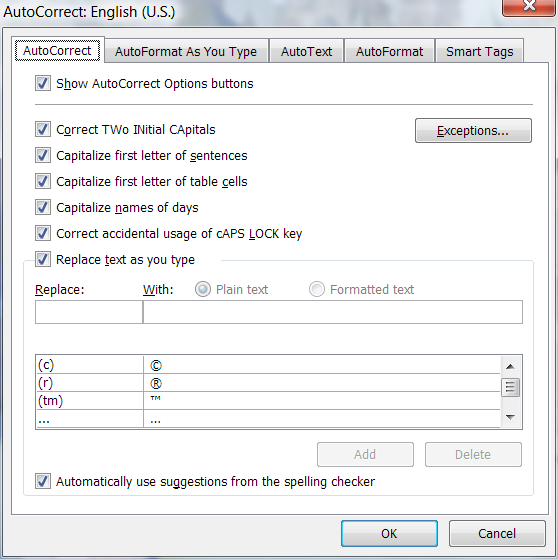
Here's what typing "turn off automatic capitalization" into the help box
brings up:

  Turn on or off AutoCorrect options


On the Tools menu, click AutoCorrect Options.
To select the options, do one or more of the following:
To show or hide the AutoCorrect Options buttons, select or clear the Show
AutoCorrect Options buttons check box.
To set the capitalization options, select or clear the next five check boxes
in the dialog box.
To turn on or off the AutoCorrect entries, select or clear the Replace text
as you type check box.
To turn on or off the spelling checker corrections, select the Replace text
as you type check box, and then select or clear the Automatically use
suggestions from the spelling checker check box.
Note  To select the Automatically use suggestions from the spelling checker
check box, you must first turn on automatic spell checking (On the Tools
menu, click Options, and on the Spelling & Grammar tab, select the Check
spelling as you type check box.

Tip

You can undo a correction or turn AutoCorrect options on or off by clicking
an option on the AutoCorrect Options button . The button first appears as a
small, blue box when you rest the mouse pointer near text that is
automatically corrected, and it changes to a button icon when you point to it.


+=+=+=+

"Turn off automatic formatting:"

On the Tools menu, click AutoCorrect Options, and then click the AutoFormat
As You Type tab.
Select or clear the options you want.


Seems pretty straightforward for an expert to understand. :-)


--
   Darren New, San Diego CA, USA (PST)
   "Ouch ouch ouch!"
   "What's wrong? Noodles too hot?"
   "No, I have Chopstick Tunnel Syndrome."
Post a reply to this message
|
|
| |
| |
|
|
|
|
| |
| |
|
|
>> Unless, that is, you join the PC to a domain during setup. Then it
>> doesn't ask you for an account and puts in the correct settings. But
>> if you want to, say, install Windows, load SP3, and *then* join the
>> domain... sorry, can't easily do that.
>
> So put SP3 on the CD before you install it?  It's called "slipstreaming"
> the disk. It's pretty straightforward if you have something that can
> burn a CD.

I guess I'm just weird in that I like to finish installing the OS and
make sure it's bootable and all working and stuff *before* I join it to
the domain.

> Otherwise, how would you expect to install SP3 if it doesn't make an
> account for you to run the install from?

How about the local admin account? You know, since it asks for a
password for that during setup anyway...

> When you're done, delete or
> disable the account, and you're good. (You can't auto-login to an
> account by default unless there's only one account and it has no
> password, so even adding a password would take care of it.)

The name of the deleted account still shows up as who this copy of
Windows is "registered to". And even once you've deleted the account and
the profile, you still have to go into the Control Panel to enable the
logon prompt. (Otherwise Ctrl+Alt+Del just gives you task manager rather
than the menu.) It's just irritating.

>> All I know is that several KB articles mention tools that are only
>> available in the resource kit, and I have tried multiple times to
>> obtain this kit, yet never actually succeeded.
>
> Go to msdn.microsoft.com
> type "resource kit" into the search bar.
> You'll get back a page of entries for downloading all the resource kits
> for different software packages.
>
> Again, what's hard? Where did you look for the resource kit before?

I was reading some KB article, and it said something like "see
KB384728374 for how to obtain the resource kit". And I don't remember
what happened from there. There was lots of time-consuming link chasing,
but I never did find a download. IIRC, I managed to download a user
guide for the resource kit, but not the kit itself. It appeared that you
have to be an M$ volume customer in order to obtain it.

--
http://blog.orphi.me.uk/
http://www.zazzle.com/MathematicalOrchid*
Post a reply to this message
|
|
| |
| |
|
|
|
|
| |
| |
|
|
>> Sure. But why couldn't they have added a button that says "yes, I
>> actually know how to operate a computer, please stop screwing up all
>> my formatting and just do what I tell you to do, not what you 'think'
>> I want you to do".
>
> They did. You're apparently not expert enough to know where the button
> is. :-)

Apparently. :-P

>> Or maybe released a seperate version of the software for experts or
>> something.
>
> They did. It's called LaTeX.

Cute. But LaTeX is a typesetter, not a word processor.

Regardless, I use LaTeX far more than I ever use Word. At least LaTeX
doesn't crash at you if you make a mistake. But, unfortunately, my job
requires me to use Word from time to time.

>> It's maddening trying to build a document with complex formatting and
>> having to constantly revert the automatic, non-deterministic changes
>> that Word keeps applying.
>
> Hmm. I find Word's automation in that area quite useful and usually
> exactly what I want and expect. When it isn't, the little drop-down menu
> on each automatic change makes it easy to fix whatever is wrong.

Lots of people keep saying this; where is this menu, OOC?

>> Well, I guess it depends who you think Access is actually aimed at.
>
> I think the idea was it would be a back-end database for simple data
> collection programs.

I always thought of it as a way for inexperienced people to throw
together small databases. And in a way, it actually works quite well for
that.

If you want to do serious database work, Access is a joke; it doesn't
support multiple users using the database at once, the performance is
horrible, and it has a habit of "corrupting" your database.

OTOH, if you just want to, say, record how many hours you spent working
on each project this week, throwing together a small Access database is
worlds simpler than setting up an Oracle server instance, configuring a
security context, designing a database schema and writing a GUI to
interface to it.

>> Presumably products like SQL Server are designed to be used by experts
>> - and, correspondingly, don't have the irritating wizards.
>
> SQL Server has the helpful wizards, instead.

Uh... do I even want to ask which tasks it automates?

--
http://blog.orphi.me.uk/
http://www.zazzle.com/MathematicalOrchid*
Post a reply to this message
|
|
| |
| |
|
|
|
|
| |
| |
|
|
Orchid XP v8 wrote:
> I guess I'm just weird in that I like to finish installing the OS and
> make sure it's bootable and all working and stuff *before* I join it to
> the domain.

Ooookey. I mean, if it really bugs you, install the OS, make sure all the
hardware works, then wipe the disk and reinstall and join the domain during
that install.

>> Otherwise, how would you expect to install SP3 if it doesn't make an
>> account for you to run the install from?
>
> How about the local admin account? You know, since it asks for a
> password for that during setup anyway...

Yeah. You'd need to be more expert at configuring Windows setups before
modifying what accounts it creates during setup and such.

>> When you're done, delete or disable the account, and you're good. (You
>> can't auto-login to an account by default unless there's only one
>> account and it has no password, so even adding a password would take
>> care of it.)
>
> The name of the deleted account still shows up as who this copy of
> Windows is "registered to".

So use the name of the company. Or leave an account out there with a
password in case you ever need to get into the machine after it's on the
domain. :-)

> It's just irritating.

But that's your job. It's obviously not irritating enough to work out how to
avoid the problem. :-) Not in the way it would be, were you in charge of
5000 computers.

>> Again, what's hard? Where did you look for the resource kit before?
>
> I was reading some KB article, and it said something like "see
> KB384728374 for how to obtain the resource kit". And I don't remember
> what happened from there. There was lots of time-consuming link chasing,
> but I never did find a download.

And you didn't think to go to microsoft's search engine and type in
"download resource kit"?

--
   Darren New, San Diego CA, USA (PST)
   "Ouch ouch ouch!"
   "What's wrong? Noodles too hot?"
   "No, I have Chopstick Tunnel Syndrome."
Post a reply to this message
|
|
| |
| |
|
|
|
|
| |
| |
|
|
>>> Otherwise, how would you expect to install SP3 if it doesn't make an
>>> account for you to run the install from?
>>
>> How about the local admin account? You know, since it asks for a
>> password for that during setup anyway...
>
> Yeah. You'd need to be more expert at configuring Windows setups before
> modifying what accounts it creates during setup and such.

As it is, it decides whether to create a local account based on whether
you join a domain or not. I don't see why it can't just *ask* you
whether you want it to create a local account or not...

>> It's just irritating.
>
> But that's your job. It's obviously not irritating enough to work out
> how to avoid the problem. :-)

Uh, didn't this thread start out with "M$ doesn't document things well
enough"?

>>> Again, what's hard? Where did you look for the resource kit before?
>>
>> I was reading some KB article, and it said something like "see
>> KB384728374 for how to obtain the resource kit". And I don't remember
>> what happened from there. There was lots of time-consuming link
>> chasing, but I never did find a download.
>
> And you didn't think to go to microsoft's search engine and type in
> "download resource kit"?

I think I might have. But in general, Microsoft's own search engine
tends not to find anything useful. Google typically works better. Like I
said, I think I managed to download a Word document explaining how to
use the resource kit, but not the resource kit itself.

--
http://blog.orphi.me.uk/
http://www.zazzle.com/MathematicalOrchid*
Post a reply to this message
|
|
| |
| |
|
|
|
|
| |
| |
|
|
Orchid XP v8 wrote:
> Lots of people keep saying this; where is this menu, OOC?

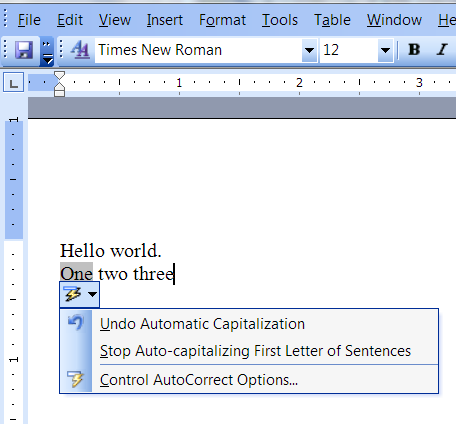
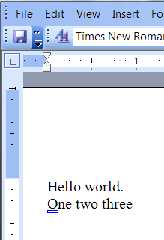
See attached images. When it makes a correction, it puts a little blue box
under the correction if you mouse close to it. Hover over the box to get the
drop-down menu.  (Or maybe click the box?)  In any case, if you correct the
same auto-correct several times, it stops correcting that.  Like, if "cisco"
is supposed to be lowercase, the second or third time you lower-case that
word manually it turns off the corrections too. Surprisingly clever.

> I always thought of it as a way for inexperienced people to throw
> together small databases. And in a way, it actually works quite well for
> that.

It's that too. But it's also a nice embedded database for small programs
that need an embedded database a little more sophisticated than a file
system. Sort of the Windows equivalent of Berkeley database manager.

> If you want to do serious database work, Access is a joke; it doesn't
> support multiple users using the database at once, the performance is
> horrible, and it has a habit of "corrupting" your database.

Yep. While I'm not sure about the "corrupting" part, it's not supposed to be
the right tool for big things.

> OTOH, if you just want to, say, record how many hours you spent working
> on each project this week, throwing together a small Access database is
> worlds simpler than setting up an Oracle server instance, configuring a
> security context, designing a database schema and writing a GUI to
> interface to it.

Yep. Or even an excel spreadsheet.

>>> Presumably products like SQL Server are designed to be used by
>>> experts - and, correspondingly, don't have the irritating wizards.
>>
>> SQL Server has the helpful wizards, instead.
>
> Uh... do I even want to ask which tasks it automates?

Stuff like setting up cluster replication, configuring automated backups,
things like that. I'm sure Gail has at least one or two wizards she starts
out with when setting things up. :-)

--
   Darren New, San Diego CA, USA (PST)
   "Ouch ouch ouch!"
   "What's wrong? Noodles too hot?"
   "No, I have Chopstick Tunnel Syndrome."
Post a reply to this message
Attachments:
Download 'image3.png' (21 KB)
Download 'image1.png' (9 KB)
Preview of image 'image3.png'
Preview of image 'image1.png'
|
|
| |
| |
|
|
|
|
| |
| |
|
|
>> The paperclip at least can be disabled. The other unecessary
>> helpy-helper features seem to be unavoidable.
>
> I don't know what version of Word you're running, but... I dunno, maybe
> the "Tools->Auto Correct" options is what you're looking for?
>
> It looks pretty straightforward to me.

Do you know where I can turn off the option that tries to automatically
format the current bullet point the same way as the last one?

(Your screenshot looks suspiciously like it's running on Vista...)

>> Computers are hopeless at figuring out what humans want!
>
> I was surprised how good a job Word did with guessing what I wanted.

Maybe because I'm trying to type stuff that features program source code
that has weird grammer and punctuation?

>>> Not necessarily. It gets everybody working the same way, which is good.
>> I can see some value in that I guess.
>
> It really is quite flexible. You just have to configure it how you want it.
>
> Now I'm talking about Visual Studio for something other than Java. Maybe
> Java has particular rules about where things go.

Or, more likely, they've made the IDE more flexible in the 10 years
since I last used it.

>>> Since I can't guess what problems your hyperbole refers to, I
>>> couldn't guess whether they fixed it or not.
>>
>> It insists that your files must be arranged in a certain way.
>
> Um, no it doesn't.

Well, when I tried it, it did. I had a working Java project that
compiled perfectly, but I couldn't do anything with it in VS until I let
the program rearrange all the files the way it wanted. (This included
manually importing all the classes, one at a time, by hand.)

>> It insists on autogenerating buckets of code that you then have to
>> manually delete.
>
> Only when you ask it to.

I couldn't find a way to avoid it. Maybe they've redesigned this part now.

>> It must be really hard if you decide you want to use some sort of
>> revision control,
>
> Actually, it's trivially easy and you almost never notice, because it's
> built into the IDE.  When you start typing into a file, it automatically
> checks it out for you.

Presumably this only works for one specific version control system though?

>> since the fixed file layout has human-written source code muddled up
>> with VS configuration files, autogenerated cache files, object files,
>> and so on.
>
> They're all in different subdirectories. Honestly, I've done some fairly
> large projects without ever looking at the layout of the files in the
> directories, other than tracking down where the actual executables went.

Maybe this was my mistake - expecting to be able to make sense of the
file layout from outside the IDE. Maybe they just assume you'll never
want to do that? (I mean, it's not like you'd ever want to put just the
source code into a Zip file so you can send it to somebody else or
something like that...)

>> POV-Ray's manual teaches you every feature of the system.
>
> I agree. POV-Ray's documentation is a shining star.

Finally, something we can agree on... ;-)

>> As far as I can tell, no such documentation exists for any M$ product.
>
> Of course it does. Heck, look at C#. There's sufficient documentation
> that someone else could write a version of the compiler based on the
> documentation that outputs the same bytecodes for the same programs.

Which is all the more amusing given that last time I looked, I couldn't
even figure out what C# *is* from the information M$ provided. (It seems
they have improved this now.)

>> It seems that if you want to know anything remotely "technical" about
>> M$ products, the only way to find out is to go on a course. I find
>> this very objectionable. I've paid money for this product, why can't
>> you just tell me how to operate it? Why must I now pay even more money?
>
> Because if it came with an 800-page manual, fewer people would buy it.

More likely it would cost a lot of money to print an 800-page manual.
But they could supply it electronically, surely?

>> (I wonder how many courses you have to take before you really know
>> what you're talking about?)
>
> Lots of courses are like that, yes.  Sometimes you just have to sit down
> and plow thru MSDN online.  Welcome to computers.

What does MSDN actually contain anyway? I've never looked at it. I
usually just search the Microsoft support website - or, if that fails to
turn up any information, there's always Google. (Finding suitable search
terms is highly nontrivial though.)

> FSF doesn't like man pages for some reason I never figured out.

Er, yeah, I've noticed how 98% of all manpages say "please concult the
infopage". Why?

>> The actual code is not remotely complex, but it took *days* to track
>> down the magic command names. It really was ridiculously hard.
>
> I don't know. As I said, I googled the obvious term, and number 12 on
> the list of the first 20 hits was a tutorial on how to do it using VBA.

Didn't work for me back when I tried it. I wasted so much time trying to
figure it out I almost gave up trying!

(Figuring out how to sign the VB code was almost as hard. I found
several KB articles, but none appeared to work. Eventually I made it
work, but then it broke when I changed to a later version of Office. I
didn't even bother to fix it. I type in the date by hand now.)

>> can mostly guess how it works - again, I don't see a syntax
>> description anywhere.
>
>
http://social.msdn.microsoft.com/Search/en-US/?query=visual%20basic%20syntax%20description&ac=3

>
>
> Dude. MSDN is your friend. I don't know how much easier it can be than
> to type "visual basic syntax description" into MSDN and have the first
> hit being "Visual Basic .NET Language Specification."  What are you
> looking for?

Indeed, *everything* seems to be VB.NET. AFAIK, this is a different
language to the VBA used in Office 2003.

The top link appears to be a reference document. Which is nice, but not
for learning how to use something for the first time. (Also, is there a
reason why none of these M$ documents allow you to nagivate properly
whichout lots of trickery with tabs and trying to defeat the JS links?)

--
http://blog.orphi.me.uk/
http://www.zazzle.com/MathematicalOrchid*
Post a reply to this message
|
|
| |
| |
|
|
|
|
| |
| |
|
|
>> Lots of people keep saying this; where is this menu, OOC?
>
> See attached images. When it makes a correction, it puts a little blue
> box under the correction if you mouse close to it. Hover over the box to
> get the drop-down menu.  (Or maybe click the box?)

Well, I've never seen that happen. Which version of Office is this?

> In any case, if you
> correct the same auto-correct several times, it stops correcting that.
> Like, if "cisco" is supposed to be lowercase, the second or third time
> you lower-case that word manually it turns off the corrections too.
> Surprisingly clever.

What you call "clever", I call "unpredictable". I like software that
behaves in exactly the same way every single time I use it. (And HCI
studies have repeatedly demonstrated that such behaviour greatly
facilitates learnability.)

>> OTOH, if you just want to, say, record how many hours you spent
>> working on each project this week, throwing together a small Access
>> database is worlds simpler than setting up an Oracle server instance,
>> configuring a security context, designing a database schema and
>> writing a GUI to interface to it.
>
> Yep. Or even an excel spreadsheet.

Dude, do you have *any idea* how many people think that using an Excel
spreadsheet is an appropriate way to have multiple users input data into
the same file?? *shivers*

>>> SQL Server has the helpful wizards, instead.
>>
>> Uh... do I even want to ask which tasks it automates?
>
> Stuff like setting up cluster replication, configuring automated
> backups, things like that. I'm sure Gail has at least one or two wizards
> she starts out with when setting things up. :-)

Oh, OK. So stuff that geniunely *is* difficult to set up by hand then?

--
http://blog.orphi.me.uk/
http://www.zazzle.com/MathematicalOrchid*
Post a reply to this message
|
|
| |
| |
|
|
|
|
| |
| |
|
|
Orchid XP v8 wrote:
> you join a domain or not. I don't see why it can't just *ask* you
> whether you want it to create a local account or not...

Because that's a question that would confuse 95% of their customers, and the
5% who might not want it are expected to be able to find the documentation
on how to stop that from happening.

> Uh, didn't this thread start out with "M$ doesn't document things well
> enough"?

Sure. I'm pointing out that they document it OK if you dig hard enough.
You would look up something like this...
http://download.microsoft.com/download/b/1/0/b106fc39-936c-4857-a6ea-3fb9d1f37063/Step-by-Step_Guide_for_Windows_Deployment_Services_in_Windows_Server_2008.doc
... only for your own OS version. You might, for example, search for "remote
installation services" or "unattended install windows xp".
That might lead you to a link like
http://support.microsoft.com/kb/294801
wherein it tells you what to set to avoid the "out of the box experience",
which I assume is probably what asks you about setting up accounts.

"""
For more information about answer files and performing an unattended
installation, see the Windows XP deployment documentation Ref.chm Help file
that is located in Support\Tools\Deploy.cab on the Windows XP CD-ROM.
"""

> I think I might have. But in general, Microsoft's own search engine
> tends not to find anything useful.

You know you need to go to msdn.microsoft.com right? Not just microsoft.com?

--
   Darren New, San Diego CA, USA (PST)
   "Ouch ouch ouch!"
   "What's wrong? Noodles too hot?"
   "No, I have Chopstick Tunnel Syndrome."
Post a reply to this message
|
|
| |
| |
|
|
|
|
| |
| |
|
|
Orchid XP v8 wrote:
> Well, I've never seen that happen. Which version of Office is this?

I think it's new with 2003.  I find 2003 far more friendly than the earlier
versions I've used.

> What you call "clever", I call "unpredictable". I like software that
> behaves in exactly the same way every single time I use it. (And HCI
> studies have repeatedly demonstrated that such behaviour greatly
> facilitates learnability.)

Yet, oddly enough, when the IDE enforces repeatability across projects, you
complain it's not flexible enough. ;-)

In any case, now you know how to turn off the features that most people
actually want.

> Dude, do you have *any idea* how many people think that using an Excel
> spreadsheet is an appropriate way to have multiple users input data into
> the same file?? *shivers*

Yes, and it works pretty well when you set it up right. You have to tell it
the file will be shared, and it works nicely.

I've seen entire online newspapers with buttloads of readers manage their
content in an access database, bellowing "does anyone have the database
open?" between cubicles every once in a while.

> Oh, OK. So stuff that geniunely *is* difficult to set up by hand then?

For me, yes. On the other hand, I expect you might consider any GUI
interface to be "a wizard", considering the database really only takes SQL
input and output, so I do set up tables with a wizard and such, if you want
to call it that. And I write stored procedures that way, and draw pretty
pictures, and all that. The database is secondary to the applications that
use it. If I can use a tool that makes it look like it's part of my app, all
the better.  It's nice to be able to add a column to the database and get
back (1) a new database, (2) a new interface to the database, and (3) a
script to change the schema of the production database from the old version
to the new version, all in one step.

--
   Darren New, San Diego CA, USA (PST)
   "Ouch ouch ouch!"
   "What's wrong? Noodles too hot?"
   "No, I have Chopstick Tunnel Syndrome."
Post a reply to this message
|
|
| |
| |
|
|
|
|
| |
| |
|
|
Orchid XP v8 wrote:
>>> The paperclip at least can be disabled. The other unecessary
>>> helpy-helper features seem to be unavoidable.
>>
>> I don't know what version of Word you're running, but... I dunno,
>> maybe the "Tools->Auto Correct" options is what you're looking for?
>>
>> It looks pretty straightforward to me.
>
> Do you know where I can turn off the option that tries to automatically
> format the current bullet point the same way as the last one?

Well, I go over to the help list and type in "turn off bullet list
formatting" and it returns a help page that says

"""
  Turn on or off automatic bulleted or numbered lists
On the Tools menu, click AutoCorrect Options, and then click the AutoFormat
As You Type tab.
Under Apply as you type, select or clear the Automatic bulleted lists or
Automatic numbered lists check box.
"""

That dialog looks as attached.  (Ooo. Never knew there was a way to define
styles based on formatting.)  There's also options to just underline in blue
formatting that is inconsistent with the rest of the document, in case
you're not turning on styles.

I guess it's that "format beginning of list item" that impressed me last
time it kicked in automatically.


> (Your screenshot looks suspiciously like it's running on Vista...)

Yes? And?

> Maybe because I'm trying to type stuff that features program source code
> that has weird grammer and punctuation?

Yeah, that would probably confuse it. You probably want to turn off all the
auto formatting and correcting stuff.  Or use notepad. :-)

> Or, more likely, they've made the IDE more flexible in the 10 years
> since I last used it.

Possibly.

> Well, when I tried it, it did. I had a working Java project that
> compiled perfectly, but I couldn't do anything with it in VS until I let
> the program rearrange all the files the way it wanted. (This included
> manually importing all the classes, one at a time, by hand.)

Well, if you create a blank project, sure, you have to add the files into
the project. That's like complaining the paragraph in that other document
has to be pasted into this one for it to print.

>>> It insists on autogenerating buckets of code that you then have to
>>> manually delete.
>>
>> Only when you ask it to.
>
> I couldn't find a way to avoid it. Maybe they've redesigned this part now.

Maybe. Depends what kind of project you started and so on. If you just open
a "blank" solution, you don't get any files that aren't needed for the
language you're using.

> Presumably this only works for one specific version control system though?

I don't know. It certainly works with Microsoft's version control system.
:-)  You can probably go through 50 times the effort and get it to work with
someone else's, if it's worth that much to you.

> Maybe this was my mistake - expecting to be able to make sense of the
> file layout from outside the IDE. Maybe they just assume you'll never
> want to do that? (I mean, it's not like you'd ever want to put just the
> source code into a Zip file so you can send it to somebody else or
> something like that...)

It does make sense. You just have to know what the files are.

For example, in one test windows forms project (i.e., with a non-templated
GUI), I have the source files I typed, the one resource file holding all the
resources, app.config (which is a .NET thing that lets you store the
configuration of the application, like POV's .INI files, and which also
holds stuff like which version of the runtime system it needs and so on, all
thoroughly documented), a directory called "Properties" which holds the
auto-generated code, a "Program.cs" which is the auto-generated "main"
program (about 3 lines of code long), and a "csproj" file, which holds the
configuration of the specific project (basically, the tree view of the files
and settings and stuff for the project, that you would otherwise be passing
on the command line to the compiler in a makefile).

It has a bin and an obj file, each with a Debug and a Release directory.

I'm not sure what junk you had in your IDE, but nowadays they seem to do a
fine job.

> Which is all the more amusing given that last time I looked, I couldn't
> even figure out what C# *is* from the information M$ provided. (It seems
> they have improved this now.)

Um.... OK.

>>> It seems that if you want to know anything remotely "technical" about
>>> M$ products, the only way to find out is to go on a course. I find
>>> this very objectionable. I've paid money for this product, why can't
>>> you just tell me how to operate it? Why must I now pay even more money?
>>
>> Because if it came with an 800-page manual, fewer people would buy it.
>
> More likely it would cost a lot of money to print an 800-page manual.
> But they could supply it electronically, surely?

They do. It's online. I've been giving you pointers to it all day.

> What does MSDN actually contain anyway? I've never looked at it.

Damn, dude. No wonder.

Microsoft Developers Network.

It's all the documentation and code and etc for people who work with
microsoft code to develop or configure software.

> usually just search the Microsoft support website - or, if that fails to
> turn up any information, there's always Google. (Finding suitable search
> terms is highly nontrivial though.)

Well, yeah. I wouldn't be surprised of most of MSDN doesn't get indexed by
google. The MS support site is for "my computer is broken, how do I fix it?"
  MSDN is for "I need to use Windows to do my job, what do I need to know?"

>> FSF doesn't like man pages for some reason I never figured out.
>
> Er, yeah, I've noticed how 98% of all manpages say "please concult the
> infopage". Why?

Because the InfoPage runs in emacs, which is RSM's baby. They're emacs
scripts pretending to be a web browser. Annoying as hell.

> Indeed, *everything* seems to be VB.NET. AFAIK, this is a different
> language to the VBA used in Office 2003.

I don't understand. I put in "vba office 2003" in the search engine, and I get.

http://social.msdn.microsoft.com/Search/en-US/?query=vba%20office%202003&ac=2

The first four links are for Excel VBA language reference, Access VBA
language referene, Word VBA language reference, and VBA language reference
for the Office 2003 data model. Later links are for outlook, powerpoint,
graph, frontpage, compiled as a help page, etc.

Why do you think Microsoft isn't documenting this?

> The top link appears to be a reference document. Which is nice, but not
> for learning how to use something for the first time.

Suck it up, dude. Not every product comes with a free tutorial.

http://www.amazon.com/s/ref=nb_ss_gw?url=search-alias%3Daps&field-keywords=vba+for+dummies&x=0&y=0

First try gives me 17 books about VBA for the office suite as tutorials. If
the reference is too complicated, get the boss to shell out $20 for a
textbook. If the boss won't do that, you need a new job. :-) But you knew
that already.

You know, my car didn't come with a book teaching me how to drive, either. :-)

 > (Also, is there a
> reason why none of these M$ documents allow you to nagivate properly
> whichout lots of trickery with tabs and trying to defeat the JS links?)

Because there's a giant TOC on the left side for most of MSDN? I dunno.
Works for me.

--
   Darren New, San Diego CA, USA (PST)
   "Ouch ouch ouch!"
   "What's wrong? Noodles too hot?"
   "No, I have Chopstick Tunnel Syndrome."
Post a reply to this message
|
|
| |
| |
|
|
|
|
| |
| |
|
|
>> Do you know where I can turn off the option that tries to
>> automatically format the current bullet point the same way as the last
>> one?
>
> On the Tools menu, click AutoCorrect Options, and then click the
> AutoFormat As You Type tab.

This looks like the relevant info. Maybe if I turn this off, Word will
finally behave deterministically...

>> Maybe because I'm trying to type stuff that features program source
>> code that has weird grammer and punctuation?
>
> Yeah, that would probably confuse it. You probably want to turn off all
> the auto formatting and correcting stuff.  Or use notepad. :-)

Yes. Because Notepad allows you to use multiple typefaces. Oh, wait... :-P

>> Well, when I tried it, it did. I had a working Java project that
>> compiled perfectly, but I couldn't do anything with it in VS until I
>> let the program rearrange all the files the way it wanted. (This
>> included manually importing all the classes, one at a time, by hand.)
>
> Well, if you create a blank project, sure, you have to add the files
> into the project. That's like complaining the paragraph in that other
> document has to be pasted into this one for it to print.

You'd think you could import *all* the classes in one go though, no?

> I'm not sure what junk you had in your IDE, but nowadays they seem to do
> a fine job.

OK. Apparently they improved it then.

>> What does MSDN actually contain anyway? I've never looked at it.
>
> Damn, dude. No wonder.
>
> Microsoft Developers Network.
>
> It's all the documentation and code and etc for people who work with
> microsoft code to develop or configure software.

I see. I thought it was only for people who want to write low-level C
code that runs under Windows. (Obviously, this is not something I ever
want to have to do.)

> Well, yeah. I wouldn't be surprised of most of MSDN doesn't get indexed
> by google. The MS support site is for "my computer is broken, how do I
> fix it?"  MSDN is for "I need to use Windows to do my job, what do I
> need to know?"

I see. This was not clear to me.

>> Er, yeah, I've noticed how 98% of all manpages say "please concult the
>> infopage". Why?
>
> Because the InfoPage runs in emacs, which is RSM's baby. They're emacs
> scripts pretending to be a web browser. Annoying as hell.

Well, I never liked it much...

>> Indeed, *everything* seems to be VB.NET. AFAIK, this is a different
>> language to the VBA used in Office 2003.
>
> I don't understand. I put in "vba office 2003" in the search engine, and
> I get.
>
> http://social.msdn.microsoft.com/Search/en-US/?query=vba%20office%202003&ac=2
>
> The first four links are for Excel VBA language reference, Access VBA
> language referene, Word VBA language reference, and VBA language
> reference for the Office 2003 data model. Later links are for outlook,
> powerpoint, graph, frontpage, compiled as a help page, etc.
>
> Why do you think Microsoft isn't documenting this?

I'll resurve judgement until *after* I've read this stuff. ;-)

>> The top link appears to be a reference document. Which is nice, but
>> not for learning how to use something for the first time.
>
> Suck it up, dude. Not every product comes with a free tutorial.

Why the hell not? If you've paid good money for it, surely you expect to
get instructions?

> You know, my car didn't come with a book teaching me how to drive,
> either. :-)

No, because (for the 8th time) this is not specific to your car. It
works for *all* cars.

You know what? When I bought a Pascal compiler, it came with a book that
teaches you how to program in Pascal. You'd think if you buy a
wordprocessor, it could come with instructions telling you what all the
various options mean, and how to make it do stuff. (Especially given the
exorbitant price tag...)

>> (Also, is there a
>> reason why none of these M$ documents allow you to nagivate properly
>> whichout lots of trickery with tabs and trying to defeat the JS links?)
>
> Because there's a giant TOC on the left side for most of MSDN? I dunno.
> Works for me.

I get a ToC, but not focused on the thing that's actually displayed in
the main pane. (This seems to happen frequently.)

<cynical> I wonder if it's because I'm not using IE? </cynical>

--
http://blog.orphi.me.uk/
http://www.zazzle.com/MathematicalOrchid*
Post a reply to this message
|
|
| |
| |
|
|
|
|
| |
| |
|
|
Orchid XP v8 wrote:
> This looks like the relevant info. Maybe if I turn this off, Word will
> finally behave deterministically...

It's deterministic. It's just not always easy to understand. :-)

> Yes. Because Notepad allows you to use multiple typefaces. Oh, wait... :-P

Mark it up with HTML then. :-)

> You'd think you could import *all* the classes in one go though, no?

Dunno. You might need to write a 5-line VBA script to do that. ;-)

> I see. I thought it was only for people who want to write low-level C
> code that runs under Windows. (Obviously, this is not something I ever
> want to have to do.)

No. If you develop anything for Windows, that's where it goes.

And if you subscribe for something like $50/year, you get boxes and boxes of
CDs with every version of every OS and Office and development tool they ever
produced.

>>> The top link appears to be a reference document. Which is nice, but
>>> not for learning how to use something for the first time.
>>
>> Suck it up, dude. Not every product comes with a free tutorial.
>
> Why the hell not? If you've paid good money for it, surely you expect to
> get instructions?

You get instructions. You don't get a tutorial for people who can't handle
the instructions. :-)

> You know what? When I bought a Pascal compiler, it came with a book that
> teaches you how to program in Pascal.

Gee. And to think I spent all that money on college.

> You'd think if you buy a
> wordprocessor, it could come with instructions telling you what all the
> various options mean, and how to make it do stuff. (Especially given the
> exorbitant price tag...)

Uh, it does. As reference material.

> I get a ToC, but not focused on the thing that's actually displayed in
> the main pane. (This seems to happen frequently.)

That happens sometimes. You might have to scroll, especially if you have
javascript turned off.

> <cynical> I wonder if it's because I'm not using IE? </cynical>

Works fine for me with firefox.

--
   Darren New, San Diego CA, USA (PST)
   "Ouch ouch ouch!"
   "What's wrong? Noodles too hot?"
   "No, I have Chopstick Tunnel Syndrome."
Post a reply to this message
|
|
| |
| |
|
|
|
|
| |
| |
|
|
On 2/10/2009 3:03 PM, Darren New wrote:
> And if you subscribe for something like $50/year, you get boxes and
> boxes of CDs with every version of every OS and Office and development
> tool they ever produced.

In all fairness, the least expensive subscription is $699/yr ($499/yr
renewal), although all of the information (articles & such) is free
online (you just don't get the software).

--
...Chambers
www.pacificwebguy.com
Post a reply to this message
|
|
| |
| |
|
|
|
|
| |
| |
|
|
On 2/10/2009 12:56 PM, Orchid XP v8 wrote:
> Uh, didn't this thread start out with "M$ doesn't document things well
> enough"?

No, this thread started out with making things easier for particular
groups of people :)

--
...Chambers
www.pacificwebguy.com
Post a reply to this message
|
|
| |
| |
|
|
|
|
| |
| |
|
|
> If you're setting up a home PC, this is precisely what you want, of
> course. But if you're trying to set up a corporate PC that's supposed to
> be part of a business network, you now have to go in, delete the local
> account just created (but note that it still appears in the Windows
> registration information), delete the corresponding profile, turn off
> auto-login, turn on the login prompt, and basically mess around with a
> whole crapload of stuff.

I don't think MS expected the bog-standard XP install disc to be used by
companies setting up more than half a dozen machines.

I must admit I don't know the details, but I believe it is relatively
straightforward to customise an XP install pretty heavily to suit your
setup.
Post a reply to this message
|
|
| |
| |
|
|
|
|
| |
| |
|
|
On Tue, 10 Feb 2009 13:27:17 -0800, Darren New <dne### [at] san rrcom> wrote:
>Orchid XP v8 wrote:
>> Well, I've never seen that happen. Which version of Office is this?
>
>I think it's new with 2003. I find 2003 far more friendly than the earlier
>versions I've used.
I'm still using Word 2002 and it has that feature
--
Regards
Stephen rrcom> wrote:
>Orchid XP v8 wrote:
>> Well, I've never seen that happen. Which version of Office is this?
>
>I think it's new with 2003. I find 2003 far more friendly than the earlier
>versions I've used.
I'm still using Word 2002 and it has that feature
--
Regards
Stephen
Post a reply to this message
|
|
| |
| |
|
|
|
|
| |
| |
|
|
Stephen wrote:
> On Tue, 10 Feb 2009 13:27:17 -0800, Darren New <dne### [at] sanrrcom> wrote:
>
>> Orchid XP v8 wrote:
>>> Well, I've never seen that happen. Which version of Office is this?
>> I think it's new with 2003.  I find 2003 far more friendly than the earlier
>> versions I've used.
>
> I'm still using Word 2002 and it has that feature

I think I skipped from 2000 to 2003, so that's possible, yes.

--
   Darren New, San Diego CA, USA (PST)
   "Ouch ouch ouch!"
   "What's wrong? Noodles too hot?"
   "No, I have Chopstick Tunnel Syndrome."
Post a reply to this message
|
|
| |
| |
|
|
|
|
| |
| |
|
|
Chambers wrote:
> In all fairness, the least expensive subscription is $699/yr ($499/yr
> renewal), although all of the information (articles & such) is free
> online (you just don't get the software).

Technet is cheaper, but I'm not sure if it's the same thing I was thinkign
of. I think the last place we were at, we must have gotten something with 10
licenses or some such, because all the software was allowed to be on 10
machines. Probably a one-off is more expensive, yes.

You can also get these things on ebay pretty easily. Some company buys 20
licenses, and has 18 people, or goes out of business, or whatever.

--
   Darren New, San Diego CA, USA (PST)
   "Ouch ouch ouch!"
   "What's wrong? Noodles too hot?"
   "No, I have Chopstick Tunnel Syndrome."
Post a reply to this message
|
|
| |
| |
|
|
|
|
| |
| |
|
|
On Wed, 11 Feb 2009 10:45:21 -0800, Darren New <dne### [at] sanrrcom> wrote:

>> I'm still using Word 2002 and it has that feature
>
>I think I skipped from 2000 to 2003, so that's possible, yes.

I also download the updates so it could come from them but I think that feature
has been around for a while.
--

Regards
     Stephen
Post a reply to this message
|
|
| |
| |
|
|
|
|
| |
|
|