|
|
|
|
|
|
| |
| |
|
|
|
|
| |
| |
|
|
As per my hypothesis, by ordering using the super-ultra-hyper-mega-saver
delivery option, they just sat on the order for three days before
mailing it to me. Presumably to encourage me to spend money on faster
delivery next time. :-P

So, my new GPU is here... nVidia GeForce GTX 260, with the 896 MB of
GDDR3 RAM and the 192 GPU cores running at 576 MHz and the dual DVI
outputs and the DirectX 10 support and the CUDA and PhysX readiness and
and and...

(Anybody remember back when YOUR ENTIRE COMPUTER had drastically less
than 896 MB of RAM? These days, it seems that the L2 CACHE on your CPU
can be 32 MB or more! Sheesh...)

I haven't opened the box yet, but *damn*... That's one BIG box! o_O

Seriously, I think my laptop will actually fit inside this box.

My first graphics card came in a box slightly bigger than the PCB. (But
then, it was "only" a GeForce 6600. Not even a 6600 Ultra, just a
vanilla 6600.) My second one came in a very slightly larger box (with
the mandatory over-the-top graphics on the box). But then, the card was
slightly bigger too.

*This* thing... comes in a box that's 255 mm by 355 mm by 105 mm - which
seems awfully large just for a PCB and a CD. :-?

And once again, the box shrieks "BUY ME! BUY ME!!" while it's still on
the shelf; it features the letters "GTX" in chrome, with metal sharks
showering down over it, and a little "260" on a plate beneith.

Ooo, check this out... I didn't see this part... I also get a free copy
of FarCry 2! :-D

And "3DMark Vantage Advanced Edition" for free.

Mmm. *Clearly* I must now open the box... ;-)

--
http://blog.orphi.me.uk/
http://www.zazzle.com/MathematicalOrchid*
Post a reply to this message
|
|
| |
| |
|
|
|
|
| |
| |
|
|
Orchid XP v8 escreveu:
> Mmm. *Clearly* I must now open the box... ;-)

That sounds reasonable. :)

Now you need Crysis to test it. :P
Post a reply to this message
|
|
| |
| |
|
|
|
|
| |
| |
|
|
nemesis wrote:

> Now you need Crysis to test it. :P

COME PLAY MY GAME, I'LL TEST YA!!! >:-D

COOOOOOOOOOOOOM PLAAAAAAAAY MYYYYYYY GAAAAAAAAAAME!!!

--
http://blog.orphi.me.uk/
http://www.zazzle.com/MathematicalOrchid*
Post a reply to this message
|
|
| |
| |
|
|
|
|
| |
| |
|
|
"Powering your XFX graphics card"

"XFX does not support the use of two 4-pin to one 6-pin power cable
converter for these graphics cards."

So, uh, why did you supply just such a converter IN THE BOX WITH THE CARD???

Is it just me?! o_O

--
http://blog.orphi.me.uk/
http://www.zazzle.com/MathematicalOrchid*
Post a reply to this message
|
|
| |
| |
|
|
|
|
| |
| |
|
|
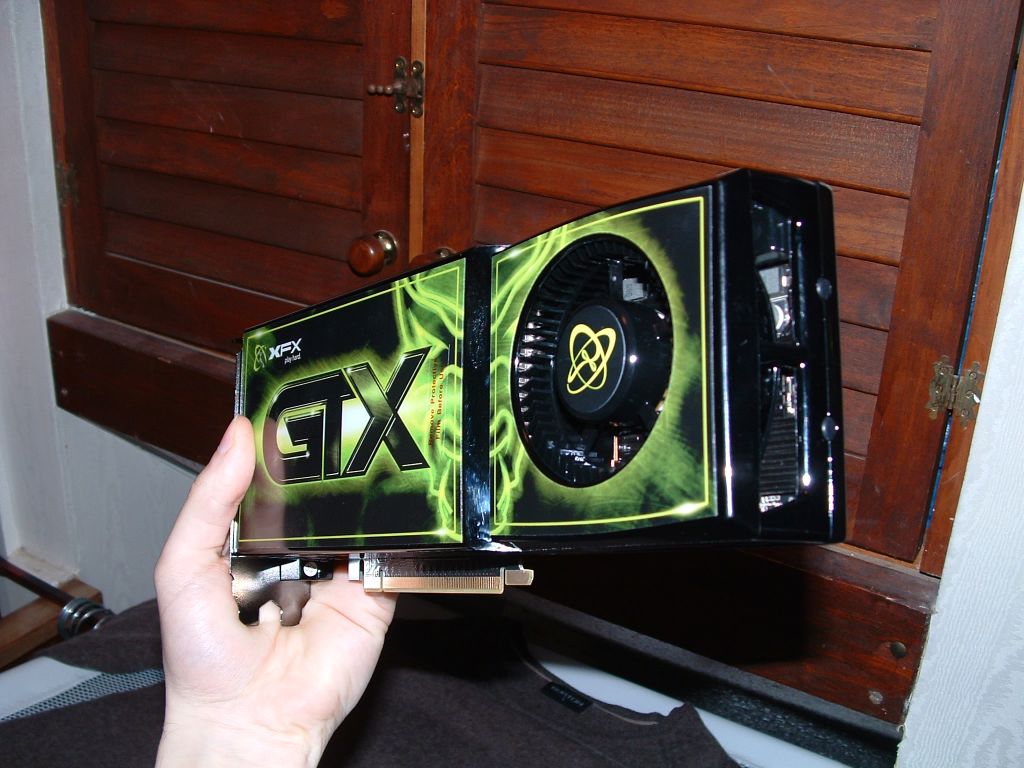
OMG, WTF?? o_O

Seriously, this thing is both larger and heavier than a harddrive!

Usually when you buy a graphics card, you get... a PCB. It weighs
nothing, and it's pretty small. My last graphics card was a PCB with a
small fan on it, so it was slightly larger.

THIS mutha... is... a solid metal brick, 265 mm by 110 mm by 40 mm.
There is no PCB visible; the entire thing is solid metal (and
elaborately printed with lush graphics in glossy paint too). About a
quarter of the object is made up of the massive exhaust fan! o_O

Jesus, I've got an SLI motherboard, but I don't think I could physically
*fit* two of these suckers in there even if I had the money! The card is
about 3 bays wide!! It weighs a tonne too...

Bugger me, this is gonna be good! :-D

--
http://blog.orphi.me.uk/
http://www.zazzle.com/MathematicalOrchid*
Post a reply to this message
|
|
| |
| |
|
|
|
|
| |
| |
|
|
Orchid XP v8 wrote:
> (Anybody remember back when YOUR ENTIRE COMPUTER had drastically less
> than 896 MB of RAM?

I remember when 896 MB of removable storage was an inconceivable amount. :-)

--
   Darren New, San Diego CA, USA (PST)
   "Ouch ouch ouch!"
   "What's wrong? Noodles too hot?"
   "No, I have Chopstick Tunnel Syndrome."
Post a reply to this message
|
|
| |
| |
|
|
|
|
| |
| |
|
|
Hahahaha...

"Minimum power supply: 500 W. Recommended power supply: 630 W or more."

Er, yeah. I'm pretty sure my power supply is 250 W. ;-)

--
http://blog.orphi.me.uk/
http://www.zazzle.com/MathematicalOrchid*
Post a reply to this message
|
|
| |
| |
|
|
|
|
| |
| |
|
|
Orchid XP v8 <voi### [at] dev null> wrote:
> Hahahaha...
> "Minimum power supply: 500 W. Recommended power supply: 630 W or more."
> Er, yeah. I'm pretty sure my power supply is 250 W. ;-)
"I'm pretty sure"? You don't know? Nor can check?
It should be rather common knowledge that newer graphics cards require
more powerful PSUs. If you are going to heavily upgrade your graphics
card, you'll usually have to upgrade your PSU as well. Luckily those
are not very expensive.
--
- Warp null> wrote:
> Hahahaha...
> "Minimum power supply: 500 W. Recommended power supply: 630 W or more."
> Er, yeah. I'm pretty sure my power supply is 250 W. ;-)
"I'm pretty sure"? You don't know? Nor can check?
It should be rather common knowledge that newer graphics cards require
more powerful PSUs. If you are going to heavily upgrade your graphics
card, you'll usually have to upgrade your PSU as well. Luckily those
are not very expensive.
--
- Warp
Post a reply to this message
|
|
| |
| |
|
|
|
|
| |
| |
|
|
Warp wrote:
> more powerful PSUs.

When did it get common to tack a "U" on the end of "Power Supply"? Nobody
calls it a Power Supply Unit. :-)

--
   Darren New, San Diego CA, USA (PST)
   "Ouch ouch ouch!"
   "What's wrong? Noodles too hot?"
   "No, I have Chopstick Tunnel Syndrome."
Post a reply to this message
|
|
| |
| |
|
|
|
|
| |
| |
|
|
Warp wrote:

>   "I'm pretty sure"? You don't know? Nor can check?

Nope. Apparently there's no technical data printed on the PSU. I just
checked. (And I didn't buy it online, so I don't have an invoice to
check either.)

> Luckily those are not very expensive.

Well, that's the main thing, yes. ;-)

(Otherwise, right now you'd see my sitting in the corner crying.)

--
http://blog.orphi.me.uk/
http://www.zazzle.com/MathematicalOrchid*
Post a reply to this message
|
|
| |
| |
|
|
|
|
| |
| |
|
|
Darren New wrote:

> When did it get common to tack a "U" on the end of "Power Supply"?
> Nobody calls it a Power Supply Unit. :-)

Er... I do?

I've always seen it referred to as PSU. (When it's referred to by a
specific term, at any rate. Typically it's something that just comes
with the case...)

--
http://blog.orphi.me.uk/
http://www.zazzle.com/MathematicalOrchid*
Post a reply to this message
|
|
| |
| |
|
|
|
|
| |
| |
|
|
Orchid XP v8 wrote:

 > THIS mutha... is... a solid metal brick, 265 mm by 110 mm by 40 mm.

Hahahahaha!

Wanna take a guess what the distance between the motherboard's
PCI-Express sockets and the motherboard's SATA sockets is?

Hint: It isn't 110 mm.

So... unless I don't connect any SATA devices, it is *actually
impossible* to fit this particular graphics card. Weeeeee!! :-D

--
http://blog.orphi.me.uk/
http://www.zazzle.com/MathematicalOrchid*
Post a reply to this message
|
|
| |
| |
|
|
|
|
| |
| |
|
|
Darren New <dne### [at] sanrrcom> wrote:
> Warp wrote:
> > more powerful PSUs.

> When did it get common to tack a "U" on the end of "Power Supply"? Nobody
> calls it a Power Supply Unit. :-)

  "PSU" is more unambiguous than "PS".

--
                                                          - Warp
Post a reply to this message
|
|
| |
| |
|
|
|
|
| |
| |
|
|
I'm not making this stuff up!!

--
http://blog.orphi.me.uk/
http://www.zazzle.com/MathematicalOrchid*
Post a reply to this message
Attachments:
Download 'big.jpg' (126 KB)
Preview of image 'big.jpg'
|
|
| |
| |
|
|
|
|
| |
| |
|
|
Orchid XP v8 wrote:
> Darren New wrote:
>
>> When did it get common to tack a "U" on the end of "Power Supply"?
>> Nobody calls it a Power Supply Unit. :-)
>
> Er... I do?

Weird. Maybe it's a European thing or something. It's just "power supply"
every time I've heard it out loud.

--
   Darren New, San Diego CA, USA (PST)
   "Ouch ouch ouch!"
   "What's wrong? Noodles too hot?"
   "No, I have Chopstick Tunnel Syndrome."
Post a reply to this message
|
|
| |
| |
|
|
|
|
| |
| |
|
|
Orchid XP v8 wrote:
> I'm not making this stuff up!!

Mofo! That's a damn big card.

--
   Darren New, San Diego CA, USA (PST)
   "Ouch ouch ouch!"
   "What's wrong? Noodles too hot?"
   "No, I have Chopstick Tunnel Syndrome."
Post a reply to this message
|
|
| |
| |
|
|
|
|
| |
| |
|
|
>> I'm not making this stuff up!!
>
> Mofo! That's a damn big card.

Yes. It is. It's BIGGER THAN THE DISTANCE BETWEEN MY PCI SOCKET AND MY
SATA SOCKETS. 8-}

[You might wanna stand a little further away from me right now...]

--
http://blog.orphi.me.uk/
http://www.zazzle.com/MathematicalOrchid*
Post a reply to this message
|
|
| |
| |
|
|
|
|
| |
| |
|
|
Orchid XP v8 wrote:
> [You might wanna stand a little further away from me right now...]

We sell more than everyone else put together! How do we do it? Volume! Our
ads are louder than anyone else's!

--
   Darren New, San Diego CA, USA (PST)
   "Ouch ouch ouch!"
   "What's wrong? Noodles too hot?"
   "No, I have Chopstick Tunnel Syndrome."
Post a reply to this message
|
|
| |
| |
|
|
|
|
| |
| |
|
|
Orchid XP v8 <voi### [at] devnull> wrote:
> Wanna take a guess what the distance between the motherboard's
> PCI-Express sockets and the motherboard's SATA sockets is?
>
> Hint: It isn't 110 mm.
>
> So... unless I don't connect any SATA devices, it is *actually
> impossible* to fit this particular graphics card. Weeeeee!! :-D

ROFL!

So until now, you *definitely* need a new power plant, and as it seems a new
mainboard (or an older hard drive) for this Big Bad Brick of Pure Pixel Power,
huh?

What's next? Drivers requiring a new OS, output connector incompatible with your
old display, and card too heavy to be supported by the case? ;)

Gee, maybe you should've bought a new computer right away, after all :P


This reminds me, I actually once resorted to (mini-) angle grinder work to
upgrade the graphics of some computer... the corner of a PCI expansion slot had
to make way =B)
Post a reply to this message
|
|
| |
| |
|
|
|
|
| |
| |
|
|
Orchid XP v8 <voi### [at] devnull> wrote:
> I'm not making this stuff up!!

How many horsepower in there?  They must be stallions! :D
Post a reply to this message
|
|
| |
| |
|
|
|
|
| |
| |
|
|
> Wanna take a guess what the distance between the motherboard's
> PCI-Express sockets and the motherboard's SATA sockets is?
>
> Hint: It isn't 110 mm.
>
> So... unless I don't connect any SATA devices, it is *actually
> impossible* to fit this particular graphics card. Weeeeee!! :-D

Could you not fit a 90 degree SATA socket, like this one:

http://estore.asus.com/images/14-000107075.jpg
Post a reply to this message
|
|
| |
| |
|
|
|
|
| |
| |
|
|
>> So... unless I don't connect any SATA devices, it is *actually
>> impossible* to fit this particular graphics card. Weeeeee!! :-D
>
> Could you not fit a 90 degree SATA socket, like this one:
>
> http://estore.asus.com/images/14-000107075.jpg

Hmm... It's possible. Would be a pretty tight fit though.

OTOH, I just remembered that my motherboard (being a high-end "delux"
version) has a second SATA controller. So I think I can use the sockets
for that. I forget where those are, but I think they're on a different
part of the board...
Post a reply to this message
|
|
| |
| |
|
|
|
|
| |
| |
|
|
nemesis wrote:
> Orchid XP v8 <voi### [at] devnull> wrote:
>> I'm not making this stuff up!!
>
> How many horsepower in there?  They must be stallions! :D

715 gigaFLOPS, bitches!! :-D

[Er, but that's *peak* performance. And at *single* precision.]


Also... 182 W TDP? o_O
I think that's more then the *radiator* in my bedroom!
Post a reply to this message
|
|
| |
| |
|
|
|
|
| |
| |
|
|
Darren New wrote:

> We sell more than everyone else put together! How do we do it? Volume!
> Our ads are louder than anyone else's!

I don't know about adverts, but I'm wondering how loud that fan is going
to be... ;-)
Post a reply to this message
|
|
| |
| |
|
|
|
|
| |
| |
|
|
>> http://estore.asus.com/images/14-000107075.jpg
>
> Hmm... It's possible. Would be a pretty tight fit though.
>
> OTOH, I just remembered that my motherboard (being a high-end "delux"
> version) has a second SATA controller. So I think I can use the sockets
> for that. I forget where those are, but I think they're on a different
> part of the board...

That was going to be my next suggestion :-)  I have not seen a motherboard
with all the SATA sockets exactly in the same place.  I think mine has a
header near the back for an "external SATA" socket - but unused currently.
Post a reply to this message
|
|
| |
| |
|
|
|
|
| |
| |
|
|
>> OTOH, I just remembered that my motherboard (being a high-end "delux"
>> version) has a second SATA controller. So I think I can use the
>> sockets for that. I forget where those are, but I think they're on a
>> different part of the board...
>
> That was going to be my next suggestion :-)  I have not seen a
> motherboard with all the SATA sockets exactly in the same place.  I
> think mine has a header near the back for an "external SATA" socket -
> but unused currently.

My motherboard is a £90 Gigabyte K8N Ultra-SLI powered by the nForce 4
SLI chipset, which gives you 4 SATA II ports that can be configured for
RAID. Gigabyte then added an onboard Silicon Image SATA controller,
giving you an additional 4 SATA II ports. (This is on top of not one but
*two* Firewire ports - one of them a faster Firewire-B port - two
gigabit Ethernet ports [remember when those used to be expensive? This
was back then!!], and of course SLI support [SLI was still very new.])

More impressive still, not only does the board have 8 SATA sockets, but
THEY GIVE YOU EIGHT SATA CABLES!

COLOUR CODED!!

As one reviewer wrote, "penny-pinching is not evident".

http://www.tomshardware.co.uk/finally-available,review-1164-12.html

 From the image here (which is for the GA K8NXP-9), it appears that the
extra SATA sockets are on the bottom edge of the board, clear of the GPU
bay. So that ought to be usable.

Damn, I spent £90 on a motherboard, and today it's almost a museum
piece. How technology moves on, eh? (Remember, back then socket-939 was
supposed to be "the next Big Thing"...)
Post a reply to this message
|
|
| |
| |
|
|
|
|
| |
| |
|
|
On 1/29/2009 1:03 AM, Invisible wrote:
> Darren New wrote:
>
>> We sell more than everyone else put together! How do we do it? Volume!
>> Our ads are louder than anyone else's!
>
> I don't know about adverts, but I'm wondering how loud that fan is going
> to be... ;-)

The larger the fan, the slower it needs to spin to move the same volume
of air.

Most of the time, it should be quiet enough.  Unless you're playing a
game, doing some heavy Photoshop stuff, running Vista with Aero, looking
at it wrong, et cetera.  You get the idea :)

--
...Chambers
www.pacificwebguy.com
Post a reply to this message
|
|
| |
| |
|
|
|
|
| |
| |
|
|
Invisible wrote:

> http://www.tomshardware.co.uk/finally-available,review-1164-12.html
>
>  From the image here (which is for the GA K8NXP-9), it appears that the
> extra SATA sockets are on the bottom edge of the board, clear of the GPU
> bay. So that ought to be usable.

Or, better yet, here:

http://www.giga-byte.com.tw/Products/Motherboard/Products_Spec.aspx?ProductID=1867

Click to enlarge the image. You'll see 4 *yellow* SATA connectors. Those
are from the nForce 4 chipset. You'll also see 4 *red* SATA connectors.
These are from the Silicon Image SATA controller. (And so these don't
have the RAID feature - which is "host-based RAID" anyway, as it happens.)

The box for the motherboard actually contains 4 red and 4 yellow SATA
cables. And colour-coded IDE and FDD cables. And several types of PSU
adaptors. And... Seriously, the box contains everything you could
possibly need to set this board up. It was way more than just a
cardboard box with a PCB in it! :-D

You can also see where the two PCI Express slots of the twin graphics
cards are. (Remember, this is a 2-way SLI board.) I think my new card
actually extends off the edge of the motherboard! o_O

Also, on checking, the card takes 2 bay slots - so looking at the
placement of those PCI slots, it looks like you *could* fit two of
these. At least, there's enough physical space. I can't believe that the
airflow would be in any way "optimal" though...
Post a reply to this message
|
|
| |
| |
|
|
|
|
| |
| |
|
|
>> I don't know about adverts, but I'm wondering how loud that fan is going
>> to be... ;-)
>
> The larger the fan, the slower it needs to spin to move the same volume
> of air.

Yes, but OTOH... if they fitted a fan this huge in the first place, this
suggests it's going to need it. ;-)

I mean, Jesus, the card is 2 bays wide just so it can accomodate enough
heatsinks and fans. It has a TDP of 182W!! o_O

> Most of the time, it should be quiet enough.  Unless you're playing a
> game, doing some heavy Photoshop stuff, running Vista with Aero, looking
> at it wrong, et cetera.  You get the idea :)

Really? Interesting. The fan on my existing card (nVidia GeForce 7900GT)
spins at constant speed.

(As does the CPU fan. But that probably just means you need a special
driver to throttle it...)
Post a reply to this message
|
|
| |
| |
|
|
|
|
| |
| |
|
|
On 1/29/2009 2:07 AM, Invisible wrote:
> Really? Interesting. The fan on my existing card (nVidia GeForce 7900GT)
> spins at constant speed.
>
> (As does the CPU fan. But that probably just means you need a special
> driver to throttle it...)

That's funny... you would think that a card that advanced would know how
to throttle the fan.  My 4850 certainly does (in fact, I almost never
hear it, even when playing games!)

--
...Chambers
www.pacificwebguy.com
Post a reply to this message
|
|
| |
| |
|
|
|
|
| |
| |
|
|
> http://www.giga-byte.com.tw/Products/Motherboard/Products_Spec.aspx?ProductID=1867
>
> Click to enlarge the image. You'll see 4 *yellow* SATA connectors. Those
> are from the nForce 4 chipset. You'll also see 4 *red* SATA connectors.

Can't you use the other PCIe slot for the new GPU?  Or does the first one
have to go in the right slot?

Does the GPU really cover all 4 of the SATA sockets? Wow.
Post a reply to this message
|
|
| |
| |
|
|
|
|
| |
| |
|
|
scott wrote:

> Can't you use the other PCIe slot for the new GPU?  Or does the first
> one have to go in the right slot?

I *believe* the first GPU has to go in the upper slot. I'll check the
manual. (The manual is currently downloading from Gigabyte's website at
roughly 1KB/sec, as is typical for motherboard downloads...)

> Does the GPU really cover all 4 of the SATA sockets? Wow.

Well, I haven't actually tried it, but it's 2 bays wide, and holding it
up against the motherboard (which isn't easy) it appears to be longer
then the full width of the board, so...
Post a reply to this message
|
|
| |
| |
|
|
|
|
| |
| |
|
|
> I *believe* the first GPU has to go in the upper slot. I'll check the
> manual. (The manual is currently downloading from Gigabyte's website at
> roughly 1KB/sec, as is typical for motherboard downloads...)

Hehe, would be quicker just to try it out and see if it boots or not.

Yeh, why is it that all MB manufacturers have websites with a total
bandwidth of 4kb/sec?  And just when you need some simple onboard sound
driver quickly, you see it's a 63MB download and it's going to take 3 weeks
to complete.

> Well, I haven't actually tried it, but it's 2 bays wide, and holding it up
> against the motherboard (which isn't easy) it appears to be longer then
> the full width of the board, so...

To cover all 4 SATA sockets it must be pretty thick.
Post a reply to this message
|
|
| |
| |
|
|
|
|
| |
| |
|
|
scott wrote:
>> I *believe* the first GPU has to go in the upper slot. I'll check the
>> manual. (The manual is currently downloading from Gigabyte's website
>> at roughly 1KB/sec, as is typical for motherboard downloads...)
>
> Hehe, would be quicker just to try it out and see if it boots or not.

Well, maybe. :-P Currently at... ooo, 48%? o_O

> Yeh, why is it that all MB manufacturers have websites with a total
> bandwidth of 4kb/sec?  And just when you need some simple onboard sound
> driver quickly, you see it's a 63MB download and it's going to take 3
> weeks to complete.

Yeah, why the **** is that??? Like, even if the download is 78KB, it's
the slowest 78KB of your entire life! o_O

> To cover all 4 SATA sockets it must be pretty thick.

Have you *seen* the photograph??
Post a reply to this message
|
|
| |
| |
|
|
|
|
| |
| |
|
|
scott wrote:

> Can't you use the other PCIe slot for the new GPU?

No. You can't.
Post a reply to this message
|
|
| |
| |
|
|
|
|
| |
| |
|
|
"Invisible" <voi### [at] devnull> wrote in message
news:49819695$1@news.povray.org...
> scott wrote:

> I *believe* the first GPU has to go in the upper slot. I'll check the
> manual. (The manual is currently downloading from Gigabyte's website at
> roughly 1KB/sec, as is typical for motherboard downloads...)

  Wow, that's weird, I've just tried it myself, and what a weird way to
download it, all I get is a blank page with download info in the bottom left
corner. :oO

   ~Steve~
Post a reply to this message
|
|
| |
| |
|
|
|
|
| |
| |
|
|
Orchid XP v8 wrote:
> Ooo, check this out... I didn't see this part... I also get a free copy
> of FarCry 2! :-D

Don't bother.  That game is the most repetitive POS I've played.
Crysis, OTOH...
Post a reply to this message
|
|
| |
| |
|
|
|
|
| |
| |
|
|
>> Ooo, check this out... I didn't see this part... I also get a free
>> copy of FarCry 2! :-D
>
> Don't bother.  That game is the most repetitive POS I've played. Crysis,
> OTOH...

...will cost me money, whereas FarCry 2 I already have. ;-) I might as
well at least see what it's like...

Hmm, although... if it's any harder than FarCry 1, I guess there really
*is* no point. o_O
Post a reply to this message
|
|
| |
| |
|
|
|
|
| |
| |
|
|
"Kyle" <no### [at] spamok> wrote in message news:4981a9e5$1@news.povray.org...
> Orchid XP v8 wrote:
>> Ooo, check this out... I didn't see this part... I also get a free copy
>> of FarCry 2! :-D
>
> Don't bother.  That game is the most repetitive POS I've played.

  Yeah, I've heard that too, and I was really looking forward to it after
the original, (which I thought was brilliant for gameplay).

> Crysis, OTOH...

   No doubt about it... :)

     ~Steve~
Post a reply to this message
|
|
| |
| |
|
|
|
|
| |
| |
|
|
>> Crysis, OTOH...
>
>    No doubt about it... :)

Well, Nemesis seems to pretty strongly doubt it. :-P
Post a reply to this message
|
|
| |
| |
|
|
|
|
| |
| |
|
|
"Invisible" <voi### [at] devnull> wrote in message
news:4981ace6$1@news.povray.org...
>>> Crysis, OTOH...
>>
>>    No doubt about it... :)
>
> Well, Nemesis seems to pretty strongly doubt it. :-P

 Well, in a way, he's right about the 'tech demo' side of it, but I woudn't
go as far as saying that it's bland. The story is quite good, the cutscenes
are very good, scenery is amazing, (you'll get to see that with your 260
easy), and gameplay is just great if you love freedom to do what you want
and how you want. I completed it in about 12 hours and honestly, it's one of
those games where you'll want to take a break because you'll want to just
carry on to see what happens next.

  ~Steve~
Post a reply to this message
|
|
| |
| |
|
|
|
|
| |
| |
|
|
Invisible wrote:
>> Crysis, OTOH...
>
> ...will cost me money, whereas FarCry 2 I already have. ;-) I might as
> well at least see what it's like...

Sure, check it out since it's *ahem* free.  How much did you pay for
that video card?

Also, I thought you were going to buy Crysis anyway.

> Hmm, although... if it's any harder than FarCry 1, I guess there really
> *is* no point. o_O

I don't think it's harder.  Don't expect the same game as FarCry 1,
though.  It's quite different.  Crysis is much more similar to FarCry 1
than FarCry 2 is.
Post a reply to this message
|
|
| |
| |
|
|
|
|
| |
| |
|
|
Kyle wrote:

> Sure, check it out since it's *ahem* free.  How much did you pay for
> that video card?

£200. Because I wanted a big, chunky GPU to run all my insane
compute-bounded mentalness on? ;-)

> Also, I thought you were going to buy Crysis anyway.

Er, yeah. But probably not "soon"...

> I don't think it's harder.  Don't expect the same game as FarCry 1,
> though.  It's quite different.  Crysis is much more similar to FarCry 1
> than FarCry 2 is.

OK then.

--
http://blog.orphi.me.uk/
http://www.zazzle.com/MathematicalOrchid*
Post a reply to this message
|
|
| |
| |
|
|
|
|
| |
| |
|
|
On 28-Jan-09 22:46, Orchid XP v8 wrote:
> Darren New wrote:
>
>> When did it get common to tack a "U" on the end of "Power Supply"?
>> Nobody calls it a Power Supply Unit. :-)
>
> Er... I do?
>
> I've always seen it referred to as PSU.

Would you pronounce that as P.S.U. and if not would you pronounce the
the P as in pseudo?
Post a reply to this message
|
|
| |
| |
|
|
|
|
| |
| |
|
|
>> I've always seen it referred to as PSU.
>
> Would you pronounce that as P.S.U.

Yes.
Post a reply to this message
|
|
| |
| |
|
|
|
|
| |
| |
|
|
OK, so last night I embarked on an epic HD moving process.

Suffice it to say, I removed the 80GB HD that I don't really use much. I
took the two remaining HDs and moved them to the bottom of the drive
rack. There is now space for the giant graphics card to slot into the PC
without purchasing a larger case.

It sounds like a trivial operation, but it wasn't. I only just have
enough power connectors, and various cables weren't really long enough, etc.

There is one small problem: the drive I removed was the one with the
working boot sector on it. I did try plugging the drives into the other
SATA sockets, but the Windows XP install CD apparently lacks the drivers
necessary to access the secondary SATA controller, so it couldn't "find"
the drives in that configuration. (KNOPPIX found them just fine, but not
Windows XP.)

Actually, it turns out the new graphics card will only block *two* of
the primary SATA sockets, so I can in fact still plug my drives in in
the usual way. I have now done this, and Windows XP can "see" them again.

Now *all* I have to do is figure out how to put NTLDR and friends back
onto the drive using the recovery console and my PC will be usable
again... o_O
Post a reply to this message
|
|
| |
| |
|
|
|
|
| |
| |
|
|
> Actually, it turns out the new graphics card will only block *two* of
> the primary SATA sockets,

Cool.

> Now *all* I have to do is figure out how to put NTLDR and friends back
> onto the drive using the recovery console and my PC will be usable
> again... o_O

Then you should be able to try the latest ones from here:

http://www.nzone.com/object/nzone_downloads_nvidia.html
Post a reply to this message
|
|
| |
| |
|
|
|
|
| |
| |
|
|
scott wrote:

>> Now *all* I have to do is figure out how to put NTLDR and friends back
>> onto the drive using the recovery console and my PC will be usable
>> again... o_O
>
> Then you should be able to try the latest ones from here:
>
> http://www.nzone.com/object/nzone_downloads_nvidia.html

One time, I actually sat down and tried every demo on nVidia's website.
(Up until the point where the higher ones wouldn't run, anyway.)

Some of the demos are just rubbish, but a few of them are really awesom.
Most especially this one:

http://www.nzone.com/object/nzone_luna_home.html

OK, technologically it's probably not that special. But seriously...
WOW! o_O This is some SERIOUSLY WEIRD CRAP! How the **** did they come
up with this stuff?! ._.

Unfortunately, I rapidly discovered that many of the demos will not
cleanly uninstall afterwards. (!!)
Post a reply to this message
|
|
| |
| |
|
|
|
|
| |
| |
|
|
Invisible wrote:

> Now *all* I have to do is figure out how to put NTLDR and friends back
> onto the drive using the recovery console and my PC will be usable
> again... o_O

Under Windows NT, there was a feature where you could boot from the
install CD, select "repair", and it would scan your HDs, try to find an
installed copy of Windows NT, and if it found one, attempt to make it
bootable. (E.g., check the boot sector, add the various executables and
configuration files required for a successful boot, and even replace
missing or corrupted DLLs and so on.)

Apparently this feature does not exist in Windows XP. (One presumes it
was found to be too useful, and its removal allows M$ consultants to
charge you money to fix your PC for you...)

Anyway, after consulting not less than 7 different KB articles, it
appears that I can use the Recovery Console to manually copy the two
boot files from the CD to the HD and semi-automatically rebuild the boot
configuration menu.

In case anybody wants to know, the procedure appears to be this:

- Start the Recovery Console. (I.e., boot the install CD and press "R"
when prompted.)

- Type "map" and observe the drive letter for the CD drive.

- Copy NTLDR to the harddrive: copy O:\i386\ntldr C:\

- Copy NTDETECT.COM too: copy O:\i386\ntdetect.com C:\

- Build a new BOOT.INI file: bootcfg /all

- This last command spends a few hours scanning all your HDs looking for
anything that looks like a Windows installation. It then gives you an
interactive prompt asking which ones to add to the boot menu.

Hopefully at this point the system should become bootable again. (And if
not, I'll just reinstall Windows. That should get rid of those old
nVidia demos that wouldn't uninstall...)
Post a reply to this message
|
|
| |
| |
|
|
|
|
| |
| |
|
|
Invisible wrote:

> Unfortunately, I rapidly discovered that many of the demos will not
> cleanly uninstall afterwards. (!!)

I just realised... I can't even run them in a VM! They need the GPU. ;-)
Post a reply to this message
|
|
| |
| |
|
|
|
|
| |