|
|
|
|
|
|
| |
| |
|
|
|
|
| |
| |
|
|
As you maybe remember, I'm programming ssRay, a Monte Carlo path tracer.
Next I'd like to add mesh support for more interesting shapes. What
would be the most common mesh file format? Or at least common enough AND
simple?

Regards,
Severi

ssRay:

http://www.saunalahti.fi/~sevesalm/ssRay/ssRay.php
Post a reply to this message
|
|
| |
| |
|
|
|
|
| |
| |
|
|
I'd suggest the Wavefront OBJ file format...

http://en.wikipedia.org/wiki/Obj
Post a reply to this message
|
|
| |
| |
|
|
|
|
| |
| |
|
|
"Kyle" <no### [at] spam ok> wrote in message news:497dbbf7$1@news.povray.org...
> I'd suggest the Wavefront OBJ file format...
>
> http://en.wikipedia.org/wiki/Obj
OBJ is a decent format, but I'd say 3DS is still unfortunately the most
common one. ok> wrote in message news:497dbbf7$1@news.povray.org...
> I'd suggest the Wavefront OBJ file format...
>
> http://en.wikipedia.org/wiki/Obj
OBJ is a decent format, but I'd say 3DS is still unfortunately the most
common one.
Post a reply to this message
|
|
| |
| |
|
|
|
|
| |
| |
|
|
Kyle <no### [at] spamok> wrote:
> I'd suggest the Wavefront OBJ file format...
>
> http://en.wikipedia.org/wiki/Obj

OBJ is extremely simple, too.  Just ASCII text, so I was able to
reverse-engineer it and make a shell script to convert it to mesh2 format.  3DS
appears to be binary formatted which, while not difficult to work with, is that
much more complex for debugging.

 - Ricky
Post a reply to this message
|
|
| |
| |
|
|
|
|
| |
| |
|
|
I found that aspect of OBJ extremely useful in testing my exporter for Hash
AM. I could just open the file and see if everything was being written
correctly.

Another advantage of OBJ is that it support quads. I think 3DS only supports
triangles?

"triple_r" <nomail@nomail> wrote in message
news:web.497dc5c7c930bdbfef2b9ba40@news.povray.org...
> Kyle <no### [at] spamok> wrote:
>> I'd suggest the Wavefront OBJ file format...
>>
>> http://en.wikipedia.org/wiki/Obj
>
> OBJ is extremely simple, too.  Just ASCII text, so I was able to
> reverse-engineer it and make a shell script to convert it to mesh2 format.
> 3DS
> appears to be binary formatted which, while not difficult to work with, is
> that
> much more complex for debugging.
>
> - Ricky
>
Post a reply to this message
|
|
| |
| |
|
|
|
|
| |
| |
|
|
Kyle wrote:
> I'd suggest the Wavefront OBJ file format...
>
> http://en.wikipedia.org/wiki/Obj

Thanks. OBJ seems fine. Any idea where I could find very simple .obj
files which contain (say) less than 100 triangles?

ssRay still lacks kd-trees so I don't want to wait millions of years
rendering that cool dragon model...
Post a reply to this message
|
|
| |
| |
|
|
|
|
| |
| |
|
|
On 26-Jan-09 23:15, Severi Salminen wrote:
> Kyle wrote:
>> I'd suggest the Wavefront OBJ file format...
>>
>> http://en.wikipedia.org/wiki/Obj
>
> Thanks. OBJ seems fine. Any idea where I could find very simple .obj
> files which contain (say) less than 100 triangles?
>
> ssRay still lacks kd-trees so I don't want to wait millions of years
> rendering that cool dragon model...
use blender, wings3d or something like that and export a few basic
shapes as obj
Post a reply to this message
|
|
| |
| |
|
|
|
|
| |
| |
|
|
Mike Hough <nos### [at] nospamcom> wrote:
> Another advantage of OBJ is that it support quads. I think 3DS only supports
> triangles?

  Rendering a (non-rectangular) textured quad is not an unambiguous process.
How do you do that? Dividing it into two triangles will get you a texturing
artifact.

--
                                                          - Warp
Post a reply to this message
|
|
| |
| |
|
|
|
|
| |
| |
|
|
Warp <war### [at] tagpovrayorg> wrote:
>   Rendering a (non-rectangular) textured quad is not an unambiguous process.
> How do you do that? Dividing it into two triangles will get you a texturing
> artifact.

Should be not too difficult: Just triangulate the nasty things.

As long as we're "only" talking about quads and not generic N-gons that should
not be a big deal. Find the shortest diagonal and cut it in two.

For users wanting more control over the results, advise them to triangulate
their models in a proper mesh editor.

At least it's one of those things I wouldn't bother too much about in the
beginning if I'd write such a program. For starters, a warning to the user and
a totally braindead automatic tesselation (or even total refusal to import the
file) should be an acceptable enough way to deal with the problem. It can
always be fleshed out in the future with more sophisticated algorithms.

It wouldn't be the first program to place certain restrictions on the data in
the .obj file to be imported. (How much software do you know, for example, that
accepts bezier patches in .obj files? Or was it nurbs? Even the number of
programs that can do arbitrary N-gons is probably quite limited; e.g. Poser
only accepts triangles and quads.)


BTW, there's another issue with 3DS files: As far as I see, there seems to be a
"hard deck" at 32k triangles. At least that's where various programs start
messing up their 3DS export (not only seen in freeware stuff like Wings 3D, but
also in commercial software like Poser 7).

Never seen such problems with .obj files.
Post a reply to this message
|
|
| |
| |
|
|
|
|
| |
| |
|
|
As clipka said, they usually get triangulated at render time. I have only
written exporters, not renderers, so I don't know how it is actually
handeled by the program after they are imported. However quads imported into
all programs I have tried using OBJ format do not appear to suffer any
texturing problems. This is an advantage in blender because subdivision
surfaces work much better on quads than on triangles.

"Warp" <war### [at] tagpovrayorg> wrote in message
news:497e4b51@news.povray.org...
> Mike Hough <nos### [at] nospamcom> wrote:
>> Another advantage of OBJ is that it support quads. I think 3DS only
>> supports
>> triangles?
>
>  Rendering a (non-rectangular) textured quad is not an unambiguous
> process.
> How do you do that? Dividing it into two triangles will get you a
> texturing
> artifact.
>
> --
>                                                          - Warp
Post a reply to this message
|
|
| |
| |
|
|
|
|
| |
| |
|
|
andrel wrote:

> use blender, wings3d or something like that and export a few basic
> shapes as obj

Thanks, that was a good idea! I exported and imported the Blender monkey
model (in .obj) and here is the result:

http://www.saunalahti.fi/~sevesalm/ssRay/ShowImage.php?img=27

w00t, it works :D It is slow but looks to render quite properly.
However, my system crashed at 7am for some reason (blinking keyboard
leds - kernel panic, maybe?). Still don't know what was the reason.
Post a reply to this message
|
|
| |
| |
|
|
|
|
| |
| |
|
|
>> Another advantage of OBJ is that it support quads. I think 3DS only
>> supports
>> triangles?
>
>  Rendering a (non-rectangular) textured quad is not an unambiguous
> process.
> How do you do that? Dividing it into two triangles will get you a
> texturing
> artifact.

To be clearer, there is no expected or obvious way how the inside of a quad
should be textured given the four vertex texture coordinates.  Converting to
two triangles does it one way, but there are other possibilities.  In
practise every modeller and renderer will convert it to two triangles, so I
guess that can be thought of the "standard" way.

However, a more fundamental problem with quads is if the vertices are
non-planar.  Now, depending on how you triangulate it, you will actually get
different geometry.  For this reason, when you model using quads you should
try to keep them as close to planar as possible, otherwise you might be
surprised at the output, or when you come to smooth the mesh you will get
some funny results.
Post a reply to this message
|
|
| |
| |
|
|
|
|
| |
| |
|
|
>> Thanks. OBJ seems fine. Any idea where I could find very simple .obj
>> files which contain (say) less than 100 triangles?
>>
>> ssRay still lacks kd-trees so I don't want to wait millions of years
>> rendering that cool dragon model...
> use blender, wings3d or something like that and export a few basic shapes
> as obj

Just as a warning, I came across something weird with Blender and .obj
files, I can't remember exactly, but it was something like if no vertex
positions had a decimal point it wouldn't like the file.  Putting a ".0" on
the end of just one number in the file made it load ok.  ???
Post a reply to this message
|
|
| |
| |
|
|
|
|
| |
| |
|
|
clipka <nomail@nomail> wrote:
> [-- text/plain, encoding 8bit, charset: iso-8859-1, 34 lines --]

> Warp <war### [at] tagpovrayorg> wrote:
> >   Rendering a (non-rectangular) textured quad is not an unambiguous process.
> > How do you do that? Dividing it into two triangles will get you a texturing
> > artifact.

> Should be not too difficult: Just triangulate the nasty things.

> As long as we're "only" talking about quads and not generic N-gons that should
> not be a big deal. Find the shortest diagonal and cut it in two.

  But if you do that, you will get a texturing artifact, as I said.
Specifically this:

http://warp.povusers.org/images/uvproblem.gif

  (And if someone mentions the term "perspective" as a reply to this post,
I'll smash his face.)

  I suppose that if you subdivide the quad into four triangles (with one
extra vertex at the center of the quad) the artifact will be greatly
lessened, but it would still not be correct. (Basically the triangles
at the top and bottom edges would have their texture completely vertical,
even though it shouldn't be.)

--
                                                          - Warp
Post a reply to this message
|
|
| |
| |
|
|
|
|
| |
| |
|
|
scott <sco### [at] scottcom> wrote:
> In
> practise every modeller and renderer will convert it to two triangles, so I
> guess that can be thought of the "standard" way.

  It might be the "standard" way, but it produces an incorrect texturing
(with non-rectangular quads). The texture would require a non-linear
transformation to be rendered correctly on such a quad.

--
                                                          - Warp
Post a reply to this message
|
|
| |
| |
|
|
|
|
| |
| |
|
|
>> In
>> practise every modeller and renderer will convert it to two triangles, so
>> I
>> guess that can be thought of the "standard" way.
>
>  It might be the "standard" way, but it produces an incorrect texturing
> (with non-rectangular quads).

More specifically, when trying to map a rectangular section of a texture
onto a non-rectangular quad in model-space.  In practise this rarely happens
because you usually match your texture coordinates to the mesh (so that the
texture does not get distorted) - ie your 2 and 3 in texture space would be
moved to match how they look in model space.

In screen-space, when quads pretty much always become distorted and
non-rectangular due to perspective, the GPU accounts for this by
interpolating the texture coordinates divided by w (the homogenous
coordinate) to ensure the problem you illustrated in the other reply is
avoided.
Post a reply to this message
|
|
| |
| |
|
|
|
|
| |
| |
|
|
scott <sco### [at] scottcom> wrote:
> More specifically, when trying to map a rectangular section of a texture
> onto a non-rectangular quad in model-space.  In practise this rarely happens
> because you usually match your texture coordinates to the mesh (so that the
> texture does not get distorted) - ie your 2 and 3 in texture space would be
> moved to match how they look in model space.

  That's not always possible. Simple example: A torus composed of quads,
and a rectangular texture image wrapped onto its surface. The texture will
be distorted at the places where the quads are non-rectangular.

  I suppose you could tansform the texture image so that it matches the
shape of the quads at each point. It would make the texture irregular and
larger, but I suppose it might work. OTOH, if you ever decide to change
the resolution of your torus (ie. change the number of quads it's composed
of), you'll have to re-calculate the texture as well, which might not be
practical.

> In screen-space, when quads pretty much always become distorted and
> non-rectangular due to perspective, the GPU accounts for this by
> interpolating the texture coordinates divided by w (the homogenous
> coordinate) to ensure the problem you illustrated in the other reply is
> avoided.

  Perspective has nothing to do with what I'm talking about.

--
                                                          - Warp
Post a reply to this message
|
|
| |
| |
|
|
|
|
| |
| |
|
|
>  That's not always possible. Simple example: A torus composed of quads,
> and a rectangular texture image wrapped onto its surface. The texture will
> be distorted at the places where the quads are non-rectangular.

True, but if you use enough quads that your torus looks like a torus and not
like a jaggedy square wheel the distortion is going to be minimal.  And
anyway, won't you have exactly the same problem using triangles instead of
quads - the renderer can only interpolate linearly and a rectangular texture
on a torus needs a non-linear interpolation to be correct.

>  I suppose you could tansform the texture image so that it matches the
> shape of the quads at each point. It would make the texture irregular and
> larger, but I suppose it might work. OTOH, if you ever decide to change
> the resolution of your torus (ie. change the number of quads it's composed
> of), you'll have to re-calculate the texture as well, which might not be
> practical.

In most modellers I've seen you apply your texture in certain ways to the
mesh and the modeller automatically calculates the texture coordinates at
each vertex for you, so you don't have to concern yourself with making sure
the textures are distortion free.

>  Perspective has nothing to do with what I'm talking about.

I mentioned it because it's the most common situation when you need to map a
rectangular texture onto an often hugely non-rectangular quad, and it's
important it looks right.
Post a reply to this message
|
|
| |
| |
|
|
|
|
| |
| |
|
|
scott <sco### [at] scottcom> wrote:
> >  That's not always possible. Simple example: A torus composed of quads,
> > and a rectangular texture image wrapped onto its surface. The texture will
> > be distorted at the places where the quads are non-rectangular.

> True, but if you use enough quads that your torus looks like a torus and not
> like a jaggedy square wheel the distortion is going to be minimal.

  May be feasible for non-realtime rendering, but not real-time games
where you need such shapes.

>  And
> anyway, won't you have exactly the same problem using triangles instead of
> quads - the renderer can only interpolate linearly and a rectangular texture
> on a torus needs a non-linear interpolation to be correct.

  At least with triangles you can lessen the problem by making the
triangles as equilateral as possible (iow. each "row" (in torus
coordinates) of vertices is at the middle of the previous "row" of
vertices). Sure, the texturing will still not be technically perfect,
but at least the error is much less glaring, at least on a torus shape.
With quads the error becomes very visible, especially if the quads are
large.

--
                                                          - Warp
Post a reply to this message
|
|
| |
| |
|
|
|
|
| |
| |
|
|
Severi Salminen escreveu:
> andrel wrote:
>
>> use blender, wings3d or something like that and export a few basic
>> shapes as obj
>
> Thanks, that was a good idea! I exported and imported the Blender monkey
> model (in .obj) and here is the result:
>
> http://www.saunalahti.fi/~sevesalm/ssRay/ShowImage.php?img=27

Nice too see a renderer built from scratch specially as I remember its
birth here in past threads... :)
Post a reply to this message
|
|
| |
| |
|
|
|
|
| |
| |
|
|
Severi Salminen wrote:
> Still don't know what was the reason.

Overheating? :-)

--
   Darren New, San Diego CA, USA (PST)
   "Ouch ouch ouch!"
   "What's wrong? Noodles too hot?"
   "No, I have Chopstick Tunnel Syndrome."
Post a reply to this message
|
|
| |
| |
|
|
|
|
| |
| |
|
|
On 27-Jan-09 9:03, Severi Salminen wrote:
> andrel wrote:
>
>> use blender, wings3d or something like that and export a few basic
>> shapes as obj
>
> Thanks, that was a good idea! I exported and imported the Blender monkey
> model (in .obj) and here is the result:
>
> http://www.saunalahti.fi/~sevesalm/ssRay/ShowImage.php?img=27
>
> w00t, it works :D It is slow but looks to render quite properly.
> However, my system crashed at 7am for some reason (blinking keyboard
> leds - kernel panic, maybe?). Still don't know what was the reason.

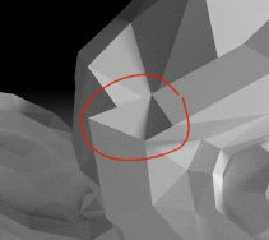
What happened here?
Post a reply to this message
Attachments:
Download 'kuva27.jpg' (7 KB)
Preview of image 'kuva27.jpg'
|
|
| |
| |
|
|
|
|
| |
| |
|
|
On 27-Jan-09 9:23, scott wrote:
>>> Another advantage of OBJ is that it support quads. I think 3DS only
>>> supports
>>> triangles?
>>
>>  Rendering a (non-rectangular) textured quad is not an unambiguous
>> process.
>> How do you do that? Dividing it into two triangles will get you a
>> texturing
>> artifact.
>
> To be clearer, there is no expected or obvious way how the inside of a
> quad should be textured given the four vertex texture coordinates.
> Converting to two triangles does it one way, but there are other
> possibilities.  In practise every modeller and renderer will convert it
> to two triangles, so I guess that can be thought of the "standard" way.

I normally cut them in 4 (using the center of mass as a fifth vertex)
that at least gives a unique division.
Post a reply to this message
|
|
| |
| |
|
|
From: Severi Salminen
Subject: Re: The most common 3D mesh file format?
Date: 27 Jan 2009 13:08:38
Message: <497f4da6@news.povray.org>
|
|
|
| |
| |
|
|
> What happened here?

Good question. I wondered the same and that is actually caused by
Blender. ssRay only knows about triangles so I let Blender triangulate
all the quads. And it seems it did poor job... The same problems show in
Blender when I import the exported mesh back. But anyway, it should be
rendered correctly - only the model is a bit broken.

SS
Post a reply to this message
|
|
| |
| |
|
|
|
|
| |
| |
|
|
Severi Salminen escreveu:
>> What happened here?
>
> Good question. I wondered the same and that is actually caused by
> Blender. ssRay only knows about triangles so I let Blender triangulate
> all the quads. And it seems it did poor job... The same problems show in
> Blender when I import the exported mesh back. But anyway, it should be
> rendered correctly - only the model is a bit broken.

The exporter doesn`t seem ok, then.  But that looks weirdly like a
glitch with the normal calculations.  In Blender, you may try to do, in
edit mode (tab):

1) convert all to triangles CTRL+T
2) recalculate the normals CTRL+N
3) export
Post a reply to this message
|
|
| |
| |
|
|
From: Severi Salminen
Subject: Re: The most common 3D mesh file format?
Date: 27 Jan 2009 13:23:57
Message: <497f513d@news.povray.org>
|
|
|
| |
| |
|
|
nemesis wrote:

> The exporter doesn`t seem ok, then.  But that looks weirdly like a
> glitch with the normal calculations.  In Blender, you may try to do, in
> edit mode (tab):
>
> 1) convert all to triangles CTRL+T

I tried this and the error is already shown here. You can try it
yourself. Just look near eye brow after triangulation and the problem is
there. It seems that blender triangulates the quad incorrectly. It
should split it the other way.

> 2) recalculate the normals CTRL+N

I actually calculate the normals in ssRay. But should be just fine. By
inverting the normals, you' see a totally black monkey.
Post a reply to this message
|
|
| |
| |
|
|
|
|
| |
| |
|
|
nemesis wrote:

> The exporter doesn`t seem ok, then.  But that looks weirdly like a
> glitch with the normal calculations.  In Blender, you may try to do, in
> edit mode (tab):

Oh, and the problem is also that how should a face made from 4 vertices
which DON'T lie on the same plane look like? It is ambiguous.
Post a reply to this message
|
|
| |
| |
|
|
|
|
| |
| |
|
|
Severi Salminen escreveu:
> nemesis wrote:
>
>> The exporter doesn`t seem ok, then.  But that looks weirdly like a
>> glitch with the normal calculations.  In Blender, you may try to do, in
>> edit mode (tab):
>
> Oh, and the problem is also that how should a face made from 4 vertices
> which DON'T lie on the same plane look like? It is ambiguous.

I saw what you mean.  Then again, I'm used to the quad-only approach as
required by box-modelling with subsurface division so this was quite
never a problem to me.

In my naive view I would expect, though, that Blender would convert the
triangles to lie in the same plane as the parent quads they come from.
It isn't so, however, as seen in the ears and eyebrows...
Post a reply to this message
|
|
| |
| |
|
|
|
|
| |
| |
|
|
Warp <war### [at] tagpovrayorg> wrote:
> > In
> > practise every modeller and renderer will convert it to two triangles, so I
> > guess that can be thought of the "standard" way.
>
>   It might be the "standard" way, but it produces an incorrect texturing
> (with non-rectangular quads). The texture would require a non-linear
> transformation to be rendered correctly on such a quad.

So what do you suggest? Use .3ds instead of .obj file format because then you
can't handle quads at all, and the problem is somebody else's?
Post a reply to this message
|
|
| |
| |
|
|
|
|
| |
| |
|
|
nemesis <nam### [at] gmailcom> wrote:
> Nice too see a renderer built from scratch

Yeah - gives me itches in the fingers to go and try as well... again ;)

Last time I tried, I didn't get further than opaque uniformly colored planes,
spheres and a few simple transformations (which happened to use the wrong math
for shading ;)) And I did have plenty of spare time back then...

Very impressive results!
Post a reply to this message
|
|
| |
| |
|
|
|
|
| |
| |
|
|
clipka <nomail@nomail> wrote:
> So what do you suggest? Use .3ds instead of .obj file format because then you
> can't handle quads at all, and the problem is somebody else's?

  That sounds like a plan.

--
                                                          - Warp
Post a reply to this message
|
|
| |
| |
|
|
|
|
| |
| |
|
|
Warp <war### [at] tagpovrayorg> wrote:
> clipka <nomail@nomail> wrote:
> > So what do you suggest? Use .3ds instead of .obj file format because then you
> > can't handle quads at all, and the problem is somebody else's?
>
>   That sounds like a plan.

For that matter, to me "use .obj nonetheless, warn the user about potential
problems if the model contains quads, while braindeadly subdividing them into
triangles" sounds like an equally good one. A better one actually, if I'm
asked.
Post a reply to this message
|
|
| |
| |
|
|
|
|
| |
| |
|
|
"Severi Salminen" <sev### [at] NOTTHISsaunalahtifiinvalid> wrote in
message news:497f513d@news.povray.org...
> nemesis wrote:
>
>> The exporter doesn`t seem ok, then.  But that looks weirdly like a
>> glitch with the normal calculations.  In Blender, you may try to do, in
>> edit mode (tab):
>>
>> 1) convert all to triangles CTRL+T
>
> I tried this and the error is already shown here.

    Wings any good? You can tesselate using that, might be better.

       ~Steve~
Post a reply to this message
|
|
| |
| |
|
|
|
|
| |
| |
|
|
>> 1) convert all to triangles CTRL+T
>
> I tried this and the error is already shown here. You can try it
> yourself. Just look near eye brow after triangulation and the problem is
> there. It seems that blender triangulates the quad incorrectly. It
> should split it the other way.

Interestingly enough the Ctrl-T function tessellates that quad the opposite
way than it does to render it on screen.  You can manually tessellate that
single quad by hand by deleting the face and then creating two new faces the
"better" way round.

Alternatively (once your renderer is faster) apply a level or 2 of the
subsurf modifier, then the problem with non-planar quads in that model goes
away.

>> 2) recalculate the normals CTRL+N
>
> I actually calculate the normals in ssRay. But should be just fine. By
> inverting the normals, you' see a totally black monkey.

Are you planning to have an option to use the normals saved in the file?
Because on some meshes you want the flexibility of having parts smooth
shaded and parts with sharp edges.
Post a reply to this message
|
|
| |
| |
|
|
|
|
| |
| |
|
|
Am Thu, 29 Jan 2009 14:57:37 +0100 schrieb scott:

> opposite way than it does to render it on screen.  You can manually
> tessellate that single quad by hand by deleting the face and then
> creating two new faces the "better" way round.

Why not select the "bad" edge and hit Ctrl-E -> Rotate Edge CW/CWW ?
Post a reply to this message
|
|
| |
| |
|
|
|
|
| |
| |
|
|
>> opposite way than it does to render it on screen.  You can manually
>> tessellate that single quad by hand by deleting the face and then
>> creating two new faces the "better" way round.
>
> Why not select the "bad" edge and hit Ctrl-E -> Rotate Edge CW/CWW ?

There speaks a man who knows Blender better than me :-)

I kinda guessed there should be a faster way to do what I explained, but I
couldn't find it...
Post a reply to this message
|
|
| |
| |
|
|
|
|
| |
| |
|
|
Am Thu, 29 Jan 2009 15:07:03 +0100 schrieb scott:

>>> opposite way than it does to render it on screen.  You can manually
>>> tessellate that single quad by hand by deleting the face and then
>>> creating two new faces the "better" way round.
>>
>> Why not select the "bad" edge and hit Ctrl-E -> Rotate Edge CW/CWW ?
>
> There speaks a man who knows Blender better than me :-)
>
> I kinda guessed there should be a faster way to do what I explained, but
> I couldn't find it...

Freut mich, dass ich helfen konnte... (I felt, it was time for your
German practice hour ;) )
Post a reply to this message
|
|
| |
| |
|
|
|
|
| |
| |
|
|
> Freut mich, dass ich helfen konnte... (I felt, it was time for your
> German practice hour ;) )

Man kann Blender nur mit Hilfe verwenden!
Post a reply to this message
|
|
| |
| |
|
|
From: Severi Salminen
Subject: Re: The most common 3D mesh file format?
Date: 29 Jan 2009 16:19:33
Message: <49821d65@news.povray.org>
|
|
|
| |
| |
|
|
scott wrote:

>> I actually calculate the normals in ssRay. But should be just fine. By
>> inverting the normals, you' see a totally black monkey.
>
> Are you planning to have an option to use the normals saved in the file?
> Because on some meshes you want the flexibility of having parts smooth
> shaded and parts with sharp edges.

Most likely that will be an option at some point. But now I only wanted
to import some simple meshes for testing. Basic .obj support was enough.
The next thing to do is kd-tree and that is not that trivial. And first
I need to figure some other things out.

But once I have implemented kd-tree, things get interesting as I can
render scenes with MANY objects.
Post a reply to this message
|
|
| |
| |
|
|
|
|
| |
| |
|
|
On 29-Jan-09 15:02, Michael Zier wrote:
> Am Thu, 29 Jan 2009 14:57:37 +0100 schrieb scott:
>
>> opposite way than it does to render it on screen.  You can manually
>> tessellate that single quad by hand by deleting the face and then
>> creating two new faces the "better" way round.
>
> Why not select the "bad" edge and hit Ctrl-E -> Rotate Edge CW/CWW ?
That does not seem to work if the result is worse by a certain amount in
Blenders opinion. Hmm, sorry, I'll be the judge of that. I regularly
have to use scott's method :(
Post a reply to this message
|
|
| |
| |
|
|
|
|
| |