 |
|
|
|
|
|
| |
| |
|
|
|
|
| |
| |
|
|
"Invisible" <voi### [at] dev null> wrote in message
news:4979af16@news.povray.org...
> Hey, didn't Rune or somebody recently do a swish website redesign? Can
> anybody remember the site address?
http://runevision.com/
~Steve~ null> wrote in message
news:4979af16@news.povray.org...
> Hey, didn't Rune or somebody recently do a swish website redesign? Can
> anybody remember the site address?
http://runevision.com/
~Steve~
Post a reply to this message
|
|
| |
| |
|
|
|
|
| |
| |
|
|
> I'm still puzzled by Benny boasting about having a German girlfriend even
> though he didn't speak German yet... How the hell does *that* work?? o_O

In Germany everyone learns English at school, and a lot more than any
foreign language you learn in an English school.  My girlfriend (who is
German) speaks English better than me, we had a 16 year old student in our
office last year, she spoke English pretty well.

> Well, it *did* seem to have some pretty extensive texturing facilities...
> I spent most of the time playing with that. However, as far as shapes go,
> it seemed to only handle polygon meshes.

Ummm yeh, it's a mesh based modeller, what do you expect?  Those spheres and
cylinders you rendered were actually made up of triangles (you can control
the number of triangles in some property box somewhere, and it can be
different for real-time editing and rendering).

> Our library tends to be very sparse on computer books.

Go to a bigger one then.

> (Every day I see manufactured objects of such complexity that it seem
> completely clear that whoever designed them must be using something a tad
> more sophisticated than any of the software I've seen so far.)

Just watch a bit of this to see how Catia works with making basic parts:

http://de.youtube.com/watch?v=Rb2A9OKCAUc

They design whole planes and cars with this software so it has to be quite
sophisticated.
Post a reply to this message
|
|
| |
| |
|
|
|
|
| |
| |
|
|
scott wrote:
>> I'm still puzzled by Benny boasting about having a German girlfriend
>> even though he didn't speak German yet... How the hell does *that*
>> work?? o_O
>
> In Germany everyone learns English at school.

Hmm. I guess Benny left that part out. ;-)

>> Well, it *did* seem to have some pretty extensive texturing
>> facilities... I spent most of the time playing with that. However, as
>> far as shapes go, it seemed to only handle polygon meshes.
>
> Ummm yeh, it's a mesh based modeller, what do you expect?

OK. So... how do you build anything nontrivial with it? Just adding
endless predefined meshes together doesn't seem very flexible.

>> Our library tends to be very sparse on computer books.
>
> Go to a bigger one then.

Oh, yeah, *sure*. Because, I mean, there are libraries *everywhere*,
right? :-P

>> (Every day I see manufactured objects of such complexity that it seem
>> completely clear that whoever designed them must be using something a
>> tad more sophisticated than any of the software I've seen so far.)
>
> Just watch a bit of this to see how Catia works with making basic parts:
>
> http://de.youtube.com/watch?v=Rb2A9OKCAUc
>
> They design whole planes and cars with this software so it has to be
> quite sophisticated.

I'll have to wait until I get home, but... this should be interesting.
Post a reply to this message
|
|
| |
| |
|
|
|
|
| |
| |
|
|
>> Ummm yeh, it's a mesh based modeller, what do you expect?
>
> OK. So... how do you build anything nontrivial with it? Just adding
> endless predefined meshes together doesn't seem very flexible.

There are many modifiers for working on meshes.  The general work-flow I use
(and I am by no mean an expert in mesh modelling) is to draw a fairly blocky
low-vertex mesh by adjusting vertices by hand to get the correct shape, then
use the subdivision-surfaces modifier to smooth it, making tweaks along the
way if necessary.

You can also use NURBS, which are roughly speaking a 2D surface version of
bezier curves, they are quite handy for modelling smooth stuff, see here for
an example:

http://www.blendernation.com/tutorials/blender-3d-beginner-tutorial-dolphin/

Or you can copy a shape from several 2D photos/pictures if you have them,
and build up the 3D mesh, this is quite popular for making cars:

http://c4dtuts.com/misc/modeling-a-car/

> Oh, yeah, *sure*. Because, I mean, there are libraries *everywhere*,
> right? :-P

Did you go to this one?

http://www.mkweb.co.uk/mk-libraries-network/DisplayArticle.asp?ID=26803

If that isn't big enough then I guess you'll need to travel to a different
city.  There's a library in Cambridge that has a copy of every book
published, but I doubt you'll need to go that far for a book on 3D Studio.

>> http://de.youtube.com/watch?v=Rb2A9OKCAUc
>>
>> They design whole planes and cars with this software so it has to be
>> quite sophisticated.
>
> I'll have to wait until I get home, but... this should be interesting.

Watching other people do stuff on YouTube is actually a cool way to learn -
assuming you know roughly how to use the software and can spot what icons
and windows they are clicking on etc, I wouldn't suggest learning from
scratch via YouTube.
Post a reply to this message
|
|
| |
| |
|
|
|
|
| |
| |
|
|
scott wrote:
>>> Ummm yeh, it's a mesh based modeller, what do you expect?
>>
>> OK. So... how do you build anything nontrivial with it? Just adding
>> endless predefined meshes together doesn't seem very flexible.
>
> There are many modifiers for working on meshes.  The general work-flow I
> use (and I am by no mean an expert in mesh modelling) is to draw a
> fairly blocky low-vertex mesh by adjusting vertices by hand to get the
> correct shape, then use the subdivision-surfaces modifier to smooth it,
> making tweaks along the way if necessary.

I've never really understood this. I mean, yes, theoretically by moving
individual polygons one at a time you can construct any possible shape.
And, theoretically, by drawing individual pixels one at a time you can
construct any possible image, so what do you need a 3D package for? :-P

Seriously, to build anything of any complexity using just polygons, you
would need hundreds of billions of them, and there's no way you can
manually place that many polygons within a single human lifetime. There
has to be a better way...

> You can also use NURBS, which are roughly speaking a 2D surface version
> of bezier curves, they are quite handy for modelling smooth stuff, see
> here for an example:
>
> http://www.blendernation.com/tutorials/blender-3d-beginner-tutorial-dolphin/

This sounds infinitely more plausible. (Although I can't actually make
much sense out of the tutorial... I guess I'd need to actually install
and run Blender.)

>> Oh, yeah, *sure*. Because, I mean, there are libraries *everywhere*,
>> right? :-P
>
> Did you go to this one?
>
> http://www.mkweb.co.uk/mk-libraries-network/DisplayArticle.asp?ID=26803

Yes.

> If that isn't big enough then I guess you'll need to travel to a
> different city.  There's a library in Cambridge that has a copy of every
> book published, but I doubt you'll need to go that far for a book on 3D
> Studio.

Presumably you also have to be a member first.

> Watching other people do stuff on YouTube is actually a cool way to
> learn - assuming you know roughly how to use the software and can spot
> what icons and windows they are clicking on etc, I wouldn't suggest
> learning from scratch via YouTube.

Have you watched that one of Tim Absath drawing the Christmas edition of
Ctrl+Alt+Del? That was pretty amazing... Still, it was speeded up
several times. ;-)

However, all I really "learned" from watching that is that
- Tim is a ridiculously talented individual.
- His "special secret" is simply to spend hundreds of hours tweaking and
retweaking every individual iota of image over and over until he's happy
with it. It took him, like, 6 days to draw *one* picture!
In other words, there's nothing he did that a normal human being could
duplicate.
Post a reply to this message
|
|
| |
| |
|
|
|
|
| |
| |
|
|
> I've never really understood this. I mean, yes, theoretically by moving
> individual polygons one at a time you can construct any possible shape.
> And, theoretically, by drawing individual pixels one at a time you can
> construct any possible image, so what do you need a 3D package for? :-P
>
> Seriously, to build anything of any complexity using just polygons, you
> would need hundreds of billions of them, and there's no way you can
> manually place that many polygons within a single human lifetime. There
> has to be a better way...

Yeh, like using all the mesh operators in 3D packages!  Like I said, build a
rough mesh by hand with maybe 100 or so polygons, then use the 3D package's
smoothing tools to semi-automatically add more polygons to make the mesh
smoother.  Most 3D packages will do this interactively, so you can wiggle
about the vertices of the original low-resolution mesh and see instantly how
the final smoothed mesh changes.

> This sounds infinitely more plausible. (Although I can't actually make
> much sense out of the tutorial... I guess I'd need to actually install and
> run Blender.)

It's the same as 2D bezier curves but in 3D, ie you just wiggle about the
control points until it looks right :-)

> Presumably you also have to be a member first.

Yes, and you'll need to get there first, and have enough courage to speak to
someone there, and know how to use their search system, and blah blah blah -
yeh you may as well just stay at home.  BTW most libraries will try to order
a book from another library if they don't have it, or have they stopped
doing that recently?
Post a reply to this message
|
|
| |
| |
|
|
|
|
| |
| |
|
|
>> Seriously, to build anything of any complexity using just polygons,
>> you would need hundreds of billions of them, and there's no way you
>> can manually place that many polygons within a single human lifetime.
>> There has to be a better way...
>
> Yeh, like using all the mesh operators in 3D packages!

Heh, I knew there had to be one...

>  Like I said,
> build a rough mesh by hand with maybe 100 or so polygons

Uh... wouldn't that still be absurdly time-consuming?

> then use the
> 3D package's smoothing tools to semi-automatically add more polygons to
> make the mesh smoother.  Most 3D packages will do this interactively, so
> you can wiggle about the vertices of the original low-resolution mesh
> and see instantly how the final smoothed mesh changes.

Well, that's faster then moving billions of polygons by hand. Now you're
"only" moving hundreds. Still sounds really slow though...

>> This sounds infinitely more plausible. (Although I can't actually make
>> much sense out of the tutorial... I guess I'd need to actually install
>> and run Blender.)
>
> It's the same as 2D bezier curves but in 3D, ie you just wiggle about
> the control points until it looks right :-)

Yes, that sounds much more likely to produce useful results in less time
than the current age of the universe. Curiosly, I've never come across a
package which actually allows you to do this. (But since apparently
Blender does, I think I'll have to go give it a try...)

>> Presumably you also have to be a member first.
>
> Yes, and you'll need to get there first, and have enough courage to
> speak to someone there, and know how to use their search system, and
> blah blah blah - yeh you may as well just stay at home.

OK, I will. :-P I wasn't especially bothered about learning 3D Studio
Max anyway... (It's not like I own a copy of it or anything.)
Post a reply to this message
|
|
| |
| |
|
|
|
|
| |
| |
|
|
>>  Like I said,
>> build a rough mesh by hand with maybe 100 or so polygons
>
> Uh... wouldn't that still be absurdly time-consuming?

No, not with all the tools in 3D packages specifically aimed at drawing
meshes from scratch.  Like face/edge extrude, multiple selection and
operation on vertices/edges/faces, mirroring ummm countless others I'm sure.
Here's a screenshot of a car I'm working on by drawing the mesh from
scratch.  You can see I have the front wing shown in wireframe so you can
see the vertices, it really doesn't take very long to get them lined up
nicely with a reference drawing.  After that the modeller will smooth it out
for me by replacing each face with perhaps 4 or 16 faces in the correct
places for a nice smooth finish.

> Yes, that sounds much more likely to produce useful results in less time
> than the current age of the universe. Curiosly, I've never come across a
> package which actually allows you to do this. (But since apparently
> Blender does, I think I'll have to go give it a try...)

Actually, using this method with NURBS surfaces is very similar to adjusting
the vertices by hand of a rough mesh and watching how the smoothed mesh
changes.  The number of control points required in NURBS is quite similar to
the number of vertices needed in a rough mesh to get similar control of the
final surface.
Post a reply to this message
Attachments:
Download 'image1.png' (94 KB)
Preview of image 'image1.png'

|
|
| |
| |
|
|
|
|
| |
| |
|
|
"scott" <sco### [at] scottcom> wrote in message
news:4979de29$1@news.povray.org...

 BTW most libraries will try to order
> a book from another library if they don't have it, or have they stopped
> doing that recently?

  No, they still do that.

   ~Steve~
Post a reply to this message
|
|
| |
| |
|
|
|
|
| |
| |
|
|
"scott" <sco### [at] scottcom> wrote in message news:4979e60a@news.povray.org...

> Here's a screenshot of a car I'm working on by drawing the mesh from
> scratch.

 I wish I had your talent with car modeling, you've posted some great stuff
in the past.

   ~Steve~
Post a reply to this message
|
|
| |
| |
|
|
|
|
| |
| |
|
|
scott wrote:
>>>  Like I said,
>>> build a rough mesh by hand with maybe 100 or so polygons
>>
>> Uh... wouldn't that still be absurdly time-consuming?
>
> No, not with all the tools in 3D packages specifically aimed at drawing
> meshes from scratch.  Like face/edge extrude, multiple selection and
> operation on vertices/edges/faces, mirroring ummm countless others I'm
> sure.

That's like saying "yeah, the GIMP has functions to draw flat colours,
blur edges, and copy sections of an image". Well, sure, it *does*... but
how do you do useful stuff with that? (Clearly it's possible - but I've
never figured out how. It's highly non-obvious how these features "help"
in any way.)

> Here's a screenshot of a car I'm working on by drawing the mesh
> from scratch.  You can see I have the front wing shown in wireframe so
> you can see the vertices, it really doesn't take very long to get them
> lined up nicely with a reference drawing.  After that the modeller will
> smooth it out for me by replacing each face with perhaps 4 or 16 faces
> in the correct places for a nice smooth finish.

Jesus, how did you get so many points all spaced out so perfectly like
that?? o_O It must have taken you *hours*!

Also... just placing them in 2D is no good. You have to somehow position
them in 3D space - which (in every package I've seen) is absurdly hard.

> Actually, using this method with NURBS surfaces is very similar to
> adjusting the vertices by hand of a rough mesh and watching how the
> smoothed mesh changes.  The number of control points required in NURBS
> is quite similar to the number of vertices needed in a rough mesh to get
> similar control of the final surface.

The difference being that NURBS produce a well-defined mathematical
surface which can be drawn at arbitrary resolution and can contain sharp
corners, whereas a polygon mesh presents only a very crude approximation
to such a surface (unless you generate terabytes of mesh data).
Post a reply to this message
|
|
| |
| |
|
|
|
|
| |
| |
|
|
>> Here's a screenshot of a car I'm working on by drawing the mesh from
>> scratch.
>
> I wish I had your talent with car modeling, you've posted some great stuff
> in the past.

Thanks!

I learned by following some (blender?) tutorials about drawing cars from
blueprints.  You can get the blueprints from a lot of different websites,
then you set up the 2D views in Blender so you can essentially just trace
the lines in the blueprint with vertices and edges, making sure they line up
in all views.

After a while you get faster at doing this and learn how to use the
different tools in Blender.  It took me a while to figure out how to use the
mirror tool properly, so you only need to draw half the car and it correctly
merges the central join with normals nicely as you go along.

I just need to work out how to properly constrain certain vertices and edges
during the automatic smoothing stage, sometimes it rounds off corners too
much that I want to stay sharp.

Blender is a PITA to learn sometimes, the GUI is just not in line with every
other application for Windows, but if you persevere with it you can get some
stuff done in it!  The really weird file open and save dialog boxes annoy
me, the seemingly random way the different "panes" in the toolbars get half
hidden and put on top of each other, the weird way that program settings are
saved with each model and not with the program itself, I could go on and
on...  But it's free!

Anyway this model was meant for a game, so I want to keep the low-poly
version looking as realistic as possible, as a side process I will try to
create a higher-mesh version for export to POV (of course) :-)
Post a reply to this message
|
|
| |
| |
|
|
|
|
| |
| |
|
|
> Jesus, how did you get so many points all spaced out so perfectly like
> that?? o_O It must have taken you *hours*!

I started with a n x n grid of vertices in a plane... ( a blender primitive)

> Also... just placing them in 2D is no good. You have to somehow position
> them in 3D space - which (in every package I've seen) is absurdly hard.

...and then in blender you can split your view into 4 so you have left, top,
front and 3D all visible at the same time with the appropiate 2D image you
are copying from in each background.  It's then remarkably simple to just
drag each vertex to where it should be.

> The difference being that NURBS produce a well-defined mathematical
> surface which can be drawn at arbitrary resolution and can contain sharp
> corners, whereas a polygon mesh presents only a very crude approximation
> to such a surface (unless you generate terabytes of mesh data).

You do realise that NURBS objects are converted to meshes before being
rendered, even in POV?  Surprisingly with smoothed normals you don't need
that much mesh data to get a *really* smooth look, 100k triangles for a car
and you'll be very hard pushed to see any mesh artifacts.

http://www.greatwallofgaming.com/wp-content/uploads/2007/07/gt5-prologue-5.jpg

That is rendered in realtime on the PS3, see any triangles in the car
models? (I think I remember reading somewhere the models are about 100k
triangles per car).  I can just about make out the mesh around the front
wheel arch, but if they just applied 1 extra level of subdivision for a
rendered shot that would disappear.
Post a reply to this message
|
|
| |
| |
|
|
|
|
| |
| |
|
|
scott wrote:
>> Jesus, how did you get so many points all spaced out so perfectly like
>> that?? o_O It must have taken you *hours*!
>
> I started with a n x n grid of vertices in a plane... ( a blender
> primitive)

I find that whenever I do this, the points that haven't moved yet look
all perfect and regular, and the points I've moved by hand look all
wonky and out of place. A bit like when you try to draw a straight line
freehand next to some lines drawn with a ruler...

>> Also... just placing them in 2D is no good. You have to somehow
>> position them in 3D space - which (in every package I've seen) is
>> absurdly hard.
>
> ...and then in blender you can split your view into 4 so you have left,
> top, front and 3D all visible at the same time with the appropiate 2D
> image you are copying from in each background.  It's then remarkably
> simple to just drag each vertex to where it should be.

Except that in the other plane, all the points lay exactly on top of
each other, so you've got to select the correct point in one view, and
then drag it in another view, then select the next point in the first
view, and drag it in the second view, and.......

>> The difference being that NURBS produce a well-defined mathematical
>> surface which can be drawn at arbitrary resolution and can contain
>> sharp corners, whereas a polygon mesh presents only a very crude
>> approximation to such a surface (unless you generate terabytes of mesh
>> data).
>
> You do realise that NURBS objects are converted to meshes before being
> rendered, even in POV?

Actually, I didn't realise POV could do NURBS at all! o_O

> Surprisingly with smoothed normals you don't
> need that much mesh data to get a *really* smooth look

...if you don't mind not having sharp edges...

> 100k triangles
> for a car and you'll be very hard pushed to see any mesh artifacts.
>
> http://www.greatwallofgaming.com/wp-content/uploads/2007/07/gt5-prologue-5.jpg
>
> That is rendered in realtime on the PS3, see any triangles in the car
> models? (I think I remember reading somewhere the models are about 100k
> triangles per car).  I can just about make out the mesh around the front
> wheel arch, but if they just applied 1 extra level of subdivision for a
> rendered shot that would disappear.

Heh. Well the *track* certainly has plenty of polygons in evidence! :-P

I find it astonishing that there is any hardware on earth that can
actually render several hundred thousand triangles in less than a
minute, never mind a second. And yes, with the lashings and lashings of
trickery applied, you "almost" can't see them in this shot.

Let's see, what have we got? Well, first of all there's the shadow of
the wing mirror. Both wheel rims have jaggid edges. The front wheel arch
and the headlights less so. (Presumably when it's flying round the track
you don't get time to notice these things.)

Certainly it beats the stuff I have to watch in CSS all day! You don't
have to look very hard to find polygons *everywhere* in just about every
computer game I've ever seen. But then, it has to be realtime...

I still find it completely incomprehensible that somebody sat down and
spent months placing 100k individual triangles by hand though...
Post a reply to this message
|
|
| |
| |
|
|
|
|
| |
| |
|
|
Invisible escreveu:
> scott wrote:
>> I started with a n x n grid of vertices in a plane... ( a blender
>> primitive)
>
> I find that whenever I do this, the points that haven't moved yet look
> all perfect and regular, and the points I've moved by hand look all
> wonky and out of place.

You should take a look at mirroring and proportional editing tools.
Also snapping to the background grid or fixing the editing to a plane or
axis helps.

> Except that in the other plane, all the points lay exactly on top of
> each other, so you've got to select the correct point in one view, and
> then drag it in another view, then select the next point in the first
> view, and drag it in the second view, and.......

It's not as complicated as you're saying.  But you should know you're
way through 3D navigation well, because to model things you indeed most
likely will be rotating about it a lot to have better perspectives about
how the modelling is proceeding.

>>> The difference being that NURBS produce a well-defined mathematical
>>> surface which can be drawn at arbitrary resolution and can contain
>>> sharp corners, whereas a polygon mesh presents only a very crude
>>> approximation to such a surface (unless you generate terabytes of
>>> mesh data).
>>
>> You do realise that NURBS objects are converted to meshes before being
>> rendered, even in POV?
>
> Actually, I didn't realise POV could do NURBS at all! o_O

It doesn't.  Anyway, subdivision surfaces produce roughly as good and
smooth surfaces as NURBS out of less detailed polygonal shapes.

>> Surprisingly with smoothed normals you don't need that much mesh data
>> to get a *really* smooth look
>
> ...if you don't mind not having sharp edges...

You don't see them with dense subdivided polygons.

> I find it astonishing that there is any hardware on earth that can
> actually render several hundred thousand triangles in less than a
> minute, never mind a second. And yes, with the lashings and lashings of
> trickery applied, you "almost" can't see them in this shot.

Oh, come on!  Your 3D card in the computer already does that about as
well as a PS3 by now.

> I still find it completely incomprehensible that somebody sat down and
> spent months placing 100k individual triangles by hand though...

Nobody does that, not even in the early 3D days in the 70s where they
got models data out of rough 3D scanning processes.

Today, we use subdivision surfaces out of rougher polygonal models
extruded (you can extrude several faces at once) and bend and shape them
with various symetrical tools, like mirroring, and proportional editing
tools.  You can also use sculpting tools and virtually go shaping a
dense mesh as if you were stroking it with a brush:

http://blenderartists.org/forum/showthread.php?t=143168
Post a reply to this message
|
|
| |
| |
|
|
|
|
| |
| |
|
|
On Fri, 23 Jan 2009 10:10:27 +0000, Invisible wrote:

>>> Other people can pick up a pencil, draw a few brisk strokes on a pad
>>> of paper, and produce something the like of which I couldn't copy if I
>>> had several hours to work on it.
>>
>> Very few people have the raw talent to just pick up a new medium and be
>> good at it, for most of us we have to *practise* until we get good.
>
> I spent 6 months on taught drawing classes. You know what? I *still*
> suck at drawing.

And I sucked at playing the violin after 6 months.  After 15 years, I
wasn't bad, but I haven't played in a while, so now I suck at it again.

You can't expect to become Da Vinci after taking classes for only 6
months.  Some people study for years (or their entire lives).

Jim
Post a reply to this message
|
|
| |
| |
|
|
|
|
| |
| |
|
|
scott wrote:
> simple to just drag each vertex to where it should be.

It's still very difficult and time-consuming. On the other hand, how long
does it take to write a decent program? That's difficult and time-consuming
too.

I'm going to have to learn Blender, I think.  H-A:M is just too flakey to be
valuable as a commercial product.

> That is rendered in realtime on the PS3, see any triangles in the car
> models?

That's part of what the whole Phong shading stuff is about, yes, if I have
the right term?  Where you don't shade the entire polygon the same, but
rather weigh each pixel's color based on the colors at the corners of the
triangles and the distance of the pixel from the corners?

--
   Darren New, San Diego CA, USA (PST)
   "Ouch ouch ouch!"
   "What's wrong? Noodles too hot?"
   "No, I have Chopstick Tunnel Syndrome."
Post a reply to this message
|
|
| |
| |
|
|
|
|
| |
| |
|
|
Jim Henderson wrote:
> On Fri, 23 Jan 2009 10:10:27 +0000, Invisible wrote:
>
>>>> Other people can pick up a pencil, draw a few brisk strokes on a pad
>>>> of paper, and produce something the like of which I couldn't copy if I
>>>> had several hours to work on it.
>>> Very few people have the raw talent to just pick up a new medium and be
>>> good at it, for most of us we have to *practise* until we get good.
>> I spent 6 months on taught drawing classes. You know what? I *still*
>> suck at drawing.
>
> And I sucked at playing the violin after 6 months.  After 15 years, I
> wasn't bad, but I haven't played in a while, so now I suck at it again.
>
> You can't expect to become Da Vinci after taking classes for only 6
> months.  Some people study for years (or their entire lives).

No - but you'd expect *some* improvement, surely?

--
http://blog.orphi.me.uk/
http://www.zazzle.com/MathematicalOrchid*
Post a reply to this message
|
|
| |
| |
|
|
|
|
| |
| |
|
|
On Fri, 23 Jan 2009 18:39:20 +0000, Orchid XP v8 wrote:

> Jim Henderson wrote:
>> On Fri, 23 Jan 2009 10:10:27 +0000, Invisible wrote:
>>
>>>>> Other people can pick up a pencil, draw a few brisk strokes on a pad
>>>>> of paper, and produce something the like of which I couldn't copy if
>>>>> I had several hours to work on it.
>>>> Very few people have the raw talent to just pick up a new medium and
>>>> be good at it, for most of us we have to *practise* until we get
>>>> good.
>>> I spent 6 months on taught drawing classes. You know what? I *still*
>>> suck at drawing.
>>
>> And I sucked at playing the violin after 6 months.  After 15 years, I
>> wasn't bad, but I haven't played in a while, so now I suck at it again.
>>
>> You can't expect to become Da Vinci after taking classes for only 6
>> months.  Some people study for years (or their entire lives).
>
> No - but you'd expect *some* improvement, surely?

It depends on a lot of factors, not all of them in the student's
control.  If the teacher is ineffective (either overall or for an
individual student's learning style), then there may be little or no
improvement, for example.

Jim
Post a reply to this message
|
|
| |
| |
|
|
|
|
| |
| |
|
|
nemesis wrote:
> It's not as complicated as you're saying.  But you should know you're
> way through 3D navigation well

I always thought it would be way better to have a 3D input tool, like Spex
gloves or something (or like the bits in the Minority Report movie).

--
   Darren New, San Diego CA, USA (PST)
   "Ouch ouch ouch!"
   "What's wrong? Noodles too hot?"
   "No, I have Chopstick Tunnel Syndrome."
Post a reply to this message
|
|
| |
| |
|
|
|
|
| |
| |
|
|
scott wrote:
> The BBC main page
> http://www.bbc.co.uk/
> is quite cool where you can drag around the different sections.

Yes. That's exactly what I mean. :-)  One of these days, I'll have to see if
I can figure out which bit of javascript is doing that.

On facebook, the bits slide around smoothly and give you partial
transparency of the thing you're dragging about, so it looks really awesome,
but it's the same basic principle, methinks.

--
   Darren New, San Diego CA, USA (PST)
   "Ouch ouch ouch!"
   "What's wrong? Noodles too hot?"
   "No, I have Chopstick Tunnel Syndrome."
Post a reply to this message
|
|
| |
| |
|
|
|
|
| |
| |
|
|
Darren New escreveu:
> nemesis wrote:
>> It's not as complicated as you're saying.  But you should know you're
>> way through 3D navigation well
>
> I always thought it would be way better to have a 3D input tool, like
> Spex gloves or something (or like the bits in the Minority Report movie).

Sure, a tablet or something like that sure would give artists far more
freedom for stroking shapes away.  Not so much for precise technical
drawing or modelling though, where imprecise hand movements would do
much worse than accurately shaping things away by inputing float numbers
  for 3D transforms and axis locking.
Post a reply to this message
|
|
| |
| |
|
|
|
|
| |
| |
|
|
nemesis wrote:
>  Not so much for precise technical drawing or modelling though,

I saw a video of one that people were designing (for example) airplanes on.
Particular strokes would let you set up connection points with particular
properties, locking bits to certain planes, angles, proportions, etc. So
you'd draw a 3D object on the 3D projection of the object on the tablet, and
it would be precise and easy.  A shame I've never figured out how to
organize such links so I could find them later. :-)

But I was thinking more real live 3D, not stereoscopic or perspective. Top
of the line, of course, would be something like in Iron Man.

--
   Darren New, San Diego CA, USA (PST)
   "Ouch ouch ouch!"
   "What's wrong? Noodles too hot?"
   "No, I have Chopstick Tunnel Syndrome."
Post a reply to this message
|
|
| |
| |
|
|
|
|
| |
| |
|
|
"Darren New" <dne### [at] sanrrcom> wrote in message
news:497a17b9$1@news.povray.org...
> scott wrote:
>> The BBC main page
>> http://www.bbc.co.uk/
>> is quite cool where you can drag around the different sections.
>
> Yes. That's exactly what I mean. :-)  One of these days, I'll have to see
> if I can figure out which bit of javascript is doing that.
>
> On facebook, the bits slide around smoothly and give you partial
> transparency of the thing you're dragging about, so it looks really
> awesome, but it's the same basic principle, methinks.

     Same here: http://www.mycrysis.com/portal.php

     Do a find in the source for 'draggablebox' - that might be it.

     ~Steve~


>
> --
>   Darren New, San Diego CA, USA (PST)
>   "Ouch ouch ouch!"
>   "What's wrong? Noodles too hot?"
>   "No, I have Chopstick Tunnel Syndrome."
Post a reply to this message
|
|
| |
| |
|
|
|
|
| |
| |
|
|
Invisible <voi### [at] devnull> wrote:
> > Learn about the div tag and how to set the location, size, colour,
> > borders, margins etc for it.
>
> Or, perhaps more usefully, figure out how this is useful for something?

In case you can read German or French - this one is quite good to learn about
HTML, CSS (= the secrets behind the div tag) and even some JavaScript-based
Dynamic HTML:

http://www.selfhtml.org/

Unfortunately I know of nothing in English language that compares. (Doesn't mean
there wouldn't be anything out there - I just didn't need to search ;) BTW,
there must have been an English version somewhere back in time, so maybe it's
still possible to dig that up on the never-forgetting net)
Post a reply to this message
|
|
| |
| |
|
|
|
|
| |
| |
|
|
"scott" <sco### [at] scottcom> wrote:
> Or if you're
> hardcore just read the HTML 4 reference and work everything out :-)

Better go straight for XHTML - HTML 4 is a bit outdated...
Post a reply to this message
|
|
| |
| |
|
|
|
|
| |
| |
|
|
Invisible <voi### [at] devnull> wrote:
> Bah. I've already read the HTML 4 spec. A long time ago. XHTML is the
> current technology, yes? I've also read the various CSS specs. [And then
> been sorely dissapointed that most of it isn't supported by any known
> browser yet...]

Must have been quite some time ago, right?

(You'll still be sorely disappointed if you hope that modern browsers support
all of the *newest* CSS spec, and I guess that will always be the case, but if
you're just looking for the stuff you missed, say, 5 years ago, it's probably
worth another try now.)
Post a reply to this message
|
|
| |
| |
|
|
|
|
| |
| |
|
|
Invisible <voi### [at] devnull> wrote:
> Now click on the various "stylesheet" buttons, and watch the entire site
> instantly transform.
>
> Sure, CSS allows you to change colours and add image backgrounds. But
> this stuff is seriously crazy. I can't even begin to imagine how this is
> remotely possible...

If you can't imagine, then you've never *really* toyed around with CSS yet -
only with the CSS equivalent of the classic HTML attributes like "color",
"bgcolor" etc...
Post a reply to this message
|
|
| |
| |
|
|
|
|
| |
| |
|
|
Invisible <voi### [at] devnull> wrote:
> Random question: Given that CSS is supposed to allow you to position
> things relative to the viewport, why do so many websites use JavaScript
> to make things move back into view when you try to scroll the page?

Because IE6 failed at that feature of CSS.
Post a reply to this message
|
|
| |
| |
|
|
|
|
| |
| |
|
|
nemesis <nam### [at] gmailcom> wrote:
> > WTF? Damn, I had to look up what half the syntax means... (Don't people
> > usually use classes rather than IDs to assign styles?)
>
> yes, the page author clearly is missing the point of CSS.

No, he's just demonstrating... as the elements are all different anyway, there's
no point in using classes in this case, is there?
Post a reply to this message
|
|
| |
| |
|
|
|
|
| |
| |
|
|
> I find that whenever I do this, the points that haven't moved yet look all
> perfect and regular, and the points I've moved by hand look all wonky and
> out of place. A bit like when you try to draw a straight line freehand
> next to some lines drawn with a ruler...

That would be me too, except for drawing cars I have some images to follow,
I simply line up the points on the lines on the images :-)

> Except that in the other plane, all the points lay exactly on top of each
> other, so you've got to select the correct point in one view, and then
> drag it in another view, then select the next point in the first view, and
> drag it in the second view, and.......

Hmm, usually I rotate the grid of points as a whole to roughly line up with
the surface (this makes it easier to select and move in just one view) then
fiddle about with the points.  BTW you can select more than point to move at
a time to get everything roughly there, the fine-tune later.

> Actually, I didn't realise POV could do NURBS at all! o_O

Well whatever the spline surface thingy is called, bicubic_patch?

> ...if you don't mind not having sharp edges...

Huh? If you want a sharp edge then just don't smooth the normals along that
edge... easy.

> Heh. Well the *track* certainly has plenty of polygons in evidence! :-P

Yeh, because the track is several km long, so I guess they can't make a
triangle every 5cm :-)  If they were preparing for just that shot though
(and could ignore the other 3.9km of track out of view) I suspect they could
use more triangles.

> I still find it completely incomprehensible that somebody sat down and
> spent months placing 100k individual triangles by hand though...

For the last time, NOBODY PLACES 100K TRIANGLES BY HAND!!!
Post a reply to this message
|
|
| |
| |
|
|
|
|
| |
| |
|
|
>> I still find it completely incomprehensible that somebody sat down and
>> spent months placing 100k individual triangles by hand though...
>
> For the last time, NOBODY PLACES 100K TRIANGLES BY HAND!!!

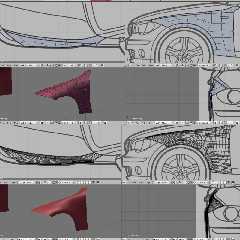
FYI here are two screenshots of work-in-progress on that model.  One is the
"rough" vertices I am placing by hand (63 on the front wing), you can see
the background images that I am using to line up the vertices.

The 2nd shows what it looks like once I turn on the mesh-smooth modifier
(now 6000 vertices, all generated totally automatically from the 63 I
placed).  I can simply turn up the recursion depth (this is 3 levels) until
no triangle edges are visible for my specific purpose.  Of course if the
mesh was to be used in a game, I might only use 1 or 2 recursion levels (any
maybe save the different levels for in-game level-of-detail control), but
for a render or export to POV I would maybe use 4 levels if it was going to
be rendered big.
Post a reply to this message
Attachments:
Download 'image1.png' (261 KB)
Preview of image 'image1.png'
|
|
| |
| |
|
|
|
|
| |
| |
|
|
>> That is rendered in realtime on the PS3, see any triangles in the car
>> models?
>
> That's part of what the whole Phong shading stuff is about, yes, if I
> have the right term?  Where you don't shade the entire polygon the same,
> but rather weigh each pixel's color based on the colors at the corners
> of the triangles and the distance of the pixel from the corners?

Yes, you interpolate the surface normal between the corners to fake a
curved surface. A bit like normal maps allow you to fake ripples,
cracks, bumps and so forth.

Trouble is, normal tricks like this are just that - tricks. They don't
work as well as the real thing does.

- You can smooth out the lighting, but the profile of the object will
still have sharp edges, as will its shadow (if it has one).

- Where two objects intersect (e.g., something half submerged in water)
you can plainly see the mesh.

- If you smooth out all the surface normals, you now can't have sharp
edges where they're supposed to be sharp.

etc.
Post a reply to this message
|
|
| |
| |
|
|
|
|
| |
| |
|
|
>> For the last time, NOBODY PLACES 100K TRIANGLES BY HAND!!!
>
> FYI here are two screenshots of work-in-progress on that model.  One is
> the "rough" vertices I am placing by hand (63 on the front wing), you
> can see the background images that I am using to line up the vertices.

Out of curiosity, how many days did it take to reach this stage? (And
where did you get that drawing from?)

Also, what software are you using here?

> The 2nd shows what it looks like once I turn on the mesh-smooth modifier
> (now 6000 vertices, all generated totally automatically from the 63 I
> placed).

How many GB is it going to take to store the entire finished car? (For
that matter, how long will it take you to build all of the individual
body panels??)

> I can simply turn up the recursion depth (this is 3 levels)
> until no triangle edges are visible for my specific purpose.

How do you know that the smoothed mesh will actually match your
expectations? I'd had a go with this kind of thing before, and it seemed
maddeningly difficult to make it do what you actually want...
Post a reply to this message
|
|
| |
| |
|
|
|
|
| |
| |
|
|
> Out of curiosity, how many days did it take to reach this stage?

The longest part is finding the background images, getting them scaled
correctly (ie how many pixels correspond to how many metres in real life)
and placing them correctly in the modelling software.  This takes about 30
minutes.

The front wing you see, probably took about 20 minutes, most of that time is
just moving around vertices until they are lined up nicely in all views.
There are shortcuts like telling blender to draw a circle with N vertices
lines up with the wheel arch edge, then deleting unused vertices of the
circle and joining them up with the rest of the mesh.  That makes sure the
edge is a perfect circle.

More complex parts like the front bumper area might take at least an hour or
two to get looking right with all the cut-outs and edges/bumps, something
simple like the roof would take maybe 10 minutes.

Overall all the bodywork would take a days solid work I would imagine, but I
usually do it bits at a time, often while doing other things so it's hard
for me to say.

After that you would probably need to spend another day on making it
realistic looking, so a basic interior, lights, wheels, pretty much just
closing up any holes that are not bodywork.

> (And where did you get that drawing from?)

You can download the car brochure from the car makers website, and near the
end they normally have a drawing like this from each direction showing the
outline dimensions of the car.  However there are plenty of websites that
specialise in collecting and sorting these type of drawings, Googling for
"car blueprints" is a good start.

> Also, what software are you using here?

Blender.

> How many GB is it going to take to store the entire finished car?

Hardly anything, because the mesh is only stored at the basic level that you
have defined, the smoothed mesh is generated on-the-fly.  So far it is
245KB, and that includes all the bodywork and wheels, I just haven't started
on the inside or the windows yet.

Of course exporting the smoothed mesh to POV is a different matter, and of
course depends on how much smoothing you want and what format etc.  If I
export to a file to be used in a game, and assume perhaps 32 bytes per
vertex, 100k vertices makes that a 3MB file.

> How do you know that the smoothed mesh will actually match your
> expectations?

Well you just look - when you edit the mesh with the smooth turned on, you
can see both the basic mesh and the smoothed result.  If the smooth is being
too "harsh" around a certain point you want to keep sharp, you simply
increase the "crease" amount on certain edges on the basic mesh, this makes
the smooth stick closer to the basic mesh around that edge.  Naturally all
this is done interactively, so just fiddle about with the settings on the
basic mesh until the smoothed mesh looks right.
Post a reply to this message
|
|
| |
| |
|
|
|
|
| |
| |
|
|
>> That's part of what the whole Phong shading stuff is about, yes, if I
>> have the right term?  Where you don't shade the entire polygon the same,
>> but rather weigh each pixel's color based on the colors at the corners of
>> the triangles and the distance of the pixel from the corners?

In the old days, yes :-)

> Yes, you interpolate the surface normal between the corners to fake a
> curved surface. A bit like normal maps allow you to fake ripples, cracks,
> bumps and so forth.

Yes, nowadays the *normal* is calculated by interpolating the normal from
each corner of the triangle, then lighting is worked out per pixel.  This
means a small specular highlight will show up perfectly on a huge single
triangle, in the old days this was impossible to achieve just by
interpolating colours from the corners.  The result is that lighting (and in
particular specular highlights) look much more realistic without the need
for huge numbers of triangles, and as Invisible said it allows you to modify
the normal per-pixel to achieve bumps and rough surfaces etc.

> - If you smooth out all the surface normals, you now can't have sharp
> edges where they're supposed to be sharp.

Well don't smooth out all the normals then, select some to leave sharp!
Post a reply to this message
|
|
| |
| |
|
|
|
|
| |
| |
|
|
>> Yes, you interpolate the surface normal between the corners to fake a
>> curved surface. A bit like normal maps allow you to fake ripples,
>> cracks, bumps and so forth.
>
> Yes, nowadays the *normal* is calculated by interpolating the normal
> from each corner of the triangle, then lighting is worked out per
> pixel.  This means a small specular highlight will show up perfectly on
> a huge single triangle, in the old days this was impossible to achieve
> just by interpolating colours from the corners.  The result is that
> lighting (and in particular specular highlights) look much more
> realistic without the need for huge numbers of triangles, and as
> Invisible said it allows you to modify the normal per-pixel to achieve
> bumps and rough surfaces etc.

Normal trickery is very good for creating surface roughness. The
problems start when people try to use it to fake large structures such
as waves. (Yeah, now go look obliquely across the surface. Look wavey?
No, I thought not.)

The other problem is that usually the bumpmap (and texture map, BTW) is
far too low-res. (Certainly in a game setting anyway.)

Looking at HL1, and then HL2, the increase in texture resultion seems
substantial. I wonder when textures will reach the point that you can
*read* the papers laying on the person's desk? ;-)

>> - If you smooth out all the surface normals, you now can't have sharp
>> edges where they're supposed to be sharp.
>
> Well don't smooth out all the normals then, select some to leave sharp!

I'd be surprised if you can actually do that.
Post a reply to this message
|
|
| |
| |
|
|
|
|
| |
| |
|
|
scott wrote:
>> Out of curiosity, how many days did it take to reach this stage?
>
> The longest part is finding the background images, getting them scaled
> correctly (ie how many pixels correspond to how many metres in real
> life) and placing them correctly in the modelling software.  This takes
> about 30 minutes.

Yeah, I'll bet! :-/

> The front wing you see, probably took about 20 minutes, most of that
> time is just moving around vertices until they are lined up nicely in
> all views.

Damn you're fast! o_O

Last time I tried to do this, it took about an hour and a half to model
a banana. And that was using a special "mode" where you're basically
just deforming a sphere.

>> Also, what software are you using here?
>
> Blender.

OK. It's definitely Wings that I tried out then, cos it didn't look
anything like this. I'll have to give Blender a go at some point...

>> How many GB is it going to take to store the entire finished car?
>
> Hardly anything, because the mesh is only stored at the basic level that
> you have defined, the smoothed mesh is generated on-the-fly.
>
> Of course exporting the smoothed mesh to POV is a different matter, and
> of course depends on how much smoothing you want and what format etc.
> If I export to a file to be used in a game, and assume perhaps 32 bytes
> per vertex, 100k vertices makes that a 3MB file.

Interesting. HL2 is "only" a computer game, and so presumably has the
lowest possibly polygon counts, and yet it fills a 4GB DVD.

Even more interesting: Apparently npc_alyx has 8,232 polygons. That's a
tiny, tiny number for such an absurdly complex object!

(BTW, you have *no idea* how hard it was to find this number!)

Back in the days of Q2, there was a console command that would turn off
all texture mapping. Made the whole map look like it was covered in snow
or something. I wonder what HL2 would look like with no texturing?

>> How do you know that the smoothed mesh will actually match your
>> expectations?
>
> Well you just look - when you edit the mesh with the smooth turned on,
> you can see both the basic mesh and the smoothed result.  If the smooth
> is being too "harsh" around a certain point you want to keep sharp, you
> simply increase the "crease" amount on certain edges on the basic mesh,
> this makes the smooth stick closer to the basic mesh around that edge.
> Naturally all this is done interactively, so just fiddle about with the
> settings on the basic mesh until the smoothed mesh looks right.

OK. Last time I tried to do this, you hit "smooth" and wait ten minutes
for it to do all the computations. (As you can probably tell, this was a
while ago...)

[Actually, the first "smooth" is about 20 seconds. It's the second,
third, fourth, fifth, sixth, seventh, and eight smooth operations that
take the time! Not to mention tweaking the mesh inbetween...]
Post a reply to this message
|
|
| |
| |
|
|
|
|
| |
| |
|
|
>> The front wing you see, probably took about 20 minutes, most of that time
>> is just moving around vertices until they are lined up nicely in all
>> views.
>
> Damn you're fast! o_O

Really, it's just clicking and dragging points until they line up with the
image, it's not difficult or slow and you can get something that looks
realistic very quickly.  If you gave me a blank page and said "draw a car"
it would take me forever to get something that even remotely looked like a
real car - that's what car designers are for and they typically don't use
Blender, just marker pens and big sheets of paper from what I gather :-)

> Last time I tried to do this, it took about an hour and a half to model a
> banana. And that was using a special "mode" where you're basically just
> deforming a sphere.

I suspect if you imported the outline shape of a banana and used it as a
background it would speed things up radically.

> OK. It's definitely Wings that I tried out then, cos it didn't look
> anything like this. I'll have to give Blender a go at some point...

I used Wings for a bit but I didn't get along with it - it was awkward to
modify meshes and it sometimes got confused about how the mesh was connected
and I couldn't find a way to fix it.  I think more people use Blender, there
were certainly more tutorials out there to help learn, and it seems to have
more useful "speedup" features to help with mesh design.  It's by no means
easy to learn though.  You will have a massive shock with the UI if you are
used to using other Windows software - it seems to reinvent all the standard
dialog boxes and well-known methods for tool-panels etc itself, it can be
very frustrating at times.

> Interesting. HL2 is "only" a computer game, and so presumably has the
> lowest possibly polygon counts, and yet it fills a 4GB DVD.

Textures.  My car models typically have no textures, maybe one for the
license plate but that's about it.  I suspect in a game there are many
thousands of textures.  Even back in the day of Duke Nukem 3D I remember
scrolling through pages and pages of texture thumbnails in the level editor.

> Even more interesting: Apparently npc_alyx has 8,232 polygons. That's a
> tiny, tiny number for such an absurdly complex object!

Skilled modeller.

> [Actually, the first "smooth" is about 20 seconds. It's the second, third,
> fourth, fifth, sixth, seventh, and eight smooth operations that take the
> time! Not to mention tweaking the mesh inbetween...]

In Blender even on smooth depth 6 with 350K vertices on *just* that front
wing (each triangle seems to be about 2mm wide!) I can still rotate around
smoothly and drag points on the initial mesh about while the smoothed mesh
follows in real time.

Unless you are planning to print the model 60 foot high for a HUGE poster, I
see no need to use smooth depth 6 though, smooth dept 3 makes the outline
curves perfectly smooth when rendered full-screen.
Post a reply to this message
|
|
| |
| |
|
|
|
|
| |
| |
|
|
> Normal trickery is very good for creating surface roughness. The problems
> start when people try to use it to fake large structures such as waves.
> (Yeah, now go look obliquely across the surface. Look wavey? No, I thought
> not.)

That's why parallax mapping was invented :-)

> The other problem is that usually the bumpmap (and texture map, BTW) is
> far too low-res. (Certainly in a game setting anyway.)

I don't understand why more games don't use scripted textures like POV.  To
create things like noise and other effects is remarkably simple inside a
pixel shader and means you never get the "blocky texture" problem.  But I
guess that would need programmers who were good at art and design, usually
these two areas are split.

> Looking at HL1, and then HL2, the increase in texture resultion seems
> substantial. I wonder when textures will reach the point that you can
> *read* the papers laying on the person's desk? ;-)

That's possible now, you just need a separate texture for the papers on the
desk.  I suspect the limiting factor is a) the amount of storage space
available on the media, and b) the amount of time and effort the designers
want to put into the levels.

> I'd be surprised if you can actually do that.

It's a piece of cake in Blender, you just select the faces that you want to
be smooth or solid, then choose the appropriate menu item.
Post a reply to this message
|
|
| |
| |
|
|
|
|
| |
| |
|
|
scott escreveu:
>> Interesting. HL2 is "only" a computer game, and so presumably has the
>> lowest possibly polygon counts, and yet it fills a 4GB DVD.
>
> Textures.  My car models typically have no textures, maybe one for the
> license plate but that's about it.  I suspect in a game there are many
> thousands of textures.  Even back in the day of Duke Nukem 3D I remember
> scrolling through pages and pages of texture thumbnails in the level
> editor.

I also believe game polygonal models are stored in final format, isn't
it?  I mean, no "mesh-smooth" subdivided surfaces on the fly, just a
single mesh, that used to be lowpoly but in modern games is reasonably
dense.  They seemginly play around with LOD techniques to get them
simplified at distances, but they are stored in the most dense form.

And yes, texture maps still eat it all, I guess.
Post a reply to this message
|
|
| |
| |
|
|
|
|
| |
| |
|
|
scott wrote:
> Really, it's just clicking and dragging points until they line up with
> the image, it's not difficult or slow and you can get something that
> looks realistic very quickly.

http://www.hash.com/2007web/vm.htm
Check out exercise 10, which goes thru the whole exercise for an airplane.

> I used Wings for a bit but I didn't get along with it - it was awkward
> to modify meshes and it sometimes got confused about how the mesh was
> connected and I couldn't find a way to fix it.

Yes, me too. :-)

>> Interesting. HL2 is "only" a computer game, and so presumably has the
>> lowest possibly polygon counts, and yet it fills a 4GB DVD.
>
> Textures.

And sound. And game logic. And the levels are pretty f'ing huge, when you
think about it.

--
   Darren New, San Diego CA, USA (PST)
   "Ouch ouch ouch!"
   "What's wrong? Noodles too hot?"
   "No, I have Chopstick Tunnel Syndrome."
Post a reply to this message
|
|
| |
| |
|
|
|
|
| |
| |
|
|
Invisible wrote:
> - You can smooth out the lighting, but the profile of the object will
> still have sharp edges, as will its shadow (if it has one).

Sure. But when you're talking about a polygon that's five or ten pixels on a
side on a modern-res screen, that stuff will be much less noticable, methinks.

-
   Darren New, San Diego CA, USA (PST)
   "Ouch ouch ouch!"
   "What's wrong? Noodles too hot?"
   "No, I have Chopstick Tunnel Syndrome."
Post a reply to this message
|
|
| |
| |
|
|
|
|
| |
| |
|
|
>>> Interesting. HL2 is "only" a computer game, and so presumably has the
>>> lowest possibly polygon counts, and yet it fills a 4GB DVD.
>>
>> Textures.
>
> And sound. And game logic. And the levels are pretty f'ing huge, when
> you think about it.

Levels are "only" polygon meshes, after all. (And walls and ceilings are
pretty big polygons.)

OTOH, not sure how much space the radiosity data takes up...
Post a reply to this message
|
|
| |
| |
|
|
|
|
| |
| |
|
|
Darren New wrote:
> Invisible wrote:
>> - You can smooth out the lighting, but the profile of the object will
>> still have sharp edges, as will its shadow (if it has one).
>
> Sure. But when you're talking about a polygon that's five or ten pixels
> on a side on a modern-res screen, that stuff will be much less
> noticable, methinks.

True, but that's a hell of a lot of polygons. :-P
Post a reply to this message
|
|
| |
| |
|
|
|
|
| |
| |
|
|
> Normal trickery is very good for creating surface roughness. The problems
> start when people try to use it to fake large structures such as waves.
> (Yeah, now go look obliquely across the surface. Look wavey? No, I thought
> not.)

This is one of the best examples of parallax mapping I have seen:

http://www.elderscrolls.com/images/art/ob_pc/obliv06B.jpg

I imagine it looks even better when seen animated.

Hard to believe that the walls are just flat polygons (well until you see
the silhouette edge on the right under the chain!).
Post a reply to this message
|
|
| |
| |
|
|
|
|
| |
| |
|
|
>> Sure. But when you're talking about a polygon that's five or ten pixels
>> on a side on a modern-res screen, that stuff will be much less noticable,
>> methinks.
>
> True, but that's a hell of a lot of polygons. :-P

Not really compared to what a GPU can handle.  If you assume each triangle
takes up 50 pixels (10x10 quad split into two), and you run at 1920x1200
res, that's only 46K triangles.  Even an ancient GPU can handle that in real
time.
Post a reply to this message
|
|
| |
| |
|
|
|
|
| |
| |
|
|
scott wrote:
>> Normal trickery is very good for creating surface roughness. The
>> problems start when people try to use it to fake large structures such
>> as waves. (Yeah, now go look obliquely across the surface. Look wavey?
>> No, I thought not.)
>
> This is one of the best examples of parallax mapping I have seen:
>
> http://www.elderscrolls.com/images/art/ob_pc/obliv06B.jpg
>
> I imagine it looks even better when seen animated.
>
> Hard to believe that the walls are just flat polygons (well until you
> see the silhouette edge on the right under the chain!).

If you look at a "wavey" surface really obliquely, it will still not
look right. (Unless you use parallex mapping with occlusion, and nothing
intersects the polygon surface, and you can't see where the polygon
meets any other flat surfaces. I'm also not sure how refraction fits
into this picture...)

However, for "small" surface perturbations, it probably works quite well.
Post a reply to this message
|
|
| |
| |
|
|
|
|
| |
| |
|
|
Invisible wrote:
> Levels are "only" polygon meshes, after all.

Not really. There's buttons and triggers, moving stuff, the type of polygon
(whether you can push it, whether it moves, whether to save it in the saved
game file, etc), the data that helps the AI navigate (dunno if HL has this,
but Unreal does), etc etc.  Probably not a whole lot of data, but then how
much data does one triangle take?

--
   Darren New, San Diego CA, USA (PST)
   "Ouch ouch ouch!"
   "What's wrong? Noodles too hot?"
   "No, I have Chopstick Tunnel Syndrome."
Post a reply to this message
|
|
| |
| |
|
|
|
|
| |
| |
|
|
Darren New wrote:
> Invisible wrote:
>> Levels are "only" polygon meshes, after all.
>
> Not really. There's buttons and triggers, moving stuff, the type of
> polygon (whether you can push it, whether it moves, whether to save it
> in the saved game file, etc), the data that helps the AI navigate (dunno
> if HL has this, but Unreal does), etc etc.  Probably not a whole lot of
> data, but then how much data does one triangle take?

More importantly, it's polygon meshes with precomputed light maps. Not
to mention some algorithm for minimising the number of "rooms" that
actually need to be rendered for any given viewpoint.

(And yes, CSS uses navigation information for the computer-controlled
players, as did the original HL1. I wouldn't be surprised if lots of
source-based games do.)
Post a reply to this message
|
|
| |
| |
|
|
|
|
| |
|
|







