|
|
|
|
|
|
| |
| |
|
|
|
|
| |
| |
|
|
OK, so my PC has spent the entire evening encoding and re-encoding the
same AVI over and over again. And the results are in:

12-Flower3-v1-Part.avi

6,351 frames, 720x576 pixels, 24 bits/pixel, 25 frames/second.

Uncompressed:         7,901.797 MB,               14% CPU on playback.
FFDshow Huffyuv:        746.872 MB, 1:45 encode,  20% CPU on playback.
FFDshow FFV1:           547.746 MB, 5:09 encode, >50% CPU on playback
(failed to play in realtime).
FFDshow MPEG1:           28.947 MB, 1:35 encode, Completely broken on
playback.
FFDshow MPEG2:           28.947 MB, 1:35 encode, Playback refused.
FFDshow XviD:            28.782 MB, 1:39 encode,  13% CPU on playback.
FFDshow DivX:            28.952 MB, 1:45 encode,  13% CPU on playback.
FFDshow Theora:          28.298 MB, 2:19 encode,  16% CPU on playback.
FFDshow H.264:           29.061 MB, 3:50 encode,  21% CPU on playback.
FFDshow H.264 Lossless: 252.069 MB, 4:22 encode, Completely broken on
playback.
TPMGEnc MPEG1 30Mbit:   148.213 MB, 1:47 encode,  17% CPU on playback.
TPMGEnc MPEG1 900Kbit:   27.168 MB, 1:43 encode,  17% CPU on playback.

As you can see, this conclusively proves... something.

Actually, you know what? My head hurts!

All of the ones that say "FFDshow" where encoded using Virtual Dub and
the selected codec with all defaults. (Apparently that means 900
Kbit/sec in one-pass average bitrate mode. I didn't even *look* at the
defaults for the advanced settings...)

As far as lossless codecs go, only Huffyuv is actually usable. FFV1
produces somewhat smaller files, but it's too slow for realtime
playback. (As you can see, it locked up one core of my dual-core
processor.) H.264 lossless was smaller still, but on playback the
picture was spectacularly broken. Even in Virtual Dub, all the colours
are mixed up and there are random lines everywhere and it basically
looks like a bug in the codec. It is *not* lossless!

It also appears that putting an MPEG1/2 data stream into an AVI fail is
a "bad" thing to do. Oh well!

As for the lossy codecs... well the numbers speak for themselves.
Suffice it to say that most of the codecs are pretty similar in CPU
requirements. (And obviously, at the same average bitrate, they produce
similar files sizes!)

I am a little bit puzzled as to how some of the codecs manage to have
slightly lower CPU load than completely uncompressed video. Obviously
this is impossible - unless you're seriously telling me it takes 14% CPU
to transfer 7.9 GB of data from HD to RAM?

In terms of visual quality, things are more complicated. Actually *all*
of the codecs look quite good at 900 Kbit/sec with my test video - which
probably means I've chosen a bad video for test purposes. The video in
question is a POV-Ray animation. Most of the frame is jet-black. The
parts that aren't black are all the same shade of green, varying in
brightness only.

I should probably just start over with a better test video! Tomorrow
I'll probably do that. (I think I have some fractal zooms kicking around
somewhere. That should be a better test!)

 From what I've seen tonight, I can say this:
1. ALL of the codecs look pretty similar at 900 Kbit/sec.
2. MPEG1 does look very slightly worse.
3. Theora looks better than MPEG1, but slightly worse than everything else.
4. Beyond that, it's hard to say.

At lower bitrates, the ridiculously-named codec "H.264" seems to look
slightly better than Xvid, which looks a bit better than DivX, which
looks quite a bit better than MPEG1.

But anyway, the main result of tonights exploration is this: Last time I
tried to use an MPEG-4 codec (I'm pretty sure it was DivX), the results
were abomination. If you take a photo, save it as JPEG with quality=5,
and then open it again, you'll get some idea of the level of quality I'm
talking about. Large general features of the video were unrecognisible
due to the extreme distortion. More importantly, no amount of increasing
the quality settings had any effect on the garbage produced.

However, tonight I encoded a video with both DivX and XviD, and it came
out looking... well, not that different, actually. They both look like
codecs you could actually use, in the real world.

I am not, however, seeing the reputed "massive" difference in image
quality. I think I need to pick a better video. A project for tomorrow,
then.

--
http://blog.orphi.me.uk/
http://www.zazzle.com/MathematicalOrchid*
Post a reply to this message
|
|
| |
| |
|
|
|
|
| |
| |
|
|
Orchid XP v8 wrote:

> H.264 lossless was smaller still, but on playback the
> picture was spectacularly broken. Even in Virtual Dub, all the colours
> are mixed up and there are random lines everywhere and it basically
> looks like a bug in the codec. It is *not* lossless!

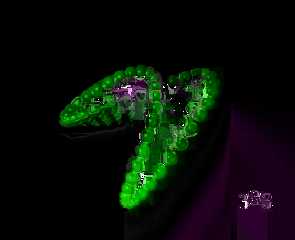
In case anybody wanted to know what I mean by "spectacularly broken"...

--
http://blog.orphi.me.uk/
http://www.zazzle.com/MathematicalOrchid*
Post a reply to this message
Attachments:
Download 'broken1.png' (128 KB)
Preview of image 'broken1.png'
|
|
| |
| |
|
|
|
|
| |
| |
|
|
Orchid XP v8 <voi### [at] dev null> wrote:
> At lower bitrates, the ridiculously-named codec "H.264" seems to look
> slightly better than Xvid, which looks a bit better than DivX, which
> looks quite a bit better than MPEG1.
They will look better at lower bitrates if you use multipass encoding.
> I am not, however, seeing the reputed "massive" difference in image
> quality.
Not in image quality. In quality/size ratio. Try lowering the bitrate
for all the codecs (trying to keep all the resulting file sizes about
the same) and until you start seeing significant differences.
--
- Warp null> wrote:
> At lower bitrates, the ridiculously-named codec "H.264" seems to look
> slightly better than Xvid, which looks a bit better than DivX, which
> looks quite a bit better than MPEG1.
They will look better at lower bitrates if you use multipass encoding.
> I am not, however, seeing the reputed "massive" difference in image
> quality.
Not in image quality. In quality/size ratio. Try lowering the bitrate
for all the codecs (trying to keep all the resulting file sizes about
the same) and until you start seeing significant differences.
--
- Warp
Post a reply to this message
|
|
| |
| |
|
|
|
|
| |
| |
|
|
Warp wrote:
> Orchid XP v8 <voi### [at] devnull> wrote:
>> At lower bitrates, the ridiculously-named codec "H.264" seems to look
>> slightly better than Xvid, which looks a bit better than DivX, which
>> looks quite a bit better than MPEG1.
>
>   They will look better at lower bitrates if you use multipass encoding.

OK, I'll try that. Like I said, I basically just ran the codecs with
everything at default.

>> I am not, however, seeing the reputed "massive" difference in image
>> quality.
>
>   Not in image quality. In quality/size ratio. Try lowering the bitrate
> for all the codecs (trying to keep all the resulting file sizes about
> the same) and until you start seeing significant differences.

Well, all the files came out almost exactly the same size, as you can
see. (And given the same average bitrate, you'd expect that.)

In the dying minutes of last night, I quickly tried using a different
video, and got radically different results. I think my test video is
just too easy to compress. (It's 80% black pixels, and 20% green pixels
of varying brightness.) So I think I should rerun my experiment on a
harder video.


The slightly weird thing is that if I play back, say, a DivX video in
WMP, there are a small amount of visual artifacts. But if I take the
DivX video and use Virtual Dub to decompress it to an uncompressed AVI
and then play that in WMP, I get slightly different visual artifacts... WTF?

(Also, as I mentioned, this happens with "lossless" codecs. When I play,
say, a Huffyuv video in WMP, it looks very slightly fuzzy, and the black
becomes dark grey. But if I decompress it and play the decompressed
version, it looks perfect again. Very odd...)
Post a reply to this message
|
|
| |
| |
|
|
|
|
| |
| |
|
|
Orchid XP v8 wrote:
> I am a little bit puzzled as to how some of the codecs manage to have
> slightly lower CPU load than completely uncompressed video. Obviously
> this is impossible - unless you're seriously telling me it takes 14% CPU
> to transfer 7.9 GB of data from HD to RAM?

	Those were the _lossy_ codecs.

--
The worst thing about censorship is .


                    /\  /\               /\  /
                   /  \/  \ u e e n     /  \/  a w a z
                       >>>>>>mue### [at] nawazorg<<<<<<
                                   anl
Post a reply to this message
|
|
| |
| |
|
|
|
|
| |
| |
|
|
Mueen Nawaz wrote:
> Orchid XP v8 wrote:
>> I am a little bit puzzled as to how some of the codecs manage to have
>> slightly lower CPU load than completely uncompressed video. Obviously
>> this is impossible - unless you're seriously telling me it takes 14% CPU
>> to transfer 7.9 GB of data from HD to RAM?
>
> 	Those were the _lossy_ codecs.

...and?

In the uncompressed case, you take some data on disk and copy it to the
framebuffer. In the compressed case, you take some data on disk, copy it
to RAM, perform a vast amount of highly compute-intensive work on it,
and *then* copy it to the framebuffer. Obviously the latter shouldn't
use less CPU power than the former.
Post a reply to this message
|
|
| |
| |
|
|
|
|
| |
| |
|
|
Invisible wrote:
> In the uncompressed case, you take some data on disk and copy it to the
> framebuffer.

Not quite. You need to align the scanlines, perhaps reorder the R, G,
and B, etc. You can't just blit the whole image to the screen like you
could with an Amiga.  And I'd highly expect that it goes through RAM on
the way between disk and screen.

> In the compressed case, you take some data on disk, copy it
> to RAM, perform a vast amount of highly compute-intensive work on it,
> and *then* copy it to the framebuffer. Obviously the latter shouldn't
> use less CPU power than the former.

Depends on how expensive decompressing into the frame buffer is compared
to moving the uncompressed data in and out of RAM.

--
Darren New / San Diego, CA, USA (PST)
Post a reply to this message
|
|
| |
| |
|
|
|
|
| |
| |
|
|
Darren New wrote:
> Invisible wrote:
>> In the uncompressed case, you take some data on disk and copy it to
>> the framebuffer.
>
> Not quite. You need to align the scanlines, perhaps reorder the R, G,
> and B, etc. You can't just blit the whole image to the screen like you
> could with an Amiga.  And I'd highly expect that it goes through RAM on
> the way between disk and screen.

Well actually, WMP is playing it back at 200% original size, if you want
to be picky about it.

Even so, moving data from A to B has to be faster than performing highly
elaborate arithmetic over it. Unless DMA really does require *that much*
CPU power.

> Depends on how expensive decompressing into the frame buffer is compared
> to moving the uncompressed data in and out of RAM.

Bearing in mind that the video data in question is many, many times
larger than any L1 or L2 cache on Earth...
Post a reply to this message
|
|
| |
| |
|
|
|
|
| |
| |
|
|
Invisible wrote:
> Darren New wrote:
>> Invisible wrote:
>>> In the uncompressed case, you take some data on disk and copy it to
>>> the framebuffer.
>>
>> Not quite. You need to align the scanlines, perhaps reorder the R, G,
>> and B, etc. You can't just blit the whole image to the screen like you
>> could with an Amiga.  And I'd highly expect that it goes through RAM
>> on the way between disk and screen.
>
> Well actually, WMP is playing it back at 200% original size, if you want
> to be picky about it.
>
> Even so, moving data from A to B has to be faster than performing highly
> elaborate arithmetic over it. Unless DMA really does require *that much*
> CPU power.
>
>> Depends on how expensive decompressing into the frame buffer is
>> compared to moving the uncompressed data in and out of RAM.
>
> Bearing in mind that the video data in question is many, many times
> larger than any L1 or L2 cache on Earth...

If the decompression CODEC is in any way hardware accelerated you're
then talking about shoving a small stream down the video pipeline versus
shoving an enormous stream down the video pipeline. Video memory is very
fact, hardware MPEG processors are very fast at decoding MPEG, which
means less CPU usage, less memory bottleneck. In opposition, reading the
frames into memory, copying the (relatively large) frames to video
memory, then instructing the video card to flip frame buffers ~30 times
a second is much more CPU consuming. In the MPEG case, the system will
feed blocks of stream data to the video card at a much more leisurely rate.

--
~Mike
Post a reply to this message
|
|
| |
| |
|
|
|
|
| |
| |
|
|
Mike Raiford wrote:

> If the decompression CODEC is in any way hardware accelerated

...then it'll take much less CPU power. ;-)

Given that the fastest codecs are DivX and Xvid, I doubt that's the answer.

Question: Does anybody still make MPEG acceleration cards for the PC any
more?

Question: Do such hardware acceleration schemes accelerate the whole
pipeline? Or just key parts of it?

--
http://blog.orphi.me.uk/
http://www.zazzle.com/MathematicalOrchid*
Post a reply to this message
|
|
| |
| |
|
|
|
|
| |
| |
|
|
Orchid XP v8 wrote:
> Question: Does anybody still make MPEG acceleration cards for the PC any
> more?

They're usually built into either the video output card or the capture
card. I imagine some people make stand-alone MPEG cards, but it's not
the sort of thing you'll see on the shelf at Circuit City. Getting a TV
tuner card with a built-in MPEG compressor isn't difficult, tho.

--
Darren New / San Diego, CA, USA (PST)
Post a reply to this message
|
|
| |
| |
|
|
|
|
| |
| |
|
|
Orchid XP v8 wrote:

> I should probably just start over with a better test video!

OK, so I started again, this time with a custom-rendered Electric Sheep
video. In other words, it features intricate fractal detail, vibrant
colours, full-frame complex swirling motion, and high-quality motion blur.

S026m-Anim2.avi

720x576 pixels, 24 bits/pixel, 25 frames/second, 420 frames.

Uncompressed:         498 MB

Huffyuv: 0:08 encode, 105 MB
FFV1:    0:37 encode, 176 MB

MPEG1:   0:16 encode, 3.40 MB
Theora:  0:28 encode, 4.16 MB
DivX 3:  0:08 encode, 1.96 MB
XviD:    0:12 encode, 2.11 MB
H.264:   0:38 encode, 4.73 MB

Well that definitely says... something. (In particular, FFV1 now does
drastically worse than Huffyuv, despite being much slower to encode and
too slow for realtime codecing.) But how good does the lossy video look?

All of the video was encoding at "900 Kbit/sec average bitrate". And
yet, they differ fairly widely in file size. Perhaps unsurprisingly
then, we find the following:

- MPEG1 looks *horrible*! I mean, *really* horrible. (Recall that with
my previous test, 900 Kbit MPEG1 actually looked not much different from
the uncompressed original. Clearly I picked a test case that was far too
easy!)

- DivX 3 looks even worse than MPEG1. And not by a small margin.

- XviD looks better than MPEG1.

- Theora looks quite a bit better than XviD.

- H.264 looks really very good indeed. Considering the file is over 100x
smaller than the original, there is surprisingly little distortion.

So we have roughly

   DivX < MPEG1 < XviD < Theora < H.264

This follows the file sizes almost exactly, except for MPEG1.

I had assumed that given the same average bitrate, all the codecs would
produce a file roughly the same size. This isn't really the case here. I
guess now I'll have to spend a few hours trying to get each codec to
produce a file of roughly the same size so I can compare those...

--
http://blog.orphi.me.uk/
http://www.zazzle.com/MathematicalOrchid*
Post a reply to this message
|
|
| |
| |
|
|
|
|
| |
| |
|
|
Orchid XP v8 wrote:
> - DivX 3 looks even worse than MPEG1. And not by a small margin.

I may be wrong, but I think DivX3 is quite an old version...
Post a reply to this message
|
|
| |
| |
|
|
|
|
| |
| |
|
|
Orchid XP v8 wrote:
> - DivX 3 looks even worse than MPEG1. And not by a small margin.

Current DivX version is 6.8

Wikipedia on Version 3:
DivX ;-) 3.11 Alpha and later 3.xx versions refers to a hacked version of the
Microsoft MPEG-4 Version 3 (MPEG-4v3, Microsoft internal numbering scheme,
unrelated to MPEG-4 parts) video codec (which was actually not MPEG-4
compliant), extracted around 1998 by French hacker Jérome Rota (also known as
Gej) in Montpellier. The Microsoft codec, which originally required that the
compressed output be put in an ASF file, was altered to allow other containers
such as Audio Video Interleave (AVI). Rota hacked the Microsoft codec because
newer versions of the Windows Media Player wouldn't play his video portfolio
and résumé that were encoded with it. Instead of re-encoding his portfolio,
Rota and German hacker Max Morice decided to reverse engineer the codec, which
"took about a week".[5]

So DivX3 is not what you should use if you want a relaistic picture of current
codecs
Post a reply to this message
|
|
| |
| |
|
|
|
|
| |
| |
|
|
Orchid XP v8 <voi### [at] devnull> wrote:
> I guess now I'll have to spend a few hours trying to get each codec to
> produce a file of roughly the same size so I can compare those...

  Remember to use multipass encoding for those codecs which support it.
It will generally produce better results (although it might not with such
a short video; doesn't hurt to try, though).

  Usually it's done by selecing "multipass, 1st pass" or whatever option,
encoding, then the "multipass, 2nd pass" and then encoding again. This will
actually produce a viewable video.

  Some codecs support even more passes, but usually the 3rd and subsequent
passes have only very minimal effect on the quality.

--
                                                          - Warp
Post a reply to this message
|
|
| |
| |
|
|
|
|
| |
| |
|
|
Warp wrote:
>   Remember to use multipass encoding for those codecs which support it.

And in case it wasn't obvious by now, multipass encoding is generally
what helps a lot with making B-frames work well. :-)

--
Darren New / San Diego, CA, USA (PST)
Post a reply to this message
|
|
| |
| |
|
|
|
|
| |
| |
|
|
Warp wrote:
> Orchid XP v8 <voi### [at] devnull> wrote:
>> I guess now I'll have to spend a few hours trying to get each codec to
>> produce a file of roughly the same size so I can compare those...
>
>   Remember to use multipass encoding for those codecs which support it.
> It will generally produce better results (although it might not with such
> a short video; doesn't hurt to try, though).

Yeah, I could certainly do that. I just haven't quite figured out how yet...

>   Usually it's done by selecing "multipass, 1st pass" or whatever option,
> encoding, then the "multipass, 2nd pass" and then encoding again. This will
> actually produce a viewable video.

I see the options. So, what, the first pass produces a video file that
just isn't viewable, or...?

--
http://blog.orphi.me.uk/
http://www.zazzle.com/MathematicalOrchid*
Post a reply to this message
|
|
| |
| |
|
|
|
|
| |
| |
|
|
Darren New <dne### [at] sanrrcom> wrote:
> Warp wrote:
> >   Remember to use multipass encoding for those codecs which support it.

> And in case it wasn't obvious by now, multipass encoding is generally
> what helps a lot with making B-frames work well. :-)

  It also helps the encoding process to distribute the bitrate throughout
the video. When it has processed the input video once it will have a much
better idea which parts should use more of the bitrate and which parts need
less. This way it avoids much better the phenomenon where sudden complex
video content looks like crap for several seconds before it stabilishes.
When the encoding process has seen these difficult parts, it can allocate
more of the bitrate to those parts in advance, and not waste it on parts
which don't need it so much.

--
                                                          - Warp
Post a reply to this message
|
|
| |
| |
|
|
|
|
| |
| |
|
|
Orchid XP v8 <voi### [at] devnull> wrote:
> >   Usually it's done by selecing "multipass, 1st pass" or whatever option,
> > encoding, then the "multipass, 2nd pass" and then encoding again. This will
> > actually produce a viewable video.

> I see the options. So, what, the first pass produces a video file that
> just isn't viewable, or...?

  I suppose it depends on the codec, but most codecs only produce data for
the secondary pass.

--
                                                          - Warp
Post a reply to this message
|
|
| |
| |
|
|
|
|
| |
| |
|
|
Orchid XP v8 wrote:
> I see the options. So, what, the first pass produces a video file that
> just isn't viewable, or...?
>

I think ffmpeg produces a viewable video file, along with a giant file
containing statistics. But I doubt DirectShow- or VFW-based codecs can do
that... (VirtualDub gives them chunks of data, not a path to a file, so how
would they know where to save the stats?)
Post a reply to this message
|
|
| |
| |
|
|
|
|
| |
|
|