|
|
|
|
|
|
| |
| |
|
|
|
|
| |
| |
|
|
OK, so for anybody who knows about such things... Would it be feasible
to render an Iterated Function System image using a GPU? And would it be
any faster than using the CPU?

--
http://blog.orphi.me.uk/
http://www.zazzle.com/MathematicalOrchid*
Post a reply to this message
|
|
| |
| |
|
|
|
|
| |
| |
|
|
Orchid XP v8 <voi### [at] dev null> wrote:
> OK, so for anybody who knows about such things... Would it be feasible
> to render an Iterated Function System image using a GPU? And would it be
> any faster than using the CPU?
From the little I know, Pixel Shader Model 3 supports branching and
looping, so I assume it might be possible to create a pixel shader which
colors pixels according to an iterated function system.
However, if I'm not completely mistaken, pixel shaders are calculated
on a specific pixel and cannot re-use previous calculations from other
pixels which have been calculated with a pixel shader (because else it
would make parallelizing pixel shaders extremely difficult, if not
impossible). Thus you are limited to making a pixel shader routine
which is calculated on a per-pixel basis, without input from other
pixels.
I assume that this means that you cannot create a pixel shader which
jumps around the screen and draws pixels here and there, as most IFS
fractals do. You are limited to calculate on single pixels, like for
example how the basic Mandelbrot set is calculated.
Assuming it is indeed possible to implement some IFS fractals with
pixel shaders, then it may indeed be much faster than with the CPU.
That's because modern display cards can run a fair amount of shaders
in parallel.
--
- Warp null> wrote:
> OK, so for anybody who knows about such things... Would it be feasible
> to render an Iterated Function System image using a GPU? And would it be
> any faster than using the CPU?
From the little I know, Pixel Shader Model 3 supports branching and
looping, so I assume it might be possible to create a pixel shader which
colors pixels according to an iterated function system.
However, if I'm not completely mistaken, pixel shaders are calculated
on a specific pixel and cannot re-use previous calculations from other
pixels which have been calculated with a pixel shader (because else it
would make parallelizing pixel shaders extremely difficult, if not
impossible). Thus you are limited to making a pixel shader routine
which is calculated on a per-pixel basis, without input from other
pixels.
I assume that this means that you cannot create a pixel shader which
jumps around the screen and draws pixels here and there, as most IFS
fractals do. You are limited to calculate on single pixels, like for
example how the basic Mandelbrot set is calculated.
Assuming it is indeed possible to implement some IFS fractals with
pixel shaders, then it may indeed be much faster than with the CPU.
That's because modern display cards can run a fair amount of shaders
in parallel.
--
- Warp
Post a reply to this message
|
|
| |
| |
|
|
|
|
| |
| |
|
|
Warp wrote:

>   From the little I know, Pixel Shader Model 3 supports branching and
> looping, so I assume it might be possible to create a pixel shader which
> colors pixels according to an iterated function system.
>
>   However, if I'm not completely mistaken, pixel shaders are calculated
> on a specific pixel and cannot re-use previous calculations from other
> pixels which have been calculated with a pixel shader (because else it
> would make parallelizing pixel shaders extremely difficult, if not
> impossible). Thus you are limited to making a pixel shader routine
> which is calculated on a per-pixel basis, without input from other
> pixels.
>   I assume that this means that you cannot create a pixel shader which
> jumps around the screen and draws pixels here and there, as most IFS
> fractals do. You are limited to calculate on single pixels, like for
> example how the basic Mandelbrot set is calculated.

That seems like a reasonable assessment to me.

I wonder if you could attempt this using the Copy Game rather than the
Chaos Game? That is, start with a white screen, apply each
transformation to it seperately, merge the frame buffers back together,
and then repeat. Do this enough times and the shape on the screen is
guaranteed to converge to the attractor of the system. If you implement
the "merging" state correctly, you can even get density information.

The fatal problem with this method is that it utterly fails if the
entire attractor does not fit on the screen. For attractors involving,
say, infinitely long lines, this method can never work properly.

Also, how about random number generation? Is this "easy" to do on a GPU?

Could you do something like rendering millions of tiny semi-transparent
polygons of roughly 1-pixel size?

Does a GPU provide any way to procedurally render texture bitmaps that
might allow a histogram to be built?

Asside from all that, presumably you'd have to go with some kind of
GPGPU solution such as CUDA. Again, I'm not sure how well the GPU memory
architecture is going to play with that; I haven't looked at the numbers.

>   Assuming it is indeed possible to implement some IFS fractals with
> pixel shaders, then it may indeed be much faster than with the CPU.
> That's because modern display cards can run a fair amount of shaders
> in parallel.

This was my feeling...

--
http://blog.orphi.me.uk/
http://www.zazzle.com/MathematicalOrchid*
Post a reply to this message
|
|
| |
| |
|
|
|
|
| |
| |
|
|
Orchid XP v8 <voi### [at] devnull> wrote:
> Also, how about random number generation? Is this "easy" to do on a GPU?

  Even if pixel shaders didn't have some RNG available (I don't know if
they have), a simple linear congruential generator should be rather
trivial to implement.

  (OTOH that means that the LCG would have to store the seed somewhere
so that the next time the shader is called it can use it. Again, I don't
know if that's possible. There could well be parallelism problems with
that.)

> Could you do something like rendering millions of tiny semi-transparent
> polygons of roughly 1-pixel size?

  Why would you want to do that? There's no need. A pixel shader determines
the color of a screen pixel, so what else do you need? AFAIK, you don't even
need any polygons in order to fill the screen with the products of a pixel
shader (or you need at most one).

  (The idea of pixel shaders is that if they are attached to a polygon,
when that polygon is projected on screen, each of the pixels of this
projection is colored according to the shader. The shader has tons of
information available from that polygon and other data in order to
determine the color of the pixel.)

  If what you want to do is to fill the screen with data in progressive
steps, graphics cards support that. They have stencil buffers and other
similar techniques for additive drawing.

--
                                                          - Warp
Post a reply to this message
|
|
| |
| |
|
|
|
|
| |
| |
|
|
Orchid XP v8 wrote:
> OK, so for anybody who knows about such things... Would it be feasible
> to render an Iterated Function System image using a GPU? And would it be
> any faster than using the CPU?
>

As long as you can break down your function so that a single step is
performed on the entire screen at once, then you can.

Ie, you can do function f() on all pixels, store the output in a buffer,
and use that buffer as the input in the next step.

If you have to perform varying steps on individual pixels, you get
problems.  As in, if you go f() then g() then h() on one pixel, then
only g() and h() on its neighbor, then only f() and h() on a third, this
won't work.

The same instructions have to be run on the whole screen (well, the
whole polygon - for what you're asking about, I would just draw a quad
to the whole screen).

...Chambers
Post a reply to this message
|
|
| |
| |
|
|
|
|
| |
| |
|
|
I haven't done any GPU programming myself, but from what I've gathered
from friends who have modern GPUs are essentially fully programmable
architectures these days, so you can use them to boost the speed of
computations which have seemingly little to do with actually displaying
things on the screen (for instance, I believe that folding@home can use
the GPU).

It probably depends on what graphics card you have as to weather or not
you can do this on it, but you might take a look at CUDA, a C compiler
revently released by nvidia that allows you to write things for the GPU:

http://www.nvidia.com/object/cuda_learn.html

You'll, of course, need to design your IFS algorithm so that it can be
run in a highly parallel manner, but unless I'm missing something that
should be pretty straightforward in this case (just run multiple
iterators simultaneously).  Of course, not having ever done this sort of
thing increases the chances that I'll have missed something :-)


Orchid XP v8 wrote:
> OK, so for anybody who knows about such things... Would it be feasible
> to render an Iterated Function System image using a GPU? And would it be
> any faster than using the CPU?
>
Post a reply to this message
|
|
| |
| |
|
|
|
|
| |
| |
|
|
> OK, so for anybody who knows about such things... Would it be feasible to
> render an Iterated Function System image using a GPU? And would it be any
> faster than using the CPU?

Yes, and yes it would be much faster.  Sometimes you need to think a bit
before implementing such a thing though...

I would run several points through the IFS in parallel.  Say, 2^16 points.
Create two 256x256 textures of floats, one to hold the X coordinates and one
to hold the Y coordinates of all your points.

Then write two pixel shaders, one to calculate the new X coordinate, and one
to create the new Y coordinate.

Then, for each pass, set the current X and Y textures and inputs, and render
to the newX texture.  Render again to the newY texture with the other pixel
shader.

Now, here comes the clever bit.  After you've generated the new XY textures,
you now run a *vertex* shader with 2^16 quads.  THe vertex shader looks up
the XY values from the texture for each quad and translates the quad to that
position.  You can then just use a fairly normal pixel shader to increment
the pixel value on the screen, or some off-screen texture.

It should run pretty fast, and don't forget you're doing 64k points in
parallel so it should outrun the CPU by a huge factor.
Post a reply to this message
|
|
| |
| |
|
|
|
|
| |
| |
|
|
Kevin Wampler wrote:

> It probably depends on what graphics card you have as to weather or not
> you can do this on it, but you might take a look at CUDA, a C compiler
> revently released by nvidia that allows you to write things for the GPU:

Yeah, CUDA seems the obvious way to do this.

Unfortunately, only GeForce 8 and newer support this technology. I have
a GeForce 7900GT. :-(

(Also... I get the impression you need Vista for the GeForce 8 to work.)

> You'll, of course, need to design your IFS algorithm so that it can be
> run in a highly parallel manner, but unless I'm missing something that
> should be pretty straightforward in this case (just run multiple
> iterators simultaneously).  Of course, not having ever done this sort of
> thing increases the chances that I'll have missed something :-)

There are 3 processes that need to happen.

1. A stream of coordinates needs to be generated.
2. A histogram of the coordinates needs to be constructed.
3. A non-linear mapping from histogram frequencies to colours is performed.

Step 2 looks to be the tricky one - but it shouldn't be *vastly*
difficult I think. The question is whether the histograms will fit into
the limited RAM on the card...

--
http://blog.orphi.me.uk/
http://www.zazzle.com/MathematicalOrchid*
Post a reply to this message
|
|
| |
| |
|
|
|
|
| |
| |
|
|
Chambers wrote:

> As long as you can break down your function so that a single step is
> performed on the entire screen at once, then you can.

This is the program. An IFS image is essentially a histogram plot. You
can't just compute each pixel's colour independently.

OOC, is it possible to use a GPU to copy and transform chunks of video
data? (E.g., rotate, scale, that kind of thing.)

--
http://blog.orphi.me.uk/
http://www.zazzle.com/MathematicalOrchid*
Post a reply to this message
|
|
| |
| |
|
|
|
|
| |
| |
|
|
scott wrote:

> Yes, and yes it would be much faster.  Sometimes you need to think a bit
> before implementing such a thing though...
>
> I would run several points through the IFS in parallel.  Say, 2^16
> points. Create two 256x256 textures of floats, one to hold the X
> coordinates and one to hold the Y coordinates of all your points.
>
> Then write two pixel shaders, one to calculate the new X coordinate, and
> one to create the new Y coordinate.
>
> Then, for each pass, set the current X and Y textures and inputs, and
> render to the newX texture.  Render again to the newY texture with the
> other pixel shader.
>
> Now, here comes the clever bit.  After you've generated the new XY
> textures, you now run a *vertex* shader with 2^16 quads.  THe vertex
> shader looks up the XY values from the texture for each quad and
> translates the quad to that position.  You can then just use a fairly
> normal pixel shader to increment the pixel value on the screen, or some
> off-screen texture.
>
> It should run pretty fast, and don't forget you're doing 64k points in
> parallel so it should outrun the CPU by a huge factor.

Uuhhh... any chance of some code? :-}

(Also... what's a vertex shader?)

Would it be possible to do all this using just, say, OpenGL? So far the
approaches I've considered would all require CUDA, which obviously works
*only* for certain GPUs.

--
http://blog.orphi.me.uk/
http://www.zazzle.com/MathematicalOrchid*
Post a reply to this message
|
|
| |
| |
|
|
|
|
| |
| |
|
|
Orchid XP v8 wrote:

> Yeah, CUDA seems the obvious way to do this.
>
> Unfortunately, only GeForce 8 and newer support this technology. I have
> a GeForce 7900GT. :-(

Also... I can't program in C to save my life. ESPECIALLY if it involves
floating point arithmetic...

--
http://blog.orphi.me.uk/
http://www.zazzle.com/MathematicalOrchid*
Post a reply to this message
|
|
| |
| |
|
|
|
|
| |
| |
|
|
Warp wrote:
> Orchid XP v8 <voi### [at] devnull> wrote:
>> Also, how about random number generation? Is this "easy" to do on a GPU?
>
>   Even if pixel shaders didn't have some RNG available (I don't know if
> they have), a simple linear congruential generator should be rather
> trivial to implement.
>
>   (OTOH that means that the LCG would have to store the seed somewhere
> so that the next time the shader is called it can use it. Again, I don't
> know if that's possible. There could well be parallelism problems with
> that.)

Yeah, that's going to be the fun part - getting each PRNG to produe a
different stream. Maybe it could be seeded from pixel coordinates or
something...

>> Could you do something like rendering millions of tiny semi-transparent
>> polygons of roughly 1-pixel size?
>
>   Why would you want to do that?

The idea being to scatter polygons around using a geometry shader,
rather than trying to implement the IFS as a pixel shader. I don't know
if it would work well though.

--
http://blog.orphi.me.uk/
http://www.zazzle.com/MathematicalOrchid*
Post a reply to this message
|
|
| |
| |
|
|
|
|
| |
| |
|
|
> Uuhhh... any chance of some code? :-}

I don't have time to write anything working now, but I'm just having a look
at something I have already that would be a good basis...  This is using
DirectX 9 btw.

Use CreateTexture() to create two new 256x256 textures with the format
D3DFMT_R32F (that gives you a texture full of 32bit floats, as opposed to
the more usual RGBA bytes).  Also create two temp textures.

You can then lock the texture and write to it using CPU code, to set the
initial values.

I would create a big vertex buffer full of the 65k squares 1 unit big
centered at the origin.  Also assign an x,y coordinate to each vertex of
each square (this is so the vertex shader knows which square it is
processing).

Then, in the game loop, use the Direct3D call SetRenderTarget() to set the
first temp texture as the render target, and run your pixel shader that
calculates the new x coordinate.  DO the same for y.  If you have DX10 then
you can render to multiple render targets in one shot, so could be faster.

Pixel shader code would look something like:

{
  float currentX , currentY;
  currentX = tex2D( xCoordTexture , ps_in.textureCoordinate );
  currentY = tex2D( yCoordTexture , ps_in.textureCoordinate );

  < calculate new X coord here >

  return newX;

}

> (Also... what's a vertex shader?)

OK, so then the next bit, to actually draw all those points somewhere.  The
vertex shader is what "normally" converts your mesh from model space into
screen space that is then used by the pixel shader to know where to draw
each pixel.  Usually it just multiplies by a big matrix, but we can do
whatever we want in it.

I'm going to look up the X,Y coordinates from those textures, using the XY
coordinates we set in the vertex buffer above, remember?

{
  currentX = tex2D( xCoordTexture , vs_in.xCoordinate );
  currentY = tex2D( yCoordTexture , vs_in.yCoordinate );

  vs_out.Pos.x = vs_in.Pos.x + vs_in.x + currentX;
  vs_out.Pos.y = vs_in.Pos.y + vs_in.y + currentX;

  return vs_out;
}

It returns each vertex of each square shifted to the position defined by the
coordinates in the xy texture.

The pixel shader used to draw those squares would then do something really
simple, like just increment the colour at that coordinate by 1.  Or if you
want to get really clever you could make the square a bit bigger (so it
covers say 9 pixels) and do some antialiasing by hand in the pixel shader.

> Would it be possible to do all this using just, say, OpenGL?

Yes.  But I don't know any of the syntax, sorry.
Post a reply to this message
|
|
| |
| |
|
|
|
|
| |
| |
|
|
> OOC, is it possible to use a GPU to copy and transform chunks of video
> data? (E.g., rotate, scale, that kind of thing.)

Yes, you just draw a textured square wherever you want, using whatever you
want as the texture (the result of a previous calculation?).

The only limitation is that you cannot render to a texture at the same time
as using that texture as a source for drawing operations.
Post a reply to this message
|
|
| |
| |
|
|
|
|
| |
| |
|
|
>> OOC, is it possible to use a GPU to copy and transform chunks of video
>> data? (E.g., rotate, scale, that kind of thing.)
>
> Yes, you just draw a textured square wherever you want, using whatever
> you want as the texture (the result of a previous calculation?).

I was hoping you'd say something like that. :-)

Is it possible to take a chunk of the frame buffer and turn it into a
texture? Or would I have to render texture to texture and then make a
copy to the screen so I can see it?

> The only limitation is that you cannot render to a texture at the same
> time as using that texture as a source for drawing operations.

That won't be a problem.

--
http://blog.orphi.me.uk/
http://www.zazzle.com/MathematicalOrchid*
Post a reply to this message
|
|
| |
| |
|
|
|
|
| |
| |
|
|
scott wrote:
>> Uuhhh... any chance of some code? :-}
>
> I don't have time to write anything working now, but I'm just having a
> look at something I have already that would be a good basis...  This is
> using DirectX 9 btw.
>
> Use CreateTexture() to create two new 256x256 textures with the format
> D3DFMT_R32F (that gives you a texture full of 32bit floats, as opposed
> to the more usual RGBA bytes).  Also create two temp textures.
>
> You can then lock the texture and write to it using CPU code, to set the
> initial values.
>
> I would create a big vertex buffer full of the 65k squares 1 unit big
> centered at the origin.  Also assign an x,y coordinate to each vertex of
> each square (this is so the vertex shader knows which square it is
> processing).
>
> Then, in the game loop, use the Direct3D call SetRenderTarget() to set
> the first temp texture as the render target, and run your pixel shader
> that calculates the new x coordinate.  DO the same for y.  If you have
> DX10 then you can render to multiple render targets in one shot, so
> could be faster.
>
> Pixel shader code would look something like:
>
> {
>  float currentX , currentY;
>  currentX = tex2D( xCoordTexture , ps_in.textureCoordinate );
>  currentY = tex2D( yCoordTexture , ps_in.textureCoordinate );
>
>  < calculate new X coord here >
>
>  return newX;
>
> }
>
>> (Also... what's a vertex shader?)
>
> OK, so then the next bit, to actually draw all those points somewhere.
> The vertex shader is what "normally" converts your mesh from model space
> into screen space that is then used by the pixel shader to know where to
> draw each pixel.  Usually it just multiplies by a big matrix, but we can
> do whatever we want in it.
>
> I'm going to look up the X,Y coordinates from those textures, using the
> XY coordinates we set in the vertex buffer above, remember?
>
> {
>  currentX = tex2D( xCoordTexture , vs_in.xCoordinate );
>  currentY = tex2D( yCoordTexture , vs_in.yCoordinate );
>
>  vs_out.Pos.x = vs_in.Pos.x + vs_in.x + currentX;
>  vs_out.Pos.y = vs_in.Pos.y + vs_in.y + currentX;
>
>  return vs_out;
> }
>
> It returns each vertex of each square shifted to the position defined by
> the coordinates in the xy texture.
>
> The pixel shader used to draw those squares would then do something
> really simple, like just increment the colour at that coordinate by 1.
> Or if you want to get really clever you could make the square a bit
> bigger (so it covers say 9 pixels) and do some antialiasing by hand in
> the pixel shader.
>
>> Would it be possible to do all this using just, say, OpenGL?
>
> Yes.  But I don't know any of the syntax, sorry.

Ah, OK. Well I have a Haskell binding to OpenGL, but not for DirectX.

So the exact function calls you're talking about won't help me, but it
gives me some idea what I'm trying to do...

--
http://blog.orphi.me.uk/
http://www.zazzle.com/MathematicalOrchid*
Post a reply to this message
|
|
| |
| |
|
|
|
|
| |
| |
|
|
> Is it possible to take a chunk of the frame buffer and turn it into a
> texture?

You can, but it's a bit long-winded and slow.

> Or would I have to render texture to texture and then make a copy to the
> screen so I can see it?

Yes, that's what is normally done.  Also gives you the advantage that you
can do funky things with the pixel shader you use to write the texture to
the screen, like using colour look up tables, motion blur, bloom, edge
detection, etc etc.
Post a reply to this message
|
|
| |
| |
|
|
|
|
| |
| |
|
|
> Ah, OK. Well I have a Haskell binding to OpenGL, but not for DirectX.
>
> So the exact function calls you're talking about won't help me, but it
> gives me some idea what I'm trying to do...

I would try and find some very simple demos of pixel and vertex shaders
written in OpenGL first and get them working.  IIRC they are called
something else in OpenGL too, just to make matters more confusing.
Post a reply to this message
|
|
| |
| |
|
|
|
|
| |
| |
|
|
scott wrote:
>> Ah, OK. Well I have a Haskell binding to OpenGL, but not for DirectX.
>>
>> So the exact function calls you're talking about won't help me, but it
>> gives me some idea what I'm trying to do...
>
> I would try and find some very simple demos of pixel and vertex shaders
> written in OpenGL first and get them working.  IIRC they are called
> something else in OpenGL too, just to make matters more confusing.

OpenGL apparently calls a pixel shader a "fragment shader".

I found a small program that allows you to type in GLSL source code and
see it applied to a mesh object. Should help me get to know the
language, but won't help much with rendering a texture of floats. ;-)

The "other" fun thing is that shaders were introduced in OpenGL 2.0, for
which no language spec is available online. You have to buy the book for
that. But having a look at the Haskell OpenGL bindings, I think I see
how it's supposed to work...

--
http://blog.orphi.me.uk/
http://www.zazzle.com/MathematicalOrchid*
Post a reply to this message
|
|
| |
| |
|
|
|
|
| |
| |
|
|
Orchid XP v8 wrote:
> There are 3 processes that need to happen.
>
> 1. A stream of coordinates needs to be generated.
> 2. A histogram of the coordinates needs to be constructed.
> 3. A non-linear mapping from histogram frequencies to colours is performed.
>
> Step 2 looks to be the tricky one - but it shouldn't be *vastly*
> difficult I think. The question is whether the histograms will fit into
> the limited RAM on the card...

I'd think that memory wouldn't be a problem here, as 256MB is enough to
store a reasonably large histogram.
Post a reply to this message
|
|
| |
| |
|
|
|
|
| |
| |
|
|
Kevin Wampler wrote:

> I'd think that memory wouldn't be a problem here, as 256MB is enough to
> store a reasonably large histogram.

The *only* reason I increased the RAM in my system from 1 GB to 3 GB was
to handle rendering high resolution IFS images. ;-)

OTOH, I'm talking about resolutions high enough for Zazzle...

--
http://blog.orphi.me.uk/
http://www.zazzle.com/MathematicalOrchid*
Post a reply to this message
|
|
| |
| |
|
|
|
|
| |
| |
|
|
Orchid XP v8 wrote:
> The "other" fun thing is that shaders were introduced in OpenGL 2.0, for
> which no language spec is available online. You have to buy the book for
> that. But having a look at the Haskell OpenGL bindings, I think I see
> how it's supposed to work...

That's not true, you can download the spec for both GL2 and the GLSL for
free (they're separate documents, though).

...Chambers
Post a reply to this message
|
|
| |
| |
|
|
|
|
| |
| |
|
|
Orchid XP v8 wrote:
> (Also... I get the impression you need Vista for the GeForce 8 to work.)

I have a 8600 GT. Used to use it on Windows XP. Now running Linux.

(and many Compiz effects involving shaders, like transparency blur, indeed
get WAY more framerate than on my previous machine with a... GeForce 4?)
Post a reply to this message
|
|
| |
| |
|
|
|
|
| |
| |
|
|
Nicolas Alvarez wrote:
> Orchid XP v8 wrote:
>> (Also... I get the impression you need Vista for the GeForce 8 to work.)
>
> I have a 8600 GT. Used to use it on Windows XP. Now running Linux.

Oh, OK then.

--
http://blog.orphi.me.uk/
http://www.zazzle.com/MathematicalOrchid*
Post a reply to this message
|
|
| |
| |
|
|
|
|
| |
| |
|
|
Orchid XP v8 wrote:
> Nicolas Alvarez wrote:
>> Orchid XP v8 wrote:
>>> (Also... I get the impression you need Vista for the GeForce 8 to work.)
>>
>> I have a 8600 GT. Used to use it on Windows XP. Now running Linux.
>
> Oh, OK then.
>

You need Vista to run DirectX 10.

You can still access all the functionality of the card through OpenGL,
though, on XP, Linux, and MacOS.

In fact, I saw a demo that tricked XP into installing DX10, so you could
still run almost everything that claimed it required Vista.

...Chambers
Post a reply to this message
|
|
| |
| |
|
|
|
|
| |
| |
|
|
Chambers wrote:

> You need Vista to run DirectX 10.
>
> You can still access all the functionality of the card through OpenGL,
> though, on XP, Linux, and MacOS.

Oh right. I'll have to check to see whether CUDA works. >:-D

Basically there's a couple of graphics demos I've seen out there that
require a GeForce 8 or higher. How much do you want to bet that's really
because they want DirectX 10?

> In fact, I saw a demo that tricked XP into installing DX10, so you could
> still run almost everything that claimed it required Vista.

I find that a little surprising - AFAIK, Vista uses a radically
different internal graphics pipeline, so you'd think it wouldn't be
possible to make it work on XP at all.

--
http://blog.orphi.me.uk/
http://www.zazzle.com/MathematicalOrchid*
Post a reply to this message
|
|
| |
| |
|
|
|
|
| |
| |
|
|
> I find that a little surprising - AFAIK, Vista uses a radically different
> internal graphics pipeline, so you'd think it wouldn't be possible to make
> it work on XP at all.

I imagine they've hacked the DX9 drivers to use some of the hardware
functionality that is only exposed under DX10 (and thus only in Vista).  I
would highly doubt that they have managed to replicate the Vista graphics
system on XP, so there is no way all applications designed for DX10 are
going to work.  To do that they would have had to pretty much rewrite the
whole Vista graphics system and parts of the OS GUI to run on XP, which
seems a bit unlikely.
Post a reply to this message
|
|
| |
| |
|
|
|
|
| |
| |
|
|
scott wrote:
>> I find that a little surprising - AFAIK, Vista uses a radically
>> different internal graphics pipeline, so you'd think it wouldn't be
>> possible to make it work on XP at all.
>
> I imagine they've hacked the DX9 drivers to use some of the hardware
> functionality that is only exposed under DX10 (and thus only in Vista).
> I would highly doubt that they have managed to replicate the Vista
> graphics system on XP, so there is no way all applications designed for
> DX10 are going to work.  To do that they would have had to pretty much
> rewrite the whole Vista graphics system and parts of the OS GUI to run
> on XP, which seems a bit unlikely.

They don't hack the DX9 drivers, and they don't replicate DX10 - they
actually trick DX10 into installing on XP, so you get full functionality.

Such an act, of course, is against the EULA, and I wasn't willing to
risk hosing my system enough to try it out - but it seemed interesting,
at least :)

...Chambers
Post a reply to this message
|
|
| |
| |
|
|
|
|
| |
| |
|
|
Invisible wrote:
> Basically there's a couple of graphics demos I've seen out there that
> require a GeForce 8 or higher. How much do you want to bet that's really
> because they want DirectX 10?

Rather, they want certain functionality in the cards that's only
provided in the GF8 series and above, and that functionality is only
exposed by DX10.  So it's not that they want DX10, it's that they want
the card, and to use it to its fullest you need DX10 (or GL, but that's
another matter).

...Chambers
Post a reply to this message
|
|
| |
| |
|
|
|
|
| |
| |
|
|
> They don't hack the DX9 drivers, and they don't replicate DX10 - they
> actually trick DX10 into installing on XP, so you get full functionality.

But that's impossible to keep full functionality, DX10 has many new function
calls that talk to the new window manager in Vista.  Such things simply will
not work in XP.  I suspect that at the moment very few programs actually use
those calls (to make developing DX9 and DX10 versions simultaneously
easier), so most programs probably will still work ok.  One example is how
Vista handles the mouse pointer compared to XP.

Of course a limited functionality of DX10 would be useful on XP, but I
imagine it's very buggy in places, which is why MS never bothered spending
the effort to really tidy it up and get it working properly.
Post a reply to this message
|
|
| |
| |
|
|
|
|
| |
| |
|
|
> OK, so for anybody who knows about such things... Would it be feasible to
> render an Iterated Function System image using a GPU? And would it be any
> faster than using the CPU?

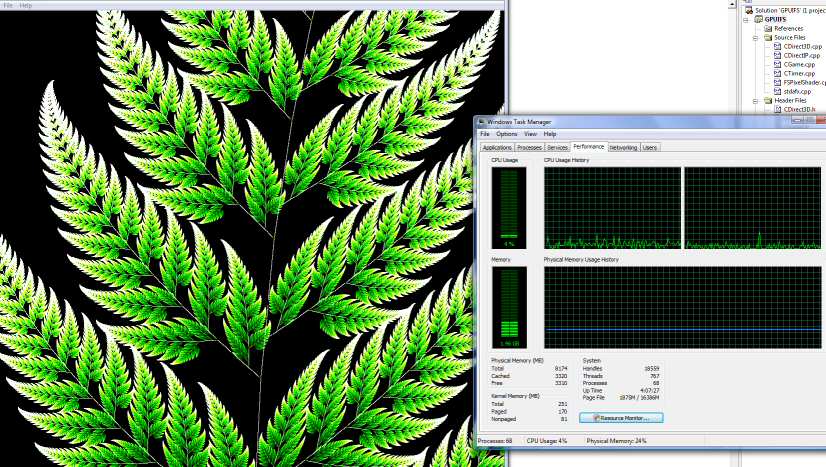
See attached image. That spike in the right CPU chart was where I started
the program.

I'm using the standard fern algorithm that's on the wikipedia page about
IFS.

Speed: 23.2 million iterations per second (512x512 points in parallel per
frame at 88 fps)

This is on an nVidia FX1700, if I get time I'll try it on my FX7900 tonight,
should be significantly faster.

I don't know how this compares to how fast a CPU would be, if I get time
later I will try out the same on the CPU for comparison.

The hardest bit was actually getting a good random number generator inside
the pixel shader.  What I ended up doing was to generate a big texture full
of random numbers at the start of the code, then in the pixel shader it
generates an xy coord based on a number of things and looks up the value in
the random texture at that position.  Seems to work well, because believe
me, if your random number generator is just a little bit wonky, the fern
doesn't look very nice at all!
Post a reply to this message
Attachments:
Download 'image1.jpg' (99 KB)
Preview of image 'image1.jpg'
|
|
| |
| |
|
|
|
|
| |
| |
|
|
scott wrote:

> See attached image. That spike in the right CPU chart was where I
> started the program.

Sweet! That looks pretty awesome.

Next step: realtime animation. ;-)

--
http://blog.orphi.me.uk/
http://www.zazzle.com/MathematicalOrchid*
Post a reply to this message
|
|
| |
| |
|
|
|
|
| |
| |
|
|
> Speed: 23.2 million iterations per second (512x512 points in parallel per
> frame at 88 fps)
>
> This is on an nVidia FX1700, if I get time I'll try it on my FX7900
> tonight,
> should be significantly faster.

OK so my FX7900 wasn't that much faster (37 million per second), despite the
specs indicating about 5x the pixel throughput.  The speed bottleneck is
obviously somewhere else in this code then, probably in the texture lookup
in the vertex shader, I guess that isn't very optimised yet.  If I had a
DX10 card I could use a geometry shader to cut the number of texture lookups
and vertex shader calls by a factor of 4, that would definitely speed things
up significantly.

> I don't know how this compares to how fast a CPU would be, if I get time
> later I will try out the same on the CPU for comparison.

Using a single core of an Intel E6400 I get 11 million iterations per second
(C++, but with no graphics).

Also it took me like 5 minutes to write the CPU code from scratch, but
several hours to get the GPU code working correctly!
Post a reply to this message
|
|
| |
| |
|
|
|
|
| |
| |
|
|
>> Speed: 23.2 million iterations per second (512x512 points in parallel per
>> frame at 88 fps)
>>
>> This is on an nVidia FX1700, if I get time I'll try it on my FX7900
>> tonight,
>> should be significantly faster.
>
> OK so my FX7900 wasn't that much faster (37 million per second), despite
> the specs indicating about 5x the pixel throughput.  The speed
> bottleneck is obviously somewhere else in this code then, probably in
> the texture lookup in the vertex shader, I guess that isn't very
> optimised yet.  If I had a DX10 card I could use a geometry shader to
> cut the number of texture lookups and vertex shader calls by a factor of
> 4, that would definitely speed things up significantly.

Ooo... profiling GPU code... THAT SOUNDS FUN! o_O

>> I don't know how this compares to how fast a CPU would be, if I get time
>> later I will try out the same on the CPU for comparison.
>
> Using a single core of an Intel E6400 I get 11 million iterations per
> second (C++, but with no graphics).

Mmm, OK.

> Also it took me like 5 minutes to write the CPU code from scratch, but
> several hours to get the GPU code working correctly!

Heh. All hail the day when GHC has a GPU backend! ;-)

(Mind you, apparently Roman Cheplyaka is working on a physics engine
using Data Parallel Haskell as a Google SoC project. Apparently rigid
body collision is working already...)

--
http://blog.orphi.me.uk/
http://www.zazzle.com/MathematicalOrchid*
Post a reply to this message
|
|
| |
| |
|
|
|
|
| |
|
|