|
|
|
|
|
|
| |
| |
|
|
|
|
| |
| |
|
|
Our server got a 120 Gb disk.

Data files are stored on a 100 Gb partition of it.
That partition is NTFS, cluster size 4 Kb.

The files in that partition sums up to 40 Gb (which,
not surprisingly, is also the size of the nightly
backup)

Today, someone had a problem to save a file, and I've
been horrified to see that Windows Server 2003 tells
me there's only 2 Mb left on the partition !

I've run a defrag, which freed 250 Mb.

WHERE IS THE REST ? (there should be 60 Gb free !)

What could it be ? I don't know what to do...

Fabien.
Post a reply to this message
|
|
| |
| |
|
|
|
|
| |
| |
|
|
Have you tried to do a search for large files? I'd start there.
Post a reply to this message
|
|
| |
| |
|
|
|
|
| |
| |
|
|
Fa3ien wrote:
> Our server got a 120 Gb disk.
>
> Data files are stored on a 100 Gb partition of it.
> That partition is NTFS, cluster size 4 Kb.
>
> The files in that partition sums up to 40 Gb (which,
> not surprisingly, is also the size of the nightly
> backup)
>
> Today, someone had a problem to save a file, and I've
> been horrified to see that Windows Server 2003 tells
> me there's only 2 Mb left on the partition !
>
> I've run a defrag, which freed 250 Mb.
>
> WHERE IS THE REST ? (there should be 60 Gb free !)
>
> What could it be ? I don't know what to do...

Some of it could conceivably be "slack space". (A file can only be an
integer number of blocks long. The remaining space isn't shown in the
"file size", yet cannot be used for any other data because a block can
only belong to one file. If you look at file properties, you will see a
"file size" and a larger "disk on disk", which includes the slack space.)

Some more of it could be for the directory structure. (Directories take
up space too!)

If you have vast numbers of really tiny files, that might well eat up a
lot of free size without registering as much "used space". (IIRC,
*really* tiny files get inlined into the directory structure itself to
reduce slash space. I forget what the size limit is though.)

Met more of it might be things like reversed file allocations (rare),
MTF (master file table), System Volume Information, Restore Points, etc.

Do you have that Previous Versions option switched on?
Post a reply to this message
|
|
| |
| |
|
|
From: Invisible
Subject: Re: missing disk space on server, need help
Date: 9 Nov 2007 08:46:47
Message: <473464c7@news.povray.org>
|
|
|
| |
| |
|
|
Invisible wrote:

> Some of it could conceivably be "slack space". (A file can only be an
> integer number of blocks long. The remaining space isn't shown in the
> "file size", yet cannot be used for any other data because a block can
> only belong to one file. If you look at file properties, you will see a
> "file size" and a larger "disk on disk", which includes the slack space.)

I meant, of course, "size on disk"...
Post a reply to this message
|
|
| |
| |
|
|
|
|
| |
| |
|
|
Fa3ien escribió:
> I've run a defrag, which freed 250 Mb.

Defrags free disk space??
Post a reply to this message
|
|
| |
| |
|
|
|
|
| |
| |
|
|
"Nicolas Alvarez" <nic### [at] gmail isthebestcom> a écrit dans le
message de news: 473472c5$1@news.povray.org...
> Fa3ien escribió:
>> I've run a defrag, which freed 250 Mb.
>
> Defrags free disk space??
I am not an expert but maybe if it optimizes disk occupation by filling
blocks instead of letting empty portions of blocks.
Marc isthebestcom> a écrit dans le
message de news: 473472c5$1@news.povray.org...
> Fa3ien escribió:
>> I've run a defrag, which freed 250 Mb.
>
> Defrags free disk space??
I am not an expert but maybe if it optimizes disk occupation by filling
blocks instead of letting empty portions of blocks.
Marc
Post a reply to this message
|
|
| |
| |
|
|
|
|
| |
| |
|
|
And lo on Fri, 09 Nov 2007 13:35:14 -0000, Fa3ien
<fab### [at] yourshoesskynetbe> did spake, saying:

> Our server got a 120 Gb disk.
>
> Data files are stored on a 100 Gb partition of it.
> That partition is NTFS, cluster size 4 Kb.
>
> The files in that partition sums up to 40 Gb (which,
> not surprisingly, is also the size of the nightly
> backup)
>
> Today, someone had a problem to save a file, and I've
> been horrified to see that Windows Server 2003 tells
> me there's only 2 Mb left on the partition !
>
> I've run a defrag, which freed 250 Mb.
>
> WHERE IS THE REST ? (there should be 60 Gb free !)
>
> What could it be ? I don't know what to do...

Asking the obvious I'm assuming that the swap file isn't on the same
partition?

--
Phil Cook

--
I once tried to be apathetic, but I just couldn't be bothered
http://flipc.blogspot.com
Post a reply to this message
|
|
| |
| |
|
|
|
|
| |
| |
|
|
Phil Cook wrote:

> Asking the obvious I'm assuming that the swap file isn't on the same
> partition?

Even if it is, that would show up as a "file" and would be counted with
all the other files in the "40 GB" number. (Although presumably not the
backup size.) Also, the swap file doesn't just change size of its own
accord. Certainly not by 60 GB. ;-)
Post a reply to this message
|
|
| |
| |
|
|
|
|
| |
| |
|
|
And lo on Fri, 09 Nov 2007 16:10:20 -0000, Invisible <voi### [at] devnull> did
spake, saying:

> Phil Cook wrote:
>
>> Asking the obvious I'm assuming that the swap file isn't on the same
>> partition?
>
> Even if it is, that would show up as a "file" and would be counted with
> all the other files in the "40 GB" number. (Although presumably not the
> backup size.)

Depends how you're counting. If it's sitting on its hidden lonesome in
root and you just total the folders. Wouldn't show up on a file size
search either unless you specifically include hidden system files.

> Also, the swap file doesn't just change size of its own accord.

Well no it changes when it needs to.

> Certainly not by 60 GB. ;-)

Why not unless you've set a maximum limit.

--
Phil Cook

--
I once tried to be apathetic, but I just couldn't be bothered
http://flipc.blogspot.com
Post a reply to this message
|
|
| |
| |
|
|
|
|
| |
| |
|
|
Kyle schrieb:
> Have you tried to do a search for large files?  I'd start there.
>
nice tool to get an overview:

http://w3.win.tue.nl/nl/onderzoek/onderzoek_informatica/visualization/sequoiaview//

but it won't help, if those 60GB are no files at all, as Fabien suggests...

kk
Post a reply to this message
|
|
| |
| |
|
|
|
|
| |
| |
|
|
Le 09.11.2007 14:35, Fa3ien nous fit lire :
> Our server got a 120 Gb disk.
>
> Data files are stored on a 100 Gb partition of it.
> That partition is NTFS, cluster size 4 Kb.
>
> The files in that partition sums up to 40 Gb (which,
> not surprisingly, is also the size of the nightly
> backup)
>
> Today, someone had a problem to save a file, and I've
> been horrified to see that Windows Server 2003 tells
> me there's only 2 Mb left on the partition !
>
> I've run a defrag, which freed 250 Mb.
>
> WHERE IS THE REST ? (there should be 60 Gb free !)
>

You need admin right to see all the files... (and more to see
more-than-hidden-resource-forks...)
Now, the defrag tools should display a nice analysis of the filled
space.
From memory, Red is fragmented, Blue is continuous and Green is
System. (grey is free space ???)
Have a look.


> What could it be ? I don't know what to do...

Ask Microsoft a 60% refund ?

>
> Fabien.


--
The superior man understands what is right;
the inferior man understands what will sell.
-- Confucius
Post a reply to this message
|
|
| |
| |
|
|
From: Orchid XP v7
Subject: Re: missing disk space on server, need help
Date: 9 Nov 2007 14:29:23
Message: <4734b513@news.povray.org>
|
|
|
| |
| |
|
|
Phil Cook wrote:
> And lo on Fri, 09 Nov 2007 16:10:20 -0000, Invisible <voi### [at] devnull> did
> spake, saying:
>
>> Phil Cook wrote:
>>
>>> Asking the obvious I'm assuming that the swap file isn't on the same
>>> partition?
>>
>> Even if it is, that would show up as a "file" and would be counted
>> with all the other files in the "40 GB" number. (Although presumably
>> not the backup size.)
>
> Depends how you're counting.

True.

>> Also, the swap file doesn't just change size of its own accord.
>
> Well no it changes when it needs to.

I thought it was standard practise to set minsize = maxsize to prevent
fragmentation...

>> Certainly not by 60 GB. ;-)
>
> Why not unless you've set a maximum limit.

What do you mean "unless"? ;-)
Post a reply to this message
|
|
| |
| |
|
|
From: Fa3ien
Subject: Re: missing disk space on server, need help (SOLVED with chkdsk)
Date: 9 Nov 2007 15:01:03
Message: <4734bc7f$1@news.povray.org>
|
|
|
| |
| |
|
|
Sorry for getting back so late after the event, but
I had urgent work to do PM.

In short, a good'ol chkdsk /f solved the problem.
I didn't knew that so much empty space could be
erroneously marked as allocated... (and didn't think
if chkdsk at first because I haven't used it in years).

Thanks to everyone who tried to help :-)

Fabien.
Post a reply to this message
|
|
| |
| |
|
|
|
|
| |
| |
|
|
Invisible a écrit :

> Some of it could conceivably be "slack space". (A file can only be an
> integer number of blocks long. The remaining space isn't shown in the
> "file size", yet cannot be used for any other data because a block can
> only belong to one file. If you look at file properties, you will see a
> "file size" and a larger "disk on disk", which includes the slack space.)

I thought of that at first, but, no.  With 4 Kb clusters, the maximum
amount of lost space is rather small (say we got 100 000 files, which
isn't even the case, it would take 400 Mb at worst).

> Do you have that Previous Versions option switched on?

No.  That partition contains only data files, nothing system-related.

It was just clusters erroneously marked as allocated, chkdsk fixed it !

Thanks anyway.

Fabien.
Post a reply to this message
|
|
| |
| |
|
|
From: Orchid XP v7
Subject: Re: missing disk space on server, need help (SOLVED with chkdsk)
Date: 9 Nov 2007 15:02:45
Message: <4734bce5@news.povray.org>
|
|
|
| |
| |
|
|
Fa3ien wrote:

> In short, a good'ol chkdsk /f solved the problem.
> I didn't knew that so much empty space could be
> erroneously marked as allocated...

Woah! o_O

That's one unhappy filesystem... heh. Glad it's all fixed now though.
(Although you probably ought to find out *why* it did this in the first
place...)
Post a reply to this message
|
|
| |
| |
|
|
|
|
| |
| |
|
|
Nicolas Alvarez a écrit :
> Fa3ien escribió:
>> I've run a defrag, which freed 250 Mb.
>
> Defrags free disk space??

Theorically, it shouldn't, I'm surprised too.  The fact
is that Windows seen more free space after defrag.
chkdsk freed the rest !

Fabien.
Post a reply to this message
|
|
| |
| |
|
|
|
|
| |
| |
|
|
Fa3ien wrote:
> Nicolas Alvarez a écrit :
>> Fa3ien escribió:
>>> I've run a defrag, which freed 250 Mb.
>>
>> Defrags free disk space??
>
> Theorically, it shouldn't, I'm surprised too.  The fact
> is that Windows seen more free space after defrag.
> chkdsk freed the rest !

Most likely defrag partially corrected some mis-allocated space as a
side-effect of frobnicating the low-level FS data...
Post a reply to this message
|
|
| |
| |
|
|
From: Fa3ien
Subject: Re: missing disk space on server, need help (SOLVED with chkdsk)
Date: 9 Nov 2007 15:14:15
Message: <4734bf97@news.povray.org>
|
|
|
| |
| |
|
|
Orchid XP v7 a écrit :
> Fa3ien wrote:
>
>> In short, a good'ol chkdsk /f solved the problem.
>> I didn't knew that so much empty space could be
>> erroneously marked as allocated...
>
> Woah! o_O
>
> That's one unhappy filesystem... heh. Glad it's all fixed now though.
> (Although you probably ought to find out *why* it did this in the first
> place...)

I'll check regularly to see if it happens again... Maybe it's related
to the problems I had with Raid in may. I currently run the server
without Raid1, because the bad experience showed me that no raid (with
a daily backup, anyway) is less of a potential hassle than shitty SIS
software Raid (which is more insecure because it doesn't inform you
correctly of the real array state).

Fabien.
Post a reply to this message
|
|
| |
| |
|
|
From: Jim Henderson
Subject: Re: missing disk space on server, need help
Date: 9 Nov 2007 15:22:50
Message: <4734c19a@news.povray.org>
|
|
|
| |
| |
|
|
On Fri, 09 Nov 2007 11:46:23 -0300, Nicolas Alvarez wrote:

> Fa3ien escribió:
>> I've run a defrag, which freed 250 Mb.
>
> Defrags free disk space??

I was wondering that myself - disk cleanup would, but not a defrag...

Jim
Post a reply to this message
|
|
| |
| |
|
|
|
|
| |
| |
|
|
On Fri, 09 Nov 2007 16:02:22 +0100, M_a_r_c wrote:

> "Nicolas Alvarez" <nic### [at] gmailisthebestcom> a écrit dans
> le message de news: 473472c5$1@news.povray.org...
>> Fa3ien escribió:
>>> I've run a defrag, which freed 250 Mb.
>>
>> Defrags free disk space??
>
> I am not an expert but maybe if it optimizes disk occupation by filling
> blocks instead of letting empty portions of blocks.

Nope, a block in most* filesystems can only belong to a single file, not
to multiple files, and anything left over in the tail end is lost.

Jim

* I say "most* because I know of at least one filesystem where that isn't
true - NetWare TFS on NetWare 4.x included a feature called "block
suballocation", where the block size for any volume was set to 64KB.
When a file was written out to disk - say, a 65KB file, you would
initially use two full 64KB blocks, and the last KB would leave 63KB of
space wasted.  Not long after the write was completed, though, a process
would move that into a special "suballocated" block - AIUI, the
suballocation blocks were of each size possible for the system to handle
- 32, 16, 8, 4, 2, 1 (KB all) and 512 bytes.  The file could then be
stored on disc in such a way that the maximum space lost was 511 bytes
for any given file.

The reason this was done was because in early NetWare servers, the admin
had to guess whether there would be lots of little files or not so many
large files in order to pick the proper block size to balance performance
and storage utilisation.  BSA removed the need to do that; it was a
feature added at a time when disk storage was fairly expensive, so that +
background compression could save you a ton of money on storage.

Obviously, in a time when a 1 TB external storage device costs ~$350,
that's not so important now.

Jim
Post a reply to this message
|
|
| |
| |
|
|
From: Nicolas Alvarez
Subject: Re: missing disk space on server, need help
Date: 9 Nov 2007 17:15:52
Message: <4734dc18@news.povray.org>
|
|
|
| |
| |
|
|
Fa3ien escribió:
> Nicolas Alvarez a écrit :
>> Fa3ien escribió:
>>> I've run a defrag, which freed 250 Mb.
>>
>> Defrags free disk space??
>
> Theorically, it shouldn't, I'm surprised too.  The fact
> is that Windows seen more free space after defrag.
> chkdsk freed the rest !
>

Ah that's why. Defrag does *some* disk checking before starting. I doubt
it does a full chkdsk, or it would have (seemed to) solve your problem.
Post a reply to this message
|
|
| |
| |
|
|
|
|
| |
| |
|
|
Nicolas Alvarez nous apporta ses lumieres en ce 2007/11/09 09:46:
> Fa3ien escribió:
>> I've run a defrag, which freed 250 Mb.
>
> Defrags free disk space??
The OS want to assign a minimum contiguous space to any new or altered file. Any
free space lower than that thresshold is wasted, and often not reported.
Defragmenting consolidate that wasted space at the same tima it put fragmented
files back together.

--
Alain
-------------------------------------------------
Experience hath shewn, that even under the best forms of government those
entrusted with power have, in time, and by slow operations, perverted it
into tyranny.
Thomas Jefferson
Post a reply to this message
|
|
| |
| |
|
|
From: Alain
Subject: Re: missing disk space on server, need help (SOLVED with chkdsk)
Date: 9 Nov 2007 22:01:08
Message: <47351ef4$1@news.povray.org>
|
|
|
| |
| |
|
|
Fa3ien nous apporta ses lumieres en ce 2007/11/09 15:11:
> Orchid XP v7 a écrit :
>> Fa3ien wrote:
>>
>>> In short, a good'ol chkdsk /f solved the problem.
>>> I didn't knew that so much empty space could be
>>> erroneously marked as allocated...
>>
>> Woah! o_O
>>
>> That's one unhappy filesystem... heh. Glad it's all fixed now though.
>> (Although you probably ought to find out *why* it did this in the
>> first place...)
>
> I'll check regularly to see if it happens again... Maybe it's related
> to the problems I had with Raid in may. I currently run the server
> without Raid1, because the bad experience showed me that no raid (with
> a daily backup, anyway) is less of a potential hassle than shitty SIS
> software Raid (which is more insecure because it doesn't inform you
> correctly of the real array state).
>
> Fabien.
Faulty raid! Ugly. UGLY! *UGLY!!!!!*
Ready to bet that is was the reason of your vanishing space.

--
Alain
-------------------------------------------------
An organizer for the "Million Agoraphobics March" expressed disappointment in
the turnout for last weekend's event.
Post a reply to this message
|
|
| |
| |
|
|
|
|
| |
| |
|
|
M_a_r_c wrote:
> "Nicolas Alvarez" <nic### [at] gmailisthebestcom> a écrit dans le
> message de news: 473472c5$1@news.povray.org...
>> Fa3ien escribió:
>>> I've run a defrag, which freed 250 Mb.
>> Defrags free disk space??
>
> I am not an expert but maybe if it optimizes disk occupation by filling
> blocks instead of letting empty portions of blocks.

More precisely, if you have a fragmented file taking 3 blocks and
filling them each only 10%, defragging that file will free two blocks.

--
   Darren New / San Diego, CA, USA (PST)
     Remember the good old days, when we
     used to complain about cryptography
     being export-restricted?
Post a reply to this message
|
|
| |
| |
|
|
|
|
| |
| |
|
|
Fa3ien wrote:
> WHERE IS THE REST ? (there should be 60 Gb free !)

Besides chkdsk, I was going to suggest making sure nobody has an open,
deleted file that's real big, like some logfile output that someone
deleted the file name but didn't close the program yet that has it open.

--
   Darren New / San Diego, CA, USA (PST)
     Remember the good old days, when we
     used to complain about cryptography
     being export-restricted?
Post a reply to this message
|
|
| |
| |
|
|
|
|
| |
| |
|
|
On Sun, 11 Nov 2007 15:26:48 -0800, Darren New wrote:

> More precisely, if you have a fragmented file taking 3 blocks and
> filling them each only 10%, defragging that file will free two blocks.

I don't think that can happen with "standard" files in NTFS or FAT - why
would the OS write to a partial block but not the entire block?  Doesn't
make sense to me...

Jim
Post a reply to this message
|
|
| |
| |
|
|
|
|
| |
| |
|
|
Darren New wrote:
> M_a_r_c wrote:
>> "Nicolas Alvarez" <nic### [at] gmailisthebestcom> a écrit dans
>> le message de news: 473472c5$1@news.povray.org...
>>> Fa3ien escribió:
>>>> I've run a defrag, which freed 250 Mb.
>>> Defrags free disk space??
>>
>> I am not an expert but maybe if it optimizes disk occupation by
>> filling blocks instead of letting empty portions of blocks.
>
> More precisely, if you have a fragmented file taking 3 blocks and
> filling them each only 10%, defragging that file will free two blocks.

More precisely, how would this situation arrise in the first place?

The allocation engine allocates a full block to a file, and does not
allocate any additional ones until the present ones are full.

As noted elsewhere, in this case it's likely that the defrag partially
corrected the freelists or something. (Remember, the filesystem was
corrupted.)
Post a reply to this message
|
|
| |
| |
|
|
|
|
| |
| |
|
|
Jim Henderson nous apporta ses lumieres en ce 2007/11/12 13:43:
> On Sun, 11 Nov 2007 15:26:48 -0800, Darren New wrote:
>
>> More precisely, if you have a fragmented file taking 3 blocks and
>> filling them each only 10%, defragging that file will free two blocks.
>
> I don't think that can happen with "standard" files in NTFS or FAT - why
> would the OS write to a partial block but not the entire block?  Doesn't
> make sense to me...
>
> Jim
Ever heard of "sparse" files?

--
Alain
-------------------------------------------------
To define recursion, we must first define recursion.
Post a reply to this message
|
|
| |
| |
|
|
|
|
| |
| |
|
|
On Mon, 12 Nov 2007 19:20:08 -0500, Alain wrote:

> Ever heard of "sparse" files?

Yes.  Old hand at NetWare; didn't know that Windows filesystems supported
sparse files.

Jim
Post a reply to this message
|
|
| |
| |
|
|
|
|
| |
| |
|
|
Jim Henderson wrote:
> On Sun, 11 Nov 2007 15:26:48 -0800, Darren New wrote:
>
>> More precisely, if you have a fragmented file taking 3 blocks and
>> filling them each only 10%, defragging that file will free two blocks.
>
> I don't think that can happen with "standard" files in NTFS or FAT

I don't know about FAT, but I was surprised when I saw a log file that
actually consumed more clusters than there were lines in the file. WTF?

> would the OS write to a partial block but not the entire block?  Doesn't
> make sense to me...

Open the file, write a little bit, close it. Open it again, append a
little, close it. Repeat.  Possibly it requires other people to also
have the file open at the same time, as for reading or something?

NTFS isn't very good at avoiding fragmentation, methinks.

--
   Darren New / San Diego, CA, USA (PST)
     Remember the good old days, when we
     used to complain about cryptography
     being export-restricted?
Post a reply to this message
|
|
| |
| |
|
|
|
|
| |
| |
|
|
Jim Henderson wrote:
> On Mon, 12 Nov 2007 19:20:08 -0500, Alain wrote:
>
>> Ever heard of "sparse" files?
>
> Yes.  Old hand at NetWare; didn't know that Windows filesystems supported
> sparse files.

Yah, it does. Well, NTFS does, at least. Indeed, fundamental parts of
the system (like the USN journal) rely on the fact that you can delete
blocks off the start of a file and recover the space used therein.

Unlike UNIX, it's not just a matter of seeking around. You have to open
the file as a sparse file, then you have to say "hey, this area is
sparse" rather than (say) just writing all zeros to the blocks or something.

--
   Darren New / San Diego, CA, USA (PST)
     Remember the good old days, when we
     used to complain about cryptography
     being export-restricted?
Post a reply to this message
|
|
| |
| |
|
|
|
|
| |
| |
|
|
Orchid XP v7 wrote:
> The allocation engine allocates a full block to a file, and does not
> allocate any additional ones until the present ones are full.

How do you know?

--
   Darren New / San Diego, CA, USA (PST)
     Remember the good old days, when we
     used to complain about cryptography
     being export-restricted?
Post a reply to this message
|
|
| |
| |
|
|
|
|
| |
| |
|
|
On Mon, 12 Nov 2007 20:39:45 -0800, Darren New wrote:

> Jim Henderson wrote:
>> On Mon, 12 Nov 2007 19:20:08 -0500, Alain wrote:
>>
>>> Ever heard of "sparse" files?
>>
>> Yes.  Old hand at NetWare; didn't know that Windows filesystems
>> supported sparse files.
>
> Yah, it does. Well, NTFS does, at least. Indeed, fundamental parts of
> the system (like the USN journal) rely on the fact that you can delete
> blocks off the start of a file and recover the space used therein.
>
> Unlike UNIX, it's not just a matter of seeking around. You have to open
> the file as a sparse file, then you have to say "hey, this area is
> sparse" rather than (say) just writing all zeros to the blocks or
> something.

Ah, I see - learned something new today. :-)

Jim
Post a reply to this message
|
|
| |
| |
|
|
|
|
| |
| |
|
|
On Mon, 12 Nov 2007 20:38:07 -0800, Darren New wrote:

> Open the file, write a little bit, close it. Open it again, append a
> little, close it. Repeat.  Possibly it requires other people to also
> have the file open at the same time, as for reading or something?

Don't think so.  Sparse files I could see, but a proper sparse file
wouldn't shrink during a defrag, either, based on my own experiences,
because the "empty" space is as important as the real data is to the
application.

Jim
Post a reply to this message
|
|
| |
| |
|
|
|
|
| |
| |
|
|
Jim Henderson wrote:
> On Mon, 12 Nov 2007 20:38:07 -0800, Darren New wrote:
>
>> Open the file, write a little bit, close it. Open it again, append a
>> little, close it. Repeat.  Possibly it requires other people to also
>> have the file open at the same time, as for reading or something?
>
> Don't think so.

I don't know. All I can say is that I've seen files with 2K length
spread over half a dozen blocks as reported by defrag. :-)  I'm not sure
what causes it.

Try running the defrag GUI version, look at the report, and see if
things like your registry hives or event logs are fragmented and how
much. In my expereince, it's not uncommon.

>  Sparse files I could see, but a proper sparse file
> wouldn't shrink during a defrag, either, based on my own experiences,
> because the "empty" space is as important as the real data is to the
> application.

Yah. Sparse files are already deallocated, so you can't really
deallocate more.

--
   Darren New / San Diego, CA, USA (PST)
     Remember the good old days, when we
     used to complain about cryptography
     being export-restricted?
Post a reply to this message
|
|
| |
| |
|
|
|
|
| |
| |
|
|
Darren New wrote:
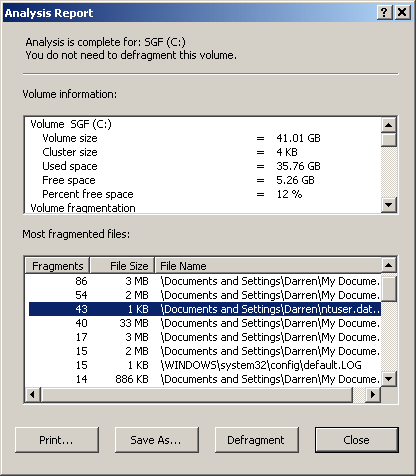
> I don't know. All I can say is that I've seen files with 2K length
> spread over half a dozen blocks as reported by defrag. :-)  I'm not sure
> what causes it.

I mean, 43 fragments for a 1K ntuser.dat?  15 fragments for a 1K
default.log? In a 4K cluster size?  Clearly, there has to be fragmented
files with not-fully-packed blocks, if defrag is to be believed.

Maybe that's the problem tho - the layout is right, the reporting is funky.

--
   Darren New / San Diego, CA, USA (PST)
     Remember the good old days, when we
     used to complain about cryptography
     being export-restricted?
Post a reply to this message
Attachments:
Download 'image1.gif' (14 KB)
Preview of image 'image1.gif'
|
|
| |
| |
|
|
|
|
| |
| |
|
|
Darren New escribió:
> Unlike UNIX, it's not just a matter of seeking around. You have to open
> the file as a sparse file, then you have to say "hey, this area is
> sparse" rather than (say) just writing all zeros to the blocks or
> something.

Not really... Cross-platform programs that don't use any
Windows-specific API manage to create sparse files here. That's why
download managers that download in chunks give the option to
pre-allocate: sparse files that are filled randomly get fragmented quite
badly.
Post a reply to this message
|
|
| |
| |
|
|
From: Nicolas Alvarez
Subject: Re: missing disk space on server, need help
Date: 13 Nov 2007 12:42:00
Message: <4739e1e8@news.povray.org>
|
|
|
| |
| |
|
|
Darren New escribió:
> I mean, 43 fragments for a 1K ntuser.dat?

That's probably mis-reporting the size. NTUSER.DAT has the whole user
registry hive. It's 6MB on my machine, no way it can be 1K on yours.
Post a reply to this message
|
|
| |
| |
|
|
|
|
| |
| |
|
|
On Tue, 13 Nov 2007 08:32:14 -0800, Darren New wrote:

> Jim Henderson wrote:
>> On Mon, 12 Nov 2007 20:38:07 -0800, Darren New wrote:
>>
>>> Open the file, write a little bit, close it. Open it again, append a
>>> little, close it. Repeat.  Possibly it requires other people to also
>>> have the file open at the same time, as for reading or something?
>>
>> Don't think so.
>
> I don't know. All I can say is that I've seen files with 2K length
> spread over half a dozen blocks as reported by defrag. :-)  I'm not sure
> what causes it.

At a guess, corruption. :-)
> Try running the defrag GUI version, look at the report, and see if
> things like your registry hives or event logs are fragmented and how
> much. In my expereince, it's not uncommon.

Hmmm, well, the only Windows I have installed is in VMware with virtual
disks, so I'm unlikely to run across this, I think.

>>  Sparse files I could see, but a proper sparse file
>> wouldn't shrink during a defrag, either, based on my own experiences,
>> because the "empty" space is as important as the real data is to the
>> application.
>
> Yah. Sparse files are already deallocated, so you can't really
> deallocate more.

Yep.

Jim
Post a reply to this message
|
|
| |
| |
|
|
|
|
| |
| |
|
|
On Tue, 13 Nov 2007 08:37:37 -0800, Darren New wrote:

> I mean, 43 fragments for a 1K ntuser.dat?  15 fragments for a 1K
> default.log? In a 4K cluster size?  Clearly, there has to be fragmented
> files with not-fully-packed blocks, if defrag is to be believed.

Weird.  Though based on my experiences with Active Directory, I'm not
inclined to believe what any Microsoft utility tells me.  I've seen two
different hardware diagnostics point fingers at each other, but with
Windows 2000 Server, I had a first - two programs that were intended to
tell me the health of my domain that couldn't agree with each other.
Both from the same vendor.

> Maybe that's the problem tho - the layout is right, the reporting is
> funky.

Could be.

Jim
Post a reply to this message
|
|
| |
| |
|
|
|
|
| |
| |
|
|
Darren New wrote:
> Orchid XP v7 wrote:
>> The allocation engine allocates a full block to a file, and does not
>> allocate any additional ones until the present ones are full.
>
> How do you know?

Well, put it this way: This is a trivial algorithm, and there is
absolutely no *reason* why it would do anything different, so...
Post a reply to this message
|
|
| |
| |
|
|
|
|
| |
| |
|
|
Jim Henderson nous apporta ses lumieres en ce 2007/11/12 19:37:
> On Mon, 12 Nov 2007 19:20:08 -0500, Alain wrote:
>
>> Ever heard of "sparse" files?
>
> Yes.  Old hand at NetWare; didn't know that Windows filesystems supported
> sparse files.
>
> Jim
Was even supported under DOS 3, maybe earlier.

--
Alain
-------------------------------------------------
Always try to be modest, and be proud of it!
Post a reply to this message
|
|
| |
| |
|
|
|
|
| |
| |
|
|
Nicolas Alvarez nous apporta ses lumieres en ce 2007/11/13 12:41:
> Darren New escribió:
>> Unlike UNIX, it's not just a matter of seeking around. You have to
>> open the file as a sparse file, then you have to say "hey, this area
>> is sparse" rather than (say) just writing all zeros to the blocks or
>> something.
>
> Not really... Cross-platform programs that don't use any
> Windows-specific API manage to create sparse files here. That's why
> download managers that download in chunks give the option to
> pre-allocate: sparse files that are filled randomly get fragmented quite
> badly.
And can have TONS of slack space! Just imagine a file whose records are about 64
bytes each, and only having less than 0.01% of them actualy used... with
clusters of 4Kb. You are stuck with many clusters containing only 1 record, at
some random location in the cluster.

--
Alain
-------------------------------------------------
Moonies: Only really happy shit happens.
Post a reply to this message
|
|
| |
| |
|
|
|
|
| |
| |
|
|
Orchid XP v7 nous apporta ses lumieres en ce 2007/11/12 13:58:
> Darren New wrote:
>> M_a_r_c wrote:
>>> "Nicolas Alvarez" <nic### [at] gmailisthebestcom> a écrit
>>> dans le message de news: 473472c5$1@news.povray.org...
>>>> Fa3ien escribió:
>>>>> I've run a defrag, which freed 250 Mb.
>>>> Defrags free disk space??
>>>
>>> I am not an expert but maybe if it optimizes disk occupation by
>>> filling blocks instead of letting empty portions of blocks.
>>
>> More precisely, if you have a fragmented file taking 3 blocks and
>> filling them each only 10%, defragging that file will free two blocks.
>
> More precisely, how would this situation arrise in the first place?
>
> The allocation engine allocates a full block to a file, and does not
> allocate any additional ones until the present ones are full.
>
How can you assume that it only allocate a single block? NTFS allocate some
cluster when you create a new file in an attempt to reduce fragmentation that
appens when several files are created at once and randomly filled. Once the file
is closed, the unused clusters are liberated. It does the same when all the
file's alocated space is filled ant it need some more disk space. That
prealocated space must reside in successive clusters.

--
Alain
-------------------------------------------------
Fix reason firmly in her seat, and call to her tribunal every fact, every
opinion. Question with boldness even the existence of a God; because, if
there be one, he must more approve of the homage of reason, than that of
blindfolded fear.
Thomas Jefferson
Post a reply to this message
|
|
| |
| |
|
|
|
|
| |
| |
|
|
Alain escribió:
> Nicolas Alvarez nous apporta ses lumieres en ce 2007/11/13 12:41:
>>
>> Not really... Cross-platform programs that don't use any
>> Windows-specific API manage to create sparse files here. That's why
>> download managers that download in chunks give the option to
>> pre-allocate: sparse files that are filled randomly get fragmented
>> quite badly.
> And can have TONS of slack space! Just imagine a file whose records are
> about 64 bytes each, and only having less than 0.01% of them actualy
> used... with clusters of 4Kb. You are stuck with many clusters
> containing only 1 record, at some random location in the cluster.
>

Of course. The file usage on disk grows while it gets downloaded. But in
the end, it will eventually be totally downloaded and extremely
fragmented. So in those cases it's a good idea to pre-allocate. If you
will have lots of "unused records" for long periods, then yes it's a
good idea to let it use sparse files.
Post a reply to this message
|
|
| |
| |
|
|
|
|
| |
| |
|
|
Nicolas Alvarez wrote:
> Darren New escribió:
>> Unlike UNIX, it's not just a matter of seeking around. You have to
>> open the file as a sparse file, then you have to say "hey, this area
>> is sparse" rather than (say) just writing all zeros to the blocks or
>> something.
>
> Not really... Cross-platform programs that don't use any
> Windows-specific API manage to create sparse files here.

I think if you write to it, regardless of what you write, you get
allocated space. UNIX *used* to see an all-zeros buffer and say "Gee, we
don't need to write that."  You didn't have to seek over the sparse
space to make it sparse, IIRC.

I think the calls I'm thinking of are for making an existing data area
sparse, too; i.e., throwing away the beginning of a log file without
changing offsets of existing records. And you may even need to open the
file in "sparse" mode.

Or, I could be completely wrong. This one I never actually did. :-)

--
   Darren New / San Diego, CA, USA (PST)
     Remember the good old days, when we
     used to complain about cryptography
     being export-restricted?
Post a reply to this message
|
|
| |
| |
|
|
|
|
| |
| |
|
|
Alain wrote:
> Jim Henderson nous apporta ses lumieres en ce 2007/11/12 19:37:
>> On Mon, 12 Nov 2007 19:20:08 -0500, Alain wrote:
>>
>>> Ever heard of "sparse" files?
>>
>> Yes.  Old hand at NetWare; didn't know that Windows filesystems
>> supported sparse files.
>>
>> Jim
> Was even supported under DOS 3, maybe earlier.

What, on FAT?  Nah.  Would have to be some other format, cause FAT
doesn't have the data structures for that.

CP/M did, actually, now that I think of it. :-)

--
   Darren New / San Diego, CA, USA (PST)
     Remember the good old days, when we
     used to complain about cryptography
     being export-restricted?
Post a reply to this message
|
|
| |
| |
|
|
|
|
| |
| |
|
|
Nicolas Alvarez wrote:
> Darren New escribió:
>> I mean, 43 fragments for a 1K ntuser.dat?
>
> That's probably mis-reporting the size. NTUSER.DAT has the whole user
> registry hive. It's 6MB on my machine, no way it can be 1K on yours.

Yah, OK. Looking at it with DIR is 15 meg or so here.  I *thought* that
was kind of funky.

--
   Darren New / San Diego, CA, USA (PST)
     Remember the good old days, when we
     used to complain about cryptography
     being export-restricted?
Post a reply to this message
|
|
| |
| |
|
|
From: Darren New
Subject: Re: missing disk space on server, need help
Date: 13 Nov 2007 21:33:33
Message: <473a5e7d@news.povray.org>
|
|
|
| |
| |
|
|
Orchid XP v7 wrote:
> Darren New wrote:
>> Orchid XP v7 wrote:
>>> The allocation engine allocates a full block to a file, and does not
>>> allocate any additional ones until the present ones are full.
>>
>> How do you know?
>
> Well, put it this way: This is a trivial algorithm, and there is
> absolutely no *reason* why it would do anything different, so...

I thought Microsoft was generally considered a good reason to do
anything trivial wrong. ;-)

--
   Darren New / San Diego, CA, USA (PST)
     Remember the good old days, when we
     used to complain about cryptography
     being export-restricted?
Post a reply to this message
|
|
| |
| |
|
|
|
|
| |
| |
|
|
Darren New escribió:
> Nicolas Alvarez wrote:
>> Darren New escribió:
>>> Unlike UNIX, it's not just a matter of seeking around. You have to
>>> open the file as a sparse file, then you have to say "hey, this area
>>> is sparse" rather than (say) just writing all zeros to the blocks or
>>> something.
>>
>> Not really... Cross-platform programs that don't use any
>> Windows-specific API manage to create sparse files here.
>
> I think if you write to it, regardless of what you write, you get
> allocated space. UNIX *used* to see an all-zeros buffer and say "Gee, we
> don't need to write that."  You didn't have to seek over the sparse
> space to make it sparse, IIRC.

Right, as far as I know, if you write 0s without using any special
Windows API, the 0s actually get written (that's the pre-allocation
download programs do).
Post a reply to this message
|
|
| |
| |
|
|
|
|
| |