 |
|
|
|
|
|
| |
| |
|
|
|
|
| |
| |
|
|
> The easiest way of learning to use software is not by complaining about
> lack of
> manual, but by sitting in front of it for hours and getting the hang and
> feel
> of it.  And be sure to not be reasonable:  force errors to learn with
> them...

There's no getting around that it's a word processor with a steep learning
curve attached to it for no particular reason. I can think of numerous
"bad" features and outright bugs, at least in the version I have (2002).

Opening Word empties the windows clipboard.

Clicking on a .doc file opens Word but not the document.

Paste from IE explorer often causes a long pause as Word
does unneeded network fetching.

"Save as web page" is mostly unusable because it links in
an Active X control for viewing Word documents as well as
converting to HTML.

When printing to a networked printer there is no feedback
about the print job, success or failed, the print dialog just closes.
(resulting in numerous unwanted second and third copies)

When a local print job fails the system often all but locks up,
despite reboots, until you manually open the print queue from
the control panel and kill the job.
Post a reply to this message
|
|
| |
| |
|
|
|
|
| |
| |
|
|
Jim Henderson wrote:
> Sounds like you'd benefit from having a look at structured Framemaker,
> then.

I miss FrameMaker. The only word processor that actually made sense and
was controllable.

--
   Darren New / San Diego, CA, USA (PST)
     Remember the good old days, when we
     used to complain about cryptography
     being export-restricted?
Post a reply to this message
|
|
| |
| |
|
|
|
|
| |
| |
|
|
Orchid XP v7 wrote:
> scott wrote:
>>> (I am convinced that I cannot possibly be alone in hating that
>>> retched paperclip though!)
>>
>> You installed (or haven't uninstalled yet) *that* thing? o_O
>
> ....it's removable??

I went about five years wondering what everyone was complaining about,
as I'd never installed it in the first place in any of the many Word
installs.

It's called "Office Assistant". Uncheck it in the setup.

--
   Darren New / San Diego, CA, USA (PST)
     Remember the good old days, when we
     used to complain about cryptography
     being export-restricted?
Post a reply to this message
|
|
| |
| |
|
|
|
|
| |
| |
|
|
Invisible wrote:
> Isn't the answer obvious? "I don't".

Why would you think you can pick up a program as big as Word and intuit
how it works?  Buy a book, dude. :-)

> Ah-hah. So there *is* a secret hidden tool for altering them! (At least,
> there is in Word 2003.)

Yeah, the secret hidden tool for modifying styles is under the Styles
menu, called Modify. ;-)

> Still puzzled as to why you have to open up a special window to do this.
> (I.e., why you can't just click on the style you want to change.)

Go to Format->Styles, and right-click on one of the styles. Notice how
you have "Modify this style" as well as "Modify this style to match the
formatting of what's selected". What would you expect?

> then, this is from the program where you can't change any program
> settings unless you have a document open. (WTF?)

Um, in mine I can, certainly. Just not stuff that's stored with a
document, like, say, styles.

> (Ooo, that's nice... If I change a style to match an existing one, the
> existing one gets deleted. And if I change the justification for the
> Normal style, the other styles update. Pitty you can't explicitly say
> which settings are applied in THIS style and which ones should just be
> inherited...)

You can. That's why the modify-style dialog has things like "based on
Normal" in the configuration.

> OK, no go. Word *refuses* to overwrite NORMAL.DOT because it's already
> open. (Duh!) God I hate Word! >_<

Really. It's complicated enough you need to buy a book if you want to do
more than the most trivial stuff. Or at least wander around in the help
files, which are actually quite good.

For example, search the help for "Modify normal.dot". It gives you
step-by-step instructions for editing it. They work.

> [Ironic, given that one of the things I was just talking about is that there *isn't*
a book...]

http://www.amazon.com/Word-2003-Dummies-Dan-Gookin/dp/0764539825

*That* wasn't hard.

> ....it's removable??

http://www.irregularwebcomic.net/783.html

> The main problem with M$ Word is that it tries to "guess" what you want to do so it
can automatically do it for you.

At least in 2003, it makes it really easy to say "Don't do that here"
and "Don't do that any more."  I notice in OO it brings up its own
Clippy to tell you it did something, but not really offer to undo it for
you. :-)


--
   Darren New / San Diego, CA, USA (PST)
     Remember the good old days, when we
     used to complain about cryptography
     being export-restricted?
Post a reply to this message
|
|
| |
| |
|
|
|
|
| |
| |
|
|
Vincent Le Chevalier wrote:
> Invisible wrote:
>> Invisible wrote:
>>
>>> I just downloaded "tex.web" and started reading it... Hmm, LOL!
>>
>> Oh wow... This stuff is really special.
>
> Well yes, the day I'll try to make the world better with a new word
> processor, I think I'll start from scratch...
>
> Not that this day has come yet ;-)
>
> TeX is admirable because of its lifespan, its stability, its low count
> of bugs, but I think starting from its source would lead to a
> derivative, but nothing radically new...

All I really want is the excellent formatting engine. (You know, the one
that decides where to put all the linebreaks and stuff.) The rest of the
thing - that whole macro expansion lot, the character "catcodes", the
buggy image support, the buggy colour support, etc. - you can keep it! :-P
Post a reply to this message
|
|
| |
| |
|
|
|
|
| |
| |
|
|
And lo on Mon, 05 Nov 2007 16:55:41 -0000, Alain
<ele### [at] netscape net> did spake, saying:
> Invisible nous apporta ses lumieres en ce 2007/11/05 10:11:
>> Brian Elliott wrote:
>>
>>> Whinge, whinge, whinge. :-P :-)
>>> They do do it. You just haven't figured it out.
>> So, I figured out LaTeX and HTML (not to mention POV-Ray, the Lambda
>> calculus, cryptography, inorganic chemistry, and much else besides) yet
>> I couldn't figure out M$ Word?
>> What does this say about M$ Word? ;-)
>> (Come to think about it, one critical difference between Word and
>> those other things is the lack of a *manual*. POV-Ray comes with an
>> excellent manual, but Word only offers context help. Not very useful if
>> you have no idea how a broad feature is supposed to work!)
>>
>
> There ARE manuals, many of them in fact. It's just that they are NOT
> included with the product, some are very simples (Word for Dummy), and
> some even come with a teacher ;)
Actually one is, it's called "Help" (not the context help). These are the
top three topics I get from typing in "Style" - "Apply a different style",
"Troubleshoot styles", and "Create a new style" that last one has another
link to "formatting text by using styles" which gives you a step-by-step
guide as to what they are and how they work.
--
Phil Cook
--
I once tried to be apathetic, but I just couldn't be bothered
http://flipc.blogspot.com net> did spake, saying:
> Invisible nous apporta ses lumieres en ce 2007/11/05 10:11:
>> Brian Elliott wrote:
>>
>>> Whinge, whinge, whinge. :-P :-)
>>> They do do it. You just haven't figured it out.
>> So, I figured out LaTeX and HTML (not to mention POV-Ray, the Lambda
>> calculus, cryptography, inorganic chemistry, and much else besides) yet
>> I couldn't figure out M$ Word?
>> What does this say about M$ Word? ;-)
>> (Come to think about it, one critical difference between Word and
>> those other things is the lack of a *manual*. POV-Ray comes with an
>> excellent manual, but Word only offers context help. Not very useful if
>> you have no idea how a broad feature is supposed to work!)
>>
>
> There ARE manuals, many of them in fact. It's just that they are NOT
> included with the product, some are very simples (Word for Dummy), and
> some even come with a teacher ;)
Actually one is, it's called "Help" (not the context help). These are the
top three topics I get from typing in "Style" - "Apply a different style",
"Troubleshoot styles", and "Create a new style" that last one has another
link to "formatting text by using styles" which gives you a step-by-step
guide as to what they are and how they work.
--
Phil Cook
--
I once tried to be apathetic, but I just couldn't be bothered
http://flipc.blogspot.com
Post a reply to this message
|
|
| |
| |
|
|
|
|
| |
| |
|
|
Orchid XP v7 wrote:

>>> (I am convinced that I cannot possibly be alone in hating that
>>> retched paperclip though!)
>>
>> You installed (or haven't uninstalled yet) *that* thing? o_O
>
> ...it's removable??

Well strap me to an eel and use me for a baseball bat... It seems that
in Word 2003, the damn paper clip is gone! At least, I opened up the
help system, and there was no paperclip there. And that's good enough
for me... ;-)
Post a reply to this message
|
|
| |
| |
|
|
|
|
| |
| |
|
|
Invisible <voi### [at] devnull> wrote:
> Nicolas Alvarez wrote:
> > Invisible escribió:
> >> Both Word and OpenOffice provide "styles", but good luck figuring out
> >> how to work them.
> >
> > I find it interesting that nobody on earth ever uses them. Come on, I
> > just decided all those headings on the 30-page document shouldn't be
> > centered. Go change them. Would take seconds using styles.
>
> Well, most people use Word to write 1-page documents. (Things like
> letters and printed notes, address labels, etc.) As for the rest, I
> guess it's just because it's so hard to figure out how this stuff
> actually works... [Assuming you even realise there's a useful thing to
> be learned about in the first place.]

Most people you know, you mean? :)

Since working in an office (~10 years) M$ Word has been my, and all projects
I’ve been on, standard WP app. Styles often come pre defined to fit the clients
specifications for conformity of style. The outline view is very useful as are
the decrease and increase indents buttons. Add that to outline numbering and it
is a quite powerful feature.
You must try to press F1 before whinging. :)


Stephen
Post a reply to this message
|
|
| |
| |
|
|
|
|
| |
| |
|
|
Stephen wrote:

> You must try to press F1 before whinging. :)

But then I'd probably end up complaining about how unhelpful F1 is. :-P

(Although, in fairness, in Word 2003 is seems somewhat more useful than
in Word 97.)
Post a reply to this message
|
|
| |
| |
|
|
|
|
| |
| |
|
|
Invisible <voi### [at] devnull> wrote:
> Stephen wrote:
>
> > You must try to press F1 before whinging. :)
>
> But then I'd probably end up complaining about how unhelpful F1 is. :-P
>
> (Although, in fairness, in Word 2003 is seems somewhat more useful than
> in Word 97.)

Just wait until Word 2099 and then it will fix whats wrong before you can ask it
:)

Stephen
Post a reply to this message
|
|
| |
| |
|
|
|
|
| |
| |
|
|
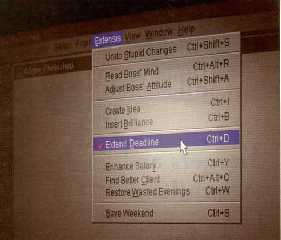
Stephen wrote:

> Just wait until Word 2099 and then it will fix whats wrong before you can ask it
> :)

What, like this?
Post a reply to this message
Attachments:
Download 'extend_deadline.jpg' (24 KB)
Preview of image 'extend_deadline.jpg'
|
|
| |
| |
|
|
|
|
| |
| |
|
|
On Mon, 05 Nov 2007 21:24:33 -0800, Darren New wrote:

> Jim Henderson wrote:
>> Sounds like you'd benefit from having a look at structured Framemaker,
>> then.
>
> I miss FrameMaker. The only word processor that actually made sense and
> was controllable.

I use it on occasion - just finished a program guide using our official
templates.  The thing that's odd is that as a Linux company, there isn't
a Linux version (the use of Frame predates our acquisition of SUSE,
though) and because we're so heavily invested in customizations made in
structured frame, we're not likely to change anytime soon.

It takes a little getting used to, but once you know how to use it, it's
a breeze.  Just a fairly steep learning curve when you're starting out.

Jim
Post a reply to this message
|
|
| |
| |
|
|
|
|
| |
| |
|
|
Jim Henderson <nos### [at] nospamcom> wrote:
> The thing that's odd is that as a Linux company, there isn't
> a Linux version

  There isn't? Then what is this:
http://en.wikipedia.org/wiki/Image:Fmlinux556.png

--
                                                          - Warp
Post a reply to this message
|
|
| |
| |
|
|
|
|
| |
| |
|
|
Darren New wrote:
> Invisible wrote:
>> Isn't the answer obvious? "I don't".
>
> Why would you think you can pick up a program as big as Word and intuit
> how it works?  Buy a book, dude. :-)

It's not like I'm trying to do something *complicated*. If I was trying
to design some intricate mail-merge or something, I'd understand having
trouble. But something as trivial as basic formatting?

>> Ah-hah. So there *is* a secret hidden tool for altering them! (At
>> least, there is in Word 2003.)
>
> Yeah, the secret hidden tool for modifying styles is under the Styles
> menu, called Modify. ;-)

I just don't get why you have to open a special extra window just to
change styles, that's all. I mean, now I know it's not that hard, but
anyway...

>> Still puzzled as to why you have to open up a special window to do
>> this. (I.e., why you can't just click on the style you want to change.)
>
> Go to Format->Styles, and right-click on one of the styles. Notice how
> you have "Modify this style" as well as "Modify this style to match the
> formatting of what's selected". What would you expect?

...to be able to just right-click on the currently selected style and
modify it. But, apparently not.

>> then, this is from the program where you can't change any program
>> settings unless you have a document open. (WTF?)
>
> Um, in mine I can, certainly. Just not stuff that's stored with a
> document, like, say, styles.

Well, in mine, if there is no active document open, Tools / Options is
disabled. (So I can't, for example, look up where the templates folder
is unless I create an empty document first. Go fiure...)


> At least in 2003, it makes it really easy to say "Don't do that here"
> and "Don't do that any more."  I notice in OO it brings up its own
> Clippy to tell you it did something, but not really offer to undo it for
> you. :-)

Yeah, I noticed that too... hmm.
Post a reply to this message
|
|
| |
| |
|
|
|
|
| |
| |
|
|
Stephen wrote:

> Since working in an office (~10 years) M$ Word has been my, and all projects
> I’ve been on, standard WP app. Styles often come pre defined to fit the clients
> specifications for conformity of style.

Ooo - don't you love it when a client sends you a Word template and
demands that you use it, but every time you use it, Word becomes
unstable? :-D
Post a reply to this message
|
|
| |
| |
|
|
|
|
| |
| |
|
|
On Tue, 06 Nov 2007 12:48:46 -0500, Warp wrote:

> Jim Henderson <nos### [at] nospamcom> wrote:
>> The thing that's odd is that as a Linux company, there isn't a Linux
>> version
>
>   There isn't? Then what is this:
> http://en.wikipedia.org/wiki/Image:Fmlinux556.png

A long-since abandoned product.  Frame is at version 7 now.

Jim
Post a reply to this message
|
|
| |
| |
|
|
|
|
| |
| |
|
|
Jim Henderson <nos### [at] nospamcom> wrote:
> A long-since abandoned product.  Frame is at version 7 now.

  And framework 5 cannot be used? Was it horrible?

--
                                                          - Warp
Post a reply to this message
|
|
| |
| |
|
|
|
|
| |
| |
|
|
On Tue, 06 Nov 2007 13:21:12 -0500, Warp wrote:

> Jim Henderson <nos### [at] nospamcom> wrote:
>> A long-since abandoned product.  Frame is at version 7 now.
>
>   And framework 5 cannot be used? Was it horrible?

It is incompatible with our templates and with the other systems that use
versions of Frame that are later than 5.  We've got entire processes that
were built to translate the output to various formats (HTML, online
documentation, Folio, etc, etc).  They're all tied to version 7 (recently
updated from 6 IIRC).

And I don't believe you can purchase it from Adobe any more, which moots
it rather significantly.

If only the Windows version worked under WINE or Crossover Office.
Sadly, it doesn't (or didn't the last time anyone here tried it).

Jim
Post a reply to this message
|
|
| |
| |
|
|
|
|
| |
| |
|
|
On Tue, 06 Nov 2007 13:21:12 -0500, Warp wrote:

> Jim Henderson <nos### [at] nospamcom> wrote:
>> A long-since abandoned product.  Frame is at version 7 now.
>
>   And framework 5 cannot be used? Was it horrible?

Oh, and then there is also the question of getting Adobe to support a
discontinued product....

Jim
Post a reply to this message
|
|
| |
| |
|
|
|
|
| |
| |
|
|
Orchid XP v7 wrote:
> ....to be able to just right-click on the currently selected style and
> modify it. But, apparently not.

I'm not sure what you mean by "currently selected style". In the
drop-down list at the top? In the styles manager window? Or do you mean
"text formatted with a particular style"?

The right-click on the drop-down menu doesn't work, no. The "modify" in
the styles window works as expected. Modifying a style by editting the
formatting of text that's in that style is one of those automatic things
that people complain about, which may or may not be turned on by default
(I don't remember).

> Well, in mine, if there is no active document open, Tools / Options is
> disabled. (So I can't, for example, look up where the templates folder
> is unless I create an empty document first. Go fiure...)

But the "Tools->Templates" menu is lit up, that lets you edit templates.

:-)

--
   Darren New / San Diego, CA, USA (PST)
     Remember the good old days, when we
     used to complain about cryptography
     being export-restricted?
Post a reply to this message
|
|
| |
| |
|
|
|
|
| |
| |
|
|
Invisible wrote:
> (Although, in fairness, in Word 2003 is seems somewhat more useful than
> in Word 97.)

In fairness, W2003 is the first *major* step up from W97, imo.

--
   Darren New / San Diego, CA, USA (PST)
     Remember the good old days, when we
     used to complain about cryptography
     being export-restricted?
Post a reply to this message
|
|
| |
| |
|
|
|
|
| |
| |
|
|
Jim Henderson <nos### [at] nospamcom> wrote:
> They're all tied to

  I have for long wondered why companies are so eager to tie their vital
documents to a closed proprietary format owned by one company who has sole
control on when and how the format is supported.

--
                                                          - Warp
Post a reply to this message
|
|
| |
| |
|
|
|
|
| |
| |
|
|
Warp wrote:
> Jim Henderson <nos### [at] nospamcom> wrote:
>> They're all tied to
>
>   I have for long wondered why companies are so eager to tie their vital
> documents to a closed proprietary format owned by one company who has sole
> control on when and how the format is supported.

I can think of several reasons.

* Few if any really viable alternatives exist. (That's starting to
change, slowly.)

* You are completely dependent on the company that makes the factory
floor equipment you use to not suddenly decide to stop supporting it -
why not your software?

* Nobody really realises there's a potential problem. (After all, "big"
companies never go under, do they?)

* Nobody has thought about it.

* Everybody else does it. (Cool reason, eh?)
Post a reply to this message
|
|
| |
| |
|
|
|
|
| |
| |
|
|
On Tue, 06 Nov 2007 16:14:24 -0500, Warp wrote:

> Jim Henderson <nos### [at] nospamcom> wrote:
>> They're all tied to
>
>   I have for long wondered why companies are so eager to tie their vital
> documents to a closed proprietary format owned by one company who has
> sole control on when and how the format is supported.

Well, for this particular instance, it's because the tool available was
the best tool out there at the time.

And many argue that it still is.  We've had elements of our organization
who wanted to move to LaTeX or other tools (got one guy who's trying to
replicate the Frame formats in OpenOffice, of all things), but in the
end, they just didn't meet the needs of the organization.

Frame can export SGML as well, but a lot of its own structure and
elements get lost along the way, or so I'm told.  I'm no expert in
creating the formats, but I use them (and was a heavy user); having
written books using Word 2.0 templates and using Frame, I'd *never* use a
word processor for that kind of work if I could possibly avoid it.

Jim
Post a reply to this message
|
|
| |
| |
|
|
|
|
| |
| |
|
|
On Tue, 06 Nov 2007 21:59:34 +0000, Orchid XP v7 wrote:

> * Few if any really viable alternatives exist. (That's starting to
> change, slowly.)

This is the most common reason, actually - though it stems from others
(such as "everyone else uses it", which leads to few choices in the
market).

There was a really good article in a recent issue of Linux Format (out of
the UK) where they talked about using Scribus instead of using whatever
tool it is they use for the magazine (something Mac-based, IIRC).  The
article itself was written entirely using Scribus, and there were a few
things that had to be adapted because Scribus didn't support the
necessary functionality, but in the end, it was a fairly viable option if
they could live without a few things (which of course they couldn't).

I can remember a time when I was told that the big Linux vendors (RedHat,
SuSE, maybe Canonical) used Windows-based systems for some of their
business functions.  Seems kinda odd until you remember that they do
actually have a business to run, and sometimes that means picking
software that you would rather not pick.  I'm sure, for example, that
Oracle will be using Windows systems internally, and it must drive
Ellison nuts that he has to pay anything to Microsoft...

Jim
Post a reply to this message
|
|
| |
| |
|
|
|
|
| |
| |
|
|
Jim Henderson <nos### [at] nospamcom> wrote:
> I can remember a time when I was told that the big Linux vendors (RedHat,
> SuSE, maybe Canonical) used Windows-based systems for some of their
> business functions.  Seems kinda odd until you remember that they do
> actually have a business to run, and sometimes that means picking
> software that you would rather not pick.  I'm sure, for example, that
> Oracle will be using Windows systems internally, and it must drive
> Ellison nuts that he has to pay anything to Microsoft...

  Reminds me of a reverse case: Microsoft's hotmail still runs on FreeBSD,
which is a PitA for Microsoft PR-wise. They have been trying to move the
entire hotmail system to Windows for over 4 years. Still runs on FreeBSD,
though.

  Kind of "if it works, don't fix it... except if it's running on a
"competitor's" system and you have been badmouthing your competitors
for two decades".

--
                                                          - Warp
Post a reply to this message
|
|
| |
| |
|
|
|
|
| |
| |
|
|
Warp wrote:
>   Reminds me of a reverse case: Microsoft's hotmail still runs on FreeBSD,

Do you have a cite for this? I heard about 10 years ago it ran on
Solaris, and about 6 years ago they'd moved it to Windows. So I'm
curious if you have access to actual current information?

--
   Darren New / San Diego, CA, USA (PST)
     Remember the good old days, when we
     used to complain about cryptography
     being export-restricted?
Post a reply to this message
|
|
| |
| |
|
|
|
|
| |
| |
|
|
On Tue, 06 Nov 2007 19:43:46 -0500, Warp wrote:

>   Reminds me of a reverse case: Microsoft's hotmail still runs on
>   FreeBSD,
> which is a PitA for Microsoft PR-wise. They have been trying to move the
> entire hotmail system to Windows for over 4 years. Still runs on
> FreeBSD, though.

Yep, and it's been fun to watch that as well. :-)

Jim
Post a reply to this message
|
|
| |
| |
|
|
|
|
| |
| |
|
|
Darren New <dne### [at] sanrrcom> wrote:
> Do you have a cite for this?

  Google?

--
                                                          - Warp
Post a reply to this message
|
|
| |
| |
|
|
|
|
| |
| |
|
|
Warp wrote:
> Darren New <dne### [at] sanrrcom> wrote:
>> Do you have a cite for this?
>
>   Google?
>

Googling on the obvious "hotmail freebsd" pair brings up articles from
2001 saying MS still uses FreeBSD, and articles from 2000 where MS
outlines how they will upgrade it. Considering they never took the
system down during the upgrade, it was all C++, and they had limited
staff *and* the stuff that was hard to scale out (naming services,
database) was already running on NT, taking 4 years to move entirely
from FreeBSD to Win2K doesn't seem that odd to me.

I was wondering if you had any information about the 2001 upgrade that
was more recent than, say, 2001?  Since it *is* six years later, it's
kind of silly to continue to say "Hotmail still runs BSD" without any
additional information?

--
   Darren New / San Diego, CA, USA (PST)
     Remember the good old days, when we
     used to complain about cryptography
     being export-restricted?
Post a reply to this message
|
|
| |
| |
|
|
|
|
| |
| |
|
|
Invisible <voi### [at] devnull> wrote:
> Stephen wrote:
>
> > Just wait until Word 2099 and then it will fix whats wrong before you can ask it
> > :)
>
> What, like this?

Yes, is it a Beta?

LOL


Stephen
Post a reply to this message
|
|
| |
| |
|
|
|
|
| |
| |
|
|
>  I have for long wondered why companies are so eager to tie their vital
> documents to a closed proprietary format owned by one company who has sole
> control on when and how the format is supported.

Well if worst comes to worst, you just don't install the newer version of
the software.  Anyway I don't think MS would last long if their latest
version of Word didn't allow imports from previous versions - I wouldn't
worry.

And if worst comes to absolute worse (like Word2009 only allows you to open
Word2009 files and nothing else) then you'd probably stick with Word2008
until MS released an update (along with every other company in the world) or
start using OpenOffice (which someone would no doubt have written a very
good Word2008 importer for).

The bottom line is the benefits of using MS Office far outweigh any risk of
all your documents suddenly becoming unusable.
Post a reply to this message
|
|
| |
| |
|
|
|
|
| |
| |
|
|
"Orchid XP v7" <voi### [at] devnull> wrote

> how to use styles in that either. (At least, not very reliably.) I
> wanted to be able to say "haha, Word sucks, OOW is better", but I can't
> because it's not true. Is that bais?

No, but it's bias. All software has bugs, is suboptimal, often bloated...
etc. I have yet to find a perfect software. Word processing is a very broad
task, it's guaranteed than some of the users will be unhappy. That neither
OO, TeX or anybody else got it "right" should tell you that it's not just
MS's fault. To top it off, often, there's a big major dilemma between
maintaining backwards compatibility and doing it right.
Post a reply to this message
|
|
| |
| |
|
|
|
|
| |
| |
|
|
scott <sco### [at] laptopcom> wrote:
> benefits of using MS Office

  What benefits would those be?

--
                                                          - Warp
Post a reply to this message
|
|
| |
| |
|
|
|
|
| |
| |
|
|
scott nous apporta ses lumieres en ce 2007/11/07 03:16:
>>  I have for long wondered why companies are so eager to tie their vital
>> documents to a closed proprietary format owned by one company who has
>> sole
>> control on when and how the format is supported.
>
> Well if worst comes to worst, you just don't install the newer version
> of the software.  Anyway I don't think MS would last long if their
> latest version of Word didn't allow imports from previous versions - I
> wouldn't worry.
>
> And if worst comes to absolute worse (like Word2009 only allows you to
> open Word2009 files and nothing else) then you'd probably stick with
> Word2008 until MS released an update (along with every other company in
> the world) or start using OpenOffice (which someone would no doubt have
> written a very good Word2008 importer for).
>
> The bottom line is the benefits of using MS Office far outweigh any risk
> of all your documents suddenly becoming unusable.
>
>
Word can only import from the previous 2, maybe 3, versions. If you have
upgraded through more than that many versions, you can import from older
versions, dating back about 2 versions before the first version that you actualy
installed. The problem is that you loose that capacity if you get a new computer
and forget to transfert all your old convertion filters.
Whenever you need to access any old document that have not been accessed for
more than 3 or 4 years, you run the risk of not been able do to it, as you may
no longer have the appropriate filters.

--
Alain
-------------------------------------------------
The strongest reason for the people to retain the right to keep and bear
arms is, as a last resort, to protect themselves against tyranny in
government.
Thomas Jefferson
Post a reply to this message
|
|
| |
| |
|
|
|
|
| |
| |
|
|
>> benefits of using MS Office
>
>  What benefits would those be?

That everyone knows how to use them, they work with all your other software,
and you can share files with your suppliers and customers hassle-free.
Post a reply to this message
|
|
| |
| |
|
|
|
|
| |
| |
|
|
> Word can only import from the previous 2, maybe 3, versions. If you have
> upgraded through more than that many versions, you can import from older
> versions, dating back about 2 versions before the first version that you
> actualy installed. The problem is that you loose that capacity if you get
> a new computer and forget to transfert all your old convertion filters.
>
> Whenever you need to access any old document that have not been accessed
> for more than 3 or 4 years, you run the risk of not been able do to it, as
> you may no longer have the appropriate filters.

Hmm, my Word 2003 looks like it will open Word 6 files (1995?), which is 8
years.

So you're saying that if your company was based on Word 5, and then upgraded
to Word 2003, you would get stuck?  Well yeh, you probably would, but I'm
pretty sure there would be a cheap solution to converting, even if it meant
buying an intermediate copy of Word to help with the conversions.
Post a reply to this message
|
|
| |
| |
|
|
|
|
| |
| |
|
|
scott <sco### [at] laptopcom> wrote:
> >> benefits of using MS Office
> >
> >  What benefits would those be?

> That everyone knows how to use them, they work with all your other software,
> and you can share files with your suppliers and customers hassle-free.

  It was a rhetorical question.

--
                                                          - Warp
Post a reply to this message
|
|
| |
| |
|
|
|
|
| |
| |
|
|
"Alain" <ele### [at] netscapenet> a écrit dans le message de news:
4731f6e1$1@news.povray.org...
> Word can only import from the previous 2, maybe 3, versions. If you have
> upgraded through more than that many versions, you can import from older
> versions, dating back about 2 versions before the first version that you
> actualy installed. The problem is that you loose that capacity if you get
> a new computer and forget to transfert all your old convertion filters.
> Whenever you need to access any old document that have not been accessed
> for more than 3 or 4 years, you run the risk of not been able do to it, as
> you may no longer have the appropriate filters.

Uh? For the fun of it, I just tested if I could open some Word files I wrote
in 1988 and apart warning me about the potential security issues with MS-DOS
Word 3/5 files, it opened them just fine and even recognised the style
sheets. I don't think that maintaining 20-year old conversion filters is
such a big hassle for Microsoft.

G.
Post a reply to this message
|
|
| |
| |
|
|
|
|
| |
| |
|
|
>> >  What benefits would those be?
>
>> That everyone knows how to use them, they work with all your other
>> software,
>> and you can share files with your suppliers and customers hassle-free.
>
>  It was a rhetorical question.

Bit of a stupid one then.
Post a reply to this message
|
|
| |
| |
|
|
|
|
| |
| |
|
|
> Hmm, my Word 2003 looks like it will open Word 6 files (1995?), which is 8
> years.

Duh!  *12* years!  I think my brain is fried.
Post a reply to this message
|
|
| |
| |
|
|
|
|
| |
| |
|
|
On Wed, 07 Nov 2007 12:33:20 -0500, Alain wrote:

> Word can only import from the previous 2, maybe 3, versions.

Nope.  The publishing industry (at least the part of it that I worked
with) uses Word 2.0 templates, and they work even in today's versions of
Word without having to install anything different - even with a fresh
install.

Jim
Post a reply to this message
|
|
| |
| |
|
|
|
|
| |
| |
|
|
scott wrote:
>> Hmm, my Word 2003 looks like it will open Word 6 files (1995?), which
>> is 8 years.
>
> Duh!  *12* years!  I think my brain is fried.
>
>
>
Actually, I think that 2003-1995 _is_ 8.. 1995+12 would be 2007,
wouldn't it?

-- Arttu Voutilainen
Post a reply to this message
|
|
| |
| |
|
|
|
|
| |
| |
|
|
On Mon, 5 Nov 2007 13:00:56 -0000, scott wrote:
> A million other people want to do exactly what you say, and actually do do
> it everyday in MS Word.

And I found the learning curve of using them in Word 2007 rather short.
Similarly for Openoffice 2.

--
Joel Yliluoma - http://bisqwit.iki.fi/
: comprehension = 1 / (2 ^ precision)
Post a reply to this message
|
|
| |
| |
|
|
|
|
| |
| |
|
|
Jim Henderson nous apporta ses lumieres en ce 2007/11/07 18:12:
> On Wed, 07 Nov 2007 12:33:20 -0500, Alain wrote:
>
>> Word can only import from the previous 2, maybe 3, versions.
>
> Nope.  The publishing industry (at least the part of it that I worked
> with) uses Word 2.0 templates, and they work even in today's versions of
> Word without having to install anything different - even with a fresh
> install.
>
> Jim
Maybe there was a change. Working with word 5, I could'nt open files from word
2: the programm complained about missing filters.

--
Alain
-------------------------------------------------
PROPENSITY TO CHANGE
A woman marries a man expecting he will change, but he doesn't.
A man marries a woman expecting that she won't change, and she does.
Post a reply to this message
|
|
| |
| |
|
|
|
|
| |
| |
|
|
On Fri, 09 Nov 2007 19:26:27 -0500, Alain wrote:

> Jim Henderson nous apporta ses lumieres en ce 2007/11/07 18:12:
>> On Wed, 07 Nov 2007 12:33:20 -0500, Alain wrote:
>>
>>> Word can only import from the previous 2, maybe 3, versions.
>>
>> Nope.  The publishing industry (at least the part of it that I worked
>> with) uses Word 2.0 templates, and they work even in today's versions
>> of Word without having to install anything different - even with a
>> fresh install.
>>
>> Jim
> Maybe there was a change. Working with word 5, I could'nt open files
> from word 2: the programm complained about missing filters.

Perhaps, I woud've been using Word97 IIRC, at least the most recent time
around.  Prior to that was some work I published in 1995.

Jim
Post a reply to this message
|
|
| |
| |
|
|
|
|
| |
| |
|
|
Alain wrote:
> Maybe there was a change. Working with word 5, I could'nt open files
> from word 2: the programm complained about missing filters.

The filters on newer Words are optional installs. But they're there.

--
   Darren New / San Diego, CA, USA (PST)
     Remember the good old days, when we
     used to complain about cryptography
     being export-restricted?
Post a reply to this message
|
|
| |
| |
|
|
|
|
| |
| |
|
|
Darren New nous apporta ses lumieres en ce 2007/11/11 17:44:
> Alain wrote:
>> Maybe there was a change. Working with word 5, I could'nt open files
>> from word 2: the programm complained about missing filters.
>
> The filters on newer Words are optional installs. But they're there.
>
Not for all editions. Word from the Small Business Edition suite don't have a
full set of filters. At least the one that I did install for a friend.

--
Alain
-------------------------------------------------
You know you've been raytracing too long when you see the movie credits going by
and instead of seeing Lenses by Panaflex it always seems to say Lens Effects by
Chris Colefax.
Ken Tyler
Post a reply to this message
|
|
| |
| |
|
|
|
|
| |
| |
|
|
And lo on Mon, 12 Nov 2007 23:48:30 -0000, Alain
<ele### [at] netscapenet> did spake, saying:

> Darren New nous apporta ses lumieres en ce 2007/11/11 17:44:
>> Alain wrote:
>>> Maybe there was a change. Working with word 5, I could'nt open files
>>> from word 2: the programm complained about missing filters.
>>  The filters on newer Words are optional installs. But they're there.
>>
> Not for all editions. Word from the Small Business Edition suite don't
> have a full set of filters. At least the one that I did install for a
> friend.

A lot of them were downloadable too.

--
Phil Cook

--
I once tried to be apathetic, but I just couldn't be bothered
http://flipc.blogspot.com
Post a reply to this message
|
|
| |
| |
|
|
|
|
| |
| |
|
|
Phil Cook nous apporta ses lumieres en ce 2007/11/13 07:59:
> And lo on Mon, 12 Nov 2007 23:48:30 -0000, Alain
> <ele### [at] netscapenet> did spake, saying:
>
>> Darren New nous apporta ses lumieres en ce 2007/11/11 17:44:
>>> Alain wrote:
>>>> Maybe there was a change. Working with word 5, I could'nt open files
>>>> from word 2: the programm complained about missing filters.
>>>  The filters on newer Words are optional installs. But they're there.
>>>
>> Not for all editions. Word from the Small Business Edition suite don't
>> have a full set of filters. At least the one that I did install for a
>> friend.
>
> A lot of them were downloadable too.
>
That friend did not have internet access at that time, her version was newer
than the one used at her school. So, she coul'nt open files from her school, and
coul'nt open files she made at home at school.

--
Alain
-------------------------------------------------
You know you've been raytracing too long when your personal correspondence to
friends starts out with #Dear Linda =
Ken Tyler
Post a reply to this message
|
|
| |
| |
|
|
|
|
| |






