|
|
|
|
|
|
| |
| |
|
|
|
|
| |
| |
|
|
Hello, there is a program that can make bicubic patches for Povray?
Post a reply to this message
|
|
| |
| |
|
|
|
|
| |
| |
|
|
On 31/03/2025 00:39, gulino wrote:
> Hello, there is a program that can make bicubic patches for Povray?
>

I am not sure about bicubic patches, but Blender has a reach editor
and supports Povray:
https://docs.blender.org/manual/en/4.1/addons/render/povray.html
--
YB
Post a reply to this message
|
|
| |
| |
|
|
|
|
| |
| |
|
|
On 31/03/2025 00:39, gulino wrote:
> Hello, there is a program that can make bicubic patches for Povray?
>

I am not sure about bicubic patches, but Blender has a rich editor
and supports Povray:
https://docs.blender.org/manual/en/4.1/addons/render/povray.html

Also you can check my plugin for C4D, if you have one:
https://github.com/syanenko/cinema2pov
--
YB
Post a reply to this message
|
|
| |
| |
|
|
|
|
| |
| |
|
|
Am 30.03.2025 um 23:39 schrieb gulino:
> Hello, there is a program that can make bicubic patches for Povray?
>

Please look at the discussion in:

https://news.povray.org/povray.binaries.images/thread/%3Cweb.67368d2782bd3fc14c71940bedfc8715%40news.povray.org%3E/

Best regaqrds
Michael
Post a reply to this message
|
|
| |
| |
|
|
|
|
| |
| |
|
|
"gulino" <nomail@nomail> wrote:
> Hello, there is a program that can make bicubic patches for Povray?

I guess also the question(s) should be - how many patches do you need to model,
and what is your goal?  Do you need to interactively model the patches, or do
you need to have the patches pass through certain points?

Can you use heightfields?

If you can use heightfields or functions, then you can craft the heightfields
using SDL in POV-Ray itself.

- BW
Post a reply to this message
|
|
| |
| |
|
|
|
|
| |
| |
|
|
"Bald Eagle" <cre### [at] netscape net> wrote:
> "gulino" <nomail@nomail> wrote:
> > Hello, there is a program that can make bicubic patches for Povray?
>
> I guess also the question(s) should be - how many patches do you need to model,
> and what is your goal? Do you need to interactively model the patches, or do
> you need to have the patches pass through certain points?
>
> Can you use heightfields?
>
> If you can use heightfields or functions, then you can craft the heightfields
> using SDL in POV-Ray itself.
>
> - BW
I want to make a plain like this image, I think heightfields will not work
because it's for mountains. I am not sure how many patches but for sure more
than one. It would be nice if there is a program that for example can make these
and give me the value of the points because it seems very hard doing by hand
Post a reply to this message
Attachments:
Download 'planice.jpg' (1144 KB)
Preview of image 'planice.jpg'

|
|
| |
| |
|
|
|
|
| |
| |
|
|
"gulino" <nomail@nomail> wrote:

> I want to make a plain like this image, I think heightfields will not work
> because it's for mountains. I am not sure how many patches but for sure more
> than one. It would be nice if there is a program that for example can make these
> and give me the value of the points because it seems very hard doing by hand

I would think that a heightfield would be perfectly fine for that.

You can model anything from a perfectly flat plane to a very rough mountainous
terrain with a detailed enough heightfield.

But if you want to do the Bezier patches - that's a topic we can get into in
more detail.

- BW
Post a reply to this message
|
|
| |
| |
|
|
|
|
| |
| |
|
|
"Bald Eagle" <cre### [at] netscapenet> wrote:
> "gulino" <nomail@nomail> wrote:
>
> > I want to make a plain like this image, I think heightfields will not work
> > because it's for mountains. I am not sure how many patches but for sure more
> > than one. It would be nice if there is a program that for example can make these
> > and give me the value of the points because it seems very hard doing by hand
>
> I would think that a heightfield would be perfectly fine for that.
>
> You can model anything from a perfectly flat plane to a very rough mountainous
> terrain with a detailed enough heightfield.
>
> But if you want to do the Bezier patches - that's a topic we can get into in
> more detail.
>
> - BW

Then there is no reason to use patches. Can you help me how to do it with
heightfield?
Post a reply to this message
|
|
| |
| |
|
|
|
|
| |
| |
|
|
"gulino" <nomail@nomail> wrote:

> Then there is no reason to use patches. Can you help me how to do it with
> heightfield?

https://wiki.povray.org/content/Reference:Height_Field

You can use either an image file or a pigment pattern to control the elevation,
or you can use a function if you have an equation that would give you the kind
of surface that you want.

f_hetero_mf(x,y,z, P0, P1, P2, P3, P4, P5): f_hetero_mf (x,0,z) makes
multifractal height fields and patterns of 1/f noise. Multifractal refers to
their characteristic of having a fractal dimension which varies with altitude.
Built from summing noise of a number of frequencies, the hetero_mf parameters
determine how many, and which frequencies are to be summed. An advantage to
using these instead of a height_field {} from an image (a number of height field
programs output multifractal types of images) is that the hetero_mf function
domain extends arbitrarily far in the x and z directions so huge landscapes can
be made without losing resolution or having to tile a height field. Other
functions of interest are f_ridged_mf and f_ridge.

P0 : H is the negative of the exponent of the basic noise frequencies used in
building these functions (each frequency f's amplitude is weighted by the factor
f - H ). In landscapes, and many natural forms, the amplitude of high frequency
contributions are usually less than the lower frequencies. When H is 1, the
fractalization is relatively smooth (1/f noise). As H nears 0, the high
frequencies contribute equally with low frequencies as in white noise.
P1 : Lacunarity is the multiplier used to get from one octave to the next. This
parameter affects the size of the frequency gaps in the pattern. Make this
greater than 1.0
P2 : Octaves is the number of different frequencies added to the fractal. Each
Octave frequency is the previous one multiplied by Lacunarity, so that using a
large number of octaves can get into very high frequencies very quickly.
P3 : Offset is the base altitude (sea level) used for the heterogeneous scaling
P4 : T scales the heterogeneity of the fractal. T=0 gives straight 1/f (no
heterogeneous scaling). T=1 suppresses higher frequencies at lower altitudes
P5 : Generator type used to generate the noise3d. 0, 1, 2 and 3 are legal
values.

https://wiki.povray.org/content/Reference:Functions.inc

https://news.povray.org/povray.general/thread/%3Cweb.63ea928499ce13121f9dae3025979125%40news.povray.org%3E/?ttop=444970
&toff=150&mtop=439826

See what you can to work with that, and then come back with any questions.
Also there are the files in the example directories supplied with your POV-Ray
distribution, and also the drop-down Insert Menu in the editor.
Probably under Special Shapes > Isosurfaces and Height_Fields, ....

- BW
Post a reply to this message
|
|
| |
| |
|
|
|
|
| |
| |
|
|
Le 2025-03-31 à 10:17, gulino a écrit :

> I want to make a plain like this image, I think heightfields will not work
> because it's for mountains. I am not sure how many patches but for sure more
> than one. It would be nice if there is a program that for example can make these
> and give me the value of the points because it seems very hard doing by hand
Heightfields can be used for mountains, but, that's just one of the many
way they can be used.
What you show here can perfectly be done using a heightfield.
Post a reply to this message
|
|
| |
| |
|
|
|
|
| |
| |
|
|
On 31/03/2025 18:00, Alain Martel wrote:
> Le 2025-03-31 à 10:17, gulino a écrit :
>
>> I want to make a plain like this image, I think heightfields will not
>> work
>> because it's for mountains. I am not sure how many patches but for
>> sure more
>> than one. It would be nice if there is a program that for example can
>> make these
>> and give me the value of the points because it seems very hard doing
>> by hand
> Heightfields can be used for mountains, but, that's just one of the many
> way they can be used.
> What you show here can perfectly be done using a heightfield.


Yes, heightfield is a good candidate.

I also think that an isosurface using one of pov's internal functions
should also do the trick.


#declare plain = height_field {
  function Res,Res {
    <<function here>>
    }
   smooth
   translate <-0.50, 0, -0.50>
   }


All that's left is to find the right function and parameters ;)
<https://www.povray.org/documentation/view/3.60/449/>
<https://www.povray.org/documentation/view/3.60/448/>


Simple combinaison of trigonometrics functions and/or f_ridged_mf() can
be used as a base.


--
kurtz le pirate
compagnie de la banquise
Post a reply to this message
|
|
| |
| |
|
|
|
|
| |
| |
|
|
Sorry but I am really struggling with this, I have no idea how to put a function
in a heightfield because I only find examples with images, can someone make a
simple example for me to see?
I tried this just to test:

height_field {
   function {
    sin(x * 0.1) * 5
  }
  smooth
  scale <100, 100, 100>

}
but it give me a error in "funcion {"
error:
expected numeric expression, { found instead
Post a reply to this message
|
|
| |
| |
|
|
|
|
| |
| |
|
|
"gulino" <nomail@nomail> wrote:
>  can someone make a
> simple example for me to see?

There were several examples in the thread I posted:
https://news.povray.org/povray.general/thread/%3Cweb.63ea928499ce13121f9dae3025979125%40news.povray.org%3E/?ttop=444970
&toff=150&mtop=439826

  height_field {
    function 500,500 { pattern { bozo scale 0.08 } }
    smooth
    pigment {rgb z}
    scale <1,0.4,1>
    }
Post a reply to this message
|
|
| |
| |
|
|
|
|
| |
| |
|
|
"Bald Eagle" <cre### [at] netscapenet> wrote:
> "gulino" <nomail@nomail> wrote:
> >  can someone make a
> > simple example for me to see?
>
> There were several examples in the thread I posted:
>
https://news.povray.org/povray.general/thread/%3Cweb.63ea928499ce13121f9dae3025979125%40news.povray.org%3E/?ttop=4449
70
> &toff=150&mtop=439826
>
>   height_field {
>     function 500,500 { pattern { bozo scale 0.08 } }
>     smooth
>     pigment {rgb z}
>     scale <1,0.4,1>
>     }

height_field {
  function 1, 2 { f_ridged_mf(x,y,z, 0.6, 3.0, 6.0, -1.0, 3.0, 3.0, 1) }
  smooth
  scale <400, 100, 400>
   pigment { checker rgb 0.05 rgb 1 scale <20, 20, 20>}
   translate <-200, -120, -200>
}

error in: function 1, 2 { f_ridged_mf(x,y,z, 0.6, 3.0, 6.0, -1.0, 3.0, 3.0, 1) }

"Expected 'operator', ( found instead"

What is wrong?
Post a reply to this message
|
|
| |
| |
|
|
|
|
| |
| |
|
|
Am 01.04.2025 um 16:52 schrieb gulino:

> height_field {
>    function 1, 2 { f_ridged_mf(x,y,z, 0.6, 3.0, 6.0, -1.0, 3.0, 3.0, 1) }
>    smooth
>    scale <400, 100, 400>
>     pigment { checker rgb 0.05 rgb 1 scale <20, 20, 20>}
>     translate <-200, -120, -200>
> }

You should include "functions.inc" first to define the function
f_ridged_mf. In addition, you should specify a higher resolution and
shorten your parameter list one parameter. Soemthing like:

#include "functions.inc"

height_field {
   function 100, 200 { f_ridged_mf(x,y,z, 0.6, 3.0, 6.0, -1.0, 3.0, 3.0) }
   smooth
   scale <400, 100, 400>
    pigment { checker rgb 0.05 rgb 1 scale <20, 20, 20>}
    translate <-200, -120, -200>
}

Best regards
Michael
Post a reply to this message
|
|
| |
| |
|
|
|
|
| |
| |
|
|
"gulino" <nomail@nomail> wrote:

> error in: function 1, 2 { f_ridged_mf(x,y,z, 0.6, 3.0, 6.0, -1.0, 3.0, 3.0, 1) }
>
> "Expected 'operator', ( found instead"
>
> What is wrong?

Like MichaelJF pointed out, you need to put
#include "functions.inc" in a line preceding your use of the function.

Why?
Because all functions.inc does is give a more human-readable and memorable name
to internal function #59:
#declare f_ridged_mf = function { internal(59) }

So, alternatively, you could just get right down to it and use
#declare f_ridged_mf = function { internal(59) }
in your scene _instead of_
#include "functions.inc"

You can't do BOTH, unless you
#undef _ridged_mf
since you can't declare a function twice.

With regard to the number of arguments in your function call, when I'm using a
new language, syntax, or function with a large number of anonymous/magic
arguments, I tend to copy/paste the documentation for the function into my
scene, and then I have some identification/explanation/meaning for each of the
arguments, as well as a proper count.

So I would
#declare P0 = 0.5;  // explanatory comment
.....
#declare P5 = 3; // noise generator

And then you can easily use and edit your function call as you experiment with
your scene:

f_ridged_mf(x,y,z, P0, P1, P2, P3, P4, P5):

I also tend to just copy the documentation into a comment block at the end of my
scene so I don't have to constantly be switching editor windows to go look up
what the heck the 7th argument in my function controls (in case I read it wrong
or misunderstood the first time)...

/*
P0 : H is the negative of the exponent of the basic noise frequencies used in
building these functions (each frequency f's amplitude is weighted by the factor
fE- H ). When H is 1, the fractalization is relatively smooth. As H nears 0, the
high frequencies contribute equally with low frequencies
P1 : Lacunarity is the multiplier used to get from one octave to the next in the
fractalization. This parameter affects the size of the frequency gaps in the
pattern. (Use values greater than 1.0)
P2 : Octaves is the number of different frequencies added to the fractal. Each
octave frequency is the previous one multiplied by Lacunarity. So, using a large
number of octaves can get into very high frequencies very quickly
P3 : Offset gives a fractal whose fractal dimension changes from altitude to
altitude. The high frequencies at low altitudes are more damped than at higher
altitudes, so that lower altitudes are smoother than higher areas
P4 : Gain weights the successive contributions to the accumulated fractal result
to make creases stick up as ridges
P5 : Generator type used to generate the noise3d. 0, 1, 2 and 3 are legal
values.
*/

- Hang in there - you'll get it.  :)

- BE
Post a reply to this message
|
|
| |
| |
|
|
|
|
| |
| |
|
|
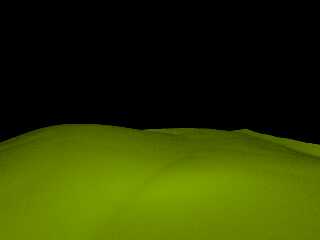
Thanks for the help, I managed to get this result with these values:

height_field {
   function 100, 200 { f_ridged_mf(x,y,z, 2.3, 7.0, 5.0, -2, 1, 3.0) }
   smooth
   scale <1000, 100, 1300>
    pigment {
       color rgb <0.3, 0.5, 0.0>
    }
    normal {
        bumps 0.3 scale 0.4
    }
    translate <-500, -120, -1000>
}

It can be better but looks like a plain at least. Also I put normal bumps to
make it more like grass but it didn't work so well, do you guys have some idea
how to it?
Post a reply to this message
Attachments:
Download 'plainpov.png' (120 KB)
Preview of image 'plainpov.png'
|
|
| |
| |
|
|
|
|
| |
| |
|
|
"gulino" <nomail@nomail> wrote:
> Thanks for the help, I managed to get this result with these values:
>
> height_field {
>    function 100, 200 { f_ridged_mf(x,y,z, 2.3, 7.0, 5.0, -2, 1, 3.0) }
>    smooth
>    scale <1000, 100, 1300>
>     pigment {
>        color rgb <0.3, 0.5, 0.0>
>     }
>     normal {
>         bumps 0.3 scale 0.4
>     }
>     translate <-500, -120, -1000>
> }
>
> It can be better but looks like a plain at least. Also I put normal bumps to
> make it more like grass but it didn't work so well, do you guys have some idea
> how to it?

https://wiki.povray.org/content/Reference:Bump_Map

The relative bump size can be scaled using the bump_size modifier. The bump size
number can be any number other than 0 but typical values are from about 0.1 to
as high as 4.0 or 5.0.

normal {
  bump_map {
    gif "stuff.gif"
    bump_size 5.0
    }
  }

Originally bump_size could only be used inside a bump map but it can now be used
with any normal.

You can also move the camera back a bit, and perhaps move your light source to
give a more raking angle to make some more shadows and give a more defined
texture/normal.

The other thing you could do is add/subtract a scaled bumps/spotted pigment as
part of your heightfield function to get an actual physical displacement.

#declare Plain = function {f_ridged_mf(x,y,z, 2.3, 7.0, 5.0, -2, 1, 3.0) }
#declare Grass = function {pigment {bumps}
#declare GrassHeight = 10;
#declare PlainAndGrass = function {Plain (x, y, z, ....) + Grass (x, y,
z)*GrassHeight}

height_field {function 100, 200 { PlainAndGrass (....)} ....

Hope that makes sense.

- BW
Post a reply to this message
|
|
| |
| |
|
|
|
|
| |
| |
|
|
> The other thing you could do is add/subtract a scaled bumps/spotted pigment as
> part of your heightfield function to get an actual physical displacement.
>
> #declare Plain = function {f_ridged_mf(x,y,z, 2.3, 7.0, 5.0, -2, 1, 3.0) }
> #declare Grass = function {pigment {bumps}
> #declare GrassHeight = 10;
> #declare PlainAndGrass = function {Plain (x, y, z, ....) + Grass (x, y,
> z)*GrassHeight}
>
> height_field {function 100, 200 { PlainAndGrass (....)} ....
>
> Hope that makes sense.
>
> - BW

I tried to do this,

#declare Plain = function {f_ridged_mf(x,y,z, 2.3, 7.0, 5.0, -2, 1, 3.0) }
#declare Grass = function {pigment {bumps}
#declare GrassHeight = 10;
#declare PlainAndGrass = function {Plain (x, y, z, 2.3, 7.0, 5.0, -2, 1, 3.0) +
Grass (x, y,z)*GrassHeight}


height_field {
   function 100, 200 {PlainAndGrass (x,y,z, 2.3, 7.0, 5.0, -2, 1, 3.0) }
   smooth
   scale <1000, 100, 1300>
    pigment {
       color rgb <0.3, 0.5, 0.0>
    }
    translate <-500, -120, -1000>
}

but I have a error in
Grass (x, y,z)*GrassHeight}

"Expected '.', * found instead"
Post a reply to this message
|
|
| |
| |
|
|
|
|
| |
| |
|
|
Le 2025-04-01 à 10:52, gulino a écrit :

> height_field {
>    function 1, 2 { f_ridged_mf(x,y,z, 0.6, 3.0, 6.0, -1.0, 3.0, 3.0, 1) }
>    smooth
>    scale <400, 100, 400>
>     pigment { checker rgb 0.05 rgb 1 scale <20, 20, 20>}
>     translate <-200, -120, -200>
> }
>
> error in: function 1, 2 { f_ridged_mf(x,y,z, 0.6, 3.0, 6.0, -1.0, 3.0, 3.0, 1) }
>
> "Expected 'operator', ( found instead"
>
> What is wrong?
>
>
1) You need to #include functions.inc before.

2) The numbers after function are the U and V resolution, or number of
samples, used to evaluate the function when creating the height field.
Values of 1,2 mean 1 sample in the U axis and 2 samples in the V axis,
or a line single between two points. You won't even see that in a scene.
You need a strict minimum of 2,2.

In order to have something acceptable, a reasonable starting point would
be something like 100,100.
Post a reply to this message
|
|
| |
| |
|
|
|
|
| |
| |
|
|
"gulino" <nomail@nomail> wrote:

> but I have a error in
> Grass (x, y,z)*GrassHeight}
>
> "Expected '.', * found instead"

Yeah - inbuilt pigment functions return a full rgbft vector, so you have to
specify which vector component you want to use in the crippled user-defined
scalar function you're writing.

So, just do:
Grass (x, y,z).red*GrassHeight

- BW
Post a reply to this message
|
|
| |
| |
|
|
|
|
| |
| |
|
|
"Bald Eagle" <cre### [at] netscapenet> wrote:
> "gulino" <nomail@nomail> wrote:
>
> > but I have a error in
> > Grass (x, y,z)*GrassHeight}
> >
> > "Expected '.', * found instead"
>
> Yeah - inbuilt pigment functions return a full rgbft vector, so you have to
> specify which vector component you want to use in the crippled user-defined
> scalar function you're writing.
>
> So, just do:
> Grass (x, y,z).red*GrassHeight
>
> - BW


#declare PlainAndGrass = function {Plain (x, y, z, 2.3, 7.0, 5.0, -2, 1, 3.0) +
Grass (x, y,z).red*GrassHeight}

"Invalid number of parameters 9 supplied, 3 required"
Post a reply to this message
|
|
| |
| |
|
|
|
|
| |
| |
|
|
{sigh}
Since you're supplying the other 6 parameters as numeric values in your function
declaration, you don't need to supply them as actual parameters when you call
the function.

try:
#declare PlainAndGrass = function {Plain (x, y, z) +
Grass (x, y,z).red*GrassHeight}

If you want to keep it like it is in the final function, rewrite Plain using
(x, y, z, P0, P1, P2, P3, P4, P5) in both parentheses and curly braces.

But just try x,y, z for now.

- BW
Post a reply to this message
|
|
| |
| |
|
|
|
|
| |
| |
|
|
"Bald Eagle" <cre### [at] netscapenet> wrote:
> {sigh}
> Since you're supplying the other 6 parameters as numeric values in your function
> declaration, you don't need to supply them as actual parameters when you call
> the function.
>
> try:
> #declare PlainAndGrass = function {Plain (x, y, z) +
> Grass (x, y,z).red*GrassHeight}
>
> If you want to keep it like it is in the final function, rewrite Plain using
> (x, y, z, P0, P1, P2, P3, P4, P5) in both parentheses and curly braces.
>
> But just try x,y, z for now.
>
> - BW

#declare Plain = function {f_ridged_mf(x,y,z, 2.3, 7.0, 5.0, -2, 1, 3.0) }
#declare Grass = function {pigment {bumps}
#declare GrassHeight = 10;
#declare PlainAndGrass = function {Plain (x, y, z) +
Grass (x, y,z).red*GrassHeight}

"Invalid number of parameters, 3 suplied, 8 required"
what
Post a reply to this message
|
|
| |
| |
|
|
|
|
| |
| |
|
|
"gulino" <nomail@nomail> wrote:

> #declare Plain = function {f_ridged_mf(x,y,z, 2.3, 7.0, 5.0, -2, 1, 3.0) }
> #declare Grass = function {pigment {bumps}
> #declare GrassHeight = 10;
> #declare PlainAndGrass = function {Plain (x, y, z) +
> Grass (x, y,z).red*GrassHeight}
>
> "Invalid number of parameters, 3 suplied, 8 required"

Then like I said, try:

#declare Plain = function {f_ridged_mf(x,y,z, P0, P1, P2, P3, P4, P5) }
#declare Grass = function {pigment {bumps}} // <--- you need a closing curly
brace
#declare GrassHeight = 10;
#declare PlainAndGrass = function {Plain (x, y, z, 2.3, 7.0, 5.0, -2, 1, 3.0) +
Grass (x, y,z).red*GrassHeight}


Then declare Pattern = pigment {function {PlainAndGrass (x, y, z, P0, P1, P2,
P3, P4, P5)}}
(Thanks for your patience. ;) This is easier when I'm home and can provide
functional, tested code that I can run through the parser.)

- BW
Post a reply to this message
|
|
| |
| |
|
|
|
|
| |
| |
|
|
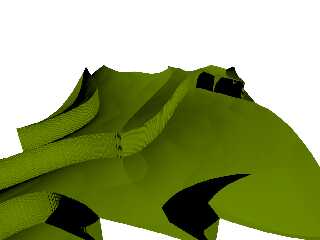
I got derailed last night, but did not forget.

Tested, working code:


#version 3.8;
global_settings {
 assumed_gamma 1.0
}

#include "functions.inc"

#declare E = 0.00001;


#declare Location = <0, 500, -1000>;
camera {
 location Location
 right x*image_width/image_height
 up y
 look_at <0, 0, 0>
}


sky_sphere {pigment {rgb 1}}

light_source {<3000, 2000, -2000> rgb 1}
sky_sphere {pigment {rgb 1}}

#declare Line = 0.01;

#declare E = 0.0000001;

#declare Plain = function (x, y, z, P0, P1, P2, P3, P4, P5) {f_ridged_mf (x,y,z,
P0, P1, P2, P3, P4, P5) }
#declare Grass = function {pigment {bumps}}
#declare GrassHeight = 10;
#declare PlainAndGrass = function (x, y, z, P0, P1, P2, P3, P4, P5) {Plain (x,
y, z, P0, P1, P2, P3, P4, P5) +
Grass (x, y,z).red*GrassHeight}


height_field {
   function 1000, 2000 {PlainAndGrass (x,y,z, 2.3, 7.0, 5.0, -2, 1, 3.0) }
   smooth
    pigment {
       color rgb <0.3, 0.5, 0.0>
    }
    translate <-0.5, 0, -0.5>
    scale <1000, 100, 1300>
}
Post a reply to this message
Attachments:
Download 'landscape.png' (258 KB)
Preview of image 'landscape.png'
|
|
| |
| |
|
|
|
|
| |
| |
|
|
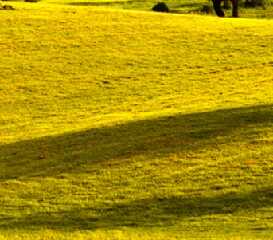
Thanks for the help but what exactly is this? I was aiming to make a grass
texture like this
Post a reply to this message
Attachments:
Download 'plainpov.png' (238 KB)
Preview of image 'plainpov.png'
|
|
| |
| |
|
|
|
|
| |
| |
|
|
hi,

"gulino" <nomail@nomail> wrote:
> Thanks for the help but what exactly is this? I was aiming to make a grass
> texture like this

individual grass blades (meshes) "planted" is one option, if you search for
"grass macro" or variations on this site, there'll be plenty of "hits", some
going back _years_ :-).  see for instance this thread:
<https://news.povray.org/povray.binaries.images/thread/%3C46972e23%40news.povray.org%3E/>.
 hth.


regards, jr.
Post a reply to this message
|
|
| |
| |
|
|
|
|
| |
| |
|
|
"gulino" <nomail@nomail> wrote:
> Thanks for the help but what exactly is this? I was aiming to make a grass
> texture like this

I'm just getting the functions to work without any errors.
Scale the functions so that they make something along the lines of what you
want.

Do that by multiplying or dividing the x, y, and z in the function call.

You may find Mike Williams' isosurface tutorial helpful with regard to working
with functions in POV-Ray.
https://wiki.povray.org/content/User:BillW

Also, as jr said, if you can't get the function or the normal method to work,
then you can use a set of macros to model actual blades of grass to better give
you what you're looking for.

Also, like jr said, you have 30 years of people writing and posting scenes here.
Search for "grass", "landscape", "heightfield", etc and see what pops up.
Use the website search feature, but also use a search engine to see what people
have done and have posted elsewhere.


- BW
Post a reply to this message
|
|
| |
| |
|
|
|
|
| |
| |
|
|
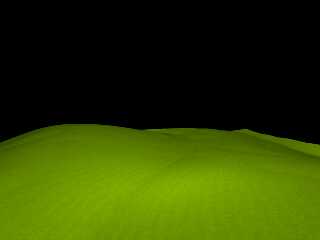
What you think? Looks grass?
Post a reply to this message
Attachments:
Download 'plainpov (2).png' (108 KB)
Preview of image 'plainpov (2).png'
|
|
| |
| |
|
|
|
|
| |
| |
|
|
"gulino" <nomail@nomail> wrote:
> What you think? Looks grass?

It does - now maybe rather than just a green pigment, you can use a pigment
pattern like "bozo" and a color map that fades from green to yellowish-green, to
give some variety to the scene.

Then you can add a few isosurface boulders jutting up out of the ground, some
trees, a gradient sky_sphere (or an HDR light probe), trees...

I think you'll enjoy building it up piece by piece.

- BW
Post a reply to this message
|
|
| |
| |
|
|
|
|
| |
| |
|
|
Am 02.04.2025 um 17:20 schrieb gulino:
> What you think? Looks grass?
It looks like a well-tended green and would make a beautiful golf
course. If you want to model a steppe, a prairie or a Spanish dehesa
(that's what your picture reminds me most of), the grass texture should
be randomly disturbed, for example by the bozo or the agate pattern as
Bald Eagle suggested.

IMO you're making good progress.

Best regards
Michael
Post a reply to this message
|
|
| |
| |
|
|
|
|
| |
| |
|
|
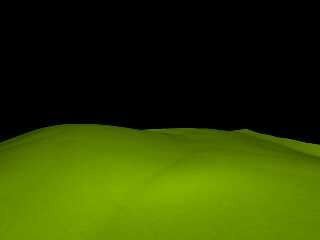
Bozo instead of gradient y
I think before was better

pigment {
        bozo scale 3 turbulence .9
        pigment_map {
            [0.00 color rgb <0.3, 0.5, 0.0>]
            [0.50 color rgb <0.3, 0.6, 0.0>]
            [1.00 color rgb <0.3, 0.7, 0.0>]
        }
    }
Post a reply to this message
Attachments:
Download 'plainpov.png' (77 KB)
Preview of image 'plainpov.png'
|
|
| |
| |
|
|
|
|
| |
| |
|
|
"gulino" <nomail@nomail> wrote:
> Bozo instead of gradient y
> I think before was better
>
> pigment {
>         bozo scale 3 turbulence .9
>         pigment_map {
>             [0.00 color rgb <0.3, 0.5, 0.0>]
>             [0.50 color rgb <0.3, 0.6, 0.0>]
>             [1.00 color rgb <0.3, 0.7, 0.0>]
>         }
>     }

It all comes down to what you want it to look like, and what you're going to add
to it.

Suggestions for experiments to explore:

1. Layered textures.
You can do things like object {MyObject texture {Texture1} texture {Texture2}}
and Texture2 will be "on top of" Texture1 like a layer of paint over a coat of
primer.
If your Texture2 has rgbt 1 as an entry, it will be clear, and you can then see
Texture1.  That way you can keep your old grass texture and add some yellowish
stuff on top of it - but not everywhere.

2. uv_mapping
you can take textures or images and paste them onto your surface in a way that
follows the surface rather than being dependent on the <x, y, z> coordinates of
the space where your object's surface is at.

3. "Planting"
you can learn how to use the trace () function to "scan" the heightfield surface
and place an upright thin cylinder at the exact "ground level" at that location.
 Lots little green cylinders will add a grass effect.  Adding a gradient with
yellow at the top, and it might look even better.   Do the narrow triangle thing
like jr suggested, and it's more grass-blade like.  Rotate them so that they
lean, and then randomly rotate their orientation, and it makes for more
"realism".
(Also, since you have a function generating your height_field, you can skip
trace () altogether and just use the y-value of your function at that <x, z>
location.)

- BW
Post a reply to this message
|
|
| |
| |
|
|
|
|
| |
| |
|
|
Hi Gulino

Below is my suggestion for some code for you to start with.

The grass-like "texture" is made like Bald Eagle suggested,
but the shape of the terrain is made with a sum of some simpler
f_noise3d() functions at different sample frequencies.

--
Tor Olav
http://subcube.com
https://github.com/t-o-k


// ===== 1 ======= 2 ======= 3 ======= 4 ======= 5 ======= 6 ======= 7

#version 3.7;

#include "functions.inc"
#include "colors.inc"

global_settings {
    assumed_gamma 1.0
}

// ===== 1 ======= 2 ======= 3 ======= 4 ======= 5 ======= 6 ======= 7

#declare GrassFn =
    function {
        pattern {
            bumps
            scale <1.0e-8, 1.0, 1.0e-8>
        }
    }
;

// Frequency multipliers
#declare Ma = pow(2, 0);
#declare Mb = pow(2, 1);
#declare Mc = pow(2, 2);
#declare Md = pow(2, 3);

// Noise sampling offsets
#declare Ya =  0.0;
#declare Yb = -1.2; // +2.0
#declare Yc =  0.0;
#declare Yd =  0.0;

#declare FnA = function { f_noise3d(Ma*x, Ya, Ma*z) };
#declare FnB = function { f_noise3d(Mb*x, Yb, Mb*z) };
#declare FnC = function { f_noise3d(Mc*x, Yc, Mc*z) };
#declare FnD = function { f_noise3d(Md*x, Yd, Md*z) };

// Frequency amplitudes
#declare Ka = 0.0;
#declare Kb = 2.0;
#declare Kc = 0.3; // 1.6
#declare Kd = 0.1;

#declare GrassHeight = 0.04;

#declare K = 1.0 + Ka + Kb + Kc + Kd + GrassHeight;

#declare TerrainFn =
    function {
        (
            1.0*y
            + Ka*FnA(x, 0.0, z)
            + Kb*FnB(x, 0.0, z)
            + Kc*FnC(x, 0.0, z)
            + Kd*FnD(x, 0.0, z)
            + GrassHeight*GrassFn(x, 0.0, z)
        )/K // To avoid "wrap around"
    }
;

union {
    height_field {
        function 1000, 1000 { TerrainFn(x, 0.0, 1.0 - y) }
        smooth
        pigment {
            function { FnC(x, 0, z) }
            color_map {
                [ 0.1 color rgb <1.0, 0.7, 0.0> ]
                [ 0.6 color rgb <0.3, 0.5, 0.0> ]
            }
        }
        // pigment { color rgb <0.6, 0.8, 0.0> }
        // no_shadow
    }
    union {
        #for (X, 0, 1, 1/32)
            #for (Z, 0, 1, 1/32)
                #declare Y = TerrainFn(X, 0, Z);
                sphere { <X, Y, Z>, 0.005 }
            #end // for
        #end // for
        pigment { color White }
    }
    translate -<1, 0, 1>/2
    scale 1000*<1, 1, 1>
}

box {
    <-1e8, -10, -1e8>, <+1e8, 0, +1e8>
    pigment { color SeaGreen }
}

// ===== 1 ======= 2 ======= 3 ======= 4 ======= 5 ======= 6 ======= 7

sky_sphere {
    pigment { color SkyBlue }
}

light_source {
    1e8*<-2, +1, -7>
    color White
}

#declare AspectRatio = image_width/image_height;

camera {
    right AspectRatio*x
    location < 0, +700, -1400>*0.8
    look_at < 0,  +450,  0>
    // angle 40
}

// ===== 1 ======= 2 ======= 3 ======= 4 ======= 5 ======= 6 ======= 7
Post a reply to this message
|
|
| |
| |
|
|
|
|
| |
| |
|
|
On 4/3/25 19:28, Tor Olav Kristensen wrote:
> The grass-like "texture" is made like Bald Eagle suggested,
> but the shape of the terrain is made with a sum of some simpler
> f_noise3d() functions at different sample frequencies.

Neat!

(Did you intend for Ka to be zero?)

Forgive me for running a yuqk experiment with your scene. I couldn't
resist given your code.

In the yuqk fork, all the inbuilt functions support noise generator
selection with an extra parameter - where the underlying code supports
multiple noise generators.

Attached an image using noise generators 1,2 and 3 top sub-image, downward.

In the bottom sub-image I use all three noise generators in combination(*).

I did not change the 'bumps pattern' noise generator, so it's always 2.

Bill P.

(*) - The idea - hard coded too in yuqk's experimental, f_granite23()
inbuilt function - uses noise generators in combination. One, so the
buckles which are sometimes visible are much less likely to be, visible.
Two, with the thought the result might look different / interesting -
less like the usual noise based results.
Post a reply to this message
Attachments:
Download 'torolavterraingrass_ngs.jpg' (94 KB)
Preview of image 'torolavterraingrass_ngs.jpg'

|
|
| |
| |
|
|
|
|
| |
| |
|
|
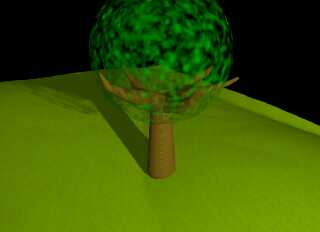
Thank you but I will try other things for now, I tried doing a tree but it
didn't work out very well...
Post a reply to this message
Attachments:
Download 'capt181003.png' (378 KB)
Preview of image 'capt181003.png'
|
|
| |
| |
|
|
|
|
| |
| |
|
|
Le 2025-04-05 à 17:15, gulino a écrit :
> Thank you but I will try other things for now, I tried doing a tree but it
> didn't work out very well...

You could try with 1 to 3 other spheres inside that one, bound in an
union and the texture applied at once.

Should be acceptable when viewed from a distance.
Closer ones having more spheres than the farther ones.
Post a reply to this message
|
|
| |
| |
|
|
|
|
| |
|
|