|
|
|
|
|
|
| |
| |
|
|
|
|
| |
| |
|
|
Ok, last question and I'll stop bugging everybody with my n00bness :)

I'm using POV purely because of the ability to script and render a scene;
I'm writing a front end to accomplish the task.

Initially I had expected to export objects to a POV mesh but this particular
scene is particularly complex - hitting over 200MB so far, and I'm not quite
half-way through.

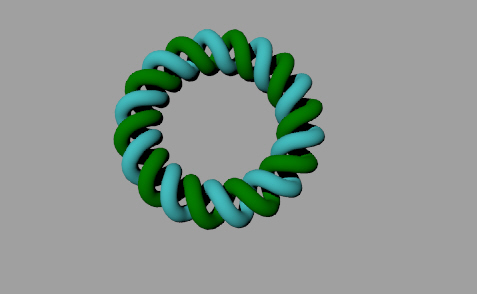
Can POV nativly build a helix that wraps around itself, to form a closed
loop? Imagine a helix following the path of a curve.

All I need to specify is circle diameter, helix thickness and number of
twists (as well as the usual colour/texture etc).

I expect this way to be a lot quicker, if it is supported...

Thanks again for everybody's help so far!

David
Post a reply to this message
|
|
| |
| |
|
|
|
|
| |
| |
|
|
"David Robinson" <tdf### [at] ezrs com> wrote:
> Can POV nativly build a helix that wraps around itself, to form a closed
> loop? Imagine a helix following the path of a curve.
>
> All I need to specify is circle diameter, helix thickness and number of
> twists (as well as the usual colour/texture etc).
>
> I expect this way to be a lot quicker, if it is supported...
There is an isosurface called the Helical Torus that does
what you're looking for. Some info on the parameters
are available at this (very excellent!) resource provided
by Mike Williams:
http://www.econym.demon.co.uk/isotut/nfunc2.htm#ht
Here are a couple of helical tori you can use as starting
points. I used the following parameter values for thin rope
trim around a window:
f_helical_torus(x,y,z, 100, 60, 2,
1.0, 1,
0.5,
0.25, 1, 1.0, 0)
These parameters were for a thick rope around the base of
a pillar:
f_helical_torus(x,y,z, 6.0, 8, 2,
0.5, 1,
0.5,
0.25, 1, 1.0, 0)
Isosurfaces are not usually considered a newusers feature
as they can be confusing, but once you get used to them
they are much more powerful than normal csg objects.
Also, if you need a mesh, I believe there are macros on
Mike's website that convert isosurfaces to meshes, but
I've not used them.
For non-circular curves, you can draw a normal
isosurface rope (f_helix1) along the path of a spline.
-Mark Slone com> wrote:
> Can POV nativly build a helix that wraps around itself, to form a closed
> loop? Imagine a helix following the path of a curve.
>
> All I need to specify is circle diameter, helix thickness and number of
> twists (as well as the usual colour/texture etc).
>
> I expect this way to be a lot quicker, if it is supported...
There is an isosurface called the Helical Torus that does
what you're looking for. Some info on the parameters
are available at this (very excellent!) resource provided
by Mike Williams:
http://www.econym.demon.co.uk/isotut/nfunc2.htm#ht
Here are a couple of helical tori you can use as starting
points. I used the following parameter values for thin rope
trim around a window:
f_helical_torus(x,y,z, 100, 60, 2,
1.0, 1,
0.5,
0.25, 1, 1.0, 0)
These parameters were for a thick rope around the base of
a pillar:
f_helical_torus(x,y,z, 6.0, 8, 2,
0.5, 1,
0.5,
0.25, 1, 1.0, 0)
Isosurfaces are not usually considered a newusers feature
as they can be confusing, but once you get used to them
they are much more powerful than normal csg objects.
Also, if you need a mesh, I believe there are macros on
Mike's website that convert isosurfaces to meshes, but
I've not used them.
For non-circular curves, you can draw a normal
isosurface rope (f_helix1) along the path of a spline.
-Mark Slone
Post a reply to this message
|
|
| |
| |
|
|
|
|
| |
| |
|
|
"Renderdog" <slo### [at] hiwaaynet> wrote in message
news:web.417fb7a44c4748cbff5df6e40@news.povray.org...
> "David Robinson" <tdf### [at] ezrscom> wrote:
> > Can POV nativly build a helix that wraps around itself, to form a closed
> > loop? Imagine a helix following the path of a curve.
> >
> > All I need to specify is circle diameter, helix thickness and number of
> > twists (as well as the usual colour/texture etc).
> >
> > I expect this way to be a lot quicker, if it is supported...
>
> There is an isosurface called the Helical Torus that does
> what you're looking for. Some info on the parameters
> are available at this (very excellent!) resource provided
> by Mike Williams:
>
> http://www.econym.demon.co.uk/isotut/nfunc2.htm#ht
>
> Here are a couple of helical tori you can use as starting
> points. I used the following parameter values for thin rope
> trim around a window:
>
>  f_helical_torus(x,y,z, 100, 60, 2,
>          1.0, 1,
>          0.5,
>          0.25, 1, 1.0, 0)
>
> These parameters were for a thick rope around the base of
> a pillar:
>
>  f_helical_torus(x,y,z, 6.0, 8, 2,
>          0.5, 1,
>          0.5,
>          0.25, 1, 1.0, 0)
>
> Isosurfaces are not usually considered a newusers feature
> as they can be confusing, but once you get used to them
> they are much more powerful than normal csg objects.
>
> Also, if you need a mesh, I believe there are macros on
> Mike's website that convert isosurfaces to meshes, but
> I've not used them.
>
> For non-circular curves, you can draw a normal
> isosurface rope (f_helix1) along the path of a spline.
>
> -Mark Slone
>
>
Ah, thanks for the tip. Looks good - but I'm afraid I don't understand POV
enough yet to debug this:

Parse Error: Expected 'object or directive', function identifier found
instead

So, I'm assuming either my syntax is all wrong (I literally copy/pasted) or
I should have some #include files.

Sorry about this, I'll be off everybody's back soon :)

David
Post a reply to this message
|
|
| |
| |
|
|
|
|
| |
| |
|
|
"David Robinson" <tdf### [at] ezrscom> wrote:
> Ah, thanks for the tip. Looks good - but I'm afraid I don't understand POV
> enough yet to debug this:
>
> Parse Error: Expected 'object or directive', function identifier found
> instead
>
> So, I'm assuming either my syntax is all wrong (I literally copy/pasted) or
> I should have some #include files.
>
> Sorry about this, I'll be off everybody's back soon :)

An isosurface requires more than just the function, you'll
have to read the documentation to make use of the helix
functions in an isosurface.

Here's a little more to go on, but you'll probably have
difficulty with it until you play with the simpler isosurfaces
first.

#local RopeHoop = function {
 f_helical_torus(x,y,z, 100, 60, 2,
         1.0, 1,
         0.5,
         0.25, 1, 1.0, 0)
            }

isosurface {
 function { RopeHoop(x,y,z) }
 max_gradient 3.0
 contained_by { box { <0, 0, 0>, <110, 10, 75> } }
 scale 0.04
 rotate -90*x
      }
Post a reply to this message
|
|
| |
| |
|
|
|
|
| |
| |
|
|
"Renderdog" <slo### [at] hiwaaynet> wrote in message
news:web.417fcc974c4748cb4428009b0@news.povray.org...
> "David Robinson" <tdf### [at] ezrscom> wrote:
> > Ah, thanks for the tip. Looks good - but I'm afraid I don't understand
POV
> > enough yet to debug this:
> >
> > Parse Error: Expected 'object or directive', function identifier found
> > instead
> >
> > So, I'm assuming either my syntax is all wrong (I literally copy/pasted)
or
> > I should have some #include files.
> >
> > Sorry about this, I'll be off everybody's back soon :)
>
> An isosurface requires more than just the function, you'll
> have to read the documentation to make use of the helix
> functions in an isosurface.
>
> Here's a little more to go on, but you'll probably have
> difficulty with it until you play with the simpler isosurfaces
> first.
>
> #local RopeHoop = function {
>  f_helical_torus(x,y,z, 100, 60, 2,
>          1.0, 1,
>          0.5,
>          0.25, 1, 1.0, 0)
>             }
>
> isosurface {
>  function { RopeHoop(x,y,z) }
>  max_gradient 3.0
>  contained_by { box { <0, 0, 0>, <110, 10, 75> } }
>  scale 0.04
>  rotate -90*x
>       }

Thanks a lot for the tip - nearly all sorted now. This is the code so far:

--
global_settings {
    radiosity {}
}

camera {
    location <0, 0, -5>
    look_at 0
}

background { color rgb <1, 1, 1> }
global_settings { ambient_light color rgb <0, 0, 0> }

#include "functions.inc"

#declare RopeHoop = function {
         f_helical_torus(x,y,z, 5, 7, 2,
         1.0, 1,
         0.5,
         0.25, 1, 1.0, 0)
                           }

isosurface {
 function { RopeHoop(x,y,z) }
 max_gradient 1
 contained_by { box { <0, 0, 0>, <200, 200, 200> } }
 scale 0.1
 rotate 90*x
 texture {
  pigment { color rgbf <1, 0, 0, 0> }
  finish  { ambient 1 diffuse 1 }
  }
      }
--

Only real problem right now is that it only renders 1/4 of the scene (but I
have a feeling it is more likely to be building 1/4 of the model). I've
tried playing with a couple of settings but nothing is making enough of a
difference to hit me in the face with a clue...!

I'm also trying to view this from top down.

Thanks a lot,

David
Post a reply to this message
|
|
| |
| |
|
|
|
|
| |
| |
|
|
"David Robinson" <tdf### [at] ezrscom> wrote:
> Only real problem right now is that it only renders 1/4 of the scene (but I
> have a feeling it is more likely to be building 1/4 of the model). I've
> tried playing with a couple of settings but nothing is making enough of a
> difference to hit me in the face with a clue...!
>
> I'm also trying to view this from top down.

The f_helical_torus is centered about <0,0,0>, so you might try
   contained_by { box { <-200, -200, -200>, <200, 200, 200> } }
to show the entire object.

f_helical_torus is a hoop about the Y axis, so to view the entire
hoop from above (camera at +Y) you might remove the
   rotate 90*x
which I used to rotate it to face the Z axis.

Finally, the
   scale 0.1
is there because I couldn't get the ratio of the rope to the hoop's
radius what I wanted without scaling the entire object.
Post a reply to this message
|
|
| |
| |
|
|
|
|
| |
| |
|
|
Wasn't it David Robinson who wrote:
>
>Only real problem right now is that it only renders 1/4 of the scene (but I
>have a feeling it is more likely to be building 1/4 of the model). I've
>tried playing with a couple of settings but nothing is making enough of a
>difference to hit me in the face with a clue...!

That's because your "contained_by" box has a corner at the origin, but
the helical torus is centred at the origin. So all the bits on the
negative sides are outside the container.

Try

 contained_by { box { -8,8 } }
 max_gradient 3


--
Mike Williams
Gentleman of Leisure
Post a reply to this message
|
|
| |
| |
|
|
|
|
| |
| |
|
|
Wasn't it Renderdog who wrote:

>There is an isosurface called the Helical Torus that does
>what you're looking for. Some info on the parameters
>are available at this (very excellent!) resource provided
>by Mike Williams:
>
>http://www.econym.demon.co.uk/isotut/nfunc2.htm#ht

I actually had no idea that the helical torus could be used to create a
circular helix. When I was developing that tutorial I experimented with
lots of different values but never happened to stumble on a set that
worked that way.

--
Mike Williams
Gentleman of Leisure
Post a reply to this message
|
|
| |
| |
|
|
|
|
| |
| |
|
|
I'm not sure if you want it. Tray with this code:

======================================
#declare RopeHoop = function { f_helical_torus(x,y,z, 5, 7, 2, 1.0, 1, 0.5,
0.25, 1, 1.0, 0) }

isosurface {
function { RopeHoop(x,y,z) }
max_gradient 7
contained_by { sphere { .4, 50*2 } }
translate x*10
scale 1
rotate 0*x
texture {
pigment { color rgbf <1, 0, 0, 0> }
finish  { ambient 1 diffuse 1 }
} }
======================================

Regards,
Oleguer


"David Robinson" <tdf### [at] ezrscom> escribió en el mensaje
news:417fdd12$1@news.povray.org...
> "Renderdog" <slo### [at] hiwaaynet> wrote in message
> news:web.417fcc974c4748cb4428009b0@news.povray.org...
> > "David Robinson" <tdf### [at] ezrscom> wrote:
> > > Ah, thanks for the tip. Looks good - but I'm afraid I don't understand
> POV
> > > enough yet to debug this:
> > >
> > > Parse Error: Expected 'object or directive', function identifier found
> > > instead
> > >
> > > So, I'm assuming either my syntax is all wrong (I literally
copy/pasted)
> or
> > > I should have some #include files.
> > >
> > > Sorry about this, I'll be off everybody's back soon :)
> >
> > An isosurface requires more than just the function, you'll
> > have to read the documentation to make use of the helix
> > functions in an isosurface.
> >
> > Here's a little more to go on, but you'll probably have
> > difficulty with it until you play with the simpler isosurfaces
> > first.
> >
> > #local RopeHoop = function {
> >  f_helical_torus(x,y,z, 100, 60, 2,
> >          1.0, 1,
> >          0.5,
> >          0.25, 1, 1.0, 0)
> >             }
> >
> > isosurface {
> >  function { RopeHoop(x,y,z) }
> >  max_gradient 3.0
> >  contained_by { box { <0, 0, 0>, <110, 10, 75> } }
> >  scale 0.04
> >  rotate -90*x
> >       }
>
> Thanks a lot for the tip - nearly all sorted now. This is the code so far:
>
> --
> global_settings {
>     radiosity {}
> }
>
> camera {
>     location <0, 0, -5>
>     look_at 0
> }
>
> background { color rgb <1, 1, 1> }
> global_settings { ambient_light color rgb <0, 0, 0> }
>
> #include "functions.inc"
>
> #declare RopeHoop = function {
>          f_helical_torus(x,y,z, 5, 7, 2,
>          1.0, 1,
>          0.5,
>          0.25, 1, 1.0, 0)
>                            }
>
> isosurface {
>  function { RopeHoop(x,y,z) }
>  max_gradient 1
>  contained_by { box { <0, 0, 0>, <200, 200, 200> } }
>  scale 0.1
>  rotate 90*x
>  texture {
>   pigment { color rgbf <1, 0, 0, 0> }
>   finish  { ambient 1 diffuse 1 }
>   }
>       }
> --
>
> Only real problem right now is that it only renders 1/4 of the scene (but
I
> have a feeling it is more likely to be building 1/4 of the model). I've
> tried playing with a couple of settings but nothing is making enough of a
> difference to hit me in the face with a clue...!
>
> I'm also trying to view this from top down.
>
> Thanks a lot,
>
> David
>
>
Post a reply to this message
|
|
| |
| |
|
|
|
|
| |
| |
|
|
"Renderdog" <slo### [at] hiwaaynet> wrote in message
news:web.417ff8e44c4748cb250c7b0b0@news.povray.org...
> "David Robinson" <tdf### [at] ezrscom> wrote:
> > Only real problem right now is that it only renders 1/4 of the scene
(but I
> > have a feeling it is more likely to be building 1/4 of the model). I've
> > tried playing with a couple of settings but nothing is making enough of
a
> > difference to hit me in the face with a clue...!
> >
> > I'm also trying to view this from top down.
>
> The f_helical_torus is centered about <0,0,0>, so you might try
>    contained_by { box { <-200, -200, -200>, <200, 200, 200> } }
> to show the entire object.
>
> f_helical_torus is a hoop about the Y axis, so to view the entire
> hoop from above (camera at +Y) you might remove the
>    rotate 90*x
> which I used to rotate it to face the Z axis.
>
> Finally, the
>    scale 0.1
> is there because I couldn't get the ratio of the rope to the hoop's
> radius what I wanted without scaling the entire object.
>
Ok, I'm starting to understand it now. Thanks for everything so far :)

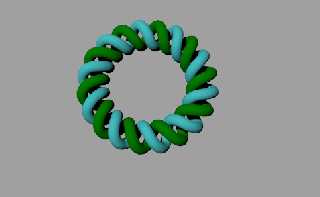
However, I think the Torus aspect is not quite what I had in mind, now that
I can see it in its entirety. I have attached an image to show an example if
it helps. It shows two intertwined helixes.

Hopefully this is achievable? There are going to be a number of these in the
scene, each one larger than this (and with more twists each time) - as I
say, if I export a mesh from a different program, things get unmanageable
very quickly.

Thanks again,

David
Post a reply to this message
Attachments:
Download 'double spun helix.jpg' (36 KB)
Preview of image 'double spun helix.jpg'
|
|
| |
| |
|
|
|
|
| |
| |
|
|
"Oleguer Vilella" <ole### [at] infonegociocom> wrote:
> I'm not sure if you want it. Tray with this code:
>
> ======================================
> #declare RopeHoop = function { f_helical_torus(x,y,z, 5, 7, 2, 1.0, 1, 0.5,
> 0.25, 1, 1.0, 0) }
>
> isosurface {
> function { RopeHoop(x,y,z) }
> max_gradient 7
> contained_by { sphere { .4, 50*2 } }
> translate x*10
> scale 1
> rotate 0*x
> texture {
> pigment { color rgbf <1, 0, 0, 0> }
> finish  { ambient 1 diffuse 1 }
> } }
> ======================================

Yes, the contained_by a sphere makes more sense with this
object, I'd used the box to chop off parts for my window frame.
Post a reply to this message
|
|
| |
| |
|
|
|
|
| |
| |
|
|
Mike Williams <nos### [at] econymdemoncouk> wrote:
> I actually had no idea that the helical torus could be used to create a
> circular helix. When I was developing that tutorial I experimented with
> lots of different values but never happened to stumble on a set that
> worked that way.

It took a lot of trial and error. Of course, I now have no memory
of what all the variables do, but I do have this commented code,
(for the first variable in each line). Not sure if they mean anything.

f_helical_torus(x,y,z, 100, 60, 2,
1.0, 1,      //  scale's the windings outward 0 = tube?
0.5,          //  negative minor radius
0.25, 1, 1.0, 0)   //  Inverse scales windings along circumference
          }

Mike, I'd like to thank you for your incredible isosurface tutorial,
http://www.econym.demon.co.uk/isotut/index.htm

It's an amazing resource I've used many times. I live in fear for
the day it disappears!

Thanks,
Mark
Post a reply to this message
|
|
| |
| |
|
|
|
|
| |
| |
|
|
contained_by { box { <-7.6, -2.6, -7.6>, <7.6, 2.6, 7.6> } }
is enough; larger containers will unneccessarily increase the render time.

   Sputnik
Post a reply to this message
|
|
| |
| |
|
|
|
|
| |
| |
|
|
"David Robinson" <tdf### [at] ezrscom> wrote:
> However, I think the Torus aspect is not quite what I had in mind, now that
> I can see it in its entirety. I have attached an image to show an example if
> it helps. It shows two intertwined helixes.
>
> Hopefully this is achievable?

Possibly. Let us know what you find.
Post a reply to this message
|
|
| |
| |
|
|
|
|
| |
| |
|
|
"Renderdog" <slo### [at] hiwaaynet> wrote:
> Possibly. Let us know what you find.

After playing with the parameters a bit, I doubt the
helical_torus will give you exactly what you're looking for.
I don't know for sure, though; there are a lot of combinations.

You will probably be better off using two sphere_sweeps,
though they can be a little temperamental. The math for
the paths shouldn't be too difficult.
Post a reply to this message
|
|
| |
| |
|
|
|
|
| |
| |
|
|
Here's an alternative way of getting a circular helix that's a bit
easier to manage than f_helical_torus. What you do is first create an
ordinary f_helix1, then translate it off to one side and transform it
into cylindrical polar co-ordinates. This gives you access to the
f_helix1 control parameters which are better understood than the
f_helical_torus parameters.

I did the translation (x => x-R3) as a separate step from the
co-ordinate change (x => f_r(x,z,y) , y => f_th(x,z,y)) to keep things
simple.

The use of (x,z,y) rather than (x,y,z) is due to the fact that f_th is
defined as atan2(x,z), whereas I wanted atan2(x,y).

#version 3.6;
global_settings {assumed_gamma 1.0}
#include "functions.inc"

camera {location  <0,0, -20> look_at 0 angle 20}
light_source { <-100,200,-300> colour rgb 1 }
background { rgb 0 }

#declare R1=0.1;     // helix minor radius
#declare R2=0.3;     // helix major radius
#declare R3=2.0;     // torus major radius
#declare Strands=2;  // DNA = double strand

#declare Turns=8.5;  // number of helix turns in the loop
                     // Turns*Strands should be an integer
                     // to avoid a discontinuity

#declare DNA=function { f_helix1 (x-R3, y, z, Strands,
                        Turns, R1, R2, 1, 1, 0) }

isosurface {
   function{DNA(f_r(x,z,y) ,f_th(x,z,y),z)}
        max_gradient 1.3
        contained_by {sphere {0, 3} }
        pigment {rgb 1}
}


For real DNA, the two strands aren't 180 degrees out of phase like this.
I'm not sure what the exact phase difference is, but here's a version
with the strands 120 degrees out of phase. If you know what the phase
difference should be, you can plug that number in where I've written
"120".

I've also changed the "shape parameter" from 1.0 to 0.6 in this version
to compensate for the fact that the change of co-ordinates had caused
the cross section to become elliptical instead of circular. This will
probably need to be adjusted whenever you change things like R3 and
Turns.

#version 3.6;
global_settings {assumed_gamma 1.0}
#include "functions.inc"

camera {location  <0,0, -20> look_at 0 angle 20}
light_source { <-100,200,-300> colour rgb 1 }
background { rgb 0 }

#declare R1=0.15;    // helix minor radius
#declare R2=0.3;     // helix major radius
#declare R3=2.0;     // torus major radius
#declare Strands=1;  // DNA = double strand

#declare Turns=8;    // number of helix turns in the loop
                     // Turns*Strands should be an integer
                     // to avoid a discontinuity

#declare DNA=function { f_helix1 (x-R3, y, z, Strands,
                        Turns, R1, R2, 0.6, 1, 0) }

#declare Strand=
isosurface {
   function{DNA(f_r(x,z,y) ,f_th(x,z,y),z)}
        max_gradient 1.3
        contained_by {sphere {0, 3} }
        pigment {rgb 1}
}

object{Strand}
object{Strand rotate z*120/Turns}

--
Mike Williams
Gentleman of Leisure
Post a reply to this message
|
|
| |
| |
|
|
|
|
| |
| |
|
|
Mike Williams <nos### [at] econymdemoncouk> wrote:
>    function{DNA(f_r(x,z,y) ,f_th(x,z,y),z)}

Magic!
Post a reply to this message
|
|
| |
| |
|
|
|
|
| |
| |
|
|
Hello Mike,

Can you explain again how did you do this translation?
====================================
isosurface {
   function{DNA(f_r(x,z,y) ,f_th(x,z,y),z)}
====================================
What's f_r and what's f_th?

Thanks,
Oleguer

"Mike Williams" <nos### [at] econymdemoncouk> escribió en el mensaje
news:jD8### [at] econymdemoncouk...
>
> Here's an alternative way of getting a circular helix that's a bit
> easier to manage than f_helical_torus. What you do is first create an
> ordinary f_helix1, then translate it off to one side and transform it
> into cylindrical polar co-ordinates. This gives you access to the
> f_helix1 control parameters which are better understood than the
> f_helical_torus parameters.
>
> I did the translation (x => x-R3) as a separate step from the
> co-ordinate change (x => f_r(x,z,y) , y => f_th(x,z,y)) to keep things
> simple.
>
> The use of (x,z,y) rather than (x,y,z) is due to the fact that f_th is
> defined as atan2(x,z), whereas I wanted atan2(x,y).
>
> #version 3.6;
> global_settings {assumed_gamma 1.0}
> #include "functions.inc"
>
> camera {location  <0,0, -20> look_at 0 angle 20}
> light_source { <-100,200,-300> colour rgb 1 }
> background { rgb 0 }
>
> #declare R1=0.1;     // helix minor radius
> #declare R2=0.3;     // helix major radius
> #declare R3=2.0;     // torus major radius
> #declare Strands=2;  // DNA = double strand
>
> #declare Turns=8.5;  // number of helix turns in the loop
>                      // Turns*Strands should be an integer
>                      // to avoid a discontinuity
>
> #declare DNA=function { f_helix1 (x-R3, y, z, Strands,
>                         Turns, R1, R2, 1, 1, 0) }
>
> isosurface {
>    function{DNA(f_r(x,z,y) ,f_th(x,z,y),z)}
>         max_gradient 1.3
>         contained_by {sphere {0, 3} }
>         pigment {rgb 1}
> }
>
>
>
> For real DNA, the two strands aren't 180 degrees out of phase like this.
> I'm not sure what the exact phase difference is, but here's a version
> with the strands 120 degrees out of phase. If you know what the phase
> difference should be, you can plug that number in where I've written
> "120".
>
> I've also changed the "shape parameter" from 1.0 to 0.6 in this version
> to compensate for the fact that the change of co-ordinates had caused
> the cross section to become elliptical instead of circular. This will
> probably need to be adjusted whenever you change things like R3 and
> Turns.
>
> #version 3.6;
> global_settings {assumed_gamma 1.0}
> #include "functions.inc"
>
> camera {location  <0,0, -20> look_at 0 angle 20}
> light_source { <-100,200,-300> colour rgb 1 }
> background { rgb 0 }
>
> #declare R1=0.15;    // helix minor radius
> #declare R2=0.3;     // helix major radius
> #declare R3=2.0;     // torus major radius
> #declare Strands=1;  // DNA = double strand
>
> #declare Turns=8;    // number of helix turns in the loop
>                      // Turns*Strands should be an integer
>                      // to avoid a discontinuity
>
> #declare DNA=function { f_helix1 (x-R3, y, z, Strands,
>                         Turns, R1, R2, 0.6, 1, 0) }
>
> #declare Strand=
> isosurface {
>    function{DNA(f_r(x,z,y) ,f_th(x,z,y),z)}
>         max_gradient 1.3
>         contained_by {sphere {0, 3} }
>         pigment {rgb 1}
> }
>
> object{Strand}
> object{Strand rotate z*120/Turns}
>
> --
> Mike Williams
> Gentleman of Leisure
Post a reply to this message
|
|
| |
| |
|
|
|
|
| |
| |
|
|
Wasn't it Oleguer Vilella who wrote:
>Hello Mike,
>
>Can you explain again how did you do this translation?
>====================================
>isosurface {
>   function{DNA(f_r(x,z,y) ,f_th(x,z,y),z)}
>====================================
>What's f_r and what's f_th?
>

If you're not familiar with polar coordinates, I don't think I can teach
the concept in a newsgroup posting.

If you are familiar with polar coordinates, then f_r(), f_th() and
f_ph() are standard functions (in functions.inc) which give you the
polar coordinates R, Theta and Phi. On a globe, they would be altitude,
longitude and latitude.

By transforming a function from Cartesian (ordinary xyz) coordinates to
polar coordinates we can bend the space that contains the function so
that the grid lines of the space are wrapped round into circles.

There are spherical polar coordinates (R Theta Phi) and cylindrical
polar coordinates (R Theta z) and it's the second of these that I used
for this scene.

--
Mike Williams
Gentleman of Leisure
Post a reply to this message
|
|
| |
| |
|
|
|
|
| |
| |
|
|
Ah ok, it's a function from "functions.inc". All understood now.

Many thanks,
Oleguer


"Mike Williams" <nos### [at] econymdemoncouk> escribió en el mensaje
news:NDqQ$LAVOUgBFw+H### [at] econymdemoncouk...
> Wasn't it Oleguer Vilella who wrote:
> >Hello Mike,
> >
> >Can you explain again how did you do this translation?
> >====================================
> >isosurface {
> >   function{DNA(f_r(x,z,y) ,f_th(x,z,y),z)}
> >====================================
> >What's f_r and what's f_th?
> >
>
> If you're not familiar with polar coordinates, I don't think I can teach
> the concept in a newsgroup posting.
>
> If you are familiar with polar coordinates, then f_r(), f_th() and
> f_ph() are standard functions (in functions.inc) which give you the
> polar coordinates R, Theta and Phi. On a globe, they would be altitude,
> longitude and latitude.
>
> By transforming a function from Cartesian (ordinary xyz) coordinates to
> polar coordinates we can bend the space that contains the function so
> that the grid lines of the space are wrapped round into circles.
>
> There are spherical polar coordinates (R Theta Phi) and cylindrical
> polar coordinates (R Theta z) and it's the second of these that I used
> for this scene.
>
> --
> Mike Williams
> Gentleman of Leisure
Post a reply to this message
|
|
| |
| |
|
|
|
|
| |
|
|