|
|
|
|
|
|
| |
| |
|
|
|
|
| |
| |
|
|
Hi all!

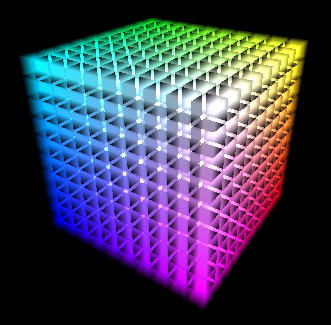
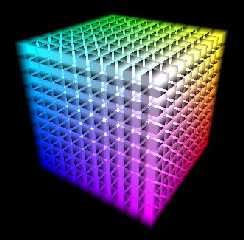
I wanted to create a rgb-cube by putting together 10^3 smaller cubes
filled with an emission media. But there are some strange black
squares between the smaller cubes! Changing density, transmit and/or
filter values didn't help.

Does anyone know where the problem is??

Thanx in advance,
Daniel
Post a reply to this message
Attachments:
Download 'rgb_cube.jpg' (30 KB)
Download 'rgb_cube.pov.txt' (1 KB)
Preview of image 'rgb_cube.jpg'
|
|
| |
| |
|
|
|
|
| |
| |
|
|
"Daniel Höfer" wrote:
>
> Hi all!
>
> I wanted to create a rgb-cube by putting together 10^3 smaller cubes
> filled with an emission media. But there are some strange black
> squares between the smaller cubes! Changing density, transmit and/or
> filter values didn't help.
>
> Does anyone know where the problem is??
>
> Thanx in advance,
> Daniel

  I don't have time to look at your source now but try adding a
nax_trace_level in your global settings. I would start with
something like 30 or more with this many objects in the scene.

--
Ken Tyler

mailto://tylereng@pacbell.net
http://home.pacbell.net/tylereng/links.htm
Post a reply to this message
|
|
| |
| |
|
|
|
|
| |
| |
|
|
Ken wrote:
>
> "Daniel Höfer" wrote:
> >
> > Hi all!
> >
> > I wanted to create a rgb-cube by putting together 10^3 smaller cubes
> > filled with an emission media. But there are some strange black
> > squares between the smaller cubes! Changing density, transmit and/or
> > filter values didn't help.
> >
> > Does anyone know where the problem is??
> >
> > Thanx in advance,
> > Daniel
>
>   I don't have time to look at your source now but try adding a
> nax_trace_level in your global settings. I would start with
> something like 30 or more with this many objects in the scene.

I didn't see the image either until now. Um there is a problem in
pov called coincident surfaces where if you have transparent objects
whose faces occupy the same space like two boxes abutting each other
the raytracer cannot decide which surface belongs to which object.
The easiest way to avoid this is to seperate them by a tiny amount
or have them overlap by a tiny amount. If you overlap them you can
also use a merge operation to remove all of the inner surfaces.
Read up in the docs about csgs and coincident surfaces.
max_trace_level can still be an issue so don't hesitate adding
that to your scene too.
--
Ken Tyler

mailto://tylereng@pacbell.net
http://home.pacbell.net/tylereng/links.htm
Post a reply to this message
|
|
| |
| |
|
|
|
|
| |
| |
|
|
Yes. there is a need for a higher max_trace_level. About 15 seems okay,
but 150 was better, somewhere inbetween perhaps then. I was going to say
it probably is coincident surfaces but the effect goes away, or appears
to anyway. The container objects being invisible to start with might not
make it obvious but still cause trouble, not sure. At the default trace
level it didn't show any change when I rescaled the boxes down slightly.


Ken wrote:
>
> Ken wrote:
> >
> > "Daniel Höfer" wrote:
> > >
> > > Hi all!
> > >
> > > I wanted to create a rgb-cube by putting together 10^3 smaller cubes
> > > filled with an emission media. But there are some strange black
> > > squares between the smaller cubes! Changing density, transmit and/or
> > > filter values didn't help.
> > >
> > > Does anyone know where the problem is??
> > >
> > > Thanx in advance,
> > > Daniel
> >
> >   I don't have time to look at your source now but try adding a
> > nax_trace_level in your global settings. I would start with
> > something like 30 or more with this many objects in the scene.
>
> I didn't see the image either until now. Um there is a problem in
> pov called coincident surfaces where if you have transparent objects
> whose faces occupy the same space like two boxes abutting each other
> the raytracer cannot decide which surface belongs to which object.
> The easiest way to avoid this is to seperate them by a tiny amount
> or have them overlap by a tiny amount. If you overlap them you can
> also use a merge operation to remove all of the inner surfaces.
> Read up in the docs about csgs and coincident surfaces.
> max_trace_level can still be an issue so don't hesitate adding
> that to your scene too.
> --
> Ken Tyler
>
> mailto://tylereng@pacbell.net
> http://home.pacbell.net/tylereng/links.htm

--
 omniVERSE: beyond the universe
  http://members.aol.com/inversez/homepage.htm
 mailto://inversez@aol.com?Subject=PoV-News
Post a reply to this message
|
|
| |
| |
|
|
From: Dave Kreskowiak
Subject: Re: rgb-cube and problems with media
Date: 25 Jul 1999 09:49:27
Message: <379b15e7@news.povray.org>
|
|
|
| |
| |
|
|
I ran into a problem probably similar to yours. I was trying to render
billowing smoke from something like a gasoline or oil fire. There spheres I
was using for containers intersected (overlapped) each other without any
coincident surfaces. The black areas I got were intermittent, but were
always confined to the INTERSECTION of the spheres, not coincident surfaces.
Moving the spheres around slightly got around the problem but it appears to
be a bug in POV.
In my experience, coincident surfaces tend to render a jittered imaged of
both textures, not a black spot. How about this... try it out 2 images
using just 2 boxes, side by side, and the texture that your using. In one
image put one box about half way into the other and render it and in the
other, make the boxes just touch each other (coincident surfaces) and render
it. Just to see what happens.
I'd try it and show you what I mean right now but I have a 6 day render
running right now with 4 days to go...
Daniel Höfer <Fur### [at] gmx de> wrote in message
news:379a139b@news.povray.org...
>
> Hi all!
>
> I wanted to create a rgb-cube by putting together 10^3 smaller cubes
> filled with an emission media. But there are some strange black
> squares between the smaller cubes! Changing density, transmit and/or
> filter values didn't help.
>
> Does anyone know where the problem is??
>
> Thanx in advance,
> Daniel
>
>
> de> wrote in message
news:379a139b@news.povray.org...
>
> Hi all!
>
> I wanted to create a rgb-cube by putting together 10^3 smaller cubes
> filled with an emission media. But there are some strange black
> squares between the smaller cubes! Changing density, transmit and/or
> filter values didn't help.
>
> Does anyone know where the problem is??
>
> Thanx in advance,
> Daniel
>
>
>
Post a reply to this message
|
|
| |
| |
|
|
|
|
| |
| |
|
|
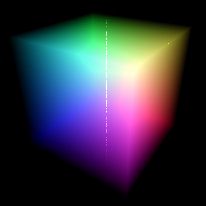
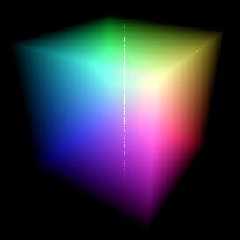
yep, a wrong value for max_trace_level was the reason,
but... this is still a mystery to me, because I know I didn't specify
ANY global_settings in the scene file yesterday, and POV-Ray still
produced garbage; today I tried again (I didn't make any changes) and
these black squares were gone! The only explanation I can imagine is
that POV-Ray crashed (which happens under Windoze95 quite often) and
after restarting POV-Ray it got a bit confused and somehow used a
wrong value (6 or 7?) for max_trace_level!?

Anyway, there is left a strange white vertical line in the middle of
the rendered picture. Does anyone know why?

btw I'm using version 3.1a.watcom.win32 [Pentium II optimized]


would it be possible to achieve the same result (without that white
line of course *g*) by using density_map / color_map on a _single_
cube instead?


Daniel
Post a reply to this message
Attachments:
Download 'rgb_cube_2nd_try.jpg' (4 KB)
Preview of image 'rgb_cube_2nd_try.jpg'
|
|
| |
| |
|
|
|
|
| |
| |
|
|
Fact is there are actually no coincident surfaces anyway in Daniels
script. The individual boxes are reduced to nine tenths their original
size (which if left unscaled would have been a potential problem,
maybe?). Being that much smaller however might be leading to some
trouble though, leaving gaps between each cube.


Dave Kreskowiak wrote:
>
> I ran into a problem probably similar to yours.  I was trying to render
> billowing smoke from something like a gasoline or oil fire.  There spheres I
> was using for containers intersected (overlapped) each other without any
> coincident surfaces.  The black areas I got were intermittent, but were
> always confined to the INTERSECTION of the spheres, not coincident surfaces.
> Moving the spheres around slightly got around the problem but it appears to
> be a bug in POV.
>
> In my experience, coincident surfaces tend to render a jittered imaged of
> both textures, not a black spot.  How about this...  try it out 2 images
> using just 2 boxes, side by side, and the texture that your using.  In one
> image put one box about half way into the other and render it and in the
> other, make the boxes just touch each other (coincident surfaces) and render
> it.  Just to see what happens.
>
> I'd try it and show you what I mean right now but I have a 6 day render
> running right now with 4 days to go...
>
> Daniel Höfer <Fur### [at] gmxde> wrote in message
> news:379a139b@news.povray.org...
> >
> > Hi all!
> >
> > I wanted to create a rgb-cube by putting together 10^3 smaller cubes
> > filled with an emission media. But there are some strange black
> > squares between the smaller cubes! Changing density, transmit and/or
> > filter values didn't help.
> >
> > Does anyone know where the problem is??
> >
> > Thanx in advance,
> > Daniel
> >
> >
> >

--
 omniVERSE: beyond the universe
  http://members.aol.com/inversez/homepage.htm
 mailto://inversez@aol.com?Subject=PoV-News
Post a reply to this message
|
|
| |
| |
|
|
|
|
| |
| |
|
|
I overlooked the scaling down of each individual box before. There is no
possibility of coincident surfaces.


Bob Hughes wrote:
>
> Yes. there is a need for a higher max_trace_level. About 15 seems okay,
> but 150 was better, somewhere inbetween perhaps then. I was going to say
> it probably is coincident surfaces but the effect goes away, or appears
> to anyway. The container objects being invisible to start with might not
> make it obvious but still cause trouble, not sure. At the default trace
> level it didn't show any change when I rescaled the boxes down slightly.
>
> Ken wrote:
> >
> > Ken wrote:
> > >
> > > "Daniel Höfer" wrote:
> > > >
> > > > Hi all!
> > > >
> > > > I wanted to create a rgb-cube by putting together 10^3 smaller cubes
> > > > filled with an emission media. But there are some strange black
> > > > squares between the smaller cubes! Changing density, transmit and/or
> > > > filter values didn't help.
> > > >
> > > > Does anyone know where the problem is??
> > > >
> > > > Thanx in advance,
> > > > Daniel
> > >
> > >   I don't have time to look at your source now but try adding a
> > > nax_trace_level in your global settings. I would start with
> > > something like 30 or more with this many objects in the scene.
> >
> > I didn't see the image either until now. Um there is a problem in
> > pov called coincident surfaces where if you have transparent objects
> > whose faces occupy the same space like two boxes abutting each other
> > the raytracer cannot decide which surface belongs to which object.
> > The easiest way to avoid this is to seperate them by a tiny amount
> > or have them overlap by a tiny amount. If you overlap them you can
> > also use a merge operation to remove all of the inner surfaces.
> > Read up in the docs about csgs and coincident surfaces.
> > max_trace_level can still be an issue so don't hesitate adding
> > that to your scene too.
> > --
> > Ken Tyler
> >
> > mailto://tylereng@pacbell.net
> > http://home.pacbell.net/tylereng/links.htm
>
> --
>  omniVERSE: beyond the universe
>   http://members.aol.com/inversez/homepage.htm
>  mailto://inversez@aol.com?Subject=PoV-News

--
 omniVERSE: beyond the universe
  http://members.aol.com/inversez/homepage.htm
 mailto://inversez@aol.com?Subject=PoV-News
Post a reply to this message
|
|
| |
| |
|
|
|
|
| |
| |
|
|
Shift your camera or rotate the entire cube itself (using a union) ever
so slightly and the vertical white line will disappear. It's a result of
the opposite front and back edges lining up.


"Daniel Höfer" wrote:
>
> yep, a wrong value for max_trace_level was the reason,
> but... this is still a mystery to me, because I know I didn't specify
> ANY global_settings in the scene file yesterday, and POV-Ray still
> produced garbage; today I tried again (I didn't make any changes) and
> these black squares were gone! The only explanation I can imagine is
> that POV-Ray crashed (which happens under Windoze95 quite often) and
> after restarting POV-Ray it got a bit confused and somehow used a
> wrong value (6 or 7?) for max_trace_level!?
>
> Anyway, there is left a strange white vertical line in the middle of
> the rendered picture. Does anyone know why?
>
> btw I'm using version 3.1a.watcom.win32 [Pentium II optimized]
>
> would it be possible to achieve the same result (without that white
> line of course *g*) by using density_map / color_map on a _single_
> cube instead?
>
> Daniel
>
>  [Image]

--
 omniVERSE: beyond the universe
  http://members.aol.com/inversez/homepage.htm
 mailto://inversez@aol.com?Subject=PoV-News
Post a reply to this message
|
|
| |
| |
|
|
|
|
| |
| |
|
|
Bob Hughes wrote:
>
> Fact is there are actually no coincident surfaces anyway in Daniels
> script. The individual boxes are reduced to nine tenths their original
> size (which if left unscaled would have been a potential problem,
> maybe?). Being that much smaller however might be leading to some
> trouble though, leaving gaps between each cube.

  The only problems I foresee with that would be the increased number
of intersection tests needed. This of course can be compensated for by
increasing the max trace level to an adequate amount.

--
Ken Tyler

mailto://tylereng@pacbell.net
http://home.pacbell.net/tylereng/links.htm
Post a reply to this message
|
|
| |
| |
|
|
|
|
| |
| |
|
|
On Sun, 25 Jul 1999 16:00:36 +0200, "Daniel Höfer" <Fur### [at] gmxde> wrote:

>but... this is still a mystery to me, because I know I didn't specify
>ANY global_settings in the scene file yesterday, and POV-Ray still
>produced garbage; today I tried again (I didn't make any changes) and
>these black squares were gone! The only explanation I can imagine is
>that POV-Ray crashed (which happens under Windoze95 quite often) and
>after restarting POV-Ray it got a bit confused and somehow used a
>wrong value (6 or 7?) for max_trace_level!?

  Hi, Daniel. This was a known bug and has been fixed since POV-Ray for
Windows v3.1d (we are now at v3.1g). As per Changes.txt that accompanies
POVWin:

o Fixed MAX_TRACE_LEVEL global not being re-initialized.

--
Alan
--------------------------------------------------------------------
http://www.povray.org - Home of the Persistence of Vision Ray Tracer
news.povray.org - where POV-Ray enthusiasts around the world can get
together to exchange ideas, information, and experiences with others
--------------------------------------------------------------------
Post a reply to this message
|
|
| |
| |
|
|
|
|
| |
| |
|
|
Alan Kong wrote:
>
> On Sun, 25 Jul 1999 16:00:36 +0200, "Daniel Höfer" <Fur### [at] gmxde> wrote:
>
> >but... this is still a mystery to me, because I know I didn't specify
> >ANY global_settings in the scene file yesterday, and POV-Ray still
> >produced garbage; today I tried again (I didn't make any changes) and
> >these black squares were gone! The only explanation I can imagine is
> >that POV-Ray crashed (which happens under Windoze95 quite often) and
> >after restarting POV-Ray it got a bit confused and somehow used a
> >wrong value (6 or 7?) for max_trace_level!?
>
>   Hi, Daniel. This was a known bug and has been fixed since POV-Ray for
> Windows v3.1d (we are now at v3.1g). As per Changes.txt that accompanies
> POVWin:
>
> o Fixed MAX_TRACE_LEVEL global not being re-initialized.
>
> --
> Alan

Alan,
I was wondering what that bug meant. Now it makes sense - thanks.

Daniel,

There are also other important bug fixes since that version you
are using and you are encouraged to upgrade now to avoid other
similar problems.

http://www.povray.org

--
Ken Tyler

mailto://tylereng@pacbell.net
http://home.pacbell.net/tylereng/links.htm
Post a reply to this message
|
|
| |
| |
|
|
|
|
| |
| |
|
|
>Shift your camera or rotate the entire cube itself (using a union)
ever
>so slightly and the vertical white line will disappear. It's a result
of
>the opposite front and back edges lining up.

it helped a bit but there was still not much improvement... some dots
disappear, others reappear :-/
Post a reply to this message
|
|
| |
| |
|
|
From: Dave Kreskowiak
Subject: Re: rgb-cube and problems with media
Date: 25 Jul 1999 20:30:14
Message: <379bac16@news.povray.org>
|
|
|
| |
| |
|
|
Maybe I'll go back and try the MaxTraceLevel on the smoke again to see if it
corrects the problem I was having.  (Didn't do anything with it because it
took too long to try and fix a problem and test!)

Thanks!


Bob Hughes <inv### [at] aolcom> wrote in message
news:379B3FC1.A567748D@aol.com...
> Fact is there are actually no coincident surfaces anyway in Daniels
> script. The individual boxes are reduced to nine tenths their original
> size (which if left unscaled would have been a potential problem,
> maybe?). Being that much smaller however might be leading to some
> trouble though, leaving gaps between each cube.
>
>
> Dave Kreskowiak wrote:
> >
> > I ran into a problem probably similar to yours.  I was trying to render
> > billowing smoke from something like a gasoline or oil fire.  There
spheres I
> > was using for containers intersected (overlapped) each other without any
> > coincident surfaces.  The black areas I got were intermittent, but were
> > always confined to the INTERSECTION of the spheres, not coincident
surfaces.
> > Moving the spheres around slightly got around the problem but it appears
to
> > be a bug in POV.
> >
> > In my experience, coincident surfaces tend to render a jittered imaged
of
> > both textures, not a black spot.  How about this...  try it out 2 images
> > using just 2 boxes, side by side, and the texture that your using.  In
one
> > image put one box about half way into the other and render it and in the
> > other, make the boxes just touch each other (coincident surfaces) and
render
> > it.  Just to see what happens.
> >
> > I'd try it and show you what I mean right now but I have a 6 day render
> > running right now with 4 days to go...
> >
> > Daniel Höfer <Fur### [at] gmxde> wrote in message
> > news:379a139b@news.povray.org...
> > >
> > > Hi all!
> > >
> > > I wanted to create a rgb-cube by putting together 10^3 smaller cubes
> > > filled with an emission media. But there are some strange black
> > > squares between the smaller cubes! Changing density, transmit and/or
> > > filter values didn't help.
> > >
> > > Does anyone know where the problem is??
> > >
> > > Thanx in advance,
> > > Daniel
> > >
> > >
> > >
>
> --
>  omniVERSE: beyond the universe
>   http://members.aol.com/inversez/homepage.htm
>  mailto://inversez@aol.com?Subject=PoV-News
Post a reply to this message
|
|
| |
| |
|
|
|
|
| |
| |
|
|
Not sure then, must be the version, I'm using 3.1g now. When I shifted
the camera or cube a bit it went completely away with a max_trace_level
of 30.


"Daniel Höfer" wrote:
>
> >Shift your camera or rotate the entire cube itself (using a union)
> ever
> >so slightly and the vertical white line will disappear. It's a result
> of
> >the opposite front and back edges lining up.
>
> it helped a bit but there was still not much improvement... some dots
> disappear, others reappear :-/

--
 omniVERSE: beyond the universe
  http://members.aol.com/inversez/homepage.htm
 mailto://inversez@aol.com?Subject=PoV-News
Post a reply to this message
|
|
| |
| |
|
|
|
|
| |
| |
|
|
On Sun, 25 Jul 1999 20:28:46 -0400, "Dave Kreskowiak"
<dkr### [at] homecom> wrote:

>Maybe I'll go back and try the MaxTraceLevel on the smoke again to see if it
>corrects the problem I was having.  (Didn't do anything with it because it
>took too long to try and fix a problem and test!)
>
>Thanks!

Replacing the spheres with the equivalent blob (of threshold 0.0001 or
similar) will result in a much faster and smoother render, and you
won't need to set max_trace_level too high. (You might need the
'sturm' keyword if there're a lot of elements, but that's all.) I have
too overlooked this method in the past until Chris Colefax opened my
eyes.


Peter Popov
ICQ: 15002700
Post a reply to this message
|
|
| |
| |
|
|
|
|
| |
| |
|
|
Peter Popov wrote:
>
> On Sun, 25 Jul 1999 20:28:46 -0400, "Dave Kreskowiak"
> <dkr### [at] homecom> wrote:
>
> >Maybe I'll go back and try the MaxTraceLevel on the smoke again to see if it
> >corrects the problem I was having.  (Didn't do anything with it because it
> >took too long to try and fix a problem and test!)
> >
> >Thanks!
>
> Replacing the spheres with the equivalent blob (of threshold 0.0001 or
> similar) will result in a much faster and smoother render, and you
> won't need to set max_trace_level too high. (You might need the
> 'sturm' keyword if there're a lot of elements, but that's all.) I have
> too overlooked this method in the past until Chris Colefax opened my
> eyes.
>
> Peter Popov
> ICQ: 15002700

Why would this be ?

--
Ken Tyler

mailto://tylereng@pacbell.net
http://home.pacbell.net/tylereng/links.htm
Post a reply to this message
|
|
| |
| |
|
|
|
|
| |
| |
|
|
On Mon, 26 Jul 1999 01:55:17 -0700, Ken <tyl### [at] pacbellnet> wrote:
>> Replacing the spheres with the equivalent blob (of threshold 0.0001 or
>> similar) will result in a much faster and smoother render, and you
>> won't need to set max_trace_level too high. (You might need the
>> 'sturm' keyword if there're a lot of elements, but that's all.) I have
>> too overlooked this method in the past until Chris Colefax opened my
>> eyes.
>>
>> Peter Popov
>> ICQ: 15002700
>
>Why would this be ?

I didn't believe it either before I did the tests. First of all,
multiple containers for multiple media proved a lot faster and
smoother than multiple media in a single container. The reason is
that, as the media are better enclosed each in its own container, a)
fewer unnecessary calculations are performed and b) media intervals
are closer together. Or, if we choose a container that's fast and
tightly fitting the media, then it's ok too. With that said, there are
three ways to go:

Union of spheres - fast, but has the problem of the high
max_trace_level needed. Also, if the spheres are closely packed, it
gets really slow. I think the reason is that every time the ray
enters/leaves a sphere and leaves/enters another, that segment of it
gets media sampled. Imagine what happens with 150 closely packed
spheres.

Merge of spheres - the problems typical for the union of spheres are
avoided, but merge is really slow as is.

Blob - the fastest of all three due to the bounding hierarchy and it
also avoids the problems that an union of spheres has. Also, each
element gets its media sampled separately (or so it seems) and this
yields a smoother image.


Peter Popov
ICQ: 15002700
Post a reply to this message
|
|
| |
| |
|
|
|
|
| |
| |
|
|
Peter Popov wrote:
>
> On Mon, 26 Jul 1999 01:55:17 -0700, Ken <tyl### [at] pacbellnet> wrote:
> >> Replacing the spheres with the equivalent blob (of threshold 0.0001 or
> >> similar) will result in a much faster and smoother render, and you
> >> won't need to set max_trace_level too high. (You might need the
> >> 'sturm' keyword if there're a lot of elements, but that's all.) I have
> >> too overlooked this method in the past until Chris Colefax opened my
> >> eyes.
> >>
> >> Peter Popov
> >> ICQ: 15002700
> >
> >Why would this be ?
>
> I didn't believe it either before I did the tests. First of all,
> multiple containers for multiple media proved a lot faster and
> smoother than multiple media in a single container. The reason is
> that, as the media are better enclosed each in its own container, a)
> fewer unnecessary calculations are performed and b) media intervals
> are closer together. Or, if we choose a container that's fast and
> tightly fitting the media, then it's ok too. With that said, there are
> three ways to go:
>
> Union of spheres - fast, but has the problem of the high
> max_trace_level needed. Also, if the spheres are closely packed, it
> gets really slow. I think the reason is that every time the ray
> enters/leaves a sphere and leaves/enters another, that segment of it
> gets media sampled. Imagine what happens with 150 closely packed
> spheres.
>
> Merge of spheres - the problems typical for the union of spheres are
> avoided, but merge is really slow as is.
>
> Blob - the fastest of all three due to the bounding hierarchy and it
> also avoids the problems that an union of spheres has. Also, each
> element gets its media sampled separately (or so it seems) and this
> yields a smoother image.
>
> Peter Popov
> ICQ: 15002700

 Then as I understand it Pov will treat the blob method as a single blob
entity with multiple cells as opposed to sphere which it must treat as
multiple entities. Yes ?

--
Ken Tyler

mailto://tylereng@pacbell.net
http://home.pacbell.net/tylereng/links.htm
Post a reply to this message
|
|
| |
| |
|
|
|
|
| |
| |
|
|
On Mon, 26 Jul 1999 03:34:34 -0700, Ken <tyl### [at] pacbellnet> wrote:

> Then as I understand it Pov will treat the blob method as a single blob
>entity with multiple cells as opposed to sphere which it must treat as
>multiple entities. Yes ?

I can't tell more without a) peeking into the source code or b)
speculating. I wish to do neither therefore I will leave these musings
to the more qualified and take it as is.


Peter Popov
ICQ: 15002700
Post a reply to this message
|
|
| |
| |
|
|
|
|
| |
| |
|
|
Peter Popov <pet### [at] usanet> wrote:
: Merge of spheres - the problems typical for the union of spheres are
: avoided, but merge is really slow as is.

  Not really true. I wonder why this delusion persists.
  See http://www.students.tut.fi/~warp/povVFAQ.html#csgspeed


  (Everyone keeps saying that merge is (always) a lot slower than union,
but no-one has ever said why. Or even proved it.)

--
main(i,_){for(_?--i,main(i+2,"FhhQHFIJD|FQTITFN]zRFHhhTBFHhhTBFysdB"[i]
):5;i&&_>1;printf("%s",_-70?_&1?"[]":" ":(_=0,"\n")),_/=2);} /*- Warp -*/
Post a reply to this message
|
|
| |
| |
|
|
|
|
| |
| |
|
|
Nieminen Mika wrote:
>
> Peter Popov <pet### [at] usanet> wrote:
> : Merge of spheres - the problems typical for the union of spheres are
> : avoided, but merge is really slow as is.
>
>   Not really true. I wonder why this delusion persists.
>   See http://www.students.tut.fi/~warp/povVFAQ.html#csgspeed
>
>   (Everyone keeps saying that merge is (always) a lot slower than union,
> but no-one has ever said why. Or even proved it.)

  I have the following script that shows the merge operation taking 2 times
longer than a union of the same objects. I did recieve similar results as
you did with the example you gave but this example obviously takes longer
though I cannot offer an explaination as to why.

 Rendered at 120x100 no AA
 union time:  min. 3  sec. 9
 merge time:  min. 6  sec. 21

 union {
 // merge {
  #declare A =  0;
  #while ( A < 10)
     #declare B =  0;
     #while ( B < 10)
        #declare C =  0;
        #while ( C < 10)
           box { -.5, .5
       pigment { rgbf .9}
                 translate<-5,-5,-5>
                 translate <0.99*A, 0.99*B, 0.99*C>
               }
        #declare C = C + 1;
        #end
     #declare B = B + 1;
     #end
  #declare A = A + 1;
  #end
 }

global_settings { max_trace_level 85}

         camera { location<2.5,5,-15> look_at 0}
   light_source { <30,100,100> rgb 1}
   light_source { <-0,10,-200> rgb 1}
    background  { rgb 1}

--
Ken Tyler

mailto://tylereng@pacbell.net
http://home.pacbell.net/tylereng/links.htm
Post a reply to this message
|
|
| |
| |
|
|
|
|
| |
| |
|
|
I tried this scene in this Sparcstation 4 rendering at 160x120 (it's a
very slow machine...). I got these results:
  Union:
    Total Time:    0 hours 13 minutes  13.0 seconds (793 seconds)
  Merge:
    Total Time:    0 hours 11 minutes  50.0 seconds (710 seconds)

  I also tried with a simplified version of the scene. I scaled the boxes by
2 and added '2' to each index (instead of '1'). Rendering at 320x240 I got:
  Union:
    Total Time:    0 hours 11 minutes  59.0 seconds (719 seconds)
  Merge:
    Total Time:    0 hours  4 minutes  25.0 seconds (265 seconds)

--
main(i,_){for(_?--i,main(i+2,"FhhQHFIJD|FQTITFN]zRFHhhTBFHhhTBFysdB"[i]
):5;i&&_>1;printf("%s",_-70?_&1?"[]":" ":(_=0,"\n")),_/=2);} /*- Warp -*/
Post a reply to this message
|
|
| |
| |
|
|
|
|
| |
| |
|
|
On Sun, 25 Jul 1999 09:48:00 -0400, Dave Kreskowiak wrote:
>In my experience, coincident surfaces tend to render a jittered imaged of
>both textures, not a black spot.

Black spots (actually transparent spots) are fairly common.  They usually
happen when you have an intersection involving coincident surfaces.  POV
will find one or the other surface, then determine that that surface is
"outside" the other surface and ignore that intersection.  It then goes
on to find another intersection, but because it always starts looking at
a distance of EPSILON along the ray from the last intersection, it misses
the second surface at that point entirely, leaving a transparent spot
that could show up as black under the right circumstances.
Post a reply to this message
|
|
| |
| |
|
|
|
|
| |
| |
|
|
On 26 Jul 1999 07:48:32 -0400, Nieminen Mika wrote:
>  (Everyone keeps saying that merge is (always) a lot slower than union,
>but no-one has ever said why. Or even proved it.)

If we look only at the time to calculate intersections, merge is slower
than union because it has to check each intersection to see if it's inside
another element.  Thus merge might be slower than union if you use a simple
texture like "texture {pigment {color rgbt .8} finish{ambient .8}}" with no
or maybe only a single light source.

However, in the real world many of us use very complex textures with
reflection and complex lighting.  Calculating the various patterns, and
especially casting all those shadow rays and reflection rays, tends to dwarf
the time it takes to test intersections for insideness.
Post a reply to this message
|
|
| |
| |
|
|
|
|
| |
| |
|
|
On 26 Jul 1999 07:48:32 -0400, Nieminen Mika <war### [at] cctutfi> wrote:

>  Not really true. I wonder why this delusion persists.
>  See http://www.students.tut.fi/~warp/povVFAQ.html#csgspeed
>
>
>  (Everyone keeps saying that merge is (always) a lot slower than union,
>but no-one has ever said why. Or even proved it.)

Yeah, I have the VFAQ, Warp. I was referring to this particular case,
namely 100 or more transparent media-filled spheres. I agree that
merge can be faster in the some cases, particularly when there are a
lot of transparent objects close together (like 100-200 transparent
surfaces) and media. This is, you should agree, a rare occasion.


Peter Popov
ICQ: 15002700
Post a reply to this message
|
|
| |
| |
|
|
|
|
| |
| |
|
|
Nieminen Mika wrote:
>
>   I tried this scene in this Sparcstation 4 rendering at 160x120 (it's a
> very slow machine...). I got these results:

  I would be interested in seeing your windows comarison. I ran one more
test using the previous test parmeters with the addition of media and
rendered at 640x480 to increase the render time. The difference between
merge and union was less than 5% for a 3.5 hour render time. The merge was
slightly faster.

--
Ken Tyler

mailto://tylereng@pacbell.net
http://home.pacbell.net/tylereng/links.htm
Post a reply to this message
|
|
| |
| |
|
|
|
|
| |
| |
|
|
Ken <tyl### [at] pacbellnet> wrote:
:   I would be interested in seeing your windows comarison.

  Yes, it probably is system and/or compiler dependant.

  Anyways, with semitransparent objects and lots of inner surfaces (which
are removed when merged), the merge operation is often (although not always)
faster than the union.
  I can easyly believe that with non-transparent objects merge may be a little
slower than union.

--
main(i,_){for(_?--i,main(i+2,"FhhQHFIJD|FQTITFN]zRFHhhTBFHhhTBFysdB"[i]
):5;i&&_>1;printf("%s",_-70?_&1?"[]":" ":(_=0,"\n")),_/=2);} /*- Warp -*/
Post a reply to this message
|
|
| |
| |
|
|
|
|
| |
| |
|
|
I just had to laugh inwardly about all this talk in the newusers group.
It sounds so much like some advanced topic going on, for which there is
the appropriate group.


Ron Parker wrote:
>
> On Sun, 25 Jul 1999 09:48:00 -0400, Dave Kreskowiak wrote:
> >In my experience, coincident surfaces tend to render a jittered imaged of
> >both textures, not a black spot.
>
> Black spots (actually transparent spots) are fairly common.  They usually
> happen when you have an intersection involving coincident surfaces.  POV
> will find one or the other surface, then determine that that surface is
> "outside" the other surface and ignore that intersection.  It then goes
> on to find another intersection, but because it always starts looking at
> a distance of EPSILON along the ray from the last intersection, it misses
> the second surface at that point entirely, leaving a transparent spot
> that could show up as black under the right circumstances.

--
 omniVERSE: beyond the universe
  http://members.aol.com/inversez/homepage.htm
 mailto://inversez@aol.com?Subject=PoV-News
Post a reply to this message
|
|
| |
| |
|
|
|
|
| |
| |
|
|
Bob Hughes <inv### [at] aolcom> wrote:
: I just had to laugh inwardly about all this talk in the newusers group.
: It sounds so much like some advanced topic going on, for which there is
: the appropriate group.

  Perhaps we should learn how to use the followup-to -field.

--
main(i,_){for(_?--i,main(i+2,"FhhQHFIJD|FQTITFN]zRFHhhTBFHhhTBFysdB"[i]
):5;i&&_>1;printf("%s",_-70?_&1?"[]":" ":(_=0,"\n")),_/=2);} /*- Warp -*/
Post a reply to this message
|
|
| |
| |
|
|
|
|
| |
| |
|
|
Nieminen Mika wrote:
>
> Bob Hughes <inv### [at] aolcom> wrote:
> : I just had to laugh inwardly about all this talk in the newusers group.
> : It sounds so much like some advanced topic going on, for which there is
> : the appropriate group.
>
>   Perhaps we should learn how to use the followup-to -field.

...Or perhaps a few newbies will get the concept being discussed in this
thread so firmly pounded into thier heads they will never have to ask
similar questions again...

--
Ken Tyler

mailto://tylereng@pacbell.net
http://home.pacbell.net/tylereng/links.htm
Post a reply to this message
|
|
| |
| |
|
|
From: Bob Hughes
Subject: Re: Getting there from here via Followup-To:
Date: 27 Jul 1999 21:04:04
Message: <379e5704@news.povray.org>
|
|
|
| |
| |
|
|
Hmmm, now this seems right. Original Group:povray.advanced-users (for
example) was left the same. Then the second header position (in Netscape
anyway) was set to Followup-To:povray.newusers and voila! I am now here,
from there. Everyone got that now? Stand back and watch the
mis-postings!

Please note that the intent is cause a redirection of message replies
into a different, possibly more appropriate newsgroup.


Bob Hughes wrote:
>
> Wups! Well glad you said so, I looked at this and thought "Hey, OK! It
> works."
> What I had done is select Followup To: in a drop-down list where the
> povray.newusers was showing and then added this advanced group in after
> a Group: heading. Think I should have done the opposite. Will do that to
> this posting and send back to the newuser group under an appropriate
> title. Maybe...
>
> Ron Parker wrote:
> >
> > On Tue, 27 Jul 1999 15:41:48 -0500, Bob Hughes wrote:
> > >Please forgive me if I've totally messed things up here but this is my
> > >first ever attempt at a "follow up" which Nieminen M. had mentioned.
> > >And if it works this might be as good a place as any to place this post.
> >
> > It didn't work.  It might look like it did, but it didn't.  You need to
> > set the Followup-To: header or it will default to sending followups
> > back to newusers.  slrn makes this easy; I don't know how easy it is with
> > Netscape.
>
> --
>  omniVERSE: beyond the universe
>   http://members.aol.com/inversez/homepage.htm
>  mailto://inversez@aol.com?Subject=PoV-News

--
 omniVERSE: beyond the universe
  http://members.aol.com/inversez/homepage.htm
 mailto://inversez@aol.com?Subject=PoV-News
Post a reply to this message
|
|
| |
| |
|
|
From: Bob Hughes
Subject: Re: Getting there from here via Followup-To:
Date: 27 Jul 1999 21:10:01
Message: <379e5869@news.povray.org>
|
|
|
| |
| |
|
|
Ah ha! Seems my restrained worry was justified. I was expecting this
post to get out into the mainstream of the group for which it was
redirected to. And here I am back at the original thread where I had
begun my investigation of the Followup-To:
Well, to put an end of my feable tamperings I will now stop and simply
watch to see what happens because of this as others reply to the posts I
did here.
May have started a rip in the fabric of space and newsgroups, forgive me
please if I have.


Bob Hughes wrote:
>
> Hmmm, now this seems right. Original Group:povray.advanced-users (for
> example) was left the same. Then the second header position (in Netscape
> anyway) was set to Followup-To:povray.newusers and voila! I am now here,
> from there. Everyone got that now? Stand back and watch the
> mis-postings!
>
> Please note that the intent is cause a redirection of message replies
> into a different, possibly more appropriate newsgroup.
>
> Bob Hughes wrote:
> >
> > Wups! Well glad you said so, I looked at this and thought "Hey, OK! It
> > works."
> > What I had done is select Followup To: in a drop-down list where the
> > povray.newusers was showing and then added this advanced group in after
> > a Group: heading. Think I should have done the opposite. Will do that to
> > this posting and send back to the newuser group under an appropriate
> > title. Maybe...
> >
> > Ron Parker wrote:
> > >
> > > On Tue, 27 Jul 1999 15:41:48 -0500, Bob Hughes wrote:
> > > >Please forgive me if I've totally messed things up here but this is my
> > > >first ever attempt at a "follow up" which Nieminen M. had mentioned.
> > > >And if it works this might be as good a place as any to place this post.
> > >
> > > It didn't work.  It might look like it did, but it didn't.  You need to
> > > set the Followup-To: header or it will default to sending followups
> > > back to newusers.  slrn makes this easy; I don't know how easy it is with
> > > Netscape.
> >
> > --
> >  omniVERSE: beyond the universe
> >   http://members.aol.com/inversez/homepage.htm
> >  mailto://inversez@aol.com?Subject=PoV-News
>
> --
>  omniVERSE: beyond the universe
>   http://members.aol.com/inversez/homepage.htm
>  mailto://inversez@aol.com?Subject=PoV-News

--
 omniVERSE: beyond the universe
  http://members.aol.com/inversez/homepage.htm
 mailto://inversez@aol.com?Subject=PoV-News
Post a reply to this message
|
|
| |
| |
|
|
|
|
| |
| |
|
|
Bob Hughes wrote:
>
> Ah ha! Seems my restrained worry was justified. I was expecting this
> post to get out into the mainstream of the group for which it was
> redirected to. And here I am back at the original thread where I had
> begun my investigation of the Followup-To:
> Well, to put an end of my feable tamperings I will now stop and simply
> watch to see what happens because of this as others reply to the posts I
> did here.
> May have started a rip in the fabric of space and newsgroups, forgive me
> please if I have.

 If you had anything to add to this thread I suggest you just add it now, here,
otherwise I think it is pretty much dead :)

--
Ken Tyler

mailto://tylereng@pacbell.net
http://home.pacbell.net/tylereng/links.htm
Post a reply to this message
|
|
| |
| |
|
|
|
|
| |
| |
|
|
bob this should go to advanced

Bob Hughes wrote:

--
Cheers
Steve

------------------------------------------------------------------------------------------------
%HAV-A-NICEDAY Error reading file mailto:sjl### [at] ndirectcouk
Post a reply to this message
|
|
| |
| |
|
|
|
|
| |