POV-Ray : Newsgroups : povray.general : Help: The normal map is not working Server Time
18 Mar 2026 19:50:47 EDT (-0400)
  Help: The normal map is not working (Message 1 to 7 of 7)  
From: LanuHum
Subject: Help: The normal map is not working
Date: 14 Mar 2026 01:05:00
Message: <web.69b4e8ed3bbece724b3090d75f41e3cc@news.povray.org>
Hello! I created a picture with a gradient. I want to use it as a height map for
a sphere. However, only gray stripes are visible on the sphere.

#version 3.7;
#include "shapes.inc"

global_settings {
    assumed_gamma 1.000000
    max_trace_level 3
    charset utf8
}
sky_sphere {
    pigment {rgb<0.051, 0.051, 0.051>}
}

#declare Default_texture = texture{pigment {rgb 0.8}}

#declare Material = texture{
    pigment{color srgbft <0.8000,0.8000,0.8000,0.0000,0.0000>}
    finish{
        diffuse 0.8000
        brilliance 1.8000
          }
}
#declare Material_001 = texture{
    pigment{color srgbft <0.8000,0.8000,0.8000,0.0000,0.0000>}
    normal{ bump_map{"/home/lanuhum/src/Thread_90.jpg" gamma 1.1000 map_type 0
interpolate 2 bump_size 5}
        translate <0.0000,0.0000,0.0000>
        rotate <0.0000,0.0000,0.0000>
        scale <1.0000,1.0000,1.0000>/1
        }
    finish{
        diffuse 0.8000
        brilliance 1.8000
          }
}
#declare data_Sphere_shape_ob = sphere { 0,1
    texture {Material_001}
    matrix <1.000000, 0.000000, 0.000000,  0.000000, 1.000000, 0.000000,
0.000000, 0.000000, 1.000000,  0.000000, 0.000000, 0.000000>
}
#include "data_Cube_dec.inc"

object {data_Sphere_shape_ob
    matrix <1.000000, 0.000000, 0.000000,  0.000000, -0.000000, -1.000000,
0.000000, 1.000000, -0.000000,  0.000000, 0.000000, 0.000000>
}
object {data_Cube_ob
    matrix <1.000000, 0.000000, 0.000000,  0.000000, -0.000000, -1.000000,
0.000000, 1.000000, -0.000000,  0.000000, 0.000000, 0.000000>
}
light_source {
    <4.08,5.9,-1.01>
    color rgb<1, 1, 1>
    fade_distance 29.9999828339
    fade_power 1
}
camera {
    perspective
    location  <0,0,0>
    look_at  <0,0,-1>
    right <-1.7777777777777777, 0, 0>
    up <0, 1, 0>
    angle  49.134343
    rotate  <-26.440706, 46.691945, -0.000003>
    translate <7.481132, 5.343666, 6.507640>
}


Post a reply to this message


Attachments:
Download 'bump_map.jpg' (64 KB)

Preview of image 'bump_map.jpg'
bump_map.jpg


From: Bald Eagle
Subject: Re: Help: The normal map is not working
Date: 14 Mar 2026 08:30:00
Message: <web.69b55447b63eec031f9dae3025979125@news.povray.org>
"LanuHum" <Lan### [at] yandexru> wrote:
> Hello! I created a picture with a gradient. I want to use it as a height map for
> a sphere. However, only gray stripes are visible on the sphere.

That's because you're only perturbing the normal vectors on the smooth sphere to
make the light reflect in different directions than it normally would, and so
produce the illusion that there is a "texture" on the surface when there isn't.

There are articles on the web and maybe a POV-Ray FAQ that show the shadows cast
by objects that are really shaped that way vs a smooth object with a normal map.

What you want to do is "surface displacement" where you actually change the
geometry of the surface of your sphere.

Luckily, myself, WFP, and Maetes have worked on this.

Your best bet is to use whatever function makes your stripes to modulate the
radius of your sphere so that those points have the actual height dictated by
the function.

https://news.povray.org/povray.binaries.images/thread/%3C5f16dc29%40news.povray.org%3E/

https://news.povray.org/povray.advanced-users/thread/%3Cweb.67b47b18cb1bd5e34d0a98d30225ff5%40news.povray.org%3E/

You can also look at Mike Williams' isosurface tutorial where he has several
examples of using functions to change the surface of a sphere.

Hope that helps.

- BE


Post a reply to this message

From: LanuHum
Subject: Re: Help: The normal map is not working
Date: 14 Mar 2026 14:10:00
Message: <web.69b5a3a0b63eec034b3090d75f41e3cc@news.povray.org>
"Bald Eagle" <cre### [at] netscapenet> wrote:
> "LanuHum" <Lan### [at] yandexru> wrote:
> > Hello! I created a picture with a gradient. I want to use it as a height map for
> > a sphere. However, only gray stripes are visible on the sphere.
>
> That's because you're only perturbing the normal vectors on the smooth sphere to
> make the light reflect in different directions than it normally would, and so
> produce the illusion that there is a "texture" on the surface when there isn't.
>
> There are articles on the web and maybe a POV-Ray FAQ that show the shadows cast
> by objects that are really shaped that way vs a smooth object with a normal map.
>
> What you want to do is "surface displacement" where you actually change the
> geometry of the surface of your sphere.
>
> Luckily, myself, WFP, and Maetes have worked on this.
>
> Your best bet is to use whatever function makes your stripes to modulate the
> radius of your sphere so that those points have the actual height dictated by
> the function.
>
>
https://news.povray.org/povray.binaries.images/thread/%3C5f16dc29%40news.povray.org%3E/
>
>
https://news.povray.org/povray.advanced-users/thread/%3Cweb.67b47b18cb1bd5e34d0a98d30225ff5%40news.povray.org%3E/
>
> You can also look at Mike Williams' isosurface tutorial where he has several
> examples of using functions to change the surface of a sphere.
>
> Hope that helps.
>
> - BE

I understand. Thank you.


Post a reply to this message

From: Kenneth
Subject: Re: Help: The normal map is not working
Date: 16 Mar 2026 07:25:00
Message: <web.69b7e4dfb63eec03e83955656e066e29@news.povray.org>
"LanuHum" <Lan### [at] yandexru> wrote:
> Hello! I created a picture with a gradient. I want to use it as a
> height map for a sphere. However, only gray stripes are visible on the sphere.
>

The 'flat' look of those gray stripes seems odd to me; there *should* be some
(fake) 'depth' to them due to your bump_map, based on the normal-pattern image
that you posted:

normal{ bump_map{"/home/lanuhum/src/Thread_90.jpg"
gamma 1.1000 map_type 0
interpolate 2 bump_size 5}

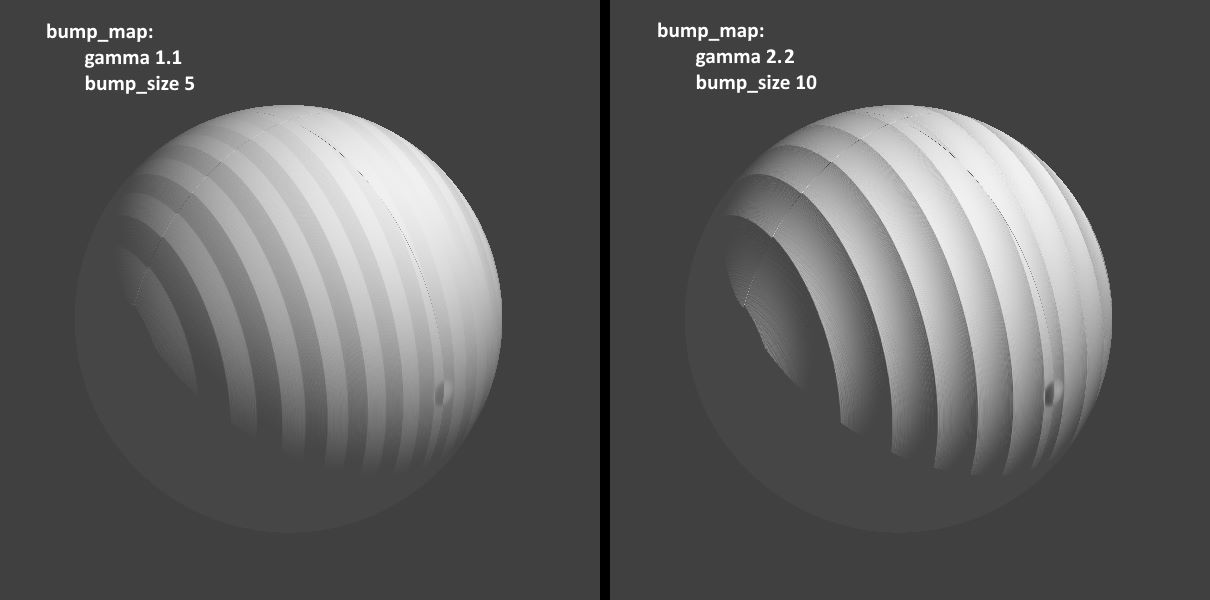
I ran your code--using the same 'normal' image that I copied here-- and it seems
that a gamma of 1.1 that you used is not a good value for a bump_map. I changed
that value to 2.2 (and boosted the bump_size to 10) and it looks much better.

If I leave out the gamma keyword altogether, the 'flat' result looks nearly
identical to your 1.1 value. The POV-ray default is 1.0 (i.e., it treats the
image as 'linear' data.)

Since we are both using jpeg's for the bump_map, they have a standard 'embedded
gamma' of around 2.2 (or maybe 'srgb'), which is not linear. So using a value of
1.1 (or 1.0) changes that; a somewhat simple explanation is that it reduces the
contrast of the image-as-bump_map.

From the documentation:
"While POV-Ray will normally interpret the bump map input file as a container of
linear data [gamma of 1.0] irregardless of file type, this can be overridden for
any individual bump map input file by specifying gamma immediately after the
file name."


Post a reply to this message


Attachments:
Download 'bump_map_gamma_comparison_kw.jpg' (41 KB)

Preview of image 'bump_map_gamma_comparison_kw.jpg'
bump_map_gamma_comparison_kw.jpg


From: Bald Eagle
Subject: Re: Help: The normal map is not working
Date: 16 Mar 2026 09:10:00
Message: <web.69b8007bb63eec032e86b3cc25979125@news.povray.org>
"Kenneth" <kdw### [at] gmailcom> wrote:
> "LanuHum" <Lan### [at] yandexru> wrote:
> > Hello! I created a picture with a gradient. I want to use it as a
> > height map for a sphere. However, only gray stripes are visible on the sphere.


> I ran your code--using the same 'normal' image that I copied here-- and it seems
> that a gamma of 1.1 that you used is not a good value for a bump_map. I changed
> that value to 2.2 (and boosted the bump_size to 10) and it looks much better.


Good work digging a little deeper into this.
I was just checking in during morning coffee, and then heading straight out.

Depending on what the final use case is, he might want consistent/believable
shadows to go along with that deep scalloped surface.
Also, it seems a little silly to evaluate the function to make an image that
then gets used as a bump map - when he can just plug it straight into an
isosurface and get better results without all of the extra workflow and
processing.

However your experiments are not without value.  I think it would be a nice
demonstration scene if you made a grid of spheres each with different gamma
handling and bump sizes - AND had them all cast shadows onto a plane.

If you share your thoughts about how the image gets converted to gamma 2.2 or
srgb-modified rgb values, and I can pipe that into the isosurface equations for
a parallel rendering and comparison.

- BE


Post a reply to this message

From: Ilya Razmanov
Subject: Re: Help: The normal map is not working
Date: 17 Mar 2026 06:02:48
Message: <69b926c8$1@news.povray.org>
On 16.03.2026 14:20, Kenneth wrote:
> The 'flat' look of those gray stripes seems odd to me; there *should* be some
> (fake) 'depth' to them due to your bump_map,

Absolutely agree. But I was unable to find the reason why the result do 
not conform with my expectations.

> I changed
> that value to 2.2

Aha! That that seem be that evasive reason!

Thank you, that sort of explains things.

-- 
Ilyich the Toad
https://dnyarri.github.io/


Post a reply to this message

From: LanuHum
Subject: Re: Help: The normal map is not working
Date: 17 Mar 2026 12:20:00
Message: <web.69b97e18b63eec034b3090d75f41e3cc@news.povray.org>
"Kenneth" <kdw### [at] gmailcom> wrote:
> "LanuHum" <Lan### [at] yandexru> wrote:
> > Hello! I created a picture with a gradient. I want to use it as a
> > height map for a sphere. However, only gray stripes are visible on the sphere.
> >
>
> The 'flat' look of those gray stripes seems odd to me; there *should* be some
> (fake) 'depth' to them due to your bump_map, based on the normal-pattern image
> that you posted:
>
> normal{ bump_map{"/home/lanuhum/src/Thread_90.jpg"
> gamma 1.1000 map_type 0
> interpolate 2 bump_size 5}
>
> I ran your code--using the same 'normal' image that I copied here-- and it seems
> that a gamma of 1.1 that you used is not a good value for a bump_map. I changed
> that value to 2.2 (and boosted the bump_size to 10) and it looks much better.
>
> If I leave out the gamma keyword altogether, the 'flat' result looks nearly
> identical to your 1.1 value. The POV-ray default is 1.0 (i.e., it treats the
> image as 'linear' data.)
>
> Since we are both using jpeg's for the bump_map, they have a standard 'embedded
> gamma' of around 2.2 (or maybe 'srgb'), which is not linear. So using a value of
> 1.1 (or 1.0) changes that; a somewhat simple explanation is that it reduces the
> contrast of the image-as-bump_map.
>
> From the documentation:
> "While POV-Ray will normally interpret the bump map input file as a container of
> linear data [gamma of 1.0] irregardless of file type, this can be overridden for
> any individual bump map input file by specifying gamma immediately after the
> file name."

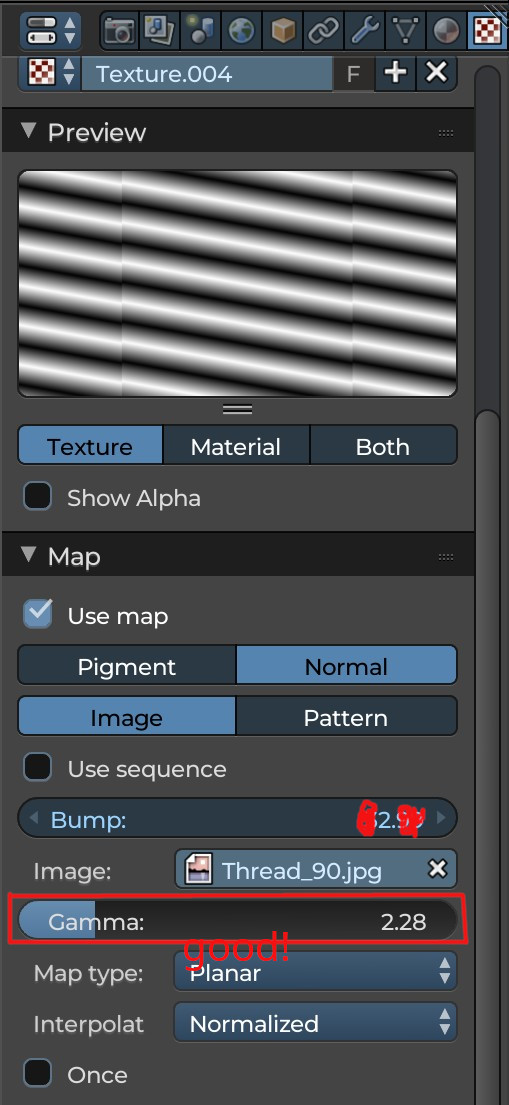
My sincere apologies. I missed your message. Thank you so much for your help


Post a reply to this message


Attachments:
Download 'screenshot.jpg' (104 KB)

Preview of image 'screenshot.jpg'
screenshot.jpg


Copyright 2003-2023 Persistence of Vision Raytracer Pty. Ltd.