 |
|
|
|
|
|
| |
| |
|
|
|
|
| |
| |
|
|
Any ideas why this scene
   https://paulbourke.net/transient/povray/
crashes once "theradius" gets past a certain value, eg: 0.6. There are no
coincident points, running version 3.7 on MacOS. Tonnes of RAM (192GB) and only
a fraction is used.
And more importantly, how to fix or get around it?
Post a reply to this message
|
|
| |
| |
|
|
|
|
| |
| |
|
|
"Paul Bourke" <pau### [at] gmail com> wrote:
> Any ideas why this scene
> https://paulbourke.net/transient/povray/
> crashes once "theradius" gets past a certain value, eg: 0.6. There are no
> coincident points, running version 3.7 on MacOS. Tonnes of RAM (192GB) and only
> a fraction is used.
> And more importantly, how to fix or get around it?
Also happens for beta 3.8, but at different values of "the radius". com> wrote:
> Any ideas why this scene
> https://paulbourke.net/transient/povray/
> crashes once "theradius" gets past a certain value, eg: 0.6. There are no
> coincident points, running version 3.7 on MacOS. Tonnes of RAM (192GB) and only
> a fraction is used.
> And more importantly, how to fix or get around it?
Also happens for beta 3.8, but at different values of "the radius".
Post a reply to this message
|
|
| |
| |
|
|
|
|
| |
| |
|
|
On 15/03/2025 11:14, Paul Bourke wrote:
> "Paul Bourke" <pau### [at] gmailcom> wrote:
>> Any ideas why this scene
>>     https://paulbourke.net/transient/povray/
>> crashes once "theradius" gets past a certain value, eg: 0.6. There are no
>> coincident points, running version 3.7 on MacOS. Tonnes of RAM (192GB) and only
>> a fraction is used.
>> And more importantly, how to fix or get around it?
>
> Also happens for beta 3.8, but at different values of "the radius".
>

IMHO, this comes from using the <disk> object.

Have you tried using the <cylinder> object instead ?


--
kurtz le pirate
compagnie de la banquise
Post a reply to this message
|
|
| |
| |
|
|
|
|
| |
| |
|
|
"Paul Bourke" <pau### [at] gmailcom> wrote:
> Any ideas why this scene
>    https://paulbourke.net/transient/povray/
> crashes once "theradius" gets past a certain value, eg: 0.6. [...]

ran it on windows 11 with POV-Ray 3.7, I get the error:

Internal limit exceeded in FixedSimpleVector
Fatal error in renderer: A POV-Ray internal nesting limit was reached.
Render failed


used radius = 0.85

ingo
Post a reply to this message
|
|
| |
| |
|
|
|
|
| |
| |
|
|
On 15/03/2025 11:00, Paul Bourke wrote:
> And more importantly, how to fix or get around it?
>

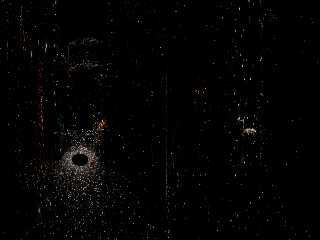
Successfully rendered this scene (see attached image), but have a lot of
warnings:
------------------------------------------------------------------------
"C:\temp\pb\scene.pov" line 33: Possible Parse Error: Suspiciously high
'ambient' value found. Are you trying to model a glowing material? As of
POV-Ray v3.7, 'ambient' is disabled when using radiosity, and its use to
model glowing materials is generally deprecated;
use 'emission' for this purpose instead. If your intention is to model
unusually high ambient illumination in a non-radiosity scene, you can
avoid this warning by explicitly specifying 'emission 0'.
------------------------------------------------------------------------

POV-Ray version:
https://github.com/LeForgeron/povray

System:
OS Name	Microsoft Windows 7
Version	6.1.7601 Service Pack 1 Build 7601
Total Physical Memory	24.0 GB

Log in attachment.
--
YB
Post a reply to this message
Attachments:
Download 'scene.png' (49 KB)
Download 'errors.zip' (2 KB)
Preview of image 'scene.png'
|
|
| |
| |
|
|
|
|
| |
| |
|
|
On 15/03/2025 12:18, yesbird wrote:
> Successfully rendered this scene (see attached image), but have a lot of
> warnings ...

And this is the first frame rendered with your scene.ini.
--
YB
Post a reply to this message
Attachments:
Download 'scene0000.png' (888 KB)
Preview of image 'scene0000.png'

|
|
| |
| |
|
|
|
|
| |
| |
|
|
On 3/15/25 04:00, Paul Bourke wrote:
> Any ideas why this scene
>     https://paulbourke.net/transient/povray/
> crashes once "theradius" gets past a certain value, eg: 0.6. There are no
> coincident points, running version 3.7 on MacOS. Tonnes of RAM (192GB) and only
> a fraction is used.
> And more importantly, how to fix or get around it?
>
>

Does it crash during parsing? Rendering the first frame? Or sometime
during the animation of the frames?

Running my playpen fork (v3.8 based Linux) for which I had a debug
compile handy. I had no trouble with theradius at 0.65 or 0.85 - the
render does get slow as that radius increases. Tried all the things I
list below, but I saw no crash. I rendered at 900 x 144 on my little i3
- without AA - and it was still 8 to 13 minutes a frame (some of that
the extra debugging checks).

Only ideas I had on reading through your scene initially were:

1) Normalize the disc normal vector: vnormalize(VP-theposition).
Shouldn't matter, but...

2) The disc is a funny 2d object in that it has a defined inside. So
adding hollow a good idea, if perhaps during your animation, the camera
happens to end up inside one or more disc shapes.

3) Fix the warnings yesbird mentioned (pushing 498,000+ discs & so
warnings) :

    finish { emission 1 ambient 0 diffuse 0 specular 0 }

There have been problems in the past when generating huge amounts a text
output to one or more of the output streams. All my renders had this change.

Otherwise I don't know what it might be.

---

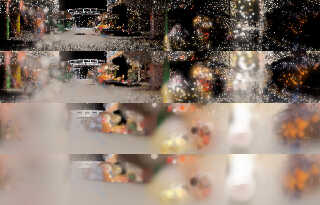
I assume this a real market somewhere. How did you get these samples?

Bill P.
Post a reply to this message
Attachments:
Download 'pbtests.jpg' (153 KB)
Preview of image 'pbtests.jpg'
|
|
| |
| |
|
|
|
|
| |
| |
|
|
William F Pokorny <ano### [at] anonymousorg> wrote:

> Does it crash during parsing? Rendering the first frame? Or sometime
> during the animation of the frames?
>

I rendered frame 100 (+SF100 +SF101). It crashes during the rendering of the
first block in the image.

When using 3.8 I get all these warnings that are typical for 3.8 and extremely
annoying, so didn't test it any further with that.

ingo
Post a reply to this message
|
|
| |
| |
|
|
|
|
| |
| |
|
|
On 15/03/2025 12:18, yesbird wrote:
> POV-Ray version:
> https://github.com/LeForgeron/povray
>
> System:
> OS Name    Microsoft Windows 7
> Version    6.1.7601 Service Pack 1 Build 7601

Just tested the same version, but build on Linux - works fine.
--
YB
Post a reply to this message
|
|
| |
| |
|
|
|
|
| |
| |
|
|
Le 2025-03-15 à 10:41, William F Pokorny a écrit :

> 2) The disc is a funny 2d object in that it has a defined inside. So
> adding hollow a good idea, if perhaps during your animation, the camera
> happens to end up inside one or more disc shapes.
>
> Bill P.

That's very important whenever you use any media or fog.
The interior of a disk extends to that of a plane object.
In a way, a disk can be regarded as a transparent plane with a spherical
pattern in it.
Post a reply to this message
|
|
| |
| |
|
|
From: William F Pokorny
Subject: Re: Crashing for reasons I can't fathom
Date: 15 Mar 2025 14:32:12
Message: <67d5c7ac@news.povray.org>
|
|
|
| |
| |
|
|
On 3/15/25 12:26, ingo wrote:
> I rendered frame 100 (+SF100 +SF101). It crashes during the rendering of the
> first block in the image.

I took you to mean +sf100 +ef100. Both v3.8 beta 2 and my current
working yuqk fork had no trouble.

In the attached image the top two rows are at frame 0. Thereafter the
rows are for frame 100, 200, 300 and 400.

The more blurry images are using a radius of 0.85 and the clearer ones
0.24. With the latter radius being ~20x faster.

Ah, though I'm not motivated to drop back and look at v3.7, let me
quickly try my current v3.7 compile to see if it dies fast at 0.85. It
does indeed crash... I know that one of the improvements clipka worked
hard on for v3.8 was to remove all the hard limits for size he could -
so I am not too surprised v3.7 dies for Paul's scene.  As you noted it
dies just as it starts to render.

Anyhow. Out of time. Real life has me tied up for a while now so... yep.

Bill P.
Post a reply to this message
Attachments:
Download 'pbtest_01.jpg' (200 KB)
Preview of image 'pbtest_01.jpg'

|
|
| |
| |
|
|
|
|
| |
| |
|
|
"Paul Bourke" <pau### [at] gmailcom> wrote:
> Any ideas why this scene
>    https://paulbourke.net/transient/povray/
> crashes once "theradius" gets past a certain value, eg: 0.6. There are no
> coincident points, running version 3.7 on MacOS. Tonnes of RAM (192GB) and only
> a fraction is used.
> And more importantly, how to fix or get around it?

I would say that you're pushing up against certain hard-coded values in 3.7.
Also, people have made a very good (and non-obvious) point about the disc object
having an inside.

Although you could use cylinders, I used spheres, but I put them all inside a
blob {} statement to get a speed boost from the special bounding mechanism.

It takes maybe 15 sec to parse that huge inc file, and then FOR-EVER to try and
render it.
That's coming from the transmit values in your pigment map.
Setting all of those to 0 allows the scene to render in 45s on my machine.

The only other things I can think of to perhaps make the scene render faster and
with less memory usage, are to sort the disc/sphere/blobs by color (perhaps with
some rounding) so that you can use a single texture statement for each group of
similarly colored object, thereby saving memory.
Also, you could sort by distance from the camera, and only give the nearest
objects a transmit pigment, so you wouldn't have so many layers of transmit to
deal with, though perhaps setting max_trace_level to a lower value would
essentially accomplish the same task.

Pretty cool idea - and I hope to see the final animation once it's all working!

- BW
Post a reply to this message
Attachments:
Download 'scene.png' (457 KB)
Preview of image 'scene.png'

|
|
| |
| |
|
|
|
|
| |
| |
|
|
> Does it crash during parsing? Rendering the first frame? Or sometime
> during the animation of the frames?

During rendering.

> Only ideas I had on reading through your scene initially were:
> 1) Normalize the disc normal vector: vnormalize(VP-theposition).
> Shouldn't matter, but...

I originally did that, will try again.

> 2) The disc is a funny 2d object in that it has a defined inside. So
> adding hollow a good idea, if perhaps during your animation, the camera
> happens to end up inside one or more disc shapes.

Hmmm.

> I assume this a real market somewhere. How did you get these samples?

Lidar on the streets of HK. This is every 100th sample, with any points really
close removed.
Post a reply to this message
|
|
| |
| |
|
|
|
|
| |
| |
|
|
yesbird <sya### [at] gmailcom> wrote:
> On 15/03/2025 12:18, yesbird wrote:
> > POV-Ray version:
> > https://github.com/LeForgeron/povray
> >
> > System:
> > OS Name    Microsoft Windows 7
> > Version    6.1.7601 Service Pack 1 Build 7601
>
> Just tested the same version, but build on Linux - works fine.
> --
> YB

.... and you increased theradius to 0.1?
Post a reply to this message
|
|
| |
| |
|
|
|
|
| |
| |
|
|
yesbird <sya### [at] gmailcom> wrote:
> On 15/03/2025 11:00, Paul Bourke wrote:
> > And more importantly, how to fix or get around it?
> >
>
> Successfully rendered this scene (see attached image), but have a lot of
> warnings:
> ------------------------------------------------------------------------
> "C:\temp\pb\scene.pov" line 33: Possible Parse Error: Suspiciously high
> 'ambient' value found. Are you trying to model a glowing material? As of
> POV-Ray v3.7, 'ambient' is disabled when using radiosity, and its use to
> model glowing materials is generally deprecated;
> use 'emission' for this purpose instead. If your intention is to model
> unusually high ambient illumination in a non-radiosity scene, you can
> avoid this warning by explicitly specifying 'emission 0'.
> ------------------------------------------------------------------------
>
> POV-Ray version:
> https://github.com/LeForgeron/povray
>
> System:
> OS Name Microsoft Windows 7
> Version 6.1.7601 Service Pack 1 Build 7601
> Total Physical Memory 24.0 GB
>
> Log in attachment.
> --
> YB

But did you increase theradius to 0.1?
Post a reply to this message
|
|
| |
| |
|
|
|
|
| |
| |
|
|
kurtz le pirate <kur### [at] freefr> wrote:
> On 15/03/2025 11:14, Paul Bourke wrote:
> > "Paul Bourke" <pau### [at] gmailcom> wrote:
> >> Any ideas why this scene
> >>     https://paulbourke.net/transient/povray/
> >> crashes once "theradius" gets past a certain value, eg: 0.6. There are no
> >> coincident points, running version 3.7 on MacOS. Tonnes of RAM (192GB) and only
> >> a fraction is used.
> >> And more importantly, how to fix or get around it?
> >
> > Also happens for beta 3.8, but at different values of "the radius".
> >
>
> IMHO, this comes from using the <disk> object.
>
> Have you tried using the <cylinder> object instead ?

I just tried it, didn't make any difference, still crashes, in fact crashes more
reliably now. Here's the new DoPoint macro.

#macro DoPoint(theposition,thecolour)
   #local thenormal = vnormalize(VP-theposition);
   #local thedistance = vlength(VP-theposition);
   #if (thedistance > 0.2)    // Filter any points close to the camera
      #if (thedistance < 30)  // Filter any distant outliers
         #local theradius = 0.05;
         cylinder {
            <0,0,0>, thenormal/100, 0.95
            //hollow
            texture {
               pigment {
                  onion
                  colour_map {
                     [0.00, rgb thecolour transmit 0]
                     [0.20, rgb thecolour transmit 0.95]
                     [1.00, rgb thecolour transmit 1]
                  }
               }
               finish { emission 0 ambient 1 diffuse 0 specular 0 }
            }
            scale theradius
            translate theposition
         }
      #end
   #end
#end
Post a reply to this message
|
|
| |
| |
|
|
|
|
| |
| |
|
|
"Bald Eagle" <cre### [at] netscapenet> wrote:
> "Paul Bourke" <pau### [at] gmailcom> wrote:
> > Any ideas why this scene
> >    https://paulbourke.net/transient/povray/
> > crashes once "theradius" gets past a certain value, eg: 0.6. There are no
> > coincident points, running version 3.7 on MacOS. Tonnes of RAM (192GB) and only
> > a fraction is used.
> > And more importantly, how to fix or get around it?
>
> I would say that you're pushing up against certain hard-coded values in 3.7.
> Also, people have made a very good (and non-obvious) point about the disc object
> having an inside.
>
> Although you could use cylinders, I used spheres, but I put them all inside a
> blob {} statement to get a speed boost from the special bounding mechanism.
>
> It takes maybe 15 sec to parse that huge inc file, and then FOR-EVER to try and
> render it.
> That's coming from the transmit values in your pigment map.
> Setting all of those to 0 allows the scene to render in 45s on my machine.
>
> The only other things I can think of to perhaps make the scene render faster and
> with less memory usage, are to sort the disc/sphere/blobs by color (perhaps with
> some rounding) so that you can use a single texture statement for each group of
> similarly colored object, thereby saving memory.
> Also, you could sort by distance from the camera, and only give the nearest
> objects a transmit pigment, so you wouldn't have so many layers of transmit to
> deal with, though perhaps setting max_trace_level to a lower value would
> essentially accomplish the same task.
>
> Pretty cool idea - and I hope to see the final animation once it's all working!
>
> - BW

Thanks for the suggestions. I am now rendering in 3.8, only takes about 20s and
that's with an even bigger inc file. But speed isn't an issue for me, at least
with 3.7 since I can distribute it. The 3.8 I downloaded has the gui (MacOS), is
there a pure command line for 3.8? Can't efficiently do a distributed render
with the gui.

See previous message, tried cylinders and spheres (3.7), same problem.

There are also nasty defects in the 3.8 render (discs), see attached example
frame. Strange they are mostly on the right half, it's those narrow dark
slivers. Perhaps they are a cue to what's happening.
Post a reply to this message
Attachments:
Download 'scene120.png' (1797 KB)
Preview of image 'scene120.png'

|
|
| |
| |
|
|
|
|
| |
| |
|
|
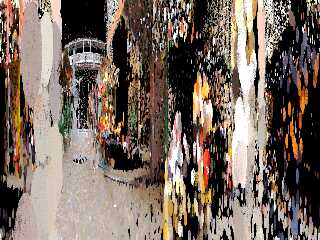
I just changed the disks to plain spheres (no blob) and set max_trace_level to
2, and it rendered just fine in 20s.

I'm guessing maybe it's something in 3.7.

I'll keep bumping up the MTL and see what happens.
Post a reply to this message
Attachments:
Download 'scene.png' (1115 KB)
Preview of image 'scene.png'
|
|
| |
| |
|
|
|
|
| |
| |
|
|
"Paul Bourke" <pau### [at] gmailcom> wrote:

> Thanks for the suggestions. I am now rendering in 3.8, only takes about 20s and
> that's with an even bigger inc file. But speed isn't an issue for me, at least
> with 3.7 since I can distribute it.

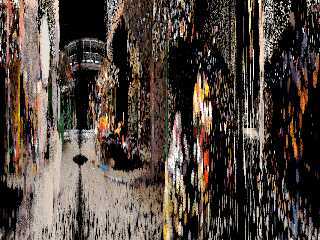
Well, I was juggling making the kid dinner + other stuff + Bourke-level POV-Ray
creativity, so I wanted to get a finished render so that I could get a better
overall idea of what was going on.

> The 3.8 I downloaded has the gui (MacOS), is
> there a pure command line for 3.8? Can't efficiently do a distributed render
> with the gui.

Yes Sir.
I just ran [Path] pvengine64 /RENDER scene.pov, and that seemed to work fine
under M$ Win 7

> See previous message, tried cylinders and spheres (3.7), same problem.
>
> There are also nasty defects in the 3.8 render (discs), see attached example
> frame. Strange they are mostly on the right half, it's those narrow dark
> slivers. Perhaps they are a cue to what's happening.

Dunno.  If they're disks or something, maybe somehow they got oriented wrong,
and they're dark colors in front of light?

I just tried again with spheres that are scaled by 0.01 in x, so that they
resemble your original disc.  Can't tell if the lines are there.
What resolution are you rendering at?

- Bill
Post a reply to this message
Attachments:
Download 'scene.png' (1239 KB)
Preview of image 'scene.png'
|
|
| |
| |
|
|
|
|
| |
| |
|
|
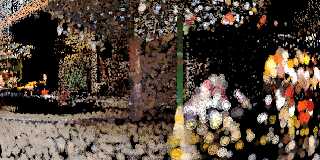
"Bald Eagle" <cre### [at] netscapenet> wrote:

> I just tried again with spheres that are scaled by 0.01 in x, so that they
> resemble your original disc.  Can't tell if the lines are there.
> What resolution are you rendering at?

"Just download the render at look at the image size, Bill."
<eyeroll>

Take a look at this and see what you think.
Post a reply to this message
Attachments:
Download 'scene.png' (976 KB)
Preview of image 'scene.png'
|
|
| |
| |
|
|
|
|
| |
| |
|
|
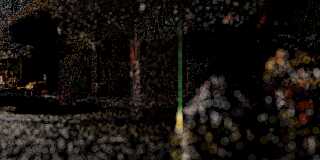
Never mind that last one.

I flattened the spheres and then rotated them so that they were perpendicular to
the camera.
Try this and see if this gets you anywhere better.


#macro Reorient_Trans(Axis1, Axis2)
   #local vX1 = vnormalize(Axis1);
   #local vX2 = vnormalize(Axis2);
   #local Y = vcross(vX1, vX2);
   #if(vlength(Y) > 0)
      #local vY = vnormalize(Y);
      #local vZ1 = vnormalize(vcross(vX1, vY));
      #local vZ2 = vnormalize(vcross(vX2, vY));
      transform {
         matrix < vX1.x, vY.x,vZ1.x, vX1.y,vY.y,vZ1.y, vX1.z,vY.z, vZ1.z, 0,0,0
>
         matrix < vX2.x,vX2.y,vX2.z,  vY.x,vY.y, vY.z, vZ2.x,vZ2.y,vZ2.z, 0,0,0
>
      }
   #else
      #if (vlength(vX1-vX2)=0)
         transform {}
      #else
         #local vZ = VPerp_To_Vector(vX2);
         transform { Axis_Rotate_Trans(vZ,180) }
      #end
   #end
#end

#macro DoPoint(theposition,thecolour)

 #local theradius = 0.2;

   sphere{<0,0,0>, 0.2 //, 0.05
    //disc{<0,0,0>, VP-theposition, 1

      texture {
         pigment {
            onion
            colour_map {
               [0.00, rgb thecolour transmit 0]
               [0.20, rgb thecolour transmit 0.95]
               [1.00, rgb thecolour transmit 1]
            }
         }
         finish { emission 1 diffuse 0 specular 0 }
      }
      scale <0.01, 1, 1>
      Reorient_Trans(x, vnormalize(VP-theposition))
      scale theradius
      translate theposition
   }

#end
Post a reply to this message
Attachments:
Download 'scene.png' (678 KB)
Preview of image 'scene.png'
|
|
| |
| |
|
|
|
|
| |
| |
|
|
Even if I abandon solids and just create a polygon at each position, Povray
crashes as soon as I scale the polygon up past a certain amount. Is there
possibly an issue if too many objects overlap?
Post a reply to this message
|
|
| |
| |
|
|
|
|
| |
| |
|
|
"Paul Bourke" <pau### [at] gmailcom> wrote:
> Even if I abandon solids and just create a polygon at each position, Povray
> crashes as soon as I scale the polygon up past a certain amount. Is there
> possibly an issue if too many objects overlap?

I personally am not having that issue.
I have #local theradius = 1;
and it's still just chugging along fine.
It's just a cheap HP EliteDesk i5 with 16GB RAM

Of course, I'm using an edited version of the original...

Maybe it's the Apple version?

Post your current scene and I'll run it unedited.

-BW
Post a reply to this message
|
|
| |
| |
|
|
|
|
| |
| |
|
|
On 16/03/2025 01:37, Paul Bourke wrote:
> .... and you increased theradius to 0.1?
>

This is what I got with theradius = 0.1 and no crash.
--
YB
Post a reply to this message
Attachments:
Download 'scene0000.png' (2021 KB)
Preview of image 'scene0000.png'

|
|
| |
| |
|
|
From: William F Pokorny
Subject: Re: Crashing for reasons I can't fathom
Date: 16 Mar 2025 03:21:48
Message: <67d67c0c@news.povray.org>
|
|
|
| |
| |
|
|
On 3/15/25 19:12, Paul Bourke wrote:
> There are also nasty defects in the 3.8 render (discs), see attached example
> frame. Strange they are mostly on the right half, it's those narrow dark
> slivers. Perhaps they are a cue to what's happening.

Got up to go to the bathroom(*) and, wow, a lot of posts in this thread.

One of the things I wanted to mention - and didn't as I rushed off to an
appointment yesterday - is that recent versions of POV-Ray do not
increment the trace depth on just transparency. This was a significant
change made to less often get black pixels on hitting the
max_trace_level limit. In other words, it means for your successful
renders, the end of frame output should have text which always reads:

   Max Level: 1/6

The only thing stopping the actual internal recursion depth as you move
through multiple discs is the adc_bailout value. This sometimes causes
trouble because depending on any particular ray's path the recursion
depth due the number of surfaces traversed can get very deep. A trick
Alain taught me is that we can restore the old behavior by adding an
interior with an ior of say 1.00001.

Unfortunately, trying this trick didn't fix my v3.7 render even when I
reduced the radius to 0.24 (though at that radius the first blocks now
do render for a while before crashing).

With lidar data, it should be the case that where the radius is small
you traverse through very few - maybe always one - disc. As the radius
increases rays will need to traverse more and more surfaces and the
recursion depth will increase.

One thing which does work for my v3.7 render is changing the color_map
so everything is opaque. Offers a much clearer view of what is happening
with the discs too.

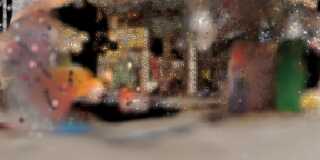
I next tried setting the maximum color_map transparency to 90% and now
my v3.7 renders are rendering fine. As does setting last color_map
transparency to 99%. Image attached (no AA).

So the issue has to do with overlapping regions of complete transparency
I guess. Wonder, does the ior 1+epsilon trick not work in v3.7? Hmm,
maybe with the spherical camera more rays hit the surface parallel to
surface normal? Don't know.

Lastly, you could play with higher adc_bailout values too as a solution
to the v3.7 rendering.

---

On your particular question about artifacts. The discs at larger radius
values will start to cross each other. Where they do there will be a
seam of numerical instability somewhat like coincident surfaces. Some
likelihood this is the cause of the artefacts, but unsure how to be sure
at moment. Can you filter out some range of discs closer to the camera
location?

Bill P.

(*) TMI.
Post a reply to this message
Attachments:
Download 'scene_v3.7_opaque0_990400.png' (194 KB)
Preview of image 'scene_v3.7_opaque0_990400.png'
|
|
| |
| |
|
|
|
|
| |
| |
|
|
William F Pokorny <ano### [at] anonymousorg> wrote:

> Got up to go to the bathroom(*) and, wow, a lot of posts in this thread.

> Lastly, you could play with higher adc_bailout values too as a solution
> to the v3.7 rendering.

I thought this was just straight rendering - no radiosity.

Also, I replaced all of the ambient statements with emission.

> On your particular question about artifacts. The discs at larger radius
> values will start to cross each other. Where they do there will be a
> seam of numerical instability somewhat like coincident surfaces. Some
> likelihood this is the cause of the artefacts, but unsure how to be sure
> at moment. Can you filter out some range of discs closer to the camera
> location?

I would think the lines would be curved in that instance?

Just out of curiosity, I was wondering what the actual overall scene looked
like, so once I wrapped my head around the coordinate system and
camera-to-look_at orientation, I was able to pull the camera back and look down
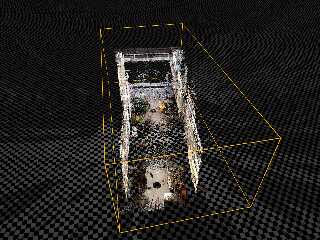
over the entire undistorted market.
(see attached)

There are places where there are significant holes / spaces.
I'm wondering if perhaps part of the problem may be that the lines are places
where the rays are making it through to the black background.

Perhaps a non-zero (1/255) sky_sphere or background may help, or something like
a fog effect where the foreground is crystal clear, but the far-away spaces get
filled in with a lighter color.  Maybe some sort of large box with a gradient
that's the 4th root of the normalized total distance... that sort of thing.

Due to the time difference, I'm _just_ getting up and having First Coffee - so,
you're getting what you're paying for.  ;)

- BW

A huge point set like this is a real treat to play with, since it is large,
asymmetric, offers human-recognizable structure, and has color data built in.
I've been wanting to do a 3D convex hull algorithm, and this would be a great
final test for that.
Wondering what would happen if instead of discs or cylinders or spheres, _cones_
were used instead, oriented looking straight at the smaller face and the larger
end being just large enough to protrude: maybe that might fix the dark artifact
lines if it's a see-through effect.
Post a reply to this message
Attachments:
Download 'scene.png' (756 KB)
Preview of image 'scene.png'
|
|
| |
| |
|
|
|
|
| |
| |
|
|
On 3/16/25 03:21, William F Pokorny wrote:
> So the issue has to do with overlapping regions of complete transparency
> I guess. Wonder, does the ior 1+epsilon trick not work in v3.7? Hmm,
> maybe with the spherical camera more rays hit the surface parallel to
> surface normal? Don't know.

It just came to me what is likely going on.

The disc has an infinite inside so the 'interior ior' only kicks in on
the fist disc intersection. All the disc surfaces seen after that first
are inside other discs and also have the same ior - so there is no
further refraction, but rather we get again transmitted rays. In other
words, the trick doesn't limit the recursive depth on ray surface
traversals in this case because it only bumps the max trace level by
one. We get Max Level: 2/6 rather than 1/6 - and we were after 6/6.

Bill P.
Post a reply to this message
|
|
| |
| |
|
|
|
|
| |
| |
|
|
On 3/16/25 08:36, Bald Eagle wrote:
> I would think the lines would be curved in that instance?

I guess what I was thinking is that off to the left and right the disc
intersections would become perpendicular where one of the two discs has
passed behind the forward directional plane - and both discs are
somewhat near the camera location. But, I admit I'm not sure I've
imagined the situation correctly.

>
> Just out of curiosity, I was wondering what the actual overall scene looked
> like, so once I wrapped my head around the coordinate system and
> camera-to-look_at orientation, I was able to pull the camera back and look down
> over the entire undistorted market.
> (see attached)

Cool. :-)

Bill P.
Post a reply to this message
|
|
| |
| |
|
|
|
|
| |
| |
|
|
On 16/03/2025 04:27, yesbird wrote:
> This is what I got with theradius = 0.1 and no crash.
> --
> YB

The charm of these mystical cyberpunk-like images forced me to start
rendering complete animation and this is the first 11 seconds
(334 frames of 3204x512 resolution) with cylindrical projection and
forward-backward loop:
https://povlab.yesbird.online/pb/

Rendering in progress ...
--YB
Post a reply to this message
|
|
| |
| |
|
|
|
|
| |
| |
|
|
yesbird <sya### [at] gmailcom> wrote:

> The charm of these mystical cyberpunk-like images forced me to start
> rendering complete animation and this is the first 11 seconds
> (334 frames of 3204x512 resolution) with cylindrical projection and
> forward-backward loop:
> https://povlab.yesbird.online/pb/
>
> Rendering in progress ...
> --YB

Super nice job, Sergey.  :)

This is pretty much what I envisioned Paul was shooting for when I saw that all
of the points were a sort of firefly glow.

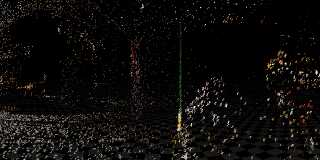
I just did a quick render using "puffs" that I used in place of spheres.

It adds a peaceful, ethereal, Christmassy feel.

So now I'm thinking that if there was a way to use a collection of actual
snowflake shapes and have them appear, fall a sort way, then fade out - in a
cycle centered on their locations, that might make a cool "animated animation".
Or it might look like a total nightmare of a mess  ;)

- BW
Post a reply to this message
Attachments:
Download 'scenewithpuffs.png' (625 KB)
Preview of image 'scenewithpuffs.png'
|
|
| |
| |
|
|
|
|
| |
| |
|
|
Also:

Since we have trace (), we can do a synthetic / virtual LIDAR to take any
geomtric scene and place similar points.

What we DON'T have, is a combination of trace () and eval_pigment () to return a
color.

I suppose there are a number of workarounds that we could do there...

3D to 2D reverse projection (screen location macro)

Scan all of the objects in the scene sequentially with trace, and assign color
based on which object gets hit. (ugh)

Render the geometric scene and use that as an image_map for eval_pigment, and
use trace () in a sort of orthographic scanning mode.

I think the last has the most merit.

- BE
Post a reply to this message
|
|
| |
| |
|
|
|
|
| |
| |
|
|
On 16/03/2025 21:44, Bald Eagle wrote:
> Super nice job, Sergey.  :)
>
> This is pretty much what I envisioned Paul was shooting for when I saw that all
> of the points were a sort of firefly glow.
>
> I just did a quick render using "puffs" that I used in place of spheres.
>
> It adds a peaceful, ethereal, Christmassy feel.
>
> So now I'm thinking that if there was a way to use a collection of actual
> snowflake shapes and have them appear, fall a sort way, then fade out - in a
> cycle centered on their locations, that might make a cool "animated animation".
> Or it might look like a total nightmare of a mess  ;)
>
> - BW

Thanks, Bill, it was not a "rocket science" task, having Three.js, a
powerful server and such rich data in hands.

I like your idea about snowflakes - winter in HK looks excellent !
Animated animation sounds intriguing, and looks like a lot of space for
experiments. If you will send me a scene, I'll do the rendering.

Now I am working on a stereo version with VR support, for those who have
a headset (static images at first). Btw, this is the reason why I am
prefer HGPovray - it has a stereo camera.
--
YB
Post a reply to this message
|
|
| |
| |
|
|
|
|
| |
| |
|
|
On 16/03/2025 21:51, Bald Eagle wrote:
> Also:
>
> Since we have trace (), we can do a synthetic / virtual LIDAR to take any
> geomtric scene and place similar points.
> ...

Really, and by applying different objects to points we can produce
fantastic effects ! I like this idea very much and can assist as I can.

Quick googling shows that colorization of point clouds is not a trivial
task, but there are different approaches and solutions to choose from.
Interesting, how did PB solve it in his scene ?

Let's try ?
--
YB
Post a reply to this message
|
|
| |
| |
|
|
|
|
| |
| |
|
|
"Bald Eagle" <cre### [at] netscapenet> wrote:
> "Paul Bourke" <pau### [at] gmailcom> wrote:
>
> > Thanks for the suggestions. I am now rendering in 3.8, only takes about 20s and
> > that's with an even bigger inc file. But speed isn't an issue for me, at least
> > with 3.7 since I can distribute it.
>
> Well, I was juggling making the kid dinner + other stuff + Bourke-level POV-Ray
> creativity, so I wanted to get a finished render so that I could get a better
> overall idea of what was going on.
>
> > The 3.8 I downloaded has the gui (MacOS), is
> > there a pure command line for 3.8? Can't efficiently do a distributed render
> > with the gui.
>
> Yes Sir.
> I just ran [Path] pvengine64 /RENDER scene.pov, and that seemed to work fine
> under M$ Win 7
>
> > See previous message, tried cylinders and spheres (3.7), same problem.
> >
> > There are also nasty defects in the 3.8 render (discs), see attached example
> > frame. Strange they are mostly on the right half, it's those narrow dark
> > slivers. Perhaps they are a cue to what's happening.
>
> Dunno.  If they're disks or something, maybe somehow they got oriented wrong,
> and they're dark colors in front of light?
>
> I just tried again with spheres that are scaled by 0.01 in x, so that they
> resemble your original disc.  Can't tell if the lines are there.
> What resolution are you rendering at?
>
> - Bill

No problems with spheres.
There is only one light source, it's at the camera.
I can't imagine misorientated discs, the normal is the vector from camera to
point position.
Post a reply to this message
|
|
| |
| |
|
|
|
|
| |
| |
|
|
"Bald Eagle" <cre### [at] netscapenet> wrote:
> "Bald Eagle" <cre### [at] netscapenet> wrote:
>
> > I just tried again with spheres that are scaled by 0.01 in x, so that they
> > resemble your original disc.  Can't tell if the lines are there.
> > What resolution are you rendering at?
>
> "Just download the render at look at the image size, Bill."
> <eyeroll>
>
> Take a look at this and see what you think.

Except that's not the look I want. The "ghostly" effect is the goal.
Post a reply to this message
|
|
| |
| |
|
|
|
|
| |
| |
|
|
yesbird <sya### [at] gmailcom> wrote:
> On 16/03/2025 04:27, yesbird wrote:
> > This is what I got with theradius = 0.1 and no crash.
> > --
> > YB
>
> The charm of these mystical cyberpunk-like images forced me to start
> rendering complete animation and this is the first 11 seconds
> (334 frames of 3204x512 resolution) with cylindrical projection and
> forward-backward loop:
> https://povlab.yesbird.online/pb/
>
> Rendering in progress ...
> --YB

Looks good. What was the magic sauce? 3.7 or 3.8?
I'd be much happier if I could use 3.7.

The look I currently have is with 3.8, sample frame attached. Final render will
be 12816x2048, and a omni directional stereo pair. Should look good in a 360 LED
stereo cylinder.

This one has many more points, 1500K.
I vary theradius depending on distance from the camera, with some bounds.
Added light falloff and other stuff.
Post a reply to this message
|
|
| |
| |
|
|
|
|
| |
| |
|
|
yesbird <sya### [at] gmailcom> wrote:
> On 16/03/2025 04:27, yesbird wrote:
> > This is what I got with theradius = 0.1 and no crash.
> > --
> > YB
>
> The charm of these mystical cyberpunk-like images forced me to start
> rendering complete animation and this is the first 11 seconds
> (334 frames of 3204x512 resolution) with cylindrical projection and
> forward-backward loop:
> https://povlab.yesbird.online/pb/
>
> Rendering in progress ...
> --YB

I also reverted to polygons, to get away from all the suggestions around discs,
media, interiors, etc. Seems to be OK in 3.7 and 3.8, although 3.8 is MUCH
faster, factor about 3 or 4.

#macro DoPoint(theposition,thecolour)
   #local thenormal = vnormalize(VP-theposition);
   #local thedistance = vlength(VP-theposition);
   #local theright = vcross(thenormal,z);
   #local theup = vcross(theright,thenormal);
   #local theright = vcross(thenormal,theup);
   #if (thedistance > 1.0)    // Filter any points close to the camera
      #if (thedistance < 30)  // Filter any distant outliers
         #local theradius = 0.01*(1+thedistance); // Diameter of closest points
         #if (theradius > 0.3)                    // Diameter of most distant
            #local theradius = 0.3;
         #end
         polygon {
            5, theright, theup, -theright, -theup, theright
            no_shadow
            texture {
               pigment {
                  onion
                  colour_map {
                     [0.00, rgb thecolour transmit 0.75]
                     [0.50, rgb thecolour transmit 0.95]
                     [0.95, rgb thecolour transmit 1]
                     [1.00, rgb <0,0,0> transmit 1]
                  }
               }
              finish { emission 0 ambient 0 diffuse 1 specular 0 }
            }
            scale theradius
            translate theposition
         }
      #end
   #end
#end
Post a reply to this message
|
|
| |
| |
|
|
|
|
| |
| |
|
|
"Bald Eagle" <cre### [at] netscapenet> wrote:
> William F Pokorny <ano### [at] anonymousorg> wrote:
>
> > Got up to go to the bathroom(*) and, wow, a lot of posts in this thread.
>
> > Lastly, you could play with higher adc_bailout values too as a solution
> > to the v3.7 rendering.
>
> I thought this was just straight rendering - no radiosity.
>
> Also, I replaced all of the ambient statements with emission.
>
> > On your particular question about artifacts. The discs at larger radius
> > values will start to cross each other. Where they do there will be a
> > seam of numerical instability somewhat like coincident surfaces. Some
> > likelihood this is the cause of the artefacts, but unsure how to be sure
> > at moment. Can you filter out some range of discs closer to the camera
> > location?
>
> I would think the lines would be curved in that instance?
>
> Just out of curiosity, I was wondering what the actual overall scene looked
> like, so once I wrapped my head around the coordinate system and
> camera-to-look_at orientation, I was able to pull the camera back and look down
> over the entire undistorted market.
> (see attached)
>
> There are places where there are significant holes / spaces.
> I'm wondering if perhaps part of the problem may be that the lines are places
> where the rays are making it through to the black background.
>
> Perhaps a non-zero (1/255) sky_sphere or background may help, or something like
> a fog effect where the foreground is crystal clear, but the far-away spaces get
> filled in with a lighter color.  Maybe some sort of large box with a gradient
> that's the 4th root of the normalized total distance... that sort of thing.
>
> Due to the time difference, I'm _just_ getting up and having First Coffee - so,
> you're getting what you're paying for.  ;)
>
> - BW
>
> A huge point set like this is a real treat to play with, since it is large,
> asymmetric, offers human-recognizable structure, and has color data built in.
> I've been wanting to do a 3D convex hull algorithm, and this would be a great
> final test for that.
> Wondering what would happen if instead of discs or cylinders or spheres, _cones_
> were used instead, oriented looking straight at the smaller face and the larger
> end being just large enough to protrude: maybe that might fix the dark artifact
> lines if it's a see-through effect.

"A huge point set" .... I need to tell you that the sample I put on line for
testing is about 1/100 of the points in the actual scan. :-)
Post a reply to this message
|
|
| |
| |
|
|
|
|
| |
| |
|
|
yesbird <sya### [at] gmailcom> wrote:
> On 16/03/2025 04:27, yesbird wrote:
> > This is what I got with theradius = 0.1 and no crash.
> > --
> > YB
>
> The charm of these mystical cyberpunk-like images forced me to start
> rendering complete animation and this is the first 11 seconds
> (334 frames of 3204x512 resolution) with cylindrical projection and
> forward-backward loop:
> https://povlab.yesbird.online/pb/
>
> Rendering in progress ...
> --YB

I think a I forgot to "post" after the "preview", sorry if it's a duplicate.

There were lots of comments around discs, their interior and so on. So I
reverted to polygons, problems seems to have disappeared.

Did some other things like filtering distant and really near points, fade
distance and power on the light.

The final render will be a stereoscopic pair as omni directional cylindrical
panoramas (created using a vertex shader style approach) at 12816 x 2048 pixels.
It's for a 8m diameter, 4m high LED cylindrical display.

#macro DoPoint(theposition,thecolour)
   #local thenormal = vnormalize(VP-theposition);
   #local thedistance = vlength(VP-theposition);
   #local theright = vcross(thenormal,z);
   #local theup = vcross(theright,thenormal);
   #local theright = vcross(thenormal,theup);
   #if (thedistance > 1.0)    // Filter any points close to the camera
      #if (thedistance < 30)  // Filter any distant outliers
         #local theradius = 0.01*(1+thedistance); // Diameter of closest points
         #if (theradius > 0.3)                    // Diameter of most distant
            #local theradius = 0.3;
         #end
         polygon {
            5, theright, theup, -theright, -theup, theright
            no_shadow
            texture {
               pigment {
                  onion
                  colour_map {
                     [0.00, rgb thecolour transmit 0.75]
                     [0.50, rgb thecolour transmit 0.95]
                     [0.95, rgb thecolour transmit 1]
                     [1.00, rgb <0,0,0> transmit 1]
                  }
               }
              finish { emission 0 ambient 0 diffuse 1 specular 0 }
            }
            scale theradius
            translate theposition
         }
      #end
   #end
#end
Post a reply to this message
|
|
| |
| |
|
|
|
|
| |
| |
|
|
[running Windows 10. Most of my notes are a recap of what has already been
said.]

According to the documentation, POV-ray's disc object is actually a transparent
plane with a colored circle on it(?). So there are a lot of overlapping
transparent planes in Paul's scene!

Using his original scene code as-is:
In v3.7.0:
The parsing of the include file takes a very long time, then the render fails
about 1/3rd of the way down during the first animation frame. That render area
seems to coincide with a very dense collection of discs in the far distance.

Interestingly, by removing the finish {'transmits'} from the discs, the entire
scene renders OK.

In v3.8 beta 1:
The render crashes (hangs) during the parsing of the first frame. However, by
adding 'emission 0' to the disc's finish{...} as William P. suggested-- to
eliminate all of the many text warnings that are generated concerning a
'too-high ambient value'-- the scene renders OK. Nice call, William!

Also, v3.8 parses the scene at least 10X faster than 3.7.

-----------
In several of the posted renders here, I noticed what look like
coincident-surface problems on some of the discs. I set up a simple 2-disc scene
to see if I could recreate that, where the disc-planes exactly overlap.  I don't
see such a problem-- but if I reverse the 'normal' of one of the discs,
coincident surface artifacts do show up. It is probably due to numerical
precision under-the-hood.

-----------
#version 3.8;
global_settings{assumed_gamma 1.0 max_trace_level 5}

camera {
  perspective
  location  <.1, .1, -1.5>
  look_at   <0, .3,  0>
  right     x*image_width/image_height  // aspect
   angle 50
}

background{rgb .1}

// left
disc {
    <-.25,.5,.7>, <0,0,1>, .5
texture{
pigment{rgb <.5,1,1>}  // LIGHT BLUE-GREEN
finish{ambient 1 emission 0 diffuse 0}
       }
interior_texture{
pigment{rgb .5*<1,.2,.2>}  // DARK RED
finish{ambient 1 emission 0 diffuse 0}
                }
    }

// right:
// Change the z-normal to -1 to see the coincident-surface effect.
disc {
    <.25,.5,.7>, <0,0,1>, .5
texture{
pigment{rgb <.2,1,.2>}  // GREEN
finish{ambient 1 emission 0 diffuse 0}
       }
interior_texture{
pigment{rgb <0,.5,1>}  // SKY BLUE
finish{ambient 1 emission 0 diffuse 0}
                }
    }
Post a reply to this message
|
|
| |
| |
|
|
|
|
| |
| |
|
|
On 17/03/2025 03:27, Paul Bourke wrote:
> Looks good. What was the magic sauce? 3.7 or 3.8?
> I'd be much happier if I could use 3.7.
>
> The look I currently have is with 3.8, sample frame attached. Final render will
> be 12816x2048, and a omni directional stereo pair. Should look good in a 360 LED
> stereo cylinder.
>
> This one has many more points, 1500K.
> I vary theradius depending on distance from the camera, with some bounds.
> Added light falloff and other stuff.
>

Thank you for appreciating my work. The alchemy recipe is following:
https://github.com/LeForgeron/povray
built from sources under Ubuntu 24.04.

I prefer this fork, because it supports stereoscopic and many other
useful camera types. In my works it' important, as I am using stereo
VR180 and VR360 projections in XR mode.Please find more info about
Le Forgeron's cameras here:
https://wiki.povray.org/content/User:Le_Forgeron/cameras

If you will choose this way and have
difficulties while compiling sources, I can assist you.

Here are previous and new versions of static images rendered at
resolution 12816x2048 for comparison:
https://povlab.yesbird.online/pb/lidar_static.html
https://povlab.yesbird.online/pb/lidar_static_v2.html

I noticed that all "ghost magic" disappeared for unknown reasons, please
feel free to send me new code for experiments, as this project is very
close to my interests - data visualization in XR.

Also video have some improvements: start/stop button and additional set
of frames (587 total now):
https://povlab.yesbird.online/pb/

Unfortunately, I am limited in hardware resources, having only
Intel(R) Xeon(R) E-2236 CPU @ 3.40GHz 12 Cores
and
Oculus Go VR headset,
so rendering of 1200 stereo frames at 12816x2048 resolution will take a
lot of time - frame of the first version was rendered ~4 min,
the last ~20 min.

Now I am working on a VR stereo version, and hope tomorrow I will
publish it.

PS: Can't find the attachment you mentioned - don't you forget
to add in ?
--
YB
Post a reply to this message
|
|
| |
| |
|
|
|
|
| |
| |
|
|
> > So now I'm thinking that if there was a way to use a collection of actual
> > snowflake shapes and have them appear, fall a sort way, then fade out - in a
> > cycle centered on their locations, that might make a cool "animated animation".

And here's a short proof of concept.
Post a reply to this message
Attachments:
Download 'snowingmarket.mp4.dat' (1897 KB)
|
|
| |
| |
|
|
|
|
| |
| |
|
|
> I prefer this fork, because it supports stereoscopic and many other
> useful camera types. In my works it' important, as I am using stereo
> VR180 and VR360 projections in XR mode.Please find more info about
> Le Forgeron's cameras here:
> https://wiki.povray.org/content/User:Le_Forgeron/cameras

Including a ODSP camera!

I've just implemented one using a vertex shader approach, that is transform
points to a longitude/latitude/distance and do final render with an ortho
camera. Works fine but I would love a ODSP with a cylindrical camera within
PovRay itself.
Post a reply to this message
|
|
| |
| |
|
|
|
|
| |
| |
|
|
On 18/03/2025 07:25, Paul Bourke wrote:
> I've just implemented one using a vertex shader approach, that is transform
> points to a longitude/latitude/distance and do final render with an ortho
> camera. Works fine but I would love a ODSP with a cylindrical camera within
> PovRay itself.
>
>
Vertex shader approach ? It's interesting - I would like to look at
(through) it.

I see you already have good set of cameras, that possibly can be
extended: https://paulbourke.net/stereographics/povcameras/

When I was looking for cameras to produce VR images I also
found these sources:
http://stereopov.ichthyostega.de/
http://www.triplespark.net/render/stereo/create.html
--
YB
Post a reply to this message
|
|
| |
| |
|
|
|
|
| |
| |
|
|
On 17/03/2025 03:27, Paul Bourke wrote:
> The look I currently have is with 3.8, sample frame attached. Final render will
> be 12816x2048, and a omni directional stereo pair. Should look good in a 360 LED
> stereo cylinder.
>
Not having a 360 LED stereo cylinders at home, I modeled them in VR:

https://povlab.yesbird.online/pb/lidar_video.html
https://povlab.yesbird.online/pb/lidar_static.html

Camera located inside two cylinders with the same location, but
different textures - one for left, order for right eye. Now it's only a
mono preview (both have the same texture, while I am looking for the
best way to render stereo pairs).
--
YB
Post a reply to this message
|
|
| |
| |
|
|
|
|
| |
| |
|
|
Dr. Bourke,

Let me just briefly segue from your project to say:

It is great to see you here, still using POV-Ray after all these many long
years.

We would love to see you, and many others with your creativity and skill set,
here on our forum more often, and would like to attract others so that we can
sustain and improve this beloved piece of open source software.

I'm not sure what level of exposure to POV-Ray your colleagues get, but it would
be wonderful if undergrads and graduate students, as well as physicists,
mathematicians, statisticians, astronomers, artists, and engineers could be
introduced to what it is currently capable of.
Hopefully by doing so, we can get computer scientists and their students
interested and perhaps attract new interest in further developing POV-Ray.

I was very excited to see a somewhat recent video by Dr. Oliver Knill:
https://people.math.harvard.edu/~knill/various/povray/index.html

Perhaps you can put in a kind word to your colleagues and professional
acquaintances about what we strive to do here in our little corner of the
internet, and help keep POV-Ray - not just alive - but thriving and growing.

Thank you,

Bill Walker
Post a reply to this message
|
|
| |
| |
|
|
|
|
| |
|
|








