|
|
|
|
|
|
| |
| |
|
|
|
|
| |
| |
|
|
Hello,

I'm now looking at splines and trying to understand how POVRay treats
this object.

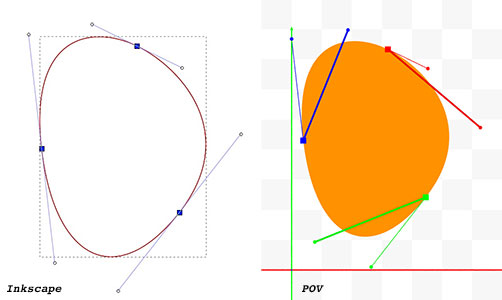
I made a trace in Inkscape and exported it to POV.
Export looks like this :

#declare path35 = prism {
 linear_sweep
 bezier_spline
 1.0, //top
 0.0, //bottom
 12 //nr points
 /*   0*/ <249.99999874, 886.42857827>, <316.34878488, 854.35384819>,
          <403.57141417, 756.42857575>, <312.85712126, 640.71428031>,
 /*   1*/ <312.85712126, 640.71428031>, <222.14285480, 525.00000000>,
          <128.57142803, 566.42857323>, <109.28570835, 735.00000000>,
 /*   2*/ <109.28570835, 735.00000000>, <90.00000000, 903.57142677>,
          <183.65121260, 918.50330457>, <249.99999874, 886.42857827>
 }


If I've understood correctly, each line has 4 vectors :
- the point,
- control point 1,
- control point 2,
- next point.

So i thought the two control points were the handle points.
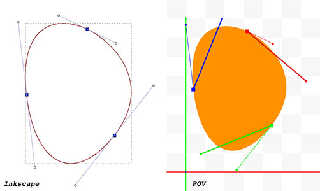
So I tried to draw it all. This is the attached image.
Left: Inkscape screenshot, Right : POV

And it doesn't quite work as expected :
- square for principal points are (seems) OK
- first handle seems OK (with fine lines)
- second handles are wrongs (with heavy lines) :(


* Doesn't the third vector represent the second control point ?
* It also seems strange to me that the fourth vector is equal to the
  next main point.


There are a few things I didn't understand.
Is there a doc, a web page, ... that explains POV splines
in more detail ?


Thanks

--
Kurtz le pirate
Compagnie de la Banquise
Post a reply to this message
Attachments:
Download 'spline.jpg' (20 KB)
Preview of image 'spline.jpg'
|
|
| |
| |
|
|
|
|
| |
| |
|
|
In the POV-Image the fat handle does seem to be flipped around the normal of the
other handle attached to the same point.
kurtz le pirate <kur### [at] gmail com> wrote:
> Hello,
>
> I'm now looking at splines and trying to understand how POVRay treats
> this object. com> wrote:
> Hello,
>
> I'm now looking at splines and trying to understand how POVRay treats
> this object.
Post a reply to this message
|
|
| |
| |
|
|
|
|
| |
| |
|
|
On 7/12/24 04:53, kurtz le pirate wrote:
> If I've understood correctly, each line has 4 vectors :
> - the point,
> - control point 1,
> - control point 2,
> - next point.

I think the confusion is Inkscape is grouping by the tangents and
POV-Ray by the Bezier spline segments as above.

It should be that each POV-Ray segment has a starting, on curve, tangent
point and an ending, on curve, tangent point(*) - between which are two
control points coming from two different Inkscape tangents(**).

(*) - These being <249.99999874, 886.42857827>,  <312.85712126,
640.71428031> and <109.28570835, 735.00000000>

(**) The pairs being pulled from the six inkscape control points as the
two between each of 3 pairs of starting and ending on curve points.

Bill P.
Post a reply to this message
|
|
| |
| |
|
|
|
|
| |
| |
|
|
Thank you for your comments.
It helps, but it's still not very clear to me.

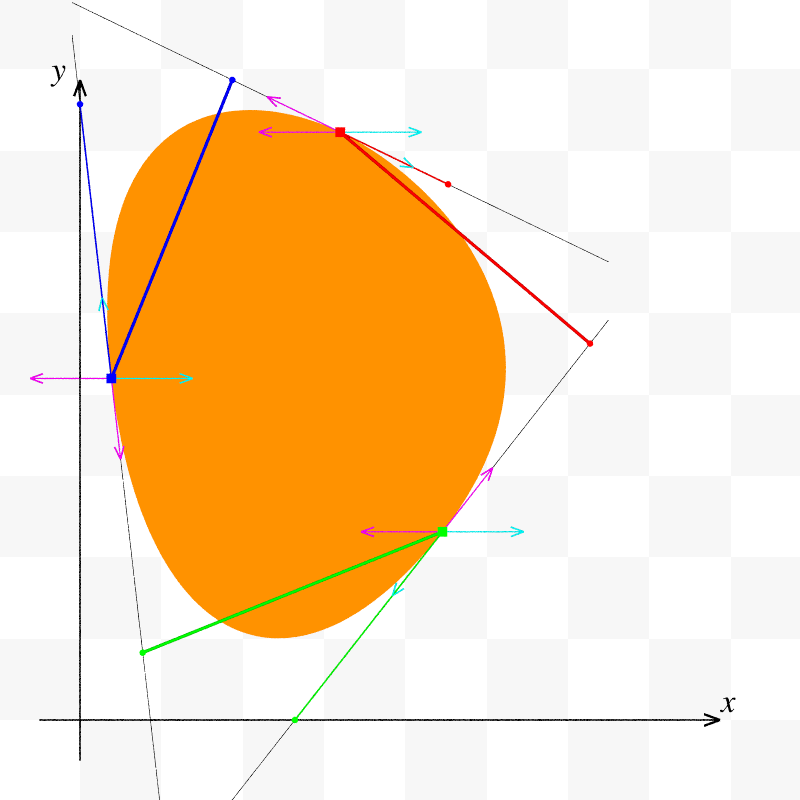
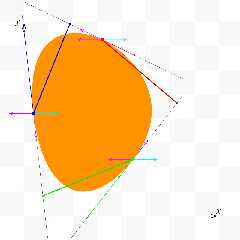
I've added a few elements to the drawing to help me.
Image and code (a bit messy) attached.


--
Kurtz le pirate
Compagnie de la Banquise
Post a reply to this message
Attachments:
Download 'code.tgz.gz' (3 KB)
Download 'drawing_bezier_spline.png' (54 KB)
Preview of image 'drawing_bezier_spline.png'
|
|
| |
| |
|
|
|
|
| |
| |
|
|
On 12/07/2024 11:53, kurtz le pirate wrote:
> There are a few things I didn't understand.
> Is there a doc, a web page, ... that explains POV splines
> in more detail ?

There was a discussion about strange POV splines behaviour, somehow I've
forced it to work, but the control and implementation are still mystery
to me:
news://news.povray.org:119/64105423$1@news.povray.org
--
YB
Post a reply to this message
|
|
| |
| |
|
|
|
|
| |
| |
|
|
On 7/12/24 12:46, yesbird wrote:
> On 12/07/2024 11:53, kurtz le pirate wrote:
>> There are a few things I didn't understand.
>> Is there a doc, a web page, ... that explains POV splines
>> in more detail ?
>
> There was a discussion about strange POV splines behaviour, somehow I've
> forced it to work, but the control and implementation are still mystery
> to me:
> news://news.povray.org:119/64105423$1@news.povray.org

Another form of the link which might be easier to use:

https://news.povray.org/povray.advanced-users/thread/%3C85b87be3-7ea0-95d9-62fa-0aa3cad0a315%40gmail.com%3E/

Bill P.
Post a reply to this message
|
|
| |
| |
|
|
|
|
| |
| |
|
|
On 12/07/2024 22:09, William F Pokorny wrote:
> Another form of the link which might be easier to use: ...

Thanks, I will take it into account, but how you got it ?
I was using: RightClick -> "Copy Message Location" in Thunderbird.
--
YB
Post a reply to this message
|
|
| |
| |
|
|
|
|
| |
| |
|
|
yesbird <sya### [at] gmailcom> wrote:
> On 12/07/2024 22:09, William F Pokorny wrote:
> > Another form of the link which might be easier to use: ...
>
> Thanks, I will take it into account, but how you got it ?
> I was using: RightClick -> "Copy Message Location" in Thunderbird.
> --
> YB

Use the URL in the browser/web interface
http://news.povray.org/
Post a reply to this message
|
|
| |
| |
|
|
|
|
| |
| |
|
|
On 7/12/2024 1:53 AM, kurtz le pirate wrote:
>
> Hello,
>
> I'm now looking at splines and trying to understand how POVRay treats
> this object.
>

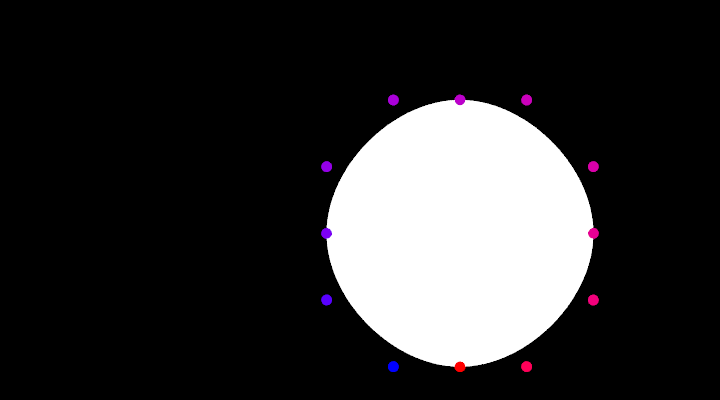
Your understanding is correct. Here's an example with:
a) simpler coordinates
b) an array for tracking the indices.

It ain't pretty, but it works.

The points 0, 3, 6, and 9 are points on the curve.

Point 0 has control points 11 and 1
Point 3 has control points 2 and 4
Point 6 has control points 5 and 7
Point 9 has control points 8 and 10

Josh
Post a reply to this message
Attachments:
Download 'spline_question_answer.pov.txt' (2 KB)
Download 'spline_question_answer.png' (8 KB)
Preview of image 'spline_question_answer.png'

|
|
| |
| |
|
|
|
|
| |
| |
|
|
On 12/07/2024 23:53, Bald Eagle wrote:
> Use the URL in the browser/web interface
> http://news.povray.org/

Thanks.
--
YB.
Post a reply to this message
|
|
| |
| |
|
|
|
|
| |
| |
|
|
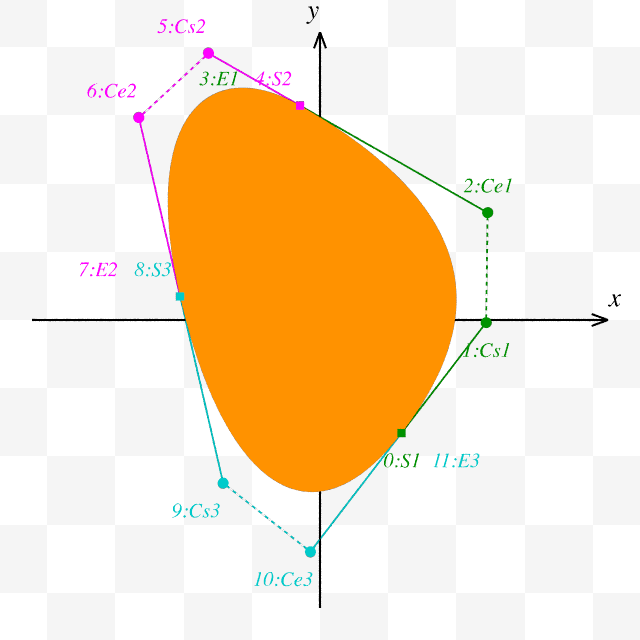
In fact, it's simple !


Each segment is defined by four points.

First segment :
0 : Point on curve
1 : Control point attached to point (0)
2 : Control point attached to the next point
3 : Next point

Second segment :
4 : Point on curve equal to (3) from previous segment
5 : Control point attached to point (4)
6 : Control point attached to the next point
7 : Next point

... and so on.


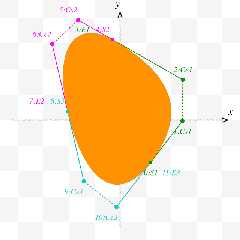
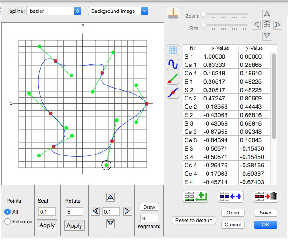
In the attached image, the points are numbered and named in accordance
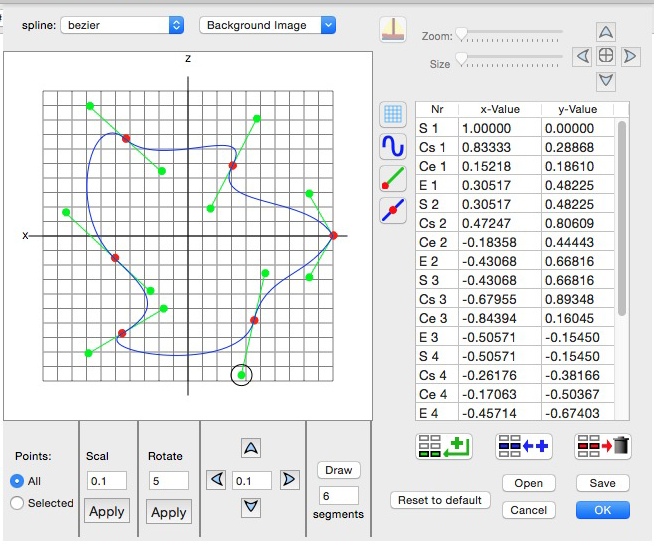
with POV's built-in spline editor : "S. Cs. Ce. E.".
I haven't found what these names correspond to.


The complete curve is therefore the succession of segments placed
end to end.

In the image, each element of each segment has the same color :
Segment 1 - Point 0,1,2,3 - Color Green
Segment 2 - Point 4,5,6,7 - Color Magenta
Segment 3 - Point 8,9,10,11 - Color Blue


Disturbingly, the two pendulums of the same point are identified by two
distinct segments. Once you've got the hang of it, it's no longer a problem.


--
Kurtz le pirate
Compagnie de la Banquise
Post a reply to this message
Attachments:
Download 'drawing_bezier_spline_editor.png' (38 KB)
Preview of image 'drawing_bezier_spline_editor.png'
|
|
| |
| |
|
|
|
|
| |
| |
|
|
kurtz le pirate <kur### [at] gmailcom> wrote:

> In the attached image, the points are numbered and named in accordance
> with POV's built-in spline editor : "S. Cs. Ce. E.".
> I haven't found what these names correspond to.

> POV's built-in spline editor (?)

"S. Cs. Ce. E.".
I haven't found what these names correspond to.

Start
Control (point) Start
Control (point) End
End

?

Or something like that.


I'm glad you got it all worked out.
Hopefully you have an interesting project to apply it to.

- BW
Post a reply to this message
|
|
| |
| |
|
|
|
|
| |
| |
|
|
On 2024-07-13 09:10 (-4), kurtz le pirate wrote:
>
> In the attached image, the points are numbered and named in accordance
> with POV's built-in spline editor : "S. Cs. Ce. E.".

POV has a built-in spline editor?  When did this happen?  Is it a
Windows thing?
Post a reply to this message
|
|
| |
| |
|
|
|
|
| |
| |
|
|
On 15/07/2024 19:04, Cousin Ricky wrote:

> POV has a built-in spline editor?  When did this happen?  Is it a
> Windows thing?

No, it's a Mac OSX feature.


--
Kurtz le pirate
Compagnie de la Banquise
Post a reply to this message
Attachments:
Download 'spline_editor.jpg' (293 KB)
Preview of image 'spline_editor.jpg'
|
|
| |
| |
|
|
|
|
| |