|
|
|
|
|
|
| |
| |
|
|
|
|
| |
| |
|
|
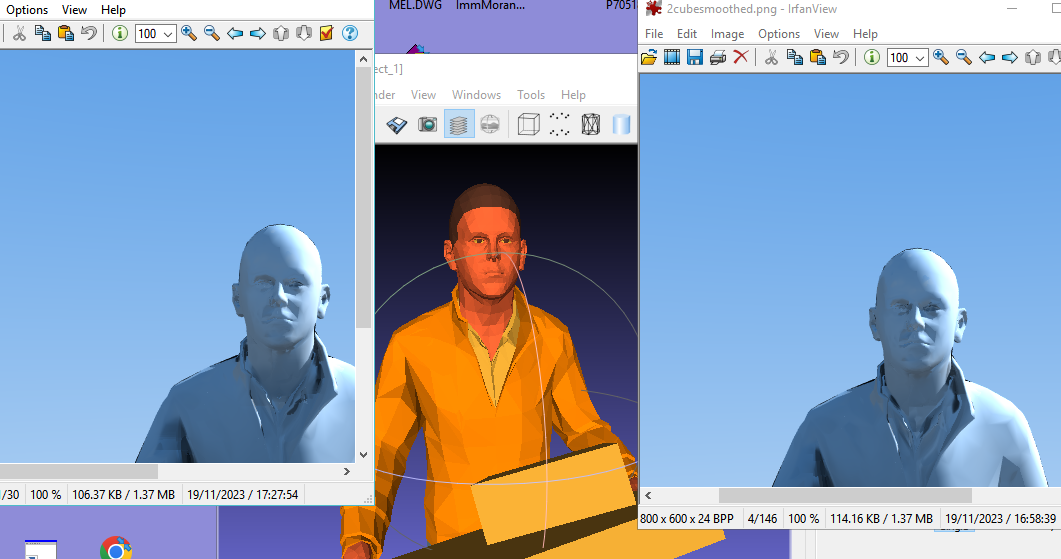
Hi all, first I apologize for my bad english.
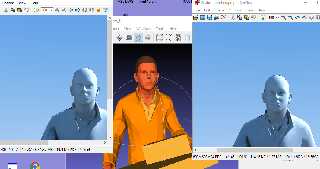
I finished now developing (basic version no color at this moment)  a small
transformation tool from STL mesh, in the center, to mesh with smooth_triangles.
But I have a problem. Too smooth. I thought that the length of the normal vector
caused a gradation, but this is not the case, even if I reduce the length of the
vectors the smoothness level remains the same. What am I doing wrong?
Thanks in advanced!
Giovanni
Post a reply to this message
Attachments:
Download 'smoothstltest.png' (148 KB)
Preview of image 'smoothstltest.png'
|
|
| |
| |
|
|
|
|
| |
| |
|
|
"GioSeregni" <gms### [at] hotmail com> wrote:
> Hi all, first I apologize for my bad english.
It's fine, and you probably speak better English than many people who speak it
natively. ;)
> I finished now developing (basic version no color at this moment) a small
> transformation tool from STL mesh, in the center, to mesh with smooth_triangles.
Excellent. Hopefully it was simple, can be invoked from SDL with a
pre_frame_command, and makes an .ini file with a built-in inside_vector
statement.
> But I have a problem. Too smooth. I thought that the length of the normal vector
> caused a gradation, but this is not the case, even if I reduce the length of the
> vectors the smoothness level remains the same. What am I doing wrong?
Not sure what "too smooth" means.
We would also need to see your exact code to make the smooth_triangle from the
stl triangle vertices. That can get complicated, especially with a free-form
mesh like you're starting with.
For any given triangle, you're going to have neighboring triangles with
different face normals. The normals of your smooth_triangle vertices should be
the average of all of the face normals that meet at that vertex.
So, you're going to have to find all of the neighboring triangles that share
common edges/vertices.
You're also going to have to have ways to handle missing triangles, edges, and
things like the edges of a cubic mesh - since on face of a cube should not
influence the normal of a separate face.
It's looking great, and anything is better than nothing!
I would suggest that you just search for calculating triangle normals, and you
ought to come up with articles and forum posts on scratchapixel.com,
gamedev.net, etc. There's likely going to be instructional videos on YouTube
from people like Daniel Schiffman, Sebastian Lague, Martijn Steinrucken, Inigo
Quilez and a host of others.
Try rendering with a texture {} AND and interior_texture {} of contrasting color
to get a true idea of where your normals are facing.
- BW com> wrote:
> Hi all, first I apologize for my bad english.
It's fine, and you probably speak better English than many people who speak it
natively. ;)
> I finished now developing (basic version no color at this moment) a small
> transformation tool from STL mesh, in the center, to mesh with smooth_triangles.
Excellent. Hopefully it was simple, can be invoked from SDL with a
pre_frame_command, and makes an .ini file with a built-in inside_vector
statement.
> But I have a problem. Too smooth. I thought that the length of the normal vector
> caused a gradation, but this is not the case, even if I reduce the length of the
> vectors the smoothness level remains the same. What am I doing wrong?
Not sure what "too smooth" means.
We would also need to see your exact code to make the smooth_triangle from the
stl triangle vertices. That can get complicated, especially with a free-form
mesh like you're starting with.
For any given triangle, you're going to have neighboring triangles with
different face normals. The normals of your smooth_triangle vertices should be
the average of all of the face normals that meet at that vertex.
So, you're going to have to find all of the neighboring triangles that share
common edges/vertices.
You're also going to have to have ways to handle missing triangles, edges, and
things like the edges of a cubic mesh - since on face of a cube should not
influence the normal of a separate face.
It's looking great, and anything is better than nothing!
I would suggest that you just search for calculating triangle normals, and you
ought to come up with articles and forum posts on scratchapixel.com,
gamedev.net, etc. There's likely going to be instructional videos on YouTube
from people like Daniel Schiffman, Sebastian Lague, Martijn Steinrucken, Inigo
Quilez and a host of others.
Try rendering with a texture {} AND and interior_texture {} of contrasting color
to get a true idea of where your normals are facing.
- BW
Post a reply to this message
|
|
| |
| |
|
|
|
|
| |
| |
|
|
"Bald Eagle" <cre### [at] netscapenet> wrote:
> "GioSeregni" <gms### [at] hotmailcom> wrote:
> > Hi all, first I apologize for my bad english.
>
> It's fine, and you probably speak better English than many people who speak it
> natively.  ;)
>
> > I finished now developing (basic version no color at this moment)  a small
> > transformation tool from STL mesh, in the center, to mesh with smooth_triangles.
>
> Excellent.  Hopefully it was simple, can be invoked from SDL with a
> pre_frame_command, and makes an .ini file with a built-in inside_vector
> statement.
>
> > But I have a problem. Too smooth. I thought that the length of the normal vector
> > caused a gradation, but this is not the case, even if I reduce the length of the
> > vectors the smoothness level remains the same. What am I doing wrong?
>
> Not sure what "too smooth" means.
>
> We would also need to see your exact code to make the smooth_triangle from the
> stl triangle vertices.  That can get complicated, especially with a free-form
> mesh like you're starting with.
>
> For any given triangle, you're going to have neighboring triangles with
> different face normals.  The normals of your smooth_triangle vertices should be
> the average of all of the face normals that meet at that vertex.
> So, you're going to have to find all of the neighboring triangles that share
> common edges/vertices.
>
> You're also going to have to have ways to handle missing triangles, edges, and
> things like the edges of a cubic mesh - since on face of a cube should not
> influence the normal of a separate face.
>
> It's looking great, and anything is better than nothing!
> I would suggest that you just search for calculating triangle normals, and you
> ought to come up with articles and forum posts on scratchapixel.com,
> gamedev.net, etc.  There's likely going to be instructional videos on YouTube
> from people like Daniel Schiffman, Sebastian Lague, Martijn Steinrucken, Inigo
> Quilez and a host of others.
>
> Try rendering with a texture {} AND and interior_texture {} of contrasting color
> to get a true idea of where your normals are facing.
>
> - BW

Many Thanks!
My code is easy. I use all the vertices of the triangles to create an array of
points (xyz).
Another array, absolutely PARALLEL, contains the normal (xyz) for each vertex of
the first array, obtained from the normal of the corresponding triangles.
Then I scroll through all the points with a nested loop, step by step for each
point, and every time I find an identical point I go to point to its vector in
the second array. I add the vectors that I find for the equal points, then at
the end, I divide the value of the vector sum by the number of points that I
found equal. And I get the AVERAGE vector for each vertex.
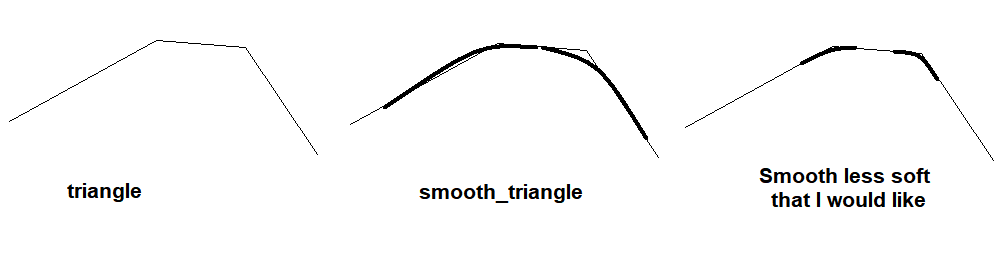
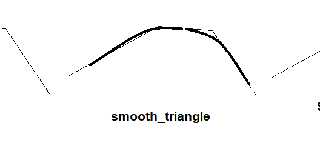
It seems correct, PovRay does not give errors, but I would like the rounding of
the edges to be less, as per this diagram.
Thank you very much!
G.
Post a reply to this message
Attachments:
Download 'sm.png' (7 KB)
Preview of image 'sm.png'
|
|
| |
| |
|
|
|
|
| |
| |
|
|
I remember reading somewhere that the length of the normal vector determines the
smoothness. Shorter the vector, smaller the radius of the corner rounding, but
PovRay doesn't seem to think this way.
I was wondering if there are any options in the syntax...
Thank you again!
G.
Post a reply to this message
|
|
| |
| |
|
|
|
|
| |
| |
|
|
"GioSeregni" <gms### [at] hotmailcom> wrote:

Sounds good.

> It seems correct, PovRay does not give errors, but I would like the rounding of
> the edges to be less, as per this diagram.

So you want a sharper curvature.

Try this:

Take your starting triangle and find the area.  1/2 base times height, or
there's a matrix determinant way.

Use that as a multiplier - a weighting to that vertex normal.
Do that every time you find a matching triangle.  Weight the normal by the
triangle's area before adding it.
Never mind dividing / averaging - I think that would just ad an extra
unnecessary step - just use vnormalize ().

This way, the normal of the edge is influenced more by the bigger area than the
smaller transition area, and there should be a more sudden and pronounced change
of direction as you progress from one large face across the smaller face to the
other.

- BW
Post a reply to this message
|
|
| |
| |
|
|
|
|
| |
| |
|
|
"Bald Eagle" <cre### [at] netscapenet> wrote:
necessary step - just use vnormalize ().
>
> This way, the normal of the edge is influenced more by the bigger area than the
> smaller transition area, and there should be a more sudden and pronounced change
> of direction as you progress from one large face across the smaller face to the
> other.
>
> - BW

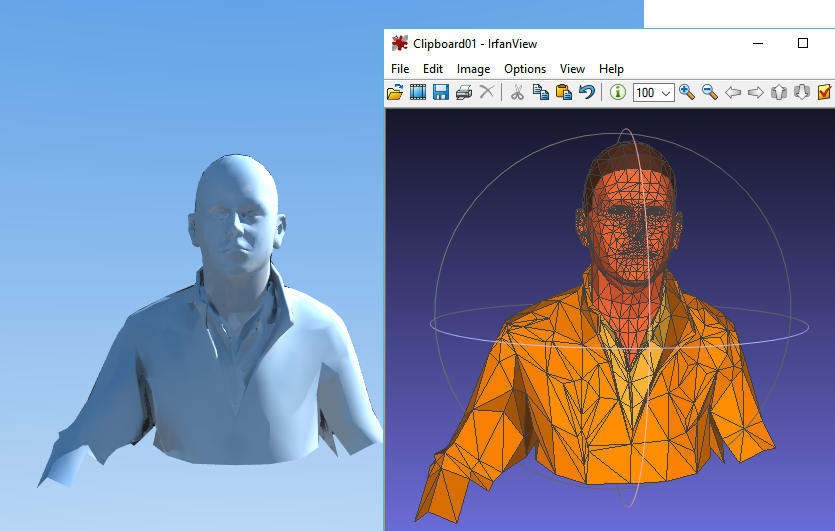
Yes, really good idea, I understood the concept. Great concept.
I'm just worried about the times which are already very long lol

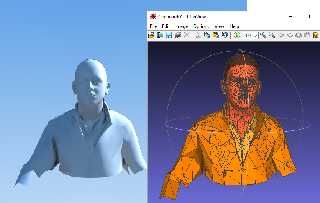
I have however noticed that short vectors, here X/10 y/10 z/10 seem to introduce
fewer artefacts!
Thanks again
Post a reply to this message
Attachments:
Download 'clipboard01.png' (115 KB)
Preview of image 'clipboard01.png'
|
|
| |
| |
|
|
|
|
| |
| |
|
|
"GioSeregni" <gms### [at] hotmailcom> wrote:

> Yes, really good idea, I understood the concept. Great concept.
> I'm just worried about the times which are already very long lol

Indeed.  This is of course a common problem in dealing with large data sets in
computer graphics.

One thing you may want to consider is sorting your triangles so that you can
quickly use something like an octree to only search very nearby triangles for
matching vertices.

Do one BIG sort, then all of your very very many searches will be a LOT faster.

> I have however noticed that short vectors, here X/10 y/10 z/10 seem to introduce
> fewer artefacts!

When developing concepts like this, it is usually helpful to use very small test
scenes that parse and render very quickly, so that you can isolate and address
any problems quickly.  Then once you have everything worked out, you can try it
on a big mesh, like you are doing now.

Take a few single triangles, and just render them with different normal vector
lengths and see what happens.

First, all of your normal lengths should normalized as a starting point.
Then you add all of the weighted face normals with a common vertex,
and finally normalize the final result.

What language are you doing this in?   SDL?  :O

- BW
Post a reply to this message
|
|
| |
| |
|
|
|
|
| |
| |
|
|
"Bald Eagle" <cre### [at] netscapenet> wrote:
> "GioSeregni" <gms### [at] hotmailcom> wrote:
>
> > Yes, really good idea, I understood the concept. Great concept.
> > I'm just worried about the times which are already very long lol
>
> Indeed.  This is of course a common problem in dealing with large data sets in
> computer graphics.
>
> One thing you may want to consider is sorting your triangles so that you can
> quickly use something like an octree to only search very nearby triangles for
> matching vertices.
>
> Do one BIG sort, then all of your very very many searches will be a LOT faster.
>
> > I have however noticed that short vectors, here X/10 y/10 z/10 seem to introduce
> > fewer artefacts!
>
> When developing concepts like this, it is usually helpful to use very small test
> scenes that parse and render very quickly, so that you can isolate and address
> any problems quickly.  Then once you have everything worked out, you can try it
> on a big mesh, like you are doing now.
>
> Take a few single triangles, and just render them with different normal vector
> lengths and see what happens.
>
> First, all of your normal lengths should normalized as a starting point.
> Then you add all of the weighted face normals with a common vertex,
> and finally normalize the final result.
>
> What language are you doing this in?   SDL?  :O
>
> - BW

sure, last night I started with two faces, then three, then a cube (bad idea),
and then this.
I use the old RapidQ, it's slow but it's very versatile and it's the language I
know best, and the fastest to write. I also know XBLite, Ruby and AutoLisp, but
it would be much more complicated...

I was thinking, for your idea, instead of the area, which means many operations,
finding the center of the triangle, and comparing the size of the triangles
using the center- 1 vertex distance.
G.
Post a reply to this message
|
|
| |
| |
|
|
|
|
| |
| |
|
|
It's the first draft, raw and not optimized.
Be careful here, you are missing global variable declarations
Post a reply to this message
Attachments:
Download 'stlsmoothcode.zip' (1 KB)
|
|
| |
| |
|
|
|
|
| |
| |
|
|
"GioSeregni" <gms### [at] hotmailcom> wrote:
> It's the first draft, raw and not optimized.
> Be careful here, you are missing global variable declarations

GRIDf and NETf are memorystream, for points and normals...
so I have no limits of arrays to declare
Post a reply to this message
|
|
| |
| |
|
|
|
|
| |
| |
|
|
"GioSeregni" <gms### [at] hotmailcom> wrote:

> sure, last night I started with two faces, then three, then a cube (bad idea),

Well, it was a good idea, because it shows you what can happen  ;)


> I was thinking, for your idea, instead of the area, which means many operations,
> finding the center of the triangle, and comparing the size of the triangles
> using the center- 1 vertex distance.
> G.

Well, you can do whatever you like, but I'm not sure how much faster it will be,
or how much better it will be.

First you have to compute the center, and then you have to pick - what - the
maximum distance to 3 vertices?  What if you have 2 triangles that share the
only a single vertex?  |X|  Which of the 2 sides on the one triangle do you use
to scale the face normal by?

If you have vertices, A, B, and C, then you have vectors (A-B) and (C-B), and
the vector cross product of those will give you a vector perpendicular to the
surface (the face normal), AND it's length will be a scalar value proportional
to the surface area of the triangle, all in a single calculation.

What I usually do when experimenting with different methods, is either use a
#switch block to choose what method I'm using, or use macros with similar names
that do things a slightly different way.
#macro Method1 ()
#macro Method2 ()
#macro Method3 ()

and then I just change the name of what macro I'm calling to do the part of the
code where I'm doing the experimentation to see what will work best / fastest.


- BW
Post a reply to this message
|
|
| |
| |
|
|
|
|
| |
| |
|
|
"GioSeregni" <gms### [at] hotmailcom> wrote:
> Hi all, first I apologize for my bad english.
> I finished now developing (basic version no color at this moment)  a small
> transformation tool from STL mesh, in the center, to mesh with smooth_triangles.
> But I have a problem. Too smooth. I thought that the length of the normal vector
> caused a gradation, but this is not the case, even if I reduce the length of the
> vectors the smoothness level remains the same. What am I doing wrong?
> Thanks in advanced!
> Giovanni

Glassner, Andrew, Building Vertex Normals from an Unstructured Polygon List,
Graphics Gems IV, p. 60-73, code: p. 64-73, vert_norm/.
https://www.realtimerendering.com/resources/GraphicsGems/gemsiv/vert_norm/
Post a reply to this message
|
|
| |
| |
|
|
|
|
| |
| |
|
|
"Bald Eagle" <cre### [at] netscapenet> wrote:
> "GioSeregni" <gms### [at] hotmailcom> wrote:
> > Hi all, first I apologize for my bad english.
> > I finished now developing (basic version no color at this moment)  a small
> > transformation tool from STL mesh, in the center, to mesh with smooth_triangles.
> > But I have a problem. Too smooth. I thought that the length of the normal vector
> > caused a gradation, but this is not the case, even if I reduce the length of the
> > vectors the smoothness level remains the same. What am I doing wrong?
> > Thanks in advanced!
> > Giovanni
>
> Glassner, Andrew, Building Vertex Normals from an Unstructured Polygon List,
> Graphics Gems IV, p. 60-73, code: p. 64-73, vert_norm/.
> https://www.realtimerendering.com/resources/GraphicsGems/gemsiv/vert_norm/

Thanks, but I my code with normals works fine, see my code and render pictures
above.
Furthermore, even if I am able to calculate the normals, in the binary STL files
to be converted, they are already present and available.
The question is about the level of the smooth.
I would like to get the effect of a smaller radius in the rounding illusion.
As Bald Eagle suggested I'm trying to work on the single "weight" of normals in
their average for each point  (which creates the smooth effect) , considering
the size of each triangle.
I hope I have explained myself, I have little command of English, and the
question is not very simple
Many Thanks!
G.
Post a reply to this message
|
|
| |
| |
|
|
|
|
| |
| |
|
|
I'm slowly clearing my head
For an excellent result the code must have at least 3 steps
1) (already done), calculation of the average of the normals affecting the
point.
2) Correcting the weight of the normals per point if they also come from
triangles with a large surface area
3) Corrective of the normals if the adjacent triangles have an inclination
between them that tends to approach 90 degrees

G.
Post a reply to this message
|
|
| |
| |
|
|
|
|
| |
| |
|
|
hi,

"GioSeregni" <gms### [at] hotmailcom> wrote:
> For an excellent result the code must have at least 3 steps
> 1) (already done), calculation of the average of the normals affecting the
> point.
> 2) Correcting the weight of the normals per point if they also come from
> triangles with a large surface area
> 3) Corrective of the normals if the adjacent triangles have an inclination
> between them that tends to approach 90 degrees

fwiw, my 'gts2pov' takes triangle area into account when calculating the
normals.  also just found mention of a 'stl2pov' software :
<https://news.povray.org/web.6156c51533af95845bd1b3ba6cde94f1%40news.povray.org>

<https://wiki.povray.org/content/User:Jr>


regards, jr.
Post a reply to this message
|
|
| |
| |
|
|
|
|
| |
| |
|
|
"jr" <cre### [at] gmailcom> wrote:
> hi,
>
> "GioSeregni" <gms### [at] hotmailcom> wrote:
> > For an excellent result the code must have at least 3 steps
> > 1) (already done), calculation of the average of the normals affecting the
> > point.
> > 2) Correcting the weight of the normals per point if they also come from
> > triangles with a large surface area
> > 3) Corrective of the normals if the adjacent triangles have an inclination
> > between them that tends to approach 90 degrees
>
> fwiw, my 'gts2pov' takes triangle area into account when calculating the
> normals.  also just found mention of a 'stl2pov' software :
> <https://news.povray.org/web.6156c51533af95845bd1b3ba6cde94f1%40news.povray.org>
>
> <https://wiki.povray.org/content/User:Jr>
>
>
> regards, jr.

Tx JR!
My code is already working from STL to POV even with the color subset of STL.
In fact I have to add the surface calculation to the loops from triangle to
smooth_triangle, I'll take a look at your system. But first I also want to
translate the color, as I already do with the triangles, dividing groups of
differently colored meshes. This way my translator will also become faster
because the loops are compact and short on small meshes.
(between different colors I don't want smooth).
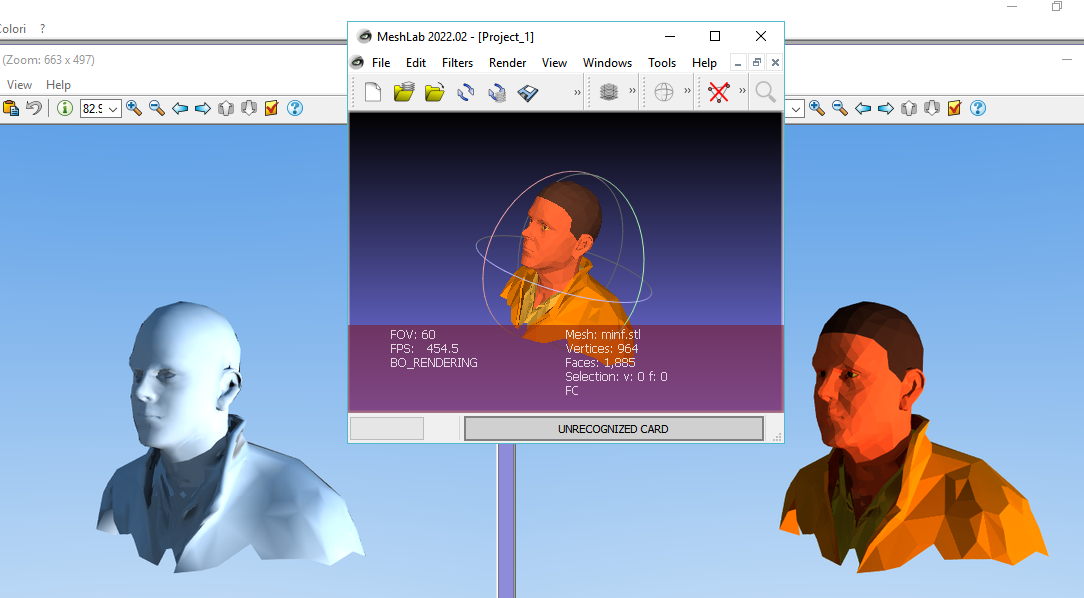
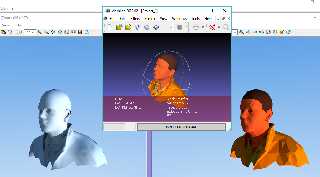
In the center STL, on the left the current smooth routine, on the right the
simple triangle mesh. Thank you!
Post a reply to this message
Attachments:
Download 'clipboard01.png' (158 KB)
Preview of image 'clipboard01.png'
|
|
| |
| |
|
|
|
|
| |
| |
|
|
"GioSeregni" <gms### [at] hotmailcom> wrote:
> "jr" <cre### [at] gmailcom> wrote:
> > hi,
> >
> > "GioSeregni" <gms### [at] hotmailcom> wrote:
> > > For an excellent result the code must have at least 3 steps
> > > 1) (already done), calculation of the average of the normals affecting the
> > > point.
> > > 2) Correcting the weight of the normals per point if they also come from
> > > triangles with a large surface area
> > > 3) Corrective of the normals if the adjacent triangles have an inclination
> > > between them that tends to approach 90 degrees
> >
> > fwiw, my 'gts2pov' takes triangle area into account when calculating the
> > normals.  also just found mention of a 'stl2pov' software :
> > <https://news.povray.org/web.6156c51533af95845bd1b3ba6cde94f1%40news.povray.org>
> >
> > <https://wiki.povray.org/content/User:Jr>
> >
> >
> > regards, jr.
>
> Tx JR!
> My code is already working from STL to POV even with the color subset of STL.
> In fact I have to add the surface calculation to the loops from triangle to
> smooth_triangle, I'll take a look at your system. But first I also want to
> translate the color, as I already do with the triangles, dividing groups of
> differently colored meshes. This way my translator will also become faster
> because the loops are compact and short on small meshes.
> (between different colors I don't want smooth).
> In the center STL, on the left the current smooth routine, on the right the
> simple triangle mesh. Thank you!

I May be wrong but I don't believe the normals length will be taken into account
at all. I believe they are rather always 'normalized' (no pun) to a value of 1
and just their directions used. Some of the most valuable input may be from
Alain with all his technical POV knowledge. the only things that then would
change the apparent curvature of normals *globally* is the 'brilliance' keyword
value or more locally the slope normal pattern... but again all this needs to be
verified.
Post a reply to this message
|
|
| |
| |
|
|
|
|
| |
| |
|
|
hi,

"GioSeregni" <gms### [at] hotmailcom> wrote:
> ...
> Tx JR!

welcome.  a visual to compare, the mesh is from the GTS home site.
<https://news.povray.org/web.610401e9687fa6155e0fed26cde94f1%40news.povray.org>


> My code is already working from STL to POV even with the color subset of STL.

ah, colour is something I ought to look into, too.  cheers.


regards, jr.
Post a reply to this message
|
|
| |
| |
|
|
|
|
| |
| |
|
|
I tried a search of the NG to see what else there might be, these were the only
2 so far to catch my eye.

Maybe some small thing in there might trigger an idea, yet untested.

Warp:
https://news.povray.org/3cd536d5%40news.povray.org

jceddy:
http://news.povray.org/povray.general/thread/%3Cweb.442a6fe16260549766ffc7a50@news.povray.org%3E/

- BW
Post a reply to this message
|
|
| |
| |
|
|
|
|
| |
| |
|
|
"Bald Eagle" <cre### [at] netscapenet> wrote:
> I tried a search of the NG to see what else there might be, these were the only
> 2 so far to catch my eye.
>
> Maybe some small thing in there might trigger an idea, yet untested.
>
> Warp:
> https://news.povray.org/3cd536d5%40news.povray.org
>
> jceddy:
>
http://news.povray.org/povray.general/thread/%3Cweb.442a6fe16260549766ffc7a50@news.povray.org%3E/
>
> - BW

Tx Jr and BW for the links, I use exactly the average..
warning about colors in STL
They aren't true color
I use this code by STL (subset of colors)  to POV (truecolor)

r=STLface.descriptor AND 31744
r=r SHR 10
r=r*8
g=STLface.descriptor AND 992
g=g SHR 5
g=g*8
b=STLface.descriptor AND 31
b=b*8
POV_COLOR=b+(g*256)+(r*65536)

NOTE: this is my struct for STL's face

TYPE STL
 header    As String * 80
 numfacets As Long  '4 b then -> loop
 nx        As Single   '4 b
 ny        As Single
 nz        As Single
 x0        As Single
 y0        AS Single
 z0        As Single
 x1        As Single
 y1        As Single
 z1        As Single
 x2        As Single
 y2        As Single
 z2        As Single
 descriptor As Short '2 b <--- end loop
END TYPE
DIM STLface AS STL
Post a reply to this message
|
|
| |
| |
|
|
|
|
| |
| |
|
|
"GioSeregni" <gms### [at] hotmailcom> wrote:
> Hi all, first I apologize for my bad english.
> I finished now developing (basic version no color at this moment)  a small
> transformation tool from STL mesh, in the center, to mesh with smooth_triangles.

Hello Giovanni!

Your results are already looking very good! :-) Congratulations for figuring out
this kind of translation. (I have been busy working on the 'opposite'
translation-- POV-ray objects to STL.)

A little utility called 'stl2pov' was mentioned. I remember it from years ago.
It is still available here, although it apparently runs in Python(?). It might
give you some ideas and suggestions about your problem.

https://github.com/rsmith-nl/stltools

By the way, I also thought that the normals of triangles are direction vectors
of 'unit length' by default, not smaller or larger, but I could be wrong.

I am looking forward to seeing how you solve your too-smooth problem; I wish
that I could offer some suggestions. Some of this triangle stuff is outside my
knowledge.  *If* the triangle normals are all unit length, perhaps your summing
operation could be made to eliminate some of the identical normals on large flat
areas, which might reduce their contribution-- and make the smoothness less
smooth. (?)
Post a reply to this message
|
|
| |
| |
|
|
|
|
| |
| |
|
|
"Kenneth" <kdw### [at] gmailcom> wrote:
 *If* the triangle normals are all unit length, perhaps your summing
> operation could be made to eliminate some of the identical normals on large flat
> areas, which might reduce their contribution-- and make the smoothness less
> smooth. (?)

or maybe... MORE smooth? So perhaps the normals on LARGER triangles could be
*duplicated* in your summing process instead, to make their contribution have
more weight, resulting in a *less*-smooth result. Based on the size or computed
area of each triangle.

I apologize for just guessing about this, because I don't fully understand all
of the details of your idea.
Post a reply to this message
|
|
| |
| |
|
|
|
|
| |
| |
|
|
"Kenneth" <kdw### [at] gmailcom> wrote:

> I am looking forward to seeing how you solve your too-smooth problem; I wish
> that I could offer some suggestions. Some of this triangle stuff is outside my
> knowledge.  *If* the triangle normals are all unit length, perhaps your summing
> operation could be made to eliminate some of the identical normals on large flat
> areas, which might reduce their contribution-- and make the smoothness less
> smooth. (?)

Triangles typically have a sinlge normal - a vector that is perpendicular to
it's face (in either direction).

The normal can be of any length.

Typically, for lighting purposes, since the normal vector is used to calculate
how light interacts with the surface, you want them of unit length.

For smooth, or perturbed-surfaces, you will specify the normals of the vertices,
and then POV-Ray will interpolate the normals across the surface, (and perhaps
adding/multiplying by some pattern) to yield a smoothly changing surface.

When dealing with a mesh of triangles that share common vertices and edges, one
typically averages all of the normals that meet at a common vertex so that
there's no sudden discontinuity in the way light reflects from the surface,
appearing as lump, depressions, or creases.

If you have two triangles oriented in different directions, if you multiply the
length of the normal of one triangle, its contribution to how the triangles
behave at that vertex will be greater.

I think in order to accomplish what he's looking to do, the way that the
triangles get interpolated would have to change, other wise I don't see how to
maintain a common normal direction on one end, and non-linearly change apparent
curvature at the other.

It's not something I've played with in detail, but it sure seems like something
that ought to be explored with test renders, diagrams, normal directions and
lengths explicitly labeled, etc.

Good instructional articles are what draw computer graphics students and
hobbyists to any given site for the quality content.

We should have that.
Right on the home page.  Perhaps directing to a specific (new) sub-group titled
"Articles".

- BW
Post a reply to this message
|
|
| |
| |
|
|
|
|
| |
| |
|
|
"Bald Eagle" <cre### [at] netscapenet> wrote:
> "Kenneth" <kdw### [at] gmailcom> wrote:
>
> > I am looking forward to seeing how you solve your too-smooth problem; I wish
> > that I could offer some suggestions. Some of this triangle stuff is outside my
> > knowledge.  *If* the triangle normals are all unit length, perhaps your summing
> > operation could be made to eliminate some of the identical normals on large flat
> > areas, which might reduce their contribution-- and make the smoothness less
> > smooth. (?)
>
> Triangles typically have a sinlge normal - a vector that is perpendicular to
> it's face (in either direction).
>
> The normal can be of any length.
>
> Typically, for lighting purposes, since the normal vector is used to calculate
> how light interacts with the surface, you want them of unit length.
>
> For smooth, or perturbed-surfaces, you will specify the normals of the vertices,
> and then POV-Ray will interpolate the normals across the surface, (and perhaps
> adding/multiplying by some pattern) to yield a smoothly changing surface.
>
> When dealing with a mesh of triangles that share common vertices and edges, one
> typically averages all of the normals that meet at a common vertex so that
> there's no sudden discontinuity in the way light reflects from the surface,
> appearing as lump, depressions, or creases.
>
> If you have two triangles oriented in different directions, if you multiply the
> length of the normal of one triangle, its contribution to how the triangles
> behave at that vertex will be greater.
>
> I think in order to accomplish what he's looking to do, the way that the
> triangles get interpolated would have to change, other wise I don't see how to
> maintain a common normal direction on one end, and non-linearly change apparent
> curvature at the other.
>
> It's not something I've played with in detail, but it sure seems like something
> that ought to be explored with test renders, diagrams, normal directions and
> lengths explicitly labeled, etc.
>
> Good instructional articles are what draw computer graphics students and
> hobbyists to any given site for the quality content.
>
> We should have that.
> Right on the home page.  Perhaps directing to a specific (new) sub-group titled
> "Articles".
>
> - BW
tx Bw
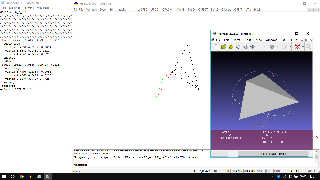
I am working around this concept. The bad angle is 90 degrees. The vectors are
ever long 1 (red color), so the distance (green) it's approximately 1,4142
(Pitagora).
Around this value I have to eliminate the smoothing. It involves graduating on
the size of the angles. Unfortunately I don't have much training in
trigonometry... it takes me a long time and I don't know the shortcuts in the
formulas, I need time...
TX Again
G.
Post a reply to this message
Attachments:
Download 'clipboard01.jpg' (476 KB)
Preview of image 'clipboard01.jpg'
|
|
| |
| |
|
|
|
|
| |
| |
|
|
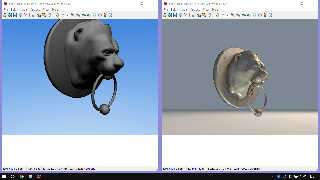
There was an interesting comment with a utility to download, but now I don't see
it anymore. Has it been cancelled? I took the obj and converted it to STL then
applied my code to it, but without refinements in the environment. I tested his
example with my program, because I had downloaded it, my render is poor.. it has
no texture, it has no lights... I put the linked example but rendered with my
version 3.7 (the file was 3.8 ) Strange, I can no longer find who posted and the
content, thanks anyway!
Post a reply to this message
Attachments:
Download 'clip.jpg' (399 KB)
Preview of image 'clip.jpg'
|
|
| |
| |
|
|
|
|
| |
| |
|
|
"Bald Eagle" <cre### [at] netscapenet> wrote:
> "Kenneth" <kdw### [at] gmailcom> wrote:
>
> > I am looking forward to seeing how you solve your too-smooth problem; I wish
> > that I could offer some suggestions. Some of this triangle stuff is outside my
> > knowledge.  *If* the triangle normals are all unit length, perhaps your summing
> > operation could be made to eliminate some of the identical normals on large flat
> > areas, which might reduce their contribution-- and make the smoothness less
> > smooth. (?)
>
> Triangles typically have a sinlge normal - a vector that is perpendicular to
> it's face (in either direction).
>
> The normal can be of any length.
>
> Typically, for lighting purposes, since the normal vector is used to calculate
> how light interacts with the surface, you want them of unit length.
>
> For smooth, or perturbed-surfaces, you will specify the normals of the vertices,
> and then POV-Ray will interpolate the normals across the surface, (and perhaps
> adding/multiplying by some pattern) to yield a smoothly changing surface.
>
> When dealing with a mesh of triangles that share common vertices and edges, one
> typically averages all of the normals that meet at a common vertex so that
> there's no sudden discontinuity in the way light reflects from the surface,
> appearing as lump, depressions, or creases.
>
> If you have two triangles oriented in different directions, if you multiply the
> length of the normal of one triangle, its contribution to how the triangles
> behave at that vertex will be greater.
>
> I think in order to accomplish what he's looking to do, the way that the
> triangles get interpolated would have to change, other wise I don't see how to
> maintain a common normal direction on one end, and non-linearly change apparent
> curvature at the other.
>
> It's not something I've played with in detail, but it sure seems like something
> that ought to be explored with test renders, diagrams, normal directions and
> lengths explicitly labeled, etc.
>
> Good instructional articles are what draw computer graphics students and
> hobbyists to any given site for the quality content.
>
> We should have that.
> Right on the home page.  Perhaps directing to a specific (new) sub-group titled
> "Articles".

Hi Bill

Here's two relevant articles:

"Weighted Vertex Normals"
http://www.bytehazard.com/articles/vertnorm.html

"On the computation of vertex normals"
http://meshlabstuff.blogspot.com/2009/04/on-computation-of-vertex-normals.html

- And then there's this paper, which delves deep into the topic:

"A comparison of algorithms for vertex normal computation"
Shuangshuang Jin, Robert R. Lewis, David West
The Visual Computer, 2005 - Springer

Vertex normal algorithms investigated in that article:

    Mean edge weighted by cotangents of subtended angles
    Mean weighted by angle
    Mean weighted by areas of adjacent triangles
    Mean weighted equally
    Mean weighted by edge length reciprocals
    Mean weighted by square root of edge length reciprocals
    Mean weighted by sine and edge length reciprocals

From the article's "Conclusions and future work":

Relatively speaking, except for trigonometrically parameterized surfaces,
"Mean weighted by angle" is most frequently a good choice. If speed is a
concern, however, "Mean weighted equally" holds up well in most cases.

--
Tor Olav
http://subcube.com
https://github.com/t-o-k
Post a reply to this message
|
|
| |
| |
|
|
|
|
| |
| |
|
|
"GioSeregni" <gms### [at] hotmailcom> wrote:
> There was an interesting comment with a utility to download, but now I don't see
> it anymore. Has it been cancelled? I took the obj and converted it to STL then
> applied my code to it, but without refinements in the environment. I tested his
> example with my program, because I had downloaded it, my render is poor.. it has
> no texture, it has no lights... I put the linked example but rendered with my
> version 3.7 (the file was 3.8 ) Strange, I can no longer find who posted and the
> content, thanks anyway!
NOW I understand! it hasn't disappeared, it's on another topic. Obj to POV...
Now I understand why I had artifacts. By transforming the obj into STL I already
had the normals with smooth, on which I intervened with a new smooth, mine, that
is, sorry, I made a mess :)
Post a reply to this message
|
|
| |
| |
|
|
|
|
| |
| |
|
|
"Tor Olav Kristensen" <tor### [at] TOBEREMOVEDgmailcom> wrote:

> Hi Bill
>
> Here's two relevant articles:

Hi Tor,

Thank you as always for sharing some of (what I'm sure is a very extensive)
reference library.

Luckily, I had written a fully chamfered box macro not too long ago, so I could
just piggyback off of that and get right to trying to calculate the normals and
replicate the work in that first paper.

I normalize all of my cross-product vectors before summing to get the "wrong
way" and then just use the direct cross-product result to try to get the
right/improved way - but it still doesn't look very smooth.  So I must have some
aspect of this that I didn't code right in that second macro.
(and even seeing the flaws is very lighting and camera angle dependent...)

However, aside from that, what I did find disturbing is that I have an
interior_texture defined for my smooth_triangles, and that's showing up, even
though my normals are facing the proper way.

So it seems like we're back to having some triangle mesh rendering errors in the
source, even after clipka hunted down and fixed the faux-mesh union-of-triangles
problem that I uncovered when making subdivided spheres.

See attached.

Maybe someone else can confirm.


- BW
Post a reply to this message
Attachments:
Download 'weightedvertexnormals.png' (68 KB)
Preview of image 'weightedvertexnormals.png'

|
|
| |
| |
|
|
|
|
| |
| |
|
|
"- And then there's this paper, which delves deep into the topic:

"A comparison of algorithms for vertex normal computation"
Shuangshuang Jin, Robert R. Lewis, David West
The Visual Computer, 2005 - Springer"

Can't seem to find that one, even though my tax dollars probably funded the
research.  ;)

Is that a journal article, or part of _3D Imaging, Analysis and Applications
(Pears, Liu, Bunting) ?


- BW
Post a reply to this message
|
|
| |
| |
|
|
|
|
| |
| |
|
|
"Bald Eagle" <cre### [at] netscapenet> wrote:
> "- And then there's this paper, which delves deep into the topic:
>
> "A comparison of algorithms for vertex normal computation"
> Shuangshuang Jin, Robert R. Lewis, David West
> The Visual Computer, 2005 - Springer"
>
> Can't seem to find that one, even though my tax dollars probably funded the
> research.  ;)
>
> Is that a journal article, or part of _3D Imaging, Analysis and Applications
> (Pears, Liu, Bunting) ?

It's here:

https://link.springer.com/article/10.1007/s00371-004-0271-1

Springer seems to have some kind of sharing feature for this.
So let's see of you can read it if you follow this link:

https://rdcu.be/drMhc

--
Tor Olav
http://subcube.com
https://github.com/t-o-k
Post a reply to this message
|
|
| |
| |
|
|
|
|
| |
| |
|
|
"Bald Eagle" <cre### [at] netscapenet> wrote:
> "Tor Olav Kristensen" <tor### [at] TOBEREMOVEDgmailcom> wrote:
>
> > Hi Bill
> >
> > Here's two relevant articles:
>
> Hi Tor,
>
> Thank you as always for sharing some of (what I'm sure is a very extensive)
> reference library.

Yes, I have saved a lot of articles related to computer graphics (and
mathematics, photography, electronics and much more) on a lot of hard
drives during the years, but unfortunately I'm not able to keep track
of them.

So this time I googled a bit and then posted the ones that looked most
relevant and informative. (But I did remember that I had read somewhere
that there are more than one way of weighting the normal vectors of
triangles surrounding a vertex in a mesh, before summing them. And that
there's no single way to choose those weights so that one gets good
results in all cases.)


> Luckily, I had written a fully chamfered box macro not too long ago, so I could
> just piggyback off of that and get right to trying to calculate the normals and
> replicate the work in that first paper.
>
> I normalize all of my cross-product vectors before summing to get the "wrong
> way" and then just use the direct cross-product result to try to get the
> right/improved way - but it still doesn't look very smooth.  So I must have some
> aspect of this that I didn't code right in that second macro.
> (and even seeing the flaws is very lighting and camera angle dependent...)
>
> However, aside from that, what I did find disturbing is that I have an
> interior_texture defined for my smooth_triangles, and that's showing up, even
> though my normals are facing the proper way.
>
> So it seems like we're back to having some triangle mesh rendering errors in the
> source, even after clipka hunted down and fixed the faux-mesh union-of-triangles
> problem that I uncovered when making subdivided spheres.
>
> See attached.
>
> Maybe someone else can confirm.

As you know:
It will be easier for us look at your problems if you show your code.

    ;-)

--
Tor Olav
http://subcube.com
https://github.com/t-o-k
Post a reply to this message
|
|
| |
| |
|
|
|
|
| |
| |
|
|
"Bald Eagle" <cre### [at] netscapenet> wrote:
> "Kenneth" <kdw### [at] gmailcom> wrote:
>
> I also thought that the normals of triangles are direction vectors of 'unit
> length' by default, not smaller or larger, but I could be wrong.
[and...]
> *If* the triangle normals are all unit length, perhaps your summing
> operation could be made to... [clip]

[Bald Eagle:]
>
> Triangles typically have a single normal - a vector that is perpendicular to
> its face (in either direction).
>
> The normal can be of any length.
>
> Typically, for lighting purposes, since the normal vector is used to calculate
> how light interacts with the surface, you want them of unit length.
>

Sorry for the confusion, I was actually thinking-- in a muddled way-- of the
original 'source' triangles from Giovanni's STL file.

Honestly, I did not know *what* length such normals there could be-- so I took
one of my 'slice-created' STL binary files made by the 3D SLICER app (mentioned
elsewhere), brought that into MESHMIXER, and converted it to an asci-text STL
file. The triangles-- or each vertex?-- are of this typical form (not
'smooth triangles', as far as I know)...

facet normal -0.107895597816 -0.696702897549 0.709199249744
    outer loop
      vertex 21.3610057831 0.39481022954 -0.11346334219
      vertex 22.4441795349 0.273843616247 -0.158073753119
      vertex 22.0666675568 -0.210549205542 0.393470913172
    endloop

In POV-ray, I took the 'facet normal' data/vector and ran it with vlength(...)
and #debug. It turns out that ALL of the triangles have a unit-length normal:
<1.000,0.000,0.000>, as vlength reports it.

-----
[off-topic here but interesting}: The MESHMIXER app (also my CURA 3-D-printing
app) shows the STL object to have smooth edges-- even though the triangle
data appears to be 'un-smooth'. I have no idea why. Perhaps those apps are
automatically creating smooth triangles from the data. (Or maybe interpolating
the data from the individual vertices?)
Post a reply to this message
|
|
| |
| |
|
|
|
|
| |
| |
|
|
"Tor Olav Kristensen" <tor### [at] TOBEREMOVEDgmailcom> wrote:

> As you know:
> It will be easier for us look at your problems if you show your code.
>
>     ;-)


Yes, yes yes - I was on my way out the door to shovel snow and get out to The
Circus.

Link to shared article worked great.  Thank you.
Post a reply to this message
Attachments:
Download 'weightedvertexnormals.pov.txt' (19 KB)
|
|
| |
| |
|
|
|
|
| |
| |
|
|
"Kenneth" <kdw### [at] gmailcom> wrote:

> converted it to an asci-text STL
> file. The triangles-- or each vertex?-- are of this typical form (not
> 'smooth triangles', as far as I know)...
>
> facet normal -0.107895597816 -0.696702897549 0.709199249744
>     outer loop
>       vertex 21.3610057831 0.39481022954 -0.11346334219
>       vertex 22.4441795349 0.273843616247 -0.158073753119
>       vertex 22.0666675568 -0.210549205542 0.393470913172
>     endloop

And as you can see, that's about as close to SDL's triangle {} statement as
anything.

> In POV-ray, I took the 'facet normal' data/vector and ran it with vlength(...)
> and #debug. It turns out that ALL of the triangles have a unit-length normal:
> <1.000,0.000,0.000>, as vlength reports it.

Well yes.  Those are going to be the final surface normals, and ought to all be
1.0.   The intermediate computations for calculating what the vertex normals of
smooth_triangles are can be anything.  The final normals, however, are almost
always going to get normalized, and so end up as length 1.0.   It's really the
direction of those normals that's going to influence how the light bounces off
of the surface from the light_source to the camera, and show up as either a flat
facet, a smoothly curving surface, or a normal {} pattern.

> [off-topic here but interesting}: The MESHMIXER app (also my CURA 3-D-printing
> app) shows the STL object to have smooth edges-- even though the triangle
> data appears to be 'un-smooth'. I have no idea why. Perhaps those apps are
> automatically creating smooth triangles from the data. (Or maybe interpolating
> the data from the individual vertices?)

Yeah, I think that's just the way they get rendered.  There's likely a setting
that you can turn off, so you can see the raw stl mesh.

- BW
Post a reply to this message
|
|
| |
| |
|
|
|
|
| |
| |
|
|
"Kenneth" <kdw### [at] gmailcom> wrote:
>
> ..and converted it to an asci-text STL file. The triangles-- or each
> vertex?-- are of this typical form (not 'smooth triangles', as far as I know)...
>
>  facet normal -0.107895597816 -0.696702897549 0.709199249744
>     outer loop
>       vertex 21.3610057831 0.39481022954 -0.11346334219
>       vertex 22.4441795349 0.273843616247 -0.158073753119
>       vertex 22.0666675568 -0.210549205542 0.393470913172
>     endloop
>

Just to follow up, after a little more research:
FACET means the entire triangle, not an individual vertex. STL files are
composed of flat triangles, not smooth ones. Giovanni's STL image show this too.

-------------------
I am not very happy that MESHMIXER (and CURA) show 'smooth triangle' versions of
the file; I would rather see the raw-triangle representation there. And it seems
that CURA also *outputs* its .stl-to-.gcode 3-D-printing file as a
smooth-triangle version, according to tests that I have made. I have mixed
feelings about that...
Post a reply to this message
|
|
| |
| |
|
|
|
|
| |
| |
|
|
>
> > [off-topic here but interesting}: The MESHMIXER app (also my CURA 3-D-printing
> > app) shows the STL object to have smooth edges-- even though the triangle
> > data appears to be 'un-smooth'. I have no idea why...
>
> Yeah, I think that's just the way they get rendered.  There's likely a setting
> that you can turn off, so you can see the raw stl mesh.
>

Finally found it in MESHMIXER-- it takes two steps. Apps that have lots of
features have lots of menus to learn :-/

     PREFERENCES:  choose 'face normals'
     VIEW: choose 'wireframe'

BTW, I was wrong about the CURA app automatically smoothing an STL model prior
to 3-D-printing it; the fault is in the STL output of that complicated 3D SLICER
app that I've been testing. I have to find where to turn that off (as an
option.)

[more on-topic, hopefully...]

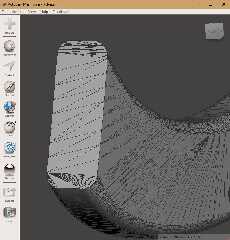
I downloaded a few STL files made by others, to take a look at their triangle
meshes in MESHMIXER. There can be some complicated triangle arrangements in such
files! Even on what look to be completely flat surfaces. I guess the many
vertices have meet up *somewhere*.
Post a reply to this message
Attachments:
Download 'example_stl_mesh.jpg' (97 KB)
Preview of image 'example_stl_mesh.jpg'
|
|
| |
| |
|
|
|
|
| |
| |
|
|
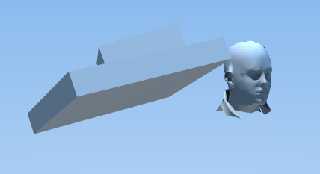
ok, after two days of going crazy I implemented a drastic and elementary
control. Then later I will see how to improve with the "weights" and the
individual vertices, but now I have chosen the simplest path.
I work with normalized normals. So, if two normals make an angle of about 90
degrees, their normalized distance is about 1.41
Around this value I abandon the smooth and use the simple triangle.
I still have a lot to work on, I will find many special cases along the way, but
in this rough way I get rid of the most conspicuous artefacts.
Post a reply to this message
Attachments:
Download 'smoothed.png' (16 KB)
Preview of image 'smoothed.png'
|
|
| |
| |
|
|
|
|
| |
| |
|
|
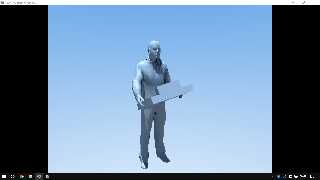
1024x768 AA
22 minutes on my old notebook with win 10. I think I'll get half that on win 11
with the new one. I'll try tomorrow.
The concept is this


.....
distance=SQR( ((xNS-NormX1)^2)+((yNS-NormY1)^2)+((zNS-NormZ1)^2))
if distance > 1.38 and distance < 1.45 then NoNorm=1
....
distance=SQR( ((xNS-NormX2)^2)+((yNS-NormY2)^2)+((zNS-NormZ2)^2))
if distance > 1.38 and distance < 1.45 then NoNorm=1
....
distance=SQR( ((xNS-NormX2)^2)+((yNS-NormY2)^2)+((zNS-NormZ2)^2))
if distance > 1.38 and distance < 1.45 then NoNorm=1
......
Post a reply to this message
Attachments:
Download 'clipboard01.png' (254 KB)
Preview of image 'clipboard01.png'
|
|
| |
| |
|
|
|
|
| |
| |
|
|
hi,

"GioSeregni" <gms### [at] hotmailcom> wrote:
> 1024x768 AA
> 22 minutes on my old notebook with win 10. I think I'll get half that on win 11
> with the new one. I'll try tomorrow.

is that a large pizza and sides ?!  </grin>


regards, jr.
Post a reply to this message
|
|
| |
| |
|
|
|
|
| |
| |
|
|
"jr" <cre### [at] gmailcom> wrote:
> hi,
>
> "GioSeregni" <gms### [at] hotmailcom> wrote:
> > 1024x768 AA
> > 22 minutes on my old notebook with win 10. I think I'll get half that on win 11
> > with the new one. I'll try tomorrow.
>
> is that a large pizza and sides ?!  </grin>
>
>
> regards, jr.

no no, lol, ebay or amazon!
Today a new trouble (solved).
Some incorrect results by same points.
Same for me, but not for "single". the "doubles" does not have this problem, the
"single", after operations, can to became x.00000000 like x.99999999999999 or
something similar
In fact Autolisp, for example, in comparison for "=" or "equal", has the option
that you can to use to define the small irrilevant difference.
but which is very relevant when I look for identities in my points cloud
(vertices), and that I have to cut in the comparison, or the comparison does not
work.
I'll have to add a filter...
BR
G.
Post a reply to this message
|
|
| |
| |
|
|
|
|
| |
| |
|
|
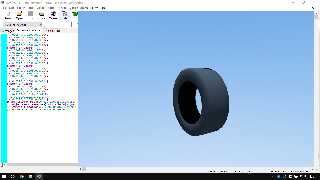
well, I have a little question because I have often read about "artifact" on
sooth_triangle but I don't understand. It is very difficult for me to translate
technical language and figurative sayings. Now I have started translating the
include files of my PovRay library that I interface with CAD, triangle to
smooth_triangle.
This wheel has black corners (two), on the right. Are these common artifacts, or
can I fix them?
Thanx in advanced!
G.
Post a reply to this message
Attachments:
Download 'clipboard01.png' (168 KB)
Preview of image 'clipboard01.png'
|
|
| |
| |
|
|
|
|
| |
| |
|
|
"GioSeregni" <gms### [at] hotmailcom> wrote:
> well, I have a little question because I have often read about "artifact" on
> sooth_triangle but I don't understand. It is very difficult for me to translate
> technical language and figurative sayings. Now I have started translating the
> include files of my PovRay library that I interface with CAD, triangle to
> smooth_triangle.
> This wheel has black corners (two), on the right. Are these common artifacts, or
> can I fix them?
> Thanx in advanced!
> G.

I think you might be seeing the same bug that I've been seeing.

instead of pigment, try using (_BOTH_)

texture {pigment {rgb 0.1} finish {specular 0.4}}
interior_texture {pigment {rgb x*0.2} finish {emission 1}}

And see if those "corners" turn red.
If so, we're seeing the underside of those triangles, when we shouldn't.

- BW
Post a reply to this message
|
|
| |
| |
|
|
|
|
| |
| |
|
|
"Bald Eagle" <cre### [at] netscapenet> wrote:
> "GioSeregni" <gms### [at] hotmailcom> wrote:
> > well, I have a little question because I have often read about "artifact" on
> > sooth_triangle but I don't understand. It is very difficult for me to translate
> > technical language and figurative sayings. Now I have started translating the
> > include files of my PovRay library that I interface with CAD, triangle to
> > smooth_triangle.
> > This wheel has black corners (two), on the right. Are these common artifacts, or
> > can I fix them?
> > Thanx in advanced!
> > G.
>
> I think you might be seeing the same bug that I've been seeing.
>
> instead of pigment, try using (_BOTH_)
>
> texture {pigment {rgb 0.1} finish {specular 0.4}}
> interior_texture {pigment {rgb x*0.2} finish {emission 1}}
>
> And see if those "corners" turn red.
> If so, we're seeing the underside of those triangles, when we shouldn't.
>
> - BW

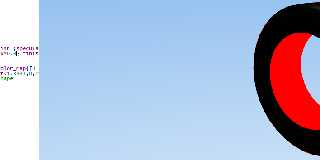
THANKS! You are right, the red is here (elevated to see it better).
This knowledge is very useful! Many thanks again!
G.
Post a reply to this message
Attachments:
Download 'clipboard01.png' (75 KB)
Preview of image 'clipboard01.png'
|
|
| |
| |
|
|
|
|
| |
| |
|
|
"GioSeregni" <gms### [at] hotmailcom> wrote:

> THANKS! You are right, the red is here (elevated to see it better).
> This knowledge is very useful! Many thanks again!
> G.

Well, you're _supposed to_ see _that_ red - those are the undersides of the open
mesh - the inside of the tire.

You were talking about the "corners" on the upper right of the tire, which
should be smooth, and the same color as the rest of the tire.

And if you DO see red there, then try moving the camera around, and viewing it
from different angles - because it may just disappear and pop up in different
areas.

- BW
Post a reply to this message
|
|
| |
| |
|
|
|
|
| |
| |
|
|
"Bald Eagle" <cre### [at] netscapenet> wrote:
> "GioSeregni" <gms### [at] hotmailcom> wrote:
>
> > THANKS! You are right, the red is here (elevated to see it better).
> > This knowledge is very useful! Many thanks again!
> > G.
>
> Well, you're _supposed to_ see _that_ red - those are the undersides of the open
> mesh - the inside of the tire.
>
> You were talking about the "corners" on the upper right of the tire, which
> should be smooth, and the same color as the rest of the tire.
>
> And if you DO see red there, then try moving the camera around, and viewing it
> from different angles - because it may just disappear and pop up in different
> areas.
>
> - BW

I think you are just looking at preview image. If you open it you will also see
the triangles of the right we are talking about. I kept about the same point of
view just to check on my first image. It seems that they always arise on the
perimeter of the volumes (in positions tangential to the cone of vision)...
However, the internal color makeup is useful, it can help mask a bit the bug.
I think you could mask it a bit with a generic "finish" using the outer color of
the face
Thanks!
G.
Post a reply to this message
|
|
| |
| |
|
|
|
|
| |
| |
|
|
"GioSeregni" <gms### [at] hotmailcom> wrote:
> "Bald Eagle" <cre### [at] netscapenet> wrote:
> >
> > And if you DO see red there, then try moving the camera around, and viewing it
> > from different angles - because it may just disappear and pop up in different
> > areas.
>
> It seems that they always arise on the
> perimeter of the volumes (in positions tangential to the cone of vision)...

Yes, that is where those artifacts sometimes appear on a smooth-triangle object.
I think it also depends on the lighting angle, and maybe even the size of the
triangles.

What you are seeing is a known effect of raytracing the smooth normals when they
are viewed at that raking angle. (I thought that there was a short technical
explanation of this in the documentation, but I cannot find it.) The camera is
picking up the unlighted (black) interior of the object.

If I make a low-rez height_field and add the 'smooth' keyword, the same thing
happens. The interior_texture trick is one way to try and make these artifacts
less noticable. Or try adding the 'double_illuminate' keyword to the object. If
I recall, this was a recommended 'fix' for the problem. It seems to work most of
the time, but not in every situation.
Post a reply to this message
Attachments:
Download 'smooth_triangle artifacts_kw.jpg' (87 KB)
Preview of image 'smooth_triangle artifacts_kw.jpg'

|
|
| |
| |
|
|
|
|
| |
| |
|
|
"Kenneth" <kdw### [at] gmailcom> wrote:
> "GioSeregni" <gms### [at] hotmailcom> wrote:
> > "Bald Eagle" <cre### [at] netscapenet> wrote:
> > >
> > > And if you DO see red there, then try moving the camera around, and viewing it
> > > from different angles - because it may just disappear and pop up in different
> > > areas.
> >
> > It seems that they always arise on the
> > perimeter of the volumes (in positions tangential to the cone of vision)...
>
> Yes, that is where those artifacts sometimes appear on a smooth-triangle object.
> I think it also depends on the lighting angle, and maybe even the size of the
> triangles.
>
> What you are seeing is a known effect of raytracing the smooth normals when they
> are viewed at that raking angle. (I thought that there was a short technical
> explanation of this in the documentation, but I cannot find it.) The camera is
> picking up the unlighted (black) interior of the object.
>
> If I make a low-rez height_field and add the 'smooth' keyword, the same thing
> happens. The interior_texture trick is one way to try and make these artifacts
> less noticable. Or try adding the 'double_illuminate' keyword to the object. If
> I recall, this was a recommended 'fix' for the problem. It seems to work most of
> the time, but not in every situation.

Ok, thank! I am working on .. it does not seems by light position, but by the
angle between WP and smooth_triangle (s) ...
Many thanks again!
G.
Post a reply to this message
|
|
| |
| |
|
|
|
|
| |
| |
|
|
"GioSeregni" <gms### [at] hotmailcom> wrote:
> "Kenneth" <kdw### [at] gmailcom> wrote:
> > "GioSeregni" <gms### [at] hotmailcom> wrote:
> > > "Bald Eagle" <cre### [at] netscapenet> wrote:
> > > >
> > > > And if you DO see red there, then try moving the camera around, and viewing it
> > > > from different angles - because it may just disappear and pop up in different
> > > > areas.
> > >
> > > It seems that they always arise on the
> > > perimeter of the volumes (in positions tangential to the cone of vision)...
> >
> > Yes, that is where those artifacts sometimes appear on a smooth-triangle object.
> > I think it also depends on the lighting angle, and maybe even the size of the
> > triangles.
> >
> > What you are seeing is a known effect of raytracing the smooth normals when they
> > are viewed at that raking angle. (I thought that there was a short technical
> > explanation of this in the documentation, but I cannot find it.) The camera is
> > picking up the unlighted (black) interior of the object.
> >
> > If I make a low-rez height_field and add the 'smooth' keyword, the same thing
> > happens. The interior_texture trick is one way to try and make these artifacts
> > less noticable. Or try adding the 'double_illuminate' keyword to the object. If
> > I recall, this was a recommended 'fix' for the problem. It seems to work most of
> > the time, but not in every situation.
>
> Ok, thank! I am working on .. it does not seems by light position, but by the
> angle between WP and smooth_triangle (s) ...
> Many thanks again!
> G.
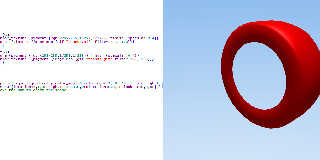
Bug hacked?
old sprites concept? I'm under no illusions, I'll do more tests, but in this way
I don't see the bug anymore
Post a reply to this message
Attachments:
Download 'clipboard01.jpg' (122 KB)
Preview of image 'clipboard01.jpg'
|
|
| |
| |
|
|
|
|
| |
| |
|
|
Le 2023-11-24 à 16:19, GioSeregni a écrit :
> well, I have a little question because I have often read about "artifact" on
> sooth_triangle but I don't understand. It is very difficult for me to translate
> technical language and figurative sayings. Now I have started translating the
> include files of my PovRay library that I interface with CAD, triangle to
> smooth_triangle.
> This wheel has black corners (two), on the right. Are these common artifacts, or
> can I fix them?
> Thanx in advanced!
> G.
>
That can happen when you can see the triangle but it's normal is
pointing away from the camera.

Try rotating the tire along it's axis.
Post a reply to this message
|
|
| |
| |
|
|
|
|
| |
| |
|
|
"GioSeregni" <gms### [at] hotmailcom> wrote:
> "GioSeregni" <gms### [at] hotmailcom> wrote:
> > "Kenneth" <kdw### [at] gmailcom> wrote:
> > > "GioSeregni" <gms### [at] hotmailcom> wrote:
> > > > "Bald Eagle" <cre### [at] netscapenet> wrote:
> > > > >
> > > > > And if you DO see red there, then try moving the camera around, and viewing
it
> > > > > from different angles - because it may just disappear and pop up in
different
> > > > > areas.
> > > >
> > > > It seems that they always arise on the
> > > > perimeter of the volumes (in positions tangential to the cone of vision)...
> > >
> > > Yes, that is where those artifacts sometimes appear on a smooth-triangle object.
> > > I think it also depends on the lighting angle, and maybe even the size of the
> > > triangles.
> > >
> > > What you are seeing is a known effect of raytracing the smooth normals when they
> > > are viewed at that raking angle. (I thought that there was a short technical
> > > explanation of this in the documentation, but I cannot find it.) The camera is
> > > picking up the unlighted (black) interior of the object.
> > >
> > > If I make a low-rez height_field and add the 'smooth' keyword, the same thing
> > > happens. The interior_texture trick is one way to try and make these artifacts
> > > less noticable. Or try adding the 'double_illuminate' keyword to the object. If
> > > I recall, this was a recommended 'fix' for the problem. It seems to work most of
> > > the time, but not in every situation.
> >
> > Ok, thank! I am working on .. it does not seems by light position, but by the
> > angle between WP and smooth_triangle (s) ...
> > Many thanks again!
> > G.
> Bug hacked?
> old sprites concept? I'm under no illusions, I'll do more tests, but in this way
> I don't see the bug anymore


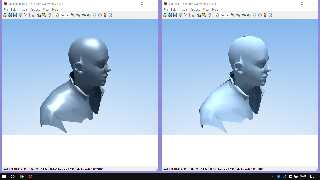
WOW!
right no trick
left the concept ... SHAPE-in-out XOR SWAPSHAPE-out-in
Post a reply to this message
Attachments:
Download 'clipboard01.png' (198 KB)
Preview of image 'clipboard01.png'
|
|
| |
| |
|
|
|
|
| |
|
|