|
|
|
|
|
|
| |
| |
|
|
|
|
| |
| |
|
|
I am trying to understand the mesh camera and picking apart the demo
scenes but I'm just not getting something.

I thought the mesh involved had to have on triangle per pixel, and
that's easy enough. The normal vector of the triangle determines the
direction of the ray for that pixel. Does the position of the mesh also
determine the location of the ray?

A second question: is the first triangle in the mesh the upper left
corner of the image or bottom left corner?

A third question: does the ray start at the first vector in each triangle?

I set up a simple scene with a vertical cylinder, but through the mesh
camera it shows up horizontally. So I'm wondering if the second triangle
in the mesh has to follow the column or the row.

Any help from those of you who are way smarter than me?

Thanks

Uncle Josh
Post a reply to this message
|
|
| |
| |
|
|
|
|
| |
| |
|
|
On 30/04/2023 12:30, Josh English wrote:
> I am trying to understand the mesh camera and picking apart the demo scenes but I'm
just not getting something.

It's a long time since I wrote the mesh camera code, so please excuse me if my memory
is rusty, but I'll try to answer.

The following applies to distribution methods 0, 1 and 2:

> The normal vector of the triangle determines the direction of the ray for that
pixel.

Yes, with the consideration that if the camera Z direction is less than 0, the normal
is reversed.

> Does the position of the mesh also determine the location of the ray?

Yes, with the caveat that the Z location of the camera is then used to offset the
ray's origin along its direction.

> A second question: is the first triangle in the mesh the upper left corner of the
image or bottom left corner?

Upper left. The face index is mapped as y * width + x, where y, width and x are all
first mapped to unsigned int.

> A third question: does the ray start at the first vector in each triangle?

No, it's shot from the triangle's centroid.

About mesh selection:

Distribution 0 is single or multiple rays per pixel, with each additional ray going to
the next mesh in the sequence in which they were declared.

Distribution 1 is 1:1 distribution across summed meshes, potentially with multiple
rays per pixel. The faces of all the supplied meshes are logically summed together as
if they were one single mesh. If shooting multiple rays per pixel, the face index is
determined as (width * height * ray_number) + pixel_number.

Distribution 2 is multiple logical cameras, placed side-by-size horizontally, with
mesh #0 being the left-most camera, and mesh #n is the right-most. Rays per pixel is
ignored.

I won't cover distribution 3 here as it's quite different from the above.

I also suggest that, if you haven't already done so, you take a look at Jaime's mesh
camera page at http://www.ignorancia.org/index.php/technical/mesh-camera/. He's also
posted some other examples here in the groups, e.g.
http://news.povray.org/povray.binaries.images/thread/%3C500fb7e5%40news.povray.org%3E/

-- Chris
Post a reply to this message
|
|
| |
| |
|
|
|
|
| |
| |
|
|
On 4/30/2023 5:08 AM, Chris Cason wrote:
> On 30/04/2023 12:30, Josh English wrote:
>> I am trying to understand the mesh camera and picking apart the demo
>> scenes but I'm just not getting something.

>
> I also suggest that, if you haven't already done so, you take a look at
> Jaime's mesh camera page at
> http://www.ignorancia.org/index.php/technical/mesh-camera/. He's also
> posted some other examples here in the groups, e.g.
>
http://news.povray.org/povray.binaries.images/thread/%3C500fb7e5%40news.povray.org%3E/
>
> -- Chris

Thank you.

I was going through Jaime's demo files and just not understanding the
logic. I still don't but I think my problem may be in my mesh
generation. I am looping through each row, then each column, and
creating a triangle, but I was not creating an equilateral triangle and
I thought that was the problem. I updated my code to match Jaime's but
the problem remains.

My loops:

// frame for the mesh
#declare UL = <(-image_width/image_height)/2, 2, -4>;
#declare LR = <(image_width/image_height)/2, 1, -4>;

#declare u_vect = <LR.x, UL.y, LR.z> - UL;
#declare v_vect = <UL.x, LR.y, LR.z> - UL;

#declare tr_base_1=<        0,2/3,0>*0.1;
#declare tr_base_2=< 1/2, -1/3,0>*0.1;
#declare tr_base_3=<-1/2, -1/3,0>*0.1;
#declare camera_mesh =
mesh {
   #for(V,0,image_height,1)
     #for(U,0,image_width,1)
       #declare here = (UL+u_vect*(U/image_width)+v_vect*(V/image_height));
       triangle {
         here + tr_base_1, here + tr_base_2, here + tr_base_3
       }
     #end // for U
   #end // for V
} // mesh

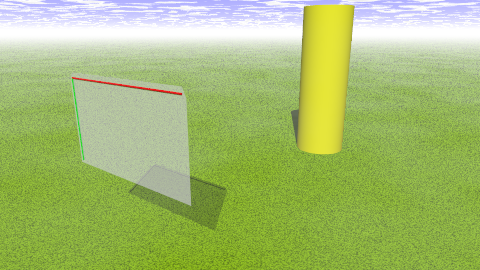
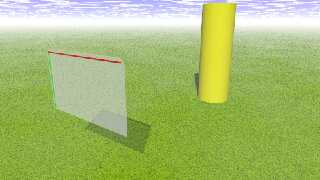
The first attachment shows the basic scene, where I've built the mesh
and what it's looking at. The second attachment shows the results of
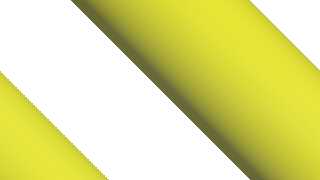
using the mesh with distribution 0. The cylinder is diagonal and repeated.

The mesh camera code itself is
camera {
   mesh_camera { 1 0
     mesh { camera_mesh }
   }
   location <0,0,-.1>
   direction z
   }

I have no idea what's going on with this code.

Josh
Post a reply to this message
Attachments:
Download 'mech_cam_blocking.png' (196 KB)
Download 'mesh_cam_wtf.png' (18 KB)
Preview of image 'mech_cam_blocking.png'
Preview of image 'mesh_cam_wtf.png'
|
|
| |
| |
|
|
|
|
| |
| |
|
|
hi,
Josh English <Jos### [at] joshuarenglish com> wrote:
> ...
> I have no idea what's going on with this code.
while I would not be able to tell, at any rate, a ready-to-run copy'n'paste code
to "try things" would have been nice/helpful.
regards, jr. com> wrote:
> ...
> I have no idea what's going on with this code.
while I would not be able to tell, at any rate, a ready-to-run copy'n'paste code
to "try things" would have been nice/helpful.
regards, jr.
Post a reply to this message
|
|
| |
| |
|
|
|
|
| |
| |
|
|
On 5/1/2023 5:43 AM, jr wrote:
> hi,
>
> Josh English <Jos### [at] joshuarenglishcom> wrote:
>> ...
>> I have no idea what's going on with this code.
>
> while I would not be able to tell, at any rate, a ready-to-run copy'n'paste code
> to "try things" would have been nice/helpful.
>
>
> regards, jr.
>

True. Unfortunately my code is so hodge-podge I am always reluctant to
post it because a) I suck at documentation, and b) you guys shouldn't
have to perform archeology for me.

I gave up and stole one of Jaime's macros then hacked it to do what I
wanted.

I've attached the code that's misbehaving.
Post a reply to this message
Attachments:
Download 'mesh_explorer.png' (30 KB)
Preview of image 'mesh_explorer.png'
|
|
| |
| |
|
|
|
|
| |
| |
|
|
On 5/1/2023 12:32 PM, Josh English wrote:
> On 5/1/2023 5:43 AM, jr wrote:
>> hi,
>>
>> Josh English <Jos### [at] joshuarenglishcom> wrote:
>>> ...
>>> I have no idea what's going on with this code.
>>
>> while I would not be able to tell, at any rate, a ready-to-run
>> copy'n'paste code
>> to "try things" would have been nice/helpful.
>>
>>
>> regards, jr.
>>
>
> True. Unfortunately my code is so hodge-podge I am always reluctant to
> post it because a) I suck at documentation, and b) you guys shouldn't
> have to perform archeology for me.
>
> I gave up and stole one of Jaime's macros then hacked it to do what I
> wanted.
>
> I've attached the code that's misbehaving.
  Oh ffs.
Post a reply to this message
Attachments:
Download 'mesh_explorer.pov.txt' (5 KB)
|
|
| |
| |
|
|
|
|
| |
| |
|
|
hi,

Josh English <Jos### [at] joshuarenglishcom> wrote:
> ...
> >> code to "try things" would have been nice/helpful.
> > True. Unfortunately my code is so hodge-podge I am always reluctant ...

know that feeling :-)  also think though that when one runs into a problem,
writing some code just to replicate the problem in the simplest scene possible,
can often provide (new) insight.


> > I've attached the code that's misbehaving.
>   Oh ffs.

</grin>

thanks.  will follow this thread with interest, as mesh cam is a big puzzle to
me.

regards, jr.
Post a reply to this message
|
|
| |
| |
|
|
|
|
| |
| |
|
|
On 5/2/2023 4:24 AM, jr wrote:
> hi,
>
> Josh English <Jos### [at] joshuarenglishcom> wrote:
>> ...
>>>> code to "try things" would have been nice/helpful.
>>> True. Unfortunately my code is so hodge-podge I am always reluctant ...
>
> know that feeling :-)  also think though that when one runs into a problem,
> writing some code just to replicate the problem in the simplest scene possible,
> can often provide (new) insight.
>
>
>>> I've attached the code that's misbehaving.
>>    Oh ffs.
>
> </grin>
>
> thanks.  will follow this thread with interest, as mesh cam is a big puzzle to
> me.
>
> regards, jr.
>

I found the mistake that is causing the skewed image. I forgot the end
condition on a FOR loop will can the end value of the loop, so I was
calculating one extra pixel per row, which the mesh camera dutifully
pushed to the next row, so my original code was generating more
triangles than needed.

Live and learn.

Well ... live.

Josh
Post a reply to this message
|
|
| |
| |
|
|
|
|
| |
| |
|
|
Josh English <Jos### [at] joshuarenglishcom> wrote:

> I found the mistake that is causing the skewed image. I forgot the end
> condition on a FOR loop will can the end value of the loop, so I was
> calculating one extra pixel per row, which the mesh camera dutifully
> pushed to the next row, so my original code was generating more
> triangles than needed.

Ah - that explains it.

Of course, now that you've discovered that, you could actually (ab)use that to
do things like a TV-interference effect.  Also wondering what happens if you
double the columns and halve the rows.  Triple, quadruple...


Perhaps at some point when you get everything mostly worked out to your liking,
you can post a working scene file.  It would be nice to make some explanatory
diagrams to complement the extant documentation, and maybe make a version that
makes use of a Bezier patch as the camera control surface.  :)

Nice job hunting down the cause.

- BW
Post a reply to this message
|
|
| |
| |
|
|
|
|
| |
| |
|
|
On 5/5/2023 3:24 AM, Bald Eagle wrote:
> It would be nice to make some explanatory
> diagrams to complement the extant documentation, and maybe make a version that
> makes use of a Bezier patch as the camera control surface.

I'm thinking about how to explain some of my discoveries to expand on
Jaime's work.

But bezier patches? That's a cruel challenge. I don't know how to
convert a patch to a mesh in the first place. That's why I used them: to
let POV-Ray do the hard work.

Josh
Post a reply to this message
|
|
| |
| |
|
|
|
|
| |
| |
|
|
Josh English <Jos### [at] joshuarenglishcom> wrote:
> But bezier patches? That's a cruel challenge.

Not even remotely.

> I don't know how to
> convert a patch to a mesh in the first place. That's why I used them: to
> let POV-Ray do the hard work.

Mr. English, my dear Sir, TOK and I have done all of the hard work, and you may
generate a mesh of triangles from any Bezier patch that you wish.

You're not even subject to the u and v step limits for rendering the patch,
since you'll be custom generating the mesh in SDL.

Here ya go:
Post a reply to this message
Attachments:
Download 'beziertrianglemesh.pov.txt' (11 KB)
|
|
| |
| |
|
|
|
|
| |
| |
|
|
hi,

Josh English <Jos### [at] joshuarenglishcom> wrote:
> ...
> I found the mistake that is causing the skewed image. ...

thank you (very much).  this has set me on yet-another-unexpected-detour :-)


> Live and learn.
> Well ... live.

+1


regards, jr.
Post a reply to this message
|
|
| |
| |
|
|
|
|
| |
| |
|
|
"jr" <cre### [at] gmailcom> wrote:
> ...
> this has set me on yet-another-unexpected-detour :-)

first WIP, with the 'z' components of the triangle corners "jiggled", a little.


regards, jr.
Post a reply to this message
Attachments:
Download 'mc_wip.png' (296 KB)
Preview of image 'mc_wip.png'

|
|
| |
| |
|
|
|
|
| |
| |
|
|
"jr" <cre### [at] gmailcom> wrote:
> "jr" <cre### [at] gmailcom> wrote:
> > ...
> > this has set me on yet-another-unexpected-detour :-)
>
> first WIP, with the 'z' components of the triangle corners "jiggled", a little.
>
>
> regards, jr.

That's pretty cool.

I like the "blurred" effect that it gives.  I wonder if there's any way to fill
in some the graininess in the first pass, or maybe a custom convolution kernel
could be used for a second pass to "correct" the rgb 0 pixels that --- I guess
missed hitting anything in the scene.

What if you jiggle not every pixel randomly, but every row as a whole?

I can imagine that one could apply sine waves and other curves to the mesh and
get a sort of fun-house mirror effect ... maybe.

As I understand it, you can layer / sum mesh cameras?  Some interesting
experiments to be done there, I'm sure.

- BE
Post a reply to this message
|
|
| |
| |
|
|
|
|
| |
| |
|
|
On 5/7/2023 8:28 AM, Bald Eagle wrote:

>
> As I understand it, you can layer / sum mesh cameras?  Some interesting
> experiments to be done there, I'm sure.
>
> - BE
>

Exactly. I just posted an image of my desert towers with a cheesy effect
that took 4 hours to render, which is for me a long time.

The mesh_camera can fire many rays for each pixel, one ray per defined
mesh, and add them together.

And since you probably have a defined mesh, you can include it in the
scene file itself with a texture and it will effect every pixel. It's
kind of like screen.inc magic but with any projection type, even the
whacked out things mesh_cameras can do.

I'm still trying to solve a few problems and then I have to figure out
how to post my tutorial on what I've learned.

Josh
Post a reply to this message
|
|
| |
| |
|
|
|
|
| |
| |
|
|
hi,

"Bald Eagle" <cre### [at] netscapenet> wrote:
> ...
> What if you jiggle not every pixel randomly, but every row as a whole?
> I can imagine that one could apply sine waves and other curves to the mesh and
> get a sort of fun-house mirror effect ... maybe.

yes.  as written, that is starting with stuff copied + modified from the
distribution mesh_cam scene/inc, there isn't really a good way of picking a
subset (of triangles) to treat separately.  (will put together an email, later
or tomorrow)


> As I understand it, you can layer / sum mesh cameras?  Some interesting
> experiments to be done there, I'm sure.

yes, and agree, interesting stuff ahead.


regards, jr.
Post a reply to this message
|
|
| |
| |
|
|
|
|
| |
| |
|
|
On 5/8/2023 5:53 AM, jr wrote:
> hi,
>
> "Bald Eagle" <cre### [at] netscapenet> wrote:
>> ...

> yes.  as written, that is starting with stuff copied + modified from the
> distribution mesh_cam scene/inc, there isn't really a good way of picking a
> subset (of triangles) to treat separately.  (will put together an email, later
> or tomorrow)
>
>

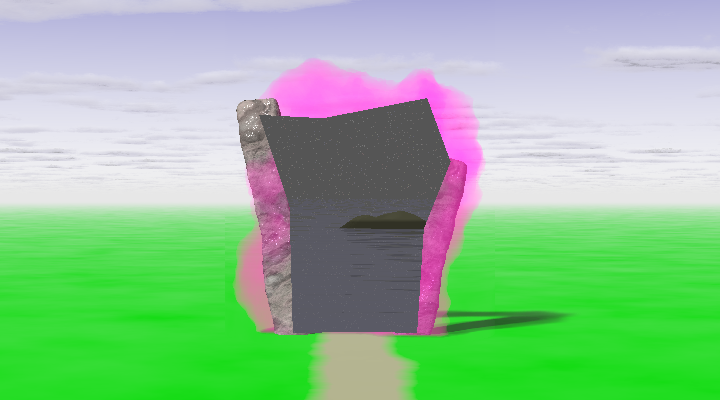
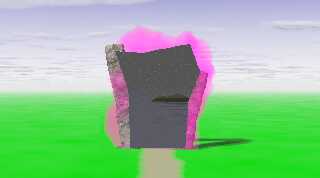
Actually, I've been playing with that, too, but the image is not so
great because I'm a crappy modeller. This technique is based of Jaime's
macros. I've been directly calculation the location of each spline out
of stubbornness. Jaime relies on the trace function, which means you can
filter the triangles with an object. I think his method using trace is
superior to mine. I had to reinvent some wheels to get to a point of
understanding, though.

In the attached image the sky and clouds and "grass" are all fairly
normal (the "grass" is a plane at y=0), but the attempt at a starry
water scene is actually sitting at y=-20.

Cheers.
Post a reply to this message
Attachments:
Download 'portal_test.png' (153 KB)
Preview of image 'portal_test.png'
|
|
| |
| |
|
|
|
|
| |
|
|