|
|
|
|
|
|
| |
| |
|
|
|
|
| |
| |
|
|
I have a fairly new laptop that I'm setting up and sorting out, and at some
point I became aware that there is really precious little clear, methodical,
detailed information on how to install povray on a linux system, that is right
here on the POV-Ray website.

So, in an effort to work out a fairly robust process for folks new to linux, and
unfamiliar with all of "the usual" ways of doing things that are just left as
"we assumed that you already know how to do all of this..." (no) I'm going to
use this thread to document installation of official POV-Ray, perhaps by several
methods, version 3.8 alpha, and hopefully povr and hgpovray38 as well.
Post a reply to this message
|
|
| |
| |
|
|
|
|
| |
| |
|
|
Sytem information:
bald@Alienware ~/Desktop $ inxi -Fx
System: Host: Alienware Kernel: 4.10.0-38-generic x86_64 (64 bit gcc: 5.4.0)
Desktop: Cinnamon 3.6.7 (Gtk 3.18.9) Distro: Linux Mint 18.3 Sylvia
Machine: System: Alienware product: Alienware 17 R3 v: 1.2.3
Mobo: Alienware model: Alienware 17 R3 v: A00 Bios: Alienware v:
1.2.3 date: 11/11/2015
CPU: Quad core Intel Core i7-6700HQ (-HT-MCP-) cache: 6144 KB
flags: (lm nx sse sse2 sse3 sse4_1 sse4_2 ssse3 vmx) bmips: 20736
clock speeds: max: 3500 MHz 1: 3284 MHz 2: 3269 MHz 3: 3400 MHz 4:
3266 MHz 5: 3279 MHz 6: 3409 MHz
7: 3297 MHz 8: 3366 MHz
Graphics: Card-1: Intel HD Graphics 530 bus-ID: 00:02.0
Card-2: NVIDIA GM204M [GeForce GTX 970M] bus-ID: 01:00.0
Display Server: X.Org 1.18.4 driver: nvidia Resolution:
192### [at] 60 02hz
GLX Renderer: GeForce GTX 970M/PCIe/SSE2 GLX Version: 4.5.0 NVIDIA
384.130 Direct Rendering: Yes
Audio: Card Intel 100 Series/C230 Series Family HD Audio Controller driver:
snd_hda_intel bus-ID: 00:1f.3
Sound: Advanced Linux Sound Architecture v: k4.10.0-38-generic
Network: Card-1: Qualcomm Atheros Killer E2400 Gigabit Ethernet Controller
driver: alx port: d000 bus-ID: 3b:00.0
IF: enp59s0 state: up speed: 1000 Mbps duplex: full mac:
f8:ca:b8:5e:15:b1
Card-2: Qualcomm Atheros QCA6174 802.11ac Wireless Network Adapter
driver: ath10k_pci bus-ID: 3c:00.0
IF: wlp60s0 state: down mac: 9c:b6:d0:09:fd:b5
Card-3: Atheros usb-ID: 001-003
IF: null-if-id state: N/A speed: N/A duplex: N/A mac: N/A
Drives: HDD Total Size: 1000.2GB (1.7% used) ID-1: /dev/sda model:
HGST_HTS721010A9 size: 1000.2GB
Partition: ID-1: / size: 503G used: 8.4G (2%) fs: ext4 dev: /dev/sda6
ID-2: swap-1 size: 8.49GB used: 0.00GB (0%) fs: swap dev: /dev/sda7
RAID: No RAID devices: /proc/mdstat, md_mod kernel module present
Sensors: System Temperatures: cpu: 33.0C mobo: N/A gpu: 0.0:34C
Fan Speeds (in rpm): cpu: N/A
Info: Processes: 250 Uptime: 1 min Memory: 728.0/7881.1MB Init: systemd
runlevel: 5 Gcc sys: 5.4.0
Client: Shell (bash 4.3.481) inxi: 2.2.35 02hz
GLX Renderer: GeForce GTX 970M/PCIe/SSE2 GLX Version: 4.5.0 NVIDIA
384.130 Direct Rendering: Yes
Audio: Card Intel 100 Series/C230 Series Family HD Audio Controller driver:
snd_hda_intel bus-ID: 00:1f.3
Sound: Advanced Linux Sound Architecture v: k4.10.0-38-generic
Network: Card-1: Qualcomm Atheros Killer E2400 Gigabit Ethernet Controller
driver: alx port: d000 bus-ID: 3b:00.0
IF: enp59s0 state: up speed: 1000 Mbps duplex: full mac:
f8:ca:b8:5e:15:b1
Card-2: Qualcomm Atheros QCA6174 802.11ac Wireless Network Adapter
driver: ath10k_pci bus-ID: 3c:00.0
IF: wlp60s0 state: down mac: 9c:b6:d0:09:fd:b5
Card-3: Atheros usb-ID: 001-003
IF: null-if-id state: N/A speed: N/A duplex: N/A mac: N/A
Drives: HDD Total Size: 1000.2GB (1.7% used) ID-1: /dev/sda model:
HGST_HTS721010A9 size: 1000.2GB
Partition: ID-1: / size: 503G used: 8.4G (2%) fs: ext4 dev: /dev/sda6
ID-2: swap-1 size: 8.49GB used: 0.00GB (0%) fs: swap dev: /dev/sda7
RAID: No RAID devices: /proc/mdstat, md_mod kernel module present
Sensors: System Temperatures: cpu: 33.0C mobo: N/A gpu: 0.0:34C
Fan Speeds (in rpm): cpu: N/A
Info: Processes: 250 Uptime: 1 min Memory: 728.0/7881.1MB Init: systemd
runlevel: 5 Gcc sys: 5.4.0
Client: Shell (bash 4.3.481) inxi: 2.2.35
Post a reply to this message
|
|
| |
| |
|
|
|
|
| |
| |
|
|
On 2021-05-10 8:58 PM (-4), Bald Eagle wrote:
> I have a fairly new laptop that I'm setting up and sorting out, and at some
> point I became aware that there is really precious little clear, methodical,
> detailed information on how to install povray on a linux system, that is right
> here on the POV-Ray website.
>
> So, in an effort to work out a fairly robust process for folks new to linux, and
> unfamiliar with all of "the usual" ways of doing things that are just left as
> "we assumed that you already know how to do all of this..." (no) I'm going to
> use this thread to document installation of official POV-Ray, perhaps by several
> methods, version 3.8 alpha, and hopefully povr and hgpovray38 as well.

This sounds like an excellent thread for povray.unix.  Indeed, it seems
you already started one there last June.  Unless you're inviting Windows
and Mac users to contribute their own tips?
Post a reply to this message
|
|
| |
| |
|
|
|
|
| |
| |
|
|
Cousin Ricky <ric### [at] yahoocom> wrote:

> This sounds like an excellent thread for povray.unix.

It does.

> Indeed, it seems you already started one there last June.

I sorta remember that.  ;)

> Unless you're inviting Windows and Mac users to contribute their own tips?

Yes.  I think the primary motivation is addressing the paucity of information
that is available on the official webpage with regard to installation,
especially for 3.8 alpha.

I think a lot of people would like to use it, and would benefit from the
additions and changes made since 3.7 stable.

For the unix-specific packages, I think that a lot of people - out in the world
- might want to install povray but don't know how, and getting 3.8 properly
working might be daunting enough to overall prevent them from doing so.

Which would be shame, as we should be promoting the creation of new users
aggressively.

And it would be so nice to just have a fairly straightforward and easy-to-follow
plan for getting official povray, hgpovray38, and povr all installed so I could
use whichever one I wanted.  Without breaking something.
Post a reply to this message
|
|
| |
| |
|
|
|
|
| |
| |
|
|
"Bald Eagle" <cre### [at] netscapenet> wrote:
> I have a fairly new laptop that I'm setting up and sorting out, and at some
> point I became aware that there is really precious little clear, methodical,
> detailed information on how to install povray on a linux system, that is right
> here on the POV-Ray website.
>
> So, in an effort to work out a fairly robust process for folks new to linux, and
> unfamiliar with all of "the usual" ways of doing things that are just left as
> "we assumed that you already know how to do all of this..." (no) I'm going to
> use this thread to document installation of official POV-Ray, perhaps by several
> methods, version 3.8 alpha, and hopefully povr and hgpovray38 as well.

Hi Bill

I don't know how far you have got with this. And it has been a long time since I
compiled POV-Ray.

Right now I wanted to see if I could remember anything related to that. Here's
what I did on my x86_64 PC running Ubuntu 20.04.2 LTS in order to compile
v3.7.0.8:

  sudo apt install libboost-dev libpng-dev libjpeg-dev libtiff-dev
  cd ~
  git clone https://github.com/POV-Ray/povray
  cd povray
  git checkout release/v3.7.0
  cd unix
  less README
  less install.txt
  ./prebuild.sh
  cd ..
  ./configure COMPILED_BY="My Name <email@address>"
  make check
  sudo make install

(I did not actually execute the last line.) configure mentioned that it can not
find an sdl library, so there is no preview window while POV-Ray is rendering.

Perhaps it helps to do this before starting the process above:

  sudo apt install libsdl1.2-dev

Also note that I have been using this PC for some months now, so there may be
some necessary utilities or libraries that has been installed along with other
programs that I have installed before now.

It might be that the process of compiling v3.8 is quite similar to this.

I see now that you mention installation of official POV-Ray. The process above
will, of coarse, always make and install an unofficial version.

Are you aware of any official prebuilt binary for x86_64 Linux PCs ?

--
Tor Olav
http://subcube.com
https://github.com/t-o-k
Post a reply to this message
|
|
| |
| |
|
|
|
|
| |
| |
|
|
in news:web.609b0f032344a9a11f9dae3025979125@news.povray.org Bald Eagle
wrote:

>> Unless you're inviting Windows and Mac users to contribute their own
>> tips?
>
> Yes.

No tips here. I'd realy welcome windows compilation instructions for using
VS17 Developer command prompt.

Ingo
Post a reply to this message
|
|
| |
| |
|
|
|
|
| |
| |
|
|
Op 12/05/2021 om 01:10 schreef Bald Eagle:
> Yes.  I think the primary motivation is addressing the paucity of information
> that is available on the official webpage with regard to installation,
> especially for 3.8 alpha.
>
This installation info was given by Clipka in
https://github.com/POV-Ray/povray/releases/tag/v3.8.0-alpha.10064268

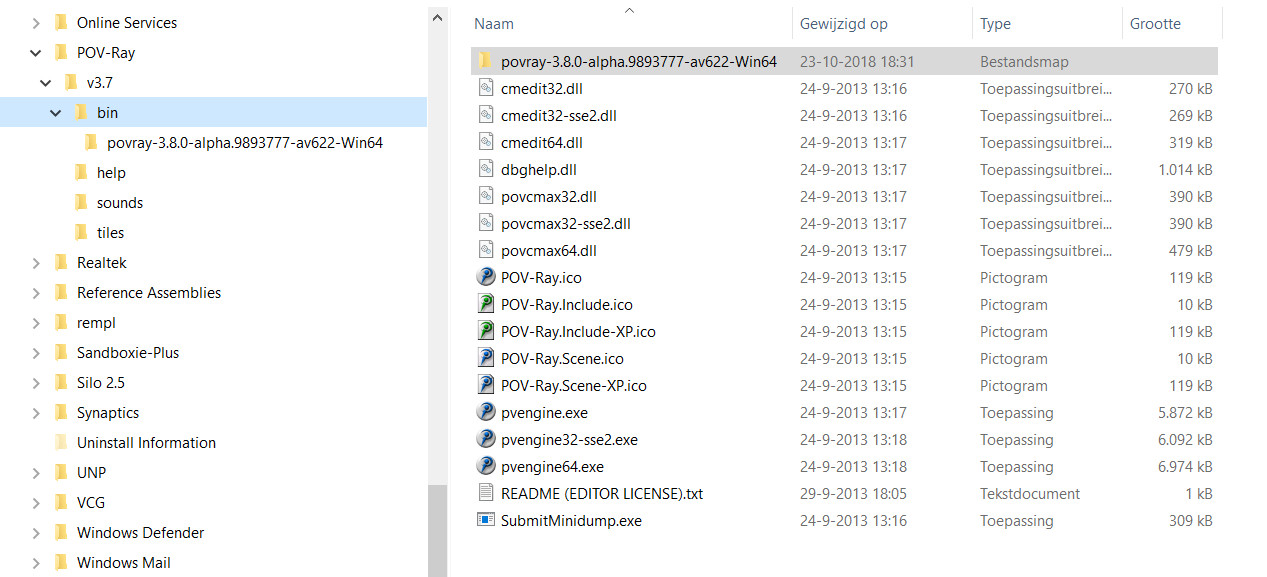
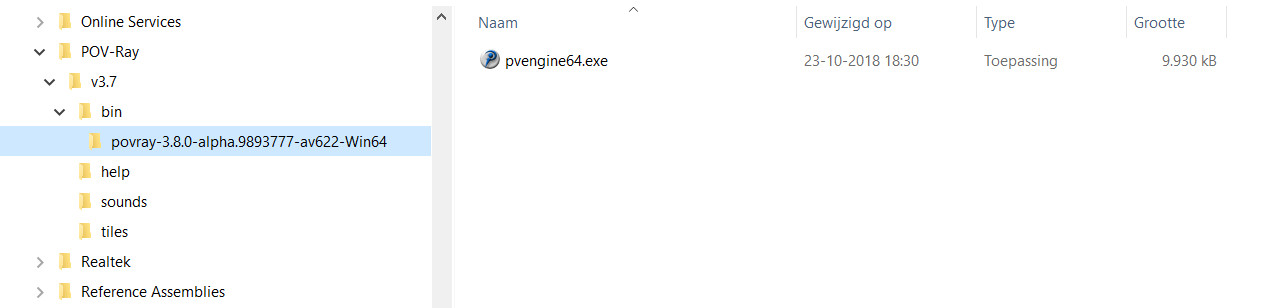
However, in Windows, I use a more 'intuitive' way which gives access
both to 3.7 and 3.8 easily (in separate renders of course ;-) ). That is
by putting the complete folder 'povray-3.8.0-alpha.10064268-av691-Win64'
into the 'bin' folder of POV-Ray. That way, you can access both
'pvengine64.exe' versions side by side if you want to do so.
Additionally, there is no conflict between the two that I know of. I
never came up against one as long as I have been using this setup. In
the past I had thus different folders in 'bin' corresponding to
different development stages of POV-Ray, including MegaPOV and/or UberPOV.

But maybe this is common knowledge? I don't know.

> I think a lot of people would like to use it, and would benefit from the
> additions and changes made since 3.7 stable.
>
Absolutely.

> For the unix-specific packages, I think that a lot of people - out in the world
> - might want to install povray but don't know how, and getting 3.8 properly
> working might be daunting enough to overall prevent them from doing so.
>
> Which would be shame, as we should be promoting the creation of new users
> aggressively.
>
> And it would be so nice to just have a fairly straightforward and easy-to-follow
> plan for getting official povray, hgpovray38, and povr all installed so I could
> use whichever one I wanted.  Without breaking something.
>
...and, when possible, for Windows too of course. ;-)

Excellent initiative!

--
Thomas
Post a reply to this message
|
|
| |
| |
|
|
|
|
| |
| |
|
|
"Tor Olav Kristensen" <tor### [at] TOBEREMOVEDgmailcom> wrote:

Thanks for those instructions.  It's always good to get a few people to recount
their installation commands from scratch to see if there are some small
important details.

Those dependencies are a good case in point.

> It might be that the process of compiling v3.8 is quite similar to this.

Probably.  I gave it a whirl with qtpovray, way back when, and what is in my
history is this:

sudo apt install git qt5-qmake qt5-default libboost-dev libboost-date-time-dev
libboost-thread-dev libz-dev libpng-dev libjpeg-dev libtiff-dev libopenexr-dev
git clone https://github.com/dickbalaska/qtpovray.git && git checkout qtpovray
&& qmake && make -j4

But then I think Dick Balaska whacked me upside the head and said "Listen, it's
as simple as:

sudo add-apt-repository ppa:qtpovray/qtpovray
sudo apt update
sudo apt upgrade
qtpovray
"


> I see now that you mention installation of official POV-Ray. The process above
> will, of coarse, always make and install an unofficial version.
>
> Are you aware of any official prebuilt binary for x86_64 Linux PCs ?

At the outset of _this_ installation thread, I went looking around, and found
that

sudo apt-get install povray

actually worked  :O  Which is lovely, because it can hardly get any easier than
that, excepting buying it pre-installed on the laptop.

So, I'm guessing that's an already compiled binary?

Thanks again for your review and commentary - always appreciated.
Post a reply to this message
|
|
| |
| |
|
|
|
|
| |
| |
|
|
"Bald Eagle" <cre### [at] netscapenet> wrote:
> "Tor Olav Kristensen" <tor### [at] TOBEREMOVEDgmailcom> wrote:
>
> Thanks for those instructions.  It's always good to get a few people to recount
> their installation commands from scratch to see if there are some small
> important details.
>
> Those dependencies are a good case in point.
>
> > It might be that the process of compiling v3.8 is quite similar to this.

Right after my last post I did this.

  git checkout release/v3.8.0
  cd unix
  ./prebuild.sh
  cd ..
  ./configure COMPILED_BY="My Name <email@address>"
  make check

The result was a working POV-Ray version 3.8.0-alpha.unofficial


> Probably.  I gave it a whirl with qtpovray, way back when, and what is in my
> history is this:
>
> sudo apt install git qt5-qmake qt5-default libboost-dev libboost-date-time-dev
> libboost-thread-dev libz-dev libpng-dev libjpeg-dev libtiff-dev libopenexr-dev
> git clone https://github.com/dickbalaska/qtpovray.git && git checkout qtpovray
> && qmake && make -j4
>
> But then I think Dick Balaska whacked me upside the head and said "Listen, it's
> as simple as:
>
> sudo add-apt-repository ppa:qtpovray/qtpovray
> sudo apt update
> sudo apt upgrade
> qtpovray
> "

Nice. That's useful.


> > I see now that you mention installation of official POV-Ray. The process above
> > will, of coarse, always make and install an unofficial version.
> >
> > Are you aware of any official prebuilt binary for x86_64 Linux PCs ?
>
> At the outset of _this_ installation thread, I went looking around, and found
> that
>
> sudo apt-get install povray

Yes, of course. I forgot about that. That's how I installed v3.7 on this Ubuntu
PC earlier. And since Ubuntu's repository version was already installed, I did
not want to mess up things by running the sudo make install command.


> actually worked  :O  Which is lovely, because it can hardly get any easier than
> that, excepting buying it pre-installed on the laptop.
>
> So, I'm guessing that's an already compiled binary?

Yes, it is. But it is probably not an official one.


> Thanks again for your review and commentary - always appreciated.

I'm glad that I can help.

--
Tor Olav
http://subcube.com
https://github.com/t-o-k
Post a reply to this message
|
|
| |
| |
|
|
|
|
| |
| |
|
|
Thomas de Groot <tho### [at] degrootorg> wrote:

> This installation info was given by Clipka in
> https://github.com/POV-Ray/povray/releases/tag/v3.8.0-alpha.10064268

Yes, I recall that, as well as the discussion about renaming the .chm help file.

> However, in Windows, I use a more 'intuitive' way

Here, I think is where a screenshot or other graphic output of the directory
tree structure would be really nice for the documentation.


> But maybe this is common knowledge? I don't know.

I've learned to make as close to zero assumptions about "common knowledge" as
possible, especially when doing instructional or documentation work.

What was common knowledge in the 14th century as opposed to now?
The use of slide rules was "common knowledge" for 200+ years - and then *POOF*
we collectively forgot.
I've worked with PhD's in industry who didn't know that the GUI [B] button in MS
Word not only bolded text, but _un_bolded text.  <facepalm>
"If I just take this 5-liter flask full of tetrahydrofuran and sodium-potassium
alloy, and put it under the faucet, that'll get rid of the sodium, right?"  Yep.
 Along with the rest of the room that your standing in...

And, in the linux world, people do that thing where: it's your first day working
at the local drug store, and so you must therefore know everything about every
product in the store, which one is "best", how all of the registers and other
things work, and must have in-depth medical knowledge to diagnose the rash on
little johnny's private parts.  "Here, let me show you..."  No, please.

So, although I am running linux and can do a handful of things very poorly, with
much search-engine use and finger-crossing, I really just don't know what I'm
doing, and it can't be assumed that "Well, of COURSE you 'just' do this git
thing, use THOSE flags do undo the tarball and then naturally perform a
make-check to make sure that these things reside in "the usual places"...

So I'm gonna try to write as much of it down as I can this time in one place and
make a PDF of it, and maybe most of it can wind up on the download page - which
can be the download and install page.  ;)
Post a reply to this message
|
|
| |
| |
|
|
|
|
| |
| |
|
|
Op 12-5-2021 om 13:17 schreef Bald Eagle:
> Thomas de Groot <tho### [at] degrootorg> wrote:
>
>> This installation info was given by Clipka in
>> https://github.com/POV-Ray/povray/releases/tag/v3.8.0-alpha.10064268
>
> Yes, I recall that, as well as the discussion about renaming the .chm help file.
>
>> However, in Windows, I use a more 'intuitive' way
>
> Here, I think is where a screenshot or other graphic output of the directory
> tree structure would be really nice for the documentation.
>
>
>> But maybe this is common knowledge? I don't know.
>
> I've learned to make as close to zero assumptions about "common knowledge" as
> possible, especially when doing instructional or documentation work.
>
Absolutely right! I make amends ;-) Please find two screenshots of  the
tree structure. Let me know if you need anything else.

> What was common knowledge in the 14th century as opposed to now?
> The use of slide rules was "common knowledge" for 200+ years - and then *POOF*
> we collectively forgot.
> [snip] >
> So I'm gonna try to write as much of it down as I can this time in one place and
> make a PDF of it, and maybe most of it can wind up on the download page - which
> can be the download and install page.  ;)
>
Very true what you write. I was afraid of stating the 'obvious' that
"everybody knows /that/, stupid!" :-)

--
Thomas
Post a reply to this message
Attachments:
Download 'screenshot_01.jpg' (191 KB)
Download 'screenshot_02.jpg' (45 KB)
Preview of image 'screenshot_01.jpg'
Preview of image 'screenshot_02.jpg'
|
|
| |
| |
|
|
|
|
| |
| |
|
|
hi,

"Bald Eagle" <cre### [at] netscapenet> wrote:
> ...
> So, in an effort to work out a fairly robust process for folks new to linux, and
> unfamiliar with all of "the usual" ways of doing things that are just left as
> "we assumed that you already know how to do all of this..." (no) I'm going to
> use this thread to document installation of official POV-Ray, perhaps by several
> methods, version 3.8 alpha, and hopefully povr and hgpovray38 as well.

no one mentioned using/creating a (shell, etc) script to build yet, I think, so
that'd be my advice.


regards, jr.
Post a reply to this message
|
|
| |
| |
|
|
|
|
| |
| |
|
|
On 5/12/21 9:20 AM, jr wrote:
> hi,
>
> "Bald Eagle" <cre### [at] netscapenet> wrote:
>> ...
>> So, in an effort to work out a fairly robust process for folks new to linux, and
>> unfamiliar with all of "the usual" ways of doing things that are just left as
>> "we assumed that you already know how to do all of this..." (no) I'm going to
>> use this thread to document installation of official POV-Ray, perhaps by several
>> methods, version 3.8 alpha, and hopefully povr and hgpovray38 as well.
>
> no one mentioned using/creating a (shell, etc) script to build yet, I think, so
> that'd be my advice.
>

A good idea. On linux based systems a script could take a quick look at
whether the right packages dependencies were installed in a way more
friendly than the configure script. Suppose a concern is it would itself
be an abnormal way to do things for more experienced linux/unix users.
Well, thinking a bit, the prebuild.sh stuff is too with most POV-Ray
sources. ;-)

--- Something for the future, perhaps.
Aside: I've been thinking too on linux we should move away from setting
up default system install directories. Most linux users should install
from existing packages, not compile and install. Further, our 'default'
build system should not by default, try to overwrite such provided
packages on a 'make install.'

I've been toying with the default install directory for linux/unix being
/dev/null in fact. (/dev/null being a 'bit bucket / null disk')

With the 'core' approach and a 'povr' wrapper script you can run in
place after a compile or with an install. When a user installs, it
should normally be to a local user directory and not a system wide one.

Bill P.
Post a reply to this message
|
|
| |
| |
|
|
|
|
| |
| |
|
|
William F Pokorny <ano### [at] anonymousorg> wrote:

> Most linux users should install
> from existing packages, not compile and install.

Perhaps you or someone else could expand / clarify.

> Further, our 'default'
> build system should not by default, try to overwrite such provided
> packages on a 'make install.'

Yes, I would especially like an installation to be able to preserve things like
the insert menu and inc files, or at least make directories off to the side
specifically labeled for user-created stuff, so they don't get overwritten on
re-install / update of new version.

The clearer it is about how to do thing on 'nix, the easier it will be for
people wanting to transition away from certain other O$'s to do so.
Post a reply to this message
|
|
| |
| |
|
|
|
|
| |
| |
|
|
hi,

William F Pokorny <ano### [at] anonymousorg> wrote:
> On 5/12/21 9:20 AM, jr wrote:
> > "Bald Eagle" <cre### [at] netscapenet> wrote:
> >> ...
> >> So, in an effort to work out a fairly robust process for folks new to linux, and
> >> unfamiliar with all of "the usual" ways of doing things that are just left as
> >> "we assumed that you already know how to do all of this..." (no) I'm going to
> >> use this thread to document installation of official POV-Ray, perhaps by several
> >> methods, version 3.8 alpha, and hopefully povr and hgpovray38 as well.
> >
> > no one mentioned using/creating a (shell, etc) script to build yet, I think, so
> > that'd be my advice.
> >
>
> A good idea. On linux based systems a script could take a quick look at
> whether the right packages dependencies were installed in a way more
> friendly than the configure script. Suppose a concern is it would itself
> be an abnormal way to do things for more experienced linux/unix users.
> Well, thinking a bit, the prebuild.sh stuff is too with most POV-Ray
> sources. ;-)

:-)  I've been thinking that 'povr' ought to provide a dummy 'prebuild.sh'.
that would allow a single "template" to work for all (afaik, except qtpovray)
variants.


> --- Something for the future, perhaps.
> Aside: I've been thinking too on linux we should move away from setting
> up default system install directories. Most linux users should install
> from existing packages, not compile and install. Further, our 'default'
> build system should not by default, try to overwrite such provided
> packages on a 'make install.'

what is the point, except more .. outgrowths.

is this a Debian/Ubuntu thing?  you know, like people who say "PIN number"
instead of just "PIN".  example.  manual pages don't really have a purpose
unless shared by users.  so what is the gain, say, from moving '/usr/man/' to
'/usr/share/man/'?


> I've been toying with the default install directory for linux/unix being
> /dev/null in fact. (/dev/null being a 'bit bucket / null disk')

this leaves me .. scratching my head.


> With the 'core' approach and a 'povr' wrapper script you can run in
> place after a compile or with an install. When a user installs, it
> should normally be to a local user directory and not a system wide one.

right.  but which ever location the user chooses, by supporting DESTDIR it's not
your problem.


while on 'povr'.  I really thought the bottom right sphere of most recent post v
interesting, a real nice depth effect.  can you please supply a simple scene, or
at least a complete texture?  (thanks)


regards, jr.
Post a reply to this message
|
|
| |
| |
|
|
|
|
| |
| |
|
|
On 5/13/21 7:51 AM, jr wrote:
>> --- Something for the future, perhaps.
>> Aside: I've been thinking too on linux we should move away from setting
>> up default system install directories. Most linux users should install
>> from existing packages, not compile and install. Further, our 'default'
>> build system should not by default, try to overwrite such provided
>> packages on a 'make install.'
> what is the point, except more .. outgrowths.
>
> is this a Debian/Ubuntu thing?  you know, like people who say "PIN number"
> instead of just "PIN".  example.  manual pages don't really have a purpose
> unless shared by users.  so what is the gain, say, from moving '/usr/man/' to
> '/usr/share/man/'?
>
>
>> I've been toying with the default install directory for linux/unix being
>> /dev/null in fact. (/dev/null being a 'bit bucket / null disk')
> this leaves me .. scratching my head.
>

My current thinking/leanings come from often compiling versions which
are not in fact complete matches for the provided linux distribution
package POV-Ray directories or what gets installed if you compile the
most recent github versions and install in the common directories.

The fact a 'user' compiled version of POV-Ray is still looking at a
default install directories when those directories have include files
and such not a match for the compiled version can lead to very confusing
behavior. This is an exposure any time, on any OS when the compiled
executable is 'different' than that commonly 'installed.'

If I set the install directory, via --prefix=, during configuration to
/dev/null, I never pick up something I really didn't want for whatever
local version of POV-Ray I'm toying with(1). I can't - there is never
anything in a /dev/null null directory to accidentally pick up.

(1) - It's how I've been running lately after too many times getting
myself tangled up because I wasn't getting the dependency I expected to get.

>
>> With the 'core' approach and a 'povr' wrapper script you can run in
>> place after a compile or with an install. When a user installs, it
>> should normally be to a local user directory and not a system wide one.
> right.  but which ever location the user chooses, by supporting DESTDIR it's not
> your problem.
>
>
> while on 'povr'.  I really thought the bottom right sphere of most recent post v
> interesting, a real nice depth effect.  can you please supply a simple scene, or
> at least a complete texture?  (thanks)

Effect is all from the perturbed normal. Let me see if I can find it.

// This a povr branch only example!
#declare Sph00 = sphere { 0, 0.8 }
#declare Grey70 = srgb <0.7,0.7,0.7>;
#declare Pig00 = pigment { color Grey70 }
#declare Nrml00 = normal {
     average
     normal_map {
         [0 bevy type 1 bump_size 0.5] // unbiased wrinkles alt
         [1 bevy type 4 bump_size 0.5] // Lean already wrinkled at +y
     }
}
#declare Fnsh00 = finish { phong 0.5 phong_size 40 }
#declare Txtr00 = texture {
     pigment { Pig00 }
     finish { Fnsh00 }
     normal { Nrml00 }
}
#declare Obj00 = object {
     Sph00
     texture { Txtr00 }
}

In playing more with normals, I'm starting to believe we've not
exploited the mechanism anywhere near as fully as is possible.

Bill P.
Post a reply to this message
|
|
| |
| |
|
|
|
|
| |
| |
|
|
hi,

William F Pokorny <ano### [at] anonymousorg> wrote:
> ...
> >> I've been toying with the default install directory for linux/unix being
> >> /dev/null in fact. (/dev/null being a 'bit bucket / null disk')
> > this leaves me .. scratching my head.
>
> My current thinking/leanings come from often compiling versions which
> are not in fact complete matches for the provided linux distribution
> package POV-Ray directories or what gets installed if you compile the
> most recent github versions and install in the common directories.
>
> The fact a 'user' compiled version of POV-Ray is still looking at a
> default install directories when those directories have include files
> and such not a match for the compiled version can lead to very confusing
> behavior. This is an exposure any time, on any OS when the compiled
> executable is 'different' than that commonly 'installed.'

perhaps time for a "clean break"?  POV-Ray/povr packaged as an installable
library, shipped with version specific stuff, scenes, and documentation.  then
you can shift all those considerations/concerns into the front-end(s).


> If I set the install directory, via --prefix=, during configuration to
> /dev/null, I never pick up something I really didn't want for whatever
> local version of POV-Ray I'm toying with(1). I can't - there is never
> anything in a /dev/null null directory to accidentally pick up.
>
> (1) - It's how I've been running lately after too many times getting
> myself tangled up because I wasn't getting the dependency I expected to get.

sure, "via --prefix" no problem.  that, and its brethren (data, doc, etc dirs),
if supported by your autotools code, is all that's required.  you may see 'povr'
as installed for a single user, but it _can_ also be installed for all.


> >> With the 'core' approach and a 'povr' wrapper script you can run in
> >> place after a compile or with an install. When a user installs, it
> >> should normally be to a local user directory and not a system wide one.
> > right.  but which ever location the user chooses, by supporting DESTDIR it's not
> > your problem.


> > ... a complete texture?  (thanks)
>
> Effect is all from the perturbed normal. Let me see if I can find it.
>
> // This a povr branch only example!
> #declare Sph00 = sphere { 0, 0.8 }
> #declare Grey70 = srgb <0.7,0.7,0.7>;
> #declare Pig00 = pigment { color Grey70 }
> #declare Nrml00 = normal {
>      average
>      normal_map {
>          [0 bevy type 1 bump_size 0.5] // unbiased wrinkles alt
>          [1 bevy type 4 bump_size 0.5] // Lean already wrinkled at +y
>      }
> }
> #declare Fnsh00 = finish { phong 0.5 phong_size 40 }
> #declare Txtr00 = texture {
>      pigment { Pig00 }
>      finish { Fnsh00 }
>      normal { Nrml00 }
> }
> #declare Obj00 = object {
>      Sph00
>      texture { Txtr00 }
> }

great, thanks.  (something for the evening :-))

> In playing more with normals, I'm starting to believe we've not
> exploited the mechanism anywhere near as fully as is possible.

if the sphere is "only the beginning", oh boy..  yes, more, please.


regards, jr.
Post a reply to this message
|
|
| |
| |
|
|
|
|
| |
| |
|
|
in news:web.609bd6312344a9a179819d986cde94f1@news.povray.org jr wrote:

> no one mentioned using/creating a (shell, etc) script to build yet, I
> think, so that'd be my advice.
>

i.i.r.c. that's kind of what I did the last time I compiled POV-Ray on
FreeBSD. Take their standard compile and install script and point it to a
patched version of POV-Ray.

Ingo
Post a reply to this message
|
|
| |
| |
|
|
|
|
| |
| |
|
|
hi,

ingo <ing### [at] tagpovrayorg> wrote:
> ...
> i.i.r.c. that's kind of what I did the last time I compiled POV-Ray on
> FreeBSD. Take their standard compile and install script and point it to a
> patched version of POV-Ray.

:-)  same here.  took the slackbuilds.org script and "made it my own".


regards, jr.
Post a reply to this message
|
|
| |
| |
|
|
|
|
| |
| |
|
|
"Bald Eagle" <cre### [at] netscapenet> wrote:
> I have a fairly new laptop that I'm setting up and sorting out, and at some
> point I became aware that there is really precious little clear, methodical,
> detailed information on how to install povray on a linux system, that is right
> here on the POV-Ray website.
>
> So, in an effort to work out a fairly robust process for folks new to linux, and
> unfamiliar with all of "the usual" ways of doing things that are just left as
> "we assumed that you already know how to do all of this..." (no) I'm going to
> use this thread to document installation of official POV-Ray, perhaps by several
> methods, version 3.8 alpha, and hopefully povr and hgpovray38 as well.


Please consider the final format to suit addition or corrections to the
following page if you haven't already. Is that okay?
https://wiki.povray.org/content/HowTo:Install_POV

If collectively, and more importantly tried by real users and validated on a per
distribution basis.

Anyone can write to discussion tab of that same page, just sign with your
nickname at the bottom of suggestions for more clarity of the exchange. Thanks
for this initiative among so many  !  :-)
Post a reply to this message
|
|
| |
| |
|
|
|
|
| |
| |
|
|
hi,

William F Pokorny <ano### [at] anonymousorg> wrote:
> ...
> // This a povr branch only example!
> ...
> #declare Nrml00 = normal {
>      average
>      normal_map {
>          [0 bevy type 1 bump_size 0.5] // unbiased wrinkles alt

the line above (28) gives me trouble.


>          [1 bevy type 4 bump_size 0.5] // Lean already wrinkled at +y
>      }
> }

==== [Parsing...] ==========================================================
File '/home/jr/POVr/share/povray-3.8/include/shapes.inc' line 324:
Parse Warning:
Bounding object ignored due Remove_Bounds=on/+UR default or setting.
File '/home/jr/POVr/share/povray-3.8/include/shapes.inc' line 324:
Parse Warning:
Bounding object ignored due Remove_Bounds=on/+UR default or setting.
File '/home/jr/POVr/share/povray-3.8/include/shapes.inc' line 324:
Parse Warning:
Bounding object ignored due Remove_Bounds=on/+UR default or setting.
File 'bevr.pov' line 28:
Parse Error:
No normal pattern type specified. For example, bumps.
Fatal error in parser: Cannot parse input.
Render failed


regards, jr.
Post a reply to this message
|
|
| |
| |
|
|
|
|
| |
| |
|
|
On 5/13/21 3:49 PM, jr wrote:
> hi,
>
> William F Pokorny <ano### [at] anonymousorg> wrote:
>> ...
>> // This a povr branch only example!
>> ...
>> #declare Nrml00 = normal {
>>       average
>>       normal_map {
>>           [0 bevy type 1 bump_size 0.5] // unbiased wrinkles alt
...
> File 'bevr.pov' line 28:
> Parse Error:
> No normal pattern type specified. For example, bumps.
> Fatal error in parser: Cannot parse input.
> Render failed
>

The bevy keyword (as normal pattern collection, pattern) is new. I've
not yet released code that supports it. I should've added a note. And I
should tweak that error message as 'type' has become misleading.

Bill P.
Post a reply to this message
|
|
| |
| |
|
|
|
|
| |
| |
|
|
hi,

William F Pokorny <ano### [at] anonymousorg> wrote:
> On 5/13/21 3:49 PM, jr wrote:
> > William F Pokorny <ano### [at] anonymousorg> wrote:
> >> ...
> The bevy keyword (as normal pattern collection, pattern) is new. I've
> not yet released code that supports it. ...

ah, ok.  can you clue me/us in wrt planned update/release?  (roughly)


regards, jr.
Post a reply to this message
|
|
| |
| |
|
|
|
|
| |
| |
|
|
On 5/14/21 5:38 AM, jr wrote:
> hi,
>
...
>> The bevy keyword (as normal pattern collection, pattern) is new. I've
>> not yet released code that supports it. ...
>
> ah, ok.  can you clue me/us in wrt planned update/release?  (roughly)
>

I'm working on some commits today, so I might be able to put something
out fairly soon.

I know the internals of the bevy collection itself is a work in
progress, but probably I can throw a construction tarp over what is not
done. I'm not done with all the include self testing either, but quite
lot fixed... We'll see.

Bill P.
Post a reply to this message
|
|
| |
| |
|
|
|
|
| |
| |
|
|
Le 2021-05-13 à 15:49, jr a écrit :
> hi,
>
> William F Pokorny <ano### [at] anonymousorg> wrote:
>> ...
>> // This a povr branch only example!
>> ...
>> #declare Nrml00 = normal {
>>       average
>>       normal_map {
>>           [0 bevy type 1 bump_size 0.5] // unbiased wrinkles alt
>
> the line above (28) gives me trouble.
>
>
>>           [1 bevy type 4 bump_size 0.5] // Lean already wrinkled at +y
>>       }
>> }
>

In an average, the control values determine the weight of that part. So,
that [0 bevy type 1 bump_size 0.5] mean zero weight, zero contribution.
This mean that it could be removed without affecting the final result.
That zero weight may be the cause of your problem.

Try changing it to :
// effectively the same as the above code
#declare Nrm100 = normal{bevy type 4 bump_size 0.5}

or
// Equal weight
#declare Nrm100 = normal{
	average
	normal_map{
		[1 bevy type 1 bump_size 0.5]
		[1 bevy type 4 bump_size 0.5]
	}
}

or
//very little contribution for type 1
#declare Nrm100 = normal{
	average
	normal_map{
		[0.0001 bevy type 1 bump_size 0.5]
		[1 bevy type 4 bump_size 0.5]
	}
}
Post a reply to this message
|
|
| |
| |
|
|
|
|
| |
| |
|
|
Just went through povr installation with jr.
Got the biscuit render, so looked good.

Went into qtpovray38 distribution directory to test a .pov file.

bald@Alienware ~/povray38/scenes/objects $ povr blob.pov
/home/povray/povray-3.8.0-x.povr_b0bcf6c0/bin/povr: 5:
/home/povray/povray-3.8.0-x.povr_b0bcf6c0/bin/povr: Cannot fork

bald@Alienware ~/povray38/scenes/objects $ povr chess.pov
/home/povray/povray-3.8.0-x.povr_b0bcf6c0/bin/povr: 5:
/home/povray/povray-3.8.0-x.povr_b0bcf6c0/bin/povr: Cannot fork


Any ideas?
Post a reply to this message
|
|
| |
| |
|
|
|
|
| |
| |
|
|
On 5/14/21 10:20 AM, Alain Martel wrote:
> Le 2021-05-13 à 15:49, jr a écrit :
>> hi,
>>
>> William F Pokorny <ano### [at] anonymousorg> wrote:
>>> ...
>>> // This a povr branch only example!
>>> ...
>>> #declare Nrml00 = normal {
>>>       average
>>>       normal_map {
>>>           [0 bevy type 1 bump_size 0.5] // unbiased wrinkles alt
>>
>> the line above (28) gives me trouble.
>>
>>
>>>           [1 bevy type 4 bump_size 0.5] // Lean already wrinkled at +y
>>>       }
>>> }
>>
>
> In an average, the control values determine the weight of that part. So,
> that [0 bevy type 1 bump_size 0.5] mean zero weight, zero contribution.
> This mean that it could be removed without affecting the final result.
> That zero weight may be the cause of your problem.
>

With povr the zero weight is part of the trick to pass the results of
this map entries normal perturbation to bevy type 4 so what you get is a
chain of perturbations ending in one result and not some average on
perturbation results.

That said, your suggestion should still work, but will result in a
normal both averaged and chained... Not something I've actually tried.
I'd guess it would come in as a mix of the lower two images.

All of the bevy stuff is still sitting only on my machine. I haven't
released it.

Bill P.
Post a reply to this message
|
|
| |
| |
|
|
|
|
| |
| |
|
|
On 5/14/21 3:59 PM, Bald Eagle wrote:
>
> Just went through povr installation with jr.
> Got the biscuit render, so looked good.
>
> Went into qtpovray38 distribution directory to test a .pov file.
>
> bald@Alienware ~/povray38/scenes/objects $ povr blob.pov
> /home/povray/povray-3.8.0-x.povr_b0bcf6c0/bin/povr: 5:
> /home/povray/povray-3.8.0-x.povr_b0bcf6c0/bin/povr: Cannot fork
>
> bald@Alienware ~/povray38/scenes/objects $ povr chess.pov
> /home/povray/povray-3.8.0-x.povr_b0bcf6c0/bin/povr: 5:
> /home/povray/povray-3.8.0-x.povr_b0bcf6c0/bin/povr: Cannot fork
>
> Any ideas?
>
Just guesses.

The 'cannot fork' stuff usually happens when a unix/linux system has run
out of resources to start another process. Lack of memory/swap space,
/tmp, /var - maybe. There are sometimes limits on the number of
processes in place, but this in my experience is not all that common.

For starters you could try running the 'df' command and look at disk
usage. The command 'free -m' can be useful too.

Somewhere you posted about your machine... Let me try and find that and
I'll post back here if I see anything obvious.

---
Note! I expect quite a few existing scenes will NOT render correctly
with the povr branch without modification.

Let me try quickly to run a v3.8 blob scene here with my povr wrapper
script. It runs OK for me, but my povr is a little different.

I don't see a chess.pov, but chess2.pov doesn't run because it tries to
include color.inc and that file is not in povr's core set of includes.
In any case I'm not getting 'cannot fork' errors...

Bill P.
Post a reply to this message
|
|
| |
| |
|
|
|
|
| |
| |
|
|
On 5/14/21 5:27 PM, William F Pokorny wrote:
> On 5/14/21 3:59 PM, Bald Eagle wrote:
>>
>> Just went through povr installation with jr.
>> Got the biscuit render, so looked good.
>>
>> Went into qtpovray38 distribution directory to test a .pov file.
>>
>> bald@Alienware ~/povray38/scenes/objects $ povr blob.pov
>> /home/povray/povray-3.8.0-x.povr_b0bcf6c0/bin/povr: 5:
>> /home/povray/povray-3.8.0-x.povr_b0bcf6c0/bin/povr: Cannot fork
>>
>> bald@Alienware ~/povray38/scenes/objects $ povr chess.pov
>> /home/povray/povray-3.8.0-x.povr_b0bcf6c0/bin/povr: 5:
>> /home/povray/povray-3.8.0-x.povr_b0bcf6c0/bin/povr: Cannot fork
>>
>> Any ideas?
>>
> Just guesses.
>
> The 'cannot fork' stuff usually happens when a unix/linux system has run
> out of resources to start another process. Lack of memory/swap space,
> /tmp, /var - maybe. There are sometimes limits on the number of
> processes in place, but this in my experience is not all that common.
>
> For starters you could try running the 'df' command and look at disk
> usage. The command 'free -m' can be useful too.
>
> Somewhere you posted about your machine... Let me try and find that and
> I'll post back here if I see anything obvious.
>

Machine stats you posted look good.

---
Had a few other thoughts meanwhile.

- What was your entire command line with flags & ini ?

- If just say the blob scene you can probably point to a normal povray
v3.7/v3.8 install and see if you get the same problem.

- You could run the povray command directly. One executable would be in
the unix directory below where you issued make:

<theMakeDir>/unix/povray blob.pov

- You could copy the blob.pov scene to where you ran the biscuit scene
and try and run it there.

- You could try (a) to cut the resources required by using the '+wt1'
and '-d' flags. I guess in that vein you could just run 'povr --help'
while in the 'problem' directory.

- You could try and start another process than some form of POV-Ray -
say gimp - from within the povr script when you are seeing the error.

- While in the directory with blob.pov, if you run 'ls -l blob.pov' does
it show the read bits set on the left. Something with 'r's like:
'-rw-rw-r--'

... Yeah, guessing. It's been many years since I've seen that error.

Bill P.
Post a reply to this message
|
|
| |
| |
|
|
|
|
| |
| |
|
|
William F Pokorny <ano### [at] anonymousorg> wrote:

> > The 'cannot fork' stuff usually happens when a unix/linux system has run
> > out of resources to start another process. Lack of memory/swap space,
> > /tmp, /var - maybe. There are sometimes limits on the number of
> > processes in place, but this in my experience is not all that common.
> >
> > For starters you could try running the 'df' command and look at disk
> > usage. The command 'free -m' can be useful too.


> - What was your entire command line with flags & ini ?

Er, for what?


bald@Alienware ~/povray38/scenes/objects $ povray bezier.pov
povray: cannot open the user configuration file
/home/bald/.povray/3.8/povray.conf: No such file or directory
Persistence of Vision(tm) Ray Tracer Version 3.8.0-alpha.10064268.unofficial
 (g++ -std=gnu++11 5.4.0 @ x86_64-pc-linux-gnu)
This is an unofficial version compiled by:
 BaldEagle <cre### [at] netscapenet>
 The POV-Ray Team is not responsible for supporting this version.
<snip....>
----------------------------------------------------------------------------
Parser Time
  Parse Time:       0 hours  0 minutes  0 seconds (0.087 seconds)
              using 1 thread(s) with 0.012 CPU-seconds total
  Bounding Time:    0 hours  0 minutes  0 seconds (0.000 seconds)
              using 1 thread(s) with 0.000 CPU-seconds total
Cannot create render state output file.
Cannot create render state output file.
Render failed


> - You could copy the blob.pov scene to where you ran the biscuit scene
> and try and run it there.

The biscuit scene automatically rendered as part of the install process.

> - You could try (a) to cut the resources required by using the '+wt1'

> - While in the directory with blob.pov, if you run 'ls -l blob.pov' does
> it show the read bits set on the left. Something with 'r's like:
> '-rw-rw-r--'

bald@Alienware ~/povray38/scenes/objects $ ls -a -l
total 288
drwxr-xr-x  4 root root   4096 Jun 21  2020 .
drwxr-xr-x 20 root root   4096 Jun 21  2020 ..
-rw-r--r--  1 root root   1463 Jun 21  2020 bezier.pov
-rw-r--r--  1 root root    955 Jun 21  2020 blob1a.pov
-rw-r--r--  1 root root   1246 Jun 21  2020 blob1b.pov
-rw-r--r--  1 root root   1077 Jun 21  2020 blob1c.pov
-rw-r--r--  1 root root   1023 Jun 21  2020 blob.pov
-rw-r--r--  1 root root   1105 Jun 21  2020 chesmsh.pov
-rw-r--r--  1 root root 115136 Jun 21  2020 chess.inc
drwxr-xr-x  2 root root   4096 Jun 21  2020 csg
-rw-r--r--  1 root root   1522 Jun 21  2020 fractal1.pov
-rw-r--r--  1 root root   2349 Jun 21  2020 fractal2.pov
-rw-r--r--  1 root root   1405 Jun 21  2020 fractal3.pov
-rw-r--r--  1 root root   1277 Jun 21  2020 fractal4.pov
-rw-r--r--  1 root root   5082 Jun 21  2020 isosurfaces.pov
-rw-r--r--  1 root root   1499 Jun 21  2020 lathe1a.pov
-rw-r--r--  1 root root   1518 Jun 21  2020 lathe1b.pov
-rw-r--r--  1 root root   1555 Jun 21  2020 lathe1c.pov
-rw-r--r--  1 root root   3198 Jun 21  2020 lathe2.pov
-rw-r--r--  1 root root   5357 Jun 21  2020 mesh2.pov
-rw-r--r--  1 root root   1257 Jun 21  2020 polygon.pov
-rw-r--r--  1 root root   4104 Jun 21  2020 primitiv.pov
-rw-r--r--  1 root root   5344 Jun 21  2020 prism1.pov
-rw-r--r--  1 root root   5388 Jun 21  2020 prism2.pov
-rw-r--r--  1 root root   1354 Jun 21  2020 prism3a.pov
-rw-r--r--  1 root root   1810 Jun 21  2020 prism3b.pov
-rw-r--r--  1 root root   1597 Jun 21  2020 prism3c.pov
-rw-r--r--  1 root root    571 Jun 21  2020 prism3.inc
drwxr-xr-x  2 root root   4096 Jun 21  2020 quartic
-rw-r--r--  1 root root   3561 Jun 21  2020 sor1.pov
-rw-r--r--  1 root root   2617 Jun 21  2020 superel1.pov
-rw-r--r--  1 root root   2629 Jun 21  2020 superel2.pov
-rw-r--r--  1 root root   4247 Jun 21  2020 superel3.pov
-rw-r--r--  1 root root   4963 Jun 21  2020 torus1.pov
-rw-r--r--  1 root root   1759 Jun 21  2020 torus2.pov
-rw-r--r--  1 root root   1342 Jun 21  2020 ttf1.pov
-rw-r--r--  1 root root   1821 Jun 21  2020 wtorus.pov

I have qtpovray running on this machine, and it works just fine - rendering a
scene file.  But not THOSE scene files.   Couldn't make the state file.

Just did chown -R bald:bald povray38 on that whole parent directory, and
qtpovray renders those, but povr now gives me --- no output whatsoever.

bald@Alienware ~/povray38/scenes/objects $ povr blob.pov
bald@Alienware ~/povray38/scenes/objects $

no new image file in that directory after silent command
Post a reply to this message
|
|
| |
| |
|
|
|
|
| |
| |
|
|
On 5/14/21 6:31 PM, Bald Eagle wrote:
> William F Pokorny <ano### [at] anonymousorg> wrote:
>
>>> The 'cannot fork' stuff usually happens when a unix/linux system has run
>>> out of resources to start another process. Lack of memory/swap space,
>>> /tmp, /var - maybe. There are sometimes limits on the number of
>>> processes in place, but this in my experience is not all that common.
>>>
>>> For starters you could try running the 'df' command and look at disk
>>> usage. The command 'free -m' can be useful too.
>
>> - What was your entire command line with flags & ini ?
>
> Er, for what?

No idea. I'm fishing for cause. :-)

The 'no output at all' you now see makes as little sense to me - as a
likely problem - as did the unable to fork message.

The cannot create state file is what I got too - with 'povr' - when
trying reproduce your fork issue last night and not having permissions
to write to the current directory.

As I expect you know by now, directories installed system wide as
packages or with 'make install' / 'sudo make install' almost always have
an owner of root. Further they are read only except for the owner. Those
permissions should be left as is to prevent accidental corruption.
Normal users - even those able to play as 'root' should work elsewhere
in directories and with files they do own.

The povr script ships in the root build directory but must be modified
and installed somewhere in your PATH. If you type the command:

'which povr'

what do you see?

I see: /home/pokorny/bin/povr because I copied the povr script to my
/home/pokorny/bin directory - which is part of my PATH environment
variable by default. Plus, I updated the contents of 'povr' to point to
the build location directory. You can point the 'povr' script to an
install directory too, if you configured with
--prefix=<eventual_install_dir> before building and after a successful
'make install'.

'echo $PATH'

shows the contents of the search path used for executable commands.

You can execute commands with the full path assuming the permissions are
set for an executable. For example, no matter the current directory
permissions, I can type:

'/home/pokorny/bin/povr --version'

and see in the output:
...
POV-Ray (povr) 3.8.0-x.povr_19812865.unofficial
This is an unofficial version compiled by: wfp
...

Further, such a full path command should run in any directory no matter
permissions so long as the permission bits are set correctly. When I use
the command:

ls -lt /home/pokorny/bin/povr

I see:

-rwxr-xr-x 1 pokorny pokorny 806 May 14 17:53 /home/pokorny/bin/pov

Let's start the debugging with the commands above.

>
...
>

Aside: As a general aim I'm thinking most unix/linux users should
install packages maintained for their OS distributions.

For those wanting to play with code branches, a goal of the povr branch
is to NOT use or need 'root' or 'admin' authority at all. Further, to be
able to run as many versions side by side as they wish in local,
smallish, directories without cross interactions - something long an
issue. There are tentative code changes in the povr branch to support
this aim. For more see, for example:

https://github.com/POV-Ray/povray/issues/374

The povr script as shipped is a template, and for users in the playpen,
like me, I have many such scripts pointing to different versions. Where
'povr' as a command is how I execute my most current code and compile.

Bill P.
Post a reply to this message
|
|
| |
| |
|
|
|
|
| |
| |
|
|
On 5/15/21 7:48 AM, William F Pokorny wrote:
> '/home/pokorny/bin/povr --version'

Grumble... No idea why I was adding single quotes to many of the
commands. Run the commands without them. Old brain glitching. :-(

Bill P.
Post a reply to this message
|
|
| |
| |
|
|
|
|
| |
| |
|
|
hi,

William F Pokorny <ano### [at] anonymousorg> wrote:
> ...
> The cannot create state file is what I got too - with 'povr' - when
> trying reproduce your fork issue last night and not having permissions
> to write to the current directory.

had never seen a cannot create file error until reading this, then got one when
preparing to try TdG's granite macro.  :-)  turns out, having a (now)
non-existing directory in the .ini file "works" too.


regards, jr.
Post a reply to this message
|
|
| |
| |
|
|
|
|
| |
| |
|
|
William F Pokorny <ano### [at] anonymousorg> wrote:

> Let's start the debugging with the commands above.


> Bill P.

bald@Alienware ~/povray38/scenes/objects $ which povr
/home/bald/bin/povr

bald@Alienware ~/povray38/scenes/objects $ echo $PATH
/home/bald/bin:/home/bald/.local/bin:/usr/local/sbin:/usr/local/bin:/usr/sbin:/usr/bin:/sbin:/bin:/usr/games:/usr/local
/games:/snap/bin

bald@Alienware ~/povray38/scenes/objects $ /home/bald/bin/povr --version

bald@Alienware ~/povray38/scenes/objects $ ls -lt /home/bald/bin/povr
lrwxrwxrwx 1 bald bald 50 May 14 15:37 /home/bald/bin/povr ->
/home/povray/povray-3.8.0-x.povr_b0bcf6c0/bin/povr
Post a reply to this message
|
|
| |
| |
|
|
|
|
| |
| |
|
|
On 5/15/21 1:05 PM, Bald Eagle wrote:
> William F Pokorny <ano### [at] anonymousorg> wrote:
>
>> Let's start the debugging with the commands above.
>
>
>> Bill P.
>
> bald@Alienware ~/povray38/scenes/objects $ which povr
> /home/bald/bin/povr
>
> bald@Alienware ~/povray38/scenes/objects $ echo $PATH
>
/home/bald/bin:/home/bald/.local/bin:/usr/local/sbin:/usr/local/bin:/usr/sbin:/usr/bin:/sbin:/bin:/usr/games:/usr/local
> /games:/snap/bin
>
> bald@Alienware ~/povray38/scenes/objects $ /home/bald/bin/povr --version
>
> bald@Alienware ~/povray38/scenes/objects $ ls -lt /home/bald/bin/povr
> lrwxrwxrwx 1 bald bald 50 May 14 15:37 /home/bald/bin/povr ->
> /home/povray/povray-3.8.0-x.povr_b0bcf6c0/bin/povr
>
>
Thanks.

OK, so it looks like you established a symbolic link from

/home/povray/povray-3.8.0-x.povr_b0bcf6c0/bin/povr

to:

/home/bald/bin/povr

There isnt' a bin directory shipped with
povray-3.8.0-x.povr_b0bcf6c0 so guessing you created it and the povr
script/command within the directory?

---
I've spent some time trying to reproduce the null result and I can
indeed do it if the file:

/home/povray/povray-3.8.0-x.povr_b0bcf6c0/bin/povr

is empty, but, the read and execute bits are set true. The command then
just does nothing. So, a guess would be the file is empty - or just does
nothing.

To run the in-place compiled code, that link target file should contain
something like:

#!/bin/sh

#...

COMPILEDIR=/tmp/povray-3.8.0-x.povr_b0bcf6c0
unset POVINI
export POVINC=${COMPILEDIR}/include
${COMPILEDIR}/unix/povray $@

#...

---
Something else which could be tried if you think the contents of the
file look OK, is to point your bin directory link at say the 'ls'
command. My 'which ls' returns /bin/ls. So

ln -fs /bin/ls /home/bald/bin/povr

Then run again:

/home/bald/bin/povr --version

It should be it returns the ls command version. This would be a sanity
test that nothing otherwise off with system sym links or something.

Bill P.
Post a reply to this message
|
|
| |
| |
|
|
|
|
| |
| |
|
|
hi,

William F Pokorny <ano### [at] anonymousorg> wrote:
> ...
>> /home/povray/povray-3.8.0-x.povr_b0bcf6c0/bin/povr
> There isnt' a bin directory shipped with
> povray-3.8.0-x.povr_b0bcf6c0 so guessing you created it and the povr
> script/command within the directory?

just chiming in on this point.  the script I provided installed povr, as a
package, in '/home/povray/povray-3.8.0-x.povr_b0bcf6c0/'.  (installed and owned
by "regular user" BE)


regards, jr.
Post a reply to this message
|
|
| |
| |
|
|
|
|
| |
| |
|
|
On 5/15/21 3:43 PM, jr wrote:
> hi,
>
> William F Pokorny <ano### [at] anonymousorg> wrote:
>> ...
>>> /home/povray/povray-3.8.0-x.povr_b0bcf6c0/bin/povr
>> There isnt' a bin directory shipped with
>> povray-3.8.0-x.povr_b0bcf6c0 so guessing you created it and the povr
>> script/command within the directory?
>
> just chiming in on this point.  the script I provided installed povr, as a
> package, in '/home/povray/povray-3.8.0-x.povr_b0bcf6c0/'.  (installed and owned
> by "regular user" BE)
>
>
Ah, OK. Then my guess is the sym link should be to the file:

/home/povray/povray-3.8.0-x.povr_b0bcf6c0/bin/povray

and that Bill can probably run

/home/povray/povray-3.8.0-x.povr_b0bcf6c0/bin/povray --version

In other words, he isn't really using the 'povr' wrapper script?

---
...I'm left, though, not understanding why he isn't getting a "command
not found" message if the file:

/home/povray/povray-3.8.0-x.povr_b0bcf6c0/bin/povr

doesn't really exist on his system...

Bill P.
Post a reply to this message
|
|
| |
| |
|
|
|
|
| |
| |
|
|
hi,

William F Pokorny <ano### [at] anonymousorg> wrote:
> ...
> ...I'm left, though, not understanding why he isn't getting a "command
> not found" message if the file:
>
> /home/povray/povray-3.8.0-x.povr_b0bcf6c0/bin/povr
>
> doesn't really exist on his system...

agree that the executable should run invoked that way.  will not "butt in"
further, but, as I understand, the symlink in ~/bin points to a bona fide 'povr'
script.  (which only serves to deepen the mystery :-()


regards, jr.
Post a reply to this message
|
|
| |
| |
|
|
|
|
| |
| |
|
|
On 5/15/21 5:08 PM, jr wrote:
> hi,
>
> William F Pokorny <ano### [at] anonymousorg> wrote:
>> ...
>> ...I'm left, though, not understanding why he isn't getting a "command
>> not found" message if the file:
>>
>> /home/povray/povray-3.8.0-x.povr_b0bcf6c0/bin/povr
>>
>> doesn't really exist on his system...
>
> agree that the executable should run invoked that way.  will not "butt in"
> further, but, as I understand, the symlink in ~/bin points to a bona fide 'povr'
> script.  (which only serves to deepen the mystery :-()
>
Do please speak up if you think of more, I'm reasonably lost as to what
might be up. :-)

Bill P.
Post a reply to this message
|
|
| |
| |
|
|
|
|
| |
| |
|
|
Sorry for the delay.

Seems that somehow the povr script got deleted but the file was still there.


I redownloaded the file and edited it to read:

#!/bin/sh
INSTALLDIR=/home/povray/povray-3.8.0-x.povr_b0bcf6c0
export POVINC=${INSTALLDIR}/share/povray-3.8/include
#export POVINI=${INSTALLDIR}/etc/povray/3.8/povray.ini
unset POVINI
${INSTALLDIR}/bin/povray $@
exit $?

Seems to render the blob scene fine now.

Not sure how THAT happened.

Thanks for all the suggestions - that helped track down the issue.

Maybe I will do some more fine tuning on this tomorrow.

It's always something ridiculous.
Post a reply to this message
|
|
| |
| |
|
|
|
|
| |
| |
|
|
On 5/15/21 6:10 PM, Bald Eagle wrote:
> Sorry for the delay.
>
> Seems that somehow the povr script got deleted but the file was still there.
>
>
> I redownloaded the file and edited it to read:
>
> #!/bin/sh
> INSTALLDIR=/home/povray/povray-3.8.0-x.povr_b0bcf6c0
> export POVINC=${INSTALLDIR}/share/povray-3.8/include
> #export POVINI=${INSTALLDIR}/etc/povray/3.8/povray.ini
> unset POVINI
> ${INSTALLDIR}/bin/povray $@
> exit $?
>
> Seems to render the blob scene fine now.
>
> Not sure how THAT happened.
>
> Thanks for all the suggestions - that helped track down the issue.
>
> Maybe I will do some more fine tuning on this tomorrow.
>
> It's always something ridiculous.
>
Good to hear you've made progress.

I just popped back on because I just had the thought on the "failed to
fork" message first reported. One thing which could cause the OS to run
out of resources would be a script calling itself recursively - in an
infinite way. Maybe?

Bill P.
Post a reply to this message
|
|
| |
| |
|
|
|
|
| |
| |
|
|
Am 12.05.2021 um 15:20 schrieb jr:

> no one mentioned using/creating a (shell, etc) script to build yet, I think, so
> that'd be my advice.


Just throwing in a couple of $0.02 here:


We are intentionally NOT delivering a single shell script, because...

(1) This is a Unix version of POV-Ray, not specifically a Linux version.

(2) Although there are some well-established standards on Linux machines
by now, it is never guaranteed that a particular Linux machine uses,
say, apt for package management.

(3) What we really want is that magic

     sudo apt-get install povray

as the sole installation instructions for POV-Ray. That command, or
whatever equivalent may happen to work on your Linux distribution. Or
whatever equivalent mouse click may make that same magic happen. In
other words, our hope is that package maintainers for the various Linux
distributions will (continue to) "adopt" POV-Ray and compile it into
packages custom-tailored to fit the conventions of those very distributions.


The current steps of installing POV-Ray from the GitHub package has the
following components, which all have their specific place and reason for
being separate:


(1) Acquire the POV-Ray source code package.

This differs depending on where you want to get your source code package
from - you could download it via the GitHub web interface, you could
pull it in via `git` IF you have it installed but we don't know that,
you could have downloaded it to a USB stick and be carrying it over to a
machine on which you have no internet access... the possibilities are
endless. Also, obviously this can't be part of a simple script, because
you'll have to download that script first.


(2) `prebuild.sh`

This script converts the platform-agnostic source code distribution
package - the thing you'd download from GitHub - into a Unix-specific
source code package, populating the directory tree with additional files
created on the fly that would be a PITA to maintain manually, or move
Unix-specific files to places where we normally don't want
platform-specific clutter - all to placate subsequent build steps, which
use a (and arguably still THE) standard toolchain well established in
the Unix world.

This script is kept separate because the intention is to eventually not
have this run by the end user at all, nor even a package maintainer, but
rather by ourselves, to create a neat official POV-Ray v3.8 for Unix
source package once that version is finalized, that we can then put up
for download anywhere we please.


(3) Install any of the necessary prerequisites for you

There is no way to universally do this step for you. We don't know what
package managers you have installed. Is it apt? Is it rpm? Maybe even
opkg? nix? pacman? What is the name of the package? It may be different
depending on your Linux distro. Heck, we don't even know what shell
you're using. Is it bash? ksh? some other flavor? Nope. Not going there,
thank you.


(4) `configure`, `make` (or `make check`) and/or `make install`

This sequence of commands is THE leading de-factor standard in the Unix
world wherever software is still installed from source code (as opposed
to via package managers), period.
Post a reply to this message
|
|
| |
| |
|
|
|
|
| |
| |
|
|
hi,

clipka <ano### [at] anonymousorg> wrote:
> Am 12.05.2021 um 15:20 schrieb jr:
>
> > no one mentioned using/creating a (shell, etc) script to build yet, I think, so
> > that'd be my advice.
>
> Just throwing in a couple of $0.02 here:
>
> We are intentionally NOT delivering a single shell script, because...
>
> (1) This is a Unix version of POV-Ray, not specifically a Linux version.
>
> (2) Although there are some well-established standards on Linux machines
> by now, it is never guaranteed that a particular Linux machine uses,
> say, apt for package management.

"...there is really precious little clear, methodical,
detailed information on how to install povray on a linux system, that is right
here on the POV-Ray website".  this comment by BE started off the thread.
you're right, UNIX != Linux, perhaps even more so for Debian derived stuff than
for others.

re providing build script(s) -- makes things repeatable, with little effort.
what's not to like?


> (3) What we really want is that magic
>
>      sudo apt-get install povray
>
> as the sole installation instructions for POV-Ray. That command, or
> whatever equivalent may happen to work on your Linux distribution. Or
> whatever equivalent mouse click may make that same magic happen. In
> other words, our hope is that package maintainers for the various Linux
> distributions will (continue to) "adopt" POV-Ray and compile it into
> packages custom-tailored to fit the conventions of those very distributions.

why would anyone want 'apt' installed, if others package managers work equally
well?  by making the process depend on a specific Linux how would that help?


> The current steps of installing POV-Ray from the GitHub package has the
> following components, which all have their specific place and reason for
> being separate:
>
> (1) Acquire the POV-Ray source code package.
> ...
> (2) `prebuild.sh`
> ...
> (3) Install any of the necessary prerequisites for you
> ...
> (4) `configure`, `make` (or `make check`) and/or `make install`
>
> This sequence of commands is THE leading de-factor standard in the Unix
> world wherever software is still installed from source code (as opposed
> to via package managers), period.

one could argue that (2) and (3) should be reversed.  agree on (4), how does
embedding that sequence (steps 2+4) in a script present "a problem"?


regards, jr.
Post a reply to this message
|
|
| |
| |
|
|
|
|
| |
| |
|
|
Am 27.05.2021 um 08:21 schrieb jr:

>> We are intentionally NOT delivering a single shell script, because...
>>
>> (1) This is a Unix version of POV-Ray, not specifically a Linux version.
>>
>> (2) Although there are some well-established standards on Linux machines
>> by now, it is never guaranteed that a particular Linux machine uses,
>> say, apt for package management.
>
> "...there is really precious little clear, methodical,
> detailed information on how to install povray on a linux system, that is right
> here on the POV-Ray website".  this comment by BE started off the thread.
> you're right, UNIX != Linux, perhaps even more so for Debian derived stuff than
> for others.
>
> re providing build script(s) -- makes things repeatable, with little effort.
> what's not to like?

See above, particularly (2).

Yes, we could conceivably provide scripts for, say, "a typical desktop
Debian 10.0 install", "a typical desktop Ubuntu 21.10 install", "a
typical desktop Fedora 34 install", "a typical desktop FreeBSD 11.2
install", and so forth.

What we can't provide is a single one-size-fits-all script. It's simply
not possible.

Even if we'd go for the individual scripts approach, we'd need people to
maintan them. Each and every one:

- Every time we add a new package dependency (such as about to happen
with the FreeType library), someone would have to figure out the name of
that package on each and every distribution we try to support, and
modify those scripts accordingly. And test them.

- Every time a distribution we try to support releases a new version,
someone would have to test the existing script on the new distro
version. And maybe create a new script to adapt to any changes.

- Every time a user reports an issue with any of those scripts, someone
would have to troubleshoot that script. And once the root cause has been
solved, every single other script would have to be examined as well, to
see if they are subject to the same issue.

You see where this is going?


I'm not intending to discorage you. All I'm saying is, this is the sort
of problems associated with this approach, and this is why "we" (as in,
the POV-Ray main developers) WILL NOT DO THIS FOR YOU. If you or anyone
else wants this to happen, it will have to be a community effort. And it
should be a commitment, not only to create such scripts once, but also
stick with it and maintain them.


My take is that it is probably far more efficient to let package
maintainers do the job. People who know the peculiarities of their
distributions by heart, and who commit to keeping "their" packages
maintained. People who are also intimately familiar with the
`configure`/`make` standard process for compiling software from source
code. We provide them with the information what packages POV-Ray needs
and what switches its `configure` script accepts, and they figure out
the exact sequence of commands to produce binaries for a particular
distribution, ready to be installed by end users at a single click or a
single command line.

Which again leads us to:

>> (3) What we really want is that magic
>>
>>       sudo apt-get install povray
>>
>> as the sole installation instructions for POV-Ray. That command, or
>> whatever equivalent may happen to work on your Linux distribution. Or
>> whatever equivalent mouse click may make that same magic happen. In
>> other words, our hope is that package maintainers for the various Linux
>> distributions will (continue to) "adopt" POV-Ray and compile it into
>> packages custom-tailored to fit the conventions of those very distributions.
>
> why would anyone want 'apt' installed, if others package managers work equally
> well?  by making the process depend on a specific Linux how would that help?

As I said, "or whatever equivalent may happen to work on your Linux
distrubution. Or whatever equivalent mouse click may make that same
magic happen."

Whatever Linux, FreeBSD or other Unix(oid) distrubution you may be using
- YOU as the end user WILL be faminilar with YOUR package manager. You
WILL have an idea how to search for the POV-Ray package for your distro,
and you WILL know how to install a package once you've identified it.

If that is something you DON'T know, then how can you expect to be able
to install ANY software on your machine?


>> The current steps of installing POV-Ray from the GitHub package has the
>> following components, which all have their specific place and reason for
>> being separate:
>>
>> (1) Acquire the POV-Ray source code package.
>> ...
>> (2) `prebuild.sh`
>> ...
>> (3) Install any of the necessary prerequisites for you
>> ...
>> (4) `configure`, `make` (or `make check`) and/or `make install`
>>
>> This sequence of commands is THE leading de-factor standard in the Unix
>> world wherever software is still installed from source code (as opposed
>> to via package managers), period.
>
> one could argue that (2) and (3) should be reversed.  agree on (4), how does
> embedding that sequence (steps 2+4) in a script present "a problem"?

You're right about the ordering of (2) and (3) insofar as (2) requires
autoconf. As far as I know, that's the only prerequisite required for
that step though.

As for combining (2) and (4), see far above.

You don't just run `configure` and then `make`.

You pass several parameters to configure, starting with `COMPILED_BY=`.
Then some people prefer to specify `--prefix=`, while some others don't
care much about it, and some people need it because they're not
administrators. Then some people want to first run `make check` to
verify that compilation went fine, and only run `make install` after
that has been established, while others prefer to just run `make
install` straight away. Others may just want to build an experimental
version without installing it, and therefore refrain from running `make
install`. Not to mention certain cases for which we know that the usual
procedure does _not_ work, such as trying to build with Clang 3.4 while
using standard headers from gcc 4.6, which needs
`CXXFLAGS=-fno-fast-math` as a parameter to `configure` to work.

Also, some people may want to check for unexpected warnings after each
of those steps before proceeding to the next.

Yeah, sure, maybe we could create a script that accepts a bunch of
parameters to pass to `prebuild.sh`, another bunch to pass to
`configure`, yet another to pass to a first call to `make`, and finally
another to pass to a second call to `make`. And some parameter to
control whether you want to pause (with the option to abort) between steps.

Do you think that would make things a jot easier?
I don't.

What I do know is that it would be another assload of work to set up,
maintain, and curse to hell when things go wrong.
Post a reply to this message
|
|
| |
| |
|
|
|
|
| |
| |
|
|
Am 28.05.2021 um 09:46 schrieb clipka:

> You pass several parameters to configure, starting with `COMPILED_BY=`.
> Then some people prefer to specify `--prefix=`, while some others don't
> care much about it, and some people need it because they're not
> administrators. Then some people want to first run `make check` to
> verify that compilation went fine, and only run `make install` after
> that has been established, while others prefer to just run `make
> install` straight away. Others may just want to build an experimental
> version without installing it, and therefore refrain from running `make
> install`. Not to mention certain cases for which we know that the usual
> procedure does _not_ work, such as trying to build with Clang 3.4 while
> using standard headers from gcc 4.6, which needs
> `CXXFLAGS=-fno-fast-math` as a parameter to `configure` to work.

... oh, and I forgot: Depending on various circumstances, people will
want to run either `make install` or `sudo make install`. In the latter
case, they`ll typically want to run a simple `make` first, if they don't
run `make check`.

Or, on some odd quirky system, they may not be able to use `sudo`, and
instead need to start a new shell session with `su`, run `make install`
in there, and exit it again. In that case, running this as a spearate
step is, to the best of my knowledge, inevitable. Unless you want to run
all of the installation steps as superuser, but trust me, you don't want
to do that. If you were the type of person who would, you'd be logged in
as root all the time anyway.


If I can come up with all that stuff in just half a morning's worth of
time, imagine what good old reality would throw at such a script...
Post a reply to this message
|
|
| |
| |
|
|
|
|
| |
| |
|
|
hi,

first off, reading yr reply, I realise (and want to note) that we are, in fact,
"in violent agreement" on pretty much all the points.  (so I've taken the
liberty to snip much)


clipka <ano### [at] anonymousorg> wrote:
> Am 27.05.2021 um 08:21 schrieb jr:
>
> >> We are intentionally NOT delivering a single shell script, because...

for all the reasons you gave etc.  the thread however, as I understood it, is
about building up a .. repository of scripts, snippets, related info on "foo"
required, etc.  all, again aiui, to be summarised + published on the wiki,
eventually.  a user-to-user resource.


> ...
> - Every time we add a new package dependency ...
> My take is that it is probably far more efficient to let package
> maintainers do the job. People who know the peculiarities of their
> distributions by heart, and who commit to keeping "their" packages
> maintained.

I have attached the 'ldd' output for POV-Ray 3.7.0.8, as installed on a Debian
system, via 'apt-get'.  I leave it to you to .. rationalise the linking to
'pulseaudio' and other such.  ;-)
Post a reply to this message
Attachments:
Download 'lddpov.txt' (5 KB)
|
|
| |
| |
|
|
|
|
| |
| |
|
|
"jr" <cre### [at] gmailcom> wrote:

> > >> We are intentionally NOT delivering a single shell script, because...
>
> for all the reasons you gave etc.  the thread however, as I understood it, is
> about building up a .. repository of scripts, snippets, related info on "foo"
> required, etc.  all, again aiui, to be summarised + published on the wiki,
> eventually.  a user-to-user resource.

Right.
One the one hand is the horror of what clipka describes, but on the other is
what I perceived as a tangible lack of concise organized instructions for doing
a basic install from scratch - right on the POV-Ray website, where someone would
expect it to be.

So, whatever it turns out to be, I think the realistic goal is to outline the
steps required for a successful install, along with some helpful caveats and
commentary about each step if necessary/desireable.

To illustrate this in part, TOK wrote, "And since Ubuntu's repository version
was already installed, I did not want to mess up things by running the sudo make
install command."

And if TOK doesn't want to screw things up, I'm betting a newbie isn't even
going to have the bravery to try.  I often don't know what "standard"
directories things get installed into, and from past threads, even those
locations are debated amongst experienced Unix/Linux users.

jr very kindly led me through a recent install of the povr branch, and somehow a
wrench got thrown into the works that puzzled everyone including WFP.  It got
sorted out - only because these people were "present", online, and asking
questions and running tests of their own in a timely manner.   That's a rare
luxury, and not something that's going to be available to some random person out
there thinking to themselves, "Hey, maybe I'll installl this POV-Ray thing..."
Which is exactly what we want people to do - install povray.

So I think the goal is not to have a bulletproof script, but to address the
problem of having next-to-no instructions on how to compile your own install,
and at least cut down on the number of forum posts required to get that to
happen with a minimum pucker factor.


> I have attached the 'ldd' output for POV-Ray 3.7.0.8, as installed on a Debian
> system, via 'apt-get'.  I leave it to you to .. rationalise the linking to
> 'pulseaudio' and other such.  ;-)

I'm just gonna take a stab at that one and say that maybe there's the error and
render sounds - if those even happen in a linux install...
Post a reply to this message
|
|
| |
| |
|
|
|
|
| |
| |
|
|
hi,

"Bald Eagle" <cre### [at] netscapenet> wrote:
> ...
> I'm just gonna take a stab at that one and say that maybe there's the error and
> render sounds - if those even happen in a linux install...

damn, too easy..  </grin>  how about:

libFLAC.so.8 => /usr/lib/x86_64-linux-gnu/libFLAC.so.8


regards, jr.
Post a reply to this message
|
|
| |
| |
|
|
|
|
| |
| |
|
|
Am 28.05.2021 um 10:04 schrieb jr:

>> - Every time we add a new package dependency ...
>> My take is that it is probably far more efficient to let package
>> maintainers do the job. People who know the peculiarities of their
>> distributions by heart, and who commit to keeping "their" packages
>> maintained.
>
> I have attached the 'ldd' output for POV-Ray 3.7.0.8, as installed on a Debian
> system, via 'apt-get'.  I leave it to you to .. rationalise the linking to
> 'pulseaudio' and other such.  ;-)

POV-Ray wants SDL for display.

SDL, as the full name "Simple Direct Media Layer" implies, does more
than just display.

SDL wants stuff, too.
Post a reply to this message
|
|
| |
| |
|
|
|
|
| |
| |
|
|
Am 28.05.2021 um 15:57 schrieb clipka:
> Am 28.05.2021 um 10:04 schrieb jr:
>
>>> - Every time we add a new package dependency ...
>>> My take is that it is probably far more efficient to let package
>>> maintainers do the job. People who know the peculiarities of their
>>> distributions by heart, and who commit to keeping "their" packages
>>> maintained.
>>
>> I have attached the 'ldd' output for POV-Ray 3.7.0.8, as installed on
>> a Debian
>> system, via 'apt-get'.  I leave it to you to .. rationalise the
>> linking to
>> 'pulseaudio' and other such.  ;-)
>
> POV-Ray wants SDL for display.
>
> SDL, as the full name "Simple Direct Media Layer" implies, does more
> than just display.
>
> SDL wants stuff, too.

(If you squint your eyes and look closely, you'll find all of POV-Ray's
primary dependencies at the top of the list, right up to `libc`. All the
remaining stuff is pulled in by those primary dependencies, it would seem.)
Post a reply to this message
|
|
| |
| |
|
|
|
|
| |
|
|