 |
|
|
|
|
|
| |
| |
|
|
|
|
| |
| |
|
|
Analogous to "parallel curve", but in three dimensions.

https://en.wikipedia.org/wiki/Parallel_curve

What formula could I use to generate an "offset surface" for an
ellipsoid/spheroid? (An ellipse rotated around a vertical axis.)

Would a parametric function or implicit function be better or faster or
simpler?

Thanks.


Mike
Post a reply to this message
Attachments:
Download 'cone_of_latitude_oblate_thickness.png' (48 KB)
Preview of image 'cone_of_latitude_oblate_thickness.png'

|
|
| |
| |
|
|
|
|
| |
| |
|
|
Mike Horvath <mik### [at] gmail com> wrote:
> Analogous to "parallel curve", but in three dimensions.
>
> https://en.wikipedia.org/wiki/Parallel_curve
>
> What formula could I use to generate an "offset surface" for an
> ellipsoid/spheroid? (An ellipse rotated around a vertical axis.)
>
> Would a parametric function or implicit function be better or faster or
> simpler?
>
> Thanks.
>
>
> Mike
Since it's symmetric around the origin, just scale it.
If you need a "2D" part of it, just take a slice out of it.
I'm sure you could use a parametric, an isosurface, or possibly even a
polynomial if those are 3D.
As a related aside:
In Shapes2 there's a spheroid, and in Shapes3 there's facetted sphere and ring
sphere, since those might be fun to play with in conjunction with a globe.
http://www.f-lohmueller.de/pov_tut/all_shapes/shapes3_45e.htm com> wrote:
> Analogous to "parallel curve", but in three dimensions.
>
> https://en.wikipedia.org/wiki/Parallel_curve
>
> What formula could I use to generate an "offset surface" for an
> ellipsoid/spheroid? (An ellipse rotated around a vertical axis.)
>
> Would a parametric function or implicit function be better or faster or
> simpler?
>
> Thanks.
>
>
> Mike
Since it's symmetric around the origin, just scale it.
If you need a "2D" part of it, just take a slice out of it.
I'm sure you could use a parametric, an isosurface, or possibly even a
polynomial if those are 3D.
As a related aside:
In Shapes2 there's a spheroid, and in Shapes3 there's facetted sphere and ring
sphere, since those might be fun to play with in conjunction with a globe.
http://www.f-lohmueller.de/pov_tut/all_shapes/shapes3_45e.htm
Post a reply to this message
|
|
| |
| |
|
|
|
|
| |
| |
|
|
Also of interest:

http://xahlee.info/SpecialPlaneCurves_dir/Parallel_dir/parallel.html

It's involved with curves, and I just cheated and used trace()   ;)

http://news.povray.org/povray.advanced-users/thread/%3Cweb.592816879146df1fc437ac910%40news.povray.org%3E/
Post a reply to this message
|
|
| |
| |
|
|
|
|
| |
| |
|
|
On 7/19/2018 8:25 PM, Bald Eagle wrote:
 >
 > Since it's symmetric around the origin, just scale it.
 > If you need a "2D" part of it, just take a slice out of it.

Not sure what you mean. The offset surface of an ellipsoid is definitely
not another ellipsoid, so simply scaling it won't work.


On 7/19/2018 8:25 PM, Bald Eagle wrote:
>
> Also of interest:
>
> http://xahlee.info/SpecialPlaneCurves_dir/Parallel_dir/parallel.html
>

Interesting. I can't read the formula however. It's been too long since
took calculus.

:(


> It's involved with curves, and I just cheated and used trace()   ;)
>
>
http://news.povray.org/povray.advanced-users/thread/%3Cweb.592816879146df1fc437ac910%40news.povray.org%3E/
>
>
>
>

Do you have any renders of your efforts that you might share?


Mike
Post a reply to this message
|
|
| |
| |
|
|
|
|
| |
| |
|
|
On 7/19/2018 8:25 PM, Bald Eagle wrote:
>
> Also of interest:
>
> http://xahlee.info/SpecialPlaneCurves_dir/Parallel_dir/parallel.html
>

Xah Lee says the parametric formula for an offset curve is

{ xf[t] + d yf'[t]/Sqrt[xf'[t]^2 + yf'[t]^2],
   yf[t] - d xf'[t]/Sqrt[xf'[t]^2 + yf'[t]^2] }

Not sure how to extend that into three dimensions. (I might be able to
make an SOR using that formula, but I'd rather not.)


Wikipedia says the parametric formula for an ellipsoid is

<math>\begin{align}
x&=a\cos(\theta)\cos(\varphi),\\
y&=b\cos(\theta)\sin(\varphi),\\
z&=c\sin(\theta),\end{align}\,\!</math>

where
<math>
-\frac \pi 2 \le \theta\le \frac \pi 2,
\qquad
-\pi\le \varphi\le \pi.
</math>

Not sure what the derivative of this is. (Calculus was years ago...)


Mike
Post a reply to this message
|
|
| |
| |
|
|
|
|
| |
| |
|
|
See here:

https://math.stackexchange.com/questions/2857219/formula-for-the-offset-curve-of-an-ellipsoid

Mike


On 7/19/2018 9:36 PM, Mike Horvath wrote:
> On 7/19/2018 8:25 PM, Bald Eagle wrote:
>>
>> Also of interest:
>>
>> http://xahlee.info/SpecialPlaneCurves_dir/Parallel_dir/parallel.html
>>
>
> Xah Lee says the parametric formula for an offset curve is
>
> { xf[t] + d yf'[t]/Sqrt[xf'[t]^2 + yf'[t]^2],
>    yf[t] - d xf'[t]/Sqrt[xf'[t]^2 + yf'[t]^2] }
>
> Not sure how to extend that into three dimensions. (I might be able to
> make an SOR using that formula, but I'd rather not.)
>
>
> Wikipedia says the parametric formula for an ellipsoid is
>
> <math>\begin{align}
> x&=a\cos(\theta)\cos(\varphi),\\
> y&=b\cos(\theta)\sin(\varphi),\\
> z&=c\sin(\theta),\end{align}\,\!</math>
>
> where
> <math>
> -\frac \pi 2 \le \theta\le \frac \pi 2,
> \qquad
> -\pi\le \varphi\le \pi.
> </math>
>
> Not sure what the derivative of this is. (Calculus was years ago...)
>
>
> Mike
Post a reply to this message
|
|
| |
| |
|
|
|
|
| |
| |
|
|
So, I think I started this around 10 last night and [mostly] solved it by
midnight.

I did it in parametric form, but then I couldn't get the stupid parametric to
render, so I somehow was able to see my way to doing it in implicit form for an
isosurface.

We already know the equation for the ellipsoid
https://en.wikipedia.org/wiki/Ellipsoid

In order to derive a normal vector for each point on its surface, we need to
know the equation of the plane tangent to the ellipsoid at those points.

http://www.math.ucla.edu/~ronmiech/Calculus_Problems/32A/chap12/section6/811d45/811_45.html

and that says that the coefficients for the polynomial are the scalars of the
normal vector.

Then ya just plug that into vnormalize to get a unit normal vector and tack that
onto the ellipsoid formula.

Hit the documentation to see what the formulae for vnormalize, vlength, and vdot
are, and you have:


#declare R = 1;
#declare a = 1;
#declare b = 0.7;
#declare c = 1;

#declare F_ellipsoid = function {(pow(x,2)/pow(a,2)) + (pow(y,2)/pow(b,2))
+(pow(z,2)/pow(c,2)) - R}
#declare F_Normal = function {
((pow(x,2)/pow(a,2)) / pow(a,2)) +
((pow(y,2)/pow(b,2)) / pow(b,2)) +
((pow(z,2)/pow(c,2)) / pow(c,2)) }

#declare FVdot = function {pow(((pow(x,2)/pow(a,2)) / pow(a,2)), 2) +
pow(((pow(y,2)/pow(b,2)) / pow(b,2)), 2) + pow(((pow(z,2)/pow(c,2)) / pow(c,2)),
2)}

#declare Normalized = function {F_Normal (x, y, z) / sqrt (FVdot (x, y, z))}


My full scene is here.
Perhaps someone better versed in the parametric object can determine why I can't
get it to render the full surface, since the exact same equations are used in
the nested loop of spheres to correctly approximate the surface.

I think the only additional thing I'd do is find some way to verify the
correctness of this solution by verifying that the distance between the offset
curve and the ellipsoid is constant over the entire surface.
For that, I'd likely use a trace() method for the offset and the ellipsoid, and
then calculate the shortest Euclidean distance.

Might be able to do that and rewrite my trace() based curve making script to
plot out an approximation, and then either use a triangular grid or a series of
rectangles to make a smooth triangle approximation of the surface like Nylander,
Loney, TOK, and Jaap Frank.


########################################################################

#version 3.8;
global_settings {assumed_gamma 1.0}

// Offset / Parallel surface of an ellipsoid.
// Bill Walker "Bald Eagle" 7/20/2018
// for Mike Horvath "posfan12" at
http://news.povray.org/povray.general/thread/%3C5b513fd2%241%40news.povray.org%3E/

// parametric only renders a small section - not functional yet, and SLOW

#include "colors.inc"
//#include "shapes.inc"
//#include "shapes2.inc"
#include "shapes3.inc"

#declare Zoom = 128;
camera {
  orthographic
   location <0, 0, -20>    // position & direction of view
  look_at  <0, 0, 0>
  right x*image_width/Zoom           // horizontal size of view
  up y*image_height/Zoom // vertical size of view
}

camera {
   location <0, 0, -4>    // position & direction of view
  look_at  <0, 0, 0>
  right x*image_width/image_height         // horizontal size of view
  up y // vertical size of view
}

sky_sphere {pigment {rgb <0.5, 0.5, 1>}}
plane {y, -3 pigment {checker}}

light_source {<5, 5, -30> color White}


#declare Ellipse = torus {1, 0.01 rotate x*90 pigment {Red} scale <0.5, 1, 1> }

#declare n=2;
//object {Ellipse}
//object {Ellipse scale <n, n, 1>}


#declare R = 1;
#declare a = 1;
#declare b = 0.7;
#declare c = 1;

#declare F_ellipsoid = function {(pow(x,2)/pow(a,2)) + (pow(y,2)/pow(b,2))
+(pow(z,2)/pow(c,2)) - R}
#declare F_Normal = function {
((pow(x,2)/pow(a,2)) / pow(a,2)) +
((pow(y,2)/pow(b,2)) / pow(b,2)) +
((pow(z,2)/pow(c,2)) / pow(c,2)) }

#declare FVdot = function {pow(((pow(x,2)/pow(a,2)) / pow(a,2)), 2) +
pow(((pow(y,2)/pow(b,2)) / pow(b,2)), 2) + pow(((pow(z,2)/pow(c,2)) / pow(c,2)),
2)}

#declare Normalized = function {F_Normal (x, y, z) / sqrt (FVdot (x, y, z))}

// for dynamic adapting of the max_gradient value
#declare Min_factor = 0.6; // between 0 and 1
#declare MaxGradient = 4;
#declare P0 = MaxGradient*Min_factor;
#declare P1 = sqrt(MaxGradient/(MaxGradient*Min_factor));
#declare P2 = 0.7;  // between  0 and 1

#declare Ellipsoid =
isosurface {
 function {F_ellipsoid (x, y, z)}
 accuracy 0.001
 max_gradient 3
 //evaluate P0, P1, min (P2, 1)
 contained_by {sphere {0, R}}
 //contained_by {box {<-R, -R, -R>, <R, R, R>}}
 pigment {rgb <0, 0, 1>}
}

// for dynamic adapting of the max_gradient value
#declare Min_factor = 0.6; // between 0 and 1
#declare MaxGradient = 3;
#declare P0 = MaxGradient*Min_factor;
#declare P1 = sqrt(MaxGradient/(MaxGradient*Min_factor));
#declare P2 = 0.7;  // between  0 and 1

#declare PEllipsoid =
isosurface {
 function {F_ellipsoid (x, y, z) - Normalized (x, y, z)/5 }
 accuracy 0.001
 max_gradient 5
 //evaluate P0, P1, min (P2, 1)
     contained_by {sphere {0, R*2}}
 //contained_by {box {<-R, -R, -R>*2, <R, R, R>*2}}
 pigment {rgbt <1, 1, 0, 0.8>}
}

object {Ellipsoid}
object {PEllipsoid} // translate x*R*2}


#declare EllipseX = function (u, v) {a*cos(u)*sin(v)}
#declare EllipseY = function (u, v) {b*sin(u)*sin(v)}
#declare EllipseZ = function (v) {c*cos(v)}

#declare FNormalX = function (u, v) {EllipseX (u, v) / pow(a,2)}
#declare FNormalY = function (u, v) {EllipseY (u, v) / pow(b,2)}
#declare FNormalZ = function (v) {EllipseZ (v) / pow(c,2)}

#declare FVDot = function (u, v)
{pow(FNormalX(u,v),2)+pow(FNormalY(u,v),2)+pow(FNormalZ(v),2)}

#declare FVnormalizeX = function (u, v) {FNormalX (u, v) / sqrt (FVDot (u, v))}
#declare FVnormalizeY = function (u, v) {FNormalY (u, v) / sqrt (FVDot (u, v))}
#declare FVnormalizeZ = function (u, v) {FNormalZ (v) / sqrt (FVDot (u, v))}

#declare Step1 = pi/18;
#declare Step2 = pi/36;

/*
#for (V, 0, tau, Step2)
 #for (U, 0, pi, Step1)
  //#declare X = a*cos(U)*sin(V);
  #declare X = EllipseX (U, V);
  //#declare Y = b*sin(U)*sin(V);
  #declare Y = EllipseY (U, V);
  //#declare Z = c*cos(V);
  #declare Z = EllipseZ (V);
  sphere {<X, Y, Z> 0.01 pigment {Blue}}  //point at <x, y, z> on the ellipsoid

  #declare Normal = <X/pow(a,2), Y/pow(b,2), Z/pow(c, 2)>;
  sphere {<EllipseX (U, V) + FVnormalizeX (U, V)/10, EllipseY (U, V) +
FVnormalizeY (U, V)/10, EllipseZ (V) + FVnormalizeZ (U, V)/10> 0.01 pigment
{Red}} // surface normal at <X, Y, Z>
 #end
#end
*/

// --------------------------------------- parametric surface --------------
#declare Parallel = parametric {
 function {EllipseX (u, v)}
 function {EllipseY (u, v)}
 function {EllipseZ (v)}
 <0, pi>, <0, 2*pi>  // start, end (u,v)
 contained_by {sphere {0, R}}
 max_gradient 50
 accuracy 0.005
 precompute 5 x,y,z
 texture {pigment{ color rgb <0, 1, 0>}}
}

//object {Parallel}
Post a reply to this message
|
|
| |
| |
|
|
|
|
| |
| |
|
|
Mike Horvath <mik### [at] gmailcom> wrote:
> See here:
>
>
https://math.stackexchange.com/questions/2857219/formula-for-the-offset-curve-of-an-ellipsoid
>
> Mike
>
>
>
> On 7/19/2018 9:36 PM, Mike Horvath wrote:
> > On 7/19/2018 8:25 PM, Bald Eagle wrote:
> >>
> >> Also of interest:
> >>
> >> http://xahlee.info/SpecialPlaneCurves_dir/Parallel_dir/parallel.html
> >>
> >
> > Xah Lee says the parametric formula for an offset curve is
> >
> > { xf[t] + d yf'[t]/Sqrt[xf'[t]^2 + yf'[t]^2],
> > Â yf[t] - d xf'[t]/Sqrt[xf'[t]^2 + yf'[t]^2] }
> >
> > Not sure how to extend that into three dimensions. (I might be able to
> > make an SOR using that formula, but I'd rather not.)
> >
> >
> > Wikipedia says the parametric formula for an ellipsoid is
> >
> > <math>\begin{align}
> > x&=a\cos(\theta)\cos(\varphi),\\
> > y&=b\cos(\theta)\sin(\varphi),\\
> > z&=c\sin(\theta),\end{align}\,\!</math>
> >
> > where
> > <math>
> > -\frac \pi 2 \le \theta\le \frac \pi 2,
> > \qquad
> > -\pi\le \varphi\le \pi.
> > </math>
> >
> > Not sure what the derivative of this is. (Calculus was years ago...)
> >
> >
> > Mike
Many years ago I ever do something for the same goal.
http://news.povray.org/povray.binaries.images/thread/%3Cweb.5264d1b954cff585cc1fd1150%40news.povray.org%3E/?ttop=423056
&toff=750
But not the same, I used the math formula, not parametric formula. And just suit
for a small offset(a thin shell)
Because it is just an approximation.
Post a reply to this message
|
|
| |
| |
|
|
|
|
| |
| |
|
|
Am 20.07.2018 um 00:59 schrieb Mike Horvath:
> Analogous to "parallel curve", but in three dimensions.
>
> https://en.wikipedia.org/wiki/Parallel_curve
>
> What formula could I use to generate an "offset surface" for an
> ellipsoid/spheroid? (An ellipse rotated around a vertical axis.)
>
> Would a parametric function or implicit function be better or faster or
> simpler?

You /could/ just pretend that the parallel curve to an ellipsis is also
an ellipsis. AFAIK that's not true, but it could be sufficiently close
for your purposes.

In that case, all you'd have to do would be to scale the ellipsoid.
Post a reply to this message
|
|
| |
| |
|
|
|
|
| |
| |
|
|
clipka <ano### [at] anonymousorg> wrote:

> You /could/ just pretend that the parallel curve to an ellipsis is also
> an ellipsis. AFAIK that's not true, but it could be sufficiently close
> for your purposes.

I was initially under the impression that he could do this, but they're similar
shapes, and therefore proportional - not constant distance.

I just took a scaled torus and then made a scaled copy - it's definitely not
good.

I'm assuming Mike wants to make an atmosphere for the globe or something
similar.

> In that case, all you'd have to do would be to scale the ellipsoid.
I already suggested this, and was properly shot down.
Post a reply to this message
|
|
| |
| |
|
|
|
|
| |
| |
|
|
"And" <49341109@ntnu.edu.tw> wrote:

> Many years ago I ever do something for the same goal.
>
http://news.povray.org/povray.binaries.images/thread/%3Cweb.5264d1b954cff585cc1fd1150%40news.povray.org%3E/?ttop=4230
56&toff=750
>
> But not the same, I used the math formula, not parametric formula. And just suit
> for a small offset(a thin shell)
> Because it is just an approximation.

Outstanding!  :)
This is exactly something I was trying to do and was having trouble with.
Hopefully I'll have time to look this over in detail tonight or over the
weekend.

Thanks so much for posting the link to that thread.  :)
Great work!
Post a reply to this message
|
|
| |
| |
|
|
|
|
| |
| |
|
|
Wow, thanks!!

I haven't tested it yet, but I saw your note about performance. Do you
think the parametric object is slower than an isosurface? I prefer the
parametric, since all the "sketches" I've been doing in GeoGebra so far
have been with parametric formulas, and in general I find them easier to
understand. Isosurfaces always make my brain freeze.


Mike


On 7/20/2018 7:39 AM, Bald Eagle wrote:
> So, I think I started this around 10 last night and [mostly] solved it by
> midnight.
>
> I did it in parametric form, but then I couldn't get the stupid parametric to
> render, so I somehow was able to see my way to doing it in implicit form for an
> isosurface.
>
> We already know the equation for the ellipsoid
> https://en.wikipedia.org/wiki/Ellipsoid
>
> In order to derive a normal vector for each point on its surface, we need to
> know the equation of the plane tangent to the ellipsoid at those points.
>
>
http://www.math.ucla.edu/~ronmiech/Calculus_Problems/32A/chap12/section6/811d45/811_45.html
>
> and that says that the coefficients for the polynomial are the scalars of the
> normal vector.
>
> Then ya just plug that into vnormalize to get a unit normal vector and tack that
> onto the ellipsoid formula.
>
> Hit the documentation to see what the formulae for vnormalize, vlength, and vdot
> are, and you have:
>
>
> #declare R = 1;
> #declare a = 1;
> #declare b = 0.7;
> #declare c = 1;
>
> #declare F_ellipsoid = function {(pow(x,2)/pow(a,2)) + (pow(y,2)/pow(b,2))
> +(pow(z,2)/pow(c,2)) - R}
> #declare F_Normal = function {
> ((pow(x,2)/pow(a,2)) / pow(a,2)) +
> ((pow(y,2)/pow(b,2)) / pow(b,2)) +
> ((pow(z,2)/pow(c,2)) / pow(c,2)) }
>
> #declare FVdot = function {pow(((pow(x,2)/pow(a,2)) / pow(a,2)), 2) +
> pow(((pow(y,2)/pow(b,2)) / pow(b,2)), 2) + pow(((pow(z,2)/pow(c,2)) / pow(c,2)),
> 2)}
>
> #declare Normalized = function {F_Normal (x, y, z) / sqrt (FVdot (x, y, z))}
>
>
> My full scene is here.
> Perhaps someone better versed in the parametric object can determine why I can't
> get it to render the full surface, since the exact same equations are used in
> the nested loop of spheres to correctly approximate the surface.
>
> I think the only additional thing I'd do is find some way to verify the
> correctness of this solution by verifying that the distance between the offset
> curve and the ellipsoid is constant over the entire surface.
> For that, I'd likely use a trace() method for the offset and the ellipsoid, and
> then calculate the shortest Euclidean distance.
>
> Might be able to do that and rewrite my trace() based curve making script to
> plot out an approximation, and then either use a triangular grid or a series of
> rectangles to make a smooth triangle approximation of the surface like Nylander,
> Loney, TOK, and Jaap Frank.
>
>
>
> ########################################################################
>
> #version 3.8;
> global_settings {assumed_gamma 1.0}
>
> // Offset / Parallel surface of an ellipsoid.
> // Bill Walker "Bald Eagle" 7/20/2018
> // for Mike Horvath "posfan12" at
> http://news.povray.org/povray.general/thread/%3C5b513fd2%241%40news.povray.org%3E/
>
> // parametric only renders a small section - not functional yet, and SLOW
>
> #include "colors.inc"
> //#include "shapes.inc"
> //#include "shapes2.inc"
> #include "shapes3.inc"
>
> #declare Zoom = 128;
> camera {
>    orthographic
>     location <0, 0, -20>    // position & direction of view
>    look_at  <0, 0, 0>
>    right x*image_width/Zoom           // horizontal size of view
>    up y*image_height/Zoom // vertical size of view
> }
>
> camera {
>     location <0, 0, -4>    // position & direction of view
>    look_at  <0, 0, 0>
>    right x*image_width/image_height         // horizontal size of view
>    up y // vertical size of view
> }
>
> sky_sphere {pigment {rgb <0.5, 0.5, 1>}}
> plane {y, -3 pigment {checker}}
>
> light_source {<5, 5, -30> color White}
>
>
> #declare Ellipse = torus {1, 0.01 rotate x*90 pigment {Red} scale <0.5, 1, 1> }
>
> #declare n=2;
> //object {Ellipse}
> //object {Ellipse scale <n, n, 1>}
>
>
>
>
> #declare R = 1;
> #declare a = 1;
> #declare b = 0.7;
> #declare c = 1;
>
> #declare F_ellipsoid = function {(pow(x,2)/pow(a,2)) + (pow(y,2)/pow(b,2))
> +(pow(z,2)/pow(c,2)) - R}
> #declare F_Normal = function {
> ((pow(x,2)/pow(a,2)) / pow(a,2)) +
> ((pow(y,2)/pow(b,2)) / pow(b,2)) +
> ((pow(z,2)/pow(c,2)) / pow(c,2)) }
>
> #declare FVdot = function {pow(((pow(x,2)/pow(a,2)) / pow(a,2)), 2) +
> pow(((pow(y,2)/pow(b,2)) / pow(b,2)), 2) + pow(((pow(z,2)/pow(c,2)) / pow(c,2)),
> 2)}
>
> #declare Normalized = function {F_Normal (x, y, z) / sqrt (FVdot (x, y, z))}
>
> // for dynamic adapting of the max_gradient value
> #declare Min_factor = 0.6; // between 0 and 1
> #declare MaxGradient = 4;
> #declare P0 = MaxGradient*Min_factor;
> #declare P1 = sqrt(MaxGradient/(MaxGradient*Min_factor));
> #declare P2 = 0.7;  // between  0 and 1
>
> #declare Ellipsoid =
> isosurface {
>   function {F_ellipsoid (x, y, z)}
>   accuracy 0.001
>   max_gradient 3
>   //evaluate P0, P1, min (P2, 1)
>   contained_by {sphere {0, R}}
>   //contained_by {box {<-R, -R, -R>, <R, R, R>}}
>   pigment {rgb <0, 0, 1>}
> }
>
> // for dynamic adapting of the max_gradient value
> #declare Min_factor = 0.6; // between 0 and 1
> #declare MaxGradient = 3;
> #declare P0 = MaxGradient*Min_factor;
> #declare P1 = sqrt(MaxGradient/(MaxGradient*Min_factor));
> #declare P2 = 0.7;  // between  0 and 1
>
> #declare PEllipsoid =
> isosurface {
>   function {F_ellipsoid (x, y, z) - Normalized (x, y, z)/5 }
>   accuracy 0.001
>   max_gradient 5
>   //evaluate P0, P1, min (P2, 1)
>       contained_by {sphere {0, R*2}}
>   //contained_by {box {<-R, -R, -R>*2, <R, R, R>*2}}
>   pigment {rgbt <1, 1, 0, 0.8>}
> }
>
> object {Ellipsoid}
> object {PEllipsoid} // translate x*R*2}
>
>
> #declare EllipseX = function (u, v) {a*cos(u)*sin(v)}
> #declare EllipseY = function (u, v) {b*sin(u)*sin(v)}
> #declare EllipseZ = function (v) {c*cos(v)}
>
> #declare FNormalX = function (u, v) {EllipseX (u, v) / pow(a,2)}
> #declare FNormalY = function (u, v) {EllipseY (u, v) / pow(b,2)}
> #declare FNormalZ = function (v) {EllipseZ (v) / pow(c,2)}
>
> #declare FVDot = function (u, v)
> {pow(FNormalX(u,v),2)+pow(FNormalY(u,v),2)+pow(FNormalZ(v),2)}
>
> #declare FVnormalizeX = function (u, v) {FNormalX (u, v) / sqrt (FVDot (u, v))}
> #declare FVnormalizeY = function (u, v) {FNormalY (u, v) / sqrt (FVDot (u, v))}
> #declare FVnormalizeZ = function (u, v) {FNormalZ (v) / sqrt (FVDot (u, v))}
>
> #declare Step1 = pi/18;
> #declare Step2 = pi/36;
>
> /*
> #for (V, 0, tau, Step2)
>   #for (U, 0, pi, Step1)
>    //#declare X = a*cos(U)*sin(V);
>    #declare X = EllipseX (U, V);
>    //#declare Y = b*sin(U)*sin(V);
>    #declare Y = EllipseY (U, V);
>    //#declare Z = c*cos(V);
>    #declare Z = EllipseZ (V);
>    sphere {<X, Y, Z> 0.01 pigment {Blue}}  //point at <x, y, z> on the ellipsoid
>
>    #declare Normal = <X/pow(a,2), Y/pow(b,2), Z/pow(c, 2)>;
>    sphere {<EllipseX (U, V) + FVnormalizeX (U, V)/10, EllipseY (U, V) +
> FVnormalizeY (U, V)/10, EllipseZ (V) + FVnormalizeZ (U, V)/10> 0.01 pigment
> {Red}} // surface normal at <X, Y, Z>
>   #end
> #end
> */
>
> // --------------------------------------- parametric surface --------------
> #declare Parallel = parametric {
>   function {EllipseX (u, v)}
>   function {EllipseY (u, v)}
>   function {EllipseZ (v)}
>   <0, pi>, <0, 2*pi>  // start, end (u,v)
>   contained_by {sphere {0, R}}
>   max_gradient 50
>   accuracy 0.005
>   precompute 5 x,y,z
>   texture {pigment{ color rgb <0, 1, 0>}}
> }
>
> //object {Parallel}
>
>
>
>
>
Post a reply to this message
|
|
| |
| |
|
|
|
|
| |
| |
|
|
Okay I have been testing your scene. I've attached an orthographic
render of an ellipsoid with equal axes (so, a sphere). You can tell in
the render that there are thicker regions at the top-left, top-right,
bottom-left, and bottom-right. So I don't think the code is working as
it should.

:(

Mike


On 7/20/2018 7:39 AM, Bald Eagle wrote:
> So, I think I started this around 10 last night and [mostly] solved it by
> midnight.
>
> I did it in parametric form, but then I couldn't get the stupid parametric to
> render, so I somehow was able to see my way to doing it in implicit form for an
> isosurface.
>
> We already know the equation for the ellipsoid
> https://en.wikipedia.org/wiki/Ellipsoid
>
> In order to derive a normal vector for each point on its surface, we need to
> know the equation of the plane tangent to the ellipsoid at those points.
>
>
http://www.math.ucla.edu/~ronmiech/Calculus_Problems/32A/chap12/section6/811d45/811_45.html
>
> and that says that the coefficients for the polynomial are the scalars of the
> normal vector.
>
> Then ya just plug that into vnormalize to get a unit normal vector and tack that
> onto the ellipsoid formula.
>
> Hit the documentation to see what the formulae for vnormalize, vlength, and vdot
> are, and you have:
>
>
> #declare R = 1;
> #declare a = 1;
> #declare b = 0.7;
> #declare c = 1;
>
> #declare F_ellipsoid = function {(pow(x,2)/pow(a,2)) + (pow(y,2)/pow(b,2))
> +(pow(z,2)/pow(c,2)) - R}
> #declare F_Normal = function {
> ((pow(x,2)/pow(a,2)) / pow(a,2)) +
> ((pow(y,2)/pow(b,2)) / pow(b,2)) +
> ((pow(z,2)/pow(c,2)) / pow(c,2)) }
>
> #declare FVdot = function {pow(((pow(x,2)/pow(a,2)) / pow(a,2)), 2) +
> pow(((pow(y,2)/pow(b,2)) / pow(b,2)), 2) + pow(((pow(z,2)/pow(c,2)) / pow(c,2)),
> 2)}
>
> #declare Normalized = function {F_Normal (x, y, z) / sqrt (FVdot (x, y, z))}
>
>
> My full scene is here.
> Perhaps someone better versed in the parametric object can determine why I can't
> get it to render the full surface, since the exact same equations are used in
> the nested loop of spheres to correctly approximate the surface.
>
> I think the only additional thing I'd do is find some way to verify the
> correctness of this solution by verifying that the distance between the offset
> curve and the ellipsoid is constant over the entire surface.
> For that, I'd likely use a trace() method for the offset and the ellipsoid, and
> then calculate the shortest Euclidean distance.
>
> Might be able to do that and rewrite my trace() based curve making script to
> plot out an approximation, and then either use a triangular grid or a series of
> rectangles to make a smooth triangle approximation of the surface like Nylander,
> Loney, TOK, and Jaap Frank.
>
>
>
> ########################################################################
>
> #version 3.8;
> global_settings {assumed_gamma 1.0}
>
> // Offset / Parallel surface of an ellipsoid.
> // Bill Walker "Bald Eagle" 7/20/2018
> // for Mike Horvath "posfan12" at
> http://news.povray.org/povray.general/thread/%3C5b513fd2%241%40news.povray.org%3E/
>
> // parametric only renders a small section - not functional yet, and SLOW
>
> #include "colors.inc"
> //#include "shapes.inc"
> //#include "shapes2.inc"
> #include "shapes3.inc"
>
> #declare Zoom = 128;
> camera {
>    orthographic
>     location <0, 0, -20>    // position & direction of view
>    look_at  <0, 0, 0>
>    right x*image_width/Zoom           // horizontal size of view
>    up y*image_height/Zoom // vertical size of view
> }
>
> camera {
>     location <0, 0, -4>    // position & direction of view
>    look_at  <0, 0, 0>
>    right x*image_width/image_height         // horizontal size of view
>    up y // vertical size of view
> }
>
> sky_sphere {pigment {rgb <0.5, 0.5, 1>}}
> plane {y, -3 pigment {checker}}
>
> light_source {<5, 5, -30> color White}
>
>
> #declare Ellipse = torus {1, 0.01 rotate x*90 pigment {Red} scale <0.5, 1, 1> }
>
> #declare n=2;
> //object {Ellipse}
> //object {Ellipse scale <n, n, 1>}
>
>
>
>
> #declare R = 1;
> #declare a = 1;
> #declare b = 0.7;
> #declare c = 1;
>
> #declare F_ellipsoid = function {(pow(x,2)/pow(a,2)) + (pow(y,2)/pow(b,2))
> +(pow(z,2)/pow(c,2)) - R}
> #declare F_Normal = function {
> ((pow(x,2)/pow(a,2)) / pow(a,2)) +
> ((pow(y,2)/pow(b,2)) / pow(b,2)) +
> ((pow(z,2)/pow(c,2)) / pow(c,2)) }
>
> #declare FVdot = function {pow(((pow(x,2)/pow(a,2)) / pow(a,2)), 2) +
> pow(((pow(y,2)/pow(b,2)) / pow(b,2)), 2) + pow(((pow(z,2)/pow(c,2)) / pow(c,2)),
> 2)}
>
> #declare Normalized = function {F_Normal (x, y, z) / sqrt (FVdot (x, y, z))}
>
> // for dynamic adapting of the max_gradient value
> #declare Min_factor = 0.6; // between 0 and 1
> #declare MaxGradient = 4;
> #declare P0 = MaxGradient*Min_factor;
> #declare P1 = sqrt(MaxGradient/(MaxGradient*Min_factor));
> #declare P2 = 0.7;  // between  0 and 1
>
> #declare Ellipsoid =
> isosurface {
>   function {F_ellipsoid (x, y, z)}
>   accuracy 0.001
>   max_gradient 3
>   //evaluate P0, P1, min (P2, 1)
>   contained_by {sphere {0, R}}
>   //contained_by {box {<-R, -R, -R>, <R, R, R>}}
>   pigment {rgb <0, 0, 1>}
> }
>
> // for dynamic adapting of the max_gradient value
> #declare Min_factor = 0.6; // between 0 and 1
> #declare MaxGradient = 3;
> #declare P0 = MaxGradient*Min_factor;
> #declare P1 = sqrt(MaxGradient/(MaxGradient*Min_factor));
> #declare P2 = 0.7;  // between  0 and 1
>
> #declare PEllipsoid =
> isosurface {
>   function {F_ellipsoid (x, y, z) - Normalized (x, y, z)/5 }
>   accuracy 0.001
>   max_gradient 5
>   //evaluate P0, P1, min (P2, 1)
>       contained_by {sphere {0, R*2}}
>   //contained_by {box {<-R, -R, -R>*2, <R, R, R>*2}}
>   pigment {rgbt <1, 1, 0, 0.8>}
> }
>
> object {Ellipsoid}
> object {PEllipsoid} // translate x*R*2}
>
>
> #declare EllipseX = function (u, v) {a*cos(u)*sin(v)}
> #declare EllipseY = function (u, v) {b*sin(u)*sin(v)}
> #declare EllipseZ = function (v) {c*cos(v)}
>
> #declare FNormalX = function (u, v) {EllipseX (u, v) / pow(a,2)}
> #declare FNormalY = function (u, v) {EllipseY (u, v) / pow(b,2)}
> #declare FNormalZ = function (v) {EllipseZ (v) / pow(c,2)}
>
> #declare FVDot = function (u, v)
> {pow(FNormalX(u,v),2)+pow(FNormalY(u,v),2)+pow(FNormalZ(v),2)}
>
> #declare FVnormalizeX = function (u, v) {FNormalX (u, v) / sqrt (FVDot (u, v))}
> #declare FVnormalizeY = function (u, v) {FNormalY (u, v) / sqrt (FVDot (u, v))}
> #declare FVnormalizeZ = function (u, v) {FNormalZ (v) / sqrt (FVDot (u, v))}
>
> #declare Step1 = pi/18;
> #declare Step2 = pi/36;
>
> /*
> #for (V, 0, tau, Step2)
>   #for (U, 0, pi, Step1)
>    //#declare X = a*cos(U)*sin(V);
>    #declare X = EllipseX (U, V);
>    //#declare Y = b*sin(U)*sin(V);
>    #declare Y = EllipseY (U, V);
>    //#declare Z = c*cos(V);
>    #declare Z = EllipseZ (V);
>    sphere {<X, Y, Z> 0.01 pigment {Blue}}  //point at <x, y, z> on the ellipsoid
>
>    #declare Normal = <X/pow(a,2), Y/pow(b,2), Z/pow(c, 2)>;
>    sphere {<EllipseX (U, V) + FVnormalizeX (U, V)/10, EllipseY (U, V) +
> FVnormalizeY (U, V)/10, EllipseZ (V) + FVnormalizeZ (U, V)/10> 0.01 pigment
> {Red}} // surface normal at <X, Y, Z>
>   #end
> #end
> */
>
> // --------------------------------------- parametric surface --------------
> #declare Parallel = parametric {
>   function {EllipseX (u, v)}
>   function {EllipseY (u, v)}
>   function {EllipseZ (v)}
>   <0, pi>, <0, 2*pi>  // start, end (u,v)
>   contained_by {sphere {0, R}}
>   max_gradient 50
>   accuracy 0.005
>   precompute 5 x,y,z
>   texture {pigment{ color rgb <0, 1, 0>}}
> }
>
> //object {Parallel}
>
>
>
>
>
Post a reply to this message
Attachments:
Download 'bald_eagle_text.png' (27 KB)
Preview of image 'bald_eagle_text.png'

|
|
| |
| |
|
|
|
|
| |
| |
|
|
Just to be clear, the offset surface of a perfect sphere should be
another perfect sphere.


Mike
Post a reply to this message
|
|
| |
| |
|
|
|
|
| |
| |
|
|
On 7/20/2018 10:02 AM, And wrote:
> Many years ago I ever do something for the same goal.
>
http://news.povray.org/povray.binaries.images/thread/%3Cweb.5264d1b954cff585cc1fd1150%40news.povray.org%3E/?ttop=423056
> &toff=750
>
> But not the same, I used the math formula, not parametric formula. And just suit
> for a small offset(a thin shell)
> Because it is just an approximation.
>
>
>

Very nice, thanks!

I did a test, but there are graphical artifacts related to max_gradient
I think. The docs say a warning should appear if max_gradient is too far
off, but I don't see such a warning.

#############################################

#version 3.8;
global_settings {assumed_gamma 1.0}

#declare Zoom = 128;

camera
{
	orthographic
	location	-z * 128		// position & direction of view
	direction	+z
	right		x*image_width/Zoom	// horizontal size of view
	up			y*image_height/Zoom	// vertical size of view
	rotate x * 15
	rotate y * 45
}

/*
camera
{
	location <0, 0, -4>    // position & direction of view
	look_at  <0, 0, 0>
	right x*image_width/image_height         // horizontal size of view
	up y // vertical size of view
	rotate x * 15
	rotate y * 15
}
*/

sky_sphere {pigment {rgb <0.5, 0.5, 1>}}
plane {y, -3 pigment {checker}}
light_source {<30, 30, -30> color rgb 1 parallel point_at 0}


#declare surf_thick = 0.1;

#declare f_spheroid = function(var1,var2,var3, a,b)
{var1*var1/a/a+var2*var2/a/a+var3*var3/b/b-1}

#declare f_spheroid_normalized = function(var1,var2,var3, a,b)
{f_spheroid(var1,var2,var3,
a,b)/sqrt(4*(var1*var1+var2*var2)/pow(a,4)+4*var3*var3/pow(b,4))}


//than difference these two isosurfaces
difference
{
	isosurface
	{
		function {f_spheroid_normalized(x,y,z,1,2)-surf_thick}
//		accuracy		0.001
		max_gradient	4
		//evaluate P0, P1, min (P2, 1)
		contained_by {sphere {0, 4}}
	}
	isosurface
	{
		function {f_spheroid(x,y,z,1,2)}
//		accuracy		0.001
		max_gradient	4
		//evaluate P0, P1, min (P2, 1)
		contained_by {sphere {0, 4}}
	}
	plane {-y, 0}
	pigment {color rgbt <1,1,1,1/4>}
}
Post a reply to this message
|
|
| |
| |
|
|
|
|
| |
| |
|
|
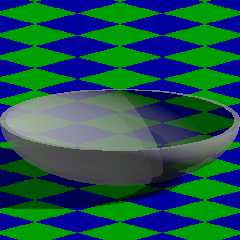
It's all working now, thanks to you all!

I've attached the latest test code and render.


Mike
Post a reply to this message
Attachments:
Download 'and_test.pov.txt' (2 KB)
Download 'and_test.png' (40 KB)
Preview of image 'and_test.png'
|
|
| |
| |
|
|
|
|
| |
| |
|
|
Am 21.07.2018 um 04:46 schrieb Mike Horvath:
> Wow, thanks!!
>
> I haven't tested it yet, but I saw your note about performance. Do you
> think the parametric object is slower than an isosurface? I prefer the
> parametric, since all the "sketches" I've been doing in GeoGebra so far
> have been with parametric formulas, and in general I find them easier to
> understand. Isosurfaces always make my brain freeze.

My gut feeling is that for any given task there's nothing slower than
isosurfaces. After all, isosurfaces are pretty much the pinnacle of
flexibility, so they also provide the least potential for optimization.
Post a reply to this message
|
|
| |
| |
|
|
|
|
| |
| |
|
|
Mike Horvath <mik### [at] gmailcom> wrote:
> It's all working now, thanks to you all!
>
> I've attached the latest test code and render.
>

That's some really nice math work and problem-solving. I played around with the
bowl thickness and object scaling in your code, just to test the 'uniform wall
thickness' idea-- which works well!

You might try scaling the final bounded_by object to more closely fit the
resulting isosurface (for the sole purpose of making the scene render a bit
faster.) Even though the initial two isosurfaces' contained_by spheres can't be
scaled (that is, *non-uniformly* scaled), the final bounded_by sphere can. For
my render, I used <2.0,0.8,0.7> in the two initial functions...
         function {f_spheroid(x,y,z,2.0,0.8,0.7)}
             and
         function {f_spheroid_normalized(x,y,z,2.0,0.8,0.7)+surf_thick}

.... with surf_thick = 0.4, and bounded_by{sphere{0,1 scale <2.0, 0.8, 0.7>}}

This works well; I even tested the resulting (hidden) 'bounding box' shape with
min_extent/max_extent, to make sure of the close fit.

Of course. maybe a scaled BOX for the bounded_by shape could be an even closer
fit (to coincide with the differenced PLANE object in your code.)

I did notice some artifacts, in the self-shadowing area of the bowl. From
testing various things, it seems to be solely due to the isosurface 'accuracy'
value. I changed that from 0.001 to 0.000001, which appears to eliminate the
Moire patterns there. (I actually don't know how *small* a value that accuracy
can be, before it has no further effect.)

I was going to attach an image here of my tests, but I can't (using the web
interface, anyway.) I'll post it to the images section instead.
Post a reply to this message
|
|
| |
| |
|
|
|
|
| |
| |
|
|
On 7/24/2018 6:15 PM, Kenneth wrote:
> Mike Horvath <mik### [at] gmailcom> wrote:
>> It's all working now, thanks to you all!
>>
>> I've attached the latest test code and render.
>>
>
> That's some really nice math work and problem-solving. I played around with the
> bowl thickness and object scaling in your code, just to test the 'uniform wall
> thickness' idea-- which works well!
>

Thanks!


> You might try scaling the final bounded_by object to more closely fit the
> resulting isosurface (for the sole purpose of making the scene render a bit
> faster.) Even though the initial two isosurfaces' contained_by spheres can't be
> scaled (that is, *non-uniformly* scaled), the final bounded_by sphere can. For
> my render, I used <2.0,0.8,0.7> in the two initial functions...
>           function {f_spheroid(x,y,z,2.0,0.8,0.7)}
>               and
>           function {f_spheroid_normalized(x,y,z,2.0,0.8,0.7)+surf_thick}
>
> .... with surf_thick = 0.4, and bounded_by{sphere{0,1 scale <2.0, 0.8, 0.7>}}
>
> This works well; I even tested the resulting (hidden) 'bounding box' shape with
> min_extent/max_extent, to make sure of the close fit.
>
> Of course. maybe a scaled BOX for the bounded_by shape could be an even closer
> fit (to coincide with the differenced PLANE object in your code.)
>
> I did notice some artifacts, in the self-shadowing area of the bowl. From
> testing various things, it seems to be solely due to the isosurface 'accuracy'
> value. I changed that from 0.001 to 0.000001, which appears to eliminate the
> Moire patterns there. (I actually don't know how *small* a value that accuracy
> can be, before it has no further effect.)
>
> I was going to attach an image here of my tests, but I can't (using the web
> interface, anyway.) I'll post it to the images section instead.
>
>
>

I'm not too worried about the artifacts, since 99% of the shape is
hidden behind another texture. Only the edges are important to me. (See
globe render in p.b.i.)


Mike
Post a reply to this message
|
|
| |
| |
|
|
|
|
| |
| |
|
|
On 7/24/2018 6:36 PM, Mike Horvath wrote:
> I'm not too worried about the artifacts, since 99% of the shape is
> hidden behind another texture. Only the edges are important to me. (See
> globe render in p.b.i.)
>
>
> Mike

p.b.a rather
Post a reply to this message
|
|
| |
| |
|
|
|
|
| |
| |
|
|
Le 18-07-20 à 12:09, Bald Eagle a écrit :
> clipka <ano### [at] anonymousorg> wrote:
>
>> You /could/ just pretend that the parallel curve to an ellipsis is also
>> an ellipsis. AFAIK that's not true, but it could be sufficiently close
>> for your purposes.
>
> I was initially under the impression that he could do this, but they're similar
> shapes, and therefore proportional - not constant distance.
>
> I just took a scaled torus and then made a scaled copy - it's definitely not
> good.
>
> I'm assuming Mike wants to make an atmosphere for the globe or something
> similar.
>
>> In that case, all you'd have to do would be to scale the ellipsoid.
> I already suggested this, and was properly shot down.
>
>
>
>

If you want the atmosphere for an oblate, rotating, planet, then, it
will be thicker over the equator and thinner at the poles.
So, a scalled up version of the original ellipsoid should be a prety
good approximation.
Post a reply to this message
|
|
| |
| |
|
|
|
|
| |
| |
|
|
"Bald Eagle" <cre### [at] netscapenet> wrote:
>...
> Perhaps someone better versed in the parametric object can determine why I can't
> get it to render the full surface, since the exact same equations are used in
> the nested loop of spheres to correctly approximate the surface.
>...

>...
> // --------------------------------------- parametric surface --------------
> #declare Parallel = parametric {
>  function {EllipseX (u, v)}
>  function {EllipseY (u, v)}
>  function {EllipseZ (v)}
>  <0, pi>, <0, 2*pi>  // start, end (u,v)
>  contained_by {sphere {0, R}}
>  max_gradient 50
>  accuracy 0.005
>  precompute 5 x,y,z
>  texture {pigment{ color rgb <0, 1, 0>}}
> }
>
> //object {Parallel}

Try this:

parametric {
    function { a*cos(u)*cos(v) }
    function { b*cos(u)*sin(v) }
    function { c*sin(u) }
    <0, 0>, <2*pi, pi>
    contained_by {
        sphere { <0, 0, 0>, max(a, b, c) }
    }
    max_gradient max(a, b, c)
    accuracy 1e-6
    precompute 10 x, y, z
    pigment { color Green }
}

The main problem was your boundaries for u and v.

--
Tor Olav
http://subcube.com
Post a reply to this message
|
|
| |
| |
|
|
|
|
| |
| |
|
|
"Tor Olav Kristensen" <tor### [at] TOBEREMOVEDgmailcom> wrote:
> "Bald Eagle" <cre### [at] netscapenet> wrote:
> >...
> > Perhaps someone better versed in the parametric object can determine why I can't
> > get it to render the full surface, since the exact same equations are used in
> > the nested loop of spheres to correctly approximate the surface.


> The main problem was your boundaries for u and v.

Ah yes. that.   And my failure to see the obvious mistake.   :|

Some days.....

There's something that's a candidate for a parser warning.

Thanks - that's one less thing on my "I really need to go back and look at...."
list.
Post a reply to this message
|
|
| |
| |
|
|
|
|
| |
| |
|
|
Are there isosurface functions for the hyperboloid? Both the saddle and
hourglass versions. Thanks!


Mike
Post a reply to this message
|
|
| |
| |
|
|
|
|
| |
| |
|
|
On 8/2/2018 6:26 PM, Mike Horvath wrote:
> Are there isosurface functions for the hyperboloid? Both the saddle and
> hourglass versions. Thanks!
>
>
> Mike

I need to create confocal ellipsoids and hyperboloids, with a cross
section like in this image

https://commons.wikimedia.org/wiki/File:Elliptical_coordinates_grid.svg

Is this possible with isosurfaces? The parametric formulas are easier to
deal with, but I don't think you can do offset curves with the
parametrics. Am I wrong?


Mike
Post a reply to this message
|
|
| |
| |
|
|
|
|
| |
| |
|
|
Mike Horvath <mik### [at] gmailcom> wrote:
> On 8/2/2018 6:26 PM, Mike Horvath wrote:
> > Are there isosurface functions for the hyperboloid? Both the saddle and
> > hourglass versions.

I would probably have to say - of course there are.

> I need to create confocal ellipsoids and hyperboloids, with a cross
> section like in this image
>
> https://commons.wikimedia.org/wiki/File:Elliptical_coordinates_grid.svg

Looks pretty straightforward:
https://en.wikipedia.org/wiki/Confocal_conic_sections

> Is this possible with isosurfaces? The parametric formulas are easier to
> deal with, but I don't think you can do offset curves with the
> parametrics. Am I wrong?

Isosurfaces and (conventionally portrayed) parametrics are infinitely thin
shells of a surface.

to make lines , you'd need sphere-sweeps or similar.

But if you're looking to make nested shells (which I think is actually where
you're going with this, then you're going to want are the 3D shapes.

Presumably you want the ones that come standard with POV-Ray:
shapes.old
Insert menu:
Shapes2
Special shapes
http://www.f-lohmueller.de/pov_tut/addon/00_Basic_Templates/22_Shapes2/__index.htm

 f_ellipsoid(x,y,z, P0, P1, P2). f_ellipsoid generates spheres and ellipsoids.
Needs "threshold 1".
Setting these scaling parameters to 1/n gives exactly the same effect as
performing a scale operation to increase the scaling by n in the corresponding
direction.

    P0 : X scale (inverse)
    P1 : Y scale (inverse)
    P2 : Z scale (inverse)
Post a reply to this message
|
|
| |
| |
|
|
|
|
| |
| |
|
|
I haven't had to dig into this, but it's possible to make the hyperboloid while
specifying the foci, so I can't imagine the ellipsoid is any more difficult:

http://news.povray.org/povray.binaries.images/message/%3Cweb.591d8c269364765ac437ac910%40news.povray.org%3E/#%3Cweb.591
d8c269364765ac437ac910%40news.povray.org%3E


Looks like a Two-fer:
https://theinnerframe.wordpress.com/2016/08/01/quadrics/
Post a reply to this message
|
|
| |
| |
|
|
|
|
| |
| |
|
|
On 8/2/2018 8:37 PM, Bald Eagle wrote:
> I haven't had to dig into this, but it's possible to make the hyperboloid while
> specifying the foci, so I can't imagine the ellipsoid is any more difficult:
>
>
http://news.povray.org/povray.binaries.images/message/%3Cweb.591d8c269364765ac437ac910%40news.povray.org%3E/#%3Cweb.591
> d8c269364765ac437ac910%40news.povray.org%3E
>
>
> Looks like a Two-fer:
> https://theinnerframe.wordpress.com/2016/08/01/quadrics/
>
>
>
>

Since I'm trying to model ellipsoidal coordinate system, the formulas
need to be parametric, so that I can make proper grid lines at the
correct intervals and angles and so forth. You and Tor Olav did a great
job of figuring out the method of creating offset surfaces of implicit
functions. Would you mind trying the same for parametrics? Thanks.


Mike
Post a reply to this message
|
|
| |
| |
|
|
|
|
| |
| |
|
|
Mike Horvath <mik### [at] gmailcom> wrote:

> Since I'm trying to model ellipsoidal coordinate system, the formulas
> need to be parametric, so that I can make proper grid lines at the
> correct intervals and angles and so forth. You and Tor Olav did a great
> job of figuring out the method of creating offset surfaces of implicit
> functions. Would you mind trying the same for parametrics? Thanks.

Surely I'm missing something.
(It's likely - as it's Saturday morning, and I'm only 1 cup into it)

You, Mike Horvath, are mikh2161, posfan12 as well as (but not limited to)
SharkD.
The elliptic and hyperbolic curves in the Geogebra file were made by you.
(10 years ago)
When you click on the Geogebra file link, you get the drawing on the right, and
the formulas on the left.

So all you need to do is make the same thing in 3D - a series of nested shells
(with thickness)

Those shells are proportional, not constant-thickness, correct?
So they're just scaled versions of each other.
And ellipsoids are just scaled spheres.

Do you want the GRID, or do you want to be able to place "points" on the grid?
Are you using standard elliptic math, or some specialized geodectic system with
an equation that only you have worked out and know the form of?

Because you can mix isosurface shells and parametrically placed points.
The solution of the implicit and parametric equations are exactly the same.
They give you exactly the same set of points in space.


I have a hard time (efficiently) programming using a ouijaboard instead of a
keyboard, and the only chicken I have is in the freezer.
If I'm lucky, I likely have another 15 minutes free before RL starts pulling me
away.
Ready... set.... GO!

Fully stating the exact goal in no uncertain terms helps define what needs to be
done, so that the solution is the one desired, not one that's close, but still
completely useless.  You probably can't use a 2015 Toyota starter in a 1958
Ford, but it would take the same amount of effort to deliver you either part.

Perhaps you could freely share some completed SDL that's implementing the
solutions already given to you to shed some light on the mystery.
"I need to get from HERE to THERE, in order to do exactly THIS (and NOT _that_)"

Please, and Thank You.
Post a reply to this message
|
|
| |
| |
|
|
|
|
| |
| |
|
|
On 8/4/2018 7:57 AM, Bald Eagle wrote:
> Mike Horvath <mik### [at] gmailcom> wrote:
>
>> Since I'm trying to model ellipsoidal coordinate system, the formulas
>> need to be parametric, so that I can make proper grid lines at the
>> correct intervals and angles and so forth. You and Tor Olav did a great
>> job of figuring out the method of creating offset surfaces of implicit
>> functions. Would you mind trying the same for parametrics? Thanks.
>
> Surely I'm missing something.
> (It's likely - as it's Saturday morning, and I'm only 1 cup into it)
>
> You, Mike Horvath, are mikh2161, posfan12 as well as (but not limited to)
> SharkD.

Correct.

> The elliptic and hyperbolic curves in the Geogebra file were made by you.
> (10 years ago)
> When you click on the Geogebra file link, you get the drawing on the right, and
> the formulas on the left.
>
> So all you need to do is make the same thing in 3D - a series of nested shells
> (with thickness)
>
> Those shells are proportional, not constant-thickness, correct?
> So they're just scaled versions of each other.
> And ellipsoids are just scaled spheres.
>
> Do you want the GRID, or do you want to be able to place "points" on the grid?
> Are you using standard elliptic math, or some specialized geodectic system with
> an equation that only you have worked out and know the form of?
>

I just want the grid. So, thin lines/curves of constant thickness, like
the curves in this collection.

http://lib.povray.org/searchcollection/index2.php?objectName=ShapeGrid&version=1.12&contributorTag=SharkD

I may expand the collection to include more shapes, and simplify some of
the existing ones; and the parametric object formulas are a natural
(albeit slow) fit for this purpose.


> Because you can mix isosurface shells and parametrically placed points.
> The solution of the implicit and parametric equations are exactly the same.
> They give you exactly the same set of points in space.
>
>

Yes, placing points parametrically is not hard.


Thanks.

Mike
Post a reply to this message
|
|
| |
| |
|
|
|
|
| |
| |
|
|
On 04/08/2018 12:57, Bald Eagle wrote:
> Surely I'm missing something.
> (It's likely - as it's Saturday morning, and I'm only 1 cup into it)

Never mind America's opioid problem. Someone seems to have a caffeine
problem. ;)


--

Regards
     Stephen
Post a reply to this message
|
|
| |
| |
|
|
|
|
| |
| |
|
|
Stop!

I just remembered parametric objects are not solid. So they are of no
use to me. Sorry.


Mike
Post a reply to this message
|
|
| |
| |
|
|
|
|
| |
| |
|
|
Everything is hunky-dory. Thanks, all, for the help!


Mike
Post a reply to this message
|
|
| |
| |
|
|
|
|
| |
|
|








