|
|
|
|
|
|
| |
| |
|
|
|
|
| |
| |
|
|
Hi

is it possible to create a scene where the rendered items are visible
but the entire empty background becomes transparent, if the output image
is a PNG?

---
Diese E-Mail wurde von AVG auf Viren geprüft.
http://www.avg.com
Post a reply to this message
|
|
| |
| |
|
|
|
|
| |
| |
|
|
On 09/10/2017 11:56, Sven Littkowski wrote:
> Hi
>
> is it possible to create a scene where the rendered items are visible
> but the entire empty background becomes transparent, if the output image
> is a PNG?
>
> ---
> Diese E-Mail wurde von AVG auf Viren geprüft.
> http://www.avg.com
>

Set Alpha output to on. And IIRC the background should be black.


http://www.povray.org/documentation/view/3.6.0/219/


--

Regards
     Stephen
Post a reply to this message
|
|
| |
| |
|
|
|
|
| |
| |
|
|
On 9-10-2017 12:56, Sven Littkowski wrote:
> Hi
>
> is it possible to create a scene where the rendered items are visible
> but the entire empty background becomes transparent, if the output image
> is a PNG?

Yes. Creating a Billboard.

Rapidly, from memory, you need to comment out every object in your scene
(including backgrounds) except the object you want rendered, and render,
adding +ua in order to switch the alpha channel on.

As far as I remember, you may need to check the alpha channel of the png
image in a paint application (I recommend IC for that) after you finish
the render. It might be better to render as tga and later convert to png
if necessary.

--
Thomas
Post a reply to this message
|
|
| |
| |
|
|
|
|
| |
| |
|
|
Sven Littkowski <I### [at] SvenLittkowski name> wrote:
> Hi
>
> is it possible to create a scene where the rendered items are visible
> but the entire empty background becomes transparent, if the output image
> is a PNG?
Of course. This question has been asked loads of times, probably even by
myself.
TdG recommends:
background { colour srgbt <0.0, 0.0, 0.0, 1.0> }
http://news.povray.org/povray.newusers/thread/%3Cweb.58acb474275844131c311e660%40news.povray.org%3E/
Warp recommends activating alpha in the command line (+ua), and using no
background whatsoever:
http://news.povray.org/povray.newusers/thread/%3Cweb.4890c3a87699c0d4749f26950@news.povray.org%3E/?ttop=344503&toff=150
http://news.povray.org/povray.newusers/thread/%3C45033d21@news.povray.org%3E/
Whatever works for you. name> wrote:
> Hi
>
> is it possible to create a scene where the rendered items are visible
> but the entire empty background becomes transparent, if the output image
> is a PNG?
Of course. This question has been asked loads of times, probably even by
myself.
TdG recommends:
background { colour srgbt <0.0, 0.0, 0.0, 1.0> }
http://news.povray.org/povray.newusers/thread/%3Cweb.58acb474275844131c311e660%40news.povray.org%3E/
Warp recommends activating alpha in the command line (+ua), and using no
background whatsoever:
http://news.povray.org/povray.newusers/thread/%3Cweb.4890c3a87699c0d4749f26950@news.povray.org%3E/?ttop=344503&toff=150
http://news.povray.org/povray.newusers/thread/%3C45033d21@news.povray.org%3E/
Whatever works for you.
Post a reply to this message
|
|
| |
| |
|
|
|
|
| |
| |
|
|
Fine everybody just pile on at once....  :|


Here's some advice on making a composite image, if you want shadows and a
transparent background (link to .pov file too :)  )

http://news.povray.org/povray.newusers/thread/%3C45033d21@news.povray.org%3E/
Post a reply to this message
|
|
| |
| |
|
|
|
|
| |
| |
|
|
Am 09.10.2017 um 12:56 schrieb Sven Littkowski:
> Hi
>
> is it possible to create a scene where the rendered items are visible
> but the entire empty background becomes transparent, if the output image
> is a PNG?

I guess you didn't know the command line parameter +ua (or
Output_Alpha=On in the INI file), did you?

Lars R.
Post a reply to this message
|
|
| |
| |
|
|
|
|
| |
| |
|
|
On 09/10/2017 12:38, Thomas de Groot wrote:
> It might be better to render as tga and later convert to png if necessary.

Is that one of those "Plant thy Mandrake when the moon is in Taurus and
waning gibbous.", things? :-P


--

Regards
     Stephen
Post a reply to this message
|
|
| |
| |
|
|
|
|
| |
| |
|
|
Am 09.10.2017 um 13:39 schrieb Bald Eagle:

>> is it possible to create a scene where the rendered items are visible
>> but the entire empty background becomes transparent, if the output image
>> is a PNG?
>
> Of course.  This question has been asked loads of times, probably even by
> myself.
>
> TdG recommends:
> background { colour srgbt <0.0, 0.0, 0.0, 1.0> }

That.

> Warp recommends activating alpha in the command line (+ua), and using no
> background whatsoever:

Those posts date back to the days of v3.6. The handling of transparency
has been overhauled since then, so don't expect that advice to work in v3.7.
Post a reply to this message
|
|
| |
| |
|
|
|
|
| |
| |
|
|
On 09.10.2017 06:56, Sven Littkowski wrote:
> Hi
>
> is it possible to create a scene where the rendered items are visible
> but the entire empty background becomes transparent, if the output image
> is a PNG?
>
> ---
> Diese E-Mail wurde von AVG auf Viren geprüft.
> http://www.avg.com
>
Biiiig thanks to everyone here! You all helped me a lot, and my problem
seems to be solved now.

No, I had indeed not know the +ua switch. Never had a need for such. But
I am reconstructing ancient Roman ships, and just their oars I want to
do in render technology. Which brings me to the next problem, how to
recreate one of the Roman-style galley oars. it is too easy just to use
a long cylinder with a flattened (thin-scaled) oval cylinder at the end.
The transition between shaft and brad area was kinda smooth.
Post a reply to this message
|
|
| |
| |
|
|
|
|
| |
| |
|
|
On 09.10.2017 09:15, Sven Littkowski wrote:
> On 09.10.2017 06:56, Sven Littkowski wrote:
>> Hi
>>
>> is it possible to create a scene where the rendered items are visible
>> but the entire empty background becomes transparent, if the output image
>> is a PNG?
>>
>> ---
>> Diese E-Mail wurde von AVG auf Viren geprüft.
>> http://www.avg.com
>>
> Biiiig thanks to everyone here! You all helped me a lot, and my problem
> seems to be solved now.
>
> No, I had indeed not know the +ua switch. Never had a need for such. But
> I am reconstructing ancient Roman ships, and just their oars I want to
> do in render technology. Which brings me to the next problem, how to
> recreate one of the Roman-style galley oars. it is too easy just to use
> a long cylinder with a flattened (thin-scaled) oval cylinder at the end.
> The transition between shaft and brad area was kinda smooth.
>
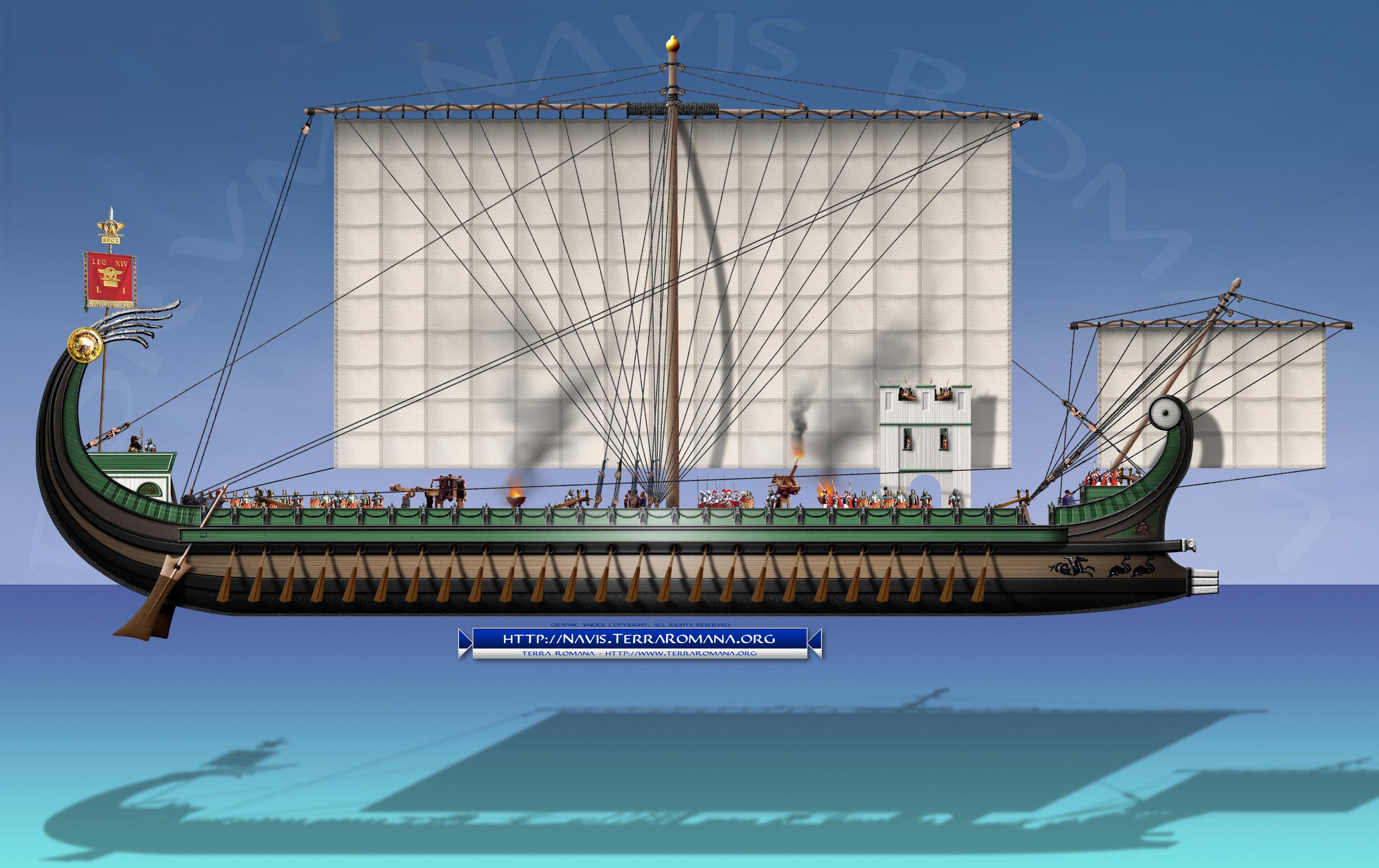
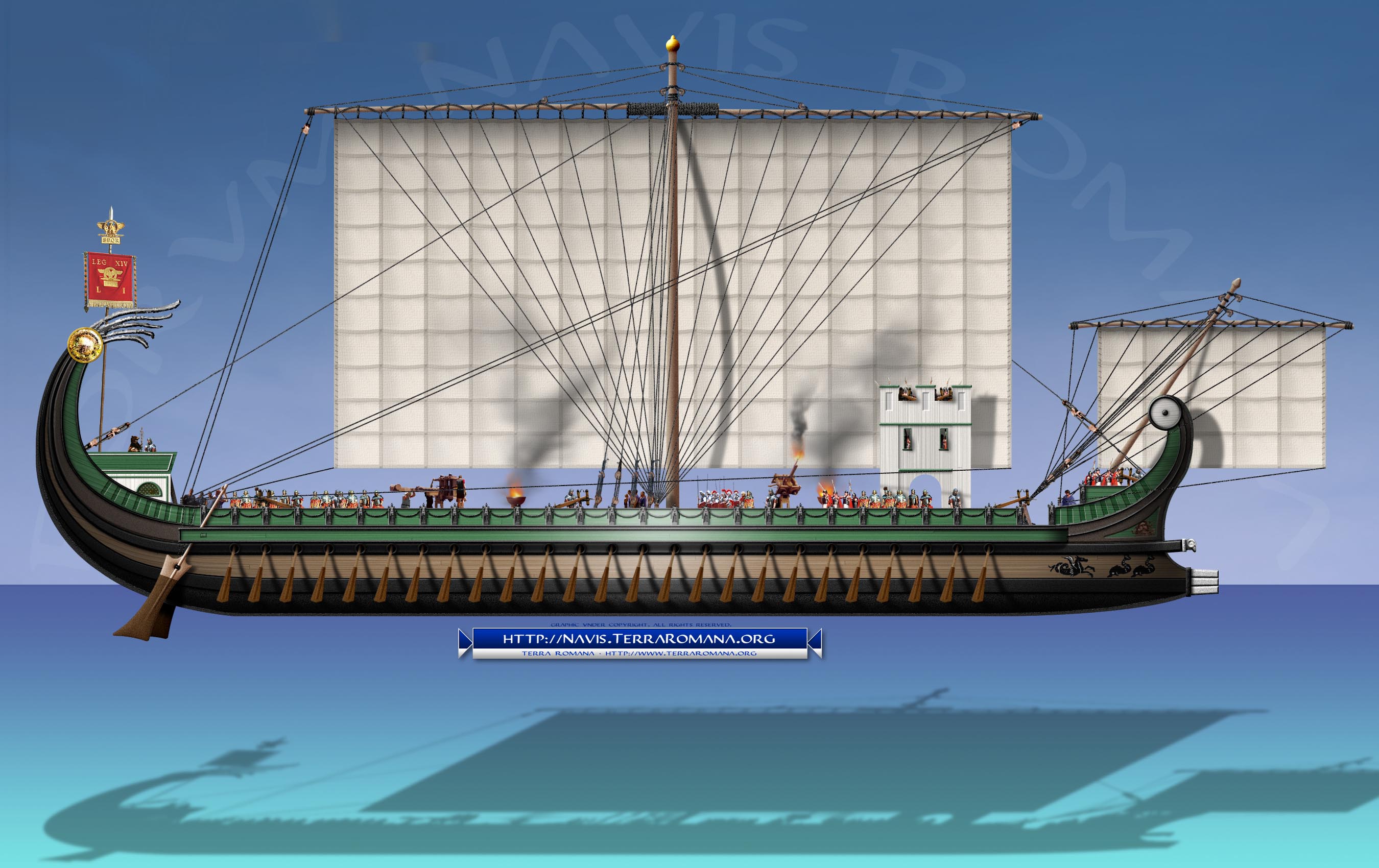
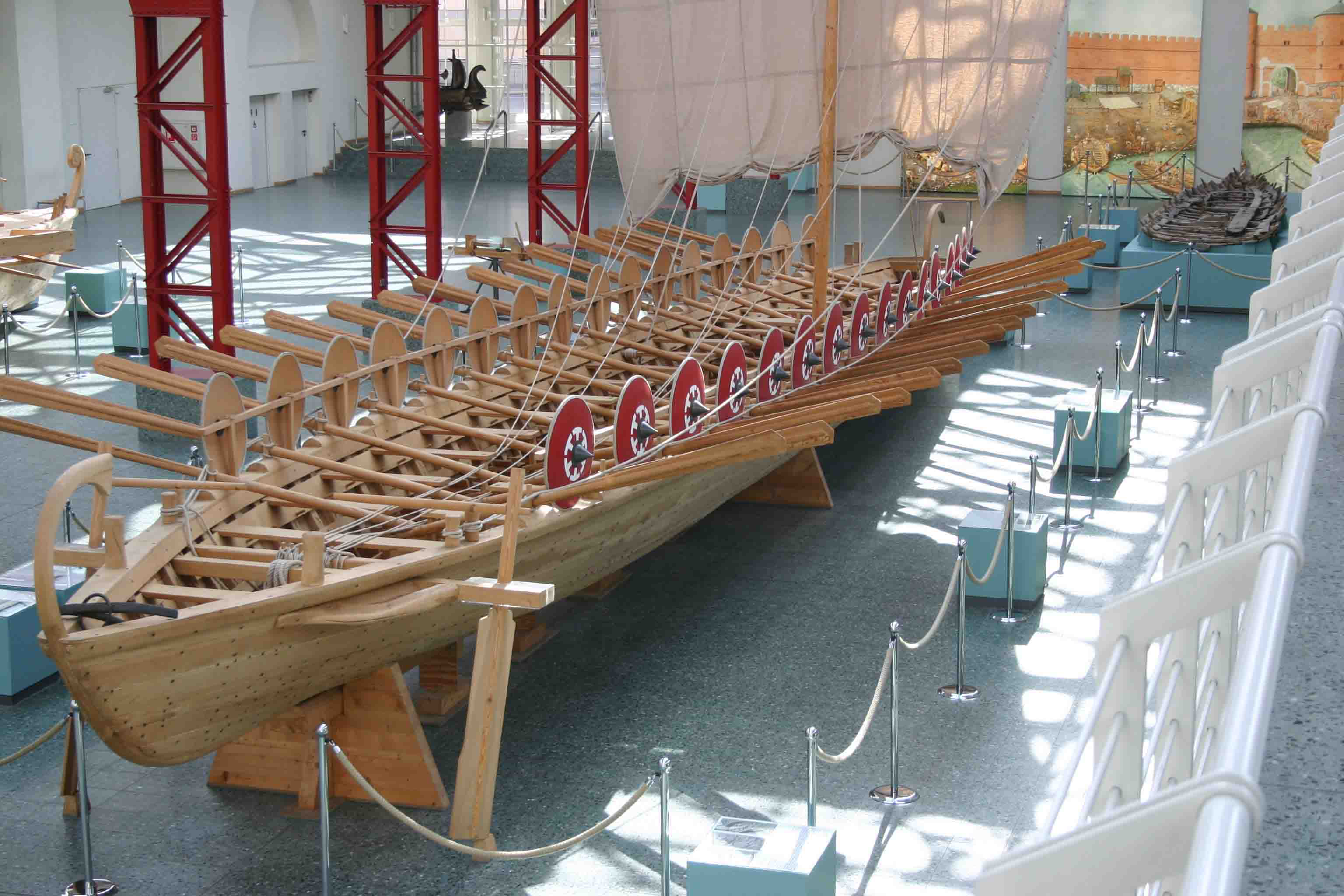
Ships like these, in high-res. Some US book publications already showing
parts of my work in the field of maritime archaeology. But I have
something in mind about the oars, that will make them looking even more
realistic.
Post a reply to this message
Attachments:
Download 'fnr-3-03-01-svenlittkowski-20041222-11pm52.jpg' (466 KB)
Preview of image 'fnr-3-03-01-svenlittkowski-20041222-11pm52.jpg'
|
|
| |
| |
|
|
|
|
| |
| |
|
|
Sven Littkowski <I### [at] SvenLittkowskiname> wrote:
> Which brings me to the next problem, how to
> recreate one of the Roman-style galley oars. it is too easy just to use
> a long cylinder with a flattened (thin-scaled) oval cylinder at the end.
> The transition between shaft and brad area was kinda smooth.

I'd start by posting a close-up / detailed image of what you want to do in 3D
(if you can't find an existing 3D model) and then I'm sure someone could
recommend a mesh-modeling, CSG, isosurface, or blob approach.
Post a reply to this message
|
|
| |
| |
|
|
|
|
| |
| |
|
|
On 09.10.2017 10:04, Bald Eagle wrote:
> Sven Littkowski <I### [at] SvenLittkowskiname> wrote:
>> Which brings me to the next problem, how to
>> recreate one of the Roman-style galley oars. it is too easy just to use
>> a long cylinder with a flattened (thin-scaled) oval cylinder at the end.
>> The transition between shaft and brad area was kinda smooth.
>
> I'd start by posting a close-up / detailed image of what you want to do in 3D
> (if you can't find an existing 3D model) and then I'm sure someone could
> recommend a mesh-modeling, CSG, isosurface, or blob approach.
>
>
>
>
The very strange thing with me is, that I find it extremely hard to
model with WYSIWYG surfaces, but I find it totally easy to write scenes
with all the coordinates by myself and understand them. This is how I
got my huge spaceships done.

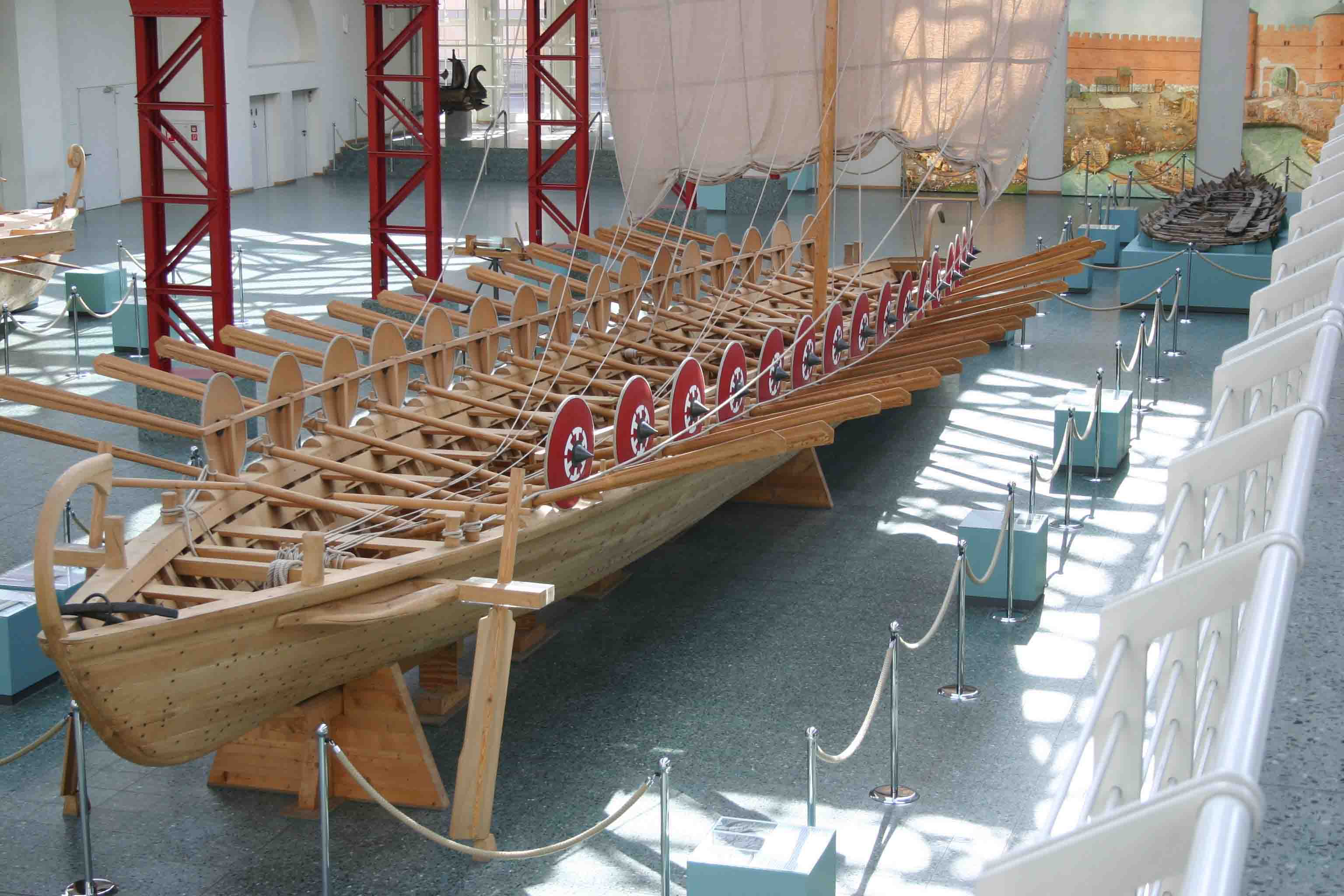
Okay, here is the sample photo. These oars have no real edges, every
corner has been rounded and smoothened. And even the edge between staff
and blade is kinda smoothened a bit.


---
Diese E-Mail wurde von AVG auf Viren geprüft.
http://www.avg.com
Post a reply to this message
Attachments:
Download 'oars.jpg' (245 KB)
Preview of image 'oars.jpg'
|
|
| |
| |
|
|
|
|
| |
| |
|
|
Sven Littkowski <I### [at] SvenLittkowskiname> wrote:

> The very strange thing with me is, that I find it extremely hard to
> model with WYSIWYG surfaces, but I find it totally easy to write scenes
> with all the coordinates by myself and understand them. This is how I
> got my huge spaceships done.

Yep, we all have our own ways of understanding and manipulating data.

> Okay, here is the sample photo. These oars have no real edges, every
> corner has been rounded and smoothened. And even the edge between staff
> and blade is kinda smoothened a bit.

CSG:
cylinder shaft
Cone tapered from shaft to near the end
flattened cones, slices of cones, or CSG parts of narrow rectangles for blades
flattened sphere or a box for the tip of the blade

If you look through the isosurface docs, you can come up with functions for all
of those primitives, their rotations and translations, and differences, and then
blob them together to get a totally smooth surface.
It sounds hard until you give it a go, and then it doesn't seem too bad.


Use the isosurface approximation or the (I believe very similar) Paul Nylander
mesh code to make an array of smooth_triangle vertices, and you could then
generate a mesh and save it.

'cause it sounds like you want to render a fleet of Roman vessels....
Post a reply to this message
|
|
| |
| |
|
|
|
|
| |
| |
|
|
On 09.10.2017 15:08, Bald Eagle wrote:
> Sven Littkowski <I### [at] SvenLittkowskiname> wrote:
>
>> The very strange thing with me is, that I find it extremely hard to
>> model with WYSIWYG surfaces, but I find it totally easy to write scenes
>> with all the coordinates by myself and understand them. This is how I
>> got my huge spaceships done.
>
> Yep, we all have our own ways of understanding and manipulating data.
>
>> Okay, here is the sample photo. These oars have no real edges, every
>> corner has been rounded and smoothened. And even the edge between staff
>> and blade is kinda smoothened a bit.
>
> CSG:
> cylinder shaft
> Cone tapered from shaft to near the end
> flattened cones, slices of cones, or CSG parts of narrow rectangles for b
lades
> flattened sphere or a box for the tip of the blade
>
> If you look through the isosurface docs, you can come up with functions f
or all
> of those primitives, their rotations and translations, and differences, a
nd then
> blob them together to get a totally smooth surface.
> It sounds hard until you give it a go, and then it doesn't seem too bad.
>
>
> Use the isosurface approximation or the (I believe very similar) Paul Nyl
ander
> mesh code to make an array of smooth_triangle vertices, and you could the
n
> generate a mesh and save it.
>
> 'cause it sounds like you want to render a fleet of Roman vessels....
>
>
I wished I had the skills to render an entire ship! I have all the
maritime archaeological knowledge, but not the skill to create such
shapes in any renderer. But this is a dream for more than 10 years...

For now, the oars only.

---
Diese E-Mail wurde von AVG auf Viren geprüft.
http://www.avg.com
Post a reply to this message
|
|
| |
| |
|
|
|
|
| |
| |
|
|
On 9-10-2017 14:00, Stephen wrote:
> On 09/10/2017 12:38, Thomas de Groot wrote:
>> It might be better to render as tga and later convert to png if
>> necessary.
>
> Is that one of those "Plant thy Mandrake when the moon is in Taurus and
> waning gibbous.", things? :-P
>
>

LOL Yes, but then adapted to the digital world. Even so, I indeed
recommend Mandrake over a Homunculus. ;-)

I seem to remember to have had problems generating transparent png
images while I never had problems with tga.

--
Thomas
Post a reply to this message
|
|
| |
| |
|
|
|
|
| |
| |
|
|
On 10/10/2017 07:41, Thomas de Groot wrote:
> On 9-10-2017 14:00, Stephen wrote:
>> On 09/10/2017 12:38, Thomas de Groot wrote:
>>> It might be better to render as tga and later convert to png if
>>> necessary.
>>
>> Is that one of those "Plant thy Mandrake when the moon is in Taurus
>> and waning gibbous.", things? :-P
>>
>>
>
> LOL Yes, but then adapted to the digital world. Even so, I indeed
> recommend Mandrake over a Homunculus. ;-)
>

Definitely Mandrake over Homunculus. Unless you are going to...


> I seem to remember to have had problems generating transparent png
> images while I never had problems with tga.
>

I recognised the form of the spell. I had the same problem donkey's
years ago.
There was a time when PNGs behaved badly. I think it was not writing the
Alpha values in the output.

--

Regards
     Stephen
Post a reply to this message
|
|
| |
| |
|
|
|
|
| |
| |
|
|
On 10-10-2017 9:27, Stephen wrote:
> On 10/10/2017 07:41, Thomas de Groot wrote:
>> On 9-10-2017 14:00, Stephen wrote:
>>> On 09/10/2017 12:38, Thomas de Groot wrote:
>>>> It might be better to render as tga and later convert to png if
>>>> necessary.
>>>
>>> Is that one of those "Plant thy Mandrake when the moon is in Taurus
>>> and waning gibbous.", things? :-P
>>>
>>>
>>
>> LOL Yes, but then adapted to the digital world. Even so, I indeed
>> recommend Mandrake over a Homunculus. ;-)
>>
>
> Definitely Mandrake over Homunculus. Unless you are going to...

Yes, unless. ;-)

>
>
>
>> I seem to remember to have had problems generating transparent png
>> images while I never had problems with tga.
>>
>
> I recognised the form of the spell. I had the same problem donkey's
> years ago.
> There was a time when PNGs behaved badly. I think it was not writing the
> Alpha values in the output.
>

That must be the origin of my dim memory of ancient trouble...

--
Thomas
Post a reply to this message
|
|
| |
| |
|
|
|
|
| |
| |
|
|
On 10/10/2017 08:34, Thomas de Groot wrote:
> On 10-10-2017 9:27, Stephen wrote:
>> On 10/10/2017 07:41, Thomas de Groot wrote:
>>> On 9-10-2017 14:00, Stephen wrote:
>>>> On 09/10/2017 12:38, Thomas de Groot wrote:
>>>>> It might be better to render as tga and later convert to png if
>>>>> necessary.
>>>>
>>>> Is that one of those "Plant thy Mandrake when the moon is in Taurus
>>>> and waning gibbous.", things? :-P
>>>>
>>>>
>>>
>>> LOL Yes, but then adapted to the digital world. Even so, I indeed
>>> recommend Mandrake over a Homunculus. ;-)
>>>
>>
>> Definitely Mandrake over Homunculus. Unless you are going to...
>
> Yes, unless. ;-)

Indeed.


>
>>
>>
>>
>>> I seem to remember to have had problems generating transparent png
>>> images while I never had problems with tga.
>>>
>>
>> I recognised the form of the spell. I had the same problem donkey's
>> years ago.
>> There was a time when PNGs behaved badly. I think it was not writing
>> the Alpha values in the output.
>>
>
> That must be the origin of my dim memory of ancient trouble...
>

I seem to remember Billboards were all the rage about that time.

--

Regards
     Stephen
Post a reply to this message
|
|
| |
| |
|
|
|
|
| |
| |
|
|
Am 10.10.2017 um 09:27 schrieb Stephen:

>> I seem to remember to have had problems generating transparent png
>> images while I never had problems with tga.
>>
>
> I recognised the form of the spell. I had the same problem donkey's
> years ago.
> There was a time when PNGs behaved badly. I think it was not writing the
> Alpha values in the output.

If I may clarify:

PNG output in POV-Ray v3.6 had the alpha mode wrong - i.e. how the alpha
channel is supposed to interact with the colour channels.

The PNG specification mandates so-called "straight alpha", i.e. the
colour channels should hold the colour as if the image was fully opaque,
and blending should be done entirely by the display software, using
Alpha:(1-Alpha) as the ratio between stored colour and background. This
is akin to the way in which semi-transparent pigments are specified in
POV-Ray's SDL.

However, POV-Ray's internal computations yield colour channel values
that already take opacity into account, which is akin to so-called "gay
alph..." uh, I mean, "associated alpha" aka "premultiplied alpha", in
which the display software is only responsible for the background
portion of the blending, using 1:(1-Alpha) as the ratio between stored
colour and background.

POV-Ray v3.6 neglected the issue of alpha mode entirely: In file output
it directly wrote the computed colour values, thus always writing in
associated alpha mode (which happens to be wrong for PNG files). In file
input, on the other hand, it interpreted the colour values in much the
same way as in SDL, thus always reading in straight alpha mode (which
happens to be correct for PNG files but wrong for certain other files).

So not only was POV-Ray v3.6 in violation of the PNG file format specs,
it also was inconsistent in itself.

In POV-Ray v3.7, a proper alpha handling framework was implemented, and
the problem fixed for PNG files.


(Interestingly, even though the modes are referred to as "associated
alpha" and "straight alpha", it's not actually the alpha channel that's
different between the two modes -- the value stored is actually
identical for both modes -- but the colour channel.)


The advantage of "straight alpha" is that you can display an opaque
version of the image simply by ignoring the alpha channel.

The advantages of "associated alpha" are that (a) it takes less
computational effort to display, and (b) it can account for situations
where bright light is to be shown against a highly transparent
background (e.g. a transparent sphere with highlights).
Post a reply to this message
|
|
| |
| |
|
|
|
|
| |
| |
|
|
On 10-10-2017 14:26, Stephen wrote:
> On 10/10/2017 08:34, Thomas de Groot wrote:
>> On 10-10-2017 9:27, Stephen wrote:
>>> On 10/10/2017 07:41, Thomas de Groot wrote:
>>>> On 9-10-2017 14:00, Stephen wrote:
>>>>> On 09/10/2017 12:38, Thomas de Groot wrote:
>>>>>> It might be better to render as tga and later convert to png if
>>>>>> necessary.
>>>>>
>>>>> Is that one of those "Plant thy Mandrake when the moon is in Taurus
>>>>> and waning gibbous.", things? :-P
>>>>>
>>>>>
>>>>
>>>> LOL Yes, but then adapted to the digital world. Even so, I indeed
>>>> recommend Mandrake over a Homunculus. ;-)
>>>>
>>>
>>> Definitely Mandrake over Homunculus. Unless you are going to...
>>
>> Yes, unless. ;-)
>
> Indeed.

As you say.

>
>
>>
>>>
>>>
>>>
>>>> I seem to remember to have had problems generating transparent png
>>>> images while I never had problems with tga.
>>>>
>>>
>>> I recognised the form of the spell. I had the same problem donkey's
>>> years ago.
>>> There was a time when PNGs behaved badly. I think it was not writing
>>> the Alpha values in the output.
>>>
>>
>> That must be the origin of my dim memory of ancient trouble...
>>
>
> I seem to remember Billboards were all the rage about that time.
>

Yes, and then it faded away. I wonder what will be next.. ;-)

--
Thomas
Post a reply to this message
|
|
| |
| |
|
|
|
|
| |
| |
|
|
On 10-10-2017 16:10, clipka wrote:
> Am 10.10.2017 um 09:27 schrieb Stephen:
>
>>> I seem to remember to have had problems generating transparent png
>>> images while I never had problems with tga.
>>>
>>
>> I recognised the form of the spell. I had the same problem donkey's
>> years ago.
>> There was a time when PNGs behaved badly. I think it was not writing the
>> Alpha values in the output.
>
> If I may clarify:
>
> PNG output in POV-Ray v3.6 had the alpha mode wrong - i.e. how the alpha
> channel is supposed to interact with the colour channels.
>
> The PNG specification mandates so-called "straight alpha", i.e. the
> colour channels should hold the colour as if the image was fully opaque,
> and blending should be done entirely by the display software, using
> Alpha:(1-Alpha) as the ratio between stored colour and background. This
> is akin to the way in which semi-transparent pigments are specified in
> POV-Ray's SDL.
>
> However, POV-Ray's internal computations yield colour channel values
> that already take opacity into account, which is akin to so-called "gay
> alph..." uh, I mean, "associated alpha" aka "premultiplied alpha", in
> which the display software is only responsible for the background
> portion of the blending, using 1:(1-Alpha) as the ratio between stored
> colour and background.
>
> POV-Ray v3.6 neglected the issue of alpha mode entirely: In file output
> it directly wrote the computed colour values, thus always writing in
> associated alpha mode (which happens to be wrong for PNG files). In file
> input, on the other hand, it interpreted the colour values in much the
> same way as in SDL, thus always reading in straight alpha mode (which
> happens to be correct for PNG files but wrong for certain other files).
>
> So not only was POV-Ray v3.6 in violation of the PNG file format specs,
> it also was inconsistent in itself.
>
> In POV-Ray v3.7, a proper alpha handling framework was implemented, and
> the problem fixed for PNG files.
>
>
> (Interestingly, even though the modes are referred to as "associated
> alpha" and "straight alpha", it's not actually the alpha channel that's
> different between the two modes -- the value stored is actually
> identical for both modes -- but the colour channel.)
>
>
> The advantage of "straight alpha" is that you can display an opaque
> version of the image simply by ignoring the alpha channel.
>
> The advantages of "associated alpha" are that (a) it takes less
> computational effort to display, and (b) it can account for situations
> where bright light is to be shown against a highly transparent
> background (e.g. a transparent sphere with highlights).
>

It comes back now, yes. Thanks for the reminder. Interesting to notice
how it is former bad behaviour that sticks in the memory rather than the
later correction. Survival adaptation, no doubt ;-)

--
Thomas
Post a reply to this message
|
|
| |
| |
|
|
|
|
| |
| |
|
|
On 10.10.2017 10:10, clipka wrote:
> Am 10.10.2017 um 09:27 schrieb Stephen:
>
>>> I seem to remember to have had problems generating transparent png
>>> images while I never had problems with tga.
>>>
>>
>> I recognised the form of the spell. I had the same problem donkey's
>> years ago.
>> There was a time when PNGs behaved badly. I think it was not writing the

>> Alpha values in the output.
>
> If I may clarify:
>
> PNG output in POV-Ray v3.6 had the alpha mode wrong - i.e. how the alpha
> channel is supposed to interact with the colour channels.
>
> The PNG specification mandates so-called "straight alpha", i.e. the
> colour channels should hold the colour as if the image was fully opaque,
> and blending should be done entirely by the display software, using
> Alpha:(1-Alpha) as the ratio between stored colour and background. This
> is akin to the way in which semi-transparent pigments are specified in
> POV-Ray's SDL.
>
> However, POV-Ray's internal computations yield colour channel values
> that already take opacity into account, which is akin to so-called "gay
> alph..." uh, I mean, "associated alpha" aka "premultiplied alpha", in
> which the display software is only responsible for the background
> portion of the blending, using 1:(1-Alpha) as the ratio between stored
> colour and background.
>
> POV-Ray v3.6 neglected the issue of alpha mode entirely: In file output
> it directly wrote the computed colour values, thus always writing in
> associated alpha mode (which happens to be wrong for PNG files). In file
> input, on the other hand, it interpreted the colour values in much the
> same way as in SDL, thus always reading in straight alpha mode (which
> happens to be correct for PNG files but wrong for certain other files).
>
> So not only was POV-Ray v3.6 in violation of the PNG file format specs,
> it also was inconsistent in itself.
>
> In POV-Ray v3.7, a proper alpha handling framework was implemented, and
> the problem fixed for PNG files.
>
>
> (Interestingly, even though the modes are referred to as "associated
> alpha" and "straight alpha", it's not actually the alpha channel that's
> different between the two modes -- the value stored is actually
> identical for both modes -- but the colour channel.)
>
>
> The advantage of "straight alpha" is that you can display an opaque
> version of the image simply by ignoring the alpha channel.
>
> The advantages of "associated alpha" are that (a) it takes less
> computational effort to display, and (b) it can account for situations
> where bright light is to be shown against a highly transparent
> background (e.g. a transparent sphere with highlights).
>
Interesting insight, thanks. :-)

---
Diese E-Mail wurde von AVG auf Viren geprüft.
http://www.avg.com
Post a reply to this message
|
|
| |
| |
|
|
|
|
| |
| |
|
|
On 09.10.2017 06:56, Sven Littkowski wrote:
> Hi
>
> is it possible to create a scene where the rendered items are visible
> but the entire empty background becomes transparent, if the output image
> is a PNG?
>
> ---
> Diese E-Mail wurde von AVG auf Viren geprüft.
> http://www.avg.com
>
I want to mention another problem that I have since I switched monitors
(now using a 16:9 monitor): the object of the scene has shifted to the
right side.

I tried to create a better camera, but still fail to get the 0.0 center
of the scene as center of the camera. Any assistance?

This is what i have now:

camera
{
 location < 0.0,  0.0, -50.0 >
 look_at  < 0.0,  0.0,   0.0 >
 right 1.77*x
}
Post a reply to this message
|
|
| |
| |
|
|
|
|
| |
| |
|
|
Am 11.10.2017 um 12:31 schrieb Sven Littkowski:

> I want to mention another problem that I have since I switched monitors
> (now using a 16:9 monitor): the object of the scene has shifted to the
> right side.
>
> I tried to create a better camera, but still fail to get the 0.0 center
> of the scene as center of the camera. Any assistance?
>
> This is what i have now:
>
> camera
> {
>  location < 0.0,  0.0, -50.0 >
>  look_at  < 0.0,  0.0,   0.0 >
>  right 1.77*x
> }

That should work just fine -- at any resolution.

Are you sure it's not just your display software?

A test scene might be helpful.

(Also, I'd recommend using `right x*16/9` rather than the fudgy factor
of 1.77; with full-resolution renders it does make a difference of
something in the order of 10-20 pixels. Or use `right
x*image_width/image_height` to be independent of output image aspect ratio.)
Post a reply to this message
|
|
| |
| |
|
|
|
|
| |
| |
|
|
On 11.10.2017 06:49, clipka wrote:
> right
> x*image_width/image_height
Thanks. :-)

---
Diese E-Mail wurde von AVG auf Viren geprüft.
http://www.avg.com
Post a reply to this message
|
|
| |
| |
|
|
|
|
| |
| |
|
|
Okay, here is the latest problem and also the scene code.

The value "AmountLines" allows me to set the amount of oar lines above
each other, but strangely, I always get just one line. I am very sure,
the fault is with me: "I am not seeing the forest because of all the
trees in my eyesight". Means, I am looking at the scene code, and just
can't discover the error in thinking/writing. Can you help?

---SCENE-------------------------------------------------------


#local Temp_version = version;
#version 3.7;

#declare MyRadiosity = off;   // on

global_settings
{
 #if(MyRadiosity)
  radiosity
  {
   media on
   pretrace_start 0.08
   pretrace_end   0.001
   count 400
   error_bound 0.75
   recursion_limit 1
   normal on
  }
 #end
 subsurface        {}
 adc_bailout       0.0039
 ambient_light     rgb < 0.000, 0.000, 0.000 >
 assumed_gamma     1.000
 irid_wavelength   rgb < 0.250, 0.180, 0.140 >
 max_trace_level   5
 number_of_waves   10
 noise_generator   3
 charset           ascii
}

camera
{
 location < 7.0,  0.0, -50.0 >
 look_at  < 7.0,  0.0,   0.0 >
 right x*image_width/image_height
}

light_source
{
 < -50000.0, 50000.0, -50000.0 > //light position
 color rgb < 1.0, 1.0, 1.0 > * 1.0
 parallel
 point_at < 0.0, 0.0, 0.0 >
}

//
---------------------------------------------------------------------------
-----------------------

#include "textures.inc"

#declare UpperOar = texture
{
 DMFDarkOak
 pigment { color rgb < 1.0, 1.0, 1.0 > }
 normal { wood 0.5 scale 0.3 turbulence 0.1 }
 finish { phong 1 }
 rotate< 90.0, 0.0, 0.0 >
 scale 0.25
}

#declare LowerOar = texture
{
 DMFDarkOak
 pigment { color rgb < 0.3, 0.01, 0.0 > }
 normal { wood 0.5 scale 0.3 turbulence 0.1 }
 finish { phong 1 }
 rotate< 90.0, 0.0, 0.0 >
 scale 0.25
}

#declare TotalLength      = 10.0;   // length of oars of the lowest line
#declare AmountOarsInLine = 30;
#declare AmountLines      = 3;
#declare LineLeftShift    = 0.5;    // shift towards the left side for
additional lines
#declare LineHeightShift  = 0.5;    // distance to line below
#declare MyVariance       = 4.0;    // human irregularity
#declare MyHeightMore     = 0.50;   // upper lines need longer oars
#declare GeneralAngle     = 40;     // the angle of each oar from hull
towards water
#declare BladeAngle       = 85.0;   // the angle of the blade when
touching water
#declare ForwardAngle     = 05.0;   // to equalize the ends of each line
to the eye

#declare R1 = seed(1);
#declare R2 = seed(2);
#declare R3 = seed(3);


//
---------------------------------------------------------------------------
-----------------------

#macro MyOar(MyHeightMoreThis)
 union
 {
  union
  {
   cone
   {
    < 0.0, -10.0, 0.0 > 0.000 < 0.0, -9.9, 0.0 > 0.250
   }
   cone
   {
    < 0.0, -9.9, 0.0 > 0.250 < 0.0, -5.5, 0.0 > 0.000
   }
   texture { LowerOar }
   scale < 1.0, 1.0, 0.1 >
  }
  union
  {
   cone
   {
    < 0.0, -9.5, 0.0 > 0.020 < 0.0, -5.5, 0.0 > 0.075
   }
   cylinder
   {
    < 0.0, -5.5, 0.0 > < 0.0, 0.0, 0.0 > 0.075
   }
   #if(MyHeightMoreThis>0)
    cylinder
    {
     < 0.0, MyHeightMoreThis, 0.0 > < 0.0, 0.0, 0.0 > 0.075
    }
    translate < 0.0, -MyHeightMoreThis, 0.0 >
   #end
   texture { UpperOar }
  }  no_shadow
 }
#end


#declare MyNumber = 0;


#macro MyOarLine(AmountOarsInLine,MyHeightMoreThis)
 union
 {
  #while(MyNumber<AmountOarsInLine)

   #declare MyAngleWater     = (rand(R1)*MyVariance)+GeneralAngle;
   #declare MyAngleHands     = (rand(R2)*MyVariance)+BladeAngle;
   #declare MyAngleDirection = (rand(R3)*MyVariance)+ForwardAngle;
   object
   {
    MyOar(MyHeightMoreThis)
    rotate < 0.0, MyAngleHands, 0.0 >
    rotate < MyAngleWater, 0.0, 0.0 >
    rotate < 0.0, 0.0, MyAngleDirection >
    translate < (MyNumber*0.925), 0.0, 0.0 >
   }
   #declare MyNumber = MyNumber+1;
  #end
 }
#end


union
{
 #declare ThisLine = 0;
 #while(ThisLine<AmountLines)
  object { MyOarLine(AmountOarsInLine,MyHeightMore*ThisLine) translate <
-((AmountOarsInLine*0.925)/2)+0.925-(LineLeftShift*ThisLine),
LineHeightShift*ThisLine, 0.0 > }
  #declare ThisLine=ThisLine+1;
 #end

 box
 {
  < -20.0, -15.0, 0.0 > < 20.0, 15.0, 0.1 >
  pigment { color rgb < 1.0, 1.0, 1.0 > }
 }
 box
 {
  < -1.0, -25.0, 2.0 > < 1.0, 25.0, 2.1 >
  pigment { color rgb < 0.5, 0.5, 0.5 > }
 }
 translate < 0.0, 0.0, 0.0 >
}


---
Diese E-Mail wurde von AVG auf Viren geprüft.
http://www.avg.com
Post a reply to this message
|
|
| |
| |
|
|
|
|
| |
| |
|
|
Sven Littkowski <I### [at] SvenLittkowskiname> wrote:
> Okay, here is the latest problem and also the scene code.
>
> The value "AmountLines" allows me to set the amount of oar lines above
> each other, but strangely, I always get just one line. I am very sure,
> the fault is with me: "I am not seeing the forest because of all the
> trees in my eyesight". Means, I am looking at the scene code, and just
> can't discover the error in thinking/writing. Can you help?


>  #declare ThisLine = 0;
>  #while(ThisLine<AmountLines)

You never have a line that increments ThisLine.

Add
#declare ThisLine = ThisLine + 1;

or use a

#for (ThisLine, 1, 3)
 ....
#end

loop.
Post a reply to this message
|
|
| |
| |
|
|
|
|
| |
| |
|
|
Am 11.10.2017 um 15:32 schrieb Bald Eagle:
> Sven Littkowski <I### [at] SvenLittkowskiname> wrote:
>> Okay, here is the latest problem and also the scene code.
>>
>> The value "AmountLines" allows me to set the amount of oar lines above
>> each other, but strangely, I always get just one line. I am very sure,
>> the fault is with me: "I am not seeing the forest because of all the
>> trees in my eyesight". Means, I am looking at the scene code, and just
>> can't discover the error in thinking/writing. Can you help?
>
>
>>  #declare ThisLine = 0;
>>  #while(ThisLine<AmountLines)
>
> You never have a line that increments ThisLine.

Actually he does.
Post a reply to this message
|
|
| |
| |
|
|
|
|
| |
| |
|
|
grrr.

Sorry, I was in the middle of handling a few thousand pounds of stuff and
clicked before I triple-read your code.

Now that I have a proper break:
Of course you had to have that increment, otherwise you'd have an infinite
loop...


But I do notice you're translating based on that value times 0.5.  Is that
supposed to be 0.5 times --- some absolute height value?   Maybe your vertical
translation is too small.

What if you create an array for your oar texture, and have each successive line
of oars be a different color - then it might be easier to see what's going on /
going wrong.

maybe output the location of the bounding boxes to the #debug stream as well...
Post a reply to this message
|
|
| |
| |
|
|
|
|
| |
| |
|
|
Am 11.10.2017 um 14:41 schrieb Sven Littkowski:

> The value "AmountLines" allows me to set the amount of oar lines above
> each other, but strangely, I always get just one line. I am very sure,
> the fault is with me: "I am not seeing the forest because of all the
> trees in my eyesight". Means, I am looking at the scene code, and just
> can't discover the error in thinking/writing. Can you help?

[...]
> #declare MyNumber = 0;
>
>
> #macro MyOarLine(AmountOarsInLine,MyHeightMoreThis)
>  union
>  {
>   #while(MyNumber<AmountOarsInLine)
>
>    #declare MyAngleWater     = (rand(R1)*MyVariance)+GeneralAngle;
>    #declare MyAngleHands     = (rand(R2)*MyVariance)+BladeAngle;
>    #declare MyAngleDirection = (rand(R3)*MyVariance)+ForwardAngle;
>    object
>    {
>     MyOar(MyHeightMoreThis)
>     rotate < 0.0, MyAngleHands, 0.0 >
>     rotate < MyAngleWater, 0.0, 0.0 >
>     rotate < 0.0, 0.0, MyAngleDirection >
>     translate < (MyNumber*0.925), 0.0, 0.0 >
>    }
>    #declare MyNumber = MyNumber+1;
>   #end
>  }
> #end

You need to set `MyNumber = 0` each time you're running the macro (i.e.
the `#declare` should be inside the macro. Also, I'd suggest using
`#local` instead; it's good practice for macros, unless you want to pass
values out of the macro via global variables.)
Post a reply to this message
|
|
| |
| |
|
|
|
|
| |
| |
|
|
On 11.10.2017 10:17, clipka wrote:
> Am 11.10.2017 um 14:41 schrieb Sven Littkowski:
>
>> The value "AmountLines" allows me to set the amount of oar lines above
>> each other, but strangely, I always get just one line. I am very sure,
>> the fault is with me: "I am not seeing the forest because of all the
>> trees in my eyesight". Means, I am looking at the scene code, and just
>> can't discover the error in thinking/writing. Can you help?
>
> [...]
>> #declare MyNumber = 0;
>>
>>
>> #macro MyOarLine(AmountOarsInLine,MyHeightMoreThis)
>>  union
>>  {
>>   #while(MyNumber<AmountOarsInLine)
>>
>>    #declare MyAngleWater     = (rand(R1)*MyVariance)+GeneralAngle;
>>    #declare MyAngleHands     = (rand(R2)*MyVariance)+BladeAngle;
>>    #declare MyAngleDirection = (rand(R3)*MyVariance)+ForwardAngle;
>>    object
>>    {
>>     MyOar(MyHeightMoreThis)
>>     rotate < 0.0, MyAngleHands, 0.0 >
>>     rotate < MyAngleWater, 0.0, 0.0 >
>>     rotate < 0.0, 0.0, MyAngleDirection >
>>     translate < (MyNumber*0.925), 0.0, 0.0 >
>>    }
>>    #declare MyNumber = MyNumber+1;
>>   #end
>>  }
>> #end
>
> You need to set `MyNumber = 0` each time you're running the macro (i.e.
> the `#declare` should be inside the macro. Also, I'd suggest using
> `#local` instead; it's good practice for macros, unless you want to pass
> values out of the macro via global variables.)
>
Hi, thanks.

I pressed ENTER too fast and therefore wasn't able to add the
explanations to that posting as I actually had wanted.

Doing it now.

The ships had between one line of oars, two, or a maximum of three lines
of oars, each line above each other by half a meter (that is the "0.5"
value), and also half a meter shifted to the left (to prevent the oar
holes would be directly above each other).

My code features the same thing: I can set the amount of oar lines, and
the WHILE loop with the,lines is executed only one single time, in which
between one to three lines (or more if I had entered more) would be
created. The value "#declare ThisLine = 0;" right in front of this code
would be read only one time therefore (should be, to the best of my
knowledge).

Each line consists of a flexible amount of oars. But I don't think, that
any fault is within those code segments.

Concentrating back on the code segment for the creation of multiple oar
lines, I think here somewhere must be the problem.

If I specify three oar lines, it creates only the upper oar line (higher
starting position). If I specify two oar lines, it only creates one oar
line in the middle. And if i specify that the ship has only one oar
line, it creates the lowest oar line (correctly in this case). But in
the first two cases (3 and 2 lines), oar lines are missing.

Example:
specifying 3 oar lines, I should see three lines of oars, one on top,
one in the middle, one at the bottom, each slightly shifted to the side.
But I see only the upper oars line.

The WHILE loop calls a macro, but the WHILE loop itself is not part of
any macro. If I would put the "#declare ThisLine = 0;" value inside a
macro, I believe it wouldn't work as that value is needed outside that
macro in order to specify how many times that macro is being called.

Can anyone get this code to function? The configuration values close to
the top of this scene are set for creating 3 oars lines. Who can get it
to create 3 lines, or can find my error(s)?


---
Diese E-Mail wurde von AVG auf Viren geprüft.
http://www.avg.com
Post a reply to this message
|
|
| |
| |
|
|
|
|
| |
| |
|
|
Sven Littkowski <I### [at] SvenLittkowskiname> wrote:

I'm gonna go with Christoph's sharp eye and programming kung-fu.

> >> The value "AmountLines" allows me to set the amount of oar lines above
> >> each other, but strangely, I always get just one line. I am very sure,
> >> the fault is with me: "I am not seeing the forest because of all the
> >> trees in my eyesight". Means, I am looking at the scene code, and just
> >> can't discover the error in thinking/writing. Can you help?
> >
> > [...]
> >> #declare MyNumber = 0;

This line only ever gets parsed once.

> >> #macro MyOarLine(AmountOarsInLine,MyHeightMoreThis)
> >>  union
> >>  {
> >>   #while(MyNumber<AmountOarsInLine)
 {stuff}
> >>    #declare MyNumber = MyNumber+1;
> >>   #end
Now MyNumber = AmountOarsInLine.
Since you don't ever do #declare MyNumber = 0; to reset that, it STAYS this way.
The next time you run the macro, the #while directive just goes, "I'm already
maxxed out", and exits.
> >>  }
> >> #end
> >
> > You need to set `MyNumber = 0` each time you're running the macro (i.e.
> > the `#declare` should be inside the macro. Also, I'd suggest using
> > `#local` instead; it's good practice for macros, unless you want to pass
> > values out of the macro via global variables.)


So the question is:  Did you move #declare MyNumber = 0; to inside the macro and
run it?

Right after
#while(MyNumber<AmountOarsInLine)
put
#debug "creating row of oars \n"
or something, and see what happens.

The more you try to head off bugs, you'll find the less you have to debug...
Post a reply to this message
|
|
| |
| |
|
|
|
|
| |
| |
|
|
On 11.10.2017 15:07, Bald Eagle wrote:
>  only ever


Bald Eagle: FULL HIT!

You managed to open my eyes. Yes, it was "MyNumber", and when i placed
it inside the macro, it worked! I think, that is what Clipka had in
mind, too, but I did not understand him (my fault again)

Problem solved!

Thank a lot, everyone!

---
Diese E-Mail wurde von AVG auf Viren geprüft.
http://www.avg.com
Post a reply to this message
|
|
| |
| |
|
|
|
|
| |
| |
|
|
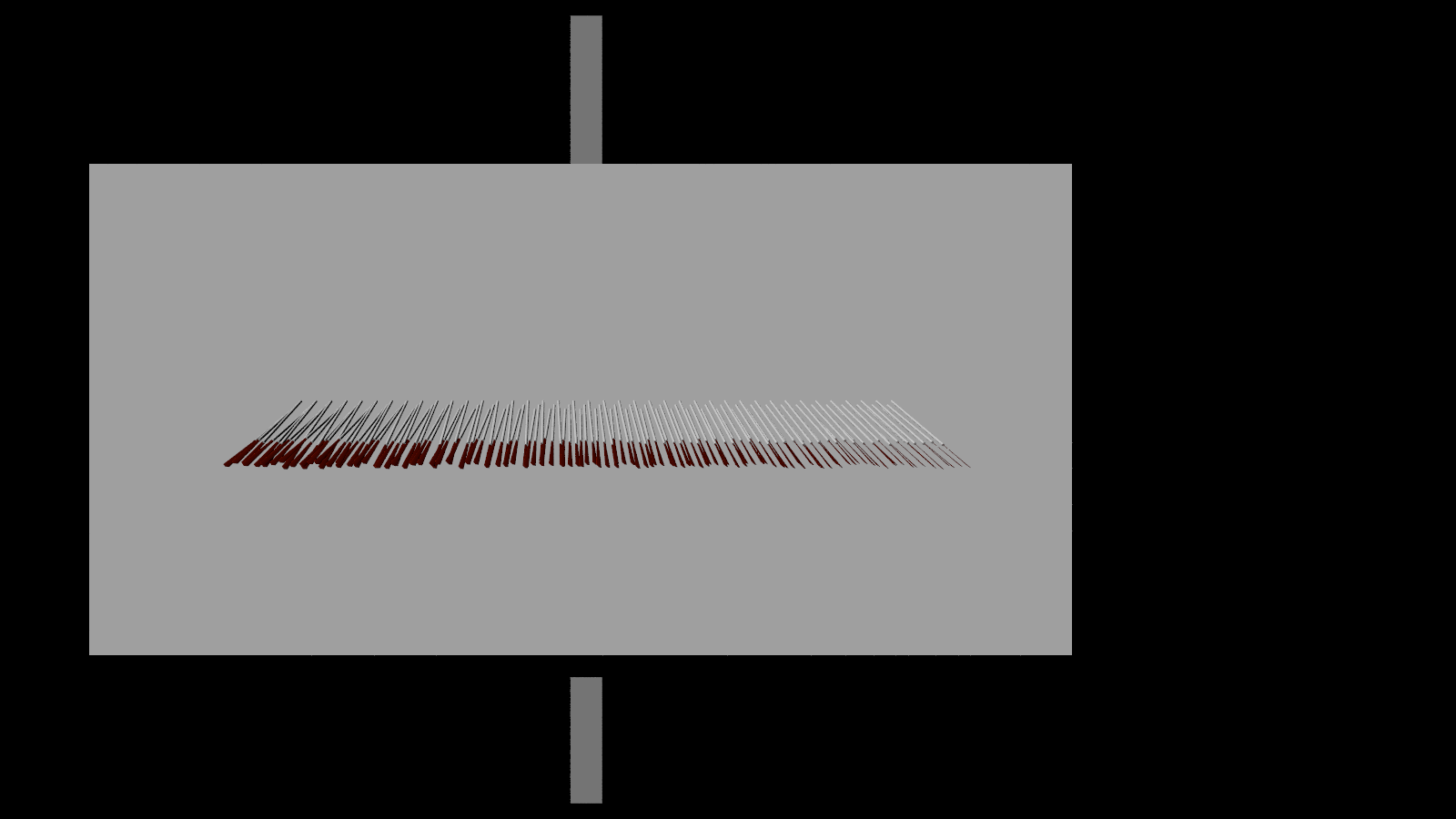
Okay, I am getting there. Almost where I want to reach. Now another
problem where I need the advise of you experienced users: perspective!

Currently, the lower ends of the oars spread more towards the left and
right side (because they are closer to the camera). I don't want to
switch of that entirely, but i want to reduce the perspective drag
towards the sides a bit. I know, this must be accomplished inside the
CAMERA settings. but how exactly?

I started to experiment already, but have not yet found the path to
paradise.


---
Diese E-Mail wurde von AVG auf Viren geprüft.
http://www.avg.com
Post a reply to this message
Attachments:
Download 'sl - rome - oars.png' (90 KB)
Preview of image 'sl - rome - oars.png'
|
|
| |
| |
|
|
|
|
| |
| |
|
|
Decrease the camera angle, and then maybe move it back.
Post a reply to this message
|
|
| |
| |
|
|
|
|
| |
| |
|
|
Am 11.10.2017 um 21:21 schrieb Sven Littkowski:
> On 11.10.2017 15:07, Bald Eagle wrote:
>>  only ever
>
>
> Bald Eagle: FULL HIT!
>
> You managed to open my eyes. Yes, it was "MyNumber", and when i placed
> it inside the macro, it worked! I think, that is what Clipka had in
> mind, too, but I did not understand him (my fault again)

My eye and programming kung-fu may be sharp, but apparently my tutoring
kung-fu didn't quite cut it this time ;)
Post a reply to this message
|
|
| |
| |
|
|
|
|
| |
| |
|
|
Le 17-10-11 à 15:41, Sven Littkowski a écrit :
> Okay, I am getting there. Almost where I want to reach. Now another
> problem where I need the advise of you experienced users: perspective!
>
> Currently, the lower ends of the oars spread more towards the left and
> right side (because they are closer to the camera). I don't want to
> switch of that entirely, but i want to reduce the perspective drag
> towards the sides a bit. I know, this must be accomplished inside the
> CAMERA settings. but how exactly?
>
> I started to experiment already, but have not yet found the path to
> paradise.
>
>
> ---
> Diese E-Mail wurde von AVG auf Viren geprüft.
> http://www.avg.com
>

Double the distance between the camera and the oars, and reduce the
angle by half OR double the direction vector length.
Post a reply to this message
|
|
| |
| |
|
|
|
|
| |
| |
|
|
On 11.10.2017 18:19, clipka wrote:

> My eye and programming kung-fu may be sharp, but apparently my tutoring
> kung-fu didn't quite cut it this time ;)
>
Maybe it were my eyes or my mind that were not in best condition. :-)

---
Diese E-Mail wurde von AVG auf Viren geprüft.
http://www.avg.com
Post a reply to this message
|
|
| |
| |
|
|
|
|
| |
| |
|
|
Everything is perfect now ... just one more question.   :-D

Is there any trick in POV-Ray, that allows me to make an item invisible
but still to get its shadow onto a wall behind it?

---
Diese E-Mail wurde von AVG auf Viren geprüft.
http://www.avg.com
Post a reply to this message
|
|
| |
| |
|
|
|
|
| |
| |
|
|
Sven Littkowski <I### [at] SvenLittkowskiname> wrote:
> Everything is perfect now ... just one more question.   :-D
>
> Is there any trick in POV-Ray, that allows me to make an item invisible
> but still to get its shadow onto a wall behind it?

no_image in the primitive, CSG or object statement, will do that and texture not
needed.
Post a reply to this message
|
|
| |
| |
|
|
|
|
| |
| |
|
|
On 11.10.2017 23:17, omniverse wrote:
> no_image in the primitive, CSG or object statement, will do that and texture not
> needed.

BIG THANKS!
"That's one small step for a POVian, one giant leap for reconstructors."

Everything is working 100% now.


---SCENE--------------------------------------------------------------------------

#local Temp_version = version;
#version 3.7;

#declare MyRadiosity = off;   // on

global_settings
{
 #if(MyRadiosity)
  radiosity
  {
   media on
   pretrace_start 0.08
   pretrace_end   0.001
   count 400
   error_bound 0.75
   recursion_limit 1
   normal on
  }
 #end
 subsurface        {}
 adc_bailout       0.0039
 ambient_light     rgb < 0.000, 0.000, 0.000 >
 assumed_gamma     1.000
 irid_wavelength   rgb < 0.250, 0.180, 0.140 >
 max_trace_level   5
 number_of_waves   10
 noise_generator   3
 charset           ascii
}


#declare TotalLength           = 10.0;   // length of oars of the lowest
line
#declare AmountOarsInLine      = 25;
#declare AmountLines           = 1;
#declare MyBladeWidth          = 0.150;  // the width of the oar's blade
#declare LineLeftShift         = 0.25;   // shift towards the left side
for additional lines
#declare LineHeightShift       = 0.25;   // distance to line below
#declare MyVariance            = 1.5;    // human irregularity
#declare MyHeightMore          = 0.50;   // upper lines need longer oars
#declare MyAngleMore           = 01.5;   // upper lines go a bit steeper
into water
#declare GeneralAngle          = 82.5;   // the angle of each oar from
hull towards water - lower angles = more vertical / higher angles = more
horizontal
#declare BladeAngle            = -65.0;  // the angle of the blade when
touching water
#declare ForwardAngle          =  7.3;   // to equalize the ends of each
line to the eye - lower angle = more backwards / higher angle = more
forwards / 7.5 = balanced
#declare MySceneTransitionLeft = -1.0;   // moves the entire object into
view center
#declare MyCameraAngle         = 17.0;
#declare MyShadows             = yes;     // render of "OARS ONLY" (no)
or of "SHADOWS ONLY" (yes)

#declare R1 = seed(1);
#declare R2 = seed(2);
#declare R3 = seed(3);


#if(MyShadows=no)
 camera
 {
  location < 7.0,  0.0, -200.0 >
  look_at  < 7.0,  0.0,   0.0 >
  angle MyCameraAngle
  right x*image_width/image_height
 }
#elseif(MyShadows=yes)
 camera
 {
  location < 7.0, -65.0, -200.0 >
  look_at  < 7.0, -15.0,   0.0 >
  angle MyCameraAngle
  right x*image_width/image_height
 }
#end


light_source
{
 < -50000.0, 25000.0, -100000.0 >
 rgb < 1.0, 1.0, 1.0 > *1.5
 area_light x*2500,z*2500,5,5 circular orient
 area_illumination
}

#if(MyShadows=no)
 light_source
 {
  <  50000.0, 25000.0, -100000.0 > //light position
  color rgb < 1.0, 1.0, 1.0 > * 0.5
  parallel
  point_at < 0.0, 0.0, 0.0 >
 }
#end

//
--------------------------------------------------------------------------------------------------

#include "textures.inc"

#declare UpperOar = texture
{
 DMFDarkOak
 pigment { color rgb < 0.3686275,  0.4509804,  0.2509804 > }
 normal { wood 0.5 scale 0.3 turbulence 0.1 }
 finish { phong 1 }
 rotate< 90.0, 0.0, 0.0 >
 scale 0.25
}

#declare LowerOar = texture
{
 DMFDarkOak
 pigment { color rgb < 0.1372549,  0.1372549,  0.1372549 > }
 normal { wood 0.5 scale 0.3 turbulence 0.1 }
 finish { phong 1 }
 rotate< 90.0, 0.0, 0.0 >
 scale 0.25
}


//
--------------------------------------------------------------------------------------------------

#macro MyOar(MyHeightMoreThis)
 union
 {
  union
  {
   cone
   {
    < 0.0, -10.0, 0.0 > 0.025 < 0.0, -9.75, 0.0 > MyBladeWidth   //
Bottom Blade
    scale < 1.0, 1.0, 0.1 >
   }
   cone
   {
    < 0.0, -9.75, 0.0 > MyBladeWidth < 0.0, -6.5, 0.0 > 0.075    // Top
Blade
    scale < 1.0, 1.0, 0.1 >
   }
   cone
   {
    < 0.0, -9.5, 0.0 > 0.020 < 0.0, -6.5, 0.0 > 0.075            //
Shaft Blending into Blade
   }
   cylinder
   {
    < 0.0, -6.5, 0.0 > < 0.0, -6.0, 0.0 > 0.075                  //
Lower Shaft
   }
   texture { LowerOar }
  }
  union
  {
   cylinder
   {
    < 0.0, -6.0, 0.0 > < 0.0, 0.0, 0.0 > 0.075                   //
Upper Shaft
   }
   #if(MyHeightMoreThis>0)
    cylinder
    {
     < 0.0, MyHeightMoreThis, 0.0 > < 0.0, 0.0, 0.0 > 0.075      //
Longer Shaft for Upper Oar Lines
    }
    translate < 0.0, -MyHeightMoreThis, 0.0 >
   #end
   texture { UpperOar }
  }
  #if(MyShadows=no)
   no_shadow
  #end
 }
#end


#macro MyOarLine(AmountOarsInLine,MyHeightMoreThis,MyAngleMore)
 union
 {
  #declare MyNumber = 0;
  #while(MyNumber<AmountOarsInLine)

   #declare MyAngleWater     = (rand(R1)*MyVariance)+GeneralAngle;
   #declare MyAngleHands     = (rand(R2)*MyVariance)+BladeAngle;
   #declare MyAngleDirection = (rand(R3)*MyVariance)+ForwardAngle;
   object
   {
    MyOar(MyHeightMoreThis)
    rotate < 0.0, MyAngleHands, 0.0 >
    rotate < MyAngleWater-MyAngleMore, 0.0, 0.0 >
    rotate < 0.0, 0.0, MyAngleDirection >
    translate < (MyNumber*0.925), 0.0, 0.0 >
   }
   #declare MyNumber = MyNumber+1;
  #end
 }
#end


union
{
 #declare ThisLine = 0;
 #while(ThisLine<AmountLines)
  object
  {
   MyOarLine(AmountOarsInLine,MyHeightMore*ThisLine,MyAngleMore*ThisLine)
   translate <
-((AmountOarsInLine*0.925)/2)+0.925+(LineLeftShift*ThisLine),
LineHeightShift*ThisLine, 0.0 >
   #if(MyShadows=yes)
    no_image
   #end
  }
  #declare ThisLine=ThisLine+1;
 #end

 #if(MyShadows=yes)
  box
  {
   < -30.0, -15.0, 0.0 > < 30.0, 15.0, 0.1 >
   pigment { color rgb < 1.0, 1.0, 1.0 > }
  }
  #end
 translate < MySceneTransitionLeft, 0.0, 0.0 >
}


---
Diese E-Mail wurde von AVG auf Viren geprüft.
http://www.avg.com
Post a reply to this message
|
|
| |
| |
|
|
|
|
| |
| |
|
|
Le 17-10-11 à 22:47, Sven Littkowski a écrit :
> Everything is perfect now ... just one more question.   :-D
>
> Is there any trick in POV-Ray, that allows me to make an item invisible
> but still to get its shadow onto a wall behind it?
>
> ---
> Diese E-Mail wurde von AVG auf Viren geprüft.
> http://www.avg.com
>

Yes. Add the no_image attribute to your object.

There is also no_reflection (won't be seen in reflections), no_shadow
(won't cast any shadow) and no_radiosity (ignore this object when
computing radiosity).
Post a reply to this message
|
|
| |
| |
|
|
|
|
| |
| |
|
|
On 12.10.2017 12:28, Alain wrote:
> Yes. Add the no_image attribute to your object.
>
> There is also no_reflection (won't be seen in reflections), no_shadow
> (won't cast any shadow) and no_radiosity (ignore this object when
> computing radiosity).

Thanks again. The code is perfect now, it dos exactly what I need it to
do. :-)

---
Diese E-Mail wurde von AVG auf Viren geprüft.
http://www.avg.com
Post a reply to this message
|
|
| |
| |
|
|
|
|
| |
| |
|
|
Sven Littkowski <I### [at] SvenLittkowskiname> wrote:

> Everything is working 100% now.
>
>
> > ---SCENE-------------------------------------------------------
snip]
> #include "textures.inc"
>
> #declare UpperOar = texture
> {
>  DMFDarkOak
>  pigment { color rgb < 0.3686275,  0.4509804,  0.2509804 > }
>  normal { wood 0.5 scale 0.3 turbulence 0.1 }
>  finish { phong 1 }
>  rotate< 90.0, 0.0, 0.0 >
>  scale 0.25
> }

It looks like you are substituting your own pigment for the pigment 'DMFDarkOak'
(which is actually just a pigment, not a complete texture.) In other words, your
own pigment is 'over-riding' DMFDarkOak; your scene isn't using it at all. The
same is happening in your 'LowerOar' texture.

When using multiple pigments in a texture, the 'final' pigment is the one that's
used; any previous ones are NOT used, or are ignored. So a texture should have
only ONE pigment-- unless you want to use a pigment_map and maybe the 'average'
keyword, to actually blend several pigments togather. Like this, for example...

#declare UpperOar =
texture{
   pigment{
       average
       pigment_map{
              [1 DMFDarkOak]
              [1 color rgb < 0.3686275,  0.4509804,  0.2509804 >]
                  }
          } // end of overall pigment statement
   normal { wood 0.5 scale 0.3 turbulence 0.1 }
   finish { phong 1 }
   rotate< 90.0, 0.0, 0.0 >
   scale 0.25
}

This blends DMFDarkOak and your own color equally (because of the 1 and 1
'weights' of the two, in the pigment_map.) You could instead use 3 and 1 for the
respective weights (for example), which would blend '3 parts DMFDarkOak' to '1
part of your color'

There's also another problem in your scene, here:

#declare DMFDarkOak =
pigment {
    wood
    turbulence 0.04            // For best results,  keep this low!
    octaves 3
    scale <0.2, 0.2, 1>        // Scaled for a unit object
    color_map {
        [0.1 rgb <0.60, 0.30, 0.18>]
        [0.9 rgb <0.30, 0.15, 0.09>]
    }
}

Now you have re-#declared DMFDarkOak to be a different pigment entirely, for use
in your 'LowerOar' texture. But again, you are substituting your own pigment
in 'LowerOar' for this 'new' DMFDarkOak.

My suggestion would be to re-write 'UpperOar' and 'LowerOar, to use *either*
DMFDarkOak *or* your own pigment/color, but not both of those. Or use the
pigment_map trick, for a blend.
Post a reply to this message
|
|
| |
| |
|
|
|
|
| |
|
|