|
|
|
|
|
|
| |
| |
|
|
|
|
| |
| |
|
|
Hi there,

The minimal scene file below should produce identical images for any
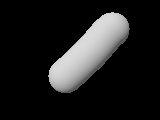
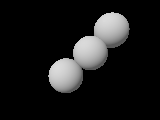
value of the scaling factor s, but it doesn't. s=1e-1 works fine, s=1e-3
produces individual spheres instead of a sweep, and s=1e-5 makes the
object fully invisible. The code for sphere_sweep doesn't seem to scale.

Using other values for the sphere_sweep tolerance and turning off the
bounding (-MB) doesn't solve the problem.

This might be related to http://bugs.povray.org/task/81, as I'm getting
the artifacts described there as well for intermediate scaling factors,
but the problems described here appear to be much more severe.

I'm using POV-Ray 3.7 on OpenSUSE 12.2.

Regards,
Roman


// START MINIMAL SCENE FILE

#version 3.7;

#declare s = 1e-3; // 1e-1: ok, 1e-3: individual spheres, 1e-5: invisible

camera {
	location 7*z
	look_at 0
	scale s
}

light_source {
	<20,25,40>, rgb 1
	scale s
}

sphere_sweep {
	cubic_spline
	5,
	< 2.4,-2.1,0>, 1
	< 0.8,-0.9,0>, 1
	<-0.6, 0.4,0>, 1
	<-1.8, 1.7,0>, 1
	<-2.8, 2.0,0>, 1
	scale s
	pigment { color rgb 1 }
}

// END MINIMAL SCENE FILE
Post a reply to this message
Attachments:
Download 'sphere_sweep_problem_1e-1.png' (3 KB)
Download 'sphere_sweep_problem_1e-3.png' (3 KB)
Download 'sphere_sweep_problem_1e-5.png' (1 KB)
Preview of image 'sphere_sweep_problem_1e-1.png'
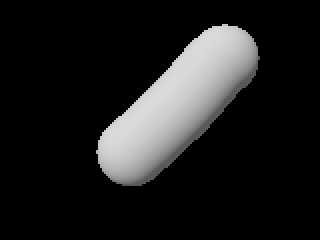
Preview of image 'sphere_sweep_problem_1e-3.png'
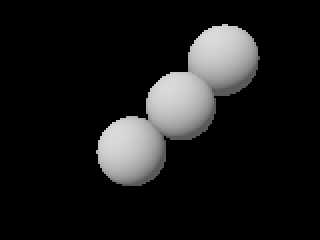
Preview of image 'sphere_sweep_problem_1e-5.png'

|
|
| |
| |
|
|
|
|
| |
| |
|
|
I wonder if you can /scale/ a camera? In the docs section about
transforming the camera, this is /not/ mentioned as such, only rotate
and translate, so maybe there lies the problem.

Thomas
Post a reply to this message
|
|
| |
| |
|
|
|
|
| |
| |
|
|
Le 13/12/2013 11:55, Roman a écrit :
> Hi there,
>
> The minimal scene file below should produce identical images for any
> value of the scaling factor s, but it doesn't. s=1e-1 works fine, s=1e-3
> produces individual spheres instead of a sweep, and s=1e-5 makes the
> object fully invisible. The code for sphere_sweep doesn't seem to scale.
>
> Using other values for the sphere_sweep tolerance and turning off the
> bounding (-MB) doesn't solve the problem.
>
> This might be related to http://bugs.povray.org/task/81, as I'm getting
> the artifacts described there as well for intermediate scaling factors,
> but the problems described here appear to be much more severe.
>
> I'm using POV-Ray 3.7 on OpenSUSE 12.2.
>

It is not related to 81, but 297

http://bugs.povray.org/task/297

(81 is about artefact (noise) in solver, whereas 297 is about epsilon)

A lot of shapes would not scale either. That's 297.

--
Just because nobody complains does not mean all parachutes are perfect.
Post a reply to this message
|
|
| |
| |
|
|
|
|
| |
| |
|
|
On 2013-12-13 13:50, Le_Forgeron wrote:

> It is not related to 81, but 297
>
> http://bugs.povray.org/task/297
>
> (81 is about artefact (noise) in solver, whereas 297 is about epsilon)
>
> A lot of shapes would not scale either. That's 297.

Thank you for clarifying this. To work around the problem, I'm currently
scaling my whole scene to a size that works for all objects. That's a
bit cumbersome though, and I'm worried that such a common error-free
scale won't exist in all cases. IMHO this is a serious limitation of
POV-Ray that should be fixed, if at all possible.
Post a reply to this message
|
|
| |
| |
|
|
|
|
| |
| |
|
|
Thomas de Groot <tho### [at] degroot org> wrote:
> I wonder if you can /scale/ a camera? In the docs section about
> transforming the camera, this is /not/ mentioned as such, only rotate
> and translate, so maybe there lies the problem.
>
> Thomas
Roman has discovered a new version of the word angle, using scale is the same
that using angle, I have just tried it with somme blob. org> wrote:
> I wonder if you can /scale/ a camera? In the docs section about
> transforming the camera, this is /not/ mentioned as such, only rotate
> and translate, so maybe there lies the problem.
>
> Thomas
Roman has discovered a new version of the word angle, using scale is the same
that using angle, I have just tried it with somme blob.
Post a reply to this message
|
|
| |
| |
|
|
|
|
| |
| |
|
|
Roman <vet### [at] ethzch> wrote:
> On 2013-12-13 13:50, Le_Forgeron wrote:
>
> > It is not related to 81, but 297
> >
> > http://bugs.povray.org/task/297
> >
> > (81 is about artefact (noise) in solver, whereas 297 is about epsilon)
> >
> > A lot of shapes would not scale either. That's 297.
>
> Thank you for clarifying this. To work around the problem, I'm currently
> scaling my whole scene to a size that works for all objects. That's a
> bit cumbersome though, and I'm worried that such a common error-free
> scale won't exist in all cases. IMHO this is a serious limitation of
> POV-Ray that should be fixed, if at all possible.

I'm trying with low scale on sphere_sweep and it appears discontinuities when
approching a scale value of 0.005. Scaling the camera has no effect on the
sphere_sweep, it just act like angle.
Post a reply to this message
|
|
| |
| |
|
|
|
|
| |
| |
|
|
Le_Forgeron <lef### [at] freefr> wrote:
> Le 13/12/2013 11:55, Roman a écrit :
> > Hi there,
> >
> > The minimal scene file below should produce identical images for any
> > value of the scaling factor s, but it doesn't. s=1e-1 works fine, s=1e-3
> > produces individual spheres instead of a sweep, and s=1e-5 makes the
> > object fully invisible. The code for sphere_sweep doesn't seem to scale.
> >
> > Using other values for the sphere_sweep tolerance and turning off the
> > bounding (-MB) doesn't solve the problem.
> >
> > This might be related to http://bugs.povray.org/task/81, as I'm getting
> > the artifacts described there as well for intermediate scaling factors,
> > but the problems described here appear to be much more severe.
> >
> > I'm using POV-Ray 3.7 on OpenSUSE 12.2.
> >
>
> It is not related to 81, but 297
>
> http://bugs.povray.org/task/297
>
> (81 is about artefact (noise) in solver, whereas 297 is about epsilon)
>
> A lot of shapes would not scale either. That's 297.
>
> --

Me again! After some reading I think the problem is related to problem #243 for
pov3.7 and 92 for Pov3.6. A too little scale make artifacts. No solution with
SDL. I have tested the file *.pov from #243 with Pov3.6 and 3.7 and the two
differents artifacts appears.
I maybe will try with UberPov, but it is actually buzy in work.
Post a reply to this message
|
|
| |
| |
|
|
|
|
| |
| |
|
|
Am 13.12.2013 21:23, schrieb Fractracer:

> Me again! After some reading I think the problem is related to problem #243 for
> pov3.7 and 92 for Pov3.6. A too little scale make artifacts. No solution with
> SDL. I have tested the file *.pov from #243 with Pov3.6 and 3.7 and the two
> differents artifacts appears.
> I maybe will try with UberPov, but it is actually buzy in work.

Don't bother; UberPOV is no different than official POV-Ray 3.7.0 when
it comes to sphere_sweep.
Post a reply to this message
|
|
| |
| |
|
|
|
|
| |
| |
|
|
On 13-12-2013 20:31, Fractracer wrote:
> Thomas de Groot <tho### [at] degrootorg> wrote:
>> I wonder if you can /scale/ a camera? In the docs section about
>> transforming the camera, this is /not/ mentioned as such, only rotate
>> and translate, so maybe there lies the problem.
>>
>> Thomas
>
> Roman has discovered a new version of the word angle, using scale is the same
> that using angle, I have just tried it with somme blob.
>
>

That is strange indeed. In my simple world view I would think that angle
and scale are two very different processes. Even if both give identical
results, I would like an explanation about how that comes to be.

Thomas
Post a reply to this message
|
|
| |
| |
|
|
|
|
| |
| |
|
|
On 2013-12-13 14:35, Roman wrote:

> Thank you for clarifying this. To work around the problem, I'm currently
> scaling my whole scene to a size that works for all objects. That's a
> bit cumbersome though, and I'm worried that such a common error-free
> scale won't exist in all cases. IMHO this is a serious limitation of
> POV-Ray that should be fixed, if at all possible.


I'm still struggling with this issue. So I've rescaled everything to a
size that works for sphere_sweep, but now some of my other objects look
wrong. More precisely, their materials look wrong. I have narrowed it
down to the minimal scene file below, which shows a sphere with a
non-zero filter value in the pigment. Different scales result in
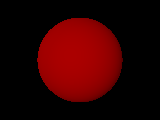
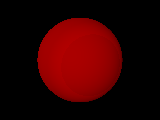
different images. What gives? I'm confused.

-Roman


// START MINIMAL SCENE FILE

#version 3.7;

// 1e-2, 1e-3, 1e-4, 1e-5 all produce different images,
// 1e-6 even produces a parse error!
#declare s = 1e-6;

camera { location 3*s*z look_at 0 }

light_source { s*<10,5,20>, rgb 1 }

sphere { 0, s pigment { color rgb <1,0,0> filter 0.5 } }

// END MINIMAL SCENE FILE
Post a reply to this message
Attachments:
Download 'scale_problem_1e-2.png' (3 KB)
Download 'scale_problem_1e-3.png' (3 KB)
Download 'scale_problem_1e-4.png' (3 KB)
Download 'scale_problem_1e-5.png' (1 KB)
Preview of image 'scale_problem_1e-2.png'
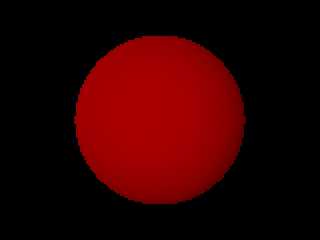
Preview of image 'scale_problem_1e-3.png'
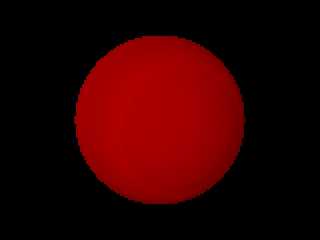
Preview of image 'scale_problem_1e-4.png'
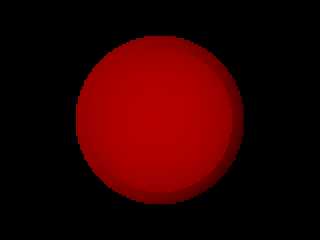
Preview of image 'scale_problem_1e-5.png'

|
|
| |
| |
|
|
|
|
| |
| |
|
|
Am 14.12.2013 19:40, schrieb Roman:
> On 2013-12-13 14:35, Roman wrote:
>
>> Thank you for clarifying this. To work around the problem, I'm currently
>> scaling my whole scene to a size that works for all objects. That's a
>> bit cumbersome though, and I'm worried that such a common error-free
>> scale won't exist in all cases. IMHO this is a serious limitation of
>> POV-Ray that should be fixed, if at all possible.
>
>
> I'm still struggling with this issue. So I've rescaled everything to a
> size that works for sphere_sweep, but now some of my other objects look
> wrong. More precisely, their materials look wrong. I have narrowed it
> down to the minimal scene file below, which shows a sphere with a
> non-zero filter value in the pigment. Different scales result in
> different images. What gives? I'm confused.

The answer is quite simple: As various internal "fudge factors" are set
to 1e-6, scene details should be a good deal larger than that.
Post a reply to this message
|
|
| |
| |
|
|
|
|
| |
| |
|
|
On 2013-12-15 01:56, clipka wrote:
>
> The answer is quite simple: As various internal "fudge factors" are set
> to 1e-6, scene details should be a good deal larger than that.
>

Well, I can live with the fact that s=1e-6 doesn't render anything,
although I think that POV-Ray should be free of internal absolute fudge
factors that break scale invariance. If these are really needed, they
should be relative so they work at any scale, or at least modifiable by
the user.

The problem is that even quite large scales s>>1e-6 result in different
images. The stripped-down scene I posted earlier might somewhat conceal
the severity of my problem. The following closer to what I actually try
to render: Transparent thin surfaces. Notice the vast difference in
visual appearance depending on s=1 or s=10. Interestingly, the
difference vanishes for thicker surfaces (e.g. 1/100 instead of 1/1000).

I'm stumped. Please tell me how I can scale such thin transparent
surfaces to get an equivalent visual.


// START SCENE FILE

#version 3.7;

#declare s = 10; // try 1 or 10

camera {
	location 0.1*s*z
	look_at 0
}

sphere {
	0, s
	texture {
		pigment { rgb 1 }
		finish { emission 1 diffuse 0 }
	}
}

#declare shell = difference {
	sphere { 0, 1.001 }
	sphere { 0, 1 }
}

union {
	object { shell translate -x/2 }
	object { shell translate x/2 }
	scale s*0.03
	material {
		texture {
			pigment { rgb 0.9 filter 1 }
			finish {
				ambient 0
				diffuse 0
				reflection { 0, 1 }
				conserve_energy
			}
		}
		interior {
			ior 1.61
			fade_power 1001
			fade_distance 6*s
		}
	}
}

// END SCENE FILE
Post a reply to this message
Attachments:
Download 'scale_problem2_1.png' (4 KB)
Download 'scale_problem2_10.png' (3 KB)
Preview of image 'scale_problem2_1.png'
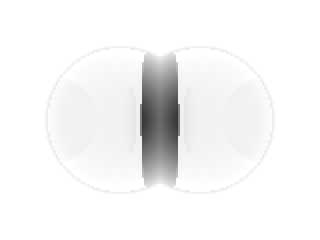
Preview of image 'scale_problem2_10.png'
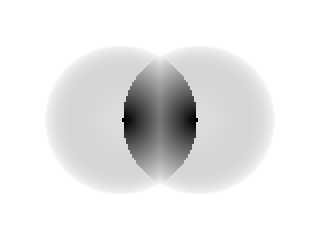
|
|
| |
| |
|
|
|
|
| |
| |
|
|
Am 15.12.2013 17:23, schrieb Roman:
> On 2013-12-15 01:56, clipka wrote:
>>
>> The answer is quite simple: As various internal "fudge factors" are set
>> to 1e-6, scene details should be a good deal larger than that.
>
> Well, I can live with the fact that s=1e-6 doesn't render anything,
> although I think that POV-Ray should be free of internal absolute fudge
> factors that break scale invariance. If these are really needed, they
> should be relative so they work at any scale, or at least modifiable by
> the user.

I certainly agree on this; but weeding out those legacy fudge factors
(they possibly have been around ever since the very first version of
POV-Ray) needs careful consideration of the mathematical implications,
which is a task that hasn't been tackled yet.

> The problem is that even quite large scales s>>1e-6 result in different
> images. The stripped-down scene I posted earlier might somewhat conceal
> the severity of my problem. The following closer to what I actually try
> to render: Transparent thin surfaces. Notice the vast difference in
> visual appearance depending on s=1 or s=10. Interestingly, the
> difference vanishes for thicker surfaces (e.g. 1/100 instead of 1/1000).
>
> I'm stumped. Please tell me how I can scale such thin transparent
> surfaces to get an equivalent visual.

Large. Very large.

Note that it is not your s itself that matters, but the size of the
resulting structures. You're at 3e-5 there (for s=1), which is obviously
still close enough to 1e-6 to give you problems.

Also note how your scene is unconventionally small anyway, with the
primary scene content having a size in the order of 0.1 units (again at
s=1).

I'm sorry to say this, but POV-Ray wasn't designed with this scenario in
mind. Traditionally, scenes are designed with the primary content having
a size in the order of 1 unit or above.
Post a reply to this message
|
|
| |
| |
|
|
|
|
| |
| |
|
|
On 2013-12-16 02:03, clipka wrote:
> Note that it is not your s itself that matters, but the size of the
> resulting structures. You're at 3e-5 there (for s=1), which is obviously
> still close enough to 1e-6 to give you problems.
>
> Also note how your scene is unconventionally small anyway, with the
> primary scene content having a size in the order of 0.1 units (again at
> s=1).
>
> I'm sorry to say this, but POV-Ray wasn't designed with this scenario in
> mind. Traditionally, scenes are designed with the primary content having
> a size in the order of 1 unit or above.

Thank you for your explanations. So, in order for POV-Ray to work
properly, the distance between any two geometrical features (such as the
inner and outer surface of a thin shell) must be well above 1e-6 POV-Ray
units? This raises a few questions.

1. Is this documented somewhere? I cannot be the only one who is
affected by this. Again, IMHO, this is a major deficiency in POV-Ray
that people should know about, or they will get unexpected/wrong
behavior. For instance, they can't use SI units for a scene involving
micrometer-scale objects.

2. What about fractals? They certainly range to much smaller scales
easily, even if the global size is, say, in the order of 1 unit.

3. Could you please, if you can, point me to the location in the source
code where this constant is set/used?. I'd like to experiment with this
a bit.

-Roman
Post a reply to this message
|
|
| |
| |
|
|
|
|
| |
| |
|
|
Am 16.12.2013 11:32, schrieb Roman:

> 3. Could you please, if you can, point me to the location in the source
> code where this constant is set/used?. I'd like to experiment with this
> a bit.

There are actually multiple such constants; search the source code for
"1e-" (and possibly also "1.0e-"; I'm not sure if that's used anywhere).
Post a reply to this message
|
|
| |
| |
|
|
|
|
| |
| |
|
|
On 16/12/13 10:32, Roman wrote:
[...]
> 1. Is this documented somewhere? I cannot be the only one who is
> affected by this. Again, IMHO, this is a major deficiency in POV-Ray
> that people should know about, or they will get unexpected/wrong
> behavior. For instance, they can't use SI units for a scene involving
> micrometer-scale objects.

I run into the opposite problem; I render astronomical objects, and
routinely run afoul of the maximum draw limit fudge factor where objects
that are a long way away are ignored completely. (My moon pictures, for
example, have to have the sun artifically close or it doesn't show up.)

What's this limit actually for? I can see that the lower limit has some
utility in order to cope sanely with rounding errors, but I can't think
of any reason for an upper limit.

--
┌─── dg@cowlark.com ─────
http://www.cowlark.com ─────
│ "There does not now, nor will there ever, exist a programming
│ language in which it is the least bit hard to write bad programs." ---
│ Flon's Axiom
Post a reply to this message
|
|
| |
| |
|
|
|
|
| |
| |
|
|
Am 16.12.2013 14:26, schrieb David Given:

> I run into the opposite problem; I render astronomical objects, and
> routinely run afoul of the maximum draw limit fudge factor where objects
> that are a long way away are ignored completely. (My moon pictures, for
> example, have to have the sun artifically close or it doesn't show up.)
>
> What's this limit actually for? I can see that the lower limit has some
> utility in order to cope sanely with rounding errors, but I can't think
> of any reason for an upper limit.

I guess the true reason for the existence of all these limits has been
lost in the mists of time.

My theory is that the developers back then were not too familiar with
the numeric limits of the IEEE floating point formats, nor with rounding
error estimation & handling.
Post a reply to this message
|
|
| |
| |
|
|
|
|
| |
| |
|
|
Le 16/12/2013 19:03, clipka nous fit lire :
> Am 16.12.2013 14:26, schrieb David Given:
>
>> I run into the opposite problem; I render astronomical objects, and
>> routinely run afoul of the maximum draw limit fudge factor where objects
>> that are a long way away are ignored completely. (My moon pictures, for
>> example, have to have the sun artifically close or it doesn't show up.)
>>
>> What's this limit actually for? I can see that the lower limit has some
>> utility in order to cope sanely with rounding errors, but I can't think
>> of any reason for an upper limit.
>
> I guess the true reason for the existence of all these limits has been
> lost in the mists of time.
>
> My theory is that the developers back then were not too familiar with
> the numeric limits of the IEEE floating point formats, nor with rounding
> error estimation & handling.
>
And a time where floating point could be 32 bits... and portability
meant lowest common denominator. (and Ieee-754 was not that common).

Also keep in mind that some solver need squared value, or even a cube,
so 2e+31 (biggest single precision value on 32 bits) introduce a limit
of 1e+15 or 1e+10 if you do not want the square/cube to go through the roof.

The minimal delta that can be stored around 1 is of the order of 1e-7.

With 64 bits floating point value now everywhere, there is less impact
on the top limit (the max is at above 1e+308, so a cube would have issue
after 1e+100), yet the precision only got 30 more bits, that's only
2^30, or 10^9. so 1e-7 should not go further than 1e-16
(and if a square/root is in the process, the 1e-7 became 1e-3 where
1e-16 become a lame 1e-8 or 1e-7)

(I talked of square and cube, but that's also true for any product of 2
or 3 terms)
Post a reply to this message
|
|
| |
| |
|
|
|
|
| |
|
|